
We value your privacy
We use cookies to enhance your browsing experience, serve personalised ads or content, and analyse our traffic. By clicking "Accept All", you consent to our use of cookies.
Customise Reject All Accept All
Customise Consent Preferences 
We use cookies to help you navigate efficiently and perform certain functions. You will find detailed information about all cookies under each consent category below.
The cookies that are categorised as "Necessary" are stored on your browser as they are essential for enabling the basic functionalities of the site. ... Show more
NecessaryAlways Active
Necessary cookies are required to enable the basic features of this site, such as providing secure log-in or adjusting your consent preferences. These cookies do not store any personally identifiable data.
* Cookie
BCTempID
* Duration
10 minutes
* Description
No description available.
* Cookie
__cf_bm
* Duration
1 hour
* Description
This cookie, set by Cloudflare, is used to support Cloudflare Bot Management.
* Cookie
AWSALBCORS
* Duration
7 days
* Description
Amazon Web Services set this cookie for load balancing.
* Cookie
_cfuvid
* Duration
session
* Description
Cloudflare sets this cookie to track users across sessions to optimize user experience by maintaining session consistency and providing personalized services
* Cookie
li_gc
* Duration
6 months
* Description
Linkedin set this cookie for storing visitor's consent regarding using cookies for non-essential purposes.
* Cookie
__hssrc
* Duration
session
* Description
This cookie is set by Hubspot whenever it changes the session cookie. The __hssrc cookie set to 1 indicates that the user has restarted the browser, and if the cookie does not exist, it is assumed to be a new session.
* Cookie
__hssc
* Duration
1 hour
* Description
HubSpot sets this cookie to keep track of sessions and to determine if HubSpot should increment the session number and timestamps in the __hstc cookie.
* Cookie
wpEmojiSettingsSupports
* Duration
session
* Description
WordPress sets this cookie when a user interacts with emojis on a WordPress site. It helps determine if the user's browser can display emojis properly.
* Cookie
BCSessionID
* Duration
1 year 1 month 4 days
* Description
Blueconic sets this cookie as a unique identifier for the BlueConic profile.
* Cookie
_octo
* Duration
1 year
* Description
No description available.
* Cookie
logged_in
* Duration
1 year
* Description
No description available.
* Cookie
__Secure-YEC
* Duration
past
* Description
YouTube sets this cookie to stores the user's video player preferences using embedded YouTube video
* Cookie
__eoi
* Duration
6 months
* Description
Description is currently not available.
* Cookie
AWSALBTGCORS
* Duration
7 days
* Description
No description available.
* Cookie
login-status-p
* Duration
past
* Description
Description is currently not available.
* Cookie
AWSALBTG
* Duration
7 days
* Description
No description available.
* Cookie
csrf_token
* Duration
session
* Description
No description available.
* Cookie
token_v2
* Duration
1 day
* Description
Description is currently not available.
* Cookie
D
* Duration
1 year
* Description
Description is currently not available.
* Cookie
PHPSESSID
* Duration
session
* Description
This cookie is native to PHP applications. The cookie stores and identifies a user's unique session ID to manage user sessions on the website. The cookie is a session cookie and will be deleted when all the browser windows are closed.
* Cookie
VISITOR_PRIVACY_METADATA
* Duration
6 months
* Description
YouTube sets this cookie to store the user's cookie consent state for the current domain.
* Cookie
cookietest
* Duration
session
* Description
The cookietest cookie is typically used to determine whether the user's browser accepts cookies, essential for website functionality and user experience.
* Cookie
__Host-airtable-session
* Duration
1 year
* Description
This cookie is used to enable us to integrate the services of Airtable.
* Cookie
__Host-airtable-session.sig
* Duration
1 year
* Description
This cookie is used to enable us to integrate the services of Airtable.
* Cookie
m
* Duration
1 year 1 month 4 days
* Description
Stripe sets this cookie for fraud prevention purposes. It identifies the device used to access the website, allowing the website to be formatted accordingly.
* Cookie
BIGipServer*
* Duration
session
* Description
Marketo sets this cookie to collect information about the user's online activity and build a profile about their interests to provide advertisements relevant to the user.
* Cookie
__cfruid
* Duration
session
* Description
Cloudflare sets this cookie to identify trusted web traffic.
* Cookie
_GRECAPTCHA
* Duration
6 months
* Description
Google Recaptcha service sets this cookie to identify bots to protect the website against malicious spam attacks.
* Cookie
__Secure-YNID
* Duration
6 months
* Description
Google cookie used to protect user security and prevent fraud, especially during the login process.
* Cookie
cookieyes-consent
* Duration
1 year
* Description
CookieYes sets this cookie to remember users' consent preferences so that their preferences are respected on subsequent visits to this site. It does not collect or store any personal information about the site visitors.
Functional
Functional cookies help perform certain functionalities like sharing the content of the website on social media platforms, collecting feedback, and other third-party features.
* Cookie
lidc
* Duration
1 day
* Description
LinkedIn sets the lidc cookie to facilitate data center selection.
* Cookie
brw
* Duration
1 year
* Description
No description available.
* Cookie
brwConsent
* Duration
5 minutes
* Description
Description is currently not available.
* Cookie
WMF-Uniq
* Duration
1 year
* Description
Description is currently not available.
* Cookie
loom_anon_comment
* Duration
1 year
* Description
No description available.
* Cookie
loom_referral_video
* Duration
session
* Description
Description is currently not available.
* Cookie
VISITOR_INFO1_LIVE
* Duration
6 months
* Description
A cookie set by YouTube to measure bandwidth that determines whether the user gets the new or old player interface.
* Cookie
yt-remote-connected-devices
* Duration
Never Expires
* Description
YouTube sets this cookie to store the user's video preferences using embedded YouTube videos.
* Cookie
ytidb::LAST_RESULT_ENTRY_KEY
* Duration
Never Expires
* Description
The cookie ytidb::LAST_RESULT_ENTRY_KEY is used by YouTube to store the last search result entry that was clicked by the user. This information is used to improve the user experience by providing more relevant search results in the future.
* Cookie
yt-remote-device-id
* Duration
Never Expires
* Description
YouTube sets this cookie to store the user's video preferences using embedded YouTube videos.
* Cookie
yt-remote-session-name
* Duration
session
* Description
The yt-remote-session-name cookie is used by YouTube to store the user's video player preferences using embedded YouTube video.
* Cookie
yt-remote-fast-check-period
* Duration
session
* Description
The yt-remote-fast-check-period cookie is used by YouTube to store the user's video player preferences for embedded YouTube videos.
* Cookie
yt-remote-session-app
* Duration
session
* Description
The yt-remote-session-app cookie is used by YouTube to store user preferences and information about the interface of the embedded YouTube video player.
* Cookie
yt-remote-cast-available
* Duration
session
* Description
The yt-remote-cast-available cookie is used to store the user's preferences regarding whether casting is available on their YouTube video player.
* Cookie
yt-remote-cast-installed
* Duration
session
* Description
The yt-remote-cast-installed cookie is used to store the user's video player preferences using embedded YouTube video.
* Cookie
cp_session
* Duration
3 months
* Description
Codepen sets this cookie for Help systems found in the website.
* Cookie
loid
* Duration
1 year 1 month 4 days
* Description
This cookie is set by the Reddit. The cookie enables the sharing of content from the website onto the social media platform.
Analytics
Analytical cookies are used to understand how visitors interact with the website. These cookies help provide information on metrics such as the number of visitors, bounce rate, traffic source, etc.
* Cookie
__hstc
* Duration
6 months
* Description
Hubspot set this main cookie for tracking visitors. It contains the domain, initial timestamp (first visit), last timestamp (last visit), current timestamp (this visit), and session number (increments for each subsequent session).
* Cookie
hubspotutk
* Duration
6 months
* Description
HubSpot sets this cookie to keep track of the visitors to the website. This cookie is passed to HubSpot on form submission and used when deduplicating contacts.
* Cookie
_ga
* Duration
1 year 1 month 4 days
* Description
Google Analytics sets this cookie to calculate visitor, session and campaign data and track site usage for the site's analytics report. The cookie stores information anonymously and assigns a randomly generated number to recognise unique visitors.
* Cookie
_ga_*
* Duration
1 year 1 month 4 days
* Description
Google Analytics sets this cookie to store and count page views.
* Cookie
__Host-psifi.analyticsTrace
* Duration
6 hours
* Description
Description is currently not available.
* Cookie
__Host-psifi.analyticsTraceV2
* Duration
6 hours
* Description
Description is currently not available.
* Cookie
_gh_sess
* Duration
session
* Description
GitHub sets this cookie for temporary application and framework state between pages like what step the user is on in a multiple step form.
* Cookie
YSC
* Duration
session
* Description
YSC cookie is set by Youtube and is used to track the views of embedded videos on Youtube pages.
* Cookie
ajs_anonymous_id
* Duration
1 year
* Description
This cookie is set by Segment to count the number of people who visit a certain site by tracking if they have visited before.
* Cookie
vuid
* Duration
1 year 1 month 4 days
* Description
Vimeo installs this cookie to collect tracking information by setting a unique ID to embed videos on the website.
Performance
Performance cookies are used to understand and analyse the key performance indexes of the website which helps in delivering a better user experience for the visitors.
* Cookie
AWSALB
* Duration
7 days
* Description
AWSALB is an application load balancer cookie set by Amazon Web Services to map the session to the target.
* Cookie
acq
* Duration
past
* Description
Description is currently not available.
* Cookie
acq.sig
* Duration
past
* Description
Description is currently not available.
* Cookie
ptc
* Duration
2 years
* Description
No description available.
Advertisement
Advertisement cookies are used to provide visitors with customised advertisements based on the pages you visited previously and to analyse the effectiveness of the ad campaigns.
* Cookie
muc_ads
* Duration
1 year 1 month 4 days
* Description
Twitter sets this cookie to collect user behaviour and interaction data to optimize the website.
* Cookie
guest_id_marketing
* Duration
1 year 1 month 4 days
* Description
Twitter sets this cookie to identify and track the website visitor.
* Cookie
guest_id_ads
* Duration
1 year 1 month 4 days
* Description
Twitter sets this cookie to identify and track the website visitor.
* Cookie
personalization_id
* Duration
1 year 1 month 4 days
* Description
Twitter sets this cookie to integrate and share features for social media and also store information about how the user uses the website, for tracking and targeting.
* Cookie
guest_id
* Duration
1 year 1 month 4 days
* Description
Twitter sets this cookie to identify and track the website visitor. It registers if a user is signed in to the Twitter platform and collects information about ad preferences.
* Cookie
bcookie
* Duration
1 year
* Description
LinkedIn sets this cookie from LinkedIn share buttons and ad tags to recognize browser IDs.
* Cookie
__Secure-ROLLOUT_TOKEN
* Duration
6 months
* Description
YouTube sets this cookie to manage feature rollout and experimentation. It helps Google control which new features or interface changes are shown to users as part of testing and staged rollouts, ensuring consistent experience for a given user during an experiment.
* Cookie
yt.innertube::nextId
* Duration
Never Expires
* Description
YouTube sets this cookie to register a unique ID to store data on what videos from YouTube the user has seen.
* Cookie
yt.innertube::requests
* Duration
Never Expires
* Description
YouTube sets this cookie to register a unique ID to store data on what videos from YouTube the user has seen.
* Cookie
session_tracker
* Duration
session
* Description
This cookie is set by the Reddit. This cookie is used to identify trusted web traffic. It also helps in adverstising on the website.
* Cookie
edgebucket
* Duration
session
* Description
Reddit sets this cookie to save the information about a log-on Reddit user, for the purpose of advertisement recommendations and updating the content.
* Cookie
did
* Duration
1 year
* Description
Arbor sets this cookie to show targeted ads to site visitors.This cookie expires after 2 months or 1 year.
Uncategorised
Other uncategorised cookies are those that are being analysed and have not been classified into a category as yet.
No cookies to display.
Reject All Save My Preferences Accept All
Toggle Search[](https://towardsdatascience.com/)Toggle Mobile Navigation
[](https://towardsdatascience.com/)
Publish AI, ML & data-science insights to a global community of data professionals.
Sign in[Submit an Article](https://write.insightmediagroup.io)
[Latest](https://towardsdatascience.com/latest/)[Editor's Picks](https://towardsdatascience.com/tag/editors-pick/)[Newsletter](https://towardsdatascience.com/tag/the-variable/)[ShipAI](https://towardsdatascience.com/shipai/)
* * *
[Write For TDS](https://towardsdatascience.com/submissions/)
[LinkedIn](https://www.linkedin.com/company/towards-data-science/)[X](https://x.com/TDataScience)Toggle Search
[Deep Learning](https://towardsdatascience.com/category/artificial-intelligence/deep-learning/)
# PANet Paper Walkthrough: When Feature Pyramids Go Bottom-Up
Understanding how PANet shortens the path between low-level and high-level features
[Muhammad Ardi Putra](https://towardsdatascience.com/author/muhammad_ardi/)
July 5, 202615 min read

Photo by [Hugo Delauney](https://unsplash.com/@ugodly?utm_source=medium&utm_medium=referral) on Unsplash
···
In my previous article I wrote about the FPN (Feature Pyramid Network) architecture [1], which is one of the most influential necks we can apply to a backbone model. FPN was first introduced to enhance the capability of an object detection model to detect small objects. However, Liu _et al._ in 2018 found that the information flow of FPN had room for improvement. So, they decided to address this gap by proposing PANet in their research paper titled “ _Path Aggregation Network for Instance Segmentation_ ” [2], which we are going to discuss in this article.
···
## A Little Bit About FPN
PANet is built on top of the FPN architecture, so I think it would be a good idea to talk a little bit about how FPN works in advance. In a CNN-based backbone model, the deeper feature maps have different characteristics from the shallower ones. The feature maps from deeper layers tend to have high semantic information, yet it does not have that much amount of spatial information. Conversely, feature maps from shallower layers contain more spatial information but have less semantic information. These facts essentially tell us that we should use the deeper feature maps if we were to predict large objects and use the shallower feature maps for predicting small objects.
However, the authors of PANet found that it is not quite appropriate to directly take information from shallower feature maps to detect small objects. This is because these feature maps contain minimal amount of semantic information, which essentially implies that they do not have a good understanding about the content of the image. FPN solves this issue by combining feature maps from the deeper layers and the shallower ones. By doing so, we can basically inject semantic information into the shallower feature maps that they previously didn’t have.
Learn this step by step with the interactive [Machine Learning](https://roadmap.sh/machine-learning) roadmap.
### What FPN Solves
Now take a look at the illustration in Figure 1 below to better understand this idea. The upward flow on the left is the main backbone model, while the one going downwards on the right (a.k.a. the _top-down pathway_) is the FPN. The horizontal arrows that go directly to the FPN part (called _lateral connections_) are the tensors to be combined with the one from the deeper layers. In this illustration, the FPN produces three feature maps where the detection head will make the bounding box predictions from.
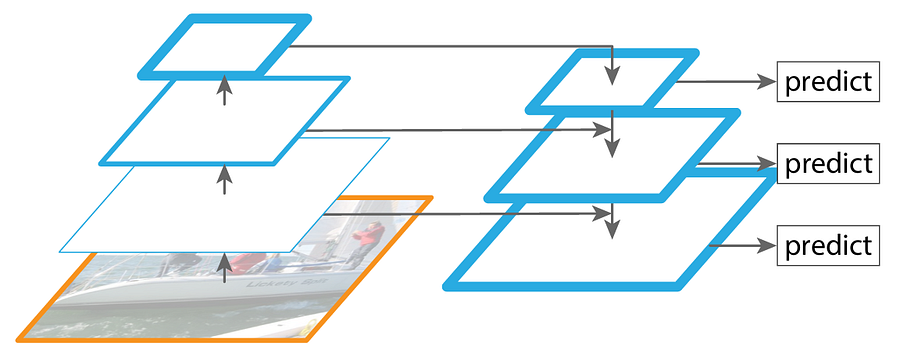
Figure 1. The FPN architecture [3].
The blue borderlines in the illustration above indicate the amount of semantic information contained within the corresponding feature map. You can see in the original backbone that the borderline gets thicker as we get deeper into the network, meaning that the feature map that has the highest semantic information is the one produced by the deepest layer. By using feature map combination mechanism proposed by FPN, we can see that the shallower feature maps are now rich of semantic information which makes them suitable for detecting small objects accurately.
### What FPN Doesn’t Solve
At this point we might think that FPN is just fine as it is able to allow a model to detect small objects better compared to the plain backbone model. In fact, the authors of PANet still see something that isn’t solved by FPN just yet, which as I’ve mentioned earlier is related to the information flow problem. Now let’s take a look at Figure 2 below.
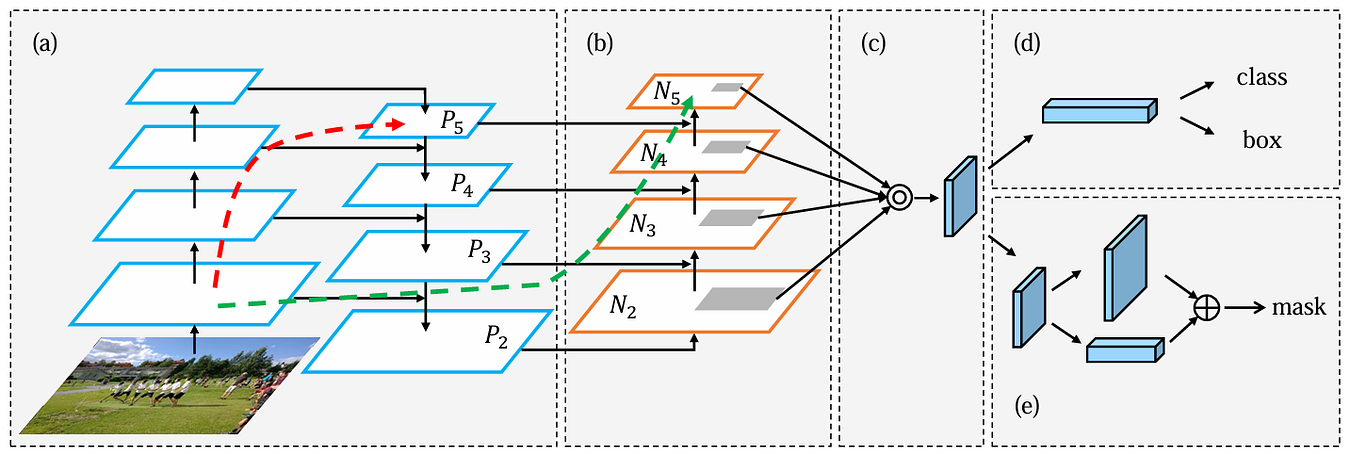
Figure 2. The PANet architecture [2].
In this figure, the component referred to as (a) is the backbone model that has been equipped with FPN, which is basically the same structure I showed you in Figure 1. In FPN, feature maps _P₅_ , _P₄_ , _P₃_ , and _P₂_ become the basis of the detection head to make predictions, where _P₂_ has a high semantic information thanks to the flow in the top-down pathway. And here’s the problem FPN doesn’t solve: while FPN effectively enriches feature maps in shallower layers, the deeper feature maps still lack spatial information. In the beginning of this article I said that the deeper and the shallower feature maps in a backbone have their own advantage and drawback, and FPN only solves the drawback of the shallower feature maps while still leaving the problem of the deeper feature maps untouched. Based on this notion, the authors of PANet thought that we could still improve the ability of an object detection model in detecting large objects by injecting spatial information to the deeper feature maps, which also potentially allows the overall accuracy of the detection model to get even higher.
It is definitely normal for a deeper layer to lose spatial information due to the downsampling mechanism in the backbone. However, this is actually not solely caused by the downsampling itself. Instead, the long information travel in the stack of convolution layers also causes spatial information to degrade. So, if we cannot omit the downsampling operation within the backbone, we can still minimize this spatial information degradation by creating shortcut paths — just like the skip-connections in ResNet.
···
## How PANet Solves the Problem Unsolved by FPN
The authors of PANet proposed a clever idea, where they added a stack of several convolution layers placed on top of the existing FPN alongside the lateral connections (the part referred to as (b) in Figure 2). It might seem counterintuitive at glance — how can adding more layers allow us to get shorter paths instead? In fact, this approach is valid as it really allows the shallower feature maps to deliver spatial information to the deeper layers more seamlessly.
Now let’s go back to Figure 2 and pay attention to the dashed arrows. Both arrows essentially denote the flow of the _C₂_ tensor (the backbone feature at the same spatial resolution as _P₂_ and _N₂_) to the deepest layer. The red one is when we only use the top-down pathway of FPN, while the green one is when we also use the _bottom-up path augmentation_ of PANet.
If we don’t utilize PANet, the only way for the _C₂_ tensor to get into the last layer _P₅_ is by traveling up through the entire backbone one by one, which can actually be over 100 layers in total. And as we discussed earlier, this causes degradation in the spatial information. If we compare this with the flow when we use PANet, it essentially allows us to use the path traced by the green arrow. Keep in mind that the number of layers within the top-down and the bottom-up pathways are much less than the one in the backbone, hence reducing the path from 100+ layers to around 10 layers to reach _N₅_ (which is in the same level as _P₅_). By doing this, we can definitely preserve much more spatial information. And so, by combining FPN and PANet, we get bidirectional information flow that enriches shallower layers with semantic information and deeper layers with spatial information.
By the way, in this article we will focus on how we can integrate the (a) and (b) parts in the architecture, which is the core contribution that has been widely adopted in modern architectures. The full PANet paper actually also includes the adaptive pooling mechanism (c), bounding box prediction for object detection (d), and fully-connected feature fusion for segmentation (e), which are beyond our scope here.
···
## The Detailed PANet Architecture
In FPN, the _P₅_ , _P₄_ , _P₃_ , and _P₂_ tensors will directly be forwarded to the detection head, whereas in PANet, these four tensors will be transferred to the bottom-up path augmentation which then produces the _N₅_ , _N₄_ , _N₃_ , and _N₂_ tensors. These _N_ tensors are the ones to be used by the detection head as the basis of the object detection prediction.
Generally speaking, the way PANet performs feature combination is similar to FPN yet is done in reversed way. Take a look at Figure 3 below to see the detailed process.
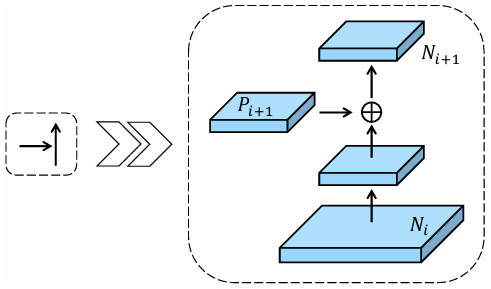
Figure 3. An illustration of the building block for bottom-up path augmentation [2].
What we initially do in the above building block is to process the _Nᵢ_ tensor with a 3×3 convolution. The stride of this conv layer is set to 2 since we want it to reduce the spatial dimension by half. Next, we combine the _Pᵢ₊₁_ tensor and the downsampled _Nᵢ_ tensor using element-wise summation. This combined tensor is then processed by another 3×3 convolution layer. This time we don’t want this layer to reduce the spatial dimension any further, so we need to set the stride to 1. Finally, as all processes above are done, we will have the _Nᵢ₊₁_ tensor, which is ready to be processed again with the same procedure until we eventually get all the _N₅_ , _N₄_ , _N₃_ , and _N₂_ tensors.
There are actually several things you need to keep in mind here. First, since _N₂_ is the very first tensor in the bottom-up path augmentation, there is actually nothing to combine to obtain this tensor. Thus, we can simply perceive _P₂_ as the _N₂_ tensor itself. Second, here we need to put a ReLU activation function after each convolution layer. In fact, this is different from FPN which completely omits the activation functions. So, later in the implementation, our top-down pathway will not use any activation function at all, yet we will have all the convs in the bottom-up path augmentation equipped with ReLU. And third, all tensors throughout the entire bottom-up path augmentation have exactly 256 channels, meaning that the convolution layers here do not change the number of channels at all.
That’s pretty much all about the detailed flow of the PANet architecture. In the next section I am going to demonstrate how to implement it from scratch.
···
## PANet From Scratch
The idea of our implementation here is that we will create a dummy backbone with an FPN and place the PANet layers on top of it. As usual, what we need to do first in the code is to import the required modules. See Codeblock 1 below.
python
```
# Codeblock 1
import torch
import torch.nn as nn
```
### CNN Implementation
What I actually mean by a dummy backbone is a very simple CNN model. In fact the `CNN` class in Codeblock 2 below is exactly the same as the one in my FPN article [1]. Just keep in mind that the actual backbone used in the paper is ResNet, but since the focus of this article is PANet, I’ll use a standard CNN instead. (By the way, I actually got a separate article about ResNet. Check that out at the link in reference [4] in case you’re interested to implement FPN on ResNet from scratch.)
python
```
# Codeblock 2
class CNN(nn.Module):
def __init__(self):
super().__init__()
self.relu = nn.ReLU()
self.maxpool = nn.MaxPool2d(kernel_size=3, stride=2, padding=1)
self.conv1 = nn.Conv2d(in_channels=3, out_channels=64, kernel_size=3, padding=1)
self.conv2 = nn.Conv2d(in_channels=64, out_channels=256, kernel_size=3, padding=1)
self.conv3 = nn.Conv2d(in_channels=256, out_channels=512, kernel_size=3, padding=1)
self.conv4 = nn.Conv2d(in_channels=512, out_channels=1024, kernel_size=3, padding=1)
self.conv5 = nn.Conv2d(in_channels=1024, out_channels=2048, kernel_size=3, padding=1)
def forward(self, x):
print(f'original\t: {x.size()}\n')
x = self.relu(self.conv1(x))
print(f'after conv1\t: {x.size()}')
x = self.maxpool(x)
print(f'after pool\t: {x.size()}\n')
x = self.relu(self.conv2(x))
print(f'after conv2\t: {x.size()}')
x = self.maxpool(x)
print(f'after pool (c2)\t: {x.size()}\n')
c2 = x.clone()
x = self.relu(self.conv3(x))
print(f'after conv3\t: {x.size()}')
x = self.maxpool(x)
print(f'after pool (c3)\t: {x.size()}\n')
c3 = x.clone()
x = self.relu(self.conv4(x))
print(f'after conv4\t: {x.size()}')
x = self.maxpool(x)
print(f'after pool (c4)\t: {x.size()}\n')
c4 = x.clone()
x = self.relu(self.conv5(x))
print(f'after conv5\t: {x.size()}')
c5 = self.maxpool(x)
print(f'after pool (c5)\t: {c5.size()}\n')
return c2, c3, c4, c5
```
The `CNN` class above returns multiple outputs: `c2`, `c3`, `c4` and `c5`, where `c5` is the tensor from the deepest layer. In order to check if this class works properly, we will test it by passing a tensor through it. The dummy tensor I initialize in Codeblock 3 below has the dimension of 3×224×224, which matches the input shape of the ResNet model.
python
```
# Codeblock 3
cnn = CNN()
x = torch.randn(1, 3, 224, 224)
out_cnn = cnn(x)
c2, c3, c4, c5 = out_cnn
```
Below you can see how the backbone model transforms our input tensor throughout the network. Later on, all the _C_ tensors will be used as the input of our FPN.
markup
```
# Codeblock 3 Outputoriginal : torch.Size([1, 3, 224, 224])after conv1 : torch.Size([1, 64, 224, 224])after pool : torch.Size([1, 64, 112, 112])after conv2 : torch.Size([1, 256, 112, 112])after pool (c2) : torch.Size([1, 256, 56, 56])after conv3 : torch.Size([1, 512, 56, 56])after pool (c3) : torch.Size([1, 512, 28, 28])after conv4 : torch.Size([1, 1024, 28, 28])after pool (c4) : torch.Size([1, 1024, 14, 14])after conv5 : torch.Size([1, 2048, 14, 14])after pool (c5) : torch.Size([1, 2048, 7, 7])
```
### FPN Implementation
And here’s what the `FPN` class looks like. I am not going to get very deep into the flow of this network since I’ve covered it thoroughly in my previous article [1].
python
```
# Codeblock 4
class FPN(nn.Module):
def __init__(self):
super().__init__()
self.upsample = nn.Upsample(scale_factor=2, mode='nearest') #(1)
self.lateral_c5 = nn.Conv2d(in_channels=2048, out_channels=256, kernel_size=1)
self.lateral_c4 = nn.Conv2d(in_channels=1024, out_channels=256, kernel_size=1)
self.lateral_c3 = nn.Conv2d(in_channels=512, out_channels=256, kernel_size=1)
self.lateral_c2 = nn.Conv2d(in_channels=256, out_channels=256, kernel_size=1)
self.smooth_m4 = nn.Conv2d(in_channels=256, out_channels=256, kernel_size=3, padding=1)
self.smooth_m3 = nn.Conv2d(in_channels=256, out_channels=256, kernel_size=3, padding=1)
self.smooth_m2 = nn.Conv2d(in_channels=256, out_channels=256, kernel_size=3, padding=1)
def forward(self, c2, c3, c4, c5):
m5 = self.lateral_c5(c5)
p5 = m5
m4 = self.upsample(m5) + self.lateral_c4(c4)
p4 = self.smooth_m4(m4)
m3 = self.upsample(m4) + self.lateral_c3(c3)
p3 = self.smooth_m3(m3)
m2 = self.upsample(m3) + self.lateral_c2(c2)
p2 = self.smooth_m2(m2)
return p2, p3, p4, p5
```
For now, let’s just focus on the returned _P_ tensors which we will use as the input of our PANet. You can see in the output of the code below that all these _P_ tensors have 256 channels, which I believe is why the authors eventually ended up with this number of channels for the entire PANet structure.
python
```
# Codeblock 5
fpn = FPN()
out_fpn = fpn(c2, c3, c4, c5)
p2, p3, p4, p5 = out_fpn
print(f'p2: {p2.size()}')
print(f'p3: {p3.size()}')
print(f'p4: {p4.size()}')
print(f'p5: {p5.size()}')
```
markup
```
# Codeblock 5 Outputp2: torch.Size([1, 256, 56, 56])p3: torch.Size([1, 256, 28, 28])p4: torch.Size([1, 256, 14, 14])p5: torch.Size([1, 256, 7, 7])
```
### PANet Implementation
And finally, it is time to implement the PANet itself. In Codeblock 6 below, what we do first is to initialize the `downsample_n{2,3,4}` layers. As the name suggests, these layers are responsible for performing spatial downsampling, which is the reason that we set the `stride` parameter of these layers to 2. Next, we initialize `conv_{n2down_p3, n3down_p4, n4down_p5}`. These three convolution layers are used to process the combined tensors. For instance, the layer with suffix `n2down_p3` will take the combined downsampled _N₂_ and the _P₃_ tensors for the input. Don’t forget to initialize the ReLU activation function as we will use them after each convolution layer.
python
```
# Codeblock 6
class PANet(nn.Module):
def __init__(self):
super().__init__()
self.downsample_n2 = nn.Conv2d(in_channels=256, out_channels=256, kernel_size=3, stride=2, padding=1)
self.downsample_n3 = nn.Conv2d(in_channels=256, out_channels=256, kernel_size=3, stride=2, padding=1)
self.downsample_n4 = nn.Conv2d(in_channels=256, out_channels=256, kernel_size=3, stride=2, padding=1)
self.conv_n2down_p3 = nn.Conv2d(in_channels=256, out_channels=256, kernel_size=3, padding=1)
self.conv_n3down_p4 = nn.Conv2d(in_channels=256, out_channels=256, kernel_size=3, padding=1)
self.conv_n4down_p5 = nn.Conv2d(in_channels=256, out_channels=256, kernel_size=3, padding=1)
self.relu = nn.ReLU()
def forward(self, p2, p3, p4, p5):
n2 = p2 #(1)
print(f'n2\t\t: {n2.size()}\n')
#######################################
n2down = self.relu(self.downsample_n2(n2)) #(2)
print(f'n2 downsampled\t: {n2down.size()}')
n2down_p3 = n2down + p3 #(3)
print(f'after sum\t: {n2down_p3.size()}')
n3 = self.relu(self.conv_n2down_p3(n2down_p3)) #(4)
print(f'n3\t\t: {n3.size()}\n')
#######################################
n3down = self.relu(self.downsample_n3(n3))
print(f'n3 downsampled\t: {n3down.size()}')
n3down_p4 = n3down + p4
print(f'after sum\t: {n3down_p4.size()}')
n4 = self.relu(self.conv_n3down_p4(n3down_p4))
print(f'n4\t\t: {n4.size()}\n')
#######################################
n4down = self.relu(self.downsample_n4(n4))
print(f'n4 downsampled\t: {n4down.size()}')
n4down_p5 = n4down + p5
print(f'after sum\t: {n4down_p5.size()}')
n5 = self.relu(self.conv_n4down_p5(n4down_p5))
print(f'n5\t\t: {n5.size()}')
return n2, n3, n4, n5
```
Now let’s move on to the `forward()` method. You can see here that we accept all _P_ tensors from FPN as the input. As I’ve mentioned earlier, we don’t need to do anything with the _P₂_ tensor since its corresponding _N_ tensor is the very first one in the bottom-up path augmentation (`#(1)`). Next, at the line marked with `#(2)` we downsample the `n2` tensor such that its spatial dimension halves. This downsampling process is important since we want the `n2` tensor to have the exact same dimension as `p3` to allow element-wise summation to be performed (`#(3)`). Afterwards, this combined tensor is processed further by another convolution layer (`#(4)`). These steps are repeated several times until we eventually reach `n5`.
Now let’s test our code above by initializing a PANet instance and pass the _P_ tensors we obtained from our previous output through the network.
python
```
# Codeblock 7
panet = PANet()
out_panet = panet(p2, p3, p4, p5)
n2, n3, n4, n5 = out_panet
```
And below is what the output looks like. It seems like our PANet works properly as it successfully passes the input tensor all the way to the end of the network. It is also seen here that while the spatial dimension gets smaller, the number of feature maps in each step remains the same, which is exactly what we want.
markup
```
# Codeblock 7 Outputn2 : torch.Size([1, 256, 56, 56])n2 downsampled : torch.Size([1, 256, 28, 28])after sum : torch.Size([1, 256, 28, 28])n3 : torch.Size([1, 256, 28, 28])n3 downsampled : torch.Size([1, 256, 14, 14])after sum : torch.Size([1, 256, 14, 14])n4 : torch.Size([1, 256, 14, 14])n4 downsampled : torch.Size([1, 256, 7, 7])after sum : torch.Size([1, 256, 7, 7])n5 : torch.Size([1, 256, 7, 7])
```
### Everything in a Single Pass
Lastly, let’s try to wrap everything in a single class which I refer to as `BackboneNeck`. The way to do it is extremely simple, all we need to do in the `__init__()` method is just to initialize the dummy CNN, FPN, and the PANet we created earlier. Next, in the `forward()` method, we can just pass the tensors sequentially. Here I also print out the shape of the tensors in the intermediate steps so that you can clearly see how the tensors transform after each part of the network. The outputs of this `BackboneNeck` are the _N_ tensros, which are ready to be forwarded to a detection head.
python
```
# Codeblock 8
class BackboneNeck(nn.Module):
def __init__(self):
super().__init__()
self.cnn = CNN()
self.fpn = FPN()
self.panet = PANet()
def forward(self, x):
c2, c3, c4, c5 = self.cnn(x)
print(f'c2: {c2.size()}')
print(f'c3: {c3.size()}')
print(f'c4: {c4.size()}')
print(f'c5: {c5.size()}\n')
p2, p3, p4, p5 = self.fpn(c2, c3, c4, c5)
print(f'p2: {p2.size()}')
print(f'p3: {p3.size()}')
print(f'p4: {p4.size()}')
print(f'p5: {p5.size()}\n')
n2, n3, n4, n5 = self.panet(p2, p3, p4, p5)
print(f'n2: {n2.size()}')
print(f'n3: {n3.size()}')
print(f'n4: {n4.size()}')
print(f'n5: {n5.size()}')
return n2, n3, n4, n5
```
Now let’s test our `BackboneNeck` class above using the following testing code.
python
```
# Codeblock 9
backbone_neck = BackboneNeck()
x = torch.randn(1, 3, 224, 224)
n2, n3, n4, n5 = backbone_neck(x)
```
Here we can see that our dummy RGB image of size 224×224 successfully flows through the entire network. The _C_ tensors produced by the backbone initially have varying numbers of channels (`#(1–4)`). Our FPN then normalizes them to a uniform 256 channels while enriching the shallower layers with semantic information (`#(5–8)`). We further process the resulting _P_ tensors with PANet to inject spatial information to the deeper layers, resulting in the _N_ tensors while maintaining the same spatial dimensions as their corresponding _P_ tensors (`#(9–12)`).
markup
```
# Codeblock 9 Outputoriginal : torch.Size([1, 3, 224, 224])after conv1 : torch.Size([1, 64, 224, 224])after pool : torch.Size([1, 64, 112, 112])after conv2 : torch.Size([1, 256, 112, 112])after pool (c2) : torch.Size([1, 256, 56, 56])after conv3 : torch.Size([1, 512, 56, 56])after pool (c3) : torch.Size([1, 512, 28, 28])after conv4 : torch.Size([1, 1024, 28, 28])after pool (c4) : torch.Size([1, 1024, 14, 14])after conv5 : torch.Size([1, 2048, 14, 14])after pool (c5) : torch.Size([1, 2048, 7, 7])c2: torch.Size([1, 256, 56, 56]) #(1)c3: torch.Size([1, 512, 28, 28]) #(2)c4: torch.Size([1, 1024, 14, 14]) #(3)c5: torch.Size([1, 2048, 7, 7]) #(4)p2: torch.Size([1, 256, 56, 56]) #(5)p3: torch.Size([1, 256, 28, 28]) #(6)p4: torch.Size([1, 256, 14, 14]) #(7)p5: torch.Size([1, 256, 7, 7]) #(8)n2: torch.Size([1, 256, 56, 56]) #(9)n3: torch.Size([1, 256, 28, 28]) #(10)n4: torch.Size([1, 256, 14, 14]) #(11)n5: torch.Size([1, 256, 7, 7]) #(12)
```
···
## Ending
And that’s everything about how PANet works, especially regarding the way it enriches spatial information in the deeper layers. There are actually several other additional components of PANet I haven’t covered in this article, i.e., the (c), (d), and (e) components in Figure 2, which I think I’ll save it for my upcoming articles.
Thank you very much for reading. You can also find the code used in this article in my GitHub repo [5]. Please let me know if there are mistakes in the code or in my explanation. See ya in my next article!
···
## References
[1] [Muhammad Ardi](https://medium.com/u/9801a58700ac). FPN Paper Walkthrough: Leveraging the Internal Pyramid. [Accessed July 3, 2026].
[2] Shu Liu _et al_. Path Aggregation Network for Instance Segmentation. Arxiv. [Accessed October 8, 2025].
[3] Tsung-Yi Lin _et al_. Feature Pyramid Networks for Object Detection. Arxiv. [Accessed October 8, 2025].
[4] [Muhammad Ardi](https://medium.com/u/9801a58700ac). Paper Walkthrough: Residual Network (ResNet). Python in Plain English. [Accessed October 8, 2025].
[5] MuhammadArdiPutra. PANet. GitHub. [Accessed October 8, 2025].
## Register Now to Continue Reading
### Unlock Towards Data Science with a Free Account
All articles on Towards Data Science are available to registered users. Create a free account today to access this article and thousands more.
Register for freeSign in to your account
* * *
Written By
## [Muhammad Ardi Putra](https://towardsdatascience.com/author/muhammad_ardi/)
Deep learning storyteller
[See all from Muhammad Ardi Putra](https://towardsdatascience.com/author/muhammad_ardi/)
[Editor's Picks](https://towardsdatascience.com/tag/editors-pick/)[Computer Vision](https://towardsdatascience.com/tag/computer-vision/)[Deep Learning](https://towardsdatascience.com/tag/deep-learning/)[Machine Learning](https://towardsdatascience.com/tag/machine-learning/)[Python](https://towardsdatascience.com/tag/python/)
Share This Article
* [](https://www.facebook.com/sharer/sharer.php?u=https%3A%2F%2Ftowardsdatascience.com%2Fpanet-paper-walkthrough-when-feature-pyramids-go-bottom-up%2F&title=PANet%20Paper%20Walkthrough%3A%20When%20Feature%20Pyramids%20Go%20Bottom-Up)
* [](https://www.linkedin.com/shareArticle?mini=true&url=https%3A%2F%2Ftowardsdatascience.com%2Fpanet-paper-walkthrough-when-feature-pyramids-go-bottom-up%2F&title=PANet%20Paper%20Walkthrough%3A%20When%20Feature%20Pyramids%20Go%20Bottom-Up)
* [](https://x.com/share?url=https%3A%2F%2Ftowardsdatascience.com%2Fpanet-paper-walkthrough-when-feature-pyramids-go-bottom-up%2F&text=PANet%20Paper%20Walkthrough%3A%20When%20Feature%20Pyramids%20Go%20Bottom-Up)
Towards Data Science is a community publication. Submit your insights to reach our global audience and earn through the TDS Author Payment Program.
[Write for TDS](https://towardsdatascience.com/submissions/)
## Related Articles
* [](https://towardsdatascience.com/lintsampler-a-new-way-to-quickly-get-random-samples-from-any-distribution-d07f73a70f5c/)
## [lintsampler: a new way to quickly get random samples from any distribution](https://towardsdatascience.com/lintsampler-a-new-way-to-quickly-get-random-samples-from-any-distribution-d07f73a70f5c/)
[Probability](https://towardsdatascience.com/category/probability/)
lintsampler is a pure Python package that can easily and efficiently generate random samples from any probability distribution.
[Aneesh Naik](https://towardsdatascience.com/author/aneesh92/)
October 14, 20244 min read
* [](https://towardsdatascience.com/evaluation-metrics-assessing-the-quality-of-nlg-outputs-39749a115ff3/)
## [Evaluation Metrics: Assessing the quality of NLG outputs](https://towardsdatascience.com/evaluation-metrics-assessing-the-quality-of-nlg-outputs-39749a115ff3/)
[Deep Learning](https://towardsdatascience.com/category/artificial-intelligence/deep-learning/)
Automate the evaluation process for NLG outputs with evaluation metrics to both save time and increase the capacity of scored instances.
[Devrim Çavuşoğlu](https://towardsdatascience.com/author/devrimcavusoglu/)
August 11, 202110 min read
* [](https://towardsdatascience.com/shahrukh-khan-face-recognizer-your-4th-cnn-38668dae5afc/)
## [Shahrukh Khan Face Recognizer - Your 4th CNN](https://towardsdatascience.com/shahrukh-khan-face-recognizer-your-4th-cnn-38668dae5afc/)
[Artificial Intelligence](https://towardsdatascience.com/category/artificial-intelligence/)
Fourth CNN?
[Vidisha Jitani](https://towardsdatascience.com/author/vidishajitani/)
October 6, 20204 min read
* [](https://towardsdatascience.com/coding-your-own-gif-creator-project-with-python-3c3c1348dfb0/)
## [Coding Your Own GIF Creator Project with Python](https://towardsdatascience.com/coding-your-own-gif-creator-project-with-python-3c3c1348dfb0/)
[Artificial Intelligence](https://towardsdatascience.com/category/artificial-intelligence/)
Develop your own GIF files from images using Python
[Bharath K](https://towardsdatascience.com/author/bharath-k1297/)
December 15, 20228 min read
* [](https://towardsdatascience.com/accelerating-deep-neural-networks-1231273c48aa/)
## [Accelerating Deep Neural Networks](https://towardsdatascience.com/accelerating-deep-neural-networks-1231273c48aa/)
[Artificial Intelligence](https://towardsdatascience.com/category/artificial-intelligence/)
Neural networks are "slow" for many reasons, including load/store latency, shuffling data in and out of the GPU pipeline, the limited width...
[Daniel Shapiro, PhD](https://towardsdatascience.com/author/lemaysolutions/)
September 20, 20173 min read
* [](https://towardsdatascience.com/probability-learning-iii-maximum-likelihood-e78d5ebea80c/)
## [Probability Learning III: Maximum Likelihood](https://towardsdatascience.com/probability-learning-iii-maximum-likelihood-e78d5ebea80c/)
[Artificial Intelligence](https://towardsdatascience.com/category/artificial-intelligence/)
Another step in our way to become probability masters...
[James Thorn](https://towardsdatascience.com/author/james-thorn/)
August 29, 20199 min read
* [](https://towardsdatascience.com/mastering-the-shifts-with-variational-autoencoders-ca609ec84f1/)
## [Mastering the shifts with variational autoencoders](https://towardsdatascience.com/mastering-the-shifts-with-variational-autoencoders-ca609ec84f1/)
[Deep Learning](https://towardsdatascience.com/category/artificial-intelligence/deep-learning/)
How variational autoencoders can be used to analyze one-dimensional signals
[Maxim Ziatdinov](https://towardsdatascience.com/author/ziatdinovmax/)
April 12, 202110 min read
* [](https://towardsdatascience.com/is-online-poker-dead-647b2a78cae9/)
## [Is Online Poker Dead?](https://towardsdatascience.com/is-online-poker-dead-647b2a78cae9/)
[Artificial Intelligence](https://towardsdatascience.com/category/artificial-intelligence/)
The Next Casualty for AI
[Jye Sawtell-Rickson](https://towardsdatascience.com/author/jyesr/)
September 17, 20193 min read
* [](https://towardsdatascience.com/machine-learning-streaming-with-kafka-debezium-and-bentoml-c5f3996afe8f/)
## [Machine Learning Streaming with Kafka, Debezium, and BentoML](https://towardsdatascience.com/machine-learning-streaming-with-kafka-debezium-and-bentoml-c5f3996afe8f/)
[Machine Learning](https://towardsdatascience.com/category/artificial-intelligence/machine-learning/)
Creating a real-time price recommender system using modern data-related tools
[João Pedro](https://towardsdatascience.com/author/joaopedro214/)
August 22, 202211 min read
* [YouTube](https://www.youtube.com/c/TowardsDataScience)
* [X](https://x.com/TDataScience)
* [LinkedIn](https://www.linkedin.com/company/towards-data-science/)
* [Threads](https://www.threads.net/@towardsdatascience)
* [Bluesky](https://bsky.app/profile/towardsdatascience.com)
[](https://towardsdatascience.com/)
Your home for data science and AI. The world's leading publication for data science, data analytics, data engineering, machine learning, and artificial intelligence professionals.
Subscribe to Our Newsletter[Write For TDS](https://towardsdatascience.com/submissions/)•[About](https://towardsdatascience.com/about-towards-data-science-d691af11cc2f/)•[Advertise](https://contact.towardsdatascience.com/advertise-with-towards-data-science)•[Privacy Policy](https://towardsdatascience.com/privacy-policy/)•[Terms of Use](https://towardsdatascience.com/website-terms-of-use/)
© Insight Media Group, LLC 2026•[The New Stack](https://thenewstack.io)•[roadmap.sh](https://roadmap.sh)•[Creator Network](https://insightmediagroup.io/creator-network)
#### Recommended Articles
Close
* [  How Relevance Models Foreshadowed Transformers for NLP ](https://towardsdatascience.com/how-relevance-models-foreshadowed-transformers-for-nlp/ "How Relevance Models Foreshadowed Transformers for NLP")
* [  Javascript Fatigue: HTMX Is All You Need to Build ChatGPT — Part 1 ](https://towardsdatascience.com/javascript-fatigue-you-dont-need-js-to-build-chatgpt/ "Javascript Fatigue: HTMX Is All You Need to Build ChatGPT — Part 1")
* [  The Subset Sum Problem Solved in Linear Time for Dense Enough Inputs ](https://towardsdatascience.com/subset-sum-problem-solved-in-linear-time-for-dense-enough-inputs/ "The Subset Sum Problem Solved in Linear Time for Dense Enough Inputs")
* [  Does Your Company Have a Data Strategy? ](https://towardsdatascience.com/does-your-company-have-a-data-strategy-e8944dbec4ae/ "Does Your Company Have a Data Strategy?")