保留正文与补采附件。源页面当前未重新核验;具体限制见交付清单。
 We value your privacy
We use cookies to enhance your browsing experience, serve personalised ads or content, and analyse our traffic. By clicking "Accept All", you consent to our use of cookies.
Customise Reject All Accept All
Customise Consent Preferences
We value your privacy
We use cookies to enhance your browsing experience, serve personalised ads or content, and analyse our traffic. By clicking "Accept All", you consent to our use of cookies.
Customise Reject All Accept All
Customise Consent Preferences  We use cookies to help you navigate efficiently and perform certain functions. You will find detailed information about all cookies under each consent category below.
The cookies that are categorised as "Necessary" are stored on your browser as they are essential for enabling the basic functionalities of the site. ... Show more
NecessaryAlways Active
Necessary cookies are required to enable the basic features of this site, such as providing secure log-in or adjusting your consent preferences. These cookies do not store any personally identifiable data.
We use cookies to help you navigate efficiently and perform certain functions. You will find detailed information about all cookies under each consent category below.
The cookies that are categorised as "Necessary" are stored on your browser as they are essential for enabling the basic functionalities of the site. ... Show more
NecessaryAlways Active
Necessary cookies are required to enable the basic features of this site, such as providing secure log-in or adjusting your consent preferences. These cookies do not store any personally identifiable data.
-
Cookie
BCTempID
-
Duration
10 minutes
-
Description
No description available.
-
Cookie
__cf_bm
-
Duration
1 hour
-
Description
This cookie, set by Cloudflare, is used to support Cloudflare Bot Management.
-
Cookie
AWSALBCORS
-
Duration
7 days
-
Description
Amazon Web Services set this cookie for load balancing.
-
Cookie
_cfuvid
-
Duration
session
-
Description
Cloudflare sets this cookie to track users across sessions to optimize user experience by maintaining session consistency and providing personalized services
-
Cookie
li_gc
-
Duration
6 months
-
Description
Linkedin set this cookie for storing visitor's consent regarding using cookies for non-essential purposes.
-
Cookie
__hssrc
-
Duration
session
-
Description
This cookie is set by Hubspot whenever it changes the session cookie. The __hssrc cookie set to 1 indicates that the user has restarted the browser, and if the cookie does not exist, it is assumed to be a new session.
-
Cookie
__hssc
-
Duration
1 hour
-
Description
HubSpot sets this cookie to keep track of sessions and to determine if HubSpot should increment the session number and timestamps in the __hstc cookie.
-
Cookie
wpEmojiSettingsSupports
-
Duration
session
-
Description
WordPress sets this cookie when a user interacts with emojis on a WordPress site. It helps determine if the user's browser can display emojis properly.
-
Cookie
BCSessionID
-
Duration
1 year 1 month 4 days
-
Description
Blueconic sets this cookie as a unique identifier for the BlueConic profile.
-
Cookie
_octo
-
Duration
1 year
-
Description
No description available.
-
Cookie
logged_in
-
Duration
1 year
-
Description
No description available.
-
Cookie
__Secure-YEC
-
Duration
past
-
Description
YouTube sets this cookie to stores the user's video player preferences using embedded YouTube video
-
Cookie
__eoi
-
Duration
6 months
-
Description
Description is currently not available.
-
Cookie
AWSALBTGCORS
-
Duration
7 days
-
Description
No description available.
-
Cookie
login-status-p
-
Duration
past
-
Description
Description is currently not available.
-
Cookie
AWSALBTG
-
Duration
7 days
-
Description
No description available.
-
Cookie
csrf_token
-
Duration
session
-
Description
No description available.
-
Cookie
token_v2
-
Duration
1 day
-
Description
Description is currently not available.
-
Cookie
D
-
Duration
1 year
-
Description
Description is currently not available.
-
Cookie
PHPSESSID
-
Duration
session
-
Description
This cookie is native to PHP applications. The cookie stores and identifies a user's unique session ID to manage user sessions on the website. The cookie is a session cookie and will be deleted when all the browser windows are closed.
-
Cookie
VISITOR_PRIVACY_METADATA
-
Duration
6 months
-
Description
YouTube sets this cookie to store the user's cookie consent state for the current domain.
-
Cookie
cookietest
-
Duration
session
-
Description
The cookietest cookie is typically used to determine whether the user's browser accepts cookies, essential for website functionality and user experience.
-
Cookie
__Host-airtable-session
-
Duration
1 year
-
Description
This cookie is used to enable us to integrate the services of Airtable.
-
Cookie
__Host-airtable-session.sig
-
Duration
1 year
-
Description
This cookie is used to enable us to integrate the services of Airtable.
-
Cookie
m
-
Duration
1 year 1 month 4 days
-
Description
Stripe sets this cookie for fraud prevention purposes. It identifies the device used to access the website, allowing the website to be formatted accordingly.
-
Cookie
BIGipServer*
-
Duration
session
-
Description
Marketo sets this cookie to collect information about the user's online activity and build a profile about their interests to provide advertisements relevant to the user.
-
Cookie
__cfruid
-
Duration
session
-
Description
Cloudflare sets this cookie to identify trusted web traffic.
-
Cookie
_GRECAPTCHA
-
Duration
6 months
-
Description
Google Recaptcha service sets this cookie to identify bots to protect the website against malicious spam attacks.
-
Cookie
__Secure-YNID
-
Duration
6 months
-
Description
Google cookie used to protect user security and prevent fraud, especially during the login process.
-
Cookie
cookieyes-consent
-
Duration
1 year
-
Description
CookieYes sets this cookie to remember users' consent preferences so that their preferences are respected on subsequent visits to this site. It does not collect or store any personal information about the site visitors.
Functional
Functional cookies help perform certain functionalities like sharing the content of the website on social media platforms, collecting feedback, and other third-party features.
-
Cookie
lidc
-
Duration
1 day
-
Description
LinkedIn sets the lidc cookie to facilitate data center selection.
-
Cookie
brw
-
Duration
1 year
-
Description
No description available.
-
Cookie
brwConsent
-
Duration
5 minutes
-
Description
Description is currently not available.
-
Cookie
WMF-Uniq
-
Duration
1 year
-
Description
Description is currently not available.
-
Cookie
loom_anon_comment
-
Duration
1 year
-
Description
No description available.
-
Cookie
loom_referral_video
-
Duration
session
-
Description
Description is currently not available.
-
Cookie
VISITOR_INFO1_LIVE
-
Duration
6 months
-
Description
A cookie set by YouTube to measure bandwidth that determines whether the user gets the new or old player interface.
-
Cookie
yt-remote-connected-devices
-
Duration
Never Expires
-
Description
YouTube sets this cookie to store the user's video preferences using embedded YouTube videos.
-
Cookie
ytidb::LAST_RESULT_ENTRY_KEY
-
Duration
Never Expires
-
Description
The cookie ytidb::LAST_RESULT_ENTRY_KEY is used by YouTube to store the last search result entry that was clicked by the user. This information is used to improve the user experience by providing more relevant search results in the future.
-
Cookie
yt-remote-device-id
-
Duration
Never Expires
-
Description
YouTube sets this cookie to store the user's video preferences using embedded YouTube videos.
-
Cookie
yt-remote-session-name
-
Duration
session
-
Description
The yt-remote-session-name cookie is used by YouTube to store the user's video player preferences using embedded YouTube video.
-
Cookie
yt-remote-fast-check-period
-
Duration
session
-
Description
The yt-remote-fast-check-period cookie is used by YouTube to store the user's video player preferences for embedded YouTube videos.
-
Cookie
yt-remote-session-app
-
Duration
session
-
Description
The yt-remote-session-app cookie is used by YouTube to store user preferences and information about the interface of the embedded YouTube video player.
-
Cookie
yt-remote-cast-available
-
Duration
session
-
Description
The yt-remote-cast-available cookie is used to store the user's preferences regarding whether casting is available on their YouTube video player.
-
Cookie
yt-remote-cast-installed
-
Duration
session
-
Description
The yt-remote-cast-installed cookie is used to store the user's video player preferences using embedded YouTube video.
-
Cookie
cp_session
-
Duration
3 months
-
Description
Codepen sets this cookie for Help systems found in the website.
-
Cookie
loid
-
Duration
1 year 1 month 4 days
-
Description
This cookie is set by the Reddit. The cookie enables the sharing of content from the website onto the social media platform.
Analytics
Analytical cookies are used to understand how visitors interact with the website. These cookies help provide information on metrics such as the number of visitors, bounce rate, traffic source, etc.
-
Cookie
__hstc
-
Duration
6 months
-
Description
Hubspot set this main cookie for tracking visitors. It contains the domain, initial timestamp (first visit), last timestamp (last visit), current timestamp (this visit), and session number (increments for each subsequent session).
-
Cookie
hubspotutk
-
Duration
6 months
-
Description
HubSpot sets this cookie to keep track of the visitors to the website. This cookie is passed to HubSpot on form submission and used when deduplicating contacts.
-
Cookie
_ga
-
Duration
1 year 1 month 4 days
-
Description
Google Analytics sets this cookie to calculate visitor, session and campaign data and track site usage for the site's analytics report. The cookie stores information anonymously and assigns a randomly generated number to recognise unique visitors.
-
Cookie
ga*
-
Duration
1 year 1 month 4 days
-
Description
Google Analytics sets this cookie to store and count page views.
-
Cookie
__Host-psifi.analyticsTrace
-
Duration
6 hours
-
Description
Description is currently not available.
-
Cookie
__Host-psifi.analyticsTraceV2
-
Duration
6 hours
-
Description
Description is currently not available.
-
Cookie
_gh_sess
-
Duration
session
-
Description
GitHub sets this cookie for temporary application and framework state between pages like what step the user is on in a multiple step form.
-
Cookie
YSC
-
Duration
session
-
Description
YSC cookie is set by Youtube and is used to track the views of embedded videos on Youtube pages.
-
Cookie
ajs_anonymous_id
-
Duration
1 year
-
Description
This cookie is set by Segment to count the number of people who visit a certain site by tracking if they have visited before.
-
Cookie
vuid
-
Duration
1 year 1 month 4 days
-
Description
Vimeo installs this cookie to collect tracking information by setting a unique ID to embed videos on the website.
Performance
Performance cookies are used to understand and analyse the key performance indexes of the website which helps in delivering a better user experience for the visitors.
-
Cookie
AWSALB
-
Duration
7 days
-
Description
AWSALB is an application load balancer cookie set by Amazon Web Services to map the session to the target.
-
Cookie
acq
-
Duration
past
-
Description
Description is currently not available.
-
Cookie
acq.sig
-
Duration
past
-
Description
Description is currently not available.
-
Cookie
ptc
-
Duration
2 years
-
Description
No description available.
Advertisement
Advertisement cookies are used to provide visitors with customised advertisements based on the pages you visited previously and to analyse the effectiveness of the ad campaigns.
-
Cookie
muc_ads
-
Duration
1 year 1 month 4 days
-
Description
Twitter sets this cookie to collect user behaviour and interaction data to optimize the website.
-
Cookie
guest_id_marketing
-
Duration
1 year 1 month 4 days
-
Description
Twitter sets this cookie to identify and track the website visitor.
-
Cookie
guest_id_ads
-
Duration
1 year 1 month 4 days
-
Description
Twitter sets this cookie to identify and track the website visitor.
-
Cookie
personalization_id
-
Duration
1 year 1 month 4 days
-
Description
Twitter sets this cookie to integrate and share features for social media and also store information about how the user uses the website, for tracking and targeting.
-
Cookie
guest_id
-
Duration
1 year 1 month 4 days
-
Description
Twitter sets this cookie to identify and track the website visitor. It registers if a user is signed in to the Twitter platform and collects information about ad preferences.
-
Cookie
bcookie
-
Duration
1 year
-
Description
LinkedIn sets this cookie from LinkedIn share buttons and ad tags to recognize browser IDs.
-
Cookie
__Secure-ROLLOUT_TOKEN
-
Duration
6 months
-
Description
YouTube sets this cookie to manage feature rollout and experimentation. It helps Google control which new features or interface changes are shown to users as part of testing and staged rollouts, ensuring consistent experience for a given user during an experiment.
-
Cookie
yt.innertube::nextId
-
Duration
Never Expires
-
Description
YouTube sets this cookie to register a unique ID to store data on what videos from YouTube the user has seen.
-
Cookie
yt.innertube::requests
-
Duration
Never Expires
-
Description
YouTube sets this cookie to register a unique ID to store data on what videos from YouTube the user has seen.
-
Cookie
session_tracker
-
Duration
session
-
Description
This cookie is set by the Reddit. This cookie is used to identify trusted web traffic. It also helps in adverstising on the website.
-
Cookie
edgebucket
-
Duration
session
-
Description
Reddit sets this cookie to save the information about a log-on Reddit user, for the purpose of advertisement recommendations and updating the content.
-
Cookie
did
-
Duration
1 year
-
Description
Arbor sets this cookie to show targeted ads to site visitors.This cookie expires after 2 months or 1 year.
Uncategorised
Other uncategorised cookies are those that are being analysed and have not been classified into a category as yet.
No cookies to display.
Reject All Save My Preferences Accept All
Toggle SearchToggle Mobile Navigation
Publish AI, ML & data-science insights to a global community of data professionals.
Sign inSubmit an Article
LatestEditor's PicksNewsletterShipAI
Write For TDS
LinkedInXToggle Search
Data Science
Recommendation System in Python: LightFM
A Step-by-Step guide to building a recommender system in Python using LightFM
Shashank Kapadia
February 25, 20209 min read
 A recommender system, or a recommendation system, can be thought of as a subclass of information filtering system that seeks to predict the best “rating” or “preference” a user would give to an item which is typically obtained by optimizing for objectives like total clicks, total revenue, and overall sales.
So, what is the basic principle that underlies the working of recommendation algorithms?
The basic principle of recommendations is that there are significant dependencies between user- and item-centric activity. For example, a user who is interested in hotels in New York City is more likely to be interested in other NYC hotels, rather than in Boston.
Introduction
While the primary business goal of any recommender system is to provide users’ with a personalized experience; from the problem setting standpoint, we can broadly classify recommenders into two categories:
Learn this step by step with the interactive AI and Data Scientist roadmap.
- Prediction problem: The first approach is where we would like to predict the rating value of a user-item combination with an assumption that the training data is available indicating a user’s preference for other items. Imagine m × n matrix, where m is # of users, and n is # of items, and the goal is to predict the missing (or unobserved) values.
 Image Source
- Ranking problem: Other times, we wish to recommend the top-k items for a particular user or determine the top-k users to target for a specific topic. This problem is also referred to as the top-k recommendation problem, and it is the ranking formulation of the recommendation problem. Think of a search engine where, depending on who is searching, you’d like to surface top-k items to serve personalized results based on their past preferences and recent activity.
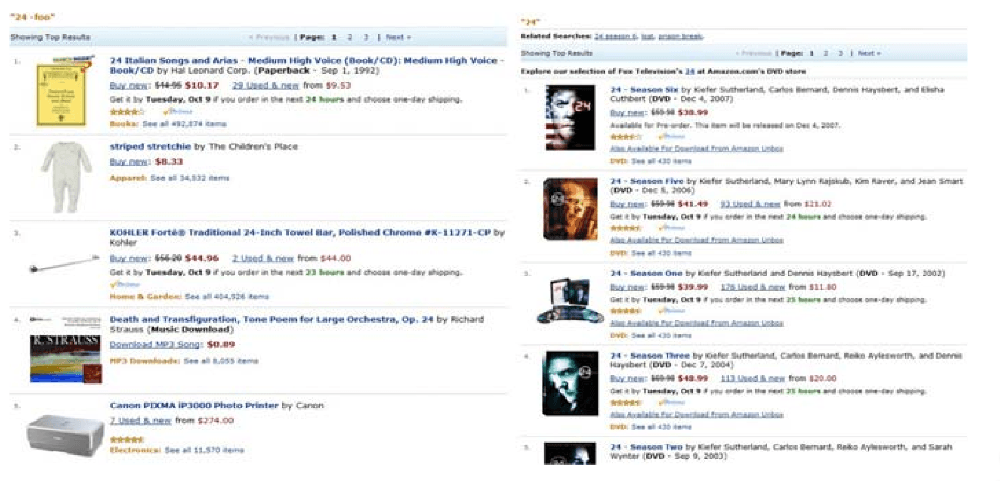 Image Source
Basics of recommendation modeling approaches
Broadly speaking, most recommender systems leverage two types of data:
- Interaction data , such as ratings, and browsing behaviors, and
- Attribution information , about each user and items
The modeling approach relying on the former data is generally known as the Collaborative Filtering method, and approaches using the latter are referred to as Content Base Filtering method. There is also another category known as Knowledge-Based recommender system that is based on explicitly specified user requirements.
Of course, each of these methods has its strengths and weaknesses depending on which applications they are used for, and the amount of data available.
Hybrid Systems are then used to combine the advantages of these approaches to have a robust performing system across a wide variety of applications.
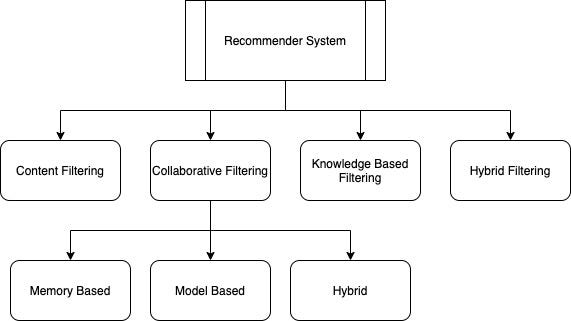
- Collaborative filtering methods: These types of models use the collaborative power of the ratings provided by multiple users to make recommendations and rely mostly on leveraging either inter-item correlations or inter-user interactions for the prediction process. Intuitively, it relies on an underlying notion that two users who rate items similarly are likely to have comparable preferences for other items.
- There are two types of methods that are commonly used in collaborative filtering:
- Memory-based methods also referred to as neighborhood-based collaborative filtering algorithms, where ratings of user-item combinations are predicted based on their neighborhoods. These neighborhoods can be further defined as (1) User Based and (2) Item Based
- In Model-based methods, ML techniques are used to learn model parameters within the context of a given optimization framework
- Content based filtering methods: In these types of systems, the descriptive attributes of items/users are used to make recommendations. The term “content” refers to these descriptions. In content-based methods, the ratings and interaction behavior of users are combined with the content information available in the items.
- Hybrid methods: In many cases, a wider variety of inputs is available; in such cases, many opportunities exist for hybridization, where the various aspects from different types of systems are combined to achieve the best of all worlds. The approach is comparable to the conventional ensemble analysis approach, where the power of multiple types of machine learning algorithms is combined to create a more robust model.
There is more to different types of approaches, and nuances of each; if you are interested in learning more, I would highly recommend the Statistical Methods for Recommender Systems book by Deepak Agarwal.
Primer into LightFM
There are many open-source recommender system frameworks and libraries available across different languages that can help you get started with your first implementation of the recommendation model.
For this article, we’ll explore one of them that I have found valuable in my work, and covers a wide variety of underlying algorithms for varied use-cases, known as LightFM.
LightFM is a Python implementation of several popular recommendation algorithms for both implicit and explicit feedback types.
Importantly, it allows you to incorporate both item and user metadata into the traditional matrix factorization algorithms, making it possible to generalize to new items (via item features) and new users (via user features).
To learn more about it, you can check its documentation here.
Implementation
The complete code is available as a Jupyter Notebook on GitHub.
- Loading data
- Data inspection and preparation
- Data preprocessing
- Model training
- Top n-recommendations
Loading data
For this tutorial, we’ll use book reviews data by Goodreads. The datasets were collected in late 2017 from goodreads.com, where the data from users’ public shelves was scraped, i.e., everyone can see it on the web without login. User IDs and review IDs are anonymized.
 The dataset is collected for academic use only. Please do not redistribute them or use for commercial purposes.
There are three groups of datasets:
The dataset is collected for academic use only. Please do not redistribute them or use for commercial purposes.
There are three groups of datasets:
- meta-data of the books
- user-book interactions
- users’ detailed book reviews
These datasets can be merged together by matching book/user/review ids. For this tutorial, we’ll be using only the former two.
You can download the dataset we'reusing in this article from here:
python
%%time
books_metadata = pd.read_json('./data/goodreads_books_poetry.json', lines=True)
interactions = pd.read_json('./data/goodreads_interactions_poetry.json', lines=True)
Data inspection & preparation
Books metadata
Let’s start by inspecting the books’ metadata information. To develop a reliable and robust ML model, it is essential to get a thorough understanding of the available data.
As the first step, let’s take a look at all the available fields, and sample data:
python
books_metadata.sample(2)
 Books Metadata (Sample)
While all the available information is vital to extract contextual information to be able to train a better recommendation system, for this example, we’ll only focus on the selected fields that require minimal manipulation.
python
Books Metadata (Sample)
While all the available information is vital to extract contextual information to be able to train a better recommendation system, for this example, we’ll only focus on the selected fields that require minimal manipulation.
python
# Limit the books metadata to selected fields
books_metadata_selected = books_metadata[['book_id',
'average_rating', 'is_ebook', 'num_pages', 'publication_year',
'ratings_count', 'language_code']]
books_metadata_selected.sample(5)
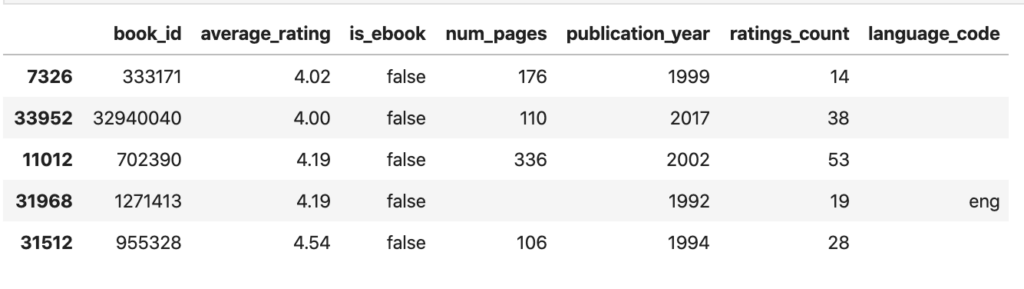 Filtered Books Metadata (Sample)
Now that we have the data with selected fields, next, we’ll run it through pandas profiler to perform preliminary exploratory data analysis to help us better understand the available data.
python
Filtered Books Metadata (Sample)
Now that we have the data with selected fields, next, we’ll run it through pandas profiler to perform preliminary exploratory data analysis to help us better understand the available data.
python
import pandas_profiling
import numpy as np
# replace blank cells with NaN
books_metadata_selected.replace('', np.nan, inplace=True)
# not taking book_id into the profiler report
profile = \
pandas_profiling.ProfileReport(books_metadata_selected[['average_rating',
'is_ebook', 'num_pages', 'publication_year', 'ratings_count']])
profile.to_file('./results/profiler_books_metadata_1.html')
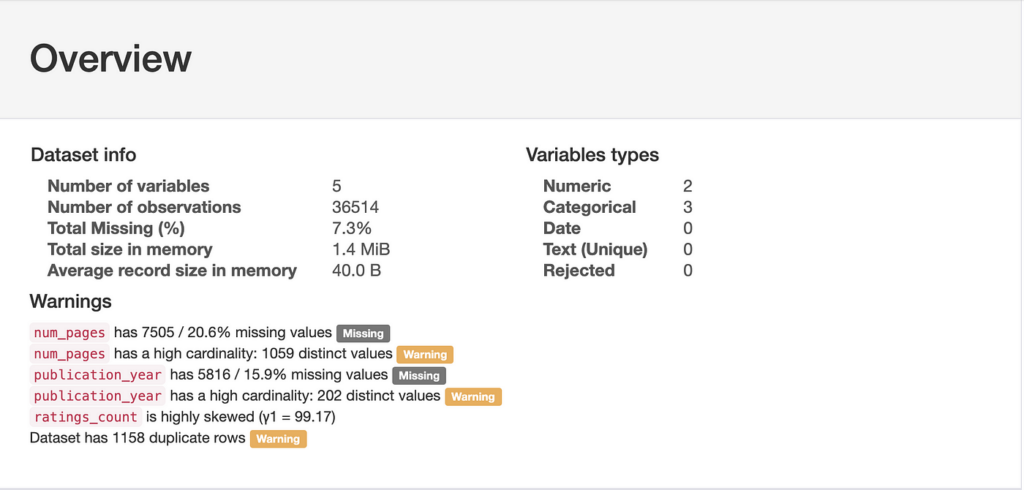 Considering the results from the profiler, we’ll perform following transformations to the dataset:
- Replace the missing value of categorical values with another value to create a new category
- Convert bin values for numeric variables into discrete intervals
python
# using pandas cut method to convert fields into discrete intervals
books_metadata_selected['num_pages'].replace(np.nan, -1, inplace=True)
books_metadata_selected['num_pages'] = pd.to_numeric(books_metadata_selected['num_pages'])
books_metadata_selected['num_pages'] = pd.cut(books_metadata_selected['num_pages'], bins=25)
# rounding ratings to neares .5 score
books_metadata_selected['average_rating'] = books_metadata_selected['average_rating'].apply(lambda x: round(x*2)/2)
# using pandas qcut method to convert fields into quantile-based discrete intervals
books_metadata_selected['ratings_count'] = pd.qcut(books_metadata_selected['ratings_count'], 25)
# replacing missing values to year 2100
books_metadata_selected['publication_year'].replace(np.nan, 2100, inplace=True)
# replacing missing values to 'unknown'
books_metadata_selected['language_code'].replace(np.nan, 'unknown', inplace=True)
# convert is_ebook column into 1/0 where true=1 and false=0
books_metadata_selected['is_ebook'] = books_metadata_selected.is_ebook.map(
    lambda x: 1.0*(x == 'true'))
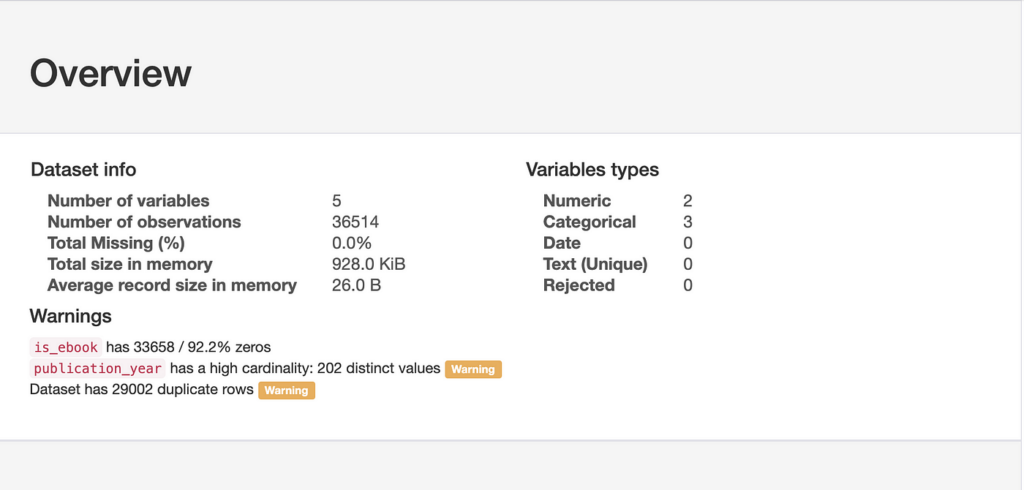
profile = pandas_profiling.ProfileReport(books_metadata_selected[['average_rating', 'is_ebook', 'num_pages',
                                                        'publication_year', 'ratings_count']])
profile.to_file('./results/profiler_books_metadata_2.html')
Interactions data
As the first step, let’s take a look at all the available fields and sample data:
python
interactions.sample(5)
 Limit the data to only the selected fields:
python
Limit the data to only the selected fields:
python
# Limit the books metadata to selected fields
interactions_selected = interactions[['user_id', 'book_id', 'is_read', 'rating']]
# mapping boolean to string
booleanDictionary = {True: 'true', False: 'false'}
interactions_selected['is_read'] = interactions_selected['is_read'].replace(booleanDictionary)
profile = pandas_profiling.ProfileReport(interactions_selected[['is_read', 'rating']])
profile.to_file('./results/profiler_interactions.html')
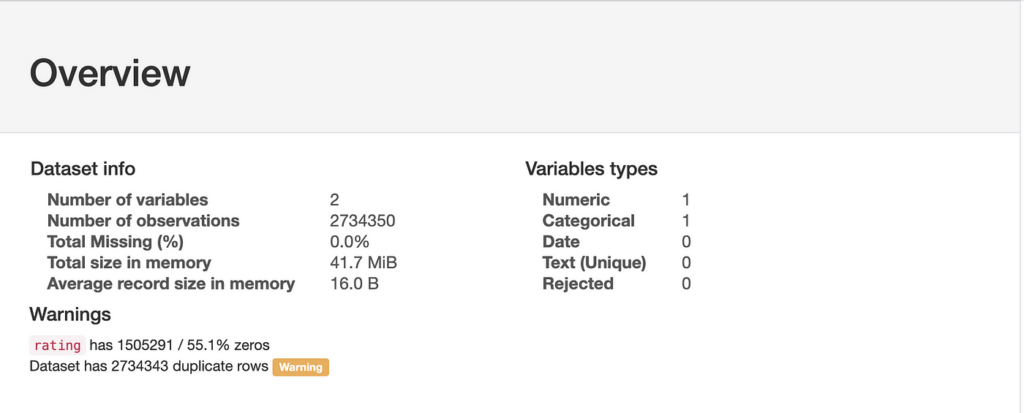 Considering the results from the profiler, we’ll convert is_read column to 1/0:
python
Considering the results from the profiler, we’ll convert is_read column to 1/0:
python
# convert is_read column into 1/0 where true=1 and false=0
interactions_selected['is_read'] = interactions_selected.is_read.map(
    lambda x: 1.0*(x == 'true'))
Since we have two fields denoting interaction between a user and a book, is_read and rating — let’s see how many data points we have where the user hasn’t read the book but have given the ratings.
python
interactions_selected.groupby(['rating', 'is_read']).size().reset_index().pivot(columns='rating', index='is_read', values=0)
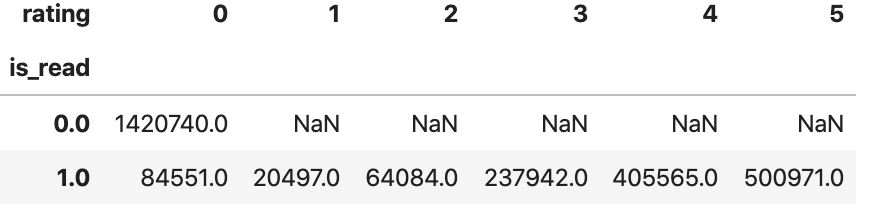 From the above results, we can conclusively infer that users with ratings >= 1 have all read the book. Therefore, we’ll use the
 ratings as the final score, drop interactions where is_read is false, and limit interactions from random 5000 users to limit the data size for further analysis.
Data preprocessing
Now, let’s transform the available data into CSR sparse matrix that can be used for matrix operations. We will start by the process by creating books_metadata matrix which is np.float64 csr_matrix of shape ([n_books, n_books_features]) — Each row contains that book’s weights over features. However, before we create a sparse matrix, we’ll first create an item dictionary for future reference.
python
item_dict ={}
df = books_metadata[['book_id', 'title']].sort_values('book_id').reset_index()
for i in range(df.shape[0]):
    item_dict[(df.loc[i,'book_id'])] = df.loc[i,'title']
# dummify categorical features
books_metadata_selected_transformed = pd.get_dummies(books_metadata_selected, columns = ['average_rating', 'is_ebook', 'num_pages',                          'publication_year', 'ratings_count', 'language_code'])
books_metadata_selected_transformed = books_metadata_selected_transformed.sort_values('book_id').reset_index().drop('index', axis=1)
books_metadata_selected_transformed.head(5)
# convert to csr matrix
books_metadata_csr = csr_matrix(books_metadata_selected_transformed.drop('book_id', axis=1).values)
Next, we’ll create an iterations matrix which is np.float64 csr_matrix of shape ([n_users, n_books]). We’ll also create a user dictionary for future use cases.
python
user_book_interaction = pd.pivot_table(interactions_selected, index='user_id', columns='book_id', values='rating')
# fill missing values with 0
user_book_interaction = user_book_interaction.fillna(0)
user_id = list(user_book_interaction.index)
user_dict = {}
counter = 0
for i in user_id:
    user_dict[i] = counter
    counter += 1
# convert to csr matrix
user_book_interaction_csr = csr_matrix(user_book_interaction.values)
user_book_interaction_csr
Model training
Ideally, we would build, train, and evaluate several models for our recommender system to determine which model holds the most promise for further optimization (hyper-parameter tuning).
However, for this tutorial, we’ll train the base model with randomly selected input parameters for demonstrations.
python
model = LightFM(loss='warp',
                random_state=2016,
                learning_rate=0.90,
                no_components=150,
                user_alpha=0.000005)
model = model.fit(user_book_interaction_csr,
                  epochs=100,
                  num_threads=16, verbose=False)
Top n-recommendations
For getting back the top-n recommendations, we’ll re-purpose the code by Aayush Agrawal here.
python
def sample_recommendation_user(model, interactions, user_id, user_dict,
                               item_dict,threshold = 0,nrec_items = 5, show = True):

    n_users, n_items = interactions.shape
    user_x = user_dict[user_id]
    scores = pd.Series(model.predict(user_x,np.arange(n_items), item_features=books_metadata_csr))
    scores.index = interactions.columns
    scores = list(pd.Series(scores.sort_values(ascending=False).index))

    known_items = list(pd.Series(interactions.loc[user_id,:] \
                                 [interactions.loc[user_id,:] > threshold].index).sort_values(ascending=False))

    scores = [x for x in scores if x not in known_items]
    return_score_list = scores[0:nrec_items]
    known_items = list(pd.Series(known_items).apply(lambda x: item_dict[x]))
    scores = list(pd.Series(return_score_list).apply(lambda x: item_dict[x]))
    if show == True:
        print ("User: " + str(user_id))
        print("Known Likes:")
        counter = 1
        for i in known_items:
            print(str(counter) + '- ' + i)
            counter+=1
print("\n Recommended Items:")
        counter = 1
        for i in scores:
            print(str(counter) + '- ' + i)
            counter+=1
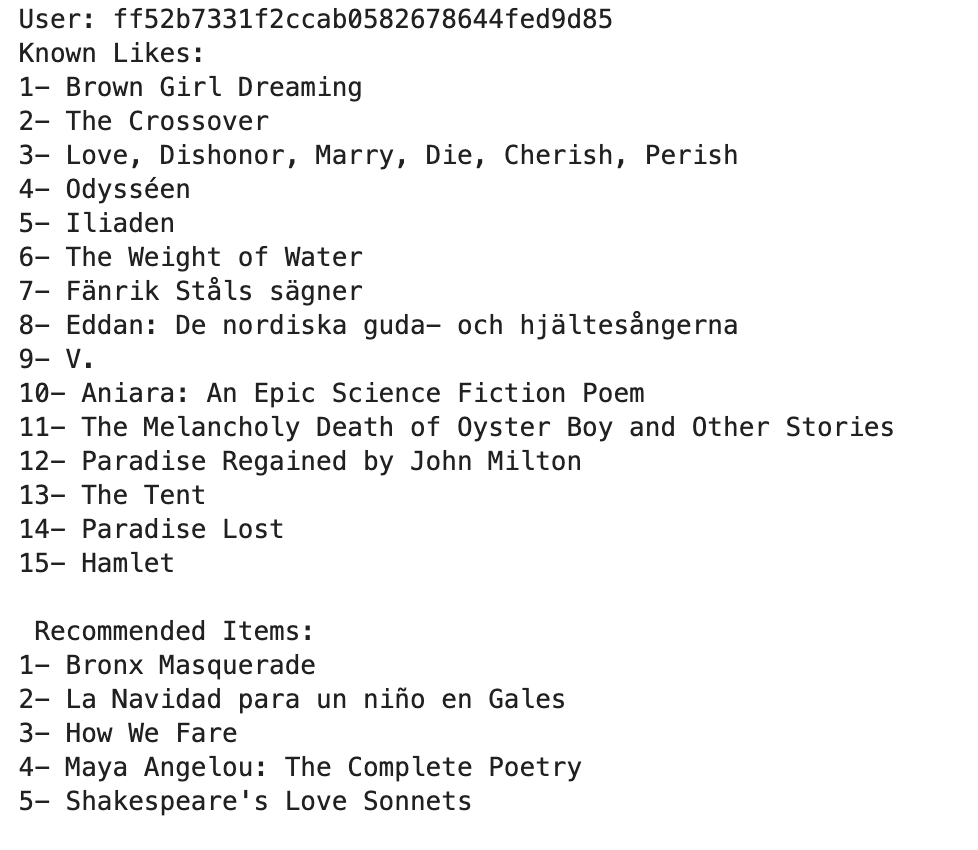
Let’s check the results:
python
sample_recommendation_user(model, user_book_interaction, 'ff52b7331f2ccab0582678644fed9d85', user_dict, item_dict)
Closing notes
Machine learning has become increasingly popular over the past decade, and recent advances in computational availability have led to exponential growth to people looking for ways how new methods can be incorporated to advance the field of Recommendation Systems.
Often, we treat the Recommendation System as black-box algorithms. Still, hopefully, this post addressed to shed light on the underlying math, and intuitions behind it, and high-level code to get you started with building your first recommendation model.
In the next article, we’ll go one step deeper into understanding how you can evaluate the performance of these models, and tune its hyper-parameters to get more intuitive and reliable results.
References
[1] https://en.wikipedia.org/wiki/Recommender_system
[2] Agarwal, Deepak K.. Statistical Methods for Recommender Systems. Cambridge University Press. Kindle Edition
[3] Charu, A. (1997). Recommender systems The Textbook. In Communications of the ACM (Vol. 40)
[4] Mengting Wan, Julian McAuley, “Item Recommendation on Monotonic Behavior Chains”, in RecSys’18
[5] Mengting Wan, Rishabh Misra, Ndapa Nakashole, Julian McAuley, “Fine-Grained Spoiler Detection from Large-Scale Review Corpora”, in ACL’19
[6] https://github.com/aayushmnit/cookbook/blob/master/recsys.py
Thanks for reading. If you have any feedback, please feel to reach out by commenting on this post, messaging me on LinkedIn , or shooting me an email (shmkapadia[at]gmail.com)
Register Now to Continue Reading
Unlock Towards Data Science with a Free Account
All articles on Towards Data Science are available to registered users. Create a free account today to access this article and thousands more.
Register for freeSign in to your account
SK
Written By
See all from Shashank Kapadia
LightfmMachine LearningPythonRecommendation EngineRecommender Systems
Share This Article
Towards Data Science is a community publication. Submit your insights to reach our global audience and earn through the TDS Author Payment Program.
Write for TDS
Related Articles
Data Science
Part 5/6 - Visualize gradient ranges of a Strava route with Python and Plotly
Dario Radečić
March 2, 20226 min read
Machine Learning
Recommendations for a successful solution - from signal analysis to sharing insights at scale
Alvin Chan
February 8, 20217 min read
Machine Learning
Exploiting Generative Adversarial Networks to generate new worlds, galaxies and stars
Davide Coccomini
August 12, 20215 min read
Machine Learning
snowflake is one of the leading data platforms out there. In this article, we will explore the capabilities of its' snowpark python...
Ransaka Ravihara
December 26, 20229 min read
Machine Learning
Making your machine learn how to see PDFs like a human
Noah Haglund
November 29, 202311 min read
Data Science
An introduction to ML library Merlion for time series forecasting
Konstantin Rink
April 13, 20228 min read
Machine Learning
How baseline strength, churn, and subjectivity determine complexity
Diogo Leitão
February 11, 20268 min read
Artificial Intelligence
How I approached the balancing act of (1) enjoying my degree and (2) setting myself up for life after university in "the real world"
Matt Chapman
May 23, 20239 min read
Data Science
Navigating the ever-changing field
Zijing Zhu, PhD
September 15, 202316 min read
Your home for data science and AI. The world's leading publication for data science, data analytics, data engineering, machine learning, and artificial intelligence professionals.
Subscribe to Our NewsletterWrite For TDS•About•Advertise•Privacy Policy•Terms of Use
© Insight Media Group, LLC 2026•The New Stack•roadmap.sh•Creator Network
Recommended Articles
Close