保留正文与补采附件。源页面当前未重新核验;具体限制见交付清单。
 We value your privacy
We use cookies to enhance your browsing experience, serve personalised ads or content, and analyse our traffic. By clicking "Accept All", you consent to our use of cookies.
Customise Reject All Accept All
Customise Consent Preferences
We value your privacy
We use cookies to enhance your browsing experience, serve personalised ads or content, and analyse our traffic. By clicking "Accept All", you consent to our use of cookies.
Customise Reject All Accept All
Customise Consent Preferences  We use cookies to help you navigate efficiently and perform certain functions. You will find detailed information about all cookies under each consent category below.
The cookies that are categorised as "Necessary" are stored on your browser as they are essential for enabling the basic functionalities of the site. ... Show more
NecessaryAlways Active
Necessary cookies are required to enable the basic features of this site, such as providing secure log-in or adjusting your consent preferences. These cookies do not store any personally identifiable data.
We use cookies to help you navigate efficiently and perform certain functions. You will find detailed information about all cookies under each consent category below.
The cookies that are categorised as "Necessary" are stored on your browser as they are essential for enabling the basic functionalities of the site. ... Show more
NecessaryAlways Active
Necessary cookies are required to enable the basic features of this site, such as providing secure log-in or adjusting your consent preferences. These cookies do not store any personally identifiable data.
-
Cookie
BCTempID
-
Duration
10 minutes
-
Description
No description available.
-
Cookie
__cf_bm
-
Duration
1 hour
-
Description
This cookie, set by Cloudflare, is used to support Cloudflare Bot Management.
-
Cookie
AWSALBCORS
-
Duration
7 days
-
Description
Amazon Web Services set this cookie for load balancing.
-
Cookie
_cfuvid
-
Duration
session
-
Description
Cloudflare sets this cookie to track users across sessions to optimize user experience by maintaining session consistency and providing personalized services
-
Cookie
li_gc
-
Duration
6 months
-
Description
Linkedin set this cookie for storing visitor's consent regarding using cookies for non-essential purposes.
-
Cookie
__hssrc
-
Duration
session
-
Description
This cookie is set by Hubspot whenever it changes the session cookie. The __hssrc cookie set to 1 indicates that the user has restarted the browser, and if the cookie does not exist, it is assumed to be a new session.
-
Cookie
__hssc
-
Duration
1 hour
-
Description
HubSpot sets this cookie to keep track of sessions and to determine if HubSpot should increment the session number and timestamps in the __hstc cookie.
-
Cookie
wpEmojiSettingsSupports
-
Duration
session
-
Description
WordPress sets this cookie when a user interacts with emojis on a WordPress site. It helps determine if the user's browser can display emojis properly.
-
Cookie
BCSessionID
-
Duration
1 year 1 month 4 days
-
Description
Blueconic sets this cookie as a unique identifier for the BlueConic profile.
-
Cookie
_octo
-
Duration
1 year
-
Description
No description available.
-
Cookie
logged_in
-
Duration
1 year
-
Description
No description available.
-
Cookie
__Secure-YEC
-
Duration
past
-
Description
YouTube sets this cookie to stores the user's video player preferences using embedded YouTube video
-
Cookie
__eoi
-
Duration
6 months
-
Description
Description is currently not available.
-
Cookie
AWSALBTGCORS
-
Duration
7 days
-
Description
No description available.
-
Cookie
login-status-p
-
Duration
past
-
Description
Description is currently not available.
-
Cookie
AWSALBTG
-
Duration
7 days
-
Description
No description available.
-
Cookie
csrf_token
-
Duration
session
-
Description
No description available.
-
Cookie
token_v2
-
Duration
1 day
-
Description
Description is currently not available.
-
Cookie
D
-
Duration
1 year
-
Description
Description is currently not available.
-
Cookie
PHPSESSID
-
Duration
session
-
Description
This cookie is native to PHP applications. The cookie stores and identifies a user's unique session ID to manage user sessions on the website. The cookie is a session cookie and will be deleted when all the browser windows are closed.
-
Cookie
VISITOR_PRIVACY_METADATA
-
Duration
6 months
-
Description
YouTube sets this cookie to store the user's cookie consent state for the current domain.
-
Cookie
cookietest
-
Duration
session
-
Description
The cookietest cookie is typically used to determine whether the user's browser accepts cookies, essential for website functionality and user experience.
-
Cookie
__Host-airtable-session
-
Duration
1 year
-
Description
This cookie is used to enable us to integrate the services of Airtable.
-
Cookie
__Host-airtable-session.sig
-
Duration
1 year
-
Description
This cookie is used to enable us to integrate the services of Airtable.
-
Cookie
m
-
Duration
1 year 1 month 4 days
-
Description
Stripe sets this cookie for fraud prevention purposes. It identifies the device used to access the website, allowing the website to be formatted accordingly.
-
Cookie
BIGipServer*
-
Duration
session
-
Description
Marketo sets this cookie to collect information about the user's online activity and build a profile about their interests to provide advertisements relevant to the user.
-
Cookie
__cfruid
-
Duration
session
-
Description
Cloudflare sets this cookie to identify trusted web traffic.
-
Cookie
_GRECAPTCHA
-
Duration
6 months
-
Description
Google Recaptcha service sets this cookie to identify bots to protect the website against malicious spam attacks.
-
Cookie
__Secure-YNID
-
Duration
6 months
-
Description
Google cookie used to protect user security and prevent fraud, especially during the login process.
-
Cookie
cookieyes-consent
-
Duration
1 year
-
Description
CookieYes sets this cookie to remember users' consent preferences so that their preferences are respected on subsequent visits to this site. It does not collect or store any personal information about the site visitors.
Functional
Functional cookies help perform certain functionalities like sharing the content of the website on social media platforms, collecting feedback, and other third-party features.
-
Cookie
lidc
-
Duration
1 day
-
Description
LinkedIn sets the lidc cookie to facilitate data center selection.
-
Cookie
brw
-
Duration
1 year
-
Description
No description available.
-
Cookie
brwConsent
-
Duration
5 minutes
-
Description
Description is currently not available.
-
Cookie
WMF-Uniq
-
Duration
1 year
-
Description
Description is currently not available.
-
Cookie
loom_anon_comment
-
Duration
1 year
-
Description
No description available.
-
Cookie
loom_referral_video
-
Duration
session
-
Description
Description is currently not available.
-
Cookie
VISITOR_INFO1_LIVE
-
Duration
6 months
-
Description
A cookie set by YouTube to measure bandwidth that determines whether the user gets the new or old player interface.
-
Cookie
yt-remote-connected-devices
-
Duration
Never Expires
-
Description
YouTube sets this cookie to store the user's video preferences using embedded YouTube videos.
-
Cookie
ytidb::LAST_RESULT_ENTRY_KEY
-
Duration
Never Expires
-
Description
The cookie ytidb::LAST_RESULT_ENTRY_KEY is used by YouTube to store the last search result entry that was clicked by the user. This information is used to improve the user experience by providing more relevant search results in the future.
-
Cookie
yt-remote-device-id
-
Duration
Never Expires
-
Description
YouTube sets this cookie to store the user's video preferences using embedded YouTube videos.
-
Cookie
yt-remote-session-name
-
Duration
session
-
Description
The yt-remote-session-name cookie is used by YouTube to store the user's video player preferences using embedded YouTube video.
-
Cookie
yt-remote-fast-check-period
-
Duration
session
-
Description
The yt-remote-fast-check-period cookie is used by YouTube to store the user's video player preferences for embedded YouTube videos.
-
Cookie
yt-remote-session-app
-
Duration
session
-
Description
The yt-remote-session-app cookie is used by YouTube to store user preferences and information about the interface of the embedded YouTube video player.
-
Cookie
yt-remote-cast-available
-
Duration
session
-
Description
The yt-remote-cast-available cookie is used to store the user's preferences regarding whether casting is available on their YouTube video player.
-
Cookie
yt-remote-cast-installed
-
Duration
session
-
Description
The yt-remote-cast-installed cookie is used to store the user's video player preferences using embedded YouTube video.
-
Cookie
cp_session
-
Duration
3 months
-
Description
Codepen sets this cookie for Help systems found in the website.
-
Cookie
loid
-
Duration
1 year 1 month 4 days
-
Description
This cookie is set by the Reddit. The cookie enables the sharing of content from the website onto the social media platform.
Analytics
Analytical cookies are used to understand how visitors interact with the website. These cookies help provide information on metrics such as the number of visitors, bounce rate, traffic source, etc.
-
Cookie
__hstc
-
Duration
6 months
-
Description
Hubspot set this main cookie for tracking visitors. It contains the domain, initial timestamp (first visit), last timestamp (last visit), current timestamp (this visit), and session number (increments for each subsequent session).
-
Cookie
hubspotutk
-
Duration
6 months
-
Description
HubSpot sets this cookie to keep track of the visitors to the website. This cookie is passed to HubSpot on form submission and used when deduplicating contacts.
-
Cookie
_ga
-
Duration
1 year 1 month 4 days
-
Description
Google Analytics sets this cookie to calculate visitor, session and campaign data and track site usage for the site's analytics report. The cookie stores information anonymously and assigns a randomly generated number to recognise unique visitors.
-
Cookie
ga*
-
Duration
1 year 1 month 4 days
-
Description
Google Analytics sets this cookie to store and count page views.
-
Cookie
__Host-psifi.analyticsTrace
-
Duration
6 hours
-
Description
Description is currently not available.
-
Cookie
__Host-psifi.analyticsTraceV2
-
Duration
6 hours
-
Description
Description is currently not available.
-
Cookie
_gh_sess
-
Duration
session
-
Description
GitHub sets this cookie for temporary application and framework state between pages like what step the user is on in a multiple step form.
-
Cookie
YSC
-
Duration
session
-
Description
YSC cookie is set by Youtube and is used to track the views of embedded videos on Youtube pages.
-
Cookie
ajs_anonymous_id
-
Duration
1 year
-
Description
This cookie is set by Segment to count the number of people who visit a certain site by tracking if they have visited before.
-
Cookie
vuid
-
Duration
1 year 1 month 4 days
-
Description
Vimeo installs this cookie to collect tracking information by setting a unique ID to embed videos on the website.
Performance
Performance cookies are used to understand and analyse the key performance indexes of the website which helps in delivering a better user experience for the visitors.
-
Cookie
AWSALB
-
Duration
7 days
-
Description
AWSALB is an application load balancer cookie set by Amazon Web Services to map the session to the target.
-
Cookie
acq
-
Duration
past
-
Description
Description is currently not available.
-
Cookie
acq.sig
-
Duration
past
-
Description
Description is currently not available.
-
Cookie
ptc
-
Duration
2 years
-
Description
No description available.
Advertisement
Advertisement cookies are used to provide visitors with customised advertisements based on the pages you visited previously and to analyse the effectiveness of the ad campaigns.
-
Cookie
muc_ads
-
Duration
1 year 1 month 4 days
-
Description
Twitter sets this cookie to collect user behaviour and interaction data to optimize the website.
-
Cookie
guest_id_marketing
-
Duration
1 year 1 month 4 days
-
Description
Twitter sets this cookie to identify and track the website visitor.
-
Cookie
guest_id_ads
-
Duration
1 year 1 month 4 days
-
Description
Twitter sets this cookie to identify and track the website visitor.
-
Cookie
personalization_id
-
Duration
1 year 1 month 4 days
-
Description
Twitter sets this cookie to integrate and share features for social media and also store information about how the user uses the website, for tracking and targeting.
-
Cookie
guest_id
-
Duration
1 year 1 month 4 days
-
Description
Twitter sets this cookie to identify and track the website visitor. It registers if a user is signed in to the Twitter platform and collects information about ad preferences.
-
Cookie
bcookie
-
Duration
1 year
-
Description
LinkedIn sets this cookie from LinkedIn share buttons and ad tags to recognize browser IDs.
-
Cookie
__Secure-ROLLOUT_TOKEN
-
Duration
6 months
-
Description
YouTube sets this cookie to manage feature rollout and experimentation. It helps Google control which new features or interface changes are shown to users as part of testing and staged rollouts, ensuring consistent experience for a given user during an experiment.
-
Cookie
yt.innertube::nextId
-
Duration
Never Expires
-
Description
YouTube sets this cookie to register a unique ID to store data on what videos from YouTube the user has seen.
-
Cookie
yt.innertube::requests
-
Duration
Never Expires
-
Description
YouTube sets this cookie to register a unique ID to store data on what videos from YouTube the user has seen.
-
Cookie
session_tracker
-
Duration
session
-
Description
This cookie is set by the Reddit. This cookie is used to identify trusted web traffic. It also helps in adverstising on the website.
-
Cookie
edgebucket
-
Duration
session
-
Description
Reddit sets this cookie to save the information about a log-on Reddit user, for the purpose of advertisement recommendations and updating the content.
-
Cookie
did
-
Duration
1 year
-
Description
Arbor sets this cookie to show targeted ads to site visitors.This cookie expires after 2 months or 1 year.
Uncategorised
Other uncategorised cookies are those that are being analysed and have not been classified into a category as yet.
No cookies to display.
Reject All Save My Preferences Accept All
Toggle SearchToggle Mobile Navigation
Publish AI, ML & data-science insights to a global community of data professionals.
Sign inSubmit an Article
LatestEditor's PicksNewsletterShipAI
Write For TDS
LinkedInXToggle Search
Data Engineering
I Built My Second ETL Pipeline. This Time, I Started Thinking Like a Data Engineer
Building a production-ready RSS pipeline with Python, Docker, PostgreSQL, and Kestra
Ibrahim Salami
July 10, 202615 min read
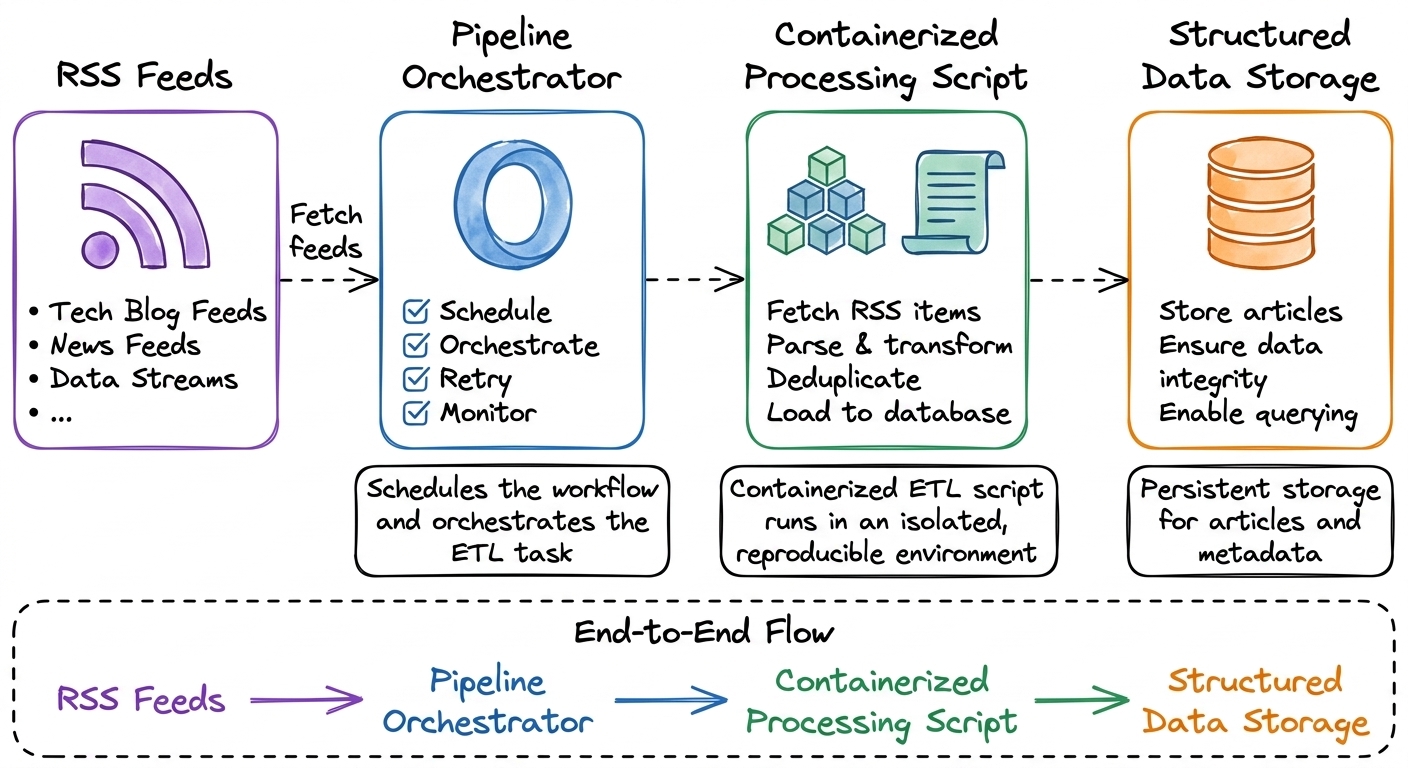 Architectural Diagram Generated by AI
A few months ago, I decided I wanted to transition from data analyst to data engineer.
Like many people starting out, I was overwhelmed by the sheer number of things I thought I needed to learn. Data warehouses, orchestration tools, distributed processing, streaming systems, cloud platforms, infrastructure. The list seemed endless.
Instead of trying to learn everything at once, I took a different approach.
I created a 12-month self-study roadmap built around one simple idea: learn by building.
Rather than jumping from one tutorial to another, I would build a series of small projects. Each project would introduce a few new concepts while reinforcing what I had learned before. The goal wasn't to build the most sophisticated applications possible. It was to develop the habit of thinking like an engineer by solving one problem at a time.
The first project in that journey was a GitHub ETL pipeline. It began as a simple Python script that fetched repository data and exported it to a CSV file. As I learned more, I gradually improved it. I replaced CSV files with SQLite, made the pipeline idempotent to prevent duplicate data, and eventually automated it with GitHub Actions.
By the time I finished, I realized something that hadn't been obvious when I started.
Building the ETL logic was actually the easy part.
The harder questions appeared once I stopped thinking about a script that runs once and started thinking about a system that needs to run over and over again without me watching it.
Architectural Diagram Generated by AI
A few months ago, I decided I wanted to transition from data analyst to data engineer.
Like many people starting out, I was overwhelmed by the sheer number of things I thought I needed to learn. Data warehouses, orchestration tools, distributed processing, streaming systems, cloud platforms, infrastructure. The list seemed endless.
Instead of trying to learn everything at once, I took a different approach.
I created a 12-month self-study roadmap built around one simple idea: learn by building.
Rather than jumping from one tutorial to another, I would build a series of small projects. Each project would introduce a few new concepts while reinforcing what I had learned before. The goal wasn't to build the most sophisticated applications possible. It was to develop the habit of thinking like an engineer by solving one problem at a time.
The first project in that journey was a GitHub ETL pipeline. It began as a simple Python script that fetched repository data and exported it to a CSV file. As I learned more, I gradually improved it. I replaced CSV files with SQLite, made the pipeline idempotent to prevent duplicate data, and eventually automated it with GitHub Actions.
By the time I finished, I realized something that hadn't been obvious when I started.
Building the ETL logic was actually the easy part.
The harder questions appeared once I stopped thinking about a script that runs once and started thinking about a system that needs to run over and over again without me watching it.
- How should it be scheduled?
- What happens if it fails halfway through?
- Where should retry logic live?
- How do you package the application so it runs the same way everywhere?
Those questions taught me far more about data engineering than parsing JSON or writing SQL ever did.
That first project left me with another challenge.
GitHub Actions worked well for automating a small ETL pipeline, but I wanted to understand what changes when you use a workflow orchestrator built specifically for data engineering. I wanted to learn how engineers separate orchestration from execution, how containerized workloads fit into that picture, and what a production-minded pipeline actually looks like, even on a small scale.
So for my second project, I decided to build an automated RSS ingestion pipeline.
On the surface, it's a fairly simple application. It fetches articles from an RSS feed, parses them into structured objects, and stores them in PostgreSQL.
But the goal was never to build an RSS reader.
The goal was to explore the engineering decisions that transform a Python script into a reliable data pipeline.
In this article, I'll walk through those decisions, the mistakes I made along the way, and the lessons I learned building my first pipeline with Kestra.
Why Build Another ETL Pipeline?
After finishing my first ETL project, I considered moving on to something completely different.
Maybe a data warehouse project. Maybe Apache Spark. Maybe an API with a more complex transformation layer.
Instead, I built... another ETL pipeline.
At first, that probably sounds like a step backwards.
After all, I'd already built an extraction pipeline, made it idempotent, and scheduled it with GitHub Actions. Why repeat the same exercise?
Because I wasn't trying to learn a new dataset. I was trying to learn a new way of thinking.
One lesson from my first project stuck with me.
Writing the ETL logic wasn't the difficult part. The difficult part was everything surrounding it.
- How should the pipeline be executed?
- How should it recover from failures?
- How do you package it so it runs consistently on any machine?
- Where does scheduling belong?
And perhaps the biggest question of all:
Where should the responsibilities of the application end, and where should the responsibilities of the orchestration layer begin?
Those questions don't have much to do with RSS feeds or GitHub repositories. They're engineering questions, and I realized I could explore them with almost any data source.
That's why I chose an RSS feed.
Not because RSS is particularly exciting, but because it's intentionally simple.
The extraction logic only takes a few lines of Python. That meant I could spend less time worrying about business logic and more time thinking about architecture.
For the same reason, I decided to move away from GitHub Actions for this project.
GitHub Actions was a great introduction to scheduling. It showed me how to automate a workflow and gave me my first taste of running an ETL pipeline without manual intervention.
But GitHub Actions isn't designed specifically for orchestrating data workflows.
I wanted to understand what changes when you use a tool that's built with data pipelines in mind.
That's what led me to Kestra.
Rather than asking, "How do I run this Python script every hour?", I found myself asking a different set of questions.
- How should retries be configured?
- How are workflow executions tracked?
- How should environment variables be passed into a container?
- What does a failed execution look like?
- How do you separate the application from the infrastructure that runs it?
Those questions were exactly what I wanted to explore.
By choosing a simple ETL pipeline, I could focus on the engineering decisions instead of getting distracted by complicated business logic.
Looking back, I think that was the right decision.
This project isn't interesting because it processes RSS feeds.
It's interesting because building it forced me to think about reliability, repeatability, and orchestration in a way my first project never did.
The First Architectural Decision: Docker Before Kestra
With the project defined, my first instinct was to jump straight into Kestra.
After all, orchestration was one of the main reasons I chose this project. Why not start there?
Instead, I did something that turned out to save me a lot of frustration later.
I ignored Kestra completely.
That might sound counterintuitive, but I wanted to avoid introducing multiple moving parts before I knew the core application actually worked.
So I built the project in layers.
First, I wrote the Python ETL.
Its job was intentionally small. Fetch the RSS feed, parse each entry into an Article object, and save the results to PostgreSQL. Nothing more.
python
feed = feedparser.parse(RSS_URL)

articles = parse_feed(feed)

save_articles(articles)
That's really all the ETL did. I intentionally kept the application small because the focus of this project wasn't the transformation logic. It was everything that happened around it.
Once that worked reliably, I turned my attention to the database.
I wanted repeated executions to be safe, so I made the inserts idempotent using PostgreSQL's ON CONFLICT DO NOTHING. That way, running the pipeline multiple times wouldn't create duplicate rows.
sql
INSERT INTO articles (...)
VALUES (...)
ON CONFLICT (id) DO NOTHING;
This one line made the pipeline safe to execute repeatedly. Whether Kestra ran the workflow once or one hundred times, PostgreSQL became responsible for preventing duplicate records.
Only after the ETL and database worked together did I introduce Docker.
That decision changed how I thought about the project.
Initially, Docker felt like another tool I needed to learn.
By the end of the project, I realized it had become something much more important.
It became the unit of execution.
bash
FROM python:3.13-slim

WORKDIR /app

COPY requirements.txt .
RUN pip install --no-cache-dir -r requirements.txt

COPY . .

CMD ["python", "fetch_rss.py"]
Packaging the ETL this way meant the application became self-contained. Instead of asking Kestra to understand my Python project, I could simply ask it to run a container that already knew how to execute the pipeline.
Instead of thinking, "Kestra will run my Python script," I started thinking, "Kestra will run my Docker image."
That distinction might seem subtle, but it completely changes the relationship between your application and your orchestration layer.
Once the ETL was packaged into a container, it no longer mattered whether it ran on my laptop, inside Kestra, or on another machine entirely.
The runtime environment was always the same.
That consistency gave me something I didn't have before: confidence.
Before introducing Kestra, I could run the container manually and verify that it fetched the RSS feed, connected to PostgreSQL, and persisted the expected records.
If something failed, I knew the problem wasn't hidden behind another layer of orchestration.
That validation step turned out to be incredibly valuable later.
During development, I ran into issues with networking, container configuration, and workflow execution. Because the Docker image had already been validated independently, I could immediately rule out the ETL itself and focus on the orchestration layer.
That made debugging dramatically easier.
Looking back, I think this was one of the biggest lessons from the project.
It's tempting to connect every component together as quickly as possible and hope everything works.
A better approach is to validate each layer before introducing the next one.
In this project, the order looked like this:
- Validate the Python ETL.
- Validate PostgreSQL persistence.
- Validate the Docker image.
- Finally, let Kestra orchestrate a container that I already trusted.
Each layer built on the previous one.
By the time Kestra entered the picture, I wasn't trying to debug Python, PostgreSQL, Docker, and orchestration at the same time.
I was only solving one problem.
That incremental approach made the entire project feel much more manageable, and it's a workflow I'll probably continue using on future data engineering projects.
The Assumption That Turned Out to Be Wrong
With a working Docker image, I was convinced the hard part was over.
- I had a Python ETL that worked.
- I had PostgreSQL running in Docker.
- I had verified that the container could fetch RSS articles and save them to the database.
Now all Kestra had to do was run it.
Or so I thought.
My original assumption was simple.
Kestra would point to my Python files, execute the script, and everything would work exactly as it had from the command line.
It didn't.
I quickly discovered that there was an important distinction I hadn't fully appreciated.
Kestra is an orchestrator.
It isn't responsible for building Python environments or managing application dependencies. Its responsibility is deciding when and how workloads should run.
That realization changed the direction of the project.
Instead of treating Kestra as another place to execute Python code, I started treating it as the layer responsible for orchestrating a workload that already existed.
That workload was my Docker image.
Once I made that mental shift, the architecture became much cleaner.
- The ETL became a self-contained application.
- Docker became the deployment artifact.
- Kestra became the orchestrator.
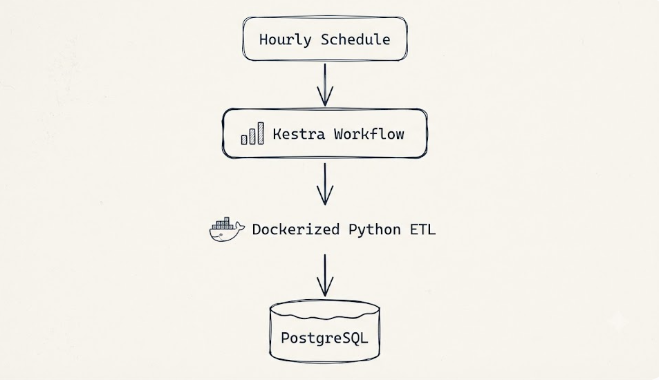 Each layer had a clear responsibility, and none of them needed to know how the others worked internally.
Interestingly, reaching that point wasn't completely straightforward.
My first instinct was to find a way for Kestra to execute the Python project directly. That approach sounded simpler, but the more I experimented with it, the more I realized I was asking the orchestrator to take responsibility for something the application should already provide.
Once I embraced Docker as the execution artifact, the workflow became much simpler.
Some approaches looked promising at first but introduced unnecessary complexity. Others worked, but didn't align with how Kestra encourages containerized workloads to be executed.
Eventually, I landed on a workflow that felt surprisingly simple.
Instead of trying to teach Kestra how to run Python, I let Kestra do what it does best.
It launches a container.
yaml
Each layer had a clear responsibility, and none of them needed to know how the others worked internally.
Interestingly, reaching that point wasn't completely straightforward.
My first instinct was to find a way for Kestra to execute the Python project directly. That approach sounded simpler, but the more I experimented with it, the more I realized I was asking the orchestrator to take responsibility for something the application should already provide.
Once I embraced Docker as the execution artifact, the workflow became much simpler.
Some approaches looked promising at first but introduced unnecessary complexity. Others worked, but didn't align with how Kestra encourages containerized workloads to be executed.
Eventually, I landed on a workflow that felt surprisingly simple.
Instead of trying to teach Kestra how to run Python, I let Kestra do what it does best.
It launches a container.
yaml
tasks:
  - id: run_etl
    type: io.kestra.plugin.scripts.shell.Commands

    containerImage: rss-pipeline-etl:latest

    taskRunner:
      type: io.kestra.plugin.scripts.runner.docker.Docker

    commands:
      - python /app/fetch_rss.py
Looking at the workflow now, what stands out isn't how much YAML it contains. It's how little Kestra actually needs to know about my application. Its only responsibility is to launch a container that already knows how to execute the ETL.
Inside that container, my application already knows exactly what to do.
That small architectural change solved more than just the immediate execution problem.
It also reinforced an idea that's becoming a recurring theme in my learning journey.
Good engineering often isn't about adding another layer.
It's about giving each layer a single responsibility and allowing it to do that job well.
- Python shouldn't worry about orchestration.
- Kestra shouldn't worry about Python dependencies.
- Docker shouldn't know anything about RSS feeds.
Each component solves a different problem.
Once I stopped asking one tool to solve every problem, the entire system became much easier to reason about.
Looking back, this was probably the biggest mindset shift in the whole project.
I didn't just learn how to use Kestra.
I learned what orchestration actually means.
Once a Pipeline Runs Automatically, Everything Changes
Up until this point, I had been running the pipeline manually.
If something failed, I was sitting in front of my computer. I could read the error, make a change, and try again.
That safety net disappears the moment a pipeline starts running on its own.
One of the first things I configured in Kestra was a simple hourly schedule.
yaml
triggers:
  - id: hourly_schedule
    type: io.kestra.plugin.core.trigger.Schedule
    cron: "0 * * * *"
On paper, it was just a cron expression.
In practice, it represented a much bigger shift.
The pipeline no longer depended on me remembering to run it.
Every hour, Kestra would start a new execution, launch the ETL container, and process the latest articles from the RSS feed.
That immediately raised another question.
What happens if one of those executions fails?
During development, I deliberately introduced failures to answer that question. I pointed the pipeline at an invalid database host and watched what happened.
The first execution failed, exactly as expected.
More importantly, it didn't stop there.
Because the workflow was configured with retries, Kestra automatically attempted the execution again after a short delay.
yaml
retry:
  type: constant
  maxAttempts: 3
  interval: PT30S
That was one of my favorite moments in the project.
Once I corrected the configuration, the workflow completed successfully without requiring any changes to the application itself.
That was one of my favorite moments in the project.
Not because retries are particularly complicated, but because they highlighted another separation of responsibilities.
The ETL shouldn't decide whether it deserves another chance.
That's an orchestration concern.
By moving retry logic into Kestra, the Python application remained focused on a single responsibility: process the feed and persist the results.
The orchestration layer handled resilience.
Scheduling introduced another challenge that I'd already encountered in my first ETL project.
Repeated executions mean repeated attempts to write data.
If the same RSS article appears in multiple hourly runs, the pipeline shouldn't insert it twice.
Fortunately, I had already solved a similar problem before.
The database layer was designed to be idempotent using PostgreSQL's ON CONFLICT DO NOTHING.
sql
INSERT INTO articles (...)
VALUES (...)
ON CONFLICT (id) DO NOTHING;
That meant every execution could safely attempt to insert the same records without creating duplicates.
The combination of scheduling, retries, and idempotent writes made the pipeline much more forgiving.
If a run failed, Kestra could retry it.
If a successful retry encountered data that had already been written, PostgreSQL would simply ignore the duplicates.
Neither layer needed to know what the other was doing.
They each handled their own responsibility.
The last improvement was visibility.
Early in development, my logs looked exactly like you'd expect from a project that was still being debugged.
I printed entire RSS objects to the console just to make sure the parser was working.
It wasn't pretty, but it served its purpose.
As the pipeline became more stable, those debug statements became less useful.
I replaced them with logs that described the execution instead of dumping raw data.
Before
python
print(feed.entries[0])
After
python
print("=== RSS PIPELINE START ===")

first = feed.entries[0]

print("First entry preview:")
print(f"Title: {first.get('title')}")
print(f"Link: {first.get('link')}")

print(f"Feed title: {feed.feed.title}")
print(f"Fetched articles: {len(articles)}")
print(f"Saved {len(articles)} articles to the database.")

print("=== RSS PIPELINE END ===")
Each run now tells a simple story.
text
=== RSS PIPELINE START ===

First entry preview:
Title: Christian Ledermann: Migrate From mypy To ty And pyrefly
Link: https://dev.to/...

Feed title: Planet Python
Fetched articles: 25
Saved 25 articles to the database.

=== RSS PIPELINE END ===
Those changes didn't make the application smarter. They made it easier to understand. And that's an important distinction.
Good observability isn't about producing more logs. It's about producing the right logs.
By the end of the project, I realized something interesting. The Python code hadn't grown dramatically. Most of the work had happened around it.
Looking back, most of the engineering effort wasn't spent making the ETL smarter. It was spent making it more reliable.
- Scheduling ensured it ran without me.
- Retries helped it recover from transient failures.
- Idempotency protected the database from duplicate writes.
- Logging made every execution easier to understand.
Individually, none of these changes were particularly complex. Together, they transformed a simple Python script into something that behaved much more like a production system.
The Final Architecture
By the end of the project, the architecture had settled into something that felt surprisingly simple.
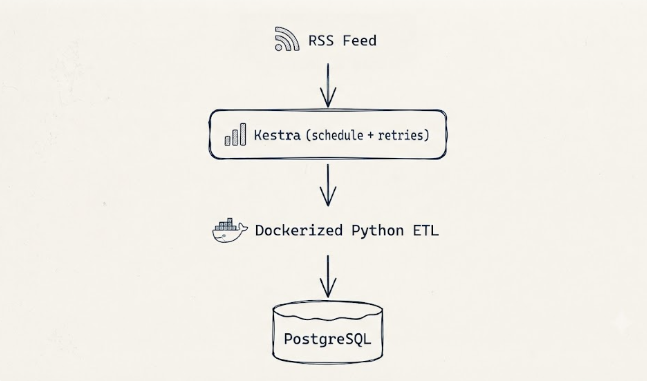
Looking at the final architecture, it's tempting to think the project was always heading in this direction.
It wasn't.
Each layer was added only after the previous one had been validated.
- The ETL came first.
- Then PostgreSQL.
- Then Docker.
- Finally, Kestra.
That order mattered.
Because every component had already been tested independently, I never found myself debugging Python, Docker, PostgreSQL, and Kestra at the same time. Each decision reduced the number of unknowns instead of increasing them.
More importantly, every component ended up with a clear responsibility.
- Python knows how to fetch, parse, and persist RSS articles.
- PostgreSQL knows how to store data safely and prevent duplicates.
- Docker provides a consistent execution environment.
- Kestra decides when the workload should run and what should happen if it fails.
None of those components are trying to do each other's jobs.
Ironically, that's what made the finished system feel much simpler than I expected.
What This Project Changed About the Way I Think
When I started learning data engineering, I assumed the difficult part would be writing ETL code.
That's what most beginner tutorials focus on.
- You learn how to call an API.
- You transform the data.
- You save it somewhere.
Repeat.
Those are valuable skills, but they're only one part of the picture.
This project taught me that the engineering begins after the script works.
Once a pipeline is expected to run every hour, survive transient failures, avoid duplicate data, and produce logs that explain what happened, the questions become much more interesting.
You're no longer thinking about individual functions. You're thinking about systems.
One of the biggest mindset shifts for me was understanding the difference between execution and orchestration.
At first, those ideas felt almost interchangeable. Now they feel completely separate.
The Python application should focus on business logic. The orchestrator should focus on when, where, and how that application runs.
Keeping those responsibilities separate made the entire project easier to reason about.
It also changed how I think about Docker.
Before this project, I saw Docker primarily as a way to package applications.
Now I see it as a deployment artifact.
Once the ETL had been packaged into a container and validated independently, I could stop worrying about whether it would behave differently inside Kestra.
That confidence turned out to be one of the biggest advantages of containerizing the application.
Perhaps the most important lesson, though, had nothing to do with Kestra or Docker. It was the value of building incrementally.
Every major decision followed the same pattern.
- Build the smallest thing that works.
- Validate it.
- Only then introduce the next layer.
That approach made the project feel much less overwhelming than trying to connect everything together from the beginning.
Looking back, I think that's a lesson I'll carry into every future project, regardless of the technology.
Looking Ahead
This RSS pipeline is only the second project in my data engineering learning journey. Compared to my first ETL pipeline, the code itself isn't dramatically more complex. What changed was the way I approached the problem.
Instead of asking, "How do I write this script?", I found myself asking questions like:
- Where should this responsibility live?
- What happens if it fails?
- Can I run it repeatedly without worrying about duplicate data
- Can I trust it to run when I'm not watching?
Those questions pushed me to think less like someone writing Python code and more like someone designing a system. And I suspect that's the real value of building projects.
Every project teaches a new tool. But the best projects slowly change the way you think. This one certainly did.
I'm sure the next project will challenge a completely different set of assumptions. Honestly, I'm looking forward to finding out what they are.
This is part of my ongoing series documenting my transition from systems analyst to data engineer. If you’ve been following along, thank you.
Connect with me on LinkedIn ,YouTube , and Twitter .
Register Now to Continue Reading
Unlock Towards Data Science with a Free Account
All articles on Towards Data Science are available to registered users. Create a free account today to access this article and thousands more.
Register for freeSign in to your account
 Written By
See all from Ibrahim Salami
Data EngineerDockerEtlEtl PipelinePython
Share This Article
Towards Data Science is a community publication. Submit your insights to reach our global audience and earn through the TDS Author Payment Program.
Write for TDS
Related Articles
Data Science
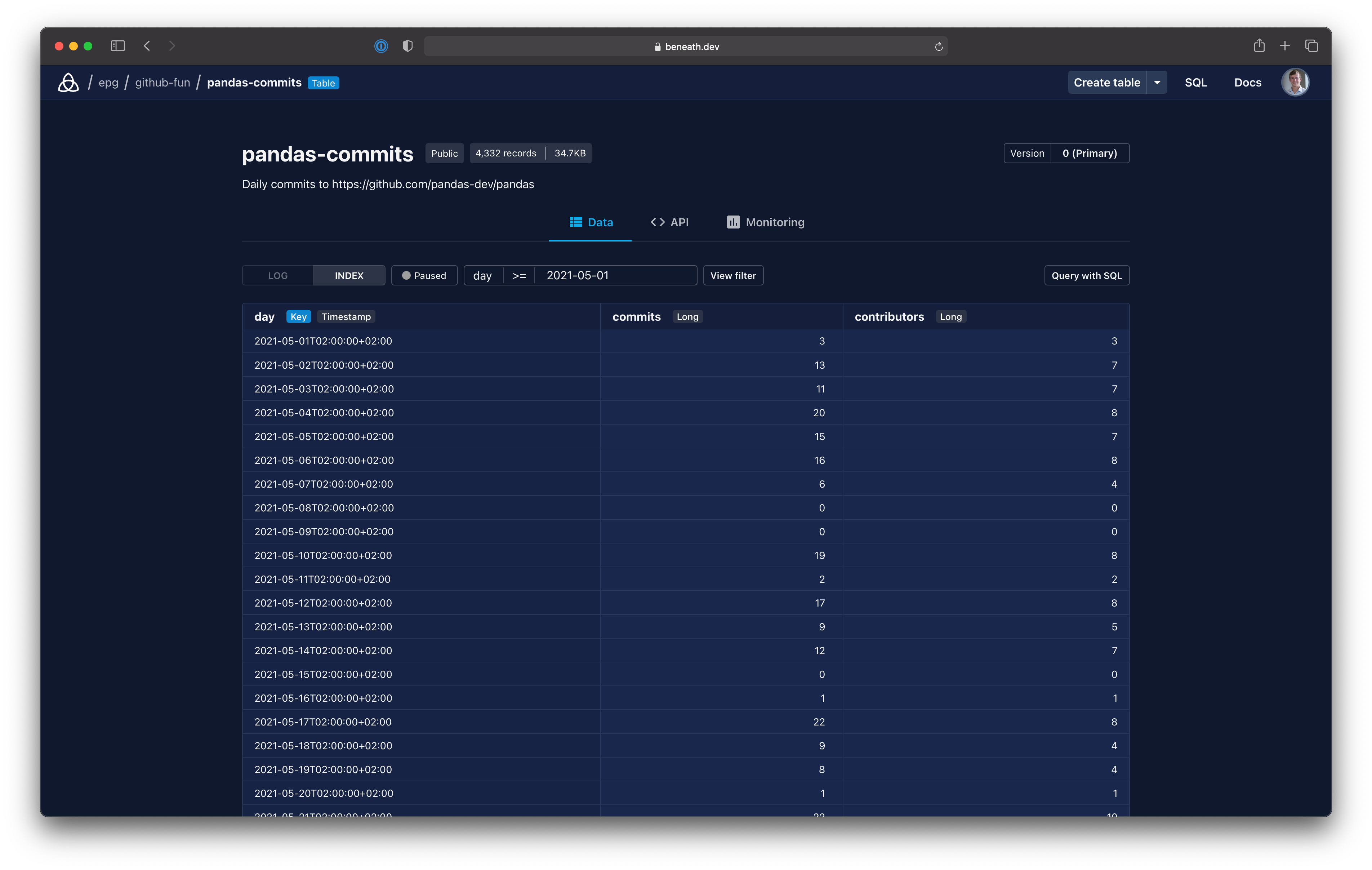
Share a dataframe with others or integrate the data into a frontend.
Eric Green
July 5, 20213 min read
Data Engineering
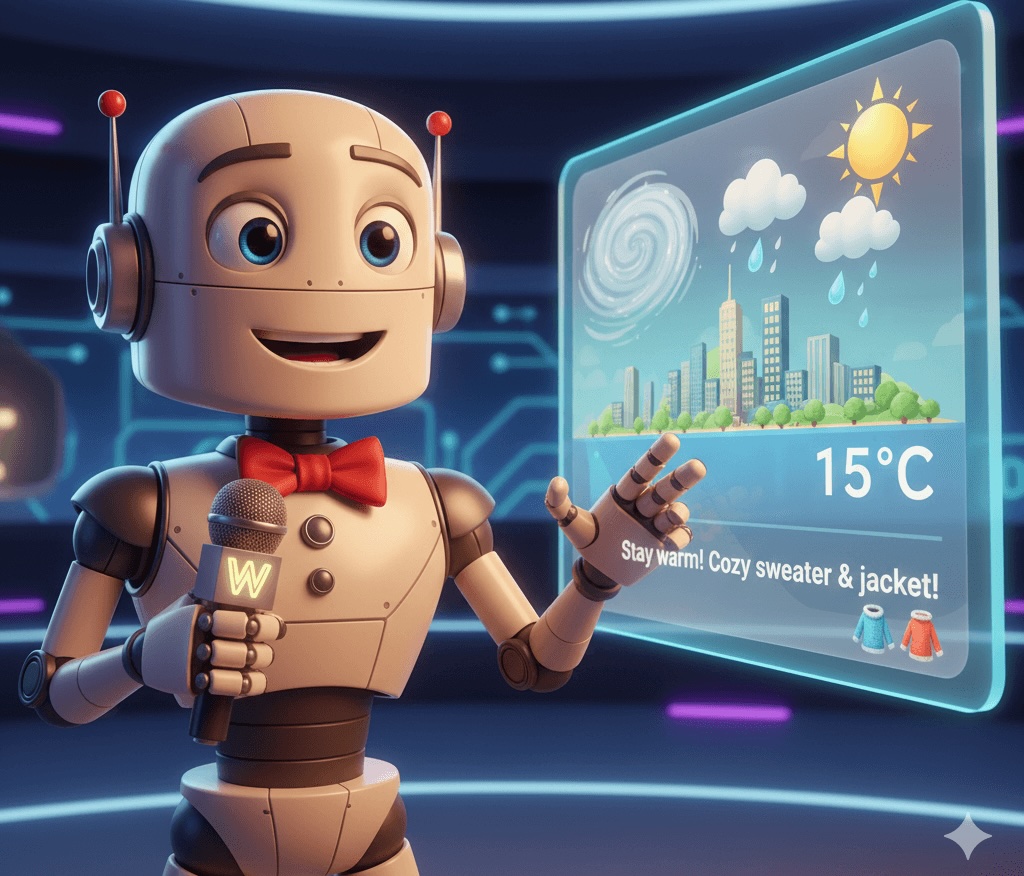
A step-by-step guide from weather API ETL to dashboard on Databricks
Gustavo Santos
December 26, 202510 min read
Machine Learning
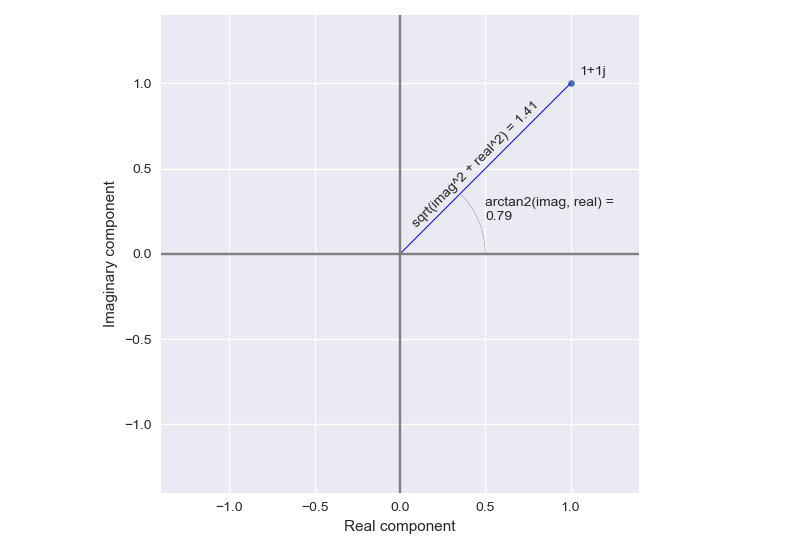
Magnitude and phase encoding in complex data
Peter Barrett Bryan
December 25, 20213 min read
Improving your Python Code Through Documentation, Type Hinting and Proper Variable Names
Andy McDonald
July 22, 20227 min read
Programming
Turn your terraform to spin in multiple projects using yaml
Daniel Low
June 24, 20243 min read
Data Science
Let’s observe the matter on the atomic level
Dmitrii Eliuseev
August 5, 202515 min read
Data Engineering
A Beginner's Hand's on Guide to PySpark with Google Colab
Garvit Arya
July 4, 20214 min read
Machine Learning
PyTorch model performance analysis and optimization—Part 7
Chaim Rand
February 6, 202512 min read
Programming
Analyzing the usage of SQL Generator
Josh Berry
September 20, 20224 min read
Your home for data science and AI. The world's leading publication for data science, data analytics, data engineering, machine learning, and artificial intelligence professionals.
Subscribe to Our NewsletterWrite For TDS•About•Advertise•Privacy Policy•Terms of Use
© Insight Media Group, LLC 2026•The New Stack•roadmap.sh•Creator Network
Recommended Articles
Close