保留正文与补采附件。源页面当前未重新核验;具体限制见交付清单。
 We value your privacy
We use cookies to enhance your browsing experience, serve personalised ads or content, and analyse our traffic. By clicking "Accept All", you consent to our use of cookies.
Customise Reject All Accept All
Customise Consent Preferences
We value your privacy
We use cookies to enhance your browsing experience, serve personalised ads or content, and analyse our traffic. By clicking "Accept All", you consent to our use of cookies.
Customise Reject All Accept All
Customise Consent Preferences  We use cookies to help you navigate efficiently and perform certain functions. You will find detailed information about all cookies under each consent category below.
The cookies that are categorised as "Necessary" are stored on your browser as they are essential for enabling the basic functionalities of the site. ... Show more
NecessaryAlways Active
Necessary cookies are required to enable the basic features of this site, such as providing secure log-in or adjusting your consent preferences. These cookies do not store any personally identifiable data.
We use cookies to help you navigate efficiently and perform certain functions. You will find detailed information about all cookies under each consent category below.
The cookies that are categorised as "Necessary" are stored on your browser as they are essential for enabling the basic functionalities of the site. ... Show more
NecessaryAlways Active
Necessary cookies are required to enable the basic features of this site, such as providing secure log-in or adjusting your consent preferences. These cookies do not store any personally identifiable data.
-
Cookie
BCTempID
-
Duration
10 minutes
-
Description
No description available.
-
Cookie
__cf_bm
-
Duration
1 hour
-
Description
This cookie, set by Cloudflare, is used to support Cloudflare Bot Management.
-
Cookie
AWSALBCORS
-
Duration
7 days
-
Description
Amazon Web Services set this cookie for load balancing.
-
Cookie
_cfuvid
-
Duration
session
-
Description
Cloudflare sets this cookie to track users across sessions to optimize user experience by maintaining session consistency and providing personalized services
-
Cookie
li_gc
-
Duration
6 months
-
Description
Linkedin set this cookie for storing visitor's consent regarding using cookies for non-essential purposes.
-
Cookie
__hssrc
-
Duration
session
-
Description
This cookie is set by Hubspot whenever it changes the session cookie. The __hssrc cookie set to 1 indicates that the user has restarted the browser, and if the cookie does not exist, it is assumed to be a new session.
-
Cookie
__hssc
-
Duration
1 hour
-
Description
HubSpot sets this cookie to keep track of sessions and to determine if HubSpot should increment the session number and timestamps in the __hstc cookie.
-
Cookie
wpEmojiSettingsSupports
-
Duration
session
-
Description
WordPress sets this cookie when a user interacts with emojis on a WordPress site. It helps determine if the user's browser can display emojis properly.
-
Cookie
BCSessionID
-
Duration
1 year 1 month 4 days
-
Description
Blueconic sets this cookie as a unique identifier for the BlueConic profile.
-
Cookie
_octo
-
Duration
1 year
-
Description
No description available.
-
Cookie
logged_in
-
Duration
1 year
-
Description
No description available.
-
Cookie
__Secure-YEC
-
Duration
past
-
Description
YouTube sets this cookie to stores the user's video player preferences using embedded YouTube video
-
Cookie
__eoi
-
Duration
6 months
-
Description
Description is currently not available.
-
Cookie
AWSALBTGCORS
-
Duration
7 days
-
Description
No description available.
-
Cookie
login-status-p
-
Duration
past
-
Description
Description is currently not available.
-
Cookie
AWSALBTG
-
Duration
7 days
-
Description
No description available.
-
Cookie
csrf_token
-
Duration
session
-
Description
No description available.
-
Cookie
token_v2
-
Duration
1 day
-
Description
Description is currently not available.
-
Cookie
D
-
Duration
1 year
-
Description
Description is currently not available.
-
Cookie
PHPSESSID
-
Duration
session
-
Description
This cookie is native to PHP applications. The cookie stores and identifies a user's unique session ID to manage user sessions on the website. The cookie is a session cookie and will be deleted when all the browser windows are closed.
-
Cookie
VISITOR_PRIVACY_METADATA
-
Duration
6 months
-
Description
YouTube sets this cookie to store the user's cookie consent state for the current domain.
-
Cookie
cookietest
-
Duration
session
-
Description
The cookietest cookie is typically used to determine whether the user's browser accepts cookies, essential for website functionality and user experience.
-
Cookie
__Host-airtable-session
-
Duration
1 year
-
Description
This cookie is used to enable us to integrate the services of Airtable.
-
Cookie
__Host-airtable-session.sig
-
Duration
1 year
-
Description
This cookie is used to enable us to integrate the services of Airtable.
-
Cookie
m
-
Duration
1 year 1 month 4 days
-
Description
Stripe sets this cookie for fraud prevention purposes. It identifies the device used to access the website, allowing the website to be formatted accordingly.
-
Cookie
BIGipServer*
-
Duration
session
-
Description
Marketo sets this cookie to collect information about the user's online activity and build a profile about their interests to provide advertisements relevant to the user.
-
Cookie
__cfruid
-
Duration
session
-
Description
Cloudflare sets this cookie to identify trusted web traffic.
-
Cookie
_GRECAPTCHA
-
Duration
6 months
-
Description
Google Recaptcha service sets this cookie to identify bots to protect the website against malicious spam attacks.
-
Cookie
__Secure-YNID
-
Duration
6 months
-
Description
Google cookie used to protect user security and prevent fraud, especially during the login process.
-
Cookie
cookieyes-consent
-
Duration
1 year
-
Description
CookieYes sets this cookie to remember users' consent preferences so that their preferences are respected on subsequent visits to this site. It does not collect or store any personal information about the site visitors.
Functional
Functional cookies help perform certain functionalities like sharing the content of the website on social media platforms, collecting feedback, and other third-party features.
-
Cookie
lidc
-
Duration
1 day
-
Description
LinkedIn sets the lidc cookie to facilitate data center selection.
-
Cookie
brw
-
Duration
1 year
-
Description
No description available.
-
Cookie
brwConsent
-
Duration
5 minutes
-
Description
Description is currently not available.
-
Cookie
WMF-Uniq
-
Duration
1 year
-
Description
Description is currently not available.
-
Cookie
loom_anon_comment
-
Duration
1 year
-
Description
No description available.
-
Cookie
loom_referral_video
-
Duration
session
-
Description
Description is currently not available.
-
Cookie
VISITOR_INFO1_LIVE
-
Duration
6 months
-
Description
A cookie set by YouTube to measure bandwidth that determines whether the user gets the new or old player interface.
-
Cookie
yt-remote-connected-devices
-
Duration
Never Expires
-
Description
YouTube sets this cookie to store the user's video preferences using embedded YouTube videos.
-
Cookie
ytidb::LAST_RESULT_ENTRY_KEY
-
Duration
Never Expires
-
Description
The cookie ytidb::LAST_RESULT_ENTRY_KEY is used by YouTube to store the last search result entry that was clicked by the user. This information is used to improve the user experience by providing more relevant search results in the future.
-
Cookie
yt-remote-device-id
-
Duration
Never Expires
-
Description
YouTube sets this cookie to store the user's video preferences using embedded YouTube videos.
-
Cookie
yt-remote-session-name
-
Duration
session
-
Description
The yt-remote-session-name cookie is used by YouTube to store the user's video player preferences using embedded YouTube video.
-
Cookie
yt-remote-fast-check-period
-
Duration
session
-
Description
The yt-remote-fast-check-period cookie is used by YouTube to store the user's video player preferences for embedded YouTube videos.
-
Cookie
yt-remote-session-app
-
Duration
session
-
Description
The yt-remote-session-app cookie is used by YouTube to store user preferences and information about the interface of the embedded YouTube video player.
-
Cookie
yt-remote-cast-available
-
Duration
session
-
Description
The yt-remote-cast-available cookie is used to store the user's preferences regarding whether casting is available on their YouTube video player.
-
Cookie
yt-remote-cast-installed
-
Duration
session
-
Description
The yt-remote-cast-installed cookie is used to store the user's video player preferences using embedded YouTube video.
-
Cookie
cp_session
-
Duration
3 months
-
Description
Codepen sets this cookie for Help systems found in the website.
-
Cookie
loid
-
Duration
1 year 1 month 4 days
-
Description
This cookie is set by the Reddit. The cookie enables the sharing of content from the website onto the social media platform.
Analytics
Analytical cookies are used to understand how visitors interact with the website. These cookies help provide information on metrics such as the number of visitors, bounce rate, traffic source, etc.
-
Cookie
__hstc
-
Duration
6 months
-
Description
Hubspot set this main cookie for tracking visitors. It contains the domain, initial timestamp (first visit), last timestamp (last visit), current timestamp (this visit), and session number (increments for each subsequent session).
-
Cookie
hubspotutk
-
Duration
6 months
-
Description
HubSpot sets this cookie to keep track of the visitors to the website. This cookie is passed to HubSpot on form submission and used when deduplicating contacts.
-
Cookie
_ga
-
Duration
1 year 1 month 4 days
-
Description
Google Analytics sets this cookie to calculate visitor, session and campaign data and track site usage for the site's analytics report. The cookie stores information anonymously and assigns a randomly generated number to recognise unique visitors.
-
Cookie
ga*
-
Duration
1 year 1 month 4 days
-
Description
Google Analytics sets this cookie to store and count page views.
-
Cookie
__Host-psifi.analyticsTrace
-
Duration
6 hours
-
Description
Description is currently not available.
-
Cookie
__Host-psifi.analyticsTraceV2
-
Duration
6 hours
-
Description
Description is currently not available.
-
Cookie
_gh_sess
-
Duration
session
-
Description
GitHub sets this cookie for temporary application and framework state between pages like what step the user is on in a multiple step form.
-
Cookie
YSC
-
Duration
session
-
Description
YSC cookie is set by Youtube and is used to track the views of embedded videos on Youtube pages.
-
Cookie
ajs_anonymous_id
-
Duration
1 year
-
Description
This cookie is set by Segment to count the number of people who visit a certain site by tracking if they have visited before.
-
Cookie
vuid
-
Duration
1 year 1 month 4 days
-
Description
Vimeo installs this cookie to collect tracking information by setting a unique ID to embed videos on the website.
Performance
Performance cookies are used to understand and analyse the key performance indexes of the website which helps in delivering a better user experience for the visitors.
-
Cookie
AWSALB
-
Duration
7 days
-
Description
AWSALB is an application load balancer cookie set by Amazon Web Services to map the session to the target.
-
Cookie
acq
-
Duration
past
-
Description
Description is currently not available.
-
Cookie
acq.sig
-
Duration
past
-
Description
Description is currently not available.
-
Cookie
ptc
-
Duration
2 years
-
Description
No description available.
Advertisement
Advertisement cookies are used to provide visitors with customised advertisements based on the pages you visited previously and to analyse the effectiveness of the ad campaigns.
-
Cookie
muc_ads
-
Duration
1 year 1 month 4 days
-
Description
Twitter sets this cookie to collect user behaviour and interaction data to optimize the website.
-
Cookie
guest_id_marketing
-
Duration
1 year 1 month 4 days
-
Description
Twitter sets this cookie to identify and track the website visitor.
-
Cookie
guest_id_ads
-
Duration
1 year 1 month 4 days
-
Description
Twitter sets this cookie to identify and track the website visitor.
-
Cookie
personalization_id
-
Duration
1 year 1 month 4 days
-
Description
Twitter sets this cookie to integrate and share features for social media and also store information about how the user uses the website, for tracking and targeting.
-
Cookie
guest_id
-
Duration
1 year 1 month 4 days
-
Description
Twitter sets this cookie to identify and track the website visitor. It registers if a user is signed in to the Twitter platform and collects information about ad preferences.
-
Cookie
bcookie
-
Duration
1 year
-
Description
LinkedIn sets this cookie from LinkedIn share buttons and ad tags to recognize browser IDs.
-
Cookie
__Secure-ROLLOUT_TOKEN
-
Duration
6 months
-
Description
YouTube sets this cookie to manage feature rollout and experimentation. It helps Google control which new features or interface changes are shown to users as part of testing and staged rollouts, ensuring consistent experience for a given user during an experiment.
-
Cookie
yt.innertube::nextId
-
Duration
Never Expires
-
Description
YouTube sets this cookie to register a unique ID to store data on what videos from YouTube the user has seen.
-
Cookie
yt.innertube::requests
-
Duration
Never Expires
-
Description
YouTube sets this cookie to register a unique ID to store data on what videos from YouTube the user has seen.
-
Cookie
session_tracker
-
Duration
session
-
Description
This cookie is set by the Reddit. This cookie is used to identify trusted web traffic. It also helps in adverstising on the website.
-
Cookie
edgebucket
-
Duration
session
-
Description
Reddit sets this cookie to save the information about a log-on Reddit user, for the purpose of advertisement recommendations and updating the content.
-
Cookie
did
-
Duration
1 year
-
Description
Arbor sets this cookie to show targeted ads to site visitors.This cookie expires after 2 months or 1 year.
Uncategorised
Other uncategorised cookies are those that are being analysed and have not been classified into a category as yet.
No cookies to display.
Reject All Save My Preferences Accept All
Toggle SearchToggle Mobile Navigation
Publish AI, ML & data-science insights to a global community of data professionals.
Sign inSubmit an Article
LatestEditor's PicksNewsletterShipAI
Write For TDS
LinkedInXToggle Search
Data Science
Build Autonomous AI Agents with Function Calling
Transform your chatbot into an agent that can interact with external APIs
Julian Yip
April 2, 202411 min read
Function Calling is not something new. In July 2023, OpenAI introduced Function Calling for their GPT models, a feature now being adopted by competitors. Google's Gemini API recently supported it, and Anthropic is integrating it into Claude. Function Calling is becoming essential for large language models (LLMs), enhancing their capabilities. All the more useful to learn this technique!
With this in mind, I aim to write a comprehensive tutorial covering Function Calling beyond basic introductions (there are already plenty of tutorials for it). The focus will be on practical implementation, building a fully autonomous AI agent and integrating it with Streamlit for a ChatGPT-like interface. Although OpenAI is used for demonstration, this tutorial can be easily adapted for other LLMs supporting Function Calling, such as Gemini.
What is Function Calling for?
Function Calling enables developers to describe functions (aka tools, you can consider this as actions for the model to take, like performing calculation, or making an order), and have the model intelligently choose to output a JSON object containing arguments to call those functions. In simpler terms, it allows for:
- Autonomous decision making : Models can intelligently choose tools to respond to questions.
- Reliable parsing : Responses are in JSON format, instead of the more typical dialogue-like response. It might not seem much from the first look, but this is what allows LLM to connect to external systems, say via APIs with structured inputs.
It opens up numerous possibilities:
Learn this step by step with the interactive AI and Data Scientist roadmap.
- Autonomous AI assistants : Bots can interact with internal systems for tasks like customer orders and returns, beyond providing answers to enquiries
- Personal research assistants : Say if you are planning for your travel, assistants can search the web, crawl content, compare options, and summarize results in Excel.
- IoT voice commands : Models can control devices or suggest actions based on detected intents, such as adjusting the AC temperature.
(Sidetracking a bit: To realize such potentials, we must have a systematic way to design our prompts and to test them. I have written an article about this too!)
Prompt Like a Data Scientist: Auto Prompt Optimization and Testing with DSPy
Without further ado, let's explore what Function Calling is about!
The Structure of Function Calling
Borrowing from Gemini's Function Calling documentation, Function Calling has the below structure, which works the same in OpenAI
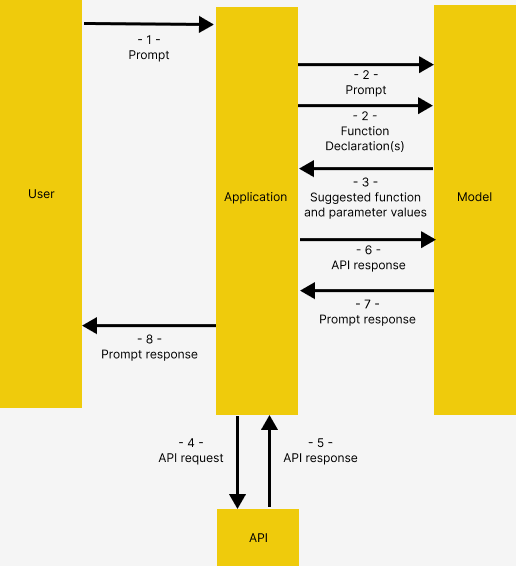 Image from Gemini's Function Calling documentation
- User issues prompt to the application
- Application passes the user-provided prompt, and the Function Declaration(s), which is a description of the tool(s) that the model could use
- Based on the Function Declaration, the model suggests the tool to use, and the relevant request parameters. Notice the model outputs the suggested tool and parameters only, WITHOUT actually calling the functions
- & 5. Based on the response, the application invokes the relevant API
- & 7. The response from API is fed into the model again to output a human-readable response
- Application returns the final response to the user, then repeat from 1.
This might seem convuluted, but the concept will be illustrated in detail with example
Architecture
Before diving into the code, a few words about the demo application's architecture
Solution
Here we build an assistant for tourists visiting a hotel. The assistant has access to the following tools, which allows the assistant to access external applications.
get_items, purchase_item: Connect to product catalog stored in database via API, for retrieving item list and making a purchase respectivelyrag_pipeline_func: Connect to document store with Retrieval Augmented Generation (RAG) to obtain information from unstructured texts e.g. hotel's brochures
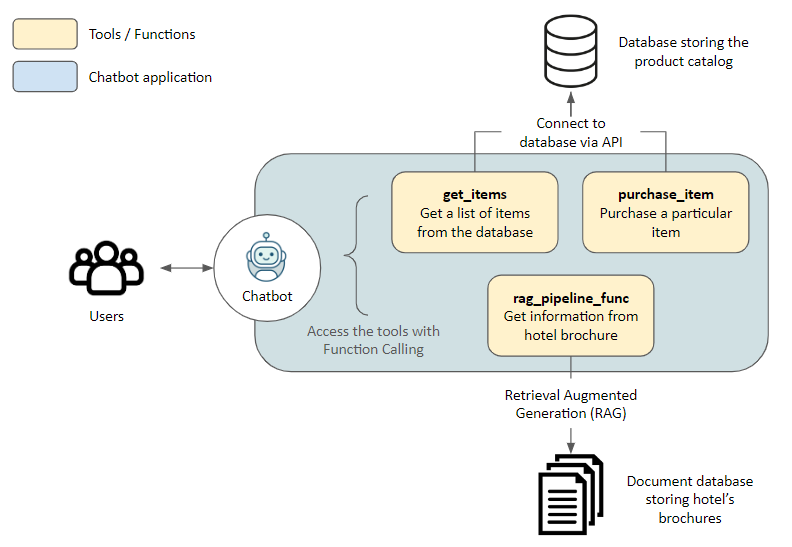
Tech stack
Now let's begin!
Sample Application
Preparation
Head over to Github to clone my code. The contents below can be found in the function_calling_demo Notebook.
Please also create and activate a virtual environment, then pip install -r requirements.txt to install the required packages
Initialization
We first connect to OpenRouter. Alternatively using the original OpenAIChatGenerator without overwritting the api_base_urlwould also work, provided you have an OpenAI API key
python
import os
from dotenv import load_dotenv
from haystack.components.generators.chat import OpenAIChatGenerator
from haystack.utils import Secret
from haystack.dataclasses import ChatMessage
from haystack.components.generators.utils import print_streaming_chunk

# Set your API key as environment variable before executing this
load_dotenv()
OPENROUTER_API_KEY = os.environ.get('OPENROUTER_API_KEY')

chat_generator = OpenAIChatGenerator(api_key=Secret.from_env_var("OPENROUTER_API_KEY"),
  api_base_url="https://openrouter.ai/api/v1",
  model="openai/gpt-4-turbo-preview",
        streaming_callback=print_streaming_chunk)
Then we test can the chat_generator be successfully invoked
python
chat_generator.run(messages=[ChatMessage.from_user("Return this text: 'test'")])
text
---------- The response should look like this ----------
{'replies': [ChatMessage(content="'test'", role=<ChatRole.ASSISTANT: 'assistant'>, name=None, meta={'model': 'openai/gpt-4-turbo-preview', 'index': 0, 'finish_reason': 'stop', 'usage': {}})]}
Step 1: Establish data store
Here we establish connection between our application and the two data sources: Document store for unstructured texts, and application database via API
Index Documents with a Pipeline
We provide sample texts in documents for the model to perform Retrival Augmented Generation (RAG). The texts are turned into embeddings and stored in an in-memory document store
python
from haystack import Pipeline, Document
from haystack.document_stores.in_memory import InMemoryDocumentStore
from haystack.components.writers import DocumentWriter
from haystack.components.embedders import SentenceTransformersDocumentEmbedder

# Sample documents
documents = [
    Document(content="Coffee shop opens at 9am and closes at 5pm."),
    Document(content="Gym room opens at 6am and closes at 10pm.")
]

# Create the document store
document_store = InMemoryDocumentStore()

# Create a pipeline to turn the texts into embeddings and store them in the document store
indexing_pipeline = Pipeline()
indexing_pipeline.add_component(
    "doc_embedder", SentenceTransformersDocumentEmbedder(model="sentence-transformers/all-MiniLM-L6-v2")
)
indexing_pipeline.add_component("doc_writer", DocumentWriter(document_store=document_store))

indexing_pipeline.connect("doc_embedder.documents", "doc_writer.documents")

indexing_pipeline.run({"doc_embedder": {"documents": documents}})
It should output this, corresponding to the documents we created as sample
json
{'doc_writer': {'documents_written': 2}}
Spin up API server
An API server made with Flask is created under db_api.py to connect to SQLite. Please spin it up by running python db_api.py in your terminal
 This would be shown in the terminal, if successfully executed
Also notice that some initial data has been added in
This would be shown in the terminal, if successfully executed
Also notice that some initial data has been added in db_api.py
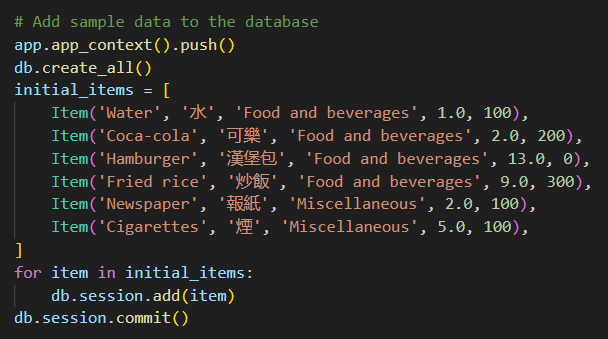 Sample data in the database
Step 2: Define the functions
Here we prepare the actual functions for the model to invoke AFTER Function Calling (Step 4–5 as described in The Structure of Function Calling)
RAG function
Namely the rag_pipeline_func. This is for the model to provide an answer by searching through the texts stored in the Document Store. We first define the RAG retrieval as a Haystack pipeline
python
from haystack.components.embedders import SentenceTransformersTextEmbedder
from haystack.components.retrievers.in_memory import InMemoryEmbeddingRetriever
from haystack.components.builders import PromptBuilder
from haystack.components.generators import OpenAIGenerator

template = """
Answer the questions based on the given context.

Context:
{% for document in documents %}
    {{ document.content }}
{% endfor %}
Question: {{ question }}
Answer:
"""
rag_pipe = Pipeline()
rag_pipe.add_component("embedder", SentenceTransformersTextEmbedder(model="sentence-transformers/all-MiniLM-L6-v2"))
rag_pipe.add_component("retriever", InMemoryEmbeddingRetriever(document_store=document_store))
rag_pipe.add_component("prompt_builder", PromptBuilder(template=template))
# Note to llm: We are using OpenAIGenerator, not the OpenAIChatGenerator, because the latter only accepts List[str] as input and cannot accept prompt_builder's str output
rag_pipe.add_component("llm", OpenAIGenerator(api_key=Secret.from_env_var("OPENROUTER_API_KEY"),
  api_base_url="https://openrouter.ai/api/v1",
  model="openai/gpt-4-turbo-preview"))

rag_pipe.connect("embedder.embedding", "retriever.query_embedding")
rag_pipe.connect("retriever", "prompt_builder.documents")
rag_pipe.connect("prompt_builder", "llm")
Test if the function works
python
query = "When does the coffee shop open?"
rag_pipe.run({"embedder": {"text": query}, "prompt_builder": {"question": query}})
This should yield the following output. Notice the replies that the model gave is from the sample documents we provided before
json
{'llm': {'replies': ['The coffee shop opens at 9am.'],
  'meta': [{'model': 'openai/gpt-4-turbo-preview',
    'index': 0,
    'finish_reason': 'stop',
    'usage': {'completion_tokens': 9,
     'prompt_tokens': 60,
     'total_tokens': 69,
     'total_cost': 0.00087}}]}}
We can then turn the rag_pipe into a function, which provides the replies only without adding in the other details
python
def rag_pipeline_func(query: str):
    result = rag_pipe.run({"embedder": {"text": query}, "prompt_builder": {"question": query}})

    return {"reply": result["llm"]["replies"][0]}
API calls
We define the get_items and purchase_itemfunctions for interacting with the database
python
# Flask's default local URL, change it if necessary
db_base_url = 'http://127.0.0.1:5000'

# Use requests to get the data from the database
import requests
import json

# get_categories is supplied as part of the prompt, it is not used as a tool
def get_categories():
    response = requests.get(f'{db_base_url}/category')
    data = response.json()
    return data

def get_items(ids=None,categories=None):
    params = {
        'id': ids,
        'category': categories,
    }
    response = requests.get(f'{db_base_url}/item', params=params)
    data = response.json()
    return data

def purchase_item(id,quantity):

    headers = {
    'Content-type':'application/json',
    'Accept':'application/json'
    }

    data = {
        'id': id,
        'quantity': quantity,
    }
    response = requests.post(f'{db_base_url}/item/purchase', json=data, headers=headers)
    return response.json()
Define the tool list
Now that we have defined the fuctions, we need to let the model recognize those functions, and to instruct them how they are used, by providing descriptions for them.
Since we are using OpenAI here, the tools is formatted as below following the format required by Open AI
python
tools = [
    {
        "type": "function",
        "function": {
            "name": "get_items",
            "description": "Get a list of items from the database",
            "parameters": {
                "type": "object",
                "properties": {
                    "ids": {
                        "type": "string",
                        "description": "Comma separated list of item ids to fetch",
                    },
                    "categories": {
                        "type": "string",
                        "description": "Comma separated list of item categories to fetch",
                    },
                },
                "required": [],
            },
        }
    },
    {
        "type": "function",
        "function": {
            "name": "purchase_item",
            "description": "Purchase a particular item",
            "parameters": {
                "type": "object",
                "properties": {
                    "id": {
                        "type": "string",
                        "description": "The given product ID, product name is not accepted here. Please obtain the product ID from the database first.",
                    },
                    "quantity": {
                        "type": "integer",
                        "description": "Number of items to purchase",
                    },
                },
                "required": [],
            },
        }
    },
    {
        "type": "function",
        "function": {
            "name": "rag_pipeline_func",
            "description": "Get information from hotel brochure",
            "parameters": {
                "type": "object",
                "properties": {
                    "query": {
                        "type": "string",
                        "description": "The query to use in the search. Infer this from the user's message. It should be a question or a statement",
                    }
                },
                "required": ["query"],
            },
        },
    }
]
Step 3: Putting it all together
We now have the necessary inputs to test Function Calling! Here we do a few things:
- Provide the initial prompt to the model, to give it some context
- Provide a sample user-generated message
- Most importantly, we pass the tool list to the chat generator in
tools
python
# 1. Initial prompt
context = f"""You are an assistant to tourists visiting a hotel.
You have access to a database of items (which includes {get_categories()}) that tourists can buy, you also have access to the hotel's brochure.
If the tourist's question cannot be answered from the database, you can refer to the brochure.
If the tourist's question cannot be answered from the brochure, you can ask the tourist to ask the hotel staff.
"""
messages = [
    ChatMessage.from_system(context),
    # 2. Sample message from user
    ChatMessage.from_user("Can I buy a coffee?"),
    ]

# 3. Passing the tools list and invoke the chat generator
response = chat_generator.run(messages=messages, generation_kwargs= {"tools": tools})
response
text
---------- Response ----------
{'replies': [ChatMessage(content='[{"index": 0, "id": "call_AkTWoiJzx5uJSgKW0WAI1yBB", "function": {"arguments": "{"categories":"Food and beverages"}", "name": "get_items"}, "type": "function"}]', role=<ChatRole.ASSISTANT: 'assistant'>, name=None, meta={'model': 'openai/gpt-4-turbo-preview', 'index': 0, 'finish_reason': 'tool_calls', 'usage': {}})]}
Now let's inspect the response. Notice how the Function Calling returns both the function chosen by the model, and the arguments for invoking the chosen function.
python
function_call = json.loads(response["replies"][0].content)[0]
function_name = function_call["function"]["name"]
function_args = json.loads(function_call["function"]["arguments"])
print("Function Name:", function_name)
print("Function Arguments:", function_args)
text
---------- Response ----------
Function Name: get_items
Function Arguments: {'categories': 'Food and beverages'}
When presented with another question, the model will use another tool that is more relevant
python
# Another question
messages.append(ChatMessage.from_user("Where's the coffee shop?"))

# Invoke the chat generator, and passing the tools list
response = chat_generator.run(messages=messages, generation_kwargs= {"tools": tools})
function_call = json.loads(response["replies"][0].content)[0]
function_name = function_call["function"]["name"]
function_args = json.loads(function_call["function"]["arguments"])
print("Function Name:", function_name)
print("Function Arguments:", function_args)
text
---------- Response ----------
Function Name: rag_pipeline_func
Function Arguments: {'query': "Where's the coffee shop?"}
Again, notice that no actual function is invoked here, this is what we will do next!
Calling the function
We can then feed the arguments into the chosen function
python
## Find the correspoding function and call it with the given arguments
available_functions = {"get_items": get_items, "purchase_item": purchase_item,"rag_pipeline_func": rag_pipeline_func}
function_to_call = available_functions[function_name]
function_response = function_to_call(**function_args)
print("Function Response:", function_response)
text
---------- Response ----------
Function Response: {'reply': 'The provided context does not specify a physical location for the coffee shop, only its operating hours. Therefore, I cannot determine where the coffee shop is located based on the given information.'}
The response from rag_pipeline_func can then passed as a context to the chat by appending it under the messages, for the model to provide the final answer
python
messages.append(ChatMessage.from_function(content=json.dumps(function_response), name=function_name))
response = chat_generator.run(messages=messages)
response_msg = response["replies"][0]

print(response_msg.content)
text
---------- Response ----------
For the location of the coffee shop within the hotel, I recommend asking the hotel staff directly. They will be able to guide you to it accurately.
We now have completed the chat cycle!
Step 4: Turn into an interactive chat
The code above shows how Function Calling can be done, but we want to go a step further by turning it into an interactive chat
Here I showcase two methods to do it, from the more primitive input() that prints the dialogue into the notebook itself, to rendering it through Streamlit to provide it with an ChatGPT-like UI
**input()**loop
The code is copied from Haystack's tutorial, which allows us to quickly test the model. Note: This application is created to demonstrate the idea of Function Calling, and is NOT meant to be perfectly robust e.g. supporting the order of multiple items at the same time, no hallucination, etc.
python
import json
from haystack.dataclasses import ChatMessage, ChatRole

response = None
messages = [
    ChatMessage.from_system(context)
]

while True:
    # if OpenAI response is a tool call
    if response and response["replies"][0].meta["finish_reason"] == "tool_calls":
        function_calls = json.loads(response["replies"][0].content)

        for function_call in function_calls:
            ## Parse function calling information
            function_name = function_call["function"]["name"]
            function_args = json.loads(function_call["function"]["arguments"])

            ## Find the correspoding function and call it with the given arguments
            function_to_call = available_functions[function_name]
            function_response = function_to_call(**function_args)

            ## Append function response to the messages list using `ChatMessage.from_function`
            messages.append(ChatMessage.from_function(content=json.dumps(function_response), name=function_name))

    # Regular Conversation
    else:
        # Append assistant messages to the messages list
        if not messages[-1].is_from(ChatRole.SYSTEM):
            messages.append(response["replies"][0])

        user_input = input("ENTER YOUR MESSAGE 👇  INFO: Type 'exit' or 'quit' to stopn")
        if user_input.lower() == "exit" or user_input.lower() == "quit":
            break
        else:
            messages.append(ChatMessage.from_user(user_input))

    response = chat_generator.run(messages=messages, generation_kwargs={"tools": tools})
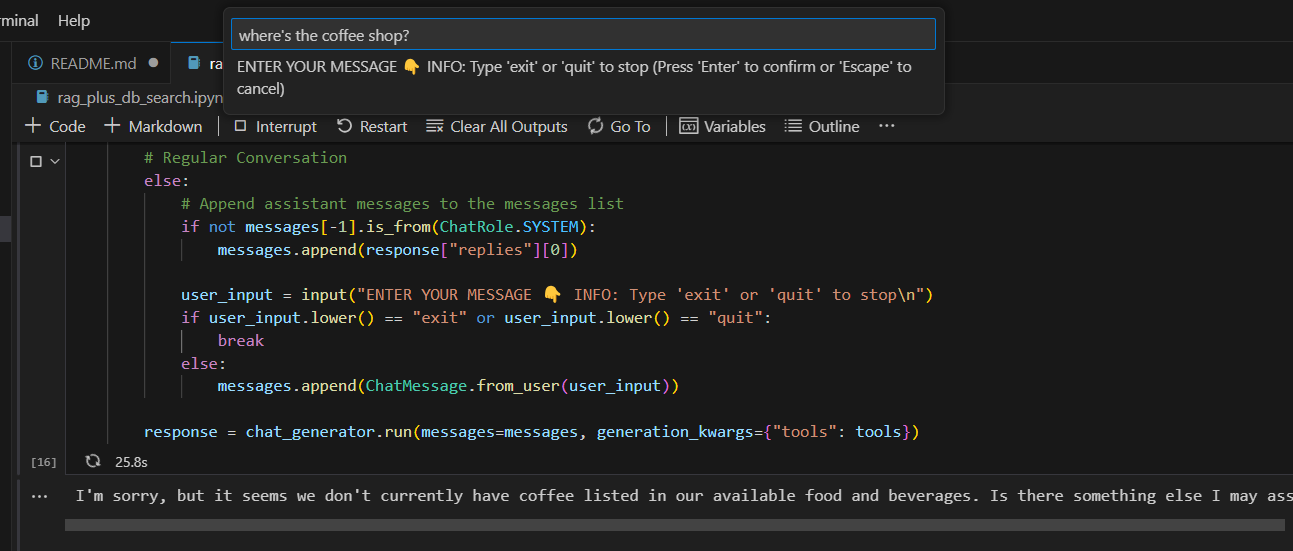 Running interactive chats in the IDE
While it works, we might want to have something that looks nicer.
Streamlit interface
Streamlit turns data scripts into shareable web apps, which provides a neat UI for our application. The code shown above are adapted into a Streamlit application under the
Running interactive chats in the IDE
While it works, we might want to have something that looks nicer.
Streamlit interface
Streamlit turns data scripts into shareable web apps, which provides a neat UI for our application. The code shown above are adapted into a Streamlit application under the streamlit folder of my repo
You can run it by:
- If you have not done so already, spin up the API server with
python db_api.py
- Set the OPENROUTER_API_KEY as environment variable e.g.
export OPENROUTER_API_KEY = '@REPLACE WITH YOUR API KEY' assuming you are on Linux / executing with git bash
- Navigate to the
streamlit folder in the terminal with cd streamlit
- Run Streamlit with
streamlit run app.py. A new tab should be automatically created in your browser running the application
That's basically it! I hope you enjoy this article.
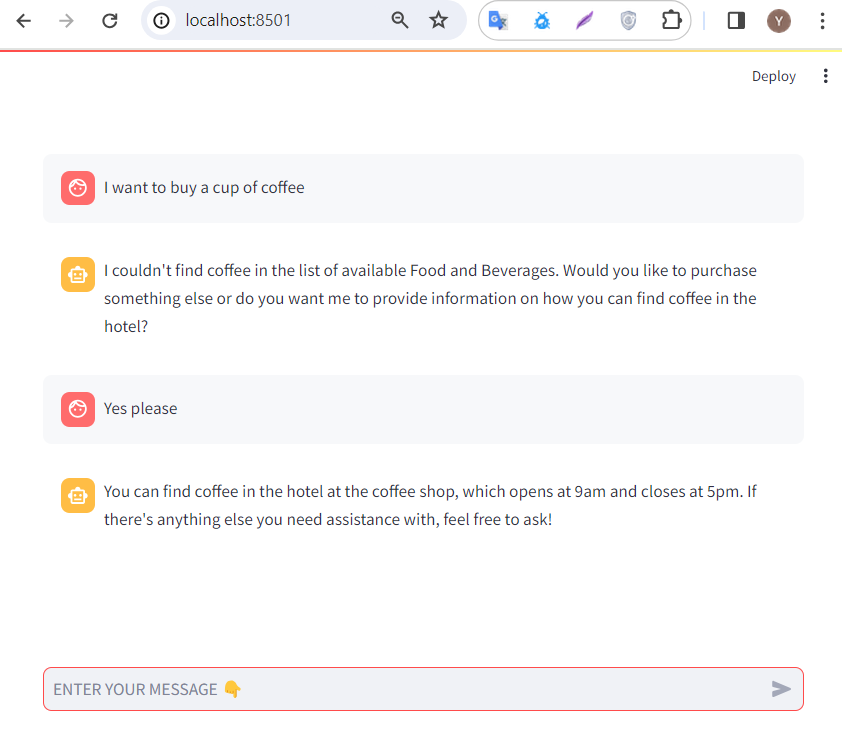 Streamlit UI
*Unless otherwise noted, all images are by the author
Streamlit UI
*Unless otherwise noted, all images are by the author
Register Now to Continue Reading
Unlock Towards Data Science with a Free Account
All articles on Towards Data Science are available to registered users. Create a free account today to access this article and thousands more.
Register for freeSign in to your account
 Written By
See all from Julian Yip
AIChatbotsData ScienceLlmOpenAI
Share This Article
Towards Data Science is a community publication. Submit your insights to reach our global audience and earn through the TDS Author Payment Program.
Write for TDS
Related Articles
Machine Learning
An overview of key differences from scikit-learn
Eryk Lewinson
June 13, 20215 min read
Large Language Model
Enterprise Document Intelligence [Vol.1 #14D] - The index lists what the case type demands before any folder is opened, and the two questions worth building for are not retrieval questions at all
Angela and Kezhan Shi
August 23, 202620 min read
Data Science
Different Styles of Interviews that You Can Try Out
Rose Day
February 4, 20227 min read
Programming
These extensions are must for a smooth workflow
Sara A. Metwalli
August 23, 20205 min read
Machine Learning
Analogies, categorisation, relatedness and spatial interpolation of word embeddings.
José Padarian
August 20, 20198 min read
Data Science
If big is not big enough In the last post, we have explored how tsfresh...
Nils Braun
December 7, 202015 min read
Artificial Intelligence
In MLOps level 1 the machine learning pipeline is automated. By doing so you achieve...
Marco Susilo
May 9, 20215 min read
Artificial Intelligence
With Python Implementation
Alexey Kravets
December 29, 202210 min read
Deep Learning
Lessons learned from building an open-source deep learning for time series framework
Isaac Godfried
September 25, 20206 min read
Your home for data science and AI. The world's leading publication for data science, data analytics, data engineering, machine learning, and artificial intelligence professionals.
Subscribe to Our NewsletterWrite For TDS•About•Advertise•Privacy Policy•Terms of Use
© Insight Media Group, LLC 2026•The New Stack•roadmap.sh•Creator Network
Recommended Articles
Close