保留正文与补采附件。源页面当前未重新核验;具体限制见交付清单。
 We value your privacy
We use cookies to enhance your browsing experience, serve personalised ads or content, and analyse our traffic. By clicking "Accept All", you consent to our use of cookies.
Customise Reject All Accept All
Customise Consent Preferences
We value your privacy
We use cookies to enhance your browsing experience, serve personalised ads or content, and analyse our traffic. By clicking "Accept All", you consent to our use of cookies.
Customise Reject All Accept All
Customise Consent Preferences  We use cookies to help you navigate efficiently and perform certain functions. You will find detailed information about all cookies under each consent category below.
The cookies that are categorised as "Necessary" are stored on your browser as they are essential for enabling the basic functionalities of the site. ... Show more
NecessaryAlways Active
Necessary cookies are required to enable the basic features of this site, such as providing secure log-in or adjusting your consent preferences. These cookies do not store any personally identifiable data.
We use cookies to help you navigate efficiently and perform certain functions. You will find detailed information about all cookies under each consent category below.
The cookies that are categorised as "Necessary" are stored on your browser as they are essential for enabling the basic functionalities of the site. ... Show more
NecessaryAlways Active
Necessary cookies are required to enable the basic features of this site, such as providing secure log-in or adjusting your consent preferences. These cookies do not store any personally identifiable data.
-
Cookie
BCTempID
-
Duration
10 minutes
-
Description
No description available.
-
Cookie
__cf_bm
-
Duration
1 hour
-
Description
This cookie, set by Cloudflare, is used to support Cloudflare Bot Management.
-
Cookie
AWSALBCORS
-
Duration
7 days
-
Description
Amazon Web Services set this cookie for load balancing.
-
Cookie
_cfuvid
-
Duration
session
-
Description
Cloudflare sets this cookie to track users across sessions to optimize user experience by maintaining session consistency and providing personalized services
-
Cookie
li_gc
-
Duration
6 months
-
Description
Linkedin set this cookie for storing visitor's consent regarding using cookies for non-essential purposes.
-
Cookie
__hssrc
-
Duration
session
-
Description
This cookie is set by Hubspot whenever it changes the session cookie. The __hssrc cookie set to 1 indicates that the user has restarted the browser, and if the cookie does not exist, it is assumed to be a new session.
-
Cookie
__hssc
-
Duration
1 hour
-
Description
HubSpot sets this cookie to keep track of sessions and to determine if HubSpot should increment the session number and timestamps in the __hstc cookie.
-
Cookie
wpEmojiSettingsSupports
-
Duration
session
-
Description
WordPress sets this cookie when a user interacts with emojis on a WordPress site. It helps determine if the user's browser can display emojis properly.
-
Cookie
BCSessionID
-
Duration
1 year 1 month 4 days
-
Description
Blueconic sets this cookie as a unique identifier for the BlueConic profile.
-
Cookie
_octo
-
Duration
1 year
-
Description
No description available.
-
Cookie
logged_in
-
Duration
1 year
-
Description
No description available.
-
Cookie
__Secure-YEC
-
Duration
past
-
Description
YouTube sets this cookie to stores the user's video player preferences using embedded YouTube video
-
Cookie
__eoi
-
Duration
6 months
-
Description
Description is currently not available.
-
Cookie
AWSALBTGCORS
-
Duration
7 days
-
Description
No description available.
-
Cookie
login-status-p
-
Duration
past
-
Description
Description is currently not available.
-
Cookie
AWSALBTG
-
Duration
7 days
-
Description
No description available.
-
Cookie
csrf_token
-
Duration
session
-
Description
No description available.
-
Cookie
token_v2
-
Duration
1 day
-
Description
Description is currently not available.
-
Cookie
D
-
Duration
1 year
-
Description
Description is currently not available.
-
Cookie
PHPSESSID
-
Duration
session
-
Description
This cookie is native to PHP applications. The cookie stores and identifies a user's unique session ID to manage user sessions on the website. The cookie is a session cookie and will be deleted when all the browser windows are closed.
-
Cookie
VISITOR_PRIVACY_METADATA
-
Duration
6 months
-
Description
YouTube sets this cookie to store the user's cookie consent state for the current domain.
-
Cookie
cookietest
-
Duration
session
-
Description
The cookietest cookie is typically used to determine whether the user's browser accepts cookies, essential for website functionality and user experience.
-
Cookie
__Host-airtable-session
-
Duration
1 year
-
Description
This cookie is used to enable us to integrate the services of Airtable.
-
Cookie
__Host-airtable-session.sig
-
Duration
1 year
-
Description
This cookie is used to enable us to integrate the services of Airtable.
-
Cookie
m
-
Duration
1 year 1 month 4 days
-
Description
Stripe sets this cookie for fraud prevention purposes. It identifies the device used to access the website, allowing the website to be formatted accordingly.
-
Cookie
BIGipServer*
-
Duration
session
-
Description
Marketo sets this cookie to collect information about the user's online activity and build a profile about their interests to provide advertisements relevant to the user.
-
Cookie
__cfruid
-
Duration
session
-
Description
Cloudflare sets this cookie to identify trusted web traffic.
-
Cookie
_GRECAPTCHA
-
Duration
6 months
-
Description
Google Recaptcha service sets this cookie to identify bots to protect the website against malicious spam attacks.
-
Cookie
__Secure-YNID
-
Duration
6 months
-
Description
Google cookie used to protect user security and prevent fraud, especially during the login process.
-
Cookie
cookieyes-consent
-
Duration
1 year
-
Description
CookieYes sets this cookie to remember users' consent preferences so that their preferences are respected on subsequent visits to this site. It does not collect or store any personal information about the site visitors.
Functional
Functional cookies help perform certain functionalities like sharing the content of the website on social media platforms, collecting feedback, and other third-party features.
-
Cookie
lidc
-
Duration
1 day
-
Description
LinkedIn sets the lidc cookie to facilitate data center selection.
-
Cookie
brw
-
Duration
1 year
-
Description
No description available.
-
Cookie
brwConsent
-
Duration
5 minutes
-
Description
Description is currently not available.
-
Cookie
WMF-Uniq
-
Duration
1 year
-
Description
Description is currently not available.
-
Cookie
loom_anon_comment
-
Duration
1 year
-
Description
No description available.
-
Cookie
loom_referral_video
-
Duration
session
-
Description
Description is currently not available.
-
Cookie
VISITOR_INFO1_LIVE
-
Duration
6 months
-
Description
A cookie set by YouTube to measure bandwidth that determines whether the user gets the new or old player interface.
-
Cookie
yt-remote-connected-devices
-
Duration
Never Expires
-
Description
YouTube sets this cookie to store the user's video preferences using embedded YouTube videos.
-
Cookie
ytidb::LAST_RESULT_ENTRY_KEY
-
Duration
Never Expires
-
Description
The cookie ytidb::LAST_RESULT_ENTRY_KEY is used by YouTube to store the last search result entry that was clicked by the user. This information is used to improve the user experience by providing more relevant search results in the future.
-
Cookie
yt-remote-device-id
-
Duration
Never Expires
-
Description
YouTube sets this cookie to store the user's video preferences using embedded YouTube videos.
-
Cookie
yt-remote-session-name
-
Duration
session
-
Description
The yt-remote-session-name cookie is used by YouTube to store the user's video player preferences using embedded YouTube video.
-
Cookie
yt-remote-fast-check-period
-
Duration
session
-
Description
The yt-remote-fast-check-period cookie is used by YouTube to store the user's video player preferences for embedded YouTube videos.
-
Cookie
yt-remote-session-app
-
Duration
session
-
Description
The yt-remote-session-app cookie is used by YouTube to store user preferences and information about the interface of the embedded YouTube video player.
-
Cookie
yt-remote-cast-available
-
Duration
session
-
Description
The yt-remote-cast-available cookie is used to store the user's preferences regarding whether casting is available on their YouTube video player.
-
Cookie
yt-remote-cast-installed
-
Duration
session
-
Description
The yt-remote-cast-installed cookie is used to store the user's video player preferences using embedded YouTube video.
-
Cookie
cp_session
-
Duration
3 months
-
Description
Codepen sets this cookie for Help systems found in the website.
-
Cookie
loid
-
Duration
1 year 1 month 4 days
-
Description
This cookie is set by the Reddit. The cookie enables the sharing of content from the website onto the social media platform.
Analytics
Analytical cookies are used to understand how visitors interact with the website. These cookies help provide information on metrics such as the number of visitors, bounce rate, traffic source, etc.
-
Cookie
__hstc
-
Duration
6 months
-
Description
Hubspot set this main cookie for tracking visitors. It contains the domain, initial timestamp (first visit), last timestamp (last visit), current timestamp (this visit), and session number (increments for each subsequent session).
-
Cookie
hubspotutk
-
Duration
6 months
-
Description
HubSpot sets this cookie to keep track of the visitors to the website. This cookie is passed to HubSpot on form submission and used when deduplicating contacts.
-
Cookie
_ga
-
Duration
1 year 1 month 4 days
-
Description
Google Analytics sets this cookie to calculate visitor, session and campaign data and track site usage for the site's analytics report. The cookie stores information anonymously and assigns a randomly generated number to recognise unique visitors.
-
Cookie
ga*
-
Duration
1 year 1 month 4 days
-
Description
Google Analytics sets this cookie to store and count page views.
-
Cookie
__Host-psifi.analyticsTrace
-
Duration
6 hours
-
Description
Description is currently not available.
-
Cookie
__Host-psifi.analyticsTraceV2
-
Duration
6 hours
-
Description
Description is currently not available.
-
Cookie
_gh_sess
-
Duration
session
-
Description
GitHub sets this cookie for temporary application and framework state between pages like what step the user is on in a multiple step form.
-
Cookie
YSC
-
Duration
session
-
Description
YSC cookie is set by Youtube and is used to track the views of embedded videos on Youtube pages.
-
Cookie
ajs_anonymous_id
-
Duration
1 year
-
Description
This cookie is set by Segment to count the number of people who visit a certain site by tracking if they have visited before.
-
Cookie
vuid
-
Duration
1 year 1 month 4 days
-
Description
Vimeo installs this cookie to collect tracking information by setting a unique ID to embed videos on the website.
Performance
Performance cookies are used to understand and analyse the key performance indexes of the website which helps in delivering a better user experience for the visitors.
-
Cookie
AWSALB
-
Duration
7 days
-
Description
AWSALB is an application load balancer cookie set by Amazon Web Services to map the session to the target.
-
Cookie
acq
-
Duration
past
-
Description
Description is currently not available.
-
Cookie
acq.sig
-
Duration
past
-
Description
Description is currently not available.
-
Cookie
ptc
-
Duration
2 years
-
Description
No description available.
Advertisement
Advertisement cookies are used to provide visitors with customised advertisements based on the pages you visited previously and to analyse the effectiveness of the ad campaigns.
-
Cookie
muc_ads
-
Duration
1 year 1 month 4 days
-
Description
Twitter sets this cookie to collect user behaviour and interaction data to optimize the website.
-
Cookie
guest_id_marketing
-
Duration
1 year 1 month 4 days
-
Description
Twitter sets this cookie to identify and track the website visitor.
-
Cookie
guest_id_ads
-
Duration
1 year 1 month 4 days
-
Description
Twitter sets this cookie to identify and track the website visitor.
-
Cookie
personalization_id
-
Duration
1 year 1 month 4 days
-
Description
Twitter sets this cookie to integrate and share features for social media and also store information about how the user uses the website, for tracking and targeting.
-
Cookie
guest_id
-
Duration
1 year 1 month 4 days
-
Description
Twitter sets this cookie to identify and track the website visitor. It registers if a user is signed in to the Twitter platform and collects information about ad preferences.
-
Cookie
bcookie
-
Duration
1 year
-
Description
LinkedIn sets this cookie from LinkedIn share buttons and ad tags to recognize browser IDs.
-
Cookie
__Secure-ROLLOUT_TOKEN
-
Duration
6 months
-
Description
YouTube sets this cookie to manage feature rollout and experimentation. It helps Google control which new features or interface changes are shown to users as part of testing and staged rollouts, ensuring consistent experience for a given user during an experiment.
-
Cookie
yt.innertube::nextId
-
Duration
Never Expires
-
Description
YouTube sets this cookie to register a unique ID to store data on what videos from YouTube the user has seen.
-
Cookie
yt.innertube::requests
-
Duration
Never Expires
-
Description
YouTube sets this cookie to register a unique ID to store data on what videos from YouTube the user has seen.
-
Cookie
session_tracker
-
Duration
session
-
Description
This cookie is set by the Reddit. This cookie is used to identify trusted web traffic. It also helps in adverstising on the website.
-
Cookie
edgebucket
-
Duration
session
-
Description
Reddit sets this cookie to save the information about a log-on Reddit user, for the purpose of advertisement recommendations and updating the content.
-
Cookie
did
-
Duration
1 year
-
Description
Arbor sets this cookie to show targeted ads to site visitors.This cookie expires after 2 months or 1 year.
Uncategorised
Other uncategorised cookies are those that are being analysed and have not been classified into a category as yet.
No cookies to display.
Reject All Save My Preferences Accept All
Toggle SearchToggle Mobile Navigation
Publish AI, ML & data-science insights to a global community of data professionals.
Sign inSubmit an Article
LatestEditor's PicksNewsletterShipAI
Write For TDS
LinkedInXToggle Search
Data Science
How to Query a Knowledge Graph with LLMs Using gRAG
Google, Microsoft, LinkedIn, and many more tech companies are using Graph RAG. Why? Let's understand it by building one from scratch.
Cristian Leo
November 7, 202425 min read
 Image illustrating a knowledge graph with interconnected nodes and edges against a tech-inspired gradient background - Image generated by the author using DALL-E
You may not realize it, but you've been interacting with Knowledge Graphs (KGs) more frequently than you might think. They're the technology behind many modern search engines, Retrieval-Augmented Generation (RAG) systems for Large Language Models (LLMs), and various query tools. But what exactly are Knowledge Graphs, and why are they so integral to these technologies? Let's delve into it.
Learn this step by step with the interactive AI and Data Scientist roadmap.
Image illustrating a knowledge graph with interconnected nodes and edges against a tech-inspired gradient background - Image generated by the author using DALL-E
You may not realize it, but you've been interacting with Knowledge Graphs (KGs) more frequently than you might think. They're the technology behind many modern search engines, Retrieval-Augmented Generation (RAG) systems for Large Language Models (LLMs), and various query tools. But what exactly are Knowledge Graphs, and why are they so integral to these technologies? Let's delve into it.
Learn this step by step with the interactive AI and Data Scientist roadmap.
Introduction to Knowledge Graphs
A Knowledge Graph (KG) is a structured representation of information that captures real-world entities and the relationships between them. Imagine a network where each point represents an entity - such as a product, person, or concept - and the lines connecting them represent the relationships they share. This interconnected web allows for a rich semantic understanding of data, where the focus isn't just on individual pieces of information but on how these pieces relate to one another.
Nodes
At the heart of a knowledge graph are nodes (entities). To illustrate this, let's consider building a knowledge graph using a publicly available Amazon dataset of toy products, this will be the dataset we will use later on in our practical application. What might we find in such a dataset?
Naturally, we would have products. In our knowledge graph, each product in the dataset becomes a node. This product node includes all information about the item, such as its description, price, stock quantity, and ratings.
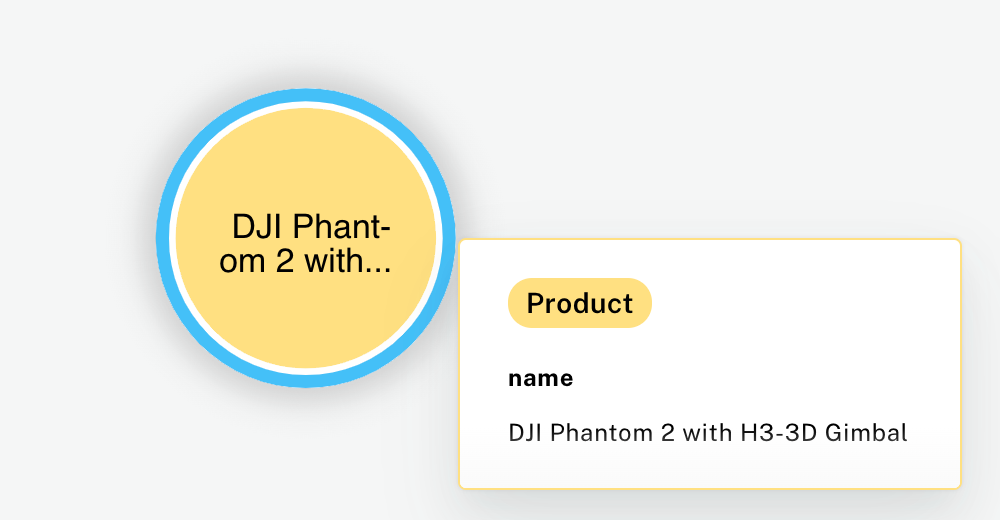 Product Node in Neo4j - Image by Author
But products aren't the only entities we can represent. Knowledge graphs are flexible, allowing us to create as many types of nodes as needed. For example, since every product has a manufacturer, we can also create nodes for each manufacturer. A manufacturer node might include properties like the company's name, location, and contact information.
Product Node in Neo4j - Image by Author
But products aren't the only entities we can represent. Knowledge graphs are flexible, allowing us to create as many types of nodes as needed. For example, since every product has a manufacturer, we can also create nodes for each manufacturer. A manufacturer node might include properties like the company's name, location, and contact information.
Edges
However, nodes most of the time can be connected by each other. For example, a product node could be connected to a manufacturer node, since the manufacturer produces the product, and the product is produced by the manufacturer. This relationship is known as the edges in a knowledge graph.
Edges are the links that define how two entities are related, and in a knowledge graph, these relationships are explicitly modeled and stored. This is a significant shift from traditional relational databases, where such relationships are often inferred at query time using JOIN operations.
Consider the relationship between a product and its manufacturer. In a relational database, we would join tables to associate a product with its manufacturer during a query. In a knowledge graph, however, we directly specify this relationship by creating an edge between the product node and the manufacturer node.
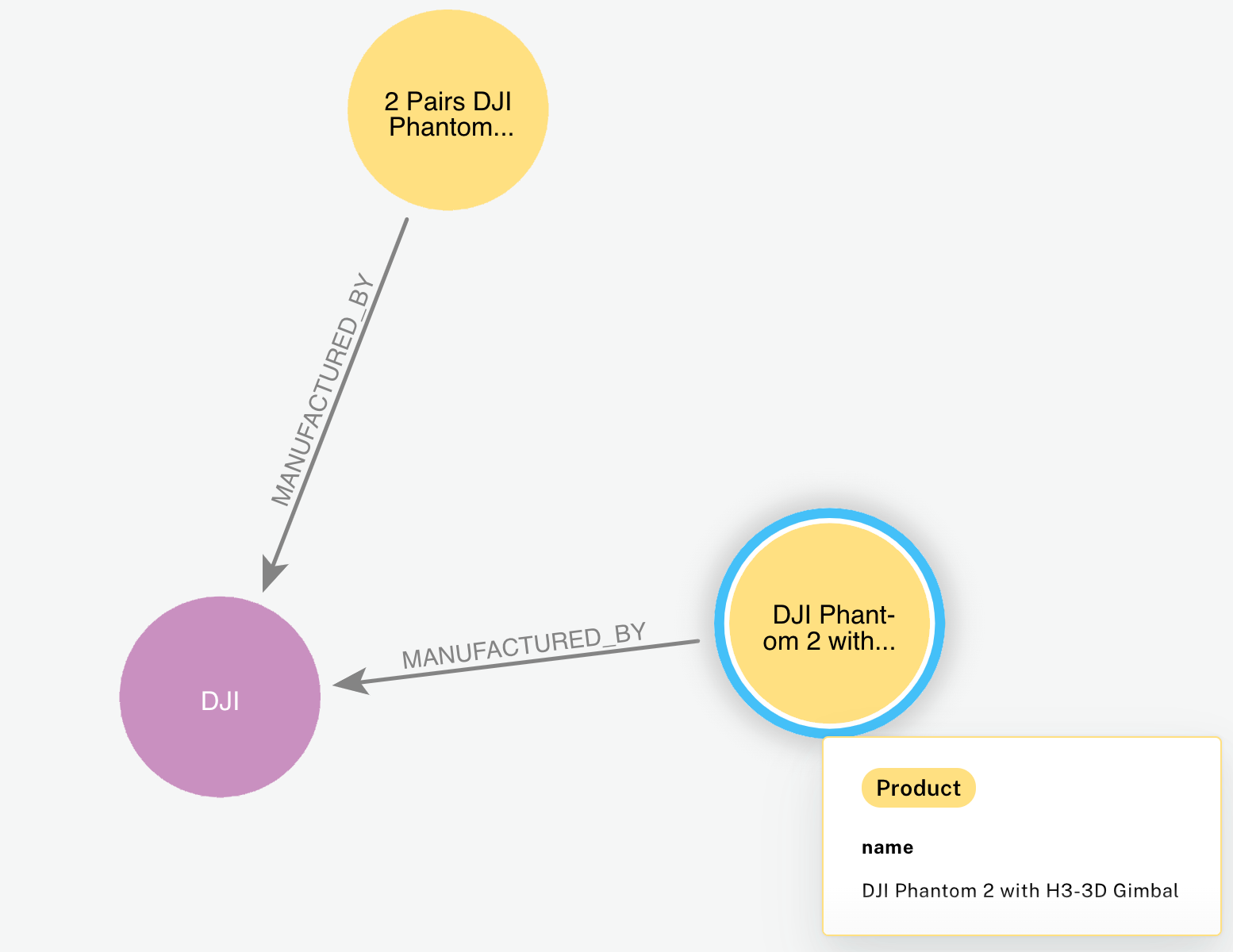 2 Product Nodes connected to 1 Manufacturer nodes via edges - Image by Author
Taking our toy dataset as an example, we know that every product is associated with a manufacturer. Therefore, we can create a "manufactured_by" edge that connects a product node to its corresponding manufacturer node, indicating who produces the product. For instance, the product "DJI Phantom 2 with H3–3D Gimbal" would be connected to the manufacturer "DJI" through this edge.
Edges themselves can carry properties, providing additional context about the relationships they represent. Focusing on the "manufactured_by" relationship from product to manufacturer, we might include a property like "since," which indicates the date when the manufacturing relationship was established.
2 Product Nodes connected to 1 Manufacturer nodes via edges - Image by Author
Taking our toy dataset as an example, we know that every product is associated with a manufacturer. Therefore, we can create a "manufactured_by" edge that connects a product node to its corresponding manufacturer node, indicating who produces the product. For instance, the product "DJI Phantom 2 with H3–3D Gimbal" would be connected to the manufacturer "DJI" through this edge.
Edges themselves can carry properties, providing additional context about the relationships they represent. Focusing on the "manufactured_by" relationship from product to manufacturer, we might include a property like "since," which indicates the date when the manufacturing relationship was established.
The Math Behind Knowledge Graphs
All right, you should now have the basics of KGs, but let's go a step further and see how the math plays out. Moreover, in our example, we will query a knowledge graph using natural language, in order to achieve that, we need to introduce two more components: embeddings and cosine similarity.
A knowledge graph G is a directed, labeled graph that can be formally represented as:
 Knowledge Graph Formula - Image by Author
Where:
Knowledge Graph Formula - Image by Author
Where:
- V is the set of vertices or nodes.
- E⊆V×V is the set of edges , representing relationships between nodes.
- ϕV:V→A_V is a function mapping nodes to their attributes.
- ϕE:E→A_E is a function mapping edges to their attributes.
Each node v ∈ V represents an entity or concept and can be characterized by a set of attributes. Mathematically, a node can be defined as:
 Node Formula - Image by Author
Where:
Node Formula - Image by Author
Where:
- id_v is a unique identifier for the node.
- A_v = { (k,a_k) ∣ k ∈ K_v } is a set of attribute-value pairs, with K_v being the set of attribute keys for node v.
For example, a product might look like:
 Product Node - Image by Author
Next, an edge e ∈ E represents a relationship between two nodes and is defined as:
Product Node - Image by Author
Next, an edge e ∈ E represents a relationship between two nodes and is defined as:
 Edge Formula - Image by Author
Where:
Edge Formula - Image by Author
Where:
- v_i, v_j ∈ V are the source and target nodes.
- r_ij is the type of relationship (e.g., MANUFACTURED_BY , BELONGS_TO).
- A_e = { (k, a_k) ∣ k ∈ K_e } is a set of attribute-value pairs associated with the edge.
For example, an edge represents that a product is manufactured by a manufacturer:
 Edge example - Image by Author
Where A_e might include:
Edge example - Image by Author
Where A_e might include:
 Edge properties - Image by Author
Embeddings and Vector Representations
As of now, our Knowledge Graph has both structured (numerical) and unstructured (text) data. However, math just doesn't work very well with text. To enable semantic search and natural language querying, we need to convert textual data into numerical vector representations. Here's where embeddings do their magic**.** We convert the text data in our KG into embedding, and the same for our natural language query.
An embedding is a mapping of discrete objects, such as words, phrases, or documents, into a continuous vector space. In this space, semantically similar items are located close to each other. This is achieved by training machine learning models on large corpora of text data to learn patterns and contexts in which words or phrases appear.
An embedding function ϕ maps textual descriptions to points in a high-dimensional vector space R^n :
 Embedding Function - Image by Author
Where:
Embedding Function - Image by Author
Where:
- T is the set of all possible textual data (e.g., product descriptions, queries).
- n is the dimensionality of the embedding space, which can range from hundreds to thousands of dimensions depending on the model
Embeddings are essential elements in our architecture because they allow us to perform mathematical operations on textual data. By representing text as vectors, we can compute distances and similarities between different pieces of text. This capability is essential for tasks like semantic search, where we want to find products that are semantically similar to a user's query, even if the exact words used are different. Moreover, you will find that different embedding models can bring very different results. In your AI application consider exploring several models and see which one delivers the best results. Some of the big names in the space are OpenAI, Gemini, and Voyage.
Cosine Similarity
Now that we have both our query and our nodes embedded, we need to find a way to compute the similarity between the query and the nodes. One of the most popular approaches is cosine similarity.
Cosine similarity measures the cosine of the angle between two non-zero vectors in an inner product space. It provides a normalized measure of similarity that is independent of the magnitude of the vectors.
Given two vectors A,B ∈ R^n the cosine similarity cosθ is defined as:
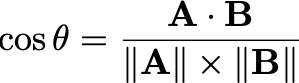 Cosine Similarity - Image by Author
The value of cosine similarity ranges from -1 to 1, where 1 indicates that the vectors are identical in direction (maximum similarity), 0 indicates orthogonality (no similarity), and -1 indicates diametrically opposed vectors (opposite meanings). In the context of embeddings generated from textual data, cosine similarity values typically range from 0 to 1 because the components of the embeddings are usually non-negative.
To compute the cosine similarity between the query embedding and product embeddings, we follow these steps:
Compute the Dot Product :
Cosine Similarity - Image by Author
The value of cosine similarity ranges from -1 to 1, where 1 indicates that the vectors are identical in direction (maximum similarity), 0 indicates orthogonality (no similarity), and -1 indicates diametrically opposed vectors (opposite meanings). In the context of embeddings generated from textual data, cosine similarity values typically range from 0 to 1 because the components of the embeddings are usually non-negative.
To compute the cosine similarity between the query embedding and product embeddings, we follow these steps:
Compute the Dot Product :
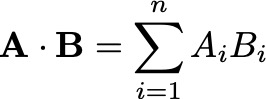 Compute Dot Product - Image by Author
Compute the Norms :
Compute Dot Product - Image by Author
Compute the Norms :
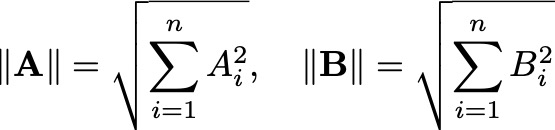 Compute Norms - Image by Author
Compute Cosine Similarity :
Compute Cosine Similarity - Image by Author
Suppose we have two embeddings:
Compute Norms - Image by Author
Compute Cosine Similarity :
Compute Cosine Similarity - Image by Author
Suppose we have two embeddings:
 Embedding Vectors A, and B - Image by Author
Compute the dot product:
Embedding Vectors A, and B - Image by Author
Compute the dot product:
 Compute dot product of A and B - Image by Author
Compute the norms:
Compute dot product of A and B - Image by Author
Compute the norms:
 Compute norms of A and B - Image by Author
Compute cosine similarity:
Compute norms of A and B - Image by Author
Compute cosine similarity:
 Compute cosine similarity - Image by Author
Mathematical Modeling of Edge Traversal
In advanced applications of knowledge graphs, we often want to consider not just the semantic similarity between entities (captured by embeddings) but also the structure of the graph itself. This involves modeling how we traverse the edges - go around the node with the highest similarity - of the graph to understand the relationships and importance of different nodes within the network.
Adjacency Matrix Representation To mathematically represent the structure of a knowledge graph, we use an adjacency matrix. Suppose our graph G has n nodes. The adjacency matrix A is an n×n matrix where each element A_ij indicates whether there is a direct connection (edge) from node v_i to node v_j :
 Adjacency Matrix - Image by Author
Consider a simple graph with three products:
Adjacency Matrix - Image by Author
Consider a simple graph with three products:
- Product A (v1)
- Product B (v2)
- Product C (v3)
Suppose:
- Product A is related to Product B.
- Product B is related to Product C.
The adjacency matrix A would be:
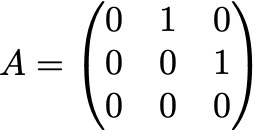 Adjacency matrix A - Image by author
This matrix helps us compute paths and determine how nodes are connected within the graph.
Random Walks and Transition Probabilities Next, to analyze how likely we are to move from one node to another, we use the concept of random walks. In a random walk, starting from a node, we randomly select an outgoing edge to follow to the next node.
We define the transition probability matrix P to represent the probabilities of moving from one node to another:
Adjacency matrix A - Image by author
This matrix helps us compute paths and determine how nodes are connected within the graph.
Random Walks and Transition Probabilities Next, to analyze how likely we are to move from one node to another, we use the concept of random walks. In a random walk, starting from a node, we randomly select an outgoing edge to follow to the next node.
We define the transition probability matrix P to represent the probabilities of moving from one node to another:
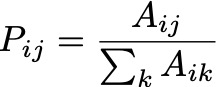 Transition Probability Matrix Formula - Image by Author
Where:
Transition Probability Matrix Formula - Image by Author
Where:
- A_ij is the adjacency between nodes v_i and v_j .
- ∑A_ik is the total number of outgoing edges from node v_i .
This formula normalizes the adjacency matrix so that each row sums to 1, turning it into a probability distribution.
Using the previous adjacency matrix A :
Adjacency Matrix A - Image by Author
Calculate P :
- For node v1 : Sum of outgoing edges =A12 + A13 = 1 + 0 =1
 Node v1 Calculation - Image by Author
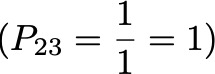
- For node v2 : Sum of outgoing edges = A23 =1
 Node v2 Calculation - Image by Author
- For node v3 : No outgoing edges, so the probabilities are zero.
Transition probability matrix P:
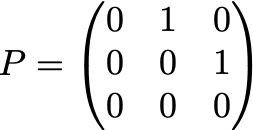 Transition Probability Matrix - Image by Author
Personalized PageRank Algorithm Finally, the Personalized PageRank algorithm allows us to compute a relevance score for each node in the graph, considering both the structure of the graph and a personalization (preference) vector.
The PageRank vector π is calculated using the iterative formula:
Transition Probability Matrix - Image by Author
Personalized PageRank Algorithm Finally, the Personalized PageRank algorithm allows us to compute a relevance score for each node in the graph, considering both the structure of the graph and a personalization (preference) vector.
The PageRank vector π is calculated using the iterative formula:
 Personalized PageRank Formula - Image by Author
Where:
Personalized PageRank Formula - Image by Author
Where:
- α is the teleportation probability , usually set to 0.15. It represents the probability of jumping back to a personalized starting point rather than following an outgoing edge.
- π0 is the personalization vector , indicating our starting preference or importance of nodes.
- P^T is the transpose of the transition probability matrix P.
- π is the PageRank vector containing the relevance scores of the nodes.
Teleportation ensures that the random walker has a chance to jump to any node based on our preferences, preventing them from getting stuck in sink nodes (nodes with no outgoing edges).
Integrating Embeddings with Graph Structure To effectively recommend products or retrieve information, we need to combine semantic similarity (from embeddings) - measures how closely the product's description matches the user's query in terms of meaning- with graph relevance (from PageRank) - reflects the product's importance within the graph's structure, considering relationships and connectivity. We define a composite score S(p) for each product p :
 Composite Score Formula - Image by Author
Where:
Composite Score Formula - Image by Author
Where:
- λ is a weighting parameter between 0 and 1 that balances the importance of semantic similarity and graph relevance. If λ=1, the ranking relies entirely on semantic similarity. If λ=0, it depends solely on graph relevance. A value like λ=0.5 gives equal weight to both.
Suppose, we have a user query where the embedding is already computed. The product embeddings and their cosine similarities with the query are:
- Product A : cosθ =0.8
- Product B : cosθ=0.6
- PageRank score πA=0.3
- PageRank score πB=0.7
With λ=0.5:
 product A and B composite scores - Image by Author
Even though Product A has a higher semantic similarity, Product B has a higher overall score due to its greater graph relevance. Therefore, Product B would be ranked higher in the recommendations.
product A and B composite scores - Image by Author
Even though Product A has a higher semantic similarity, Product B has a higher overall score due to its greater graph relevance. Therefore, Product B would be ranked higher in the recommendations.
Benefits of Knowledge Graphs
Semantic Understanding One of the most significant benefits of knowledge graphs is their ability to capture complex relationships and context between different entities. This capability makes LLMs able to reason about data in a way that's more aligned with human thinking. Instead of treating data points as isolated pieces of information, knowledge graphs interconnect entities through explicit relationships, providing a rich semantic understanding of the data.
For example, imagine an air conditioner knowledge graph. A single Product node isn't just a standalone item; it's connected to its Manufacturer , Features , Category , and SubCategory. This interconnectedness allows the system to comprehend that a particular air conditioner is linked to other entities like its brand, features it offers - such as "Energy Efficient" or "Remote Control" - and the category it belongs to, like "Portable Air Conditioners." This depth of semantic richness enables more accurate and context-aware responses to user queries, significantly enhancing user experience.
Flexibility Another advantage of knowledge graphs is their inherent flexibility. They allow for the easy addition of new nodes or relationships without necessitating significant alterations to the existing schema. This feature is particularly beneficial in dynamic environments where data is continually evolving.
For instance, suppose we decide to incorporate Customer Reviews into our knowledge graph. We can simply add new Review nodes and establish relationships like REVIEWED_BY connecting Product nodes to Customer nodes. There's no need to redesign the entire data model or migrate existing data. This adaptability makes knowledge graphs highly suitable for applications where requirements and data structures are constantly changing.
Efficient Querying Knowledge graphs are optimized for querying relationships between entities, making data retrieval more efficient - especially for complex queries involving multiple interconnected entities. This efficiency becomes evident when dealing with intricate queries that would be cumbersome in traditional databases.
Consider a scenario where we want to find all air conditioners manufactured by "CoolTech Industries" that have the feature "Energy Efficient." In a traditional relational database, executing this query would require complex JOIN operations across multiple tables, which can be time-consuming and resource-intensive.
In contrast, a knowledge graph simplifies this process significantly:
- Start at the Manufacturer Node: Begin by locating the Manufacturer node where
name = "CoolTech Industries".
- Traverse Relationships: Move along the MANUFACTURED_BY edges to find all connected Product nodes.
- Filter by Features: For these products, traverse the HAS_FEATURE edges to identify those connected to a Feature node where
name = "Energy Efficient".
This direct traversal of relationships eliminates the need for costly JOIN operations, resulting in faster and more efficient querying. The ability to navigate through interconnected data seamlessly not only improves performance but also enhances the capability to derive insights from complex data relationships.
Practical Application: Building and Querying a Knowledge Graph with Embeddings
In this section, we will create a knowledge graph using a public dataset of Amazon toy products (License). We will add embeddings to enable semantic search and query the database using natural language. By the end of this section, you will understand how to build a knowledge graph, add embeddings, and perform semantic searches to find products that match natural language queries.
Setting Up the Environment
Before we begin, ensure you have the necessary tools installed and configured:
Clone the Repository The dataset and code are available in the GitHub repository rag-knowledge-graph. Clone this repository to your local machine:
bash
git clone https://github.com/cristianleoo/rag-knowledge-graph.git
If you don't like using the terminal, or you don't have git installed, follow this link and download the repo:
GitHub - cristianleoo/rag-knowledge-graph
Install Neo4jDownload and install Neo4j from the official website. Follow the installation instructions specific to your operating system.
Start the Neo4j Server Once installed, start the Neo4j server. You can do this via the Neo4j Desktop application or by running the server from the command line:
bash
neo4j start
Write down the password you will use for the database as we will need it in a later step
Install Required Python Libraries Navigate to the cloned repository directory and set up a virtual environment. Install the required libraries using pip:
bash
cd rag-knowledge-graph
python -m venv venv
source venv/bin/activate  # On Windows, use venvScriptsactivate
pip install -r requirements.txt
Step 1: Load and Preprocess the Dataset
We begin by importing the necessary libraries and loading the dataset.
python
import pandas as pd
pd.set_option('display.max_columns', None)
from IPython.display import display
import matplotlib.pyplot as plt
import networkx as nx
from py2neo import Graph, Node, Relationship
import google.generativeai as genai
import time
from tqdm import tqdm
from ratelimit import limits, sleep_and_retry
import os
Loading the Dataset
python
df = pd.read_csv('dataset/products.csv')
df.head()
Here, we use pandas to read the CSV file containing Amazon toy products, and display the first few rows:
text
uniq_id                                   product_name  ... sellers
0  eac7efa5dbd3d667f26eb3d3ab504464                      Hornby 2014 Catalogue  ... {"seller"=>[{"Seller_name_1"=>"Amazon.co.uk", ...
1  b17540ef7e86e461d37f3ae58b7b72ac  FunkyBuys® Large Christmas Holiday Express...  ... {"seller"=>{"Seller_name_1"=>"UHD WHOLESALE", ...
2  348f344247b0c1a935b1223072ef9d8a   CLASSIC TOY TRAIN SET TRACK CARRIAGES LIGHT...  ... {"seller"=>[{"Seller_name_1"=>"DEAL-BOX", "Sel...
3  e12b92dbb8eaee78b22965d2a9bbbd9f        HORNBY Coach R4410A BR Hawksworth Corridor  ... NaN
4  e33a9adeed5f36840ccc227db4682a36  Hornby 00 Gauge 0-4-0 Gildenlow Salt Co. Steam...  ... NaN

[5 rows x 18 columns]
Data Overview We examine the dataset to understand the structure and identify missing values.
python
for col in df.columns:
    print(f"{col:<50} | {df[col].isna().sum() / len(df):>6.2%} missing | {df[col].nunique():>6} unique values | {df[col].dtype}")
This will print out:
bash
uniq_id                                           |  0.00% missing | 10000 unique values | object
product_name                                      |  0.00% missing | 9964 unique values | object
manufacturer                                      |  0.07% missing | 2651 unique values | object
price                                             | 14.35% missing | 2625 unique values | object
number_available_in_stock                         | 25.00% missing |   89 unique values | object
number_of_reviews                                 |  0.18% missing |  194 unique values | object
number_of_answered_questions                      |  7.65% missing |   19 unique values | float64
average_review_rating                             |  0.18% missing |   19 unique values | object
amazon_category_and_sub_category                  |  6.90% missing |  255 unique values | object
customers_who_bought_this_item_also_bought        | 10.62% missing | 8755 unique values | object
description                                       |  6.51% missing | 8514 unique values | object
product_information                               |  0.58% missing | 9939 unique values | object
product_description                               |  6.51% missing | 8514 unique values | object
items_customers_buy_after_viewing_this_item       | 30.65% missing | 6749 unique values | object
customer_questions_and_answers                    | 90.86% missing |  910 unique values | object
customer_reviews                                  |  0.21% missing | 9901 unique values | object
sellers                                           | 30.82% missing | 6581 unique values | object
From here, we can see the percentage of missing values, the number of unique values, and the data type for each column. This helps us identify which columns are essential and how to handle missing data.
Data Cleaning and Preprocessing We clean the data by extracting useful information and handling missing values.
python
# Extract currency symbol and price into separate columns
df['currency'] = df['price'].str.extract(r'([^0-9]+)')
df['price_value'] = df['price'].str.extract(r'(d+.?d*)').astype(float)
df['stock_type'] = df['number_available_in_stock'].str.extract(r'([^0-9]+)')
df['stock_availability'] = df['number_available_in_stock'].str.extract(r'(d+.?d*)')

# Clean up average review rating
df['average_review_rating'] = df['average_review_rating'].str.replace(' out of 5 stars', '').astype(float)
# Clean up number of reviews
df['number_of_reviews'] = df['number_of_reviews'].str.replace(',', '').fillna(0).astype(int)
In particular, we extract numerical values from strings in the price and number_available_in_stock columns, so that we can treat those columns as int and float.
Then, we clean the average_review_rating and number_of_reviews columns to ensure they are numeric.
We drop unnecessary columns and handle missing data.
sql
# Drop irrelevant columns
df = df.drop(['price', 'number_available_in_stock', 'customers_who_bought_this_item_also_bought',
              'items_customers_buy_after_viewing_this_item', 'customer_questions_and_answers', 'sellers'], axis=1)

# Drop rows with essential missing data
df.dropna(subset=['product_information', 'price_value', 'description', 'amazon_category_and_sub_category'], how='any', inplace=True)
In this example, we drop some features to keep it simple. However, in production, you may want to keep as many relevant features as possible, as they could provide useful insights for analysis and for the model.
We check the data again to ensure it's clean.
bash
# Fill missing values with defaults
df['amazon_category_and_sub_category'] = df['amazon_category_and_sub_category'].fillna('')
df['manufacturer'] = df['manufacturer'].fillna('Unknown')
df['number_of_answered_questions'] = df['number_of_answered_questions'].fillna(0.0)
df['average_review_rating'] = df['average_review_rating'].fillna(0.0)
df['description'] = df['description'].fillna('')
df['product_description'] = df['product_description'].fillna('')
df['product_information'] = df['product_information'].fillna('')
df['customer_reviews'] = df['customer_reviews'].fillna('')
df['stock_availability'] = df['stock_availability'].astype(float).fillna(0.0)
df['stock_type'] = df['stock_type'].fillna('Out of stock')
Next, we fill missing values in categorical columns with default strings, and numerical columns with values zeros so we don't bring null values into our KG.
python
# Function to combine product title and description
def complete_product_description(row):
    return f"Product Title: {row['product_name']}nProduct Description: {row['product_description']}"

# Apply the function to create a new column
df['description_complete'] = df.apply(complete_product_description, axis=1)

# Display the first few rows
df.head()
Finally, we define a function called complete_product_description that takes a row from the dataframe and combines the product_name and product_description into a single string. We then apply this function to each row in the dataframe df to create a new column called description_complete. This new column contains the complete description of each product, which we will use later for generating embeddings.
Let's call df.head(), and display the first few rows of the dataframe to verify that the new column has been added correctly.
bash
uniq_id                                   product_name  ...                                 description_complete
0  eac7efa5dbd3d667f26eb3d3ab504464                      Hornby 2014 Catalogue  ...  Product Title: Hornby 2014 CataloguenProduct Description: Hornby 2014 Catalogue Box Contains 1 x Hornby 2014 Catalogue
1  b17540ef7e86e461d37f3ae58b7b72ac  FunkyBuys® Large Christmas Holiday Express...  ...  Product Title: FunkyBuys® Large Christmas Holiday Express Festival Deluxe Railway Train SetnProduct Description: Size Name:Large FunkyBuys® Large Christmas Holiday Express Festival Deluxe Railway Train Set Light Up with Realistic Sounds Xmas Tree Decoration For Kids Gift
2  348f344247b0c1a935b1223072ef9d8a   CLASSIC TOY TRAIN SET TRACK CARRIAGES LIGHT...  ...  Product Title: CLASSIC TOY TRAIN SET TRACK CARRIAGES LIGHT ENGINE SOUNDS KIDS XMAS GIFTnProduct Description: BIG CLASSIC TOY TRAIN SET TRACK CARRIAGE LIGHT ENGINE SOUNDS KIDS XMAS GIFT This is a classic train set with a steam engine that features working headlights and realistic engine sounds. The tracks can be assembled in various configurations. Great gift for kids.
3  e12b92dbb8eaee78b22965d2a9bbbd9f        HORNBY Coach R4410A BR Hawksworth Corridor  ...  Product Title: HORNBY Coach R4410A BR Hawksworth Corridor 3rdnProduct Description: Hornby 00 Gauge BR Hawksworth 3rd Class W 2107 Corridor Coach R4410A
4  e33a9adeed5f36840ccc227db4682a36  Hornby 00 Gauge 0-4-0 Gildenlow Salt Co. Steam...  ...  Product Title: Hornby 00 Gauge 0-4-0 Gildenlow Salt Co. Steam Locomotive R9671nProduct Description: Hornby RailRoad 0-4-0 Gildenlow Salt Co. Steam Locomotive R9671

[5 rows x 13 columns]
Step 2: Connect to Neo4j and Prepare the Database
We connect to our Neo4j graph database where we'll store the knowledge graph.
python
# Connect to Neo4j (adjust credentials as needed)
graph = Graph("bolt://localhost:7687", auth=("neo4j", "YOUR_PASSWORD")) # replace this with your password

# Clear existing data (optional)
graph.run("MATCH (n) DETACH DELETE n")
Using the py2neo library, we establish a connection to the Neo4j database. Replace "YOUR_PASSWORD" with your actual Neo4j password. The command graph.run("MATCH (n) DETACH DELETE n") deletes all existing nodes and relationships in the database, providing a clean slate for our new knowledge graph. This step is optional but recommended to avoid conflicts with existing data.
Step 3: Create the Knowledge Graph
We create nodes for products, manufacturers, and categories, and establish relationships between them.
python
def create_knowledge_graph(df):
    # Create unique constraints
    try:
        # For Neo4j 5.x and later
        graph.run("CREATE CONSTRAINT product_id IF NOT EXISTS FOR (p:Product) REQUIRE p.uniq_id IS UNIQUE")
        graph.run("CREATE CONSTRAINT manufacturer_name IF NOT EXISTS FOR (m:Manufacturer) REQUIRE m.name IS UNIQUE")
        graph.run("CREATE CONSTRAINT category_name IF NOT EXISTS FOR (c:Category) REQUIRE c.name IS UNIQUE")
    except Exception as e:
        # For Neo4j 4.x
        try:
            graph.run("CREATE CONSTRAINT ON (p:Product) ASSERT p.uniq_id IS UNIQUE")
            graph.run("CREATE CONSTRAINT ON (m:Manufacturer) ASSERT m.name IS UNIQUE")
            graph.run("CREATE CONSTRAINT ON (c:Category) ASSERT c.name IS UNIQUE")
        except Exception as e:
            print(f"Warning: Could not create constraints: {e}")

    for _, row in df.iterrows():
        # Create Product node
        product = Node(
            "Product",
            uniq_id=row['uniq_id'],
            name=row['product_name'],
            description=row['product_description'],
            price=float(row['price_value']),
            currency=row['currency'],
            review_rating=float(row['average_review_rating']),
            review_count=int(row['number_of_reviews']),
            stock_type=row['stock_type'] if pd.notna(row['stock_type']) else None,
            description_complete=row['description_complete']
        )

        # Create Manufacturer node
        manufacturer = Node("Manufacturer", name=row['manufacturer'])

        # Create Category nodes from hierarchy
        categories = row['amazon_category_and_sub_category'].split(' > ')
        previous_category = None
        for cat in categories:
            category = Node("Category", name=cat.strip())
            graph.merge(category, "Category", "name")
            if previous_category:
                # Create hierarchical relationship between categories
                rel = Relationship(previous_category, "HAS_SUBCATEGORY", category)
                graph.merge(rel)
            previous_category = category
        # Merge nodes and create relationships
        graph.merge(product, "Product", "uniq_id")
        graph.merge(manufacturer, "Manufacturer", "name")
        # Connect product to manufacturer
        graph.merge(Relationship(product, "MANUFACTURED_BY", manufacturer))
        # Connect product to lowest-level category
        graph.merge(Relationship(product, "BELONGS_TO", previous_category))
# Create the knowledge graph
create_knowledge_graph(df)
This functioncreate_knowledge_graph iterates over each row in the dataframe df. For each product:
- We create a
Product node with properties such as uniq_id, name, description, price, currency, review_rating, review_count, stock_type, and description_complete.
- We create a
Manufacturer node based on the manufacturer field.
- We process the
amazon_category_and_sub_category field to create a hierarchy of Category nodes. We split the categories by the > delimiter and created nodes for each category level.
- We establish a
HAS_SUBCATEGORY relationship between categories to represent the hierarchy.
- We create relationships between the product and its manufacturer (
MANUFACTURED_BY) and between the product and the most specific category (BELONGS_TO).
- We use
graph.merge to ensure that nodes and relationships are created only if they do not already exist, preventing duplicates in the graph.
Step 4: Query the Knowledge Graph and Visualize Results
Now, let's run a sample query to retrieve data from the graph and visualize it.
python
def run_query_with_viz(query, title, viz_query=None):
    print(f"n=== {title} ===")
    # Run and display query results as a DataFrame
    results = graph.run(query).data()
    df = pd.DataFrame(results)
    display(df)

    # Create visualization
    plt.figure(figsize=(12, 8))
    G = nx.Graph()
    # Add nodes and edges
    for record in results:
        product_name = record['Product']
        manufacturer_name = record['Manufacturer']
        G.add_node(product_name, label=product_name[:30], type='Product')
        G.add_node(manufacturer_name, label=manufacturer_name, type='Manufacturer')
        G.add_edge(product_name, manufacturer_name)
    # Draw graph
    pos = nx.spring_layout(G)
    nx.draw_networkx_nodes(G, pos, nodelist=[n for n, attr in G.nodes(data=True) if attr['type'] == 'Product'],
                           node_color='lightblue', node_size=500, label='Products')
    nx.draw_networkx_nodes(G, pos, nodelist=[n for n, attr in G.nodes(data=True) if attr['type'] == 'Manufacturer'],
                           node_color='lightgreen', node_size=700, label='Manufacturers')
    nx.draw_networkx_edges(G, pos)
    nx.draw_networkx_labels(G, pos)
    plt.title(title)
    plt.legend()
    plt.axis('off')
    plt.show()

# Find most expensive products
query1 = """
MATCH (p:Product)-[:MANUFACTURED_BY]->(m:Manufacturer)
RETURN m.name as Manufacturer, p.name as Product, p.price as Price
ORDER BY p.price DESC
LIMIT 5
"""
run_query_with_viz(query1, "Most Expensive Products")
You may notice that we are creating another function run_query_with_viz . We aren't doing this just for the sake of creating functions, but because this will let us both run a query against the database and create a helper function to plot the results. However, you can also run the query in Neo4j and get an even better visualization there.
In the function we run a Cypher query and displays the results in a pandas DataFrame. We handle the visualization side using NetworkX and Matplotlib, showing the relationships between products and manufacturers.
Then, we call the function passing a query to retrieve the top 5 most expensive products along with their manufacturers and prices. This will return:
text
=== Most Expensive Products ===
Manufacturer Product Price
0 DJI DJI Phantom 2 with H3-3D Gimbal 995.11
1 Sideshow Indiana Jones - 12 Inch Action Figures: Indian... 719.95
2 AUTOart Autoart 70206 - Aston Martin V12 Vantage - 201... 648.95
3 Bushiroad Weiss Schwarz Extra Booster Clannad Vol.3 629.95
4 Dragon Panzer II - Kpfw - Ausf.C - DX'10 - 1:6th Scale 592.95
Number of visualization records: 10
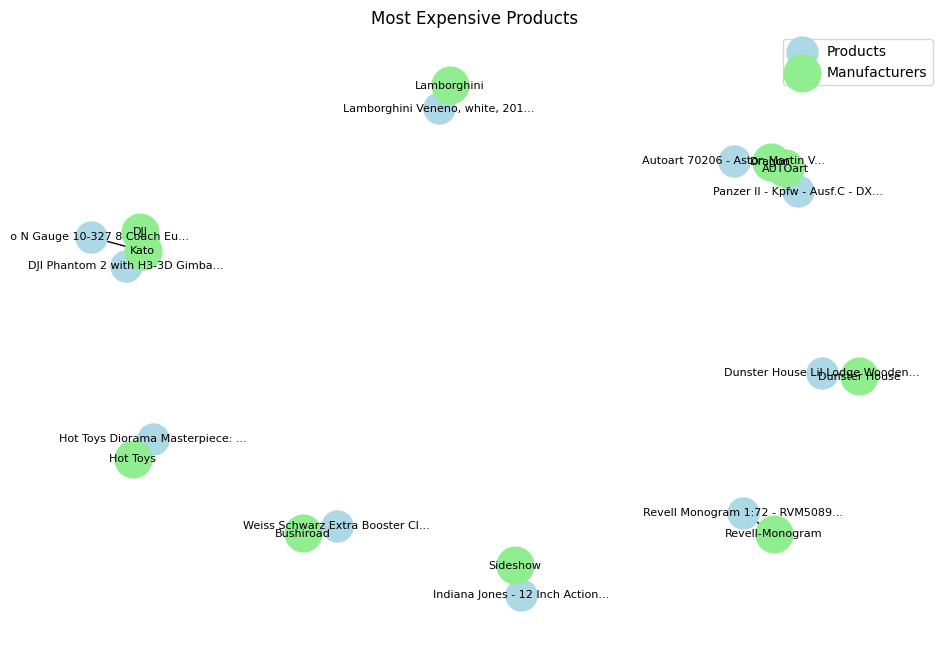 Most expensive product visualization - Image by Author
In this case, the output DataFrame displays the manufacturers, products, and prices of the top 5 most expensive products. The visualization is a graph where product nodes are connected to manufacturer nodes, with different colors representing different types of nodes.
Most expensive product visualization - Image by Author
In this case, the output DataFrame displays the manufacturers, products, and prices of the top 5 most expensive products. The visualization is a graph where product nodes are connected to manufacturer nodes, with different colors representing different types of nodes.
Step 5: Generate and Store Embeddings
We generate embeddings for the product descriptions to enable semantic search. For this part you will need to get an API Key for Google AI Studio. Don't worry it's completely free, and it will take you just a couple of minutes to get one:
Get a Gemini API key | Google AI for Developers
python
# Configure the embedding API (replace with your actual API key)
os.environ["GOOGLE_API_KEY"] = "your_api_key_here"
genai.configure(api_key=os.getenv("GOOGLE_API_KEY"))

# Test the embedding API
result = genai.embed_content(
    model="models/text-embedding-004",
    content="What is the meaning of life?",
    task_type="retrieval_document",
    title="Embedding of single string"
)
# Print a portion of the embedding vector
print(str(result['embedding'])[:50], '... TRIMMED]')
We set up the embedding API by configuring the genai library with your API key (replace "your_api_key_here" with your actual key). We test the embedding API by generating an embedding for a sample text and printing a portion of the embedding vector to verify that it works.
bash
[-0.02854543, 0.044588115, -0.034197364, -0.004266 ... TRIMMED]
This output shows the beginning of the embedding vector for the sample text. The actual length of the vector is 768, as this is the dimensionality of text-embedding-004. However, note that different embedding algorithms may have different numbers of dimensions. As a result, they may provide different results.
Next, we define functions to generate embeddings for product descriptions and store them in the knowledge graph.
python
# Rate limiter decorator
@sleep_and_retry
@limits(calls=1500, period=60)
def get_embedding(text):
    try:
        result = genai.embed_content(
            model="models/text-embedding-004",
            content=text,
            task_type="retrieval_document",
        )
        return result['embedding']
    except Exception as e:
        print(f"Error getting embedding: {e}")
        return None

def add_embeddings_to_products(batch_size=50):
    # Get the total number of products to process
    total_query = """
    MATCH (p:Product)
    WHERE p.description_embedding IS NULL
      AND p.description IS NOT NULL
    RETURN count(p) AS total
    """
    total_result = graph.run(total_query).data()
    total_to_process = total_result[0]['total'] if total_result else 0
    print(f"Total products to process: {total_to_process}n")
    total_processed = 0
    # Initialize tqdm progress bar
    with tqdm(total=total_to_process, desc='Processing products', unit='product') as pbar:
        while True:
            # Get batch of products
            query = """
            MATCH (p:Product)
            WHERE p.description_embedding IS NULL
              AND p.description IS NOT NULL
            RETURN p.uniq_id AS id, p.description AS description
            LIMIT $batch_size
            """
            products = graph.run(query, parameters={'batch_size': batch_size}).data()
            if not products:
                break
            # Process each product in the batch
            for product in products:
                try:
                    if product['description']:
                        embedding = get_embedding(product['description'])
                        if embedding:
                            # Update product with embedding
                            graph.run("""
                            MATCH (p:Product {uniq_id: $id})
                            SET p.description_embedding = $embedding
                            """, parameters={
                                'id': product['id'],
                                'embedding': embedding
                            })
                    total_processed += 1
                    pbar.update(1)  # Update the progress bar
                except Exception as e:
                    print(f"Error processing product {product['id']}: {e}")
            # Add a small delay between batches
            time.sleep(1)
    print(f"nTotal products processed: {total_processed}")
    return total_processed
# Add embeddings to products
print("Adding embeddings to products...n")
total_processed = add_embeddings_to_products()
print(f"nProcess completed. Total products processed: {total_processed}")
get_embedding retrieves the embedding for a given text while respecting API rate limits using the ratelimit library.
The add_embeddings_to_products function:
- Retrieves the total number of products that need embeddings.
- Processes products in batches, generating embeddings for their descriptions.
- Updates the
Product nodes in the graph with the new embeddings.
- Uses a progress bar to display the processing status.
- Adds a small delay between batches to comply with API rate limits.
bash
Adding embeddings to products...

Total products to process: 7434
Processing products:   0%|          | 0/7434 [00:00<?, ?product/s]
Processing products: 100%|██████████| 7434/7434 [27:20<00:00, 4.53product/s]
Total products processed: 7434
Process completed. Total products processed: 7434
The output shows that all products have been processed and embeddings have been added.
Step 6: Verify Embeddings
We check how many products now have embeddings.
python
# Verify embeddings
print("nVerifying embeddings:")
result = graph.run("""
MATCH (p:Product)
WHERE p.description_embedding IS NOT NULL
RETURN count(p) as count
""").data()
print(f"Products with embeddings: {result[0]['count']}")
This Cypher query counts the number of Product nodes where description_embedding is not null. We print the count to verify that embeddings have been successfully added to the products.
bash
Verifying embeddings:
Products with embeddings: 7434
This confirms that all products now have embeddings.
Step 7: Perform Semantic Search
We use the embeddings to perform a semantic search based on a user's natural language query.
python
def semantic_search(query_text, n=5):
    # Get query embedding
    query_embedding = get_embedding(query_text)
    if not query_embedding:
        print("Failed to get query embedding")
        return []

    # Search for similar products using dot product and magnitude for cosine similarity
    results = graph.run("""
    MATCH (p:Product)
    WHERE p.description_embedding IS NOT NULL
    WITH p,
    reduce(dot = 0.0, i in range(0, size(p.description_embedding)-1) |
    dot + p.description_embedding[i] * $embedding[i]) /
    (sqrt(reduce(a = 0.0, i in range(0, size(p.description_embedding)-1) |
    a + p.description_embedding[i] * p.description_embedding[i])) *
    sqrt(reduce(b = 0.0, i in range(0, size($embedding)-1) |
    b + $embedding[i] * $embedding[i])))
    AS similarity
    WHERE similarity > 0
    RETURN
    p.name as name,
    p.description as description,
    p.price as price,
    similarity as score
    ORDER BY similarity DESC
    LIMIT $n
    """, parameters={'embedding': query_embedding, 'n': n}).data()
    return results

# Test the search with debug info
print("nTesting semantic search:")
results = semantic_search("Give me a set of cards", n=2)
print(f"nNumber of results: {len(results)}")
for r in results:
    print(f"nProduct: {r.get('name', 'No name')}")
    print(f"Price: ${r.get('price', 'N/A')}")
    print(f"Score: {r.get('score', 'N/A'):.3f}")
    desc = r.get('description', 'No description')
    print(f"Description: {desc}")
The function semantic_search generates an embedding for the user's query. It uses a Cypher query to compute the cosine similarity between the query embedding and each product's description embedding. Since Neo4j's standard library may not have a built-in cosine similarity function, we calculate it manually using the dot product and magnitudes. Then, it filters products with a positive similarity score and returns the top n results sorted by similarity.
We test the function with the query "Give me a set of cards" and print out the results, including the product name, price, similarity score, and description.
bash
Testing semantic search:

Number of results: 2
Product: Yu-Gi-Oh Metal Raiders Booster
Price: $9.76
Score: 0.852
Description: 9 Cards Per Pack.
Product: AKB48 Trading Card Game & Collection vol.1 Booster (15packs)
Price: $12.25
Score: 0.827
Description: 15 packs, 6 cards per pack.
This output shows that the semantic search successfully retrieved products related to card sets, even if the exact wording differs from the query.
Conclusion
In this exercise, we have loaded and preprocessed a dataset of Amazon toy products. Next, we created a knowledge graph by adding nodes for products, manufacturers, and categories, and establishing relationships between them. For each node, we generated embeddings for product descriptions and stored them in the knowledge graph. Finally, we performed semantic searches using embeddings to find products matching natural language queries.
In this application, I showed a basic implementation of Graph RAG using cosine similarity. With its simplicity comes its limitations. This may not be something you want to use for your business. Instead, considering using a more advanced approach leveraging the PageRank algorithm or other retrieval functions. Or consider using an easy to use framework like Llama Index or Langchain which provide seamless integrations with the Embedding Model and Neo4j. More articles to come on this!
Register Now to Continue Reading
Unlock Towards Data Science with a Free Account
All articles on Towards Data Science are available to registered users. Create a free account today to access this article and thousands more.
Register for freeSign in to your account
 Written By
See all from Cristian Leo
Data ScienceHands On TutorialsKnowledge GraphLlmRetrieval Augmented Gen
Share This Article
Towards Data Science is a community publication. Submit your insights to reach our global audience and earn through the TDS Author Payment Program.
Write for TDS
Related Articles
Artificial Intelligence
The Role of Data Science Departments in 21st Century Organizations
Jason Nett
January 8, 202117 min read
Machine Learning
Creating a real-time price recommender system using modern data-related tools
João Pedro
August 22, 202211 min read
Deep Learning
Peculiar traits and challenges
Luca Clissa
November 30, 20225 min read
Artificial Intelligence
Demonstrated with examples
Soner Yıldırım
June 12, 20237 min read
Coding
Breaking down the main activities of a data engineer in 2021
mehdio
April 20, 20215 min read
Machine Learning
Implementing Amazon's DataWig in Python to impute missing values in tabular data
Kenneth Leung
August 24, 20222 min read
Deep Learning
I'm a Manager of Data Science & Machine Learning, specialising in design & building of solutions powered by DS & ML for enterprises for...
Raj
March 17, 20196 min read
Data Science
How unit economics should set your classification cutoff, and why they rarely do.
Fabio Oliveira
June 17, 202614 min read
Artificial Intelligence
#7: Using the previous or next value
Soner Yıldırım
November 11, 20216 min read
Your home for data science and AI. The world's leading publication for data science, data analytics, data engineering, machine learning, and artificial intelligence professionals.
Subscribe to Our NewsletterWrite For TDS•About•Advertise•Privacy Policy•Terms of Use
© Insight Media Group, LLC 2026•The New Stack•roadmap.sh•Creator Network
Recommended Articles
Close