保留正文与补采附件。源页面当前未重新核验;具体限制见交付清单。
 We value your privacy
We use cookies to enhance your browsing experience, serve personalised ads or content, and analyse our traffic. By clicking "Accept All", you consent to our use of cookies.
Customise Reject All Accept All
Customise Consent Preferences
We value your privacy
We use cookies to enhance your browsing experience, serve personalised ads or content, and analyse our traffic. By clicking "Accept All", you consent to our use of cookies.
Customise Reject All Accept All
Customise Consent Preferences  We use cookies to help you navigate efficiently and perform certain functions. You will find detailed information about all cookies under each consent category below.
The cookies that are categorised as "Necessary" are stored on your browser as they are essential for enabling the basic functionalities of the site. ... Show more
NecessaryAlways Active
Necessary cookies are required to enable the basic features of this site, such as providing secure log-in or adjusting your consent preferences. These cookies do not store any personally identifiable data.
We use cookies to help you navigate efficiently and perform certain functions. You will find detailed information about all cookies under each consent category below.
The cookies that are categorised as "Necessary" are stored on your browser as they are essential for enabling the basic functionalities of the site. ... Show more
NecessaryAlways Active
Necessary cookies are required to enable the basic features of this site, such as providing secure log-in or adjusting your consent preferences. These cookies do not store any personally identifiable data.
-
Cookie
BCTempID
-
Duration
10 minutes
-
Description
No description available.
-
Cookie
__cf_bm
-
Duration
1 hour
-
Description
This cookie, set by Cloudflare, is used to support Cloudflare Bot Management.
-
Cookie
AWSALBCORS
-
Duration
7 days
-
Description
Amazon Web Services set this cookie for load balancing.
-
Cookie
_cfuvid
-
Duration
session
-
Description
Cloudflare sets this cookie to track users across sessions to optimize user experience by maintaining session consistency and providing personalized services
-
Cookie
li_gc
-
Duration
6 months
-
Description
Linkedin set this cookie for storing visitor's consent regarding using cookies for non-essential purposes.
-
Cookie
__hssrc
-
Duration
session
-
Description
This cookie is set by Hubspot whenever it changes the session cookie. The __hssrc cookie set to 1 indicates that the user has restarted the browser, and if the cookie does not exist, it is assumed to be a new session.
-
Cookie
__hssc
-
Duration
1 hour
-
Description
HubSpot sets this cookie to keep track of sessions and to determine if HubSpot should increment the session number and timestamps in the __hstc cookie.
-
Cookie
wpEmojiSettingsSupports
-
Duration
session
-
Description
WordPress sets this cookie when a user interacts with emojis on a WordPress site. It helps determine if the user's browser can display emojis properly.
-
Cookie
BCSessionID
-
Duration
1 year 1 month 4 days
-
Description
Blueconic sets this cookie as a unique identifier for the BlueConic profile.
-
Cookie
_octo
-
Duration
1 year
-
Description
No description available.
-
Cookie
logged_in
-
Duration
1 year
-
Description
No description available.
-
Cookie
__Secure-YEC
-
Duration
past
-
Description
YouTube sets this cookie to stores the user's video player preferences using embedded YouTube video
-
Cookie
__eoi
-
Duration
6 months
-
Description
Description is currently not available.
-
Cookie
AWSALBTGCORS
-
Duration
7 days
-
Description
No description available.
-
Cookie
login-status-p
-
Duration
past
-
Description
Description is currently not available.
-
Cookie
AWSALBTG
-
Duration
7 days
-
Description
No description available.
-
Cookie
csrf_token
-
Duration
session
-
Description
No description available.
-
Cookie
token_v2
-
Duration
1 day
-
Description
Description is currently not available.
-
Cookie
D
-
Duration
1 year
-
Description
Description is currently not available.
-
Cookie
PHPSESSID
-
Duration
session
-
Description
This cookie is native to PHP applications. The cookie stores and identifies a user's unique session ID to manage user sessions on the website. The cookie is a session cookie and will be deleted when all the browser windows are closed.
-
Cookie
VISITOR_PRIVACY_METADATA
-
Duration
6 months
-
Description
YouTube sets this cookie to store the user's cookie consent state for the current domain.
-
Cookie
cookietest
-
Duration
session
-
Description
The cookietest cookie is typically used to determine whether the user's browser accepts cookies, essential for website functionality and user experience.
-
Cookie
__Host-airtable-session
-
Duration
1 year
-
Description
This cookie is used to enable us to integrate the services of Airtable.
-
Cookie
__Host-airtable-session.sig
-
Duration
1 year
-
Description
This cookie is used to enable us to integrate the services of Airtable.
-
Cookie
m
-
Duration
1 year 1 month 4 days
-
Description
Stripe sets this cookie for fraud prevention purposes. It identifies the device used to access the website, allowing the website to be formatted accordingly.
-
Cookie
BIGipServer*
-
Duration
session
-
Description
Marketo sets this cookie to collect information about the user's online activity and build a profile about their interests to provide advertisements relevant to the user.
-
Cookie
__cfruid
-
Duration
session
-
Description
Cloudflare sets this cookie to identify trusted web traffic.
-
Cookie
_GRECAPTCHA
-
Duration
6 months
-
Description
Google Recaptcha service sets this cookie to identify bots to protect the website against malicious spam attacks.
-
Cookie
__Secure-YNID
-
Duration
6 months
-
Description
Google cookie used to protect user security and prevent fraud, especially during the login process.
-
Cookie
cookieyes-consent
-
Duration
1 year
-
Description
CookieYes sets this cookie to remember users' consent preferences so that their preferences are respected on subsequent visits to this site. It does not collect or store any personal information about the site visitors.
Functional
Functional cookies help perform certain functionalities like sharing the content of the website on social media platforms, collecting feedback, and other third-party features.
-
Cookie
lidc
-
Duration
1 day
-
Description
LinkedIn sets the lidc cookie to facilitate data center selection.
-
Cookie
brw
-
Duration
1 year
-
Description
No description available.
-
Cookie
brwConsent
-
Duration
5 minutes
-
Description
Description is currently not available.
-
Cookie
WMF-Uniq
-
Duration
1 year
-
Description
Description is currently not available.
-
Cookie
loom_anon_comment
-
Duration
1 year
-
Description
No description available.
-
Cookie
loom_referral_video
-
Duration
session
-
Description
Description is currently not available.
-
Cookie
VISITOR_INFO1_LIVE
-
Duration
6 months
-
Description
A cookie set by YouTube to measure bandwidth that determines whether the user gets the new or old player interface.
-
Cookie
yt-remote-connected-devices
-
Duration
Never Expires
-
Description
YouTube sets this cookie to store the user's video preferences using embedded YouTube videos.
-
Cookie
ytidb::LAST_RESULT_ENTRY_KEY
-
Duration
Never Expires
-
Description
The cookie ytidb::LAST_RESULT_ENTRY_KEY is used by YouTube to store the last search result entry that was clicked by the user. This information is used to improve the user experience by providing more relevant search results in the future.
-
Cookie
yt-remote-device-id
-
Duration
Never Expires
-
Description
YouTube sets this cookie to store the user's video preferences using embedded YouTube videos.
-
Cookie
yt-remote-session-name
-
Duration
session
-
Description
The yt-remote-session-name cookie is used by YouTube to store the user's video player preferences using embedded YouTube video.
-
Cookie
yt-remote-fast-check-period
-
Duration
session
-
Description
The yt-remote-fast-check-period cookie is used by YouTube to store the user's video player preferences for embedded YouTube videos.
-
Cookie
yt-remote-session-app
-
Duration
session
-
Description
The yt-remote-session-app cookie is used by YouTube to store user preferences and information about the interface of the embedded YouTube video player.
-
Cookie
yt-remote-cast-available
-
Duration
session
-
Description
The yt-remote-cast-available cookie is used to store the user's preferences regarding whether casting is available on their YouTube video player.
-
Cookie
yt-remote-cast-installed
-
Duration
session
-
Description
The yt-remote-cast-installed cookie is used to store the user's video player preferences using embedded YouTube video.
-
Cookie
cp_session
-
Duration
3 months
-
Description
Codepen sets this cookie for Help systems found in the website.
-
Cookie
loid
-
Duration
1 year 1 month 4 days
-
Description
This cookie is set by the Reddit. The cookie enables the sharing of content from the website onto the social media platform.
Analytics
Analytical cookies are used to understand how visitors interact with the website. These cookies help provide information on metrics such as the number of visitors, bounce rate, traffic source, etc.
-
Cookie
__hstc
-
Duration
6 months
-
Description
Hubspot set this main cookie for tracking visitors. It contains the domain, initial timestamp (first visit), last timestamp (last visit), current timestamp (this visit), and session number (increments for each subsequent session).
-
Cookie
hubspotutk
-
Duration
6 months
-
Description
HubSpot sets this cookie to keep track of the visitors to the website. This cookie is passed to HubSpot on form submission and used when deduplicating contacts.
-
Cookie
_ga
-
Duration
1 year 1 month 4 days
-
Description
Google Analytics sets this cookie to calculate visitor, session and campaign data and track site usage for the site's analytics report. The cookie stores information anonymously and assigns a randomly generated number to recognise unique visitors.
-
Cookie
ga*
-
Duration
1 year 1 month 4 days
-
Description
Google Analytics sets this cookie to store and count page views.
-
Cookie
__Host-psifi.analyticsTrace
-
Duration
6 hours
-
Description
Description is currently not available.
-
Cookie
__Host-psifi.analyticsTraceV2
-
Duration
6 hours
-
Description
Description is currently not available.
-
Cookie
_gh_sess
-
Duration
session
-
Description
GitHub sets this cookie for temporary application and framework state between pages like what step the user is on in a multiple step form.
-
Cookie
YSC
-
Duration
session
-
Description
YSC cookie is set by Youtube and is used to track the views of embedded videos on Youtube pages.
-
Cookie
ajs_anonymous_id
-
Duration
1 year
-
Description
This cookie is set by Segment to count the number of people who visit a certain site by tracking if they have visited before.
-
Cookie
vuid
-
Duration
1 year 1 month 4 days
-
Description
Vimeo installs this cookie to collect tracking information by setting a unique ID to embed videos on the website.
Performance
Performance cookies are used to understand and analyse the key performance indexes of the website which helps in delivering a better user experience for the visitors.
-
Cookie
AWSALB
-
Duration
7 days
-
Description
AWSALB is an application load balancer cookie set by Amazon Web Services to map the session to the target.
-
Cookie
acq
-
Duration
past
-
Description
Description is currently not available.
-
Cookie
acq.sig
-
Duration
past
-
Description
Description is currently not available.
-
Cookie
ptc
-
Duration
2 years
-
Description
No description available.
Advertisement
Advertisement cookies are used to provide visitors with customised advertisements based on the pages you visited previously and to analyse the effectiveness of the ad campaigns.
-
Cookie
muc_ads
-
Duration
1 year 1 month 4 days
-
Description
Twitter sets this cookie to collect user behaviour and interaction data to optimize the website.
-
Cookie
guest_id_marketing
-
Duration
1 year 1 month 4 days
-
Description
Twitter sets this cookie to identify and track the website visitor.
-
Cookie
guest_id_ads
-
Duration
1 year 1 month 4 days
-
Description
Twitter sets this cookie to identify and track the website visitor.
-
Cookie
personalization_id
-
Duration
1 year 1 month 4 days
-
Description
Twitter sets this cookie to integrate and share features for social media and also store information about how the user uses the website, for tracking and targeting.
-
Cookie
guest_id
-
Duration
1 year 1 month 4 days
-
Description
Twitter sets this cookie to identify and track the website visitor. It registers if a user is signed in to the Twitter platform and collects information about ad preferences.
-
Cookie
bcookie
-
Duration
1 year
-
Description
LinkedIn sets this cookie from LinkedIn share buttons and ad tags to recognize browser IDs.
-
Cookie
__Secure-ROLLOUT_TOKEN
-
Duration
6 months
-
Description
YouTube sets this cookie to manage feature rollout and experimentation. It helps Google control which new features or interface changes are shown to users as part of testing and staged rollouts, ensuring consistent experience for a given user during an experiment.
-
Cookie
yt.innertube::nextId
-
Duration
Never Expires
-
Description
YouTube sets this cookie to register a unique ID to store data on what videos from YouTube the user has seen.
-
Cookie
yt.innertube::requests
-
Duration
Never Expires
-
Description
YouTube sets this cookie to register a unique ID to store data on what videos from YouTube the user has seen.
-
Cookie
session_tracker
-
Duration
session
-
Description
This cookie is set by the Reddit. This cookie is used to identify trusted web traffic. It also helps in adverstising on the website.
-
Cookie
edgebucket
-
Duration
session
-
Description
Reddit sets this cookie to save the information about a log-on Reddit user, for the purpose of advertisement recommendations and updating the content.
-
Cookie
did
-
Duration
1 year
-
Description
Arbor sets this cookie to show targeted ads to site visitors.This cookie expires after 2 months or 1 year.
Uncategorised
Other uncategorised cookies are those that are being analysed and have not been classified into a category as yet.
No cookies to display.
Reject All Save My Preferences Accept All
Toggle SearchToggle Mobile Navigation
Publish AI, ML & data-science insights to a global community of data professionals.
Sign inSubmit an Article
LatestEditor's PicksNewsletterShipAI
Write For TDS
LinkedInXToggle Search
Turn Yourself into a 3D Gaussian Splat
A Hands-on Guide for Practitioners
Sascha Kirch
March 14, 202411 min read
A Hands-on Guide for Practitioners
Last summer a non-deep learning method for novel view synthesis has entered the game: 3D Gaussian splattig. It is a method to represent a scene in 3D and to render images in real-time from any viewing direction. Some even say they are replacing NeRFs, the predominant method for novel view synthesis and implicit scene representation at that time. I think that is debatable since NeRFs are much more than image renderers. But that is nothing we care about today... Today we only care about crisp looking 3D models and that is where 3D Gaussian splatting shines 🎉
In this post we will very briefly look into Gaussian Splatting and then switch gears and I'll show you how you can turn yourself into a 3D model.
Bonus : At the end I'll show you how you can then embed your model in an interactive viewer on any website.
So, let's go!
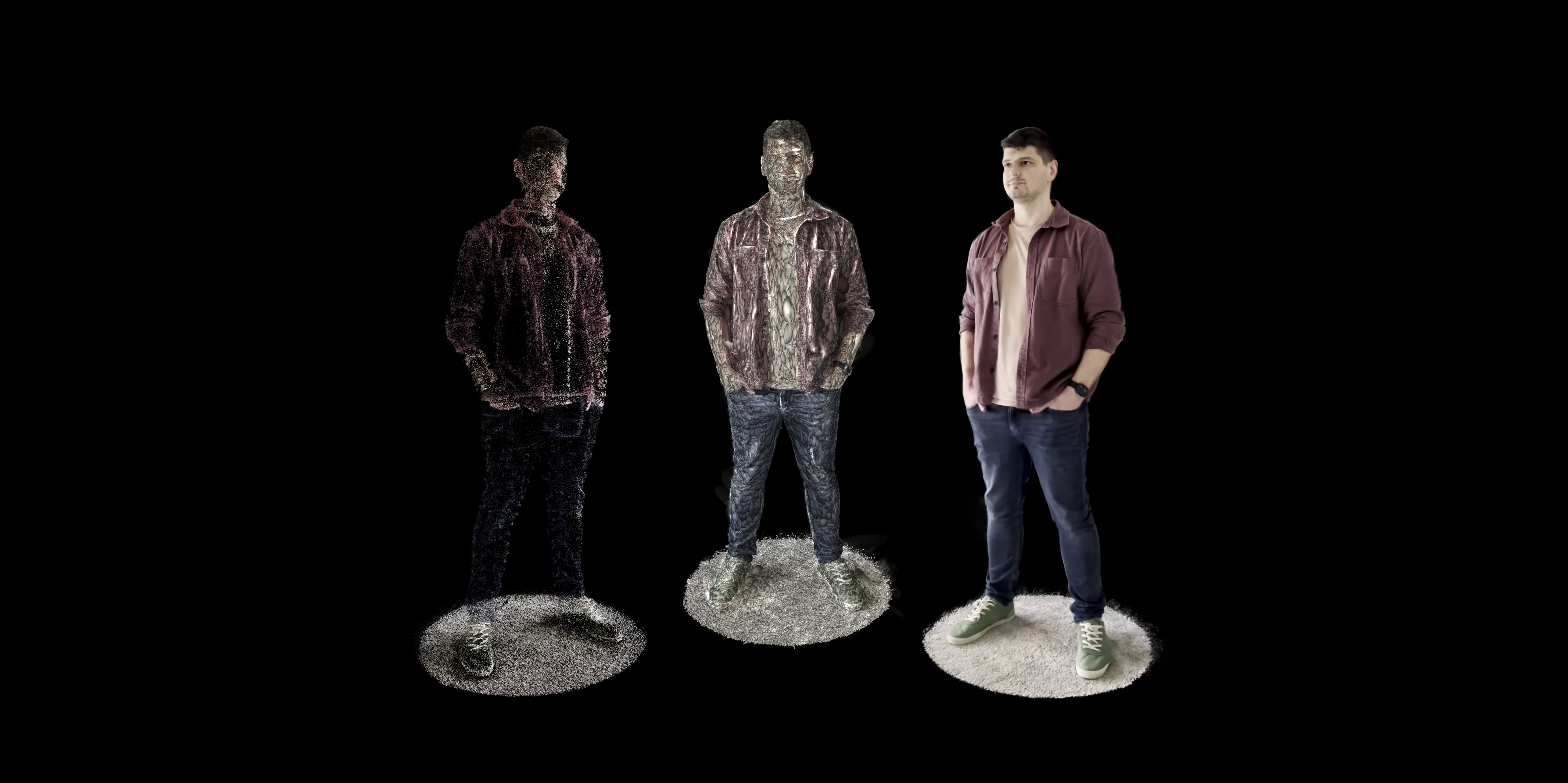 Image by Sascha Kirch.
Outline
- What are Gaussian Splats?
- Let's Turn Ourselves into a 3D Gaussian Splatting
- Conclusion and Further Resources
What are Gaussian Splats?
3D Gaussian splatting is a technique to represent a scene in 3D. It is actually one of many ways. For example you could also represent a scene as a set of points, a mesh, voxels or using an implicit representation like Neural Radiance Fields (aka. NeRFs).
The foundation of 3D Gaussian Splatting has been around for quite some time leading back to 2001 to a classical approach from computer vision called surface splatting.
But how does 3D Gaussian Splatting actually represent a scene?
3D Representation
In 3D Gaussian Splatting a scene is represented by a set of points. Each point has certain attributes associated with it to parameterize an anisotropic 3D Gaussian. If an image is rendered, these Gaussians overlap to form the image. The actual parameterization takes place during the optimization phase that fits these parameters in such a way, that rendered images are as close as possible to the original input images.
A 3D Gaussian is parameterizedwith
- its mean µ , which is the x,y,z coordinate in 3D space.
- its covariance matrix Σ, which can be interpreted as the spread of the Gaussian in any 3D direction. Since the Gaussian is anisotropic it can be stretched in any direction.
- a color usually represented as spherical harmonics. Spherical harmonics allow the Gaussian splats to have different colors from different viewpoints which drastically improves the quality of renders. It allows rendering non-lambertian effects like specularities of metallic objects.
- an opacity 𝛼 that determines how transparent the Gaussian will be.
The image bellow shows the influence of a 3D Gaussian Splat with respect to a point p. Spoiler : that point p will be the one relevant if we render the image.
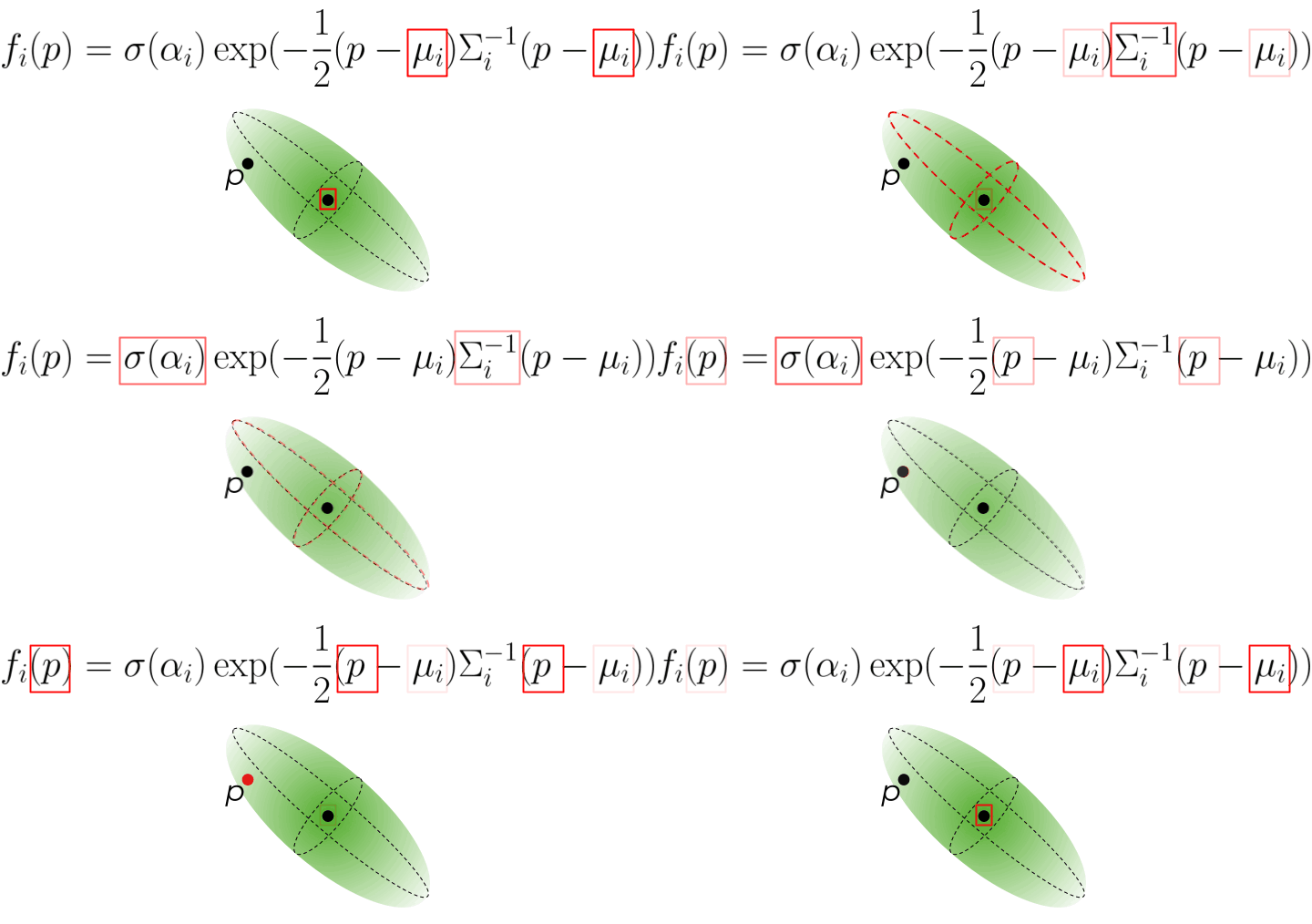 Fig.1: Influence of a 3D Gaussian i on a point p in 3D space. Image by Kate Yurkova
How do you get an image out of this representation?
Fig.1: Influence of a 3D Gaussian i on a point p in 3D space. Image by Kate Yurkova
How do you get an image out of this representation?
Image Rendering
Like NeRFs, 3D Gaussian Splatting uses 𝛼-blending along a ray that is casted from a camera through the image plane and through the scene. This basically means that through integration along a ray al intersecting gaussians contribute to the final pixel's color.
The image bellow shows the conceptual difference between the most basic NeRF (for simplicity) and gaussian splatting.
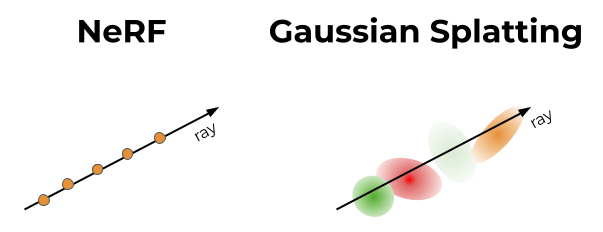 Fig.2: Conceptual difference between NeRFs and 3D Gaussian Splatting. Image by Kate Yurkova
While conceptually similar, there is a large difference in the implementation though. In Gaussian Splatting we don't have any deep learning model like the multi-layer perceptron (MLP) in NeRFs. Hence we don't need to evaluate the implicit function approximated by the MLP for each point (which is relatively time consuming) but overlap various partially transparent Gaussians of different size and color. We still need to cast at least 1 ray per pixel of the image to render the final image.
So basically through the blending of all that Gaussians the illusion of a perfect image emerges. If you'd remove the transparency from the splats you can actually see the individual gaussians of varying size and orientation.
Fig.2: Conceptual difference between NeRFs and 3D Gaussian Splatting. Image by Kate Yurkova
While conceptually similar, there is a large difference in the implementation though. In Gaussian Splatting we don't have any deep learning model like the multi-layer perceptron (MLP) in NeRFs. Hence we don't need to evaluate the implicit function approximated by the MLP for each point (which is relatively time consuming) but overlap various partially transparent Gaussians of different size and color. We still need to cast at least 1 ray per pixel of the image to render the final image.
So basically through the blending of all that Gaussians the illusion of a perfect image emerges. If you'd remove the transparency from the splats you can actually see the individual gaussians of varying size and orientation.
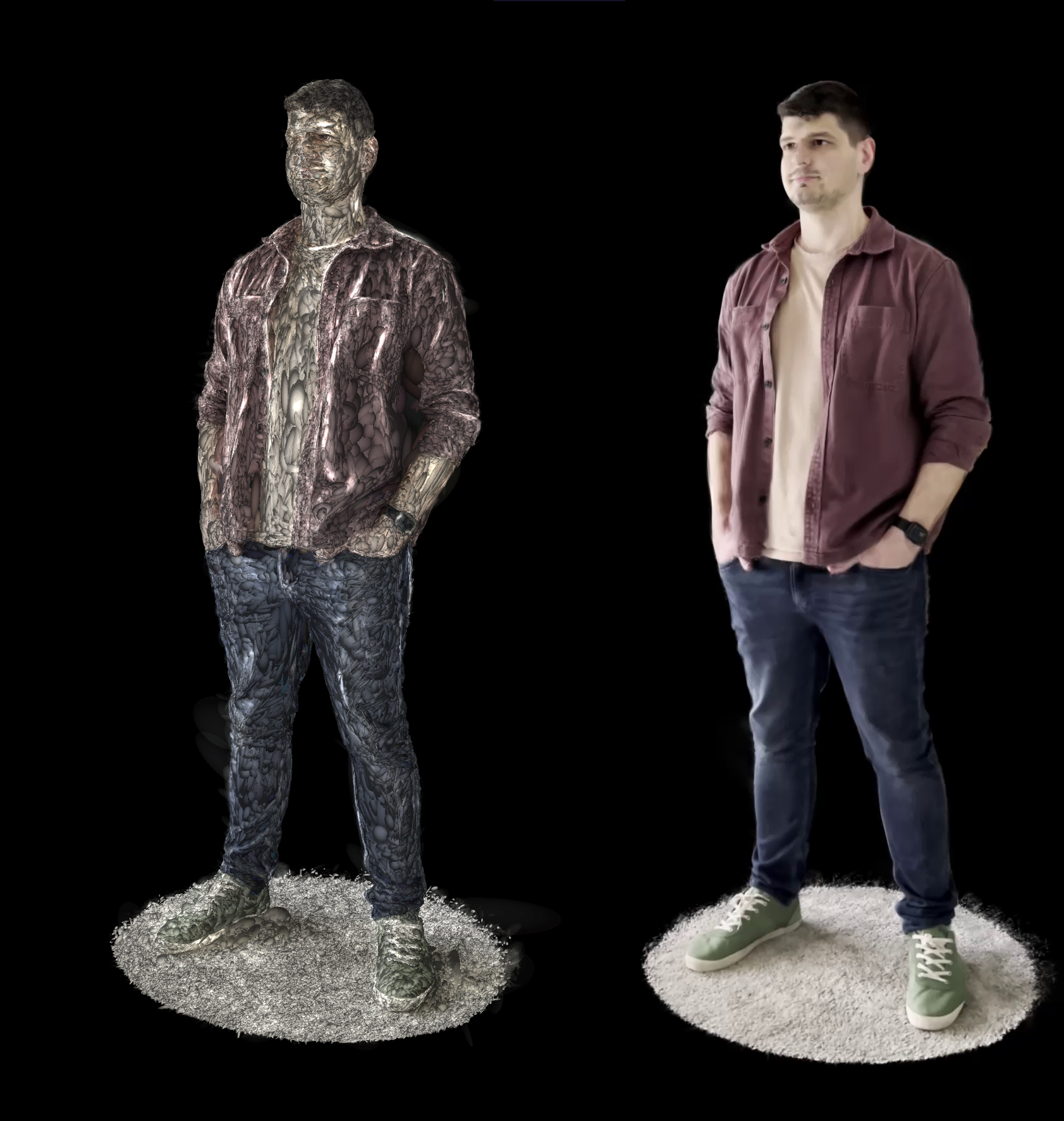 Fig.3: Visualizing the 3D Gaussians of an object. Image by Sascha Kirch.
And how is it optimized?
Fig.3: Visualizing the 3D Gaussians of an object. Image by Sascha Kirch.
And how is it optimized?
Optimization
The optimization is theoretically straightforward and easy to understand. But of course, as always, the success lies in the details.
To optimize the Gaussian Splattings, we need an initial set of points and images of the scene. The authors of the paper suggest to use the structure from motion (SfM) algorithm to obtain the initial point cloud. During training, the scene is rendered with the estimated camera pose and camera intrinsic obtained from SfM. The rendered image and the original image are compared, a loss is calculated and the parameters of each Gaussian is optimized with stochastic gradient descent (SGD).
One of the important details worth mentioning is the adaptive densification scheme. SGD is only capable to adjust the parameter of existing Gaussians, but it cannot spawn new ones or destroy existing ones. This might lead to holes in the scene or to lack of fine-grained details if there are too few points and to unnecessarily large point clouds if there are too many points. To overcome this, the adaptive densification method splits points with large gradients and removes points that have converged to low values.
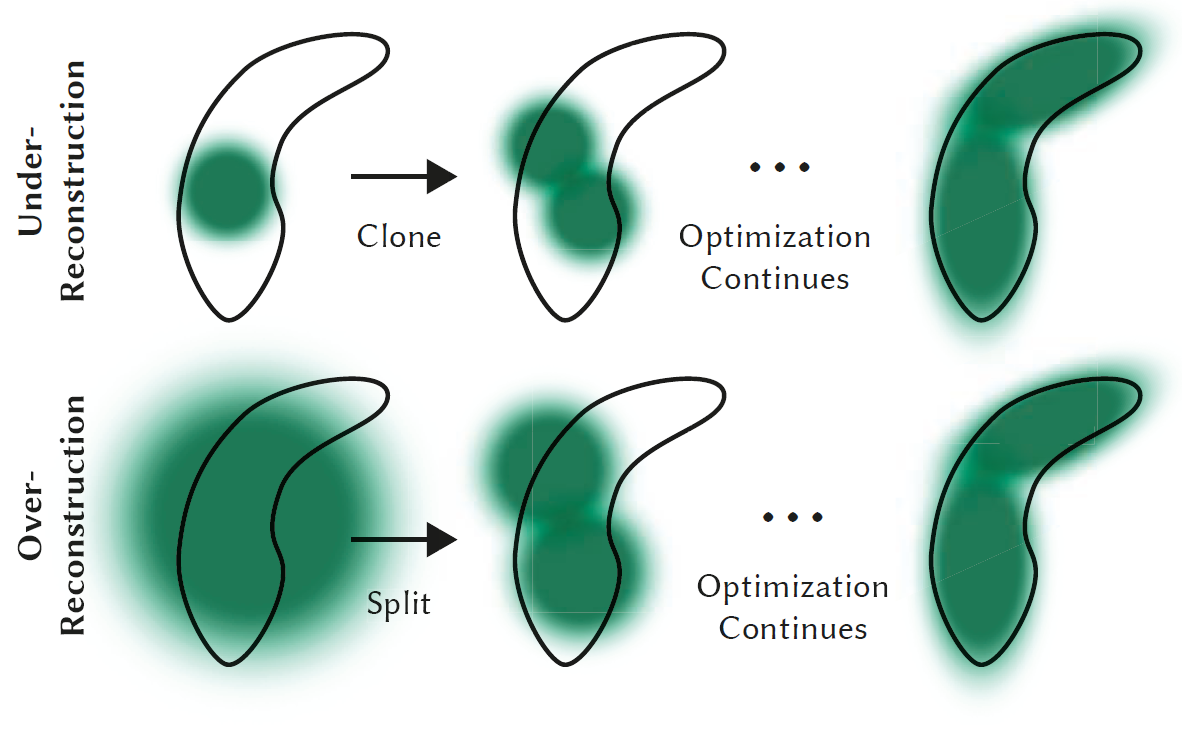 Fig.4: Adaptive Gaussian densification scheme. Image by B. Kerbl et. al.
Let's Turn Ourselves into a 3D Gaussian Splatting
Having talked about some theoretical basics let's now switch gears and jump into the practical part of this post, where I show you how you can create a 3D Gaussian splatting of yourself.
Note: The authors suggest using a GPU with at least 24GB but you can still create your 3D Gaussian Splats using some tricks I'll will mention when they need to be applied. I have an RTX 2060 mobile with 6GB.
These are the steps we will cover:
- Installation
- Capture a Video
- Obtain point cloud and camera poses
- Run the Gaussian Splatting Algo
- Post processing
- (Bonus) Embed your model on a website in an interactive viewer
Installation
For the installation you can either jump over to the official 3D Gaussian Splatting repository and follow their instructions or head over to The NeRF Guru on YouTube who does an excellent job in showing how to install all you need. I recommend the later.
I personally chose to install colmap on windows because I was not able to build colmap from source with GPU support in my WSL environment and for windows there is a pre-built installer. The optimization for the 3D Gaussian Splatting has been done on Linux. But it actually does not really matter and the commands I show you are equal on either Windows or Linux.
Capture a Video
Ask someone to capture a video of you. You must stand as still as possible and the other person must walk around you trying to capture you from any angle.
Some Hints:
- Choose a pose where it is easy for you not to move. E.g. holding your hands up for 1 minute without moving is not that easy 😅
- Choose a high framerate for capturing the video to reduce motion blur. E.g. 60fps.
- If you have a small GPU, don't film in 4k otherwise the optimizer is likely to crash with an out of memory exception.
- Ensure there is sufficient light, so your recording is crisp and clear.
- If you have a small GPU, prefer indoor scenes over outdoor scenes. Outdoor scenes have a lot of "high frequency" content aka. small things close to each other like gras and leaves which leads to many Gaussians being spawned during the adaptive densification.
Once you have recorded your video move it to your computer and extract single frames using ffmpeg.
bash
ffmpeg -i <PATH_VIDEO> -qscale:v 1 -qmin 1 -vf fps=<FRAMES_PER_SEC> <PATH_OUTPUT>/%04d.jpg
This command takes the video and converts it into jpg images of high quality with low compression (only jpg works). I usually use between 4–10 frames per second. The output files will be named with an up counting four-digit number.
You should then end up with a folder full of single frame images like so:
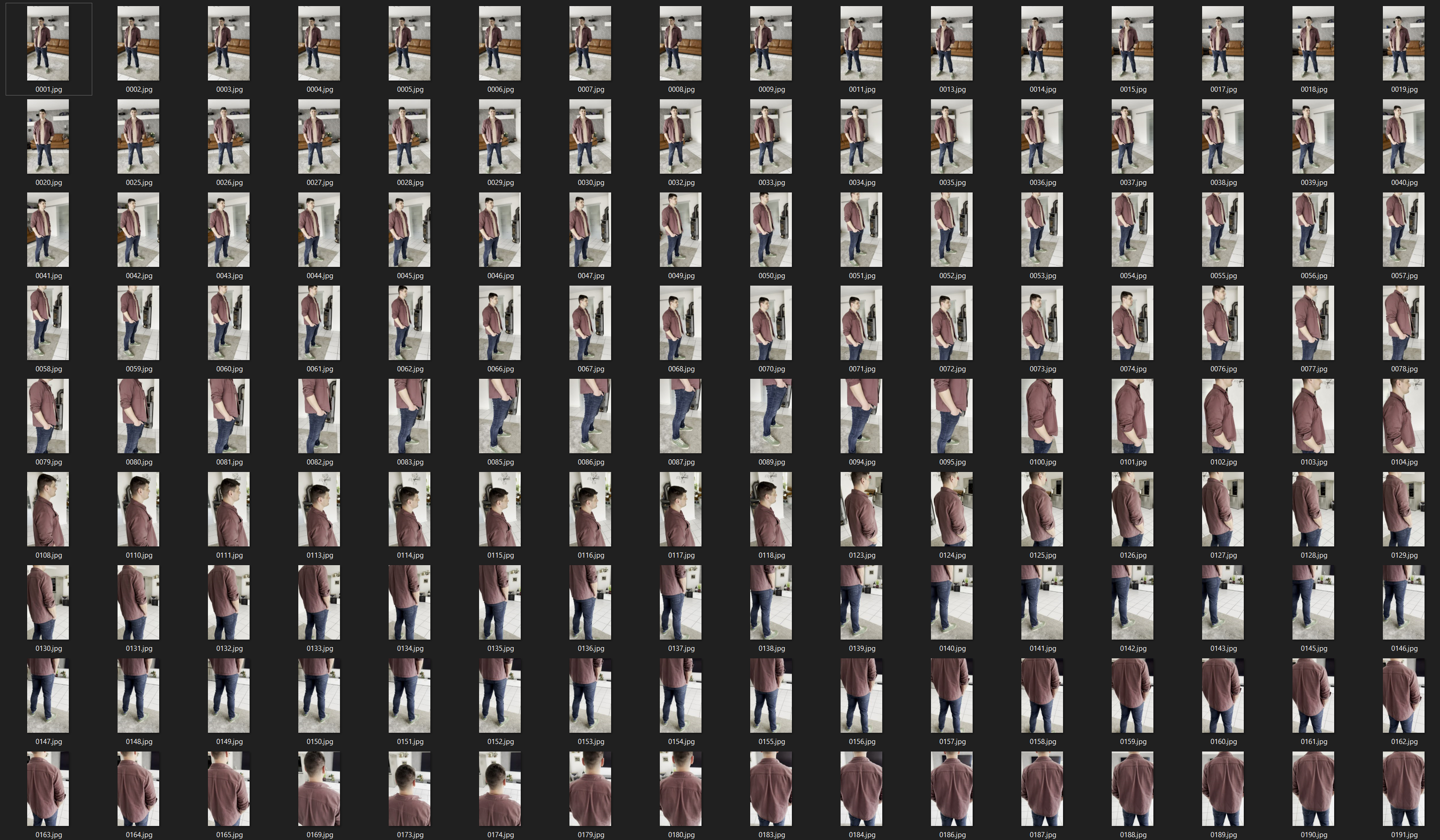 Fig.5: Single frame input images. Image by Sascha Kirch.
Some hints for better quality:
Fig.5: Single frame input images. Image by Sascha Kirch.
Some hints for better quality:
- Remove blurry images - otherwise leads to a haze around you and spawns "floaters".
- Remove images where your eyes are closed - otherwise leads to blurry eyes in the final model.
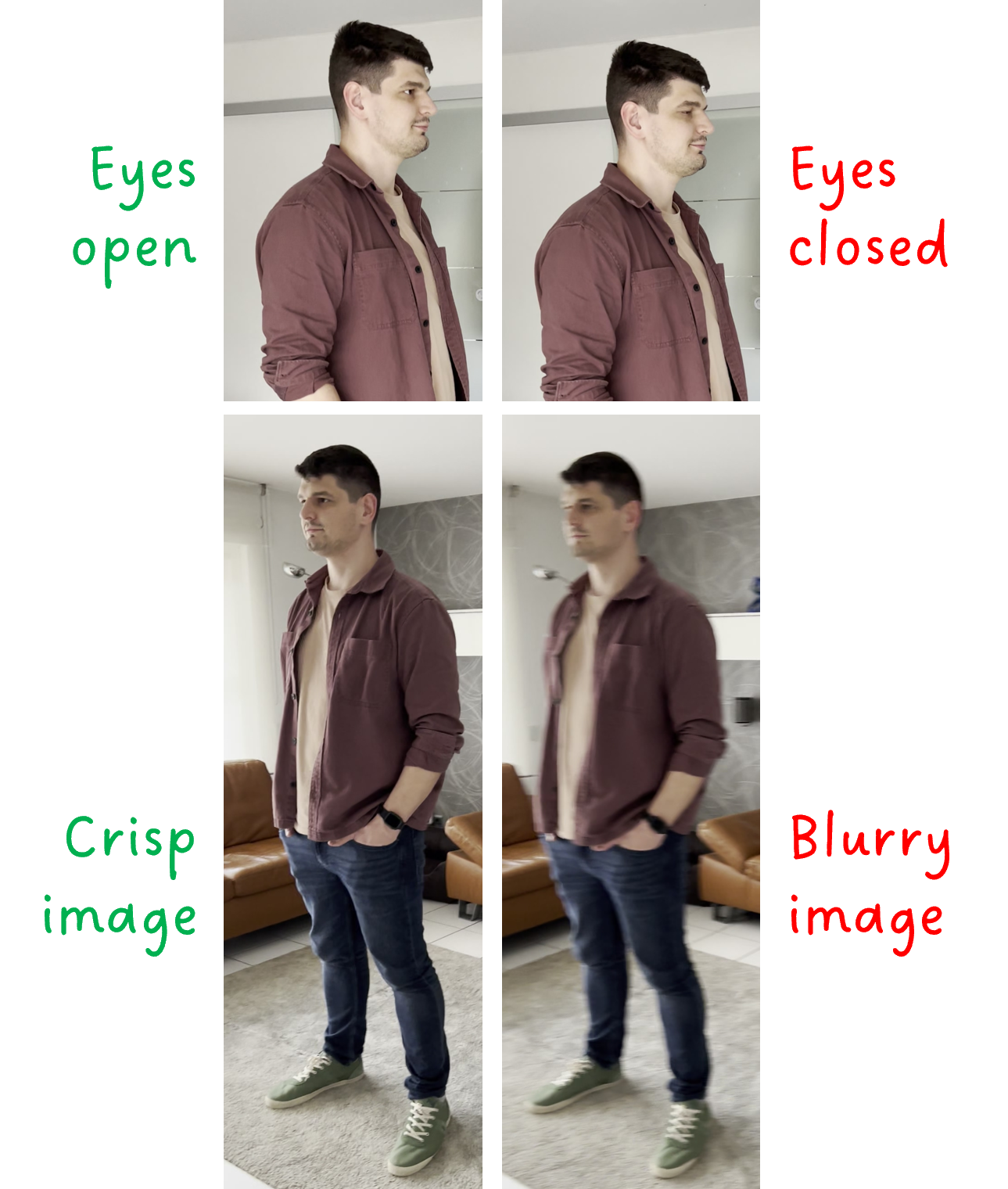 Fig.6: Good vs. bad image. Image by Sascha Kirch.
Obtain Point Cloud and Camera Poses
As mentioned earlier the gaussian splatting algorithm needs to be initialized. One way is to initialize the Gaussians' mean with the location of a point in 3D space. We can use the tool colmap which implements structure from motion (SfM) to obtain a sparse point cloud from images only. Luckily, the authors of the 3D Gaussian Splatting paper provided us with code to simplify the process.
So head over to the Gaussian Splatting repo you cloned, activate your environment and call the convert.py script.
bash
python .convert.py -s <ROOT_PATH_OF_DATA> --resize
The root path to your data is the directory that contains the "input" folder with all the input images. In my case I created a subfolder within in the repo: ./gaussian-splatting/data/<NAME_OF_MODEL>. The argument --resize will output additional images with a down sampling factors 2, 4, and 8. This is important in case you run out of memory for high resolution images, so you can simply switch to a lower resolution.
Note: I had to set the environment variable CUDA_VISIBLE_DEVICES=0 for the GPU to being used with colmap.
Depending on the number of images you have, this process might take a while, so either grab a cup of coffee or stare at the progress like I sometimes do wasting a lot of time 😂
Once colmap is done you can type colmap gui into your command line and inspect the sparse point cloud.
To open the point cloud click on "File>import model" and navigate to <ROOT_PATH_DATA>/sparse/0 and open that folder.
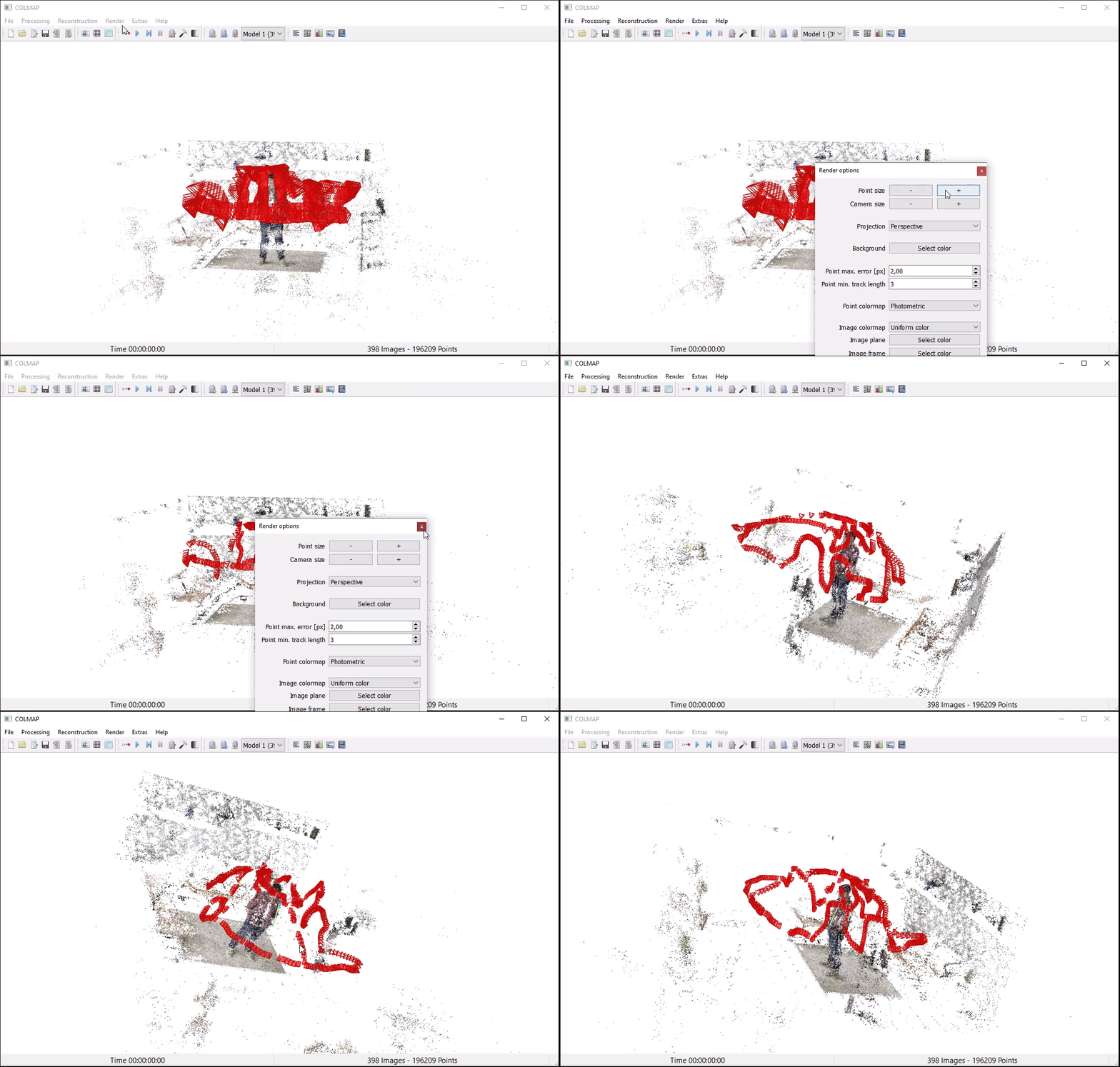 Fig.7: Sparse point cloud output and camera poses from colmap. Image by Sascha Kirch.
The red objects are cameras the SfM algorithm estimated from the input frames. They represent the position and pose of the camera where a frame was captured. SfM further provides the intrinsic camera calibration, which is important for the 3D gaussian splatting algorithm so gaussians can be rendered into a 2D image during optimization.
Fig.7: Sparse point cloud output and camera poses from colmap. Image by Sascha Kirch.
The red objects are cameras the SfM algorithm estimated from the input frames. They represent the position and pose of the camera where a frame was captured. SfM further provides the intrinsic camera calibration, which is important for the 3D gaussian splatting algorithm so gaussians can be rendered into a 2D image during optimization.
Run the Gaussian Splatting Optimizer
Everything up until now has been preparation for the actual 3D Gaussian splatting algorithm.
The script to train the 3D Gaussian splatt is train.py. I usually like to wrap those python scripts into a shell script to be able to add comments and easily change the parameters of a run. Here is what I use:
Except for the data_device=cpu all arguments are set to their default. If you run into memory issues, you can try tweaking the following arguments:
resolution: this is the down sampling factor of the image resolution. 1 means full resolution, and 2 means half resolution. Since we have used --resize for the convert.py for the sparse point cloud generation, you can test with 1, 2, 4 and 8. Before lowering the resolution I recommend trying to lower sh_degree first.
sh_degree: Sets the maximum degree of the spherical harmonics, with 3 being the maximum. Lowering this value has a large impact on the memory footprint. Remember that the spherical harmonics control the view-dependent color rendering. Practically sh_degree=1 usually still looks good from my experience.
densify_*_iter: Controls the span of iterations where adaptive densification is performed. Tweaking the argument might result in fewer points being spawned hence a lower memory footprint. Note that this might have a big impact on the quality.
If everything turns out well, you hopefully end up with a scene as shown below. In the next section we jump into the visualization and postprocessing.
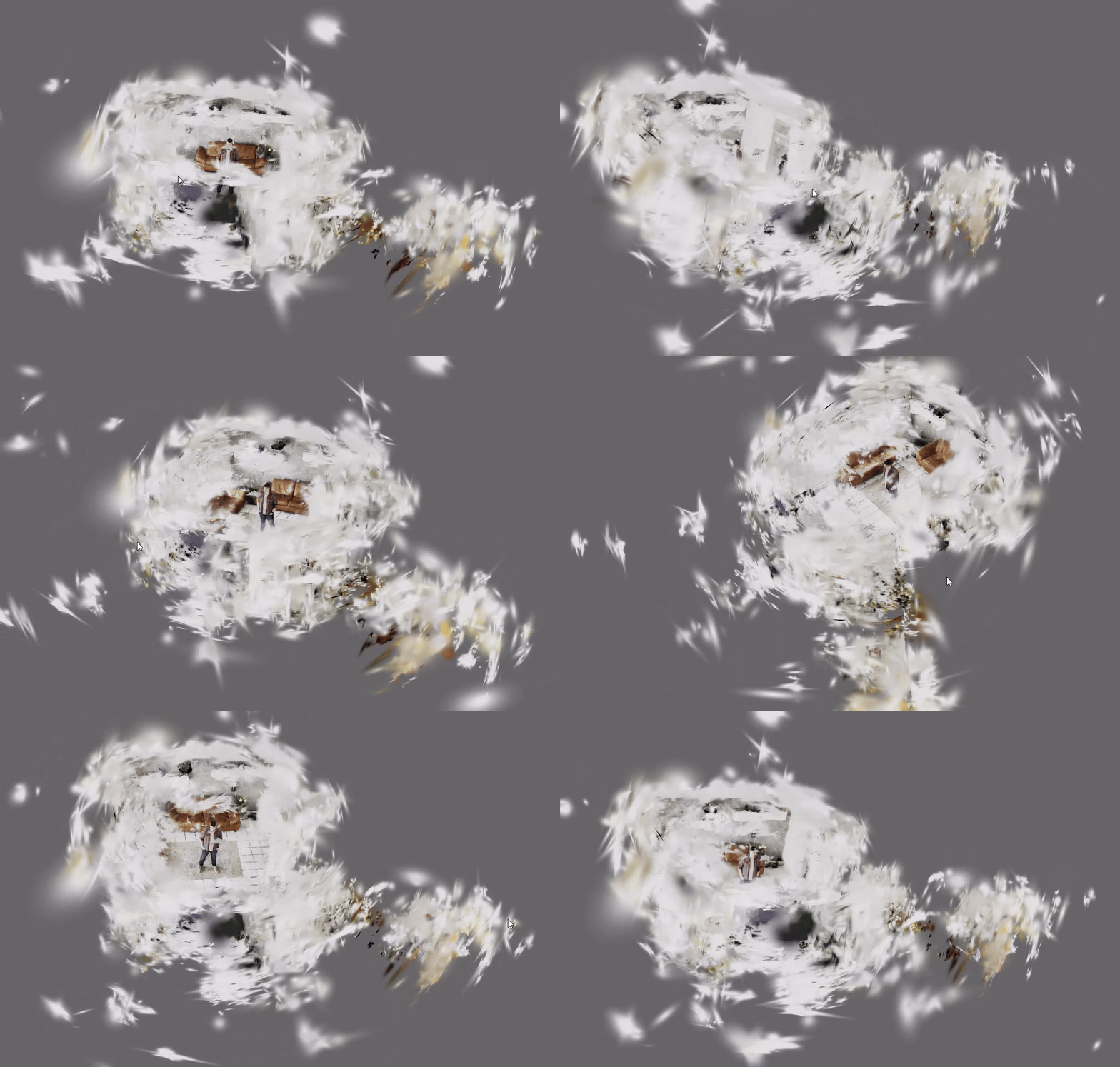 Fig.8: Optimized scene represented in 3D gaussian splattings. Image by Sascha Kirch.
You can actually see quite nice the gaussian shape of individual splats in low density regions.
Fig.8: Optimized scene represented in 3D gaussian splattings. Image by Sascha Kirch.
You can actually see quite nice the gaussian shape of individual splats in low density regions.
Post Processing
Even though the Gaussian splatting repo comes with its own visualizer, I prefer to use Super Splat since it is much more intuitive and you can directly edit your scene.
So to get started, head the Super Splat editor and open your ply-file, located under ./output/<RUN_NAME/point_cloud/iteration_xxxx>.
I usually start to remove most of the background points using a sphere as indicated below.
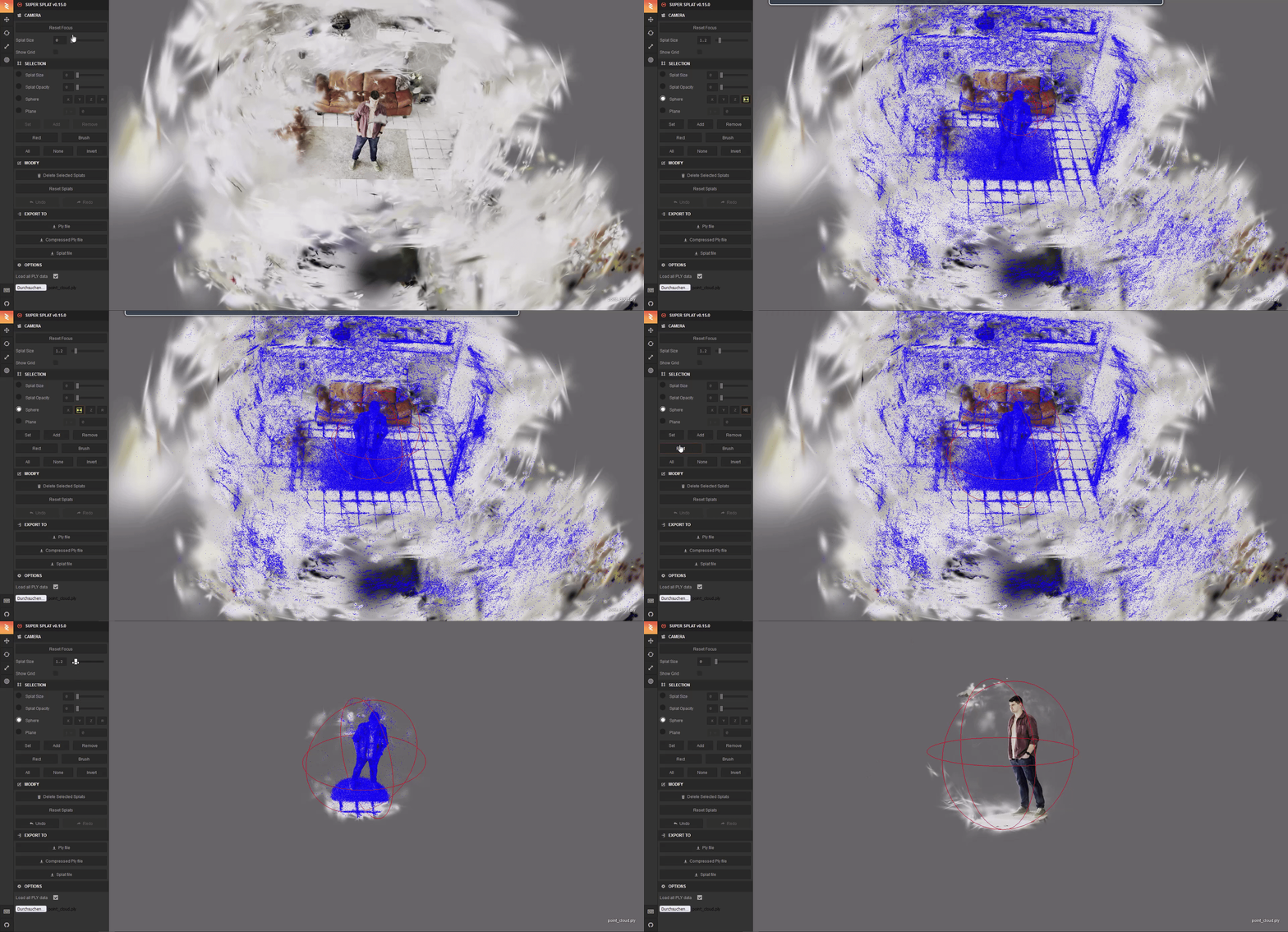 Fig.9: Post processing the 3D Gaussian Splatting. Image by Sascha Kirch.
I then continue with the brush to remove other points like those floaters we talked about earlier. I assume that the number of this floaters could be reduced if the input images are less blurry (because even if I removed most of them, some were still there) and if one would optimize the training params.
Once you are happy with the result, export the model as ply-file.
After some fine-tuning with the brush that is my final result:
Fig.9: Post processing the 3D Gaussian Splatting. Image by Sascha Kirch.
I then continue with the brush to remove other points like those floaters we talked about earlier. I assume that the number of this floaters could be reduced if the input images are less blurry (because even if I removed most of them, some were still there) and if one would optimize the training params.
Once you are happy with the result, export the model as ply-file.
After some fine-tuning with the brush that is my final result:
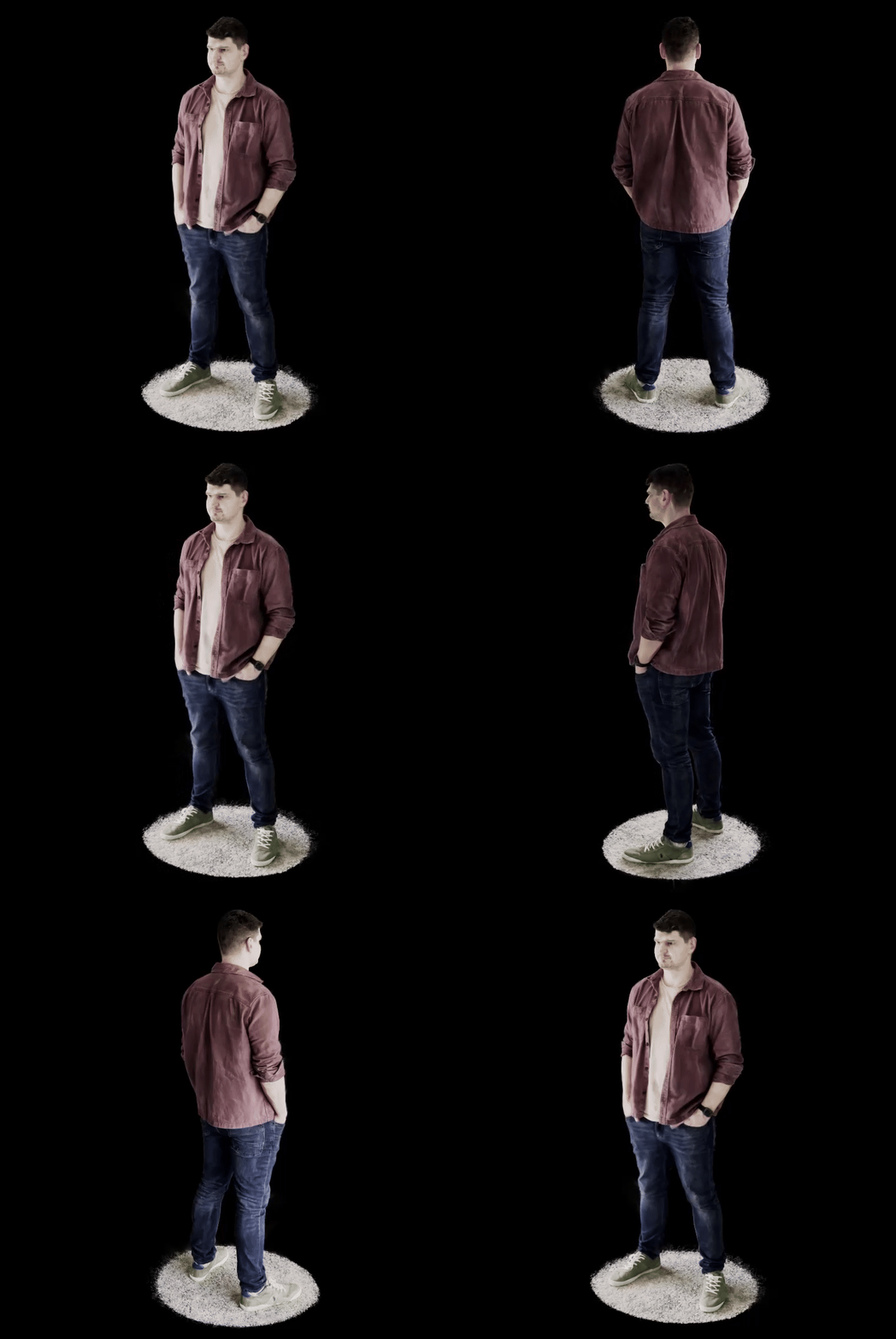 Fig.10: Final 3D Gaussian Splat. Image by Sascha Kirch.
(Bonus) Embed your model on a website in an interactive viewer
Having a cool model of yourself, you might want to share it with others. And what is cooler than sharing an interactive viewer rather than a simple rendered image?
So let me show you a neat way of how you can embed an interactive version of your model on your website, like I did here on mine.
Here is the link to my website so you can test it yourself.
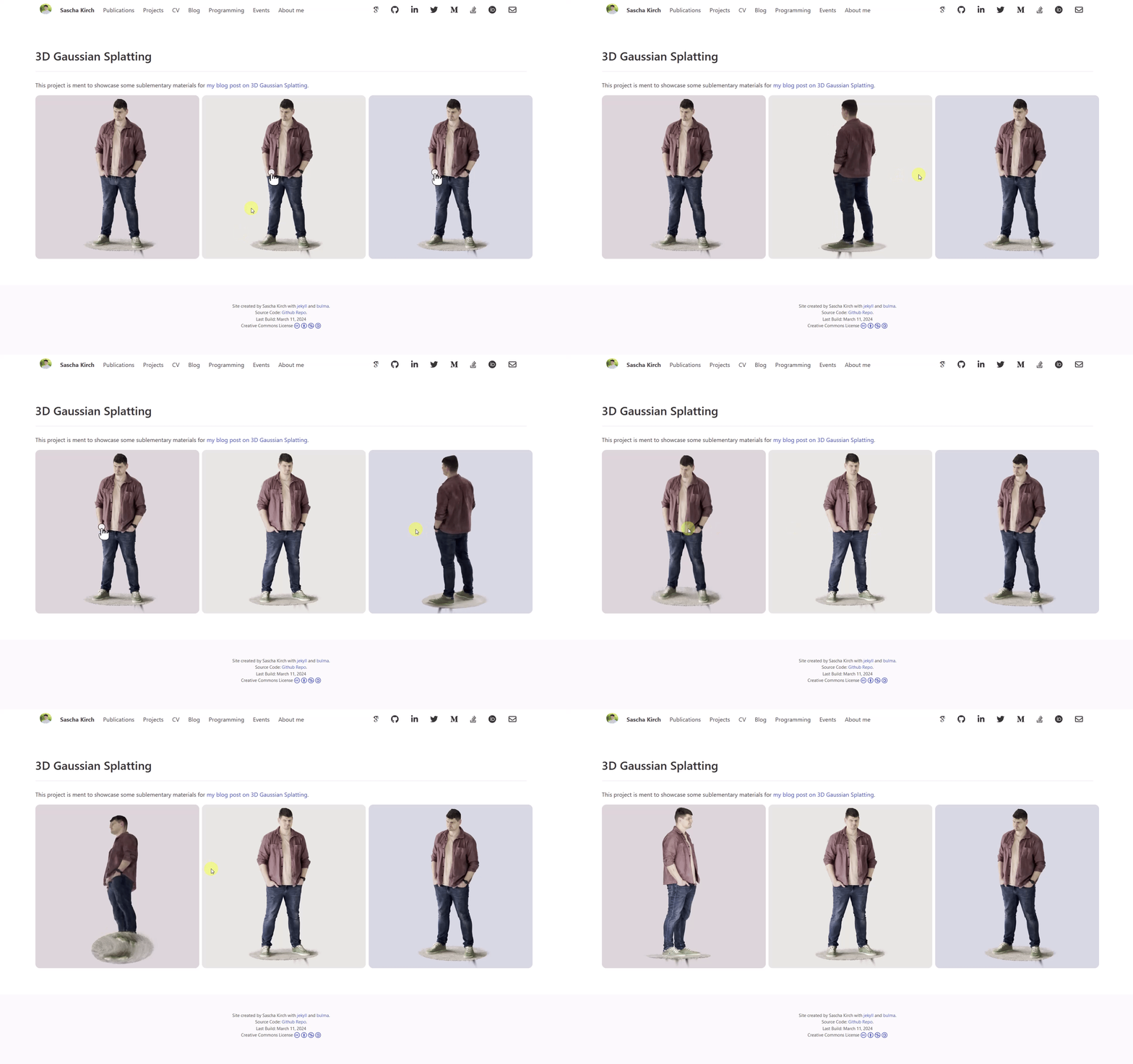 Fig.11: Interactive viewer of your 3D Gaussian Splat. Image by Sascha Kirch. Test it yourself on my Website
We are going to use Spline, a browser-based platform to create, edit and host 3D models. All I am going to show you can be implemented in their free version.
First you need to sign-up and then start a new project. Inside your project, import the same ply-file we saved during our post processing step. In the scene settings, configure the size of the final viewer and remove the background if you like. Once you are happy with the appearance, export the model.
Fig.11: Interactive viewer of your 3D Gaussian Splat. Image by Sascha Kirch. Test it yourself on my Website
We are going to use Spline, a browser-based platform to create, edit and host 3D models. All I am going to show you can be implemented in their free version.
First you need to sign-up and then start a new project. Inside your project, import the same ply-file we saved during our post processing step. In the scene settings, configure the size of the final viewer and remove the background if you like. Once you are happy with the appearance, export the model.
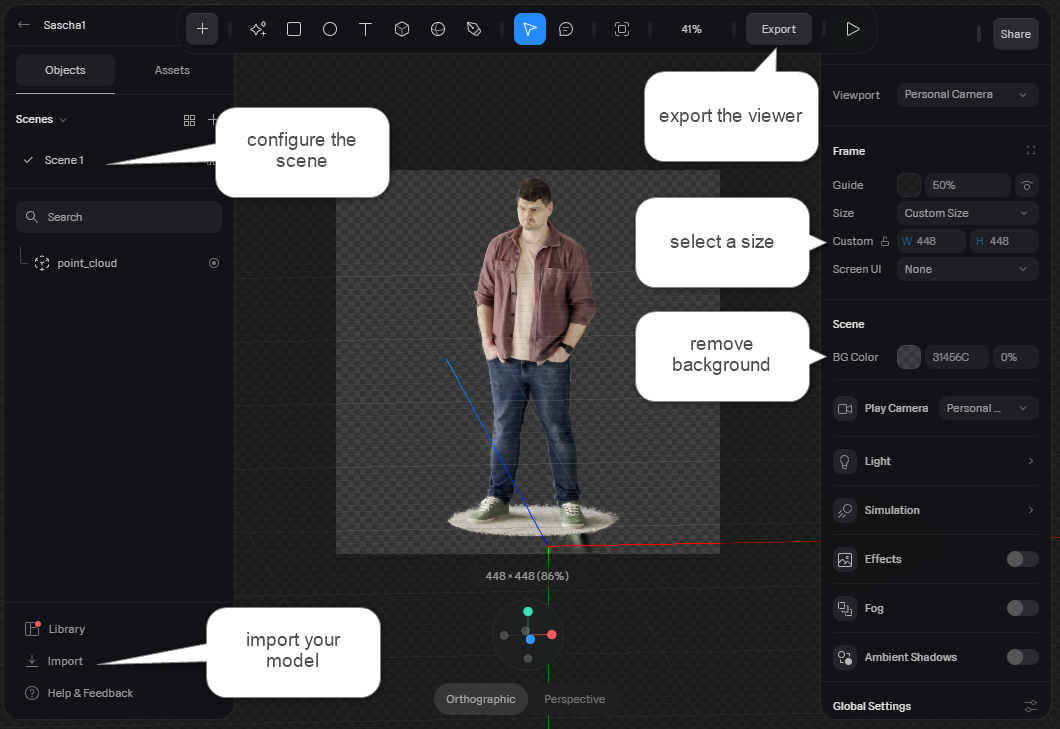 Fig.12: Spline editor. Image by Sascha Kirch.
Within the export settings, select the viewer option on the left-hand side. Make the desired customizations and then copy the html code to your own website.
Fig.12: Spline editor. Image by Sascha Kirch.
Within the export settings, select the viewer option on the left-hand side. Make the desired customizations and then copy the html code to your own website.
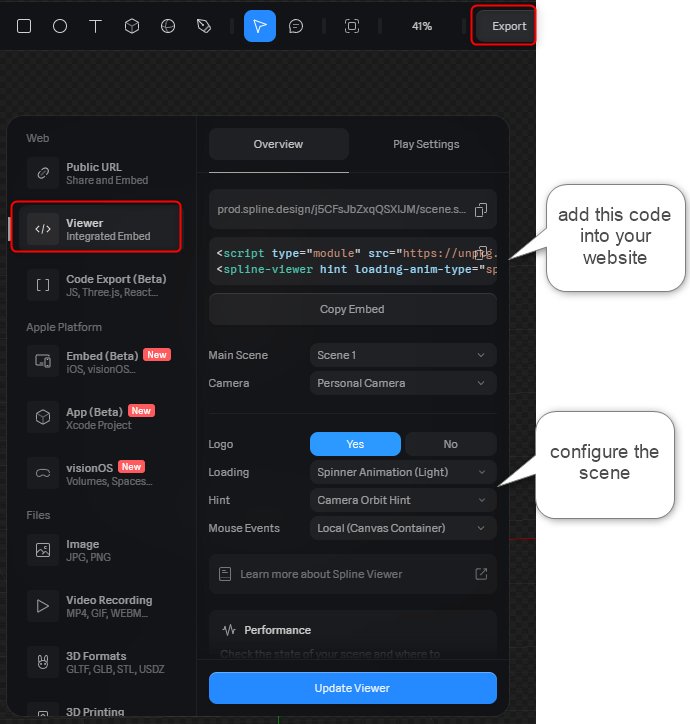 Fig.13: Spline viewer export configuration. Image by Sascha Kirch.
And that's it! Easy right? There are many awesome examples and tutorials on how you can further stylize your model so give it a try.
Fig.13: Spline viewer export configuration. Image by Sascha Kirch.
And that's it! Easy right? There are many awesome examples and tutorials on how you can further stylize your model so give it a try.
Conclusion and Further Ressources
3D Gaussian Splatting is an exciting method for representing a scene. It has been adopted widely by practitioners and academics and as a result motivated a vast number of new tools, applications and research topics.
Today we were mainly concerned with the practical aspects and turned ourselves into a 3D gaussian Splatting.
For some theoretical foundation I recommend to check out Kate Yurkova's comprehensive guide on gaussian splatting!
Register Now to Continue Reading
Unlock Towards Data Science with a Free Account
All articles on Towards Data Science are available to registered users. Create a free account today to access this article and thousands more.
Register for freeSign in to your account
 Written By
See all from Sascha Kirch
Deep Dives3d Gaussian SplattingComputer VisionNeural Radiance FieldsPoint Cloud
Share This Article
Towards Data Science is a community publication. Submit your insights to reach our global audience and earn through the TDS Author Payment Program.
Write for TDS
Related Articles
NLP
Despite the large number of blog posts and articles written about LDA Topic Model implementations, precious few delve into the most...
Dan Robinson
April 26, 20226 min read
Data Engineering
Understand how batch can be considered a subset of streaming and why data engineering should simplify its usage significantly
Bernd Wessely
September 4, 202425 min read
Deep Learning
Part 1
Sascha Kirch
August 14, 202417 min read
Artificial Intelligence
How does Google Bard handle Python coding tasks?
Marcin Kozak
November 9, 202320 min read
Data Science
From white noise to SARIMAX and beyond
Matt Sosna
August 12, 202124 min read
NLP
Using state-of-the-art NLP algorithms to build a representation for future machine learning solutions in the sports analytics domain
Ofir Magdaci
June 15, 202114 min read
Deep Learning
In this post, we discuss the problem of class imbalance and the techniques which might help to improve the performance of the model
Divyanshu Mishra
July 27, 202110 min read
Get ready for rigorous probability
Xichu Zhang
September 12, 20210 min read
Deep Learning
Making Sense of Big Data Videos, Anomalies and Autoencoders Detecting anomalies in video streams is...
Varun Menon
April 30, 202112 min read
Your home for data science and AI. The world's leading publication for data science, data analytics, data engineering, machine learning, and artificial intelligence professionals.
Subscribe to Our NewsletterWrite For TDS•About•Advertise•Privacy Policy•Terms of Use
© Insight Media Group, LLC 2026•The New Stack•roadmap.sh•Creator Network
Recommended Articles
Close