Running an inference in Luganda on the Gemma 3 models for image and video tasks
I'm a Machine Learning Engineer passionate about building production-ready ML systems for the African market. With experience in TensorFlow, Keras, and Python-based workflows, I help teams bridge the gap between machine learning research and real-world deployment—especially on resource-constrained devices. I'm also a Google Developer Expert in AI. I regularly speak at tech conferences including PyCon Africa, DevFest Kampala, DevFest Nairobi and more and also write technical articles on AI/ML here.
Google has unveiled Gemma 3, the latest iteration of its open AI models, featuring four versions: gemma-3-1b-it, gemma-3-4b-it, gemma-3-12b-it, and gemma-3-27b-it.
The gemma-3-1b-it model is limited to text-only input, supports English exclusively, and comes with a 32k context length. Due to its lack of multilingual capabilities, it is unsuitable for a Luganda inference.
In contrast, the gemma-3-4b-it, gemma-3-12b-it, and gemma-3-27b-it models support both text and image input, recognize 140+ languages, and offer an extended 128k context length, making them far better suited for multilingual tasks.
For this specific task, we are using gemma-3-4b-it due to its balance of performance and efficiency.
Accessing Gemma 3 models
Before using Gemma 3 for the first time, you must request access to the model through Hugging Face by completing the following steps:
Log in to Hugging Face, or create a new Hugging Face account if you don't already have one.
Go to the Gemma 3 model card to get access to the model.
Complete the consent form and accept the terms and conditions.
To generate a Hugging Face token, open your Settings page in Hugging Face, choose Access Tokens option in the left pane and click New token. In the next window that appears, give a name to your token and choose the type as Write to get the write access.
Then, in Colab, select Secrets (🔑) in the left pane and add your Hugging Face token. Store your Hugging Face token under the name HF_TOKEN.
Select the runtime
To complete this tutorial, you'll need to have a Colab runtime with sufficient resources to load the Gemma 3 model. In this case, a T4/L4 GPU would be needed to load the model weights.
In the upper-right of the Colab window, click the dropdown menu.
Select Change runtime type.
Under Hardware accelerator, select T4 or L4.
!pip install git+https://github.com/huggingface/transformers@v4.49.0-Gemma-3
from transformers import AutoProcessor, Gemma3ForConditionalGeneration
from PIL import Image
import cv2
from IPython.display import Markdown, HTML
from base64 import b64encode
import requests
import torch
Gemma 3 is available in four sizes, each supporting different features:
gemma-3-1b-it
Supports only text input and English language
32k context length
gemma-3-4b-it, gemma-3-12b-it, gemma-3-27b-it
Supports both text and image input
Supports 140+ languages
128k context length
model_name = 'gemma-3-4b-it' #We are using 4b
model_id = f"google/{model_name}"

model = Gemma3ForConditionalGeneration.from_pretrained(
    model_id, device_map="auto", torch_dtype=torch.bfloat16,
).eval()

processor = AutoProcessor.from_pretrained(model_id)
resize_image: Resizes the input images to n x n pixels, ensuring the aspect ratio is preserved.
get_model_response: Send a text prompt and an image to the model, and retrieve the model's response.
extract_frames: Extracts a specified number of evenly spaced frames from a video file along with their timestamps.
show_video: Embeds and displays a video in an HTML5 player.
def resize_image(image_path):
    img = Image.open(image_path)

    target_width, target_height = 640, 640
    # Calculate the target size (maximum width and height).
    if target_width and target_height:
        max_size = (target_width, target_height)
    elif target_width:
        max_size = (target_width, img.height)
    elif target_height:
        max_size = (img.width, target_height)

    img.thumbnail(max_size)

    return img


def get_model_response(img: Image, prompt: str, model, processor):
    # Prepare the messages for the model.
    messages = [
        {
            "role": "system",
            "content": [{"type": "text", "text": "You are a helpful assistant. Reply only with the answer to the question asked in Luganda language only, and avoid using additional text in your response like 'here's the answer'."}]
        },
        {
            "role": "user",
            "content": [
                {"type": "image", "image": img},
                {"type": "text", "text": prompt}
            ]
        }
    ]

    # Tokenize inputs and prepare for the model.
    inputs = processor.apply_chat_template(
        messages, add_generation_prompt=True, tokenize=True,
        return_dict=True, return_tensors="pt"
    ).to(model.device, dtype=torch.bfloat16)

    input_len = inputs["input_ids"].shape[-1]

    # Generate response from the model.
    with torch.inference_mode():
        generation = model.generate(**inputs, max_new_tokens=100, do_sample=False)
        generation = generation[0][input_len:]

    # Decode the response.
    response = processor.decode(generation, skip_special_tokens=True)
    return response


def extract_frames(video_path, num_frames):
    """
    The function is adapted from:
    https://github.com/merveenoyan/smol-vision/blob/main/Gemma_3_for_Video_Understanding.ipynb
    """
    cap = cv2.VideoCapture(video_path)

    if not cap.isOpened():
        print("Error: Could not open video file.")
        return []

    total_frames = int(cap.get(cv2.CAP_PROP_FRAME_COUNT))
    fps = cap.get(cv2.CAP_PROP_FPS)

    # Calculate the step size to evenly distribute frames across the video.
    step = total_frames // num_frames
    frames = []

    for i in range(num_frames):
        frame_idx = i * step
        cap.set(cv2.CAP_PROP_POS_FRAMES, frame_idx)
        ret, frame = cap.read()
        if not ret:
            break
        img = Image.fromarray(cv2.cvtColor(frame, cv2.COLOR_BGR2RGB))
        timestamp = round(frame_idx / fps, 2)
        frames.append((img, timestamp))

    cap.release()
    return frames


def show_video(video_path, video_width = 600):
  video_file = open(video_path, "r+b").read()
  video_url = f"data:video/mp4;base64,{b64encode(video_file).decode()}"
  video_html = f"""<video width={video_width} controls><source src="{video_url}"></video>"""
  return HTML(video_html)
Fetch some sample images for inferencing.
!wget https://raw.githubusercontent.com/wkambale/Luganda-Inference-on-Gemma-3/main/assets/image_1.jpg -O /content/image_1.jpg
!wget https://raw.githubusercontent.com/wkambale/Luganda-Inference-on-Gemma-3/main/assets/image_2.jpg -O /content/image_2.jpg
!wget https://raw.githubusercontent.com/wkambale/Luganda-Inference-on-Gemma-3/main/assets/image_3.jpg -O /content/image_3.jpg
!wget https://raw.githubusercontent.com/wkambale/Luganda-Inference-on-Gemma-3/main/assets/image_4.png -O /content/image_4.png
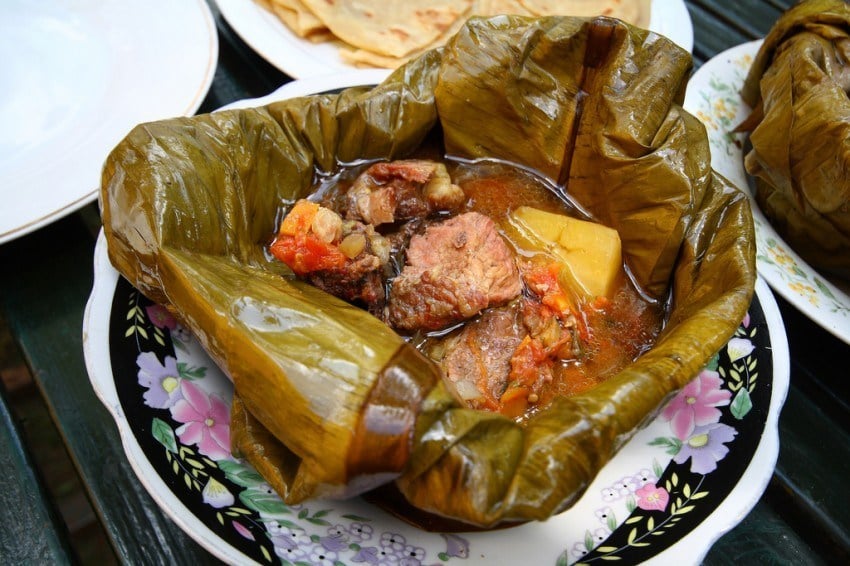
Task 1: Describe an image
The prompt is in Luganda language which translates to: "Describe the image."
image_file = 'image_1.jpg'
prompt = "Nnyonnyola emmeere eri mu kifaananyi."


img = resize_image(image_file)
display(img)
response = get_model_response(img, prompt, model, processor)
display(Markdown(response))
Response:
Omukoyogo.
The prompt is in Luganda language which translates to: "Identify the famous landmark and location"
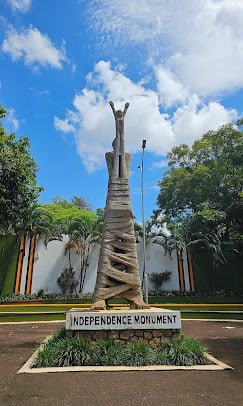
image_file = 'image_2.jpg'
prompt = "Londoola ekifo kino ekimanyiddwa ennyo nne w'ekisangibwa."

img = resize_image(image_file)
display(img)
response = get_model_response(img, prompt, model, processor)
display(Markdown(response))
Response:
Ebibuga.
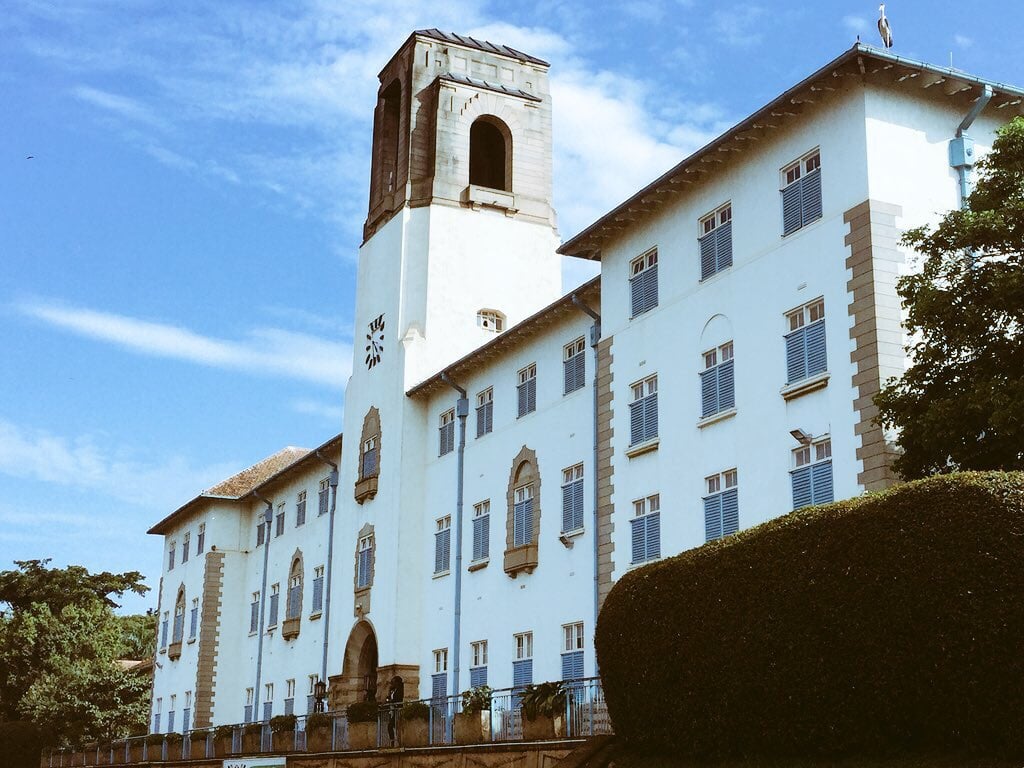
image_file = 'image_3.jpg'
prompt = "Londoola ekifo kino ekimanyiddwa ennyo nne w'ekisangibwa."

img = resize_image(image_file)
display(img)
response = get_model_response(img, prompt, model, processor)
display(Markdown(response))
Response:
Kampala Bbwalo.
The prompt is in Luganda language which translates to: "What is the value of x?"
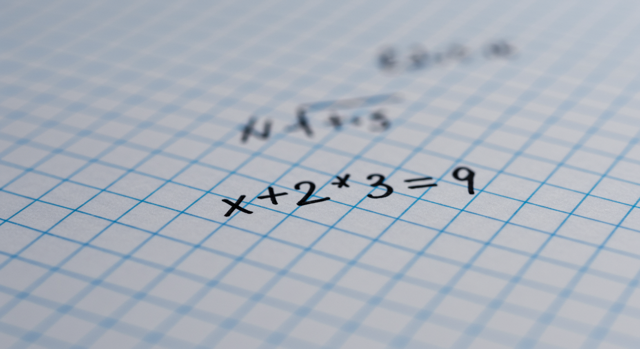
from PIL import Image
from IPython.display import Markdown

image_file = 'image_4.png'
prompt = "Omuwendo gwa x gwe guliwa?"

img = resize_image(image_file)
display(img)
response = get_model_response(img, prompt, model, processor)
display(Markdown(response))
Response:
x = 3
The video is a clip from "Why Uganda is the Pearl Of Africa!" shoot.
Credits: Eunice Tess
Source: YouTube
# Video file.
video_path = "video.mp4"

# No. of frames to be extracted from the video.
num_frames = 10

video_output = show_video(video_path, video_width=800)
display(video_output)
The prompt is in Luganda language which translates to: "Please summarize what is happening in this video"
video_frames = extract_frames(video_path, num_frames=num_frames)

messages = [
    {
        "role": "system",
        "content": [{"type": "text", "text": "You are a helpful assistant."}]
    },
    {
        "role": "user",
        "content": [{"type": "text", "text": "Nsaba mufunze ebigenda mu maaso mu katambi kano"}]
    }
]


# Add frames to the messages structure.
for frame_data in video_frames:
    img, timestamp = frame_data
    messages[1]["content"].append({"type": "text", "text": f"Frame at {timestamp} seconds:"})
    img.save(f"/content/frames/frame_{timestamp}.png")
    messages[1]["content"].append({"type": "image", "url": f"/content/frames/frame_{timestamp}.png"})


inputs = processor.apply_chat_template(
    messages, add_generation_prompt=True, tokenize=True,
    return_dict=True, return_tensors="pt"
).to(model.device)


input_length = inputs["input_ids"].shape[-1]

# Generate a response based on the inputs.
output = model.generate(**inputs, max_new_tokens=500, do_sample=False)
output = output[0][input_length:]
response = processor.decode(output, skip_special_tokens=True)

display(Markdown(response))
Response:
Okay, let's look at these images. Here's what I see in Luganda:

Frame 0.0: "Nyo mu maaso, ttiima nnyo. Twee nyo mu nsi y'omutwe, nti nyo mu maaso." (It's beautiful, very impressive. It's in a world of wonder, it's in the water.)
Frame 13.2: "Nyo mu maaso, ttiima nnyo. Twee nyo mu nsi y'omutwe, nti nyo mu maaso." (It's beautiful, very impressive. It's in a world of wonder, it's in the water.)
Frame 26.4: "Nyo mu maaso, ttiima nnyo. Twee nyo mu nsi y'omutwe, nti nyo mu maaso." (It's beautiful, very impressive. It's in a world of wonder, it's in the water.)
Frame 39.6: "Nyo mu maaso, ttiima nnyo. Twee nyo mu nsi y'omutwe, nti nyo mu maaso." (It's beautiful, very impressive. It's in a world of wonder, it's in the water.)
Frame 52.8: "Nyo mu maaso, ttiima nnyo. Twee nyo mu nsi y'omutwe, nti nyo mu maaso." (It's beautiful, very impressive. It's in a world of wonder, it's in the water.)
Frame 66.0: "Nyo mu maaso, ttiima nnyo. Twee nyo mu nsi y'omutwe, nti nyo mu maaso." (It's beautiful, very impressive. It's in a world of wonder, it's in the water.)
Frame 79.2: "Nyo mu maaso, ttiima nnyo. Twee nyo mu nsi y'omutwe, nti nyo mu maaso."
The outputs above reveal a significant limitation: despite Gemma 3 models boasting multilingual capabilities across 140+ languages, they still struggle to handle vision tasks (images and videos) in Luganda effectively.
This demonstration underscores the urgent need for:
More research into optimizing AI models for low-resource languages like Luganda.
Expanding datasets with high-quality, Luganda-specific image and video annotations.
Training foundational models that natively understand Luganda in multimodal contexts.
Without these critical steps, AI-powered vision systems will continue to exclude Luganda and other underrepresented languages from advancements in multimodal AI.
Resources
Here is the notebook.