
We value your privacy
We use cookies to enhance your browsing experience, serve personalised ads or content, and analyse our traffic. By clicking "Accept All", you consent to our use of cookies.
Customise Reject All Accept All
Customise Consent Preferences 
We use cookies to help you navigate efficiently and perform certain functions. You will find detailed information about all cookies under each consent category below.
The cookies that are categorised as "Necessary" are stored on your browser as they are essential for enabling the basic functionalities of the site. ... Show more
NecessaryAlways Active
Necessary cookies are required to enable the basic features of this site, such as providing secure log-in or adjusting your consent preferences. These cookies do not store any personally identifiable data.
* Cookie
BCTempID
* Duration
10 minutes
* Description
No description available.
* Cookie
__cf_bm
* Duration
1 hour
* Description
This cookie, set by Cloudflare, is used to support Cloudflare Bot Management.
* Cookie
AWSALBCORS
* Duration
7 days
* Description
Amazon Web Services set this cookie for load balancing.
* Cookie
_cfuvid
* Duration
session
* Description
Cloudflare sets this cookie to track users across sessions to optimize user experience by maintaining session consistency and providing personalized services
* Cookie
li_gc
* Duration
6 months
* Description
Linkedin set this cookie for storing visitor's consent regarding using cookies for non-essential purposes.
* Cookie
__hssrc
* Duration
session
* Description
This cookie is set by Hubspot whenever it changes the session cookie. The __hssrc cookie set to 1 indicates that the user has restarted the browser, and if the cookie does not exist, it is assumed to be a new session.
* Cookie
__hssc
* Duration
1 hour
* Description
HubSpot sets this cookie to keep track of sessions and to determine if HubSpot should increment the session number and timestamps in the __hstc cookie.
* Cookie
wpEmojiSettingsSupports
* Duration
session
* Description
WordPress sets this cookie when a user interacts with emojis on a WordPress site. It helps determine if the user's browser can display emojis properly.
* Cookie
BCSessionID
* Duration
1 year 1 month 4 days
* Description
Blueconic sets this cookie as a unique identifier for the BlueConic profile.
* Cookie
_octo
* Duration
1 year
* Description
No description available.
* Cookie
logged_in
* Duration
1 year
* Description
No description available.
* Cookie
__Secure-YEC
* Duration
past
* Description
YouTube sets this cookie to stores the user's video player preferences using embedded YouTube video
* Cookie
__eoi
* Duration
6 months
* Description
Description is currently not available.
* Cookie
AWSALBTGCORS
* Duration
7 days
* Description
No description available.
* Cookie
login-status-p
* Duration
past
* Description
Description is currently not available.
* Cookie
AWSALBTG
* Duration
7 days
* Description
No description available.
* Cookie
csrf_token
* Duration
session
* Description
No description available.
* Cookie
token_v2
* Duration
1 day
* Description
Description is currently not available.
* Cookie
D
* Duration
1 year
* Description
Description is currently not available.
* Cookie
PHPSESSID
* Duration
session
* Description
This cookie is native to PHP applications. The cookie stores and identifies a user's unique session ID to manage user sessions on the website. The cookie is a session cookie and will be deleted when all the browser windows are closed.
* Cookie
VISITOR_PRIVACY_METADATA
* Duration
6 months
* Description
YouTube sets this cookie to store the user's cookie consent state for the current domain.
* Cookie
cookietest
* Duration
session
* Description
The cookietest cookie is typically used to determine whether the user's browser accepts cookies, essential for website functionality and user experience.
* Cookie
__Host-airtable-session
* Duration
1 year
* Description
This cookie is used to enable us to integrate the services of Airtable.
* Cookie
__Host-airtable-session.sig
* Duration
1 year
* Description
This cookie is used to enable us to integrate the services of Airtable.
* Cookie
m
* Duration
1 year 1 month 4 days
* Description
Stripe sets this cookie for fraud prevention purposes. It identifies the device used to access the website, allowing the website to be formatted accordingly.
* Cookie
BIGipServer*
* Duration
session
* Description
Marketo sets this cookie to collect information about the user's online activity and build a profile about their interests to provide advertisements relevant to the user.
* Cookie
__cfruid
* Duration
session
* Description
Cloudflare sets this cookie to identify trusted web traffic.
* Cookie
_GRECAPTCHA
* Duration
6 months
* Description
Google Recaptcha service sets this cookie to identify bots to protect the website against malicious spam attacks.
* Cookie
__Secure-YNID
* Duration
6 months
* Description
Google cookie used to protect user security and prevent fraud, especially during the login process.
* Cookie
cookieyes-consent
* Duration
1 year
* Description
CookieYes sets this cookie to remember users' consent preferences so that their preferences are respected on subsequent visits to this site. It does not collect or store any personal information about the site visitors.
Functional
Functional cookies help perform certain functionalities like sharing the content of the website on social media platforms, collecting feedback, and other third-party features.
* Cookie
lidc
* Duration
1 day
* Description
LinkedIn sets the lidc cookie to facilitate data center selection.
* Cookie
brw
* Duration
1 year
* Description
No description available.
* Cookie
brwConsent
* Duration
5 minutes
* Description
Description is currently not available.
* Cookie
WMF-Uniq
* Duration
1 year
* Description
Description is currently not available.
* Cookie
loom_anon_comment
* Duration
1 year
* Description
No description available.
* Cookie
loom_referral_video
* Duration
session
* Description
Description is currently not available.
* Cookie
VISITOR_INFO1_LIVE
* Duration
6 months
* Description
A cookie set by YouTube to measure bandwidth that determines whether the user gets the new or old player interface.
* Cookie
yt-remote-connected-devices
* Duration
Never Expires
* Description
YouTube sets this cookie to store the user's video preferences using embedded YouTube videos.
* Cookie
ytidb::LAST_RESULT_ENTRY_KEY
* Duration
Never Expires
* Description
The cookie ytidb::LAST_RESULT_ENTRY_KEY is used by YouTube to store the last search result entry that was clicked by the user. This information is used to improve the user experience by providing more relevant search results in the future.
* Cookie
yt-remote-device-id
* Duration
Never Expires
* Description
YouTube sets this cookie to store the user's video preferences using embedded YouTube videos.
* Cookie
yt-remote-session-name
* Duration
session
* Description
The yt-remote-session-name cookie is used by YouTube to store the user's video player preferences using embedded YouTube video.
* Cookie
yt-remote-fast-check-period
* Duration
session
* Description
The yt-remote-fast-check-period cookie is used by YouTube to store the user's video player preferences for embedded YouTube videos.
* Cookie
yt-remote-session-app
* Duration
session
* Description
The yt-remote-session-app cookie is used by YouTube to store user preferences and information about the interface of the embedded YouTube video player.
* Cookie
yt-remote-cast-available
* Duration
session
* Description
The yt-remote-cast-available cookie is used to store the user's preferences regarding whether casting is available on their YouTube video player.
* Cookie
yt-remote-cast-installed
* Duration
session
* Description
The yt-remote-cast-installed cookie is used to store the user's video player preferences using embedded YouTube video.
* Cookie
cp_session
* Duration
3 months
* Description
Codepen sets this cookie for Help systems found in the website.
* Cookie
loid
* Duration
1 year 1 month 4 days
* Description
This cookie is set by the Reddit. The cookie enables the sharing of content from the website onto the social media platform.
Analytics
Analytical cookies are used to understand how visitors interact with the website. These cookies help provide information on metrics such as the number of visitors, bounce rate, traffic source, etc.
* Cookie
__hstc
* Duration
6 months
* Description
Hubspot set this main cookie for tracking visitors. It contains the domain, initial timestamp (first visit), last timestamp (last visit), current timestamp (this visit), and session number (increments for each subsequent session).
* Cookie
hubspotutk
* Duration
6 months
* Description
HubSpot sets this cookie to keep track of the visitors to the website. This cookie is passed to HubSpot on form submission and used when deduplicating contacts.
* Cookie
_ga
* Duration
1 year 1 month 4 days
* Description
Google Analytics sets this cookie to calculate visitor, session and campaign data and track site usage for the site's analytics report. The cookie stores information anonymously and assigns a randomly generated number to recognise unique visitors.
* Cookie
_ga_*
* Duration
1 year 1 month 4 days
* Description
Google Analytics sets this cookie to store and count page views.
* Cookie
__Host-psifi.analyticsTrace
* Duration
6 hours
* Description
Description is currently not available.
* Cookie
__Host-psifi.analyticsTraceV2
* Duration
6 hours
* Description
Description is currently not available.
* Cookie
_gh_sess
* Duration
session
* Description
GitHub sets this cookie for temporary application and framework state between pages like what step the user is on in a multiple step form.
* Cookie
YSC
* Duration
session
* Description
YSC cookie is set by Youtube and is used to track the views of embedded videos on Youtube pages.
* Cookie
ajs_anonymous_id
* Duration
1 year
* Description
This cookie is set by Segment to count the number of people who visit a certain site by tracking if they have visited before.
* Cookie
vuid
* Duration
1 year 1 month 4 days
* Description
Vimeo installs this cookie to collect tracking information by setting a unique ID to embed videos on the website.
Performance
Performance cookies are used to understand and analyse the key performance indexes of the website which helps in delivering a better user experience for the visitors.
* Cookie
AWSALB
* Duration
7 days
* Description
AWSALB is an application load balancer cookie set by Amazon Web Services to map the session to the target.
* Cookie
acq
* Duration
past
* Description
Description is currently not available.
* Cookie
acq.sig
* Duration
past
* Description
Description is currently not available.
* Cookie
ptc
* Duration
2 years
* Description
No description available.
Advertisement
Advertisement cookies are used to provide visitors with customised advertisements based on the pages you visited previously and to analyse the effectiveness of the ad campaigns.
* Cookie
muc_ads
* Duration
1 year 1 month 4 days
* Description
Twitter sets this cookie to collect user behaviour and interaction data to optimize the website.
* Cookie
guest_id_marketing
* Duration
1 year 1 month 4 days
* Description
Twitter sets this cookie to identify and track the website visitor.
* Cookie
guest_id_ads
* Duration
1 year 1 month 4 days
* Description
Twitter sets this cookie to identify and track the website visitor.
* Cookie
personalization_id
* Duration
1 year 1 month 4 days
* Description
Twitter sets this cookie to integrate and share features for social media and also store information about how the user uses the website, for tracking and targeting.
* Cookie
guest_id
* Duration
1 year 1 month 4 days
* Description
Twitter sets this cookie to identify and track the website visitor. It registers if a user is signed in to the Twitter platform and collects information about ad preferences.
* Cookie
bcookie
* Duration
1 year
* Description
LinkedIn sets this cookie from LinkedIn share buttons and ad tags to recognize browser IDs.
* Cookie
__Secure-ROLLOUT_TOKEN
* Duration
6 months
* Description
YouTube sets this cookie to manage feature rollout and experimentation. It helps Google control which new features or interface changes are shown to users as part of testing and staged rollouts, ensuring consistent experience for a given user during an experiment.
* Cookie
yt.innertube::nextId
* Duration
Never Expires
* Description
YouTube sets this cookie to register a unique ID to store data on what videos from YouTube the user has seen.
* Cookie
yt.innertube::requests
* Duration
Never Expires
* Description
YouTube sets this cookie to register a unique ID to store data on what videos from YouTube the user has seen.
* Cookie
session_tracker
* Duration
session
* Description
This cookie is set by the Reddit. This cookie is used to identify trusted web traffic. It also helps in adverstising on the website.
* Cookie
edgebucket
* Duration
session
* Description
Reddit sets this cookie to save the information about a log-on Reddit user, for the purpose of advertisement recommendations and updating the content.
* Cookie
did
* Duration
1 year
* Description
Arbor sets this cookie to show targeted ads to site visitors.This cookie expires after 2 months or 1 year.
Uncategorised
Other uncategorised cookies are those that are being analysed and have not been classified into a category as yet.
No cookies to display.
Reject All Save My Preferences Accept All
Toggle Search[](https://towardsdatascience.com/)Toggle Mobile Navigation
[](https://towardsdatascience.com/)
Publish AI, ML & data-science insights to a global community of data professionals.
Sign in[Submit an Article](https://write.insightmediagroup.io)
[Latest](https://towardsdatascience.com/latest/)[Editor's Picks](https://towardsdatascience.com/tag/editors-pick/)[Newsletter](https://towardsdatascience.com/tag/the-variable/)[ShipAI](https://towardsdatascience.com/shipai/)
* * *
[Write For TDS](https://towardsdatascience.com/submissions/)
[LinkedIn](https://www.linkedin.com/company/towards-data-science/)[X](https://x.com/TDataScience)Toggle Search
[Artificial Intelligence](https://towardsdatascience.com/category/artificial-intelligence/)
# YOLOv1 Loss Function Walkthrough: Regression for All
An explanation of how YOLOv1 measures the correctness of its object detection and classification predictions
[Muhammad Ardi Putra](https://towardsdatascience.com/author/muhammad_ardi/)
January 5, 202625 min read
Photo by [Bozhin Karaivanov](https://unsplash.com/@bkaraivanov?utm_source=medium&utm_medium=referral) on Unsplash
## Introduction
In my [previous article](https://towardsdatascience.com/yolov1-paper-walkthrough-the-day-yolo-first-saw-the-world/) I explained how YOLOv1 works and how to construct the architecture from scratch with PyTorch. In today’s article, I am going to focus on the loss function used to train the model. I highly recommend you read my previous YOLOv1 article before reading this one as it covers lots of fundamentals you need to know. Click on the link at reference number [1] to get there.
### What’s a Loss Function?
I believe we all already know that loss function is an extremely important component in deep learning (and also machine learning), where it is used to evaluate how good our model is in predicting the ground truth. Generally speaking, a loss function should be able to take two input values, namely the _target_ and the _prediction_ made by the model. This function is going to return a large value whenever the prediction is far from the ground truth. Conversely, the loss value will be small whenever the model successfully gives a prediction close to the target.
Normally, a model is used for either classification or regression only. However, YOLOv1 is a bit special as it incorporates a classification task — to classify the detected objects, whereas the objects themselves will be enclosed with bounding boxes which the coordinates and the sizes are determined using continuous numbers — hence a regression task. We typically use cross entropy loss when dealing with classification task, and for regression we can use something like MAE, MSE, SSE, or RMSE. But since the prediction made by YOLOv1 comprises both classification and regression at once, we need to create a custom loss function to accommodate both tasks. And here’s where things start to get interesting.
Learn this step by step with the interactive [AI Engineer](https://roadmap.sh/ai-engineer) roadmap.
···
## Breaking Down the Components
Now let’s have a look at the loss function itself. Below is what it looks like according to the original YOLOv1 paper [2].
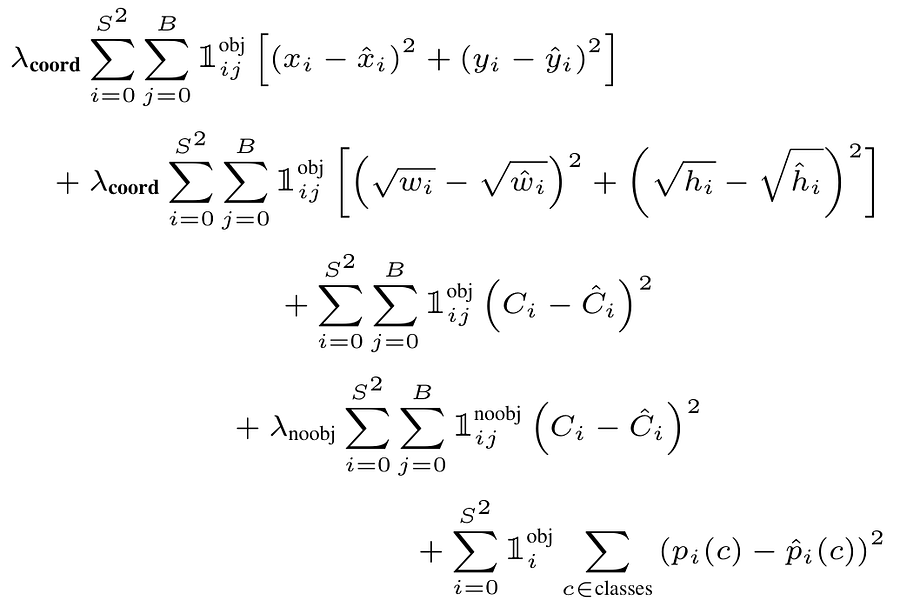
Figure 1. The loss function of YOLOv1 [2].
Yes, the above equation looks scary at glance, and that’s exactly what I felt when I first saw it. But don’t worry as you will find this equation straightforward as we get deeper into it. I’ll definitely try my best to explain everything in simple words.
Here you can see that the loss function basically consists of 5 rows. Now let’s get into each of them one by one.
### Row #1: _Midpoint_ Loss

Figure 2. The part for calculating the midpoint coordinate prediction loss [2].
The first term of the loss function focuses on evaluating the object midpoint coordinate prediction. You can see in Figure 2 above that what it essentially does is simply comparing the predicted midpoint (_x_hat_ , _y_hat_) with the corresponding target midpoint (_x, y_) by subtraction before summing the squared results of the _x_ and the _y_ parts. We do this iteratively for the two predicted bounding boxes (_B_) within all cells (_S_) and sum the error values from all of them. Or in other words, what we basically do here is to compute the SSE (Sum of Squared Errors) of the coordinate predictions. Assuming that we use the default YOLOv1 configuration (i.e., _S_ =7 and _B_ =2), we will have the first and the second sigma iterates 49 and 2 times, respectively.
Additionally, the _1^obj_ variable you see here is a binary mask, in which the value would be 1 whenever there is an object midpoint within the corresponding cell in the ground truth. But if there is no object midpoint contained inside, then the value would be 0 instead, which cancels out all operations within that cell because there is indeed nothing to predict.
### Row #2: Size Loss

Figure 3. The part for calculating the bounding box size prediction loss [2].
The focus of the second row is to evaluate the correctness of the bounding box size. I believe the above variables are pretty straightforward: _w_ denotes the width and _h_ denotes the height, where the ones with _hats_ are the predictions made by the model. If you take a closer look at this row, you’ll notice that this is basically the same as the previous one, except that here we take the square root of the variables first before doing the remaining computation.
The use of square root is actually a very clever idea. Naturally, if we directly compute the variables as they are (without square root), the same inaccuracy on small bounding box would be weighted the same as that on large bounding box. This is actually not a good thing because the same deviation in the number of pixels on small box will visually appear more misaligned from the ground truth than that of the larger box. Look at Figure 4 below to better understand this idea. Here you can see that even though the deviation of both cases are 60 pixels on the height axis, but on the smaller bounding box the error appears worse. This is actually because in the case of the smaller box the deviation of 60 pixels is 75% of the actual object height, whereas on the larger box it only deviates 25% from the target height.
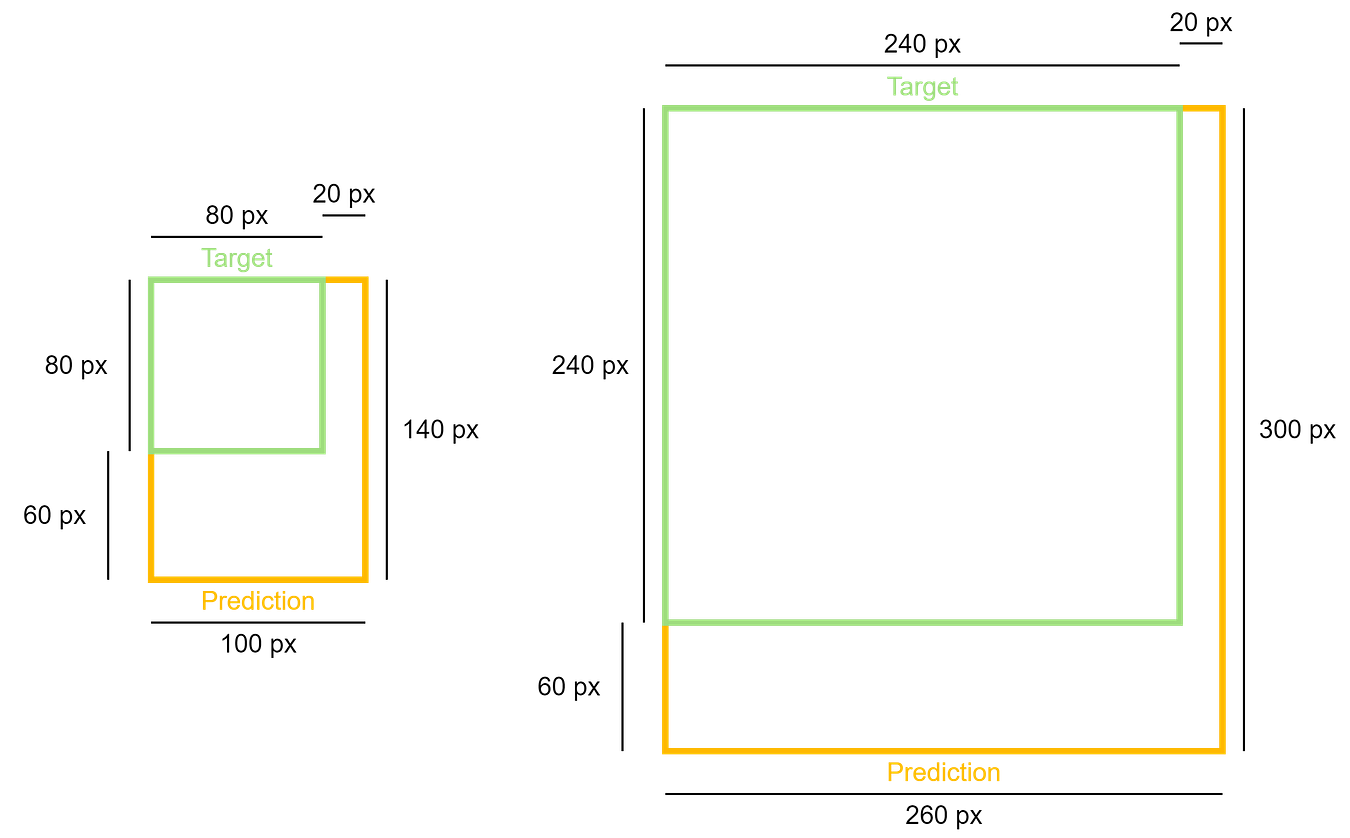
Figure 4. The same deviation in the number of pixels will appear worse on small object than that of the larger one [3].
By taking the square root of _w_ and _h_ , we will have inaccuracy in smaller box penalized more than that in the larger one. Let’s do a little bit of math to prove this. To make things simpler, I put the two examples in Figure 4 to Gemini and let it compute the height prediction error based on the equation in Figure 3. You can see the result below that the error of the small bounding box prediction is greater than that of the large bounding box (8.349 vs 3.345).
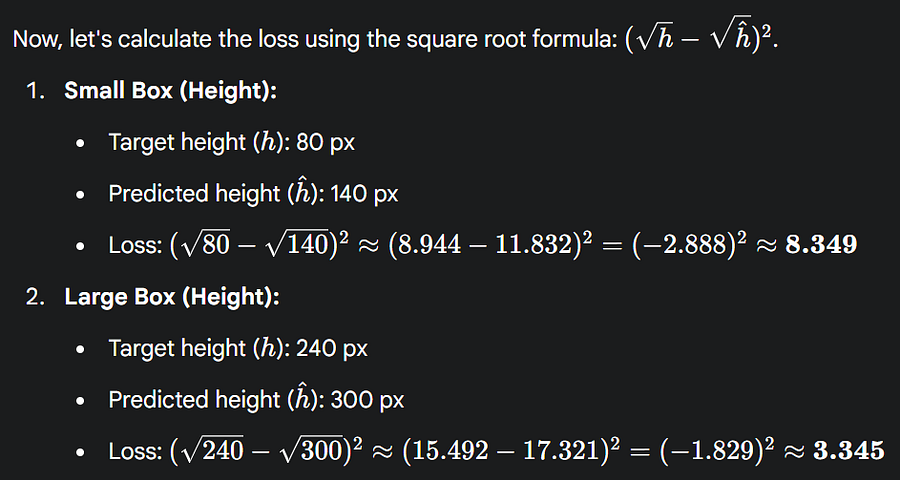
Figure 5. Proof that the square root operation allows us to give higher penalty for inaccuracy on smaller box [3].
### Row #3: Object Loss
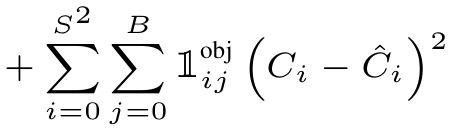
Figure 6. The part for computing the object loss [2].
Moving on to the third row, this part of the YOLOv1 loss function is used to measure how confident the model is in predicting whether or not there is an object within a cell. Whenever an object is present in the ground truth, we need to set _C_ to the IoU of the bounding box. Assuming that the predicted box perfectly matches with the target box, we essentially want our model to produce _C_hat_ close to 1. But if the predicted box is not quite accurate, say it has an IoU of 0.8, then we expect our model to produce _C_hat_ close to 0.8 as well. Just think of it like this: if the bounding box itself is inaccurate, then we should expect our model to know that the object does not perfectly present within that box. Meanwhile, whenever an object is indeed not present in the ground truth, then the variable _C_ should be exactly 0. Again, we then sum all the squared difference between _C_ and _C_hat_ across all predictions made throughout the entire image to obtain the _object loss_ of a single image.
It is worth noting that _C_hat_ is designed to reflect two things simultaneously: the probability that the object being there (a.k.a. _objectness_) and the accuracy of the bounding box (IoU). This is essentially the reason that we define ground truth _C_ as the multiplication of the _objectness_ and the IoU as mentioned in the paper. By doing so, we implicitly ask the model to give _C_hat_ , whose value incorporates both components.
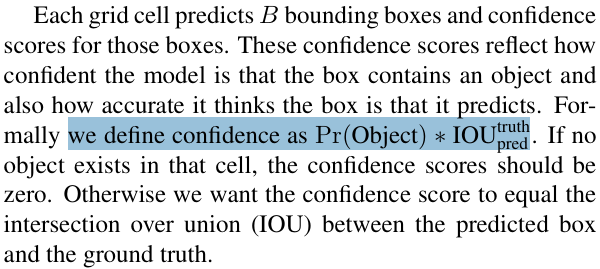
Figure 7. Bounding box confidence is defined as the multiplication of objectness and IoU [2].
As a refresher, IoU is a metric we commonly use to measure how good our bounding box prediction is compared to the ground truth in terms of area coverage. The way to compute IoU is simply to take the ratio of the intersection of the target and predicted bounding boxes to the union of them, hence the name: _Intersection over Union_.
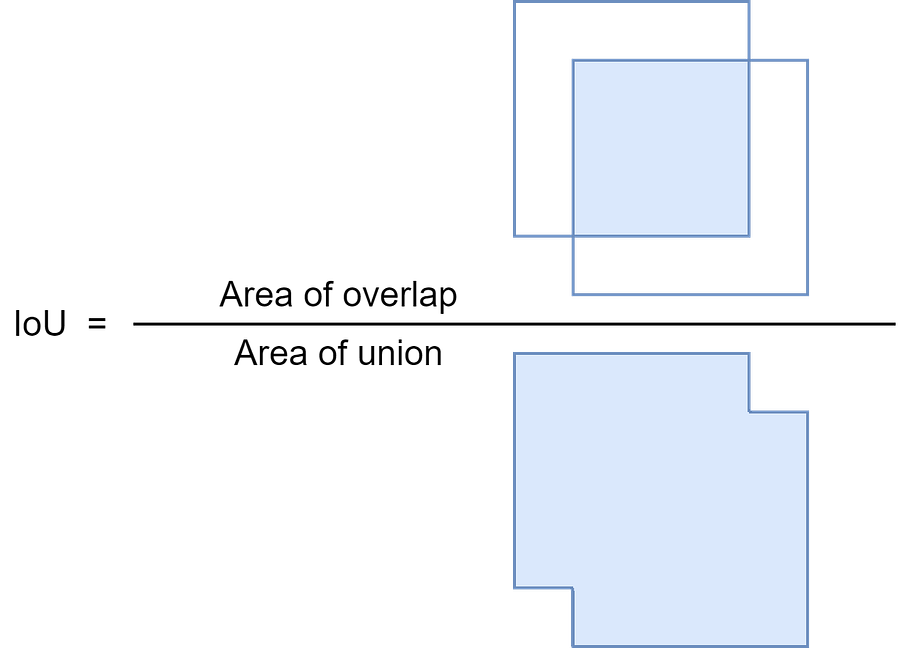
Figure 8. An illustration of how to compute IoU [3]. The IoU of two bounding boxes that perfectly overlap each other is 1, whereas if two bounding boxes do not overlap at all then the IoU would be 0.
### Row #4: No Object Loss
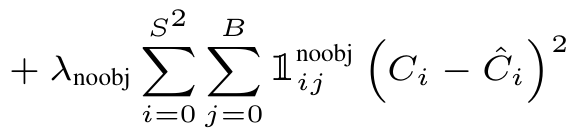
Figure 9. The so-called no-object loss term in the YOLOv1 loss function [2].
The so-called _no-object loss_ is quite unique. Despite having a similar computation as the _object loss_ in the third row, the binary mask _1^noobj_ causes this part to work something like the inverse of the _object loss_. This is because the binary mask value would be 1 if there is no object midpoint present within a cell in the ground truth. Otherwise, if an object midpoint is present, then the binary mask would be 0, causing the remaining operations for that single cell to be canceled out. So in short, this row is going to return a non-zero number whenever there is no object in the ground truth but is predicted as containing an object midpoint.
### Row #5: Classification Loss
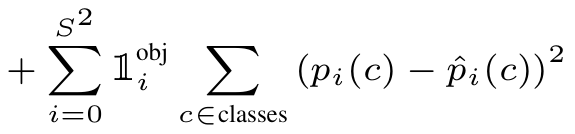
Figure 10. The part for computing object classification loss [2].
The last row in the YOLOv1 loss function is the _classification loss_. This part of the loss function is the most straightforward if I were to say, because what we essentially do here is just to compare the actual and the predicted class, which is similar to the one in the typical multi-class classification task. However, what you need to keep in mind here is that we still use the same regression loss (i.e., SSE) to compute the error. It is mentioned in the paper that the authors decided to use this regression loss for both the regression and the classification parts for the sake of simplicity.
### Adjustable Parameters
Notice that I actually haven’t discussed the _λ_coord_ and _λ_noobj_ parameters. The former is used to give more weight to the bounding box prediction, which is why it is applied to the first and the second row of the loss function. You can go back to Figure 1 to verify this. The _λ_coord_ parameter by default is set to a large value (i.e., 5) because we want our model to focus on the correctness of the bounding box creation. So, any small inaccuracy in the _xywh_ prediction will be penalized 5 times larger than what it should be.
Meanwhile, _λ_noobj_ is used to control the _no-object loss_ , i.e., the one in the fourth row in the loss function. It is mentioned in the paper that the authors set a default value of 0.5 for this parameter, which basically causes the _no-object loss_ part not to be weighted as much. This is basically because in the case of object detection the number of objects is typically much less than the total number of cells, causing the majority of the cells to not contain an object. Thus, if we don’t give a small multiplier to the term, the _no-object loss_ will give a very high contribution to the total loss, which in fact is not that important. By setting _λ_noobj_ to a small number, we can suppress the contribution of this loss.
···
## Code Implementation
I do acknowledge that our previous discussion was very mathy. Don’t worry if you haven’t grasped the entire idea of the loss function just yet. I believe you’ll eventually understand once we get into the code implementation.
So now, let’s start the code by importing the required modules as shown in Codeblock 1 below.
python
```
# Codeblock 1
import torch
import torch.nn as nn
```
### The IoU Function
Before we get into the YOLOv1 loss, we will first create a helper to calculate IoU, which will be used inside the main YOLOv1 function. Look at the Codeblock 2 below to see how I implement it.
python
```
# Codeblock 2
def intersection_over_union(boxes_targets, boxes_predictions):
box2_x1 = boxes_targets[..., 0:1] - boxes_targets[..., 2:3] / 2
box2_y1 = boxes_targets[..., 1:2] - boxes_targets[..., 3:4] / 2
box2_x2 = boxes_targets[..., 0:1] + boxes_targets[..., 2:3] / 2
box2_y2 = boxes_targets[..., 1:2] + boxes_targets[..., 3:4] / 2
box1_x1 = boxes_predictions[..., 0:1] - boxes_predictions[..., 2:3] / 2
box1_y1 = boxes_predictions[..., 1:2] - boxes_predictions[..., 3:4] / 2
box1_x2 = boxes_predictions[..., 0:1] + boxes_predictions[..., 2:3] / 2
box1_y2 = boxes_predictions[..., 1:2] + boxes_predictions[..., 3:4] / 2
x1 = torch.max(box1_x1, box2_x1)
y1 = torch.max(box1_y1, box2_y1)
x2 = torch.min(box1_x2, box2_x2)
y2 = torch.min(box1_y2, box2_y2)
intersection = (x2 - x1).clamp(0) * (y2 - y1).clamp(0) #(1)
box1_area = torch.abs((box1_x2 - box1_x1) * (box1_y2 - box1_y1))
box2_area = torch.abs((box2_x2 - box2_x1) * (box2_y2 - box2_y1))
union = box1_area + box2_area - intersection + 1e-6 #(2)
iou = intersection / union #(3)
return iou
```
The `intersection_over_union()` function above works by taking two input parameters, namely the ground truth (`boxes_targets`) and the predicted bounding boxes (`boxes_predictions`). These two inputs are basically arrays of length 4, storing the _x_ , _y_ , _w_ , and _h_ values. Note that _x_ and _y_ are the coordinate of the box midpoint, not the top-left corner. The bounding box information is then extracted so that we can compute the intersection (`#(1)`) and the union (`#(2)`). We can finally obtain the IoU using the code at line `#(3)`. In addition to line `#(2)`, here we also need to add a very small value at the end of the operation (1e-6 = 0.000001). This number is useful to prevent division-by-zero error in the case when the area of the predicted bounding box is 0 for some reasons.
Now let’s run the `intersection_over_union()` function we just created on several test cases in order to check if it works properly. The three examples in Figure 11 below show intersections with high, medium, and low IoU (from left to right, respectively).

Figure 11. Bounding box with different overlaps [3].
All the boxes you see here have the size of 200×200 px, and what makes the three cases different is only their area of the intersections. If you take a closer look at the Codeblock 3 below, you will see that the predicted boxes (`pred_{0,1,2}`) are shifted by 20, 100, and 180 pixels from their respective targets (`target_{0,1,2}`) along both the horizontal and vertical axes.
python
```
# Codeblock 3
target_0 = torch.tensor([[0., 0., 200., 200.]])
pred_0 = torch.tensor([[20., 20., 200., 200.]])
iou_0 = intersection_over_union(target_0, pred_0)
print('iou_0:', iou_0)
target_1 = torch.tensor([[0., 0., 200., 200.]])
pred_1 = torch.tensor([[100., 100., 200., 200.]])
iou_1 = intersection_over_union(target_1, pred_1)
print('iou_1:', iou_1)
target_2 = torch.tensor([[0., 0., 200., 200.]])
pred_2 = torch.tensor([[180., 180., 200., 200.]])
iou_2 = intersection_over_union(target_2, pred_2)
print('iou_2:', iou_2)
```
As the above code is run, you can see that our example on the left has the highest IoU of 0.6807, followed by the one in the middle and the one on the right with the scores of 0.1429 and 0.0050, a trend that is exactly what we expected earlier. This essentially proves that our `intersection_over_union()` function works well.
python
```
# Codeblock 3 Output
iou_0: tensor([[0.6807]])
iou_1: tensor([[0.1429]])
iou_2: tensor([[0.0050]])
```
### The YOLOv1 Loss Function
There is actually another thing we need to do before creating the loss function, namely instantiating an `nn.MSELoss` instance which will help us compute the error values across all cells. As the name suggests, this function by default will compute MSE (Mean Squared Error). Since we want the error value to be summed instead of averaged, we need to set the `reduction` parameter to `sum` as shown in Codeblock 4 below. Next, we initialize the `lambda_coord`, `lambda_noobj`, `S`, `B`, and `C` parameters, which in this case I set all of them to their default values mentioned in the original paper. Here I also initialize the `BATCH_SIZE` parameter which indicates the number of samples we are going to process in a single forward pass.
python
```
# Codeblock 4
sse = nn.MSELoss(reduction="sum")
lambda_coord = 5
lambda_noobj = 0.5
S = 7
B = 2
C = 20
BATCH_SIZE = 1
```
Alright, as all pre-requisite variables have been initialized, now let’s actually define the `loss()` function for the YOLOv1 model. This function is quite long, so I decided to break it down into several parts. Just ensure that everything is placed within the same cell if you want to try running this code on your own notebook.
You can see in Codeblock 5a below that this function takes two input arguments: `target` and `prediction` (`#(1)`). Remember that originally the output of YOLOv1 (the `prediction`) is a long single dimensional tensor of length 1470, whereas the length of the `target` tensor is 1225. What we need to do first inside the `loss()` function is to reshape them into 7×7×30 (`#(3)`) and 7×7×25 (`#(2)`), respectively, so that we can process the information contained in both tensors easily.
python
```
# Codeblock 5a
def loss(target, prediction): #(1)
target = target.reshape(-1, S, S, C+5) #(2)
prediction = prediction.reshape(-1, S, S, C+B*5) #(3)
obj = target[..., 20].unsqueeze(3) #(4)
noobj = 1 - obj #(5)
```
Next, the code at lines `#(4)` and `#(5)` are just how we implement the _1^obj_ and _1^noobj_ binary masks. At line `#(4)` we take the value at index 20 from the `target` tensor and store it in `obj` variable. Index 20 itself corresponds to the bounding box confidence (see Figure 12), which if there is an object midpoint within the cell, then the value of that index would be 1. Otherwise, if object midpoint is not present, then the value would be 0. Conversely, the `noobj` variable I initialize at line `#(5)` will act as the inverse of `obj`, which the value would be 1 if there is no object midpoint present in the grid cell.

Figure 12. What the target and prediction vector for each grid cell looks like. The target bounding box confidence is stored at index 20, whereas the predicted bounding box confidences are at index 20 and 25, each in their corresponding vectors [3]. Read more about this in my previous article at reference number [1].
Now let’s move on to Codeblock 5b, where we compute the bounding box error, which corresponds to the first and the second rows of the loss function. What we essentially do initially is to take the _xywh_ values from the target tensor (indices 21, 22, 23, and 24). This can be done with a simple array slicing technique as shown at line `#(1)`. Next, we do the same thing to the `predicted` tensor. However, remember that since our model generates two bounding boxes for each cell, we need to store their _xywh_ values into two separate variables: `pred_bbox0` and `pred_bbox1` (`#(2–3)`).
In Figure 12, the sliced indices are the ones referred to as _x1_ , _y1_ , _w1_ , _h1_ , and _x2_ , _y2_ , _w2_ , _h2_. Among the two bounding box predictions, we will only take the one that best approximates the target box. Hence, we need to compute the IoU between both predicted boxes and the target box using the code at line `#(4)` and `#(5)`. The predicted bounding box that produces the highest IoU is selected using `torch.max()` at line `#(6)`. The _xywh_ values of the best bounding box prediction will then be stored in `best_bbox`, whereas the corresponding information of the box that has the lower IoU will be discarded (`#(8)`). At lines `#(7)` and `#(8)` itself we multiply both the actual _xywh_ and the best predicted _xywh_ with `obj`, which is how we apply the _1^obj_ mask.
At this point we already have our _x_ and _y_ values ready to be processed with the `sse` function we initialized earlier. However, remember that we still need to apply square root to _w_ and _h_ beforehand, which I do at line `#(9)` and `#(10)` for the target and the best prediction vectors, respectively. One thing that you need to keep in mind at line `#(10)` is that we should take the absolute value of the numbers before applying `torch.sqrt()` just to prevent us from computing the square root of negative numbers. Not only that, it is also necessary to add a very small number (1e-6) to ensure that we won’t take the square root of 0, which will cause numerical instability. Still with the same line, we then multiply the resulting tensor with its original sign that we preserved earlier using `torch.sign()`.
Finally, as we have applied `torch.sqrt()` to the _w_ and _h_ components of `target_bbox` and `best_bbox`, we can now pass both tensors to the `sse()` function as shown at line `#(11)`. Note that the loss value stored in `bbox_loss` already includes both the error from the first and the second row of the YOLOv1 loss function.
python
```
# Codeblock 5b
target_bbox = target[..., 21:25] #(1)
pred_bbox0 = prediction[..., 21:25] #(2)
pred_bbox1 = prediction[..., 26:30] #(3)
iou_pred_bbox0 = intersection_over_union(pred_bbox0, target_bbox) #(4)
iou_pred_bbox1 = intersection_over_union(pred_bbox1, target_bbox) #(5)
iou_pred_bboxes = torch.cat([iou_pred_bbox0.unsqueeze(0),
iou_pred_bbox1.unsqueeze(0)],
dim=0)
best_iou, best_bbox_idx = torch.max(iou_pred_bboxes, dim=0) #(6)
target_bbox = obj * target_bbox #(7)
best_bbox = obj * (best_bbox_idx*pred_bbox1 #(8)
+ (1-best_bbox_idx)*pred_bbox0)
target_bbox[..., 2:4] = torch.sqrt(target_bbox[..., 2:4]) #(9)
best_bbox[..., 2:4] = torch.sign(best_bbox[..., 2:4]) * torch.sqrt(torch.abs(best_bbox[..., 2:4]) + 1e-6) #(10)
bbox_loss = sse( #(11)
torch.flatten(target_bbox, end_dim=-2),
torch.flatten(best_bbox, end_dim=-2)
)
```
The next component we will implement is the _object loss_. Take a look at the Codeblock 5c below to see how I do that.
python
```
# Codeblock 5c
target_bbox_confidence = target[..., 20:21] #(1)
pred_bbox0_confidence = prediction[..., 20:21] #(2)
pred_bbox1_confidence = prediction[..., 25:26] #(3)
target_bbox_confidence = obj * target_bbox_confidence #(4)
best_bbox_confidence = obj * (best_bbox_idx*pred_bbox1_confidence #(5)
+ (1-best_bbox_idx)*pred_bbox0_confidence)
object_loss = sse( #(6)
torch.flatten(obj * target_bbox_confidence * best_iou), #(7)
torch.flatten(obj * best_bbox_confidence),
)
```
What we initially do in the codeblock above is to take the value at index 20 from the target vector (`#(1)`). Meanwhile for the prediction vector, we need to take the values at indices 20 and 25 (`#(2–3)`), in which they correspond to the confidence scores of each of the two boxes generated by the model. You can go back to Figure 12 to verify this.
Next, at line `#(5)` I take the confidence of the box prediction that has the higher IoU. The code at line `#(4)` is actually not necessary because `obj` and `target_bbox_confidence` are basically the same thing. You can verify this by checking the code at line `#(4)` in Codeblock 5a. I actually do this anyway for the sake of clarity because we essentially have both _C_ and _C_hat_ multiplied with _1^obj_ in the original equation (see Figure 6).
Afterwards, we compute the SSE between the ground truth confidence (`target_bbox_confidence`) and the predicted confidence (`best_bbox_confidence`) (`#(6)`). It is important to note at line `#(7)` that we need to multiply the ground truth confidence with the IoU of the best bounding box prediction (`best_iou`). This is because the paper mentions that whenever there is an object midpoint within a cell, then we want the prediction confidence equal to that IoU score. — And this ends our discussion about the implementation of _object loss_.
Now the Codeblock 5d below focuses on computing the _no-object loss_. The code is quite simple since here we reuse the `target_bbox_confidence` and the `pred_bbox{0,1}_confidence` we initialized in the previous codeblock. These variables need to be multiplied with the `noobj` mask before the SSE computation is performed. Note that the error made by the two predicted boxes needs to be summed, which is the reason why you see the addition operation at line `#(1)`.
python
```
# Codeblock 5d
no_object_loss = sse(
torch.flatten(noobj * target_bbox_confidence),
torch.flatten(noobj * pred_bbox0_confidence),
)
no_object_loss += sse( #(1)
torch.flatten(noobj * target_bbox_confidence),
torch.flatten(noobj * pred_bbox1_confidence),
)
```
Lastly, we compute the classification loss using the Codeblock 5e below, in which this corresponds to the fifth row in the original equation. Remember that the original YOLOv1 was trained on the 20-class PASCAL VOC dataset. This is basically the reason that we take the first 20 indices from the `target` and `prediction` vectors (`#(1–2)`). Then, we can simply pass the two into the `sse()` function (`#(3)`).
python
```
# Codeblock 5e
target_class = target[..., :20] #(1)
pred_class = prediction[..., :20] #(2)
class_loss = sse( #(3)
torch.flatten(obj * target_class, end_dim=-2),
torch.flatten(obj * pred_class, end_dim=-2),
)
```
As we have already completed the five components of the YOLOv1 loss function, what we need to do now is to sum everything up using the following codeblock. Don’t forget to give weightings to `bbox_loss` and `no_object_loss` by multiplying them with their corresponding lambda parameters we initialized earlier (`#(1–2)`).
python
```
# Codeblock 5f
total_loss = (
lambda_coord * bbox_loss #(1)
+ object_loss
+ lambda_noobj * no_object_loss #(2)
+ class_loss
)
return bbox_loss, object_loss, no_object_loss, class_loss, total_loss
```
···
## Test Cases
In this section I am going to demonstrate how to run the `loss()` function we just created on several test cases. Now pay attention to the Figure 13 below as I’ll make the subsequent test cases based on this image.
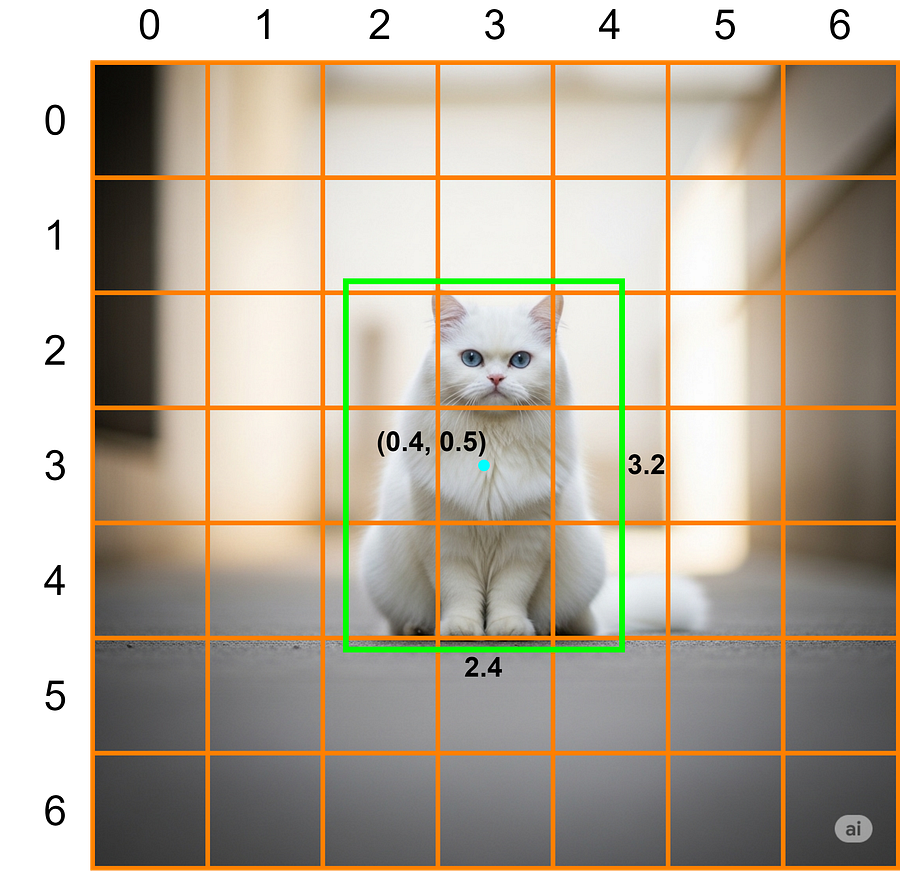
Figure 13. The image I use as the basis of the test cases [1].
### Bounding Box Loss Example
The `bbox_loss_test()` function in Codeblock 6 below focuses on testing whether the bounding box loss is working properly. At the lines marked with `#(1)` and `#(2)` I initialize two all-zero tensors which I refer to as `target` and `prediction`. I set the size of these two tensors to 1×7×7×25 and 1×7×7×30, respectively, so that we can modify the elements intuitively. We assume that the image in Figure 13 as the ground truth, hence we need to store the bounding box information in the corresponding indices of the `target` tensor.
The indexer `[0]` in the 0th axis indicates that we access the first (and the only one) image in the batch (`#(3)`). Next, `[3,3]` in the 1st and 2nd axes denotes the location of the grid cell where the object midpoint is located. We slice the tensor with `[21:25]` because we want to update the values contained in these indices with [0.4, 0.5, 2.4, 3.2], in which they correspond to the _x_ , _y_ , _w_ and _h_ values of the bounding box. The value at index 20, which is where the target bounding box confidence is stored, is set to 1 since the object midpoint is located within this cell (`#(4)`). Next, the index that corresponds to class _cat_ (the class at index 7) also needs to be set to 1 (`#(5)`), just like how we create one-hot encoding label in a typical classification task. You can refer back to Figure 12 to verify that the class _cat_ is indeed at the 7th index.
python
```
# Codeblock 6
def bbox_loss_test():
target = torch.zeros(BATCH_SIZE, S, S, (C+5)) #(1)
prediction = torch.zeros(BATCH_SIZE, S, S, (C+B*5)) #(2)
target[0, 3, 3, 21:25] = torch.tensor([0.4, 0.5, 2.4, 3.2]) #(3)
target[0, 3, 3, 20] = 1.0 #(4)
target[0, 3, 3, 7] = 1.0 #(5)
prediction[0, 3, 3, 21:25] = torch.tensor([0.4, 0.5, 2.4, 3.2]) #(6)
#prediction[0, 3, 3, 21:25] = torch.tensor([0.4, 0.5, 2.8, 4.0]) #(7)
#prediction[0, 3, 3, 21:25] = torch.tensor([0.3, 0.2, 3.2, 4.3]) #(8)
target = target.reshape(BATCH_SIZE, S*S*(C+5)) #(9)
prediction = prediction.reshape(BATCH_SIZE, S*S*(C+B*5)) #(10)
bbox_loss = loss(target, prediction)[0] #(11)
return bbox_loss
bbox_loss_test()
```
You can see in the above codeblock that I prepared three test cases at line `#(6–8)`, in which the one at line `#(6)` is a condition where the predicted bounding box midpoint and the object size matches exactly with the ground truth. In that particular case, our `bbox_loss` would be 1.8474e-13, which is an extremely small number. Remember that it does not return exactly 0 because of the 1e-6 we added during the IoU and the square root calculations. Meanwhile in the second test case, I assume that the midpoint prediction is correct, but the box size is a bit too large. If you try to run this, we will have our `bbox_loss` increase to 0.0600. Third, I further enlarge the bounding box prediction and also shift from the actual position. And in such a case, our `bbox_loss` gets even larger to 0.2385.
By the way, it is important to remember that the loss function we defined earlier expects the target and prediction tensors to have the dimensions of 1×1225 and 1×1470, respectively. Hence, we need to reshape them (`#(9–10)`) accordingly before eventually computing the loss value (`#(11)`).
markup
```
# Codeblock 6 OutputCase 1: tensor(1.8474e-13)Case 2: tensor(0.0600)Case 3: tensor(0.2385)
```
### Object Loss Example
To check whether the _object loss_ is correct, we need to focus on the value at index 20. What we do initially in the `object_loss_test()` function below is similar to the previous one, namely creating the `target` and `prediction` tensors (`#(1–2)`) and initializing ground truth vector for cell (3, 3) (`#(3–5)`). Here we assume that the bounding box prediction perfectly aligns with the actual bounding box (`#(6)`).
python
```
# Codeblock 7
def object_loss_test():
target = torch.zeros(BATCH_SIZE, S, S, (C+5)) #(1)
prediction = torch.zeros(BATCH_SIZE, S, S, (C+B*5)) #(2)
target[0, 3, 3, 21:25] = torch.tensor([0.4, 0.5, 2.4, 3.2]) #(3)
target[0, 3, 3, 20] = 1.0 #(4)
target[0, 3, 3, 7] = 1.0 #(5)
prediction[0, 3, 3, 21:25] = torch.tensor([0.4, 0.5, 2.4, 3.2]) #(6)
prediction[0, 3, 3, 20] = 1.0 #(7)
#prediction[0, 3, 3, 20] = 0.9 #(8)
#prediction[0, 3, 3, 20] = 0.6 #(9)
target = target.reshape(BATCH_SIZE, S*S*(C+5))
prediction = prediction.reshape(BATCH_SIZE, S*S*(C+B*5))
object_loss = loss(target, prediction)[1]
return object_loss
object_loss_test()
```
I’ve set up three test cases specifically for the _object loss_. The first one is the case when the model is perfectly confident that there is a box midpoint within the cell, or in other words, this is a condition where the confidence is 1 (`#(7)`). If you try to run this, the resulting object loss would be 1.4211e-14, which is again a value very close to zero. You can also see in the resulting output below that the _object loss_ increases to 0.0100 and 0.1600 as we decrease the predicted confidence to 0.9 and 0.6 (`#(8–9)`), which is exactly what we expected.
markup
```
# Codeblock 7 OutputCase 1: tensor(1.4211e-14)Case 2: tensor(0.0100)Case 3: tensor(0.1600)
```
### Classification Loss Example
Talking about the _classification loss_ , let’s now see if our loss function can really penalize misclassifications. Just like the previous ones, in the Codeblock 8 below I prepared three test cases, in which the first one is the condition where the model correctly gives perfect confidence to class _cat_ and at the same time leaving all other class probabilities to 0 (`#(1)`). If you try to run this, the resulting classification loss would be exactly 0. Next, if you decrease the confidence of predicting _cat_ to 0.9 while slightly increasing the confidence for class _chair_ (index 8) to 0.1 as shown at line `#(2)`, we will get our classification loss to increase to 0.0200. The loss value gets even larger to 1.2800 when I assume that the model misclassifies _cat_ as _chair_ by assigning a very low confidence for the _cat_ (0.2) and a high confidence for the _chair_ (0.8) (`#(3)`). This essentially indicates that our loss function implementation is shown to be able to measure errors in classification properly.
python
```
# Codeblock 8
def class_loss_test():
target = torch.zeros(BATCH_SIZE, S, S, (C+5))
prediction = torch.zeros(BATCH_SIZE, S, S, (C+B*5))
target[0, 3, 3, 21:25] = torch.tensor([0.4, 0.5, 2.4, 3.2])
target[0, 3, 3, 20] = 1.0
target[0, 3, 3, 7] = 1.0
prediction[0, 3, 3, 21:25] = torch.tensor([0.4, 0.5, 2.4, 3.2])
prediction[0, 3, 3, 7] = 1.0 #(1)
#prediction[0, 3, 3, 7:9] = torch.tensor([0.9, 0.1]) #(2)
#prediction[0, 3, 3, 7:9] = torch.tensor([0.2, 0.8]) #(3)
target = target.reshape(BATCH_SIZE, S*S*(C+5))
prediction = prediction.reshape(BATCH_SIZE, S*S*(C+B*5))
class_loss = loss(target, prediction)[3]
return class_loss
class_loss_test()
```
markup
```
# Codeblock 8 OutputCase 1: tensor(0.)Case 2: tensor(0.0200)Case 3: tensor(1.2800)
```
### No Object Loss Example
Now in order to test our implementation on the _no-object loss_ part, we are going to examine the cell that does not contain any object midpoint, which here I come up with the grid cell at coordinate (1, 1). Since the object in the image is only the one located at grid cell (3, 3), the target bounding box confidence for coordinate (1, 1) should be set to 0, as shown at line `#(1)` in Codeblock 9. In fact, this step is not quite necessary because we already set the tensors to be all-zero in the first place — but I do it anyway for clarity. Remember that this _no-object loss_ part will be activated only when the target bounding box confidence is 0 like this. Otherwise, whenever the target box confidence is 1 (i.e., there is an object midpoint within the cell), then the _no-object loss_ part will always return 0.
Here I prepared two test cases, in which the first one is when the values at indices 20 and 25 of the prediction tensor are both 0 as written at line `#(2)` and `#(3)`, namely when our YOLOv1 model correctly predicts that there is no bounding box midpoint within the cell. The loss value will increase when we use the code at line `#(4)` and `#(5)` instead, in which it simulates the model somewhat thinks that there should be objects in there while it is actually not. You can see in the resulting output below that the loss value now increases to 0.1300, which is expected.
python
```
# Codeblock 9
def no_object_loss_test():
target = torch.zeros(BATCH_SIZE, S, S, (C+5))
prediction = torch.zeros(BATCH_SIZE, S, S, (C+B*5))
target[0, 1, 1, 20] = 0.0 #(1)
prediction[0, 1, 1, 20] = 0.0 #(2)
prediction[0, 1, 1, 25] = 0.0 #(3)
#prediction[0, 1, 1, 20] = 0.2 #(4)
#prediction[0, 1, 1, 25] = 0.3 #(5)
target = target.reshape(BATCH_SIZE, S*S*(C+5))
prediction = prediction.reshape(BATCH_SIZE, S*S*(C+B*5))
no_object_loss = loss(target, prediction)[2]
return no_object_loss
no_object_loss_test()
```
markup
```
# Codeblock 9 OutputCase 1: tensor(0.)Case 2: tensor(0.1300)
```
···
## Ending
And well, I think that’s pretty much everything about the loss function of the YOLOv1 model. We have completely discussed the formal mathematical expression of the loss function, implemented it from scratch, and performed testing on each of the components. Thank you very much for reading, I hope you learn something new from this article. Please let me know if you spot any mistakes in my explanation or in the code. See ya in my next article!
_By the way you can also find the code in my GitHub repository. Click the link at reference number [4]._
···
## References
[1] Muhammad Ardi. YOLOv1 Paper Walkthrough: The Day YOLO First Saw the World. Towards Data Science. [Accessed December 18, 2025].
[2] Joseph Redmon _et al_. You Only Look Once: Unified, Real-Time Object Detection. Arxiv. [Accessed July 25, 2024].
[3] Image created originally by author.
[4] MuhammadArdiPutra. Regression For All — YOLOv1 Loss Function. GitHub. [Accessed July 25, 2024].
## Register Now to Continue Reading
### Unlock Towards Data Science with a Free Account
All articles on Towards Data Science are available to registered users. Create a free account today to access this article and thousands more.
Register for freeSign in to your account
* * *
Written By
## [Muhammad Ardi Putra](https://towardsdatascience.com/author/muhammad_ardi/)
Deep learning storyteller
[See all from Muhammad Ardi Putra](https://towardsdatascience.com/author/muhammad_ardi/)
[Editor's Picks](https://towardsdatascience.com/tag/editors-pick/)[Deep Learning](https://towardsdatascience.com/tag/deep-learning/)[Machine Learning](https://towardsdatascience.com/tag/machine-learning/)[Neural Network](https://towardsdatascience.com/tag/neural-network/)[Python](https://towardsdatascience.com/tag/python/)[Yolo](https://towardsdatascience.com/tag/yolo/)
Share This Article
* [](https://www.facebook.com/sharer/sharer.php?u=https%3A%2F%2Ftowardsdatascience.com%2Fyolov1-loss-function-walkthrough-regression-for-all%2F&title=YOLOv1%20Loss%20Function%20Walkthrough%3A%20Regression%20for%C2%A0All)
* [](https://www.linkedin.com/shareArticle?mini=true&url=https%3A%2F%2Ftowardsdatascience.com%2Fyolov1-loss-function-walkthrough-regression-for-all%2F&title=YOLOv1%20Loss%20Function%20Walkthrough%3A%20Regression%20for%C2%A0All)
* [](https://x.com/share?url=https%3A%2F%2Ftowardsdatascience.com%2Fyolov1-loss-function-walkthrough-regression-for-all%2F&text=YOLOv1%20Loss%20Function%20Walkthrough%3A%20Regression%20for%C2%A0All)
Towards Data Science is a community publication. Submit your insights to reach our global audience and earn through the TDS Author Payment Program.
[Write for TDS](https://towardsdatascience.com/submissions/)
## Related Articles
* [](https://towardsdatascience.com/can-social-platforms-detect-mental-illness-using-deep-learning-models-6475716a2f71/)
## [How Social Platforms Can Prevent Mental Illnesses Using Deep Learning](https://towardsdatascience.com/can-social-platforms-detect-mental-illness-using-deep-learning-models-6475716a2f71/)
[Machine Learning](https://towardsdatascience.com/category/artificial-intelligence/machine-learning/)
Recent university research out of Korea suggests that they can. But should they?
[Andrew Quan](https://towardsdatascience.com/author/andrewquan/)
July 23, 202011 min read
* [](https://towardsdatascience.com/the-proper-way-to-make-calls-to-chatgpt-api-52e635bea8ff/)
## [The Proper Way to Make Calls to ChatGPT API](https://towardsdatascience.com/the-proper-way-to-make-calls-to-chatgpt-api-52e635bea8ff/)
[Artificial Intelligence](https://towardsdatascience.com/category/artificial-intelligence/)
How to make reliable calls to ChatGPT API to build robust applications
[Lucas Oliveira](https://towardsdatascience.com/author/lucolivi/)
July 15, 202312 min read
* [](https://towardsdatascience.com/master-semantic-search-at-scale-index-millions-of-documents-with-lightning-fast-inference-times-fa395e4efd88/)
## [Master Semantic Search at Scale: Index Millions of Documents with Lightning-Fast Inference Times...](https://towardsdatascience.com/master-semantic-search-at-scale-index-millions-of-documents-with-lightning-fast-inference-times-fa395e4efd88/)
[Artificial Intelligence](https://towardsdatascience.com/category/artificial-intelligence/)
Dive into an end-to-end demo of a high-performance semantic search engine leveraging GPU acceleration, efficient indexing techniques, and...
[Luís Roque](https://towardsdatascience.com/author/luisroque/)
March 31, 202316 min read
* [](https://towardsdatascience.com/5-ways-you-are-sabotaging-ai-as-a-leader-826d575aff3b/)
## [5 Ways You Are Sabotaging AI As A Leader](https://towardsdatascience.com/5-ways-you-are-sabotaging-ai-as-a-leader-826d575aff3b/)
[Artificial Intelligence](https://towardsdatascience.com/category/artificial-intelligence/)
The key mistakes that are derailing AI potential and burning investment
[Kate Minogue](https://towardsdatascience.com/author/kminoguem/)
August 15, 20248 min read
* [](https://towardsdatascience.com/understanding-the-effect-of-bagging-on-variance-and-bias-visually-6131e6ff1385/)
## [Understanding the Effect of Bagging on Variance and Bias visually](https://towardsdatascience.com/understanding-the-effect-of-bagging-on-variance-and-bias-visually-6131e6ff1385/)
[Artificial Intelligence](https://towardsdatascience.com/category/artificial-intelligence/)
Giving an intuition on why Bagging algorithms actually work and displaying the effects of them in an easy and approachable way.
[Robert Kübler](https://towardsdatascience.com/author/dr-robert-kuebler/)
December 21, 201915 min read
* [](https://towardsdatascience.com/unsupervised-multilingual-text-classification-with-zero-shot-approach-e65bd79b5d0/)
## [Unsupervised Multilingual Text Classification With Zero-Shot Approach](https://towardsdatascience.com/unsupervised-multilingual-text-classification-with-zero-shot-approach-e65bd79b5d0/)
[Artificial Intelligence](https://towardsdatascience.com/category/artificial-intelligence/)
This article is a comprehensive overview of using Hugging Face Transformers🤗 to perform zero-shot classification
[Zoumana Keita](https://towardsdatascience.com/author/zoumanakeita/)
February 7, 20222 min read
* [](https://towardsdatascience.com/threat-modeling-a-i-and-machine-learning-systems-8c1c6b86eb21/)
## [Threat Modeling A.I. and Machine learning systems](https://towardsdatascience.com/threat-modeling-a-i-and-machine-learning-systems-8c1c6b86eb21/)
[Artificial Intelligence](https://towardsdatascience.com/category/artificial-intelligence/)
Use Threat modeling to identity AI and ML risks
[Taimur Ijlal](https://towardsdatascience.com/author/taimurcloud123/)
September 9, 20224 min read
* [](https://towardsdatascience.com/6-best-startup-choices-with-artificial-intelligence-360260ccf89e/)
## [6 Best Startup Choices with Artificial Intelligence](https://towardsdatascience.com/6-best-startup-choices-with-artificial-intelligence-360260ccf89e/)
[Artificial Intelligence](https://towardsdatascience.com/category/artificial-intelligence/)
Want to start a successful startup with AI?
[Bharath K](https://towardsdatascience.com/author/bharath-k1297/)
September 4, 20206 min read
* [](https://towardsdatascience.com/follow-the-ai-footpaths/)
## [Follow AI Footpaths](https://towardsdatascience.com/follow-the-ai-footpaths/)
[Artificial Intelligence](https://towardsdatascience.com/category/artificial-intelligence/)
Shadow AI and the desire paths of modern work
[Aleksandra Osipova](https://towardsdatascience.com/author/aosipova/)
March 16, 20266 min read
* [YouTube](https://www.youtube.com/c/TowardsDataScience)
* [X](https://x.com/TDataScience)
* [LinkedIn](https://www.linkedin.com/company/towards-data-science/)
* [Threads](https://www.threads.net/@towardsdatascience)
* [Bluesky](https://bsky.app/profile/towardsdatascience.com)
[](https://towardsdatascience.com/)
Your home for data science and AI. The world's leading publication for data science, data analytics, data engineering, machine learning, and artificial intelligence professionals.
Subscribe to Our Newsletter[Write For TDS](https://towardsdatascience.com/submissions/)•[About](https://towardsdatascience.com/about-towards-data-science-d691af11cc2f/)•[Advertise](https://contact.towardsdatascience.com/advertise-with-towards-data-science)•[Privacy Policy](https://towardsdatascience.com/privacy-policy/)•[Terms of Use](https://towardsdatascience.com/website-terms-of-use/)
© Insight Media Group, LLC 2026•[The New Stack](https://thenewstack.io)•[roadmap.sh](https://roadmap.sh)•[Creator Network](https://insightmediagroup.io/creator-network)
#### Recommended Articles
Close
* [  How Relevance Models Foreshadowed Transformers for NLP ](https://towardsdatascience.com/how-relevance-models-foreshadowed-transformers-for-nlp/ "How Relevance Models Foreshadowed Transformers for NLP")
* [  Javascript Fatigue: HTMX Is All You Need to Build ChatGPT — Part 1 ](https://towardsdatascience.com/javascript-fatigue-you-dont-need-js-to-build-chatgpt/ "Javascript Fatigue: HTMX Is All You Need to Build ChatGPT — Part 1")
* [  The Subset Sum Problem Solved in Linear Time for Dense Enough Inputs ](https://towardsdatascience.com/subset-sum-problem-solved-in-linear-time-for-dense-enough-inputs/ "The Subset Sum Problem Solved in Linear Time for Dense Enough Inputs")
* [  Does Your Company Have a Data Strategy? ](https://towardsdatascience.com/does-your-company-have-a-data-strategy-e8944dbec4ae/ "Does Your Company Have a Data Strategy?")