The Runner-Session Architecture in Google ADK: Orchestrating Stateful AI Conversations

Senior AI Engineer | Building & Telling Stories about AI/ML Systems | Software Engineer
Your AI agent remembers that a user's favorite color is blue. It recalls their love for pizza and their excitement about The Matrix.
But here's the question that separates amateur implementations from production-grade systems: How does this memory actually flow through your application?
The answer lies in understanding the relationship between Runners and Sessions—the twin pillars of stateful conversation management.
Most developers building AI agents focus on the language model and the prompts.
They spend hours crafting perfect instructions but ignore the infrastructure that makes conversations actually work.
The Runner-Session architecture in Google ADK solves this.
In this guide, you'll master how Runners orchestrate stateful conversations by connecting agents to persistent sessions.
You'll learn how messages flow through the system, how state persists across interactions, and how to build AI agents that actually remember your users.
By the end, you'll transform forgetful chatbots into intelligent assistants with perfect recall.
The Fundamental Problem
Every conversational AI system faces a critical challenge: bridging the gap between stateless language models and stateful applications.
Language models process individual messages without inherent memory of previous interactions.
Your application needs to maintain context, user preferences, and conversation history across multiple turns. This mismatch creates complexity that can sink even well-designed systems.
Sessions provide the memory—a persistent storage layer that survives across requests.
Agents provide the intelligence—the language model that processes user input and generates responses.
But between these two components lies a coordination problem that demands a sophisticated orchestration layer. This is where the Runner enters the picture.
The Runner acts as the central nervous system of your conversational AI.
It coordinates message flow, manages session lifecycle, executes tool calls, and ensures state changes persist correctly.
Without this orchestration layer, developers must manually handle dozens of edge cases and integration points. The Runner abstracts this complexity into a simple, elegant API.
Anatomy of a Runner
The Runner's initialization reveals its core purpose: connecting an agent to a session service.
These three components—the Runner itself, the agent, and the session service—form a complete conversational system.
Understanding how they wire together illuminates the entire architecture.
def create_runner(app_name: str, session_service: InMemorySessionService, agent: Agent):
    runner = Runner(
        app_name=app_name,
        session_service=session_service,
        agent=agent
    )
    return runner
The app_name parameter establishes the namespace for session operations. Multiple applications can share the same session service by using different app names.
This isolation prevents one application's sessions from interfering with another's. Think of app_name as the top-level organizational boundary in your session hierarchy.
The session_service parameter injects the actual session storage backend.
The Runner doesn't care whether you use InMemorySessionService, DatabaseSessionService, or VertexAISessionService.
This abstraction enables seamless transitions between development and production environments.
You can develop with in-memory sessions, test with a local database, and deploy with a managed cloud service—all without changing Runner code.
The agent parameter connects the conversational intelligence to the orchestration layer.
The Runner delegates all language processing to this agent but manages everything around it. It handles message formatting, tool execution coordination, and response streaming.
The agent focuses purely on understanding intent and generating responses while the Runner manages the operational complexity.
Session Lifecycle
Before a Runner can orchestrate a conversation, a session must exist.
Session creation establishes the memory container that persists throughout the interaction.
The relationship between session creation and Runner usage follows a specific pattern that ensures proper state management.
async def create_session(session_service: InMemorySessionService, app_name: str, user_id: str):
    session = await session_service.create_session(
        app_name=app_name,
        user_id=user_id,
        state=init_state()
    )
    return session
The create_session function operates independently of the Runner.
Sessions are created through the session service, not through the Runner itself.
This separation of concerns allows flexible session management strategies—you might create sessions at user registration, at first message, or through external triggers.
The Runner consumes sessions; it doesn't create them.
The app_name and user_id parameters form a composite key for session management.
The app_name scopes sessions to your application, preventing conflicts in multi-tenant environments.
The user_id identifies which user owns the session, enabling proper authorization and session isolation. Together, these parameters ensure that sessions are organized, secure, and retrievable.
The state parameter initializes the session with default data. In this example, init_state() returns a dictionary containing default preferences.
This initial state ensures your agent has something to work with even before users explicitly share information. Setting sensible defaults improves the user experience by enabling immediate functionality.
def init_state():
    return {
        "preferences": {
            "favorite_color": "blue",
            "favorite_food": "pizza"
        }
    }
The session service returns a Session object containing an auto-generated unique ID. This session ID becomes the key for all subsequent interactions.
You must preserve this ID throughout the conversation to maintain continuity.
Losing the session ID effectively creates amnesia—the agent forgets everything about that conversation.
Session retrieval follows a similar pattern, using the same identifying parameters.
The Runner accesses sessions through these retrieval operations during conversation processing.
Understanding this access pattern helps you design proper session management strategies in your application architecture.
async def get_session(session_service: InMemorySessionService, app_name: str, user_id: str, session_id: str):
    session = await session_service.get_session(
        app_name=app_name,
        user_id=user_id,
        session_id=session_id
    )
    return session
The Runner.run() Method
The Runner's run() method is where session and agent unite.
This method orchestrates the entire conversation flow, handling complexity that would otherwise require hundreds of lines of boilerplate code.
Every message your users send passes through this orchestration layer.
for event in runner.run(
    user_id=user_id,
    session_id=session_id,
    new_message=user_message
):
    if event.is_final_response():
        if event.content and event.content.parts:
            print(f"Agent: {event.content.parts[0].text}")
The run() method accepts three critical parameters that bind the conversation to its context.
The user_id parameter identifies who is sending the message, enabling proper session lookup and authorization.
The session_id parameter specifies exactly which conversation thread this message belongs to. The new_message parameter contains the actual user input that needs processing.
Notice what the Runner handles implicitly: it loads the session using the provided identifiers, extracts the current state, passes relevant context to the agent, executes any tool calls the agent requests, updates the session state with changes, and streams back responses as events.
This automatic orchestration eliminates entire categories of bugs related to state synchronization and message handling.
The Runner guarantees that state changes persist correctly and that the agent always works with current data.
The return value from run() is an iterator of events, not a simple response string.
This streaming approach enables real-time response delivery and supports complex multi-step reasoning.
The agent might call multiple tools, think through a problem, and gradually build a response—all visible through the event stream. This transparency helps developers understand agent behavior and debug issues.
Event-Driven Architecture
The event iterator returned by run() represents a fundamental architectural choice.
Rather than blocking until the entire response is ready, the Runner streams events as they occur.
This design supports streaming responses to users, provides visibility into agent reasoning, and enables sophisticated conversation flows.
Each event in the stream represents a discrete occurrence in the conversation processing pipeline.
Tool call events indicate when the agent invokes a tool to access external data or modify state.
Thinking events might show intermediate reasoning steps (depending on model configuration).
Response events contain the actual text being generated for the user. The final response event marks the completion of processing for this conversation turn.
The is_final_response() method identifies the terminal event containing the agent's complete response. Most applications only care about this final event, but having access to intermediate events enables advanced use cases.
You might display tool calls to users for transparency, show thinking steps for educational purposes, or implement custom logic based on specific events.
The event stream gives you complete visibility into the conversation processing lifecycle.
The event-driven architecture also enables proper error handling. If a tool call fails, you receive an error event that you can handle appropriately.
If the language model encounters an issue, the event stream terminates with an error event.
This structured error reporting beats the alternative of exceptions breaking your entire conversation flow.
How the Runner Loads Session State
The Runner's integration with the session service happens transparently during run() execution.
Understanding this integration reveals how state flows from persistent storage into the agent's context.
This knowledge is crucial for designing effective state management strategies.
When you call runner.run() with a user_id and session_id, the first action is session retrieval.
The Runner internally calls session_service.get_session() with the provided app_name, user_id, and session_id. This retrieval operation loads the complete session object including all state data.
The Runner validates that the session exists and belongs to the specified user before proceeding.
Once loaded, the Runner extracts the state dictionary from the session object. This state becomes available to tools through the ToolContext parameter.
The Runner doesn't interpret or modify the state structure—it simply makes it available. This design gives you complete freedom to structure state according to your application's needs.
The session's event history also loads during this phase. Previous messages, tool calls, and responses are accessible to provide context for the current turn.
The language model uses this history to understand the conversation flow and generate contextually appropriate responses.
The Runner manages this history automatically, appending new events as the conversation progresses.
Tools, ToolContext, and State Access
The ToolContext mechanism creates the bridge between tools and session state.
Understanding this connection is essential for building tools that effectively manipulate persistent data.
The Runner manages ToolContext injection, ensuring tools always have access to current state.
def get_user_state(tool_context: ToolContext) -> Dict[str, Any]:
    """Retrieve all user information from the session state."""
    preferences = tool_context.state.get("preferences", {})

    return {
        "status": "success",
        "preferences": preferences,
        "retrieved_at": datetime.now().isoformat()
    }
When the agent decides to call a tool, the Runner intercepts this decision. It examines the tool's signature and identifies parameters that need injection.
The ToolContext parameter is never provided by the agent—the Runner automatically injects it. This injection includes a reference to the current session's state dictionary.
The tool_context.state property provides direct dictionary access to the session state.
Tools can read values using standard dictionary operations like get(). This simple interface makes state access intuitive and error-resistant.
You don't need to worry about serialization, deserialization, or storage mechanics—the Runner handles everything.
State modifications through ToolContext persist automatically after tool execution completes. When a tool modifies tool_context.state, the Runner detects these changes.
After the tool returns, the Runner saves the modified state back to the session.
This automatic persistence eliminates a entire class of bugs where developers forget to save state changes.
def update_preference(
    preference_key: str,
    preference_value: str,
    tool_context: ToolContext
) -> Dict[str, Any]:
    preferences = tool_context.state.get("preferences", {})
    preferences[preference_key] = preference_value
    tool_context.state["preferences"] = preferences

    return {
        "status": "success",
        "message": f"Updated {preference_key} to {preference_value}",
        "updated_preferences": preferences,
        "updated_at": datetime.now().isoformat()
    }
The update_preference tool demonstrates the full cycle of state modification. It reads the current preferences from tool_context.state, modifies the dictionary, and writes it back.
The Runner observes this write operation and schedules a session update. By the time the tool returns and the agent generates its response, the state is already persisted.
Message Flow: From User Input to Agent Response
Understanding the complete message flow through the Runner illuminates how sessions and agents collaborate.
Each conversation turn follows a specific sequence of operations. This sequence ensures proper state management and consistent behavior.
def invoke_message(runner: Runner, user_id: str, session_id: str, message_text: str):
    user_message = types.Content(
        role="user",
        parts=[types.Part(text=message_text)]
    )

    for event in runner.run(
        user_id=user_id,
        session_id=session_id,
        new_message=user_message
    ):
        if event.is_final_response():
            if event.content and event.content.parts:
                print(f"Agent: {event.content.parts[0].text}")
The flow begins with message construction using Google's types.Content format.
This structure supports rich content types beyond simple text. The role field identifies who sent the message—user, model, or tool. The parts array contains the actual content, allowing multiple content pieces in a single message.
When you call runner.run(), the Runner immediately loads the session as described earlier.
It retrieves the session state and conversation history, preparing the context for agent processing.
The new message appends to the conversation history, becoming part of the context. The agent receives this complete context when making decisions.
The agent analyzes the message and context to determine appropriate actions. It might generate a direct response, call one or more tools, or perform complex reasoning.
Tool calls flow back through the Runner, which executes them with proper ToolContext injection. The agent receives tool results and incorporates them into its response generation.
Finally, the agent produces its response, which the Runner streams back as events. The Runner appends this response to the conversation history in the session. State changes from tool execution have already persisted.
The session now reflects the complete conversation turn including user message, tool calls, and agent response.
Session Isolation and Multi-User Support
The Runner's design inherently supports multiple concurrent users through session isolation. Each user gets their own session with independent state. The Runner ensures that state from one session never leaks into another.
This isolation is critical for building multi-tenant applications.
async def main():
    app_name = "personal_assistant"
    user_id = "user_12345"

    session_service = InMemorySessionService()
    session = await create_session(session_service, app_name, user_id)
    session_id = session.id

    agent = create_agent(app_name)
    runner = create_runner(app_name, session_service, agent)
The user_id parameter in every Runner operation enforces this isolation. When loading a session, the Runner verifies that the session belongs to the specified user.
A single Runner instance can handle requests from multiple users safely. The Runner itself is stateless—all state resides in sessions.
You can create one Runner at application startup and use it for all users. Each run() invocation operates on its own session, maintaining complete isolation.
This architecture enables horizontal scaling of your application. Multiple server instances can share the same session service (like a database).
Each server runs its own Runner instances, but all access the same session storage. The Runner's stateless design eliminates the need for sticky sessions or session affinity in load balancers.
Practical Example: The Complete Flow
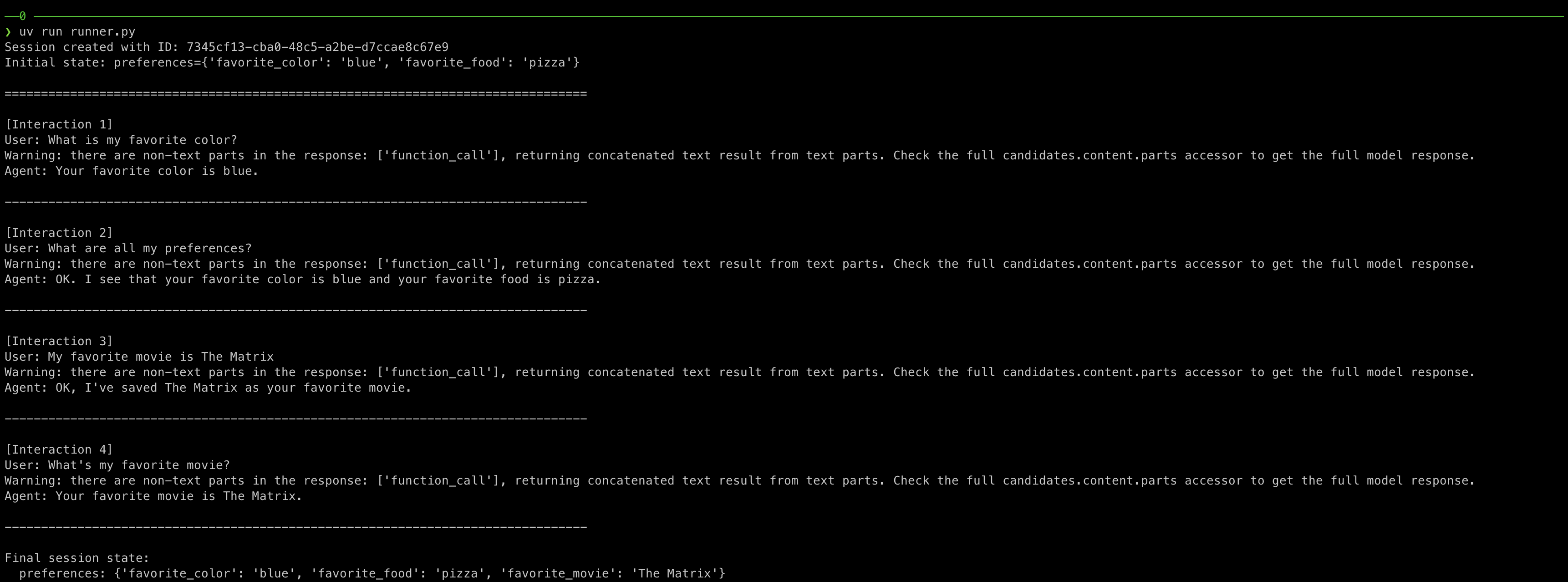
Let's trace a complete conversation turn through the Runner-Session architecture.
This concrete example clarifies how all the pieces fit together.
We'll follow the message "My favorite movie is The Matrix" from input to persisted state.
import asyncio
from datetime import datetime
from typing import Dict, Any

from google.adk.sessions import InMemorySessionService
from google.adk.agents import Agent
from google.adk.runners import Runner
from google.adk.tools.tool_context import ToolContext
from google.genai import types

from dotenv import load_dotenv

load_dotenv()

# Custom functions to manage session state
def get_user_state(tool_context: ToolContext) -> Dict[str, Any]:
    """Retrieve all user information from the session state.

    Args:
        tool_context: Automatically injected by ADK

    Returns:
        dict: User profile including name and preferences
    """
    preferences = tool_context.state.get("preferences", {})

    return {
        "status": "success",
        "preferences": preferences,
        "retrieved_at": datetime.now().isoformat()
    }

def update_preference(
    preference_key: str,
    preference_value: str,
    tool_context: ToolContext
) -> Dict[str, Any]:
    """Update or add a user preference to the session state.

    Args:
        preference_key: The preference name (e.g., 'favorite_color', 'favorite_food')
        preference_value: The new preference value
        tool_context: Automatically injected by ADK

    Returns:
        dict: Operation status and updated preferences
    """
    # Get current preferences or initialize empty dict
    preferences = tool_context.state.get("preferences", {})

    # Update the specific preference
    preferences[preference_key] = preference_value

    # Save back to state
    tool_context.state["preferences"] = preferences

    return {
        "status": "success",
        "message": f"Updated {preference_key} to {preference_value}",
        "updated_preferences": preferences,
        "updated_at": datetime.now().isoformat()
    }

def init_state():
    return {
        "preferences": {
            "favorite_color": "blue",
            "favorite_food": "pizza"
        }
    }

async def create_session(session_service: InMemorySessionService, app_name: str, user_id: str):
    session = await session_service.create_session(
        app_name=app_name,
        user_id=user_id,
        state=init_state()
    )
    return session

async def get_session(session_service: InMemorySessionService, app_name: str, user_id: str, session_id: str):
    session = await session_service.get_session(
        app_name=app_name,
        user_id=user_id,
        session_id=session_id
    )
    return session

def create_agent(app_name: str):
    agent = Agent(
        name=app_name,
        model="gemini-2.0-flash-exp",
        instruction="""
        You are a helpful personal assistant with access to user preferences and state information.

        IMPORTANT GUIDELINES:
        - When a user asks about their preferences, use the get_user_state tool to retrieve their information from the session state.
        - When a user tells you about a new preference or wants to update an existing one, use the update_preference tool to save it to the session state.
        - Provide personalized responses based on the user's stored preferences.

        TOOL USAGE:
        - get_user_state: Retrieves all user preferences
        - update_preference: Updates or adds a new preference (takes preference_key and preference_value)

        Be conversational and helpful. If you don't know something that isn't in the state, say so politely.
        """,
        tools=[get_user_state, update_preference]
    )
    return agent

def create_runner(app_name: str, session_service: InMemorySessionService, agent: Agent):
    runner = Runner(
        app_name=app_name,
        session_service=session_service,
        agent=agent
    )
    return runner

def invoke_message(runner: Runner, user_id: str, session_id: str, message_text: str):
    """Send a message to the agent and print the response.

    Args:
        runner: The Runner instance
        user_id: The user ID
        session_id: The session ID
        message_text: The text message to send
    """
    user_message = types.Content(
        role="user",
        parts=[types.Part(text=message_text)]
    )

    for event in runner.run(
        user_id=user_id,
        session_id=session_id,
        new_message=user_message
    ):
        if event.is_final_response():
            if event.content and event.content.parts:
                print(f"Agent: {event.content.parts[0].text}")

async def main():
    # Variables
    app_name = "personal_assistant"
    user_id = "user_12345"
    # Initialize session service
    session_service = InMemorySessionService()
    session = await create_session(session_service, app_name, user_id)
    session_id = session.id

    # Create agent
    agent = create_agent(app_name)

    # Initialize runner with agent and session service
    runner = create_runner(app_name, session_service, agent)

    # Define test interactions
    test_messages = [
        "What is my favorite color?",
        "What are all my preferences?",
        "My favorite movie is The Matrix",
        "What's my favorite movie?",
    ]

    print(f"Session created with ID: {session_id}")
    print(f"Initial state: preferences={session.state.get('preferences')}\n")
    print("=" * 80)

    # Execute multiple conversations to demonstrate state management
    for i, message_text in enumerate(test_messages, 1):
        print(f"\n[Interaction {i}]")
        print(f"User: {message_text}")

        invoke_message(runner, user_id, session_id, message_text)

        print("-" * 80)

    # Show final state by retrieving the latest session
    final_session = await session_service.get_session(
        app_name=app_name,
        user_id=user_id,
        session_id=session_id
    )
    print(f"\nFinal session state:")
    if final_session:
        print(f"  preferences: {final_session.state.get('preferences')}")
    else:
        print("  Session not found!")

if __name__ == "__main__":
    asyncio.run(main())
When this message enters invoke_message(), the function constructs a types.Content object. The message text wraps in a Part, which wraps in a Content with role "user". This structured format ensures consistent message handling across the ADK.
The runner.run() call begins by loading the session. Using the provided user_id and session_id, the Runner retrieves the session from the service. The current state loads into memory: {"preferences": {"favorite_color": "blue", "favorite_food": "pizza"}}. The conversation history also loads, containing previous messages and responses.
The agent receives the user message along with its instructions and available tools. The language model analyzes the input: "My favorite movie is The Matrix." Based on the instructions, it recognizes this as a preference declaration requiring the update_preference tool. The agent generates a tool call: update_preference(preference_key="favorite_movie", preference_value="The Matrix").
The Runner intercepts this tool call before execution. It examines the update_preference function signature and identifies the ToolContext parameter. The Runner constructs a ToolContext object containing a reference to the current session state. It injects this context along with the explicitly provided parameters: preference_key and preference_value.
The tool executes with full access to the session state. It retrieves the preferences dictionary: {"favorite_color": "blue", "favorite_food": "pizza"}. It adds the new preference: preferences["favorite_movie"] = "The Matrix". It writes the updated dictionary back to tool_context.state["preferences"].
The Runner detects the state modification after the tool returns. It immediately persists the updated state to the session service. The session now contains: {"preferences": {"favorite_color": "blue", "favorite_food": "pizza", "favorite_movie": "The Matrix"}}. The last_update_time timestamp updates to reflect this change.
The agent receives the tool's return value confirming the update. It generates a natural language response: "I've saved your preference. Your favorite movie is now The Matrix!" The Runner streams this response as events through the iterator. The final event contains the complete response text.
The conversation turn completes with all state changes persisted. Future messages in this session will see the updated preferences. When the next message asks "What's my favorite movie?", the agent finds the answer in the state. The Runner ensures perfect continuity across the entire conversation.
Performance Considerations in the Runner-Session Architecture
The Runner's orchestration introduces overhead that impacts conversation latency.
Understanding performance characteristics helps you optimize for your application's requirements. Session operations, tool execution, and model inference all contribute to total response time.
Session retrieval latency depends entirely on your session service choice.
InMemorySessionService offers sub-millisecond access times.
DatabaseSessionService introduces network and database query latency, typically 5-50ms.
VertexAISessionService has similar characteristics to database storage but with additional managed service overhead.
Consider implementing caching layers between the Runner and session storage. Frequently accessed sessions can cache in memory with Redis or Memcached.
This optimization dramatically reduces latency for active conversations. Cache invalidation strategies ensure users always see current state despite caching.
Tool execution time varies widely based on tool complexity.
Simple state access tools complete in microseconds. Tools that call external APIs might take hundreds of milliseconds.
The Runner executes tools serially, so multiple tool calls compound latency.
State persistence overhead depends on state size and session service implementation.
Small states (< 1KB) persist quickly even with database backends. Large states (> 100KB) introduce noticeable latency during updates.
Consider normalizing your state structure or using references to external storage for large data.
Advanced Patterns: Session Sharing and Handoffs
Some applications require advanced session management patterns. Multiple agents might collaborate on a single session. Conversations might transfer between channels or modalities. The Runner-Session architecture supports these scenarios through careful design.
Session sharing allows different agents to access the same conversation state. Create multiple agents with different capabilities or personalities. Use the same session ID when invoking different runners. State changes from one agent become visible to others, enabling collaboration.
Conversation handoffs transfer sessions between systems. A chatbot might escalate to human support, maintaining session continuity. The human agent accesses the same session, seeing full conversation history and state. After resolution, the conversation can return to the AI agent using the same session.
Cross-channel continuity allows users to switch between interfaces seamlessly. A conversation might start in a web chat, continue on mobile, and finish via API. As long as all channels use the same session ID, state and history persist. The Runner's abstraction makes these complex scenarios straightforward to implement.
Conclusion
The Runner serves as the orchestration backbone of stateful conversational AI.
It bridges the gap between stateless language models and stateful applications.
By managing sessions, executing tools, and coordinating message flow, the Runner eliminates complexity that would otherwise plague your implementation.
Sessions provide the persistent memory that makes conversations truly intelligent. They store user preferences, conversation history, and application state.
The Runner ensures this state remains consistent, accessible, and secure throughout the conversation lifecycle.
Together, the Runner-Session architecture creates a robust foundation for production conversational AI.
You can focus on building great user experiences and powerful tools instead of wrestling with infrastructure concerns.
The patterns demonstrated here—session management, state persistence, tool integration, and conversation orchestration—scale from simple prototypes to systems serving millions of users.
Master this architecture and you master the fundamental challenge of conversational AI: making artificial intelligence truly remember and understand your users.
The code patterns shown here provide a solid starting point for building sophisticated agents that maintain context, learn preferences, and deliver increasingly personalized experiences over time.
Start with the basic Runner-Session flow demonstrated in this article. Expand gradually as your requirements grow.
The architecture's flexibility supports evolution without requiring complete rewrites.
Your agents will grow from simple question-answering systems into sophisticated assistants that truly understand and remember their users.
PS:
If you like this article, share it with others ♻️
Would help a lot ❤️
And feel free to follow me for more content like this.


