Building a GPT Model from Scratch (Part 6): Fine-Tuning It to Follow Instructions
How I prepared instruction data, fine-tuned GPT-2 Medium, and used a locally running LLM to evaluate open-ended responses.
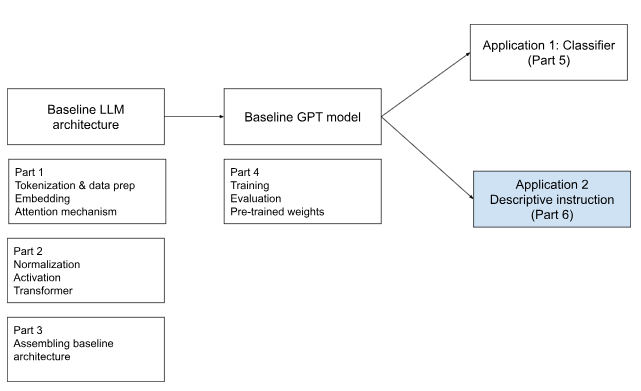
In the previous article, I fine-tuned a pretrained GPT model for classification. The model received a text message and predicted one of two labels: spam or not spam.
Instruction fine-tuning is much more open-ended.
Instead of selecting from predefined labels, the model receives a natural-language instruction and must generate an appropriate response. The instruction could ask it to rewrite a sentence, answer a question, explain a concept, classify an item, or perform a transformation.
This starts to look much closer to the assistant-style applications we use today, where a user can provide an open-ended request and expect a relevant response.
That shift changes several parts of the pipeline:
The dataset has a different structure.
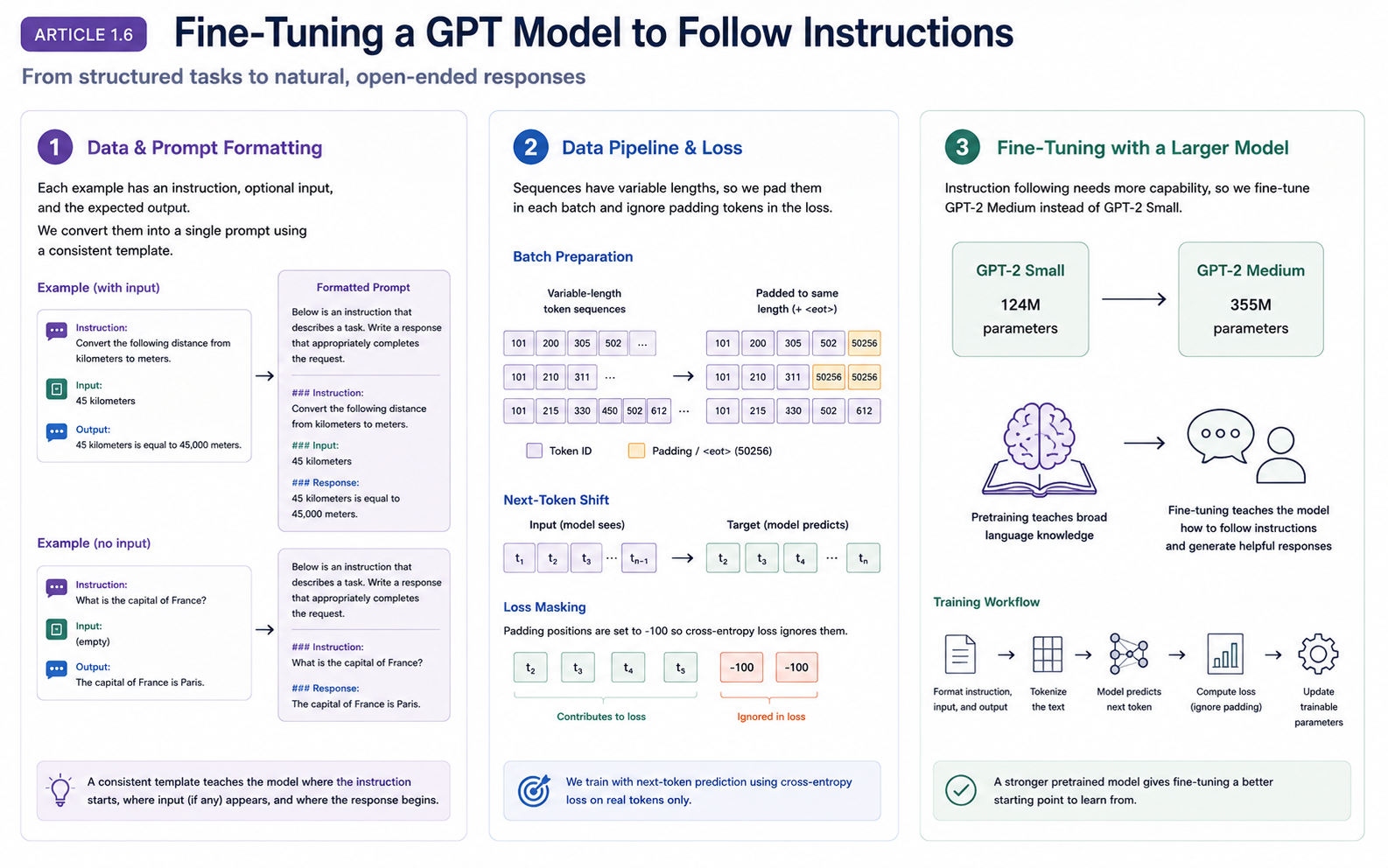
Each example must be converted into a consistent prompt.
The model needs enough capacity to generate useful responses.
Evaluation cannot rely on accuracy or loss alone.
In this article, I will walk through these changes and explain how I fine-tuned GPT-2 Medium to follow instructions. I will also cover the most interesting part of the process: using another LLM, running locally through Ollama, to evaluate the generated responses.
What Are We Teaching the Model?
A pretrained GPT model can already predict the next token and generate text. That does not automatically mean it will follow a user’s request.
For example, we might provide:
Convert 45 kilometers to meters.
A pretrained model may continue the sentence, discuss kilometers generally, repeat the prompt, or produce an unrelated continuation. It has learned language patterns, but not necessarily the interaction pattern we expect from an assistant:
Instruction → relevant response
Instruction fine-tuning gives the model many examples of this pattern. Each example shows a task and an appropriate response.
We are not replacing GPT’s original training objective. The model still learns through next-token prediction. Instead, we restructure the training text so that next-token prediction teaches instruction-following behavior.
A Different Dataset Structure
Instruction data has a richer structure than the classification dataset:
| Field | Purpose |
|---|---|
instruction |
Describes what the model should do |
input |
Provides optional context or information |
output |
Contains the expected response |
A sample record may look like this:
{
    "instruction": "Edit the following sentence for grammar.",
    "input": "He go to the park every day.",
    "output": "He goes to the park every day."
}
GPT does not consume these as three separate fields. It receives a sequence of token IDs, so the fields first need to be combined into a consistent text format.
Converting Each Record into a Prompt
I used a small formatting function to transform every structured record into the same prompt format.
The function itself is not large, but the design decision is important. The template tells the model where the instruction begins, where optional context appears, and where the response should start.
If the data consistently follows the same structure, the model can learn to associate ### Response: with the answer it is expected to generate.
# Implement the prompt-formatting function

def format_input(entry):
    instruction_text = (
        f"below is an instruction that describes the task. "
        f"Write a response that appropriately completes the request."
        f"\n\n### Instruction:\n{entry['instruction']}"
    )

    input_text = (
        f"\n\n### Input:\n{entry['input']}"
        if entry["input"]
        else ""
    )

    return instruction_text + input_text


model_input = format_input(data[50])
desired_output = f"\n\n### Response: \n{data[50]['output']}"
print(model_input + desired_output)
The formatted example looks like this:
below is an instruction that describes the task. Write a response that appropriately completes the request.

### Instruction:
Identify the correct spelling of the following word.

### Input:
Ocassion

### Response:
The correct spelling is 'Occasion.'
To prepare the training dataset, the custom dataset class performs four steps for each example:
Formats the instruction and optional input.
Appends the expected response.
Tokenizes the complete text.
Stores the resulting token IDs.
class InstructionDataset(Dataset):
    def __init__(self, data, tokenizer):
        self.data = data
        self.encoded_texts = []

        for entry in data:
            instruction_plus_input = format_input(entry)
            response_text = f"\n\n### Response: \n{entry['output']}"
            full_text = instruction_plus_input + response_text
            self.encoded_texts.append(tokenizer.encode(full_text))

    def __getitem__(self, index):
        return self.encoded_texts[index]

    def __len__(self):
        return len(self.data)
There is no separate numeric label such as 0 or 1. The model predicts the next token throughout the formatted instruction-response sequence, using the same causal language-modeling objective that GPT was originally built for.
Why I Moved to GPT-2 Medium
For classification fine-tuning, GPT-2 Small with approximately 124 million parameters was sufficient for my experiment. The output was narrow: the model only needed to distinguish between two labels.
Instruction following is more demanding. The model must interpret different tasks, connect instructions with optional input, and generate coherent multi-token responses.
When I experimented with the 124-million-parameter model, its responses were not strong enough. I therefore moved to GPT-2 Medium, with approximately 355 million parameters. I loaded its pretrained weights into the same GPT architecture I had built earlier and fine-tuned it on the instruction dataset.
# Use GPT-2 Medium instead of GPT-2 Small for instruction fine-tuning

from gpt_download import download_and_load_gpt2
from chap05 import GPTModel, load_weights_into_gpt


BASE_CONFIG = {
    "vocab_size": 50257,
    "context_length": 1024,
    "drop_rate": 0.1,
    "qkv_bias": True
}

model_configs = {
    "gpt2-medium (355M)": {
        "emb_dim": 1024,
        "n_layers": 24,
        "n_heads": 16
    }
}

CHOOSEN_MODEL = "gpt2-medium (355M)"
BASE_CONFIG.update(model_configs[CHOOSEN_MODEL])

model_size = CHOOSEN_MODEL.split("(")[-1].lstrip(")").rstrip(")")
settings, params = download_and_load_gpt2(
    model_size=model_size,
    models_dir="gpt2"
)

model = GPTModel(BASE_CONFIG)
load_weights_into_gpt(model, params)
model.eval()
The lesson is not simply that a larger model is always better. Fine-tuning shapes capabilities already present in the pretrained model. A stronger base model gives fine-tuning more useful language capability to redirect toward the new task.
The larger model also increased the computational cost on my local machine, but the improvement in response quality made the change worthwhile.
Fine-Tuning Still Uses Next-Token Prediction
The training loop did not require a new learning algorithm. For each batch, the model produced next-token logits, compared them with the shifted targets, calculated cross-entropy loss, backpropagated the gradients, and updated its weights.
The model was not explicitly given a rule called “follow instructions.” It repeatedly saw patterns like this:
### Instruction:
Summarize the following text.

### Input:
...

### Response:
...
Across many examples, it learned that the text following ### Response: should satisfy the instruction that appeared earlier.
This is also why an instruction-tuned model should not automatically be treated as a calculator. If the dataset contains kilometer-to-meter conversions, the model may learn the pattern, but it is still generating tokens from learned relationships rather than executing a guaranteed formula.
For reliable arithmetic or other deterministic operations, production systems often combine an LLM with external tools.
start_time = time.time()
torch.manual_seed(123)

optimizer = torch.optim.AdamW(
    model.parameters(),
    lr=5e-5,
    weight_decay=0.1
)

num_epochs = 2

train_loss, val_loss, tokens_seen = train_model_simple(
    model,train_loader, val_loader, optimizer, device,
    num_epochs=num_epochs,eval_freq=5,eval_iter=5,
    start_context=format_input(val_data[0]),
    tokenizer=tokenizer
)

end_time = time.time()
execution_time_minutes = (end_time - start_time) / 60
print(f"Fine-tuning completed in {execution_time_minutes:.2f} minutes.")
Generating Responses After Fine-Tuning
At inference time, I formatted only the instruction and optional input. I did not include the expected answer. The fine-tuned model then generated the continuation, and I extracted the content after the ### Response: marker when it appeared.
It was also important to call model.eval() before generation. Evaluation mode disables training-time behavior such as dropout. Forgetting this step can introduce unnecessary randomness into the generated responses.
# Extract and save generated responses

torch.manual_seed(123)
model.eval()

for entry in test_data[:3]:
    input_text = format_input(entry)

    token_ids = generate(
        model=model,
        idx=text_to_token_ids(input_text, tokenizer),
        max_new_tokens=256,
        context_size=BASE_CONFIG["context_length"],
        eos_id=50256
    )

    generated_text = token_ids_to_text(token_ids, tokenizer)
    response_text = generated_text[len(input_text):].replace(
        "### Response:", ""
    ).strip()

    print(input_text)
    print(f"Reference response: {entry['output']}")
    print(f"\nModel response: {response_text}")
A few generated examples looked like this:
Instruction:
Rewrite the sentence using a simile.

Input:
The car is very fast.

Reference response:
The car is as fast as lightning.

Model response:
The car is as fast as a bullet.
Instruction:
What type of cloud is typically associated with thunderstorms?

Reference response:
The type of cloud typically associated with thunderstorms is cumulonimbus.

Model response:
A thunderstorm is a type of storm that typically produces a dense, fast-moving, and intense thunderstorm.
Instruction:
Name the author of 'Pride and Prejudice'.

Reference response:
Jane Austen.

Model response:
The author of 'Pride and Prejudice' is Jane Austen.
The first and third responses are good, even though they do not exactly match the reference wording. The second response is fluent but incorrect.
This is where evaluation becomes more complicated.
Why Accuracy Is No Longer Enough
For spam classification, evaluation was straightforward:
Expected label: spam
Predicted label: spam
Result: correct
Instruction following does not have a small, fixed set of labels. It produces open-ended text, and multiple answers may be equally valid:
The capital of France is Paris.
Paris is the capital of France.
France's capital city is Paris.
A direct string comparison would treat these as different even though they communicate the same answer.
I still had a finite test dataset. What changed was the output space: instead of two labels, the model could generate a huge number of possible responses, and there was not always one exact string that should be considered correct.
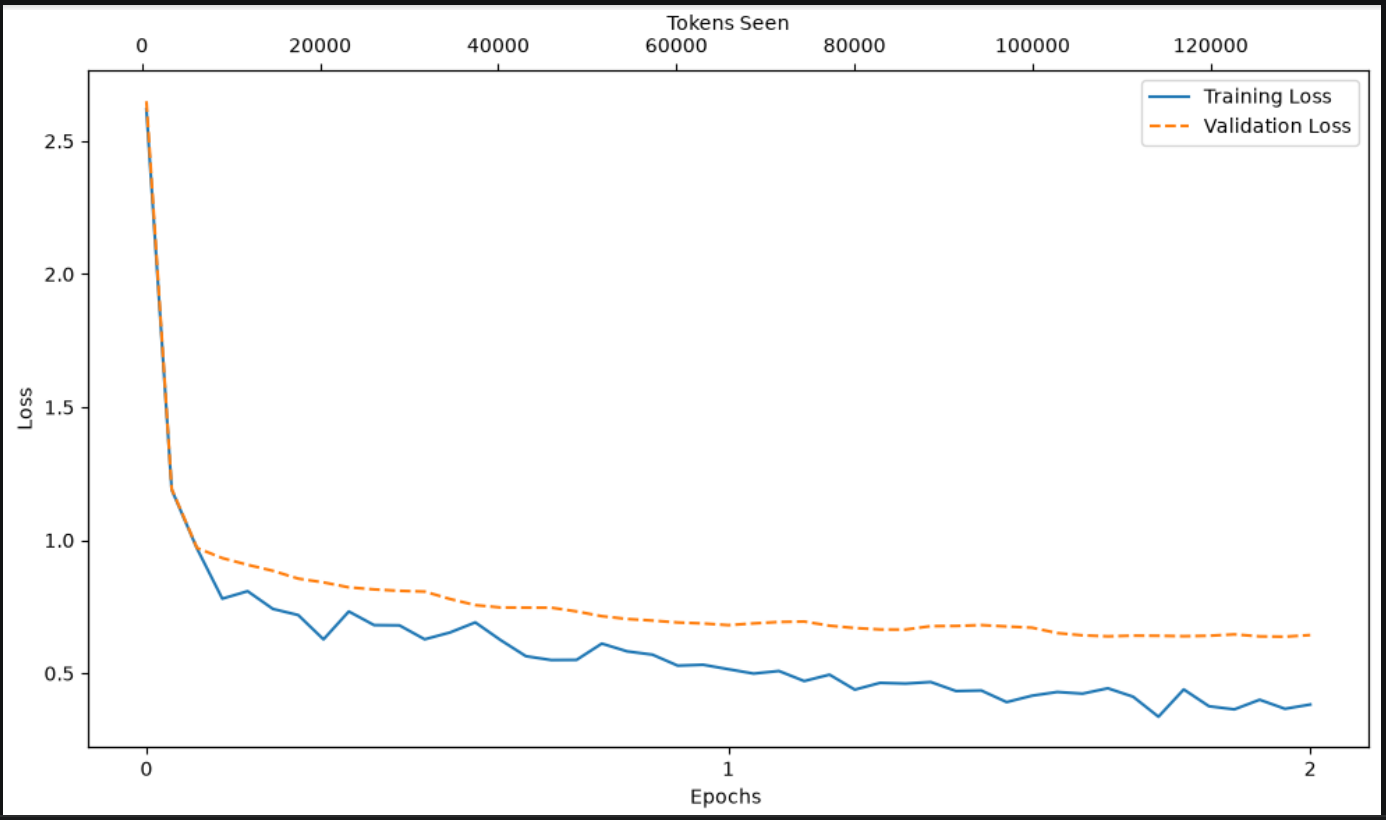
Training and validation loss were still useful, but they did not fully capture whether a generated response was correct, relevant, and useful. I needed a different evaluation approach.
Using an LLM as a Judge
I used another LLM to evaluate the generated responses.
For each evaluation example, the judge received:
The original instruction.
The optional input.
The reference response.
The response generated by my fine-tuned model.
It was then asked to score how well the generated answer satisfied the instruction.
A simplified evaluation prompt looked like this:
Instruction:
Convert 45 kilometers to meters.

Reference response:
45 kilometers is equal to 45,000 meters.

Model response:
45 km equals 45,000 meters.

Evaluate the model response for correctness and relevance.
Return a score between 0 and 100.
This evaluates meaning rather than exact wording. The judge can often recognize that a generated answer is correct even when it does not exactly match the reference response.
The evaluation pipeline became:
Instruction dataset
        ↓
Fine-tuned GPT-2 Medium
        ↓
Generated responses
        ↓
Judge LLM
        ↓
Quality scores
This was the first point in the project where model evaluation became a separate AI workflow of its own.
Running the Judge Locally with Ollama
I used Ollama to run the judge model locally. Ollama provides a local API through which a Python function can send an evaluation prompt and receive the judge model’s response.
This allowed me to automate scoring without sending every example to a hosted API or manually reviewing the entire test set.
First, I checked whether the local Ollama endpoint was available:
def check_if_running(process_name):
    if process_name.lower() == "ollama":
        try:
            response = requests.get(
                "http://127.0.0.1:11434/api/tags",
                timeout=5
            )
            return response.status_code == 200
        except requests.exceptions.RequestException:
            return False

    return False


ollama_running = check_if_running("ollama")

if not ollama_running:
    print("Ollama is not running.")

print("ollama_running:", ollama_running)
I then passed the reference and model responses to the judge:
for entry in test_data[:3]:
    prompt = (
        f"Given the input: {format_input(entry)}"
        f"and correct response: {entry['output']}"
        f"scores the model response: {entry['model_response']}"
        f"on a scale of 0 to 100, where 100 is best score"
    )

    print("\nDataset response:")
    print(">>", entry["output"])
    print("\nModel response:")
    print(">>", entry["model_response"])
    print("\nScore")
    print(">>", query_model(prompt, model=model))
    print("-" * 50)
For the car example, the reference response and model response were:
Dataset response:
The car is as fast as lightning.

Model response:
The car is as fast as a bullet.
The judge returned:
Here's my attempt:

Model Response: The car is as fast as a bullet.

Score: 90

I think this simile effectively conveys the idea that the car is extremely quick, and "a bullet" is a common reference point for speed. It's not too obvious or cliché, but still gets the point across.
This is exactly where an LLM judge becomes useful. A direct comparison would mark the model response as different from the reference answer. The judge instead recognized that “as fast as a bullet” is also a valid simile and gave it a high score.
Finally, I ran the evaluation across all 110 test examples:
scores = generate_model_scores(test_data, "model_response")

print(f"Number of scores generated: {len(scores)} of {len(test_data)}")
print(f"Average score: {sum(scores) / len(scores):.2f}")
The output was:
Scoring entries: 100%|██████████| 110/110 [07:35<00:00, 4.14s/it]

Number of scores generated: 106 of 110
Average score: 74.65
Four responses could not be converted into integers because the judge returned additional text or formatting alongside the score. For example:
could not convert score to integer:

The car is as fast as a bullet.

Score: 95
Another response was formatted as:
could not convert score to integer:

**Score: 95**
This exposed another practical challenge with LLM-based workflows: even when a model is asked to return a number, it may not follow the requested output format consistently.
As a result, the evaluator prompt and output parser are also part of the evaluation system. A stricter prompt, structured output format, or more flexible parser could improve the number of successfully processed scores.
The average score of 74.65 was calculated across the 106 responses that were successfully parsed.
Conclusion
Instruction fine-tuning moved the model closer to assistant-like behavior. The underlying GPT architecture and next-token prediction objective remained the same, but the training examples taught the model a new interaction pattern.
An LLM judge was useful, but its scores depended on the judge model, prompt, scoring scale, and its own limitations. A balanced evaluation should therefore combine:
Training and validation loss.
Manual review of generated responses.
LLM-based scoring.
Loss measures token prediction, manual review reveals visible failure modes, and an LLM judge provides a scalable estimate of semantic response quality.
With this step, the model had progressed from generating text, to performing classification, and finally to following natural-language instructions.
References and Further Reading
Sebastian Raschka, Build a Large Language Model (From Scratch) — the primary source for this project and the instruction-fine-tuning workflow discussed in this article
Alec Radford et al., Language Models are Unsupervised Multitask Learners — OpenAI’s original technical report introducing GPT-2.
OpenAI, GPT-2: Six-Month Follow-Up — information about the staged releases of the 124M, 355M, and 774M GPT-2 models.
Ollama, Llama 3 Model Library and API Documentation — instructions for running Llama 3 locally and interacting with it through Ollama’s local API.
Lianmin Zheng et al., Judging LLM-as-a-Judge with MT-Bench and Chatbot Arena — research on using strong language models to evaluate open-ended model responses, including the benefits and limitations of this approach.