保留正文与补采附件。源页面当前未重新核验;具体限制见交付清单。
 We value your privacy
We use cookies to enhance your browsing experience, serve personalised ads or content, and analyse our traffic. By clicking "Accept All", you consent to our use of cookies.
Customise Reject All Accept All
Customise Consent Preferences
We value your privacy
We use cookies to enhance your browsing experience, serve personalised ads or content, and analyse our traffic. By clicking "Accept All", you consent to our use of cookies.
Customise Reject All Accept All
Customise Consent Preferences  We use cookies to help you navigate efficiently and perform certain functions. You will find detailed information about all cookies under each consent category below.
The cookies that are categorised as "Necessary" are stored on your browser as they are essential for enabling the basic functionalities of the site. ... Show more
NecessaryAlways Active
Necessary cookies are required to enable the basic features of this site, such as providing secure log-in or adjusting your consent preferences. These cookies do not store any personally identifiable data.
We use cookies to help you navigate efficiently and perform certain functions. You will find detailed information about all cookies under each consent category below.
The cookies that are categorised as "Necessary" are stored on your browser as they are essential for enabling the basic functionalities of the site. ... Show more
NecessaryAlways Active
Necessary cookies are required to enable the basic features of this site, such as providing secure log-in or adjusting your consent preferences. These cookies do not store any personally identifiable data.
-
Cookie
BCTempID
-
Duration
10 minutes
-
Description
No description available.
-
Cookie
__cf_bm
-
Duration
1 hour
-
Description
This cookie, set by Cloudflare, is used to support Cloudflare Bot Management.
-
Cookie
AWSALBCORS
-
Duration
7 days
-
Description
Amazon Web Services set this cookie for load balancing.
-
Cookie
_cfuvid
-
Duration
session
-
Description
Cloudflare sets this cookie to track users across sessions to optimize user experience by maintaining session consistency and providing personalized services
-
Cookie
li_gc
-
Duration
6 months
-
Description
Linkedin set this cookie for storing visitor's consent regarding using cookies for non-essential purposes.
-
Cookie
__hssrc
-
Duration
session
-
Description
This cookie is set by Hubspot whenever it changes the session cookie. The __hssrc cookie set to 1 indicates that the user has restarted the browser, and if the cookie does not exist, it is assumed to be a new session.
-
Cookie
__hssc
-
Duration
1 hour
-
Description
HubSpot sets this cookie to keep track of sessions and to determine if HubSpot should increment the session number and timestamps in the __hstc cookie.
-
Cookie
wpEmojiSettingsSupports
-
Duration
session
-
Description
WordPress sets this cookie when a user interacts with emojis on a WordPress site. It helps determine if the user's browser can display emojis properly.
-
Cookie
BCSessionID
-
Duration
1 year 1 month 4 days
-
Description
Blueconic sets this cookie as a unique identifier for the BlueConic profile.
-
Cookie
_octo
-
Duration
1 year
-
Description
No description available.
-
Cookie
logged_in
-
Duration
1 year
-
Description
No description available.
-
Cookie
__Secure-YEC
-
Duration
past
-
Description
YouTube sets this cookie to stores the user's video player preferences using embedded YouTube video
-
Cookie
__eoi
-
Duration
6 months
-
Description
Description is currently not available.
-
Cookie
AWSALBTGCORS
-
Duration
7 days
-
Description
No description available.
-
Cookie
login-status-p
-
Duration
past
-
Description
Description is currently not available.
-
Cookie
AWSALBTG
-
Duration
7 days
-
Description
No description available.
-
Cookie
csrf_token
-
Duration
session
-
Description
No description available.
-
Cookie
token_v2
-
Duration
1 day
-
Description
Description is currently not available.
-
Cookie
D
-
Duration
1 year
-
Description
Description is currently not available.
-
Cookie
PHPSESSID
-
Duration
session
-
Description
This cookie is native to PHP applications. The cookie stores and identifies a user's unique session ID to manage user sessions on the website. The cookie is a session cookie and will be deleted when all the browser windows are closed.
-
Cookie
VISITOR_PRIVACY_METADATA
-
Duration
6 months
-
Description
YouTube sets this cookie to store the user's cookie consent state for the current domain.
-
Cookie
cookietest
-
Duration
session
-
Description
The cookietest cookie is typically used to determine whether the user's browser accepts cookies, essential for website functionality and user experience.
-
Cookie
__Host-airtable-session
-
Duration
1 year
-
Description
This cookie is used to enable us to integrate the services of Airtable.
-
Cookie
__Host-airtable-session.sig
-
Duration
1 year
-
Description
This cookie is used to enable us to integrate the services of Airtable.
-
Cookie
m
-
Duration
1 year 1 month 4 days
-
Description
Stripe sets this cookie for fraud prevention purposes. It identifies the device used to access the website, allowing the website to be formatted accordingly.
-
Cookie
BIGipServer*
-
Duration
session
-
Description
Marketo sets this cookie to collect information about the user's online activity and build a profile about their interests to provide advertisements relevant to the user.
-
Cookie
__cfruid
-
Duration
session
-
Description
Cloudflare sets this cookie to identify trusted web traffic.
-
Cookie
_GRECAPTCHA
-
Duration
6 months
-
Description
Google Recaptcha service sets this cookie to identify bots to protect the website against malicious spam attacks.
-
Cookie
__Secure-YNID
-
Duration
6 months
-
Description
Google cookie used to protect user security and prevent fraud, especially during the login process.
-
Cookie
cookieyes-consent
-
Duration
1 year
-
Description
CookieYes sets this cookie to remember users' consent preferences so that their preferences are respected on subsequent visits to this site. It does not collect or store any personal information about the site visitors.
Functional
Functional cookies help perform certain functionalities like sharing the content of the website on social media platforms, collecting feedback, and other third-party features.
-
Cookie
lidc
-
Duration
1 day
-
Description
LinkedIn sets the lidc cookie to facilitate data center selection.
-
Cookie
brw
-
Duration
1 year
-
Description
No description available.
-
Cookie
brwConsent
-
Duration
5 minutes
-
Description
Description is currently not available.
-
Cookie
WMF-Uniq
-
Duration
1 year
-
Description
Description is currently not available.
-
Cookie
loom_anon_comment
-
Duration
1 year
-
Description
No description available.
-
Cookie
loom_referral_video
-
Duration
session
-
Description
Description is currently not available.
-
Cookie
VISITOR_INFO1_LIVE
-
Duration
6 months
-
Description
A cookie set by YouTube to measure bandwidth that determines whether the user gets the new or old player interface.
-
Cookie
yt-remote-connected-devices
-
Duration
Never Expires
-
Description
YouTube sets this cookie to store the user's video preferences using embedded YouTube videos.
-
Cookie
ytidb::LAST_RESULT_ENTRY_KEY
-
Duration
Never Expires
-
Description
The cookie ytidb::LAST_RESULT_ENTRY_KEY is used by YouTube to store the last search result entry that was clicked by the user. This information is used to improve the user experience by providing more relevant search results in the future.
-
Cookie
yt-remote-device-id
-
Duration
Never Expires
-
Description
YouTube sets this cookie to store the user's video preferences using embedded YouTube videos.
-
Cookie
yt-remote-session-name
-
Duration
session
-
Description
The yt-remote-session-name cookie is used by YouTube to store the user's video player preferences using embedded YouTube video.
-
Cookie
yt-remote-fast-check-period
-
Duration
session
-
Description
The yt-remote-fast-check-period cookie is used by YouTube to store the user's video player preferences for embedded YouTube videos.
-
Cookie
yt-remote-session-app
-
Duration
session
-
Description
The yt-remote-session-app cookie is used by YouTube to store user preferences and information about the interface of the embedded YouTube video player.
-
Cookie
yt-remote-cast-available
-
Duration
session
-
Description
The yt-remote-cast-available cookie is used to store the user's preferences regarding whether casting is available on their YouTube video player.
-
Cookie
yt-remote-cast-installed
-
Duration
session
-
Description
The yt-remote-cast-installed cookie is used to store the user's video player preferences using embedded YouTube video.
-
Cookie
cp_session
-
Duration
3 months
-
Description
Codepen sets this cookie for Help systems found in the website.
-
Cookie
loid
-
Duration
1 year 1 month 4 days
-
Description
This cookie is set by the Reddit. The cookie enables the sharing of content from the website onto the social media platform.
Analytics
Analytical cookies are used to understand how visitors interact with the website. These cookies help provide information on metrics such as the number of visitors, bounce rate, traffic source, etc.
-
Cookie
__hstc
-
Duration
6 months
-
Description
Hubspot set this main cookie for tracking visitors. It contains the domain, initial timestamp (first visit), last timestamp (last visit), current timestamp (this visit), and session number (increments for each subsequent session).
-
Cookie
hubspotutk
-
Duration
6 months
-
Description
HubSpot sets this cookie to keep track of the visitors to the website. This cookie is passed to HubSpot on form submission and used when deduplicating contacts.
-
Cookie
_ga
-
Duration
1 year 1 month 4 days
-
Description
Google Analytics sets this cookie to calculate visitor, session and campaign data and track site usage for the site's analytics report. The cookie stores information anonymously and assigns a randomly generated number to recognise unique visitors.
-
Cookie
ga*
-
Duration
1 year 1 month 4 days
-
Description
Google Analytics sets this cookie to store and count page views.
-
Cookie
__Host-psifi.analyticsTrace
-
Duration
6 hours
-
Description
Description is currently not available.
-
Cookie
__Host-psifi.analyticsTraceV2
-
Duration
6 hours
-
Description
Description is currently not available.
-
Cookie
_gh_sess
-
Duration
session
-
Description
GitHub sets this cookie for temporary application and framework state between pages like what step the user is on in a multiple step form.
-
Cookie
YSC
-
Duration
session
-
Description
YSC cookie is set by Youtube and is used to track the views of embedded videos on Youtube pages.
-
Cookie
ajs_anonymous_id
-
Duration
1 year
-
Description
This cookie is set by Segment to count the number of people who visit a certain site by tracking if they have visited before.
-
Cookie
vuid
-
Duration
1 year 1 month 4 days
-
Description
Vimeo installs this cookie to collect tracking information by setting a unique ID to embed videos on the website.
Performance
Performance cookies are used to understand and analyse the key performance indexes of the website which helps in delivering a better user experience for the visitors.
-
Cookie
AWSALB
-
Duration
7 days
-
Description
AWSALB is an application load balancer cookie set by Amazon Web Services to map the session to the target.
-
Cookie
acq
-
Duration
past
-
Description
Description is currently not available.
-
Cookie
acq.sig
-
Duration
past
-
Description
Description is currently not available.
-
Cookie
ptc
-
Duration
2 years
-
Description
No description available.
Advertisement
Advertisement cookies are used to provide visitors with customised advertisements based on the pages you visited previously and to analyse the effectiveness of the ad campaigns.
-
Cookie
muc_ads
-
Duration
1 year 1 month 4 days
-
Description
Twitter sets this cookie to collect user behaviour and interaction data to optimize the website.
-
Cookie
guest_id_marketing
-
Duration
1 year 1 month 4 days
-
Description
Twitter sets this cookie to identify and track the website visitor.
-
Cookie
guest_id_ads
-
Duration
1 year 1 month 4 days
-
Description
Twitter sets this cookie to identify and track the website visitor.
-
Cookie
personalization_id
-
Duration
1 year 1 month 4 days
-
Description
Twitter sets this cookie to integrate and share features for social media and also store information about how the user uses the website, for tracking and targeting.
-
Cookie
guest_id
-
Duration
1 year 1 month 4 days
-
Description
Twitter sets this cookie to identify and track the website visitor. It registers if a user is signed in to the Twitter platform and collects information about ad preferences.
-
Cookie
bcookie
-
Duration
1 year
-
Description
LinkedIn sets this cookie from LinkedIn share buttons and ad tags to recognize browser IDs.
-
Cookie
__Secure-ROLLOUT_TOKEN
-
Duration
6 months
-
Description
YouTube sets this cookie to manage feature rollout and experimentation. It helps Google control which new features or interface changes are shown to users as part of testing and staged rollouts, ensuring consistent experience for a given user during an experiment.
-
Cookie
yt.innertube::nextId
-
Duration
Never Expires
-
Description
YouTube sets this cookie to register a unique ID to store data on what videos from YouTube the user has seen.
-
Cookie
yt.innertube::requests
-
Duration
Never Expires
-
Description
YouTube sets this cookie to register a unique ID to store data on what videos from YouTube the user has seen.
-
Cookie
session_tracker
-
Duration
session
-
Description
This cookie is set by the Reddit. This cookie is used to identify trusted web traffic. It also helps in adverstising on the website.
-
Cookie
edgebucket
-
Duration
session
-
Description
Reddit sets this cookie to save the information about a log-on Reddit user, for the purpose of advertisement recommendations and updating the content.
-
Cookie
did
-
Duration
1 year
-
Description
Arbor sets this cookie to show targeted ads to site visitors.This cookie expires after 2 months or 1 year.
Uncategorised
Other uncategorised cookies are those that are being analysed and have not been classified into a category as yet.
No cookies to display.
Reject All Save My Preferences Accept All
Toggle SearchToggle Mobile Navigation
Publish AI, ML & data-science insights to a global community of data professionals.
Sign inSubmit an Article
LatestEditor's PicksNewsletterShipAI
Write For TDS
LinkedInXToggle Search
Agentic AI
Building My Own Personal AI Assistant: A Chronicle, Part 2
Improving Fernão: Building a personal AI assistant is rarely a single, monolithic effort
Ivo Bernardo
April 16, 20268 min read
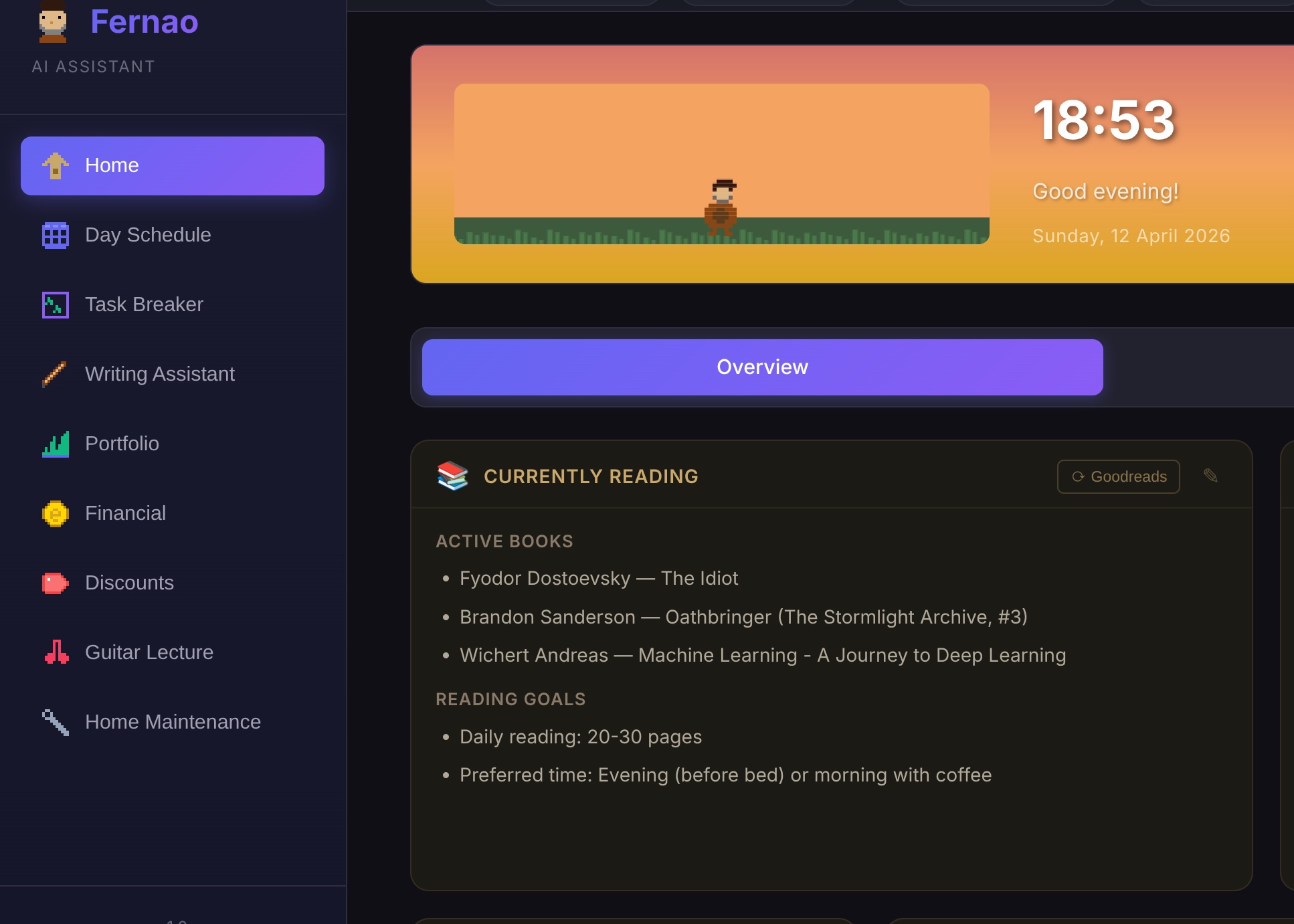 You probably remember the first part of my journey building Fernão , my personal AI agent. Now it’s time to continue the story and let’s dive into the second part!
In this post, I’ll walk you through the latest improvements to Fernão , refining existing features and adding new capabilities to the agent. Let’s start with what changed.
···
Remember the function that fetched the calendar through ICS (the universal calendar format) and extracted my calendar tasks?
That function was a mess and it reflected a poor architectural decision. ICS calendars don’t support native filtering, which means every request required pulling all events from the calendar and filtering them afterward. In practice, Fernão was downloading my entire schedule just to extract a few relevant meetings.
Learn this step by step with the interactive AI Agents roadmap.
This was like bringing home an entire library just to look up a single sentence in one book.
The more I tried to optimize the function, the less I would get anywhere, because I needed a new system solution. I needed to change the way the system was getting the calendar and I would NEVER get around this bottleneck with ICS.
So I dug deeper and found that Google provides calendar access through an API that supports native filtering. Fernão now only retrieves the events it actually needs. This improved the schedule generation, that dropped from nearly five minutes to about twenty seconds.
With this new pipeline in place, I also refactored the surrounding logic. The entire function is now significantly cleaner and faster. We now have a beautiful way to fetch the calendar events via API:
python
You probably remember the first part of my journey building Fernão , my personal AI agent. Now it’s time to continue the story and let’s dive into the second part!
In this post, I’ll walk you through the latest improvements to Fernão , refining existing features and adding new capabilities to the agent. Let’s start with what changed.
···
Remember the function that fetched the calendar through ICS (the universal calendar format) and extracted my calendar tasks?
That function was a mess and it reflected a poor architectural decision. ICS calendars don’t support native filtering, which means every request required pulling all events from the calendar and filtering them afterward. In practice, Fernão was downloading my entire schedule just to extract a few relevant meetings.
Learn this step by step with the interactive AI Agents roadmap.
This was like bringing home an entire library just to look up a single sentence in one book.
The more I tried to optimize the function, the less I would get anywhere, because I needed a new system solution. I needed to change the way the system was getting the calendar and I would NEVER get around this bottleneck with ICS.
So I dug deeper and found that Google provides calendar access through an API that supports native filtering. Fernão now only retrieves the events it actually needs. This improved the schedule generation, that dropped from nearly five minutes to about twenty seconds.
With this new pipeline in place, I also refactored the surrounding logic. The entire function is now significantly cleaner and faster. We now have a beautiful way to fetch the calendar events via API:
python
def get_events_for_date(target_date=None, use_api=True):
    """
    Fetches events for a specific date from Google Calendar.
    Tries API first (if use_api=True), falls back to ICS if API fails.

    Args:
        target_date: datetime.date object for the target day. If None, uses today.
        use_api: If True, try Google Calendar API first. If False, use ICS only.

    Returns:
        List of event dictionaries.
    """
    if use_api and GCAL_API_AVAILABLE:
        print("[GCal] Attempting to use Google Calendar API...")
        try:
            events = get_events_for_date_api(target_date)
            if events is not None:
                print(f"[GCal] Successfully fetched {len(events)} events via API")
                return events
            else:
                print("[GCal] API returned None. Falling back to ICS...")
        except Exception as e:
            print(f"[GCal] API failed with error: {e}")
            print("[GCal] Falling back to ICS...")

    # Fallback to ICS
    print("[GCal] Using ICS feed method...")
    return get_events_for_date_ics(target_date)
.. and here is our API fetch:
python
def get_events_for_date_api(target_date=None):
    """
    Fetches events for a specific date from Google Calendar using the Calendar API.

    Args:
        target_date: datetime.date object for the target day. If None, uses today.

    Returns:
        List of event dictionaries, or None if API call fails.
    """
    service = get_calendar_service()
    if not service:
        return None

    day_start, day_end, target_date, tz_name, local = _get_local_time_range(target_date)

    print(f"\n[GCal API] Fetching events for {target_date.strftime('%Y-%m-%d')}")
    print(f"  Timezone: {tz_name}")

    # Get calendar IDs from environment, or use primary
    calendar_ids_str = os.getenv('GCAL_CALENDAR_IDS', '')
    if calendar_ids_str:
        calendar_ids = [cid.strip() for cid in calendar_ids_str.split(',')]
    else:
        calendar_ids = ['primary']

    all_events = []

    # Fetch from each calendar
    for calendar_id in calendar_ids:
        try:
            print(f"[GCal API] Fetching from calendar: {calendar_id}")

            # Call the Calendar API with timeoutlobally
            old_timeout = socket.getdefaulttimeout()
            socket.setdefaulttimeout(10)

            try:
                events_result = service.events().list(
                    calendarId=calendar_id,
                    timeMin=day_start.isoformat(),
                    timeMax=day_end.isoformat(),
                    singleEvents=True,
                    orderBy='startTime'
                ).execute()
            finally:
                socket.setdefaulttimeout(old_timeout)

            events = events_result.get('items', [])
            print(f"[GCal API] Found {len(events)} event(s) in {calendar_id}")

            # Parse events
            for event in events:
                # Get start time
                start = event['start'].get('dateTime', event['start'].get('date'))
                end = event['end'].get('dateTime', event['end'].get('date'))

                # Parse datetime
                if 'T' in start:  # DateTime
                    start_dt = datetime.fromisoformat(start.replace('Z', '+00:00'))
                    end_dt = datetime.fromisoformat(end.replace('Z', '+00:00'))

                    # Convert to local timezone
                    start_local = start_dt.astimezone(local)
                    end_local = end_dt.astimezone(local)

                    start_str = start_local.strftime("%H:%M")
                    end_str = end_local.strftime("%H:%M")
                else:  # All-day event
                    start_str = "00:00"
                    end_str = "23:59"

                all_events.append({
                    "title": event.get('summary', 'Untitled Event'),
                    "start": start_str,
                    "end": end_str,
                    "location": event.get('location', ''),
                    "description": event.get('description', '')
                })

        except Exception as e:
            print(f"[GCal API] Error fetching from {calendar_id}: {e}")
            continue

    # Sort by start time
    all_events.sort(key=lambda x: x["start"])

    print(f"[GCal API] Total events: {len(all_events)}")
    return all_events
Beyond the back-end improvements, I’ve also added new features to the assistant.
In the schedule view, I can now mark tasks as completed. The cool thing is that and when I do it, they’re automatically synced with Microsoft To-Do app.
 Checking tasks in the App - Image by Author
 Checking tasks in the App - Image by Author
Marvelous!
It makes me think that, over time, many of us will end up building our own “personal operating systems”, assembling workflows from our preferred tools, integrating what we need, and replacing components whenever better options appear. If features become easy to replicate, loyalty to specific platforms will weaken.
This also raises an interesting question: will companies eventually try to lock down their systems by restricting APIs and external integrations? Possibly. But isolating themselves is unlikely to work in the long run. If users can’t connect tools to their own workflows, they’ll simply move elsewhere (… and will this be a behavior only done by power users?)
With this new capability in the Schedule Maker, I went on to implement another feature for Fernão , suggested by one of the readers.
Introducing: the Task Breaker.
Checking tasks in the App - Image by Author
Marvelous!
It makes me think that, over time, many of us will end up building our own “personal operating systems”, assembling workflows from our preferred tools, integrating what we need, and replacing components whenever better options appear. If features become easy to replicate, loyalty to specific platforms will weaken.
This also raises an interesting question: will companies eventually try to lock down their systems by restricting APIs and external integrations? Possibly. But isolating themselves is unlikely to work in the long run. If users can’t connect tools to their own workflows, they’ll simply move elsewhere (… and will this be a behavior only done by power users?)
With this new capability in the Schedule Maker, I went on to implement another feature for Fernão , suggested by one of the readers.
Introducing: the Task Breaker.
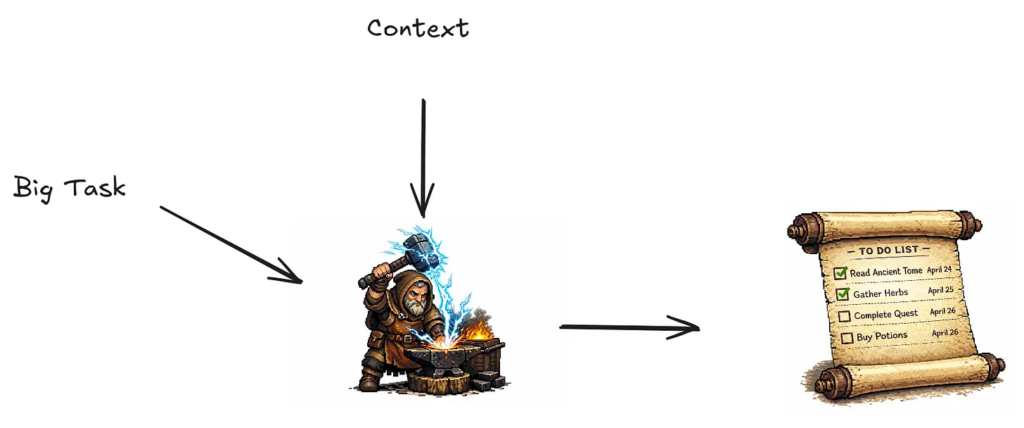
 The new Fernão role is to break tasks - Image by Author - Generated by Gemini
···
The Task Breaker follows a simple workflow:
The new Fernão role is to break tasks - Image by Author - Generated by Gemini
···
The Task Breaker follows a simple workflow:
- Start with a large, generic task in Microsoft To Do ;
- Add context on how the task should be broken down;
- Fernão decomposes the task and builds a plan;
- The resulting tasks are saved back to To-Do with due dates, and later appear in the daily assistant;
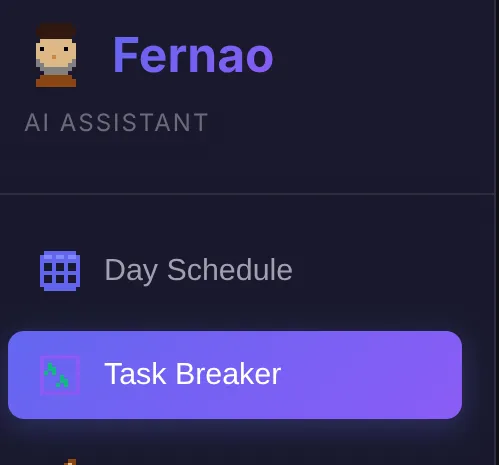
 Fernão Task Breaker - Image by Author
Here’s how the Task Breaker appears in the sidebar:
Fernão Task Breaker - Image by Author
Here’s how the Task Breaker appears in the sidebar:
 Task Breaker Module - Image by Author
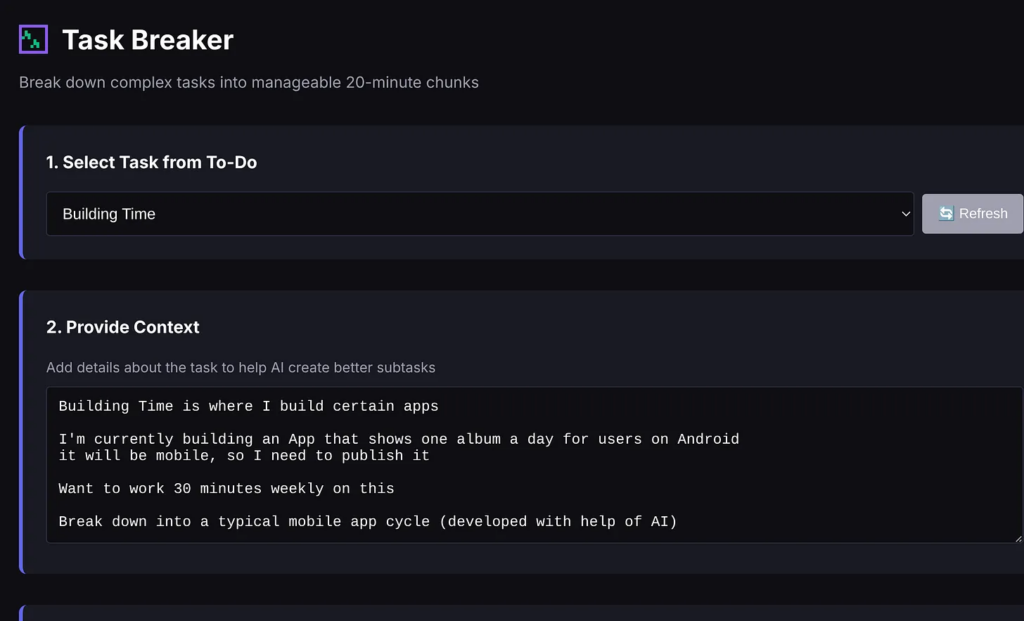
And here’s the current (still rough) front end for the Task Breaker :
Task Breaker Module - Image by Author
And here’s the current (still rough) front end for the Task Breaker :
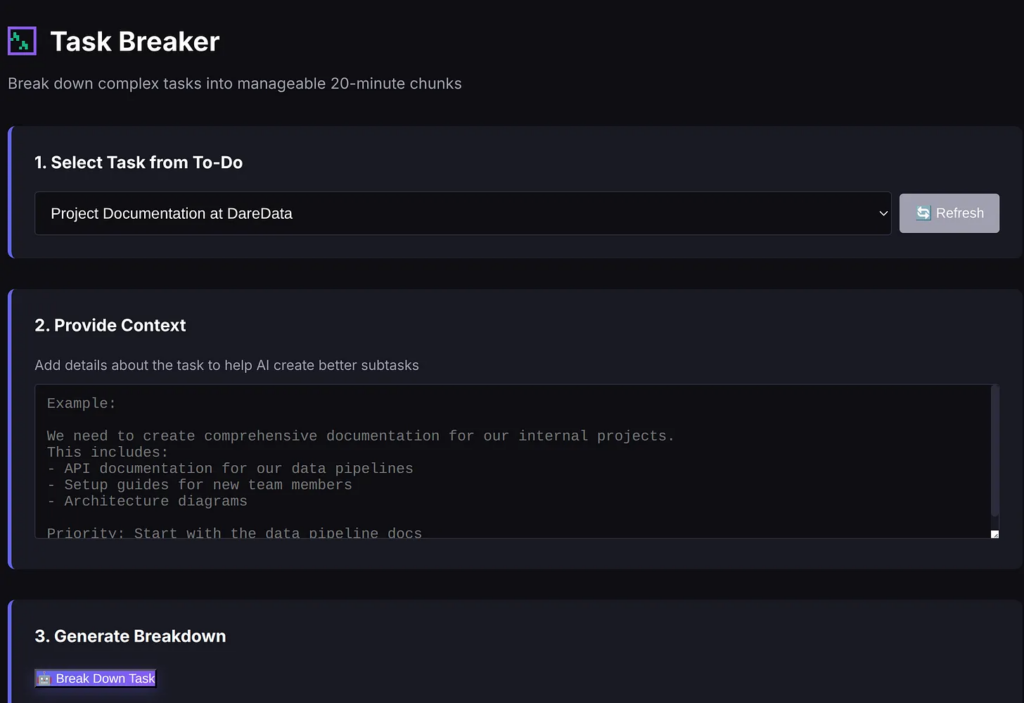 Task Breaker Module - Image by Author
Let’s take a real example. One of the larger tasks sitting in my To Do list is “ Project Documentation at DareData.” This isn’t a small operational task, it’s a structural project.
The goal is to consolidate and formalize the internal knowledge of the company in Notion, making sure the main questions about the enterprise are clearly answered in our Knowledge Hub. That means reviewing every department, identifying gaps, creating or refining pages, structuring information properly, and assigning clear ownership for each section.
In practice, this requires auditing, writing, and governance decisions. It’s not something you “just do” in one sitting and I want to complete this within three weeks. Realistically, I can dedicate between 30 minutes to one hour per day.
This is exactly the kind of task that benefits from decomposition, so I’ll use some context information in the Task Breaker and turn this giga-task into an actionable plan:
markup
Task Breaker Module - Image by Author
Let’s take a real example. One of the larger tasks sitting in my To Do list is “ Project Documentation at DareData.” This isn’t a small operational task, it’s a structural project.
The goal is to consolidate and formalize the internal knowledge of the company in Notion, making sure the main questions about the enterprise are clearly answered in our Knowledge Hub. That means reviewing every department, identifying gaps, creating or refining pages, structuring information properly, and assigning clear ownership for each section.
In practice, this requires auditing, writing, and governance decisions. It’s not something you “just do” in one sitting and I want to complete this within three weeks. Realistically, I can dedicate between 30 minutes to one hour per day.
This is exactly the kind of task that benefits from decomposition, so I’ll use some context information in the Task Breaker and turn this giga-task into an actionable plan:
markup
I’m currently building our Knowledge Hub in Notion. Here’s the current structure of Notion and Departments:# DareData Hub## Handbook for Network Members[DareData Network Member Handbook ]## Teams### Sales & Partnerships### Marketing (Brand and Gen-OS)### Finance### Delivery[Tech Specialists][Principals][Account Managers]I’ll need to:- Go Through Every department and create the pages that make sense (search the web for more context on what DareData is if you need ideas of the pages I need to create on every department or use your knowledge on what definitely needs to be documented in a 130 people B2B company).- Make sure that every page has an Owner- Revisit the Suggestions recorded by my team in the suggestions, I can probably pick one or two suggestions every day- Add some departments that are not in there: Admin, Core Members, Finance, ProductI have around 30 minutes to 1 hour to work every day and want to complete this project by 7 March 2026.
After hitting "breakdown", Fernão will start to forge:
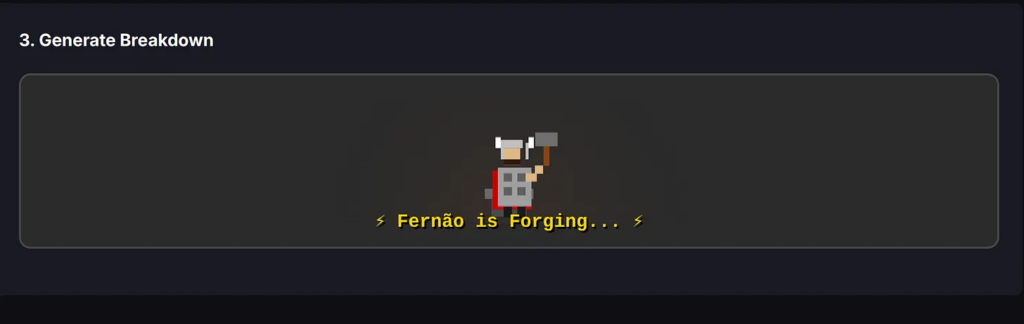 Fernão Forging the Task - Image by Author
Marvelous x2!
Fernão Forging the Task - Image by Author
Marvelous x2!
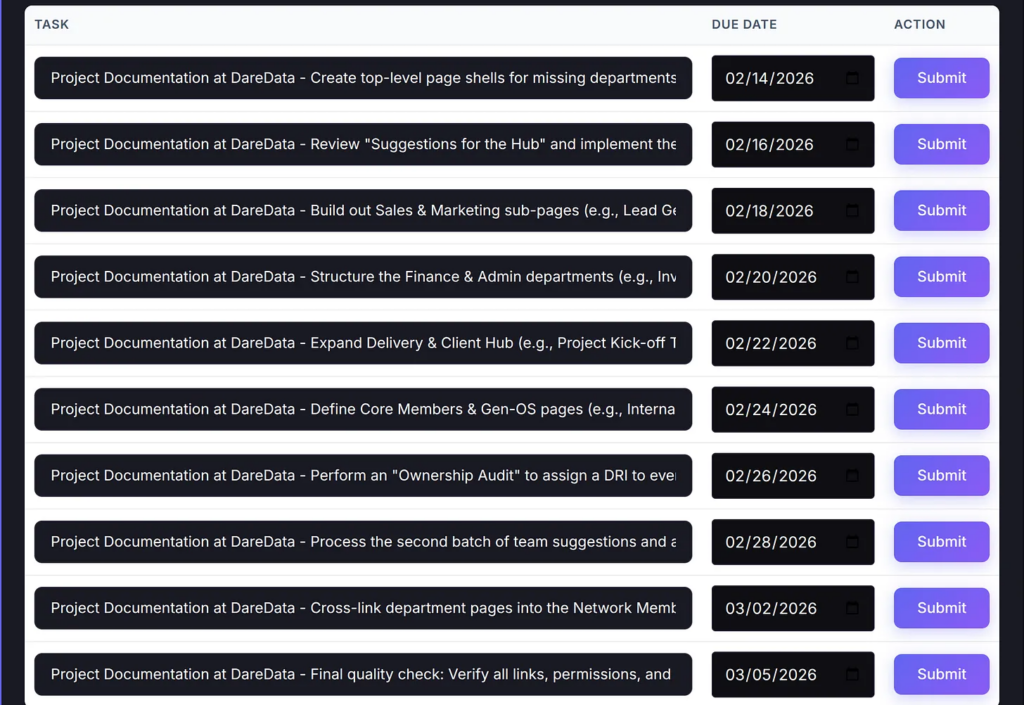 Task Breakdown - Image by Author
We can now review the tasks and plan generated and submit them to my Microsoft To-Do. I also need to assign which list on Microsoft To-Do they will be assigned to:
Task Breakdown - Image by Author
We can now review the tasks and plan generated and submit them to my Microsoft To-Do. I also need to assign which list on Microsoft To-Do they will be assigned to:
 Destination List in Microsoft To-Do - Image by Author
Cool! Let’s see how it looks in Microsoft app:
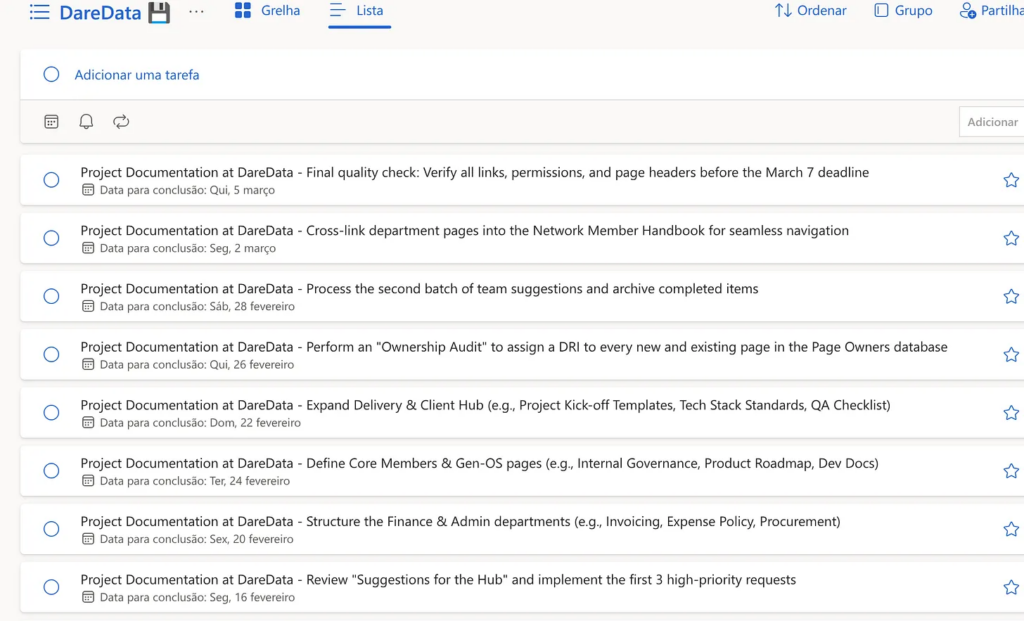 Perfecto.
While testing this, I realised I want to adjust two things.
Perfecto.
While testing this, I realised I want to adjust two things.
-
First, Fernão is meant to be a medieval chronicler, not a fantasy warrior, so I’ll change the forging design. His clothing should feel medieval.
-
Second, on a more practical note, I need a “ Submit All ” button. Submitting tasks one by one is tedious, especially when breaking down larger projects.
Let's break another task after making these changes:
 Fernão now forges in a proper medieval vest:
 Fernão is forging again - Image by Author
And now we can also use the nice “ Submit All ” button:
Fernão is forging again - Image by Author
And now we can also use the nice “ Submit All ” button:
 Submit new tasks in To-Do - Image by Author
I’ll likely remove the emoji. That kind of “ emojification ” is very typical of LLM-generated code in the front-end, and it really annoys me.
Anyway, building this new feature for Fernão was genuinely satisfying. If you have ideas for additional features, I’m open to suggestions!
Below is the current prompt I’m using for task breakdown. I’ll continue refining it as I experiment and observe how it performs in real use cases.
yaml
Submit new tasks in To-Do - Image by Author
I’ll likely remove the emoji. That kind of “ emojification ” is very typical of LLM-generated code in the front-end, and it really annoys me.
Anyway, building this new feature for Fernão was genuinely satisfying. If you have ideas for additional features, I’m open to suggestions!
Below is the current prompt I’m using for task breakdown. I’ll continue refining it as I experiment and observe how it performs in real use cases.
yaml
name: task_breakdown
description: Break down a task into 20-minute actionable subtasks
max_tokens: 4096

variables:
- task_name
- task_context
- current_date
template: |
You are a productivity expert helping break down complex tasks into manageable 20-minute chunks.

**CURRENT DATE:** {current_date}
**TASK TO BREAK DOWN:**
{task_name}
**CONTEXT PROVIDED BY USER:**
{task_context}

**YOUR JOB:**

Break this task into specific, actionable subtasks that can each be completed in approximately 20 minutes.
**RULES:**
1. Each subtask should be concrete and actionable (starts with a verb)
2. Each subtask should take ~20 minutes (can be 15-25 min, but aim for 20)
3. Subtasks should follow a logical order
4. Be specific - avoid vague tasks like “work on X”
5. If the task is already small enough, you can create 1-3 subtasks
6. If it’s large, create > 5 subtasks
7. Consider the context provided - use it to make subtasks relevant and specific
8. **SCHEDULING:** Based on the user’s context (e.g., “every other day”, “weekends only”), suggest a specific Due Date for each task starting from the Current Date.

**OUTPUT FORMAT:**

Return ONLY a markdown list of subtasks in this format:
- {task_name} - [Subtask description] (20 min) [Due: YYYY-MM-DD]

Example:
- {task_name} - Create project repository (20 min) [Due: 2026-02-13]
- {task_name} - Configure CI/CD pipeline (20 min) [Due: 2026-02-15]
Do NOT include any other text or explanations. Just the list.
In parallel, I’m already working on several new modules:
- A Dividend Analyzer to project income from my stocks and ETFs
- A Writing Assistant to create an editorial plan for my writings.
- A Discounts module to check relevant promotions when I’m planning a purchase
- A Guitar Organizer to structure and schedule practice sessions whenever I pick up my guitar
Stay tuned for the next modules and hope this inspires you for your personal projects as well!
Register Now to Continue Reading
Unlock Towards Data Science with a Free Account
All articles on Towards Data Science are available to registered users. Create a free account today to access this article and thousands more.
Register for freeSign in to your account
 Written By
See all from Ivo Bernardo
Ai AgentAi AssistantAi Product ManagementArtificial IntelligenceProgramming
Share This Article
Towards Data Science is a community publication. Submit your insights to reach our global audience and earn through the TDS Author Payment Program.
Write for TDS
Related Articles
Agentic AI
Understanding how LLMs interact with the world around them, from returning data to taking action
Maria Mouschoutzi
June 21, 202611 min read
Agentic AI
The barriers to building have collapsed. That shifts the bottleneck to ownership, validation, taste, and deciding what should actually exist
Clara Chong
June 2, 20266 min read
Artificial Intelligence
Maximize your learning with minimal time and cost
Louis Teo
February 4, 20216 min read
Artificial Intelligence
One nice alternative to One-hot encoding your categories
Vinicius Trevisan
March 17, 20227 min read
Agentic AI
Step-by-Step Guide to Developing a Multi-Agent System for Social Media Marketing
Destin Gong
November 9, 202511 min read
Agentic AI
Optimise how you interact with your coding agents
Eivind Kjosbakken
July 30, 202611 min read
Agentic AI
Accelerate coding with AI while staying in control and building reliable, production-ready software.
Partha Sarkar
March 19, 202614 min read
Programming
A new Pattern Mining Python library for Data Science
Uday Kiran RAGE
November 18, 20215 min read
Programming
Consider these potentially superior alternatives
Aashish Nair
October 4, 20215 min read
Your home for data science and AI. The world's leading publication for data science, data analytics, data engineering, machine learning, and artificial intelligence professionals.
Subscribe to Our NewsletterWrite For TDS•About•Advertise•Privacy Policy•Terms of Use
© Insight Media Group, LLC 2026•The New Stack•roadmap.sh•Creator Network
Recommended Articles
Close