保留正文与补采附件。源页面当前未重新核验;具体限制见交付清单。
 We value your privacy
We use cookies to enhance your browsing experience, serve personalised ads or content, and analyse our traffic. By clicking "Accept All", you consent to our use of cookies.
Customise Reject All Accept All
Customise Consent Preferences
We value your privacy
We use cookies to enhance your browsing experience, serve personalised ads or content, and analyse our traffic. By clicking "Accept All", you consent to our use of cookies.
Customise Reject All Accept All
Customise Consent Preferences  We use cookies to help you navigate efficiently and perform certain functions. You will find detailed information about all cookies under each consent category below.
The cookies that are categorised as "Necessary" are stored on your browser as they are essential for enabling the basic functionalities of the site. ... Show more
NecessaryAlways Active
Necessary cookies are required to enable the basic features of this site, such as providing secure log-in or adjusting your consent preferences. These cookies do not store any personally identifiable data.
We use cookies to help you navigate efficiently and perform certain functions. You will find detailed information about all cookies under each consent category below.
The cookies that are categorised as "Necessary" are stored on your browser as they are essential for enabling the basic functionalities of the site. ... Show more
NecessaryAlways Active
Necessary cookies are required to enable the basic features of this site, such as providing secure log-in or adjusting your consent preferences. These cookies do not store any personally identifiable data.
-
Cookie
BCTempID
-
Duration
10 minutes
-
Description
No description available.
-
Cookie
__cf_bm
-
Duration
1 hour
-
Description
This cookie, set by Cloudflare, is used to support Cloudflare Bot Management.
-
Cookie
AWSALBCORS
-
Duration
7 days
-
Description
Amazon Web Services set this cookie for load balancing.
-
Cookie
_cfuvid
-
Duration
session
-
Description
Cloudflare sets this cookie to track users across sessions to optimize user experience by maintaining session consistency and providing personalized services
-
Cookie
li_gc
-
Duration
6 months
-
Description
Linkedin set this cookie for storing visitor's consent regarding using cookies for non-essential purposes.
-
Cookie
__hssrc
-
Duration
session
-
Description
This cookie is set by Hubspot whenever it changes the session cookie. The __hssrc cookie set to 1 indicates that the user has restarted the browser, and if the cookie does not exist, it is assumed to be a new session.
-
Cookie
__hssc
-
Duration
1 hour
-
Description
HubSpot sets this cookie to keep track of sessions and to determine if HubSpot should increment the session number and timestamps in the __hstc cookie.
-
Cookie
wpEmojiSettingsSupports
-
Duration
session
-
Description
WordPress sets this cookie when a user interacts with emojis on a WordPress site. It helps determine if the user's browser can display emojis properly.
-
Cookie
BCSessionID
-
Duration
1 year 1 month 4 days
-
Description
Blueconic sets this cookie as a unique identifier for the BlueConic profile.
-
Cookie
_octo
-
Duration
1 year
-
Description
No description available.
-
Cookie
logged_in
-
Duration
1 year
-
Description
No description available.
-
Cookie
__Secure-YEC
-
Duration
past
-
Description
YouTube sets this cookie to stores the user's video player preferences using embedded YouTube video
-
Cookie
__eoi
-
Duration
6 months
-
Description
Description is currently not available.
-
Cookie
AWSALBTGCORS
-
Duration
7 days
-
Description
No description available.
-
Cookie
login-status-p
-
Duration
past
-
Description
Description is currently not available.
-
Cookie
AWSALBTG
-
Duration
7 days
-
Description
No description available.
-
Cookie
csrf_token
-
Duration
session
-
Description
No description available.
-
Cookie
token_v2
-
Duration
1 day
-
Description
Description is currently not available.
-
Cookie
D
-
Duration
1 year
-
Description
Description is currently not available.
-
Cookie
PHPSESSID
-
Duration
session
-
Description
This cookie is native to PHP applications. The cookie stores and identifies a user's unique session ID to manage user sessions on the website. The cookie is a session cookie and will be deleted when all the browser windows are closed.
-
Cookie
VISITOR_PRIVACY_METADATA
-
Duration
6 months
-
Description
YouTube sets this cookie to store the user's cookie consent state for the current domain.
-
Cookie
cookietest
-
Duration
session
-
Description
The cookietest cookie is typically used to determine whether the user's browser accepts cookies, essential for website functionality and user experience.
-
Cookie
__Host-airtable-session
-
Duration
1 year
-
Description
This cookie is used to enable us to integrate the services of Airtable.
-
Cookie
__Host-airtable-session.sig
-
Duration
1 year
-
Description
This cookie is used to enable us to integrate the services of Airtable.
-
Cookie
m
-
Duration
1 year 1 month 4 days
-
Description
Stripe sets this cookie for fraud prevention purposes. It identifies the device used to access the website, allowing the website to be formatted accordingly.
-
Cookie
BIGipServer*
-
Duration
session
-
Description
Marketo sets this cookie to collect information about the user's online activity and build a profile about their interests to provide advertisements relevant to the user.
-
Cookie
__cfruid
-
Duration
session
-
Description
Cloudflare sets this cookie to identify trusted web traffic.
-
Cookie
_GRECAPTCHA
-
Duration
6 months
-
Description
Google Recaptcha service sets this cookie to identify bots to protect the website against malicious spam attacks.
-
Cookie
__Secure-YNID
-
Duration
6 months
-
Description
Google cookie used to protect user security and prevent fraud, especially during the login process.
-
Cookie
cookieyes-consent
-
Duration
1 year
-
Description
CookieYes sets this cookie to remember users' consent preferences so that their preferences are respected on subsequent visits to this site. It does not collect or store any personal information about the site visitors.
Functional
Functional cookies help perform certain functionalities like sharing the content of the website on social media platforms, collecting feedback, and other third-party features.
-
Cookie
lidc
-
Duration
1 day
-
Description
LinkedIn sets the lidc cookie to facilitate data center selection.
-
Cookie
brw
-
Duration
1 year
-
Description
No description available.
-
Cookie
brwConsent
-
Duration
5 minutes
-
Description
Description is currently not available.
-
Cookie
WMF-Uniq
-
Duration
1 year
-
Description
Description is currently not available.
-
Cookie
loom_anon_comment
-
Duration
1 year
-
Description
No description available.
-
Cookie
loom_referral_video
-
Duration
session
-
Description
Description is currently not available.
-
Cookie
VISITOR_INFO1_LIVE
-
Duration
6 months
-
Description
A cookie set by YouTube to measure bandwidth that determines whether the user gets the new or old player interface.
-
Cookie
yt-remote-connected-devices
-
Duration
Never Expires
-
Description
YouTube sets this cookie to store the user's video preferences using embedded YouTube videos.
-
Cookie
ytidb::LAST_RESULT_ENTRY_KEY
-
Duration
Never Expires
-
Description
The cookie ytidb::LAST_RESULT_ENTRY_KEY is used by YouTube to store the last search result entry that was clicked by the user. This information is used to improve the user experience by providing more relevant search results in the future.
-
Cookie
yt-remote-device-id
-
Duration
Never Expires
-
Description
YouTube sets this cookie to store the user's video preferences using embedded YouTube videos.
-
Cookie
yt-remote-session-name
-
Duration
session
-
Description
The yt-remote-session-name cookie is used by YouTube to store the user's video player preferences using embedded YouTube video.
-
Cookie
yt-remote-fast-check-period
-
Duration
session
-
Description
The yt-remote-fast-check-period cookie is used by YouTube to store the user's video player preferences for embedded YouTube videos.
-
Cookie
yt-remote-session-app
-
Duration
session
-
Description
The yt-remote-session-app cookie is used by YouTube to store user preferences and information about the interface of the embedded YouTube video player.
-
Cookie
yt-remote-cast-available
-
Duration
session
-
Description
The yt-remote-cast-available cookie is used to store the user's preferences regarding whether casting is available on their YouTube video player.
-
Cookie
yt-remote-cast-installed
-
Duration
session
-
Description
The yt-remote-cast-installed cookie is used to store the user's video player preferences using embedded YouTube video.
-
Cookie
cp_session
-
Duration
3 months
-
Description
Codepen sets this cookie for Help systems found in the website.
-
Cookie
loid
-
Duration
1 year 1 month 4 days
-
Description
This cookie is set by the Reddit. The cookie enables the sharing of content from the website onto the social media platform.
Analytics
Analytical cookies are used to understand how visitors interact with the website. These cookies help provide information on metrics such as the number of visitors, bounce rate, traffic source, etc.
-
Cookie
__hstc
-
Duration
6 months
-
Description
Hubspot set this main cookie for tracking visitors. It contains the domain, initial timestamp (first visit), last timestamp (last visit), current timestamp (this visit), and session number (increments for each subsequent session).
-
Cookie
hubspotutk
-
Duration
6 months
-
Description
HubSpot sets this cookie to keep track of the visitors to the website. This cookie is passed to HubSpot on form submission and used when deduplicating contacts.
-
Cookie
_ga
-
Duration
1 year 1 month 4 days
-
Description
Google Analytics sets this cookie to calculate visitor, session and campaign data and track site usage for the site's analytics report. The cookie stores information anonymously and assigns a randomly generated number to recognise unique visitors.
-
Cookie
ga*
-
Duration
1 year 1 month 4 days
-
Description
Google Analytics sets this cookie to store and count page views.
-
Cookie
__Host-psifi.analyticsTrace
-
Duration
6 hours
-
Description
Description is currently not available.
-
Cookie
__Host-psifi.analyticsTraceV2
-
Duration
6 hours
-
Description
Description is currently not available.
-
Cookie
_gh_sess
-
Duration
session
-
Description
GitHub sets this cookie for temporary application and framework state between pages like what step the user is on in a multiple step form.
-
Cookie
YSC
-
Duration
session
-
Description
YSC cookie is set by Youtube and is used to track the views of embedded videos on Youtube pages.
-
Cookie
ajs_anonymous_id
-
Duration
1 year
-
Description
This cookie is set by Segment to count the number of people who visit a certain site by tracking if they have visited before.
-
Cookie
vuid
-
Duration
1 year 1 month 4 days
-
Description
Vimeo installs this cookie to collect tracking information by setting a unique ID to embed videos on the website.
Performance
Performance cookies are used to understand and analyse the key performance indexes of the website which helps in delivering a better user experience for the visitors.
-
Cookie
AWSALB
-
Duration
7 days
-
Description
AWSALB is an application load balancer cookie set by Amazon Web Services to map the session to the target.
-
Cookie
acq
-
Duration
past
-
Description
Description is currently not available.
-
Cookie
acq.sig
-
Duration
past
-
Description
Description is currently not available.
-
Cookie
ptc
-
Duration
2 years
-
Description
No description available.
Advertisement
Advertisement cookies are used to provide visitors with customised advertisements based on the pages you visited previously and to analyse the effectiveness of the ad campaigns.
-
Cookie
muc_ads
-
Duration
1 year 1 month 4 days
-
Description
Twitter sets this cookie to collect user behaviour and interaction data to optimize the website.
-
Cookie
guest_id_marketing
-
Duration
1 year 1 month 4 days
-
Description
Twitter sets this cookie to identify and track the website visitor.
-
Cookie
guest_id_ads
-
Duration
1 year 1 month 4 days
-
Description
Twitter sets this cookie to identify and track the website visitor.
-
Cookie
personalization_id
-
Duration
1 year 1 month 4 days
-
Description
Twitter sets this cookie to integrate and share features for social media and also store information about how the user uses the website, for tracking and targeting.
-
Cookie
guest_id
-
Duration
1 year 1 month 4 days
-
Description
Twitter sets this cookie to identify and track the website visitor. It registers if a user is signed in to the Twitter platform and collects information about ad preferences.
-
Cookie
bcookie
-
Duration
1 year
-
Description
LinkedIn sets this cookie from LinkedIn share buttons and ad tags to recognize browser IDs.
-
Cookie
__Secure-ROLLOUT_TOKEN
-
Duration
6 months
-
Description
YouTube sets this cookie to manage feature rollout and experimentation. It helps Google control which new features or interface changes are shown to users as part of testing and staged rollouts, ensuring consistent experience for a given user during an experiment.
-
Cookie
yt.innertube::nextId
-
Duration
Never Expires
-
Description
YouTube sets this cookie to register a unique ID to store data on what videos from YouTube the user has seen.
-
Cookie
yt.innertube::requests
-
Duration
Never Expires
-
Description
YouTube sets this cookie to register a unique ID to store data on what videos from YouTube the user has seen.
-
Cookie
session_tracker
-
Duration
session
-
Description
This cookie is set by the Reddit. This cookie is used to identify trusted web traffic. It also helps in adverstising on the website.
-
Cookie
edgebucket
-
Duration
session
-
Description
Reddit sets this cookie to save the information about a log-on Reddit user, for the purpose of advertisement recommendations and updating the content.
-
Cookie
did
-
Duration
1 year
-
Description
Arbor sets this cookie to show targeted ads to site visitors.This cookie expires after 2 months or 1 year.
Uncategorised
Other uncategorised cookies are those that are being analysed and have not been classified into a category as yet.
No cookies to display.
Reject All Save My Preferences Accept All
Toggle SearchToggle Mobile Navigation
Publish AI, ML & data-science insights to a global community of data professionals.
Sign inSubmit an Article
LatestEditor's PicksNewsletterShipAI
Write For TDS
LinkedInXToggle Search
Data Science
The Rule Everyone Misses: How to Stop Confusing loc and iloc in Pandas
A simple mental model to remember when each one works (with examples that finally click).
Ibrahim Salami
February 5, 20268 min read
 Image by Author. Created with Gemini
If you’ve ever worked with pandas, you’ve probably stumbled on this classic confusion: should you use
Image by Author. Created with Gemini
If you’ve ever worked with pandas, you’ve probably stumbled on this classic confusion: should you use loc or iloc to extract data? At first glance, they look almost identical. Both are used to slice, filter, and retrieve rows or columns from a DataFrame — yet one tiny difference in how they work can completely change your results (or throw an error that leaves you scratching your head).
I remember the first time I tried selecting a row with df.loc[0] and wondered why it didn’t work. The reason? Pandas doesn’t always “think” in terms of positions — sometimes it uses labels. That’s where the loc vs iloc distinction comes in.
In this article, I’ll walk through a simple mini project using a small student performance dataset. By the end, you’ll not only understand the difference between loc and iloc, but also know exactly when to use each in your own data analysis.
Learn this step by step with the interactive AI and Data Scientist roadmap.
Introducing the dataset
The dataset comes from ChatGPT. It contains some basic student exam score records. Here’s a snapshot of our dataset
python
import pandas as pd
df = pd.read_csv(‘student_scores.csv’)
df
Output:
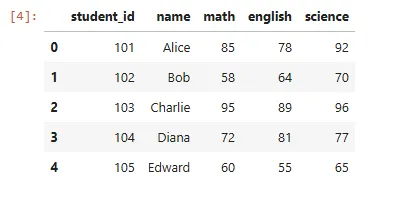 I’ll try to perform some data extraction tasks using loc and iloc, like
- Extracting a single row from the DataFrame
- Extracting a single value
- Extracting multiple rows
- Slicing a range of rows
- Extracting specific columns and
Boolean Filtering
First, let me briefly explain what loc and iloc are in Pandas.
What is loc and iloc
Loc and iloc are data extraction techniques in Pandas. They are quite helpful for selecting data from records.
Loc uses labels to retrieve records from a DataFrame, so I find it easier to use. Iloc, however, are helpful for a more precise retrieval of records, because iloc selects data based on the integer positions of the rows and columns, similar to how you would index a Python list or array.
But if you’re like me, you might be wondering. If loc is clearly easier because of row labels, why bother using iloc? Why bother trying to figure out row indexes, especially if you’re dealing with large datasets? Here are a couple of reasons.
- A lot of times, datasets don’t come with neat row indexes (like 101, 102, …). Instead, you have a plain index (
0, 1, 2, …), or you might misspell row labelling when retrieving records. In this case, you’re better off using iloc. Later in this article, it’s something we’ll be addressing also.
- In some scenarios, like machine learning preprocessing, labels don’t really matter. You only care about a snapshot of the data. For instance, the first or last three records. iloc is really helpful in this scenario.
iloc makes the code shorter and less fragile, especially if labels change, which could break your machine learning model
- A lot of datasets have duplicate row labels. In this case,
iloc always works since positions are unique.
- The bottom line is, use loc when your dataset has clear, meaningful labels and you want your code to be readable.
- Use iloc when you need position-based control, or when labels are missing/messy.
Now that I’ve cleared the air, here’s the basic syntax for loc and iloc below:
python
df.loc[rows, columns]
df.iloc[rows, columns]
The syntax is pretty much the same. With this syntax, let’s try to retrieve some records using loc and iloc.
Extracting a single row from the DataFrame
To make a proper demonstration, let’s first change the column index and make it student_id. Currently, pandas is auto-indexing:
python
# setting student_id as index
df.set_index('student_id', inplace=True)
Here’s the output:
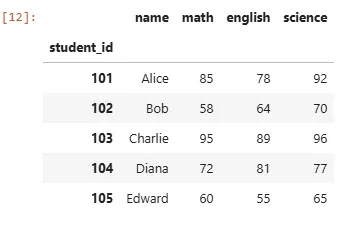 Looks better. Now, let’s try to retrieve all of Bob’s records. Here’s how to approach that using loc:
python
Looks better. Now, let’s try to retrieve all of Bob’s records. Here’s how to approach that using loc:
python
df.loc[102]
All I’m doing here is specifying the row label. This should retrieve all of Bob’s records.
Here’s the output:
text
name   Bob
math    58
english 64
science 70
Name: 102, dtype: object
The cool thing about this is that I can drill down, kinda like a hierarchy. For instance, let’s try to retrieve specific info about Bob, like his score on math.
python
df.loc[102, ‘math’]
The output would be 58.
Now let’s try this using iloc. If you’re familiar with lists and arrays, indexing always starts at 0. So if I want to retrieve the first record in the DataFrame, I’ll have to specify the index 0. In this case, I’m trying to retrieve Bob, which is the second row in our DataFrame — so, in this case, the index would be 1.
python
df.iloc[1]
We’d get the same output as above:
text
name   Bob
math    58
english 64
science 70
Name: 102, dtype: object
And if I try to drill down and retrieve the math score of Bob. Our index would also be 1, given that math is on the second row
python
df.iloc[1, 1]
The output would be 58.
Alright, I can wrap this article up here, but loc and iloc offer some more impressive features. Let’s speed-run through some of them.
Extract Multiple Rows (Specific Students)
Pandas allows you to retrieve multiple rows using loc and iloc. I’m gonna make a demonstration by retrieving the records of multiple students. In this case, instead of storing a single value in our loc/iloc method, we’d be storing a list. Here’s how you can do that with loc:
python
# Alice, Charlie and Edward's records
df.loc[[101, 103, 105]]
Here’s the output:
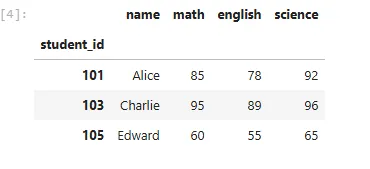 And here’s how to do that with
 iloc:
python
df.iloc[[0, 2, 4]]
We’d get the same output:
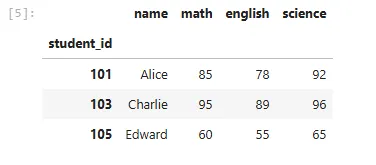 I hope you’re getting the hang of it.
Slice a Range of Rows
Another helpful feature Python Pandas offers is the ability to slice a range of rows. Here, you can specify your start and end position. Here’s the syntax for loc/iloc slicing:
python
df.loc[start_label:end_label]
In loc, however, the end label would be included in the output — quite different from the default Python slicing.
The syntax is the same for iloc, with the exception that the end label would be excluded from the output (just like the default Python slicing).
Let’s walk through an example:
I’m trying to retrieve a range of students' records. Let’s try that using loc:
python
df.loc[101:103]
Output:
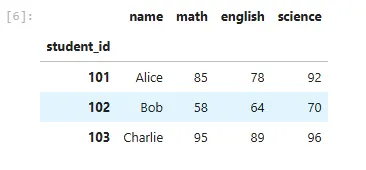 As you can see above, the end label is included in the result. Now, let’s try that using
 iloc. If you recall, the first row index would be 0, which would mean the third row would be 2.
python
df.iloc[0:3]
Output:
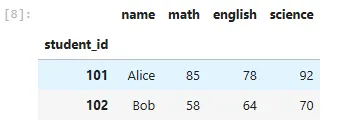 Here, the third row is excluded. But if you’re like me (someone who questions things a lot), you might be wondering, why would you want the last row to be excluded? In what scenarios would that be helpful? What if I told you it actually makes your life easier? Let’s clear that up real quick.
Assuming you want to process your DataFrame in chunks of 100 rows each.
If slicing were inclusive, you’d have to do some awkward math to avoid repeating the last row.
But because slicing is exclusive at the end, you can do this quite easily, like so.
python
Here, the third row is excluded. But if you’re like me (someone who questions things a lot), you might be wondering, why would you want the last row to be excluded? In what scenarios would that be helpful? What if I told you it actually makes your life easier? Let’s clear that up real quick.
Assuming you want to process your DataFrame in chunks of 100 rows each.
If slicing were inclusive, you’d have to do some awkward math to avoid repeating the last row.
But because slicing is exclusive at the end, you can do this quite easily, like so.
python
df.iloc[0:100] # first 100 rows
df.iloc[100:200] # next 100 rows
df.iloc[200:300] # next 100 rows
Here, there will be no overlaps, and there will be consistent chunk sizes. Another reason is how it’s similar to how ranges work in Pandas. Usually, when you want to retrieve a range of rows, it also starts at 0 and doesn’t include the last row. Having this same logic in iloc slicing is really helpful, especially when you’re working on some web scraping or looping through a range of rows.
Extract Specific Columns (Subjects)
I’d also love to introduce you to the colon : sign. This allows you to retrieve all records in your DataFrame using loc. Similar to the * in SQL. The cool thing about this is that you can filter and extract a subset of columns.
This is usually where I find myself starting. I use it to get an overview of a particular dataset. From there, I can start to filter and drill down. Let me show you what I mean.
Let’s retrieve all records:
python
df.loc[:]
Output:
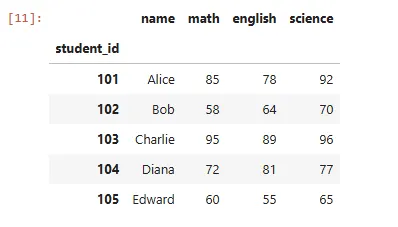 From here, I can extract specific columns like so. With loc:
python
From here, I can extract specific columns like so. With loc:
python
df.loc[:, [‘math’, ‘science’]]
Output:
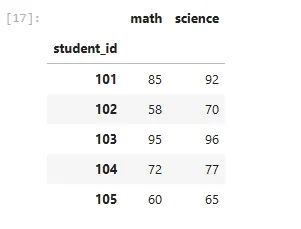
With iloc:
python
df.iloc[:, [2, 4]]
The output would be the same.
I love this feature because it’s so flexible. Let’s say I want to retrieve Alice and Bob’s math and science scores. It’ll go something like this. I can just specify the range of records and columns I want.
With loc:
python
df.loc[101:103, ['name', 'math', 'science']]
Output:
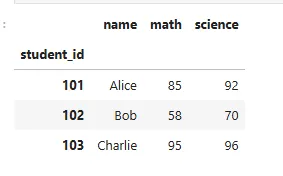 With iloc:
python
With iloc:
python
df.iloc[0:3, [0, 1, 3]]
We’d get the same output.
Boolean Filtering (Who scored above 80 in Math?)
The final feature I want to share with you is Boolean filtering. This allows for a more flexible extraction. Let’s say I want to retrieve the records of students who scored above 80 in Math. Usually, in SQL, you’ll have to use the WHERE and HAVING clauses. Python makes this so easy.
python
# Students with Math > 80.
df.loc[df['math'] > 80]
Output:
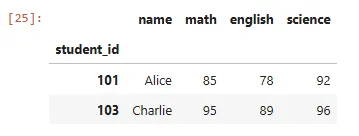
You can also filter on multiple conditions using the AND(&), OR(|), and NOT(~) operators. For instance:
python
# Math > 70 and Science > 80
df.loc[(df[‘math’] > 70) & (df[‘science’] > 80)]
Output:
P.S. I wrote an article on filtering with Pandas. You can read it here
Usually, you’ll find yourself using this feature with loc. It can get a bit complicated with iloc, as it doesn’t support Boolean conditions. To do this with iloc, you’ll have to convert the Boolean filtering into a list, like so:
python
# Students with Math > 80.
df.iloc[list(df['math'] > 80)]
To avoid the headache, just go with loc.
Conclusion
You’ll probably use the loc and iloc methods a lot when you’re working on a dataset. So it’s crucial to know how they work and distinguish the two. I love how easy and flexible it is to extract records with these methods. Whenever you’re confused, just remember loc is all about labels while iloc is about positions.
I hope you found this article helpful. Try running these examples on your own dataset to see the difference in action.
I write these articles as a way to test and strengthen my own understanding of technical concepts — and to share what I’m learning with others who might be on the same path. Feel free to share with others. Let’s learn and grow together. Cheers!
Feel free to say hi on any of these platforms
Medium
LinkedIn
Twitter
YouTube
Register Now to Continue Reading
Unlock Towards Data Science with a Free Account
All articles on Towards Data Science are available to registered users. Create a free account today to access this article and thousands more.
Register for freeSign in to your account
 Written By
See all from Ibrahim Salami
Data AnalyticsData ExtractionData SciencePandasPython
Share This Article
Towards Data Science is a community publication. Submit your insights to reach our global audience and earn through the TDS Author Payment Program.
Write for TDS
Related Articles
Artificial Intelligence
A friendly guide to Expected Improvement for Global Optimization, in Python
Piero Paialunga
June 9, 202410 min read
Artificial Intelligence
A guide to identify and solve any optimization problem
Maxime Labonne
April 7, 202213 min read
Data Science
An intuitive and effective way to visualize the beauty and complexity of your data
Jamshaid Shahir, Ph.D
July 20, 202111 min read
Artificial Intelligence
What exactly is the difference between them?
Soner Yıldırım
June 16, 20215 min read
Programming
All you need to know to begin your Matlab journey
Guangyuan(Frank) Li
July 17, 20217 min read
Programming
How to Store Data Analysis Results to Facilitate Later Regression Analysis
Peter Grant
April 1, 20195 min read
Data Science
Seamlessly switch between arm64 and x86_64 Python dependencies on M1 Apple Silicon
Lloyd Hamilton
September 28, 20225 min read
Machine Learning
Complete project of predicting new COVID-19 cases in the next 90 days with LSTM (code included)
Samrat Dutta
January 11, 20227 min read
Programming
Load, Experiment, and Download Cloud Optimized Geotiffs (COG) using Python with Google Colab.
Abdishakur
January 12, 20206 min read
Your home for data science and AI. The world's leading publication for data science, data analytics, data engineering, machine learning, and artificial intelligence professionals.
Subscribe to Our NewsletterWrite For TDS•About•Advertise•Privacy Policy•Terms of Use
© Insight Media Group, LLC 2026•The New Stack•roadmap.sh•Creator Network
Recommended Articles
Close