保留正文与补采附件。源页面当前未重新核验;具体限制见交付清单。
 We value your privacy
We use cookies to enhance your browsing experience, serve personalised ads or content, and analyse our traffic. By clicking "Accept All", you consent to our use of cookies.
Customise Reject All Accept All
Customise Consent Preferences
We value your privacy
We use cookies to enhance your browsing experience, serve personalised ads or content, and analyse our traffic. By clicking "Accept All", you consent to our use of cookies.
Customise Reject All Accept All
Customise Consent Preferences  We use cookies to help you navigate efficiently and perform certain functions. You will find detailed information about all cookies under each consent category below.
The cookies that are categorised as "Necessary" are stored on your browser as they are essential for enabling the basic functionalities of the site. ... Show more
NecessaryAlways Active
Necessary cookies are required to enable the basic features of this site, such as providing secure log-in or adjusting your consent preferences. These cookies do not store any personally identifiable data.
We use cookies to help you navigate efficiently and perform certain functions. You will find detailed information about all cookies under each consent category below.
The cookies that are categorised as "Necessary" are stored on your browser as they are essential for enabling the basic functionalities of the site. ... Show more
NecessaryAlways Active
Necessary cookies are required to enable the basic features of this site, such as providing secure log-in or adjusting your consent preferences. These cookies do not store any personally identifiable data.
-
Cookie
BCTempID
-
Duration
10 minutes
-
Description
No description available.
-
Cookie
__cf_bm
-
Duration
1 hour
-
Description
This cookie, set by Cloudflare, is used to support Cloudflare Bot Management.
-
Cookie
AWSALBCORS
-
Duration
7 days
-
Description
Amazon Web Services set this cookie for load balancing.
-
Cookie
_cfuvid
-
Duration
session
-
Description
Cloudflare sets this cookie to track users across sessions to optimize user experience by maintaining session consistency and providing personalized services
-
Cookie
li_gc
-
Duration
6 months
-
Description
Linkedin set this cookie for storing visitor's consent regarding using cookies for non-essential purposes.
-
Cookie
__hssrc
-
Duration
session
-
Description
This cookie is set by Hubspot whenever it changes the session cookie. The __hssrc cookie set to 1 indicates that the user has restarted the browser, and if the cookie does not exist, it is assumed to be a new session.
-
Cookie
__hssc
-
Duration
1 hour
-
Description
HubSpot sets this cookie to keep track of sessions and to determine if HubSpot should increment the session number and timestamps in the __hstc cookie.
-
Cookie
wpEmojiSettingsSupports
-
Duration
session
-
Description
WordPress sets this cookie when a user interacts with emojis on a WordPress site. It helps determine if the user's browser can display emojis properly.
-
Cookie
BCSessionID
-
Duration
1 year 1 month 4 days
-
Description
Blueconic sets this cookie as a unique identifier for the BlueConic profile.
-
Cookie
_octo
-
Duration
1 year
-
Description
No description available.
-
Cookie
logged_in
-
Duration
1 year
-
Description
No description available.
-
Cookie
__Secure-YEC
-
Duration
past
-
Description
YouTube sets this cookie to stores the user's video player preferences using embedded YouTube video
-
Cookie
__eoi
-
Duration
6 months
-
Description
Description is currently not available.
-
Cookie
AWSALBTGCORS
-
Duration
7 days
-
Description
No description available.
-
Cookie
login-status-p
-
Duration
past
-
Description
Description is currently not available.
-
Cookie
AWSALBTG
-
Duration
7 days
-
Description
No description available.
-
Cookie
csrf_token
-
Duration
session
-
Description
No description available.
-
Cookie
token_v2
-
Duration
1 day
-
Description
Description is currently not available.
-
Cookie
D
-
Duration
1 year
-
Description
Description is currently not available.
-
Cookie
PHPSESSID
-
Duration
session
-
Description
This cookie is native to PHP applications. The cookie stores and identifies a user's unique session ID to manage user sessions on the website. The cookie is a session cookie and will be deleted when all the browser windows are closed.
-
Cookie
VISITOR_PRIVACY_METADATA
-
Duration
6 months
-
Description
YouTube sets this cookie to store the user's cookie consent state for the current domain.
-
Cookie
cookietest
-
Duration
session
-
Description
The cookietest cookie is typically used to determine whether the user's browser accepts cookies, essential for website functionality and user experience.
-
Cookie
__Host-airtable-session
-
Duration
1 year
-
Description
This cookie is used to enable us to integrate the services of Airtable.
-
Cookie
__Host-airtable-session.sig
-
Duration
1 year
-
Description
This cookie is used to enable us to integrate the services of Airtable.
-
Cookie
m
-
Duration
1 year 1 month 4 days
-
Description
Stripe sets this cookie for fraud prevention purposes. It identifies the device used to access the website, allowing the website to be formatted accordingly.
-
Cookie
BIGipServer*
-
Duration
session
-
Description
Marketo sets this cookie to collect information about the user's online activity and build a profile about their interests to provide advertisements relevant to the user.
-
Cookie
__cfruid
-
Duration
session
-
Description
Cloudflare sets this cookie to identify trusted web traffic.
-
Cookie
_GRECAPTCHA
-
Duration
6 months
-
Description
Google Recaptcha service sets this cookie to identify bots to protect the website against malicious spam attacks.
-
Cookie
__Secure-YNID
-
Duration
6 months
-
Description
Google cookie used to protect user security and prevent fraud, especially during the login process.
-
Cookie
cookieyes-consent
-
Duration
1 year
-
Description
CookieYes sets this cookie to remember users' consent preferences so that their preferences are respected on subsequent visits to this site. It does not collect or store any personal information about the site visitors.
Functional
Functional cookies help perform certain functionalities like sharing the content of the website on social media platforms, collecting feedback, and other third-party features.
-
Cookie
lidc
-
Duration
1 day
-
Description
LinkedIn sets the lidc cookie to facilitate data center selection.
-
Cookie
brw
-
Duration
1 year
-
Description
No description available.
-
Cookie
brwConsent
-
Duration
5 minutes
-
Description
Description is currently not available.
-
Cookie
WMF-Uniq
-
Duration
1 year
-
Description
Description is currently not available.
-
Cookie
loom_anon_comment
-
Duration
1 year
-
Description
No description available.
-
Cookie
loom_referral_video
-
Duration
session
-
Description
Description is currently not available.
-
Cookie
VISITOR_INFO1_LIVE
-
Duration
6 months
-
Description
A cookie set by YouTube to measure bandwidth that determines whether the user gets the new or old player interface.
-
Cookie
yt-remote-connected-devices
-
Duration
Never Expires
-
Description
YouTube sets this cookie to store the user's video preferences using embedded YouTube videos.
-
Cookie
ytidb::LAST_RESULT_ENTRY_KEY
-
Duration
Never Expires
-
Description
The cookie ytidb::LAST_RESULT_ENTRY_KEY is used by YouTube to store the last search result entry that was clicked by the user. This information is used to improve the user experience by providing more relevant search results in the future.
-
Cookie
yt-remote-device-id
-
Duration
Never Expires
-
Description
YouTube sets this cookie to store the user's video preferences using embedded YouTube videos.
-
Cookie
yt-remote-session-name
-
Duration
session
-
Description
The yt-remote-session-name cookie is used by YouTube to store the user's video player preferences using embedded YouTube video.
-
Cookie
yt-remote-fast-check-period
-
Duration
session
-
Description
The yt-remote-fast-check-period cookie is used by YouTube to store the user's video player preferences for embedded YouTube videos.
-
Cookie
yt-remote-session-app
-
Duration
session
-
Description
The yt-remote-session-app cookie is used by YouTube to store user preferences and information about the interface of the embedded YouTube video player.
-
Cookie
yt-remote-cast-available
-
Duration
session
-
Description
The yt-remote-cast-available cookie is used to store the user's preferences regarding whether casting is available on their YouTube video player.
-
Cookie
yt-remote-cast-installed
-
Duration
session
-
Description
The yt-remote-cast-installed cookie is used to store the user's video player preferences using embedded YouTube video.
-
Cookie
cp_session
-
Duration
3 months
-
Description
Codepen sets this cookie for Help systems found in the website.
-
Cookie
loid
-
Duration
1 year 1 month 4 days
-
Description
This cookie is set by the Reddit. The cookie enables the sharing of content from the website onto the social media platform.
Analytics
Analytical cookies are used to understand how visitors interact with the website. These cookies help provide information on metrics such as the number of visitors, bounce rate, traffic source, etc.
-
Cookie
__hstc
-
Duration
6 months
-
Description
Hubspot set this main cookie for tracking visitors. It contains the domain, initial timestamp (first visit), last timestamp (last visit), current timestamp (this visit), and session number (increments for each subsequent session).
-
Cookie
hubspotutk
-
Duration
6 months
-
Description
HubSpot sets this cookie to keep track of the visitors to the website. This cookie is passed to HubSpot on form submission and used when deduplicating contacts.
-
Cookie
_ga
-
Duration
1 year 1 month 4 days
-
Description
Google Analytics sets this cookie to calculate visitor, session and campaign data and track site usage for the site's analytics report. The cookie stores information anonymously and assigns a randomly generated number to recognise unique visitors.
-
Cookie
ga*
-
Duration
1 year 1 month 4 days
-
Description
Google Analytics sets this cookie to store and count page views.
-
Cookie
__Host-psifi.analyticsTrace
-
Duration
6 hours
-
Description
Description is currently not available.
-
Cookie
__Host-psifi.analyticsTraceV2
-
Duration
6 hours
-
Description
Description is currently not available.
-
Cookie
_gh_sess
-
Duration
session
-
Description
GitHub sets this cookie for temporary application and framework state between pages like what step the user is on in a multiple step form.
-
Cookie
YSC
-
Duration
session
-
Description
YSC cookie is set by Youtube and is used to track the views of embedded videos on Youtube pages.
-
Cookie
ajs_anonymous_id
-
Duration
1 year
-
Description
This cookie is set by Segment to count the number of people who visit a certain site by tracking if they have visited before.
-
Cookie
vuid
-
Duration
1 year 1 month 4 days
-
Description
Vimeo installs this cookie to collect tracking information by setting a unique ID to embed videos on the website.
Performance
Performance cookies are used to understand and analyse the key performance indexes of the website which helps in delivering a better user experience for the visitors.
-
Cookie
AWSALB
-
Duration
7 days
-
Description
AWSALB is an application load balancer cookie set by Amazon Web Services to map the session to the target.
-
Cookie
acq
-
Duration
past
-
Description
Description is currently not available.
-
Cookie
acq.sig
-
Duration
past
-
Description
Description is currently not available.
-
Cookie
ptc
-
Duration
2 years
-
Description
No description available.
Advertisement
Advertisement cookies are used to provide visitors with customised advertisements based on the pages you visited previously and to analyse the effectiveness of the ad campaigns.
-
Cookie
muc_ads
-
Duration
1 year 1 month 4 days
-
Description
Twitter sets this cookie to collect user behaviour and interaction data to optimize the website.
-
Cookie
guest_id_marketing
-
Duration
1 year 1 month 4 days
-
Description
Twitter sets this cookie to identify and track the website visitor.
-
Cookie
guest_id_ads
-
Duration
1 year 1 month 4 days
-
Description
Twitter sets this cookie to identify and track the website visitor.
-
Cookie
personalization_id
-
Duration
1 year 1 month 4 days
-
Description
Twitter sets this cookie to integrate and share features for social media and also store information about how the user uses the website, for tracking and targeting.
-
Cookie
guest_id
-
Duration
1 year 1 month 4 days
-
Description
Twitter sets this cookie to identify and track the website visitor. It registers if a user is signed in to the Twitter platform and collects information about ad preferences.
-
Cookie
bcookie
-
Duration
1 year
-
Description
LinkedIn sets this cookie from LinkedIn share buttons and ad tags to recognize browser IDs.
-
Cookie
__Secure-ROLLOUT_TOKEN
-
Duration
6 months
-
Description
YouTube sets this cookie to manage feature rollout and experimentation. It helps Google control which new features or interface changes are shown to users as part of testing and staged rollouts, ensuring consistent experience for a given user during an experiment.
-
Cookie
yt.innertube::nextId
-
Duration
Never Expires
-
Description
YouTube sets this cookie to register a unique ID to store data on what videos from YouTube the user has seen.
-
Cookie
yt.innertube::requests
-
Duration
Never Expires
-
Description
YouTube sets this cookie to register a unique ID to store data on what videos from YouTube the user has seen.
-
Cookie
session_tracker
-
Duration
session
-
Description
This cookie is set by the Reddit. This cookie is used to identify trusted web traffic. It also helps in adverstising on the website.
-
Cookie
edgebucket
-
Duration
session
-
Description
Reddit sets this cookie to save the information about a log-on Reddit user, for the purpose of advertisement recommendations and updating the content.
-
Cookie
did
-
Duration
1 year
-
Description
Arbor sets this cookie to show targeted ads to site visitors.This cookie expires after 2 months or 1 year.
Uncategorised
Other uncategorised cookies are those that are being analysed and have not been classified into a category as yet.
No cookies to display.
Reject All Save My Preferences Accept All
Toggle SearchToggle Mobile Navigation
Publish AI, ML & data-science insights to a global community of data professionals.
Sign inSubmit an Article
LatestEditor's PicksNewsletterShipAI
Write For TDS
LinkedInXToggle Search
Misinformation
Advanced Techniques in Lying using Data Visualizations
Discover the power of chart design to manipulate an audience, whatever the narrative
Cai Parry-Jones
October 4, 20249 min read
Advanced Techniques in Lying Using Data Visualizations
Discover the power of chart design to manipulate an audience towards any narrative
 source: unsplash.com
This article is satire. Using bogus visualizations to spread misinformation is not cool. The purpose of this article is to teach you how to spot misinformation.
Do you have a narrative you need to sell? Perhaps you've predicted something at work, which you now need to prove. Maybe someone on X said your political opinion was wrong, so you need ammunition for a counter-attack.
Data visualizations are often the final layer in data analysis, used for presenting insights quickly and easily. The audience can vary, from board members to TV viewers to government officials to social media followers. However, despite their differences, they often have a few things in common. They're usually not a data technical professional, and they usually don't have time to delve into the details. This makes data visualizations the perfect tool for manipulating your audience, whatever the data, whatever your narrative.
Learn this step by step with the interactive Data Analyst roadmap.
Using real-world examples, this article delves into four advanced techniques that data-savvy manipulators use to get their own message across, regardless of what the raw data actually says. These are:
source: unsplash.com
This article is satire. Using bogus visualizations to spread misinformation is not cool. The purpose of this article is to teach you how to spot misinformation.
Do you have a narrative you need to sell? Perhaps you've predicted something at work, which you now need to prove. Maybe someone on X said your political opinion was wrong, so you need ammunition for a counter-attack.
Data visualizations are often the final layer in data analysis, used for presenting insights quickly and easily. The audience can vary, from board members to TV viewers to government officials to social media followers. However, despite their differences, they often have a few things in common. They're usually not a data technical professional, and they usually don't have time to delve into the details. This makes data visualizations the perfect tool for manipulating your audience, whatever the data, whatever your narrative.
Learn this step by step with the interactive Data Analyst roadmap.
Using real-world examples, this article delves into four advanced techniques that data-savvy manipulators use to get their own message across, regardless of what the raw data actually says. These are:
- Omit unwanted data points
- Exploit pattern psychology
- Selectively categorize data
- Strategically adjust readability
By the end of this article your tool bag will be fully equipped to spread misinformation in its most potent form, statistics.
TL;DR
- Selectively removing or shuffling data around is often powerful enough to support contradictory narratives.
- For audiences that don't have time to critically analyze the data, using simple psychological patterns, such as red = bad, green = good, can be enough to sway them.
- The only way to stop manipulative data techniques is to call it out when you see it.
Omitting unwanted data points
If you're into healthy living, you will likely be aware of the best selling book "Why We Sleep" by Matthew Walker. Health books didn't just casually fall into no.1 place on the Sunday Times Bestseller list. So, how did "Why We Sleep" achieve such a remarkable feat? If you've read the book, like I did, you will know exactly why. It is a powerful, bordering on frightening, piece of non-fiction with the central message: if you don't take your sleep seriously, you will suffer a world of health issues.
It's not just the message that's powerful. The book contains an abundance of academic research and data analysis, all of which unequivocally supports the narrative. By the end of the book, there is no doubt about it - the message is true, and we, the enlightened few, then go out to tell everyone else they should read it too. The end result for the publisher is 10s of millions of dollars in revenue. I'm sure Penguin gave Matthew Walker a big pat on the back, and a few million for himself, naturally.
What Matthew Walker did brilliantly to ensure a faultless narrative was, of course, omit unwanted data. There is no mention of research that goes against the idea that less sleep doesn't make a difference, or could even be good for you. But, what is truly impressive is that there are no unwanted data points for analyses that are actually used in the book!
For example, on discussing the likelihood of injury in sports vs average sleep duration, a chart is shown, on page 129 of the book, presenting the results of a research paper. In it we have 4 four data points, 6hr = 72%, 7hr = 60%, 8hr = 34%, 9hr = 18%. The underlying data that built this chart comes from research published in the Journal of Paediatric Orthopaedics, titled "Chronic lack of sleep is associated with increased sports injuries in adolescent athletes". The paper's data is exactly the same, except for the fact that there is an additional data point. It has data for athletes with five hours average sleep, which had an injury risk of 54%.
Why might this data point have been omitted from Matthew Walker's chart? It's in a peer reviewed journal, so it's not as if the five hours data point isn't usable data. Of course, the answer is that it goes against the narrative. It's much better to have a chart that goes from lowest sleep = worst to most sleep = best. Next time, when you have a pesky data point or two, remember, you can just remove it. If it's acceptable enough for a Penguin published book by an author who is a UC Berkeley professor, then it's acceptable enough for us.
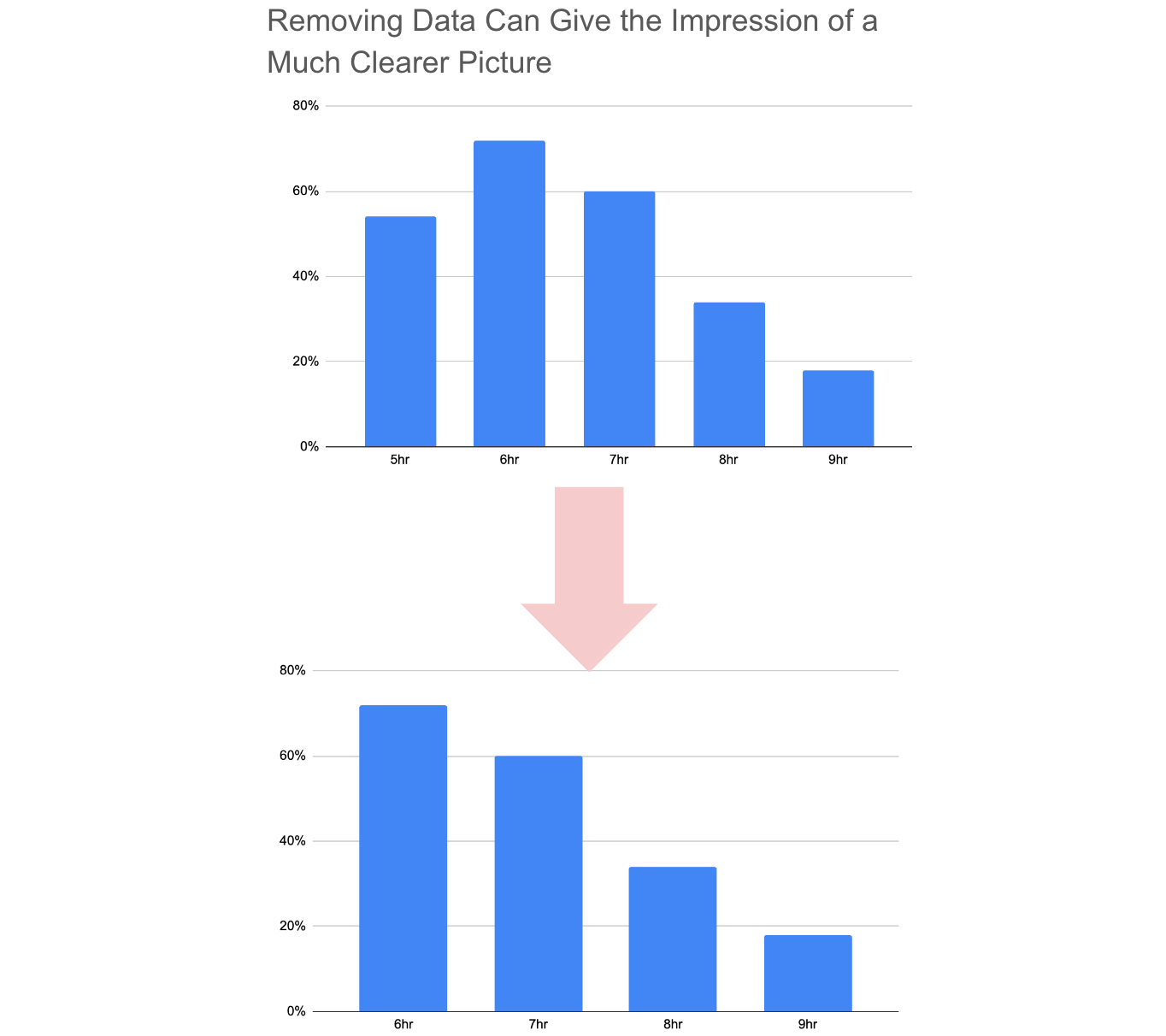 Created by the author using Google Sheets.
Exploit pattern psychology
This may seem a little less obvious than the first technique, but it's actually quite simple. It is about being aware of how people instinctively feel about seeing things on charts, and taking advantage of that for your benefit. Common perceptive patterns are:
- Green = good
- Red = bad
- Sharp rise = significant
- Big = significant
- Correlation = causation
Fox News are great at this sort of stuff. However, depending on your audience's ability to critically assess your work, you may need to adjust how much you take advantage of this technique.
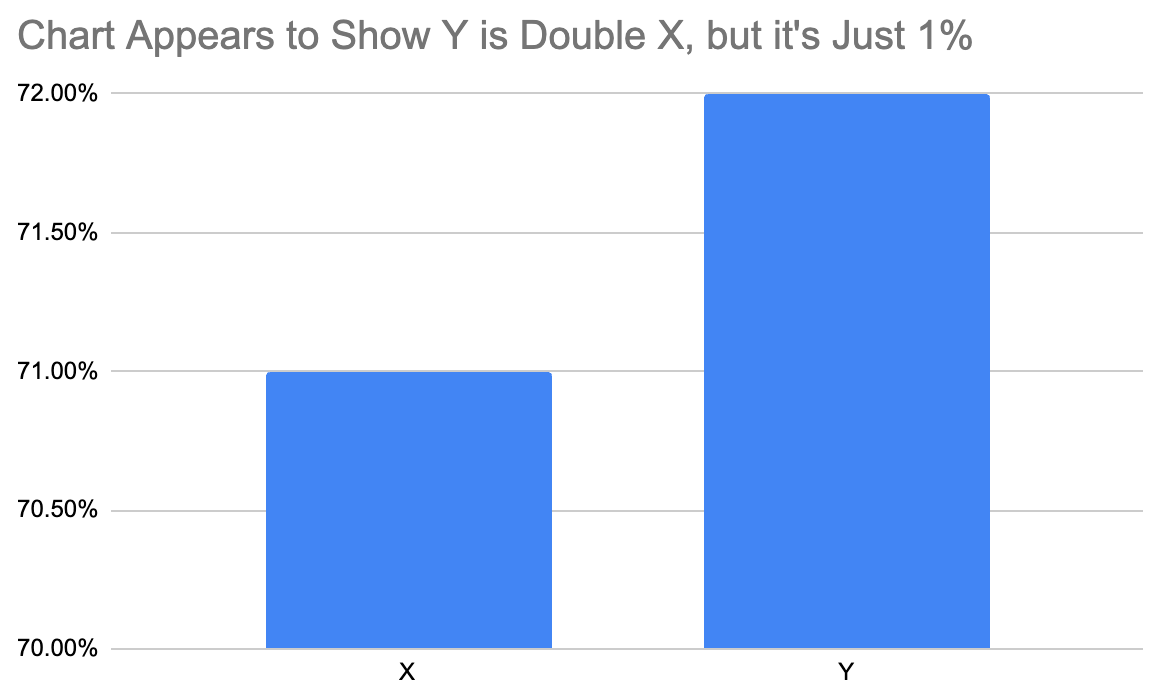 Created by the author using Google Sheets.
Above uses the popular trick of starting the Y-axis at greater than zero. The effect is a much sharper difference between data points, which translates to a feeling of significance. Of course, if the direction between data points goes against your narrative, you will want to set the Y-axis as low as possible, as to convey a feeling of insignificance in difference.
Another way of presenting the data to suit your agenda is using colors. For most people, the color red is associated with something bad. Presenting a chart with a wall of red can be very effective in providing a sense of fear, crisis, alarm etc. to the audience. Climate change is a particularly great topic to use red as it's also used to symbolize heat and fire.
A chart by The Guardian in the article "What's happening with the climate crisis and heat-trapping emissions in Australia" perfectly executes the use of red.
Created by the author using Google Sheets.
Above uses the popular trick of starting the Y-axis at greater than zero. The effect is a much sharper difference between data points, which translates to a feeling of significance. Of course, if the direction between data points goes against your narrative, you will want to set the Y-axis as low as possible, as to convey a feeling of insignificance in difference.
Another way of presenting the data to suit your agenda is using colors. For most people, the color red is associated with something bad. Presenting a chart with a wall of red can be very effective in providing a sense of fear, crisis, alarm etc. to the audience. Climate change is a particularly great topic to use red as it's also used to symbolize heat and fire.
A chart by The Guardian in the article "What's happening with the climate crisis and heat-trapping emissions in Australia" perfectly executes the use of red.
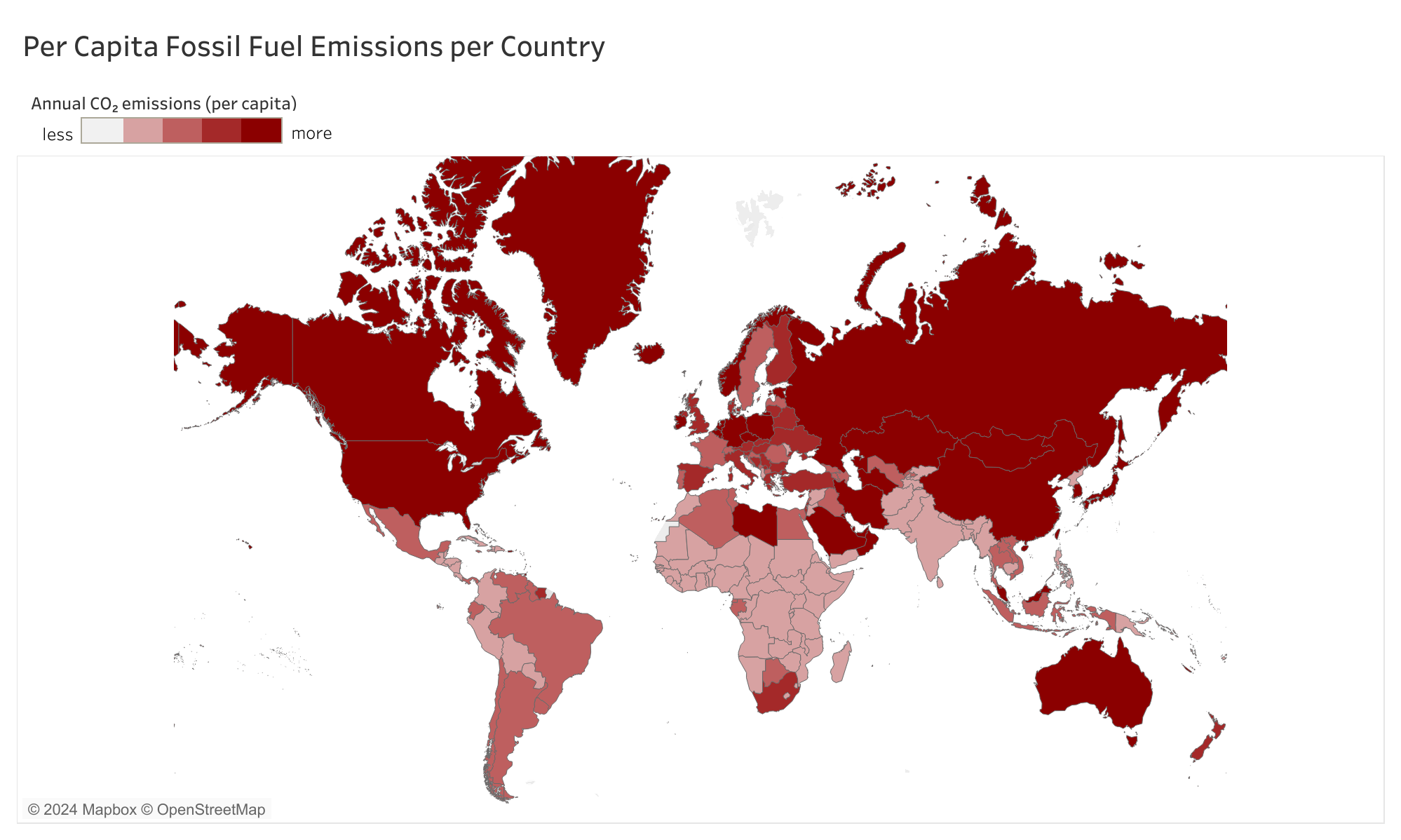 'World on fire' version of chart. Created by the author using Tableau. Data source: Global Carbon Budget, 2022
Notice how every country on the map is red, even countries that produce zero fossil fuel emissions would be highlighted in a pinky red. Using the exact same data, without a full red color scale, produces a chart with a much less fearful punch to it, such as the one below:
'World on fire' version of chart. Created by the author using Tableau. Data source: Global Carbon Budget, 2022
Notice how every country on the map is red, even countries that produce zero fossil fuel emissions would be highlighted in a pinky red. Using the exact same data, without a full red color scale, produces a chart with a much less fearful punch to it, such as the one below:
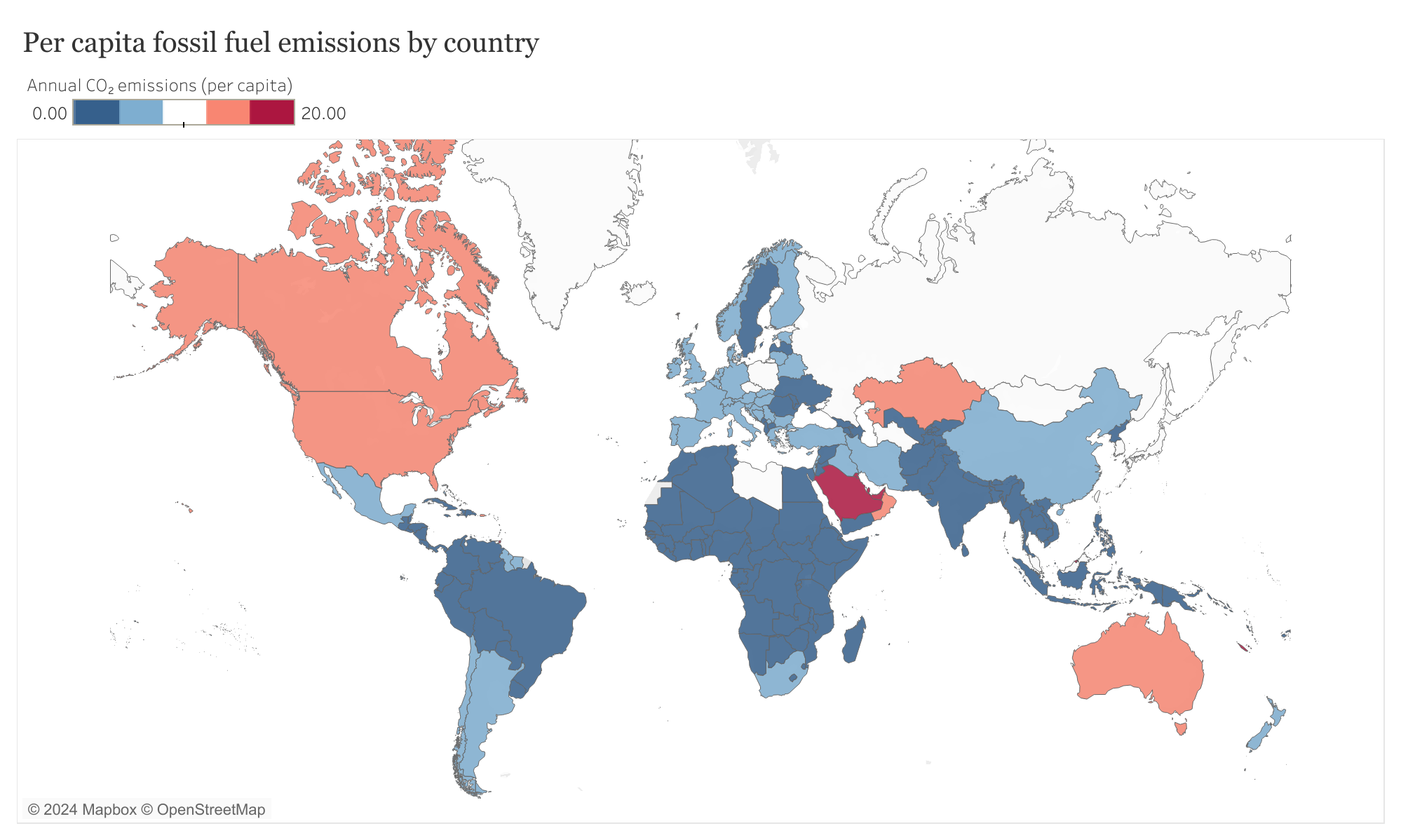 'Only parts of the world on fire' version of chart. Created by the author using Tableau. Data source: Global Carbon Budget, 2022
Be selective in categorizing
This technique is somewhat similar to omitting data. However, it isn't quite the same. Omitting data is simply removing the unwanted data from view, selective categorization is about shuffling data around until we find an adequate story. It is also less susceptible to criticism, and as such is most commonly used in areas where there is an attempt at critically assessing the analysis, such as published papers in peer-reviewed journals.
I'll start with a simple toy example to explain what I mean by shuffling data around. Say I am studying the number of people who live in each household of a village. I have collected the following raw data:
 If I want to convey the message that the village has many overcrowded households, then I can present the data like so:
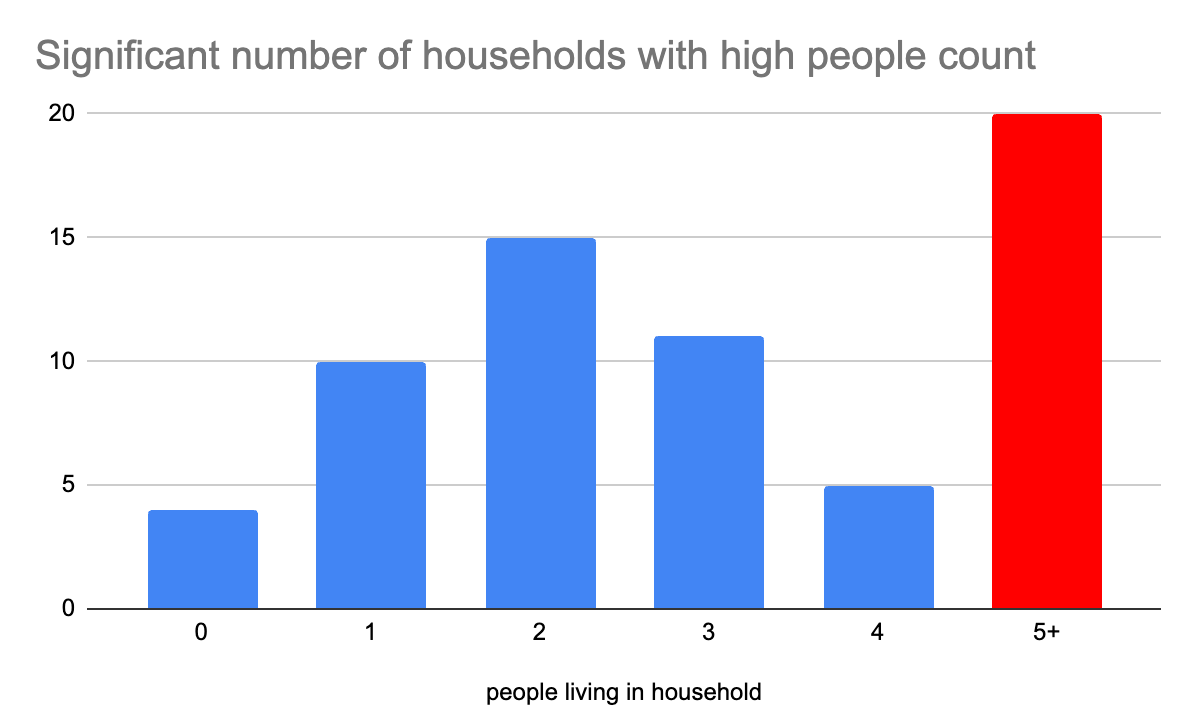 Created by the author using Google Sheets.
All I have done is bundle 5,6,7, and 8 together to create one single data point, 5+. The final result is a chart with the biggest people per household category appearing the largest. Perfect for my narrative.
But, what if I don't want that. In fact, what if I want to convey the exact opposite message. I can shuffle the data around a bit, and end up presenting the data like so:
Created by the author using Google Sheets.
All I have done is bundle 5,6,7, and 8 together to create one single data point, 5+. The final result is a chart with the biggest people per household category appearing the largest. Perfect for my narrative.
But, what if I don't want that. In fact, what if I want to convey the exact opposite message. I can shuffle the data around a bit, and end up presenting the data like so:
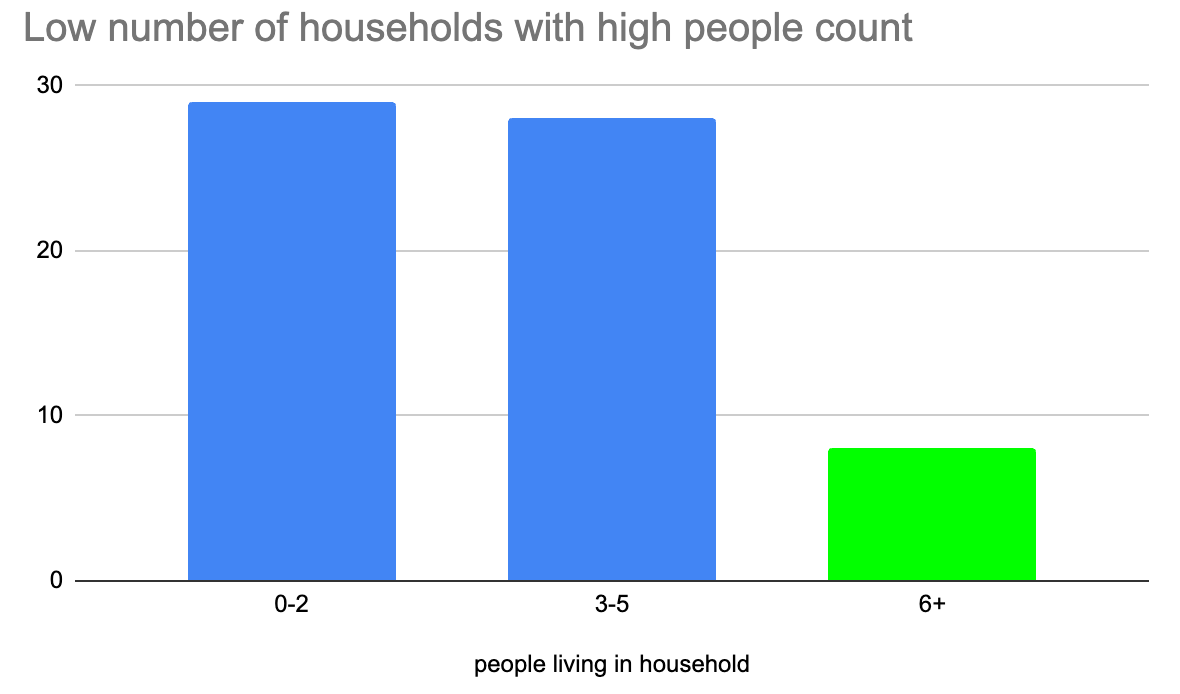 Created by the author using Google Sheets.
Here, what I have done is bundle 0, 1, and 2 together, 3, 4, and 5 together, and 6, 7, and 8 together. As you can see, without even omitting a single point of raw data, I have completely changed the story.
This technique was brilliantly implemented in an academic research paper focusing on whether more guns reduce or increase crime. A highly cited paper by John Lott and David Mustard titled, "Crime, Deterrence, and Right‐to‐Carry Concealed Handguns" provides a remarkable chart of the consequences of implementing handgun concealment laws designed to increase the number of guns on the street.
Created by the author using Google Sheets.
Here, what I have done is bundle 0, 1, and 2 together, 3, 4, and 5 together, and 6, 7, and 8 together. As you can see, without even omitting a single point of raw data, I have completely changed the story.
This technique was brilliantly implemented in an academic research paper focusing on whether more guns reduce or increase crime. A highly cited paper by John Lott and David Mustard titled, "Crime, Deterrence, and Right‐to‐Carry Concealed Handguns" provides a remarkable chart of the consequences of implementing handgun concealment laws designed to increase the number of guns on the street.
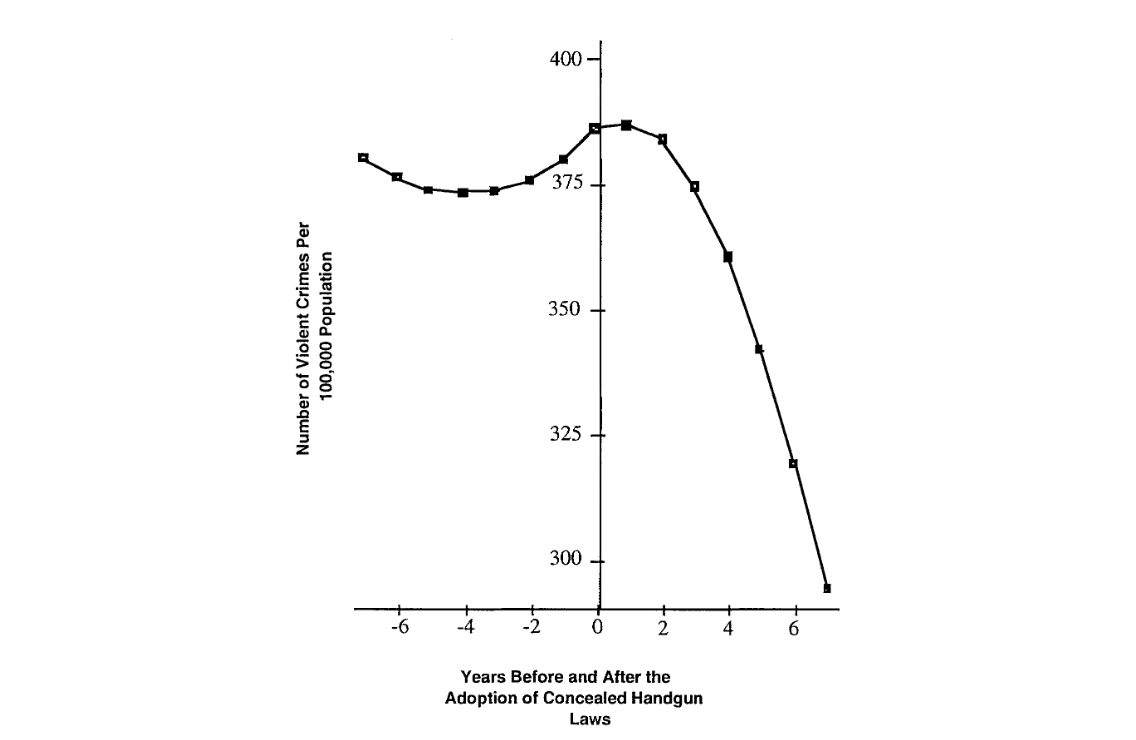 source: "Crime, Deterrence, and Right‐to‐Carry Concealed Handguns" by John Lott and David Mustard
Take another second to really look at what this chart is saying, because it is quite remarkable. It would suggest that violent crimes are almost universally due to the lack of concealed handguns, as evident by the lack of variance i.e. the crime rate smoothly declines post introduction of handgun laws. So, how did the authors achieve such a remarkable chart?
Firstly, it takes advantage of technique number two, exploit pattern psychology, by starting the Y-axis at greater than zero. Secondly, and most influentially, it has selectively chosen what is and isn't considered as a 'violent crime', 'concealed handgun law', and the 'population' of the study. For example, in the violent crime category, they choose to allow robbery and aggravated assaults with a gun, but not without a gun e.g. a knife. Why? Because, robberies and aggravated assaults on average increased post adoption of handgun laws, which goes against the narrative. But taking a small slice of this violent crime i.e. robberies and aggravated assaults with a gun, the average conveniently decreased post adoption of handgun laws.
Similarly, some regions and years were excluded from the population sample. These regions and years had huge spikes in violent crimes post concealed handgun law adoption. The reason the authors gave for removing these populations was due to 'higher drug prices' (I'm not making this up, page 24 "Crime, Deterrence, and Right‐to‐Carry Concealed Handguns").
Repeat this sort of selective categorization a few more times, and voila - the perfect chart!
source: "Crime, Deterrence, and Right‐to‐Carry Concealed Handguns" by John Lott and David Mustard
Take another second to really look at what this chart is saying, because it is quite remarkable. It would suggest that violent crimes are almost universally due to the lack of concealed handguns, as evident by the lack of variance i.e. the crime rate smoothly declines post introduction of handgun laws. So, how did the authors achieve such a remarkable chart?
Firstly, it takes advantage of technique number two, exploit pattern psychology, by starting the Y-axis at greater than zero. Secondly, and most influentially, it has selectively chosen what is and isn't considered as a 'violent crime', 'concealed handgun law', and the 'population' of the study. For example, in the violent crime category, they choose to allow robbery and aggravated assaults with a gun, but not without a gun e.g. a knife. Why? Because, robberies and aggravated assaults on average increased post adoption of handgun laws, which goes against the narrative. But taking a small slice of this violent crime i.e. robberies and aggravated assaults with a gun, the average conveniently decreased post adoption of handgun laws.
Similarly, some regions and years were excluded from the population sample. These regions and years had huge spikes in violent crimes post concealed handgun law adoption. The reason the authors gave for removing these populations was due to 'higher drug prices' (I'm not making this up, page 24 "Crime, Deterrence, and Right‐to‐Carry Concealed Handguns").
Repeat this sort of selective categorization a few more times, and voila - the perfect chart!
Strategically adjust readability
If, sadly, you can't avoid publishing some unsightly data in your charts, there is one final technique you can use to maintain your narrative. Make the charts unbearable to look at. A classic is to present the data as a cold hard table. For example:
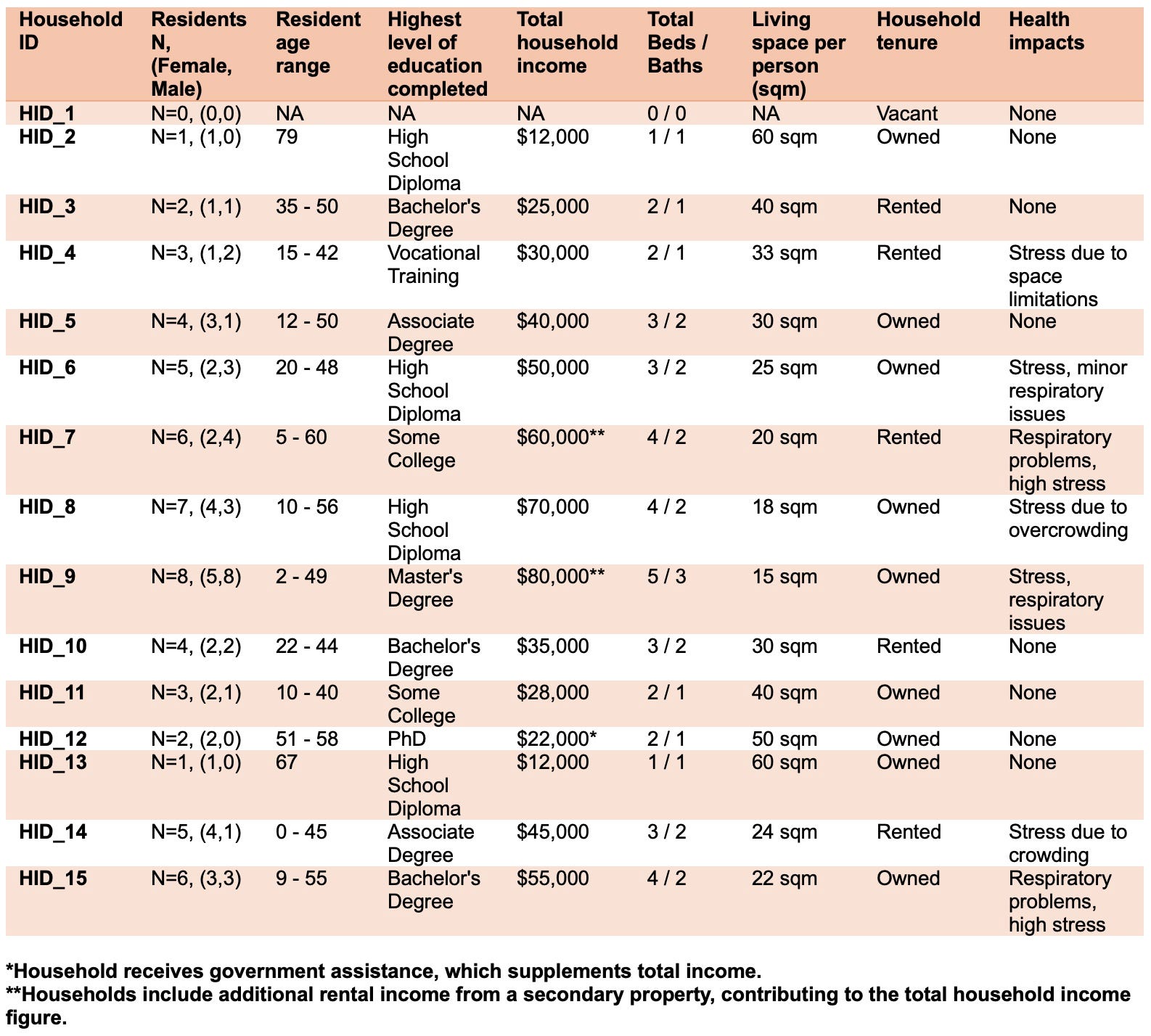 Created by the author using Microsoft Word
Did you read it all? If so you're a stronger person than I am. I'll be honest with you, I have no idea if this data is trying to manipulate me or not, all I know is I don't want to read that ugly table, and you can't make me!
If you do have some good data sprinkled around the nasty narrative-killing data, then do your best to make the good stuff as readable as possible. Nice simple line or bar charts will do. And, of course, make sure all the bad data gets the table treatment.
Created by the author using Microsoft Word
Did you read it all? If so you're a stronger person than I am. I'll be honest with you, I have no idea if this data is trying to manipulate me or not, all I know is I don't want to read that ugly table, and you can't make me!
If you do have some good data sprinkled around the nasty narrative-killing data, then do your best to make the good stuff as readable as possible. Nice simple line or bar charts will do. And, of course, make sure all the bad data gets the table treatment.
Conclusion
A message to data scientists, business analysts, academic researchers, and everyone else involved in presenting data : Manipulating your audience can be easy, but it's not cool. It is important to make a deliberate effort to consider whether your work uses any of these four techniques. It may not have been intentional, but confirmation bias, as well as pressure from others, does cause manipulative data tricks to slip into one's work.
A message to data consumers ( basically, everyone**)** : I hope this article has empowered you to critically evaluate the data and statistics you encounter. Furthermore, I encourage readers to be vocal about any poor data ethical discoveries you may find. Whether it is via verbal discussion, a social media post, blog, video essay, note in the comment section... the list goes on, please don't be shy from criticising it when you see it.
If you'd like more of my insights on uncovering data issues, I encourage you to read my previous article, Stop being data driven, as well as following me on Medium for future articles. If you'd like to spread the reach of this article, please give it a clap (or 50 😏 ) and share on social media. Thanks for reading. Until next time, peace out data champs! ✌️
Register Now to Continue Reading
Unlock Towards Data Science with a Free Account
All articles on Towards Data Science are available to registered users. Create a free account today to access this article and thousands more.
Register for freeSign in to your account
 Written By
See all from Cai Parry-Jones
ChartsData AnalysisData VisualizationMisinformationTips And Tricks
Share This Article
Towards Data Science is a community publication. Submit your insights to reach our global audience and earn through the TDS Author Payment Program.
Write for TDS
Related Articles
Data Science
Go from Nothing to a Complete Dataframe with Python
Kurt Klingensmith
February 7, 20248 min read
Data Visualization
A two-part series on developing real-time streaming dashboards and their use cases.
Nathan Cheng
January 31, 20218 min read
Artificial Intelligence
Explained with examples using Seaborn
Soner Yıldırım
November 21, 20206 min read
Data Science
Neon Lines and Dark Designs, An Introduction
Mia Dwyer
April 8, 20243 min read
Artificial Intelligence
How I built an AI-powered prototype to turn images into insights
Jens Winkelmann
June 30, 202514 min read
Artificial Intelligence
Practical guide for FacetGrid and PairGrid
Soner Yıldırım
January 2, 20215 min read
Data Visualization
Data Analysis, Stats & Visualisation of 13k+ responses to the Value of Time Calculator
Marta
January 10, 20215 min read
Data Science
Explore our changing climate using Python and passive microwave data
Will Norris
June 25, 202110 min read
Data Science
SQL Is Powerful but Is It Powerful Enough for This Important Job?
Efe Buyuk
December 8, 20204 min read
Your home for data science and AI. The world's leading publication for data science, data analytics, data engineering, machine learning, and artificial intelligence professionals.
Subscribe to Our NewsletterWrite For TDS•About•Advertise•Privacy Policy•Terms of Use
© Insight Media Group, LLC 2026•The New Stack•roadmap.sh•Creator Network
Recommended Articles
Close