保留正文与补采附件。源页面当前未重新核验;具体限制见交付清单。
 We value your privacy
We use cookies to enhance your browsing experience, serve personalised ads or content, and analyse our traffic. By clicking "Accept All", you consent to our use of cookies.
Customise Reject All Accept All
Customise Consent Preferences
We value your privacy
We use cookies to enhance your browsing experience, serve personalised ads or content, and analyse our traffic. By clicking "Accept All", you consent to our use of cookies.
Customise Reject All Accept All
Customise Consent Preferences  We use cookies to help you navigate efficiently and perform certain functions. You will find detailed information about all cookies under each consent category below.
The cookies that are categorised as "Necessary" are stored on your browser as they are essential for enabling the basic functionalities of the site. ... Show more
NecessaryAlways Active
Necessary cookies are required to enable the basic features of this site, such as providing secure log-in or adjusting your consent preferences. These cookies do not store any personally identifiable data.
We use cookies to help you navigate efficiently and perform certain functions. You will find detailed information about all cookies under each consent category below.
The cookies that are categorised as "Necessary" are stored on your browser as they are essential for enabling the basic functionalities of the site. ... Show more
NecessaryAlways Active
Necessary cookies are required to enable the basic features of this site, such as providing secure log-in or adjusting your consent preferences. These cookies do not store any personally identifiable data.
-
Cookie
BCTempID
-
Duration
10 minutes
-
Description
No description available.
-
Cookie
__cf_bm
-
Duration
1 hour
-
Description
This cookie, set by Cloudflare, is used to support Cloudflare Bot Management.
-
Cookie
AWSALBCORS
-
Duration
7 days
-
Description
Amazon Web Services set this cookie for load balancing.
-
Cookie
_cfuvid
-
Duration
session
-
Description
Cloudflare sets this cookie to track users across sessions to optimize user experience by maintaining session consistency and providing personalized services
-
Cookie
li_gc
-
Duration
6 months
-
Description
Linkedin set this cookie for storing visitor's consent regarding using cookies for non-essential purposes.
-
Cookie
__hssrc
-
Duration
session
-
Description
This cookie is set by Hubspot whenever it changes the session cookie. The __hssrc cookie set to 1 indicates that the user has restarted the browser, and if the cookie does not exist, it is assumed to be a new session.
-
Cookie
__hssc
-
Duration
1 hour
-
Description
HubSpot sets this cookie to keep track of sessions and to determine if HubSpot should increment the session number and timestamps in the __hstc cookie.
-
Cookie
wpEmojiSettingsSupports
-
Duration
session
-
Description
WordPress sets this cookie when a user interacts with emojis on a WordPress site. It helps determine if the user's browser can display emojis properly.
-
Cookie
BCSessionID
-
Duration
1 year 1 month 4 days
-
Description
Blueconic sets this cookie as a unique identifier for the BlueConic profile.
-
Cookie
_octo
-
Duration
1 year
-
Description
No description available.
-
Cookie
logged_in
-
Duration
1 year
-
Description
No description available.
-
Cookie
__Secure-YEC
-
Duration
past
-
Description
YouTube sets this cookie to stores the user's video player preferences using embedded YouTube video
-
Cookie
__eoi
-
Duration
6 months
-
Description
Description is currently not available.
-
Cookie
AWSALBTGCORS
-
Duration
7 days
-
Description
No description available.
-
Cookie
login-status-p
-
Duration
past
-
Description
Description is currently not available.
-
Cookie
AWSALBTG
-
Duration
7 days
-
Description
No description available.
-
Cookie
csrf_token
-
Duration
session
-
Description
No description available.
-
Cookie
token_v2
-
Duration
1 day
-
Description
Description is currently not available.
-
Cookie
D
-
Duration
1 year
-
Description
Description is currently not available.
-
Cookie
PHPSESSID
-
Duration
session
-
Description
This cookie is native to PHP applications. The cookie stores and identifies a user's unique session ID to manage user sessions on the website. The cookie is a session cookie and will be deleted when all the browser windows are closed.
-
Cookie
VISITOR_PRIVACY_METADATA
-
Duration
6 months
-
Description
YouTube sets this cookie to store the user's cookie consent state for the current domain.
-
Cookie
cookietest
-
Duration
session
-
Description
The cookietest cookie is typically used to determine whether the user's browser accepts cookies, essential for website functionality and user experience.
-
Cookie
__Host-airtable-session
-
Duration
1 year
-
Description
This cookie is used to enable us to integrate the services of Airtable.
-
Cookie
__Host-airtable-session.sig
-
Duration
1 year
-
Description
This cookie is used to enable us to integrate the services of Airtable.
-
Cookie
m
-
Duration
1 year 1 month 4 days
-
Description
Stripe sets this cookie for fraud prevention purposes. It identifies the device used to access the website, allowing the website to be formatted accordingly.
-
Cookie
BIGipServer*
-
Duration
session
-
Description
Marketo sets this cookie to collect information about the user's online activity and build a profile about their interests to provide advertisements relevant to the user.
-
Cookie
__cfruid
-
Duration
session
-
Description
Cloudflare sets this cookie to identify trusted web traffic.
-
Cookie
_GRECAPTCHA
-
Duration
6 months
-
Description
Google Recaptcha service sets this cookie to identify bots to protect the website against malicious spam attacks.
-
Cookie
__Secure-YNID
-
Duration
6 months
-
Description
Google cookie used to protect user security and prevent fraud, especially during the login process.
-
Cookie
cookieyes-consent
-
Duration
1 year
-
Description
CookieYes sets this cookie to remember users' consent preferences so that their preferences are respected on subsequent visits to this site. It does not collect or store any personal information about the site visitors.
Functional
Functional cookies help perform certain functionalities like sharing the content of the website on social media platforms, collecting feedback, and other third-party features.
-
Cookie
lidc
-
Duration
1 day
-
Description
LinkedIn sets the lidc cookie to facilitate data center selection.
-
Cookie
brw
-
Duration
1 year
-
Description
No description available.
-
Cookie
brwConsent
-
Duration
5 minutes
-
Description
Description is currently not available.
-
Cookie
WMF-Uniq
-
Duration
1 year
-
Description
Description is currently not available.
-
Cookie
loom_anon_comment
-
Duration
1 year
-
Description
No description available.
-
Cookie
loom_referral_video
-
Duration
session
-
Description
Description is currently not available.
-
Cookie
VISITOR_INFO1_LIVE
-
Duration
6 months
-
Description
A cookie set by YouTube to measure bandwidth that determines whether the user gets the new or old player interface.
-
Cookie
yt-remote-connected-devices
-
Duration
Never Expires
-
Description
YouTube sets this cookie to store the user's video preferences using embedded YouTube videos.
-
Cookie
ytidb::LAST_RESULT_ENTRY_KEY
-
Duration
Never Expires
-
Description
The cookie ytidb::LAST_RESULT_ENTRY_KEY is used by YouTube to store the last search result entry that was clicked by the user. This information is used to improve the user experience by providing more relevant search results in the future.
-
Cookie
yt-remote-device-id
-
Duration
Never Expires
-
Description
YouTube sets this cookie to store the user's video preferences using embedded YouTube videos.
-
Cookie
yt-remote-session-name
-
Duration
session
-
Description
The yt-remote-session-name cookie is used by YouTube to store the user's video player preferences using embedded YouTube video.
-
Cookie
yt-remote-fast-check-period
-
Duration
session
-
Description
The yt-remote-fast-check-period cookie is used by YouTube to store the user's video player preferences for embedded YouTube videos.
-
Cookie
yt-remote-session-app
-
Duration
session
-
Description
The yt-remote-session-app cookie is used by YouTube to store user preferences and information about the interface of the embedded YouTube video player.
-
Cookie
yt-remote-cast-available
-
Duration
session
-
Description
The yt-remote-cast-available cookie is used to store the user's preferences regarding whether casting is available on their YouTube video player.
-
Cookie
yt-remote-cast-installed
-
Duration
session
-
Description
The yt-remote-cast-installed cookie is used to store the user's video player preferences using embedded YouTube video.
-
Cookie
cp_session
-
Duration
3 months
-
Description
Codepen sets this cookie for Help systems found in the website.
-
Cookie
loid
-
Duration
1 year 1 month 4 days
-
Description
This cookie is set by the Reddit. The cookie enables the sharing of content from the website onto the social media platform.
Analytics
Analytical cookies are used to understand how visitors interact with the website. These cookies help provide information on metrics such as the number of visitors, bounce rate, traffic source, etc.
-
Cookie
__hstc
-
Duration
6 months
-
Description
Hubspot set this main cookie for tracking visitors. It contains the domain, initial timestamp (first visit), last timestamp (last visit), current timestamp (this visit), and session number (increments for each subsequent session).
-
Cookie
hubspotutk
-
Duration
6 months
-
Description
HubSpot sets this cookie to keep track of the visitors to the website. This cookie is passed to HubSpot on form submission and used when deduplicating contacts.
-
Cookie
_ga
-
Duration
1 year 1 month 4 days
-
Description
Google Analytics sets this cookie to calculate visitor, session and campaign data and track site usage for the site's analytics report. The cookie stores information anonymously and assigns a randomly generated number to recognise unique visitors.
-
Cookie
ga*
-
Duration
1 year 1 month 4 days
-
Description
Google Analytics sets this cookie to store and count page views.
-
Cookie
__Host-psifi.analyticsTrace
-
Duration
6 hours
-
Description
Description is currently not available.
-
Cookie
__Host-psifi.analyticsTraceV2
-
Duration
6 hours
-
Description
Description is currently not available.
-
Cookie
_gh_sess
-
Duration
session
-
Description
GitHub sets this cookie for temporary application and framework state between pages like what step the user is on in a multiple step form.
-
Cookie
YSC
-
Duration
session
-
Description
YSC cookie is set by Youtube and is used to track the views of embedded videos on Youtube pages.
-
Cookie
ajs_anonymous_id
-
Duration
1 year
-
Description
This cookie is set by Segment to count the number of people who visit a certain site by tracking if they have visited before.
-
Cookie
vuid
-
Duration
1 year 1 month 4 days
-
Description
Vimeo installs this cookie to collect tracking information by setting a unique ID to embed videos on the website.
Performance
Performance cookies are used to understand and analyse the key performance indexes of the website which helps in delivering a better user experience for the visitors.
-
Cookie
AWSALB
-
Duration
7 days
-
Description
AWSALB is an application load balancer cookie set by Amazon Web Services to map the session to the target.
-
Cookie
acq
-
Duration
past
-
Description
Description is currently not available.
-
Cookie
acq.sig
-
Duration
past
-
Description
Description is currently not available.
-
Cookie
ptc
-
Duration
2 years
-
Description
No description available.
Advertisement
Advertisement cookies are used to provide visitors with customised advertisements based on the pages you visited previously and to analyse the effectiveness of the ad campaigns.
-
Cookie
muc_ads
-
Duration
1 year 1 month 4 days
-
Description
Twitter sets this cookie to collect user behaviour and interaction data to optimize the website.
-
Cookie
guest_id_marketing
-
Duration
1 year 1 month 4 days
-
Description
Twitter sets this cookie to identify and track the website visitor.
-
Cookie
guest_id_ads
-
Duration
1 year 1 month 4 days
-
Description
Twitter sets this cookie to identify and track the website visitor.
-
Cookie
personalization_id
-
Duration
1 year 1 month 4 days
-
Description
Twitter sets this cookie to integrate and share features for social media and also store information about how the user uses the website, for tracking and targeting.
-
Cookie
guest_id
-
Duration
1 year 1 month 4 days
-
Description
Twitter sets this cookie to identify and track the website visitor. It registers if a user is signed in to the Twitter platform and collects information about ad preferences.
-
Cookie
bcookie
-
Duration
1 year
-
Description
LinkedIn sets this cookie from LinkedIn share buttons and ad tags to recognize browser IDs.
-
Cookie
__Secure-ROLLOUT_TOKEN
-
Duration
6 months
-
Description
YouTube sets this cookie to manage feature rollout and experimentation. It helps Google control which new features or interface changes are shown to users as part of testing and staged rollouts, ensuring consistent experience for a given user during an experiment.
-
Cookie
yt.innertube::nextId
-
Duration
Never Expires
-
Description
YouTube sets this cookie to register a unique ID to store data on what videos from YouTube the user has seen.
-
Cookie
yt.innertube::requests
-
Duration
Never Expires
-
Description
YouTube sets this cookie to register a unique ID to store data on what videos from YouTube the user has seen.
-
Cookie
session_tracker
-
Duration
session
-
Description
This cookie is set by the Reddit. This cookie is used to identify trusted web traffic. It also helps in adverstising on the website.
-
Cookie
edgebucket
-
Duration
session
-
Description
Reddit sets this cookie to save the information about a log-on Reddit user, for the purpose of advertisement recommendations and updating the content.
-
Cookie
did
-
Duration
1 year
-
Description
Arbor sets this cookie to show targeted ads to site visitors.This cookie expires after 2 months or 1 year.
Uncategorised
Other uncategorised cookies are those that are being analysed and have not been classified into a category as yet.
No cookies to display.
Reject All Save My Preferences Accept All
Toggle SearchToggle Mobile Navigation
Publish AI, ML & data-science insights to a global community of data professionals.
Sign inSubmit an Article
LatestEditor's PicksNewsletterShipAI
Write For TDS
LinkedInXToggle Search
Data Science
Dimensionality Reduction Made Simple: PCA Theory and Scikit-Learn Implementation
Tame the Curse of Dimensionality! Learn Dimensionality Reduction (PCA) and implement it with Python and Scikit-Learn.
Riccardo Andreoni
February 7, 202411 min read
 Image source: unsplash.com.
In the novel Flatland, characters living in a two-dimensional world find themselves perplexed and unable to comprehend when they encounter a three-dimensional being. I use this analogy to illustrate how similar phenomena occur in Machine Learning when dealing with problems involving thousands or even millions of dimensions (i.e. features): surprising phenomena happen , which have disastrous implications on our Machine Learning models.
I'm sure you felt stunned, at least once, by the huge number of features involved in modern Machine Learning problems. Every Data Science practitioner, sooner or later, will face this challenge. This article will explore the theoretical foundations and the Python implementation of the most used Dimensionality Reduction algorithm: Principal Component Analysis (PCA).
Image source: unsplash.com.
In the novel Flatland, characters living in a two-dimensional world find themselves perplexed and unable to comprehend when they encounter a three-dimensional being. I use this analogy to illustrate how similar phenomena occur in Machine Learning when dealing with problems involving thousands or even millions of dimensions (i.e. features): surprising phenomena happen , which have disastrous implications on our Machine Learning models.
I'm sure you felt stunned, at least once, by the huge number of features involved in modern Machine Learning problems. Every Data Science practitioner, sooner or later, will face this challenge. This article will explore the theoretical foundations and the Python implementation of the most used Dimensionality Reduction algorithm: Principal Component Analysis (PCA).
Why do we need to reduce the number of features?
Datasets involving thousands or even millions of features are common nowadays. Adding new features to a dataset can bring in valuable information, however, they will slow the training process and make it harder to find good patterns and solutions. In Data Science this is called the Curse of Dimensionality and it often **** leads to skewed interpretation of data and inaccurate predictions.
Learn this step by step with the interactive AI and Data Scientist and Machine Learning roadmaps.
Machine learning practitioners like us can benefit from the fact that for most ML problems, the number of features can be reduced consistently. For example, consider a picture: the pixels near the border often don't carry any valuable information. However, the techniques to safely reduce the number of features in a ML problem are not trivial and need an explanation that I will provide in this post.
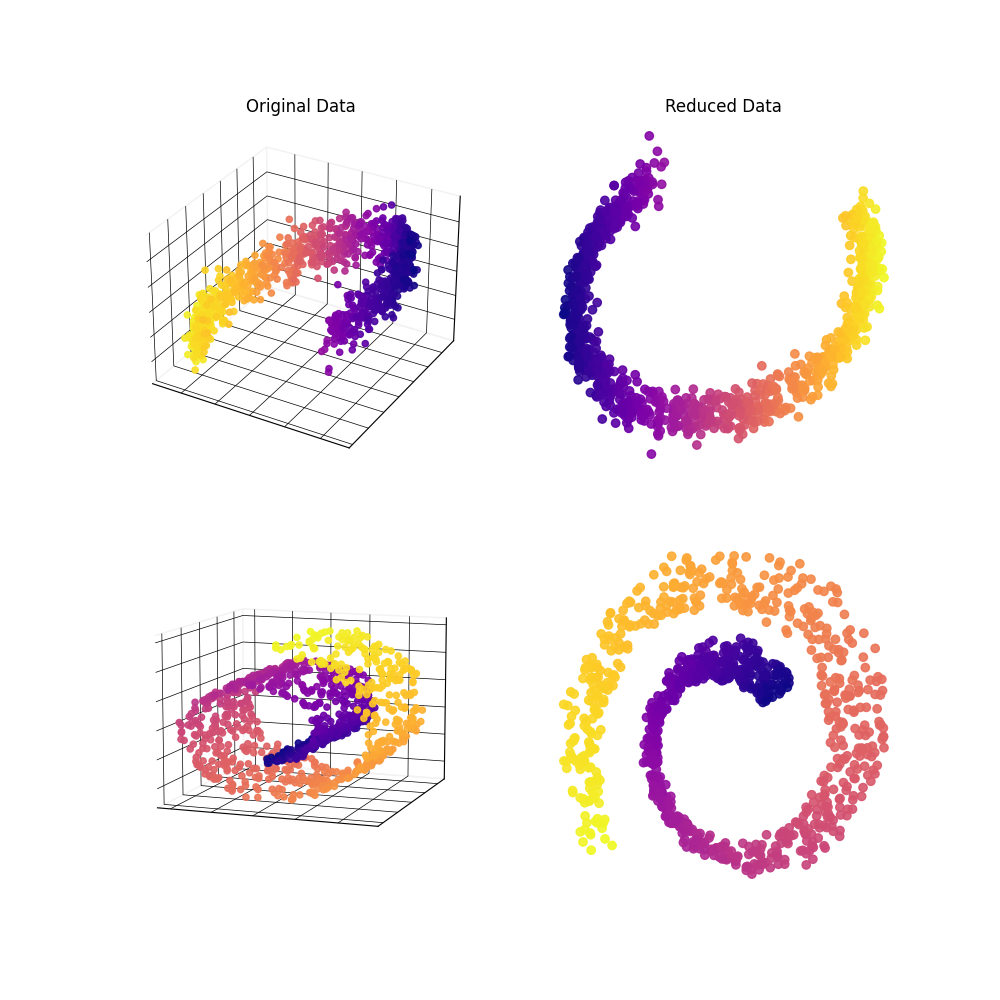 Image by the author.
The tools I will present not only simplify the computation effort and boost the prediction accuracy, but they will also serve as a tool to graphically visualize high-dimensional data. For this reason, they are essential to communicate your insights with other people.
Fortunately for us, the above-mentioned technique, named Dimensionality Reduction, exists and can easily take part in every data scientist's toolbox. Moreover, Dimensionality Reduction can be easily implemented in Python programming thanks to the Scikit-Learn (sklearn) library.
Image by the author.
The tools I will present not only simplify the computation effort and boost the prediction accuracy, but they will also serve as a tool to graphically visualize high-dimensional data. For this reason, they are essential to communicate your insights with other people.
Fortunately for us, the above-mentioned technique, named Dimensionality Reduction, exists and can easily take part in every data scientist's toolbox. Moreover, Dimensionality Reduction can be easily implemented in Python programming thanks to the Scikit-Learn (sklearn) library.
Curse of Dimensionality
The Curse of Dimensionality represents one of the biggest challenges in Data Science as it makes algorithms computationally intensive. But what is it exactly?
When the number of dimensions in a dataset grows substantially, the available data points become sparser and sparser, leading to an intricate cascade of computational challenges. As humans, we struggle to conceptualize more than 3, or sometimes 2, dimensions. This limitation leads to very unexpected behavior of data in high-dimensional spaces.
For example, consider a 2D 1x1 square. If we pick a random point inside of it, there is only a small probability for it to be located very close to a border. Numerically, there is a 0.4% probability for it to be located within a 0.001 distance from a border. Instead, in a higher-dimensional unit hypercube, as the number of edges grow, the probability for a random point to be located close to a border grows exponentially. In a 10.000-dimensional hypercube, the same probability increases to over 99.99999%. This means that in a high-dimensional space, it's very likely to be near a border.
The following experiment is even more surprising (or disturbing in my opinion). Take the usual 2-dimensional unit square. The distance of 2 randomly chosen points inside the square is, on average, equal to 0.52. Would you believe me if I tell you that doing the same experiment with a 100.000-dimensional unit hypercube results in an average distance of 129.09? I can prove that to you with the following Montecarlo simulation.
python
import numpy as np
test_dimensions = [2, 100000]
print('Average distance between 2 points in a unit hypercube')
for n_dim in test_dimensions:
    distances = []
    for i in range(100000):
        rand_point_1 = np.random.uniform(size=n_dim)
        rand_point_2 = np.random.uniform(size=n_dim)
        dist = np.linalg.norm(rand_point_1-rand_point_2)
        distances.append(dist)
    avg_distance = np.mean(distances)
    print('{} dimensions: {}'.format(n_dim, avg_distance))
 The concept is even better represented by this visualization:
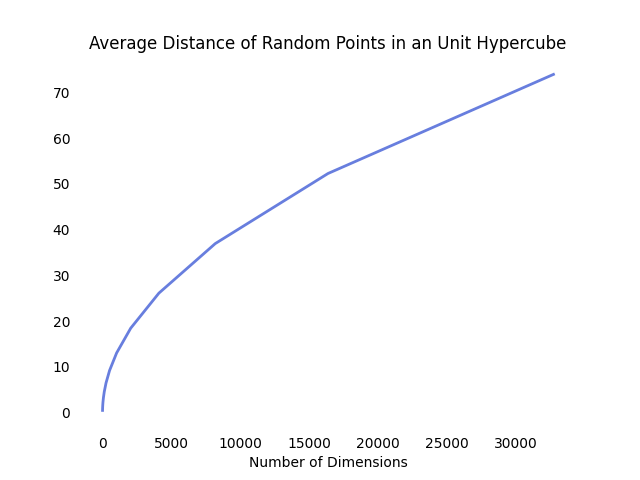 Image by the author.
Leaving aside these funny simulations, we can extrapolate a major implication for Data Science practitioners: there is plenty of space in high-dimensions.
The consequence is that high-dimensional datasets are, with any probability, very sparse , and the training instances are far apart from each other. With such training data, the risk of overfitting your Machine Learning model is high.
While, in theory, we could add new training examples , in practice this is not enough to cope with the increase of features. In fact, in order to maintain a constant density, the required number of training points needs to grow exponentially as a function of the number of features.
Just to provide an example, to maintain a distance of 0.1 between each training point in a dataset with 100 features, we would need a number of training point greater than the number of atoms in the universe.
Image by the author.
Leaving aside these funny simulations, we can extrapolate a major implication for Data Science practitioners: there is plenty of space in high-dimensions.
The consequence is that high-dimensional datasets are, with any probability, very sparse , and the training instances are far apart from each other. With such training data, the risk of overfitting your Machine Learning model is high.
While, in theory, we could add new training examples , in practice this is not enough to cope with the increase of features. In fact, in order to maintain a constant density, the required number of training points needs to grow exponentially as a function of the number of features.
Just to provide an example, to maintain a distance of 0.1 between each training point in a dataset with 100 features, we would need a number of training point greater than the number of atoms in the universe.
 Image source: pixabay.com.
The only feasible approach is to reduce the number of features , and I will provide different techniques to do that while avoiding losing too much information.
Image source: pixabay.com.
The only feasible approach is to reduce the number of features , and I will provide different techniques to do that while avoiding losing too much information.
Principal Component Analysis (PCA)
Principal Component Analysis (PCA) is perhaps the most popular algorithm for Dimensionality Reduction. At its functioning core, it projects the data onto a hyperplane , aiming to make the rotated features statistically uncorrelated. The rotation is typically followed by selecting a subset of these new projected features, based on their importance in describing the data.
As PCA is based on projections, it is fundamental to know what this operation is. The following section explains the Projection operation.
Projection
In practical scenarios, a vast portion of the training instances lies close to a lower-dimensional subspace of the original training set hyperspace. The reasons are:
- Correlation between features : many features are heavily correlated.
- Constant values : many features assume near-to-constant values.
To illustrate this concept, take the following 2D dataset:
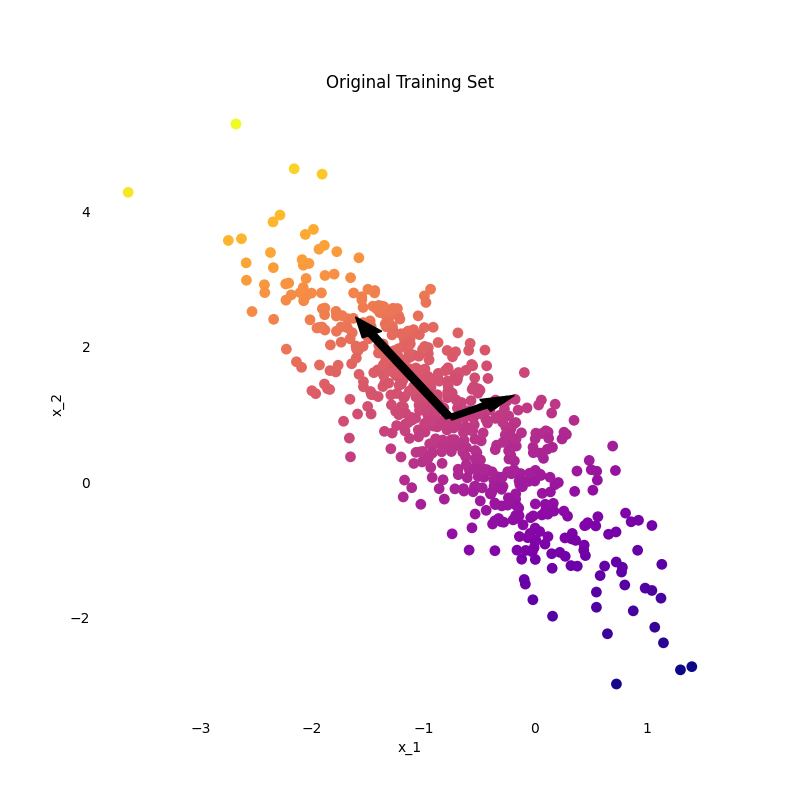 Image by the author
Given the strong correlation of feature _x 1 with feature _x 2 , we can project the dataset on a lower-dimensional plane, which, in this case, is a line. Considering the directions identified by the black arrows, called components, if we rotate the dataset such that component 1 (_p 1) is horizontal, we obtain:
Image by the author
Given the strong correlation of feature _x 1 with feature _x 2 , we can project the dataset on a lower-dimensional plane, which, in this case, is a line. Considering the directions identified by the black arrows, called components, if we rotate the dataset such that component 1 (_p 1) is horizontal, we obtain:
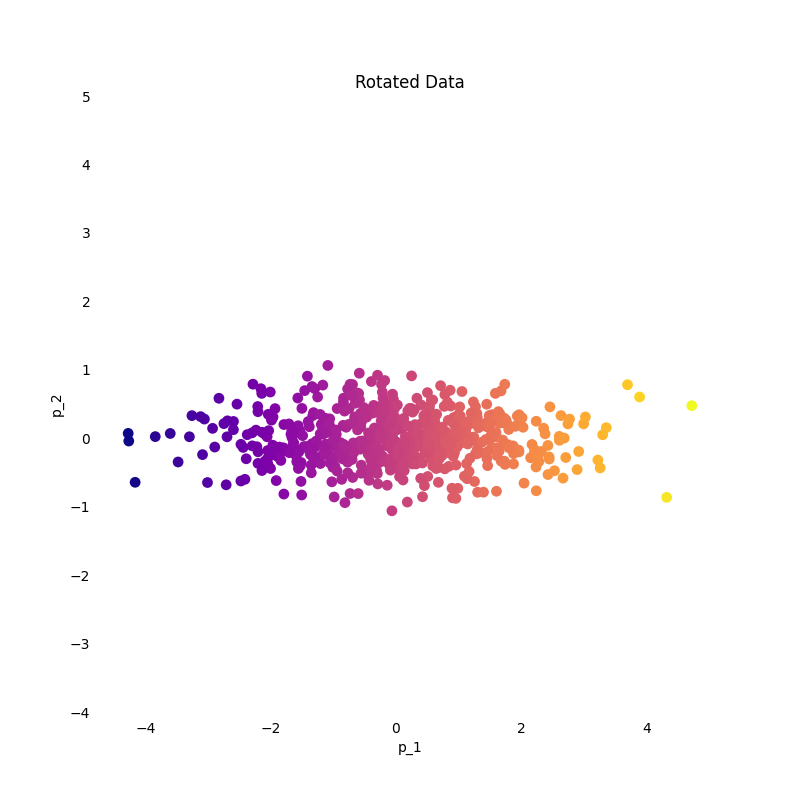 Image by the author.
As the component _p 2 doesn't add much information, we can project data only on component _p 1.
Image by the author.
As the component _p 2 doesn't add much information, we can project data only on component _p 1.
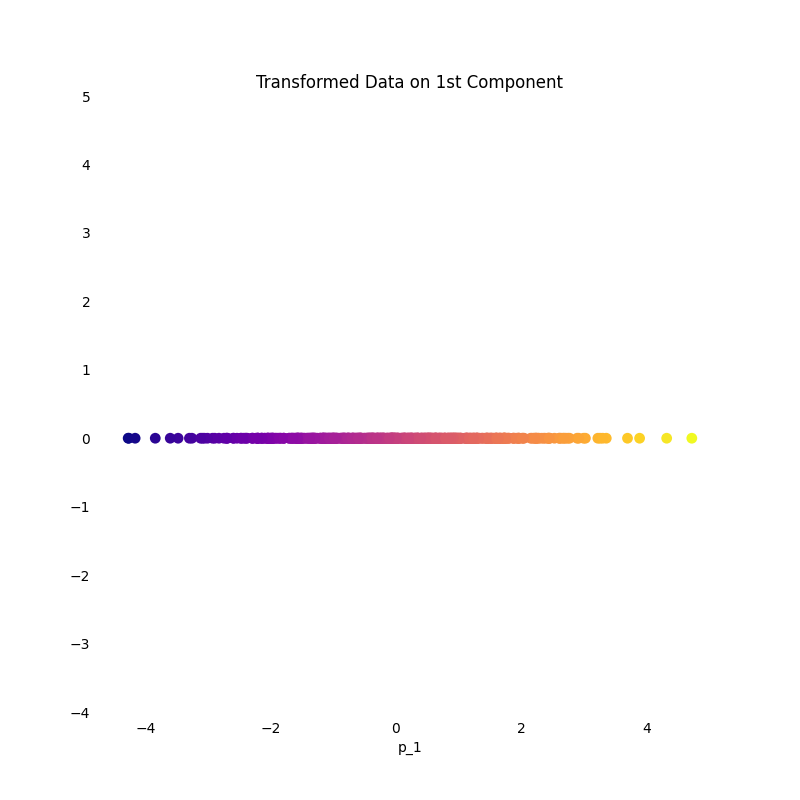 Image by the author.
This is, in essence, what projection does. Its effect is even clearer considering instead a 3D dataset.
Image by the author.
This is, in essence, what projection does. Its effect is even clearer considering instead a 3D dataset.
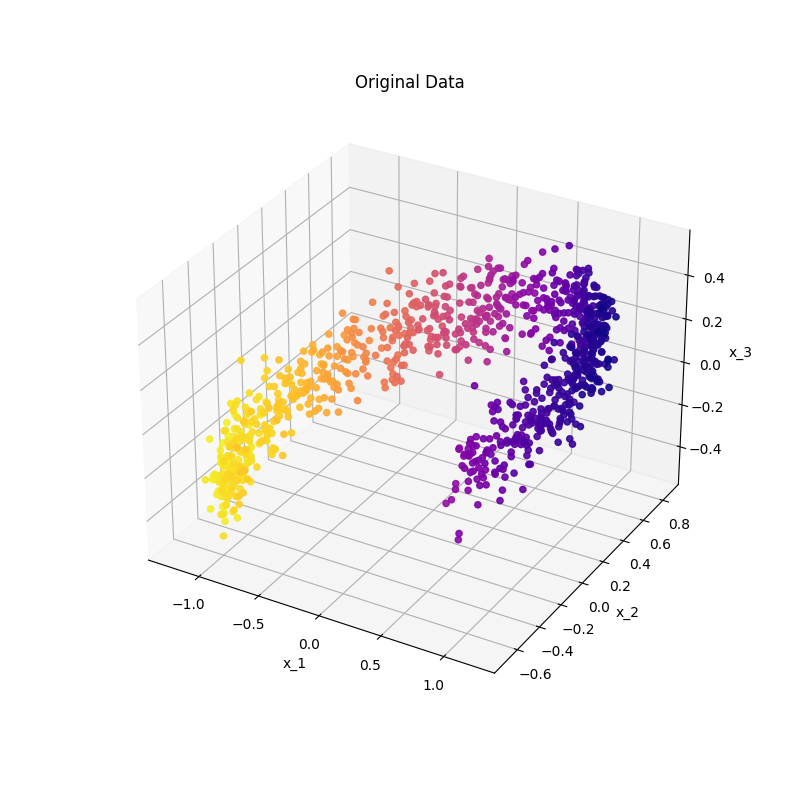 Image by the author.
We can project the original data onto a 2-dimensional plane, creating 2 new features _p 1 , _p 2 :
Image by the author.
We can project the original data onto a 2-dimensional plane, creating 2 new features _p 1 , _p 2 :
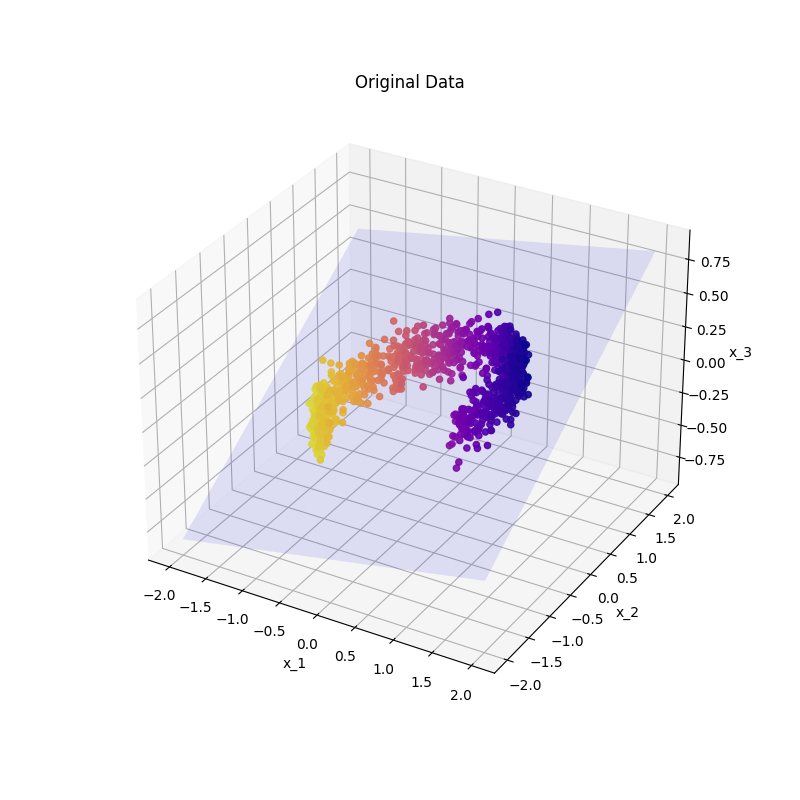 Image by the author.
As there is no free meal in Machine Learning , projection is not always suited for every type of dataset. If the data, in the original feature space, belong to a plane that turns or twists , no projection operation can preserve the original information in a lower-dimensional space.
Consider for example the Swiss Roll dataset:
Image by the author.
As there is no free meal in Machine Learning , projection is not always suited for every type of dataset. If the data, in the original feature space, belong to a plane that turns or twists , no projection operation can preserve the original information in a lower-dimensional space.
Consider for example the Swiss Roll dataset:
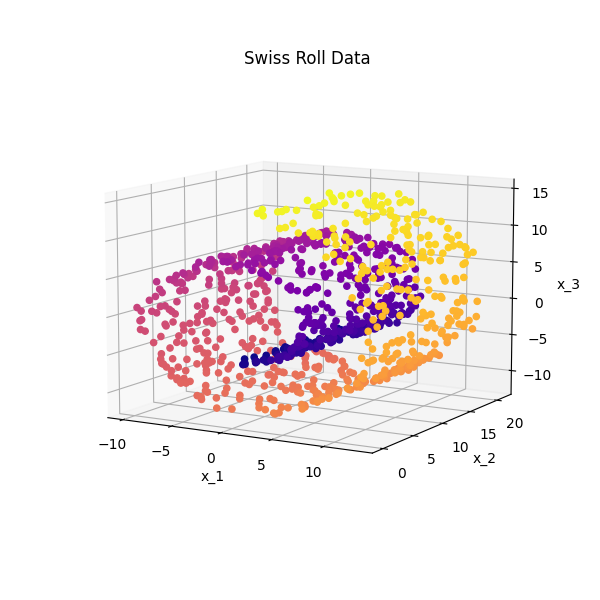 Image by the author.
It consists of a 2D plane rolled over itself. In this case, we can't effectively project the data on a plane without losing a considerable portion of the original information.
To avoid this amount of information loss, we will see a different method later, which aims at "unrolling" the data.
Image by the author.
It consists of a 2D plane rolled over itself. In this case, we can't effectively project the data on a plane without losing a considerable portion of the original information.
To avoid this amount of information loss, we will see a different method later, which aims at "unrolling" the data.
Principal Components
As I anticipated, PCA consists of projecting the data onto a lower-dimensional hyperplane. In order to preserve as much information as possible, PCA doesn't project the data on any random hyperplane. Instead, PCA selects the hyperplane on which data projection has the maximum variance.
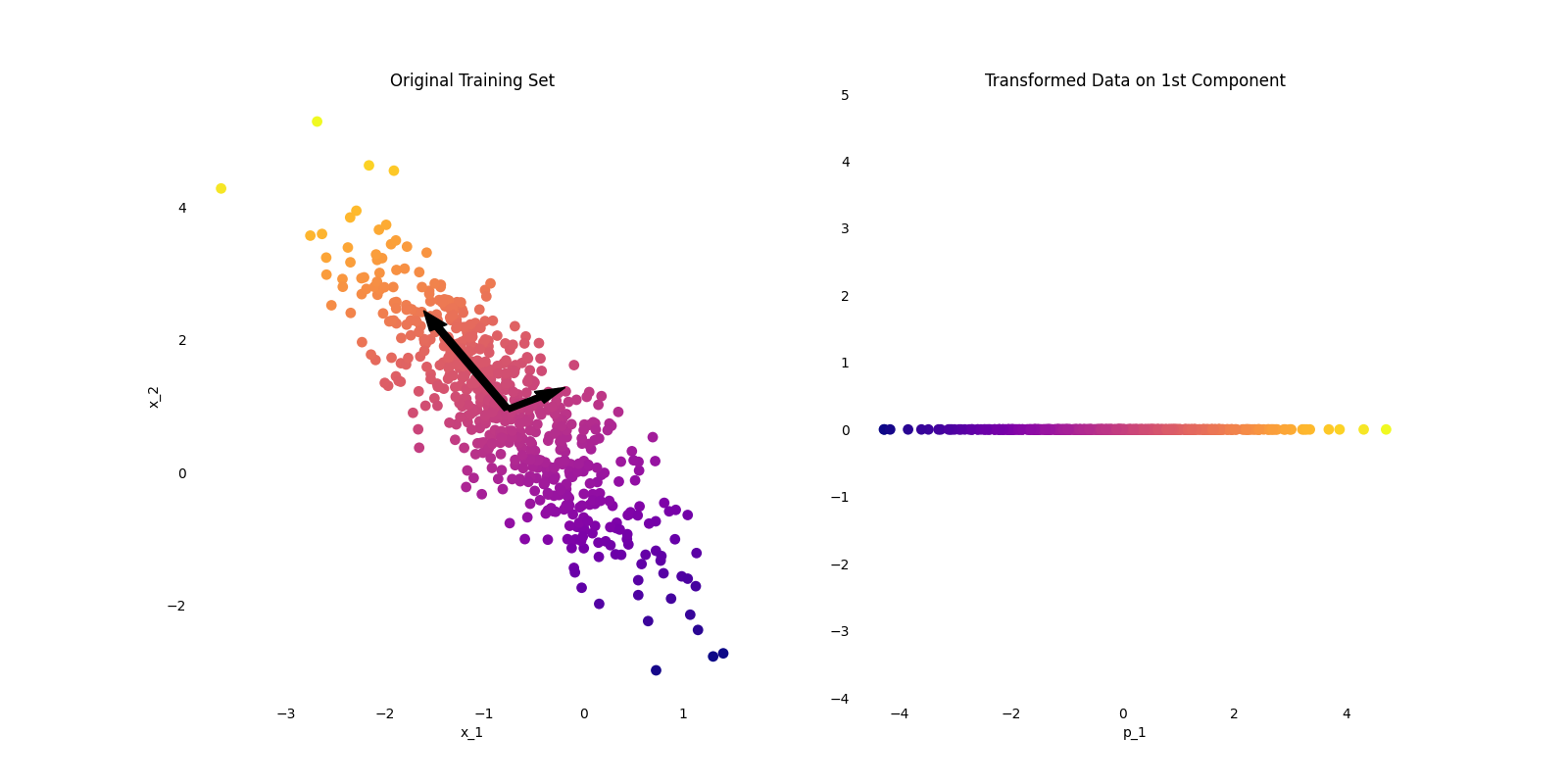 Image by the author.
It is easy to understand why if we consider again a 2D example.
PCA then considers all the axes orthogonal to the one of maximum variance and selects, between them, the one with the remaining larger variance.
This process iterates as many times as the number of dimensions in the original dataset. Each identified axis is called Principal Component of the dataset.
The question now is how to mathematically compute the Principal Components. Fortunately, linear algebra provides us with the Singular Value Decomposition technique, through which we can decompose the original training set X into the matrix multiplication of 3 new matrices:
Image by the author.
It is easy to understand why if we consider again a 2D example.
PCA then considers all the axes orthogonal to the one of maximum variance and selects, between them, the one with the remaining larger variance.
This process iterates as many times as the number of dimensions in the original dataset. Each identified axis is called Principal Component of the dataset.
The question now is how to mathematically compute the Principal Components. Fortunately, linear algebra provides us with the Singular Value Decomposition technique, through which we can decompose the original training set X into the matrix multiplication of 3 new matrices:
 The columns of the V matrix contain the direction of all the Principal Components previously identified.
 While it is easy to implement SVD with the Numpy Python library, it is even more effortless to implement PCA with the Scikit-learn (sklearn) module.
In Scikit-learn (sklearn) I first need to create a
While it is easy to implement SVD with the Numpy Python library, it is even more effortless to implement PCA with the Scikit-learn (sklearn) module.
In Scikit-learn (sklearn) I first need to create a PCA() object, and later fit it on the data and transform them:
python
from sklearn.decomposition import PCA
from sklearn.datasets import make_swiss_roll

# Create synthetic data
X, t = make_swiss_roll(n_samples=1000, noise=0.2, random_state=42)

# Instantiate a PCA object
pca = PCA(n_components=1)

# Fit the PCA object on the data
pca.fit(X)

# Transform the data
X_transformed = pca.transform(X)

print('Original data shape: ', X.shape)
print('Transformed data shape: ', X_transformed.shape)
 As we can see from the output, we reduced the original dataset dimension from 3 down to 1 dimension. This happened because we specified
 n_components=1 while instantiating the PCA() object.
Unless we are performing Dimensionality Reduction for data visualization , we might not know which is the best number of dimensions of the transformed training set.
Selecting the right number of dimensions to reduce the training set down to is a big deal in Dimensionality Reduction. If the original feature space is narrow, we might try a manual iterative approach, However, in most real-world cases, the feature space is huge and we need a more robust and automized approach.
In order to introduce said approach, I first need to define the Explained Variance Ratio (EVR). In simple terms, the EVR is defined as the percentage of the variance of the original dataset which lies along each Principal Component.
As Scikit-learn offers an intuitive explained_variance_ratio_attribute, we can apply this concept to the previous example:
python
from sklearn.decomposition import PCA
from sklearn.datasets import make_swiss_roll

# Create synthetic data
X, t = make_swiss_roll(n_samples=1000, noise=0.2, random_state=42)

# Instantiate a PCA object
pca = PCA(n_components=1)

# Fit the PCA object on the data
pca.fit(X)

# Calculate the EVA of each PC
eva = pca.explained_variance_ratio_

print(eva)
The variance associated with the 1st principal component is about 40%. This tells us that, by reducing the original training set dimension down to just 1 feature, we are losing about 60% of the variance.
The most straightforward approach for choosing the number of dimension of the reduced dataset is the following: use as many Principal Components as needed until the cumulative explained variance ratio reaches a given threshold.
While this approach may still appear obscure, an example will immediately clarify it. In this example, I will apply PCA on a synthetically generated dataset.
python
# Generate the dataset
num_instances = 10000
num_features = 784
X = np.random.rand(num_instances, num_features)

# Instantiate and train a PCA object
pca = PCA()
pca.fit(X)

# Compute the explained variance ratio
eva = pca.explained_variance_ratio_

print(np.round(eva, decimals=4)
By printing the Explained Variance Ratio of the trained PCA, we see that the first Principale Component "explains" 9.75% of the variance of the original dataset, the second Principal Component is responsible for the 7.16% of the variance, and so on. After a while, the following components' explanation of the original dataset's variance becomes negligible.
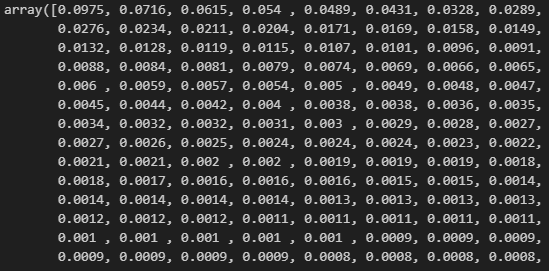 It's common practice to pick the Principal Components whose cumulative EVA values add up to 95% of the original dataset's variance:
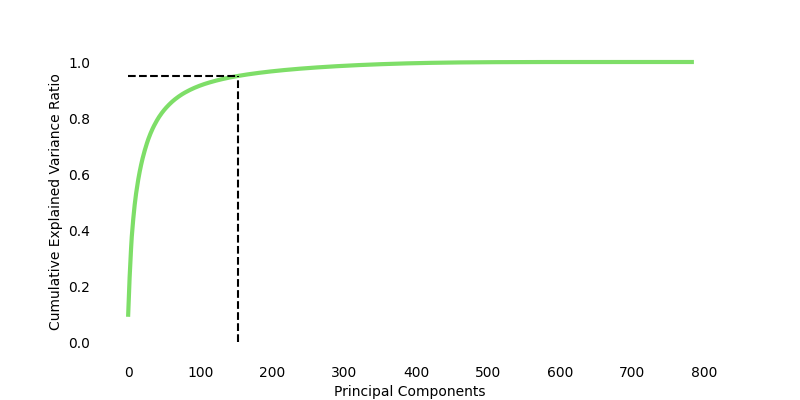 Image by the author.
For the synthetic dataset, we have that 153 Principal Components are able to explain 95% of the original variance. This means that, given the 784 original features, we can safely drop 631 dimensions. In other words, we can reduce by 80% the dimension of the original training set with a cost of only 5% of lost variance.
Scikit-learn (sklearn) allows us to specify the cumulative EVA threshold we want to reach, instead of the number of Principal Components to consider:
python
Image by the author.
For the synthetic dataset, we have that 153 Principal Components are able to explain 95% of the original variance. This means that, given the 784 original features, we can safely drop 631 dimensions. In other words, we can reduce by 80% the dimension of the original training set with a cost of only 5% of lost variance.
Scikit-learn (sklearn) allows us to specify the cumulative EVA threshold we want to reach, instead of the number of Principal Components to consider:
python
pca = PCA(n_components=.95)
pca.fit(X)
X_transformed = pca.transform(X)

print(X_transformed.shape)
 In this case, we automatically get a reduced dataset made of 153 new features.
You can find all the code displayed in this post (and more) on this GitHub repository:
In this case, we automatically get a reduced dataset made of 153 new features.
You can find all the code displayed in this post (and more) on this GitHub repository:
articles/dimensionality-reduction at main · andreoniriccardo/articles
Conclusion
In this post, we explored the theory of this powerful, and yet simple, unsupervised model. We also understood how easy it is to implement it in Python through the Scikit-Learn library.
Understanding PCA's impact on Machine Learning is essential as its applications span several industries.
I conclude this introductory guide by delineating the pros and cons of the PCA model.
The main strength of PCA is its efficiency at reducing the number of dimensions while retaining essential information , lowering computation efforts, and boosting the model's performance. It is also worth noticing that PCA decorrelates the features , meaning that the resulting Principal Components are statistically uncorrelated.
By focusing only on the most relevant features, PCA is also able to reduce the noise in the original training set.
However, as I mentioned earlier, PCA is not suited for every task. In some cases, like the Swiss Roll example, PCA is unable to fully capture the data structure. Applying PCA means transforming the original features into Principal Components, and consequently losing the interpretability of them.
Given these limitations, in my next post, I will deal with more complex Dimensionality Reduction algorithms like Kernel PCA and LLE.
As I reach the end of this guide, I need to point out that, despite having touched all the most relevant aspects of PCA, its field extends far beyond the insight provided here. For this reason, I recommend digging into the resources and references linked to this article and I encourage you to experiment with PCA on your own datasets. Your hands-on exploration will deepen your understanding, leading to valuable insights.
If you liked this story, consider following me to be notified of my upcoming projects and articles!
Here are some of my past projects:
Outlier Detection with Scikit-Learn and Matplotlib: a Practical Guide
Social Network Analysis with NetworkX: A Gentle Introduction
References
Register Now to Continue Reading
Unlock Towards Data Science with a Free Account
All articles on Towards Data Science are available to registered users. Create a free account today to access this article and thousands more.
Register for freeSign in to your account
 Written By
See all from Riccardo Andreoni
Data ScienceDimensionality ReductionMachine LearningPrincipal ComponentPython
Share This Article
Towards Data Science is a community publication. Submit your insights to reach our global audience and earn through the TDS Author Payment Program.
Write for TDS
Related Articles
Coding
The 10 things you need to know, with code templates in Python and R
Kendon Darlington
August 23, 20215 min read
Data Science
Discover the Tools for Data-Driven Decision Making Applied to Supply Chain Optimization.
Samir Saci
August 4, 202310 min read
Machine Learning
Scaling advanced object detection to arbitrarily large satellite imagery
Adam Van Etten
April 27, 20213 min read
Coding
Unanticipated aspects of working in the tech industry from a bootcamp graduate In this article,...
Jesse Ruiz (she/they)
April 26, 20217 min read
Machine Learning
Cross-validation is the first technique to use to avoid overfitting and data leakage when we want to train a predictive model on our data.
Andrea D'Agostino
December 19, 20224 min read
Web Development
Which path is the ❝optimal route❞? Mobile responsive map layout. Full source code included.
Charmaine Chui
August 3, 20224 min read
Artificial Intelligence
A simple, fun, and useful Python Project developed to improve your productivity for the Upcoming New Year!
Bharath K
December 29, 20208 min read
Machine Learning
Practical Tips for Getting the Most Out of torch.compile
Chaim Rand
August 18, 202526 min read
Data Science
With Visualizations and Simulated Data
Brayton Hall
September 12, 20207 min read
Your home for data science and AI. The world's leading publication for data science, data analytics, data engineering, machine learning, and artificial intelligence professionals.
Subscribe to Our NewsletterWrite For TDS•About•Advertise•Privacy Policy•Terms of Use
© Insight Media Group, LLC 2026•The New Stack•roadmap.sh•Creator Network
Recommended Articles
Close