保留正文与补采附件。源页面当前未重新核验;具体限制见交付清单。
 We value your privacy
We use cookies to enhance your browsing experience, serve personalised ads or content, and analyse our traffic. By clicking "Accept All", you consent to our use of cookies.
Customise Reject All Accept All
Customise Consent Preferences
We value your privacy
We use cookies to enhance your browsing experience, serve personalised ads or content, and analyse our traffic. By clicking "Accept All", you consent to our use of cookies.
Customise Reject All Accept All
Customise Consent Preferences  We use cookies to help you navigate efficiently and perform certain functions. You will find detailed information about all cookies under each consent category below.
The cookies that are categorised as "Necessary" are stored on your browser as they are essential for enabling the basic functionalities of the site. ... Show more
NecessaryAlways Active
Necessary cookies are required to enable the basic features of this site, such as providing secure log-in or adjusting your consent preferences. These cookies do not store any personally identifiable data.
We use cookies to help you navigate efficiently and perform certain functions. You will find detailed information about all cookies under each consent category below.
The cookies that are categorised as "Necessary" are stored on your browser as they are essential for enabling the basic functionalities of the site. ... Show more
NecessaryAlways Active
Necessary cookies are required to enable the basic features of this site, such as providing secure log-in or adjusting your consent preferences. These cookies do not store any personally identifiable data.
-
Cookie
BCTempID
-
Duration
10 minutes
-
Description
No description available.
-
Cookie
__cf_bm
-
Duration
1 hour
-
Description
This cookie, set by Cloudflare, is used to support Cloudflare Bot Management.
-
Cookie
AWSALBCORS
-
Duration
7 days
-
Description
Amazon Web Services set this cookie for load balancing.
-
Cookie
_cfuvid
-
Duration
session
-
Description
Cloudflare sets this cookie to track users across sessions to optimize user experience by maintaining session consistency and providing personalized services
-
Cookie
li_gc
-
Duration
6 months
-
Description
Linkedin set this cookie for storing visitor's consent regarding using cookies for non-essential purposes.
-
Cookie
__hssrc
-
Duration
session
-
Description
This cookie is set by Hubspot whenever it changes the session cookie. The __hssrc cookie set to 1 indicates that the user has restarted the browser, and if the cookie does not exist, it is assumed to be a new session.
-
Cookie
__hssc
-
Duration
1 hour
-
Description
HubSpot sets this cookie to keep track of sessions and to determine if HubSpot should increment the session number and timestamps in the __hstc cookie.
-
Cookie
wpEmojiSettingsSupports
-
Duration
session
-
Description
WordPress sets this cookie when a user interacts with emojis on a WordPress site. It helps determine if the user's browser can display emojis properly.
-
Cookie
BCSessionID
-
Duration
1 year 1 month 4 days
-
Description
Blueconic sets this cookie as a unique identifier for the BlueConic profile.
-
Cookie
_octo
-
Duration
1 year
-
Description
No description available.
-
Cookie
logged_in
-
Duration
1 year
-
Description
No description available.
-
Cookie
__Secure-YEC
-
Duration
past
-
Description
YouTube sets this cookie to stores the user's video player preferences using embedded YouTube video
-
Cookie
__eoi
-
Duration
6 months
-
Description
Description is currently not available.
-
Cookie
AWSALBTGCORS
-
Duration
7 days
-
Description
No description available.
-
Cookie
login-status-p
-
Duration
past
-
Description
Description is currently not available.
-
Cookie
AWSALBTG
-
Duration
7 days
-
Description
No description available.
-
Cookie
csrf_token
-
Duration
session
-
Description
No description available.
-
Cookie
token_v2
-
Duration
1 day
-
Description
Description is currently not available.
-
Cookie
D
-
Duration
1 year
-
Description
Description is currently not available.
-
Cookie
PHPSESSID
-
Duration
session
-
Description
This cookie is native to PHP applications. The cookie stores and identifies a user's unique session ID to manage user sessions on the website. The cookie is a session cookie and will be deleted when all the browser windows are closed.
-
Cookie
VISITOR_PRIVACY_METADATA
-
Duration
6 months
-
Description
YouTube sets this cookie to store the user's cookie consent state for the current domain.
-
Cookie
cookietest
-
Duration
session
-
Description
The cookietest cookie is typically used to determine whether the user's browser accepts cookies, essential for website functionality and user experience.
-
Cookie
__Host-airtable-session
-
Duration
1 year
-
Description
This cookie is used to enable us to integrate the services of Airtable.
-
Cookie
__Host-airtable-session.sig
-
Duration
1 year
-
Description
This cookie is used to enable us to integrate the services of Airtable.
-
Cookie
m
-
Duration
1 year 1 month 4 days
-
Description
Stripe sets this cookie for fraud prevention purposes. It identifies the device used to access the website, allowing the website to be formatted accordingly.
-
Cookie
BIGipServer*
-
Duration
session
-
Description
Marketo sets this cookie to collect information about the user's online activity and build a profile about their interests to provide advertisements relevant to the user.
-
Cookie
__cfruid
-
Duration
session
-
Description
Cloudflare sets this cookie to identify trusted web traffic.
-
Cookie
_GRECAPTCHA
-
Duration
6 months
-
Description
Google Recaptcha service sets this cookie to identify bots to protect the website against malicious spam attacks.
-
Cookie
__Secure-YNID
-
Duration
6 months
-
Description
Google cookie used to protect user security and prevent fraud, especially during the login process.
-
Cookie
cookieyes-consent
-
Duration
1 year
-
Description
CookieYes sets this cookie to remember users' consent preferences so that their preferences are respected on subsequent visits to this site. It does not collect or store any personal information about the site visitors.
Functional
Functional cookies help perform certain functionalities like sharing the content of the website on social media platforms, collecting feedback, and other third-party features.
-
Cookie
lidc
-
Duration
1 day
-
Description
LinkedIn sets the lidc cookie to facilitate data center selection.
-
Cookie
brw
-
Duration
1 year
-
Description
No description available.
-
Cookie
brwConsent
-
Duration
5 minutes
-
Description
Description is currently not available.
-
Cookie
WMF-Uniq
-
Duration
1 year
-
Description
Description is currently not available.
-
Cookie
loom_anon_comment
-
Duration
1 year
-
Description
No description available.
-
Cookie
loom_referral_video
-
Duration
session
-
Description
Description is currently not available.
-
Cookie
VISITOR_INFO1_LIVE
-
Duration
6 months
-
Description
A cookie set by YouTube to measure bandwidth that determines whether the user gets the new or old player interface.
-
Cookie
yt-remote-connected-devices
-
Duration
Never Expires
-
Description
YouTube sets this cookie to store the user's video preferences using embedded YouTube videos.
-
Cookie
ytidb::LAST_RESULT_ENTRY_KEY
-
Duration
Never Expires
-
Description
The cookie ytidb::LAST_RESULT_ENTRY_KEY is used by YouTube to store the last search result entry that was clicked by the user. This information is used to improve the user experience by providing more relevant search results in the future.
-
Cookie
yt-remote-device-id
-
Duration
Never Expires
-
Description
YouTube sets this cookie to store the user's video preferences using embedded YouTube videos.
-
Cookie
yt-remote-session-name
-
Duration
session
-
Description
The yt-remote-session-name cookie is used by YouTube to store the user's video player preferences using embedded YouTube video.
-
Cookie
yt-remote-fast-check-period
-
Duration
session
-
Description
The yt-remote-fast-check-period cookie is used by YouTube to store the user's video player preferences for embedded YouTube videos.
-
Cookie
yt-remote-session-app
-
Duration
session
-
Description
The yt-remote-session-app cookie is used by YouTube to store user preferences and information about the interface of the embedded YouTube video player.
-
Cookie
yt-remote-cast-available
-
Duration
session
-
Description
The yt-remote-cast-available cookie is used to store the user's preferences regarding whether casting is available on their YouTube video player.
-
Cookie
yt-remote-cast-installed
-
Duration
session
-
Description
The yt-remote-cast-installed cookie is used to store the user's video player preferences using embedded YouTube video.
-
Cookie
cp_session
-
Duration
3 months
-
Description
Codepen sets this cookie for Help systems found in the website.
-
Cookie
loid
-
Duration
1 year 1 month 4 days
-
Description
This cookie is set by the Reddit. The cookie enables the sharing of content from the website onto the social media platform.
Analytics
Analytical cookies are used to understand how visitors interact with the website. These cookies help provide information on metrics such as the number of visitors, bounce rate, traffic source, etc.
-
Cookie
__hstc
-
Duration
6 months
-
Description
Hubspot set this main cookie for tracking visitors. It contains the domain, initial timestamp (first visit), last timestamp (last visit), current timestamp (this visit), and session number (increments for each subsequent session).
-
Cookie
hubspotutk
-
Duration
6 months
-
Description
HubSpot sets this cookie to keep track of the visitors to the website. This cookie is passed to HubSpot on form submission and used when deduplicating contacts.
-
Cookie
_ga
-
Duration
1 year 1 month 4 days
-
Description
Google Analytics sets this cookie to calculate visitor, session and campaign data and track site usage for the site's analytics report. The cookie stores information anonymously and assigns a randomly generated number to recognise unique visitors.
-
Cookie
ga*
-
Duration
1 year 1 month 4 days
-
Description
Google Analytics sets this cookie to store and count page views.
-
Cookie
__Host-psifi.analyticsTrace
-
Duration
6 hours
-
Description
Description is currently not available.
-
Cookie
__Host-psifi.analyticsTraceV2
-
Duration
6 hours
-
Description
Description is currently not available.
-
Cookie
_gh_sess
-
Duration
session
-
Description
GitHub sets this cookie for temporary application and framework state between pages like what step the user is on in a multiple step form.
-
Cookie
YSC
-
Duration
session
-
Description
YSC cookie is set by Youtube and is used to track the views of embedded videos on Youtube pages.
-
Cookie
ajs_anonymous_id
-
Duration
1 year
-
Description
This cookie is set by Segment to count the number of people who visit a certain site by tracking if they have visited before.
-
Cookie
vuid
-
Duration
1 year 1 month 4 days
-
Description
Vimeo installs this cookie to collect tracking information by setting a unique ID to embed videos on the website.
Performance
Performance cookies are used to understand and analyse the key performance indexes of the website which helps in delivering a better user experience for the visitors.
-
Cookie
AWSALB
-
Duration
7 days
-
Description
AWSALB is an application load balancer cookie set by Amazon Web Services to map the session to the target.
-
Cookie
acq
-
Duration
past
-
Description
Description is currently not available.
-
Cookie
acq.sig
-
Duration
past
-
Description
Description is currently not available.
-
Cookie
ptc
-
Duration
2 years
-
Description
No description available.
Advertisement
Advertisement cookies are used to provide visitors with customised advertisements based on the pages you visited previously and to analyse the effectiveness of the ad campaigns.
-
Cookie
muc_ads
-
Duration
1 year 1 month 4 days
-
Description
Twitter sets this cookie to collect user behaviour and interaction data to optimize the website.
-
Cookie
guest_id_marketing
-
Duration
1 year 1 month 4 days
-
Description
Twitter sets this cookie to identify and track the website visitor.
-
Cookie
guest_id_ads
-
Duration
1 year 1 month 4 days
-
Description
Twitter sets this cookie to identify and track the website visitor.
-
Cookie
personalization_id
-
Duration
1 year 1 month 4 days
-
Description
Twitter sets this cookie to integrate and share features for social media and also store information about how the user uses the website, for tracking and targeting.
-
Cookie
guest_id
-
Duration
1 year 1 month 4 days
-
Description
Twitter sets this cookie to identify and track the website visitor. It registers if a user is signed in to the Twitter platform and collects information about ad preferences.
-
Cookie
bcookie
-
Duration
1 year
-
Description
LinkedIn sets this cookie from LinkedIn share buttons and ad tags to recognize browser IDs.
-
Cookie
__Secure-ROLLOUT_TOKEN
-
Duration
6 months
-
Description
YouTube sets this cookie to manage feature rollout and experimentation. It helps Google control which new features or interface changes are shown to users as part of testing and staged rollouts, ensuring consistent experience for a given user during an experiment.
-
Cookie
yt.innertube::nextId
-
Duration
Never Expires
-
Description
YouTube sets this cookie to register a unique ID to store data on what videos from YouTube the user has seen.
-
Cookie
yt.innertube::requests
-
Duration
Never Expires
-
Description
YouTube sets this cookie to register a unique ID to store data on what videos from YouTube the user has seen.
-
Cookie
session_tracker
-
Duration
session
-
Description
This cookie is set by the Reddit. This cookie is used to identify trusted web traffic. It also helps in adverstising on the website.
-
Cookie
edgebucket
-
Duration
session
-
Description
Reddit sets this cookie to save the information about a log-on Reddit user, for the purpose of advertisement recommendations and updating the content.
-
Cookie
did
-
Duration
1 year
-
Description
Arbor sets this cookie to show targeted ads to site visitors.This cookie expires after 2 months or 1 year.
Uncategorised
Other uncategorised cookies are those that are being analysed and have not been classified into a category as yet.
No cookies to display.
Reject All Save My Preferences Accept All
Toggle SearchToggle Mobile Navigation
Publish AI, ML & data-science insights to a global community of data professionals.
Sign inSubmit an Article
LatestEditor's PicksNewsletterShipAI
Write For TDS
LinkedInXToggle Search
Artificial Intelligence
Capturing and Deploying PyTorch Models with torch.export
A demonstration of PyTorch’s exciting new export feature on a HuggingFace model
Chaim Rand
August 19, 202515 min read
 Photo by Alferio Njau on Unsplash
When we think of starting a new AI/ML model project, most of our attention tends to focus on the big problems, such as: creating and curating datasets, designing the best ML architecture, acquiring appropriately large GPU clusters for training, and building an inference solution that meets target quality-of-service (QOS) requirements. However, it’s often the small details that become our Achilles’ heel , leading to unanticipated bugs and significant production delays.
One detail that’s often overlooked is the handoff of a trained model to the inference environment. While this handoff may seem trivial, it can easily become the source of a great deal of frustration. The training and inference environments are rarely identical, with differences varying from runtime libraries to hardware targets. To navigate these differences, the AI/ML model developer must ensure:
Photo by Alferio Njau on Unsplash
When we think of starting a new AI/ML model project, most of our attention tends to focus on the big problems, such as: creating and curating datasets, designing the best ML architecture, acquiring appropriately large GPU clusters for training, and building an inference solution that meets target quality-of-service (QOS) requirements. However, it’s often the small details that become our Achilles’ heel , leading to unanticipated bugs and significant production delays.
One detail that’s often overlooked is the handoff of a trained model to the inference environment. While this handoff may seem trivial, it can easily become the source of a great deal of frustration. The training and inference environments are rarely identical, with differences varying from runtime libraries to hardware targets. To navigate these differences, the AI/ML model developer must ensure:
- that the model definition, along with its trained weights, is loaded properly into the inference environment, and
- that the model’s behavior does not change.
This post will focus on the first challenge — reliable restoration of the model definition and state in an inference environment. We will survey some of the legacy options and their shortcomings. We will then introduce the new torch.export API and demonstrate it in action on a toy model built with HuggingFace’s transformers library (version 4.54.0). For our experiments, we will use an Amazon EC2 g5.xlarge instance (containing an NVIDIA A10G GPU and 4 vCPUs) running a PyTorch (2.7) Deep Learning AMI (DLAMI).
One of the technologies underlying torch.export is Torch Dynamo, a key component of PyTorch’s graph compilation solution, torch.compile. In a recent post we demonstrated the power of torch.compile and its importance in optimizing the runtime performance of AI/ML models. In some ways this post can be viewed as a sequel: we will revisit some of the key concepts — particularly graph-breaks, we will reuse the same toy model, and we will demonstrate the use of torch.compile for just-in-time (JIT) compilation in our inference environment. While we recommend reading the previous post, it is not a prerequisite for this one.
Learn this step by step with the interactive AI Engineer roadmap.
Disclaimers:
As of the time of this writing (PyTorch 2.8.0), torch.export is a “prototype” feature. While the behaviors discussed in this post are likely to mostly remain, the API definitions could change. Be sure to align your use of torch.export to the latest API versions.
This post will cover only a subset of torch.export’s features and behaviors. It should not be viewed as an alternative to the official PyTorch documentation. There are a number of pages covering the export feature, including an introductory tutorial, an overview of the programming model, and a guide to solving export challenges.
While we will demonstrate its functionality on a toy example, torch.export depends heavily on the model’s details and may exhibit very different behavior in your own project.
The code we will share is for demonstration purposes only and should not be relied on for correctness or optimality. Please do not interpret our choice of platform, framework, or any other tool or library as an endorsement for its use.
A Toy HuggingFace Model
To facilitate our discussion, we define a simple image-to-text generative model using the HuggingFace transformers library. For simplicity, we skip the training phase and assume that the default constructor returns a pretrained model.
python
import torch

NUM_TOKENS = 1024
MAX_SEQ_LEN = 256
PAD_ID = 0
START_ID = 1
END_ID = 2

# Set up an image-to-text model.
def get_model():

    # import transformers utilities
    from transformers import (
        VisionEncoderDecoderModel,
        VisionEncoderDecoderConfig,
        AutoConfig
    )

    config = VisionEncoderDecoderConfig.from_encoder_decoder_configs(
        encoder_config=AutoConfig.for_model("vit"),  # vit encoder
        decoder_config=AutoConfig.for_model("gpt2")  # gpt2 decoder
    )
    config.decoder.vocab_size = NUM_TOKENS
    config.decoder.use_cache = False
    config.decoder_start_token_id = START_ID
    config.pad_token_id = PAD_ID
    config.eos_token_id = END_ID
    config.max_length = MAX_SEQ_LEN

    model = VisionEncoderDecoderModel(config=config)
    model.encoder.pooler = None  # remove unused pooler
    model.eval() # prepare the model for evaluation
    return model
We define an auto-regressive image-to-text generator that uses the encoder and decoder components of the model to produce a caption for the input image. For simplicity, we use a basic implementation, leaving out common optimization techniques, such as KV caching.
python
# generate the next token
def generate_token(decoder, encoder_hidden_states, sequence):
    outputs = decoder(
        sequence,
        encoder_hidden_states
    )
    logits = outputs[0][:, -1, :]
    return torch.argmax(logits, dim=-1, keepdim=True)

# simple auto-regressive sequence generator
def image_to_text_generator(encoder, decoder, image):
    # run encoder
    encoder_hidden_states = encoder(image)[0]

    # initialize sequence
    generated_ids = torch.ones(
        (image.shape[0], 1),
        dtype=torch.long,
        device=image.device
    ) * START_ID

    for _ in range(MAX_SEQ_LEN):
        # generate next token
        next_token = generate_token(
            decoder,
            encoder_hidden_states,
            generated_ids
        )
        generated_ids = torch.cat([generated_ids, next_token], dim=-1)
        if (next_token == END_ID).all():
            break

    return generated_ids
The following code block demonstrates the use of our generator on a batch of random input images.
python
import os, time, random, torch

torch.manual_seed(42)
random.seed(42)

BATCH_SIZE = 64
EXPORT_PATH = '/tmp/export/'

def test_inference(model_path=EXPORT_PATH, mode=None, compile=False):
    device = 'cuda' if torch.cuda.is_available() else 'cpu'
    rnd_image = torch.randn(BATCH_SIZE, 3, 224, 224).to(device)
    encoder, decoder = load_model(model_path, mode)
    encoder = encoder.to(device)
    decoder = decoder.to(device)

    if compile:
        encoder = torch.compile(encoder, mode="reduce-overhead")
        decoder = torch.compile(decoder, dynamic=True)
        # run a few warmup rounds
        for i in range(10):
            image_to_text_generator(encoder, decoder, random_image)

    t0 = time.perf_counter()

    # optionally enable mixed precision
    with torch.amp.autocast(device, dtype=torch.bfloat16, enabled=True):
        with torch.no_grad():
            caption = image_to_text_generator(encoder, decoder, rnd_image)

    total_time = time.perf_counter() - t0
    print(f'batched inference total time: {total_time}')
The encoder and decoder models are loaded via a load_model utility. We define an initial implementation and amend it later based on our choice of model capturing strategy.
To prepare our model for the export process, we define a pass-through wrapper class for the decoder. This wrapper ensures the model can be traced using positional (rather than keyword) arguments, which is a current requirement of torch.export.
python
class DecoderWrapper(torch.nn.Module):
    def __init__(self, decoder_model):
        super().__init__()
        self.decoder = decoder_model

    def forward(self, input_ids, encoder_hidden_states):
        return self.decoder(
            input_ids=input_ids,
            encoder_hidden_states=encoder_hidden_states,
            use_cache=False,
            output_attentions=False,
            output_hidden_states=False,
            return_dict=False
        )

def load_model(path=EXPORT_PATH, mode=None):
    model = get_model()
    encoder = model.encoder
    decoder = model.decoder
    return encoder, DecoderWrapper(decoder)
Now that we have defined our toy model, let’s explore different strategies for capturing and deploying it to an inference environment.
Model Capturing and Deployment Strategies
In this section, we’ll review two common methods for capturing and deploying an AI/ML model’s state: weights-only capture and conversion to a serializable intermediate graph-representation using TorchScript.
Weights Only Capture
The first option is to use torch.save to capture only the model weights, not the model definition. This requires you to explicitly redefine the PyTorch model in the inference environment. There are several ways to carryg over the code definition including: copy-pasting (which is very error-prone), pulling from a shared code repository, or using Python packages. If the model definition relies on specific Python package dependencies, you will need to make sure that those packages exist in the inference environment and that their versions match the training environment.
The following code block demonstrates capturing and loading the model weights for our toy model:
python
def capture_model(model, path=EXPORT_PATH):
    # weights only
    weights_path = os.path.join(EXPORT_PATH, "weights.pth")
    torch.save(model.state_dict(), weights_path)

def load_model(path=EXPORT_PATH, mode=None):
    if mode == 'weights':
        model = get_model()
        weights_path = os.path.join(path,"weights.pth")
        state_dict = torch.load(weights_path, map_location="cpu")
        model.load_state_dict(state_dict)
        return model.encoder, DecoderWrapper(model.decoder)
    else:
        model = get_model()
        return model.encoder, DecoderWrapper(model.decoder)
One advantage of this method is that it provides maximum flexibility for tuning the model’s configuration to the inference environment. For example, you can apply machine-specific optimizations that increase the throughput of the inference workload. This freedom is especially important for very large models that require advanced sharding techniques for model execution.
However, this method assumes you can easily design and configure the inference environment as desired — which cannot be taken for granted. Some inference environments are extremely constrained — with limited control over the runtime libraries and package installations.
The separation between the model definition and the model weights also can be the source of all sorts of ugly bugs. Ensuring appropriate alignment between the source code and the model weights requires disciplined version management. A preferred approach would be to bundle the model definition and weights into a single archive.
TorchScript Variants
For many years, the primary method for capturing a PyTorch model along with its weights was TorchScript. And despite its recent deprecation, it remains widely popular. TorchScript encapsulates two different capturing solutions, torch.jit.script and torch.jit.trace, both of which convert PyTorch models into serializable graph representations. This graph can be loaded into another environment and run as a standalone PyTorch program, with minimal runtime dependencies.
The scripting and tracing functionalities are complementary. Scripting performs ahead-of-time (AOT) static analysis of the source code, whereas tracing traces the actual execution of the model on a sample input. Scripting is able to capture more complexity in the graph, such as conditional control-flow and dynamic shapes. This is contrary to tracing that captures just the execution path and tensor shapes dictated by the input sample it runs on. On the other hand, torch.jit.trace supports more operations than torch.jit.script (e.g., see here). Often, scripting will succeed where tracing will fail and vice versa. Sometimes, some form of combination of both methods is required.
Let’s now attempt to convert our toy model to TorchScript. Since the sequence generator makes separate calls to the encoder (once) and the decoder (iteratively) separately, we’ll capture them as separate graphs. The encoder takes fixed-shape inputs and has no input-dependent conditional logic, so we can apply the more flexible tracing option. However, the sequence that we input to the decoder increases in size each time a token is generated, so we have no choice but to use the scripting option.
HuggingFace supports TorchScript via a dedicated configuration. See the HuggingFace documentation for more details.
python
config.decoder.torchscript = True
config.encoder.torchscript = True
In the code block below, we extend our capture and loading utilities with TorchScript support. Note the inclusion of the torch.jit.freeze optimization during capture and the use the torch.jit.optimize_for_inference optimization on the target device.
python
def capture_model(model, path=EXPORT_PATH):
    # weights only
    weights_path = os.path.join(EXPORT_PATH, "weights.pth")
    torch.save(model.state_dict(), weights_path)

    encoder = model.encoder
    decoder = DecoderWrapper(model.decoder)

    # torchscript encoder using trace
    example = torch.randn(1, 3, 224, 224)
    encoder_jit = torch.jit.trace(encoder, example)
    # optionally apply jit.freeze optimization
    encoder_jit = torch.jit.freeze(encoder_jit)
    encoder_path = os.path.join(path, "encoder.pt")
    torch.jit.save(encoder_jit, encoder_path)

    try:
        # torchscript decoder using scripting
        decoder_jit = torch.jit.script(decoder)
        # optionally apply jit.freeze optimization
        decoder_jit = torch.jit.freeze(decoder_jit)
        decoder_path = os.path.join(path, "decoder.pt")
        torch.jit.save(decoder_jit, decoder_path)
    except Exception as e:
        print(f'torch.jit.script(model.decoder) failed\n{e}')

def load_model(path=EXPORT_PATH, mode=None):
    if mode == 'weights':
        model = get_model()
        weights_path = os.path.join(path,"weights.pth")
        state_dict = torch.load(weights_path, map_location="cpu")
        model.load_state_dict(state_dict)
        return model.encoder, DecoderWrapper(model.decoder)
    elif mode == 'torchscript':
        encoder_path = os.path.join(path, "encoder.pt")
        decoder_path = os.path.join(path, "decoder.pt")
        encoder = torch.jit.load(encoder_path)
        decoder = torch.jit.load(decoder_path)
        # optionally apply target-device optimization
        encoder = torch.jit.optimize_for_inference(encoder)
        decoder = torch.jit.optimize_for_inference(decoder)
        return encoder, decoder
    else:
        model = get_model()
        return model.encoder, DecoderWrapper(model.decoder)
Unfortunately, our capture utility fails when trying to script the decoder model. A common problem with TorchScript is that it often fails on complex models. While many issues can be bypassed by using torch.jit.trace, it cannot be applied to models with dynamic shapes or conditional logic, such as our decoder. It is often possible to rewrite the model implementation to be script-compliant, but it can require a lot of painstaking (and ugly) work. In the case of our decoder model, it would require a lot of intrusive patchwork to the transformers library source code.
For more on the topic of TorchScript, please see the official documentation.
Model Capturing with torch.export
The new way of capturing a model for deployment is torch.export. Similar to torch.jit.trace, export works by tracing the model’s execution on input samples. However, unlike torch.jit.trace, export includes support for dynamism and conditional control flow. The output of the export utility is an intermediate graph representation called Export IR, which can be loaded and executed in a clean inference environment. One of the advantages of our exported model is that, contrary to TorchScript models, they can be optimized for the inference environment using torch.compile. On the other hand, optimizations that require source code changes (e.g., configuring the attn_implementation) cannot be applied.
Overcoming Graph Breaks
A graph break occurs when the export function encounters an “untraceable” portion of Python code (e.g., see here for unsupported operations). We encountered the concept of graph breaks in our previous post on graph compilation. However, contrary to model compilation where PyTorch will simply fall back to eager mode, torch.export forbids the presence of graph breaks. If export fails on your model due to a graph break, you will have to rewrite your code to bypass it.
There are several resources at your disposal for overcoming graph breaks, including the Draft Export utility, which generates a detailed report of export issues, ExportDB, which maintains a list of supported and unsupported export cases, and a tutorial on overcoming common export issues.
Debugging an Exported Graph
On some occasions, you may succeed in exporting a graph only to find that running it on the target device either fails with an error or returns incorrect output. A common cause of such errors is that some of the variables from the export environment are treated as constants and baked into the exported graph.
Unfortunately, (as of the time of this writing) the tools for debugging Export IR graphs are somewhat limited. Although the exported model is a torch.nn.Module with a forward function, you cannot use a debugger to step into it to find the source of the errors.
We can, however, inspect the contents of the generated graph using GraphModule.print_readable. This will print out all of the graph operations along with comments that point to the source code from which they were generated. Sometimes, this, combined with the output error information, is enough to find the source of the errors and tweak the source code accordingly. See below for an example.
Exporting a HuggingFace Model
To apply torch.export to our toy model, we first make sure to update the PyTorch library to the latest version (2.8.0 at the time of this writing). The export utility is under rapid development and we want to make sure to get the most up-do-date feature support.
In the code block below we revise our capture and load utility functions to support torch.export. Note our use of torch.export.Dim to specify dynamic dimensions:
python
def capture_model(model, path=EXPORT_PATH):
    encoder = model.encoder
    decoder = DecoderWrapper(model.decoder)

    # define dynamic dimensions
    batch = torch.export.Dim("batch")
    seq_len = torch.export.Dim("seq_len", min=2, max=MAX_SEQ_LEN)

    # export encoder
    # sample input
    example = torch.randn(4, 3, 224, 224)
    encoder_export = torch.export.export(
        encoder,
        (example,),
        dynamic_shapes=((batch,
                         torch.export.Dim.STATIC,
                         torch.export.Dim.STATIC,
                         torch.export.Dim.STATIC),
                        )
    )
    torch.export.save(encoder_export, os.path.join(path, "encoder.pt2"))


    # export decoder
    # get sample input for decoder
    encoder_hidden_states = encoder_export.module()(example)[0]
    decoder_input_ids = torch.ones((4, MAX_SEQ_LEN),
                                   dtype=torch.long)*START_ID


    decoder_export = torch.export.export(
        decoder,
        (decoder_input_ids, encoder_hidden_states),
        dynamic_shapes={
                  'input_ids': (batch,seq_len),
                  'encoder_hidden_states': (batch,
                                            torch.export.Dim.STATIC,
                                            torch.export.Dim.STATIC)
                       }
    )
    torch.export.save(decoder_export, os.path.join(path, "decoder.pt2"))


def load_model(path=EXPORT_PATH, mode=None):
    if mode == 'weights':
        model = get_model()
        weights_path = os.path.join(path,"weights.pth")
        state_dict = torch.load(weights_path, map_location="cpu")
        model.load_state_dict(state_dict)
        return model.encoder, DecoderWrapper(model.decoder)
   elif mode == 'export':
        encoder_path = os.path.join(path, "encoder.pt2")
        decoder_path = os.path.join(path, "decoder.pt2")
        encoder = load(encoder_path).module()
        decoder = load(decoder_path).module()
        return encoder, decoder
    else:
        model = get_model()
        return model.encoder, DecoderWrapper(model.decoder)
Contrary to TorchScript, torch.export had no issues capturing our decoder and encoder models. In particular, no graph breaks were encountered during tracing.
Deploying an Exported Model
To complete our demonstration, we’ll test our exported model in a clean inference environment. For this experiment, we’ll use an Amazon EC2 g5.xlarge instance (containing an NVIDIA A10G GPU and 4 vCPUs) running a PyTorch (2.7) Deep Learning AMI (DLAMI). We’ll update to the latest PyTorch version but intentionally won’t install the transformers package
Unfortunately, our excitement at the success of exporting our model was premature, as running the exported decoder on the GPU results in a runtime error, a portion of which we’ve pasted below:
shell-session
File "<eval_with_key>.24", line 306, in forwardFile "/opt/pytorch/lib/python3.12/site-packages/torch/_ops.py", line 829, in __call__ return self._op(*args, **kwargs) ^^^^^^^^^^^^^^^^^^^^^^^^^RuntimeError: Expected all tensors to be on the same device, but got index is on cpu, different from other tensors on cuda:0 (when checking argument in method wrapper_CUDA__index_select)
The error indicates during the execution the exported graph, some of the tensors reside on the CPU when they are expected to be on the GPU. Since we explicitly copy the input tensors onto the GPU, we can conclude that these refer to tensors that the graph is creating internally. Since the graph was exported on a CPU device, the use of device =”cpu” was baked into the graph creation, resulting in a runtime error when running on a GPU.
Although the error message points to the faulty line of code (File “ <eval_with_key>.24”, line 306, in forward), there is no actual file that we can add a breakpoint to and debug. We can, however, inspect the contents of the decoder graph and search for places where the use of the CPU device has been inadvertently baked in:
python
decoder_export.module().print_readable()
Analyzing the output (searching for “cpu” references) and cross-referencing the source code using the embedded comments, we discover four locations where the transformers library (modeling_gpt2.py file) creates tensors on the CPU:
- If not specified, the GPT2 model creates of a cache_position tensor on the baked-in CPU device using torch.arange. This can be fixed by passing in a user-defined value for cache_position.
- On line 861, a torch.Tensor.to operation is performed to ensure proper placement of the position_embeds tensor. While this may be required in a case of model parallelism, we do not require it.
- If not specified, the model creates a causal mask using tensors that it creates on the baked-in CPU device. We could bypass this by passing in a user-defined causal mask, but we are perfectly happy keeping this None and relying on the use of the is_causal flag of the sdpa attention function.
- If not specified, the model creates an ecnoder_attention_mask tensor on the baked-in CPU. Once again, we could specify a value for this tensor, but since the mask would be all True , setting it None achieves the same purpose.
The following patch summarizes the changes we performed on the modeling_gpt2.py file. Importantly, these changes were specific to our toy model and will not generalize to all use cases. This kind of monkey-patching is ill-advised and requires extensive testing before being used in a production setting.
diff
@@ -861 +861 @@
-        hidden_states = inputs_embeds + position_embeds.to(inputs_embeds.device)
+        hidden_states = inputs_embeds + position_embeds
@@ -867,3 +867 @@
-        causal_mask = self._update_causal_mask(
-            attention_mask, inputs_embeds, cache_position, past_key_values, output_attentions
-        )
+        causal_mask = None
@@ -877 +875 @@
-            if encoder_attention_mask is None:
+            if not _use_sdpa and encoder_attention_mask is None:
@@ -880,3 +878 @@
-                encoder_attention_mask = _prepare_4d_attention_mask_for_sdpa(
-                    mask=encoder_attention_mask, dtype=inputs_embeds.dtype, tgt_len=input_shape[-1]
-                )
+                pass
In the following code block, we extend the decoder definitions and export implementation with an explicit value for cache_position.
python
def generate_token(decoder, encoder_hidden_states, sequence):
    outputs = decoder(
        sequence,
        encoder_hidden_states,
        torch.arange(sequence.shape[1], device=sequence.device)
    )
    logits = outputs[0][:, -1, :]
    return torch.argmax(logits, dim=-1, keepdim=True)

class DecoderWrapper(torch.nn.Module):
    def __init__(self, decoder_model):
        super().__init__()
        self.decoder = decoder_model

    def forward(self, input_ids, encoder_hidden_states, cache_position):
        return self.decoder(
            input_ids=input_ids,
            cache_position=cache_position,
            encoder_hidden_states=encoder_hidden_states,
            use_cache=False,
            output_attentions=False,
            output_hidden_states=False,
            return_dict=False
        )

def capture_model(model, path=EXPORT_PATH):
    encoder = model.encoder
    decoder = DecoderWrapper(model.decoder)

    # define dynamic dimensions
    batch = torch.export.Dim("batch")
    seq_len = torch.export.Dim("seq_len", min=2, max=MAX_SEQ_LEN)

    # export encoder
    # sample tensor
    example = torch.randn(4, 3, 224, 224)
    encoder_export = torch.export.export(
        encoder,
        (example,),
        dynamic_shapes=((batch,
                         torch.export.Dim.STATIC,
                         torch.export.Dim.STATIC,
                         torch.export.Dim.STATIC),
                        )
    )
    torch.export.save(encoder_export, os.path.join(path, "encoder.pt2"))

    # export decoder
    # get sample input for decoder
    encoder_hidden_states = encoder_export.module()(example)[0]
    decoder_input_ids = torch.ones((4, MAX_SEQ_LEN),
                                    dtype=torch.long)*START_ID

    decoder_args = (
        decoder_input_ids,
        encoder_hidden_states,
        torch.arange(MAX_SEQ_LEN)
    )

    dynamic_shapes = {
        'input_ids': (batch,seq_len),
        'encoder_hidden_states': (batch,
                                  torch.export.Dim.STATIC,
                                  torch.export.Dim.STATIC),
        'cache_position': (seq_len,),
    }

    decoder_export = torch.export.export(
        decoder,
        decoder_args,
        dynamic_shapes=dynamic_shapes
    )
    torch.export.save(decoder_export, os.path.join(path, "decoder.pt2"))
Following these change, the exported decoder succeeds in generating sequences on the GPU device. We hope (and expect) that as the torch.export feature evolves, these kinds of issues will be handled automatically by the internal tracing mechanism.
We further test the potential for machine-specific optimizations by applying graph compilation. For details on our choice of compilation parameters, see our previous post.
python
encoder = torch.compile(encoder, mode="reduce-overhead")
decoder = torch.compile(decoder, dynamic=True)
The table below captures the execution time of our model on a batch of random images, with and without torch.compile. (Note, that running the original model requires installation of the transformers library, version 4.54.0).
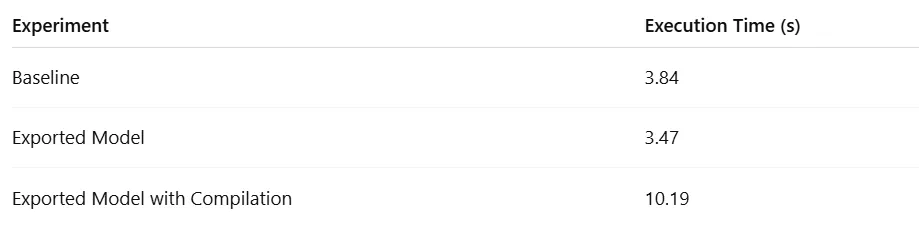 Runtime Results (by Author)
We can see that exporting the model to graph representation results in a speed-up of 10.7%. The model compilation, however, had the opposite effect, significantly increasing the execution time. It is likely that this could be fixed through appropriate tuning.
Runtime Results (by Author)
We can see that exporting the model to graph representation results in a speed-up of 10.7%. The model compilation, however, had the opposite effect, significantly increasing the execution time. It is likely that this could be fixed through appropriate tuning.
Summary
In this post we explored the new torch.export utility and demonstrated its use in capturing and deploying a toy HuggingFace model. We found that is has a number of powerful and compelling properties, including:
- Support for complex models : torch.export succeeded in capturing models that failed with TorchScript.
- Portability : Exported models can be loaded and executed as standalone programs without specific package dependencies.
- Machine-specific optimizations : exported models are compatible with graph compilation, enabling the application of machine-specific optimizations.
We also encountered some of torch.export's limitations:
- Unintended consequences of graph creation: If we are not careful about how we design our model, values from the export environment can be inadvertently baked into the resulting graph, breaking its compatibility with the inference environment.
- Limited debugging tools: As of this writing, the tools for debugging the execution of exported graphs are limited.
Although it still requires some refinement, torch.export is already a huge improvement over previous capturing solutions like TorchScript. We look forward to seeing it continue to evolve and improve.
For more details on capturing AI/ML models using PyTorch Export and to keep track of API changes, please see the torch.export documentation. If you’re running inference on an edge device, also see the ExecuTorch solution for model deployment, which is based on torch.export.
Register Now to Continue Reading
Unlock Towards Data Science with a Free Account
All articles on Towards Data Science are available to registered users. Create a free account today to access this article and thousands more.
Register for freeSign in to your account
 Written By
See all from Chaim Rand
Deep DivesDeep LearningModel DeploymentPytorchTorchscript
Share This Article
Towards Data Science is a community publication. Submit your insights to reach our global audience and earn through the TDS Author Payment Program.
Write for TDS
Related Articles
Data Science
How to run valid experiments with smaller sample sizes with the Sequential Probability Ratio Test
Matteo Courthoud
May 2, 202214 min read
Artificial Intelligence
In machine learning we often say something is "learnable". What does that really mean? Read on to find out.
Wilson Wang
August 12, 20214 min read
Deep Learning
Deep learning is often used to make predictions for data driven analysis. But what are the meanings of these predictions? This post...
Tom Charnock
August 3, 202017 min read
Artificial Intelligence
Comparison of both speed and performance
Soner Yıldırım
September 29, 20205 min read
Artificial Intelligence
Why and how to overcome the inner limit of a Large Language Model
Salvatore Raieli
July 14, 202319 min read
Deep Learning
A hands-on tutorial for retrieving, processing and using the dataset
Yousef Nami
October 25, 202210 min read
Artificial Intelligence
A fun project and detailed walkthrough of data analytics steps to help you learn Python, pandas, matplotlib, seaborn and Folium
Nick Cox
February 9, 202112 min read
Artificial Intelligence
In the second part of this article, we will conclude the list of some of the critical facts you need to know to become a super data...
Mario Larcher
April 19, 202213 min read
Deep Learning
An intelligent system that can increase e-commerce sales and profits
Reslley Gabriel
February 16, 20215 min read
Your home for data science and AI. The world's leading publication for data science, data analytics, data engineering, machine learning, and artificial intelligence professionals.
Subscribe to Our NewsletterWrite For TDS•About•Advertise•Privacy Policy•Terms of Use
© Insight Media Group, LLC 2026•The New Stack•roadmap.sh•Creator Network
Recommended Articles
Close