保留正文与补采附件。源页面当前未重新核验;具体限制见交付清单。
 We value your privacy
We use cookies to enhance your browsing experience, serve personalised ads or content, and analyse our traffic. By clicking "Accept All", you consent to our use of cookies.
Customise Reject All Accept All
Customise Consent Preferences
We value your privacy
We use cookies to enhance your browsing experience, serve personalised ads or content, and analyse our traffic. By clicking "Accept All", you consent to our use of cookies.
Customise Reject All Accept All
Customise Consent Preferences  We use cookies to help you navigate efficiently and perform certain functions. You will find detailed information about all cookies under each consent category below.
The cookies that are categorised as "Necessary" are stored on your browser as they are essential for enabling the basic functionalities of the site. ... Show more
NecessaryAlways Active
Necessary cookies are required to enable the basic features of this site, such as providing secure log-in or adjusting your consent preferences. These cookies do not store any personally identifiable data.
We use cookies to help you navigate efficiently and perform certain functions. You will find detailed information about all cookies under each consent category below.
The cookies that are categorised as "Necessary" are stored on your browser as they are essential for enabling the basic functionalities of the site. ... Show more
NecessaryAlways Active
Necessary cookies are required to enable the basic features of this site, such as providing secure log-in or adjusting your consent preferences. These cookies do not store any personally identifiable data.
-
Cookie
BCTempID
-
Duration
10 minutes
-
Description
No description available.
-
Cookie
__cf_bm
-
Duration
1 hour
-
Description
This cookie, set by Cloudflare, is used to support Cloudflare Bot Management.
-
Cookie
AWSALBCORS
-
Duration
7 days
-
Description
Amazon Web Services set this cookie for load balancing.
-
Cookie
_cfuvid
-
Duration
session
-
Description
Cloudflare sets this cookie to track users across sessions to optimize user experience by maintaining session consistency and providing personalized services
-
Cookie
li_gc
-
Duration
6 months
-
Description
Linkedin set this cookie for storing visitor's consent regarding using cookies for non-essential purposes.
-
Cookie
__hssrc
-
Duration
session
-
Description
This cookie is set by Hubspot whenever it changes the session cookie. The __hssrc cookie set to 1 indicates that the user has restarted the browser, and if the cookie does not exist, it is assumed to be a new session.
-
Cookie
__hssc
-
Duration
1 hour
-
Description
HubSpot sets this cookie to keep track of sessions and to determine if HubSpot should increment the session number and timestamps in the __hstc cookie.
-
Cookie
wpEmojiSettingsSupports
-
Duration
session
-
Description
WordPress sets this cookie when a user interacts with emojis on a WordPress site. It helps determine if the user's browser can display emojis properly.
-
Cookie
BCSessionID
-
Duration
1 year 1 month 4 days
-
Description
Blueconic sets this cookie as a unique identifier for the BlueConic profile.
-
Cookie
_octo
-
Duration
1 year
-
Description
No description available.
-
Cookie
logged_in
-
Duration
1 year
-
Description
No description available.
-
Cookie
__Secure-YEC
-
Duration
past
-
Description
YouTube sets this cookie to stores the user's video player preferences using embedded YouTube video
-
Cookie
__eoi
-
Duration
6 months
-
Description
Description is currently not available.
-
Cookie
AWSALBTGCORS
-
Duration
7 days
-
Description
No description available.
-
Cookie
login-status-p
-
Duration
past
-
Description
Description is currently not available.
-
Cookie
AWSALBTG
-
Duration
7 days
-
Description
No description available.
-
Cookie
csrf_token
-
Duration
session
-
Description
No description available.
-
Cookie
token_v2
-
Duration
1 day
-
Description
Description is currently not available.
-
Cookie
D
-
Duration
1 year
-
Description
Description is currently not available.
-
Cookie
PHPSESSID
-
Duration
session
-
Description
This cookie is native to PHP applications. The cookie stores and identifies a user's unique session ID to manage user sessions on the website. The cookie is a session cookie and will be deleted when all the browser windows are closed.
-
Cookie
VISITOR_PRIVACY_METADATA
-
Duration
6 months
-
Description
YouTube sets this cookie to store the user's cookie consent state for the current domain.
-
Cookie
cookietest
-
Duration
session
-
Description
The cookietest cookie is typically used to determine whether the user's browser accepts cookies, essential for website functionality and user experience.
-
Cookie
__Host-airtable-session
-
Duration
1 year
-
Description
This cookie is used to enable us to integrate the services of Airtable.
-
Cookie
__Host-airtable-session.sig
-
Duration
1 year
-
Description
This cookie is used to enable us to integrate the services of Airtable.
-
Cookie
m
-
Duration
1 year 1 month 4 days
-
Description
Stripe sets this cookie for fraud prevention purposes. It identifies the device used to access the website, allowing the website to be formatted accordingly.
-
Cookie
BIGipServer*
-
Duration
session
-
Description
Marketo sets this cookie to collect information about the user's online activity and build a profile about their interests to provide advertisements relevant to the user.
-
Cookie
__cfruid
-
Duration
session
-
Description
Cloudflare sets this cookie to identify trusted web traffic.
-
Cookie
_GRECAPTCHA
-
Duration
6 months
-
Description
Google Recaptcha service sets this cookie to identify bots to protect the website against malicious spam attacks.
-
Cookie
__Secure-YNID
-
Duration
6 months
-
Description
Google cookie used to protect user security and prevent fraud, especially during the login process.
-
Cookie
cookieyes-consent
-
Duration
1 year
-
Description
CookieYes sets this cookie to remember users' consent preferences so that their preferences are respected on subsequent visits to this site. It does not collect or store any personal information about the site visitors.
Functional
Functional cookies help perform certain functionalities like sharing the content of the website on social media platforms, collecting feedback, and other third-party features.
-
Cookie
lidc
-
Duration
1 day
-
Description
LinkedIn sets the lidc cookie to facilitate data center selection.
-
Cookie
brw
-
Duration
1 year
-
Description
No description available.
-
Cookie
brwConsent
-
Duration
5 minutes
-
Description
Description is currently not available.
-
Cookie
WMF-Uniq
-
Duration
1 year
-
Description
Description is currently not available.
-
Cookie
loom_anon_comment
-
Duration
1 year
-
Description
No description available.
-
Cookie
loom_referral_video
-
Duration
session
-
Description
Description is currently not available.
-
Cookie
VISITOR_INFO1_LIVE
-
Duration
6 months
-
Description
A cookie set by YouTube to measure bandwidth that determines whether the user gets the new or old player interface.
-
Cookie
yt-remote-connected-devices
-
Duration
Never Expires
-
Description
YouTube sets this cookie to store the user's video preferences using embedded YouTube videos.
-
Cookie
ytidb::LAST_RESULT_ENTRY_KEY
-
Duration
Never Expires
-
Description
The cookie ytidb::LAST_RESULT_ENTRY_KEY is used by YouTube to store the last search result entry that was clicked by the user. This information is used to improve the user experience by providing more relevant search results in the future.
-
Cookie
yt-remote-device-id
-
Duration
Never Expires
-
Description
YouTube sets this cookie to store the user's video preferences using embedded YouTube videos.
-
Cookie
yt-remote-session-name
-
Duration
session
-
Description
The yt-remote-session-name cookie is used by YouTube to store the user's video player preferences using embedded YouTube video.
-
Cookie
yt-remote-fast-check-period
-
Duration
session
-
Description
The yt-remote-fast-check-period cookie is used by YouTube to store the user's video player preferences for embedded YouTube videos.
-
Cookie
yt-remote-session-app
-
Duration
session
-
Description
The yt-remote-session-app cookie is used by YouTube to store user preferences and information about the interface of the embedded YouTube video player.
-
Cookie
yt-remote-cast-available
-
Duration
session
-
Description
The yt-remote-cast-available cookie is used to store the user's preferences regarding whether casting is available on their YouTube video player.
-
Cookie
yt-remote-cast-installed
-
Duration
session
-
Description
The yt-remote-cast-installed cookie is used to store the user's video player preferences using embedded YouTube video.
-
Cookie
cp_session
-
Duration
3 months
-
Description
Codepen sets this cookie for Help systems found in the website.
-
Cookie
loid
-
Duration
1 year 1 month 4 days
-
Description
This cookie is set by the Reddit. The cookie enables the sharing of content from the website onto the social media platform.
Analytics
Analytical cookies are used to understand how visitors interact with the website. These cookies help provide information on metrics such as the number of visitors, bounce rate, traffic source, etc.
-
Cookie
__hstc
-
Duration
6 months
-
Description
Hubspot set this main cookie for tracking visitors. It contains the domain, initial timestamp (first visit), last timestamp (last visit), current timestamp (this visit), and session number (increments for each subsequent session).
-
Cookie
hubspotutk
-
Duration
6 months
-
Description
HubSpot sets this cookie to keep track of the visitors to the website. This cookie is passed to HubSpot on form submission and used when deduplicating contacts.
-
Cookie
_ga
-
Duration
1 year 1 month 4 days
-
Description
Google Analytics sets this cookie to calculate visitor, session and campaign data and track site usage for the site's analytics report. The cookie stores information anonymously and assigns a randomly generated number to recognise unique visitors.
-
Cookie
ga*
-
Duration
1 year 1 month 4 days
-
Description
Google Analytics sets this cookie to store and count page views.
-
Cookie
__Host-psifi.analyticsTrace
-
Duration
6 hours
-
Description
Description is currently not available.
-
Cookie
__Host-psifi.analyticsTraceV2
-
Duration
6 hours
-
Description
Description is currently not available.
-
Cookie
_gh_sess
-
Duration
session
-
Description
GitHub sets this cookie for temporary application and framework state between pages like what step the user is on in a multiple step form.
-
Cookie
YSC
-
Duration
session
-
Description
YSC cookie is set by Youtube and is used to track the views of embedded videos on Youtube pages.
-
Cookie
ajs_anonymous_id
-
Duration
1 year
-
Description
This cookie is set by Segment to count the number of people who visit a certain site by tracking if they have visited before.
-
Cookie
vuid
-
Duration
1 year 1 month 4 days
-
Description
Vimeo installs this cookie to collect tracking information by setting a unique ID to embed videos on the website.
Performance
Performance cookies are used to understand and analyse the key performance indexes of the website which helps in delivering a better user experience for the visitors.
-
Cookie
AWSALB
-
Duration
7 days
-
Description
AWSALB is an application load balancer cookie set by Amazon Web Services to map the session to the target.
-
Cookie
acq
-
Duration
past
-
Description
Description is currently not available.
-
Cookie
acq.sig
-
Duration
past
-
Description
Description is currently not available.
-
Cookie
ptc
-
Duration
2 years
-
Description
No description available.
Advertisement
Advertisement cookies are used to provide visitors with customised advertisements based on the pages you visited previously and to analyse the effectiveness of the ad campaigns.
-
Cookie
muc_ads
-
Duration
1 year 1 month 4 days
-
Description
Twitter sets this cookie to collect user behaviour and interaction data to optimize the website.
-
Cookie
guest_id_marketing
-
Duration
1 year 1 month 4 days
-
Description
Twitter sets this cookie to identify and track the website visitor.
-
Cookie
guest_id_ads
-
Duration
1 year 1 month 4 days
-
Description
Twitter sets this cookie to identify and track the website visitor.
-
Cookie
personalization_id
-
Duration
1 year 1 month 4 days
-
Description
Twitter sets this cookie to integrate and share features for social media and also store information about how the user uses the website, for tracking and targeting.
-
Cookie
guest_id
-
Duration
1 year 1 month 4 days
-
Description
Twitter sets this cookie to identify and track the website visitor. It registers if a user is signed in to the Twitter platform and collects information about ad preferences.
-
Cookie
bcookie
-
Duration
1 year
-
Description
LinkedIn sets this cookie from LinkedIn share buttons and ad tags to recognize browser IDs.
-
Cookie
__Secure-ROLLOUT_TOKEN
-
Duration
6 months
-
Description
YouTube sets this cookie to manage feature rollout and experimentation. It helps Google control which new features or interface changes are shown to users as part of testing and staged rollouts, ensuring consistent experience for a given user during an experiment.
-
Cookie
yt.innertube::nextId
-
Duration
Never Expires
-
Description
YouTube sets this cookie to register a unique ID to store data on what videos from YouTube the user has seen.
-
Cookie
yt.innertube::requests
-
Duration
Never Expires
-
Description
YouTube sets this cookie to register a unique ID to store data on what videos from YouTube the user has seen.
-
Cookie
session_tracker
-
Duration
session
-
Description
This cookie is set by the Reddit. This cookie is used to identify trusted web traffic. It also helps in adverstising on the website.
-
Cookie
edgebucket
-
Duration
session
-
Description
Reddit sets this cookie to save the information about a log-on Reddit user, for the purpose of advertisement recommendations and updating the content.
-
Cookie
did
-
Duration
1 year
-
Description
Arbor sets this cookie to show targeted ads to site visitors.This cookie expires after 2 months or 1 year.
Uncategorised
Other uncategorised cookies are those that are being analysed and have not been classified into a category as yet.
No cookies to display.
Reject All Save My Preferences Accept All
Toggle SearchToggle Mobile Navigation
Publish AI, ML & data-science insights to a global community of data professionals.
Sign inSubmit an Article
LatestEditor's PicksNewsletterShipAI
Write For TDS
LinkedInXToggle Search
Machine Learning
Maximizing AI/ML Model Performance with PyTorch Compilation
Practical Tips for Getting the Most Out of torch.compile
Chaim Rand
August 18, 202526 min read
 Photo by Mg Cthu on Unsplash
Since its inception in PyTorch 2.0 in March 2023, the evolution of torch.compile has been one of the most exciting things to follow. Given that PyTorch’s popularity was due to its “Pythonic” nature, its ease of use, and its line-by-line (a.k.a., eager) execution, the success of a just-in-time (JIT) graph compilation mode should not have been taken for granted. And yet, just over two years later, the importance of this feature cannot be overstated: It is an essential tool in optimizing the runtime performance of AI/ML workloads.
Unfortunately, the use of torch.compile still feels a bit like a dark art. When it works it is awesome and everyone is happy. However, when it doesn’t, figuring out the reason can be difficult. It has multiple API controls, but knowing which ones to apply and when — can seem like black magic. Moreover, its documentation is currently somewhat decentralized, with the details of many of its key features scattered across multiple posts and tutorials.
Although covered in a previous post, we felt that the rapid evolution of torch.compile warranted a renewed discussion. This post attempts to unveil some of the mystique surrounding torch.compile. We will review how it works, demonstrate its use, discuss a few strategies for how to apply it most effectively, and evaluate the impact of some of its features on the runtime performance of a toy model. We will cover the following topics:
Learn this step by step with the interactive Machine Learning roadmap.
Photo by Mg Cthu on Unsplash
Since its inception in PyTorch 2.0 in March 2023, the evolution of torch.compile has been one of the most exciting things to follow. Given that PyTorch’s popularity was due to its “Pythonic” nature, its ease of use, and its line-by-line (a.k.a., eager) execution, the success of a just-in-time (JIT) graph compilation mode should not have been taken for granted. And yet, just over two years later, the importance of this feature cannot be overstated: It is an essential tool in optimizing the runtime performance of AI/ML workloads.
Unfortunately, the use of torch.compile still feels a bit like a dark art. When it works it is awesome and everyone is happy. However, when it doesn’t, figuring out the reason can be difficult. It has multiple API controls, but knowing which ones to apply and when — can seem like black magic. Moreover, its documentation is currently somewhat decentralized, with the details of many of its key features scattered across multiple posts and tutorials.
Although covered in a previous post, we felt that the rapid evolution of torch.compile warranted a renewed discussion. This post attempts to unveil some of the mystique surrounding torch.compile. We will review how it works, demonstrate its use, discuss a few strategies for how to apply it most effectively, and evaluate the impact of some of its features on the runtime performance of a toy model. We will cover the following topics:
Learn this step by step with the interactive Machine Learning roadmap.
- techniques for avoiding the two “compilation-killers”, graph-breaks and recompilations,
- strategies for debugging compilation issues
- squeezing maximum performance using some of torch.compile’s advanced features and configuration settings,
- making the most of the torch.compile logs to debug compilation issues,
- modular application of torch.compile,
- methods for reducing compilation time,
- and more.
As in our previous posts, we will define a toy PyTorch model which we will use to demonstrate the application and impact of torch.compile. We will run our experiments on an Amazon EC2 p4d.96xlarge instance (containing 8 NVIDIA A100 GPUs) running a PyTorch (2.7) Deep Learning AMI (DLAMI).
Disclaimers:
PyTorch compilation is a complex topic with a continuously growing set of features. This post makes no attempt to encompass the full scope of torch.compile, but rather aims to offer some practical tips on how to approach it. For a complete reference, please see the official PyTorch documentation. But keep in mind that you may need to surf through multiple pages to collect all the information you need (e.g., here for the API documentation, here for an introductory tutorial, here for a deep-dive on TorchDynamo, here and here for indices to many other pages covering a wide range of compilation features, etc.).
If you prefer a single source with a comprehensive overview of torch.compile, its inner workings, and detailed examples of its use, we recommend chapter 14 of the book AI Systems Performance Engineering, by Chris Fregly.
The code we will share is intended for demonstrative purposes and should not be relied on for correctness or optimality — especially for other projects. Please do not interpret our choice of platform, framework, or any other tool or library as an endorsement for its use.
The impact of torch.compile can vary greatly based on the details of the AI/ML model and runtime environment. The results we will share on our toy model may not be indicative of the results you will get on your own model. In fact, compilation of some models may result in worse performance.
When applied correctly, torch.compile should not affect the quality of your model (in the case of inference) or its ability to converge (in the case of training). However, there are likely to be numerical differences due to the use of different compute kernels. It is essential that you verify that applying torch.compile does not degrade your quality-performance metrics before deploying it to a production environment.
Importantly, torch.compile continues to evolve with each PyTorch release. The contents of this post are based on PyTorch 2.7. Staying up-to-date with latest PyTorch releases is essential for taking advantage of the latest and greatest available optimization opportunities.
PyTorch Compilation: How it Works
In PyTorch’s default eager execution mode, each line of Python code is processed independently. While this mode of execution is extremely user-friendly — making it easy to follow and debug line-per-line what the model is doing — it misses a great deal of opportunity to optimize performance, e.g.:
- GPU operations are performed independently. This misses the opportunity for operator fusion where GPU operations are combined into a single, more efficient, GPU kernel.
- Potential optimizations from ahead-of-time (AOT) compilation, such as out-of-order execution and memory layout optimizations, are missed.
- The Python runtime is involved in all stages of the model execution. Every time an operation is launched on the GPU, control is passed from the Python interpreter to the CUDA backend and back. This can introduce significant overhead.
How torch.compile Fixes This
First introduced in PyTorch 2.0, torch.compile acts as a just-in-time (JIT) compiler: The first time you call a compiled function, the compiler traces the Python code and converts it into an intermediate graph representation (IR) using TorchDynamo, sometimes referred to as an FX Graph. If the compiled function requires backpropagation, the FX Graph is passed to the AOTAutograd library which captures the backward pass ahead-of-time (AOT) and generates a combined forward and backward graph. The FX Graph is then passed to the compiler backend which performs kernel fusion, out-of-order execution, and other techniques to generate machine code that is highly optimized for the target hardware.
The default PyTorch compiler backend is TorchInductor which supports both GPU and CPU targets. When compiling for NVIDIA GPUs, TorchInductor uses: 1) the Triton compiler (previously covered in this post) to create optimal GPU kernels and 2) CUDA Graphs (whenever possible) to combine multiple GPU kernels into efficient, re-playable sequences.
The final, machine-specific computation graph is cached and used for each subsequent invocation of the compiled function/model. Note that although the bulk of the compilation is performed on the first invocation, several additional warm-up passes are often required to reach peak performance.
The combined JIT and AOT properties of torch.compile allow it to maximize opportunities for graph optimization, while the use of the compiled execution graph avoids the line-by-line involvement of the Python interpreter — thereby addressing the three aforementioned inefficiencies of eager execution.
Avoiding Compilation Pitfalls
Usually, applying torch.compile will boost your model throughput (e.g., see the TorchInductor performance dashboard). However, sometimes you may find that torch compilation results in the same or even worse performance than in eager mode. There could be a number of reasons for this:
- There may be a bottleneck in the training step that is overshadowing the torch.compile optimization, e.g., a data input pipeline bottleneck. This can be identified and solved through appropriate performance analysis and optimization.
- Your function or model might already be so efficient that the application of torch.compile is negligible.
- You may be suffering from one of two compilation killers, graph-breaks and recompilations, which we elaborate on in the next sections.
PyTorch Compilation Killer #1: Graph-Breaks
Graph-breaks are one of the most common events that interfere with efficient torch compilation. Graph-breaks occur when the TorchDynamo or AOTAutograd libraries encounter Python operations that they cannot convert into a graph operation. In such cases, the sections of code before and after the problematic operation, are compiled separately and the resultant graph is said to contain a graph-break. Graph-breaks interfere with the compiler’s capacity for optimization in two primary ways: First, optimizations such as kernel fusion cannot be performed across graph breaks and, second, a graph break implies a return of control to the Python interpreter. The presence of a large number of graph breaks can completely cancel out the potential benefit of torch.compile. Common examples of graph breaks include print() operations, conditional logic, and asserts.
What is frustrating is that, more often than not, graph-breaks can be easily avoided. What is even more frustrating is that the default behavior is to handle graph breaks by silently falling back to eager execution for the problematic code segment.
Avoiding Graph-Breaks
The first step to handling graph-breaks is to configure the compiler to report them. Here are several ways of doing this:
- Apply the torch._dynamo.explain operator to your (uncompiled) model and run it on a sample input (as demonstrated here). This will result in a log containing a list of all of the graph-breaks.
- Set the TORCH_LOGS environment variable to include “ graph_breaks ”. This will cause the compiler to print the graph-breaks it encounters during compilation.
- Call with torch.compile with fullgraph =True. This will cause the compilation to fail each time it encounters a graph-break — thereby forcing the developer to acknowledge its presence and potentially fix it.
While our personal preference is option three, it is important to note that there are times where graph-breaks cannot be avoided, which means that we may need to disable fullgraph in a production setting. The best example of this is distributed training (e.g., DDP and FSDP) where the computation group includes communication calls which (as of the time of this writing) are not supported by torch.compile and, thus, result in graph-breaks.
With knowledge of the location of our graph breaks, we address each one individually. We remove redundant prints and assertions, replace conditional blocks with graph-friendly alternatives such as torch.where or torch.cond, and adjust our model implementation to minimize untraceable Python control flow and native operations. In some cases, we may desire to maintain some of the prints or assertions for running in eager mode; in this case, we can wrap them in a conditional check like if not torch.compiler.is_compiling(). There may be cases (e.g., DDP) where graph-breaks are unavoidable.
See here for more on avoiding graph-breaks.
PyTorch Compilation Killer #2: Recompilations
The second potential compilation killer is the graph recompilation. During the initial graph compilation phase, several assumptions are made and relied upon for generating the resultant graph. In torch.compile lingo these assumptions are referred to as guards. Common guards include the data types and shapes of input tensors. On each iteration, these guards are verified on the current tensor inputs and training state. If one of the guards is violated, the current graph is deemed invalid for the current state and a new graph is generated, i.e., the graph is recompiled. Graph compilation takes an extremely long time relative to the time it takes to execute a compiled graph. Consequently, multiple recompilations is likely to erase any potential performance gains from torch.compile. Moreover, torch.compile has a recompilation limit (the default is 8) after which it will raise a torch._dynamo.exc.RecompileLimitExceeded exception and fall back to eager mode.
Avoiding Recompiles
Here too, the first step is identifying the causes of the recompilations. Once again, there are several options:
- Use torch_compiler.set_stance operator to fail on recompile:
torch.compiler.set_stance(“fail_on_recompile”). In practice, this option can sometimes prove to be too limiting.
- Set the TORCH_LOGS environment variable to include “ recompiles ”. This will cause the compiler to report each time it performs recompilation along with the guards that were violated.
Compiling Graphs with Variable-Shaped Tensors
One of the most common causes of recompilations is the presence of tensors with dynamic shapes. The first time a graph is compiled it creates guards according to the shapes of the tensors it traced. When a tensor changes shape in a subsequent step, the guard is violated and the graph is recompiled. There are multiple ways of handling tensors with dynamic shapes:
- Default Compilation Behavior : If the dynamic field of the torch.compile call is not set (or set to None), each time the compiler encounters a new dynamic tensor, it will perform recompilation to generate a new graph that supports the dynamism it identified. In this option, the graph modification is applied surgically, allowing for “static” optimizations to be applied to other portions of the graph. If new dynamism is discovered in multiple iterations, we may hit the recompilation limit and fall back to eager execution. Consequently, this option should only be used for models with limited dynamism.
- Mark Dynamic Tensors : Another option is to explicitly mark the dynamic tensors and associated dynamic axis using the torch._dynamo.mark_dynamic API. This informs the compiler to build a graph that supports the reported dynamism and prevents recompilations altogether. This is a great option in situations in which you know upfront what your dynamic shapes are (which you absolutely should!!).
- Dynamic Compilation : The third option is to apply torch.compile with dynamic =True. This instructs the compiler to construct a graph that is as dynamic as possible in order to avoid recompilations. When enabled, dynamic shape tracing is applied to all of the tensors in the graph. This is often overkill. Keep in mind that many graph optimization techniques (e.g., CUDA graphs) assume static shapes. These are automatically disabled when this setting is applied. This option should be avoided whenever possible.
- Generate a Limited Number of Static Graphs : When torch.compile is applied with dynamic =False, the compiler will never generate dynamic graphs. Each time a guard is violated a new static graph is created, supporting the newly encountered tensor shape, and added to the compilation cache. While limited (by the recompilation limit) in the number of shapes it can support, this option is compelling due to the fact that it allows for optimizations that assume a static graph. To benefit from this capability, a common approach is to remove dynamism from the graph by padding dynamic tensors to a fixed length. A more advanced approach that reduces the amount of padding is to set a number of fixed length values (e.g., powers of two) and pad the variable shaped tensors to the closest length. The number of length values should not exceed the recompilation limit. This will result in a fixed number of recompilations and a fixed number of highly optimized graphs. We can ensure that all graphs are created during the model warmup phase.
As before, there are some situations where graph recompilations cannot be avoided, and we may have no choice but to run our model in eager mode.
See here for more on avoiding recompilations and here for details on how torch.compile handles dynamic shapes.
Debugging Compilation Issues
Inevitably, you will encounter some situations where torch compilation fails. Often, you will get a long error message and callstack, but it may as well be in a foreign language. You will likely be encouraged to Set TORCH_LOGS=”+dynamo” and TORCHDYNAMO_VERBOSE=1 but you may find that this does little to help you solve the problem.
The torch.compile troubleshooting guide offers multiple tips for diagnosing compilation errors (e.g., by compiling with “eager”, “aot_eager” and “inductor” backends), for fixing or avoiding them, and if all else fails, for reporting them to PyTorch. In this post we call out two different approaches for tackling tough compilation issues.
Top-Down VS. Bottom-Up Approach
In a top-down approach, we apply torch compilation at the highest-level function/model — come what may. We then begin to work through the compilation issues as they come up by either fixing them or removing them from the graph via the torch.compiler.disable utility. This approach assumes that we are sufficiently able to decipher the compilation logs — at least well enough to navigate to the problematic line of code.
In a bottom-up approach, we begin by applying compilation to a few low-level components and slowly increase the scope of compilation until we hit an error. This approach makes it easy to pinpoint the sources of the compilation issue. An additional advantage is that we can benefit from the results of a partially compiled graph while we continue to work on additional optimizations. This is contrary to the Top-Down approach where we will only have a workable graph once all issues are addressed.
The best approach depends on the model at hand and your personal inclination.Often, a combination of the two delivers the best results: for example, identifying issues via a bottom-up approach, resolving them, and then testing if the full graph compilation works.
Tuning for Maximal Performance
Once you have succeeded in compiling your model, there are a wide range of controls for trying to squeeze out even better performance. In this section we will cover some of the available options. It should be noted that the additional performance gains from these options are usually a small fraction of the gains from the initial application of standard compilation.
Advanced Compiler Modes and Options
The torch.compile API allows for tuning the compiler-backend behavior via via the mode and options parameters. There are dozens of knobs that can be applied and assessed. Some of the most notable ones are “reduce-overhead” — that optimizes more aggressively to further reduce the overhead of the kernel loading and Python interpreter, and “max-autotune” — the most aggressive optimization option that performs benchmarking of multiple kernel options before choosing the most efficient one. Both of these, particularly “max-autotune”, increase the compilation time, but usually result in more efficient graphs.
Varying the Compiler Backend
The default compiler backend is TorchInductor which supports a variety of target devices. You can specify the compiler backend via the backend parameter of the torch.compile API. While other backends are unlikely to beat TorchInductor when running on NVIDIA GPUs, you may find them to perform better on other hardware devices (e.g., the ipex backend includes optimizations that leverage the unique capabilities of Intel® CPUs).
Applying Modular Compilation
While it is usually recommended to apply compilation to the entire model, there are times where the model can be broken into submodules that respond very differently to the compiler controls. For example, if your model contains one component that includes many tensors with dynamic shapes and another component that is static, you may find that compiling the first in “max-autotune-no-cudagraphs” mode and the second in “max-autotune” mode, results in maximum performance.
Compiling the Optimizer
In addition to compiling the model execution, as of PyTorch 2.2, you can further optimize your training workload by compiling the optimizer. This will be demonstrated below.
New Compiler Features
Since the initial release of torch.compile in PyTorch 2.0, each PyTorch release has included enhancements to the torch.compile offering. Sometimes released as “prototypes”, new features offerings challenge developers to extract even greater performance out of graph compilation. For example, the PyTorch 2.7 release included the foreach_map prototype feature, the use of which we will demonstrate below.
Reducing Compilation Time
While the initial compilation and warm-up time can be quite long compared to the subsequent training steps, it is usually negligible compared to the overall life of the model (i.e., the training or inference time). In some cases, however, the lengthy compilation time can become an issue. If the model is extremely large and we are tuning for optimal performance, compilation could take hours. If we are using our model in an inference server setup, the model start-up time could have a direct impact on the server response time and user experience.
In this section we cover two techniques for reducing model compilation time: compile-time caching and regional compilation.
Compile Time Caching
In compile-time caching we upload the results of the local graph compilation to persistent storage. Every time we need to run the same model in the same runtime environment (e.g., same hardware and same library versions) we pull the cache state from persistent storage to the local disk, instead of compiling from scratch.
Regional Compilation
Regional compilation relies on the fact that large models typically consist of computation blocks that are repeated multiple times. In regional compilation, torch.compile is applied to the repeating block, instead of the entire model. The result is a single, relatively small graph that is created and reused for each of the blocks.
How to Configure the TORCH_LOGS Environment Variable
Torch compilation supports a wide variety of logging controls. While the log reports can be extremely useful for debugging issues and maximizing performance, it’s important to find the right balance where the logs are helpful but not excessive. In this post we propose using the following initial configuration and adapting as needed:
bash
export TORCH_LOGS="graph_breaks,recompiles,perf_hints"
- “graph_breaks” — reports each time a graph-break is encountered (see above)
- “recompiles” — reports each time a recompilation is performed along with the guard-violation that triggered it.
- “perf_hints” — outputs performance logs from the inductor backend along with hints for additional optimizations
Note that sometimes “perf_hints” will flood the console with unactionable messages, in which case you may opt to disable it.
A Toy PyTorch Model: Image Captioning
To demonstrate torch.compile in action, we define a toy image captioning model using the popular Hugging Face transformers library (version 4.54.1). Specifically, we define an image-to-text model using a VisionEncoderDecoderModel, with a Vision Transformer (ViT) encoder and a GPT-2 decoder, and train it on a synthetic dataset of fixed-sized images and random sequences (“captions”) of variable length.
We begin by defining our image-to-text model:
python
import os, shutil, time, random, torch
from transformers import (
    VisionEncoderDecoderModel,
    VisionEncoderDecoderConfig,
    AutoConfig
)

torch.manual_seed(42)
random.seed(42)

BATCH_SIZE = 64
NUM_WORKERS = 12
NUM_TOKENS = 1024
MAX_SEQ_LEN = 256
PAD_ID = 0
START_ID = 1
END_ID = 2


# set up image-to-text model
def get_model():
    config = VisionEncoderDecoderConfig.from_encoder_decoder_configs(
        encoder_config=AutoConfig.for_model("vit"),  # vit encoder
        decoder_config=AutoConfig.for_model("gpt2")  # gpt2 decoder
    )
    config.decoder.vocab_size = NUM_TOKENS
    config.decoder.use_cache = False
    config.decoder_start_token_id = START_ID
    config.pad_token_id = PAD_ID
    config.eos_token_id = END_ID
    config.max_length = MAX_SEQ_LEN

    model = VisionEncoderDecoderModel(config=config)

    # remove unused pooler
    model.encoder.pooler = None

    # uncomment to specify the loss function
    # from transformers.loss.loss_utils import ForCausalLMLoss
    # model.loss_function = ForCausalLMLoss
    return model
Next, we define a synthetic dataset that generates pairs of random images of fixed size and random sequences of variable size. We use a weighted distribution for the sequence length to mimic a scenario where the vast majority of sequences are short.
Given the varying length of the input captions, we require a strategy for dealing with dynamically shaped input. Here, we offer two alternatives, both of which use padding: padding to the maximum input length and padding to the length of the longest sequence in the batch, along with an option to align it to a given multiple. Please see our previous post for additional strategies for handling variable-length input sequences.
python
from torch.utils.data import Dataset, DataLoader
from functools import partial

# A synthetic Dataset with random images and captions
class FakeDataset(Dataset):
    def __init__(self):
        self.length_dist = {
            'short': {'range': (5, 32), 'weight': 0.90},
            'medium': {'range': (33, 64), 'weight': 0.09},
            'long': {'range': (65, 256), 'weight': 0.01}
        }
        super().__init__()

    def __len__(self):
        return 1000000

    def __getitem__(self, index):
        length_bin = random.choices(
            list(self.length_dist.keys()),
            weights=[d['weight'] for d in self.length_dist.values()],
            k=1
        )[0]

        range_start, range_end = self.length_dist[length_bin]['range']
        image = torch.randn(3, 224, 224)
        length = random.randint(range_start, range_end - 1)
        labels = torch.cat([torch.randint(1, NUM_TOKENS, (length,)),
                            torch.tensor([END_ID])],
                           dim=0)
        input_ids = torch.cat([torch.tensor([START_ID]),
                               labels[:-1]],
                              dim=0)
        return {
            'image': image,
            'input_ids': input_ids,
            'labels': labels
        }

def pad_sequence(sequence, length, pad_val):
    return torch.nn.functional.pad(
        sequence,
        (0, length - sequence.shape[0]),
        value=pad_val
    )

def collate_with_padding(batch, pad_to_longest=False, align=None):
    padded_inputs = []
    padded_labels = []
    if pad_to_longest:
        pad_len = max([b['input_ids'].shape[0] for b in batch])
        if align:
            pad_len = ((pad_len + align - 1) // align) * align
    else:
        pad_len = MAX_SEQ_LEN

    for b in batch:
        input_ids = b['input_ids']
        labels = b['labels']
        padded_inputs.append(pad_sequence(input_ids, pad_len, PAD_ID))
        padded_labels.append(pad_sequence(labels, pad_len, -100))

    padded_inputs = torch.stack(padded_inputs, dim=0)
    padded_labels = torch.stack(padded_labels, dim=0)
    images = torch.stack([b['image'] for b in batch], dim=0)
    return {
        'pixel_values': images,
        'decoder_input_ids': padded_inputs,
        'labels': padded_labels,
        'decoder_attention_mask': (padded_inputs != PAD_ID)
    }

def get_dataloader(pad_to_longest=False, align=None):
    return DataLoader(
        dataset=FakeDataset(),
        batch_size=BATCH_SIZE,
        num_workers=NUM_WORKERS,
        collate_fn=partial(
            collate_with_padding,
            pad_to_longest=pad_to_longest,
            align=align
            )
    )
Last, we define our training step and main training function:
python
def copy_to_device(batch, device):
    return {
        key: val.to(device=device, non_blocking=True)
        for key, val in batch.items()
    }

def train_step(model, device, optimizer, batch):
    # copy data to device
    batch = copy_to_device(batch, device)
    optimizer.zero_grad()
    with torch.amp.autocast('cuda', dtype=torch.bfloat16):
        outputs = model(**batch)
    loss = outputs.loss
    loss.backward()
    optimizer.step()
    return loss

def train(local_rank=0, world_size=1, compile=False):
    # specify log settings
    torch._logging.set_logs(
        graph_breaks=True,
        recompiles=True,
        perf_hints=True
    )

    torch.cuda.set_device(local_rank)
    device = torch.cuda.current_device()

    if world_size > 1:
        # DDP setup
        import torch.distributed as dist
        from torch.nn.parallel import DistributedDataParallel as DDP
        os.environ['MASTER_ADDR'] = 'localhost'
        os.environ['MASTER_PORT'] = str(2222)
        dist.init_process_group('nccl', rank=local_rank,
                                world_size=world_size)

    # configure pad_to_longest and optional alignment
    dataloader = get_dataloader(pad_to_longest=False, align=None)

    model = get_model()
    model = model.to(device)
    if world_size > 1:
        model = DDP(model, [local_rank])
    optimizer = torch.optim.Adam(model.parameters())

    if compile:
        # uncomment to run pre-compile warmup - required for some optimizations
        # batch = next(iter(dataloader))
        # train_step(model, device, optimizer, batch)
        model, optimizer = apply_compilation(model, optimizer)

    warmup = 20
    active = 100
    total_steps = warmup + active
    t0 = time.perf_counter()

    for idx, batch in enumerate(dataloader, start=1):
        # apply train step
        train_step(model, device, optimizer, batch)

        if idx == warmup:
            torch.cuda.synchronize()
            print(f'warmup time: {time.perf_counter()-t0}')
            t0 = time.perf_counter()
        elif idx == total_steps:
            break

    if local_rank == 0:
        torch.cuda.synchronize()
        total_time = time.perf_counter() - t0
        print(f'average throughput: {active / total_time}')

    if world_size > 1:
        dist.destroy_process_group()


if __name__ == '__main__':
    # specify inductor cache dir
    inductor_cache_dir = '/tmp/inductor_cache'
    os.environ['TORCHINDUCTOR_CACHE_DIR'] = inductor_cache_dir

    # clean up compiler cache
    torch._dynamo.reset()
    shutil.rmtree(inductor_cache_dir, ignore_errors=True)

    world_size = 1
    torch.multiprocessing.spawn(
        fn=train,
        args=(world_size,),
        nprocs=world_size,
        join=True
    )
Baseline Performance
Running the training script without compilation yields the following baseline performance results:
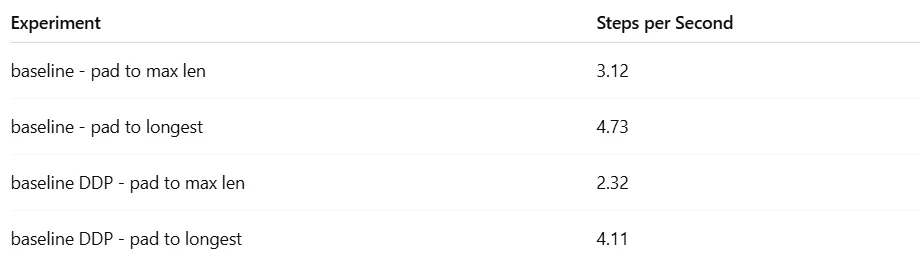 Baseline Model Performance (by Author)
We can see clearly that the collation strategy that reduces padding results in much better performance.
Baseline Model Performance (by Author)
We can see clearly that the collation strategy that reduces padding results in much better performance.
Applying Model Compilation
In this section we will apply torch compilation with different configurations and measure its impact on the training throughput. We will begin by applying compilation without dynamism, i.e., when padding all inputs to max sequence length. In the following section we will evaluate its impact in the case of inputs with dynamic shapes.
Model Compilation Step #1: Fixing Graph Breaks
We introduce the following compilation utility function and apply it to our model:
python
def apply_compilation(model, optimizer):
    model = torch.compile(model, fullgraph=True)
    return model, optimizer
The fullgraph setting ensures that compilation will fail whenever it encounters a graph break. Sure enough, our first compilation attempt results in an error coming from the transformer library. Here is a small snippet:
shell-session
from user code: File "/opt/pytorch/lib/python3.12/site-packages/transformers/models/vision_encoder_decoder/modeling_vision_encoder_decoder.py", line 574, in forward loss = self.loss_function( File "/opt/pytorch/lib/python3.12/site-packages/transformers/modeling_utils.py", line 5776, in loss_function
The reason for this error is that when the VisionEncoderDecoderModel loss function is not specified, the transformers library uses native Python code to determine what loss function to apply. This is easy to fix by specifying the model loss function, as follows:
python
from transformers.loss.loss_utils import ForCausalLMLoss
model.loss_function = ForCausalLMLoss
Following this fix, model compilation succeeds. The resultant throughput is 5.17 steps per second — a 66% speed-up over the baseline (fixed-input) throughput.
Note that in the current scenario of a static graph, the compiler did not report any recompilations, but it did report the following perf_hint :
shell-session
I0805 13:37:52.406000 51587 torch/_inductor/codegen/simd.py:1976] [0/0] [__perf_hints] Reduction over non-contiguous dims.I0805 13:37:52.406000 51587 torch/_inductor/codegen/simd.py:1976] [0/0] [__perf_hints] Consider setting config.triton.tile_reductions to True.
However, applying the suggested configuration results in a compilation error, so we ignore it going forward.
Model Compilation Step #2: Tuning the Compiler Configuration
Let’s try to increase the performance further by applying some of the advanced compilation controls. The code block below includes three alternative modifications:
python
# reduce-overhead
model = torch.compile(model, fullgraph=True, mode="reduce-overhead")

# max-autotune
model = torch.compile(model, fullgraph=True, mode="max-autotune")

# shapes padding
model = torch.compile(model, fullgraph=True, options={"shape_padding":True})
The results are captured in the table below:
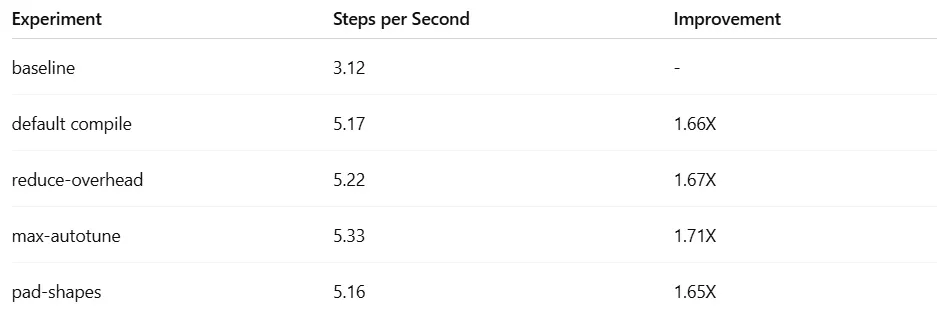 torch.compile results (by Author)
The subsequent experiments in this section will be run with the “max-autotune” optimization.
torch.compile results (by Author)
The subsequent experiments in this section will be run with the “max-autotune” optimization.
Model Compilation Step #3: Compiling the Optimizer
Next, we extend our solution to apply compilation to the optimizer. Since optimizer compilation currently requires graph-breaks, we apply it without the fullgraph flag:
python
def apply_compilation(model, optimizer):
    model = torch.compile(model, fullgraph=True, mode="max-autotune")
    optimizer.step = torch.compile(optimizer.step)
    return model, optimizer
Compiling the optimizer further increases the throughput to 5.54 steps per second!!
When compiling the optimizer, the following performance hint is printed:
shell-session
<list of grads> will be copied during cudagraphs execution.If using cudagraphs and the grad tensor addresses will be the same across runs, use torch._dynamo.decorators.mark_static_address to elide this copy.
The proposal is to fix the addresses of gradient tensors and mark them. To implement the suggestion, we introduce the following two utility functions:
python
# this replaces default optimizer.zero_grad() and verifies reuse
# of same gradient tensors
def zero_grads(model):
    for p in model.parameters():
        if p.grad is not None:
            p.grad.zero_()

# uses dynamo utility to mark each of the gradient tensors as static
def mark_static_address(optimizer):
    for group in optimizer.param_groups:
        for p in group['params']:
            if p.grad is not None:
                torch._dynamo.mark_static_address(p.grad)
The updated training step appears below:
python
def train_step(model, device, optimizer, batch):
    # copy data to device
    batch = copy_to_device(batch, device)
    zero_grads(model)
    with torch.amp.autocast('cuda', dtype=torch.bfloat16):
        outputs = model(**batch)
    loss = outputs.loss
    loss.backward()
    mark_static_address(optimizer)
    optimizer.step()
    return loss
In our case, implementing the performance hint decreases the throughput result to 5.32 steps per second — so we disregard it.
Model Compilation Step #4: Foreach Map Optimization
Constantly be on the lookout for torch.compile enhancements and additions. Here we will apply horizontal fusion with foreach_map — an optimization introduced in the latest PyTorch release — to the optimizer step. Using the utility functions from the Foreach Map tutorial, we create an optimized Adam optimizer step function, and apply it to our optimizer:
python
def get_compiled_adam_step(optimizer):
    compiled_adam = torch.compile(foreach_map_adam)
    inputs = get_inputs(optimizer)
    def compiled_adam_step():
        compiled_adam(*inputs)
    return compiled_adam_step

def apply_compilation(model, optimizer):
    model = torch.compile(model, fullgraph=True, mode="max-autotune")
    optimizer.step = get_compiled_adam_step(optimizer)
    return model, optimizer
This optimization requires use of the zero_grads utility from above. It also requires that we run a warmup training step before compilation to populate all of the gradient tensors.
The modified optimizer step results in a reduced throughput of 5.28 steps per second. We presume that our toy model is too small to reap the benefit of the new compilation feature.
Our best result, 5.54 steps per second, is 78% faster than our baseline result. Let’s see what happens when we extend our solution to multiple GPUs.
Model Compilation Step #5: Extending to DDP
The final step is to extend the training script to use all 8 GPUs. For this step we need to disable the fullgraph setting since the cross-GPU gradient sharing requires graph-breaking communication calls.
The resultant throughput is 4.59 steps per second, nearly two times faster than our baseline result.
Results
The table below summarizes the results of our static-graph experiments:
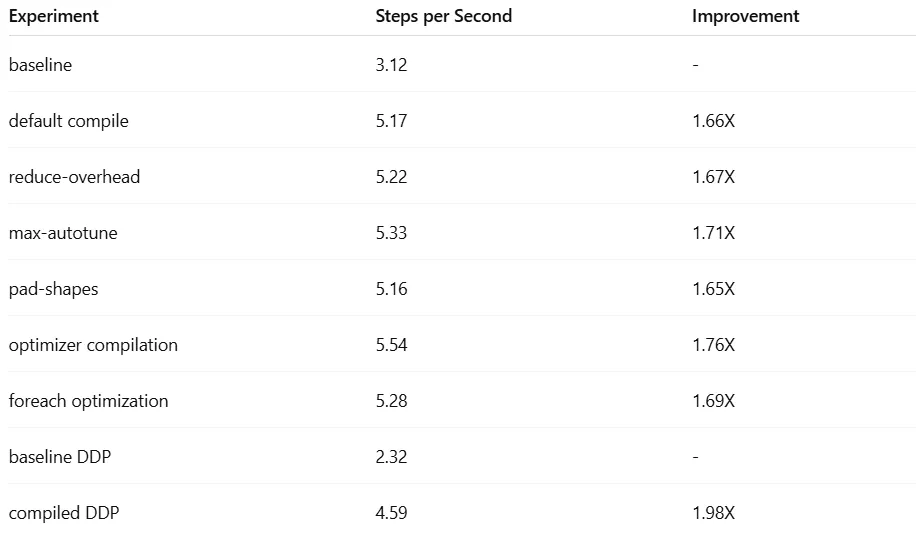 Static Graph Compilation Results (by Author)
Thus far, all of our experiments have assumed fixed-sized input tensors. Since the vast majority of input sequences are small, our graph is performing a huge amount of wasteful computation.
In the next section we will evaluate torch.compile when padding to variable-length inputs.
Static Graph Compilation Results (by Author)
Thus far, all of our experiments have assumed fixed-sized input tensors. Since the vast majority of input sequences are small, our graph is performing a huge amount of wasteful computation.
In the next section we will evaluate torch.compile when padding to variable-length inputs.
Dynamic Model Compilation
In this section we introduce dynamism into our toy model definition by padding the inputs sequences in each batch to the length of the longest sequence. In a previous section we described several strategies for compiling dynamic graphs. We will apply these strategies and assess their impact on the training throughput.
The experiments in this section were run on a single NVIDIA A100 GPU.
Option #1: Auto-Detect Dynamism
The default behavior (dynamic =None) of torch.compile is to auto-detect dynamism and recompile the graph accordingly. When running in this setting, we indeed see the recompilation due to the variation in input size, but we also get the following print:
shell-session
V0806 09:31:00.624000 175763 torch/_dynamo/guards.py:2997] [0/1] [__recompiles] - 0/1: ((decoder_input_ids.size()[1]*decoder_input_ids.size()[1]) % 8) != 0 # attn_output = torch.nn.functional.scaled_dot_product_attention( # transformers/integrations/sdpa_attention.py:89 in sdpa_attention_forward (_dynamo/utils.py:3284 in run_node)
The source of this recompilation is the scaled_dot_product_attention operator, which requires that input shapes be aligned to multiples of eight for optimal use. To address this issue and avoid the recompilation, we modify our padding operation to pad to a multiple of eight.
To avoid the recompilation that is triggered by the variable-length inputs, we define the following utility and apply it to the input tensors:
python
def mark_dynamic(batch):
    for key in ['decoder_input_ids', 'labels', 'decoder_attention_mask']:
        torch._dynamo.mark_dynamic(batch[key], 1)

def train_step(model, device, optimizer, batch):
    # copy data to device
    batch = copy_to_device(batch, device)
    # mark inputs as dynamic to avoid recompilation
    mark_dynamic(batch)
    optimizer.zero_grad()
    with torch.amp.autocast('cuda', dtype=torch.bfloat16):
        outputs = model(**batch)
    loss = outputs.loss
    loss.backward()
    optimizer.step()
    return loss
This option results in a throughput of 7.78 steps per second, 64% higher than the baseline throughput (4.73).
An additional speed-up is achieved when we apply the “max-autotune” mode — 8.13 steps per second.
Option #2: Dynamic Compilation
Another way to avoid recompilations is to call torch.compile with dynamic =True :
python
def apply_compilation(model, optimizer):
    model = torch.compile(model, fullgraph=True, dynamic=True)
    optimizer.step = torch.compile(optimizer.step)
    return model, optimizer
This results in a throughput of 7.77 steps per second. Since setting dynamic =True precludes the use of CUDA graphs, we attempt to optimize further by setting mode =”max-autotune-no-cudagraphs”. This results in a throughput of 7.89 steps per second.
Option #3: Compile a Fixed Number of Static Graphs
The last option we explore is to set a fixed number of supported input shapes and compile a corresponding fixed number of static graphs. Since the default number of recompilations supported is eight, we program our collator to emit eight different tensor shapes by aligning the padding to multiples of 32. To force the recompilations, we set dynamic =False.
The resultant throughputs are for 7.77 steps per second for the default mode and 8.04 for mode =”max-autotune”.
Note that this option may require a greater number of warmup steps to ensure that all shape variations are processed. (An alternative is to manually feed the model with all shape variations before starting the training loop.)
Modular Compilation
Since our model naturally splits into two submodules — a static encoder and a dynamic decoder — it is tempting to explore the option of applying separate compilation to each component. Note that in an inference setting, it is essential to compile the encoder and decoder separately, since the encoder is called only once, while the decoder is called repeatedly in an auto-regressive loop.
python
def apply_compilation(model, optimizer):
    model.encoder = torch.compile(model.encoder, fullgraph=True)
    model.decoder = torch.compile(model.decoder, fullgraph=True)
    model.loss_function = torch.compile(model.loss_function, fullgraph=True)
    optimizer.step = torch.compile(optimizer.step)
    return model, optimizer
The result of this strategy is a throughput of 7.93, which is slightly higher than the result we got (in default mode) when compiling the entire model.
One advantage to this approach is the ability to tune the compilation controls to each submodule independently. For example, setting mode =”max-autotune” to just the encoder, further increased the throughput to 8.04 steps per second.
Results
We summarize the results of our dynamic-graph experiments in the table below:
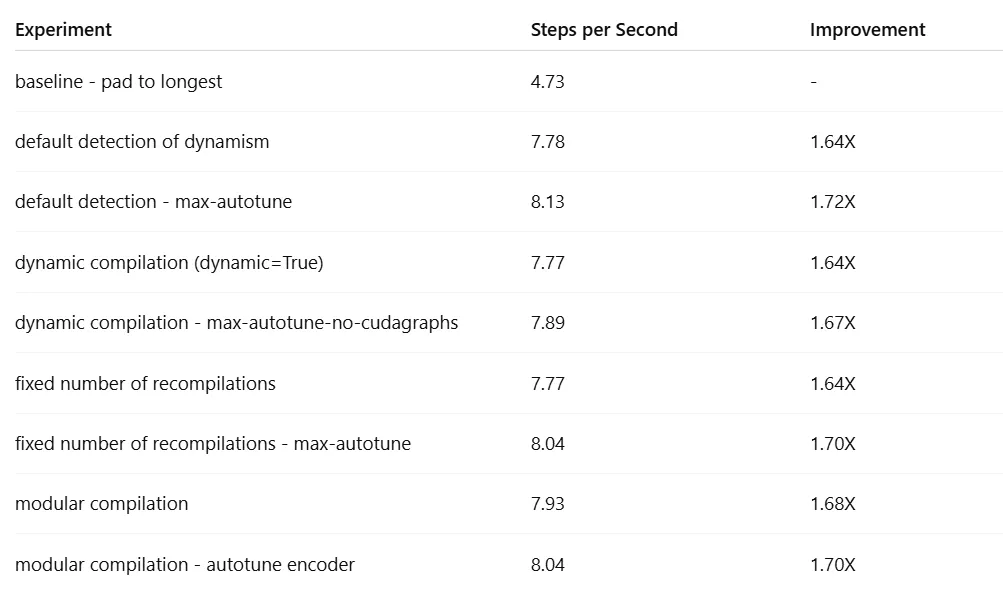 Dynamic Graph Compilation Results (by Author)
The best result was 8.13 steps per second, 72% higher than the baseline result (4.73). It is likely that further tuning could result in additional gains.
Keep in mind that the impact of torch.compile can vary greatly based on the details of the model and the runtime environment.
Dynamic Graph Compilation Results (by Author)
The best result was 8.13 steps per second, 72% higher than the baseline result (4.73). It is likely that further tuning could result in additional gains.
Keep in mind that the impact of torch.compile can vary greatly based on the details of the model and the runtime environment.
Reducing Compilation Time
We now turn our attention to the duration of the torch.compile warmup. We will assess the two optimizations discussed above, compile-time caching and regional compilation. We limit our experiments to a single GPU. We use the default application of torch.compile and measure the duration of the first 20 training iterations.
Pre-Loading Compilation Cache
In the following demonstration of compile-time caching, we use an Amazon S3 bucket as our persistent storage location:
python
import boto3

S3_BUCKET = "<insert bucket>"
S3_KEY = "<insert path>"

def download_cache():
    s3_client = boto3.client('s3')
    t0 = time.perf_counter()
    try:
        response = s3_client.get_object(Bucket=S3_BUCKET, Key=S3_KEY)
        artifact_bytes = response['Body'].read()
        torch.compiler.load_cache_artifacts(artifact_bytes)
        print(f"Cache restored. Time: {time.perf_counter()-t0} sec")
    except:
        return False
    return True

def upload_cache():
    s3_client = boto3.client('s3')
    artifact_bytes, cache_info = torch.compiler.save_cache_artifacts()
    s3_client.put_object(
        Bucket=S3_BUCKET,
        Key=S3_KEY,
        Body=artifact_bytes
    )


if __name__ == '__main__':
    # specify inductor cache dir
    inductor_cache_dir = '/tmp/inductor_cache'
    os.environ['TORCHINDUCTOR_CACHE_DIR'] = inductor_cache_dir

    # clean up compiler cache
    torch._dynamo.reset()
    shutil.rmtree(inductor_cache_dir, ignore_errors=True)

    # upload the compilation artifacts
    download_cache()

    # train the model
    train()

    # upload the compilation artifacts
    upload_cache()
This method reduces the compilation warmup from 196 seconds to 56 seconds — a 3.5X speed-up.
Regional Compilation
To implement regional compilation, we apply compilation to the internal blocks of both the encoder and the decoder:
python
def apply_compilation(model, optimizer):
    model.encoder.encoder.layer = torch.nn.ModuleList(
        [torch.compile(layer, fullgraph=True)
         for layer in model.encoder.encoder.layer]
    )
    model.decoder.transformer.h = torch.nn.ModuleList(
        [torch.compile(layer, fullgraph=True)
         for layer in model.decoder.transformer.h]
    )
    model.loss_function = torch.compile(model.loss_function, fullgraph=True)
    optimizer.step = torch.compile(optimizer.step)
    return model, optimizer
This change reduces the throughput from 7.78 steps per second to 7.61 steps per second. On the other hand, the compilation warmup drops from 196 seconds to 80 seconds — a 2.45X speed-up.
In the case of our toy model — which is extremely small by today’s standards — the gains we have demonstrated are modest. But for large models, these types of compilation-time optimization techniques could prove essential.
Summary
As AI/ML models grow in size to hundreds of billions or even trillions of parameters, optimizing their runtime performance becomes increasingly essential. For PyTorch models, torch.compile is one of the most powerful optimization tools at your disposal. This post has aimed to ease the adoption of torch.compile by addressing some of its intricacies and demonstrating its practical use. Some of the main techniques we covered were:
- Reducing graph-breaks and recompilations
- Tuning compilation settings to maximize performance gains
- Effective use of the PyTorch logs
- Top-down vs. bottom-up debugging strategies
- Modular application of torch.compile
- Reducing the duration of compilation warmup
PyTorch compilation is a complex and nuanced topic. In this post we have covered just some of its many features. For more on the topic, be refer to the official documentation.
Register Now to Continue Reading
Unlock Towards Data Science with a Free Account
All articles on Towards Data Science are available to registered users. Create a free account today to access this article and thousands more.
Register for freeSign in to your account
 Written By
See all from Chaim Rand
Editor's PicksArtificial IntelligenceDeep LearningPythonPytorch
Share This Article
Towards Data Science is a community publication. Submit your insights to reach our global audience and earn through the TDS Author Payment Program.
Write for TDS
Related Articles
Easy way to find the optimum Time series transformations for a forecasting model in a Machine Learning project.
Vicente P. Soloviev
November 25, 20204 min read
Machine Learning
Why you should build first and ask questions later
Russell Pollari
October 19, 20204 min read
Deep Learning
Understanding how to choose activation function in the final layer and loss function for neural network
Ibrahim Kovan
April 14, 20226 min read
Artificial Intelligence
The art of learning through data
Abiodun Olaoye
October 24, 20224 min read
Artificial Intelligence
Distilling the knowledge of a large model is complex but a new method shows incredible performances
Salvatore Raieli
November 11, 202311 min read
Machine Learning
EDA and Sentiment Analysis of Reddit Data
Sadrach Pierre, Ph.D.
February 8, 20215 min read
Data Science
Why does the autocorrelation of the errors term matter?
JUNIOR JUMBONG
March 10, 202513 min read
Deep Learning
An outdoor obstacle identification project proposal for blind people with DeepLabv3+
Shuyang Xiang
January 4, 20226 min read
Artificial Intelligence
If you have ever had to tinker with anchor boxes, you were probably frustrated, confused and saying to yourself, "There must be another...
Anders Christiansen
April 2, 20194 min read
Your home for data science and AI. The world's leading publication for data science, data analytics, data engineering, machine learning, and artificial intelligence professionals.
Subscribe to Our NewsletterWrite For TDS•About•Advertise•Privacy Policy•Terms of Use
© Insight Media Group, LLC 2026•The New Stack•roadmap.sh•Creator Network
Recommended Articles
Close