
In the early part of our Supervised Learning series, we introduced what supervised learning is and how it works. Now, in this second article, we’ll explore Logistic Regression — one of the most common and powerful classification algorithms. The goal is not to dive too deep into math, but to make the concept clear with an example, so anyone—even new learners—can understand how it works.
We will also see how to go from a trained model → real-world use case.
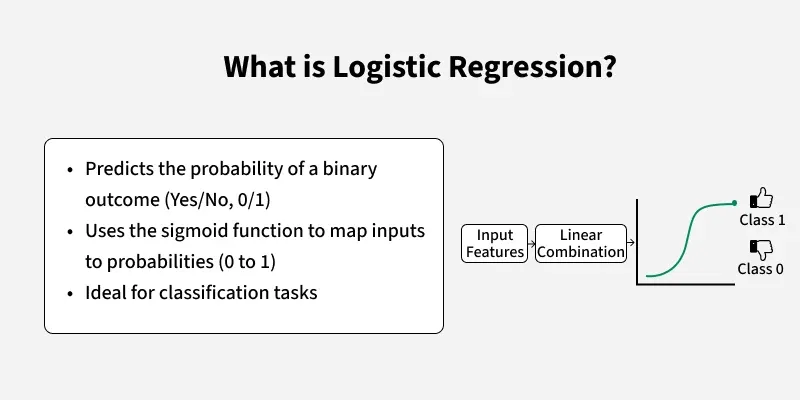
Despite its name, Logistic Regression is not used for regression problems. Instead, it is a classification algorithm.
It is mainly used for binary classification problems where the output has only two categories, such as:
Yes / No
True / False
0 / 1
Pass / Fail
Smoker / Non-Smoker
It can also be extended to handle multinomial (more than two classes) and ordinal (ordered categories) problems.
Example: Predicting whether a loan will be approved or not based on income, savings, and credit score.
Logistic Regression is popular because it is simple to understand, Fast to train, Interpretable (we can see how each input impacts the result), and flexible for binary and multi-class classification
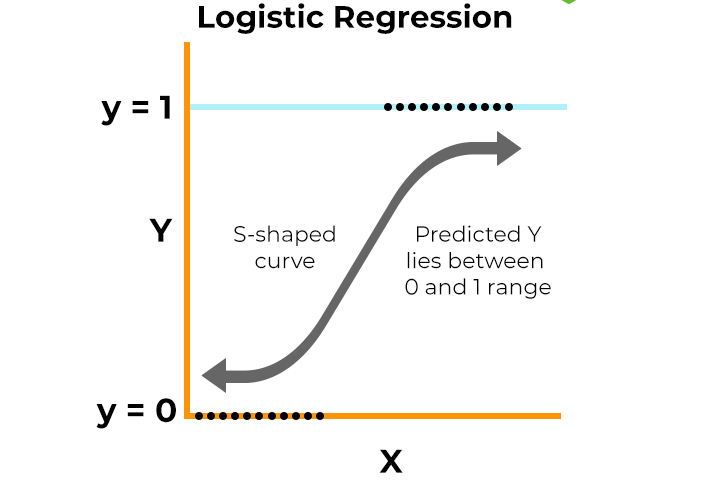
The main purpose of logistic regression is to understand patterns in input data and make predictions about the output.
It works by using the logistic (sigmoid) function, which maps any number to a probability between 0 and 1.
σ(x)=11+e−x\sigma(x) = \frac{1}{1 + e^{-x}}σ(x)=1+e−x1
If probability ≥ threshold (e.g., 0.5) → classify as 1 (positive class)
If probability < threshold → classify as 0 (negative class)
Example:
Imagine predicting if a car will break down based on the years since its last service. Logistic Regression gives a probability (say 0.8). If it’s above 0.5, we classify it as “Yes, breakdown likely”.
Input Features: Collect predictor variables (e.g., age, salary, credit score).
Apply Weights + Bias: Combine them into a linear equation.
Sigmoid Function: Convert the result into probability (between 0 and 1).
Threshold: Compare probability with a set threshold (e.g., 0.5).
Output: Final classification (e.g., loan approved or not).
Logistic Regression is widely used across industries:
Fraud Detection – detecting fraudulent vs. genuine transactions
Disease Prediction – predicting if a patient has a disease based on symptoms
Customer Churn – predicting if a customer will leave a service
Spam Detection – classifying emails as spam or not
We normally follow the following steps
Load the dataset
Split into training and testing sets
Train the Logistic Regression model
Make predictions on the test set
Evaluate performance (e.g., accuracy)
In this example we will show how to use the breast cancer dataset to implement a Logistic Regression model for classification. [orignal refrence ]
# Importing required libraries
from sklearn.datasets import load_breast_cancer        # Built-in dataset (Breast Cancer)
from sklearn.linear_model import LogisticRegression    # Logistic Regression model
from sklearn.model_selection import train_test_split   # To split data into training & testing
from sklearn.metrics import accuracy_score             # To measure model performance

# Step 1: Load the dataset (features = X, target labels = y)
X, y = load_breast_cancer(return_X_y=True)

# Step 2: Split dataset into training (80%) and testing (20%) sets
X_train, X_test, y_train, y_test = train_test_split(X, y, test_size=0.20, random_state=23)

# Step 3: Create a Logistic Regression model
# max_iter=10000 ensures the model has enough iterations to converge
clf = LogisticRegression(max_iter=10000, random_state=0)

# Step 4: Train the model using the training data
clf.fit(X_train, y_train)

# Step 5: Predict on the test data and calculate accuracy
acc = accuracy_score(y_test, clf.predict(X_test)) * 100

# Step 6: Print the model accuracy in percentage
print(f"Logistic Regression model accuracy: {acc:.2f}%")
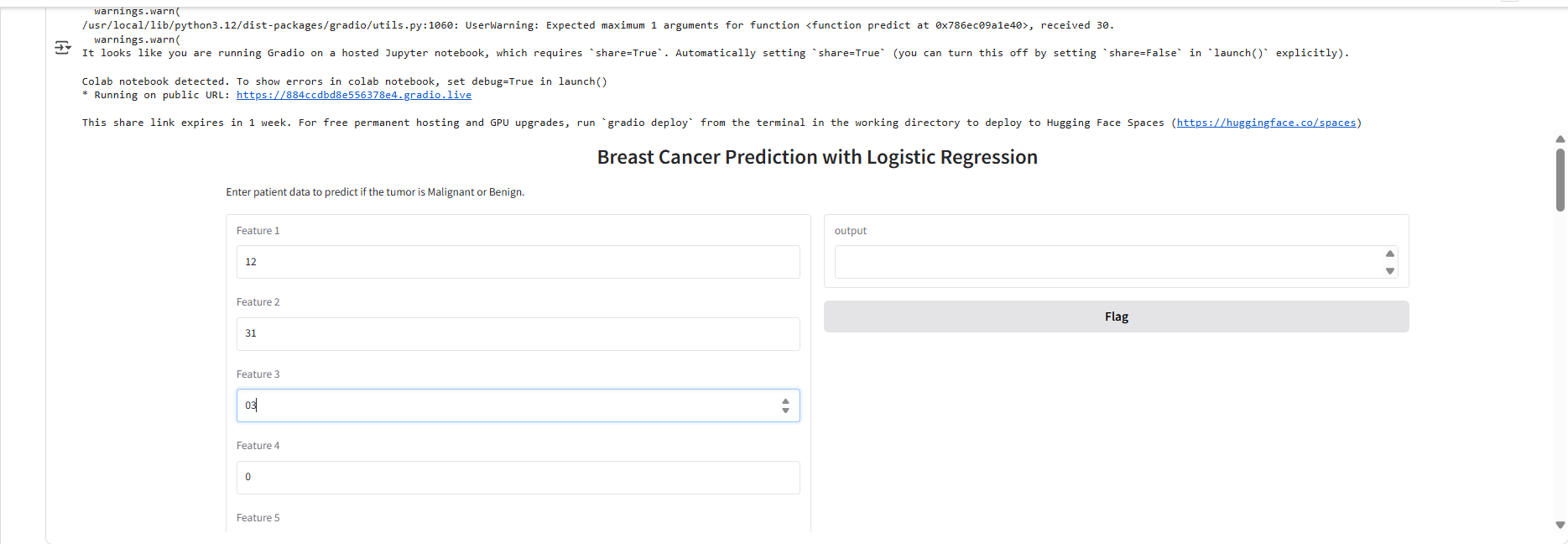
We’ve built and tested our Logistic Regression model in code. But in real life, models are often wrapped inside a user-friendly interface so anyone can try them without touching code. For this, we can save our trained model and use Gradio, a Python library that makes it easy to create interactive UIs for machine learning projects. With just a few lines, we can build a simple app where users enter input values and instantly see predictions (e.g., whether a tumor is malignant or benign).
Step 4: Save the trained model
joblib.dump(clf, "logistic_model.pkl")
Step 5: Define the prediction function for UI
def predict(features): model = joblib.load("logistic_model.pkl") prediction = model.predict([features])[0] return "Malignant (Cancerous)" if prediction == 0 else "Benign (Non-Cancerous)"
Step 6: Create Gradio Interface
Logistic Regression is one of the most foundational algorithms in machine learning. It introduces the key idea of mapping inputs to probabilities using the sigmoid function and helps us make simple yet powerful decisions.
In this series, we’ll continue to build upon such concepts, moving from logistic regression to other classification algorithms like Decision Trees, Random Forests, and SVMs.
Stay tuned — each step will connect the dots a little further!