保留正文与补采附件。源页面当前未重新核验;具体限制见交付清单。
 We value your privacy
We use cookies to enhance your browsing experience, serve personalised ads or content, and analyse our traffic. By clicking "Accept All", you consent to our use of cookies.
Customise Reject All Accept All
Customise Consent Preferences
We value your privacy
We use cookies to enhance your browsing experience, serve personalised ads or content, and analyse our traffic. By clicking "Accept All", you consent to our use of cookies.
Customise Reject All Accept All
Customise Consent Preferences  We use cookies to help you navigate efficiently and perform certain functions. You will find detailed information about all cookies under each consent category below.
The cookies that are categorised as "Necessary" are stored on your browser as they are essential for enabling the basic functionalities of the site. ... Show more
NecessaryAlways Active
Necessary cookies are required to enable the basic features of this site, such as providing secure log-in or adjusting your consent preferences. These cookies do not store any personally identifiable data.
We use cookies to help you navigate efficiently and perform certain functions. You will find detailed information about all cookies under each consent category below.
The cookies that are categorised as "Necessary" are stored on your browser as they are essential for enabling the basic functionalities of the site. ... Show more
NecessaryAlways Active
Necessary cookies are required to enable the basic features of this site, such as providing secure log-in or adjusting your consent preferences. These cookies do not store any personally identifiable data.
-
Cookie
BCTempID
-
Duration
10 minutes
-
Description
No description available.
-
Cookie
__cf_bm
-
Duration
1 hour
-
Description
This cookie, set by Cloudflare, is used to support Cloudflare Bot Management.
-
Cookie
AWSALBCORS
-
Duration
7 days
-
Description
Amazon Web Services set this cookie for load balancing.
-
Cookie
_cfuvid
-
Duration
session
-
Description
Cloudflare sets this cookie to track users across sessions to optimize user experience by maintaining session consistency and providing personalized services
-
Cookie
li_gc
-
Duration
6 months
-
Description
Linkedin set this cookie for storing visitor's consent regarding using cookies for non-essential purposes.
-
Cookie
__hssrc
-
Duration
session
-
Description
This cookie is set by Hubspot whenever it changes the session cookie. The __hssrc cookie set to 1 indicates that the user has restarted the browser, and if the cookie does not exist, it is assumed to be a new session.
-
Cookie
__hssc
-
Duration
1 hour
-
Description
HubSpot sets this cookie to keep track of sessions and to determine if HubSpot should increment the session number and timestamps in the __hstc cookie.
-
Cookie
wpEmojiSettingsSupports
-
Duration
session
-
Description
WordPress sets this cookie when a user interacts with emojis on a WordPress site. It helps determine if the user's browser can display emojis properly.
-
Cookie
BCSessionID
-
Duration
1 year 1 month 4 days
-
Description
Blueconic sets this cookie as a unique identifier for the BlueConic profile.
-
Cookie
_octo
-
Duration
1 year
-
Description
No description available.
-
Cookie
logged_in
-
Duration
1 year
-
Description
No description available.
-
Cookie
__Secure-YEC
-
Duration
past
-
Description
YouTube sets this cookie to stores the user's video player preferences using embedded YouTube video
-
Cookie
__eoi
-
Duration
6 months
-
Description
Description is currently not available.
-
Cookie
AWSALBTGCORS
-
Duration
7 days
-
Description
No description available.
-
Cookie
login-status-p
-
Duration
past
-
Description
Description is currently not available.
-
Cookie
AWSALBTG
-
Duration
7 days
-
Description
No description available.
-
Cookie
csrf_token
-
Duration
session
-
Description
No description available.
-
Cookie
token_v2
-
Duration
1 day
-
Description
Description is currently not available.
-
Cookie
D
-
Duration
1 year
-
Description
Description is currently not available.
-
Cookie
PHPSESSID
-
Duration
session
-
Description
This cookie is native to PHP applications. The cookie stores and identifies a user's unique session ID to manage user sessions on the website. The cookie is a session cookie and will be deleted when all the browser windows are closed.
-
Cookie
VISITOR_PRIVACY_METADATA
-
Duration
6 months
-
Description
YouTube sets this cookie to store the user's cookie consent state for the current domain.
-
Cookie
cookietest
-
Duration
session
-
Description
The cookietest cookie is typically used to determine whether the user's browser accepts cookies, essential for website functionality and user experience.
-
Cookie
__Host-airtable-session
-
Duration
1 year
-
Description
This cookie is used to enable us to integrate the services of Airtable.
-
Cookie
__Host-airtable-session.sig
-
Duration
1 year
-
Description
This cookie is used to enable us to integrate the services of Airtable.
-
Cookie
m
-
Duration
1 year 1 month 4 days
-
Description
Stripe sets this cookie for fraud prevention purposes. It identifies the device used to access the website, allowing the website to be formatted accordingly.
-
Cookie
BIGipServer*
-
Duration
session
-
Description
Marketo sets this cookie to collect information about the user's online activity and build a profile about their interests to provide advertisements relevant to the user.
-
Cookie
__cfruid
-
Duration
session
-
Description
Cloudflare sets this cookie to identify trusted web traffic.
-
Cookie
_GRECAPTCHA
-
Duration
6 months
-
Description
Google Recaptcha service sets this cookie to identify bots to protect the website against malicious spam attacks.
-
Cookie
__Secure-YNID
-
Duration
6 months
-
Description
Google cookie used to protect user security and prevent fraud, especially during the login process.
-
Cookie
cookieyes-consent
-
Duration
1 year
-
Description
CookieYes sets this cookie to remember users' consent preferences so that their preferences are respected on subsequent visits to this site. It does not collect or store any personal information about the site visitors.
Functional
Functional cookies help perform certain functionalities like sharing the content of the website on social media platforms, collecting feedback, and other third-party features.
-
Cookie
lidc
-
Duration
1 day
-
Description
LinkedIn sets the lidc cookie to facilitate data center selection.
-
Cookie
brw
-
Duration
1 year
-
Description
No description available.
-
Cookie
brwConsent
-
Duration
5 minutes
-
Description
Description is currently not available.
-
Cookie
WMF-Uniq
-
Duration
1 year
-
Description
Description is currently not available.
-
Cookie
loom_anon_comment
-
Duration
1 year
-
Description
No description available.
-
Cookie
loom_referral_video
-
Duration
session
-
Description
Description is currently not available.
-
Cookie
VISITOR_INFO1_LIVE
-
Duration
6 months
-
Description
A cookie set by YouTube to measure bandwidth that determines whether the user gets the new or old player interface.
-
Cookie
yt-remote-connected-devices
-
Duration
Never Expires
-
Description
YouTube sets this cookie to store the user's video preferences using embedded YouTube videos.
-
Cookie
ytidb::LAST_RESULT_ENTRY_KEY
-
Duration
Never Expires
-
Description
The cookie ytidb::LAST_RESULT_ENTRY_KEY is used by YouTube to store the last search result entry that was clicked by the user. This information is used to improve the user experience by providing more relevant search results in the future.
-
Cookie
yt-remote-device-id
-
Duration
Never Expires
-
Description
YouTube sets this cookie to store the user's video preferences using embedded YouTube videos.
-
Cookie
yt-remote-session-name
-
Duration
session
-
Description
The yt-remote-session-name cookie is used by YouTube to store the user's video player preferences using embedded YouTube video.
-
Cookie
yt-remote-fast-check-period
-
Duration
session
-
Description
The yt-remote-fast-check-period cookie is used by YouTube to store the user's video player preferences for embedded YouTube videos.
-
Cookie
yt-remote-session-app
-
Duration
session
-
Description
The yt-remote-session-app cookie is used by YouTube to store user preferences and information about the interface of the embedded YouTube video player.
-
Cookie
yt-remote-cast-available
-
Duration
session
-
Description
The yt-remote-cast-available cookie is used to store the user's preferences regarding whether casting is available on their YouTube video player.
-
Cookie
yt-remote-cast-installed
-
Duration
session
-
Description
The yt-remote-cast-installed cookie is used to store the user's video player preferences using embedded YouTube video.
-
Cookie
cp_session
-
Duration
3 months
-
Description
Codepen sets this cookie for Help systems found in the website.
-
Cookie
loid
-
Duration
1 year 1 month 4 days
-
Description
This cookie is set by the Reddit. The cookie enables the sharing of content from the website onto the social media platform.
Analytics
Analytical cookies are used to understand how visitors interact with the website. These cookies help provide information on metrics such as the number of visitors, bounce rate, traffic source, etc.
-
Cookie
__hstc
-
Duration
6 months
-
Description
Hubspot set this main cookie for tracking visitors. It contains the domain, initial timestamp (first visit), last timestamp (last visit), current timestamp (this visit), and session number (increments for each subsequent session).
-
Cookie
hubspotutk
-
Duration
6 months
-
Description
HubSpot sets this cookie to keep track of the visitors to the website. This cookie is passed to HubSpot on form submission and used when deduplicating contacts.
-
Cookie
_ga
-
Duration
1 year 1 month 4 days
-
Description
Google Analytics sets this cookie to calculate visitor, session and campaign data and track site usage for the site's analytics report. The cookie stores information anonymously and assigns a randomly generated number to recognise unique visitors.
-
Cookie
ga*
-
Duration
1 year 1 month 4 days
-
Description
Google Analytics sets this cookie to store and count page views.
-
Cookie
__Host-psifi.analyticsTrace
-
Duration
6 hours
-
Description
Description is currently not available.
-
Cookie
__Host-psifi.analyticsTraceV2
-
Duration
6 hours
-
Description
Description is currently not available.
-
Cookie
_gh_sess
-
Duration
session
-
Description
GitHub sets this cookie for temporary application and framework state between pages like what step the user is on in a multiple step form.
-
Cookie
YSC
-
Duration
session
-
Description
YSC cookie is set by Youtube and is used to track the views of embedded videos on Youtube pages.
-
Cookie
ajs_anonymous_id
-
Duration
1 year
-
Description
This cookie is set by Segment to count the number of people who visit a certain site by tracking if they have visited before.
-
Cookie
vuid
-
Duration
1 year 1 month 4 days
-
Description
Vimeo installs this cookie to collect tracking information by setting a unique ID to embed videos on the website.
Performance
Performance cookies are used to understand and analyse the key performance indexes of the website which helps in delivering a better user experience for the visitors.
-
Cookie
AWSALB
-
Duration
7 days
-
Description
AWSALB is an application load balancer cookie set by Amazon Web Services to map the session to the target.
-
Cookie
acq
-
Duration
past
-
Description
Description is currently not available.
-
Cookie
acq.sig
-
Duration
past
-
Description
Description is currently not available.
-
Cookie
ptc
-
Duration
2 years
-
Description
No description available.
Advertisement
Advertisement cookies are used to provide visitors with customised advertisements based on the pages you visited previously and to analyse the effectiveness of the ad campaigns.
-
Cookie
muc_ads
-
Duration
1 year 1 month 4 days
-
Description
Twitter sets this cookie to collect user behaviour and interaction data to optimize the website.
-
Cookie
guest_id_marketing
-
Duration
1 year 1 month 4 days
-
Description
Twitter sets this cookie to identify and track the website visitor.
-
Cookie
guest_id_ads
-
Duration
1 year 1 month 4 days
-
Description
Twitter sets this cookie to identify and track the website visitor.
-
Cookie
personalization_id
-
Duration
1 year 1 month 4 days
-
Description
Twitter sets this cookie to integrate and share features for social media and also store information about how the user uses the website, for tracking and targeting.
-
Cookie
guest_id
-
Duration
1 year 1 month 4 days
-
Description
Twitter sets this cookie to identify and track the website visitor. It registers if a user is signed in to the Twitter platform and collects information about ad preferences.
-
Cookie
bcookie
-
Duration
1 year
-
Description
LinkedIn sets this cookie from LinkedIn share buttons and ad tags to recognize browser IDs.
-
Cookie
__Secure-ROLLOUT_TOKEN
-
Duration
6 months
-
Description
YouTube sets this cookie to manage feature rollout and experimentation. It helps Google control which new features or interface changes are shown to users as part of testing and staged rollouts, ensuring consistent experience for a given user during an experiment.
-
Cookie
yt.innertube::nextId
-
Duration
Never Expires
-
Description
YouTube sets this cookie to register a unique ID to store data on what videos from YouTube the user has seen.
-
Cookie
yt.innertube::requests
-
Duration
Never Expires
-
Description
YouTube sets this cookie to register a unique ID to store data on what videos from YouTube the user has seen.
-
Cookie
session_tracker
-
Duration
session
-
Description
This cookie is set by the Reddit. This cookie is used to identify trusted web traffic. It also helps in adverstising on the website.
-
Cookie
edgebucket
-
Duration
session
-
Description
Reddit sets this cookie to save the information about a log-on Reddit user, for the purpose of advertisement recommendations and updating the content.
-
Cookie
did
-
Duration
1 year
-
Description
Arbor sets this cookie to show targeted ads to site visitors.This cookie expires after 2 months or 1 year.
Uncategorised
Other uncategorised cookies are those that are being analysed and have not been classified into a category as yet.
No cookies to display.
Reject All Save My Preferences Accept All
Toggle SearchToggle Mobile Navigation
Publish AI, ML & data-science insights to a global community of data professionals.
Sign inSubmit an Article
LatestEditor's PicksNewsletterShipAI
Write For TDS
LinkedInXToggle Search
Data Science
Beginner's Guide To Building A Singlish AI Chatbot
AI text generation is one of the most exciting fields in NLP, but also a daunting one for beginners. This post aims to speed up the...
Chua Chin Hon
August 5, 20208 min read
 Singlish phrases such as "blur as a sotong" can be bewildering for non-Singaporeans. Can a transformer model make sense of it? Photo: Chua Chin Hon
AI text generation is one of the most exciting fields in NLP, but also a daunting one for beginners. This post aims to speed up the learning process for newcomers by combining and adapting several existing tutorials into a practical end-to-end walkthrough with notebooks and sample data for a conversational chatbot that can be used in an interactive app.
Auto-text generation is undoubtedly one of the most exciting fields in NLP in recent years. But it's also an area that's relatively difficult for newcomers to navigate, due to the high bar for technical knowledge and resource requirements.
While there's no shortage of helpful notebooks and tutorials out there, pulling the various threads together can be time consuming. To help speed up the learning process for fellow newcomers, I've put together a simple end-to-end project to create a simple AI conversational chatbot that you can run in an interactive app.
I chose to frame the text generation project around a chatbot as we react more intuitively to conversations, and can easily tell whether the auto-generated text is any good. Chatbots are also ubiquitous enough that most of us would have a good sense of the expected baseline performance without having to consult a manual or an expert. If it's bad, you'll know right away without having to check a score or metric.
The workflow in the project is structured with the practical questions of a beginner in mind: How to get started with data extraction and preparation, what's needed to fine tune a pre-trained transformer model, and finally how to test/use the bot in an app.
Learn this step by step with the interactive AI and Data Scientist roadmap.
The end product is not what one might call "polished", as the screen-grab below of one of the test-runs shows. But as a first experiment, the results are good enough (in my view) for highlighting both the possibilities and limits of AI text generation via transfer learning.
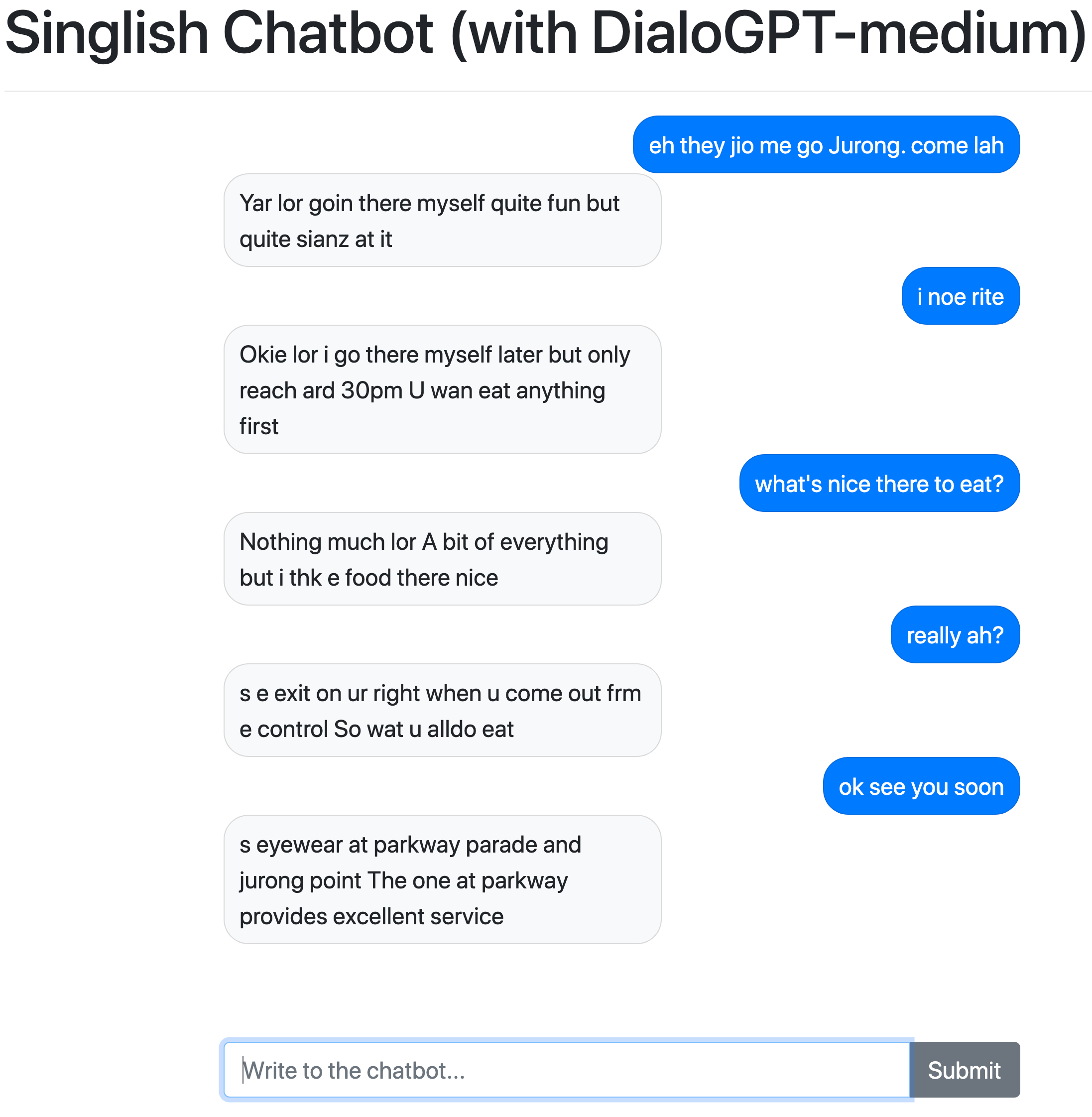 Screen-grab of test run of Singlish Chatbot on Colab.
DATA, REPO AND REQUIREMENTS
If the sample conversation above looks bewildering to you, well, you've likely not been to Singapore and/or heard of "Singlish", or colloquial Singaporean English. It's a mish-mash of several languages and local slang, and can be confusing for non-Singaporeans. In other words, not a bad way to test the limits of the DialoGPT model.
The data for fine tuning the model is taken from a collection of SMS messages by Singaporean students at a local university. While the written and spoken forms of "Singlish" can differ significantly, we'll set that aside for practical reasons.
The dataset (raw and cleaned versions for training) and four related notebooks are available in my repo. The notebooks are split according to the following tasks:
- notebook 3.0: Data preparation
- notebook 3.1: Fine tuning a pretrained DialoGPT-medium model on Colab (Pro)
- notebook 3.2: Testing the model's performance on an interactive Dash app
- notebook 3.3: CPU alternative to text generation using aitextgen
As far as resource requirements go, you can run this project on a free Google/Colab account if you fine tune a DialoGPT-small model instead of the larger versions. If you are using a more robust dataset, perhaps fine tuning a DialoGPT-small model would be sufficient.
But I found that my results from fine tuning the smaller model weren't as good, and the constant housekeeping to avoid busting the 15Gb storage limit on a free Google account was a drain on productivity.
If you foresee yourself experimenting with more/larger transformer models in future, I'd recommend an upgrade to Colab Pro as well as increasing the amount of storage space on your Google account. This allowed me to iterate quickly, without having to wrestle with a physical eGPU set up at home.
For brevity, I won't go into the technical details in this post. I'm still learning as I go, and there are far better articles on this topic out there. Most of the code are lifted or adapted from the work of previous authors, and they are acknowledged as such in the notebooks.
STEP 1: DATA PREPARATION
The first and biggest question for the project is whether you can find an appropriate dataset for your use case. The more specific the use case (say, a Trevor Noah chatbot), the harder it will be to find the appropriate training data. Ethical questions should be considered at the outset: Is it appropriate to model the chatbot after a real person, even if you have access to transcripts, and what is the likelihood of potential misuse?
The anonymised SMS dataset used in this project is among the few "Singlish" corpuses in the public space, and is the only one I've found that's large enough for this purpose. The first half of notebook3.0 involves the steps needed to extract the SMSes from a deeply nested json file. Skip this if you are using a different dataset.
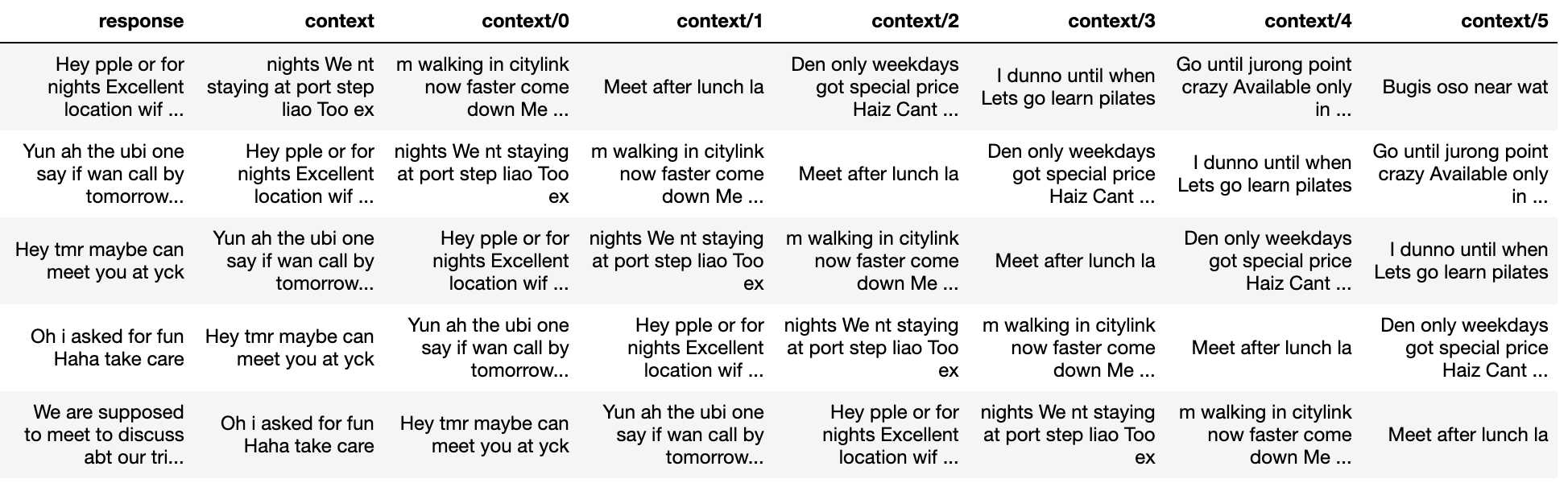
The second half deals with the very specific way that the training and validation data sets have to be prepared for use in the DialoGPT model. Essentially, for every SMS you have to create x-number of previous SMSes as "context":
 Click here to see another example of how data is prepared in building a Rick Sanchez bot.
I settled on seven previous responses, but you can change it up or down to see what impact this may or may not have on the chatbot's performance. If this is more than an experiment for you, I suspect this is where you'll be spending a lot of time tweaking the dataset to clean up the response/context. Unfortunately, I've not come across a good tutorial on how best to structure or tweak custom datasets for fine tuning a DialoGPT model.
After splitting the response-context dataset into training and validation sets, you are pretty much set for the fine tuning.
Click here to see another example of how data is prepared in building a Rick Sanchez bot.
I settled on seven previous responses, but you can change it up or down to see what impact this may or may not have on the chatbot's performance. If this is more than an experiment for you, I suspect this is where you'll be spending a lot of time tweaking the dataset to clean up the response/context. Unfortunately, I've not come across a good tutorial on how best to structure or tweak custom datasets for fine tuning a DialoGPT model.
After splitting the response-context dataset into training and validation sets, you are pretty much set for the fine tuning.
STEP 2: FINE TUNING DIALOGPT
There's a tonne of code involved in the fine tuning process, but thanks to the earlier work by folks like Nathan Cooper and Rostyslav Neskorozhenyi, the training loops can be used as is without new users having to make major changes. You can study the code in greater detail when you have more time. The key cell to note in notebook3.1 is the one below:
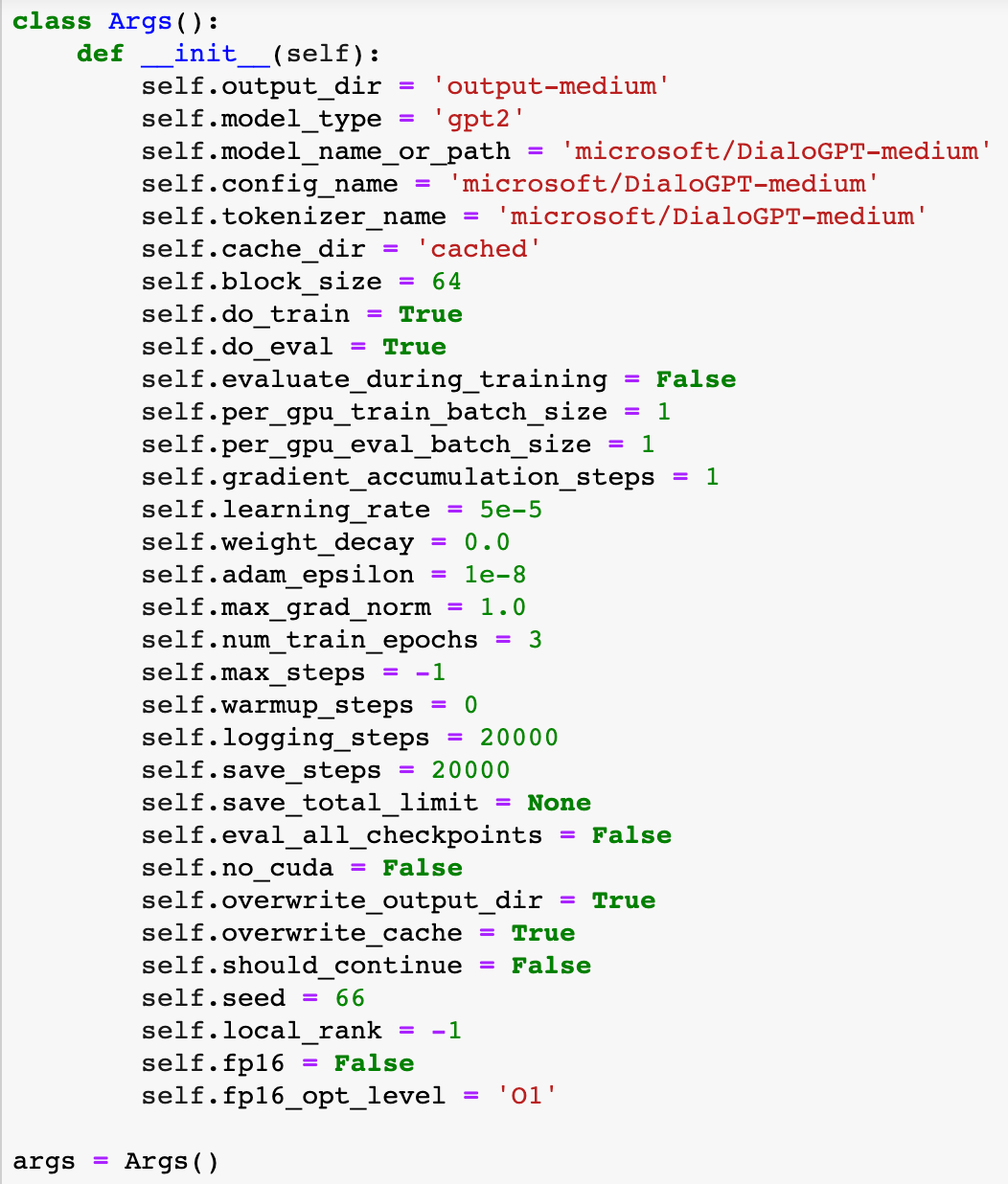 This is where you'd need to make changes depending on your dataset and the set-up at your disposal. For example, you can stick with the medium-sized DialoGPT model or dial down to the small one.
If you encounter GPU-out-of-memory issues, you'll have to reduce the batch size (as I did in cell above by reducing to 1). If you don't have much storage space left in your Google Drive, you'll have to adjust the logging_steps and save_steps intervals accordingly (files saved at various checkpoints can chew up storage space in a hurry).
The fine tuning process can take anything from 40 minutes to about 2 hours, depending on the parameters you set. Do note that there are usage limits even on Colab Pro. For instance, I wasn't able to fine tune a DialoGPT-large model due to GPU memory limits. Colab Pro notebooks can run up to 24 hours, but I have yet to test that out with more epochs.
The one metric to take note of at the end of the fine tuning process is the perplexity score - a measure of how certain the model is in picking the next token. The lower the score, the better as it means the model is less uncertain.
I got a perplexity score of 1.6134 from fine tuning the DialoGPT-medium model, a significant improvement from the scores in the ranges of 6.3 to 5.7 when using the DialoGPT-small model. It'll take several runs for you to figure out what's an acceptable score.
You can start chatting with the bot at the end of the notebook (assuming everything ran correctly), but I much prefer to load the fine tuned model into an app. Thanks to Lu Xing Han @ Plotly, there's a notebook for that.
This is where you'd need to make changes depending on your dataset and the set-up at your disposal. For example, you can stick with the medium-sized DialoGPT model or dial down to the small one.
If you encounter GPU-out-of-memory issues, you'll have to reduce the batch size (as I did in cell above by reducing to 1). If you don't have much storage space left in your Google Drive, you'll have to adjust the logging_steps and save_steps intervals accordingly (files saved at various checkpoints can chew up storage space in a hurry).
The fine tuning process can take anything from 40 minutes to about 2 hours, depending on the parameters you set. Do note that there are usage limits even on Colab Pro. For instance, I wasn't able to fine tune a DialoGPT-large model due to GPU memory limits. Colab Pro notebooks can run up to 24 hours, but I have yet to test that out with more epochs.
The one metric to take note of at the end of the fine tuning process is the perplexity score - a measure of how certain the model is in picking the next token. The lower the score, the better as it means the model is less uncertain.
I got a perplexity score of 1.6134 from fine tuning the DialoGPT-medium model, a significant improvement from the scores in the ranges of 6.3 to 5.7 when using the DialoGPT-small model. It'll take several runs for you to figure out what's an acceptable score.
You can start chatting with the bot at the end of the notebook (assuming everything ran correctly), but I much prefer to load the fine tuned model into an app. Thanks to Lu Xing Han @ Plotly, there's a notebook for that.
STEP 3: TEST YOUR FINE TUNED MODEL IN A DASH APP
The Plotly repo contains code for running the chatbot app on a local machine if you wish to do that, but I opted to run notebook3.2 on Colab for practical reasons (the fine tuned model is already there). The code is lifted straight from Lu Xing Han's demo, with minor changes towards the end for folks who might want to experiment further with the output from the bot:
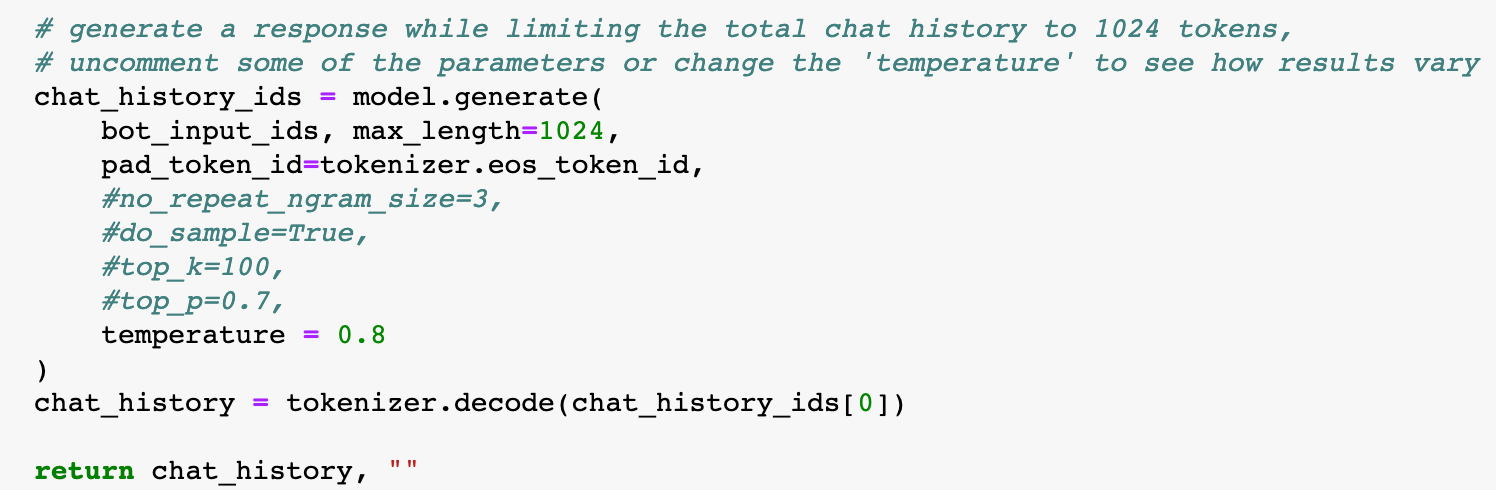 "Temperature" allows you to control the level of creativity (or craziness/brazenness) of the responses. You can reduce the length of the chatbot's "utterances" by lowering the max_length (max number of token: 1,024; default: 256 tokens). A full list of the arguments you can tweak for the chatbot conversation can be found here, under the section "Using the interaction script".
Here's a screen-grab of slightly more successful conversation I managed to have with the chatbot. Highlighted cells are my entries:
"Temperature" allows you to control the level of creativity (or craziness/brazenness) of the responses. You can reduce the length of the chatbot's "utterances" by lowering the max_length (max number of token: 1,024; default: 256 tokens). A full list of the arguments you can tweak for the chatbot conversation can be found here, under the section "Using the interaction script".
Here's a screen-grab of slightly more successful conversation I managed to have with the chatbot. Highlighted cells are my entries:
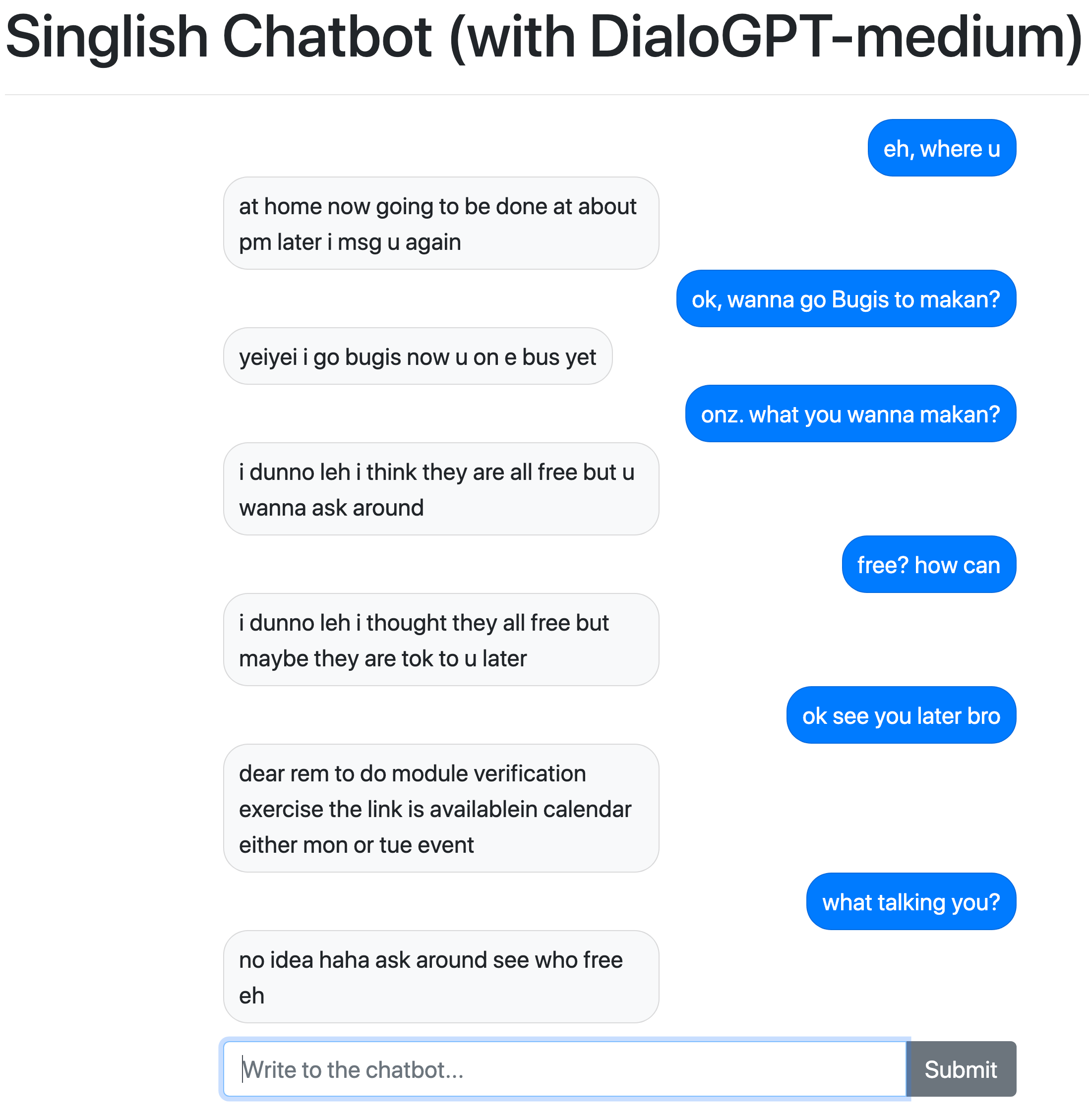 The fine tuned pytorch model is too big (1.44Gb) to be deployed on any free hosting account, so there's no way (for now) for you to try this particular Singlish chatbot on a web app.
My take: The "Singlish" chatbot is not ready for prime-time. It can give surprisingly good responses at times, but can't sustain the effort beyond a few exchanges. As you can see in the screen-grab above, things go sideways towards the end. With a richer dataset and perhaps enough compute to train on a DialoGPT-large model, the responses might get better.
But as an experiment, I'd have to say the performance is not half bad at all.
The fine tuned pytorch model is too big (1.44Gb) to be deployed on any free hosting account, so there's no way (for now) for you to try this particular Singlish chatbot on a web app.
My take: The "Singlish" chatbot is not ready for prime-time. It can give surprisingly good responses at times, but can't sustain the effort beyond a few exchanges. As you can see in the screen-grab above, things go sideways towards the end. With a richer dataset and perhaps enough compute to train on a DialoGPT-large model, the responses might get better.
But as an experiment, I'd have to say the performance is not half bad at all.
BONUS STEP: CPU ALTERATIVE TO AUTO-TEXT GENERATION
There are a number of alternatives out there if you'd rather not use Colab and/or confine the data and the fine-tuning to a local machine. I'll just highlight one Python library that I've been experimenting with - aitextgen - that provides an option for CPU-only training.
Notebook3.3 outlines a simple example using the same SMS dataset in this project. I had previously tried aitextgen with other datasets involving YouTube transcripts of political speeches in Singapore. Unfortunately, I've not been able to get very satisfactory results so far.
I'm probably not using it right. You might have better luck. Aitextgen can run on Colab too.
Hopefully this post and the accompanying notebooks will help you get started quickly on experiments with your own AI chatbot. What's far harder to do is figuring out how to improve its performance, or ensure that it's safe for public use.
There are also related technical issues to explore, such as slimming the model down for deployment or more advanced interactive app designs that can bring out additional functionalities in the chatbot. If you have recommendations for any of the above topics, or spot mistakes in this post, ping me at:
Twitter: Chua Chin Hon
LinkedIn: www.linkedin.com/in/chuachinhon
Register Now to Continue Reading
Unlock Towards Data Science with a Free Account
All articles on Towards Data Science are available to registered users. Create a free account today to access this article and thousands more.
Register for freeSign in to your account
 Written By
See all from Chua Chin Hon
AIChatbotsData ScienceSingaporeTransfer Learning
Share This Article
Towards Data Science is a community publication. Submit your insights to reach our global audience and earn through the TDS Author Payment Program.
Write for TDS
Related Articles
Programming
How to analyse pharmaceutical sales data using Python, Pandas, Matplotlib and regression models
Przemyslaw Jarzynski
September 6, 20209 min read
Data Science
Practice control flow, input handling, and functions in R by creating an interactive quiz game.
Benjamin Nweke
October 5, 20256 min read
Machine Learning
I will be predicting the number of monthly Sunspots using time series analysis. The models that will be explored in-depth are the ARMA and...
Ethan Johnson-Skinner, MSc
September 9, 202110 min read
Data Science
What it means and how it is used. Explained with a use case.
Soner Yıldırım
July 8, 20207 min read
Data Science
Conceptual overview and step by step guide for beginners
Emily A. Halford
January 10, 202117 min read
Machine Learning
Setting up the background
Rukshan Pramoditha
March 2, 20216 min read
Data Science
A gentle introduction to the amazing field of optimization
Jarom Hulet
June 26, 202412 min read
Machine Learning
A persistent thread of commentary says data science is overhyped. Don't believe it.
Brian Kent
June 10, 20218 min read
Artificial Intelligence
Using dynamic forecasting ensembles to cope with changes in the time series
Vitor Cerqueira
January 19, 20235 min read
Your home for data science and AI. The world's leading publication for data science, data analytics, data engineering, machine learning, and artificial intelligence professionals.
Subscribe to Our NewsletterWrite For TDS•About•Advertise•Privacy Policy•Terms of Use
© Insight Media Group, LLC 2026•The New Stack•roadmap.sh•Creator Network
Recommended Articles
Close