保留正文与补采附件。源页面当前未重新核验;具体限制见交付清单。
 We value your privacy
We use cookies to enhance your browsing experience, serve personalised ads or content, and analyse our traffic. By clicking "Accept All", you consent to our use of cookies.
Customise Reject All Accept All
Customise Consent Preferences
We value your privacy
We use cookies to enhance your browsing experience, serve personalised ads or content, and analyse our traffic. By clicking "Accept All", you consent to our use of cookies.
Customise Reject All Accept All
Customise Consent Preferences  We use cookies to help you navigate efficiently and perform certain functions. You will find detailed information about all cookies under each consent category below.
The cookies that are categorised as "Necessary" are stored on your browser as they are essential for enabling the basic functionalities of the site. ... Show more
NecessaryAlways Active
Necessary cookies are required to enable the basic features of this site, such as providing secure log-in or adjusting your consent preferences. These cookies do not store any personally identifiable data.
We use cookies to help you navigate efficiently and perform certain functions. You will find detailed information about all cookies under each consent category below.
The cookies that are categorised as "Necessary" are stored on your browser as they are essential for enabling the basic functionalities of the site. ... Show more
NecessaryAlways Active
Necessary cookies are required to enable the basic features of this site, such as providing secure log-in or adjusting your consent preferences. These cookies do not store any personally identifiable data.
-
Cookie
BCTempID
-
Duration
10 minutes
-
Description
No description available.
-
Cookie
__cf_bm
-
Duration
1 hour
-
Description
This cookie, set by Cloudflare, is used to support Cloudflare Bot Management.
-
Cookie
AWSALBCORS
-
Duration
7 days
-
Description
Amazon Web Services set this cookie for load balancing.
-
Cookie
_cfuvid
-
Duration
session
-
Description
Cloudflare sets this cookie to track users across sessions to optimize user experience by maintaining session consistency and providing personalized services
-
Cookie
li_gc
-
Duration
6 months
-
Description
Linkedin set this cookie for storing visitor's consent regarding using cookies for non-essential purposes.
-
Cookie
__hssrc
-
Duration
session
-
Description
This cookie is set by Hubspot whenever it changes the session cookie. The __hssrc cookie set to 1 indicates that the user has restarted the browser, and if the cookie does not exist, it is assumed to be a new session.
-
Cookie
__hssc
-
Duration
1 hour
-
Description
HubSpot sets this cookie to keep track of sessions and to determine if HubSpot should increment the session number and timestamps in the __hstc cookie.
-
Cookie
wpEmojiSettingsSupports
-
Duration
session
-
Description
WordPress sets this cookie when a user interacts with emojis on a WordPress site. It helps determine if the user's browser can display emojis properly.
-
Cookie
BCSessionID
-
Duration
1 year 1 month 4 days
-
Description
Blueconic sets this cookie as a unique identifier for the BlueConic profile.
-
Cookie
_octo
-
Duration
1 year
-
Description
No description available.
-
Cookie
logged_in
-
Duration
1 year
-
Description
No description available.
-
Cookie
__Secure-YEC
-
Duration
past
-
Description
YouTube sets this cookie to stores the user's video player preferences using embedded YouTube video
-
Cookie
__eoi
-
Duration
6 months
-
Description
Description is currently not available.
-
Cookie
AWSALBTGCORS
-
Duration
7 days
-
Description
No description available.
-
Cookie
login-status-p
-
Duration
past
-
Description
Description is currently not available.
-
Cookie
AWSALBTG
-
Duration
7 days
-
Description
No description available.
-
Cookie
csrf_token
-
Duration
session
-
Description
No description available.
-
Cookie
token_v2
-
Duration
1 day
-
Description
Description is currently not available.
-
Cookie
D
-
Duration
1 year
-
Description
Description is currently not available.
-
Cookie
PHPSESSID
-
Duration
session
-
Description
This cookie is native to PHP applications. The cookie stores and identifies a user's unique session ID to manage user sessions on the website. The cookie is a session cookie and will be deleted when all the browser windows are closed.
-
Cookie
VISITOR_PRIVACY_METADATA
-
Duration
6 months
-
Description
YouTube sets this cookie to store the user's cookie consent state for the current domain.
-
Cookie
cookietest
-
Duration
session
-
Description
The cookietest cookie is typically used to determine whether the user's browser accepts cookies, essential for website functionality and user experience.
-
Cookie
__Host-airtable-session
-
Duration
1 year
-
Description
This cookie is used to enable us to integrate the services of Airtable.
-
Cookie
__Host-airtable-session.sig
-
Duration
1 year
-
Description
This cookie is used to enable us to integrate the services of Airtable.
-
Cookie
m
-
Duration
1 year 1 month 4 days
-
Description
Stripe sets this cookie for fraud prevention purposes. It identifies the device used to access the website, allowing the website to be formatted accordingly.
-
Cookie
BIGipServer*
-
Duration
session
-
Description
Marketo sets this cookie to collect information about the user's online activity and build a profile about their interests to provide advertisements relevant to the user.
-
Cookie
__cfruid
-
Duration
session
-
Description
Cloudflare sets this cookie to identify trusted web traffic.
-
Cookie
_GRECAPTCHA
-
Duration
6 months
-
Description
Google Recaptcha service sets this cookie to identify bots to protect the website against malicious spam attacks.
-
Cookie
__Secure-YNID
-
Duration
6 months
-
Description
Google cookie used to protect user security and prevent fraud, especially during the login process.
-
Cookie
cookieyes-consent
-
Duration
1 year
-
Description
CookieYes sets this cookie to remember users' consent preferences so that their preferences are respected on subsequent visits to this site. It does not collect or store any personal information about the site visitors.
Functional
Functional cookies help perform certain functionalities like sharing the content of the website on social media platforms, collecting feedback, and other third-party features.
-
Cookie
lidc
-
Duration
1 day
-
Description
LinkedIn sets the lidc cookie to facilitate data center selection.
-
Cookie
brw
-
Duration
1 year
-
Description
No description available.
-
Cookie
brwConsent
-
Duration
5 minutes
-
Description
Description is currently not available.
-
Cookie
WMF-Uniq
-
Duration
1 year
-
Description
Description is currently not available.
-
Cookie
loom_anon_comment
-
Duration
1 year
-
Description
No description available.
-
Cookie
loom_referral_video
-
Duration
session
-
Description
Description is currently not available.
-
Cookie
VISITOR_INFO1_LIVE
-
Duration
6 months
-
Description
A cookie set by YouTube to measure bandwidth that determines whether the user gets the new or old player interface.
-
Cookie
yt-remote-connected-devices
-
Duration
Never Expires
-
Description
YouTube sets this cookie to store the user's video preferences using embedded YouTube videos.
-
Cookie
ytidb::LAST_RESULT_ENTRY_KEY
-
Duration
Never Expires
-
Description
The cookie ytidb::LAST_RESULT_ENTRY_KEY is used by YouTube to store the last search result entry that was clicked by the user. This information is used to improve the user experience by providing more relevant search results in the future.
-
Cookie
yt-remote-device-id
-
Duration
Never Expires
-
Description
YouTube sets this cookie to store the user's video preferences using embedded YouTube videos.
-
Cookie
yt-remote-session-name
-
Duration
session
-
Description
The yt-remote-session-name cookie is used by YouTube to store the user's video player preferences using embedded YouTube video.
-
Cookie
yt-remote-fast-check-period
-
Duration
session
-
Description
The yt-remote-fast-check-period cookie is used by YouTube to store the user's video player preferences for embedded YouTube videos.
-
Cookie
yt-remote-session-app
-
Duration
session
-
Description
The yt-remote-session-app cookie is used by YouTube to store user preferences and information about the interface of the embedded YouTube video player.
-
Cookie
yt-remote-cast-available
-
Duration
session
-
Description
The yt-remote-cast-available cookie is used to store the user's preferences regarding whether casting is available on their YouTube video player.
-
Cookie
yt-remote-cast-installed
-
Duration
session
-
Description
The yt-remote-cast-installed cookie is used to store the user's video player preferences using embedded YouTube video.
-
Cookie
cp_session
-
Duration
3 months
-
Description
Codepen sets this cookie for Help systems found in the website.
-
Cookie
loid
-
Duration
1 year 1 month 4 days
-
Description
This cookie is set by the Reddit. The cookie enables the sharing of content from the website onto the social media platform.
Analytics
Analytical cookies are used to understand how visitors interact with the website. These cookies help provide information on metrics such as the number of visitors, bounce rate, traffic source, etc.
-
Cookie
__hstc
-
Duration
6 months
-
Description
Hubspot set this main cookie for tracking visitors. It contains the domain, initial timestamp (first visit), last timestamp (last visit), current timestamp (this visit), and session number (increments for each subsequent session).
-
Cookie
hubspotutk
-
Duration
6 months
-
Description
HubSpot sets this cookie to keep track of the visitors to the website. This cookie is passed to HubSpot on form submission and used when deduplicating contacts.
-
Cookie
_ga
-
Duration
1 year 1 month 4 days
-
Description
Google Analytics sets this cookie to calculate visitor, session and campaign data and track site usage for the site's analytics report. The cookie stores information anonymously and assigns a randomly generated number to recognise unique visitors.
-
Cookie
ga*
-
Duration
1 year 1 month 4 days
-
Description
Google Analytics sets this cookie to store and count page views.
-
Cookie
__Host-psifi.analyticsTrace
-
Duration
6 hours
-
Description
Description is currently not available.
-
Cookie
__Host-psifi.analyticsTraceV2
-
Duration
6 hours
-
Description
Description is currently not available.
-
Cookie
_gh_sess
-
Duration
session
-
Description
GitHub sets this cookie for temporary application and framework state between pages like what step the user is on in a multiple step form.
-
Cookie
YSC
-
Duration
session
-
Description
YSC cookie is set by Youtube and is used to track the views of embedded videos on Youtube pages.
-
Cookie
ajs_anonymous_id
-
Duration
1 year
-
Description
This cookie is set by Segment to count the number of people who visit a certain site by tracking if they have visited before.
-
Cookie
vuid
-
Duration
1 year 1 month 4 days
-
Description
Vimeo installs this cookie to collect tracking information by setting a unique ID to embed videos on the website.
Performance
Performance cookies are used to understand and analyse the key performance indexes of the website which helps in delivering a better user experience for the visitors.
-
Cookie
AWSALB
-
Duration
7 days
-
Description
AWSALB is an application load balancer cookie set by Amazon Web Services to map the session to the target.
-
Cookie
acq
-
Duration
past
-
Description
Description is currently not available.
-
Cookie
acq.sig
-
Duration
past
-
Description
Description is currently not available.
-
Cookie
ptc
-
Duration
2 years
-
Description
No description available.
Advertisement
Advertisement cookies are used to provide visitors with customised advertisements based on the pages you visited previously and to analyse the effectiveness of the ad campaigns.
-
Cookie
muc_ads
-
Duration
1 year 1 month 4 days
-
Description
Twitter sets this cookie to collect user behaviour and interaction data to optimize the website.
-
Cookie
guest_id_marketing
-
Duration
1 year 1 month 4 days
-
Description
Twitter sets this cookie to identify and track the website visitor.
-
Cookie
guest_id_ads
-
Duration
1 year 1 month 4 days
-
Description
Twitter sets this cookie to identify and track the website visitor.
-
Cookie
personalization_id
-
Duration
1 year 1 month 4 days
-
Description
Twitter sets this cookie to integrate and share features for social media and also store information about how the user uses the website, for tracking and targeting.
-
Cookie
guest_id
-
Duration
1 year 1 month 4 days
-
Description
Twitter sets this cookie to identify and track the website visitor. It registers if a user is signed in to the Twitter platform and collects information about ad preferences.
-
Cookie
bcookie
-
Duration
1 year
-
Description
LinkedIn sets this cookie from LinkedIn share buttons and ad tags to recognize browser IDs.
-
Cookie
__Secure-ROLLOUT_TOKEN
-
Duration
6 months
-
Description
YouTube sets this cookie to manage feature rollout and experimentation. It helps Google control which new features or interface changes are shown to users as part of testing and staged rollouts, ensuring consistent experience for a given user during an experiment.
-
Cookie
yt.innertube::nextId
-
Duration
Never Expires
-
Description
YouTube sets this cookie to register a unique ID to store data on what videos from YouTube the user has seen.
-
Cookie
yt.innertube::requests
-
Duration
Never Expires
-
Description
YouTube sets this cookie to register a unique ID to store data on what videos from YouTube the user has seen.
-
Cookie
session_tracker
-
Duration
session
-
Description
This cookie is set by the Reddit. This cookie is used to identify trusted web traffic. It also helps in adverstising on the website.
-
Cookie
edgebucket
-
Duration
session
-
Description
Reddit sets this cookie to save the information about a log-on Reddit user, for the purpose of advertisement recommendations and updating the content.
-
Cookie
did
-
Duration
1 year
-
Description
Arbor sets this cookie to show targeted ads to site visitors.This cookie expires after 2 months or 1 year.
Uncategorised
Other uncategorised cookies are those that are being analysed and have not been classified into a category as yet.
No cookies to display.
Reject All Save My Preferences Accept All
Toggle SearchToggle Mobile Navigation
Publish AI, ML & data-science insights to a global community of data professionals.
Sign inSubmit an Article
LatestEditor's PicksNewsletterShipAI
Write For TDS
LinkedInXToggle Search
Data Science
Hidden Gems in NumPy: 7 Functions Every Data Scientist Should Know
NumPy tricks you didn’t know you needed (until now)
Ibrahim Salami
October 21, 20259 min read
 I’ve been learning data analytics for a year now. So far, I can consider myself confident in SQL and Power BI. The transition to Python has been quite exciting. I’ve been exposed to some neat and smarter approaches to data analysis.
After brushing up on my skills on the Python fundamentals, the ideal next step was to start learning about some of the Python libraries for data analysis. NumPy is one of them. Being a math nerd, naturally, I’d enjoy exploring this Python library.
This library is designed for individuals who want to perform mathematical computations using Python, from basic mathematics and algebra to advanced concepts like calculus. NumPy can pretty much do it all.
In this article, I wanted to introduce you to some NumPy functions I’ve been playing around with. Whether you’re a data scientist, financial analyst, or research nerd, these functions would help you out a lot. Without further ado, let’s get to it.
Learn this step by step with the interactive AI and Data Scientist roadmap.
I’ve been learning data analytics for a year now. So far, I can consider myself confident in SQL and Power BI. The transition to Python has been quite exciting. I’ve been exposed to some neat and smarter approaches to data analysis.
After brushing up on my skills on the Python fundamentals, the ideal next step was to start learning about some of the Python libraries for data analysis. NumPy is one of them. Being a math nerd, naturally, I’d enjoy exploring this Python library.
This library is designed for individuals who want to perform mathematical computations using Python, from basic mathematics and algebra to advanced concepts like calculus. NumPy can pretty much do it all.
In this article, I wanted to introduce you to some NumPy functions I’ve been playing around with. Whether you’re a data scientist, financial analyst, or research nerd, these functions would help you out a lot. Without further ado, let’s get to it.
Learn this step by step with the interactive AI and Data Scientist roadmap.
Sample Dataset (used throughout)
Before diving in, I’ll define a small dataset that will anchor all examples:
python
import numpy as np
temps = np.array([30, 32, 29, 35, 36, 33, 31])
Using this small temperature dataset, I’ll be sharing 7 functions that make array operations effortless.
1. np.where()— The Vectorized If-Else
Before I define what this function is, here’s a quick showcase of the function
python
arr = np.array([10, 15, 20, 25, 30])
indices = np.where(arr > 20)
print(indices)
Output: (array([3, 4]),)
np.where is a condition-based function. When a condition is specified, it outputs the index/indices where that condition is true.
For instance, in the example above, an array is specified, and I have declared a np.where function that retrieves records where the array element is greater than 20. The output is array([3, 4]), because that’s the location/indices where that condition is true — that will be 25 and 30.
Conditional selection/replacement
It’s also useful when you’re trying to define a custom output for the outputs that meet your condition. This is used a lot in data analysis. For instance:
python
import numpy as np
arr = np.array([1, 2, 3, 4, 5])
result = np.where(arr % 2 == 0, ‘even’, ‘odd’)
print(result)
Output: [‘odd’ ‘even’ ‘odd’ ‘even’ ‘odd’]
The example above tries to retrieve even numbers. After retrieving, a condition selection/replacement function is called that adds a custom name to our conditions. If the condition is true, it’s replaced by even, and if the condition is false, it’s replaced by odd.
Alright, let’s apply this to our small dataset.
Problem: Replace all temperatures above 35°C with 35 (cap extreme readings).
In real-world data, especially from sensors, weather stations, or user inputs, outliers are quite common — sudden spikes or unrealistic values that aren’t realistic.
For example, a temperature sensor might momentarily glitch and record 42°C when the actual temperature was 35°C.
Leaving such anomalies in your data can:
-
Skew averages — a single high value can pull your mean upward.
-
Distorted visualisations — charts might stretch to accommodate a few extreme points.
-
Mislead models — machine learning algorithms are sensitive to unexpected ranges.
Let’s fix that
python
adjusted = np.where(temps > 35, 35, temps)
Output: array([30, 32, 29, 35, 35, 33, 31])
Looks much better now. With just a few lines of code, we managed to fix unrealistic outliers in our dataset.
2. np.clip() — Keep Values in Range
In many practical datasets, values can spill outside the expected range, probably due to measurement noise, user error, or scaling mismatches.
For instance:
-
A temperature sensor might read −10°C when the lowest possible is 0°C.
-
A model output might predict probabilities like 1.03 or −0.05 due to rounding.
-
When normalising pixel values for an image, a few might go beyond 0–255.
These “out-of-bounds” values may seem minor, but they can:
- Break downstream calculations (e.g., log or percentage computations).
- Cause unrealistic plots or artefacts (especially in signal/image processing).
- Distort normalisation and make metrics unreliable.
np.clip() neatly solves this problem by constraining all elements of an array within a specified minimum and maximum range. It’s kinda like setting boundaries in your dataset.
Example:
Problem: Ensure all readings stay within [28, 35] range.
python
clipped = np.clip(temps, 28, 35)
clipped
Output: array([30, 32, 29, 35, 35, 33, 31])
Here’s what it does:
- Any value below 28 becomes 28.
- Any value above 35 becomes 35.
- Everything else stays the same.
Sure, this could also be done with np.where() like so
temps = np.where(temps < 28, 28, np.where(temps > 35, 35, temps))
But I’d rather go with np.clip() cos it’s much cleaner and faster.
3. np.ptp() — Find Your Data’s Range in One Line
np.ptp() (peak-to-peak) basically shows you the difference between the maximum and minimum elements.
It’s basically:
np.ptp(a) == np.max(a) — np.min(a)
But in one clean, expressive function.
Here’s how it works
python
arr = np.array([[1, 5, 2],
[8, 3, 7]])
# Calculate peak-to-peak range of the entire array
range_all = np.ptp(arr)
print(f”Peak-to-peak range of the entire array: {range_all}”)
So that’ll be our maximum value (8) — minimum value(1)
Output: Peak-to-peak range of the entire array: 7
So why is this useful? Similar to averages, understanding how much your data varies is often as important. In weather data, for instance, it shows you how stable or volatile the conditions were.
Instead of separately calling max() and min(), or manually subtracting. np.ptp() makes it concise, readable, and vectorised, especially useful when you’re computing ranges across multiple rows or columns.
Now, let’s apply this to our dataset.
Problem: How much did the temperature vary this week?
python
temps = np.array([30, 32, 29, 35, 36, 33, 31])
np.ptp(temps)
Output: np.int64(7)
This tells us the temperature fluctuated by 7°C over the period, from 29°C to 36°C.
4. np.diff() — Detect Daily Changes
np.diff() is the quickest way to measure momentum, growth, or decline across time. It basically calculates differences between elements in an array.
To paint a picture for you, if your dataset were a journey, np.ptp() tells you how far you’ve travelled overall, while np.diff() tells you how far you moved between each stop.
Essentially:
np.diff([a1, a2, a3, …]) = [a2 — a1, a3 — a2, …]
Let’s apply this to our dataset.
Let’s look at our temperature data again:
python
temps = np.array([30, 32, 29, 35, 36, 33, 31])
daily_change = np.diff(temps)
print(daily_change)
Output: [ 2 -3 6 1 -3 -2]
In the real world, np.diff() is used for
- Time series analysis — Track daily changes in temperature, sales, or stock prices.
- Signal processing — Identify spikes or sudden drops in sensor data.
- Data validation — Detect jumps or inconsistencies between consecutive measurements.
5. np.gradient() — Capture Smooth Trends and Slopes
To be honest, when I first came across this, i found it hard to grasp. But essentially, np.gradient() computes the numerical gradient (a smooth estimate of change or slope) across your data. It’s similar to np.diff(), however, np.gradient() works even if your x-values are unevenly spaced (e.g., irregular timestamps). It provides a smoother signal, making trends easier to interpret visually.
For instance:
python
time = np.array([0, 1, 2, 4, 7])
temp = np.array([30, 32, 34, 35, 36])
np.gradient(temp, time)
Output: array([2. , 2. , 1.5 , 0.43333333, 0.33333333])
Let’s break this down a bit.
Normally, np.gradient() assumes the x-values (your index positions) are evenly spaced — like 0, 1, 2, 3, 4, etc. But in the example above, the time array isn’t evenly spaced: notice the jumps are 1, 1, 2, 3. That means temperature readings weren’t taken every hour.
By passing time as the second argument, we’re essentially telling NumPy to use the actual time gaps when calculating how fast temperature changes.
To explain the output above. It’s saying between 0–2 hours, the temperature rose quickly (about 2°C per hour), and between 2–7 hours, the rise slowed down to around 0.3–1°C per hour.
Let’s apply this to our dataset.
Problem: Estimate the rate of temperature change (like slope).
python
temps = np.array([30, 32, 29, 35, 36, 33, 31])
grad = np.gradient(temps)
np.round(grad, 2)
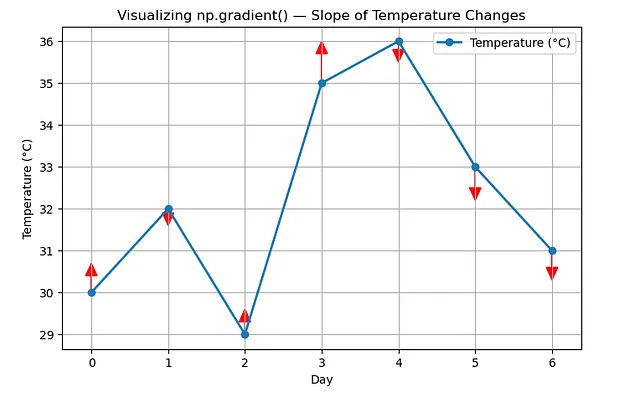
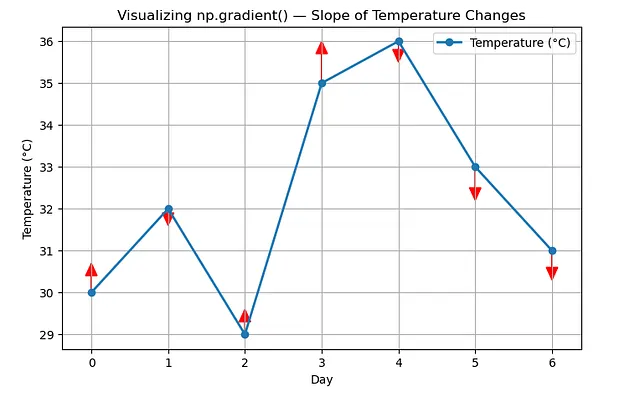
Output: array([ 2. , -0.5, 1.5, 3.5, -1. , -2.5, -2. ])
You can read it like:
- +2 → temp rising fast (early warm-up)
- -0.5 → slight drop (minor cooling)
- +1.5, +3.5 → strong rise (big heat jump)
- -1, -2.5, -2 → steady cooling trend
So this tells a story of the week’s temperature. Let’s visualise this real quick with matplotlib.
Notice how easy it is to interpret the visualisation. That’s what makes np.gradient() so useful.
6. np.percentile() – Spot Outliers or Thresholds
This is one of my favourite functions. np.percentile() helps you retrieve chunks or slices of your data. Numpy defines it well.
numpy.percentile computes the q-th percentile of data along a specified axis , where q is a percentage between 0 and 100.
In np.percentile(), usually there’s a threshold to meet (which is 100%). You can then walk backwards and check the percentage of records that fall below this threshold.
Let’s try this out with sales records
Let’s say your monthly sales target is $60,000.
You can use np.percentile() to understand how often and how strongly you’re hitting or missing that target.
python
import numpy as np
sales = np.array([45, 50, 52, 48, 60, 62, 58, 70, 72, 66, 63, 80])
np.percentile(sales, [25, 50, 75, 90])
Output: [51.0 61.0 67.5 73.0]
To break this down:
- 25th percentile = $51k → 25% of your months were below $51k (low performers)
- 50th percentile = $61k → half of your months were below $61k (around your target)
- 75th percentile = $67.5k → top-performing months are comfortably above target
- 90th percentile = $73k → your best months hit $73k or more
So now you can say:
“We hit or exceeded our $60k target in roughly half of all months.”
This can also be visualised using a KPI card. That’s pretty powerful.
That’s KPI storytelling with data.
Let’s apply that to our temperature dataset.
python
import numpy as np
temps = np.array([30, 32, 29, 35, 36, 33, 31])
np.percentile(temps, [25, 50, 75])
Output: [30.5 32. 34.5]
Here’s what it means:
- 25% of the readings are below 30.5°C
- 50% (the median) are below 32°C
- 75% are below 34.5°C
7. np.unique() — Quickly Find Unique Values and Their Counts
This function is perfect for cleaning, summarising, or categorising data. np.unique() finds all the unique elements in your array. It can also check how often those elements appear in your array.
For instance, let’s say you have a list of product categories from your store:
python
import numpy as np
products = np.array([
‘Shoes’, ‘Bags’, ‘Bags’, ‘Hats’,
‘Shoes’, ‘Shoes’, ‘Belts’, ‘Hats’
])
np.unique(products)
Output: array([‘Bags’, ‘Belts’, ‘Hats’, ‘Shoes’], dtype=’ <U5')
You can take things further by counting the number of times they appear using the return_counts property:
python
np.unique(products, return_counts=True)
Output: (array([‘Bags’, ‘Belts’, ‘Hats’, ‘Shoes’], dtype=’ <U5'), array([2, 1, 2, 3])).
Let’s apply that to my temperature dataset. Currently, there aren’t any duplicates, so we are just gonna get our same input back.
python
import numpy as np
temps = np.array([30, 32, 29, 35, 36, 33, 31])
np.unique(temps)
Output: array([29, 30, 31, 32, 33, 35, 36])
Notice how the figures are organised accordingly, too — in ascending order.
You can also ask NumPy to count how many times each value appears:
python
np.unique(temps, return_counts=True)
Output: (array([29, 30, 31, 32, 33, 35, 36]), array([1, 1, 1, 1, 1, 1, 1]))
Wrapping up
So far, these are the functions I stumbled upon. And I find them to be pretty helpful in data analysis. The beauty of NumPy is that the more you play with it, the more you uncover these tiny one-liners that replace pages of code. So next time you’re wrangling data or debugging a messy dataset, stay away from Pandas for a bit, and try dropping in one of these functions. Thanks for reading!
Register Now to Continue Reading
Unlock Towards Data Science with a Free Account
All articles on Towards Data Science are available to registered users. Create a free account today to access this article and thousands more.
Register for freeSign in to your account
 Written By
See all from Ibrahim Salami
Data AnalyticsData VisualizationNumpyProgrammingStatistics
Share This Article
Towards Data Science is a community publication. Submit your insights to reach our global audience and earn through the TDS Author Payment Program.
Write for TDS
Related Articles
Data Visualization
Using python code which can be applied to data from your own dataset for generating your own charts and gifs
James Koh, PhD
March 7, 202413 min read
Data Science
With many examples of some of the most used functions and methods
Gonçalo Guimarães Gomes
October 6, 20209 min read
Machine Learning
Optimizing web marketing strategies through statistical testing
Francesco Casalegno
February 17, 20219 min read
Machine Learning
How to predict employee salary using linear regression
Mahsa Mir
July 13, 20206 min read
Data Science
A step-by-step explanation of Directed Acyclic Graphs from the basics through to more advanced aspects
Graham Harrison
April 6, 202338 min read
Artificial Intelligence
In this article, we talk about how LLMs work, from scratch - assuming only that you know how to add and multiply two numbers. The article...
Rohit Patel
October 19, 202443 min read
Data Science
When independent sociological research is forbidden, Twitter and Python come in handy to analyze real political preferences.
Daria Minsky
July 29, 202011 min read
Deep Learning
The advent of large language models (LLMs) , trained on vast amounts of text data, has been one of the most significant breakthroughs in...
Anthony Alcaraz
November 14, 202311 min read
Data Science
Causal AI, exploring the integration of causal reasoning into machine learning
Ryan OSullivan
January 31, 20249 min read
Your home for data science and AI. The world's leading publication for data science, data analytics, data engineering, machine learning, and artificial intelligence professionals.
Subscribe to Our NewsletterWrite For TDS•About•Advertise•Privacy Policy•Terms of Use
© Insight Media Group, LLC 2026•The New Stack•roadmap.sh•Creator Network
Recommended Articles
Close