
I write technical articles that analyze real world engineering problems through the lens of production systems.
My work focuses on architectural tradeoffs, UI layer system design, performance optimization, and reliability patterns derived from shipping and maintaining scalable applications.
From the outside, bulk PDF upload looks simple. User picks a ZIP file, hits upload, system processes it. Done.
From the inside, you're dealing with 50 to 300 PDFs arriving simultaneously, each one needing to be extracted, parsed for text, run through a regex, matched against a database record, conditionally written to object storage, and then have the database updated, all while the user is sitting on the other side expecting the browser not to hang.
The synchronous path fails quickly. You start processing PDF number one, and by the time you're done with PDF number three, the HTTP request has already timed out. Even if your reverse proxy gives you 120 seconds, that's not enough for 300 documents. And even if it were, you've now blocked your entire Node.js event loop for the duration. Every other user's request is waiting behind a ZIP file. In effect, a single large upload becomes capable of degrading the responsiveness of the entire application.
The real constraint isn't algorithmic. It's environmental. The system operates on a single application server with limited compute and memory resources, connected to a managed database. There’s no distributed processing layer, autoscaling infrastructure, or serverless workers available for offloading heavy tasks. The same server must continue handling normal application traffic while processing large ZIP uploads in the background, so any solution has to work within these constraints without degrading the rest of the system.
The deployment window is also real. You don't get to take the system down for an hour to re-architect. You get a narrow window, and the feature has to work when it comes back up.
That's the actual problem. Processing PDFs is not the difficult part. That can be solved in an afternoon. The real problem is: how do I process PDFs asynchronously, track progress across an unknown number of files, recover from partial failures, report status back to the client, and do all of this while operating within the existing infrastructure constraints and without introducing additional managed services or increasing operational costs.
Before getting into decisions, here's the full async flow as built.
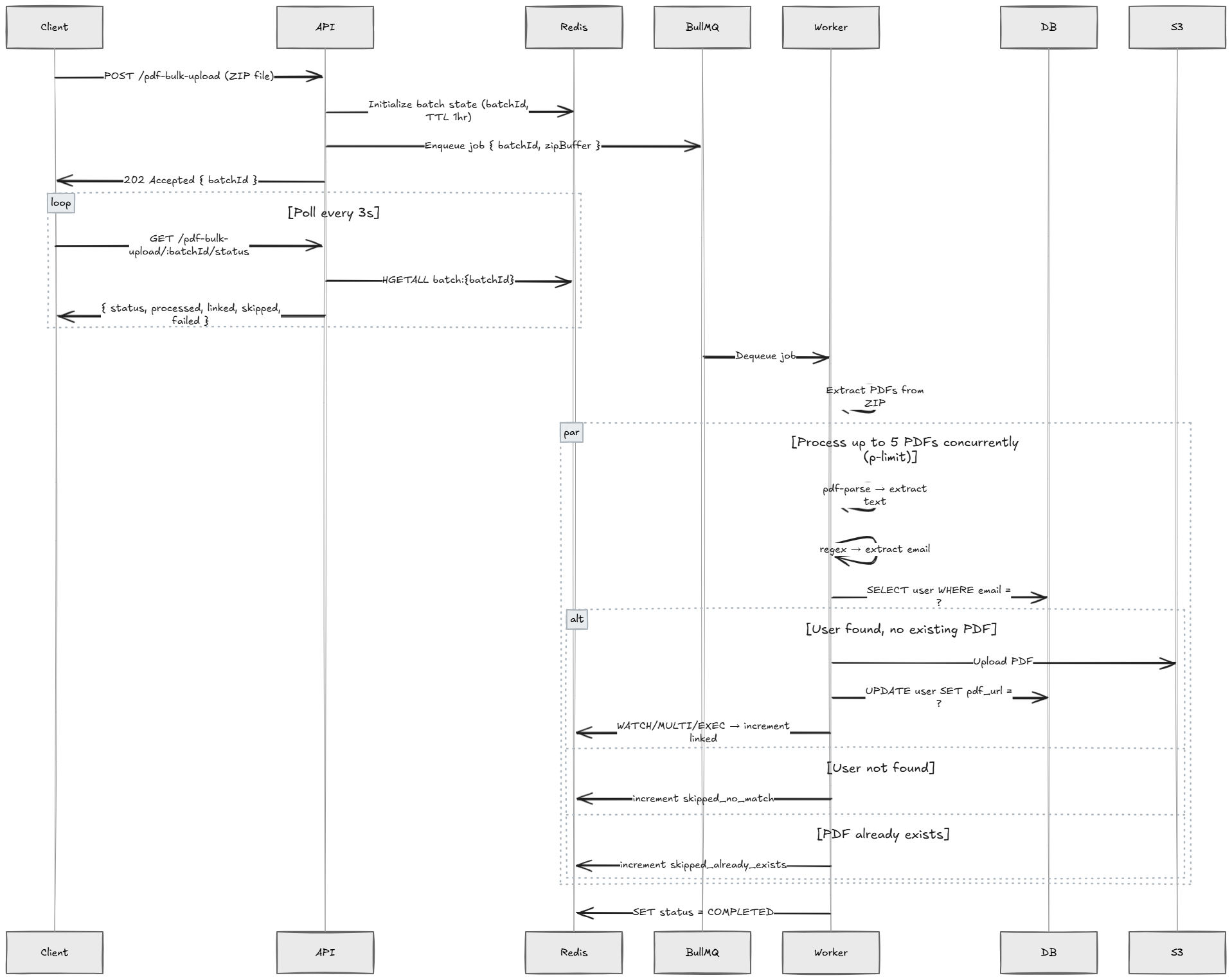
The architecture separates request handling from heavy processing as early as possible. The API endpoint accepts the ZIP upload, assigns a batchId, enqueues the job, and immediately returns control to the client. From that point forward, the HTTP request lifecycle is no longer tied to the work being performed.
The worker performs extraction and PDF processing independently while the client periodically polls Redis for batch progress. This separation prevents long-running tasks from blocking the application server and keeps the Node.js event loop free from CPU or I/O heavy work triggered by a single request.
It also creates a natural progress tracking mechanism where the system can expose partial completion status without maintaining any in-memory session state. The system effectively becomes a set of loosely coupled components: the API accepts work, the queue schedules it, the worker executes it, and Redis tracks the batch progress.
The key architectural decision is the decoupling point. The API returns a batchId before any PDF processing begins, allowing the client to poll for progress while the worker processes the batch in the background.
This decision deserves honest treatment because the database-backed queue is a legitimate architecture that I seriously considered and came close to choosing.
The database queue pattern works like this: when a job arrives, you insert a row into a jobs table with status PENDING. A background process polls that table every few seconds, picks up PENDING rows, sets them to PROCESSING, does the work, and marks them COMPLETED or FAILED. You get job persistence for free, you get queryability, and you get zero additional infrastructure.
This is genuinely a good pattern. A database polling queue works well when your team is comfortable with SQL and the workload is low-volume and latency-tolerant. If you already operate a database and want to avoid another dependency, it becomes a very reasonable choice. It scales further than most people think, especially with SELECT ... FOR UPDATE SKIP LOCKED to handle concurrent consumers without collisions.
Where it struggles: when you want real-time push semantics, when you want built-in retry with backoff, when your polling interval creates unacceptable latency, or when your database is already under load and you don't want job polling adding to that. Polling a database every 3 seconds is cheap when the table has 50 rows. Less cheap when you're in a high-throughput scenario and your external database instance is already handling application queries.
Why BullMQ won here:
First, the cost argument. Redis runs as a Docker Compose service on the same machine. No additional compute cost. The alternative is polling an external managed database. This means every job pickup requires a network round trip to a service that is already serving application queries. Redis on localhost is microseconds. External DB across a network is milliseconds. For a job queue, the difference matters less in throughput than in connection overhead and latency predictability.
Second, BullMQ gives you the primitives for free: job state machine, delayed retries with exponential backoff, concurrency control, job events, and stalled job detection. Building equivalent reliability on top of a database polling loop is not hard, but it's code I'd have to write, test, and maintain. BullMQ is that code, already written.
Third, and this is the honest reason behind the choice, Redis makes batch state tracking much cleaner. I need atomic counter increments across concurrent PDF processing. Redis has HINCRBY. The database alternative is either a transaction per counter update (expensive) or accepting eventual inconsistency in your progress display (confusing to users). Redis is just the better fit for the state shape I needed. In short, BullMQ reduced the amount of reliability infrastructure I would have had to build myself while Redis provided the atomic primitives needed for progress tracking.
The tradeoff I accepted: Redis is now a runtime dependency. If it goes down, the queue stops. The batch state disappears after TTL expiry. These are real risks. But on a single-machine Docker Compose setup where Redis restarts automatically and job data is ephemeral by design, the operational burden is lower than it sounds.
In this system Redis serves two roles. It functions as the job queue backend for BullMQ and as the storage layer for batch progress state. Because the application runs on a single server, introducing a separate Redis infrastructure layer would add operational complexity without providing meaningful benefit at the current scale.
For this reason Redis runs on the same machine as the application and is managed as a container alongside the Node.js service. This keeps deployment simple while still providing the latency and atomic operations needed for queue management and progress tracking.
The Docker Compose configuration for Redis is not complicated, but it contains at least one decision that will cost you hours if you get it wrong.
services:
  app:
    build: .
    environment:
      - REDIS_HOST=redis
      - REDIS_PORT=6379
    depends_on:
      - redis
    networks:
      - internal

  redis:
    image: redis:7-alpine
    restart: always
    networks:
      - internal

networks:
  internal:
    driver: bridge
The service topology:
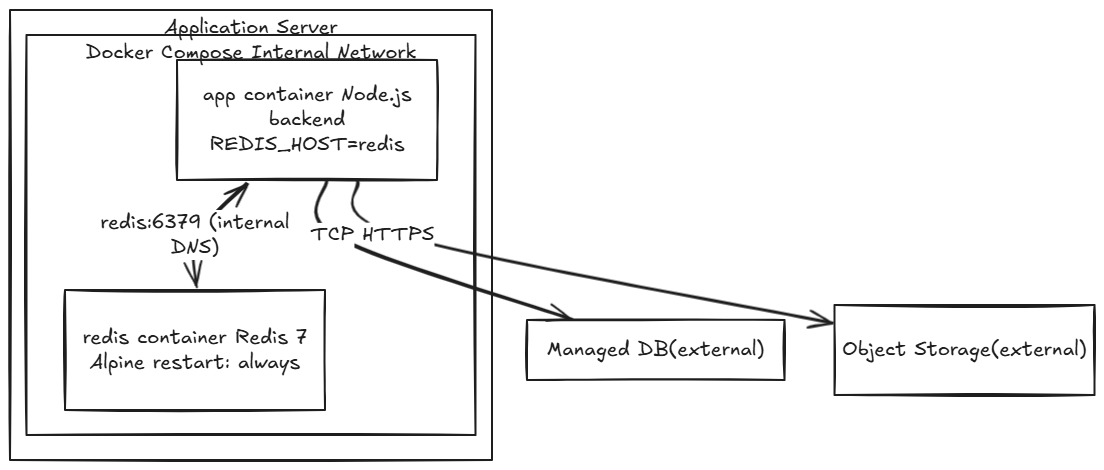
The hostname gotcha. Inside a Docker Compose network, containers resolve each other by service name. redis is a valid hostname. 127.0.0.1 is not, because inside the app container localhost refers to the container's own loopback interface, not the Redis container. If you've been testing locally with Redis running on your host machine, your .env file probably has REDIS_HOST=127.0.0.1, and that works fine on your laptop. The moment you build the container, it silently fails. BullMQ will throw connection errors that look like Redis is down, when really it's just a hostname that doesn't resolve to anything useful inside the container's network namespace.
The fix is simple: REDIS_HOST=redis in the container environment, REDIS_HOST=127.0.0.1 in your local .env when running Redis on your host. Keep these in separate env files and don't mix them up.
Local development. If you're on WSL2, running Redis directly inside the WSL environment can sometimes produce odd behavior. You may see connection hangs, socket timeouts on the first connection, or issues that disappear on subsequent runs. Docker Desktop running Redis as a local container with the app pointing at 127.0.0.1:6379 gives more predictable behavior and closer parity with production.
restart: always. When the server reboots, whether for planned maintenance, a kernel update, or another reason, Docker Compose services do not start automatically unless configured. With restart: always, Docker will restart the Redis container whenever it stops for any reason, including host reboots, as long as the Docker daemon itself is configured to start on boot. Without this, a reboot means Redis is down, BullMQ can't connect, and your application starts throwing errors. One line in the compose file. Forgetting it is the kind of thing that costs you a Sunday morning.
The batch state lives entirely in Redis. Not the database. This is a deliberate choice with real tradeoffs.
Why not the database? The state changes frequently since it is updated once per processed PDF, and the data is inherently transient. It doesn't need to survive forever; it just needs to survive long enough for the client to see the final result. A 1-hour TTL is sufficient. If this were in the database, you'd be executing UPDATE statements on every PDF completion, under concurrent load, on an external managed instance. That's connection overhead, network latency, and write amplification on infrastructure shared with your application's primary workload. Redis on localhost, updated with atomic increments, is orders of magnitude cheaper for this pattern.
A Redis hash is used so all batch counters can be stored and updated atomically under a single key.
The state schema:
// Initialized when job is enqueued
await redis.hset(`batch:${batchId}`, {
  status: 'PENDING',
  totalFiles: 0,         // updated when ZIP is extracted
  processed: 0,
  linked: 0,
  skipped_no_match: 0,
  skipped_already_exists: 0,
  failed: 0,
  createdAt: Date.now()
});
await redis.expire(`batch:${batchId}`, 3600); // 1 hour TTL
Atomic counter increments with WATCH/MULTI/EXEC:
The PDF processing runs with up to 5 concurrent processors via p-limit. All 5 can complete around the same time and try to update the same Redis hash simultaneously. Without coordination, race conditions occur. Two processors might read processed: 10 at the same time, both increment it, both write processed: 11, and one update is effectively lost.
Redis's WATCH/MULTI/EXEC provides optimistic locking:
async function incrementBatchCounter(redis, batchId, field) {
  const key = `batch:${batchId}`;

  let result = null;
  while (result === null) {
    await redis.watch(key);

    const multi = redis.multi();
    multi.hincrby(key, field, 1);
    multi.hincrby(key, 'processed', 1);

    // Returns null if WATCH key was modified by another client
    result = await multi.exec();
  }
}
WATCH marks a key for monitoring. If any watched key is modified by another client before EXEC runs, the entire transaction is aborted and EXEC returns null. The while loop retries until the transaction succeeds. Under 5 concurrent processors, contention is low and retries are rare. Under higher concurrency, you'd want Lua scripts for atomicity, which avoid the round-trip overhead of the optimistic retry loop entirely.
TTL expiry edge cases. What happens if the job takes longer than an hour and the Redis key expires mid-processing? The worker will start failing on every counter update because the key no longer exists. The client polling for status will get a 404. The job may still complete in BullMQ (the queue is separate from the state key), but the results are lost.
At 300 PDFs with 5 concurrent processors, realistic processing time is a few minutes at most. A 1-hour TTL has comfortable headroom. If your file counts grow significantly, extend the TTL. If you're paranoid about it, refresh the TTL on each worker heartbeat. But don't solve a problem that isn't happening yet.
The matching logic doesn't use the PDF filename at all. This surprises people, but it's the right call.
Filenames are unreliable. Names like "John_Resume_Final_v3.pdf", "resume.pdf", or "cv_2023.pdf" tell you nothing about whether the person in the PDF exists in your system. The only reliable identifier is an email address embedded in the PDF content.
Extraction pipeline:
const pdfParse = require('pdf-parse');

async function extractEmailFromPDF(pdfBuffer) {
  const data = await pdfParse(pdfBuffer);
  const text = data.text;

  const emailRegex = /[a-zA-Z0-9._%+\-]+@[a-zA-Z0-9.\-]+\.[a-zA-Z]{2,}/g;
  const matches = text.match(emailRegex);

  return matches ? matches[0] : null;
}
The first matched email wins. In practice, documents have one email address, typically near the top. If a document has multiple, the first one encountered is almost always the right one. This is a heuristic, and it works at the scale and document quality we're dealing with.
The pdf-parse version trap. This is genuinely annoying and worth documenting. pdf-parse at recent versions post-1.1.1 changed how the module exports its default. If you require('pdf-parse') and call the result as a function, it works in 1.1.1. On newer versions, the default export is an object and the function lives on one of its properties. Calling it directly results in the runtime error "pdf-parse is not a function."
Pin to 1.1.1:
{
  "dependencies": {
    "pdf-parse": "1.1.1"
  }
}
Alternative libraries like pdfjs-dist and pdf2json exist, but they come with their own quirks. For extracting text from standard text-layer PDFs, pdf-parse@1.1.1 works reliably. Pin the version and move on unless you plan to adapt to the newer export format.
The OCR gap. Scanned PDFs are essentially images rendered as PDF pages, so they have no text layer. pdf-parse will return empty or near-empty text. The email regex finds nothing. The file is counted as skipped_no_match. This is the correct behavior given the tooling; the alternative is integrating an OCR engine, which is a different system entirely. Surface the count in your status response so there's visibility into what happened. Don't silently skip and leave the uploader guessing.
Matching and upload logic:
async function processOnePDF(pdfBuffer, batchId, redis, db, s3) {
  let conn;
  try {
    const email = await extractEmailFromPDF(pdfBuffer);
    if (!email) {
      await incrementBatchCounter(redis, batchId, 'skipped_no_match');
      return;
    }

    conn = await db.getConnection();
    const [rows] = await conn.query(
      'SELECT id, pdf_url FROM users WHERE email = ?',
      [email]
    );

    if (rows.length === 0) {
      await incrementBatchCounter(redis, batchId, 'skipped_no_match');
      return;
    }

    const user = rows[0];
    if (user.pdf_url) {
      await incrementBatchCounter(redis, batchId, 'skipped_already_exists');
      return;
    }

    // S3 upload only after confirmed match + no existing PDF
    const s3Key = `pdfs/\({user.id}/\){Date.now()}.pdf`;
    await s3.putObject({
      Bucket: process.env.S3_BUCKET,
      Key: s3Key,
      Body: pdfBuffer,
      ContentType: 'application/pdf'
    }).promise();

    await conn.query(
      'UPDATE users SET pdf_url = ? WHERE id = ?',
      [s3Key, user.id]
    );

    await incrementBatchCounter(redis, batchId, 'linked');
  } catch (err) {
    await incrementBatchCounter(redis, batchId, 'failed');
  } finally {
    if (conn) conn.release();
  }
}
The S3 upload placement is deliberate: it happens after you've confirmed the user exists and doesn't have an existing PDF, and before the database update. You don't upload files you don't need. This ordering was chosen after thinking through what a partial failure looks like at each step.
The worker is responsible for unpacking the ZIP file and processing each PDF while respecting system resource limits. Rather than processing files sequentially or spawning unbounded parallel work, the worker uses controlled concurrency to balance throughput with database load.
Concurrency structure:
const { Worker } = require('bullmq');
const pLimit = require('p-limit');

const worker = new Worker('pdf-bulk-upload', async (job) => {
  const { batchId, zipBuffer: zipBase64 } = job.data;
  const zipBuffer = Buffer.from(zipBase64, 'base64');

  const zip = new AdmZip(zipBuffer);
  const entries = zip.getEntries().filter(e =>
    e.entryName.toLowerCase().endsWith('.pdf') && !e.isDirectory
  );

  await redis.hset(`batch:${batchId}`, 'totalFiles', entries.length);
  await redis.hset(`batch:${batchId}`, 'status', 'PROCESSING');

  const limit = pLimit(5);

  await Promise.all(
    entries.map(entry =>
      limit(() => processOnePDF(entry.getData(), batchId, redis, db, s3))
    )
  );

  await redis.hset(`batch:${batchId}`, 'status', 'COMPLETED');
}, {
  connection: redisConnection,
  concurrency: 1
});
The per-PDF processing flow:
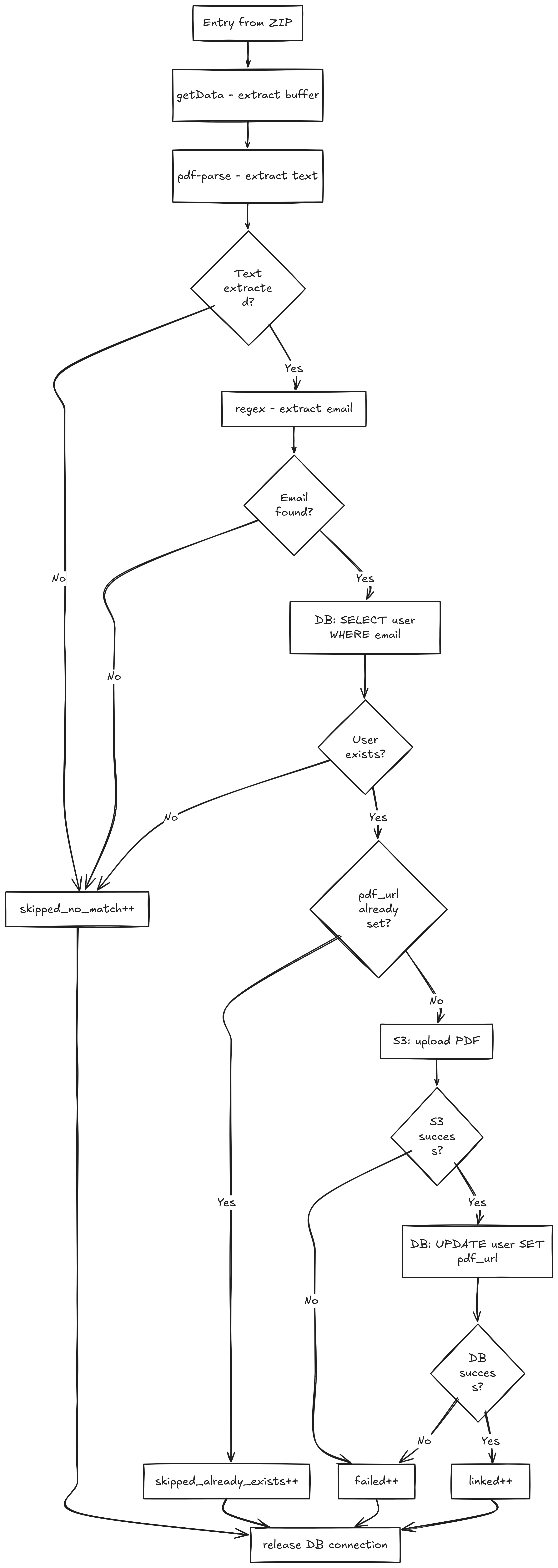
Why p-limit(5) and not a higher number. CPU is not the bottleneck in this case. pdf-parse is already fast on text-layer PDFs. The bottleneck is the database. Each PDF needs at least one database query. With 5 concurrent processors, you're holding up to 5 database connections simultaneously. The external managed database has connection limits, and more importantly, you're sharing that instance with your application's other queries. Hammering it with 50 concurrent connections from a bulk upload job while users are actively using the application is a bad trade. Five is conservative enough to be a good neighbor to the rest of the system, while fast enough to process 300 files in a reasonable timeframe.
One connection per PDF, released in finally. Each call acquires a connection from the pool at the start and releases it in finally. Non-negotiable. If you forget the finally release, you leak connections on errors. The pattern is verbose but mechanical. Acquire the connection, use it, and release it every time.
BullMQ job configuration:
await pdfBulkQueue.add('process-batch', {
  batchId,
  zipBuffer: zipBuffer.toString('base64')
}, {
  attempts: 2,
  backoff: {
    type: 'exponential',
    delay: 5000
  },
  removeOnComplete: 100,
  removeOnFail: 50
});
Two attempts with exponential backoff. If the worker crashes mid-job, BullMQ marks it as stalled after the lock expires and re-enqueues it. The job will restart from the beginning and reprocess all PDFs. This is acceptable given the idempotency logic: if a user already has a PDF set, the duplicate is skipped. The counters will be off (they'll double-count skips), but the actual data integrity is fine.
Why concurrency: 1 at the worker level. Single worker, single job at a time. No race conditions on the BullMQ side. The parallelism lives inside the job via p-limit, not across jobs. This is the right default for a feature that processes large batches. You want predictable resource usage, not two 300-PDF batches competing for database connections at the same time.
Worker registration:
// server.js
require('./workers/pdfBulkWorker'); // registers worker on boot
The worker runs in the same process as the HTTP server. On a constrained server with a single application container, process isolation buys you nothing and adds deployment complexity. BullMQ handles job persistence. Jobs do not vanish if the process restarts.
These bugs all appeared during local development and were resolved before anything reached production. Documented here because they're not obvious, and "obvious in retrospect" is a bad standard for learning from mistakes.
queue.add is not a function
The error message doesn't tell you what's actually wrong. The cause: the queue module was exporting both the queue and the Redis connection object together.
// pdfBulkQueue.js
module.exports = { pdfBulkQueue, redisConnection };

// In the route file — WRONG
const pdfBulkQueue = require('../queues/pdfBulkQueue');
// pdfBulkQueue is now { pdfBulkQueue, redisConnection }
// pdfBulkQueue.add is undefined

// CORRECT
const { pdfBulkQueue } = require('../queues/pdfBulkQueue');
JavaScript's module system gives you no type checking on imports. The wrong object gets imported, it quacks enough like a queue (it's an object, it doesn't throw on access), and then you get a runtime error when you actually try to use it. This class of bug doesn't show up in static analysis without TypeScript. Be explicit about destructuring imports and consistent about your module export shapes.
pdf-parse is not a function
Some npm packages changed their module export format between versions. Earlier versions used module.exports = function(){}, while newer versions export an object such as module.exports = { default: function(){}, ...helpers } as part of ESM and CommonJS interoperability changes. When your code calls pdfParse(buffer) and pdfParse is an object instead of a function, JavaScript throws "pdfParse is not a function" with no indication that the problem is the import, not the call site.
Version pinning to 1.1.1 is the fix. The deeper habit: when a function-shaped thing stops being callable, check what you actually imported before assuming the call is wrong.
Docker networking: why localhost lies inside containers
Inside a Docker container, localhost and 127.0.0.1 refer to the container's own loopback interface. They do not refer to the host machine or any other container. If your Redis container is named redis in Docker Compose, that's the hostname your app container should use. If you have REDIS_HOST=127.0.0.1 in your environment, left over from local non-container development, the app will attempt to connect to its own loopback, find nothing listening on port 6379, and fail.
The error from BullMQ looks like ECONNREFUSED 127.0.0.1:6379. It doesn't say "wrong hostname." If you don't immediately think "wait, which localhost is this," you'll spend time checking whether Redis is running (it is), whether the port is correct (it is). The fix is changing the hostname. The lesson is to understand network namespaces in Docker before you spend an hour debugging a connection string.
The client polls for batch status every 3 seconds:
async function pollBatchStatus(batchId) {
  const response = await fetch(`/api/pdf-bulk-upload/${batchId}/status`);
  const data = await response.json();

  updateProgressUI(data);

  if (data.status !== 'COMPLETED' && data.status !== 'FAILED') {
    setTimeout(() => pollBatchStatus(batchId), 3000);
  }
}
The server-side status endpoint reads directly from Redis:
app.get('/pdf-bulk-upload/:batchId/status', async (req, res) => {
  const { batchId } = req.params;
  const state = await redis.hgetall(`batch:${batchId}`);

  if (!state || Object.keys(state).length === 0) {
    return res.status(404).json({ error: 'Batch not found or expired' });
  }

  res.json({
    status: state.status,
    totalFiles: parseInt(state.totalFiles) || 0,
    processed: parseInt(state.processed) || 0,
    linked: parseInt(state.linked) || 0,
    skipped_no_match: parseInt(state.skipped_no_match) || 0,
    skipped_already_exists: parseInt(state.skipped_already_exists) || 0,
    failed: parseInt(state.failed) || 0
  });
});
WebSockets weren't seriously considered for long. The usual arguments for them are real-time push and the absence of polling overhead. At this scale, those advantages do not hold up. A single user uploading a batch makes one HTTP request every 3 seconds for a few minutes. That's negligible load on any server that can handle a production application at all. WebSockets add connection management complexity, require reconnection handling on the client, and need server-side state to track which socket corresponds to which batch. Polling is stateless, trivially resumable after a page reload, and requires zero additional server infrastructure.
The 3-second interval is a judgment call. For a progress bar updating across 300 files processed over a couple of minutes, 3 seconds gives smooth-enough perceived update frequency without hammering the server. If you needed sub-second updates, the calculus changes. You don't, so it doesn't.
TTL expiry from the client's perspective. If the client polls an hour after the job completed, they'll get a 404. This is correct behavior. The state has expired, so the client should interpret 404 as "this batch is no longer available" and stop polling. If your UX needs to persist results longer than an hour, write a summary to the database on job completion and serve it from there. The Redis state is ephemeral progress tracking; persistent results belong in persistent storage.
These are the things that need to be verified before the feature is live, in the order they'll bite you if you miss them.
Docker Compose changes:
services:
  redis:
    image: redis:7-alpine
    restart: always
    networks:
      - internal

  app:
    environment:
      - REDIS_HOST=redis
      - REDIS_PORT=6379
    depends_on:
      - redis
    networks:
      - internal
Verify: docker-compose up starts both services, app logs show successful Redis connection, docker-compose ps shows both containers running.
Environment variables:
| Variable | Local | Container |
|---|---|---|
REDIS_HOST |
127.0.0.1 |
redis |
REDIS_PORT |
6379 |
6379 |
S3_BUCKET |
dev bucket | prod bucket |
Do not commit the production .env file. Commit a .env.example with all required variables and no values.
Docker daemon auto-start on reboot:
sudo systemctl enable docker
This ensures Docker starts on boot. Combined with restart: always on services, your containers come back up automatically after a reboot. Without it, the Docker daemon doesn't start on reboot, and your containers don't either.
Stuck job recovery. BullMQ uses a lock mechanism to detect stalled jobs. If a worker picks up a job and dies mid-processing, BullMQ reclassifies it as stalled after the lock expires and re-enqueues it. For manual recovery, check for jobs in ACTIVE state older than your expected maximum processing time:
const active = await pdfBulkQueue.getActive();
const staleThreshold = 10 * 60 * 1000; // 10 minutes

const stale = active.filter(job =>
  Date.now() - job.timestamp > staleThreshold
);

for (const job of stale) {
  await job.moveToFailed(new Error('Manually failed: stale job'), true);
}
At the current scale, the architecture is appropriately simple. The system supports a small internal team that runs batches a few times a day, typically handling 50 to 300 files at a time. Here is what breaks first as the scale increases.
The ZIP in memory. The ZIP buffer is stored in memory during the API request and passed to BullMQ as a base64-encoded string. At 50MB, this is fine. At 200MB, you're putting pressure on a machine that's also running your application and Redis. The fix is to write the ZIP to temporary storage on upload, pass the reference in the job payload, and have the worker retrieve and stream it. This decouples the job payload size from memory consumption.
Single Redis on the same machine. If the machine goes down, you lose both the application and the queue. For an internal tool this is probably acceptable. For customer-facing systems with SLA obligations, Redis should run as a managed service with replication, automated failover, and persistence. That way a bad day on the host machine does not take the queue down with it.
Multiple workers. Right now, concurrency: 1 means one batch processes at a time. If two users upload simultaneously, the second batch waits. To support parallel batches, you'd increase concurrency or run multiple worker processes. Both approaches require careful database connection pool sizing. Otherwise, 10 workers each holding 5 connections can quickly exhaust your connection limit.
Distributed locking. Currently there's no lock preventing two workers from processing the same PDF for the same user simultaneously if you run multiple workers. The database UPDATE is effectively the lock, and the existence check happens before the upload. But at higher concurrency with multiple workers, you'd want an explicit distributed lock (Redis SETNX, Redlock) around the per-user PDF assignment to prevent redundant storage uploads from racing updates.
Email regex → proper parsing. The email regex works for well-formatted text-layer PDFs. It's fragile in predictable ways: it misses obfuscated emails, it's confused by email addresses appearing elsewhere in the document, and it finds nothing in scanned files. At scale, or if match rates start falling, the right answer is a proper document parsing library or service. The email extraction is a pragmatic shortcut that works at current volume. At 10× volume with more varied document quality, it becomes the primary source of incorrect matches and missed links.
The decisions that matter in systems design are rarely the ones with obvious right answers. They are the ones where multiple approaches work, and the correct choice depends on the constraints you are operating under: the infrastructure you have, the team maintaining it, the timeline you are working within, and the failure modes you can tolerate.
The architecture described here is simply one set of decisions made under a specific set of constraints and at a particular scale. Change the constraints, and the right decisions will likely change with them.