保留正文与补采附件。源页面当前未重新核验;具体限制见交付清单。
 We value your privacy
We use cookies to enhance your browsing experience, serve personalised ads or content, and analyse our traffic. By clicking "Accept All", you consent to our use of cookies.
Customise Reject All Accept All
Customise Consent Preferences
We value your privacy
We use cookies to enhance your browsing experience, serve personalised ads or content, and analyse our traffic. By clicking "Accept All", you consent to our use of cookies.
Customise Reject All Accept All
Customise Consent Preferences  We use cookies to help you navigate efficiently and perform certain functions. You will find detailed information about all cookies under each consent category below.
The cookies that are categorised as "Necessary" are stored on your browser as they are essential for enabling the basic functionalities of the site. ... Show more
NecessaryAlways Active
Necessary cookies are required to enable the basic features of this site, such as providing secure log-in or adjusting your consent preferences. These cookies do not store any personally identifiable data.
We use cookies to help you navigate efficiently and perform certain functions. You will find detailed information about all cookies under each consent category below.
The cookies that are categorised as "Necessary" are stored on your browser as they are essential for enabling the basic functionalities of the site. ... Show more
NecessaryAlways Active
Necessary cookies are required to enable the basic features of this site, such as providing secure log-in or adjusting your consent preferences. These cookies do not store any personally identifiable data.
-
Cookie
BCTempID
-
Duration
10 minutes
-
Description
No description available.
-
Cookie
__cf_bm
-
Duration
1 hour
-
Description
This cookie, set by Cloudflare, is used to support Cloudflare Bot Management.
-
Cookie
AWSALBCORS
-
Duration
7 days
-
Description
Amazon Web Services set this cookie for load balancing.
-
Cookie
_cfuvid
-
Duration
session
-
Description
Cloudflare sets this cookie to track users across sessions to optimize user experience by maintaining session consistency and providing personalized services
-
Cookie
li_gc
-
Duration
6 months
-
Description
Linkedin set this cookie for storing visitor's consent regarding using cookies for non-essential purposes.
-
Cookie
__hssrc
-
Duration
session
-
Description
This cookie is set by Hubspot whenever it changes the session cookie. The __hssrc cookie set to 1 indicates that the user has restarted the browser, and if the cookie does not exist, it is assumed to be a new session.
-
Cookie
__hssc
-
Duration
1 hour
-
Description
HubSpot sets this cookie to keep track of sessions and to determine if HubSpot should increment the session number and timestamps in the __hstc cookie.
-
Cookie
wpEmojiSettingsSupports
-
Duration
session
-
Description
WordPress sets this cookie when a user interacts with emojis on a WordPress site. It helps determine if the user's browser can display emojis properly.
-
Cookie
BCSessionID
-
Duration
1 year 1 month 4 days
-
Description
Blueconic sets this cookie as a unique identifier for the BlueConic profile.
-
Cookie
_octo
-
Duration
1 year
-
Description
No description available.
-
Cookie
logged_in
-
Duration
1 year
-
Description
No description available.
-
Cookie
__Secure-YEC
-
Duration
past
-
Description
YouTube sets this cookie to stores the user's video player preferences using embedded YouTube video
-
Cookie
__eoi
-
Duration
6 months
-
Description
Description is currently not available.
-
Cookie
AWSALBTGCORS
-
Duration
7 days
-
Description
No description available.
-
Cookie
login-status-p
-
Duration
past
-
Description
Description is currently not available.
-
Cookie
AWSALBTG
-
Duration
7 days
-
Description
No description available.
-
Cookie
csrf_token
-
Duration
session
-
Description
No description available.
-
Cookie
token_v2
-
Duration
1 day
-
Description
Description is currently not available.
-
Cookie
D
-
Duration
1 year
-
Description
Description is currently not available.
-
Cookie
PHPSESSID
-
Duration
session
-
Description
This cookie is native to PHP applications. The cookie stores and identifies a user's unique session ID to manage user sessions on the website. The cookie is a session cookie and will be deleted when all the browser windows are closed.
-
Cookie
VISITOR_PRIVACY_METADATA
-
Duration
6 months
-
Description
YouTube sets this cookie to store the user's cookie consent state for the current domain.
-
Cookie
cookietest
-
Duration
session
-
Description
The cookietest cookie is typically used to determine whether the user's browser accepts cookies, essential for website functionality and user experience.
-
Cookie
__Host-airtable-session
-
Duration
1 year
-
Description
This cookie is used to enable us to integrate the services of Airtable.
-
Cookie
__Host-airtable-session.sig
-
Duration
1 year
-
Description
This cookie is used to enable us to integrate the services of Airtable.
-
Cookie
m
-
Duration
1 year 1 month 4 days
-
Description
Stripe sets this cookie for fraud prevention purposes. It identifies the device used to access the website, allowing the website to be formatted accordingly.
-
Cookie
BIGipServer*
-
Duration
session
-
Description
Marketo sets this cookie to collect information about the user's online activity and build a profile about their interests to provide advertisements relevant to the user.
-
Cookie
__cfruid
-
Duration
session
-
Description
Cloudflare sets this cookie to identify trusted web traffic.
-
Cookie
_GRECAPTCHA
-
Duration
6 months
-
Description
Google Recaptcha service sets this cookie to identify bots to protect the website against malicious spam attacks.
-
Cookie
__Secure-YNID
-
Duration
6 months
-
Description
Google cookie used to protect user security and prevent fraud, especially during the login process.
-
Cookie
cookieyes-consent
-
Duration
1 year
-
Description
CookieYes sets this cookie to remember users' consent preferences so that their preferences are respected on subsequent visits to this site. It does not collect or store any personal information about the site visitors.
Functional
Functional cookies help perform certain functionalities like sharing the content of the website on social media platforms, collecting feedback, and other third-party features.
-
Cookie
lidc
-
Duration
1 day
-
Description
LinkedIn sets the lidc cookie to facilitate data center selection.
-
Cookie
brw
-
Duration
1 year
-
Description
No description available.
-
Cookie
brwConsent
-
Duration
5 minutes
-
Description
Description is currently not available.
-
Cookie
WMF-Uniq
-
Duration
1 year
-
Description
Description is currently not available.
-
Cookie
loom_anon_comment
-
Duration
1 year
-
Description
No description available.
-
Cookie
loom_referral_video
-
Duration
session
-
Description
Description is currently not available.
-
Cookie
VISITOR_INFO1_LIVE
-
Duration
6 months
-
Description
A cookie set by YouTube to measure bandwidth that determines whether the user gets the new or old player interface.
-
Cookie
yt-remote-connected-devices
-
Duration
Never Expires
-
Description
YouTube sets this cookie to store the user's video preferences using embedded YouTube videos.
-
Cookie
ytidb::LAST_RESULT_ENTRY_KEY
-
Duration
Never Expires
-
Description
The cookie ytidb::LAST_RESULT_ENTRY_KEY is used by YouTube to store the last search result entry that was clicked by the user. This information is used to improve the user experience by providing more relevant search results in the future.
-
Cookie
yt-remote-device-id
-
Duration
Never Expires
-
Description
YouTube sets this cookie to store the user's video preferences using embedded YouTube videos.
-
Cookie
yt-remote-session-name
-
Duration
session
-
Description
The yt-remote-session-name cookie is used by YouTube to store the user's video player preferences using embedded YouTube video.
-
Cookie
yt-remote-fast-check-period
-
Duration
session
-
Description
The yt-remote-fast-check-period cookie is used by YouTube to store the user's video player preferences for embedded YouTube videos.
-
Cookie
yt-remote-session-app
-
Duration
session
-
Description
The yt-remote-session-app cookie is used by YouTube to store user preferences and information about the interface of the embedded YouTube video player.
-
Cookie
yt-remote-cast-available
-
Duration
session
-
Description
The yt-remote-cast-available cookie is used to store the user's preferences regarding whether casting is available on their YouTube video player.
-
Cookie
yt-remote-cast-installed
-
Duration
session
-
Description
The yt-remote-cast-installed cookie is used to store the user's video player preferences using embedded YouTube video.
-
Cookie
cp_session
-
Duration
3 months
-
Description
Codepen sets this cookie for Help systems found in the website.
-
Cookie
loid
-
Duration
1 year 1 month 4 days
-
Description
This cookie is set by the Reddit. The cookie enables the sharing of content from the website onto the social media platform.
Analytics
Analytical cookies are used to understand how visitors interact with the website. These cookies help provide information on metrics such as the number of visitors, bounce rate, traffic source, etc.
-
Cookie
__hstc
-
Duration
6 months
-
Description
Hubspot set this main cookie for tracking visitors. It contains the domain, initial timestamp (first visit), last timestamp (last visit), current timestamp (this visit), and session number (increments for each subsequent session).
-
Cookie
hubspotutk
-
Duration
6 months
-
Description
HubSpot sets this cookie to keep track of the visitors to the website. This cookie is passed to HubSpot on form submission and used when deduplicating contacts.
-
Cookie
_ga
-
Duration
1 year 1 month 4 days
-
Description
Google Analytics sets this cookie to calculate visitor, session and campaign data and track site usage for the site's analytics report. The cookie stores information anonymously and assigns a randomly generated number to recognise unique visitors.
-
Cookie
ga*
-
Duration
1 year 1 month 4 days
-
Description
Google Analytics sets this cookie to store and count page views.
-
Cookie
__Host-psifi.analyticsTrace
-
Duration
6 hours
-
Description
Description is currently not available.
-
Cookie
__Host-psifi.analyticsTraceV2
-
Duration
6 hours
-
Description
Description is currently not available.
-
Cookie
_gh_sess
-
Duration
session
-
Description
GitHub sets this cookie for temporary application and framework state between pages like what step the user is on in a multiple step form.
-
Cookie
YSC
-
Duration
session
-
Description
YSC cookie is set by Youtube and is used to track the views of embedded videos on Youtube pages.
-
Cookie
ajs_anonymous_id
-
Duration
1 year
-
Description
This cookie is set by Segment to count the number of people who visit a certain site by tracking if they have visited before.
-
Cookie
vuid
-
Duration
1 year 1 month 4 days
-
Description
Vimeo installs this cookie to collect tracking information by setting a unique ID to embed videos on the website.
Performance
Performance cookies are used to understand and analyse the key performance indexes of the website which helps in delivering a better user experience for the visitors.
-
Cookie
AWSALB
-
Duration
7 days
-
Description
AWSALB is an application load balancer cookie set by Amazon Web Services to map the session to the target.
-
Cookie
acq
-
Duration
past
-
Description
Description is currently not available.
-
Cookie
acq.sig
-
Duration
past
-
Description
Description is currently not available.
-
Cookie
ptc
-
Duration
2 years
-
Description
No description available.
Advertisement
Advertisement cookies are used to provide visitors with customised advertisements based on the pages you visited previously and to analyse the effectiveness of the ad campaigns.
-
Cookie
muc_ads
-
Duration
1 year 1 month 4 days
-
Description
Twitter sets this cookie to collect user behaviour and interaction data to optimize the website.
-
Cookie
guest_id_marketing
-
Duration
1 year 1 month 4 days
-
Description
Twitter sets this cookie to identify and track the website visitor.
-
Cookie
guest_id_ads
-
Duration
1 year 1 month 4 days
-
Description
Twitter sets this cookie to identify and track the website visitor.
-
Cookie
personalization_id
-
Duration
1 year 1 month 4 days
-
Description
Twitter sets this cookie to integrate and share features for social media and also store information about how the user uses the website, for tracking and targeting.
-
Cookie
guest_id
-
Duration
1 year 1 month 4 days
-
Description
Twitter sets this cookie to identify and track the website visitor. It registers if a user is signed in to the Twitter platform and collects information about ad preferences.
-
Cookie
bcookie
-
Duration
1 year
-
Description
LinkedIn sets this cookie from LinkedIn share buttons and ad tags to recognize browser IDs.
-
Cookie
__Secure-ROLLOUT_TOKEN
-
Duration
6 months
-
Description
YouTube sets this cookie to manage feature rollout and experimentation. It helps Google control which new features or interface changes are shown to users as part of testing and staged rollouts, ensuring consistent experience for a given user during an experiment.
-
Cookie
yt.innertube::nextId
-
Duration
Never Expires
-
Description
YouTube sets this cookie to register a unique ID to store data on what videos from YouTube the user has seen.
-
Cookie
yt.innertube::requests
-
Duration
Never Expires
-
Description
YouTube sets this cookie to register a unique ID to store data on what videos from YouTube the user has seen.
-
Cookie
session_tracker
-
Duration
session
-
Description
This cookie is set by the Reddit. This cookie is used to identify trusted web traffic. It also helps in adverstising on the website.
-
Cookie
edgebucket
-
Duration
session
-
Description
Reddit sets this cookie to save the information about a log-on Reddit user, for the purpose of advertisement recommendations and updating the content.
-
Cookie
did
-
Duration
1 year
-
Description
Arbor sets this cookie to show targeted ads to site visitors.This cookie expires after 2 months or 1 year.
Uncategorised
Other uncategorised cookies are those that are being analysed and have not been classified into a category as yet.
No cookies to display.
Reject All Save My Preferences Accept All
Toggle SearchToggle Mobile Navigation
Publish AI, ML & data-science insights to a global community of data professionals.
Sign inSubmit an Article
LatestEditor's PicksNewsletterShipAI
Write For TDS
LinkedInXToggle Search
Programming
Why You Should Stop Writing Loops in Pandas
How to think in columns, write faster code, and finally use Pandas like a professional
Ibrahim Salami
March 3, 20267 min read
 Created with Gemini AI
Okay, full disclosure: when I first started using Pandas, I wrote loops like this all the time:
python
Created with Gemini AI
Okay, full disclosure: when I first started using Pandas, I wrote loops like this all the time:
python
for i in range(len(df)):
if df.loc[i, "sales"] > 1000:
df.loc[i, "tier"] = "high"
else:
df.loc[i, "tier"] = "low"
It worked. And I thought, “Hey, that’s fine, right?”
Turns out… not so much.
I didn’t realize it at the time, but loops like this are a classic beginner trap. They make Pandas do way more work than it needs to, and they sneak in a mental model that keeps you thinking row by row instead of column by column.
Once I started thinking in columns , things changed. Code got shorter. Execution got faster. And suddenly, Pandas felt like it was actually built to help me , not slow me down.
To show this, let’s use a tiny dataset we’ll reference throughout:
python
import pandas as pd
df = pd.DataFrame({
"product": ["A", "B", "C", "D", "E"],
"sales": [500, 1200, 800, 2000, 300]
})
Output:
markup
product sales0 A 5001 B 12002 C 8003 D 20004 E 300
Our goal is simple: label each row as high if sales are greater than 1000, otherwise low.
Let me show you how I did it at first , and why there’s a better way.
Learn this step by step with the interactive Computer Science roadmap.
The Loop Approach I Started With
Here’s the loop I used when I was learning:
python
for i in range(len(df)):
if df.loc[i, "sales"] > 1000:
df.loc[i, "tier"] = "high"
else:
df.loc[i, "tier"] = "low"
print(df)
It produces this result:
markup
product sales tier0 A 500 low1 B 1200 high2 C 800 low3 D 2000 high4 E 300 low
And yes, it works. But here’s what I learned the hard way:
Pandas is doing a tiny operation for each row , instead of efficiently handling the whole column at once.
This approach doesn’t scale — what feels fine with 5 rows slows down with 50,000 rows.
More importantly, it keeps you thinking like a beginner — row by row — instead of like a professional Pandas user.
Timing the Loop (The Moment I Realized It Was Slow)
When I first ran my loop on this tiny dataset, I thought, “No problem, it’s fast enough.” But then I wondered… what if I had a bigger dataset?
So I tried it:
python
import pandas as pd
import time
# Make a bigger dataset
df_big = pd.DataFrame({
"product": ["A", "B", "C", "D", "E"] * 100_000,
"sales": [500, 1200, 800, 2000, 300] * 100_000
})

# Time the loop
start = time.time()
for i in range(len(df_big)):
if df_big.loc[i, "sales"] > 1000:
df_big.loc[i, "tier"] = "high"
else:
df_big.loc[i, "tier"] = "low"
end = time.time()
print("Loop time:", end - start)
Here’s what I got:
markup
Loop time: 129.27328729629517
That’s 129 seconds.
Over two minutes just to label rows as "high" or "low".
That’s the moment it clicked for me. The code wasn’t just “a little inefficient.” It was fundamentally using Pandas the wrong way.
And imagine this running inside a data pipeline, in a dashboard refresh, on millions of rows every single day.
Why It’s That Slow
The loop forces Pandas to:
- Access each row individually
- Execute Python-level logic for every iteration
- Update the DataFrame one cell at a time
In other words, it turns a highly optimized columnar engine into a glorified Python list processor.
And that’s not what Pandas is built for.
The One-Line Fix (And the Moment It Clicked)
After seeing 129 seconds , I knew there had to be a better way.
So instead of looping through rows, I tried expressing the rule at the column level :
“If sales > 1000, label high. Otherwise, label low.”
That’s it. That’s the rule.
Here’s the vectorized version:
python
import numpy as np
import time

start = time.time()
df_big["tier"] = np.where(df_big["sales"] > 1000, "high", "low")
end = time.time()
print("Vectorized time:", end - start)
And the result?
markup
Vectorized time: 0.08
Let that sink in.
Loop version: 129 seconds
Vectorized version: 0.08 seconds
That’s over 1,600× faster.
What Just Happened?
The key difference is this:
The loop processed the DataFrame row by row. The vectorized version processed the entire sales column in one optimized operation.
When you write:
python
df_big["sales"] > 1000
Pandas doesn’t check values one at a time in Python. It performs the comparison at a lower level (via NumPy), in compiled code, across the entire array.
Then np.where() applies the labels in one efficient pass.
Here’s the subtle but powerful change:
Instead of asking:
“What should I do with this row?”
You ask:
“What rule applies to this column?”
That’s the line between beginner Pandas and professional Pandas.
At this point, I thought I’d “leveled up.” Then I discovered I could make it even simpler.
And Then I Discovered Boolean Indexing
After timing the vectorized version, I felt pretty proud. But then I had another realization.
I don’t even need np.where() for this.
Let’s go back to our small dataset:
python
df = pd.DataFrame({
"product": ["A", "B", "C", "D", "E"],
"sales": [500, 1200, 800, 2000, 300]
})
Our goal is still the same:
Label each row _high_if sales > 1000, otherwise _low_.
With np.where() we wrote:
python
df["tier"] = np.where(df["sales"] > 1000, "high", "low")
It’s cleaner and faster. Much better than a loop.
But here’s the part that really changed how I think about Pandas:
This line right here…
python
df["sales"] > 1000
…already returns something incredibly useful.
Let’s look at it:
Output:
markup
0 False1 True2 False3 True4 FalseName: sales, dtype: bool
That’s a Boolean Series.
Pandas just evaluated the condition for the entire column at once.
No loop. No if. No row-by-row logic.
It produced a full mask of True/False values in one shot.
Boolean Indexing Feels Like a Superpower
Now here’s where it gets interesting.
You can use that Boolean mask directly to filter rows:
python
df[df["sales"] > 1000]
And Pandas instantly gives you:
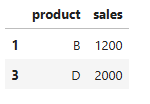 We can even build the
 tier column using Boolean indexing directly:
python
df["tier"] = "low"
df.loc[df["sales"] > 1000, "tier"] = "high"
I’m basically saying:
- Assume everything is
"low".
- Override only the rows where sales > 1000.
That’s it.
And suddenly, I’m not thinking:
“For each row, check the value…”
I’m thinking:
“Start with a default. Then apply a rule to a subset.”
That shift is subtle, but it changes everything.
Once I got comfortable with Boolean masks, I started wondering:
What happens when the logic isn’t as clean as “greater than 1000”? What if I need custom rules?
That’s where I discovered apply(). And at first, it felt like the best of both worlds.
Isn’t apply() Good Enough?
I’ll be honest. After I stopped writing loops, I thought I had everything figured out. Because there was this magical function that seemed to solve everything:
apply().
It felt like the perfect middle ground between messy loops and scary vectorization.
So naturally, I started writing things like this:
python
df["tier"] = df["sales"].apply(
lambda x: "high" if x > 1000 else "low"
)
And at first glance?
This looks great.
- No
for loop
- No manual indexing
- Easy to read
It feels like a professional solution.
But here’s what I didn’t understand at the time:
apply() is still running Python code for every single row.
It just hides the loop.
When you use:
df["sales"].apply(lambda x: ...)
Pandas is still:
- Taking each value
- Passing it into a Python function
- Returning the result
- Repeating that for every row
It’s cleaner than a for loop, yes. But performance-wise? It’s much closer to a loop than to true vectorization.
That was a bit of a wake-up call for me. I realized I was replacing visible loops with invisible ones.
So When Should You Use apply()?
- If the logic can be expressed with vectorized operations → do that.
- If it can be expressed with Boolean masks → do that.
- If it absolutely requires custom Python logic → then use
apply().
In other words:
Vectorize first. Reach for _apply()only_when you must.
Not because apply() is bad. But because Pandas is fastest and cleanest when you think in columns, not in row-wise functions.
Conclusion
Looking back, the biggest mistake I made wasn’t writing loops. It was assuming that if the code worked, it was good enough.
Pandas doesn’t punish you immediately for thinking in rows. But as your datasets grow, as your pipelines scale, as your code ends up in dashboards and production workflows, the difference becomes obvious.
- Row-by-row thinking doesn’t scale.
- Hidden Python loops don’t scale.
- Column-level rules do.
That’s the real line between beginner and professional Pandas usage.
So, in summary:
Stop asking what to do with each row. Start asking what rule applies to the entire column.
Once you make that shift, your code gets faster, cleaner, easier to review and easier to maintain. And you start spotting inefficient patterns instantly, including your own.
Register Now to Continue Reading
Unlock Towards Data Science with a Free Account
All articles on Towards Data Science are available to registered users. Create a free account today to access this article and thousands more.
Register for freeSign in to your account
 Written By
See all from Ibrahim Salami
Data AnalyticsData SciencePandasPythonVectorization
Share This Article
Towards Data Science is a community publication. Submit your insights to reach our global audience and earn through the TDS Author Payment Program.
Write for TDS
Related Articles
Artificial Intelligence
Short Python snippets that you can quickly learn and use in your work or personal needs
Fatos Morina
September 7, 20194 min read
Programming
How to incorporate decentralized storage into your workflow
Luke Gloege, Ph.D.
June 27, 20228 min read
Programming
How do developers' skills related to each other and how will the skills evolve?
Hannah Yan Han
July 9, 20173 min read
Data Science
From a chocolate bar with no price tag to a marketing mix model in PyMC, and the 200-year-old integral that stood in between.
Spyros Georgopoulos
September 17, 202622 min read
Artificial Intelligence
Learn how to make tables with tabulate and show progress bars with tqdm in Python
Luay Matalka
March 20, 20213 min read
Data Science
Wave buoys that are placed all around the world track and store data of ocean properties throughout time. This time series data includes...
Billy Leibundgut
November 19, 20204 min read
Programming
A step-by-step tutorial how create a basic chart up to a publication ready dataviz chart
Dr. Gregor Scheithauer
May 14, 20188 min read
NLP
A beginner-friendly tutorial with real world, web-scraped article data. Exploring a range of SOTA NLP...
Mohamed A. Warsame
May 19, 202113 min read
Data Science
Apply tests to your data and improve the quality of your pipeline with great-expectations
Laurenz Reitsam
October 18, 20205 min read
Your home for data science and AI. The world's leading publication for data science, data analytics, data engineering, machine learning, and artificial intelligence professionals.
Subscribe to Our NewsletterWrite For TDS•About•Advertise•Privacy Policy•Terms of Use
© Insight Media Group, LLC 2026•The New Stack•roadmap.sh•Creator Network
Recommended Articles
Close