保留正文与补采附件。源页面当前未重新核验;具体限制见交付清单。
 We value your privacy
We use cookies to enhance your browsing experience, serve personalised ads or content, and analyse our traffic. By clicking "Accept All", you consent to our use of cookies.
Customise Reject All Accept All
Customise Consent Preferences
We value your privacy
We use cookies to enhance your browsing experience, serve personalised ads or content, and analyse our traffic. By clicking "Accept All", you consent to our use of cookies.
Customise Reject All Accept All
Customise Consent Preferences  We use cookies to help you navigate efficiently and perform certain functions. You will find detailed information about all cookies under each consent category below.
The cookies that are categorised as "Necessary" are stored on your browser as they are essential for enabling the basic functionalities of the site. ... Show more
NecessaryAlways Active
Necessary cookies are required to enable the basic features of this site, such as providing secure log-in or adjusting your consent preferences. These cookies do not store any personally identifiable data.
We use cookies to help you navigate efficiently and perform certain functions. You will find detailed information about all cookies under each consent category below.
The cookies that are categorised as "Necessary" are stored on your browser as they are essential for enabling the basic functionalities of the site. ... Show more
NecessaryAlways Active
Necessary cookies are required to enable the basic features of this site, such as providing secure log-in or adjusting your consent preferences. These cookies do not store any personally identifiable data.
-
Cookie
BCTempID
-
Duration
10 minutes
-
Description
No description available.
-
Cookie
__cf_bm
-
Duration
1 hour
-
Description
This cookie, set by Cloudflare, is used to support Cloudflare Bot Management.
-
Cookie
AWSALBCORS
-
Duration
7 days
-
Description
Amazon Web Services set this cookie for load balancing.
-
Cookie
_cfuvid
-
Duration
session
-
Description
Cloudflare sets this cookie to track users across sessions to optimize user experience by maintaining session consistency and providing personalized services
-
Cookie
li_gc
-
Duration
6 months
-
Description
Linkedin set this cookie for storing visitor's consent regarding using cookies for non-essential purposes.
-
Cookie
__hssrc
-
Duration
session
-
Description
This cookie is set by Hubspot whenever it changes the session cookie. The __hssrc cookie set to 1 indicates that the user has restarted the browser, and if the cookie does not exist, it is assumed to be a new session.
-
Cookie
__hssc
-
Duration
1 hour
-
Description
HubSpot sets this cookie to keep track of sessions and to determine if HubSpot should increment the session number and timestamps in the __hstc cookie.
-
Cookie
wpEmojiSettingsSupports
-
Duration
session
-
Description
WordPress sets this cookie when a user interacts with emojis on a WordPress site. It helps determine if the user's browser can display emojis properly.
-
Cookie
BCSessionID
-
Duration
1 year 1 month 4 days
-
Description
Blueconic sets this cookie as a unique identifier for the BlueConic profile.
-
Cookie
_octo
-
Duration
1 year
-
Description
No description available.
-
Cookie
logged_in
-
Duration
1 year
-
Description
No description available.
-
Cookie
__Secure-YEC
-
Duration
past
-
Description
YouTube sets this cookie to stores the user's video player preferences using embedded YouTube video
-
Cookie
__eoi
-
Duration
6 months
-
Description
Description is currently not available.
-
Cookie
AWSALBTGCORS
-
Duration
7 days
-
Description
No description available.
-
Cookie
login-status-p
-
Duration
past
-
Description
Description is currently not available.
-
Cookie
AWSALBTG
-
Duration
7 days
-
Description
No description available.
-
Cookie
csrf_token
-
Duration
session
-
Description
No description available.
-
Cookie
token_v2
-
Duration
1 day
-
Description
Description is currently not available.
-
Cookie
D
-
Duration
1 year
-
Description
Description is currently not available.
-
Cookie
PHPSESSID
-
Duration
session
-
Description
This cookie is native to PHP applications. The cookie stores and identifies a user's unique session ID to manage user sessions on the website. The cookie is a session cookie and will be deleted when all the browser windows are closed.
-
Cookie
VISITOR_PRIVACY_METADATA
-
Duration
6 months
-
Description
YouTube sets this cookie to store the user's cookie consent state for the current domain.
-
Cookie
cookietest
-
Duration
session
-
Description
The cookietest cookie is typically used to determine whether the user's browser accepts cookies, essential for website functionality and user experience.
-
Cookie
__Host-airtable-session
-
Duration
1 year
-
Description
This cookie is used to enable us to integrate the services of Airtable.
-
Cookie
__Host-airtable-session.sig
-
Duration
1 year
-
Description
This cookie is used to enable us to integrate the services of Airtable.
-
Cookie
m
-
Duration
1 year 1 month 4 days
-
Description
Stripe sets this cookie for fraud prevention purposes. It identifies the device used to access the website, allowing the website to be formatted accordingly.
-
Cookie
BIGipServer*
-
Duration
session
-
Description
Marketo sets this cookie to collect information about the user's online activity and build a profile about their interests to provide advertisements relevant to the user.
-
Cookie
__cfruid
-
Duration
session
-
Description
Cloudflare sets this cookie to identify trusted web traffic.
-
Cookie
_GRECAPTCHA
-
Duration
6 months
-
Description
Google Recaptcha service sets this cookie to identify bots to protect the website against malicious spam attacks.
-
Cookie
__Secure-YNID
-
Duration
6 months
-
Description
Google cookie used to protect user security and prevent fraud, especially during the login process.
-
Cookie
cookieyes-consent
-
Duration
1 year
-
Description
CookieYes sets this cookie to remember users' consent preferences so that their preferences are respected on subsequent visits to this site. It does not collect or store any personal information about the site visitors.
Functional
Functional cookies help perform certain functionalities like sharing the content of the website on social media platforms, collecting feedback, and other third-party features.
-
Cookie
lidc
-
Duration
1 day
-
Description
LinkedIn sets the lidc cookie to facilitate data center selection.
-
Cookie
brw
-
Duration
1 year
-
Description
No description available.
-
Cookie
brwConsent
-
Duration
5 minutes
-
Description
Description is currently not available.
-
Cookie
WMF-Uniq
-
Duration
1 year
-
Description
Description is currently not available.
-
Cookie
loom_anon_comment
-
Duration
1 year
-
Description
No description available.
-
Cookie
loom_referral_video
-
Duration
session
-
Description
Description is currently not available.
-
Cookie
VISITOR_INFO1_LIVE
-
Duration
6 months
-
Description
A cookie set by YouTube to measure bandwidth that determines whether the user gets the new or old player interface.
-
Cookie
yt-remote-connected-devices
-
Duration
Never Expires
-
Description
YouTube sets this cookie to store the user's video preferences using embedded YouTube videos.
-
Cookie
ytidb::LAST_RESULT_ENTRY_KEY
-
Duration
Never Expires
-
Description
The cookie ytidb::LAST_RESULT_ENTRY_KEY is used by YouTube to store the last search result entry that was clicked by the user. This information is used to improve the user experience by providing more relevant search results in the future.
-
Cookie
yt-remote-device-id
-
Duration
Never Expires
-
Description
YouTube sets this cookie to store the user's video preferences using embedded YouTube videos.
-
Cookie
yt-remote-session-name
-
Duration
session
-
Description
The yt-remote-session-name cookie is used by YouTube to store the user's video player preferences using embedded YouTube video.
-
Cookie
yt-remote-fast-check-period
-
Duration
session
-
Description
The yt-remote-fast-check-period cookie is used by YouTube to store the user's video player preferences for embedded YouTube videos.
-
Cookie
yt-remote-session-app
-
Duration
session
-
Description
The yt-remote-session-app cookie is used by YouTube to store user preferences and information about the interface of the embedded YouTube video player.
-
Cookie
yt-remote-cast-available
-
Duration
session
-
Description
The yt-remote-cast-available cookie is used to store the user's preferences regarding whether casting is available on their YouTube video player.
-
Cookie
yt-remote-cast-installed
-
Duration
session
-
Description
The yt-remote-cast-installed cookie is used to store the user's video player preferences using embedded YouTube video.
-
Cookie
cp_session
-
Duration
3 months
-
Description
Codepen sets this cookie for Help systems found in the website.
-
Cookie
loid
-
Duration
1 year 1 month 4 days
-
Description
This cookie is set by the Reddit. The cookie enables the sharing of content from the website onto the social media platform.
Analytics
Analytical cookies are used to understand how visitors interact with the website. These cookies help provide information on metrics such as the number of visitors, bounce rate, traffic source, etc.
-
Cookie
__hstc
-
Duration
6 months
-
Description
Hubspot set this main cookie for tracking visitors. It contains the domain, initial timestamp (first visit), last timestamp (last visit), current timestamp (this visit), and session number (increments for each subsequent session).
-
Cookie
hubspotutk
-
Duration
6 months
-
Description
HubSpot sets this cookie to keep track of the visitors to the website. This cookie is passed to HubSpot on form submission and used when deduplicating contacts.
-
Cookie
_ga
-
Duration
1 year 1 month 4 days
-
Description
Google Analytics sets this cookie to calculate visitor, session and campaign data and track site usage for the site's analytics report. The cookie stores information anonymously and assigns a randomly generated number to recognise unique visitors.
-
Cookie
ga*
-
Duration
1 year 1 month 4 days
-
Description
Google Analytics sets this cookie to store and count page views.
-
Cookie
__Host-psifi.analyticsTrace
-
Duration
6 hours
-
Description
Description is currently not available.
-
Cookie
__Host-psifi.analyticsTraceV2
-
Duration
6 hours
-
Description
Description is currently not available.
-
Cookie
_gh_sess
-
Duration
session
-
Description
GitHub sets this cookie for temporary application and framework state between pages like what step the user is on in a multiple step form.
-
Cookie
YSC
-
Duration
session
-
Description
YSC cookie is set by Youtube and is used to track the views of embedded videos on Youtube pages.
-
Cookie
ajs_anonymous_id
-
Duration
1 year
-
Description
This cookie is set by Segment to count the number of people who visit a certain site by tracking if they have visited before.
-
Cookie
vuid
-
Duration
1 year 1 month 4 days
-
Description
Vimeo installs this cookie to collect tracking information by setting a unique ID to embed videos on the website.
Performance
Performance cookies are used to understand and analyse the key performance indexes of the website which helps in delivering a better user experience for the visitors.
-
Cookie
AWSALB
-
Duration
7 days
-
Description
AWSALB is an application load balancer cookie set by Amazon Web Services to map the session to the target.
-
Cookie
acq
-
Duration
past
-
Description
Description is currently not available.
-
Cookie
acq.sig
-
Duration
past
-
Description
Description is currently not available.
-
Cookie
ptc
-
Duration
2 years
-
Description
No description available.
Advertisement
Advertisement cookies are used to provide visitors with customised advertisements based on the pages you visited previously and to analyse the effectiveness of the ad campaigns.
-
Cookie
muc_ads
-
Duration
1 year 1 month 4 days
-
Description
Twitter sets this cookie to collect user behaviour and interaction data to optimize the website.
-
Cookie
guest_id_marketing
-
Duration
1 year 1 month 4 days
-
Description
Twitter sets this cookie to identify and track the website visitor.
-
Cookie
guest_id_ads
-
Duration
1 year 1 month 4 days
-
Description
Twitter sets this cookie to identify and track the website visitor.
-
Cookie
personalization_id
-
Duration
1 year 1 month 4 days
-
Description
Twitter sets this cookie to integrate and share features for social media and also store information about how the user uses the website, for tracking and targeting.
-
Cookie
guest_id
-
Duration
1 year 1 month 4 days
-
Description
Twitter sets this cookie to identify and track the website visitor. It registers if a user is signed in to the Twitter platform and collects information about ad preferences.
-
Cookie
bcookie
-
Duration
1 year
-
Description
LinkedIn sets this cookie from LinkedIn share buttons and ad tags to recognize browser IDs.
-
Cookie
__Secure-ROLLOUT_TOKEN
-
Duration
6 months
-
Description
YouTube sets this cookie to manage feature rollout and experimentation. It helps Google control which new features or interface changes are shown to users as part of testing and staged rollouts, ensuring consistent experience for a given user during an experiment.
-
Cookie
yt.innertube::nextId
-
Duration
Never Expires
-
Description
YouTube sets this cookie to register a unique ID to store data on what videos from YouTube the user has seen.
-
Cookie
yt.innertube::requests
-
Duration
Never Expires
-
Description
YouTube sets this cookie to register a unique ID to store data on what videos from YouTube the user has seen.
-
Cookie
session_tracker
-
Duration
session
-
Description
This cookie is set by the Reddit. This cookie is used to identify trusted web traffic. It also helps in adverstising on the website.
-
Cookie
edgebucket
-
Duration
session
-
Description
Reddit sets this cookie to save the information about a log-on Reddit user, for the purpose of advertisement recommendations and updating the content.
-
Cookie
did
-
Duration
1 year
-
Description
Arbor sets this cookie to show targeted ads to site visitors.This cookie expires after 2 months or 1 year.
Uncategorised
Other uncategorised cookies are those that are being analysed and have not been classified into a category as yet.
No cookies to display.
Reject All Save My Preferences Accept All
Toggle SearchToggle Mobile Navigation
Publish AI, ML & data-science insights to a global community of data professionals.
Sign inSubmit an Article
LatestEditor's PicksNewsletterShipAI
Write For TDS
LinkedInXToggle Search
Data Science
Build Deployable Machine Learning Pipelines
Leverage Kedro to build production-ready machine learning pipelines
John Adeojo
June 30, 20238 min read
 Image by Author: Generated with Midjourney
Background - Notebooks are not "Deployable"
Many data scientists' initial encounters with coding take place through notebook-style user interfaces. Notebooks are indispensable for exploration - a critical aspect of our workflow. However, they're not designed to be production-ready. This is a key issue I've observed among numerous clients, some of whom inquire about ways to productionise their notebooks. Rather than productionising your notebooks, the optimal route to production readiness is to craft modular, maintainable, and reproducible code.
In this article, I present an example of a modular ML pipeline for training a model to classify fraudulent credit card transactions. By the conclusion of this article, I hope that you will:
- Gain an appreciation and understanding of modular ML pipelines.
- Feel inspired to build one for yourself.
If you want to reap the benefits of deploying your machine learning models for maximum effect, writing modular code is an important step to take.
Learn this step by step with the interactive AI and Data Scientist, Computer Science and Machine Learning roadmaps.
First a quick definition of modular code. Modular code is software design paradigm that emphasizes separating a program out into independent, interchangeable modules. We should aim to approach this state with our machine learning pipelines.
Quick Detour - The project, the Data, and Approach
The machine learning project is sourced from Kaggle. The dataset consists of 284,807 anonymised credit card transactions for which 492 are fraudulent. The task is to build a classifier to detect the fraudulent transactions.
The Data for this project is licensed for any purpose including commercial use under the Open Data Commons.
I have used a deep learning approach leveraging the Ludwig , an open-source framework for declarative deep learning. I won't go into the details of Ludwig here, however I have previously written an article on the framework.
The Ludwig deep neural network is configured with a .yaml file. For those that are curious you can find this in the model registry GitHub.
Building Modular Pipelines with Kedro
Building modular machine learning pipelines has been made easier with open-source tools, my favourite of these is Kedro. Not only because I have seen this used successfully in industry, but also because it helped me develop my software engineering skills.
Kedro is an open-source framework (licensed under Apache 2.0) for creating reproducible, maintainable and modular data science code. I came across it while I was developing the AI strategy for a bank, considering which tools my team could utilise to build production-ready code.
Disclaimer: I have no affiliation with Kedro or McKinsey's QuantumBlack, the creators of this open-source tool.
The Model Training Pipeline
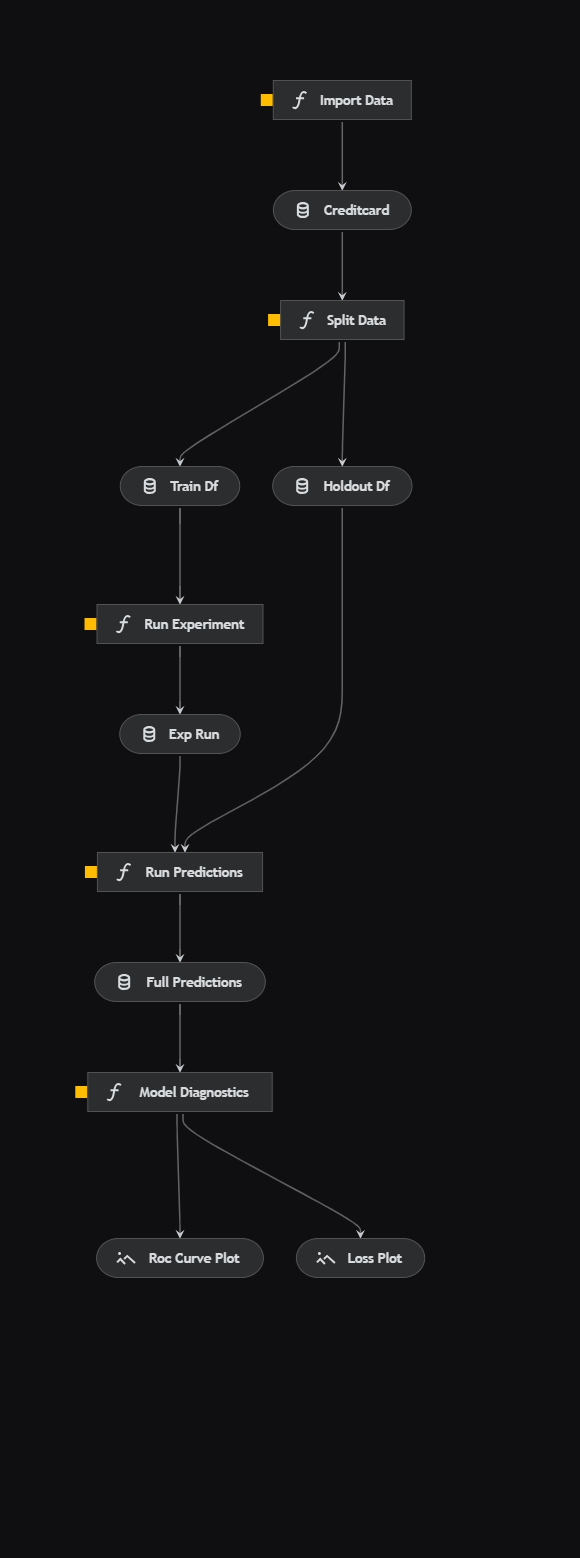 Image by Author: End-to-end model training pipeline generated with Kedro viz
Kedro conveniently allows you to visualise your pipelines, a fantastic feature that can help bring clarity to your code. The pipeline is standard for machine learning so I will only briefly touch on each aspect.
Image by Author: End-to-end model training pipeline generated with Kedro viz
Kedro conveniently allows you to visualise your pipelines, a fantastic feature that can help bring clarity to your code. The pipeline is standard for machine learning so I will only briefly touch on each aspect.
- Import Data : Import the credit card transaction data from an external source.
- Split Data : Use random split to split the data into training and holdout sets.
- Run Experiment : Uses the Ludwig framework to train a deep neural network on the train data set. The Ludwig experiment API conveniently saves model artefacts for every experiment run.
- Run Predictions : Uses the model trained in the previous step to run predictions on the holdout dataset.
- Model Diagnostics : Produces two diagnostic charts. First, the tracking the cross-entropy loss over each epoch. Second, the ROC curve measuring the model's performance on the holdout dataset.
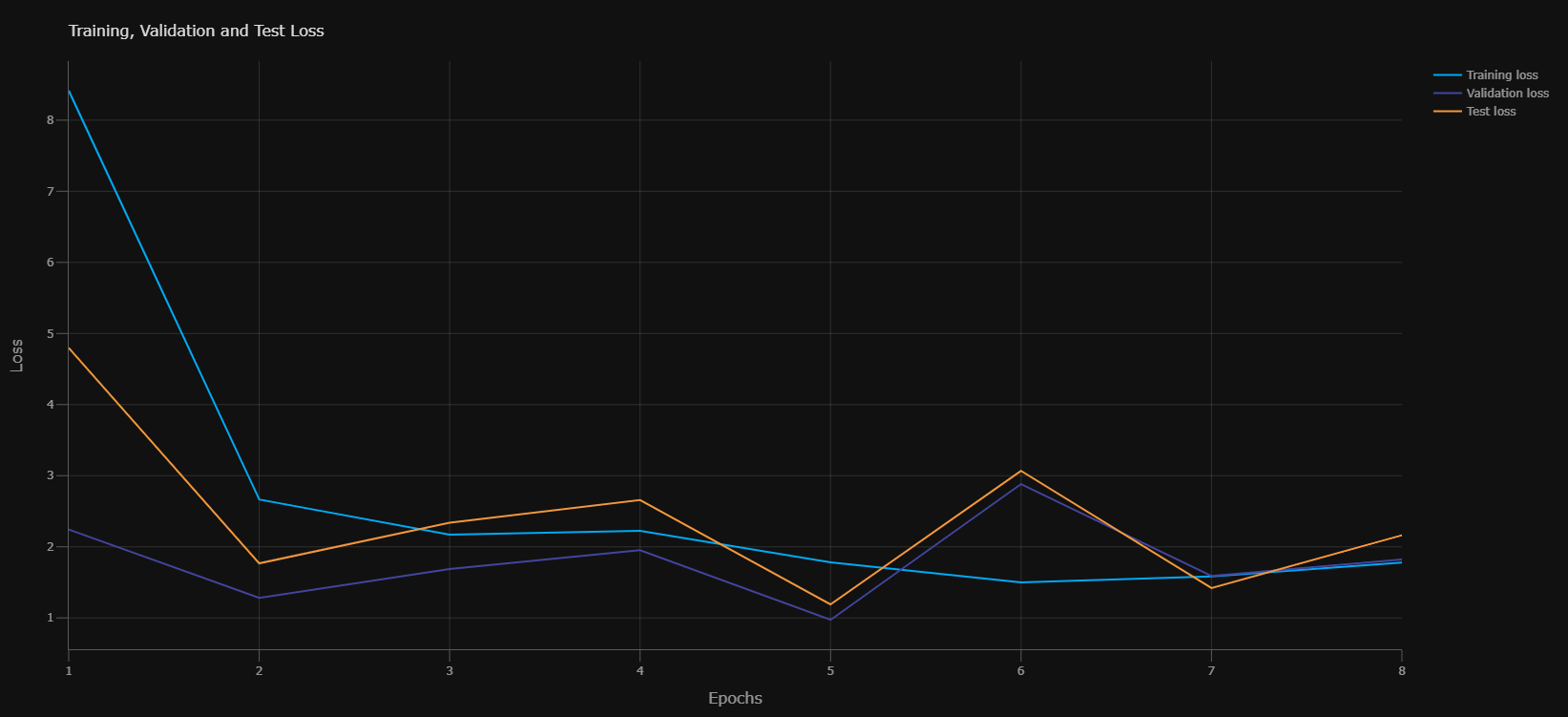 Image by Author: Loss Curve from model training process
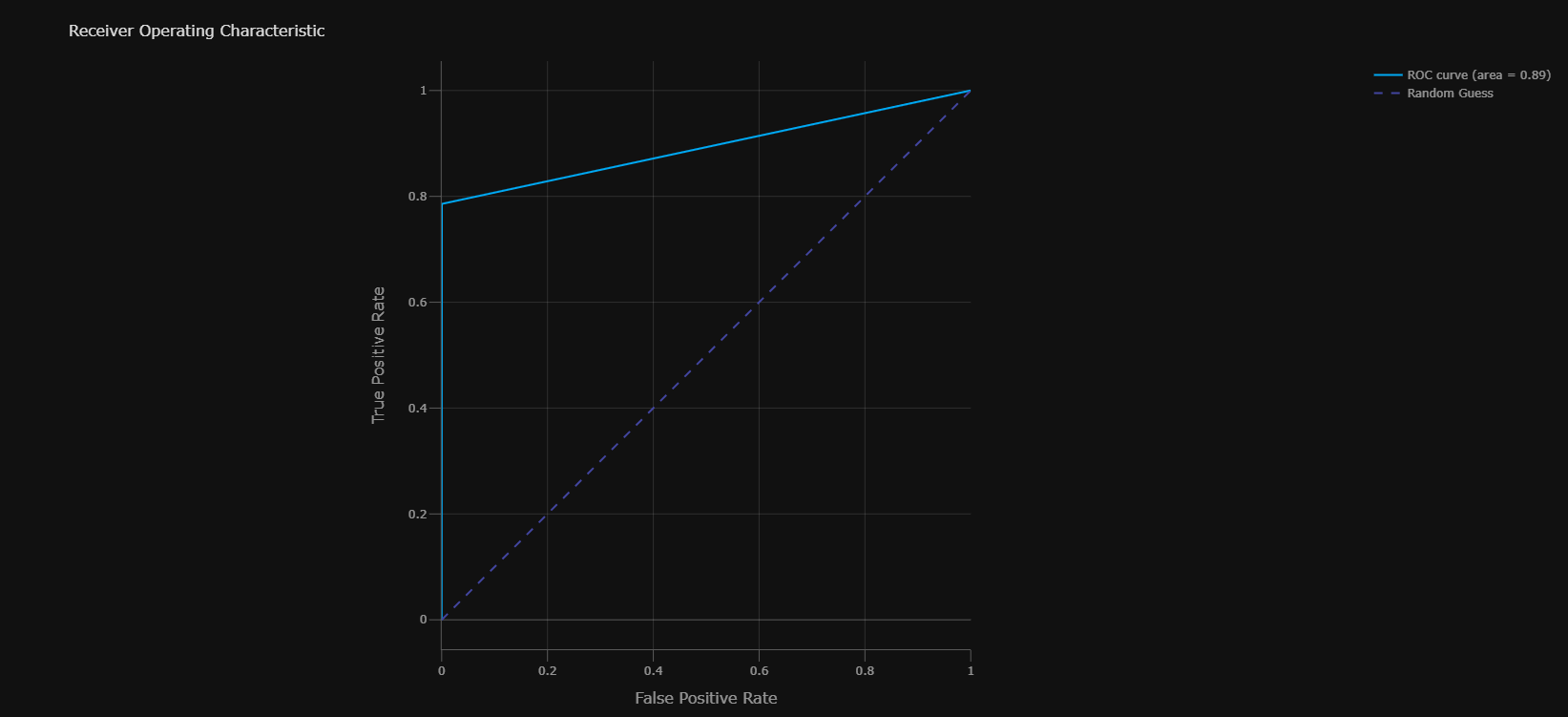 Image by Author: ROC Curve from model evaluation on the holdout dataset
Core Components of the Pipeline
Now that we have established a high-level view, let's get into some of the core components of this pipeline.
Project Structure
text
C:.
├───conf
│   ├───base
│   │   └───parameters
│   └───local
├───data
│   ├───01_raw
│   ├───02_intermediate
│   ├───03_primary
│   ├───04_feature
│   ├───05_model_input
│   ├───06_models
│   │   ├───experiment_run
│   │   │   └───model
│   │   │       ├───logs
│   │   │       │   ├───test
│   │   │       │   ├───training
│   │   │       │   └───validation
│   │   │       └───training_checkpoints
│   │   └───experiment_run_0
│   │       └───model
│   │           ├───logs
│   │           │   ├───test
│   │           │   ├───training
│   │           │   └───validation
│   │           └───training_checkpoints
│   ├───07_model_output
│   └───08_reporting
├───docs
│   └───source
│
└───src
    ├───fraud_detection_model
    │   ├───pipelines
    │       ├───train_model
    └───tests
        └───pipelines
Kedro provides a templated directory structure that is established when you initiate a project. From this base, you can programmatically add more pipelines to your directory structure. This standardised structure ensures that every machine learning project is identical and easy to document, thereby facilitating ease of maintenance.
Data Management
Data plays a crucial role in machine learning. The ability to track your data becomes even more essential when employing machine learning models in a commercial setting. You often find yourself facing audits, or the necessity to productionise or reproduce your pipeline on someone else's machine.
Kedro offers two methods for enforcing best practices in data management. The first is a directory structure, designed for machine learning workloads, providing distinct locations for the intermediate tables produced during data transformation and the model artefacts. The second method is the data catalogue. As part of the Kedro workflow, you are required to register datasets within a .yaml configuration file, thereby enabling you to leverage these datasets in your pipelines. This approach may initially seem unusual, but it allows you and others working on your pipeline to track data with ease.
Orchestration - Nodes and Pipelines
This is really where the magic happens. Kedro provides you with pipeline functionality straight out of the box.
The initial building block of your pipeline is the nodes. Each executable piece of code can be encapsulated within a Node, which is simply a Python function that accepts an input and yields an output. You can then structure a pipeline as a series of nodes. Pipelines are easily constructed by invoking the node and specifying the inputs and outputs. Kedro determines the execution order.
Once pipelines are constructed, they are registered in the provided pipeline_registry.py file. The beauty of this approach is that you can create multiple pipelines. This is particularly beneficial in machine learning, where you might have a data processing pipeline, a model training pipeline, an inference pipeline, and so forth.
Once set up, it's straightforward enough to modify aspects of your pipeline.
Configuration
Kedro's best practices stipulate that all configurations should be handled through the provided parameters.yml file. From a machine learning perspective, hyperparameters fall into this category. This approach streamlines experimentation, as you can simply substitute one parameters.yml file with a set of hyperparameters for another, which is also much easier to track.
I have also included the locations of my Ludwig deep neural network model.yaml and the data source within the parameters.yml configuration. Should the model or the location of the data change - for instance, when moving between developers' machines - it would be incredibly straightforward to adjust these settings.
Reproducibility
Kedro includes a requirements.txt file as part of the templated structure. This makes it really straightforward to monitor your environment and exact library versions. However, should you prefer, you can employ other environment management methods, such as an environment.yml file.
Establishing a Workflow
If you're developing machine learning pipelines and considering using Kedro, it can initially present a steep learning curve, but adopting a standard workflow will simplify the process. Here's my suggested workflow:
- Establish your working environment : I prefer using Anaconda for this task. I typically use an environment.yml file, containing all the dependencies needed for my environment, and employ the Anaconda Powershell command line to create my environment from this.
- Create a Kedro project : Once you have Kedro installed - which should hopefully be declared in your environment.yml - you can create a Kedro project through the Anaconda command line interface.
- Explore in Jupyter Notebooks : I construct an initial pipeline in Jupyter notebooks, a process familiar to most data scientists. The only difference is that, once your pipeline is built, you should tidy it up so that each cell could serve as one Node in your Kedro pipeline.
- Register your data : Record the input and outputs for each data processing or data ingestion step in the data catalogue.
- Add your pipeline : After conducting your exploration in notebooks, you'll want to create a pipeline. This is achieved through the command line interface. Running this command will add an additional folder to 'pipelines', bearing the name of the pipeline you've just created. It's within this folder that you'll construct your nodes and pipelines.
- Define your pipeline : This is the stage where you start transferring the code from your Jupyter notebooks into the node.py file in your pipeline folder, ensuring that nodes you intend to be part of a pipeline have inputs and outputs. Once the nodes are set up, proceed to define your pipeline in the pipeline.py file.
- Register your pipelines : The pipeline_registry.py file offers a template for you to register your newly created pipeline.
- Run your project : Once established, you can run any pipeline through the CLI and also visualise your project.
Production-ready pipelines fit into a wider ecosystem of machine learning operations. Read my article on MLOps for a deeper dive.
Building Machine Learning Operations for Businesses
Conclusion
Kedro is an excellent framework for delivering production-ready machine learning pipelines. Beyond the functionality discussed in this article, there are numerous integrations with other open-source libraries, as well as packages for documentation and testing. Kedro doesn't solve every issue related to model deployment - for instance, model versioning is likely better handled by another tool such as DVC. However, it will assist data scientists in a commercial setting to produce more maintainable, modular, and reproducible code that is ready for production. There is a relatively steep learning curve for complete novices, but the documentation is clear and includes guided tutorials. As with any of these packages, the best way to learn is to dive in and experiment.
Link to the full GitHub repo
Follow me on LinkedIn
Subscribe to medium to get more insights from me:
Join Medium with my referral link - John Adeojo
Should you be interested in integrating AI or data science into your business operations, we invite you to schedule a complimentary initial consultation with us:
Book Online | Data-Centric Solutions
Register Now to Continue Reading
Unlock Towards Data Science with a Free Account
All articles on Towards Data Science are available to registered users. Create a free account today to access this article and thousands more.
Register for freeSign in to your account
 Written By
See all from John Adeojo
Data ScienceKedroMachine LearningMachine Learning PipelineProgramming
Share This Article
Towards Data Science is a community publication. Submit your insights to reach our global audience and earn through the TDS Author Payment Program.
Write for TDS
Related Articles
Artificial Intelligence
An AI model compatible with 97 languages - and how to use it
Nikos Kafritsas
October 7, 202210 min read
Machine Learning
Manipulate database data leveraging an object-oriented programming paradigm
Marcello Politi
January 2, 20256 min read
Machine Learning
Cleaning up messy text using open-source EDA accelerator "data-describe"
Rishi Sheth
November 10, 20207 min read
Data Science
This function using Seaborn creates visuals for your project in no time.
Katie Sylvia
August 22, 20212 min read
Machine Learning
Automated and easy-to-understand script to get the job done.
Dario Radečić
August 25, 20207 min read
Data Science
How to inspect Pandas data frames in chained operations without breaking the chain into separate statements
Marcin Kozak
November 15, 20239 min read
Programming
Join Me on a Journey!
JB
August 24, 20218 min read
Deep Learning
Last part of the Transformer series
Chen Margalit
October 5, 20237 min read
Programming
A Real-Life Data Analyst Case Study
Terence Shin, MSc, MBA
May 21, 20209 min read
Your home for data science and AI. The world's leading publication for data science, data analytics, data engineering, machine learning, and artificial intelligence professionals.
Subscribe to Our NewsletterWrite For TDS•About•Advertise•Privacy Policy•Terms of Use
© Insight Media Group, LLC 2026•The New Stack•roadmap.sh•Creator Network
Recommended Articles
Close