保留正文与补采附件。源页面当前未重新核验;具体限制见交付清单。
 We value your privacy
We use cookies to enhance your browsing experience, serve personalised ads or content, and analyse our traffic. By clicking "Accept All", you consent to our use of cookies.
Customise Reject All Accept All
Customise Consent Preferences
We value your privacy
We use cookies to enhance your browsing experience, serve personalised ads or content, and analyse our traffic. By clicking "Accept All", you consent to our use of cookies.
Customise Reject All Accept All
Customise Consent Preferences  We use cookies to help you navigate efficiently and perform certain functions. You will find detailed information about all cookies under each consent category below.
The cookies that are categorised as "Necessary" are stored on your browser as they are essential for enabling the basic functionalities of the site. ... Show more
NecessaryAlways Active
Necessary cookies are required to enable the basic features of this site, such as providing secure log-in or adjusting your consent preferences. These cookies do not store any personally identifiable data.
We use cookies to help you navigate efficiently and perform certain functions. You will find detailed information about all cookies under each consent category below.
The cookies that are categorised as "Necessary" are stored on your browser as they are essential for enabling the basic functionalities of the site. ... Show more
NecessaryAlways Active
Necessary cookies are required to enable the basic features of this site, such as providing secure log-in or adjusting your consent preferences. These cookies do not store any personally identifiable data.
-
Cookie
BCTempID
-
Duration
10 minutes
-
Description
No description available.
-
Cookie
__cf_bm
-
Duration
1 hour
-
Description
This cookie, set by Cloudflare, is used to support Cloudflare Bot Management.
-
Cookie
AWSALBCORS
-
Duration
7 days
-
Description
Amazon Web Services set this cookie for load balancing.
-
Cookie
_cfuvid
-
Duration
session
-
Description
Cloudflare sets this cookie to track users across sessions to optimize user experience by maintaining session consistency and providing personalized services
-
Cookie
li_gc
-
Duration
6 months
-
Description
Linkedin set this cookie for storing visitor's consent regarding using cookies for non-essential purposes.
-
Cookie
__hssrc
-
Duration
session
-
Description
This cookie is set by Hubspot whenever it changes the session cookie. The __hssrc cookie set to 1 indicates that the user has restarted the browser, and if the cookie does not exist, it is assumed to be a new session.
-
Cookie
__hssc
-
Duration
1 hour
-
Description
HubSpot sets this cookie to keep track of sessions and to determine if HubSpot should increment the session number and timestamps in the __hstc cookie.
-
Cookie
wpEmojiSettingsSupports
-
Duration
session
-
Description
WordPress sets this cookie when a user interacts with emojis on a WordPress site. It helps determine if the user's browser can display emojis properly.
-
Cookie
BCSessionID
-
Duration
1 year 1 month 4 days
-
Description
Blueconic sets this cookie as a unique identifier for the BlueConic profile.
-
Cookie
_octo
-
Duration
1 year
-
Description
No description available.
-
Cookie
logged_in
-
Duration
1 year
-
Description
No description available.
-
Cookie
__Secure-YEC
-
Duration
past
-
Description
YouTube sets this cookie to stores the user's video player preferences using embedded YouTube video
-
Cookie
__eoi
-
Duration
6 months
-
Description
Description is currently not available.
-
Cookie
AWSALBTGCORS
-
Duration
7 days
-
Description
No description available.
-
Cookie
login-status-p
-
Duration
past
-
Description
Description is currently not available.
-
Cookie
AWSALBTG
-
Duration
7 days
-
Description
No description available.
-
Cookie
csrf_token
-
Duration
session
-
Description
No description available.
-
Cookie
token_v2
-
Duration
1 day
-
Description
Description is currently not available.
-
Cookie
D
-
Duration
1 year
-
Description
Description is currently not available.
-
Cookie
PHPSESSID
-
Duration
session
-
Description
This cookie is native to PHP applications. The cookie stores and identifies a user's unique session ID to manage user sessions on the website. The cookie is a session cookie and will be deleted when all the browser windows are closed.
-
Cookie
VISITOR_PRIVACY_METADATA
-
Duration
6 months
-
Description
YouTube sets this cookie to store the user's cookie consent state for the current domain.
-
Cookie
cookietest
-
Duration
session
-
Description
The cookietest cookie is typically used to determine whether the user's browser accepts cookies, essential for website functionality and user experience.
-
Cookie
__Host-airtable-session
-
Duration
1 year
-
Description
This cookie is used to enable us to integrate the services of Airtable.
-
Cookie
__Host-airtable-session.sig
-
Duration
1 year
-
Description
This cookie is used to enable us to integrate the services of Airtable.
-
Cookie
m
-
Duration
1 year 1 month 4 days
-
Description
Stripe sets this cookie for fraud prevention purposes. It identifies the device used to access the website, allowing the website to be formatted accordingly.
-
Cookie
BIGipServer*
-
Duration
session
-
Description
Marketo sets this cookie to collect information about the user's online activity and build a profile about their interests to provide advertisements relevant to the user.
-
Cookie
__cfruid
-
Duration
session
-
Description
Cloudflare sets this cookie to identify trusted web traffic.
-
Cookie
_GRECAPTCHA
-
Duration
6 months
-
Description
Google Recaptcha service sets this cookie to identify bots to protect the website against malicious spam attacks.
-
Cookie
__Secure-YNID
-
Duration
6 months
-
Description
Google cookie used to protect user security and prevent fraud, especially during the login process.
-
Cookie
cookieyes-consent
-
Duration
1 year
-
Description
CookieYes sets this cookie to remember users' consent preferences so that their preferences are respected on subsequent visits to this site. It does not collect or store any personal information about the site visitors.
Functional
Functional cookies help perform certain functionalities like sharing the content of the website on social media platforms, collecting feedback, and other third-party features.
-
Cookie
lidc
-
Duration
1 day
-
Description
LinkedIn sets the lidc cookie to facilitate data center selection.
-
Cookie
brw
-
Duration
1 year
-
Description
No description available.
-
Cookie
brwConsent
-
Duration
5 minutes
-
Description
Description is currently not available.
-
Cookie
WMF-Uniq
-
Duration
1 year
-
Description
Description is currently not available.
-
Cookie
loom_anon_comment
-
Duration
1 year
-
Description
No description available.
-
Cookie
loom_referral_video
-
Duration
session
-
Description
Description is currently not available.
-
Cookie
VISITOR_INFO1_LIVE
-
Duration
6 months
-
Description
A cookie set by YouTube to measure bandwidth that determines whether the user gets the new or old player interface.
-
Cookie
yt-remote-connected-devices
-
Duration
Never Expires
-
Description
YouTube sets this cookie to store the user's video preferences using embedded YouTube videos.
-
Cookie
ytidb::LAST_RESULT_ENTRY_KEY
-
Duration
Never Expires
-
Description
The cookie ytidb::LAST_RESULT_ENTRY_KEY is used by YouTube to store the last search result entry that was clicked by the user. This information is used to improve the user experience by providing more relevant search results in the future.
-
Cookie
yt-remote-device-id
-
Duration
Never Expires
-
Description
YouTube sets this cookie to store the user's video preferences using embedded YouTube videos.
-
Cookie
yt-remote-session-name
-
Duration
session
-
Description
The yt-remote-session-name cookie is used by YouTube to store the user's video player preferences using embedded YouTube video.
-
Cookie
yt-remote-fast-check-period
-
Duration
session
-
Description
The yt-remote-fast-check-period cookie is used by YouTube to store the user's video player preferences for embedded YouTube videos.
-
Cookie
yt-remote-session-app
-
Duration
session
-
Description
The yt-remote-session-app cookie is used by YouTube to store user preferences and information about the interface of the embedded YouTube video player.
-
Cookie
yt-remote-cast-available
-
Duration
session
-
Description
The yt-remote-cast-available cookie is used to store the user's preferences regarding whether casting is available on their YouTube video player.
-
Cookie
yt-remote-cast-installed
-
Duration
session
-
Description
The yt-remote-cast-installed cookie is used to store the user's video player preferences using embedded YouTube video.
-
Cookie
cp_session
-
Duration
3 months
-
Description
Codepen sets this cookie for Help systems found in the website.
-
Cookie
loid
-
Duration
1 year 1 month 4 days
-
Description
This cookie is set by the Reddit. The cookie enables the sharing of content from the website onto the social media platform.
Analytics
Analytical cookies are used to understand how visitors interact with the website. These cookies help provide information on metrics such as the number of visitors, bounce rate, traffic source, etc.
-
Cookie
__hstc
-
Duration
6 months
-
Description
Hubspot set this main cookie for tracking visitors. It contains the domain, initial timestamp (first visit), last timestamp (last visit), current timestamp (this visit), and session number (increments for each subsequent session).
-
Cookie
hubspotutk
-
Duration
6 months
-
Description
HubSpot sets this cookie to keep track of the visitors to the website. This cookie is passed to HubSpot on form submission and used when deduplicating contacts.
-
Cookie
_ga
-
Duration
1 year 1 month 4 days
-
Description
Google Analytics sets this cookie to calculate visitor, session and campaign data and track site usage for the site's analytics report. The cookie stores information anonymously and assigns a randomly generated number to recognise unique visitors.
-
Cookie
ga*
-
Duration
1 year 1 month 4 days
-
Description
Google Analytics sets this cookie to store and count page views.
-
Cookie
__Host-psifi.analyticsTrace
-
Duration
6 hours
-
Description
Description is currently not available.
-
Cookie
__Host-psifi.analyticsTraceV2
-
Duration
6 hours
-
Description
Description is currently not available.
-
Cookie
_gh_sess
-
Duration
session
-
Description
GitHub sets this cookie for temporary application and framework state between pages like what step the user is on in a multiple step form.
-
Cookie
YSC
-
Duration
session
-
Description
YSC cookie is set by Youtube and is used to track the views of embedded videos on Youtube pages.
-
Cookie
ajs_anonymous_id
-
Duration
1 year
-
Description
This cookie is set by Segment to count the number of people who visit a certain site by tracking if they have visited before.
-
Cookie
vuid
-
Duration
1 year 1 month 4 days
-
Description
Vimeo installs this cookie to collect tracking information by setting a unique ID to embed videos on the website.
Performance
Performance cookies are used to understand and analyse the key performance indexes of the website which helps in delivering a better user experience for the visitors.
-
Cookie
AWSALB
-
Duration
7 days
-
Description
AWSALB is an application load balancer cookie set by Amazon Web Services to map the session to the target.
-
Cookie
acq
-
Duration
past
-
Description
Description is currently not available.
-
Cookie
acq.sig
-
Duration
past
-
Description
Description is currently not available.
-
Cookie
ptc
-
Duration
2 years
-
Description
No description available.
Advertisement
Advertisement cookies are used to provide visitors with customised advertisements based on the pages you visited previously and to analyse the effectiveness of the ad campaigns.
-
Cookie
muc_ads
-
Duration
1 year 1 month 4 days
-
Description
Twitter sets this cookie to collect user behaviour and interaction data to optimize the website.
-
Cookie
guest_id_marketing
-
Duration
1 year 1 month 4 days
-
Description
Twitter sets this cookie to identify and track the website visitor.
-
Cookie
guest_id_ads
-
Duration
1 year 1 month 4 days
-
Description
Twitter sets this cookie to identify and track the website visitor.
-
Cookie
personalization_id
-
Duration
1 year 1 month 4 days
-
Description
Twitter sets this cookie to integrate and share features for social media and also store information about how the user uses the website, for tracking and targeting.
-
Cookie
guest_id
-
Duration
1 year 1 month 4 days
-
Description
Twitter sets this cookie to identify and track the website visitor. It registers if a user is signed in to the Twitter platform and collects information about ad preferences.
-
Cookie
bcookie
-
Duration
1 year
-
Description
LinkedIn sets this cookie from LinkedIn share buttons and ad tags to recognize browser IDs.
-
Cookie
__Secure-ROLLOUT_TOKEN
-
Duration
6 months
-
Description
YouTube sets this cookie to manage feature rollout and experimentation. It helps Google control which new features or interface changes are shown to users as part of testing and staged rollouts, ensuring consistent experience for a given user during an experiment.
-
Cookie
yt.innertube::nextId
-
Duration
Never Expires
-
Description
YouTube sets this cookie to register a unique ID to store data on what videos from YouTube the user has seen.
-
Cookie
yt.innertube::requests
-
Duration
Never Expires
-
Description
YouTube sets this cookie to register a unique ID to store data on what videos from YouTube the user has seen.
-
Cookie
session_tracker
-
Duration
session
-
Description
This cookie is set by the Reddit. This cookie is used to identify trusted web traffic. It also helps in adverstising on the website.
-
Cookie
edgebucket
-
Duration
session
-
Description
Reddit sets this cookie to save the information about a log-on Reddit user, for the purpose of advertisement recommendations and updating the content.
-
Cookie
did
-
Duration
1 year
-
Description
Arbor sets this cookie to show targeted ads to site visitors.This cookie expires after 2 months or 1 year.
Uncategorised
Other uncategorised cookies are those that are being analysed and have not been classified into a category as yet.
No cookies to display.
Reject All Save My Preferences Accept All
Toggle SearchToggle Mobile Navigation
Publish AI, ML & data-science insights to a global community of data professionals.
Sign inSubmit an Article
LatestEditor's PicksNewsletterShipAI
Write For TDS
LinkedInXToggle Search
Programming
AutoML with AutoGluon: Transform Your ML Workflow with Just Four Lines of Code
How AutoGluon Dominated Kaggle Competitions and How You Can Beat It. The algorithm that beats 99% of Data Scientists with 4 lines of code.
Cristian Leo
July 3, 202420 min read
AutoML with AutoGluon: ML workflow with Just Four Lines of Code
 Image generated by DALL-E
In two popular Kaggle competitions, AutoGluon beat 99% of the participating data scientists after merely 4h of training on the raw data (AutoGluon Team. "AutoGluon: AutoML for Text, Image, and Tabular Data." 2020)
This statement, taken from the AutoGluon research paper, perfectly captures what we will explore today: a machine-learning framework that delivers impressive performance with minimal coding. You only need four lines of code to set up a complete ML pipeline, a task that could otherwise take hours. Yes, just four lines of code! See for yourself:
python
from autogluon.tabular import TabularDataset, TabularPredictor

train_data = TabularDataset('train.csv')
predictor = TabularPredictor(label='Target').fit(train_data, presets='best_quality')
predictions = predictor.predict(train_data)
These four lines handle data preprocessing by automatically recognizing the data type of each column, feature engineering by finding useful column combinations, and model training through ensembling to identify the best-performing model within a given time. Notice that I didn't even specify the type of machine learning task (regression/classification). AutoGluon examines the label and determines the task on its own.
Am I advocating for this algorithm? Not necessarily. While I appreciate the power of AutoGluon, I prefer solutions that don't reduce data science to mere accuracy scores in a Kaggle competition. However, as these models become increasingly popular and widely adopted, it's important to understand how they work, the math and code behind them, and how you can leverage or outperform them.
1: AutoGluon Overview
AutoGluon is an open-source machine-learning library created by Amazon Web Services (AWS). It's designed to handle the entire ML process for you, from preparing your data to selecting the best model and tuning its settings.
AutoGluon combines simplicity with top-notch performance. It employs advanced techniques like ensemble learning and automatic hyperparameter tuning to ensure that the models you create are highly accurate. This means you can develop powerful machine-learning solutions without getting bogged down in the technical details.
The library takes care of data preprocessing, feature selection, model training, and evaluation, which significantly reduces the time and effort required to build robust machine-learning models. Additionally, AutoGluon scales well, making it suitable for both small projects and large, complex datasets.
For tabular data, AutoGluon can handle both classification tasks, where you categorize data into different groups, and regression tasks, where you predict continuous outcomes. It also supports text data, making it useful for tasks like sentiment analysis or topic categorization. Moreover, it can manage image data, assisting with image recognition and object detection. Although several variations of AutoGluon were built to better handle time-series data, text, and image, here we will focus on the variation to handle tabular data. Let me know if you liked this article and would like future deep dives into its variations. (AutoGluon Team. "AutoGluon: AutoML for Text, Image, and Tabular Data." 2020)
2: The Space of AutoML
2.1: What is AutoML?
AutoML, short for Automated Machine Learning, is a technology that automates the entire process of applying machine learning to real-world problems. The main goal of AutoML is to make machine learning more accessible and efficient, allowing people to develop models without needing deep expertise. As we've already seen, it handles tasks like data preprocessing, feature engineering, model selection, and hyperparameter tuning, which are usually complex and time-consuming (He et al., "AutoML: A Survey of the State-of-the-Art," 2019).
The concept of AutoML has evolved significantly over the years. Initially, machine learning required a lot of manual effort from experts who had to carefully select features, tune hyperparameters, and choose the right algorithms. As the field grew, so did the need for automation to handle increasingly large and complex datasets. Early efforts to automate parts of the process paved the way for modern AutoML systems. Today, AutoML uses advanced techniques like ensemble learning and Bayesian optimization to create high-quality models with minimal human intervention (Feurer et al., "Efficient and Robust Automated Machine Learning," 2015).
Several players have emerged in the AutoML space, each offering unique features and capabilities. AutoGluon, developed by Amazon Web Services, is known for its ease of use and strong performance across various data types (AutoGluon Team, "AutoGluon: AutoML for Text, Image, and Tabular Data," 2020). Google Cloud AutoML provides a suite of machine-learning products that allow developers to train high-quality models with minimal effort. H2O.ai offers H2O AutoML, which provides automatic machine-learning capabilities for both supervised and unsupervised learning tasks (H2O.ai, "H2O AutoML: Scalable Automatic Machine Learning," 2020). DataRobot focuses on enterprise-level AutoML solutions, offering robust tools for model deployment and management. Microsoft's Azure Machine Learning also features AutoML capabilities, integrating seamlessly with other Azure services for a comprehensive machine learning solution.
2.2: Key Components of AutoML
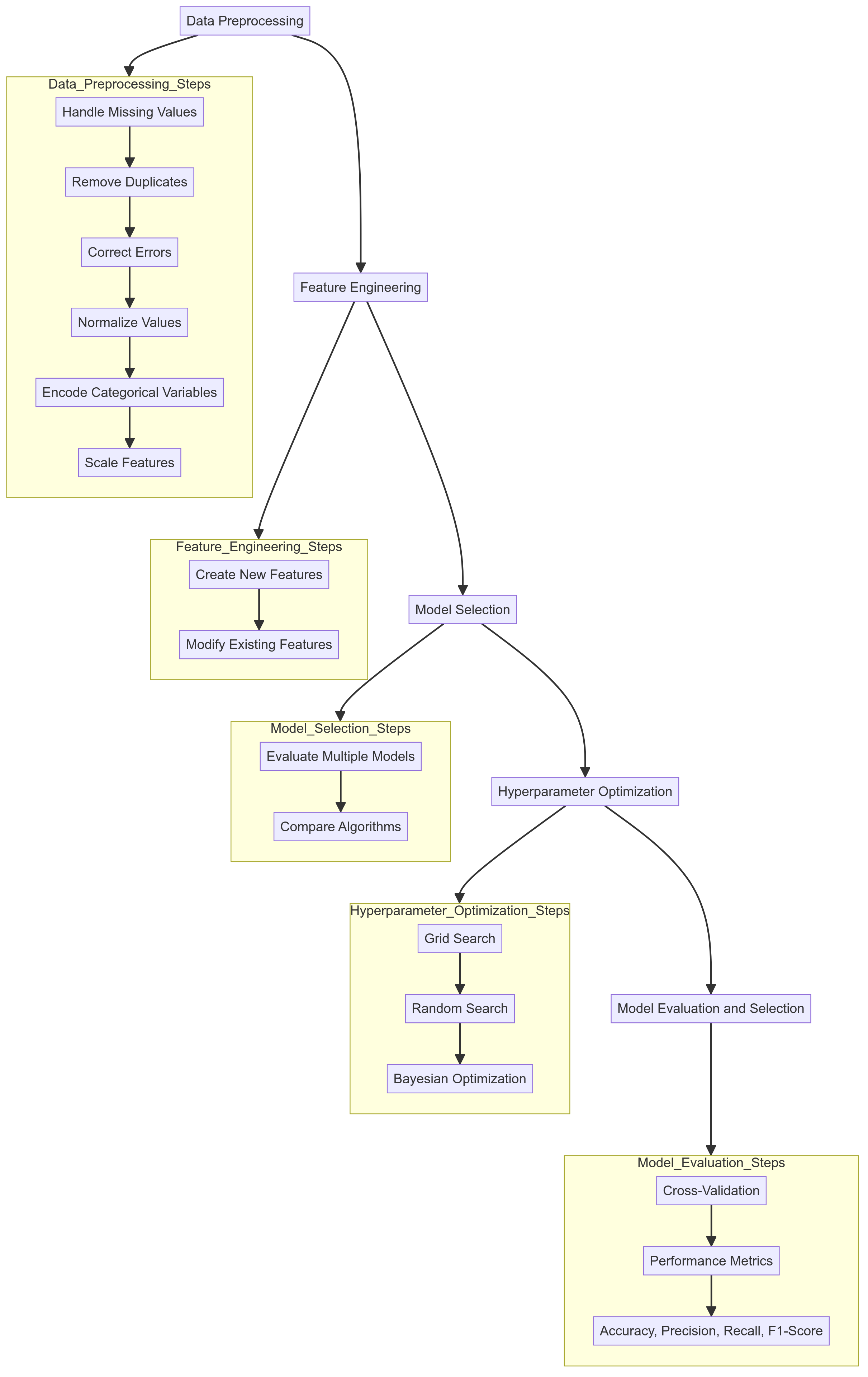 AutoGluon Workflow - Image by Author
The first step in any machine learning pipeline is data preprocessing. This involves cleaning the data by handling missing values, removing duplicates, and correcting errors. Data preprocessing also includes transforming the data into a format suitable for analysis, such as normalizing values, encoding categorical variables, and scaling features. Proper data preprocessing is crucial because the quality of the data directly impacts the performance of the machine learning models.
Once the data is cleaned, the next step is feature engineering. This process involves creating new features or modifying existing ones to improve the model's performance. Feature engineering can be as simple as creating new columns based on existing data or as complex as using domain knowledge to create meaningful features. The right features can significantly enhance the predictive power of the models.
With the data ready and features engineered, the next step is model selection. There are many algorithms to choose from, each with its strengths and weaknesses depending on the problem at hand. AutoML systems evaluate multiple models to identify the best one for the given task. This might involve comparing models like decision trees, support vector machines, neural networks, and others to see which performs best with the data.
After selecting a model, the next challenge is hyperparameter optimization. Hyperparameters are settings that control the behavior of the machine learning algorithm, such as the learning rate in neural networks or the depth of decision trees. Finding the optimal combination of hyperparameters can greatly improve model performance. AutoML uses techniques like grid search, random search, and more advanced methods like Bayesian optimization to automate this process, ensuring the model is fine-tuned for the best results.
The final step is model evaluation and selection. This involves using techniques like cross-validation to assess how well the model generalizes to new data. Various performance metrics, such as accuracy, precision, recall, and F1-score, are used to measure the model's effectiveness. AutoML systems automate this evaluation process, ensuring that the model selected is the best fit for the task. Once the evaluation is complete, the best-performing model is chosen for deployment (AutoGluon Team. "AutoGluon: AutoML for Text, Image, and Tabular Data." 2020).
AutoGluon Workflow - Image by Author
The first step in any machine learning pipeline is data preprocessing. This involves cleaning the data by handling missing values, removing duplicates, and correcting errors. Data preprocessing also includes transforming the data into a format suitable for analysis, such as normalizing values, encoding categorical variables, and scaling features. Proper data preprocessing is crucial because the quality of the data directly impacts the performance of the machine learning models.
Once the data is cleaned, the next step is feature engineering. This process involves creating new features or modifying existing ones to improve the model's performance. Feature engineering can be as simple as creating new columns based on existing data or as complex as using domain knowledge to create meaningful features. The right features can significantly enhance the predictive power of the models.
With the data ready and features engineered, the next step is model selection. There are many algorithms to choose from, each with its strengths and weaknesses depending on the problem at hand. AutoML systems evaluate multiple models to identify the best one for the given task. This might involve comparing models like decision trees, support vector machines, neural networks, and others to see which performs best with the data.
After selecting a model, the next challenge is hyperparameter optimization. Hyperparameters are settings that control the behavior of the machine learning algorithm, such as the learning rate in neural networks or the depth of decision trees. Finding the optimal combination of hyperparameters can greatly improve model performance. AutoML uses techniques like grid search, random search, and more advanced methods like Bayesian optimization to automate this process, ensuring the model is fine-tuned for the best results.
The final step is model evaluation and selection. This involves using techniques like cross-validation to assess how well the model generalizes to new data. Various performance metrics, such as accuracy, precision, recall, and F1-score, are used to measure the model's effectiveness. AutoML systems automate this evaluation process, ensuring that the model selected is the best fit for the task. Once the evaluation is complete, the best-performing model is chosen for deployment (AutoGluon Team. "AutoGluon: AutoML for Text, Image, and Tabular Data." 2020).
2.3: Challenges of AutoML
While AutoML saves time and effort, it can be quite demanding in terms of computational resources. Automating tasks like hyperparameter tuning and model selection often requires running many iterations and training multiple models, which can be a challenge for smaller organizations or individuals without access to high-performance computing.
Another challenge is the need for customization. Although AutoML systems are highly effective in many situations, they might not always meet specific requirements right out of the box. Sometimes, the automated processes may not fully capture the unique aspects of a particular dataset or problem. Users may need to tweak parts of the workflow, which can be difficult if the system doesn't offer enough flexibility or if the user lacks the necessary expertise.
Despite these challenges, the benefits of AutoML often outweigh the drawbacks. It greatly enhances productivity, broadens accessibility, and offers scalable solutions, enabling more people to leverage the power of machine learning (Feurer et al., "Efficient and Robust Automated Machine Learning," 2015).
3: The Math Behind AutoGluon
3.1: AutoGluon's Architecture
AutoGluon's architecture is designed to automate the entire machine learning workflow, from data preprocessing to model deployment. This architecture consists of several interconnected modules, each responsible for a specific stage of the process.
The first step is the Data Module , which handles loading and preprocessing data. This module deals with tasks such as cleaning the data, addressing missing values, and transforming the data into a suitable format for analysis. For example, consider a dataset X with missing values. The Data Module might impute these missing values using the mean or median:
java
from sklearn.impute import SimpleImputer
imputer = SimpleImputer(strategy='mean')
X_imputed = imputer.fit_transform(X)
Once the data is preprocessed, the Feature Engineering Module takes over. This component generates new features or transforms existing ones to enhance the model's predictive power. Techniques such as one-hot encoding for categorical variables or creating polynomial features for numeric data are common. For instance, encoding categorical variables might look like this:
java
from sklearn.preprocessing import OneHotEncoder
encoder = OneHotEncoder()
X_encoded = encoder.fit_transform(X)
At the core of AutoGluon is the Model Module. This module includes a wide array of machine-learning algorithms, such as decision trees, neural networks, and gradient-boosting machines. It trains multiple models on the dataset and evaluates their performance. A decision tree, for example, might be trained as follows:
java
from sklearn.tree import DecisionTreeClassifier
model = DecisionTreeClassifier()
model.fit(X_train, y_train)
The Hyperparameter Optimization Module automates the search for the best hyperparameters for each model. It uses methods like grid search, random search, and Bayesian optimization. Bayesian optimization, as detailed in the paper by Snoek et al. (2012), builds a probabilistic model to guide the search process:
java
from skopt import BayesSearchCV
search_space = {'max_depth': (1, 32)}
bayes_search = BayesSearchCV(estimator=DecisionTreeClassifier(), search_spaces=search_space)
bayes_search.fit(X_train, y_train)
After training, the Evaluation Module assesses model performance using metrics like accuracy, precision, recall, and F1-score. Cross-validation is commonly used to ensure the model generalizes well to new data:
java
from sklearn.model_selection import cross_val_score
scores = cross_val_score(model, X, y, cv=5, scoring='accuracy')
mean_score = scores.mean()
AutoGluon excels with its Ensemble Module, which combines the predictions of multiple models to produce a single, more accurate prediction. Techniques like stacking, bagging, and blending are employed. For instance, bagging can be implemented using the BaggingClassifier:
java
from sklearn.ensemble import BaggingClassifier
bagging = BaggingClassifier(base_estimator=DecisionTreeClassifier(), n_estimators=10)
bagging.fit(X_train, y_train)
Finally, the Deployment Module handles the deployment of the best model or ensemble into production. This includes exporting the model, generating predictions on new data, and integrating the model into existing systems:
go
import joblib
joblib.dump(bagging, 'model.pkl')
These components work together to automate the machine learning pipeline, allowing users to build and deploy high-quality models quickly and efficiently.
3.2: Ensemble Learning in AutoGluon
Ensemble learning is a key feature of AutoGluon that enhances its ability to deliver high-performing models. By combining multiple models, ensemble methods improve predictive accuracy and robustness. AutoGluon leverages three main ensemble techniques: stacking, bagging, and blending.
Stacking Stacking involves training multiple base models on the same dataset and using their predictions as input features for a higher-level model, often called a meta-model. This approach leverages the strengths of various algorithms, allowing the ensemble to make more accurate predictions. The stacking process can be mathematically represented as follows:
 Stacking Formula - Image by Author
Here, h_1 represents the base models, and h_2 is the meta-model. Each base model h_1 takes the input features x_i and produces a prediction. These predictions are then used as input features for the meta-model h_2 , which makes the final prediction y^ . By combining the outputs of different base models, stacking can capture a broader range of patterns in the data, leading to improved predictive performance.
Bagging Bagging, short for Bootstrap Aggregating, improves model stability and accuracy by training multiple instances of the same model on different subsets of the data. These subsets are created by randomly sampling the original dataset with replacement. The final prediction is typically made by averaging the predictions of all the models for regression tasks or by taking a majority vote for classification tasks.
Mathematically, bagging can be represented as follows:
For regression:
Stacking Formula - Image by Author
Here, h_1 represents the base models, and h_2 is the meta-model. Each base model h_1 takes the input features x_i and produces a prediction. These predictions are then used as input features for the meta-model h_2 , which makes the final prediction y^ . By combining the outputs of different base models, stacking can capture a broader range of patterns in the data, leading to improved predictive performance.
Bagging Bagging, short for Bootstrap Aggregating, improves model stability and accuracy by training multiple instances of the same model on different subsets of the data. These subsets are created by randomly sampling the original dataset with replacement. The final prediction is typically made by averaging the predictions of all the models for regression tasks or by taking a majority vote for classification tasks.
Mathematically, bagging can be represented as follows:
For regression:
 Regression in Bagging Formula - Image by Author
For classification:
Regression in Bagging Formula - Image by Author
For classification:
 Classification in Bagging - Image by Author
Here, h_i represents the i-th model trained on a different subset of the data. For regression, the final prediction y^ is the average of the predictions made by each model. For classification, the final prediction y^ is the most frequently predicted class among the models.
The variance reduction effect of bagging can be illustrated by the law of large numbers, which states that the average of the predictions from multiple models will converge to the expected value, reducing the overall variance and improving the stability of the predictions. It can be illustrated as:
Classification in Bagging - Image by Author
Here, h_i represents the i-th model trained on a different subset of the data. For regression, the final prediction y^ is the average of the predictions made by each model. For classification, the final prediction y^ is the most frequently predicted class among the models.
The variance reduction effect of bagging can be illustrated by the law of large numbers, which states that the average of the predictions from multiple models will converge to the expected value, reducing the overall variance and improving the stability of the predictions. It can be illustrated as:
 Variance Reduction in Bagging - Image by Author
By training on different subsets of the data, bagging also helps in reducing overfitting and increasing the generalizability of the model.
Blending Blending is similar to stacking but with a simpler implementation. In blending, the data is split into two parts: the training set and the validation set. Base models are trained on the training set, and their predictions on the validation set are used to train a final model, also known as the blender or meta-learner. Blending uses a holdout validation set, which can make it faster to implement:
makefile
Variance Reduction in Bagging - Image by Author
By training on different subsets of the data, bagging also helps in reducing overfitting and increasing the generalizability of the model.
Blending Blending is similar to stacking but with a simpler implementation. In blending, the data is split into two parts: the training set and the validation set. Base models are trained on the training set, and their predictions on the validation set are used to train a final model, also known as the blender or meta-learner. Blending uses a holdout validation set, which can make it faster to implement:
makefile
# Example of blending with simple train-validation split
train_meta, val_meta, y_train_meta, y_val_meta = train_test_split(X, y, test_size=0.2)
base_model_1.fit(train_meta, y_train_meta)
base_model_2.fit(train_meta, y_train_meta)
preds_1 = base_model_1.predict(val_meta)
preds_2 = base_model_2.predict(val_meta)
meta_features = np.column_stack((preds_1, preds_2))
meta_model.fit(meta_features, y_val_meta)
These techniques ensure that the final predictions are more accurate and robust, leveraging the diversity and strengths of multiple models to deliver superior results.
3.3: Hyperparameter Optimization
Hyperparameter optimization involves finding the best settings for a model to maximize its performance. AutoGluon automates this process using advanced techniques like Bayesian optimization, early stopping, and smart resource allocation.
Bayesian Optimization Bayesian optimization aims to find the optimal set of hyperparameters by building a probabilistic model of the objective function. It uses past evaluation results to make informed decisions about which hyperparameters to try next. This is particularly useful for efficiently navigating large and complex hyperparameter spaces, reducing the number of evaluations needed to find the best configuration:
 Bayesian Optimization Formula - Image by Author
where f(θ) is the objective function want to optimize, such as model accuracy or loss. θ represents the hyperparameters. E[f(θ)] is the expected value of the objective function given the hyperparameters θ.
Bayesian optimization involves two main steps:
Bayesian Optimization Formula - Image by Author
where f(θ) is the objective function want to optimize, such as model accuracy or loss. θ represents the hyperparameters. E[f(θ)] is the expected value of the objective function given the hyperparameters θ.
Bayesian optimization involves two main steps:
- Surrogate Modeling : A probabilistic model, usually a Gaussian process, is built to approximate the objective function based on past evaluations.
- Acquisition Function : This function determines the next set of hyperparameters to evaluate by balancing exploration (trying new areas of the hyperparameter space) and exploitation (focusing on areas known to perform well). Common acquisition functions include Expected Improvement (EI) and Upper Confidence Bound (UCB).
The optimization iteratively updates the surrogate model and acquisition function to converge on the optimal set of hyperparameters with fewer evaluations compared to grid or random search methods.
Early Stopping Techniques Early stopping prevents overfitting and reduces training time by halting the training process once the model's performance stops improving on a validation set. AutoGluon monitors the performance of the model during training and stops the process when further training is unlikely to yield significant improvements. This technique not only saves computational resources but also ensures that the model generalizes well to new, unseen data:
python
from sklearn.model_selection import train_test_split
from sklearn.metrics import log_loss

X_train, X_val, y_train, y_val = train_test_split(X, y, test_size=0.2)
model = DecisionTreeClassifier()
best_loss = np.inf

for epoch in range(100):
    model.fit(X_train, y_train)
    val_preds = model.predict(X_val)
    loss = log_loss(y_val, val_preds)
    if loss < best_loss:
        best_loss = loss
    else:
        break
Resource Allocation Strategies Effective resource allocation is crucial in hyperparameter optimization, especially when dealing with limited computational resources. AutoGluon employs strategies like multi-fidelity optimization, where the system initially trains models with a subset of the data or fewer epochs to quickly assess their potential. Promising models are then allocated more resources for thorough evaluation. This approach balances exploration and exploitation, ensuring that computational resources are used effectively:
 Multi-Fidelity Optimization Formula - Image by Author
In this formula:
Multi-Fidelity Optimization Formula - Image by Author
In this formula:
- h_i represents the i-th model.
- C_i is the cost associated with model h_i , such as computational time or resources used.
- Resource(h_i) represents the proportion of total resources allocated to model h_i .
By initially training models with reduced fidelity (e.g., using fewer data points or epochs), multi-fidelity optimization quickly identifies promising candidates. These candidates are then trained with higher fidelity, ensuring that computational resources are used effectively. This approach balances the exploration of the hyperparameter space with the exploitation of known good configurations, leading to efficient and effective hyperparameter optimization.
3.4: Model Evaluation and Selection
Model evaluation and selection ensure the chosen model performs well on new, unseen data. AutoGluon automates this process using cross-validation techniques, performance metrics, and automated model selection criteria.
Cross-Validation Techniques Cross-validation involves splitting the data into multiple folds and training the model on different subsets while validating it on the remaining parts. AutoGluon uses techniques like k-fold cross-validation, where the data is divided into k subsets, and the model is trained and validated k times, each time with a different subset as the validation set. This helps in obtaining a reliable estimate of the model's performance and ensures that the evaluation is not biased by a particular train-test split:
 Cross-Validation Accuracy Formula - Image by Author
Performance Metrics To evaluate the quality of a model, AutoGluon relies on various performance metrics, which depend on the specific task at hand. For classification tasks, common metrics include accuracy, precision, recall, F1-score, and area under the ROC curve (AUC-ROC). For regression tasks, metrics like mean absolute error (MAE), mean squared error (MSE), and R-squared are often used. AutoGluon automatically calculates these metrics during the evaluation process, providing a comprehensive view of the model's strengths and weaknesses:
makefile
Cross-Validation Accuracy Formula - Image by Author
Performance Metrics To evaluate the quality of a model, AutoGluon relies on various performance metrics, which depend on the specific task at hand. For classification tasks, common metrics include accuracy, precision, recall, F1-score, and area under the ROC curve (AUC-ROC). For regression tasks, metrics like mean absolute error (MAE), mean squared error (MSE), and R-squared are often used. AutoGluon automatically calculates these metrics during the evaluation process, providing a comprehensive view of the model's strengths and weaknesses:
makefile
from sklearn.metrics import accuracy_score, precision_score, recall_score, f1_score
y_pred = model.predict(X_val)
accuracy = accuracy_score(y_val, y_pred)
precision = precision_score(y_val, y_pred)
recall = recall_score(y_val, y_pred)
f1 = f1_score(y_val, y_pred)
Automated Model Selection Criteria After evaluating the models, AutoGluon uses automated criteria to select the best-performing one. This involves comparing the performance metrics across different models and choosing the model that excels in the most relevant metrics for the task. AutoGluon also considers factors like model complexity, training time, and resource efficiency. The automated model selection process ensures that the chosen model not only performs well but is also practical to deploy and use in real-world scenarios. By automating this selection, AutoGluon eliminates human bias and ensures a consistent and objective approach to choosing the best model:
python
best_model = max(models, key=lambda model: model['score'])
4: AutoGluon in Python
Before diving into using AutoGluon, you need to set up your environment. This involves installing the necessary libraries and dependencies.
You can install AutoGluon using pip. Open your terminal or command prompt and run the following command:
bash
pip install autogluon
This command will install AutoGluon along with its required dependencies.
Next, you need to download the data. You'll need to install Kaggle to download the dataset for this example:
typescript
pip install kaggle
After installing, download the dataset by running these commands in your terminal. Make sure you're in the same directory as your notebook file:
bash
mkdir data
cd data
kaggle competitions download -c playground-series-s4e6
unzip "Academic Succession/playground-series-s4e6.zip"
Alternatively, you can manually download the dataset from the recent Kaggle competition "Classification with an Academic Success Dataset". The dataset is free for commercial use.
Once your environment is set up, you can use AutoGluon to build and evaluate machine learning models. First, you need to load and prepare your dataset. AutoGluon makes this process straightforward. Suppose you have a CSV file named train.csv containing your training data:
python
from autogluon.tabular import TabularDataset, TabularPredictor

# Load the dataset
train_df = TabularDataset('data/train.csv')
With the data loaded, you can train a model using AutoGluon. In this example, we will train a model to predict a target variable named 'Target' and use accuracy as the evaluation metric. We will also enable hyperparameter tuning and automatic stacking to improve model performance:
python
# Train the model
predictor = TabularPredictor(
    label='Target',
    eval_metric='accuracy',
    verbosity=1
).fit(
    train_df,
    presets=['best_quality'],
    hyperparameter_tune=True,
    auto_stack=True
)
After training, you can evaluate the model's performance using the leaderboard, which provides a summary of the model's performance on the training data:
python
# Evaluate the model
leaderboard = predictor.leaderboard(train_df, silent=True)
print(leaderboard)
The leaderboard gives you a detailed comparison of all the models trained by AutoGluon.
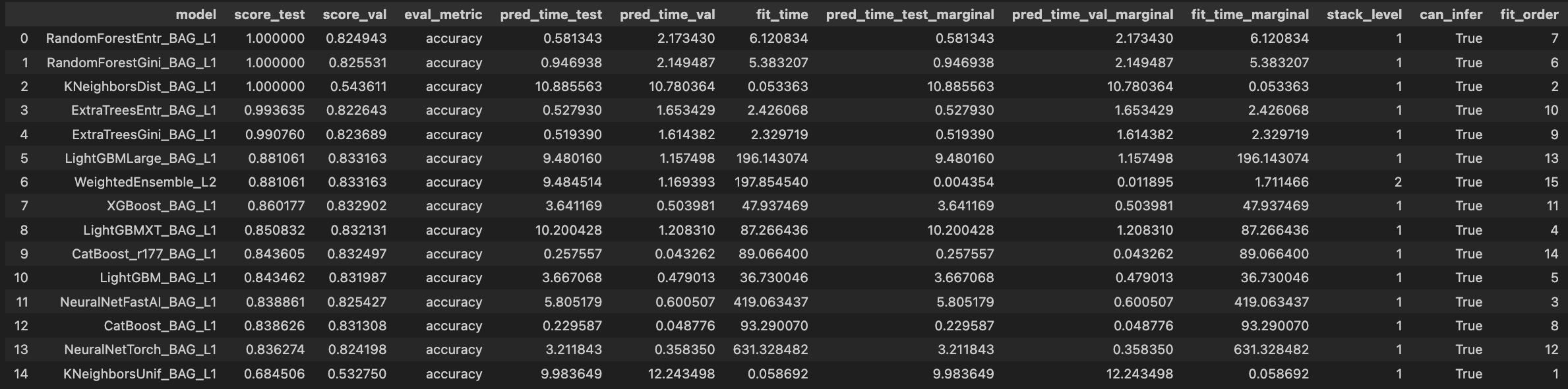 Let's break down the key columns and what they mean:
- model : This column lists the names of the models. For example,
RandomForestEntr_BAG_L1 refers to a Random Forest model using entropy as the criterion, bagged at level 1.
- score_test : This shows the model's accuracy on the dataset. A score of
1.00 indicates perfect accuracy for some models. Contrary to its name, score_test is the training dataset used during training.
- score_val : This shows the model's accuracy on the validation dataset. Keep an eye out for this one, as it shows how well the models perform on unseen data.
- eval_metric : The evaluation metric used, which in this case is accuracy.
- pred_time_test : The time taken to make predictions on the test data.
- pred_time_val : The time taken to make predictions on the validation data.
- fit_time : The time taken to train the model.
- pred_time_test_marginal : The additional prediction time added by the model in the ensemble on the test dataset.
- pred_time_val_marginal : The additional prediction time added by the model in the ensemble on the validation dataset.
- fit_time_marginal : The additional training time added by the model in the ensemble.
- stack_level : Indicates the stacking level of the model. Level 1 models are the base models, while level 2 models are meta-models that use the predictions of level 1 models as features.
- can_infer : Indicates whether the model can be used for inference.
- fit_order : The order in which the models were trained.
Looking at the provided leaderboard, we can see some models like RandomForestEntr_BAG_L1 and RandomForestGini_BAG_L1 have perfect train accuracy (1.000000) but slightly lower validation accuracy, suggesting potential overfitting. WeightedEnsemble_L2, which combines the predictions of level 1 models, generally shows good performance by balancing the strengths of its base models.
Models such as LightGBMLarge_BAG_L1 and XGBoost_BAG_L1 have competitive validation scores and reasonable training and prediction times, making them strong candidates for deployment.
The fit_time and pred_time columns offer insights into the computational efficiency of each model, which is crucial for practical applications.
In addition to the leaderboard, AutoGluon offers several advanced features that allow you to customize the training process, handle imbalanced datasets, and perform hyperparameter tuning.
You can customize various aspects of the training process by adjusting the parameters of the fit method. For example, you can change the number of training iterations, specify different algorithms to use, or set custom hyperparameters for each algorithm.
python
from autogluon.tabular import TabularPredictor, TabularDataset

# Load the dataset
train_df = TabularDataset('train.csv')

# Define custom hyperparameters
hyperparameters = {
    'GBM': {'num_boost_round': 200},
    'NN': {'epochs': 10},
    'RF': {'n_estimators': 100},
}

# Train the model with custom settings
predictor = TabularPredictor(
    label='Target',
    eval_metric='accuracy',
    verbosity=2
).fit(
    train_data=train_df,
    hyperparameters=hyperparameters
)
Imbalanced datasets can be challenging, but AutoGluon provides tools to handle them effectively. You can use techniques such as oversampling the minority class, undersampling the majority class, or applying cost-sensitive learning algorithms. AutoGluon can automatically detect and handle imbalances in your dataset.
python
from autogluon.tabular import TabularPredictor, TabularDataset

# Load the dataset
train_df = TabularDataset('train.csv')

# Handle imbalanced datasets by specifying custom parameters
# AutoGluon can handle this internally but specifying here for clarity
hyperparameters = {
    'RF': {'n_estimators': 100, 'class_weight': 'balanced'},
    'GBM': {'num_boost_round': 200, 'scale_pos_weight': 2},
}

# Train the model with settings for handling imbalance
predictor = TabularPredictor(
    label='Target',
    eval_metric='accuracy',
    verbosity=2
).fit(
    train_data=train_df,
    hyperparameters=hyperparameters
)
Hyperparameter tuning is crucial for optimizing model performance. AutoGluon automates this process using advanced techniques like Bayesian optimization. You can enable hyperparameter tuning by setting hyperparameter_tune=True in the fit method.
python
from autogluon.tabular import TabularPredictor, TabularDataset

# Load the dataset
train_df = TabularDataset('train.csv')

# Train the model with hyperparameter tuning
predictor = TabularPredictor(
    label='Target',
    eval_metric='accuracy',
    verbosity=2
).fit(
    train_data=train_df,
    presets=['best_quality'],
    hyperparameter_tune=True
)
Let's explore how you could potentially outperform an AutoML model. Let's assume your main goal is to improve the loss metric, rather than focusing on latency, computational costs, or other metrics.
If you have a large dataset that's well-suited for deep learning, you might find it easier to experiment with deep learning architectures. AutoML frameworks often struggle in this area because deep learning requires a thorough understanding of the dataset, and blindly applying models can be very time and resource-consuming. Here are some resources to get you started with Deep Learning:
The Math Behind Neural Networks
The Math Behind Fine-Tuning Deep Neural Networks
The Math Behind LSTM
However, the real challenge lies in beating AutoML with traditional machine learning tasks. AutoML systems typically use ensembling, which means you'll likely end up doing the same thing. A good starting strategy could be to first fit an AutoML model. For instance, using AutoGluon, you can identify which models performed best. You can then take these models and recreate the ensemble architecture that AutoGluon used. By optimizing these models further with a technique like Optuna, you might be able to achieve better performance. Here's a comprehensive guide to master Optuna:
Machine Learning Optimization with Optuna
Additionally, applying domain knowledge to feature engineering can give you an edge. Understanding the specifics of your data can help you create more meaningful features, which can significantly boost your model's performance. If applicable, augment your dataset to provide more varied training examples, which can help improve the robustness of your models.
By combining these strategies with the insights gained from an initial AutoML model, you can outperform the automated approach and achieve superior results.
Conclusion
AutoGluon revolutionizes the ML process by automating everything from data preprocessing to model deployment. Its cutting-edge architecture, powerful ensemble learning techniques, and sophisticated hyperparameter optimization make it an indispensable tool for newcomers and seasoned data scientists. With AutoGluon, you can transform complex, time-consuming tasks into streamlined workflows, enabling you to build top-tier models with unprecedented speed and efficiency.
However, to truly excel in machine learning, it's essential not to rely solely on AutoGluon. Use it as a foundation to jumpstart your projects and gain insights into effective model strategies. From there, dive deeper into understanding your data and applying domain knowledge for feature engineering. Experiment with custom models and fine-tune them beyond AutoGluon's initial offerings.
Bibliography
- Erickson, N., Mueller, J., Charpentier, P., Kornblith, S., Weissenborn, D., Norris, E., ... & Smola, A. (2020). AutoGluon-Tabular: Robust and Accurate AutoML for Structured Data. arXiv preprint arXiv:2003.06505.
- Snoek, J., Larochelle, H., & Adams, R. P. (2012). Practical Bayesian optimization of machine learning algorithms. Advances in neural information processing systems, 25.
- Pedregosa, F., Varoquaux, G., Gramfort, A., Michel, V., Thirion, B., Grisel, O., ... & Duchesnay, É. (2011). Scikit-learn: Machine learning in Python. Journal of machine learning research, 12(Oct), 2825–2830.
- AutoGluon Team. "AutoGluon: AutoML for Text, Image, and Tabular Data." 2020.
- Feurer, Matthias, et al. "Efficient and Robust Automated Machine Learning." 2015.
- He, Xin, et al. "AutoML: A Survey of the State-of-the-Art." 2020.
- Hutter, Frank, et al. "Automated Machine Learning: Methods, Systems, Challenges." 2019.
- H2O.ai. "H2O AutoML: Scalable Automatic Machine Learning." 2020.
Register Now to Continue Reading
Unlock Towards Data Science with a Free Account
All articles on Towards Data Science are available to registered users. Create a free account today to access this article and thousands more.
Register for freeSign in to your account
 Written By
See all from Cristian Leo
Deep DivesDeep LearningMachine LearningProgrammingPython
Share This Article
Towards Data Science is a community publication. Submit your insights to reach our global audience and earn through the TDS Author Payment Program.
Write for TDS
Related Articles
Machine Learning
In this blog, we explore the problem of fake news detection related to COVID-19 and describe our approach to tackle it using NLP.
Prathyush Potluri
December 4, 202010 min read
Machine Learning
Understanding P-values and ML use cases
Sadrach Pierre, Ph.D.
January 6, 20237 min read
Data Science
How to detect it and which model to choose.
Arnaud Capitaine
September 5, 202511 min read
Artificial Intelligence
Detailing and Building a Logistic Regression model from scratch
Kurtis Pykes
July 15, 202011 min read
Always wanted to create a dashboard, but concerned about where you have to host it and learning CSS and HTML seems daunting? Then this...
Adrienne Kline
June 6, 20224 min read
Artificial Intelligence
In my previous blog talking about TextGenie, I mentioned the issues I faced while collecting text data from scratch and using paraphrases...
Het Pandya
June 29, 20213 min read
Artificial Intelligence
What are the rewards?
Soner Yıldırım
August 24, 20214 min read
Artificial Intelligence
The way I use to extract data from PDF scanned images
Low Wei Hong
September 29, 20194 min read
Machine Learning
We introduce an approach called ImPULSE Classifier with improved performance on balanced and imbalanced PU data compared to other...
Volodymyr Holomb
April 6, 20235 min read
Your home for data science and AI. The world's leading publication for data science, data analytics, data engineering, machine learning, and artificial intelligence professionals.
Subscribe to Our NewsletterWrite For TDS•About•Advertise•Privacy Policy•Terms of Use
© Insight Media Group, LLC 2026•The New Stack•roadmap.sh•Creator Network
Recommended Articles
Close