保留正文与补采附件。源页面当前未重新核验;具体限制见交付清单。
 We value your privacy
We use cookies to enhance your browsing experience, serve personalised ads or content, and analyse our traffic. By clicking "Accept All", you consent to our use of cookies.
Customise Reject All Accept All
Customise Consent Preferences
We value your privacy
We use cookies to enhance your browsing experience, serve personalised ads or content, and analyse our traffic. By clicking "Accept All", you consent to our use of cookies.
Customise Reject All Accept All
Customise Consent Preferences  We use cookies to help you navigate efficiently and perform certain functions. You will find detailed information about all cookies under each consent category below.
The cookies that are categorised as "Necessary" are stored on your browser as they are essential for enabling the basic functionalities of the site. ... Show more
NecessaryAlways Active
Necessary cookies are required to enable the basic features of this site, such as providing secure log-in or adjusting your consent preferences. These cookies do not store any personally identifiable data.
We use cookies to help you navigate efficiently and perform certain functions. You will find detailed information about all cookies under each consent category below.
The cookies that are categorised as "Necessary" are stored on your browser as they are essential for enabling the basic functionalities of the site. ... Show more
NecessaryAlways Active
Necessary cookies are required to enable the basic features of this site, such as providing secure log-in or adjusting your consent preferences. These cookies do not store any personally identifiable data.
-
Cookie
BCTempID
-
Duration
10 minutes
-
Description
No description available.
-
Cookie
__cf_bm
-
Duration
1 hour
-
Description
This cookie, set by Cloudflare, is used to support Cloudflare Bot Management.
-
Cookie
AWSALBCORS
-
Duration
7 days
-
Description
Amazon Web Services set this cookie for load balancing.
-
Cookie
_cfuvid
-
Duration
session
-
Description
Cloudflare sets this cookie to track users across sessions to optimize user experience by maintaining session consistency and providing personalized services
-
Cookie
li_gc
-
Duration
6 months
-
Description
Linkedin set this cookie for storing visitor's consent regarding using cookies for non-essential purposes.
-
Cookie
__hssrc
-
Duration
session
-
Description
This cookie is set by Hubspot whenever it changes the session cookie. The __hssrc cookie set to 1 indicates that the user has restarted the browser, and if the cookie does not exist, it is assumed to be a new session.
-
Cookie
__hssc
-
Duration
1 hour
-
Description
HubSpot sets this cookie to keep track of sessions and to determine if HubSpot should increment the session number and timestamps in the __hstc cookie.
-
Cookie
wpEmojiSettingsSupports
-
Duration
session
-
Description
WordPress sets this cookie when a user interacts with emojis on a WordPress site. It helps determine if the user's browser can display emojis properly.
-
Cookie
BCSessionID
-
Duration
1 year 1 month 4 days
-
Description
Blueconic sets this cookie as a unique identifier for the BlueConic profile.
-
Cookie
_octo
-
Duration
1 year
-
Description
No description available.
-
Cookie
logged_in
-
Duration
1 year
-
Description
No description available.
-
Cookie
__Secure-YEC
-
Duration
past
-
Description
YouTube sets this cookie to stores the user's video player preferences using embedded YouTube video
-
Cookie
__eoi
-
Duration
6 months
-
Description
Description is currently not available.
-
Cookie
AWSALBTGCORS
-
Duration
7 days
-
Description
No description available.
-
Cookie
login-status-p
-
Duration
past
-
Description
Description is currently not available.
-
Cookie
AWSALBTG
-
Duration
7 days
-
Description
No description available.
-
Cookie
csrf_token
-
Duration
session
-
Description
No description available.
-
Cookie
token_v2
-
Duration
1 day
-
Description
Description is currently not available.
-
Cookie
D
-
Duration
1 year
-
Description
Description is currently not available.
-
Cookie
PHPSESSID
-
Duration
session
-
Description
This cookie is native to PHP applications. The cookie stores and identifies a user's unique session ID to manage user sessions on the website. The cookie is a session cookie and will be deleted when all the browser windows are closed.
-
Cookie
VISITOR_PRIVACY_METADATA
-
Duration
6 months
-
Description
YouTube sets this cookie to store the user's cookie consent state for the current domain.
-
Cookie
cookietest
-
Duration
session
-
Description
The cookietest cookie is typically used to determine whether the user's browser accepts cookies, essential for website functionality and user experience.
-
Cookie
__Host-airtable-session
-
Duration
1 year
-
Description
This cookie is used to enable us to integrate the services of Airtable.
-
Cookie
__Host-airtable-session.sig
-
Duration
1 year
-
Description
This cookie is used to enable us to integrate the services of Airtable.
-
Cookie
m
-
Duration
1 year 1 month 4 days
-
Description
Stripe sets this cookie for fraud prevention purposes. It identifies the device used to access the website, allowing the website to be formatted accordingly.
-
Cookie
BIGipServer*
-
Duration
session
-
Description
Marketo sets this cookie to collect information about the user's online activity and build a profile about their interests to provide advertisements relevant to the user.
-
Cookie
__cfruid
-
Duration
session
-
Description
Cloudflare sets this cookie to identify trusted web traffic.
-
Cookie
_GRECAPTCHA
-
Duration
6 months
-
Description
Google Recaptcha service sets this cookie to identify bots to protect the website against malicious spam attacks.
-
Cookie
__Secure-YNID
-
Duration
6 months
-
Description
Google cookie used to protect user security and prevent fraud, especially during the login process.
-
Cookie
cookieyes-consent
-
Duration
1 year
-
Description
CookieYes sets this cookie to remember users' consent preferences so that their preferences are respected on subsequent visits to this site. It does not collect or store any personal information about the site visitors.
Functional
Functional cookies help perform certain functionalities like sharing the content of the website on social media platforms, collecting feedback, and other third-party features.
-
Cookie
lidc
-
Duration
1 day
-
Description
LinkedIn sets the lidc cookie to facilitate data center selection.
-
Cookie
brw
-
Duration
1 year
-
Description
No description available.
-
Cookie
brwConsent
-
Duration
5 minutes
-
Description
Description is currently not available.
-
Cookie
WMF-Uniq
-
Duration
1 year
-
Description
Description is currently not available.
-
Cookie
loom_anon_comment
-
Duration
1 year
-
Description
No description available.
-
Cookie
loom_referral_video
-
Duration
session
-
Description
Description is currently not available.
-
Cookie
VISITOR_INFO1_LIVE
-
Duration
6 months
-
Description
A cookie set by YouTube to measure bandwidth that determines whether the user gets the new or old player interface.
-
Cookie
yt-remote-connected-devices
-
Duration
Never Expires
-
Description
YouTube sets this cookie to store the user's video preferences using embedded YouTube videos.
-
Cookie
ytidb::LAST_RESULT_ENTRY_KEY
-
Duration
Never Expires
-
Description
The cookie ytidb::LAST_RESULT_ENTRY_KEY is used by YouTube to store the last search result entry that was clicked by the user. This information is used to improve the user experience by providing more relevant search results in the future.
-
Cookie
yt-remote-device-id
-
Duration
Never Expires
-
Description
YouTube sets this cookie to store the user's video preferences using embedded YouTube videos.
-
Cookie
yt-remote-session-name
-
Duration
session
-
Description
The yt-remote-session-name cookie is used by YouTube to store the user's video player preferences using embedded YouTube video.
-
Cookie
yt-remote-fast-check-period
-
Duration
session
-
Description
The yt-remote-fast-check-period cookie is used by YouTube to store the user's video player preferences for embedded YouTube videos.
-
Cookie
yt-remote-session-app
-
Duration
session
-
Description
The yt-remote-session-app cookie is used by YouTube to store user preferences and information about the interface of the embedded YouTube video player.
-
Cookie
yt-remote-cast-available
-
Duration
session
-
Description
The yt-remote-cast-available cookie is used to store the user's preferences regarding whether casting is available on their YouTube video player.
-
Cookie
yt-remote-cast-installed
-
Duration
session
-
Description
The yt-remote-cast-installed cookie is used to store the user's video player preferences using embedded YouTube video.
-
Cookie
cp_session
-
Duration
3 months
-
Description
Codepen sets this cookie for Help systems found in the website.
-
Cookie
loid
-
Duration
1 year 1 month 4 days
-
Description
This cookie is set by the Reddit. The cookie enables the sharing of content from the website onto the social media platform.
Analytics
Analytical cookies are used to understand how visitors interact with the website. These cookies help provide information on metrics such as the number of visitors, bounce rate, traffic source, etc.
-
Cookie
__hstc
-
Duration
6 months
-
Description
Hubspot set this main cookie for tracking visitors. It contains the domain, initial timestamp (first visit), last timestamp (last visit), current timestamp (this visit), and session number (increments for each subsequent session).
-
Cookie
hubspotutk
-
Duration
6 months
-
Description
HubSpot sets this cookie to keep track of the visitors to the website. This cookie is passed to HubSpot on form submission and used when deduplicating contacts.
-
Cookie
_ga
-
Duration
1 year 1 month 4 days
-
Description
Google Analytics sets this cookie to calculate visitor, session and campaign data and track site usage for the site's analytics report. The cookie stores information anonymously and assigns a randomly generated number to recognise unique visitors.
-
Cookie
ga*
-
Duration
1 year 1 month 4 days
-
Description
Google Analytics sets this cookie to store and count page views.
-
Cookie
__Host-psifi.analyticsTrace
-
Duration
6 hours
-
Description
Description is currently not available.
-
Cookie
__Host-psifi.analyticsTraceV2
-
Duration
6 hours
-
Description
Description is currently not available.
-
Cookie
_gh_sess
-
Duration
session
-
Description
GitHub sets this cookie for temporary application and framework state between pages like what step the user is on in a multiple step form.
-
Cookie
YSC
-
Duration
session
-
Description
YSC cookie is set by Youtube and is used to track the views of embedded videos on Youtube pages.
-
Cookie
ajs_anonymous_id
-
Duration
1 year
-
Description
This cookie is set by Segment to count the number of people who visit a certain site by tracking if they have visited before.
-
Cookie
vuid
-
Duration
1 year 1 month 4 days
-
Description
Vimeo installs this cookie to collect tracking information by setting a unique ID to embed videos on the website.
Performance
Performance cookies are used to understand and analyse the key performance indexes of the website which helps in delivering a better user experience for the visitors.
-
Cookie
AWSALB
-
Duration
7 days
-
Description
AWSALB is an application load balancer cookie set by Amazon Web Services to map the session to the target.
-
Cookie
acq
-
Duration
past
-
Description
Description is currently not available.
-
Cookie
acq.sig
-
Duration
past
-
Description
Description is currently not available.
-
Cookie
ptc
-
Duration
2 years
-
Description
No description available.
Advertisement
Advertisement cookies are used to provide visitors with customised advertisements based on the pages you visited previously and to analyse the effectiveness of the ad campaigns.
-
Cookie
muc_ads
-
Duration
1 year 1 month 4 days
-
Description
Twitter sets this cookie to collect user behaviour and interaction data to optimize the website.
-
Cookie
guest_id_marketing
-
Duration
1 year 1 month 4 days
-
Description
Twitter sets this cookie to identify and track the website visitor.
-
Cookie
guest_id_ads
-
Duration
1 year 1 month 4 days
-
Description
Twitter sets this cookie to identify and track the website visitor.
-
Cookie
personalization_id
-
Duration
1 year 1 month 4 days
-
Description
Twitter sets this cookie to integrate and share features for social media and also store information about how the user uses the website, for tracking and targeting.
-
Cookie
guest_id
-
Duration
1 year 1 month 4 days
-
Description
Twitter sets this cookie to identify and track the website visitor. It registers if a user is signed in to the Twitter platform and collects information about ad preferences.
-
Cookie
bcookie
-
Duration
1 year
-
Description
LinkedIn sets this cookie from LinkedIn share buttons and ad tags to recognize browser IDs.
-
Cookie
__Secure-ROLLOUT_TOKEN
-
Duration
6 months
-
Description
YouTube sets this cookie to manage feature rollout and experimentation. It helps Google control which new features or interface changes are shown to users as part of testing and staged rollouts, ensuring consistent experience for a given user during an experiment.
-
Cookie
yt.innertube::nextId
-
Duration
Never Expires
-
Description
YouTube sets this cookie to register a unique ID to store data on what videos from YouTube the user has seen.
-
Cookie
yt.innertube::requests
-
Duration
Never Expires
-
Description
YouTube sets this cookie to register a unique ID to store data on what videos from YouTube the user has seen.
-
Cookie
session_tracker
-
Duration
session
-
Description
This cookie is set by the Reddit. This cookie is used to identify trusted web traffic. It also helps in adverstising on the website.
-
Cookie
edgebucket
-
Duration
session
-
Description
Reddit sets this cookie to save the information about a log-on Reddit user, for the purpose of advertisement recommendations and updating the content.
-
Cookie
did
-
Duration
1 year
-
Description
Arbor sets this cookie to show targeted ads to site visitors.This cookie expires after 2 months or 1 year.
Uncategorised
Other uncategorised cookies are those that are being analysed and have not been classified into a category as yet.
No cookies to display.
Reject All Save My Preferences Accept All
Toggle SearchToggle Mobile Navigation
Publish AI, ML & data-science insights to a global community of data professionals.
Sign inSubmit an Article
LatestEditor's PicksNewsletterShipAI
Write For TDS
LinkedInXToggle Search
Data Engineering
Optimizing Data Transfer in Batched AI/ML Inference Workloads
A deep dive on data transfer bottlenecks, their identification, and their resolution with the help of NVIDIA Nsight™ Systems - part 2
Chaim Rand
January 12, 202612 min read
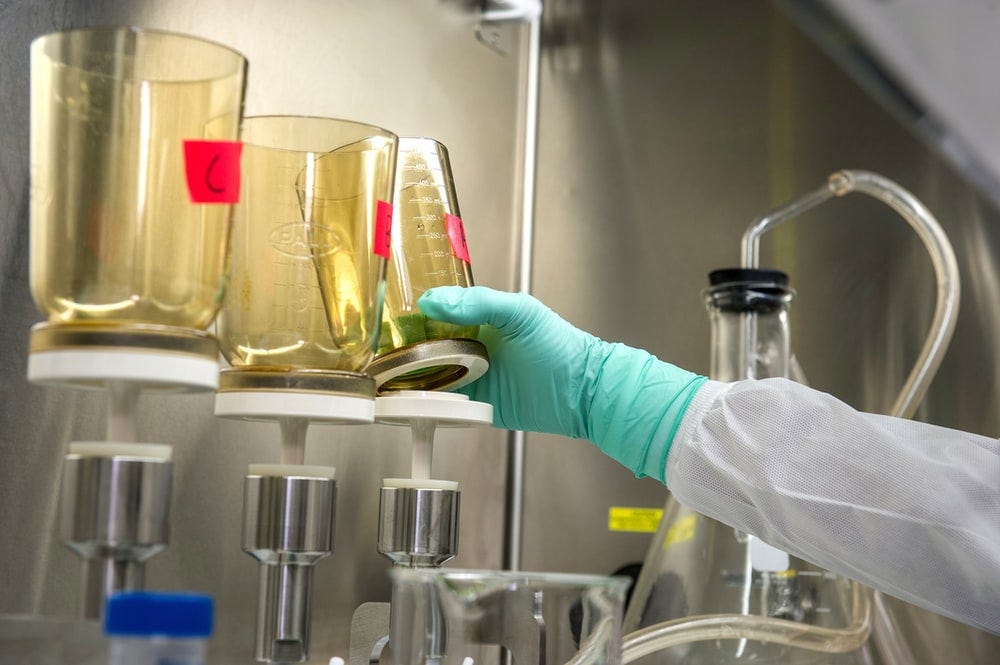
 Photo by Joel & Jasmin Førestbird on Unsplash
This is a sequel post to Optimizing Data Transfer in AI/ML Workloads where we demonstrated the use of NVIDIA Nsight™ Systems (nsys) in studying and solving the common data-loading bottleneck — occurrences where the GPU idles while it waits for input data from the CPU. In this post we focus our attention on data travelling in the opposite direction, from the GPU device to the CPU host. More specifically, we address AI/ML inference workloads where the size of the output being returned by the model is relatively high. Common examples include: 1) running a scene segmentation (per-pixel labeling) model on batches of high-resolution images and 2) capturing high dimensional feature embeddings of input sequences using an encoder model (e.g., to create a vector database). Both examples involve executing a model on an input batch and then copying the output tensor from the GPU to the CPU for additional processing, storage, and/or over-the-network communication.
GPU-to-CPU memory copies of the model output typically receive much less attention in optimization tutorials than the CPU-to-GPU copies that feed the model (e.g., see here). But their potential impact on model efficiency and execution costs can be just as detrimental. Moreover, while optimizations to CPU-to-GPU data-loading are well documented and easy to implement, optimizing data copy in the opposite direction requires a bit more manual labor.
In this post we will apply the same strategy we used in our previous post: We will define a toy model and use nsys profiler to identify and solve performance bottlenecks. We will run our experiments on an Amazon EC2 g6e.2xlarge instance (with an NVIDIA L40S GPU) running an AWS Deep Learning (Ubuntu 24.04) AMI with PyTorch (2.8), nsys-cli profiler (version 2025.6.1), and the NVIDIA Tools Extension (NVTX) library.
Learn this step by step with the interactive Data Engineer roadmap.
Photo by Joel & Jasmin Førestbird on Unsplash
This is a sequel post to Optimizing Data Transfer in AI/ML Workloads where we demonstrated the use of NVIDIA Nsight™ Systems (nsys) in studying and solving the common data-loading bottleneck — occurrences where the GPU idles while it waits for input data from the CPU. In this post we focus our attention on data travelling in the opposite direction, from the GPU device to the CPU host. More specifically, we address AI/ML inference workloads where the size of the output being returned by the model is relatively high. Common examples include: 1) running a scene segmentation (per-pixel labeling) model on batches of high-resolution images and 2) capturing high dimensional feature embeddings of input sequences using an encoder model (e.g., to create a vector database). Both examples involve executing a model on an input batch and then copying the output tensor from the GPU to the CPU for additional processing, storage, and/or over-the-network communication.
GPU-to-CPU memory copies of the model output typically receive much less attention in optimization tutorials than the CPU-to-GPU copies that feed the model (e.g., see here). But their potential impact on model efficiency and execution costs can be just as detrimental. Moreover, while optimizations to CPU-to-GPU data-loading are well documented and easy to implement, optimizing data copy in the opposite direction requires a bit more manual labor.
In this post we will apply the same strategy we used in our previous post: We will define a toy model and use nsys profiler to identify and solve performance bottlenecks. We will run our experiments on an Amazon EC2 g6e.2xlarge instance (with an NVIDIA L40S GPU) running an AWS Deep Learning (Ubuntu 24.04) AMI with PyTorch (2.8), nsys-cli profiler (version 2025.6.1), and the NVIDIA Tools Extension (NVTX) library.
Learn this step by step with the interactive Data Engineer roadmap.
Disclaimers
The code we will share is intended for demonstrative purposes; please do not rely on its correctness or optimality. Please do not interpret our use of any library, tool, or platform, as an endorsement of its use. The impact of the optimizations we will cover can vary greatly based on the details of the model and the runtime environment. Please be sure to assess their effect on your own use case before integrating their use.
Many thanks to Yitzhak Levi and Gilad Wasserman for their contributions to this post.
A Toy PyTorch Model
We introduce a batched inference script that performs image segmentation on a synthetic dataset using a DeepLabV3 model with a ResNet-50 backbone. The model outputs are copied to the CPU for post processing and storage. We wrap the different portions of the inference step with color-coded nvtx annotations:
python
import time, torch, nvtx
from torch.utils.data import Dataset, DataLoader
from torch.cuda import profiler
from torchvision.models.segmentation import deeplabv3_resnet50

DEVICE = "cuda"
WARMUP_STEPS = 10
PROFILE_STEPS = 3
COOLDOWN_STEPS = 1
TOTAL_STEPS = WARMUP_STEPS + PROFILE_STEPS + COOLDOWN_STEPS
BATCH_SIZE = 64
TOTAL_SAMPLES = TOTAL_STEPS * BATCH_SIZE
IMG_SIZE = 512
N_CLASSES = 21
NUM_WORKERS = 8
ASYNC_DATALOAD = True


# A synthetic Dataset with random images
class FakeDataset(Dataset):

    def __len__(self):
        return TOTAL_SAMPLES

    def __getitem__(self, index):
        img = torch.randn((3, IMG_SIZE, IMG_SIZE))
        return img

# utility class for prefetching data to GPU
class DataPrefetcher:
    def __init__(self, loader):
        self.loader = iter(loader)
        self.stream = torch.cuda.Stream()
        self.next_batch = None
        self.preload()

    def preload(self):
        try:
            data = next(self.loader)
            with torch.cuda.stream(self.stream):
                next_data = data.to(DEVICE, non_blocking=ASYNC_DATALOAD)
            self.next_batch = next_data
        except:
            self.next_batch = None

    def __iter__(self):
        return self

    def __next__(self):
        torch.cuda.current_stream().wait_stream(self.stream)
        data = self.next_batch
        self.preload()
        return data

model = deeplabv3_resnet50(weights_backbone=None).to(DEVICE).eval()

data_loader = DataLoader(
    FakeDataset(),
    batch_size=BATCH_SIZE,
    num_workers=NUM_WORKERS,
    pin_memory=ASYNC_DATALOAD
)

data_iter = DataPrefetcher(data_loader)

def synchronize_all():
    torch.cuda.synchronize()

def to_cpu(output):
    return output.cpu()

def process_output(batch_id, logits):
    # do some post processing on output
    with open('/dev/null', 'wb') as f:
        f.write(logits.numpy().tobytes())

with torch.inference_mode():
    for i in range(TOTAL_STEPS):
        if i == WARMUP_STEPS:
            synchronize_all()
            start_time = time.perf_counter()
            profiler.start()
        elif i == WARMUP_STEPS + PROFILE_STEPS:
            synchronize_all()
            profiler.stop()
            end_time = time.perf_counter()

        with nvtx.annotate(f"Batch {i}", color="blue"):
            with nvtx.annotate("get batch", color="red"):
                batch = next(data_iter)
            with nvtx.annotate("compute", color="green"):
                output = model(batch)
            with nvtx.annotate("copy to CPU", color="yellow"):
                output_cpu = to_cpu(output['out'])
            with nvtx.annotate("process output", color="cyan"):
                process_output(i, output_cpu)

total_time = end_time - start_time
throughput = PROFILE_STEPS / total_time
print(f"Throughput: {throughput:.2f} steps/sec")
Note the inclusion of all of the CPU-to-GPU data-loading optimizations discussed in our previous post.
We run the following command to capture an nsys profile trace:
bash
nsys profile \
  --capture-range=cudaProfilerApi \
  --trace=cuda,nvtx,osrt \
  --output=baseline \
  python batch_infer.py
This results in a baseline.nsys-rep trace file that we copy over to our development machine for analysis.
To measure the inference throughput, we increase the number of steps to 100. The average throughput of our baseline experiment is 0.45 steps-per-second. In the following sections we will use the nsys profile traces to incrementally improve this result.
Baseline Performance Analysis
The image below shows the nsys profile trace of our baseline experiment:
 Baseline Nsight Systems Profiler Trace (by Author)
In the GPU section we see the following recurring pattern:
Baseline Nsight Systems Profiler Trace (by Author)
In the GPU section we see the following recurring pattern:
- A block of kernel compute (in light blue) that runs for ~520 milliseconds.
- A small block of host-to-device memory copy (in green) that runs in parallel to the kernel compute. This concurrency was achieved using the optimizations discussed in our previous post.
- A block of device-to-host memory copy (in red) that runs for ~750 milliseconds.
- A long period (~940 milliseconds) of GPU idle time (white space) between every two steps.
Looking at the NVTX bar of the CPU section, we can see that the whitespace aligns perfectly with the “process output” block (in cyan). In our initial implementation, both the model execution and the output storage function run in the same single process in a sequential manner. This leads to significant idle time on the GPU as the CPU waits for the storage function to return before feeding the GPU the next batch.
Optimization 1: Multi-Worker Output Processing
The first step we take is to run the output storage function in parallel worker processes. We took a similar step in our previous post when we moved the input batch preparation sequence to dedicated workers. However, whereas there we were able to automate multi-process data loading by simply setting the num_workers argument of the DataLoader class to a non-zero value, applying multi-worker output-processing requires a manual implementation. Here we choose a simple solution for demonstrative purposes. This should be customized per your needs and design preferences.
PyTorch Multiprocessing
We implement a producer-consumer strategy using PyTorch’s built-in multiprocessing package, torch.multiprocessing. We define a queue for storing output batches and multiple consumer workers that process the batches on the queue. We modify our inference loop to put the output buffers in the output queue. We also update the synchronize_all() utility to drain the queue and append a cleanup sequence at the end of the script.
The following block of code contains our initial implementation. As we will see in the next sections, this will require some tuning in order to reach maximum performance.
python
import torch.multiprocessing as mp

POSTPROC_WORKERS = 8 # tune for optimal throughput

output_queue = mp.JoinableQueue(maxsize=POSTPROC_WORKERS)

def output_worker(in_q):
    while True:
        item = in_q.get()
        if item is None: break  # signal to shut down
        batch_id, batch_preds = item
        process_output(batch_id, batch_preds)
        in_q.task_done()

processes = []
for _ in range(POSTPROC_WORKERS):
    p = mp.Process(target=output_worker, args=(output_queue,))
    p.start()
    processes.append(p)

def synchronize_all():
    torch.cuda.synchronize()
    output_queue.join() # drain queue


with torch.inference_mode():
    for i in range(TOTAL_STEPS):
        if i == WARMUP_STEPS:
            synchronize_all()
            start_time = time.perf_counter()
            profiler.start()
        elif i == WARMUP_STEPS + PROFILE_STEPS:
            synchronize_all()
            profiler.stop()
            end_time = time.perf_counter()

        with nvtx.annotate(f"Batch {i}", color="blue"):
            with nvtx.annotate("get batch", color="red"):
                batch = next(data_iter)
            with nvtx.annotate("compute", color="green"):
                output = model(batch)
            with nvtx.annotate("copy to CPU", color="yellow"):
                output_cpu = to_cpu(output['out'])
            with nvtx.annotate("queue output", color="cyan"):
                output_queue.put((i, output_cpu))


total_time = end_time - start_time
throughput = PROFILE_STEPS / total_time
print(f"Throughput: {throughput:.2f} steps/sec")
# cleanup
for _ in range(POSTPROC_WORKERS):
    output_queue.put(None)
The multi-worker output processing optimization results in a throughput of 0.71 steps-per-second — a 58% increase over our baseline results.
Rerunning the nsys command results in the following profile trace:
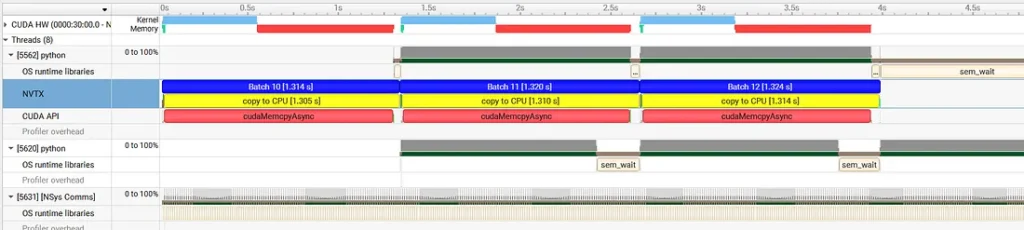 Multi-Worker Nsight Systems Profiler Timeline (by Author)
We can see that the size of the block of whitespace has dropped considerably (from ~940 milliseconds to ~50). Were we to zoom in on the remaining whitespace, we would find it aligned to an “munmap” operation. In our previous post, the same finding informed our asynchronous data copy optimization. But this time we take an intermediate memory-optimization step in the form of a pre-allocated pool of buffers.
Multi-Worker Nsight Systems Profiler Timeline (by Author)
We can see that the size of the block of whitespace has dropped considerably (from ~940 milliseconds to ~50). Were we to zoom in on the remaining whitespace, we would find it aligned to an “munmap” operation. In our previous post, the same finding informed our asynchronous data copy optimization. But this time we take an intermediate memory-optimization step in the form of a pre-allocated pool of buffers.
Optimization 2: Buffer Pool Pre-allocation
In order to reduce the overhead of allocating and managing a new CPU tensor on every iteration, we initialize a pool of tensors pre-allocated in shared memory and define a second queue to manage their use.
Our updated code appears below:
python
shape = (BATCH_SIZE, N_CLASSES, IMG_SIZE, IMG_SIZE)
buffer_pool = [torch.empty(shape).share_memory_()
               for _ in range(POSTPROC_WORKERS)]

buf_queue = mp.Queue()
for i in range(POSTPROC_WORKERS):
    buf_queue.put(i)

def output_worker(buffer_pool, in_q, buf_q):
    while True:
        item = in_q.get()
        if item is None: break  # signal to shut down
        batch_id, buf_id = item
        process_output(batch_id, buffer_pool[buf_id])
        buf_q.put(buf_id)
        in_q.task_done()

processes = []
for _ in range(POSTPROC_WORKERS):
    p = mp.Process(target=output_worker,
                   args=(buffer_pool,output_queue,buf_queue))
    p.start()
    processes.append(p)

def to_cpu(output):
    buf_id = buf_queue.get()
    output_cpu = buffer_pool[buf_id]
    output_cpu.copy_(output)
    return output_cpu, buf_id

with torch.inference_mode():
    for i in range(TOTAL_STEPS):
        if i == WARMUP_STEPS:
            synchronize_all()
            start_time = time.perf_counter()
            profiler.start()
        elif i == WARMUP_STEPS + PROFILE_STEPS:
            synchronize_all()
            profiler.stop()
            end_time = time.perf_counter()

        with nvtx.annotate(f"Batch {i}", color="blue"):
            with nvtx.annotate("get batch", color="red"):
                batch = next(data_iter)
            with nvtx.annotate("compute", color="green"):
                output = model(batch)
            with nvtx.annotate("copy to CPU", color="yellow"):
                output_cpu, buf_id = to_cpu(output['out'])
            with nvtx.annotate("queue output", color="cyan"):
                output_queue.put((i, buf_id))
Following these changes, the inference throughput jumps to 1.51 — a more than 2 X speed-up over our previous result.
The new profile trace appears below:
 Buffer Pool Nsight Systems Profiler Timeline (by Author)
Not only has the whitespace all but disappeared, but the CUDA DtoH memory operation (in red) has dropped from ~750 milliseconds to ~110. Presumably, the large GPU-to-CPU data copy involved quite a bit of memory-management overhead that we have removed by implementing a dedicated buffer pool.
Despite the considerable improvement, if we zoom in we will find that there remains around ~0.5 milliseconds of whitespace that is caused by the synchronicity of the GPU-to-CPU copy command — so long as the copy has not completed the CPU does not trigger the kernel computation of the next batch.
Buffer Pool Nsight Systems Profiler Timeline (by Author)
Not only has the whitespace all but disappeared, but the CUDA DtoH memory operation (in red) has dropped from ~750 milliseconds to ~110. Presumably, the large GPU-to-CPU data copy involved quite a bit of memory-management overhead that we have removed by implementing a dedicated buffer pool.
Despite the considerable improvement, if we zoom in we will find that there remains around ~0.5 milliseconds of whitespace that is caused by the synchronicity of the GPU-to-CPU copy command — so long as the copy has not completed the CPU does not trigger the kernel computation of the next batch.
Optimization 3: Asynchronous Data Copy
Our third optimization is to change the device-to-host copy to be asynchronous. As before, we will find that implementing this change is more difficult than in the CPU-to-GPU direction.
The first step is to pass non_blocking=True to the GPU-to-CPU copy command.
python
def to_cpu(output):
    buf_id = buf_queue.get()
    output_cpu = buffer_pool[buf_id]
    output_cpu.copy_(output, non_blocking=True)
    return output_cpu, buf_id
However, as we saw in our previous post, this change will not have a meaningful impact unless we modify our tensors to use pinned memory:
python
shape = (BATCH_SIZE, N_CLASSES, IMG_SIZE, IMG_SIZE)
buffer_pool = [torch.empty(shape, pin_memory=True).share_memory_()
               for _ in range(POSTPROC_WORKERS)]
Crucially, if we apply only these two changes to our script, the throughput would increase but the output may be corrupted (e.g., see here). We need an event-based mechanism for identifying each time a GPU-to-CPU copy has been completed so that we can proceed with the output data processing. (Note, that this was not required when making the CPU-to-GPU copy asynchronous. Because a single GPU stream processes commands sequentially, the kernel computation only starts when the copy has completed. Synchronization was only required when introducing a second stream.)
To implement the notification mechanism, we define a pool of CUDA events and an additional queue for managing their use. We further define a listener thread for monitoring the state of events on the queue and populating the output queue once the copies are complete.
python
import threading, queue

event_pool = [torch.cuda.Event() for _ in range(POSTPROC_WORKERS)]
event_queue = queue.Queue()

def event_monitor(event_pool, event_queue, output_queue):
    while True:
        item = event_queue.get()
        if item is None: break
        batch_id, buf_idx = item
        event_pool[buf_idx].synchronize()
        output_queue.put((batch_id, buf_idx))
        event_queue.task_done()

monitor = threading.Thread(target=event_monitor,
                           args=(event_pool, event_queue, output_queue))
monitor.start()
The updated inference sequence consists of the following steps:
- Get an input batch that was prefetched to the GPU.
- Execute the model on the input batch to get an output tensor on the GPU.
- Request a vacant CPU buffer from the buffer queue and use it to trigger an asynchronous data copy. Configure an event to trigger when the copy is complete and push the event to the event-queue.
- The monitor thread waits for the event to trigger and then pushes the output tensor to the output queue for processing.
- A worker thread pulls the output tensor from the queue and saves it to disk. It then releases the buffer back to the buffer queue.
The updated code appears below.
python
def synchronize_all():
    torch.cuda.synchronize()
    event_queue.join()
    output_queue.join()


with torch.inference_mode():
    for i in range(TOTAL_STEPS):
        if i == WARMUP_STEPS:
            synchronize_all()
            start_time = time.perf_counter()
            profiler.start()
        elif i == WARMUP_STEPS + PROFILE_STEPS:
            synchronize_all()
            profiler.stop()
            end_time = time.perf_counter()

        with nvtx.annotate(f"Batch {i}", color="blue"):
            with nvtx.annotate("get batch", color="red"):
                batch = next(data_iter)
            with nvtx.annotate("compute", color="green"):
                output = model(batch)
            with nvtx.annotate("copy to CPU", color="yellow"):
                output_cpu, buf_id = to_cpu(output['out'])
            with nvtx.annotate("queue CUDA event", color="cyan"):
                event_pool[buf_id].record()
                event_queue.put((i, buf_id))

total_time = end_time - start_time
throughput = PROFILE_STEPS / total_time
print(f"Throughput: {throughput:.2f} steps/sec")
# cleanup
event_queue.put(None)
for _ in range(POSTPROC_WORKERS):
    output_queue.put(None)
The resultant throughput is 1.55 steps-per-second.
The new profile trace appears below:
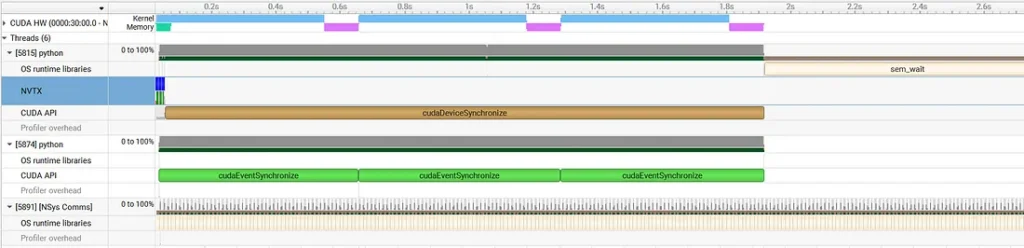 Async Data Transfer Nsight Systems Profiler Timeline (by Author)
In the NVTX row of the CPU section we can see all of the operations in the inference loop bunched together on left side — implying that they all ran immediately and asynchronously. We also see the event synchronization calls (in light green) running on the dedicated monitor thread. In the GPU section we see that the kernel computation begins immediately after the device-to-host copy has completed.
Our final optimization will focus on improving the parallelization of the kernel and memory operations on the GPU.
Async Data Transfer Nsight Systems Profiler Timeline (by Author)
In the NVTX row of the CPU section we can see all of the operations in the inference loop bunched together on left side — implying that they all ran immediately and asynchronously. We also see the event synchronization calls (in light green) running on the dedicated monitor thread. In the GPU section we see that the kernel computation begins immediately after the device-to-host copy has completed.
Our final optimization will focus on improving the parallelization of the kernel and memory operations on the GPU.
Optimization 4: Pipelining Using CUDA Streams
As in our previous post, we wish to take advantage of the independent engines for memory copying (the DMA) and kernel compute (the SMs). We do this by assigning the memory copy to a dedicated CUDA stream:
python
egress_stream = torch.cuda.Stream()

with torch.inference_mode():
    for i in range(TOTAL_STEPS):
        if i == WARMUP_STEPS:
            synchronize_all()
            start_time = time.perf_counter()
            profiler.start()
        elif i == WARMUP_STEPS + PROFILE_STEPS:
            synchronize_all()
            profiler.stop()
            end_time = time.perf_counter()

        with nvtx.annotate(f"Batch {i}", color="blue"):
            with nvtx.annotate("get batch", color="red"):
                batch = next(data_iter)
            with nvtx.annotate("compute", color="green"):
                output = model(batch)

            # on separate stream
            with torch.cuda.stream(egress_stream):
                # wait for default stream to complete compute
                egress_stream.wait_stream(torch.cuda.default_stream())
                # Mark that egress_stream will use this tensor
                output['out'].record_stream(egress_stream)
                with nvtx.annotate("copy to CPU", color="yellow"):
                    output_cpu, buf_id = to_cpu(output['out'])
                with nvtx.annotate("queue CUDA event", color="cyan"):
                    event_pool[buf_id].record(egress_stream)
                    event_queue.put((i, buf_id))
This results in a throughput of 1.85 steps per second — an additional 19.3% improvement over our previous experiment.
The final profile trace appears below:
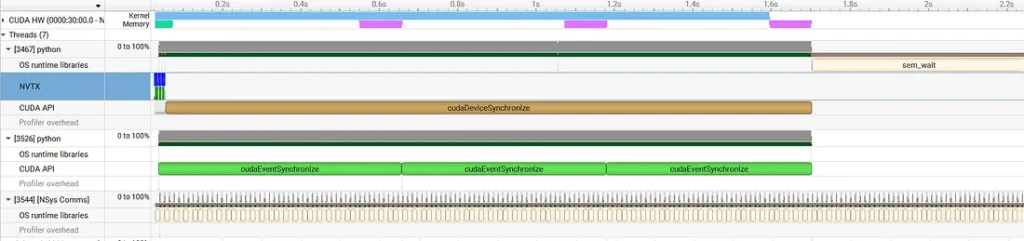 Pipelined Nsight Systems Profiler Timeline (by Author)
In the GPU section we see a continuous block of kernel compute (in light blue) with both the host-to-device (in light green) and device-to-host (in purple) running in parallel. Our inference loop is now compute-bound, implying that we have exhausted all practical opportunities for data-transfer optimization.
Pipelined Nsight Systems Profiler Timeline (by Author)
In the GPU section we see a continuous block of kernel compute (in light blue) with both the host-to-device (in light green) and device-to-host (in purple) running in parallel. Our inference loop is now compute-bound, implying that we have exhausted all practical opportunities for data-transfer optimization.
Results
We summarize our results in the following table:
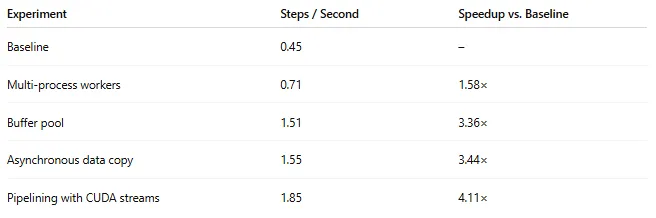 Experiment Results (by Author)
Through the use of nsys profiler we were able to increase efficiency by over 4 X. Naturally, the impact of the optimizations we discussed will vary based on the details of the model and runtime environment.
Experiment Results (by Author)
Through the use of nsys profiler we were able to increase efficiency by over 4 X. Naturally, the impact of the optimizations we discussed will vary based on the details of the model and runtime environment.
Summary
This concludes the second part of our series of posts on the topic of optimizing data-transfer in AI/ML workloads. Part one focused on host-to-device copies and part two on device-to-host copies. When implemented naively, data-transfer in either direction can lead to significant performance bottlenecks resulting in GPU starvation and increased runtime costs. Using Nsight Systems profiler, we demonstrated how to identify and resolve these bottlenecks and increase runtime efficiency.
Although the optimization of both directions involved similar steps, the implementation details were very different. While optimizing CPU-to-GPU data-transfer is well-supported by PyTorch’s data-loading APIs and required relatively small changes to the execution loop, optimizing the the GPU-to-CPU direction required a bit more software engineering. Importantly, the solutions we put forth in this post were chosen for demonstrative purposes. Your own solution may differ considerably based on your project needs and design preferences.
Having covered both CPU-to-GPU and GPU-to-CPU data copies, we turn our attention to GPU-to-GPU transactions: Stay tuned for a future post on the topic of optimizing data transfer between GPUs in distributed training workloads.
Register Now to Continue Reading
Unlock Towards Data Science with a Free Account
All articles on Towards Data Science are available to registered users. Create a free account today to access this article and thousands more.
Register for freeSign in to your account
 Written By
See all from Chaim Rand
Deep DivesArtificial IntelligenceMachine LearningModel OptimizationPytorch
Share This Article
Towards Data Science is a community publication. Submit your insights to reach our global audience and earn through the TDS Author Payment Program.
Write for TDS
Related Articles
Programming
Leverage Airbyte's simple REST API for complex configuration
Isaac Harris-Holt
April 23, 20224 min read
Artificial Intelligence
Compared to the opacity around human intelligence, AI is more transparent in some very tangible ways.
Piotr Mardziel
June 13, 20256 min read
Artificial Intelligence
Sharpen your skills.
Soner Yıldırım
August 27, 20203 min read
Data Engineering
You just need one, robust data pipeline system
Olivia Iannone
April 27, 20229 min read
Large Language Models
For AI engineers who want to understand every step, not just call the library
Angela and Kezhan Shi
May 22, 202622 min read
Data Engineering
Using Lambda as a bridge to enable data flow from SQS queue in Account X to Kinesis Data Stream in Account Y
Shreyas Mondikal Subramanya
April 12, 20215 min read
Machine Learning
Thoughts and Theory Can a simple string-matching method compete against a big supervised model? At...
Stephan Tulkens
May 27, 202112 min read
Machine Learning
A conceptual guide
Alex Powell
January 6, 20214 min read
Large Data Models
Learn how InfiniBand and RoCEv2 enable high-speed GPU communication
Shireesh Kumar Singh
August 6, 20257 min read
Your home for data science and AI. The world's leading publication for data science, data analytics, data engineering, machine learning, and artificial intelligence professionals.
Subscribe to Our NewsletterWrite For TDS•About•Advertise•Privacy Policy•Terms of Use
© Insight Media Group, LLC 2026•The New Stack•roadmap.sh•Creator Network
Recommended Articles
Close