保留正文与补采附件。源页面当前未重新核验;具体限制见交付清单。
 We value your privacy
We use cookies to enhance your browsing experience, serve personalised ads or content, and analyse our traffic. By clicking "Accept All", you consent to our use of cookies.
Customise Reject All Accept All
Customise Consent Preferences
We value your privacy
We use cookies to enhance your browsing experience, serve personalised ads or content, and analyse our traffic. By clicking "Accept All", you consent to our use of cookies.
Customise Reject All Accept All
Customise Consent Preferences  We use cookies to help you navigate efficiently and perform certain functions. You will find detailed information about all cookies under each consent category below.
The cookies that are categorised as "Necessary" are stored on your browser as they are essential for enabling the basic functionalities of the site. ... Show more
NecessaryAlways Active
Necessary cookies are required to enable the basic features of this site, such as providing secure log-in or adjusting your consent preferences. These cookies do not store any personally identifiable data.
We use cookies to help you navigate efficiently and perform certain functions. You will find detailed information about all cookies under each consent category below.
The cookies that are categorised as "Necessary" are stored on your browser as they are essential for enabling the basic functionalities of the site. ... Show more
NecessaryAlways Active
Necessary cookies are required to enable the basic features of this site, such as providing secure log-in or adjusting your consent preferences. These cookies do not store any personally identifiable data.
-
Cookie
BCTempID
-
Duration
10 minutes
-
Description
No description available.
-
Cookie
__cf_bm
-
Duration
1 hour
-
Description
This cookie, set by Cloudflare, is used to support Cloudflare Bot Management.
-
Cookie
AWSALBCORS
-
Duration
7 days
-
Description
Amazon Web Services set this cookie for load balancing.
-
Cookie
_cfuvid
-
Duration
session
-
Description
Cloudflare sets this cookie to track users across sessions to optimize user experience by maintaining session consistency and providing personalized services
-
Cookie
li_gc
-
Duration
6 months
-
Description
Linkedin set this cookie for storing visitor's consent regarding using cookies for non-essential purposes.
-
Cookie
__hssrc
-
Duration
session
-
Description
This cookie is set by Hubspot whenever it changes the session cookie. The __hssrc cookie set to 1 indicates that the user has restarted the browser, and if the cookie does not exist, it is assumed to be a new session.
-
Cookie
__hssc
-
Duration
1 hour
-
Description
HubSpot sets this cookie to keep track of sessions and to determine if HubSpot should increment the session number and timestamps in the __hstc cookie.
-
Cookie
wpEmojiSettingsSupports
-
Duration
session
-
Description
WordPress sets this cookie when a user interacts with emojis on a WordPress site. It helps determine if the user's browser can display emojis properly.
-
Cookie
BCSessionID
-
Duration
1 year 1 month 4 days
-
Description
Blueconic sets this cookie as a unique identifier for the BlueConic profile.
-
Cookie
_octo
-
Duration
1 year
-
Description
No description available.
-
Cookie
logged_in
-
Duration
1 year
-
Description
No description available.
-
Cookie
__Secure-YEC
-
Duration
past
-
Description
YouTube sets this cookie to stores the user's video player preferences using embedded YouTube video
-
Cookie
__eoi
-
Duration
6 months
-
Description
Description is currently not available.
-
Cookie
AWSALBTGCORS
-
Duration
7 days
-
Description
No description available.
-
Cookie
login-status-p
-
Duration
past
-
Description
Description is currently not available.
-
Cookie
AWSALBTG
-
Duration
7 days
-
Description
No description available.
-
Cookie
csrf_token
-
Duration
session
-
Description
No description available.
-
Cookie
token_v2
-
Duration
1 day
-
Description
Description is currently not available.
-
Cookie
D
-
Duration
1 year
-
Description
Description is currently not available.
-
Cookie
PHPSESSID
-
Duration
session
-
Description
This cookie is native to PHP applications. The cookie stores and identifies a user's unique session ID to manage user sessions on the website. The cookie is a session cookie and will be deleted when all the browser windows are closed.
-
Cookie
VISITOR_PRIVACY_METADATA
-
Duration
6 months
-
Description
YouTube sets this cookie to store the user's cookie consent state for the current domain.
-
Cookie
cookietest
-
Duration
session
-
Description
The cookietest cookie is typically used to determine whether the user's browser accepts cookies, essential for website functionality and user experience.
-
Cookie
__Host-airtable-session
-
Duration
1 year
-
Description
This cookie is used to enable us to integrate the services of Airtable.
-
Cookie
__Host-airtable-session.sig
-
Duration
1 year
-
Description
This cookie is used to enable us to integrate the services of Airtable.
-
Cookie
m
-
Duration
1 year 1 month 4 days
-
Description
Stripe sets this cookie for fraud prevention purposes. It identifies the device used to access the website, allowing the website to be formatted accordingly.
-
Cookie
BIGipServer*
-
Duration
session
-
Description
Marketo sets this cookie to collect information about the user's online activity and build a profile about their interests to provide advertisements relevant to the user.
-
Cookie
__cfruid
-
Duration
session
-
Description
Cloudflare sets this cookie to identify trusted web traffic.
-
Cookie
_GRECAPTCHA
-
Duration
6 months
-
Description
Google Recaptcha service sets this cookie to identify bots to protect the website against malicious spam attacks.
-
Cookie
__Secure-YNID
-
Duration
6 months
-
Description
Google cookie used to protect user security and prevent fraud, especially during the login process.
-
Cookie
cookieyes-consent
-
Duration
1 year
-
Description
CookieYes sets this cookie to remember users' consent preferences so that their preferences are respected on subsequent visits to this site. It does not collect or store any personal information about the site visitors.
Functional
Functional cookies help perform certain functionalities like sharing the content of the website on social media platforms, collecting feedback, and other third-party features.
-
Cookie
lidc
-
Duration
1 day
-
Description
LinkedIn sets the lidc cookie to facilitate data center selection.
-
Cookie
brw
-
Duration
1 year
-
Description
No description available.
-
Cookie
brwConsent
-
Duration
5 minutes
-
Description
Description is currently not available.
-
Cookie
WMF-Uniq
-
Duration
1 year
-
Description
Description is currently not available.
-
Cookie
loom_anon_comment
-
Duration
1 year
-
Description
No description available.
-
Cookie
loom_referral_video
-
Duration
session
-
Description
Description is currently not available.
-
Cookie
VISITOR_INFO1_LIVE
-
Duration
6 months
-
Description
A cookie set by YouTube to measure bandwidth that determines whether the user gets the new or old player interface.
-
Cookie
yt-remote-connected-devices
-
Duration
Never Expires
-
Description
YouTube sets this cookie to store the user's video preferences using embedded YouTube videos.
-
Cookie
ytidb::LAST_RESULT_ENTRY_KEY
-
Duration
Never Expires
-
Description
The cookie ytidb::LAST_RESULT_ENTRY_KEY is used by YouTube to store the last search result entry that was clicked by the user. This information is used to improve the user experience by providing more relevant search results in the future.
-
Cookie
yt-remote-device-id
-
Duration
Never Expires
-
Description
YouTube sets this cookie to store the user's video preferences using embedded YouTube videos.
-
Cookie
yt-remote-session-name
-
Duration
session
-
Description
The yt-remote-session-name cookie is used by YouTube to store the user's video player preferences using embedded YouTube video.
-
Cookie
yt-remote-fast-check-period
-
Duration
session
-
Description
The yt-remote-fast-check-period cookie is used by YouTube to store the user's video player preferences for embedded YouTube videos.
-
Cookie
yt-remote-session-app
-
Duration
session
-
Description
The yt-remote-session-app cookie is used by YouTube to store user preferences and information about the interface of the embedded YouTube video player.
-
Cookie
yt-remote-cast-available
-
Duration
session
-
Description
The yt-remote-cast-available cookie is used to store the user's preferences regarding whether casting is available on their YouTube video player.
-
Cookie
yt-remote-cast-installed
-
Duration
session
-
Description
The yt-remote-cast-installed cookie is used to store the user's video player preferences using embedded YouTube video.
-
Cookie
cp_session
-
Duration
3 months
-
Description
Codepen sets this cookie for Help systems found in the website.
-
Cookie
loid
-
Duration
1 year 1 month 4 days
-
Description
This cookie is set by the Reddit. The cookie enables the sharing of content from the website onto the social media platform.
Analytics
Analytical cookies are used to understand how visitors interact with the website. These cookies help provide information on metrics such as the number of visitors, bounce rate, traffic source, etc.
-
Cookie
__hstc
-
Duration
6 months
-
Description
Hubspot set this main cookie for tracking visitors. It contains the domain, initial timestamp (first visit), last timestamp (last visit), current timestamp (this visit), and session number (increments for each subsequent session).
-
Cookie
hubspotutk
-
Duration
6 months
-
Description
HubSpot sets this cookie to keep track of the visitors to the website. This cookie is passed to HubSpot on form submission and used when deduplicating contacts.
-
Cookie
_ga
-
Duration
1 year 1 month 4 days
-
Description
Google Analytics sets this cookie to calculate visitor, session and campaign data and track site usage for the site's analytics report. The cookie stores information anonymously and assigns a randomly generated number to recognise unique visitors.
-
Cookie
ga*
-
Duration
1 year 1 month 4 days
-
Description
Google Analytics sets this cookie to store and count page views.
-
Cookie
__Host-psifi.analyticsTrace
-
Duration
6 hours
-
Description
Description is currently not available.
-
Cookie
__Host-psifi.analyticsTraceV2
-
Duration
6 hours
-
Description
Description is currently not available.
-
Cookie
_gh_sess
-
Duration
session
-
Description
GitHub sets this cookie for temporary application and framework state between pages like what step the user is on in a multiple step form.
-
Cookie
YSC
-
Duration
session
-
Description
YSC cookie is set by Youtube and is used to track the views of embedded videos on Youtube pages.
-
Cookie
ajs_anonymous_id
-
Duration
1 year
-
Description
This cookie is set by Segment to count the number of people who visit a certain site by tracking if they have visited before.
-
Cookie
vuid
-
Duration
1 year 1 month 4 days
-
Description
Vimeo installs this cookie to collect tracking information by setting a unique ID to embed videos on the website.
Performance
Performance cookies are used to understand and analyse the key performance indexes of the website which helps in delivering a better user experience for the visitors.
-
Cookie
AWSALB
-
Duration
7 days
-
Description
AWSALB is an application load balancer cookie set by Amazon Web Services to map the session to the target.
-
Cookie
acq
-
Duration
past
-
Description
Description is currently not available.
-
Cookie
acq.sig
-
Duration
past
-
Description
Description is currently not available.
-
Cookie
ptc
-
Duration
2 years
-
Description
No description available.
Advertisement
Advertisement cookies are used to provide visitors with customised advertisements based on the pages you visited previously and to analyse the effectiveness of the ad campaigns.
-
Cookie
muc_ads
-
Duration
1 year 1 month 4 days
-
Description
Twitter sets this cookie to collect user behaviour and interaction data to optimize the website.
-
Cookie
guest_id_marketing
-
Duration
1 year 1 month 4 days
-
Description
Twitter sets this cookie to identify and track the website visitor.
-
Cookie
guest_id_ads
-
Duration
1 year 1 month 4 days
-
Description
Twitter sets this cookie to identify and track the website visitor.
-
Cookie
personalization_id
-
Duration
1 year 1 month 4 days
-
Description
Twitter sets this cookie to integrate and share features for social media and also store information about how the user uses the website, for tracking and targeting.
-
Cookie
guest_id
-
Duration
1 year 1 month 4 days
-
Description
Twitter sets this cookie to identify and track the website visitor. It registers if a user is signed in to the Twitter platform and collects information about ad preferences.
-
Cookie
bcookie
-
Duration
1 year
-
Description
LinkedIn sets this cookie from LinkedIn share buttons and ad tags to recognize browser IDs.
-
Cookie
__Secure-ROLLOUT_TOKEN
-
Duration
6 months
-
Description
YouTube sets this cookie to manage feature rollout and experimentation. It helps Google control which new features or interface changes are shown to users as part of testing and staged rollouts, ensuring consistent experience for a given user during an experiment.
-
Cookie
yt.innertube::nextId
-
Duration
Never Expires
-
Description
YouTube sets this cookie to register a unique ID to store data on what videos from YouTube the user has seen.
-
Cookie
yt.innertube::requests
-
Duration
Never Expires
-
Description
YouTube sets this cookie to register a unique ID to store data on what videos from YouTube the user has seen.
-
Cookie
session_tracker
-
Duration
session
-
Description
This cookie is set by the Reddit. This cookie is used to identify trusted web traffic. It also helps in adverstising on the website.
-
Cookie
edgebucket
-
Duration
session
-
Description
Reddit sets this cookie to save the information about a log-on Reddit user, for the purpose of advertisement recommendations and updating the content.
-
Cookie
did
-
Duration
1 year
-
Description
Arbor sets this cookie to show targeted ads to site visitors.This cookie expires after 2 months or 1 year.
Uncategorised
Other uncategorised cookies are those that are being analysed and have not been classified into a category as yet.
No cookies to display.
Reject All Save My Preferences Accept All
Toggle SearchToggle Mobile Navigation
Publish AI, ML & data-science insights to a global community of data professionals.
Sign inSubmit an Article
LatestEditor's PicksNewsletterShipAI
Write For TDS
LinkedInXToggle Search
LLM Applications
Baseline Enterprise RAG, From PDF to Highlighted Answer
Enterprise Document Intelligence [Vol. 1 #1] The smallest version of RAG that actually works, on a real PDF, with grounded answers and the source lines highlighted.
Angela and Kezhan Shi
May 29, 202636 min read
 Photo by Curvd, via Unsplash
The fastest way to understand what RAG is is to build the smallest version that actually works, run it on a real document, and look closely at what just happened.
That’s this article. About a hundred lines of Python (no vector database, no framework, no agents) running on the Attention Is All You Need paper (Vaswani et al. 2017; arXiv non-exclusive distribution license, declared on the arXiv abstract page), returning a sourced answer with the exact source lines highlighted on the page.
Then we walk back through each block and ask the question it naturally raises. Each question is what a later article develops.
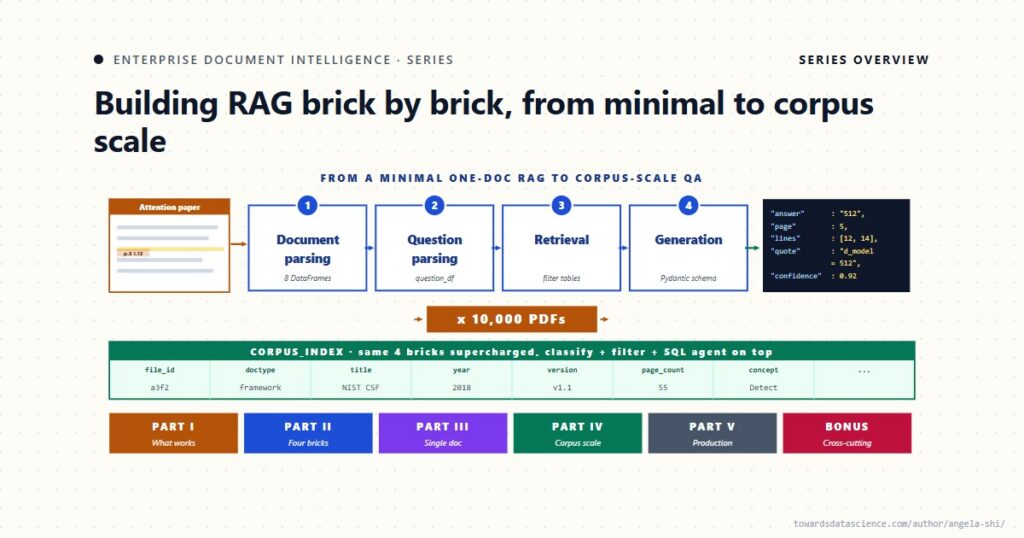
The minimal pipeline is the smallest amount of code that respects the four bricks and produces a verifiable answer. Every later article adds capability the team needs after a specific failure on real documents, not because the architecture needed more layers.
This article is one piece of the broader Entreprise Document Intelligence Vol. 1 series, which builds enterprise RAG brick by brick from a baseline pipeline to corpus-scale architecture.
Photo by Curvd, via Unsplash
The fastest way to understand what RAG is is to build the smallest version that actually works, run it on a real document, and look closely at what just happened.
That’s this article. About a hundred lines of Python (no vector database, no framework, no agents) running on the Attention Is All You Need paper (Vaswani et al. 2017; arXiv non-exclusive distribution license, declared on the arXiv abstract page), returning a sourced answer with the exact source lines highlighted on the page.
Then we walk back through each block and ask the question it naturally raises. Each question is what a later article develops.
The minimal pipeline is the smallest amount of code that respects the four bricks and produces a verifiable answer. Every later article adds capability the team needs after a specific failure on real documents, not because the architecture needed more layers.
This article is one piece of the broader Entreprise Document Intelligence Vol. 1 series, which builds enterprise RAG brick by brick from a baseline pipeline to corpus-scale architecture.
 Learn this step by step with the interactive AI Agents roadmap.
1. What we’re building
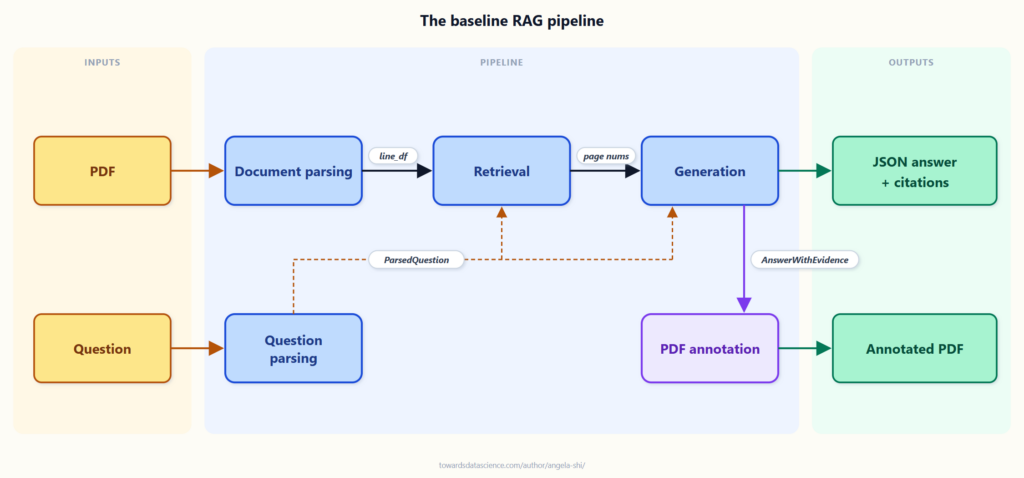
The pipeline has four bricks (Part II goes into each one in detail) plus a final, optional rendering step. Each brick says what it takes in and what it gives back; what we pass from one brick to the next is what we save.
- Document parsing takes a PDF path and returns
line_df (one row per text line, with page_num, line_num, text, and the bounding box) plus page_df. The minimal version holds both in memory; bigger systems persist them (Article 23 covers when to move to a database).
- Question parsing turns the user’s question into a
ParsedQuestion carrying the normalized question plus a short list of checked keywords. It stays narrow on purpose: no retrieval logic here, no question embedding.
- Retrieval consumes the
ParsedQuestion and emits top-k page numbers (and, when needed, the matching line numbers within those pages). Keeping the handoff to page numbers only keeps it small; the next step rebuilds the filtered lines from line_df on the spot. The question embedding lives in this brick because it depends on the corpus index.
- Generation brings together the question,
line_df, and the retrieved page numbers, and produces an AnswerWithEvidence: a typed JSON carrying the answer, the evidence span (start_page, start_line, end_page, end_line), a confidence, a justification, the exact quotes from the source, and any caveats. The full JSON is worth saving for evaluation, audit, and replay.
- PDF annotation is optional. Given the source PDF and the evidence span, it writes an annotated PDF with rectangles drawn around the cited lines. A CLI tool, a batch job, or an API consumer can skip it; the answer with citations is already complete after generation.
The first four are the four bricks (Article 5 develops document parsing, Article 6 question parsing, Article 7 retrieval, Article 8 generation). PDF annotation is the rendering step, not a brick in itself.
 The baseline RAG pipeline, end to end - Image by author
A PDF and a question go in. Each brick turns its input into something more structured: document parsing turns the PDF into rows, question parsing turns the question into search-ready keywords, retrieval cuts the rows down to a few page numbers, generation produces a typed answer, and PDF annotation draws the cited lines back onto the source. What comes out is not a chatbot bubble. It’s a sourced JSON answer plus an annotated PDF you can open and check.
The dependencies are minimal:
The baseline RAG pipeline, end to end - Image by author
A PDF and a question go in. Each brick turns its input into something more structured: document parsing turns the PDF into rows, question parsing turns the question into search-ready keywords, retrieval cuts the rows down to a few page numbers, generation produces a typed answer, and PDF annotation draws the cited lines back onto the source. What comes out is not a chatbot bubble. It’s a sourced JSON answer plus an annotated PDF you can open and check.
The dependencies are minimal:
- pymupdf parses PDFs into text plus position info; the bounding boxes it returns are what we use to highlight the answer back on the source page.
- openai is the LLM client; via
base_url the same library serves Azure, OpenRouter, Ollama, or any compatible endpoint.
- pandas holds the document as a DataFrame, the format every parsing and retrieval step uses.
- pydantic defines the answer schema that forces structured JSON with citations.
No vector database, no orchestration framework, no specialized RAG library. Later articles look at when those libraries’ helpers become useful, and when they get in the way of seeing what’s going on.
“For a 15-page paper, the LLM can read the whole thing. Why bother with retrieval?” Fair point on this one document. We use the paper to teach the method, not to save tokens on these 15 pages. The objection often points to the Needle in a Haystack benchmark (Kamradt, 2023), where frontier models score near-perfectly retrieving a single verbatim sentence from a 1M-token context.
That benchmark is research, not practice. A needle is one isolated, verbatim fact, while enterprise questions aggregate (“every contract whose deductible exceeds €5,000”), compare (“clause 12 across these three policies”), or summarize across many passages. None of those is a single sentence to find.
Two more practical reasons keep retrieval in the loop. Enterprise documents are often long:
- a 300-page insurance contract,
- a 500-page regulatory filing,
- a multi-volume technical specification.
Sending the whole thing to the LLM costs real money on every question, every rerun, every user, and dilutes its attention across irrelevant pages.
And the same question runs across hundreds or thousands of documents at once:
- “find every contract that excludes earthquake damage” ,
- “summarize this year’s regulatory changes across all filings”.
At that scale, “throw it all in” stops being a strategy. Retrieval is what makes the pipeline survive both moves: from one short paper to one long contract, and from one document to a whole corpus.
2. The four bricks, and a PDF highlight
Each step declares its inputs and outputs, and the steps are independent. The output of step N is the input of step N+1, saved as a named DataFrame so any step can be re-run on its own against the saved output of the previous one. In the AI-coding era, an assistant told to “fix retrieval” can quietly modify the question parser when it should have stayed untouched. Independent modules are how you work confidently on one piece without breaking the rest.
The setup chunks below load them alongside the OpenAI client.
Every brick that talks to a model needs a configured client. The series uses OpenAI’s Python SDK; any provider that exposes an OpenAI-compatible endpoint (Azure OpenAI, vLLM, llama.cpp’s --api-server, …) drops in by changing base_url and the model name.
python
import os
from openai import OpenAI
from dotenv import load_dotenv

load_dotenv()

client = OpenAI(
    api_key=os.getenv("API_KEY"),
    base_url=os.getenv("BASE_URL"),
)
model_chat = os.getenv("MODEL_CHAT", "gpt-4.1")
model_embed = os.getenv("MODEL_EMBED", "text-embedding-3-small")
2.1 Document parsing
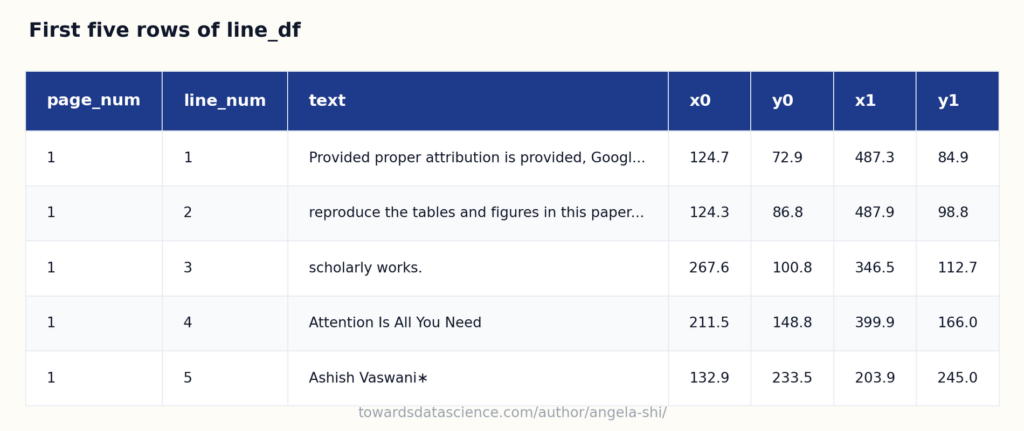
We extract every text line of the PDF along with its position on the page. The output is a DataFrame where each row is one line, with page_num, line_num, the text itself, and the four bounding-box coordinates x0, y0, x1, y1.
- In: a PDF path.
- Out:
line_df (one row per text line, with page_num, line_num, text, and the bounding box) plus a page_df we’ll build in section 2.3.
The bounding boxes matter: they’re what we use to draw highlights on the source PDF at the end.
python
def fitz_pdf_to_line_df(file_path):
    doc = fitz.open(file_path)
    data = []
    for page_num in range(len(doc)):
        page = doc[page_num]
        blocks = page.get_text("dict").get("blocks", [])
        line_num = 0
        for block in blocks:
            if block.get("type") != 0:
                continue
            for line in block.get("lines", []):
                spans = line.get("spans", [])
                if not spans: continue
                text = "".join(s["text"] for s in spans)
                rect = fitz.Rect(spans[0]["bbox"])
                for span in spans[1:]:
                    rect |= fitz.Rect(span["bbox"])
                data.append({
                    "page_num": page_num + 1,
                    "line_num": line_num + 1,
                    "text": text,
                    "x0": float(rect.x0), "y0": float(rect.y0),
                    "x1": float(rect.x1), "y1": float(rect.y1),
                })
                line_num += 1
    return pd.DataFrame(data)
Running line_df = fitz_pdf_to_line_df(pdf_path) on the Attention paper returns 1048 lines across 15 pages.
 First five rows of line_df with page, line number, text, and bounding box - Image by author
The paper, turned into rows. Each line is one row, with its text and the four numbers that locate it on the page. The
First five rows of line_df with page, line number, text, and bounding box - Image by author
The paper, turned into rows. Each line is one row, with its text and the four numbers that locate it on the page. The x0, y0, x1, y1 columns don’t mean much yet; in section 2.5 they’re what we use to draw rectangles on the source PDF, exactly over the lines the model cited.
This DataFrame,**line_df**, is the core data structure of the rest of the series. Article 5 introduces a richer relational model around it (line_df, chunk_df, toc_df, page_df, image_df).
What this parser doesn’t do: detect tables (Table 1 page 4, Table 3 page 9 flatten into plain lines), reconstruct headings, footnotes, cross-references, or handle multi-column layouts. None of this matters for the question we ask here. For other questions on the same paper, it will. Article 5 covers parsing in full.
2.2 Question parsing
Before the question goes to retrieval, we run it through a tiny LLM call. The goal is to extract the keywords most useful for searching the document : short phrases the document is likely to use, not necessarily the literal words of the question.
- In: a text question.
- Out: a
ParsedQuestion holding the normalized question and a short list of checked keywords.
This step does not know about retrieval. It does not compute the question embedding either. That one is tied to the corpus index and lives in section 2.3. Keep that line clean and you can swap the embedding model or add a hybrid retriever tomorrow without touching question parsing.
Why bother on a minimal pipeline? Two reasons:
- You can explain why retrieval picked what it picked. When the system answers wrong, we can see whether the keywords were off (question-parsing problem) or the right keywords landed on the wrong page (retrieval problem). Without question parsing, retrieval is a black box.
- The question is a real input, just like the document. Section 2.1 parsed the document into
line_df. This subsection parses the question into ParsedQuestionMinimal. Both inputs deserve to be parsed before they hit the search step. Article 6 builds the richer brick (parse_question, with answer shape, scope filters, decomposition, …).
On the question “What are the options mentioned for positional encoding?” , the call parsed_question = get_keywords_from_question(question, client=client) returns parsed_question.keywords = ['positional encoding', 'options', 'mentioned'].
python
question = "What are the options mentioned for positional encoding?"
parsed_question = get_keywords_from_question(question, client=client)
print(parsed_question.keywords)
bash
['positional encoding']
The LLM produces a single, literal phrase like ['positional encoding']. That’s deliberate. An earlier draft of this prompt asked for “3 to 5 short keywords useful for searching”, and the LLM happily filled the quota with paraphrases (positional encoding options, types of positional encoding, transformer positional encoding). None of those are written in the document. Only positional encoding is. Substring matching is strict: a single missing word kills the match. The minimal version asks the LLM to do less (extract the literal noun phrase, drop the question framing) and trusts the next block to do the rest.
What this minimal version doesn’t do:
- detect an
answer_shape (Q&A vs summarization)
- decompose compound questions
- pull from a domain glossary
- attach retrieval hints
All covered in Article 6, under the richer parse_question brick. Here we keep two fields, corrected_question and keywords, the smallest version that makes the brick visible.
Note: overriding the system prompt. get_keywords_from_question exposes the system prompt as a kwarg with KEYWORDS_PROMPT as default. To test a variant (different domain, stricter rules, extra examples), pass system_prompt=... at the call site. No edit to the function. Same pattern for every LLM helper in docintel (llm_answer_with_evidence exposes both system_prompt and user_template). Below: the same call, run twice on a contract -style question. First with the research-paper default, which stays generic. Then with a contract-domain prompt, which picks up insurance vocabulary like exclusions, deductible.
python
demo_question = "Are earthquakes excluded from coverage?"

# Default: research-paper prompt.
parsed_question_default = get_keywords_from_question(demo_question, client=client)
print("Default (research-paper):", parsed_question_default.keywords)

# Override: insurance / legal contract prompt.
contract_prompt = (
    "Extract 1 to 3 short keywords from the user question for searching an "
    "insurance contract or legal policy. Prefer literal terms the contract is "
    "likely to use: clauses, exclusions, named perils, deductibles, caps. Drop "
    "question framing words. Output 1 to 3 keywords."
)
parsed_question_contract = get_keywords_from_question(
    demo_question, system_prompt=contract_prompt, client=client,
)
print("Contract prompt:        ", parsed_question_contract.keywords)
bash
Default (research-paper): ['earthquakes', 'coverage']
Contract prompt:         ['earthquakes', 'exclusions', 'coverage']
2.3 Retrieval
Sending all 1048 lines to the LLM works on a paper this size but does not scale and dilutes the model’s attention. We cut the document down to the few pages most likely to contain the answer.
- In: the checked keywords (and/or the normalized question, depending on the method) from section 2.2.
- Out: the top-k page numbers , plus optionally the matching line numbers within those pages.
The question embedding is computed here, not in section 2.2, because an embedding only makes sense relative to the index it was built on. Same logic for any hybrid scoring or BM25 statistics.
The standard answer in 2024 RAG tutorials is embeddings : turn each page into a vector, score by cosine similarity. Article 2 is dedicated to them. For the minimal version, we deliberately don’t, for one reason.
Embeddings are opaque. Cosine similarity returns a number like 0.7798 and asks the user to trust that “page 6 is relevant to the question”. Show that score to a domain expert, a product owner, or a manager: nobody understands what 0.78 means, or why it’s higher than 0.65. Developers may argue they understand it (“dot product of normalized vectors”). They understand the math, not the relevance. Asked why this specific page scored 0.7798 against this specific question, they shrug and point at the model.
In an enterprise context, retrieval is the step users question the most. Why did the system look at this page and not that one? You have to explain it. So the minimal version uses something we can read with our own eyes: keyword matching. Section 2.2 pulled the keywords; we score each page by how many of those keywords appear in it, and keep the top three.
Where we search vs what we return: both pages here. Real retrieval has two levels. The anchor is where the keyword or embedding actually hits (a line, a sentence). The context is what we hand to generation (the lines around it, the page). We search small, we return big. Here we use the page for both. That works on an academic paper where each page is roughly one idea. Article 7 separates the two levels for long contracts, multi-column reports, table-heavy documents.
page_df = build_page_df(line_df) collapses the 1048 lines into 15 pages, one row per page.
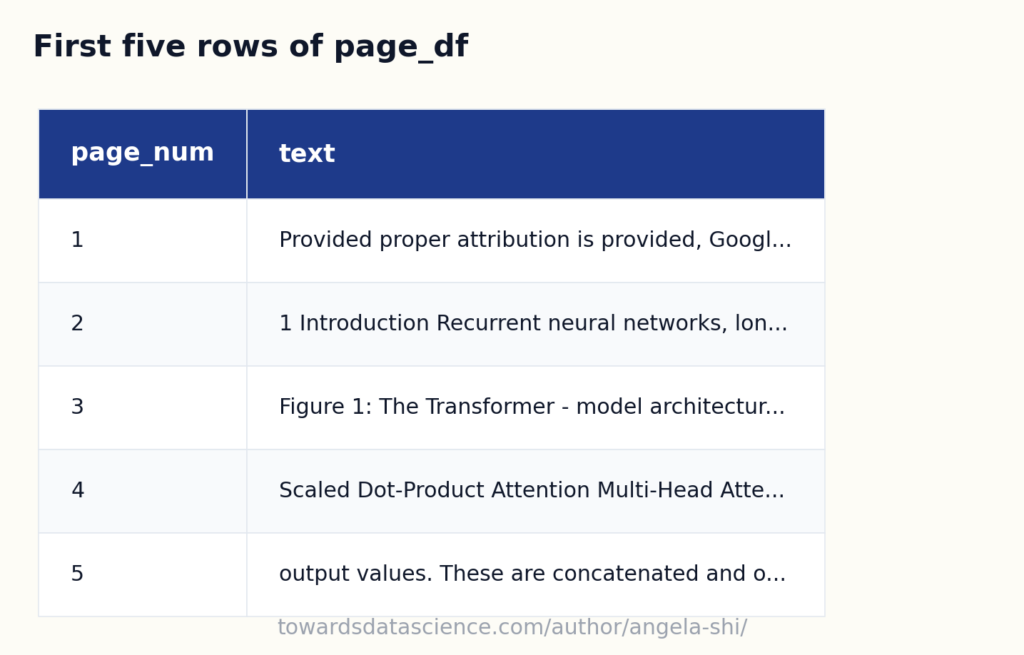 First five rows of page_df, one row per page with the full text concatenated - Image by author
2.3.a Embeddings + cosine similarity
Embed every page (one call per page), embed the question, compute cosine similarity, keep the top-k. The output: a number like 0.7798 per page. Look at the scores below: can you tell why a page made the top three? Could you explain the ranking to a domain expert? That’s the opaque-score problem the article opens with.
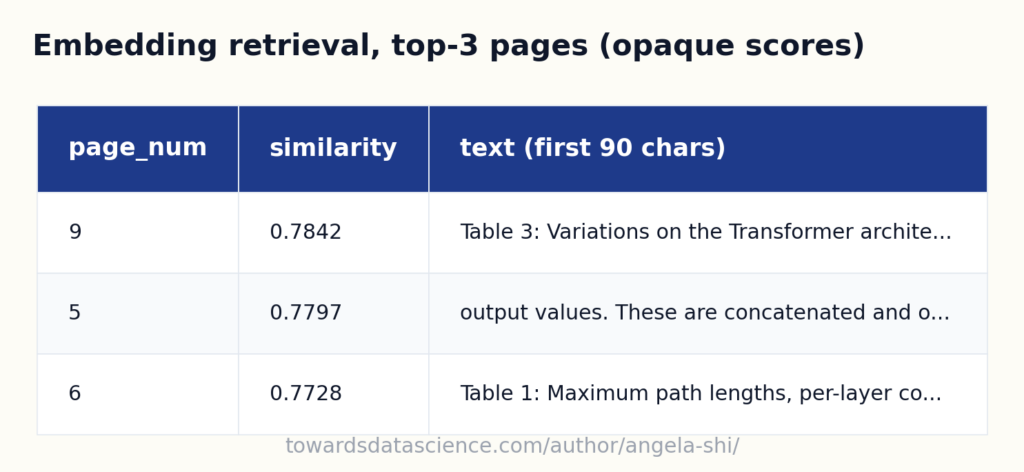 Top three pages by cosine similarity. Precise scores, opaque ranking - Image by author
Three numbers, all very close to each other (0.7843, 0.7798, 0.7728). Can you say why page 9 beats page 6? The text preview makes it obvious: page 9 is the Variations on the Transformer architecture table, page 5 is about output values and concatenation , page 6 is the Maximum path lengths table. The page that actually answers the question, section 3.5 Positional Encoding , sits on page 6 and ranks last in the top three. The unrelated page 5 ranks second. The scores look precise, but the ranking has no story behind it: there is no token to point at, no phrase to defend, just a dot product on two black-box vectors. Embeddings work in many cases, and Article 2 unpacks where this score comes from. But the score itself never becomes interpretable , and for the rest of this article we use a retriever you can read with your own eyes.
Top three pages by cosine similarity. Precise scores, opaque ranking - Image by author
Three numbers, all very close to each other (0.7843, 0.7798, 0.7728). Can you say why page 9 beats page 6? The text preview makes it obvious: page 9 is the Variations on the Transformer architecture table, page 5 is about output values and concatenation , page 6 is the Maximum path lengths table. The page that actually answers the question, section 3.5 Positional Encoding , sits on page 6 and ranks last in the top three. The unrelated page 5 ranks second. The scores look precise, but the ranking has no story behind it: there is no token to point at, no phrase to defend, just a dot product on two black-box vectors. Embeddings work in many cases, and Article 2 unpacks where this score comes from. But the score itself never becomes interpretable , and for the rest of this article we use a retriever you can read with your own eyes.
2.3.b Keyword matching
For each page, count how many of parsed_question.keywords appear in it (case-insensitive substring match). Drop pages with zero matches; keep the top-k by match count. The output table below carries the actual matched_keywords per page, so anyone can read it and see why a page was picked.
retrieve_pages(page_df, line_df, parsed_question.keywords, top_k=3) returns the top three pages by keyword count plus the filtered lines: 314 lines kept from pages 6, 9, 7.
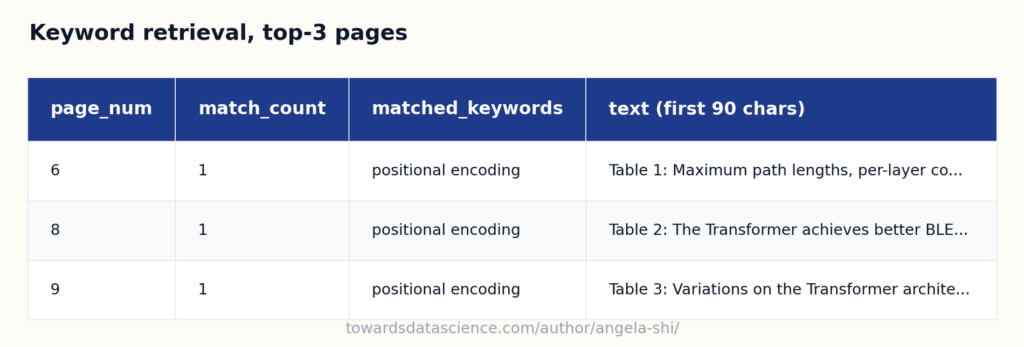 Top three keyword-matched pages, with the matched terms shown per page - Image by author
Three pages, ranked by match count, with the actual matches laid out. Pages 6, 8, and 9 each contain the literal phrase
Top three keyword-matched pages, with the matched terms shown per page - Image by author
Three pages, ranked by match count, with the actual matches laid out. Pages 6, 8, and 9 each contain the literal phrase positional encoding; page 6 holds Section 3.5 Positional Encoding with the actual answer. Anyone reading the table can verify the result by hand: search the source for positional encoding and you’ll find these three pages.
Two design choices:
- Drop pages with zero matches. A retrieval that says “nothing matches” is more useful than one that pads with three random pages. The schema’s null path (next subsection) handles the empty case cleanly.
- We don’t break ties. When pages tie at the same match count, the order is whatever pandas’
nlargest returns. The downstream LLM sees the lines from all tied pages in document order and decides.
From 1048 lines to 300, and we know the right material is in there.
python
def cosine_sim_matrix(query_vec, doc_matrix):
    q = query_vec / (np.linalg.norm(query_vec) + 1e-12)
    d = doc_matrix / np.linalg.norm(doc_matrix, axis=1, keepdims=True)
    return d @ q

def retrieve_pages(page_df, line_df, question, top_k=3):
    q_vec = np.asarray(get_embedding(question), dtype=np.float32)
    doc_matrix = np.vstack(page_df["embedding"].values)
    sims = cosine_sim_matrix(q_vec, doc_matrix)

    scored = page_df.copy()
    scored["similarity"] = sims
    retrieved_pages_df = scored.nlargest(top_k, "similarity")

    kept_pages = retrieved_pages_df["page_num"].tolist()
    filtered_line_df = line_df[line_df["page_num"].isin(kept_pages)]
    return retrieved_pages_df, filtered_line_df
Note: the “split into individual words” trap. A natural reflex when the multi-word phrases don’t match: split them and search for the individual tokens. Below we expand every keyword into its words, deduplicate, then re-run retrieval. We get matches, and we also get false positives, because words like encoding, transformer, network appear all over the document in unrelated contexts.
Now every page in the top three matches several tokens, but look at which tokens. Words like encoding and transformer cover most of the paper. Pages about layer encoding or encoder stacks look as relevant as the page that actually answers the question. Splitting trades one failure (zero matches) for another (false positives). Article 7 covers the real fixes (synonym expansion through a dictionary, hybrid scoring); for now, keep the phrase whole.
2.3.c A harder question: where each retriever breaks
Same pipeline, a different question. We ask about the value of epsilon used in label smoothing. The answer is on page 8 of the paper, written as ε_ls = 0.1 (Greek letter ε, never the English word epsilon). Watch what each retriever does.
python
question_2 = "What is the value of epsilon used in label smoothing?"
parsed_question_2 = get_keywords_from_question(question_2, client=client)
print("Keywords:", parsed_question_2.keywords)
text
Keywords: ['epsilon', 'label smoothing']
Two failures of different shapes:
- Embeddings rank pages by topical proximity. The right page (page 8, where
ε_ls = 0.1 lives) may or may not be in the top three. Pages dense in math notation come up even when they’re unrelated.
- Keywords are blind to symbols. The LLM emits
epsilon, label smoothing, etc. The document writes the Greek letter ε. Substring match returns zero on anything that mentions epsilon by symbol only. The page that contains the answer is invisible to the keyword retriever.
Section 4.4 picks this up as the bridge to Article 2 (Embeddings handle synonyms and surface variation) and Article 6 (richer Question Parsing pulls in alternatives like the Greek letter).
2.4 Generation
We send the retrieved lines to the LLM with the question, formatted as a tab-separated block where page_num and line_num sit next to each line. That format gives the LLM the exact coordinates it needs to cite.
- In: the original question,
line_df, and the retrieved page numbers from section 2.3.
- Out: an
AnswerWithEvidence, a structured JSON with the answer, the evidence span (start_page_num, start_line_num, end_page_num, end_line_num), a confidence, a justification, the exact quotes, and any caveats.
python
class AnswerWithEvidence(BaseModel):
    answer: str = Field(...)

    start_page_num: int | None
    start_line_num: int | None
    end_page_num: int | None
    end_line_num: int | None

    confidence: float = Field(..., ge=0.0, le=1.0)
    justification: str = Field(...)

    quotes: list[str] = Field(default_factory=list)
    caveats: list[str] = Field(default_factory=list)
The raw JSON is worth saving in production: justification, quotes, caveats, and confidence all feed evaluation, audit, and replay, well beyond the answer field a chat UI shows.
We serialize the filtered lines into a TSV with header page_num\tline_num\ttext, one row per line. The LLM sees the exact coordinates next to each text fragment so it can cite by (page_num, line_num) in its answer.
This is what makes the answer grounded : the schema forces the model to fill in (start_page, start_line, end_page, end_line), a verbatim quote, and caveats if anything is uncertain. No prose, only a typed object with citations.
We call answer = llm_answer_with_evidence(question, filtered_line_df, client=client) and get back an AnswerWithEvidence instance, rendered below as a styled JSON image so the field labels stay legible.
python
def llm_answer_with_evidence(question, filtered_text_prompt):
    resp = client.responses.parse(
        model=model_chat,
        input=[
            {
                "role": "system",
                "content": (
                    "Answer using ONLY the provided lines. "
                    "Return JSON only."
                ),
            },
            {
                "role": "user",
                "content": (
                    f"Lines:\n{filtered_text_prompt}\n\n"
                    f"Question:\n{question}\n\n"
                    "Pick a contiguous evidence span."
                ),
            },
        ],
        text_format=AnswerWithEvidence,
        store=False,
    )
    return resp.output_text
We call answer = llm_answer_with_evidence(question, filtered_line_df, client=client) and get back an AnswerWithEvidence instance.
json
{
  "answer": "The options for positional encoding mentioned are learned positional embeddings and fixed positional encodings (specifically, using sine and cosine functions of different frequencies).",
  "start_page_num": 6,
  "start_line_num": 31,
  "end_page_num": 6,
  "end_line_num": 32,
  "confidence": 0.98,
  "justification": "Lines 31–32 explicitly state: 'There are many choices of positional encodings, learned and fixed [9].' Additionally, further lines detail the sinusoidal encoding as the fixed choice, and Table 3 row (E) discusses using learned embeddings instead.",
  "quotes": [
    "There are many choices of positional encodings, learned and fixed [9]."
  ],
  "caveats": [
    "Further details about the specific implementation of learned embeddings are only touched on elsewhere, but both options are mentioned here."
  ],
  "complete_answer_found": true,
  "context_structured": true,
  "llm_discovered_keywords": [
    "learned positional embeddings",
    "fixed positional encodings",
    "sinusoidal positional encoding"
  ]
}
Three things happened that matter:
- The answer is correct. Both options identified, paraphrased correctly.
- The evidence span (page 6, lines 26-44) points to a specific region. Not “somewhere on page 6”. Exact lines.
- The model could not have hallucinated a citation : it only saw lines from the retrieved pages, and the schema forced a real
(page, line) range we can verify.
If the model can’t fill the schema, null fields are allowed and caveats records why. Article 8 develops the schema into a much richer form with per-brick feedback fields; Article 23 builds the storage architecture around it.
Sanity check. On a paper this short we can also send the entire line_df to the LLM with no retrieval and check the answer matches. Reassuring here, won’t scale to large documents.
json
{
  "answer": "The options mentioned for positional encoding are sinusoidal positional encodings (using sine and cosine functions of different frequencies) and learned positional embeddings.",
  "start_page_num": 6,
  "start_line_num": 27,
  "end_page_num": 6,
  "end_line_num": 41,
  "confidence": 0.99,
  "justification": "Lines 6:27-6:41 describe adding 'positional encodings' to the input embeddings, specify the sinusoidal method, and mention experimenting with learned positional embeddings, stating both options were tried and produced nearly identical results.",
  "quotes": [
    "Since our model contains no recurrence and no convolution, in order for the model to make use of the order of the sequence, we must inject some information about the relative or absolute position of the tokens in the sequence. To this end, we add 'positional encodings' to the input embeddings at the bottoms of the encoder and decoder stacks. The positional encodings have the same dimension dmodel as the embeddings, so that the two can be summed. There are many choices of positional encodings, learned and fixed [9]. In this work, we use sine and cosine functions of different frequencies: ... We also experimented with using learned positional embeddings [9] instead, and found that the two versions produced nearly identical results (see Table 3 row (E)). We chose the sinusoidal version because it may allow the model to extrapolate to sequence lengths longer than the ones encountered during training."
  ],
  "caveats": [
    "Exact mathematical formulas for sinusoidal encoding are present here, but full details for learned embeddings are not. Table 3 row (E) and further details may expand on results but are not needed for the options question."
  ],
  "complete_answer_found": true,
  "context_structured": true,
  "llm_discovered_keywords": [
    "sinusoidal positional encoding",
    "learned positional embeddings",
    "sine and cosine functions",
    "relative or absolute position"
  ]
}
2.5 PDF annotation on the source PDF
Now the satisfying part. We use the evidence span to draw rectangles directly on the source PDF.
- In: the source PDF and the evidence span from the
AnswerWithEvidence.
- Out: an annotated PDF with rectangles drawn around the cited lines.
- Optional. A CLI tool, a batch job, or an API may skip it; the answer with citations is already complete after section 2.4.
Three calls do the work:
passage_lines_df_from_answer(line_df, answer) rebuilds the cited-line DataFrame from the evidence span.passage_bbox_by_page(passage_df) groups bounding boxes per page.draw_passage_rectangles(pdf_path, bboxes_df, out_pdf_path) writes the annotated PDF.
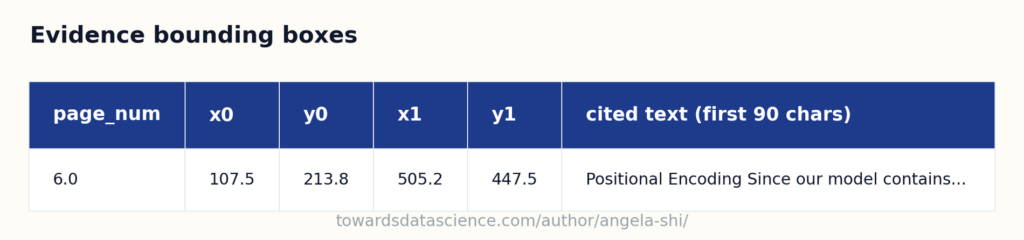 One bounding box per cited page, wrapping every cited line on that page - Image by author
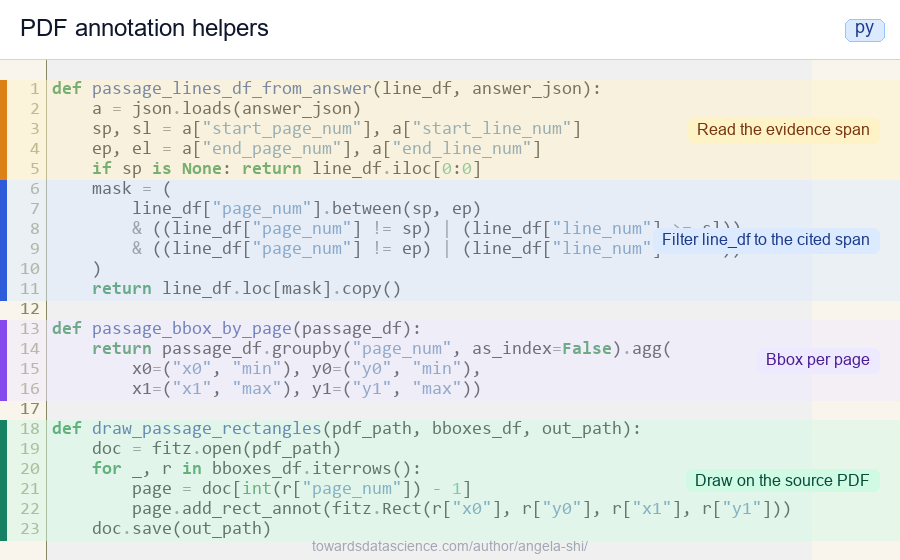 PDF annotation in three steps: expand the span, union per page, draw rectangles - Image by author
python
PDF annotation in three steps: expand the span, union per page, draw rectangles - Image by author
python
def passage_lines_df_from_answer(line_df, answer_json):
    a = json.loads(answer_json)
    sp, sl = a["start_page_num"], a["start_line_num"]
    ep, el = a["end_page_num"], a["end_line_num"]
    if sp is None: return line_df.iloc[0:0]
    mask = (
        line_df["page_num"].between(sp, ep)
        & ((line_df["page_num"] != sp) | (line_df["line_num"] >= sl))
        & ((line_df["page_num"] != ep) | (line_df["line_num"] <= el))
    )
    return line_df.loc[mask].copy()

def passage_bbox_by_page(passage_df):
    return passage_df.groupby("page_num", as_index=False).agg(
        x0=("x0", "min"), y0=("y0", "min"),
        x1=("x1", "max"), y1=("y1", "max"))

def draw_passage_rectangles(pdf_path, bboxes_df, out_path):
    doc = fitz.open(pdf_path)
    for _, r in bboxes_df.iterrows():
        page = doc[int(r["page_num"]) - 1]
        page.add_rect_annot(fitz.Rect(r["x0"], r["y0"], r["x1"], r["y1"]))
    doc.save(out_path)
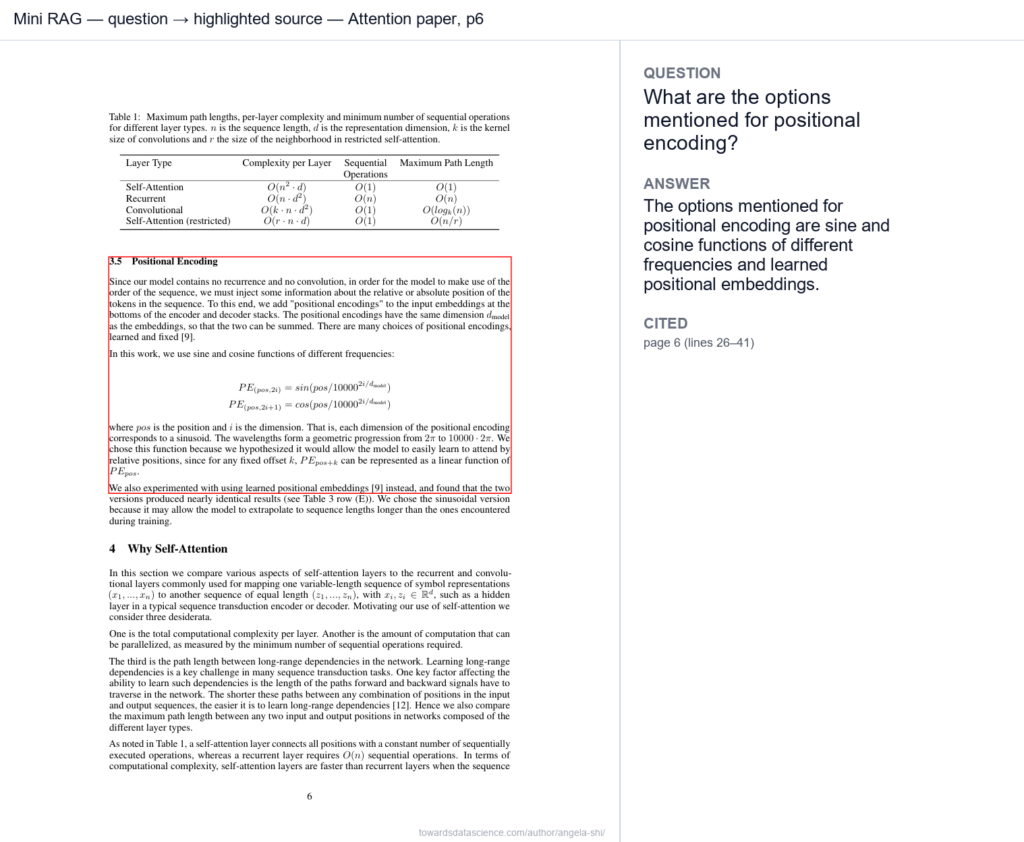 Attention paper page 6 with cited paragraph highlighted, next to question and answer - Image by author
The passage really is where the answer comes from. The red box wraps the Positional Encoding paragraph: the sentence that introduces the choice (“we use sine and cosine functions of different frequencies”) and the two-line formula directly below it. The reader can move from the chat answer to the citation to the source paragraph without leaving the same screen. That’s the whole point.
Why a box around the whole paragraph and not the exact words? Because we worked at the line granularity:
Attention paper page 6 with cited paragraph highlighted, next to question and answer - Image by author
The passage really is where the answer comes from. The red box wraps the Positional Encoding paragraph: the sentence that introduces the choice (“we use sine and cosine functions of different frequencies”) and the two-line formula directly below it. The reader can move from the chat answer to the citation to the source paragraph without leaving the same screen. That’s the whole point.
Why a box around the whole paragraph and not the exact words? Because we worked at the line granularity: line_df carries one bounding box per text line, the LLM cites a (start_line, end_line) span, and passage_bbox_by_page collapses every line in that span into one wrapping rectangle. If you want to draw the box around the exact words sin(pos / 10000^(2i/d_model)) instead of the whole paragraph, the approach is the same. Just change the granularity. Replace line_df with a word-level word_df (PyMuPDF’s page.get_text("words") gives you a bounding box per word), make the schema cite (start_word, end_word), and passage_bbox_by_page already does the right thing. Same four-brick pipeline, finer scope.
3. Chaining the bricks, and testing the pipeline
3.1 The whole pipeline as one function
The bricks chain into a single call. Feed in a PDF and a question; get back a typed answer with line citations, and optionally an annotated PDF.
- In: a PDF path and a text question (plus an optional
top_k and an optional output PDF path).
- Out: an
AnswerWithEvidence, and (if annotate_pdf is given) an annotated PDF on disk.
Inside, pdf_qa_baseline chains document parsing → question parsing → retrieval → generation → PDF annotation. What crosses the retrieval → generation boundary is just the page numbers; the filtered line_df is rebuilt inside generation.
python
def pdf_qa_baseline(
    pdf_path: str,
    question: str,
    top_k: int = 3,
    annotate_pdf: str | None = None,
):
    # 1. Parsing
    line_df = fitz_pdf_to_line_df(pdf_path)

    # 2. Retrieval
    page_df = embed_page_df(build_page_df(line_df))
    _, filtered = retrieve_pages(page_df, line_df, question, top_k)

    # 3. Generation
    answer = llm_answer_with_evidence(question, filtered)

    # 4. Optional highlighting on the source PDF
    if annotate_pdf is not None:
        passage = passage_lines_df_from_answer(line_df, answer)
        bboxes = passage_bbox_by_page(passage)
        draw_passage_rectangles(pdf_path, bboxes, annotate_pdf)

    return answer
json
{
  "answer": "The options mentioned for positional encoding are learned and fixed positional encodings, specifically sinusoidal positional encodings (using sine and cosine functions of different frequencies) and learned positional embeddings.",
  "start_page_num": 6,
  "start_line_num": 31,
  "end_page_num": 6,
  "end_line_num": 41,
  "confidence": 0.99,
  "justification": "Lines 31-41 discuss the choices for positional encodings, stating that there are many choices including learned and fixed encodings. It then explains the use of sine and cosine functions (sinusoidal encoding) and notes that learned positional embeddings were also experimented with.",
  "quotes": [
    "There are many choices of positional encodings, learned and fixed [9].",
    "In this work, we use sine and cosine functions of different frequencies: ...",
    "We also experimented with using learned positional embeddings [9] instead, and found that the two versions produced nearly identical results (see Table 3 row (E))."
  ],
  "caveats": [],
  "complete_answer_found": true,
  "context_structured": true,
  "llm_discovered_keywords": [
    "positional encodings",
    "learned",
    "fixed",
    "sinusoidal",
    "sine and cosine functions",
    "learned positional embeddings"
  ]
}
This is the API of the article. Later articles build a sister function ask_corpus(question, corpus, ...) for archive-scale work: same contract (typed answer with citations), different scope (filter the corpus first, then run document-level work on the matching documents).
3.2 Try it on a different document
Drop in any PDF you have around: a paper from your own field, a contract, a report from work. Here we pick the World Bank’s April 2026 Commodity Markets Outlook (World Bank publication, April 2026 issue; CC BY 3.0 IGO, as declared on the World Bank Open Knowledge Repository publication page for this issue): a 69-page report on energy, agriculture, and fertilizer markets, far from a research paper in tone and structure.
Same four bricks, same default prompts, same retrieve_pages, same schema. Nothing about the pipeline changes for a new document.
We start with a question whose answer lives deep in the report, in the metals chapter rather than the Executive Summary: the outlook for aluminum prices in 2026.
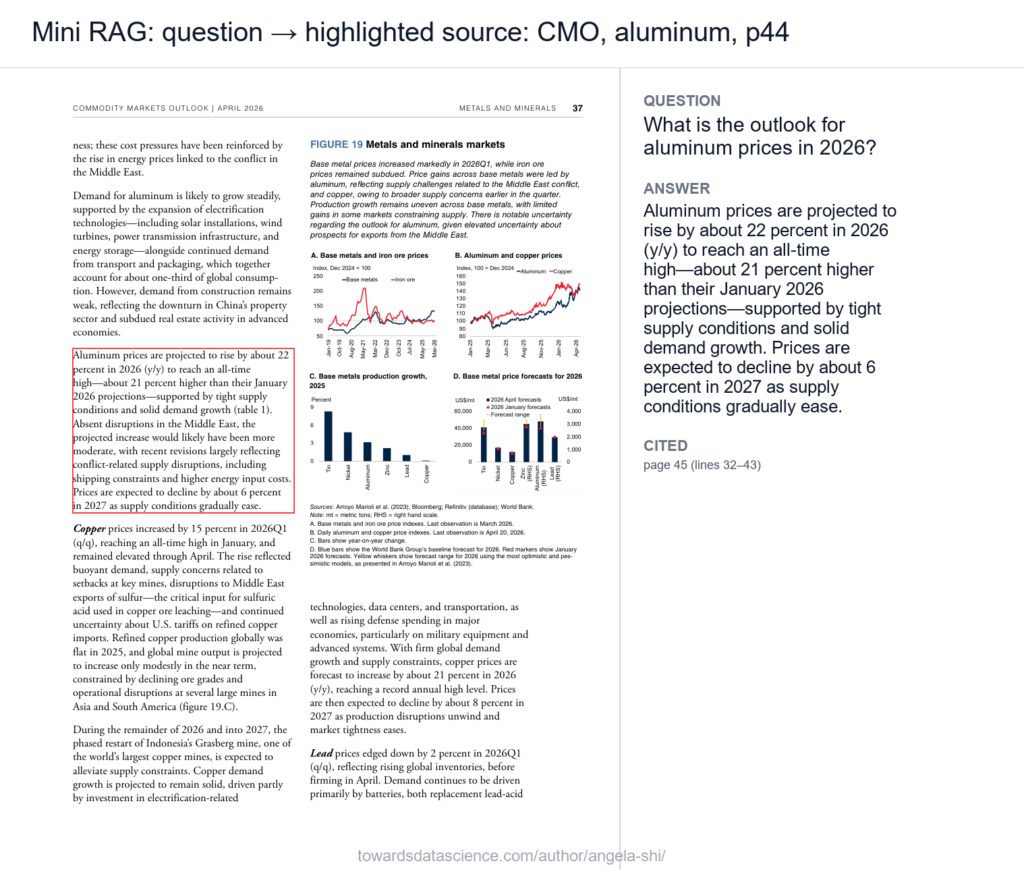
We call pdf_qa_baseline end-to-end: pass the CMO PDF, the aluminum question, top_k=3, and an annotate_pdf path so the pipeline also writes the highlighted source. The returned answer_cmo_al is the same AnswerWithEvidence shape we saw on the Attention paper.
json
{
  "answer": "Aluminum prices are projected to rise by about 22 percent in 2026 (y/y) to reach an all-time high—about 21 percent higher than their January 2026 projections—supported by tight supply conditions and solid demand growth. Prices are expected to decline by about 6 percent in 2027 as supply conditions gradually ease.",
  "start_page_num": 45,
  "start_line_num": 32,
  "end_page_num": 45,
  "end_line_num": 43,
  "confidence": 0.98,
  "justification": "The selected span explicitly provides the projected percentage increase for aluminum prices in 2026, the context for these movements, and the outlook for 2027. It also mentions the record-high level forecast and factors driving the price.",
  "quotes": [
    "Aluminum prices are projected to rise by about 22 percent in 2026 (y/y) to reach an all-time high—about 21 percent higher than their January 2026 projections—supported by tight supply conditions and solid demand growth (table 1).",
    "Prices are expected to decline by about 6 percent in 2027 as supply conditions gradually ease."
  ],
  "caveats": [],
  "complete_answer_found": true,
  "context_structured": true,
  "llm_discovered_keywords": [
    "all-time high",
    "tight supply conditions",
    "solid demand growth"
  ]
}
The composite view places the highlighted source page next to the question and the answer, so the citation can be checked at a glance:
 A harder question on the same report. What if we ask about something the report mentions only in passing? We try the AI-related electricity demand question, whose answer the World Bank developed only in an “Upside risk” sidebar on page 31.
Same call shape, harder question:
A harder question on the same report. What if we ask about something the report mentions only in passing? We try the AI-related electricity demand question, whose answer the World Bank developed only in an “Upside risk” sidebar on page 31.
Same call shape, harder question: pdf_qa_baseline(pdf_path=pdf_path_cmo, question=question_cmo_ai, top_k=3, ...). The pipeline must decide whether the retrieved pages actually carry the AI-electricity figure or whether to flag the answer as not found.
json
{
  "answer": "The provided lines mention that faster-than-anticipated expansion of AI-related data centers could boost demand for certain metals like aluminum and copper, but do not quantify the contribution of AI-related data centers to global electricity demand growth.",
  "start_page_num": 47,
  "start_line_num": 39,
  "end_page_num": 47,
  "end_line_num": 40,
  "confidence": 0.8,
  "justification": "The only mention of AI-related data centers is in relation to demand for metals, not electricity demand. There is no quantitative estimate or percentage given for their impact on global electricity demand growth.",
  "quotes": [
    "Also, faster-than-antici-\npated expansion of AI-related data centers could \nboost demand for aluminum and copper, driving \nprices higher."
  ],
  "caveats": [
    "No specific figures or direct statements about global electricity demand growth caused by AI-related data centers were found in the provided lines."
  ],
  "complete_answer_found": false,
  "context_structured": true,
  "llm_discovered_keywords": [
    "AI-related data centers",
    "electricity demand growth",
    "boost demand for aluminum and copper"
  ]
}
 CMO page 47, null-path response: the schema refused to fabricate when the answer wasn’t there - Image by author
But how can we be sure the answer really doesn’t exist in the document? Strictly, we can’t, at least not from this null path alone. What the schema says is “the LLM didn’t find the answer in the lines it was shown” , which is a different claim from “the answer is not in the document”. The Upside-risk sidebar on page 31 of the same CMO report does quantify the figure (the World Bank cites the IEA’s 8% projection of global electricity demand growth from 2024 to 2030). The default keyword pipeline pulled page 47 and nearby pages instead, where the report’s prose discusses AI’s effect on metal demand. Proving absence would require either running the LLM on every page, or a retrieval method that surfaces sidebar text and short reference mentions. That’s exactly what Article 7 (Retrieval) develops; for the minimal version, “I didn’t find it in the top three pages” is what we report.
CMO page 47, null-path response: the schema refused to fabricate when the answer wasn’t there - Image by author
But how can we be sure the answer really doesn’t exist in the document? Strictly, we can’t, at least not from this null path alone. What the schema says is “the LLM didn’t find the answer in the lines it was shown” , which is a different claim from “the answer is not in the document”. The Upside-risk sidebar on page 31 of the same CMO report does quantify the figure (the World Bank cites the IEA’s 8% projection of global electricity demand growth from 2024 to 2030). The default keyword pipeline pulled page 47 and nearby pages instead, where the report’s prose discusses AI’s effect on metal demand. Proving absence would require either running the LLM on every page, or a retrieval method that surfaces sidebar text and short reference mentions. That’s exactly what Article 7 (Retrieval) develops; for the minimal version, “I didn’t find it in the top three pages” is what we report.
3.3 More questions in one table
A small batch of four questions on the same two documents, all results in one table. Read the table for patterns , not for every cell.
- Numeric value : learning rate of the base Transformer. Specific number, expected page 7 (section 5.3 on Adam optimizer).
- No answer in document : chemical composition of seawater. The schema’s null path should fire; both retrievers will pull random-looking pages.
- Different topic on CMO : outlook for urea prices. Same pipeline on the fertilizer section of the World Bank report, far from the AI sidebar.
- Compound question : d_k and d_v in the Transformer. Two values asked at once. Also tests the table-parsing limit (the values live in Table 1 page 4, parsed as flat lines).
python
def run_pipeline_test(
    question: str,
    line_df_in: pd.DataFrame,
    page_df_in: pd.DataFrame,
    page_df_emb_in: pd.DataFrame,
    top_k: int = 3,
    client=client,
) -> dict:
    """Run both retrievers + generation on one question; return a summary dict."""
    parsed_q = get_keywords_from_question(question, client=client)
    retrieved_emb_df, _ = retrieve_pages_by_similarity(
        page_df_emb_in, line_df_in, question, top_k=top_k, client=client,
    )
    retrieved_kw_df, filtered_lines_kw = retrieve_pages(
        page_df_in, line_df_in, parsed_q.keywords, top_k=top_k,
    )
    # If keyword retrieval finds nothing, fall back to the whole doc so generation
    # still runs (small PDFs only: would not scale to a real corpus).
    lines_for_generation = (
        filtered_lines_kw if len(filtered_lines_kw) > 0 else line_df_in
    )
    answer = llm_answer_with_evidence(
        question, lines_for_generation, client=client,
    )
    return {
        "question": question,
        "keywords": parsed_q.keywords,
        "emb_top3": retrieved_emb_df["page_num"].tolist(),
        "kw_top3": (
            retrieved_kw_df["page_num"].tolist()
            if len(retrieved_kw_df) > 0 else "(no kw match)"
        ),
        "answer_excerpt": (answer.answer[:80] + ("..." if len(answer.answer) > 80 else "")),
        "cite_page": answer.start_page_num,
    }
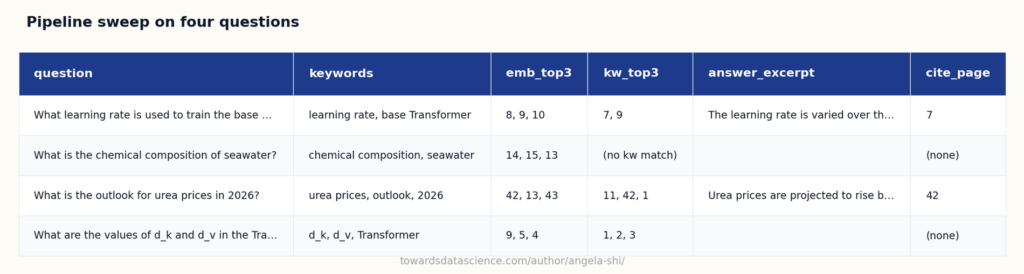 Same pipeline on four questions: two succeed, one refuses cleanly, one trips on table parsing - Image by author
Read the table left-to-right per row. Four patterns to take away:
Same pipeline on four questions: two succeed, one refuses cleanly, one trips on table parsing - Image by author
Read the table left-to-right per row. Four patterns to take away:
- Keywords beat embeddings on the learning raterow. The base Transformer’s training schedule is on page 7 (section 5.3, Optimizer). Embeddings rank pages 8/9/10; page 7 is not in the top three. The keyword retriever finds page 7 immediately via the literal phrase
learning rate. Same lesson as the epsilon row in section 2.3.c: when the question depends on a precise term the document prints verbatim, keywords are the better tool.
- Both retrievers fail on the seawaterrow, and the failure is visible. The PDF has nothing to say about seawater. The keyword column shows
(no kw match) outright, with no false ‘top-3 pages’ that look plausible. The schema then returns a null answer with a caveat. A clean ‘I don’t know’ is the system’s most valuable behavior on out-of-scope questions.
- Both retrievers work on the urearow. The CMO has a fertilizer section; embeddings and keywords both bring back page 42, generation cites it correctly. Cross-domain pipelines work as long as the question’s vocabulary lands on the document.
- The d_k and d_vcompound row exposes the table-parsing limit. The two values live in Table 1, page 4 of the Transformer paper, where each row lists
d_model, h, d_k, d_v, etc. Our parser flattened the table into plain lines, so a model that asks for two cells side by side has to reassemble the row from text alone. Keywords retrieve page 4 (the literal phrase d_k appears there), but the citation often points to one value while the other is paraphrased. The fix is structural: parse tables as tables, not as lines. That’s Article 5 (parsing) and Article 6 (compound-question decomposition) doing their job.
4. The questions each block raises
What this minimal system does well:
- A real, verifiable answer. A structured object with the answer, the page, the lines, the quote. The user can check the citation in seconds.
- “Not found” handled cleanly. When the answer isn’t in the retrieved lines, the schema allows null fields and the
caveats field says why. No fabrication.
- The answer linked to the source. The highlighted PDF closes the loop between the LLM’s claim and the document. This is what separates a useful RAG system from a chatbot that happens to read documents.
- Easy to follow. Each function does one thing. No hidden state, no framework magic. When something goes wrong, debugging is reading the code.
Now look at the same system again. Each block hides assumptions worth questioning.
4.1 Document parsing: we just read lines
We extracted text line by line. That’s reasonable for an academic paper, but look at what we threw away: section structure, headings, table layouts, figures, footnotes, cross-references. Page 4 of this paper contains Table 1 with the per-layer complexities. We parsed each of its rows as plain lines, losing the table structure entirely. Page 9 contains Table 3, the ablation study. Same problem.
For a question like “What are the options for positional encoding?” this doesn’t matter. The answer is in continuous prose. For a question like “What is the per-layer complexity of self-attention?” it suddenly does, because the answer lives in a table cell that our parser flattened into noise.
That’s the topic of Article 5: Parsing. Documents have structure. Ignoring it is the single biggest source of downstream failure.
4.2 Question parsing: we asked for keywords, but only keywords
Our question-parsing step extracts a flat list of keywords. That works on a clean question against an academic paper. It starts to break down as soon as questions get harder.
Three things this minimal version doesn’t do.
It doesn’t detect intent. “Summarize chapter 3”, “Translate this clause into French”, “Compare X and Y” each call for a different downstream pipeline. A single keywords field can’t carry that signal.
It doesn’t decompose compound questions. “What are the exclusions and the deductible?” parsed as a flat keyword list pollutes the retrieval (the keywords for “exclusions” and “deductible” pull in two different scopes that interfere). Article 6 walks through how to detect compound questions, decide whether to decompose, and route the sub-questions independently.
It doesn’t detect an expected answer shape. “What is the premium amount?” wants a number with a currency. “What are the obligations?” wants a list. “Compare the two policies” wants a table. The minimal version treats every answer as free text. Article 6 introduces the expected_answer_shape field that drives the generation template downstream.
That’s the topic of Article 6: Question Parsing. The same brick, much richer JSON.
4.3 Chunking: we aggregated by page
We chose pages as the unit of retrieval. Why pages? Why not paragraphs, or sections, or fixed-size chunks of 512 tokens like every standard RAG tutorial recommends?
The answer is that page-level aggregation happens to work for this paper because pages roughly align with semantic units. On a contract, on a legal text, on a technical manual with numbered clauses, pages are arbitrary cuts and you’d want clause-level or section-level chunks instead. The “right” chunking depends on the document and the question, not on a default value.
The temptation, when a fixed-size approach starts failing, is to grid-search over chunk sizes and overlaps. That’s the machine learning reflex. It’s the wrong frame for what’s actually a structural decision. Article 3: RAG Is Not Machine Learning, and the Six-Month Mistake of Treating It Like One makes that case in full.
4.4 Retrieval: keyword matching is transparent, but blind to vocabulary
Our retrieval just worked. Page 6 came back with the matched keyword, ahead of the rest, and the Positional Encoding section is on page 6. Anyone can look at the match table and see why. That’s the trade we made: the simplest possible retrieval, completely auditable.
The trade has a cost. Keyword matching is blind whenever the question’s vocabulary doesn’t match the document’s. Three failure modes show up immediately on the same paper.
Symbol vs word. Ask “What is the value of epsilon used in label smoothing?” The keywords from question parsing are likely something like ["epsilon", "label smoothing"]. The actual answer (ε_ls = 0.1) sits on page 8, but the document writes it as the Greek letter ε, never the English word “epsilon”. The substring check returns zero on the symbol-only page; only the literal phrase label smoothing lands on page 8.
Synonym mismatch. Ask “How does the model know the order of words in a sentence?” The keywords might be ["word order", "sentence order"]. The document calls this positional encoding. None of the question’s keywords appear on page 6. The retriever picks pages that happen to mention “order” or “sentence” in passing, none of which contain the answer.
Paraphrase. Ask “What attention mechanism does the encoder use?” The document says self-attention and Multi-Head Attention , never the phrase “attention mechanism the encoder uses”. The keywords pulled from the question, even after expansion, may or may not include the document’s exact phrasing. When they do, retrieval works. When they don’t, it silently degrades.
The first two failures are so common that the rest of the series spends two articles on them.
- Article 6: Question Parsing turns the keyword extraction into a much richer step that pulls from a domain glossary, expands synonyms, and includes likely document phrasings rather than the question’s literal words.
- Article 2: Embeddings introduces vector representations that match across surface vocabulary: where embeddings shine (synonyms, paraphrase, misspellings, cross-lingual matching), where they quietly fail (negation, exact values, internal acronyms, polysemic terms), and how to combine them with keyword matching for the best of both worlds.
- Articles 7 and 9 put the resulting hybrid retrieval into a real document index.
The right answer is to combine, not pick a winner. The two methods fail on almost opposite cases: embeddings stumble when the question depends on a precise symbol, named term, or exact value; keywords stumble when the asker’s vocabulary doesn’t literally appear in the document. Running both retrievers, taking the union of their candidates, and (optionally) re-ranking with a cross-encoder is the standard hybrid recipe. Article 2 develops it; Articles 7 and 9 wire it into a corpus.
The minimal version stays single-retriever because it teaches the right reflex first: the retriever must be auditable. Keyword matching makes that reflex concrete (you can see exactly which words landed on which page). Once that reflex is in place, embeddings become a controlled addition rather than an opaque default, and combining the two becomes a deliberate engineering choice rather than a trend.
4.5 Generation: we asked for sources, and we got them
This is the block that worked best, almost too easily. We defined a Pydantic schema with start_page_num, start_line_num, end_page_num, end_line_num, confidence, justification, quotes, and caveats, and the model filled it in correctly.
How much more can we ask? A structured comparison for comparative questions, a list of conflicts if the document contradicts itself, multiple citations from multiple parts of the document, a confidence breakdown per claim. Yes to all of the above. The generation step is far more controllable than most teams realize. Article 8: Generation as Controlled Execution explores this in depth.
5. The shape of what comes next
This minimal pipeline is the spine of everything that follows. Each part of the series goes deep on one of the questions raised above.
The mistakes that kill most projects come from getting the wrong picture of one of these blocks: RAG isn’t ML (Article 3), embeddings aren’t magic (Article 2), not all RAG problems look the same (Article 4). That’s Part I.
Each brick then gets its own deep dive: document parsing, question parsing, retrieval, generation. That’s Part II , the four bricks.
Once the blocks are solid, we recombine them for cases that look like production: long documents, justification and absence handling, table-of-contents-driven retrieval, listing questions, structured extraction, the composite pipeline. That’s Part III.
Then we change scale. From one document to many. From a single paper to an archive of hundreds or thousands of documents. The architecture changes substantially. That’s Part IV.
Finally, what it takes to operate the system in production: evaluation, cost and monitoring, security and compliance, the architecture of the codebase itself. That’s Part V.
The blocks don’t change. Their internals do.
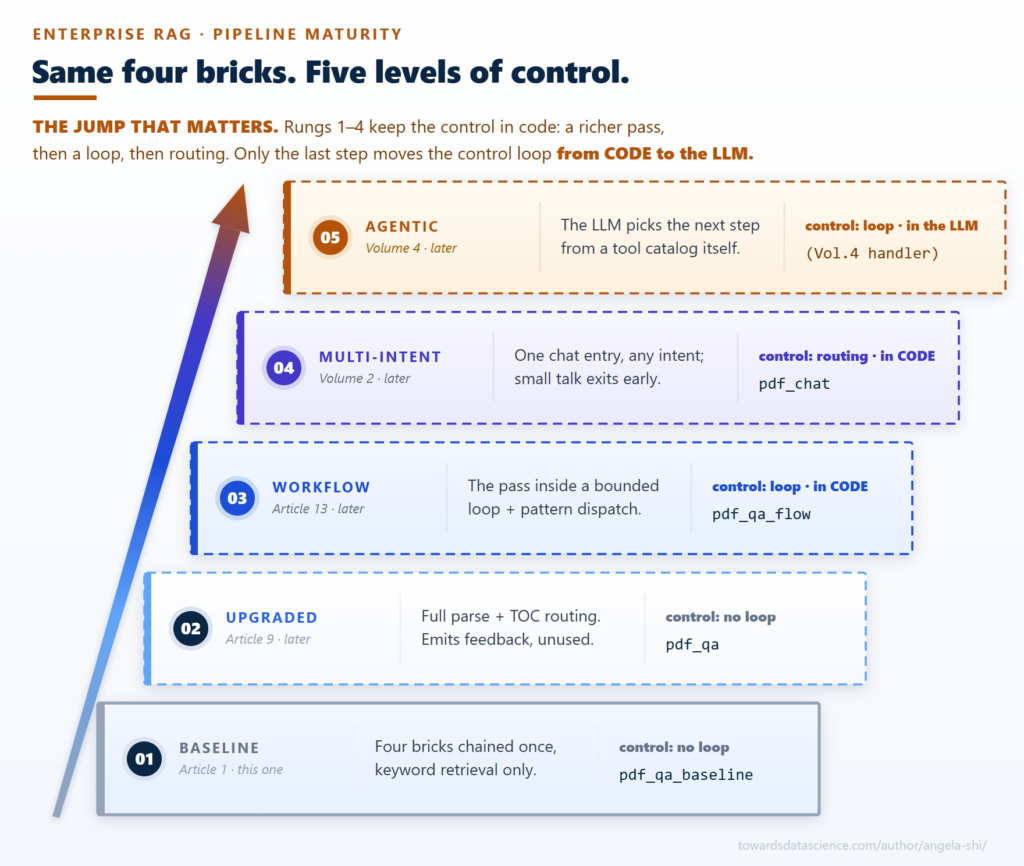 The minimal pipeline is rung 1 of 5; every later rung upgrades the same four blocks - Image by author
A few framing notes:
The minimal pipeline is rung 1 of 5; every later rung upgrades the same four blocks - Image by author
A few framing notes:
- The four bricks (Part II) are the conceptual core. Most of the rest of the series is about doing each one better. Part III and Part IV are recombinations: the same four ideas at different scales and for different question types.
- The series scope is enterprise documents. Contracts, technical specs, regulatory filings, internal procedures: all carry structure (TOC, sections, tables) and bounded vocabulary (industry jargon, expert terms). RAG works on those corpora because of that structure, not heroic embedding tricks. Documents with no structure (novels, long unstructured transcripts) and questions that require intent rather than locating a passage are out of scope; Article 4 returns to where the line falls.
- Code is illustrative, not production-ready. What you’ve read works on a real PDF, but lacks the error handling, validation, caching, cost controls, monitoring, and security a production system needs. Each gets its own article.
Here’s the explicit map from this minimal system to the rest of the series:
- PDF parsing throws away structure → Article 5, Article 10
- Question parsing needs more than keywords (intent, decomposition, expected answer shape) → Article 6
- Chunking strategy isn’t a hyperparameter → Article 3
- Question vocabulary doesn’t match document terms → Article 2, Article 6
- Retrieval picks the wrong page → Article 7, Article 9
- Model paraphrases its citation → Article 8, Article 21
- “Not found” needs nuance → Article 4
- Compound, listing, comparison, summarization questions → Article 6, Articles 11-13
- Multi-document corpus → Part IV (Articles 15-20)
- Production, evaluation, security, architecture → Part V (Articles 21-25)
You can read this introduction article to this series:
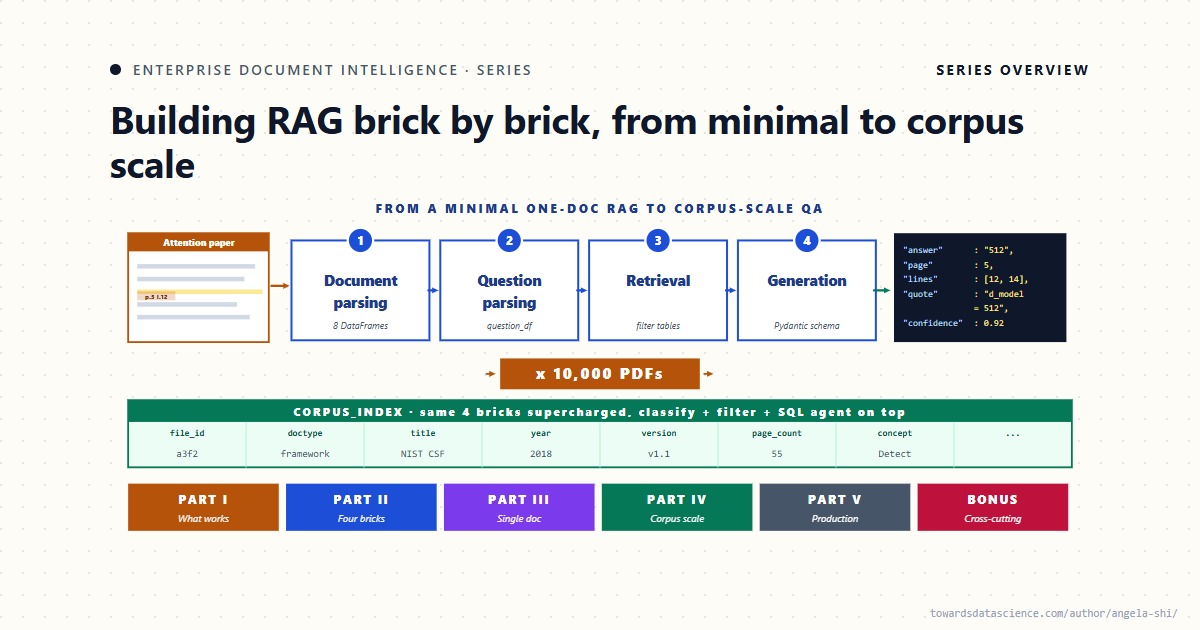 Enterprise Document Intelligence: A Series on Building RAG Brick by Brick, from Minimal to Corpus scaleFor AI engineers who want to understand every step, not just call the libraryAngela and Kezhan Shi · 22 min read
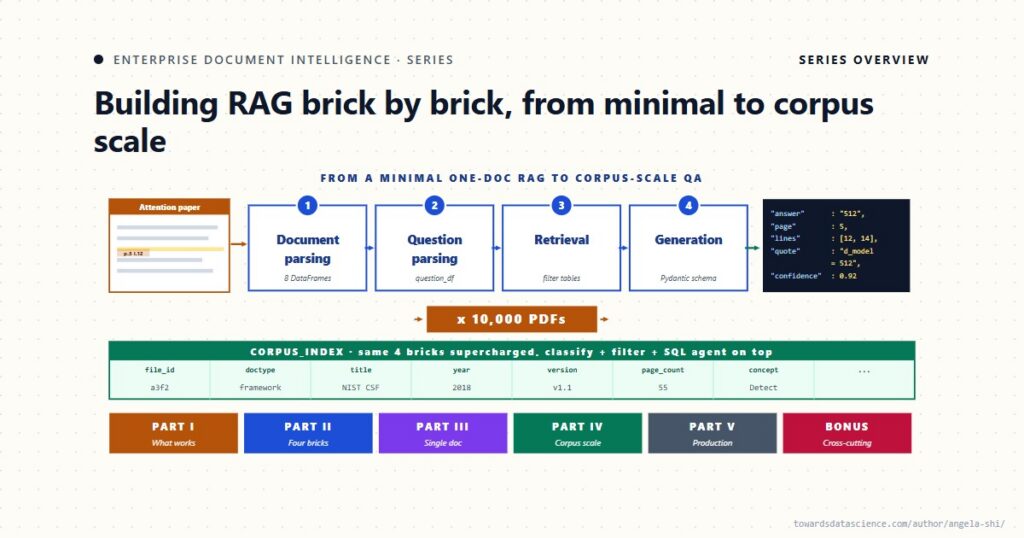
6. Conclusion
A hundred lines of Python and a Pydantic schema are enough to ship a working RAG system on a real PDF. What makes the system trustworthy is not the line count : it is the structured answer with line-level citations, the schema’s null path that refuses to fabricate, and the PDF highlight that ties every claim back to its source. The four bricks (parsing, question parsing, retrieval, generation) are the conceptual core ; everything that follows in the series is about doing each one better.
The minimal version is a baseline, not a destination. The next article tackles the misconception that wrecks the most RAG projects : that RAG is a machine learning problem. It is not.
7. Sources and further reading
The structured-output-with-citations framing this article uses for AnswerWithEvidence is the same direction as Bohnet et al. (Attributed Question Answering, 2022). The full production-grade equivalent of this kind of pipeline shows up in Anthropic’s Contextual Retrieval (Sept 2024), which Article 9 will preview. The term RAG itself comes from Lewis et al. (2020). Volume 3 (Agentic Bricks) returns to the agentic upgrade path on top of the four bricks defined here.
Same direction as the article:
- Bohnet et al., Attributed Question Answering , 2022 (arXiv:2212.08037). Structured output with citations as the trust mechanism; the closest published idea behind the
AnswerWithEvidence schema.
- Anthropic, Contextual Retrieval (Sept 2024 engineering post). Production-grade “minimal but ship-ready” pipeline; lands on hybrid retrieval + reranking. Article 9 picks up where this one stops.
- Asai et al., Self-RAG: Learning to Retrieve, Generate, and Critique through Self-Reflection , ICLR 2024 (arXiv:2310.11511). Same trust-via-structure direction. Self-reflection tokens flag when retrieval helped and when a claim is grounded.
- Lewis et al., Retrieval-Augmented Generation for Knowledge-Intensive NLP Tasks , NeurIPS 2020 (arXiv:2005.11401). The paper that named RAG.
Different angle, different context:
- Karpukhin et al., Dense Passage Retrieval for Open-Domain QA , EMNLP 2020 (arXiv:2004.04906). Dense retrieval as the production primitive; most “minimal RAG” tutorials descend from this. This article uses keyword matching instead (defended in Article 2).
- Yao et al., ReAct: Synergizing Reasoning and Acting in Language Models , ICLR 2023 (arXiv:2210.03629). Founding paper of agentic RAG. The context is general-purpose tool-picking at runtime. Volume 3 (Agentic Bricks) develops this line on top of the four bricks defined here.
- Lee et al., Can Long-Context Language Models Subsume Retrieval, RAG, SQL, and More? , 2024 (arXiv:2406.13121). The long-context-replaces-retrieval approach. Empirical data on where this works and where it breaks; this article assumes long-context doesn’t replace structured retrieval on enterprise PDFs.
Register Now to Continue Reading
Unlock Towards Data Science with a Free Account
All articles on Towards Data Science are available to registered users. Create a free account today to access this article and thousands more.
Register for freeSign in to your account
 Written By
See all from Angela and Kezhan Shi
Deep DivesDocument ProcessingLlmLlm ApplicationsRag
Share This Article
Towards Data Science is a community publication. Submit your insights to reach our global audience and earn through the TDS Author Payment Program.
Write for TDS
Related Articles
LLM Applications
How I built a self-healing pipeline that automatically fixes bad CSVs, schema changes, and weird delimiters.
Benjamin Nweke
January 21, 20268 min read
Large Language Models
How approximate vector search silently degrades Recall—and what to do about It
Partha Sarkar
January 7, 202612 min read
LLM Applications
Retrieval is not evidence. How to build AI that proves its own claims.
Ari Joury, PhD
September 24, 202611 min read
Machine Learning
Data scarcity is when a) there is limited amount or a complete lack of labeled training data, or b) lack of data for a given label...
Preetam Joshi
February 19, 20219 min read
LLM Applications
Improve the quality of Claude Code output.
Eivind Kjosbakken
May 14, 20268 min read
Data Science
Understand how ROC curves and AUC help you go beyond accuracy with visuals and examples.
Nikhil Dasari
September 17, 202510 min read
LLM Applications
Improve your proficiency with Claude Code.
Eivind Kjosbakken
August 20, 202610 min read
From Mathematical Theory to Actionable Insights: A 6-Year Shopify Case Study
Piotr Gruszecki
January 31, 202534 min read
Data Science
Using DMV Data with Pandas and GeoPandas
Dan Wilentz
April 26, 202313 min read
Your home for data science and AI. The world's leading publication for data science, data analytics, data engineering, machine learning, and artificial intelligence professionals.
Subscribe to Our NewsletterWrite For TDS•About•Advertise•Privacy Policy•Terms of Use
© Insight Media Group, LLC 2026•The New Stack•roadmap.sh•Creator Network
Recommended Articles
Close