In our supervised learning series, we’ve explored the basics of classification algorithms and covered the concept of logistic regression. Now, let’s move to another popular algorithm: Decision Trees.
Decision Trees are widely used in machine learning because they are simple, interpretable, and effective for both classification and regression tasks. The beauty of decision trees is that they break complex problems into smaller, more understandable steps — just like following a flowchart.
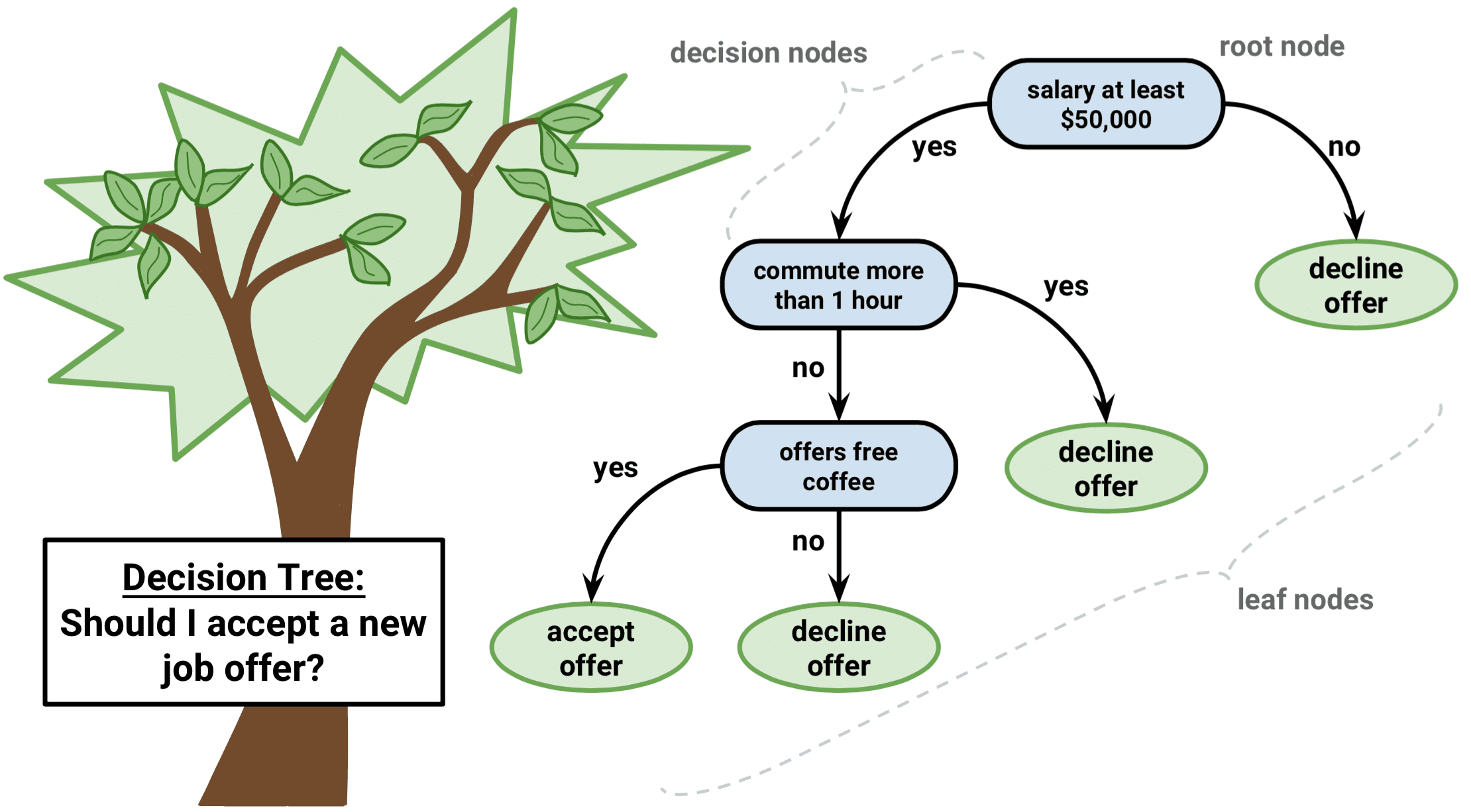
A Decision Tree is a hierarchical structure that helps make predictions based on conditions.
Root Node → The starting point (first split).
Internal Nodes → Tests based on feature values.
Branches → Outcomes of the test.
Leaf Nodes → Final decision or prediction.
Think of it like a series of Yes/No questions that lead you to an answer.
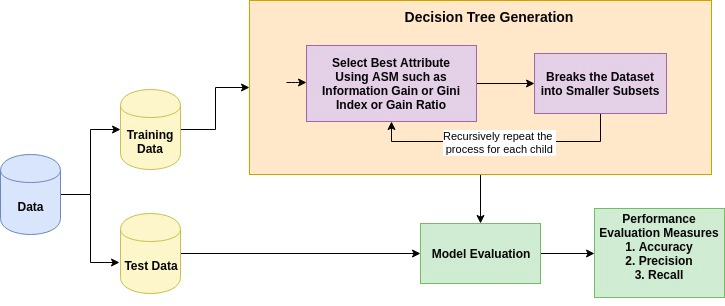
The algorithm builds the tree by repeatedly splitting the dataset into groups:
Select the best feature using a rule (Attribute Selection Measure, ASM).
Split the dataset based on that feature.
Create decision nodes for splits, and leaf nodes for final decisions.
Repeat until:
All records in a branch belong to the same class.
No features are left.
The dataset can’t be split further.
The goal is to create “pure” groups where each group mostly contains samples from one class.
A big question is: How does the algorithm decide which feature to split on?
It uses Attribute Selection Measures (ASMs) like Information Gain, Gain Ratio, Gini Index. For detail math, you can visit here.
These methods measure how well a feature divides the dataset into clear groups. The feature with the best score becomes the node for splitting.
Decision Trees can be used in two ways:
Classification → The tree predicts a class label (e.g., Setosa, Versicolor, Virginica in the Iris dataset). It splits data into pure groups until each branch mainly belongs to one class.
Regression → Instead of predicting a class, the tree predicts a continuous value (e.g., predicting house prices). At each split, it tries to minimize the difference between predicted and actual values (using metrics like Mean Squared Error).
👉 In short, classification trees answer “Which category does this belong to?”, while regression trees answer “What is the value?”.
Let’s use the Iris dataset, which has:
4 features → Sepal length, Sepal width, Petal length, Petal width.
Target → Type of Iris flower (Setosa, Versicolor, Virginica).
The algorithm looks at all features. It finds that Petal length separates Setosa from the others very well.
Petal length ≤ 2.45 → Setosa
Petal length > 2.45 → Needs more splitting
For samples where Petal length > 2.45, we still have two species mixed (Versicolor & Virginica). The algorithm checks the remaining features and finds Petal width is the best split:
Petal width ≤ 1.75 → Versicolor
Petal width > 1.75 → Virginica
Now each branch contains only one species. The tree looks like this:
Petal length ≤ 2.45 → Setosa
Petal length > 2.45 & Petal width ≤ 1.75 → Versicolor
Petal length > 2.45 & Petal width > 1.75 → Virginica
That’s it —how it works!
The Iris dataset is one of the most common beginner datasets. It contains measurements of iris flowers (like sepal length, sepal width, petal length, petal width) and the goal is to predict the species (Setosa, Versicolor, Virginica).
We’ll use a Decision Tree Classifier from sklearn to solve this problem.
from sklearn.datasets import load_iris
from sklearn.tree import DecisionTreeClassifier
from sklearn.model_selection import train_test_split
from sklearn.metrics import accuracy_score

# Step 1: Load the Iris dataset
X, y = load_iris(return_X_y=True)

# Step 2: Split data into training (80%) and testing (20%)
X_train, X_test, y_train, y_test = train_test_split(X, y, test_size=0.2, random_state=42)

# Step 3: Initialize Decision Tree Classifier
clf = DecisionTreeClassifier(random_state=42)

# Step 4: Train the model
clf.fit(X_train, y_train)

# Step 5: Predict and evaluate
y_pred = clf.predict(X_test)
acc = accuracy_score(y_test, y_pred) * 100
print(f"Decision Tree model accuracy: {acc:.2f}%")
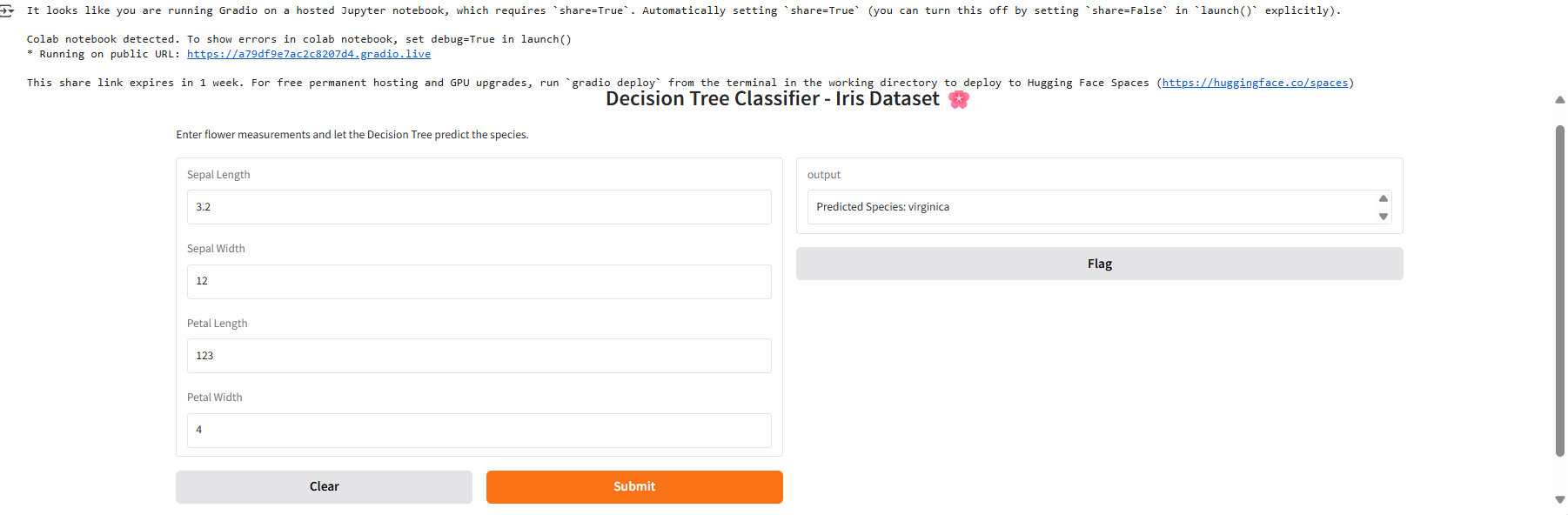
We can make our model interactive so that anyone can test predictions without writing code. Let’s build a Gradio interface where users input flower measurements and see the predicted species.We can perform the
Save the trained model
Load the iris tables
Define prediction function
Build Gradio UI
import gradio as gr
import joblib

# Save the trained model
joblib.dump(clf, "decision_tree_iris.pkl")

# Load iris dataset labels
iris = load_iris()
target_names = iris.target_names

# Define prediction function
def predict_species(sepal_length, sepal_width, petal_length, petal_width):
    model = joblib.load("decision_tree_iris.pkl")
    features = [[sepal_length, sepal_width, petal_length, petal_width]]
    prediction = model.predict(features)[0]
    return f"Predicted Species: {target_names[prediction]}"

# Build Gradio UI
interface = gr.Interface(
    fn=predict_species,
    inputs=[
        gr.Number(label="Sepal Length"),
        gr.Number(label="Sepal Width"),
        gr.Number(label="Petal Length"),
        gr.Number(label="Petal Width")
    ],
    outputs="text",
    title="Decision Tree Classifier - Iris Dataset 🌸",
    description="Enter flower measurements and let the Decision Tree predict the species."
)

interface.launch()
Decision Trees work by asking the most important “Yes/No” questions about features until they can classify data into groups. In the Iris dataset, just two questions about petal length and width were enough to classify flowers into three species.
In real-world scenarios, decision trees can grow much larger, but the concept remains the same. They’re simple, interpretable, and a great starting point before moving on to advanced ensemble methods like Random Forests and Gradient Boosting.
Stay tuned — in the next articles, we’ll explore how decision trees form the foundation for these advanced models. 🚀