保留正文与补采附件。源页面当前未重新核验;具体限制见交付清单。
 We value your privacy
We use cookies to enhance your browsing experience, serve personalised ads or content, and analyse our traffic. By clicking "Accept All", you consent to our use of cookies.
Customise Reject All Accept All
Customise Consent Preferences
We value your privacy
We use cookies to enhance your browsing experience, serve personalised ads or content, and analyse our traffic. By clicking "Accept All", you consent to our use of cookies.
Customise Reject All Accept All
Customise Consent Preferences  We use cookies to help you navigate efficiently and perform certain functions. You will find detailed information about all cookies under each consent category below.
The cookies that are categorised as "Necessary" are stored on your browser as they are essential for enabling the basic functionalities of the site. ... Show more
NecessaryAlways Active
Necessary cookies are required to enable the basic features of this site, such as providing secure log-in or adjusting your consent preferences. These cookies do not store any personally identifiable data.
We use cookies to help you navigate efficiently and perform certain functions. You will find detailed information about all cookies under each consent category below.
The cookies that are categorised as "Necessary" are stored on your browser as they are essential for enabling the basic functionalities of the site. ... Show more
NecessaryAlways Active
Necessary cookies are required to enable the basic features of this site, such as providing secure log-in or adjusting your consent preferences. These cookies do not store any personally identifiable data.
-
Cookie
BCTempID
-
Duration
10 minutes
-
Description
No description available.
-
Cookie
__cf_bm
-
Duration
1 hour
-
Description
This cookie, set by Cloudflare, is used to support Cloudflare Bot Management.
-
Cookie
AWSALBCORS
-
Duration
7 days
-
Description
Amazon Web Services set this cookie for load balancing.
-
Cookie
_cfuvid
-
Duration
session
-
Description
Cloudflare sets this cookie to track users across sessions to optimize user experience by maintaining session consistency and providing personalized services
-
Cookie
li_gc
-
Duration
6 months
-
Description
Linkedin set this cookie for storing visitor's consent regarding using cookies for non-essential purposes.
-
Cookie
__hssrc
-
Duration
session
-
Description
This cookie is set by Hubspot whenever it changes the session cookie. The __hssrc cookie set to 1 indicates that the user has restarted the browser, and if the cookie does not exist, it is assumed to be a new session.
-
Cookie
__hssc
-
Duration
1 hour
-
Description
HubSpot sets this cookie to keep track of sessions and to determine if HubSpot should increment the session number and timestamps in the __hstc cookie.
-
Cookie
wpEmojiSettingsSupports
-
Duration
session
-
Description
WordPress sets this cookie when a user interacts with emojis on a WordPress site. It helps determine if the user's browser can display emojis properly.
-
Cookie
BCSessionID
-
Duration
1 year 1 month 4 days
-
Description
Blueconic sets this cookie as a unique identifier for the BlueConic profile.
-
Cookie
_octo
-
Duration
1 year
-
Description
No description available.
-
Cookie
logged_in
-
Duration
1 year
-
Description
No description available.
-
Cookie
__Secure-YEC
-
Duration
past
-
Description
YouTube sets this cookie to stores the user's video player preferences using embedded YouTube video
-
Cookie
__eoi
-
Duration
6 months
-
Description
Description is currently not available.
-
Cookie
AWSALBTGCORS
-
Duration
7 days
-
Description
No description available.
-
Cookie
login-status-p
-
Duration
past
-
Description
Description is currently not available.
-
Cookie
AWSALBTG
-
Duration
7 days
-
Description
No description available.
-
Cookie
csrf_token
-
Duration
session
-
Description
No description available.
-
Cookie
token_v2
-
Duration
1 day
-
Description
Description is currently not available.
-
Cookie
D
-
Duration
1 year
-
Description
Description is currently not available.
-
Cookie
PHPSESSID
-
Duration
session
-
Description
This cookie is native to PHP applications. The cookie stores and identifies a user's unique session ID to manage user sessions on the website. The cookie is a session cookie and will be deleted when all the browser windows are closed.
-
Cookie
VISITOR_PRIVACY_METADATA
-
Duration
6 months
-
Description
YouTube sets this cookie to store the user's cookie consent state for the current domain.
-
Cookie
cookietest
-
Duration
session
-
Description
The cookietest cookie is typically used to determine whether the user's browser accepts cookies, essential for website functionality and user experience.
-
Cookie
__Host-airtable-session
-
Duration
1 year
-
Description
This cookie is used to enable us to integrate the services of Airtable.
-
Cookie
__Host-airtable-session.sig
-
Duration
1 year
-
Description
This cookie is used to enable us to integrate the services of Airtable.
-
Cookie
m
-
Duration
1 year 1 month 4 days
-
Description
Stripe sets this cookie for fraud prevention purposes. It identifies the device used to access the website, allowing the website to be formatted accordingly.
-
Cookie
BIGipServer*
-
Duration
session
-
Description
Marketo sets this cookie to collect information about the user's online activity and build a profile about their interests to provide advertisements relevant to the user.
-
Cookie
__cfruid
-
Duration
session
-
Description
Cloudflare sets this cookie to identify trusted web traffic.
-
Cookie
_GRECAPTCHA
-
Duration
6 months
-
Description
Google Recaptcha service sets this cookie to identify bots to protect the website against malicious spam attacks.
-
Cookie
__Secure-YNID
-
Duration
6 months
-
Description
Google cookie used to protect user security and prevent fraud, especially during the login process.
-
Cookie
cookieyes-consent
-
Duration
1 year
-
Description
CookieYes sets this cookie to remember users' consent preferences so that their preferences are respected on subsequent visits to this site. It does not collect or store any personal information about the site visitors.
Functional
Functional cookies help perform certain functionalities like sharing the content of the website on social media platforms, collecting feedback, and other third-party features.
-
Cookie
lidc
-
Duration
1 day
-
Description
LinkedIn sets the lidc cookie to facilitate data center selection.
-
Cookie
brw
-
Duration
1 year
-
Description
No description available.
-
Cookie
brwConsent
-
Duration
5 minutes
-
Description
Description is currently not available.
-
Cookie
WMF-Uniq
-
Duration
1 year
-
Description
Description is currently not available.
-
Cookie
loom_anon_comment
-
Duration
1 year
-
Description
No description available.
-
Cookie
loom_referral_video
-
Duration
session
-
Description
Description is currently not available.
-
Cookie
VISITOR_INFO1_LIVE
-
Duration
6 months
-
Description
A cookie set by YouTube to measure bandwidth that determines whether the user gets the new or old player interface.
-
Cookie
yt-remote-connected-devices
-
Duration
Never Expires
-
Description
YouTube sets this cookie to store the user's video preferences using embedded YouTube videos.
-
Cookie
ytidb::LAST_RESULT_ENTRY_KEY
-
Duration
Never Expires
-
Description
The cookie ytidb::LAST_RESULT_ENTRY_KEY is used by YouTube to store the last search result entry that was clicked by the user. This information is used to improve the user experience by providing more relevant search results in the future.
-
Cookie
yt-remote-device-id
-
Duration
Never Expires
-
Description
YouTube sets this cookie to store the user's video preferences using embedded YouTube videos.
-
Cookie
yt-remote-session-name
-
Duration
session
-
Description
The yt-remote-session-name cookie is used by YouTube to store the user's video player preferences using embedded YouTube video.
-
Cookie
yt-remote-fast-check-period
-
Duration
session
-
Description
The yt-remote-fast-check-period cookie is used by YouTube to store the user's video player preferences for embedded YouTube videos.
-
Cookie
yt-remote-session-app
-
Duration
session
-
Description
The yt-remote-session-app cookie is used by YouTube to store user preferences and information about the interface of the embedded YouTube video player.
-
Cookie
yt-remote-cast-available
-
Duration
session
-
Description
The yt-remote-cast-available cookie is used to store the user's preferences regarding whether casting is available on their YouTube video player.
-
Cookie
yt-remote-cast-installed
-
Duration
session
-
Description
The yt-remote-cast-installed cookie is used to store the user's video player preferences using embedded YouTube video.
-
Cookie
cp_session
-
Duration
3 months
-
Description
Codepen sets this cookie for Help systems found in the website.
-
Cookie
loid
-
Duration
1 year 1 month 4 days
-
Description
This cookie is set by the Reddit. The cookie enables the sharing of content from the website onto the social media platform.
Analytics
Analytical cookies are used to understand how visitors interact with the website. These cookies help provide information on metrics such as the number of visitors, bounce rate, traffic source, etc.
-
Cookie
__hstc
-
Duration
6 months
-
Description
Hubspot set this main cookie for tracking visitors. It contains the domain, initial timestamp (first visit), last timestamp (last visit), current timestamp (this visit), and session number (increments for each subsequent session).
-
Cookie
hubspotutk
-
Duration
6 months
-
Description
HubSpot sets this cookie to keep track of the visitors to the website. This cookie is passed to HubSpot on form submission and used when deduplicating contacts.
-
Cookie
_ga
-
Duration
1 year 1 month 4 days
-
Description
Google Analytics sets this cookie to calculate visitor, session and campaign data and track site usage for the site's analytics report. The cookie stores information anonymously and assigns a randomly generated number to recognise unique visitors.
-
Cookie
ga*
-
Duration
1 year 1 month 4 days
-
Description
Google Analytics sets this cookie to store and count page views.
-
Cookie
__Host-psifi.analyticsTrace
-
Duration
6 hours
-
Description
Description is currently not available.
-
Cookie
__Host-psifi.analyticsTraceV2
-
Duration
6 hours
-
Description
Description is currently not available.
-
Cookie
_gh_sess
-
Duration
session
-
Description
GitHub sets this cookie for temporary application and framework state between pages like what step the user is on in a multiple step form.
-
Cookie
YSC
-
Duration
session
-
Description
YSC cookie is set by Youtube and is used to track the views of embedded videos on Youtube pages.
-
Cookie
ajs_anonymous_id
-
Duration
1 year
-
Description
This cookie is set by Segment to count the number of people who visit a certain site by tracking if they have visited before.
-
Cookie
vuid
-
Duration
1 year 1 month 4 days
-
Description
Vimeo installs this cookie to collect tracking information by setting a unique ID to embed videos on the website.
Performance
Performance cookies are used to understand and analyse the key performance indexes of the website which helps in delivering a better user experience for the visitors.
-
Cookie
AWSALB
-
Duration
7 days
-
Description
AWSALB is an application load balancer cookie set by Amazon Web Services to map the session to the target.
-
Cookie
acq
-
Duration
past
-
Description
Description is currently not available.
-
Cookie
acq.sig
-
Duration
past
-
Description
Description is currently not available.
-
Cookie
ptc
-
Duration
2 years
-
Description
No description available.
Advertisement
Advertisement cookies are used to provide visitors with customised advertisements based on the pages you visited previously and to analyse the effectiveness of the ad campaigns.
-
Cookie
muc_ads
-
Duration
1 year 1 month 4 days
-
Description
Twitter sets this cookie to collect user behaviour and interaction data to optimize the website.
-
Cookie
guest_id_marketing
-
Duration
1 year 1 month 4 days
-
Description
Twitter sets this cookie to identify and track the website visitor.
-
Cookie
guest_id_ads
-
Duration
1 year 1 month 4 days
-
Description
Twitter sets this cookie to identify and track the website visitor.
-
Cookie
personalization_id
-
Duration
1 year 1 month 4 days
-
Description
Twitter sets this cookie to integrate and share features for social media and also store information about how the user uses the website, for tracking and targeting.
-
Cookie
guest_id
-
Duration
1 year 1 month 4 days
-
Description
Twitter sets this cookie to identify and track the website visitor. It registers if a user is signed in to the Twitter platform and collects information about ad preferences.
-
Cookie
bcookie
-
Duration
1 year
-
Description
LinkedIn sets this cookie from LinkedIn share buttons and ad tags to recognize browser IDs.
-
Cookie
__Secure-ROLLOUT_TOKEN
-
Duration
6 months
-
Description
YouTube sets this cookie to manage feature rollout and experimentation. It helps Google control which new features or interface changes are shown to users as part of testing and staged rollouts, ensuring consistent experience for a given user during an experiment.
-
Cookie
yt.innertube::nextId
-
Duration
Never Expires
-
Description
YouTube sets this cookie to register a unique ID to store data on what videos from YouTube the user has seen.
-
Cookie
yt.innertube::requests
-
Duration
Never Expires
-
Description
YouTube sets this cookie to register a unique ID to store data on what videos from YouTube the user has seen.
-
Cookie
session_tracker
-
Duration
session
-
Description
This cookie is set by the Reddit. This cookie is used to identify trusted web traffic. It also helps in adverstising on the website.
-
Cookie
edgebucket
-
Duration
session
-
Description
Reddit sets this cookie to save the information about a log-on Reddit user, for the purpose of advertisement recommendations and updating the content.
-
Cookie
did
-
Duration
1 year
-
Description
Arbor sets this cookie to show targeted ads to site visitors.This cookie expires after 2 months or 1 year.
Uncategorised
Other uncategorised cookies are those that are being analysed and have not been classified into a category as yet.
No cookies to display.
Reject All Save My Preferences Accept All
Toggle SearchToggle Mobile Navigation
Publish AI, ML & data-science insights to a global community of data professionals.
Sign inSubmit an Article
LatestEditor's PicksNewsletterShipAI
Write For TDS
LinkedInXToggle Search
Data Science
Ludwig - A "Friendlier" Deep Learning Framework
Deep Learning Made Easier with this low-code Declarative Framework
John Adeojo
June 26, 202312 min read
Deep Learning Made Easy with this Low-Code, Declarative Framework
 Image by Author: Generated with Midjourney
Learn this step by step with the interactive AI and Data Scientist, Computer Science and Machine Learning roadmaps.
Image by Author: Generated with Midjourney
Learn this step by step with the interactive AI and Data Scientist, Computer Science and Machine Learning roadmaps.
Background - Deep Learning, too Complex?
I have tended to shy away from deep learning for industry use cases. Not due to a lack of interest, rather I find the popular deep learning frameworks cumbersome. I appreciate Pytorch and TensorFlow are fantastic tools for research purposes, but the APIs are not the most user friendly. In situations where I need to deliver a quick proof of concept for a client, the last thing I want to be doing is tinkering with Pytorch tensors.
While attending the AI summit in London, I stumbled across a team claiming to have a solution to my deep learning problem. They have been leveraging a different approach, which they described as "the mid-point between TensorFlow and AutoML", a framework called Ludwig.
What is Ludwig?
Developed by Uber, Ludwig is an open-source framework for building deep learning models. It is declarative, which means that instead of constructing complex models layer-by-layer like you would in TensorFlow, you simply declare the structure of the model with a configuration file. This sounded too good to be true, so I had to see for myself. In the remainder of this article, I detail my experience with Ludwig through an example project I have taken from Kaggle. Along the way I will discuss some of its strengths, pain-points, and give you my conclusion on whether it's worth using.
Note - Although initially developed by Uber, Ludwig is an open source library under the Apache 2.0 License. The project is hosted by the Linux Foundation AI & Data . I have no commercial affiliation with Uber or the developers of Ludwig.
The project - Demand Forecasting
The project brief : Forecast the final 30 days of orders across each store for the retailer WOMart.
Your Client WOMart is a leading nutrition and supplement retail chain that offers a comprehensive range of products for all your wellness and fitness needs.
WOMart follows a multi-channel distribution strategy with 350+ retail stores spread across 100+ cities.
The Data
The dataset had a total of 22,265 observations, each pertaining to one day of sales at a given store. For brevity I won't go into the full details of the data set, but you can see some descriptive statistics here.
Note : The data is free to use for any purposes under the Open Data Commons license.
The data dictionary:
A Brief Overview of the Methodology
I won't go into too much detail on the methodology here as this isn't the main purpose of this article. I'll cover how I framed the problem at a high level to give you some context.
I framed the forecasting issue as a 'pseudo' sequence-to-sequence deep learning problem. The method entailed utilising 360 days of time series data points to predict the subsequent 30 days of customer orders. I incorporated some categorical variables and had to generate separate predictions for each day of orders, which led to a somewhat unconventional setup - thus the term 'pseudo' sequence-to-sequence for describing the problem. I will expand on the specifics of the feature engineering later in this article.
Besides this, the methodology I followed was standard for model development. I split my data into a training data set and a holdout dataset and did some re-scaling of features and labels. Model training was done on the training data, and testing on the holdout.
Note: Ludwig does provide the capability to natively split data within the API. However, to maintain rigour, I established a separate holdout dataset. The training dataset was subsequently divided into additional training, validation, and testing subsets. The holdout dataset was excluded entirely, used only for analysing the predictions generated by the model.
Feature Engineering
At the time of writing this article, I would say that sequence-to-sequence modelling as it pertains to timeseries forecasting is tricky to do in Ludwig. The reason for this is the feature engineering. The Ludwig API has an excellent ability to handle sequences as inputs, but they haven't (yet) developed a coherent approach for time series sequences as outputs. You can develop a "pseudo" sequence-to-sequence model by declaring multiple outputs, but the overall feature engineering experience feels quite "hacky".
Sequence features : Except for those features that don't change with time, I engineered all the predictive features to be "Ludwig-formatted" sequences. Each input sequence is a horizontal stacking of each "time series" feature across a pre-defined timeframe. Each feature sequence is determined at the store level and encapsulated in one cell of the dataframe (it looks as messy as it sounds).
Sequence labels : For sequence labels, you must declare each point in the sequence as an individual label for the model. This ended up with me declaring 30 labels for each store, one label per day of orders to be predicted.
Example of the feature engineering process below:
Architecting Your Model
The Ludwig API allows you to architect fairly complex and customisable models declaratively. Ludwig does this through a .yaml file. Now, I appreciate many data scientists reading this might not have used .yaml files, but generally in software development these are used for configuration. The files might appear scary at first glance, but they are quite friendly. Let's step through the main parts of the file I create to build the model.
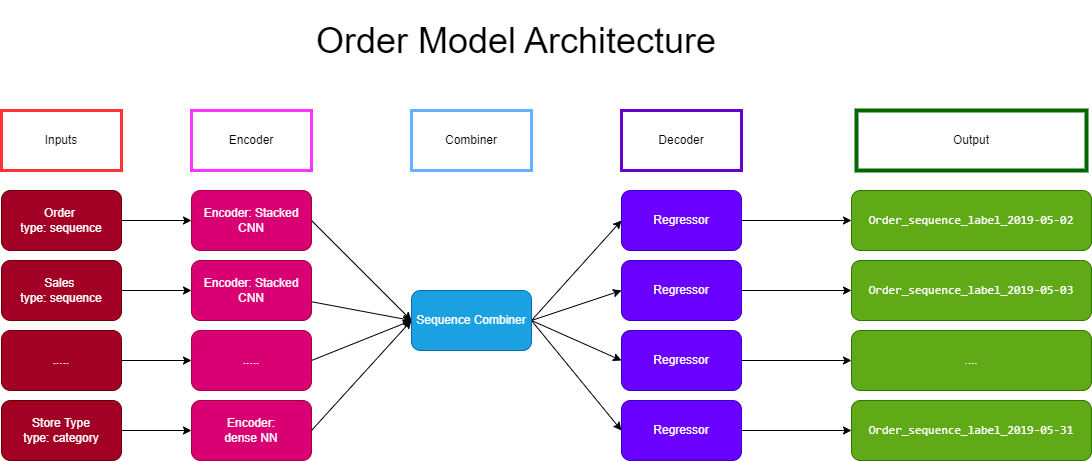 Image by Author: Model architecture
Before we delve into the configurations, it's worth briefly introducing the architecture at the heart of Ludwig's deep learning framework: the Encoder, Combiner, and Decoder. Most of the models you configure in Ludwig will predominantly adhere to this architecture. Understanding this can simplify the process of stacking components to quickly build your deep learning models.
Image by Author: Model architecture
Before we delve into the configurations, it's worth briefly introducing the architecture at the heart of Ludwig's deep learning framework: the Encoder, Combiner, and Decoder. Most of the models you configure in Ludwig will predominantly adhere to this architecture. Understanding this can simplify the process of stacking components to quickly build your deep learning models.
Declaring your Model
Right at the top of the file you declare the model type used. Ludwig provides two options, tree-based models, and deep neural networks for which I chose the latter.
yaml
model_type: ecd
Declaring your data splits
You can split data sets natively by declaring your split percentages, type of split, and column or variable you're splitting on. For my purposes I wanted to ensure that a store could only appear in one of the data sets, hash splitting was perfect for that.
For best practice, I would probably advise constructing a holdout set outside of the Ludwig API especially where you are doing some initial feature engineering like one-hot-encoding or normalisation. This should help prevent data leakage.
yaml
model_type: ecd
split:
    type: hash
    column: Store_id
    probabilities:
    - 0.7
    - 0.15
    - 0.15
#...omitted sections...
Declaring the Model Inputs
You declare inputs by name, type, and encoder. Depending on the type of input to the model you have a variety of options for encoders. Essentially encoders are a way of transforming your inputs such that it can be interpreted by the model. The choice of encoder really depends on the data and the modelling task.
yaml
model_type: ecd
split:
    type: hash
    column: Store_id
    probabilities:
    - 0.7
    - 0.15
    - 0.15
input_features:
  - name: Sales
    type: sequence
    encoder: stacked_cnn
    reduce_output: null
  - name: Order
    type: sequence
    encoder: stacked_cnn
    reduce_output: null
  - name: Discount
    type: sequence
    encoder: stacked_cnn
    reduce_output: null
  - name: DayOfWeek
    type: sequence
    encoder: stacked_cnn
    reduce_output: null
  - name: MonthOfYear
    type: sequence
    encoder: stacked_cnn
    reduce_output: null
  - name: Holiday
    type: sequence
    encoder: stacked_cnn
    reduce_output: null
  - name: Store_Type
    type: category
    encoder: dense
  - name: Location_Type
    type: category
    encoder: dense
  - name: Region_Code
    type: category
    encoder: dense
#...omitted sections...
Declaring the Combiner
Combiners, as the name suggests, amalgamate the outputs of your encoders. The Ludwig API offers an array of different combiners, each with its own specific use case. The choice of combiner can depend on the structure of your model and the relationships between your features. For instance, you might use a 'concat' combiner if you want to simply concatenate the outputs of your encoders, or a 'sequence' combiner if your features have a sequential relationship.
yaml
model_type: ecd
split:
    type: hash
    column: Store_id
    probabilities:
    - 0.7
    - 0.15
    - 0.15
input_features:
  - name: Sales
    type: sequence
    encoder: stacked_cnn
    reduce_output: null
  - name: Order
    type: sequence
    encoder: stacked_cnn
    reduce_output: null
  # ... omitted sections ...

  - name: Location_Type
    type: category
    encoder: dense
  - name: Region_Code
    type: category
    encoder: dense
combiner:
    type: sequence
    main_sequence_feature: Order
    reduce_output: null
    encoder:
    # ... omitted sections ...
As with many aspects of deep learning, the optimal choice of combiner often depends on the specifics of your dataset and problem, and may require some experimentation.
Declaring the Model Outputs
Finalising your network is as simple as declaring your outputs, which are just your labels. My pet peeve with Ludwig for timeseries is that you can't (yet) declare timeseries outputs. As I mentioned previously, you have to "hack" it by declaring each point in your time series separately. This left me with thirty separate declarations, which looks very messy in all honesty. For each output you can specify the loss function too adding additional configurability. Ludwig has a myriad of options pre-built for different output types, however I don't know if you are able to implement custom loss functions as you can with Pytorch.
yaml
model_type: ecd
split:
    type: hash
    column: Store_id
    probabilities:
    - 0.7
    - 0.15
    - 0.15
input_features:
  - name: Sales
    type: sequence
    encoder: stacked_cnn
    reduce_output: null
  - name: Order
    type: sequence
    encoder: stacked_cnn
    reduce_output: null
# ...omitted sections...

  - name: Location_Type
    type: category
    encoder: dense
  - name: Region_Code
    type: category
    encoder: dense
combiner:
    type: sequence
    main_sequence_feature: Order
    reduce_output: null
    encoder:
        type: parallel_cnn
output_features:
  - name: Order_sequence_label_2019-05-02
    type: number
    loss:
      type: mean_absolute_error
  - name: Order_sequence_label_2019-05-03
    type: number
    loss:
      type: mean_absolute_error
#...omitted sections...

      type: mean_absolute_error
  - name: Order_sequence_label_2019-05-30
    type: number
    loss:
      type: mean_absolute_error
  - name: Order_sequence_label_2019-05-31
    type: number
    loss:
      type: mean_absolute_error
#...omitted sections...
Declaring the Trainer
The trainer configuration in Ludwig, while optional due to Ludwig's provision of sensible defaults, allows for a high degree of customisation. It gives you control over the specifics of how your model is trained. This includes the ability to specify the type of optimiser used, the number of training epochs, the learning rate, and criteria for early stopping, among other parameters.
yaml
model_type: ecd
split:
    type: hash
    column: Store_id
    probabilities:
    - 0.7
    - 0.15
    - 0.15
input_features:
  - name: Sales
    type: sequence
    encoder: stacked_cnn
    reduce_output: null
  - name: Order
    type: sequence
    encoder: stacked_cnn
    reduce_output: null
# ...omitted sections...

  - name: Location_Type
    type: category
    encoder: dense
  - name: Region_Code
    type: category
    encoder: dense
combiner:
    type: sequence
    main_sequence_feature: Order
    reduce_output: null
    encoder:
        type: parallel_cnn
output_features:
  - name: Order_sequence_label_2019-05-02
    type: number
    loss:
      type: mean_absolute_error
  - name: Order_sequence_label_2019-05-03
    type: number
    loss:
      type: mean_absolute_error
#...omitted sections...

      type: mean_absolute_error
  - name: Order_sequence_label_2019-05-30
    type: number
    loss:
      type: mean_absolute_error
  - name: Order_sequence_label_2019-05-31
    type: number
    loss:
      type: mean_absolute_error
trainer:
    epochs: 200
    learning_rate: 0.0001
    early_stop: 20
    evaluate_training_set: true
    validation_metric: mean_absolute_error
    validation_field: Order_sequence_label_2019-05-31
For your particular use case, you might find it beneficial to define these parameters yourself. For instance, you might want to adjust the learning rate, or the number of epochs based on the complexity of your model and the size of your dataset. Similarly, early stopping can be a useful tool to prevent overfitting by halting the training process if the model's performance on a validation set stops improving.
Train your Model
Training your model can be easily done with Ludwig's python expermiment API. See the script example below:
Other Configurations
Outside of those I mentioned, Ludwig has a myriad of possible configurations. They are all very well documented and well structured. I would advise having a read of their documentation to familiarise yourself.
Model Performance Analysis - A brief view
The aim of this article is to explore some of the functionalities of the Ludwig framework through a practical example project. Although demonstrating model performance is part of this, there's no need to delve into the specifics of the metrics. I will limit the discussion to presenting some of the charts generated from the model's analysis. Note that the comprehensive end-to-end script is available on my GitHub, linked at the conclusion of the article.
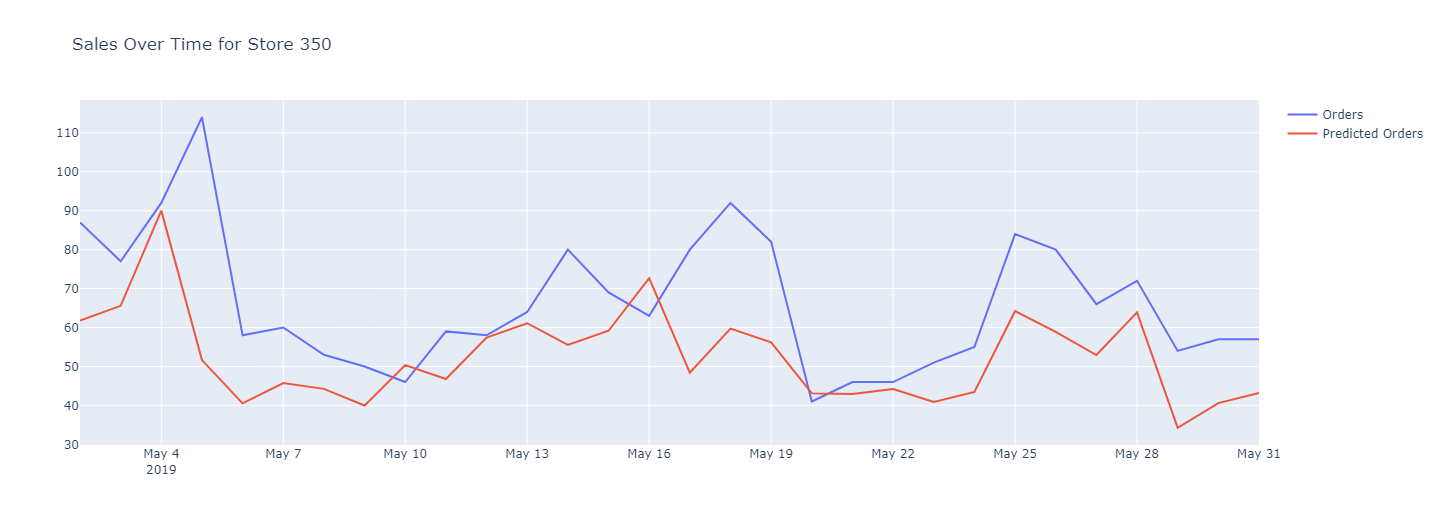
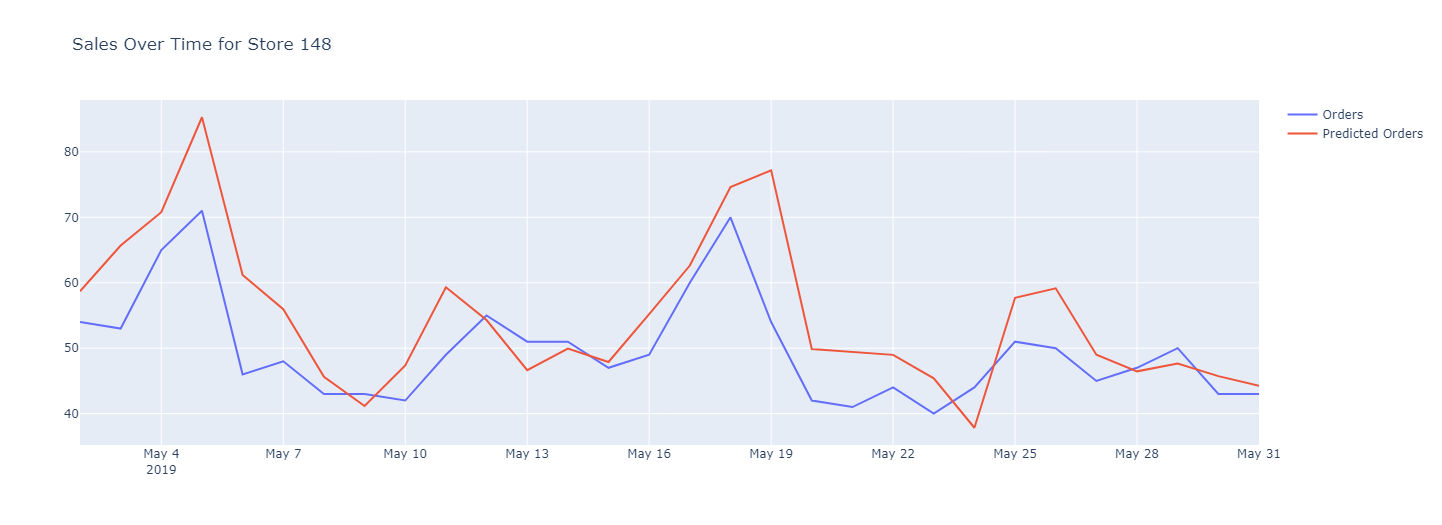
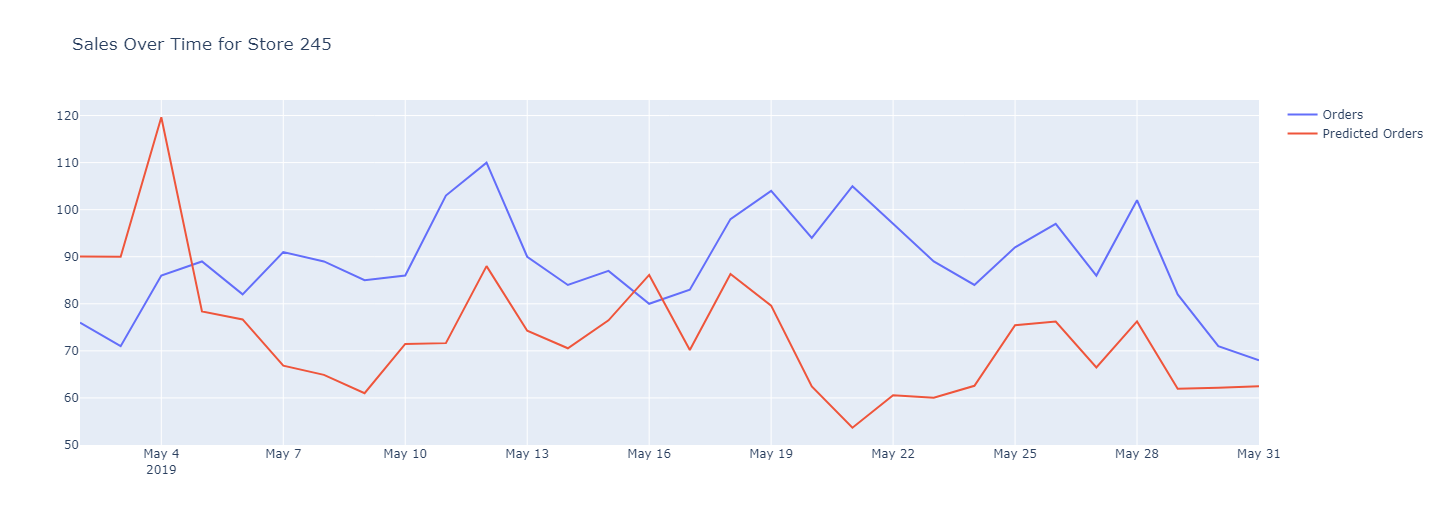 Image by Author: Model predictions (red) against actual orders (blue) for the last 30 days of data. These examples are drawn from the holdout set.
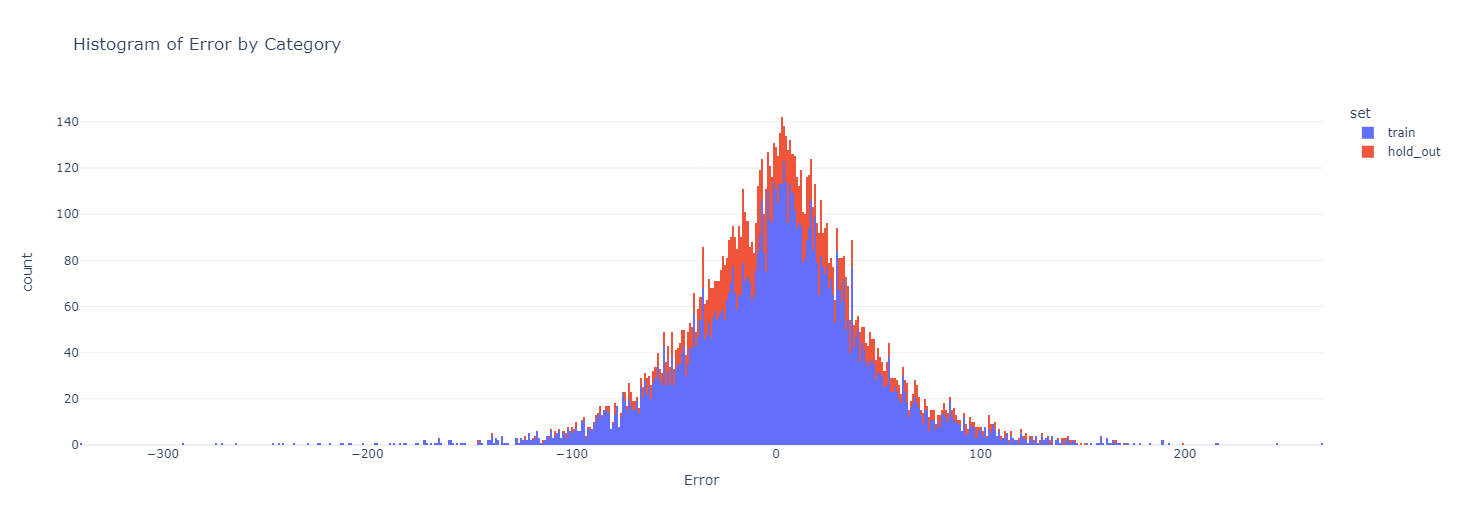 Image by Author: Distribution of error, where error is Actual Orders minus Predicted Orders.
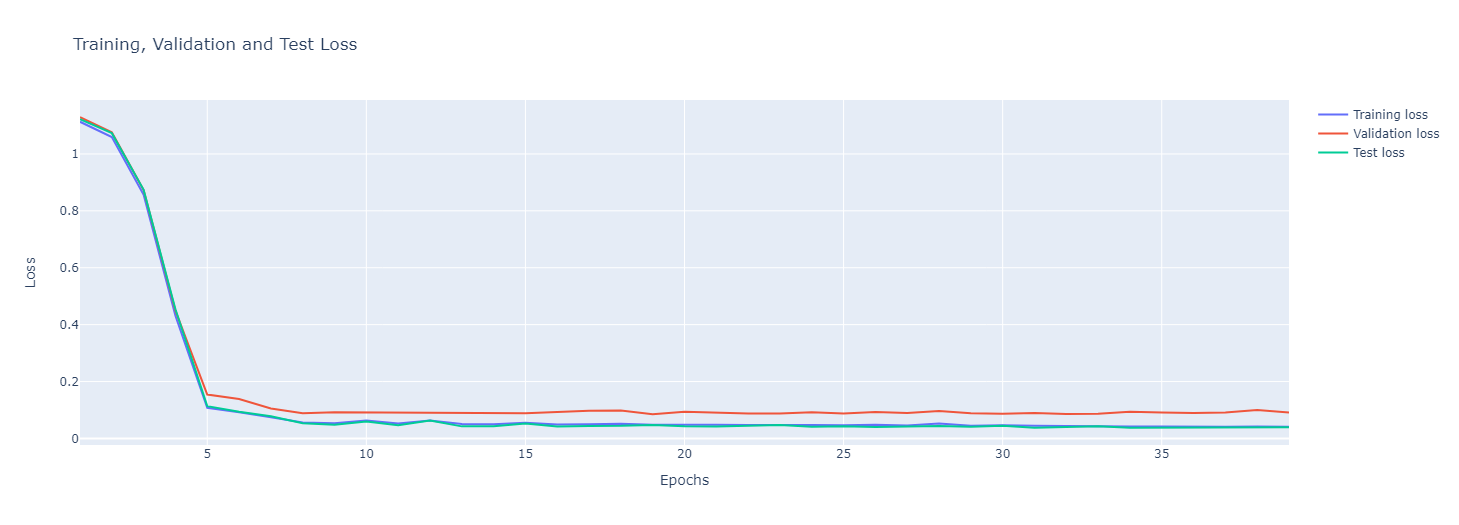 Image by Author: Loss curve for the model training. Loss metric is Mean Absolute Error
My Verdict
I'll begin by confessing that I was initially sceptical about Ludwig. However, after experimenting with it myself, I'm convinced of its capabilities and believe it delivers as promised. I think there are several truly impressive features worth highlighting.
Coding experience : The coding experience feels more like constructing an elaborate Lego set. You really can have a lot of fun messing around with components and different architectures to find your perfect model.
Documentation : The documentation is clear and well structured. It was very easy to figure out how to implement different architectures and change your model configurations. Most of the documentation appears to be up to date too, which is a bonus.
Backend : The backend experience is excellent. The library developers have done a great job abstracting away a lot of the usual configurations you have to do to train deep neural networks on GPUs. I trained my model on a Google Collab, and Ludwig automatically moved the workloads onto the GPU.
Another great thing about Ludwig is that the backend is highly configurable. For example, if you're running massive workloads and need a cluster of GPUs, you can configure this too!
Experiment Tracking : Ludwig provides you with an Experiment API that can be used to track your model artefacts between experiment runs. I believe there are integrations with MLflow too which is fantastic for commercial scale MLOps.
Pet Peeves
There are a few areas in which the framework could be enhanced, let's get into those too.
Visualisation : Ludwig does offer a visualisation API to track training losses across your data sets. However, at the time of writing, it does not function particularly well and its usage is unintuitive. I tried running it in a Google Collab, but to no avail. Eventually, I created my own loss curve visualisations by scripting a Python function to parse the training_statistics.json files that Ludwig saves for you after each experiment run.
Support : Whilst there is some support available, Ludwig's community does not seem to be as extensive as those of TensorFlow or Pytorch yet. A few issues have been raised on GitHub, and there are some threads that might offer assistance, but for the most part, it feels like you are left to your own devices. As for ChatGPT, it provides a certain level of support up until 2021.
Transparency : Ludwig excels in eliminating the more challenging aspects of building deep learning models. However, this comes at the expense of transparency, which occasionally renders the logs somewhat cryptic and challenging to debug.
Conclusion
In my opinion, Ludwig is an excellent tool for those looking to start utilising deep learning whether in a commercial setting or just for learning. While it may be too high-level for state-of-the-art research purposes, it is well-suited to solving clearly defined problems swiftly. A certain degree of understanding of deep learning is still necessary, but once you've grasped the concept, the barrier to entry for Ludwig is considerably lower than it is for TensorFlow or Pytorch.
The end-to-end notebook is available in my GitHub repo, please feel free to experiment.
Follow me on LinkedIn
Subscribe to medium to get more insights from me:
Join Medium with my referral link - John Adeojo
Should you be interested in integrating AI or data science into your business operations, we invite you to schedule a complimentary initial consultation with us:
Book Online | Data-Centric Solutions
Register Now to Continue Reading
Unlock Towards Data Science with a Free Account
All articles on Towards Data Science are available to registered users. Create a free account today to access this article and thousands more.
Register for freeSign in to your account
 Written By
See all from John Adeojo
Data ScienceDeep LearningHands On TutorialsMachine LearningProgramming
Share This Article
Towards Data Science is a community publication. Submit your insights to reach our global audience and earn through the TDS Author Payment Program.
Write for TDS
Related Articles
Artificial Intelligence
Custom Object Detection Localhost Deployment | YOLO
Pranjal Saxena
September 3, 20205 min read
Artificial Intelligence
In this article I plan to give you a glimpse into an asset model for algorithmic trading. This model of the world should allow us to make...
Daniel Shapiro, PhD
December 31, 201816 min read
Data Science
Instead of using data shift as an excuse for poor performance, use Inverse Probability Weighting to estimate how your model should perform in the new environment
Alon Lanyado
January 5, 20267 min read
Programming
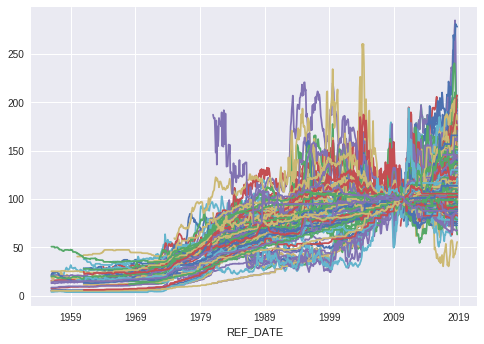
Visualization ideas for coping with overlapping lines in multiple time-series plots.
Boriharn K
April 28, 20228 min read
Machine Learning
Cluster sensor data with Kolmogorv Smirnov Statistic and Machine Learning
Marco Cerliani
July 25, 20195 min read
Deep Learning
Overview
Nicola Bernini
May 25, 20194 min read
Artificial Intelligence
A full implementation of the REINFORCE algorithm in Python. The steps are performed manually to illustrate the inner workings of the...
Wouter van Heeswijk, PhD
October 21, 20218 min read
Programming
Are you using Python to extract raw data from the database? It could be a huge bottleneck in your apps. Use SQL instead.
Dario Radečić
February 17, 20226 min read
Machine Learning
Tuning a process oven using Reinforcement Learning
John Morrow
August 16, 20193 min read
Your home for data science and AI. The world's leading publication for data science, data analytics, data engineering, machine learning, and artificial intelligence professionals.
Subscribe to Our NewsletterWrite For TDS•About•Advertise•Privacy Policy•Terms of Use
© Insight Media Group, LLC 2026•The New Stack•roadmap.sh•Creator Network
Recommended Articles
Close