保留正文与补采附件。源页面当前未重新核验;具体限制见交付清单。
 We value your privacy
We use cookies to enhance your browsing experience, serve personalised ads or content, and analyse our traffic. By clicking "Accept All", you consent to our use of cookies.
Customise Reject All Accept All
Customise Consent Preferences
We value your privacy
We use cookies to enhance your browsing experience, serve personalised ads or content, and analyse our traffic. By clicking "Accept All", you consent to our use of cookies.
Customise Reject All Accept All
Customise Consent Preferences  We use cookies to help you navigate efficiently and perform certain functions. You will find detailed information about all cookies under each consent category below.
The cookies that are categorised as "Necessary" are stored on your browser as they are essential for enabling the basic functionalities of the site. ... Show more
NecessaryAlways Active
Necessary cookies are required to enable the basic features of this site, such as providing secure log-in or adjusting your consent preferences. These cookies do not store any personally identifiable data.
We use cookies to help you navigate efficiently and perform certain functions. You will find detailed information about all cookies under each consent category below.
The cookies that are categorised as "Necessary" are stored on your browser as they are essential for enabling the basic functionalities of the site. ... Show more
NecessaryAlways Active
Necessary cookies are required to enable the basic features of this site, such as providing secure log-in or adjusting your consent preferences. These cookies do not store any personally identifiable data.
-
Cookie
BCTempID
-
Duration
10 minutes
-
Description
No description available.
-
Cookie
__cf_bm
-
Duration
1 hour
-
Description
This cookie, set by Cloudflare, is used to support Cloudflare Bot Management.
-
Cookie
AWSALBCORS
-
Duration
7 days
-
Description
Amazon Web Services set this cookie for load balancing.
-
Cookie
_cfuvid
-
Duration
session
-
Description
Cloudflare sets this cookie to track users across sessions to optimize user experience by maintaining session consistency and providing personalized services
-
Cookie
li_gc
-
Duration
6 months
-
Description
Linkedin set this cookie for storing visitor's consent regarding using cookies for non-essential purposes.
-
Cookie
__hssrc
-
Duration
session
-
Description
This cookie is set by Hubspot whenever it changes the session cookie. The __hssrc cookie set to 1 indicates that the user has restarted the browser, and if the cookie does not exist, it is assumed to be a new session.
-
Cookie
__hssc
-
Duration
1 hour
-
Description
HubSpot sets this cookie to keep track of sessions and to determine if HubSpot should increment the session number and timestamps in the __hstc cookie.
-
Cookie
wpEmojiSettingsSupports
-
Duration
session
-
Description
WordPress sets this cookie when a user interacts with emojis on a WordPress site. It helps determine if the user's browser can display emojis properly.
-
Cookie
BCSessionID
-
Duration
1 year 1 month 4 days
-
Description
Blueconic sets this cookie as a unique identifier for the BlueConic profile.
-
Cookie
_octo
-
Duration
1 year
-
Description
No description available.
-
Cookie
logged_in
-
Duration
1 year
-
Description
No description available.
-
Cookie
__Secure-YEC
-
Duration
past
-
Description
YouTube sets this cookie to stores the user's video player preferences using embedded YouTube video
-
Cookie
__eoi
-
Duration
6 months
-
Description
Description is currently not available.
-
Cookie
AWSALBTGCORS
-
Duration
7 days
-
Description
No description available.
-
Cookie
login-status-p
-
Duration
past
-
Description
Description is currently not available.
-
Cookie
AWSALBTG
-
Duration
7 days
-
Description
No description available.
-
Cookie
csrf_token
-
Duration
session
-
Description
No description available.
-
Cookie
token_v2
-
Duration
1 day
-
Description
Description is currently not available.
-
Cookie
D
-
Duration
1 year
-
Description
Description is currently not available.
-
Cookie
PHPSESSID
-
Duration
session
-
Description
This cookie is native to PHP applications. The cookie stores and identifies a user's unique session ID to manage user sessions on the website. The cookie is a session cookie and will be deleted when all the browser windows are closed.
-
Cookie
VISITOR_PRIVACY_METADATA
-
Duration
6 months
-
Description
YouTube sets this cookie to store the user's cookie consent state for the current domain.
-
Cookie
cookietest
-
Duration
session
-
Description
The cookietest cookie is typically used to determine whether the user's browser accepts cookies, essential for website functionality and user experience.
-
Cookie
__Host-airtable-session
-
Duration
1 year
-
Description
This cookie is used to enable us to integrate the services of Airtable.
-
Cookie
__Host-airtable-session.sig
-
Duration
1 year
-
Description
This cookie is used to enable us to integrate the services of Airtable.
-
Cookie
m
-
Duration
1 year 1 month 4 days
-
Description
Stripe sets this cookie for fraud prevention purposes. It identifies the device used to access the website, allowing the website to be formatted accordingly.
-
Cookie
BIGipServer*
-
Duration
session
-
Description
Marketo sets this cookie to collect information about the user's online activity and build a profile about their interests to provide advertisements relevant to the user.
-
Cookie
__cfruid
-
Duration
session
-
Description
Cloudflare sets this cookie to identify trusted web traffic.
-
Cookie
_GRECAPTCHA
-
Duration
6 months
-
Description
Google Recaptcha service sets this cookie to identify bots to protect the website against malicious spam attacks.
-
Cookie
__Secure-YNID
-
Duration
6 months
-
Description
Google cookie used to protect user security and prevent fraud, especially during the login process.
-
Cookie
cookieyes-consent
-
Duration
1 year
-
Description
CookieYes sets this cookie to remember users' consent preferences so that their preferences are respected on subsequent visits to this site. It does not collect or store any personal information about the site visitors.
Functional
Functional cookies help perform certain functionalities like sharing the content of the website on social media platforms, collecting feedback, and other third-party features.
-
Cookie
lidc
-
Duration
1 day
-
Description
LinkedIn sets the lidc cookie to facilitate data center selection.
-
Cookie
brw
-
Duration
1 year
-
Description
No description available.
-
Cookie
brwConsent
-
Duration
5 minutes
-
Description
Description is currently not available.
-
Cookie
WMF-Uniq
-
Duration
1 year
-
Description
Description is currently not available.
-
Cookie
loom_anon_comment
-
Duration
1 year
-
Description
No description available.
-
Cookie
loom_referral_video
-
Duration
session
-
Description
Description is currently not available.
-
Cookie
VISITOR_INFO1_LIVE
-
Duration
6 months
-
Description
A cookie set by YouTube to measure bandwidth that determines whether the user gets the new or old player interface.
-
Cookie
yt-remote-connected-devices
-
Duration
Never Expires
-
Description
YouTube sets this cookie to store the user's video preferences using embedded YouTube videos.
-
Cookie
ytidb::LAST_RESULT_ENTRY_KEY
-
Duration
Never Expires
-
Description
The cookie ytidb::LAST_RESULT_ENTRY_KEY is used by YouTube to store the last search result entry that was clicked by the user. This information is used to improve the user experience by providing more relevant search results in the future.
-
Cookie
yt-remote-device-id
-
Duration
Never Expires
-
Description
YouTube sets this cookie to store the user's video preferences using embedded YouTube videos.
-
Cookie
yt-remote-session-name
-
Duration
session
-
Description
The yt-remote-session-name cookie is used by YouTube to store the user's video player preferences using embedded YouTube video.
-
Cookie
yt-remote-fast-check-period
-
Duration
session
-
Description
The yt-remote-fast-check-period cookie is used by YouTube to store the user's video player preferences for embedded YouTube videos.
-
Cookie
yt-remote-session-app
-
Duration
session
-
Description
The yt-remote-session-app cookie is used by YouTube to store user preferences and information about the interface of the embedded YouTube video player.
-
Cookie
yt-remote-cast-available
-
Duration
session
-
Description
The yt-remote-cast-available cookie is used to store the user's preferences regarding whether casting is available on their YouTube video player.
-
Cookie
yt-remote-cast-installed
-
Duration
session
-
Description
The yt-remote-cast-installed cookie is used to store the user's video player preferences using embedded YouTube video.
-
Cookie
cp_session
-
Duration
3 months
-
Description
Codepen sets this cookie for Help systems found in the website.
-
Cookie
loid
-
Duration
1 year 1 month 4 days
-
Description
This cookie is set by the Reddit. The cookie enables the sharing of content from the website onto the social media platform.
Analytics
Analytical cookies are used to understand how visitors interact with the website. These cookies help provide information on metrics such as the number of visitors, bounce rate, traffic source, etc.
-
Cookie
__hstc
-
Duration
6 months
-
Description
Hubspot set this main cookie for tracking visitors. It contains the domain, initial timestamp (first visit), last timestamp (last visit), current timestamp (this visit), and session number (increments for each subsequent session).
-
Cookie
hubspotutk
-
Duration
6 months
-
Description
HubSpot sets this cookie to keep track of the visitors to the website. This cookie is passed to HubSpot on form submission and used when deduplicating contacts.
-
Cookie
_ga
-
Duration
1 year 1 month 4 days
-
Description
Google Analytics sets this cookie to calculate visitor, session and campaign data and track site usage for the site's analytics report. The cookie stores information anonymously and assigns a randomly generated number to recognise unique visitors.
-
Cookie
ga*
-
Duration
1 year 1 month 4 days
-
Description
Google Analytics sets this cookie to store and count page views.
-
Cookie
__Host-psifi.analyticsTrace
-
Duration
6 hours
-
Description
Description is currently not available.
-
Cookie
__Host-psifi.analyticsTraceV2
-
Duration
6 hours
-
Description
Description is currently not available.
-
Cookie
_gh_sess
-
Duration
session
-
Description
GitHub sets this cookie for temporary application and framework state between pages like what step the user is on in a multiple step form.
-
Cookie
YSC
-
Duration
session
-
Description
YSC cookie is set by Youtube and is used to track the views of embedded videos on Youtube pages.
-
Cookie
ajs_anonymous_id
-
Duration
1 year
-
Description
This cookie is set by Segment to count the number of people who visit a certain site by tracking if they have visited before.
-
Cookie
vuid
-
Duration
1 year 1 month 4 days
-
Description
Vimeo installs this cookie to collect tracking information by setting a unique ID to embed videos on the website.
Performance
Performance cookies are used to understand and analyse the key performance indexes of the website which helps in delivering a better user experience for the visitors.
-
Cookie
AWSALB
-
Duration
7 days
-
Description
AWSALB is an application load balancer cookie set by Amazon Web Services to map the session to the target.
-
Cookie
acq
-
Duration
past
-
Description
Description is currently not available.
-
Cookie
acq.sig
-
Duration
past
-
Description
Description is currently not available.
-
Cookie
ptc
-
Duration
2 years
-
Description
No description available.
Advertisement
Advertisement cookies are used to provide visitors with customised advertisements based on the pages you visited previously and to analyse the effectiveness of the ad campaigns.
-
Cookie
muc_ads
-
Duration
1 year 1 month 4 days
-
Description
Twitter sets this cookie to collect user behaviour and interaction data to optimize the website.
-
Cookie
guest_id_marketing
-
Duration
1 year 1 month 4 days
-
Description
Twitter sets this cookie to identify and track the website visitor.
-
Cookie
guest_id_ads
-
Duration
1 year 1 month 4 days
-
Description
Twitter sets this cookie to identify and track the website visitor.
-
Cookie
personalization_id
-
Duration
1 year 1 month 4 days
-
Description
Twitter sets this cookie to integrate and share features for social media and also store information about how the user uses the website, for tracking and targeting.
-
Cookie
guest_id
-
Duration
1 year 1 month 4 days
-
Description
Twitter sets this cookie to identify and track the website visitor. It registers if a user is signed in to the Twitter platform and collects information about ad preferences.
-
Cookie
bcookie
-
Duration
1 year
-
Description
LinkedIn sets this cookie from LinkedIn share buttons and ad tags to recognize browser IDs.
-
Cookie
__Secure-ROLLOUT_TOKEN
-
Duration
6 months
-
Description
YouTube sets this cookie to manage feature rollout and experimentation. It helps Google control which new features or interface changes are shown to users as part of testing and staged rollouts, ensuring consistent experience for a given user during an experiment.
-
Cookie
yt.innertube::nextId
-
Duration
Never Expires
-
Description
YouTube sets this cookie to register a unique ID to store data on what videos from YouTube the user has seen.
-
Cookie
yt.innertube::requests
-
Duration
Never Expires
-
Description
YouTube sets this cookie to register a unique ID to store data on what videos from YouTube the user has seen.
-
Cookie
session_tracker
-
Duration
session
-
Description
This cookie is set by the Reddit. This cookie is used to identify trusted web traffic. It also helps in adverstising on the website.
-
Cookie
edgebucket
-
Duration
session
-
Description
Reddit sets this cookie to save the information about a log-on Reddit user, for the purpose of advertisement recommendations and updating the content.
-
Cookie
did
-
Duration
1 year
-
Description
Arbor sets this cookie to show targeted ads to site visitors.This cookie expires after 2 months or 1 year.
Uncategorised
Other uncategorised cookies are those that are being analysed and have not been classified into a category as yet.
No cookies to display.
Reject All Save My Preferences Accept All
Toggle SearchToggle Mobile Navigation
Publish AI, ML & data-science insights to a global community of data professionals.
Sign inSubmit an Article
LatestEditor's PicksNewsletterShipAI
Write For TDS
LinkedInXToggle Search
Deep Learning
On the Challenge of Converting TensorFlow Models to PyTorch
How to upgrade and optimize legacy AI/ML models
Chaim Rand
December 5, 202517 min read
 Photo by Olga Thelavart on Unsplash
Prologue
In the interest of managing reader expectations and preventing disappointment, we would like to begin by stating that this post does not provide a fully satisfactory solution to the problem described in the title. We will propose and assess two possible schemes for auto-conversion of TensorFlow models to PyTorch — the first based on the Open Neural Network Exchange (ONNX) format and libraries and the second using the Keras3 API. However, as we will see, each comes with its own set of challenges and limitations. To the best of the authors’ knowledge, at the time of this writing, there are no publicly available foolproof solutions to this problem.
Many thanks to Rom Maltser for his contributions to this post.
The Decline of TensorFlow
Over the years, the field of computer science has known its fair share of “religious wars” — heated, sometimes hostile, debates among programmers and engineers over the “best” tools, languages, and methodologies. Up until a few years ago, the religious war between PyTorch and TensorFlow, two prominent open-source deep learning frameworks, loomed large. Proponents of TensorFlow would highlight its fast graph-execution mode, while those in the PyTorch camp would emphasize its “Pythonic” nature and ease of use.
However, these days, the amount of activity in PyTorch far overshadows that of TensorFlow. This is evidenced by the number of big-tech companies that have embraced PyTorch over TensorFlow, by the number of models per framework in HuggingFace’s models repository, and by the amount of innovation and optimization in each framework. Simply put, TensorFlow is a shell of its former self. The war is over, with PyTorch the definitive winner. For a brief history of the Pytorch-TensorFlow wars and the reasons for TensorFlow’s downfall, see Pan Xinghan’s post: TensorFlow Is Dead. PyTorch Won.
Learn this step by step with the interactive Machine Learning roadmap.
Problem: What do we do with all of our legacy TensorFlow models?!!
In light of this new reality, many organizations that once used TensorFlow have moved all of their new AI/ML model development to PyTorch. But they are faced with a difficult challenge when it comes to their legacy code: What should they do with all of the models that have already been built and deployed in TensorFlow?
Option 1: Do Nothing.
You might be wondering why this is even a problem — the TensorFlow models work — let’s not touch them. While this is a valid approach, there are a number of disadvantages that should be taken into consideration:
- Reduced maintenance : As TensorFlow continues to decline so will its maintenance. Inevitably, things will start to break. For example, there may be issues of compatibility with newer Python packages or system libraries.
- Limited Ecosystem : AI/ML solutions typically involve multiple supporting software libraries and services that interface with our framework of choice, be it PyTorch or TensorFlow. Over time, we can expect to see many of these discontinue their support for TensorFlow. Case in point: HuggingFace recently announced the deprecation of its support for TensorFlow.
- Limited Community : The AI/ML industry owes its fast pace of development, in large part, to its community. The number of open source projects, the number of online tutorials, and the amount of activity in dedicated support channels in the AI/ML space, is unparalleled. As TensorFlow declines, so will its community and you may experience increasing difficulty getting the help you need. Needless to say, the PyTorch community is flourishing.
- Opportunity Cost : The PyTorch ecosystem is thriving with constant innovations and optimizations. Recent years have seen the development of flash-attention kernels, support for the eight-bit floating-point data type, graph compilation, and many other advancements that have demonstrated significant boosts to runtime performance and significant reductions in AI/ML costs. During the same time period the feature offering in TensorFlow has remained mostly static. Sticking with TensorFlow means forgoing many opportunities for AI/ML cost optimization.
Option 2: Manually Convert TensorFlow Models to PyTorch
The second option is to rewrite legacy TensorFlow models in PyTorch. This is probably the best option in terms of its result, but for companies that have built up technical debt over many years, converting even a single model could be a daunting task. Given the effort required, you may choose to do this only for models that are still under active development (e.g., in the model training phase). Doing this for all of the models that are already deployed may prove prohibitive.
Option 3: Automate TensorFlow to PyTorch Conversion
The third option, and the approach we explore in this post, is to automate the conversion of legacy TensorFlow models to PyTorch. In this manner, we hope to accomplish the benefit of model execution in PyTorch, but without the enormous effort of manually converting each one.
To facilitate our discussion we will define a toy TensorFlow model and assess two proposals for converting it to PyTorch. As our runtime environment, we will use an Amazon EC2 g6e.xlarge with an NVIDIA L40S GPU, an AWS Deep Learning Ubuntu (22.04) AMI, and a Python environment that includes the TensorFlow (2.20), PyTorch (2.9), torchvision (0.24.0), and transformers (4.55.4) libraries. Please note that the code blocks we will share are intended for demonstrative purposes. Please do not interpret our use of any code, library, or platform as an endorsement of its use.
Model Conversion — Why is it Hard?
An AI model definition is comprised of two components: a model architecture and its trained weights. A model conversion solution must address both components. Conversion of the model weights is pretty straightforward; the weights are typically stored in a format that can be easily parsed into individual tensor arrays and reapplied in the framework of choice. In contrast, conversion of the model architecture presents a much greater challenge.
One approach could be to create a mapping between the building blocks of the model in each of the frameworks. However, there are a number of factors that make this approach, for all intents and purposes, virtually intractable:
- API Overlap and Proliferation : When you take into account the sheer number of, often overlapping, TensorFlow APIs for building model components and then add the vast number of API controls and arguments for each layer, you can see how creating a comprehensive, one-to-one mapping can quickly get ugly.
- Differing Implementation Approaches : At the implementation level, TensorFlow and PyTorch have fundamentally different approaches. Although usually hidden behind the top-level APIs, some assumptions require special user attention. For example, while TensorFlow defaults to the “channels-last” (NHWC) format, PyTorch prefers “channels-first” (NCHW). This difference in how tensors are indexed and stored complicates the conversion of model operations, as every layer must be checked/altered for correct dimension ordering.
Rather than attempt conversion at the API level, an alternative approach could be to capture and convert an internal TensorFlow graph representation. However, as anyone who has ever looked under the hood of TensorFlow will tell you, this too could get pretty nasty very quickly. TensorFlow’s internal graph representation is incredibly complex, often including a multitude of low-level operations, control flow, and auxiliary nodes that do not have a direct equivalent in PyTorch (especially if you’re dealing with older versions of TensorFlow). Just its comprehension seems beyond normal human ability, let alone its conversion to PyTorch.
Note that the same challenges would make it difficult for a generative AI model to perform the conversion in a manner that is fully reliable.
Proposed Conversion Schemes
In light of these difficulties, we abandon our attempt at implementing our own model converter and instead look to see what tools the AI/ML community has to offer. More specifically, we consider two different strategies for overcoming the challenges we described:
- Conversion Via a Unified Graph Representation : This solution assumes a common standard for representing an AI/ML model definition and utilities for converting models to and from this standard. The solution we will explore uses the popular ONNX format.
- Conversion Based on a Standardized High-level API : In this solution we simplify the conversion task by limiting our model to a defined set of high level abstract APIs with supported implementations in each of the AI/ML frameworks of interest. For this approach, we will use the Keras3 library.
In the next sections we will assess these strategies on a toy TensorFlow model.
A Toy TensorFlow Model
In the code block below we initialize and run a TensorFlow Vision Transformer (ViT) model from HuggingFace’s popular transformers library (version 4.55.4), TFViTForImageClassification. Note that in keeping with HuggingFace’s decision to deprecate support for TensorFlow, this class was removed from recent releases of the library. The HuggingFace TensorFlow model is dependent on Keras 2 which we dutifully install via the tf-keras (2.20.1) package. We set the ViTConfig.hidden_act field to “gelu_new” for ONNX compatibility:
python
import tensorflow as tf
gpu = tf.config.list_physical_devices('GPU')[0]
tf.config.experimental.set_memory_growth(gpu, True)

from transformers import ViTConfig, TFViTForImageClassification
vit_config = ViTConfig(hidden_act="gelu_new", return_dict=False)
tf_model = TFViTForImageClassification(vit_config)
Model Conversion Using ONNX
The first method we assess relies on Open Neural Network Exchange (ONNX), a community project that aims to define an open format for building AI/ML models to increase interoperability between AI/ML frameworks and reduce the dependence on any single one. Included in the ONNX API offering are utilities for converting models from common frameworks, including TensorFlow, to the ONNX format. There are also several public libraries for converting ONNX models to PyTorch. In this post we use the onnx2torch utility. Thus, model conversion from TensorFlow to PyTorch can be achieved by successively applying TensorFlow-to-ONNX conversion followed by ONNX-to-PyTorch conversion.
To assess this solution we install the onnx (1.19.1), tf2onnx (1.16.1), and onnx2torch (1.5.15 ) libraries. We apply the no-deps flag to prevent an undesired downgrade of the protobuf library:
bash
pip install --no-deps onnx tf2onnx onnx2torch
The conversion scheme appears in the code block below:
python
import tensorflow as tf
import torch
import tf2onnx, onnx2torch

BATCH_SIZE = 32
DEVICE = "cuda"

spec = (tf.TensorSpec((BATCH_SIZE, 3, 224, 224), tf.float32, name="input"),)
onnx_model, _ = tf2onnx.convert.from_keras(tf_model, input_signature=spec)
converted_model = onnx2torch.convert(onnx_model)
To make sure that the resultant model is indeed a PyTorch module, we run the following assertion:
python
assert isinstance(converted_model, torch.nn.Module)
Let us now assess the quality and makeup of the resultant PyTorch model.
Numerical Precision
To verify the validity of the converted model, we execute both the TensorFlow model and the converted model on the same input and compare the results:
python
import numpy as np

batch_input = np.random.randn(BATCH_SIZE, 3, 224, 224).astype(np.float32)

# execute tf model
tf_input = tf.convert_to_tensor(batch_input)
tf_output = tf_model(tf_input, training=False)
tf_output = tf_output[0].numpy()

# execute converted model
converted_model = converted_model.to(DEVICE)
converted_model = converted_model.eval()
torch_input = torch.from_numpy(batch_input).to(DEVICE)
torch_output = converted_model(torch_input)
torch_output = torch_output.detach().cpu().numpy()

# compare results
print("Max diff:", np.max(np.abs(tf_output - torch_output)))

# sample output:
# Max diff: 9.3877316e-07
The outputs are certainly close enough to validate the converted model.
Model Structure
To get a feel for the structure of the converted model, we calculate the number of trainable comparisons and compare it that of the original model:
python
num_tf_params = sum([np.prod(v.shape) for v in tf_model.trainable_weights])
num_pyt_params = sum([p.numel()
                      for p in converted_model.parameters()
                      if p.requires_grad])
print(f"TensorFlow trainable parameters: {num_tf_params}")
print(f"PyTorch Trainable Parameters: {num_pyt_params:,}")
The difference in the number of trainable parameters is profound, just 589,824 in the converted model compared to over 85 million in the original model. Traversing the layers of the converted model leads to that same conclusion: The ONNX-based conversion has completely altered the model structure, rendering it essentially unrecognizable. There are a number of ramifications to this finding, including:
- Training/fine-tuning the converted model : Although we have shown that the converted model can be used for inference, the change in structure — particularly the fact that some of the model parameters have been baked in, means that we cannot use the converted model for training or fine-tuning.
- Applying pinpoint PyTorch optimizations to the model : The converted model is composed of a very large number of layers each representing a relatively low-level operation. This greatly limits our ability to replace inefficient operations with optimized PyTorch equivalents, such as torch.nn.functional.scaled_dot_product_attention (SPDA).
Model Optimization
We have already seen that our ability to access and modify model operations is limited, but there are a number of optimizations that we can apply that do not require such access. In the code block below, we apply PyTorch compilation and automatic mixed precision (AMP) and compare the resultant throughput to that of the TensorFlow model. For further context, we also test the runtime of the PyTorch version of the ViTForImageClassification model:
python
# Set tf mixed precision policy to bfloat16
tf.keras.mixed_precision.set_global_policy('mixed_bfloat16')

# Set torch matmul precision to high
torch.set_float32_matmul_precision('high')

@tf.function
def tf_infer_fn(batch):
    return tf_model(batch, training=False)

def get_torch_infer_fn(model):
    def infer_fn(batch):
        with torch.inference_mode(), torch.amp.autocast(
                DEVICE,
                dtype=torch.bfloat16,
                enabled=DEVICE=='cuda'
        ):
            output = model(batch)
        return output
    return infer_fn

def benchmark(infer_fn, batch):
    # warm-up
    for _ in range(20):
        _ = infer_fn(batch)
    start = torch.cuda.Event(enable_timing=True)
    end = torch.cuda.Event(enable_timing=True)
    torch.cuda.synchronize()
    start.record()

    iters = 100

    for _ in range(iters):
        _ = infer_fn(batch)
    end.record()
    torch.cuda.synchronize()
    return start.elapsed_time(end) / iters

# assess throughput of TF model
avg_time = benchmark(tf_infer_fn, tf_input)
print(f"\nTensorFlow average step time: {(avg_time):.4f}")

# assess throughput of converted model
torch_infer_fn = get_torch_infer_fn(converted_model)
avg_time = benchmark(torch_infer_fn, torch_input)
print(f"\nConverted model average step time: {(avg_time):.4f}")

# assess throughput of compiled model
torch_infer_fn = get_torch_infer_fn(torch.compile(converted_model))
avg_time = benchmark(torch_infer_fn, torch_input)
print(f"\nCompiled model average step time: {(avg_time):.4f}")

# assess throughput of torch ViT
from transformers import ViTForImageClassification
torch_model = ViTForImageClassification(vit_config).to(DEVICE)
torch_infer_fn = get_torch_infer_fn(torch_model)
avg_time = benchmark(torch_infer_fn, torch_input)
print(f"\nPyTorch ViT model average step time: {(avg_time):.4f}")

# assess throughput of compiled torch ViT
torch_infer_fn = get_torch_infer_fn(torch.compile(torch_model))
avg_time = benchmark(torch_infer_fn, torch_input)
print(f"\nCompiled ViT model average step time: {(avg_time):.4f}")
Note that initially PyTorch compilation fails on the converted model due to the use of torch.Size operator in the OnnxReshape layer. While this is easily fixable (e.g., tuple([int(i) for i in shape])), it points to a deeper obstacle to optimization of the model: The reshape layer, which appears dozens of times in the model, treats shapes as PyTorch tensors residing on the GPU. This means that each call requires detaching the shape tensor from the graph and copying it to the CPU. The conclusion is that although the converted model is functionally accurate, its resultant definition is not optimized for runtime performance. This can be seen from the step time results of the different model configurations:
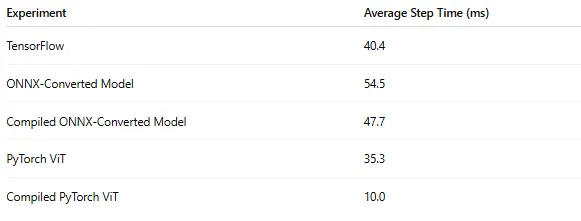 ONNX-Based Conversion Step Time Results (by Author)
The converted model is slower than the original TensorFlow flow and significantly slower than PyTorch version of the ViT model.
ONNX-Based Conversion Step Time Results (by Author)
The converted model is slower than the original TensorFlow flow and significantly slower than PyTorch version of the ViT model.
Limitations
Although (in the case of our toy model) the ONNX-based conversion scheme works, it has a number of significant limitations:
- During the conversion many parameters were baked into the model, limiting its use to inference workloads only.
- The ONNX conversion breaks the computation graph into low level operators in a manner that makes it difficult to apply and/or reap the benefit of some PyTorch optimizations.
- The reliance on ONNX implies that our conversion scheme will only work on ONNX-friendly models. It will not work on models that cannot be mapped to the standard ONNX operator set (e.g., models with dynamic control flow).
- The conversion scheme relies on the health and maintenance of a third-party library that is not part of the official ONNX offering.
Although the scheme works — at least for inference workloads — you may find the limitations to be too restrictive for use on your own TensorFlow models. One possible option is to abandon the ONNX-to-PyTorch conversion and perform inference using the ONNX Runtime library.
Model Conversion Via Keras3
Keras3 is a high-level deep learning API focused on maximizing the readability, maintainability, and ease of use of AI/ML applications. In a previous post, we evaluated Keras3 and highlighted its support for multiple backends. In this post we revisit its multi-framework support and assess whether this can be utilized for model conversion. The scheme we propose is to 1) migrate the existing TensorFlow model to Keras3 and then 2) run the model with the Keras3 PyTorch backend.
Upgrading TensorFlow to Keras3
Contrary to the ONNX-based conversion scheme, our current solution may require some code changes to the TensorFlow model to migrate it to Keras3. While the documentation makes it sound simple, in practice the difficulty of the migration will depend greatly on the details of the model implementation. In the case of our toy model, HuggingFace explicitly enforces the use of the legacy tf-keras, preventing the use of Keras3. To implement our scheme, we need to 1) redefine the model without this restriction, and 2) replace native TensorFlow operators with Keras3 equivalents. The code block below contains a stripped-down version of the model, along with the required adjustments. To get a full grasp of the changes that were required, perform a side-by-side code comparison with the original model definition.
python
import math
import keras

HIDDEN_SIZE = 768
IMG_SIZE = 224
PATCH_SIZE = 16
ATTN_HEADS = 12
NUM_LAYERS = 12
INTER_SZ = 4*HIDDEN_SIZE
N_LABELS = 2


class TFViTEmbeddings(keras.layers.Layer):
    def __init__(self, **kwargs):
        super().__init__(**kwargs)
        self.patch_embeddings = TFViTPatchEmbeddings()
        num_patches = self.patch_embeddings.num_patches
        self.cls_token = self.add_weight((1, 1, HIDDEN_SIZE))
        self.position_embeddings = self.add_weight((1, num_patches+1,
                                                    HIDDEN_SIZE))

    def call(self, pixel_values, training=False):
        bs, num_channels, height, width = pixel_values.shape
        embeddings = self.patch_embeddings(pixel_values, training=training)
        cls_tokens = keras.ops.repeat(self.cls_token, repeats=bs, axis=0)
        embeddings = keras.ops.concatenate((cls_tokens, embeddings), axis=1)
        embeddings = embeddings + self.position_embeddings
        return embeddings

class TFViTPatchEmbeddings(keras.layers.Layer):
    def __init__(self, **kwargs):
        super().__init__(**kwargs)
        patch_size = (PATCH_SIZE, PATCH_SIZE)
        image_size = (IMG_SIZE, IMG_SIZE)
        num_patches = (image_size[1]//patch_size[1]) * \
                      (image_size[0]//patch_size[0])
        self.patch_size = patch_size
        self.num_patches = num_patches
        self.projection = keras.layers.Conv2D(
            filters=HIDDEN_SIZE,
            kernel_size=patch_size,
            strides=patch_size,
            padding="valid",
            data_format="channels_last"
        )

    def call(self, pixel_values, training=False):
        bs, num_channels, height, width = pixel_values.shape
        pixel_values = keras.ops.transpose(pixel_values, (0, 2, 3, 1))
        projection = self.projection(pixel_values)
        num_patches = (width // self.patch_size[1]) * \
                      (height // self.patch_size[0])
        embeddings = keras.ops.reshape(projection, (bs, num_patches, -1))
        return embeddings

class TFViTSelfAttention(keras.layers.Layer):
    def __init__(self, **kwargs):
        super().__init__(**kwargs)
        self.num_attention_heads = ATTN_HEADS
        self.attention_head_size = int(HIDDEN_SIZE / ATTN_HEADS)
        self.all_head_size = ATTN_HEADS * self.attention_head_size
        self.sqrt_att_head_size = math.sqrt(self.attention_head_size)
        self.query = keras.layers.Dense(self.all_head_size,  name="query")
        self.key = keras.layers.Dense(self.all_head_size, name="key")
        self.value = keras.layers.Dense(self.all_head_size, name="value")

    def transpose_for_scores(self, tensor, batch_size: int):
        tensor = keras.ops.reshape(tensor, (batch_size, -1, ATTN_HEADS,
                                            self.attention_head_size))
        return keras.ops.transpose(tensor, [0, 2, 1, 3])

    def call(self, hidden_states, training=False):
        bs = hidden_states.shape[0]
        mixed_query_layer = self.query(inputs=hidden_states)
        mixed_key_layer = self.key(inputs=hidden_states)
        mixed_value_layer = self.value(inputs=hidden_states)
        query_layer = self.transpose_for_scores(mixed_query_layer, bs)
        key_layer = self.transpose_for_scores(mixed_key_layer, bs)
        value_layer = self.transpose_for_scores(mixed_value_layer, bs)
        key_layer_T = keras.ops.transpose(key_layer, [0,1,3,2])
        attention_scores = keras.ops.matmul(query_layer, key_layer_T)
        dk = keras.ops.cast(self.sqrt_att_head_size,
                            dtype=attention_scores.dtype)
        attention_scores = keras.ops.divide(attention_scores, dk)
        attention_probs = keras.ops.softmax(attention_scores+1e-9, axis=-1)
        attention_output = keras.ops.matmul(attention_probs, value_layer)
        attention_output = keras.ops.transpose(attention_output,[0,2,1,3])
        attention_output = keras.ops.reshape(attention_output,
                                             (bs, -1, self.all_head_size))
        return (attention_output,)

class TFViTSelfOutput(keras.layers.Layer):
    def __init__(self, **kwargs):
        super().__init__(**kwargs)
        self.dense = keras.layers.Dense(HIDDEN_SIZE)

    def call(self, hidden_states, input_tensor, training = False):
        return self.dense(inputs=hidden_states)

class TFViTAttention(keras.layers.Layer):
    def __init__(self, **kwargs):
        super().__init__(**kwargs)
        self.self_attention = TFViTSelfAttention()
        self.dense_output = TFViTSelfOutput()

    def call(self, input_tensor, training = False):
        self_outputs = self.self_attention(
            hidden_states=input_tensor, training=training
        )
        attention_output = self.dense_output(
            hidden_states=self_outputs[0],
            input_tensor=input_tensor,
            training=training
        )
        return (attention_output,)

class TFViTIntermediate(keras.layers.Layer):
    def __init__(self, **kwargs):
        super().__init__(**kwargs)
        self.dense = keras.layers.Dense(INTER_SZ)
        self.intermediate_act_fn = keras.activations.gelu

    def call(self, hidden_states):
        hidden_states = self.dense(hidden_states)
        hidden_states = self.intermediate_act_fn(hidden_states)
        return hidden_states

class TFViTOutput(keras.layers.Layer):
    def __init__(self, **kwargs):
        super().__init__(**kwargs)
        self.dense = keras.layers.Dense(HIDDEN_SIZE)

    def call(self, hidden_states, input_tensor, training: bool = False):
        hidden_states = self.dense(inputs=hidden_states)
        hidden_states = hidden_states + input_tensor
        return hidden_states

class TFViTLayer(keras.layers.Layer):
    def __init__(self, **kwargs):
        super().__init__(**kwargs)
        self.attention = TFViTAttention()
        self.intermediate = TFViTIntermediate()
        self.vit_output = TFViTOutput()
        self.layernorm_before = keras.layers.LayerNormalization(
            epsilon=1e-12
        )
        self.layernorm_after = keras.layers.LayerNormalization(
            epsilon=1e-12
        )

    def call(self, hidden_states, training=False):
        attention_outputs = self.attention(
            input_tensor=self.layernorm_before(inputs=hidden_states),
            training=training,
        )
        attention_output = attention_outputs[0]
        hidden_states = attention_output + hidden_states
        layer_output = self.layernorm_after(hidden_states)
        intermediate_output = self.intermediate(layer_output)
        layer_output = self.vit_output(
            hidden_states=intermediate_output,
            input_tensor=hidden_states,
            training=training
        )
        outputs = (layer_output,)
        return outputs

class TFViTEncoder(keras.layers.Layer):
    def __init__(self, **kwargs):
        super().__init__(**kwargs)
        self.layer = [TFViTLayer(name=f"layer_{i}")
                      for i in range(NUM_LAYERS)]

    def call(self, hidden_states, training=False):
        for i, layer_module in enumerate(self.layer):
            layer_outputs = layer_module(
                hidden_states=hidden_states,
                training=training,
            )
            hidden_states = layer_outputs[0]
        return tuple([hidden_states])

class TFViTMainLayer(keras.layers.Layer):
    def __init__(self, **kwargs):
        super().__init__(**kwargs)
        self.embeddings = TFViTEmbeddings()
        self.encoder = TFViTEncoder()
        self.layernorm = keras.layers.LayerNormalization(epsilon=1e-12)

    def call(self, pixel_values, training=False):
        embedding_output = self.embeddings(
            pixel_values=pixel_values,
            training=training,
        )
        encoder_outputs = self.encoder(
            hidden_states=embedding_output,
            training=training,
        )
        sequence_output = encoder_outputs[0]
        sequence_output = self.layernorm(inputs=sequence_output)
        return (sequence_output,)

class TFViTForImageClassification(keras.Model):
    def __init__(self, *inputs, **kwargs):
        super().__init__(*inputs, **kwargs)
        self.vit = TFViTMainLayer()
        self.classifier = keras.layers.Dense(N_LABELS)

    def call(self, pixel_values, training=False):
        outputs = self.vit(pixel_values, training=training)
        sequence_output = outputs[0]
        logits = self.classifier(inputs=sequence_output[:, 0, :])
        return (logits,)
TensorFlow to PyTorch Conversion
The conversion sequence appears in the code block below. As before, we validate the output of the resultant model as well as the number of trainable parameters.
python
# save weights of TensorFlow model
tf_model.save_weights("model_weights.h5")

import keras
keras.config.set_backend("torch")

from keras3_vit import TFViTForImageClassification as Keras3ViT
keras3_model = Keras3ViT()

# call model to initializate all layers
keras3_model(torch_input, training=False)

# load the weights from the TensorFlow model
keras3_model.load_weights("model_weights.h5")

# validate converted model
assert isinstance(keras3_model, torch.nn.Module)

keras3_model = keras3_model.to(DEVICE)
keras3_model = keras3_model.eval()
torch_output = keras3_model(torch_input, training=False)
torch_output = torch_output[0].detach().cpu().numpy()
print("Max diff:", np.max(np.abs(tf_output - torch_output)))

num_pyt_params = sum([p.numel()
                      for p in keras3_model.parameters()
                      if p.requires_grad])
print(f"Keras3 Trainable Parameters: {num_pyt_params:,}")
Training/Fine-tuning the Model
Contrary to the ONNX-converted model, the Keras3 model maintains the same structure and trainable parameters. This allows for resuming training and/or finetuning on the converted model. This can either be done within the Keras3 training framework or using a standard PyTorch training loop.
Optimizing Model Layers
Contrary to the ONNX-converted model, the coherence of the Keras3 model definition allows for easily modifying and optimizing the layer implementations. In the code block below, we replace the existing attention mechanism with PyTorch’s highly efficient SDPA operator.
python
from torch.nn.functional import scaled_dot_product_attention as sdpa

class TFViTSelfAttention(keras.layers.Layer):
    def __init__(self, **kwargs):
        super().__init__(**kwargs)
        self.num_attention_heads = ATTN_HEADS
        self.attention_head_size = int(HIDDEN_SIZE / ATTN_HEADS)
        self.all_head_size = ATTN_HEADS * self.attention_head_size
        self.sqrt_att_head_size = math.sqrt(self.attention_head_size)
        self.query = keras.layers.Dense(self.all_head_size,  name="query")
        self.key = keras.layers.Dense(self.all_head_size, name="key")
        self.value = keras.layers.Dense(self.all_head_size, name="value")

    def transpose_for_scores(self, tensor, batch_size: int):
        tensor = keras.ops.reshape(tensor, (batch_size, -1, ATTN_HEADS,
                                            self.attention_head_size))
        return keras.ops.transpose(tensor, [0, 2, 1, 3])

    def call(self, hidden_states, training=False):
        bs = hidden_states.shape[0]
        mixed_query_layer = self.query(inputs=hidden_states)
        mixed_key_layer = self.key(inputs=hidden_states)
        mixed_value_layer = self.value(inputs=hidden_states)
        query_layer = self.transpose_for_scores(mixed_query_layer, bs)
        key_layer = self.transpose_for_scores(mixed_key_layer, bs)
        value_layer = self.transpose_for_scores(mixed_value_layer, bs)
        sdpa_output = sdpa(query_layer, key_layer, value_layer)
        attention_output = keras.ops.transpose(sdpa_output,[0,2,1,3])
        attention_output = keras.ops.reshape(attention_output,
                                             (bs, -1, self.all_head_size))
        return (attention_output,)
We using the same benchmarking function from above to assess the impact of this optimization on the model’s runtime performance:
python
torch_infer_fn = get_torch_infer_fn(keras3_model)
avg_time = benchmark(torch_infer_fn, torch_input)
print(f"\Keras3 converted model average step time: {(avg_time):.4f}")
The results are captured in the table below:
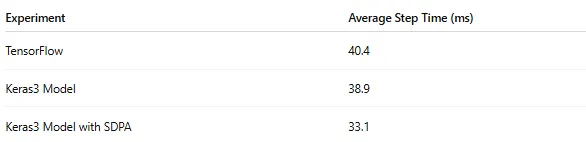 Keras3 Conversion Step Time Results (by Author)
Using the Keras3-based model conversion scheme, and applying the SDPA optimization, we are able to accelerate the model inference throughput by 22% compared to the original TensorFlow model.
Keras3 Conversion Step Time Results (by Author)
Using the Keras3-based model conversion scheme, and applying the SDPA optimization, we are able to accelerate the model inference throughput by 22% compared to the original TensorFlow model.
Model Compilation
Another optimization we would like to apply is PyTorch compilation. Unfortunately (as of the time of this writing), PyTorch compilation in Keras3 is limited. In the case of our toy model, both our attempt to apply torch.compile directly to the model, as well as setting the jit_compile field of the Keras3 Model.compile function, failed. In both cases, the failure resulted from multiple recompilations that were triggered by the Keras3 internal machinery. While Keras3 grants access to the PyTorch ecosystem, its high-level abstraction might impose some limitations.
Limitations
Once again, we have a conversion scheme that works but has several limitations:
- The TensorFlow models must be Keras3-compatible. The amount of work this will require will depend on the details of your model implementation. It may require some Keras layer customization.
- While the resultant model is a torch.nn.Module, it is not a “pure” PyTorch model in the sense that it is comprised of Keras3 layers and includes a lot of additional Keras3 code. This may require some adaptations to our PyTorch tooling and could impose some restrictions, as we saw when we tried to apply PyTorch compilation.
- The solution relies on the health and maintenance of Keras3 and its support for the TensorFlow and PyTorch backends.
Summary
In this post we have proposed and assessed two methods for auto-conversion of legacy TensorFlow models to PyTorch. We summarize our findings in the following table.
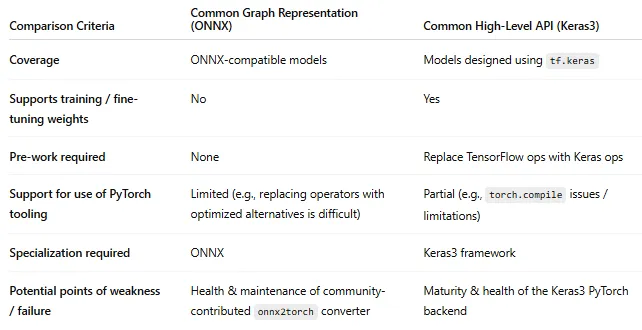 Comparison of Conversion Schemes (by Author)
Ultimately, the best approach, whether it be one of the methods discussed here, manual conversion, a solution based on generative AI, or the decision not to perform conversion at all, will greatly depend on the details of the model and the situation.
Comparison of Conversion Schemes (by Author)
Ultimately, the best approach, whether it be one of the methods discussed here, manual conversion, a solution based on generative AI, or the decision not to perform conversion at all, will greatly depend on the details of the model and the situation.
Register Now to Continue Reading
Unlock Towards Data Science with a Free Account
All articles on Towards Data Science are available to registered users. Create a free account today to access this article and thousands more.
Register for freeSign in to your account
 Written By
See all from Chaim Rand
Deep DivesArtificial IntelligenceMachine LearningPytorchTensorFlow
Share This Article
Towards Data Science is a community publication. Submit your insights to reach our global audience and earn through the TDS Author Payment Program.
Write for TDS
Related Articles
Deep Learning
In a few different posts I have put together facial recognition pipelines or something similar using object detectors and something like a...
Michael Sugimura
February 11, 20199 min read
Machine Learning
Connect, learn, and get inspired. Earlier this month, I wrote an article about the importance...
Sara A. Metwalli
May 1, 20216 min read
Deep Learning
A deep dive on data transfer bottlenecks, their identification, and their resolution with the help of NVIDIA Nsight™ Systems
Chaim Rand
January 3, 202614 min read
Deep Learning
A review of AI progress in transforming natural language database queries to SQL code
Gowtham Ramesh
November 2, 202015 min read
Machine Learning
Meet TAR - a nonlinear extension of the autoregressive model.
Michał Cukrowski
November 22, 202211 min read
Artificial Intelligence
An interesting scenario where Principal Component Analysis components are actually easy to interpret, from astrophysics
Piero Paialunga
December 2, 20205 min read
Artificial Intelligence
Accelerate model inference speed in production
Marcello Politi
September 3, 20239 min read
Artificial Intelligence
Assess probabilities of various business outcomes
Bassel Karami
December 17, 20208 min read
Artificial Intelligence
Detecting whether a new data is an outlier or not
Cornellius Wijaya
June 20, 20206 min read
Your home for data science and AI. The world's leading publication for data science, data analytics, data engineering, machine learning, and artificial intelligence professionals.
Subscribe to Our NewsletterWrite For TDS•About•Advertise•Privacy Policy•Terms of Use
© Insight Media Group, LLC 2026•The New Stack•roadmap.sh•Creator Network
Recommended Articles
Close