保留正文与补采附件。源页面当前未重新核验;具体限制见交付清单。
 We value your privacy
We use cookies to enhance your browsing experience, serve personalised ads or content, and analyse our traffic. By clicking "Accept All", you consent to our use of cookies.
Customise Reject All Accept All
Customise Consent Preferences
We value your privacy
We use cookies to enhance your browsing experience, serve personalised ads or content, and analyse our traffic. By clicking "Accept All", you consent to our use of cookies.
Customise Reject All Accept All
Customise Consent Preferences  We use cookies to help you navigate efficiently and perform certain functions. You will find detailed information about all cookies under each consent category below.
The cookies that are categorised as "Necessary" are stored on your browser as they are essential for enabling the basic functionalities of the site. ... Show more
NecessaryAlways Active
Necessary cookies are required to enable the basic features of this site, such as providing secure log-in or adjusting your consent preferences. These cookies do not store any personally identifiable data.
We use cookies to help you navigate efficiently and perform certain functions. You will find detailed information about all cookies under each consent category below.
The cookies that are categorised as "Necessary" are stored on your browser as they are essential for enabling the basic functionalities of the site. ... Show more
NecessaryAlways Active
Necessary cookies are required to enable the basic features of this site, such as providing secure log-in or adjusting your consent preferences. These cookies do not store any personally identifiable data.
-
Cookie
BCTempID
-
Duration
10 minutes
-
Description
No description available.
-
Cookie
__cf_bm
-
Duration
1 hour
-
Description
This cookie, set by Cloudflare, is used to support Cloudflare Bot Management.
-
Cookie
AWSALBCORS
-
Duration
7 days
-
Description
Amazon Web Services set this cookie for load balancing.
-
Cookie
_cfuvid
-
Duration
session
-
Description
Cloudflare sets this cookie to track users across sessions to optimize user experience by maintaining session consistency and providing personalized services
-
Cookie
li_gc
-
Duration
6 months
-
Description
Linkedin set this cookie for storing visitor's consent regarding using cookies for non-essential purposes.
-
Cookie
__hssrc
-
Duration
session
-
Description
This cookie is set by Hubspot whenever it changes the session cookie. The __hssrc cookie set to 1 indicates that the user has restarted the browser, and if the cookie does not exist, it is assumed to be a new session.
-
Cookie
__hssc
-
Duration
1 hour
-
Description
HubSpot sets this cookie to keep track of sessions and to determine if HubSpot should increment the session number and timestamps in the __hstc cookie.
-
Cookie
wpEmojiSettingsSupports
-
Duration
session
-
Description
WordPress sets this cookie when a user interacts with emojis on a WordPress site. It helps determine if the user's browser can display emojis properly.
-
Cookie
BCSessionID
-
Duration
1 year 1 month 4 days
-
Description
Blueconic sets this cookie as a unique identifier for the BlueConic profile.
-
Cookie
_octo
-
Duration
1 year
-
Description
No description available.
-
Cookie
logged_in
-
Duration
1 year
-
Description
No description available.
-
Cookie
__Secure-YEC
-
Duration
past
-
Description
YouTube sets this cookie to stores the user's video player preferences using embedded YouTube video
-
Cookie
__eoi
-
Duration
6 months
-
Description
Description is currently not available.
-
Cookie
AWSALBTGCORS
-
Duration
7 days
-
Description
No description available.
-
Cookie
login-status-p
-
Duration
past
-
Description
Description is currently not available.
-
Cookie
AWSALBTG
-
Duration
7 days
-
Description
No description available.
-
Cookie
csrf_token
-
Duration
session
-
Description
No description available.
-
Cookie
token_v2
-
Duration
1 day
-
Description
Description is currently not available.
-
Cookie
D
-
Duration
1 year
-
Description
Description is currently not available.
-
Cookie
PHPSESSID
-
Duration
session
-
Description
This cookie is native to PHP applications. The cookie stores and identifies a user's unique session ID to manage user sessions on the website. The cookie is a session cookie and will be deleted when all the browser windows are closed.
-
Cookie
VISITOR_PRIVACY_METADATA
-
Duration
6 months
-
Description
YouTube sets this cookie to store the user's cookie consent state for the current domain.
-
Cookie
cookietest
-
Duration
session
-
Description
The cookietest cookie is typically used to determine whether the user's browser accepts cookies, essential for website functionality and user experience.
-
Cookie
__Host-airtable-session
-
Duration
1 year
-
Description
This cookie is used to enable us to integrate the services of Airtable.
-
Cookie
__Host-airtable-session.sig
-
Duration
1 year
-
Description
This cookie is used to enable us to integrate the services of Airtable.
-
Cookie
m
-
Duration
1 year 1 month 4 days
-
Description
Stripe sets this cookie for fraud prevention purposes. It identifies the device used to access the website, allowing the website to be formatted accordingly.
-
Cookie
BIGipServer*
-
Duration
session
-
Description
Marketo sets this cookie to collect information about the user's online activity and build a profile about their interests to provide advertisements relevant to the user.
-
Cookie
__cfruid
-
Duration
session
-
Description
Cloudflare sets this cookie to identify trusted web traffic.
-
Cookie
_GRECAPTCHA
-
Duration
6 months
-
Description
Google Recaptcha service sets this cookie to identify bots to protect the website against malicious spam attacks.
-
Cookie
__Secure-YNID
-
Duration
6 months
-
Description
Google cookie used to protect user security and prevent fraud, especially during the login process.
-
Cookie
cookieyes-consent
-
Duration
1 year
-
Description
CookieYes sets this cookie to remember users' consent preferences so that their preferences are respected on subsequent visits to this site. It does not collect or store any personal information about the site visitors.
Functional
Functional cookies help perform certain functionalities like sharing the content of the website on social media platforms, collecting feedback, and other third-party features.
-
Cookie
lidc
-
Duration
1 day
-
Description
LinkedIn sets the lidc cookie to facilitate data center selection.
-
Cookie
brw
-
Duration
1 year
-
Description
No description available.
-
Cookie
brwConsent
-
Duration
5 minutes
-
Description
Description is currently not available.
-
Cookie
WMF-Uniq
-
Duration
1 year
-
Description
Description is currently not available.
-
Cookie
loom_anon_comment
-
Duration
1 year
-
Description
No description available.
-
Cookie
loom_referral_video
-
Duration
session
-
Description
Description is currently not available.
-
Cookie
VISITOR_INFO1_LIVE
-
Duration
6 months
-
Description
A cookie set by YouTube to measure bandwidth that determines whether the user gets the new or old player interface.
-
Cookie
yt-remote-connected-devices
-
Duration
Never Expires
-
Description
YouTube sets this cookie to store the user's video preferences using embedded YouTube videos.
-
Cookie
ytidb::LAST_RESULT_ENTRY_KEY
-
Duration
Never Expires
-
Description
The cookie ytidb::LAST_RESULT_ENTRY_KEY is used by YouTube to store the last search result entry that was clicked by the user. This information is used to improve the user experience by providing more relevant search results in the future.
-
Cookie
yt-remote-device-id
-
Duration
Never Expires
-
Description
YouTube sets this cookie to store the user's video preferences using embedded YouTube videos.
-
Cookie
yt-remote-session-name
-
Duration
session
-
Description
The yt-remote-session-name cookie is used by YouTube to store the user's video player preferences using embedded YouTube video.
-
Cookie
yt-remote-fast-check-period
-
Duration
session
-
Description
The yt-remote-fast-check-period cookie is used by YouTube to store the user's video player preferences for embedded YouTube videos.
-
Cookie
yt-remote-session-app
-
Duration
session
-
Description
The yt-remote-session-app cookie is used by YouTube to store user preferences and information about the interface of the embedded YouTube video player.
-
Cookie
yt-remote-cast-available
-
Duration
session
-
Description
The yt-remote-cast-available cookie is used to store the user's preferences regarding whether casting is available on their YouTube video player.
-
Cookie
yt-remote-cast-installed
-
Duration
session
-
Description
The yt-remote-cast-installed cookie is used to store the user's video player preferences using embedded YouTube video.
-
Cookie
cp_session
-
Duration
3 months
-
Description
Codepen sets this cookie for Help systems found in the website.
-
Cookie
loid
-
Duration
1 year 1 month 4 days
-
Description
This cookie is set by the Reddit. The cookie enables the sharing of content from the website onto the social media platform.
Analytics
Analytical cookies are used to understand how visitors interact with the website. These cookies help provide information on metrics such as the number of visitors, bounce rate, traffic source, etc.
-
Cookie
__hstc
-
Duration
6 months
-
Description
Hubspot set this main cookie for tracking visitors. It contains the domain, initial timestamp (first visit), last timestamp (last visit), current timestamp (this visit), and session number (increments for each subsequent session).
-
Cookie
hubspotutk
-
Duration
6 months
-
Description
HubSpot sets this cookie to keep track of the visitors to the website. This cookie is passed to HubSpot on form submission and used when deduplicating contacts.
-
Cookie
_ga
-
Duration
1 year 1 month 4 days
-
Description
Google Analytics sets this cookie to calculate visitor, session and campaign data and track site usage for the site's analytics report. The cookie stores information anonymously and assigns a randomly generated number to recognise unique visitors.
-
Cookie
ga*
-
Duration
1 year 1 month 4 days
-
Description
Google Analytics sets this cookie to store and count page views.
-
Cookie
__Host-psifi.analyticsTrace
-
Duration
6 hours
-
Description
Description is currently not available.
-
Cookie
__Host-psifi.analyticsTraceV2
-
Duration
6 hours
-
Description
Description is currently not available.
-
Cookie
_gh_sess
-
Duration
session
-
Description
GitHub sets this cookie for temporary application and framework state between pages like what step the user is on in a multiple step form.
-
Cookie
YSC
-
Duration
session
-
Description
YSC cookie is set by Youtube and is used to track the views of embedded videos on Youtube pages.
-
Cookie
ajs_anonymous_id
-
Duration
1 year
-
Description
This cookie is set by Segment to count the number of people who visit a certain site by tracking if they have visited before.
-
Cookie
vuid
-
Duration
1 year 1 month 4 days
-
Description
Vimeo installs this cookie to collect tracking information by setting a unique ID to embed videos on the website.
Performance
Performance cookies are used to understand and analyse the key performance indexes of the website which helps in delivering a better user experience for the visitors.
-
Cookie
AWSALB
-
Duration
7 days
-
Description
AWSALB is an application load balancer cookie set by Amazon Web Services to map the session to the target.
-
Cookie
acq
-
Duration
past
-
Description
Description is currently not available.
-
Cookie
acq.sig
-
Duration
past
-
Description
Description is currently not available.
-
Cookie
ptc
-
Duration
2 years
-
Description
No description available.
Advertisement
Advertisement cookies are used to provide visitors with customised advertisements based on the pages you visited previously and to analyse the effectiveness of the ad campaigns.
-
Cookie
muc_ads
-
Duration
1 year 1 month 4 days
-
Description
Twitter sets this cookie to collect user behaviour and interaction data to optimize the website.
-
Cookie
guest_id_marketing
-
Duration
1 year 1 month 4 days
-
Description
Twitter sets this cookie to identify and track the website visitor.
-
Cookie
guest_id_ads
-
Duration
1 year 1 month 4 days
-
Description
Twitter sets this cookie to identify and track the website visitor.
-
Cookie
personalization_id
-
Duration
1 year 1 month 4 days
-
Description
Twitter sets this cookie to integrate and share features for social media and also store information about how the user uses the website, for tracking and targeting.
-
Cookie
guest_id
-
Duration
1 year 1 month 4 days
-
Description
Twitter sets this cookie to identify and track the website visitor. It registers if a user is signed in to the Twitter platform and collects information about ad preferences.
-
Cookie
bcookie
-
Duration
1 year
-
Description
LinkedIn sets this cookie from LinkedIn share buttons and ad tags to recognize browser IDs.
-
Cookie
__Secure-ROLLOUT_TOKEN
-
Duration
6 months
-
Description
YouTube sets this cookie to manage feature rollout and experimentation. It helps Google control which new features or interface changes are shown to users as part of testing and staged rollouts, ensuring consistent experience for a given user during an experiment.
-
Cookie
yt.innertube::nextId
-
Duration
Never Expires
-
Description
YouTube sets this cookie to register a unique ID to store data on what videos from YouTube the user has seen.
-
Cookie
yt.innertube::requests
-
Duration
Never Expires
-
Description
YouTube sets this cookie to register a unique ID to store data on what videos from YouTube the user has seen.
-
Cookie
session_tracker
-
Duration
session
-
Description
This cookie is set by the Reddit. This cookie is used to identify trusted web traffic. It also helps in adverstising on the website.
-
Cookie
edgebucket
-
Duration
session
-
Description
Reddit sets this cookie to save the information about a log-on Reddit user, for the purpose of advertisement recommendations and updating the content.
-
Cookie
did
-
Duration
1 year
-
Description
Arbor sets this cookie to show targeted ads to site visitors.This cookie expires after 2 months or 1 year.
Uncategorised
Other uncategorised cookies are those that are being analysed and have not been classified into a category as yet.
No cookies to display.
Reject All Save My Preferences Accept All
Toggle SearchToggle Mobile Navigation
Publish AI, ML & data-science insights to a global community of data professionals.
Sign inSubmit an Article
LatestEditor's PicksNewsletterShipAI
Write For TDS
LinkedInXToggle Search
Large Language Models
Advanced Topic Modeling with LLMs
A deep dive into topic modeling by leveraging representation models and generative AI with BERTopic
Alex Davis
July 21, 202511 min read
Introduction
This article is a continuation of topic modeling open-source intelligence (OSINT) from the OpenAlex API. In a previous article, I give an introduction into topic modeling, the data used, and a traditional NLP approach using Latent Dirichlet Allocation (LDA).
See the previous article here:
 Topic Modeling Open-Source Research with the OpenAlex APIAn overview of topic modeling global research through the OpenAlex API and visualizing resultsAlex Davis · 9 min read
This article uses a more advanced approach of topic modeling by leveraging representation models, generative AI, and other advanced techniques. We leverage BERTopic to bring several models together into one pipeline, visualize our topics, and explore variations of topic models.
Learn this step by step with the interactive AI Engineer roadmap.
Topic Modeling Open-Source Research with the OpenAlex APIAn overview of topic modeling global research through the OpenAlex API and visualizing resultsAlex Davis · 9 min read
This article uses a more advanced approach of topic modeling by leveraging representation models, generative AI, and other advanced techniques. We leverage BERTopic to bring several models together into one pipeline, visualize our topics, and explore variations of topic models.
Learn this step by step with the interactive AI Engineer roadmap.
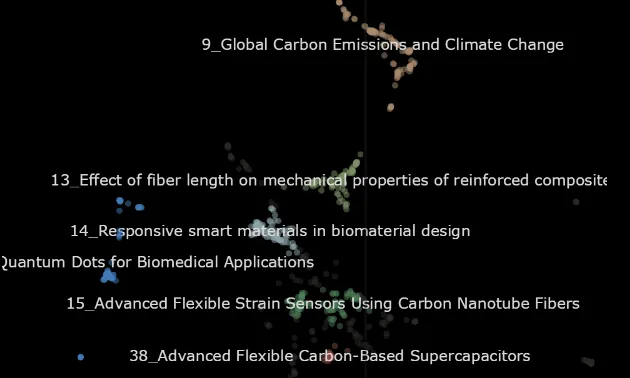 Image by Author
The data used comes from the OpenAlex API (https://openalex.org/). This is a dataset/catalogue of open-source research from around the world. The data is freely accessible under a No Rights Reserved license (CC0 license).
···
Image by Author
The data used comes from the OpenAlex API (https://openalex.org/). This is a dataset/catalogue of open-source research from around the world. The data is freely accessible under a No Rights Reserved license (CC0 license).
···
The BERTopic Pipeline
Using a traditional approach to topic modeling can be difficult, needing to build your own pipeline to clean your data, tokenize, lemmatize, create features, etc. Traditional models like LDA or LSA are also computationally expensive and often yield poor results.
BERTopic leverages the transformer architecture through embedding models, and incorporates other components like dimensionality reduction and topic representation models, to create high-performing topic models. BERTopic also provides variations of models to fit a variety of data and use cases, visualizations to explore results, and more.
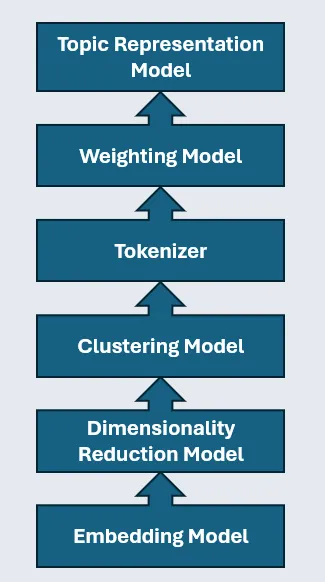 Image by Author
The biggest advantage of BERTopic is its modularity. Seen above, the pipeline is comprised of several different models:
Image by Author
The biggest advantage of BERTopic is its modularity. Seen above, the pipeline is comprised of several different models:
- Embedding model
- Dimensionality Reduction model
- Clustering model
- Tokenizer
- Weighting Scheme
- Representation model (optional)
Therefore, we can experiment with different models in each component, each with its own parameters. For example, we can try different embedding models, switch the dimensionality reduction from PCA to UMAP, or try fine-tuning the parameters on our clustering model. This is a huge advantage that allows us to fit a topic model to our data and use case.
···
First, we need to import to necessary modules. Most of these are to build the components of our BERTopic model.
python
#import packages for data management
import pickle

#import packages for topic modeling
from bertopic import BERTopic
from bertopic.representation import KeyBERTInspired
from bertopic.vectorizers import ClassTfidfTransformer
from sentence_transformers import SentenceTransformer
from umap.umap_ import UMAP
from hdbscan import HDBSCAN
from sklearn.feature_extraction.text import CountVectorizer

#import packages for data manipulation and visualization
import pandas as pd
import matplotlib.pyplot as plt
from scipy.cluster import hierarchy as sch
Embedding Model
The main component of the BERTopic model is the embedding model. First, we initialize the model using the sentence transformer. You can then specify the embedding model you would like to use.
In this case, I am using a relatively small model (~30 million parameters). While we can probably get better results using larger embedding models, I decided to use a smaller model to emphasize speed in this pipeline. You can find and compare embedding models based on their size, performance, intended use, etc. by using the MTEB leaderboard from Hugging Face (https://huggingface.co/spaces/mteb/leaderboard ).
python
#initalize embedding model
embedding_model = SentenceTransformer('thenlper/gte-small')

#calculate embeddings
embeddings = embedding_model.encode(data['all_text'].tolist(), show_progress_bar=True)
Once we run our model, we can use the .shape function to see the size of the vectors produced. Below, we can see that each embedding contains 384 values which make up the meaning of each document.
python
#invesigate shape and size of vectors
embeddings.shape

#output: (6102, 384)
Dimensionality Reduction Model
The next component of the BERTopic model is the dimensionality reduction model. As high-dimensional data can be troublesome to model, we can use a dimensionality reduction model to represent the embeddings in a lower dimensional representation without losing too much information.
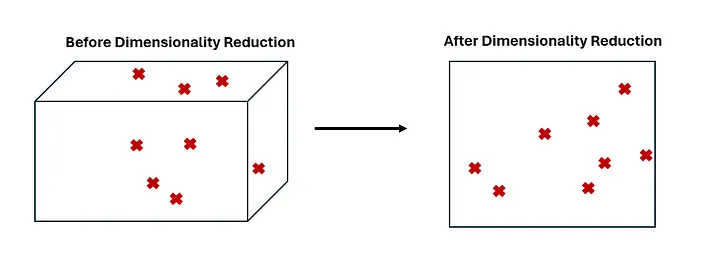 Image by Author
There are several different types of dimensionality reduction models, with Principal Component Analysis (PCA) being the most popular. In this case, we will use a Uniform Manifold Approximation and Projection (UMAP) model. The UMAP model is a non-linear model and is likely to better handle the complex relationships in our data better than PCA.
python
Image by Author
There are several different types of dimensionality reduction models, with Principal Component Analysis (PCA) being the most popular. In this case, we will use a Uniform Manifold Approximation and Projection (UMAP) model. The UMAP model is a non-linear model and is likely to better handle the complex relationships in our data better than PCA.
python
#initialize dimensionality reduction model and reduce embeddings
umap_model = UMAP(n_neighbors=5, min_dist=0.0, metric='cosine', random_state=42)
reduced_embeddings = umap_model.fit_transform(embeddings)
It is important to note that dimensionality reduction is not a solve-all for high-dimensional data. Dimensionality reduction presents a tradeoff between speed and accuracy as information is lost. These models need to be well-thought out and experimented with to avoid losing too much information while maintaining speed and scalability.
Clustering Model
The third step is to use the reduced embeddings and create clusters. While clustering is not usually necessary for topic modeling, we can leverage density-based clustering models to isolate outliers and eliminate noise in our data. Below, we initialize the Hierarchical Density-Based Spatial Clustering of Applications with Noise (HDBSCAN) model and create our clusters.
python
#initialize clustering model and cluster
hdbscan_model = HDBSCAN(min_cluster_size=30, metric='euclidean', cluster_selection_method='eom').fit(reduced_embeddings)
clusters = hdbscan_model.labels_
A density-based approach gives us a few advantages. Documents are not forced into clusters that they shouldn’t be assigned to, therefore isolating outliers and reducing noise in our data. Also, as opposed to centroid-based models, we do not specify the number of clusters, and clusters are more likely to be well-defined.
See my guide to clustering algorithms:
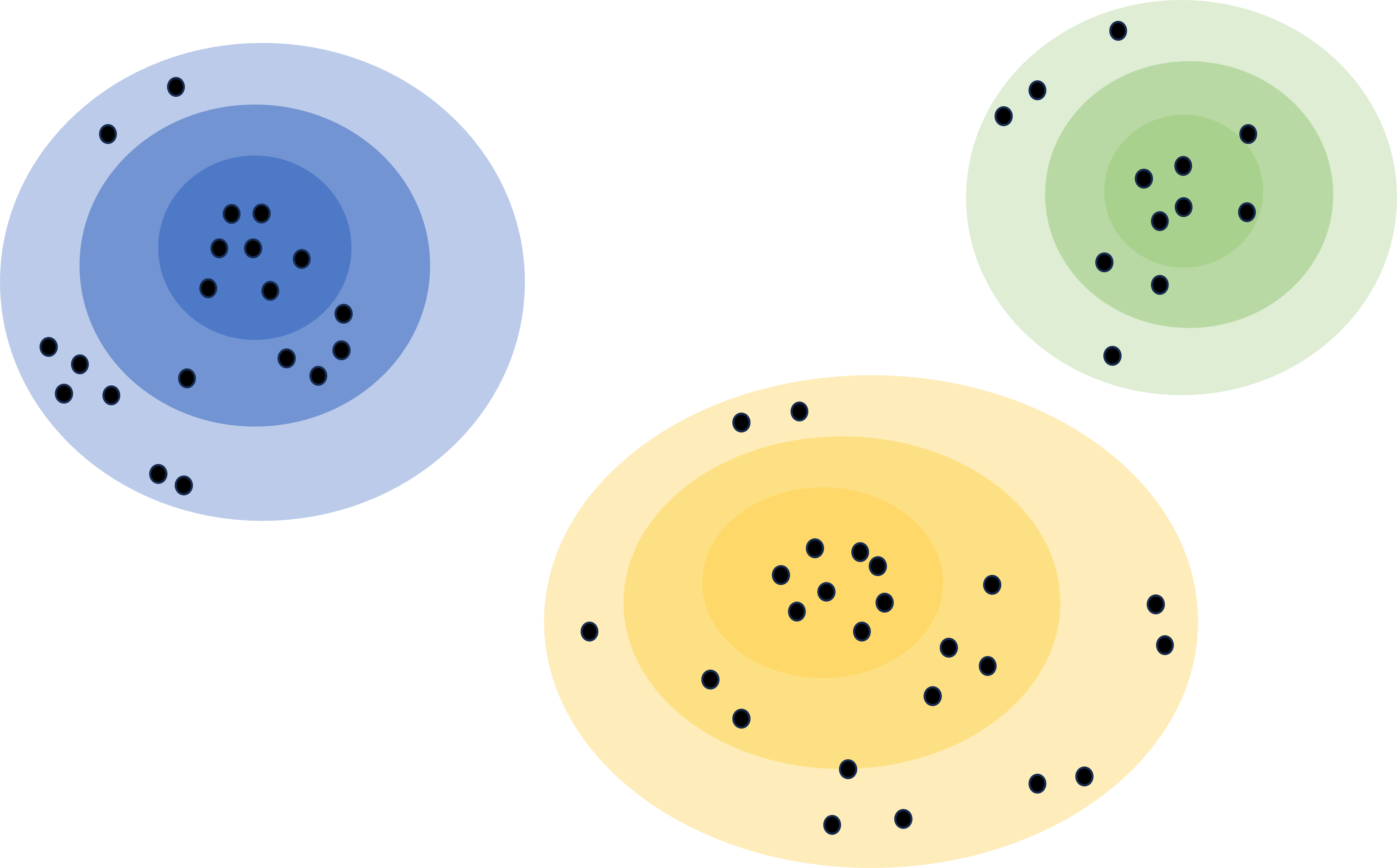 A Guide to Clustering AlgorithmsAn overview of clustering and the different families of clustering algorithms.Alex Davis · 5 min read
See the code below to visualize the results of the clustering model.
python
A Guide to Clustering AlgorithmsAn overview of clustering and the different families of clustering algorithms.Alex Davis · 5 min read
See the code below to visualize the results of the clustering model.
python
#create dataframe of reduced embeddings and clusters
df = pd.DataFrame(reduced_embeddings, columns = ['x', 'y'])
df['Cluster'] = [str(c) for c in clusters]

#split between clusters and outliers
to_plot = df.loc[df.Cluster != '-1', :]
outliers = df.loc[df.Cluster == '-1', :]

#plot clusters
plt.scatter(outliers.x, outliers.y, alpha = 0.05, s = 2, c = 'grey')
plt.scatter(to_plot.x, to_plot.y, alpha = 0.6, s = 2, c = to_plot.Cluster.astype(int), cmap = 'tab20b')
plt.axis('off')
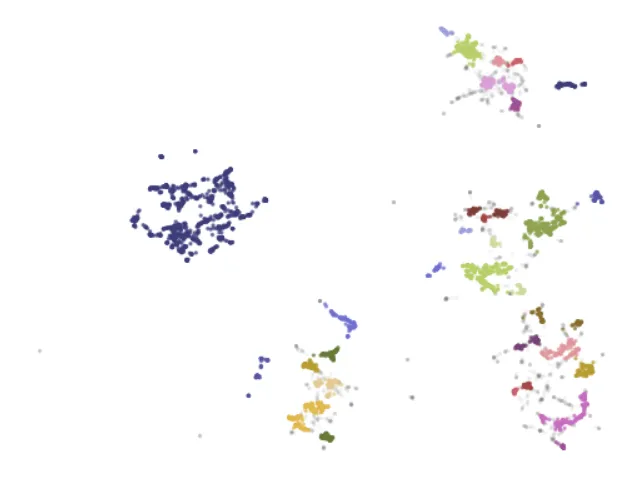 Image by Author
We can see well-defined clusters that do not overlap. We can also see some smaller clusters group together to make up higher-level topics. Lastly, we can see several documents are greyed out and identified as outliers.
···
Image by Author
We can see well-defined clusters that do not overlap. We can also see some smaller clusters group together to make up higher-level topics. Lastly, we can see several documents are greyed out and identified as outliers.
···
Creating a BERTopic Pipeline
We now have the necessary components to build our BERTopic pipeline (embedding model, dimensionality reduction model, clustering model). We can use the models we have initialized and fit them to our data using the BERTopic function.
python
#use models above to BERTopic pipeline
topic_model = BERTopic(
  embedding_model=embedding_model,          # Step 1 - Extract embeddings
  umap_model=umap_model,                    # Step 2 - Reduce dimensionality
  hdbscan_model=hdbscan_model,              # Step 3 - Cluster reduced embeddings
  verbose = True).fit(data['all_text'].tolist(), embeddings)
Since I know I ingested papers about human-machine interfaces (augmented reality, virtual reality), let’s see which topic align to the term “augmented reality”.
python
#topics most similar to 'augmented reality'
topic_model.find_topics("augmented reality")

#output: ([18, 3, 16, 24, 12], [0.9532771, 0.9498462, 0.94966936, 0.9451431, 0.9417263])
From the output above, we can see that topics 18, 3, 16, 24, and 12 highly align to the term “augmented reality”. All these topic should (hopefully) contribute to the broader theme of augmented reality, but each cover a different aspect.
To confirm this, let’s investigate the topic representations. A topic representation is a list of terms that aims to properly represent the underlying theme of the topic. For example, the terms “cake”, “candles”, “family”, and “presents” may collectively represent the topic of birthdays or birthday parties.
We can use the get_topic() function to investigate the representation of topic 18.
python
#investigate topic 18
topic_model.get_topic(18)
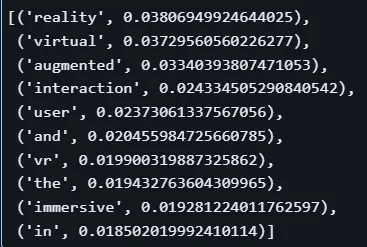 Image by Author
In the above representation, we see some useful terms like “reality”, “virtual”, “augmented”, etc. However, this is not useful as a whole, as we see several stop words like “and” and “the”. This is because BERTopic uses Bag of Words as the default way to represent topics. This representation may also match other representations about augmented reality.
Next, we will improve our BERTopic pipeline to create more meaningful topic representations that are give us more insight into these themes.
···
Image by Author
In the above representation, we see some useful terms like “reality”, “virtual”, “augmented”, etc. However, this is not useful as a whole, as we see several stop words like “and” and “the”. This is because BERTopic uses Bag of Words as the default way to represent topics. This representation may also match other representations about augmented reality.
Next, we will improve our BERTopic pipeline to create more meaningful topic representations that are give us more insight into these themes.
···
Improving Topic Representations
We can improve the topic representations by adding a weighting scheme, which will highlight the most important terms and better differentiate our topics.
This does not replace the Bag of Words model, but improves upon it. Below we add a TF-IDF model to better determine the importance of each term. We use the update_topics() function to update our pipeline.
python
#initialize tokenizer model
vectorizer_model = CountVectorizer(stop_words="english")

#initialize ctfidf model to weight terms
ctfidf_model = ClassTfidfTransformer()

#add tokenizer and ctfidf to pipeline
topic_model.update_topics(data['all_text'].tolist(), vectorizer_model=vectorizer_model, ctfidf_model=ctfidf_model)
python
#investigate how topic representations have changed
topic_model.get_topic(18)
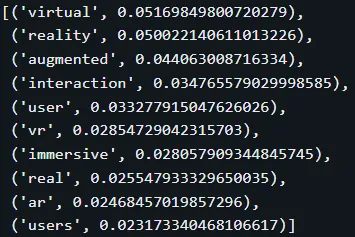 Image by Author
With TF-IDF, these topic representations are much more useful. We can see that the meaningless stop words are gone, other terms appear that help describe the topic, and terms are reordered by their importance.
But we do not have to stop here. Thanks to countless new developments in the world of AI and NLP, there are methods we can leverage to fine-tune these representations.
To fine-tune, we can take one of two approaches:
Image by Author
With TF-IDF, these topic representations are much more useful. We can see that the meaningless stop words are gone, other terms appear that help describe the topic, and terms are reordered by their importance.
But we do not have to stop here. Thanks to countless new developments in the world of AI and NLP, there are methods we can leverage to fine-tune these representations.
To fine-tune, we can take one of two approaches:
- A representation model
- A generative model
Fine-Tuning with a Representation Model
First, let’s add the KeyBERTInspired model as our representation model. This leverages BERT to compare the semantic similarity of the TF-IDF representations with the documents themselves to better determine the relevance of each term, rather than the importance.
See all representation model options here:https://maartengr.github.io/BERTopic/getting_started/representation/representation.html#keybertinspired
python
#initilzae representation model and add to pipeline
representation_model = KeyBERTInspired()
topic_model.update_topics(data['all_text'].tolist(), vectorizer_model=vectorizer_model, ctfidf_model=ctfidf_model, representation_model=representation_model)
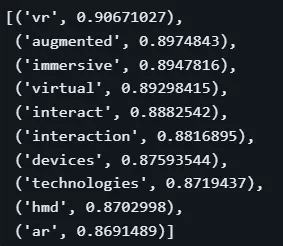 Image by Author
Here, we see a fairly major change in the terms, with some additional terms and acronyms. Comparing this to the TF-IDF representation, we again get a better understanding of what this topic is about. Also notice that the scores changed from the TF-IDF weights, which did not have any meaning without context, to scores between 0–1. These new scores represent the semantic similarity scores.
Image by Author
Here, we see a fairly major change in the terms, with some additional terms and acronyms. Comparing this to the TF-IDF representation, we again get a better understanding of what this topic is about. Also notice that the scores changed from the TF-IDF weights, which did not have any meaning without context, to scores between 0–1. These new scores represent the semantic similarity scores.
Topic Model Visualizations
Before we move to generative models for fine-tuning, let’s explore some of the visualizations that BERTopic offers. Visualizing topic models is crucial in understanding your data and how the model is working.
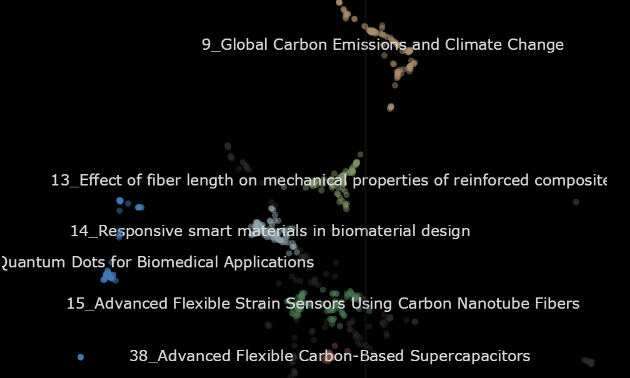
First, we can visualize our topics in a 2-dimensional space, allowing us to see the size of topics and what other topics are similar. Below, we can see we have many topics, with clusters of topics making up larger themes. We can also see a topic that is large and isolated, indicating that there is a lot of similar research regarding crispr.
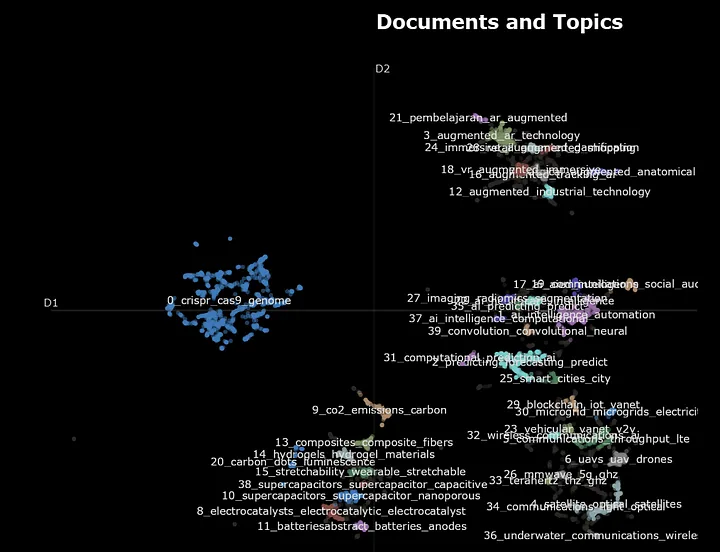 Image by Author
Let’s zoom into these clusters of topics to see how they break down higher-level themes. Below, we zoom into topics regarding augmented and virtual reality and see how some topics cover different domains and applications.
Image by Author
Let’s zoom into these clusters of topics to see how they break down higher-level themes. Below, we zoom into topics regarding augmented and virtual reality and see how some topics cover different domains and applications.
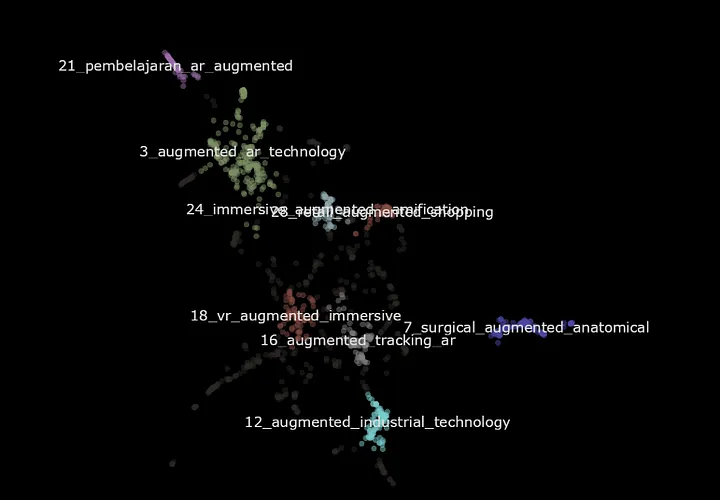 Image by Author
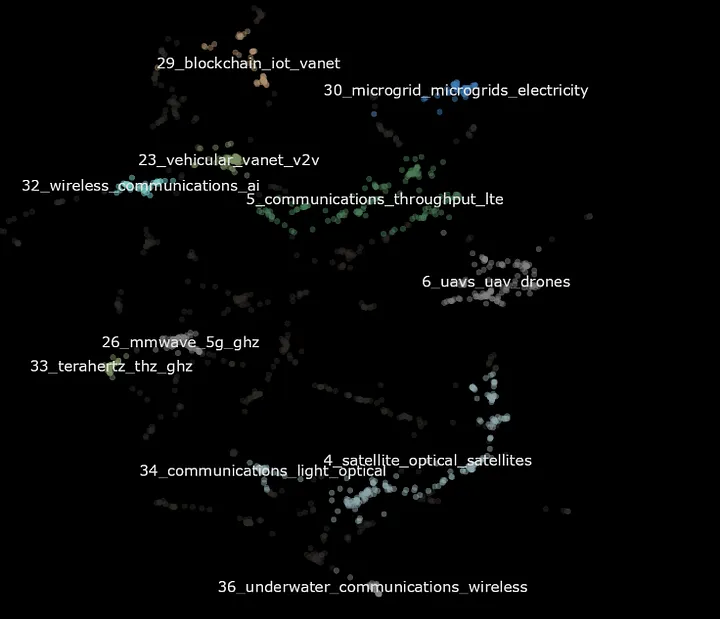 Image by Author
We can also quickly visualize the most important or most relevant terms in each topic. Again, this is dependent on your approach to the topic representations.
Image by Author
We can also quickly visualize the most important or most relevant terms in each topic. Again, this is dependent on your approach to the topic representations.
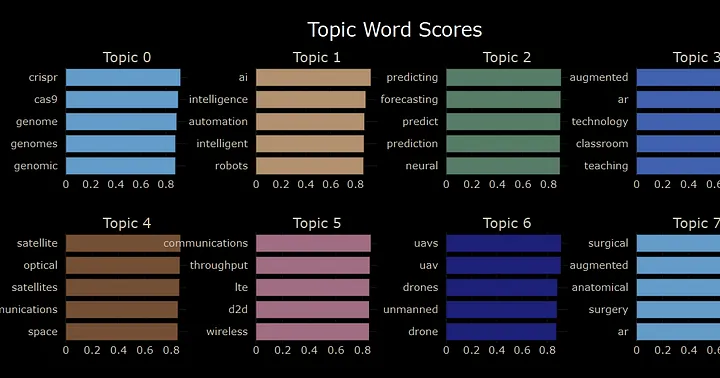 Image by Author
We can also use a heatmap to explore the similarity between topics.
Image by Author
We can also use a heatmap to explore the similarity between topics.
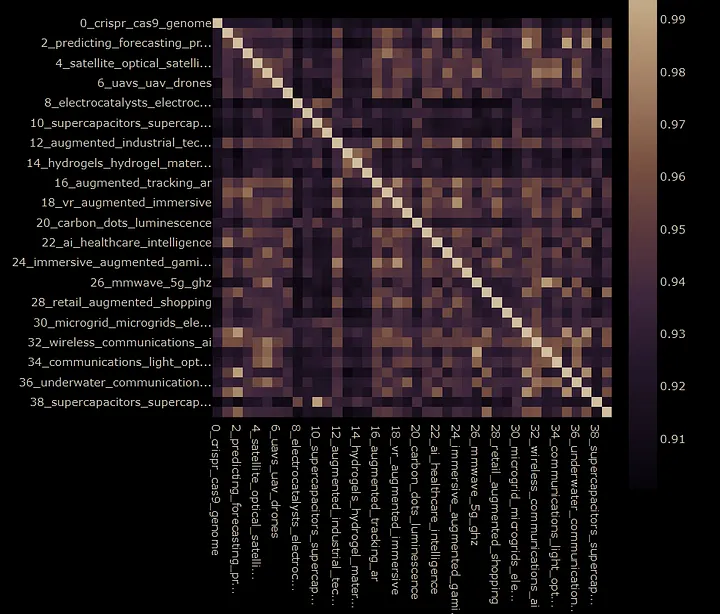 Image by Author
These are just a few of the visualizations that BERTopic offers. See the full list here:https://maartengr.github.io/BERTopic/getting_started/visualization/visualization.html
Image by Author
These are just a few of the visualizations that BERTopic offers. See the full list here:https://maartengr.github.io/BERTopic/getting_started/visualization/visualization.html
Leveraging Generative Models
For our last step of fine-tuning our topic representations, we can leverage generative AI to produce representations that are coherent descriptions of the topic.
BERTopic offers an easy way to leverage OpenAI’s GPT models to interact with the topic model. We first establish a prompt that shows the model the data and the current representation of the topics. We then ask it to generate a short label for each topic.
We then initialize the client and model, and update our pipeline.
python
import openai
from bertopic.representation import OpenAI

#promt for GPT to create topic labels
prompt = """
I have a topic that contains the following documents:
[DOCUMENTS]

The topic is described by the following key words: [KEYWORDS]

Based on the information above, extract a short topic label in the following format:
topic: <short topic label>
"""

#import GPT
client = openai.OpenAI(api_key='API KEY')

#add GPT as representation model
representation_model = OpenAI(client, model = 'gpt-3.5-turbo', exponential_backoff=True, chat=True, prompt=prompt)
topic_model.update_topics(data['all_text'].tolist(), representation_model=representation_model)
Now, let’s go back to the augmented reality topic.
python
#investigate how topic representations have changed
topic_model.get_topic(18)

#output: [('Comparative analysis of virtual and augmented reality for immersive analytics',1)]
The topic representation now reads “Comparative analysis of virtual and augmented reality for immersive analytics”. The topic is now much more clear, as we can see the objectives, technologies, and domain included in these documents.
Below is the full list of our new topic representations.
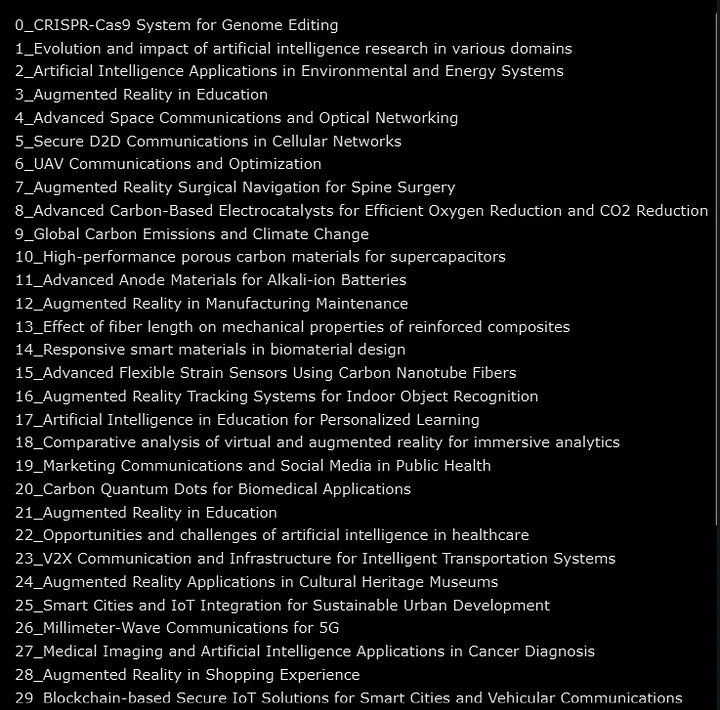 Image by Author
It does not take much code to see how powerful generative AI is in supporting our topic model and its representations. It is of course extremely important to dig deeper and validate these outputs as you build your model and to do plenty of experimentation with different models, parameters, and approaches.
Image by Author
It does not take much code to see how powerful generative AI is in supporting our topic model and its representations. It is of course extremely important to dig deeper and validate these outputs as you build your model and to do plenty of experimentation with different models, parameters, and approaches.
Leveraging Topic Models Variations
Lastly, BERTopic provides several variations of topic models to provide solutions for different data and use cases. These include time-series, hierarchical, supervised, semi-supervised, and many more.
See the full list and documentation here:https://maartengr.github.io/BERTopic/getting_started/topicsovertime/topicsovertime.html
Let’s quickly explore one of these possibilities with hierarchical topic modeling. Below, we create a linkage function using scipy, which establishes distances between our topics. We can easily fit it to our data and visualize the hierarchy of topics.
python
#create linkages between topics
linkage_function = lambda x: sch.linkage(x, 'single', optimal_ordering=True)
hierarchical_topics = topic_model.hierarchical_topics(data['all_text'], linkage_function=linkage_function)

#visualize topic model hierarchy
topic_model.visualize_hierarchy(hierarchical_topics=hierarchical_topics)
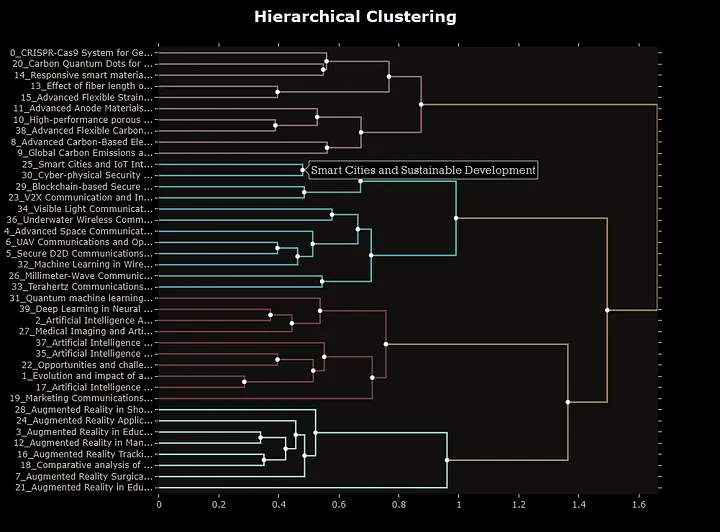 Image by Author
In the visualization above, we can see how topics put themselves together to create broader and broader topics. For example, we see topics 25 and 30 come together to form “Smart Cities and Sustainable Development”. This model provides an awesome capability of being able to zoom in and out and deciding how broad or narrow we would like our topics to be.
···
Image by Author
In the visualization above, we can see how topics put themselves together to create broader and broader topics. For example, we see topics 25 and 30 come together to form “Smart Cities and Sustainable Development”. This model provides an awesome capability of being able to zoom in and out and deciding how broad or narrow we would like our topics to be.
···
Conclusion
In this article, we got to see the power of BERTopic for topic modeling. BERTopics use of transformers and embedding models dramatically improves results from traditional approaches. The BERTopic pipeline also offers both power and modularity, leveraging several models and allowing you to plug-in other models to fit your data. All of these models can be fine-tuned and put together to create a powerful topic model.
You can also integrate representation and generative models to improve topic representations and improve interpretability. BERTopic also offers several visualizations to truly explore your data and validate your model. Lastly, BERTopic offers several variations of topic modeling, like time-series or hierarchical topic modeling, to better fit your use case.
···
I hope you have enjoyed my article! Please feel free to comment, ask questions, or request other topics.
Connect with me on LinkedIn:https://www.linkedin.com/in/alexdavis2020/
Register Now to Continue Reading
Unlock Towards Data Science with a Free Account
All articles on Towards Data Science are available to registered users. Create a free account today to access this article and thousands more.
Register for freeSign in to your account
 Written By
See all from Alex Davis
Deep DivesLlm ApplicationsMachine LearningNatural Lanugage ProcessingTopic Modeling
Share This Article
Towards Data Science is a community publication. Submit your insights to reach our global audience and earn through the TDS Author Payment Program.
Write for TDS
Related Articles
Large Language Models
Learn to enhance your LLMs with my 3 step process, inspecting, improving and iterating on your LLMs
Eivind Kjosbakken
September 11, 20258 min read
Statistics
Learn the math and methods behind the libraries you use daily as a data scientist
Adrienne Kline
January 4, 202312 min read
Large Language Models
From prototype to production: real-world insights into building smarter transcription pipelines with LLMs.
Ugo Pradère
April 29, 202518 min read
Artificial Intelligence
An introductory tutorial for Linux operating system
Soner Yıldırım
December 21, 20205 min read
Machine Learning
Learn how to use a feature store to streamline your data science workflow
Toby Coleman
April 27, 20213 min read
Artificial Intelligence
A simple way to fine-tune pretrained NLP models without native Pytorch or Tensorflow
Vincent Tan
March 25, 20215 min read
Artificial Intelligence
We show how to use PyTest for writing effective test functions for a simple machine learning module.
Tirthajyoti Sarkar
April 24, 20219 min read
Machine Learning
Hands-on Tutorials Pinpointing customer churn at the right time using XGBoost By Charles Frenzel, Baichuan...
Charles Frenzel
June 3, 202114 min read
Machine Learning
How does one of the most common language translation tools used across the world perpetuate bias?
Sourojit Ghosh(G)
December 6, 20215 min read
Your home for data science and AI. The world's leading publication for data science, data analytics, data engineering, machine learning, and artificial intelligence professionals.
Subscribe to Our NewsletterWrite For TDS•About•Advertise•Privacy Policy•Terms of Use
© Insight Media Group, LLC 2026•The New Stack•roadmap.sh•Creator Network
Recommended Articles
Close