保留正文与补采附件。源页面当前未重新核验;具体限制见交付清单。
 We value your privacy
We use cookies to enhance your browsing experience, serve personalised ads or content, and analyse our traffic. By clicking "Accept All", you consent to our use of cookies.
Customise Reject All Accept All
Customise Consent Preferences
We value your privacy
We use cookies to enhance your browsing experience, serve personalised ads or content, and analyse our traffic. By clicking "Accept All", you consent to our use of cookies.
Customise Reject All Accept All
Customise Consent Preferences  We use cookies to help you navigate efficiently and perform certain functions. You will find detailed information about all cookies under each consent category below.
The cookies that are categorised as "Necessary" are stored on your browser as they are essential for enabling the basic functionalities of the site. ... Show more
NecessaryAlways Active
Necessary cookies are required to enable the basic features of this site, such as providing secure log-in or adjusting your consent preferences. These cookies do not store any personally identifiable data.
We use cookies to help you navigate efficiently and perform certain functions. You will find detailed information about all cookies under each consent category below.
The cookies that are categorised as "Necessary" are stored on your browser as they are essential for enabling the basic functionalities of the site. ... Show more
NecessaryAlways Active
Necessary cookies are required to enable the basic features of this site, such as providing secure log-in or adjusting your consent preferences. These cookies do not store any personally identifiable data.
-
Cookie
BCTempID
-
Duration
10 minutes
-
Description
No description available.
-
Cookie
__cf_bm
-
Duration
1 hour
-
Description
This cookie, set by Cloudflare, is used to support Cloudflare Bot Management.
-
Cookie
AWSALBCORS
-
Duration
7 days
-
Description
Amazon Web Services set this cookie for load balancing.
-
Cookie
_cfuvid
-
Duration
session
-
Description
Cloudflare sets this cookie to track users across sessions to optimize user experience by maintaining session consistency and providing personalized services
-
Cookie
li_gc
-
Duration
6 months
-
Description
Linkedin set this cookie for storing visitor's consent regarding using cookies for non-essential purposes.
-
Cookie
__hssrc
-
Duration
session
-
Description
This cookie is set by Hubspot whenever it changes the session cookie. The __hssrc cookie set to 1 indicates that the user has restarted the browser, and if the cookie does not exist, it is assumed to be a new session.
-
Cookie
__hssc
-
Duration
1 hour
-
Description
HubSpot sets this cookie to keep track of sessions and to determine if HubSpot should increment the session number and timestamps in the __hstc cookie.
-
Cookie
wpEmojiSettingsSupports
-
Duration
session
-
Description
WordPress sets this cookie when a user interacts with emojis on a WordPress site. It helps determine if the user's browser can display emojis properly.
-
Cookie
BCSessionID
-
Duration
1 year 1 month 4 days
-
Description
Blueconic sets this cookie as a unique identifier for the BlueConic profile.
-
Cookie
_octo
-
Duration
1 year
-
Description
No description available.
-
Cookie
logged_in
-
Duration
1 year
-
Description
No description available.
-
Cookie
__Secure-YEC
-
Duration
past
-
Description
YouTube sets this cookie to stores the user's video player preferences using embedded YouTube video
-
Cookie
__eoi
-
Duration
6 months
-
Description
Description is currently not available.
-
Cookie
AWSALBTGCORS
-
Duration
7 days
-
Description
No description available.
-
Cookie
login-status-p
-
Duration
past
-
Description
Description is currently not available.
-
Cookie
AWSALBTG
-
Duration
7 days
-
Description
No description available.
-
Cookie
csrf_token
-
Duration
session
-
Description
No description available.
-
Cookie
token_v2
-
Duration
1 day
-
Description
Description is currently not available.
-
Cookie
D
-
Duration
1 year
-
Description
Description is currently not available.
-
Cookie
PHPSESSID
-
Duration
session
-
Description
This cookie is native to PHP applications. The cookie stores and identifies a user's unique session ID to manage user sessions on the website. The cookie is a session cookie and will be deleted when all the browser windows are closed.
-
Cookie
VISITOR_PRIVACY_METADATA
-
Duration
6 months
-
Description
YouTube sets this cookie to store the user's cookie consent state for the current domain.
-
Cookie
cookietest
-
Duration
session
-
Description
The cookietest cookie is typically used to determine whether the user's browser accepts cookies, essential for website functionality and user experience.
-
Cookie
__Host-airtable-session
-
Duration
1 year
-
Description
This cookie is used to enable us to integrate the services of Airtable.
-
Cookie
__Host-airtable-session.sig
-
Duration
1 year
-
Description
This cookie is used to enable us to integrate the services of Airtable.
-
Cookie
m
-
Duration
1 year 1 month 4 days
-
Description
Stripe sets this cookie for fraud prevention purposes. It identifies the device used to access the website, allowing the website to be formatted accordingly.
-
Cookie
BIGipServer*
-
Duration
session
-
Description
Marketo sets this cookie to collect information about the user's online activity and build a profile about their interests to provide advertisements relevant to the user.
-
Cookie
__cfruid
-
Duration
session
-
Description
Cloudflare sets this cookie to identify trusted web traffic.
-
Cookie
_GRECAPTCHA
-
Duration
6 months
-
Description
Google Recaptcha service sets this cookie to identify bots to protect the website against malicious spam attacks.
-
Cookie
__Secure-YNID
-
Duration
6 months
-
Description
Google cookie used to protect user security and prevent fraud, especially during the login process.
-
Cookie
cookieyes-consent
-
Duration
1 year
-
Description
CookieYes sets this cookie to remember users' consent preferences so that their preferences are respected on subsequent visits to this site. It does not collect or store any personal information about the site visitors.
Functional
Functional cookies help perform certain functionalities like sharing the content of the website on social media platforms, collecting feedback, and other third-party features.
-
Cookie
lidc
-
Duration
1 day
-
Description
LinkedIn sets the lidc cookie to facilitate data center selection.
-
Cookie
brw
-
Duration
1 year
-
Description
No description available.
-
Cookie
brwConsent
-
Duration
5 minutes
-
Description
Description is currently not available.
-
Cookie
WMF-Uniq
-
Duration
1 year
-
Description
Description is currently not available.
-
Cookie
loom_anon_comment
-
Duration
1 year
-
Description
No description available.
-
Cookie
loom_referral_video
-
Duration
session
-
Description
Description is currently not available.
-
Cookie
VISITOR_INFO1_LIVE
-
Duration
6 months
-
Description
A cookie set by YouTube to measure bandwidth that determines whether the user gets the new or old player interface.
-
Cookie
yt-remote-connected-devices
-
Duration
Never Expires
-
Description
YouTube sets this cookie to store the user's video preferences using embedded YouTube videos.
-
Cookie
ytidb::LAST_RESULT_ENTRY_KEY
-
Duration
Never Expires
-
Description
The cookie ytidb::LAST_RESULT_ENTRY_KEY is used by YouTube to store the last search result entry that was clicked by the user. This information is used to improve the user experience by providing more relevant search results in the future.
-
Cookie
yt-remote-device-id
-
Duration
Never Expires
-
Description
YouTube sets this cookie to store the user's video preferences using embedded YouTube videos.
-
Cookie
yt-remote-session-name
-
Duration
session
-
Description
The yt-remote-session-name cookie is used by YouTube to store the user's video player preferences using embedded YouTube video.
-
Cookie
yt-remote-fast-check-period
-
Duration
session
-
Description
The yt-remote-fast-check-period cookie is used by YouTube to store the user's video player preferences for embedded YouTube videos.
-
Cookie
yt-remote-session-app
-
Duration
session
-
Description
The yt-remote-session-app cookie is used by YouTube to store user preferences and information about the interface of the embedded YouTube video player.
-
Cookie
yt-remote-cast-available
-
Duration
session
-
Description
The yt-remote-cast-available cookie is used to store the user's preferences regarding whether casting is available on their YouTube video player.
-
Cookie
yt-remote-cast-installed
-
Duration
session
-
Description
The yt-remote-cast-installed cookie is used to store the user's video player preferences using embedded YouTube video.
-
Cookie
cp_session
-
Duration
3 months
-
Description
Codepen sets this cookie for Help systems found in the website.
-
Cookie
loid
-
Duration
1 year 1 month 4 days
-
Description
This cookie is set by the Reddit. The cookie enables the sharing of content from the website onto the social media platform.
Analytics
Analytical cookies are used to understand how visitors interact with the website. These cookies help provide information on metrics such as the number of visitors, bounce rate, traffic source, etc.
-
Cookie
__hstc
-
Duration
6 months
-
Description
Hubspot set this main cookie for tracking visitors. It contains the domain, initial timestamp (first visit), last timestamp (last visit), current timestamp (this visit), and session number (increments for each subsequent session).
-
Cookie
hubspotutk
-
Duration
6 months
-
Description
HubSpot sets this cookie to keep track of the visitors to the website. This cookie is passed to HubSpot on form submission and used when deduplicating contacts.
-
Cookie
_ga
-
Duration
1 year 1 month 4 days
-
Description
Google Analytics sets this cookie to calculate visitor, session and campaign data and track site usage for the site's analytics report. The cookie stores information anonymously and assigns a randomly generated number to recognise unique visitors.
-
Cookie
ga*
-
Duration
1 year 1 month 4 days
-
Description
Google Analytics sets this cookie to store and count page views.
-
Cookie
__Host-psifi.analyticsTrace
-
Duration
6 hours
-
Description
Description is currently not available.
-
Cookie
__Host-psifi.analyticsTraceV2
-
Duration
6 hours
-
Description
Description is currently not available.
-
Cookie
_gh_sess
-
Duration
session
-
Description
GitHub sets this cookie for temporary application and framework state between pages like what step the user is on in a multiple step form.
-
Cookie
YSC
-
Duration
session
-
Description
YSC cookie is set by Youtube and is used to track the views of embedded videos on Youtube pages.
-
Cookie
ajs_anonymous_id
-
Duration
1 year
-
Description
This cookie is set by Segment to count the number of people who visit a certain site by tracking if they have visited before.
-
Cookie
vuid
-
Duration
1 year 1 month 4 days
-
Description
Vimeo installs this cookie to collect tracking information by setting a unique ID to embed videos on the website.
Performance
Performance cookies are used to understand and analyse the key performance indexes of the website which helps in delivering a better user experience for the visitors.
-
Cookie
AWSALB
-
Duration
7 days
-
Description
AWSALB is an application load balancer cookie set by Amazon Web Services to map the session to the target.
-
Cookie
acq
-
Duration
past
-
Description
Description is currently not available.
-
Cookie
acq.sig
-
Duration
past
-
Description
Description is currently not available.
-
Cookie
ptc
-
Duration
2 years
-
Description
No description available.
Advertisement
Advertisement cookies are used to provide visitors with customised advertisements based on the pages you visited previously and to analyse the effectiveness of the ad campaigns.
-
Cookie
muc_ads
-
Duration
1 year 1 month 4 days
-
Description
Twitter sets this cookie to collect user behaviour and interaction data to optimize the website.
-
Cookie
guest_id_marketing
-
Duration
1 year 1 month 4 days
-
Description
Twitter sets this cookie to identify and track the website visitor.
-
Cookie
guest_id_ads
-
Duration
1 year 1 month 4 days
-
Description
Twitter sets this cookie to identify and track the website visitor.
-
Cookie
personalization_id
-
Duration
1 year 1 month 4 days
-
Description
Twitter sets this cookie to integrate and share features for social media and also store information about how the user uses the website, for tracking and targeting.
-
Cookie
guest_id
-
Duration
1 year 1 month 4 days
-
Description
Twitter sets this cookie to identify and track the website visitor. It registers if a user is signed in to the Twitter platform and collects information about ad preferences.
-
Cookie
bcookie
-
Duration
1 year
-
Description
LinkedIn sets this cookie from LinkedIn share buttons and ad tags to recognize browser IDs.
-
Cookie
__Secure-ROLLOUT_TOKEN
-
Duration
6 months
-
Description
YouTube sets this cookie to manage feature rollout and experimentation. It helps Google control which new features or interface changes are shown to users as part of testing and staged rollouts, ensuring consistent experience for a given user during an experiment.
-
Cookie
yt.innertube::nextId
-
Duration
Never Expires
-
Description
YouTube sets this cookie to register a unique ID to store data on what videos from YouTube the user has seen.
-
Cookie
yt.innertube::requests
-
Duration
Never Expires
-
Description
YouTube sets this cookie to register a unique ID to store data on what videos from YouTube the user has seen.
-
Cookie
session_tracker
-
Duration
session
-
Description
This cookie is set by the Reddit. This cookie is used to identify trusted web traffic. It also helps in adverstising on the website.
-
Cookie
edgebucket
-
Duration
session
-
Description
Reddit sets this cookie to save the information about a log-on Reddit user, for the purpose of advertisement recommendations and updating the content.
-
Cookie
did
-
Duration
1 year
-
Description
Arbor sets this cookie to show targeted ads to site visitors.This cookie expires after 2 months or 1 year.
Uncategorised
Other uncategorised cookies are those that are being analysed and have not been classified into a category as yet.
No cookies to display.
Reject All Save My Preferences Accept All
Toggle SearchToggle Mobile Navigation
Publish AI, ML & data-science insights to a global community of data professionals.
Sign inSubmit an Article
LatestEditor's PicksNewsletterShipAI
Write For TDS
LinkedInXToggle Search
Data Engineering
Optimizing Data Transfer in Distributed AI/ML Training Workloads
A deep dive on data transfer bottlenecks, their identification, and their resolution with the help of NVIDIA Nsight™ Systems – part 3
Chaim Rand
January 23, 202613 min read
 Photo by Jachan DeVol on Unsplash
This is the third part of a series of posts on optimizing data transfer using NVIDIA Nsight™ Systems (nsys) profiler. Part one focused on CPU-to-GPU data copies, and part two on GPU-to-CPU copies. In this post, we turn our attention to data transfer between GPUs.
Nowadays, it is quite common for AI/ML training — particularly of large models — to be distributed across multiple GPUs. While there are many different schemes for performing such distribution, what they all have in common is their reliance on the constant transfer of data — such as gradients, weights, statistics, and/or metrics — between the GPUs, throughout training. As with the other types of data transfer we analyzed in our previous posts, here too, a poor implementation could easily lead to under-utilization of compute resources and the unjustified inflation of training costs. Optimizing GPU-to-GPU communication is an active area of research and innovation involving both hardware and software development.
In this post, we will focus on the most common form of distributed training — data-distributed training. In data-distributed training, identical copies of the ML model are maintained on each GPU. Each input batch is evenly distributed among the GPUs, each of which executes a training step to calculate the local gradients. The local gradients are then shared and averaged across the GPUs, resulting in an identical gradient update to each of the model copies. Using NVIDIA Nsight™ Systems (nsys) profiler, we will analyze the effect of the GPU-to-GPU transfer of the gradients on the runtime performance of training a toy model and assess a few techniques for reducing its overhead.
Learn this step by step with the interactive Data Engineer roadmap.
Photo by Jachan DeVol on Unsplash
This is the third part of a series of posts on optimizing data transfer using NVIDIA Nsight™ Systems (nsys) profiler. Part one focused on CPU-to-GPU data copies, and part two on GPU-to-CPU copies. In this post, we turn our attention to data transfer between GPUs.
Nowadays, it is quite common for AI/ML training — particularly of large models — to be distributed across multiple GPUs. While there are many different schemes for performing such distribution, what they all have in common is their reliance on the constant transfer of data — such as gradients, weights, statistics, and/or metrics — between the GPUs, throughout training. As with the other types of data transfer we analyzed in our previous posts, here too, a poor implementation could easily lead to under-utilization of compute resources and the unjustified inflation of training costs. Optimizing GPU-to-GPU communication is an active area of research and innovation involving both hardware and software development.
In this post, we will focus on the most common form of distributed training — data-distributed training. In data-distributed training, identical copies of the ML model are maintained on each GPU. Each input batch is evenly distributed among the GPUs, each of which executes a training step to calculate the local gradients. The local gradients are then shared and averaged across the GPUs, resulting in an identical gradient update to each of the model copies. Using NVIDIA Nsight™ Systems (nsys) profiler, we will analyze the effect of the GPU-to-GPU transfer of the gradients on the runtime performance of training a toy model and assess a few techniques for reducing its overhead.
Learn this step by step with the interactive Data Engineer roadmap.
Disclaimers
The code we will share in this post is intended for demonstrative purposes; please do not rely on its accuracy or optimality. Please do not interpret our mention of any tool, framework, library, service, or platform as an endorsement of its use.
Thanks to Yitzhak Levi for his contributions to this post.
Instance Selection for Distributed Training
In a previous post, Instance Selection for Deep Learning, we discussed the importance of choosing an instance type that is most suitable for your AI/ML workload and the potential impact of that choice on the success of your project. When choosing an instance type for a workload that includes a lot of GPU-to-GPU traffic, you will want to pay attention to how such communication is carried out, including: the instance topology, GPU interconnects, maximal throughput, and latency.
In this post, we will limit our discussion to distribution between GPUs on a single instance. We will experiment with two instance types: an Amazon EC2 g6e.48xlarge with 8 NVIDIA L40S GPUs and an Amazon EC2 p4d.24xlarge with 8 NVIDIA A100 GPUs. Each will run an AWS Deep Learning (Ubuntu 24.04) AMI with PyTorch (2.8), nsys-cli profiler (version 2025.6.1), and the NVIDIA Tools Extension (NVTX) library.
One of the primary differences between the two instance types is how the GPUs are connected: On the g6e.48xlarge communication between the GPUs is over PCI Express (PCIe), whereas p4d.24xlarge includes NVIDIA NVLink™ — dedicated hardware for enabling high-throughput GPU-to-GPU communication. Communication over the PCIe bus is significantly slower than NVLink. While this may be sufficient for workloads with a low communication-to-compute ratio, it could be a performance killer for workloads with high communication rates.
To discover the topology of the instance types, we run the following command:
bash
nvidia-smi topo -m
On the g6e.48xlarge, we get the following results:
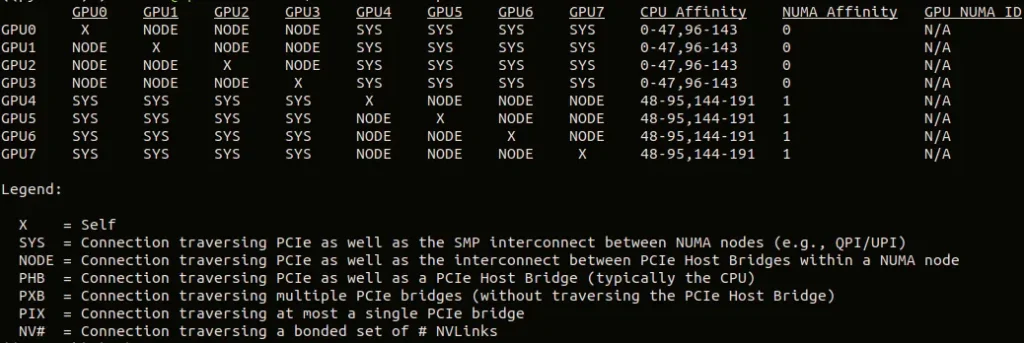 GPU Topology of g6e.48xlarge (by Author)
GPUs on the same NUMA node are connected by a “NODE” link and GPUs on different NUMA nodes by a “SYS” link. Both links traverse the PCIe as well as another interconnect; neither is a direct connection (a.k.a., a “PIX” link). We will see later on how this can impact throughput performance.
On the p4d.24xlarge, every pair of GPUs is linked by a dedicated NVLink connection:
GPU Topology of g6e.48xlarge (by Author)
GPUs on the same NUMA node are connected by a “NODE” link and GPUs on different NUMA nodes by a “SYS” link. Both links traverse the PCIe as well as another interconnect; neither is a direct connection (a.k.a., a “PIX” link). We will see later on how this can impact throughput performance.
On the p4d.24xlarge, every pair of GPUs is linked by a dedicated NVLink connection:
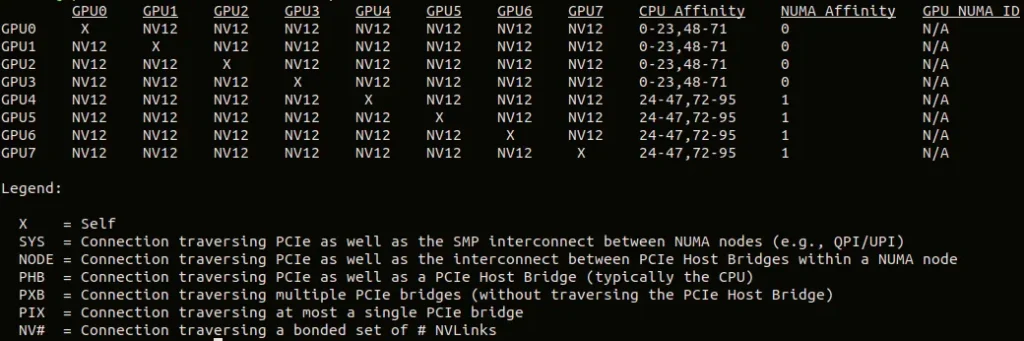 GPU Topology of p4d.24xlarge (by Author)
A Toy Model
To facilitate our discussion, we build a toy data-distributed training experiment.
We choose a model with a relatively high communication-to-compute ratio — a Vision Transformer (ViT)-L/32 image-classification model with roughly 306 million parameters — and a synthetic dataset that we will use to train it:
python
import os, time, torch, nvtx
import torch.nn as nn
import torch.optim as optim
import torch.distributed as dist
from torch.nn.parallel import DistributedDataParallel as DDP
from torch.utils.data.distributed import DistributedSampler
from torch.utils.data import Dataset, DataLoader
from torchvision.models import vit_l_32

WORLD_SIZE = int(os.environ.get("WORLD_SIZE", 1))
BATCH_SIZE = 32
IMG_SIZE = 224
WARMUP_STEPS = 10
PROFILE_STEPS = 3
COOLDOWN_STEPS = 1
TOTAL_STEPS = WARMUP_STEPS + PROFILE_STEPS + COOLDOWN_STEPS
N_WORKERS = 8

def get_model():
    return vit_l_32(weights=None)

# A synthetic dataset with random images and labels
class FakeDataset(Dataset):
    def __len__(self):
        return TOTAL_STEPS * BATCH_SIZE * WORLD_SIZE

    def __getitem__(self, index):
        img = torch.randn((3, IMG_SIZE, IMG_SIZE))
        label = torch.randint(0, 1000, (1,)).item()
        return img, label

def get_data_iter(rank, world_size):
    dataset = FakeDataset()

    sampler = DistributedSampler(dataset, num_replicas=world_size,
                                 rank=rank, shuffle=True)

    train_loader = DataLoader(dataset, batch_size=BATCH_SIZE,
                              sampler=sampler, num_workers=N_WORKERS,
                              pin_memory=True)

    return iter(train_loader)
We define a utility function that we will use to set up PyTorch DistributedDataParallel (DDP) training. We configure the PyTorch distributed communication package to use the NVIDIA Collective Communications Library (NCCL) as its communication backend and wrap the model in a DistributedDataParallel container.
python
def configure_ddp(model, rank):
    dist.init_process_group("nccl")
    model = DDP(model,
                device_ids=[rank],
                bucket_cap_mb=2000)
    return model
Note that we naively configure the DDP bucket capacity to 2 GB. DDP groups the model’s gradients into buckets and performs gradient reduction of each bucket in a separate command. The implication of setting the bucket capacity to 2 GB is that all of the ~306 million (FP32) gradients will fit in a single bucket (306 million x 4 bytes per gradient = ~1.22 GB) and reduction will only occur once all gradients have been calculated.
As in our previous posts, we schedule nsys profiler programmatically and wrap the different portions of the training step with color-coded NVTX annotations:
python
def train(use_ddp=False):
    # detect the env vars set by torchrun
    rank = int(os.environ.get("RANK", 0))
    local_rank = int(os.environ.get("LOCAL_RANK", 0))
    torch.cuda.set_device(local_rank)

    model = get_model().to(local_rank)
    criterion = nn.CrossEntropyLoss().to(local_rank)

    if use_ddp:
        model = configure_ddp(model, rank)

    optimizer = optim.SGD(model.parameters())

    data_iter = get_data_iter(rank, WORLD_SIZE)

    model.train()

    for i in range(TOTAL_STEPS):

        # Schedule Profiling
        if i == WARMUP_STEPS:
            torch.cuda.synchronize()
            start_time = time.perf_counter()
            torch.cuda.profiler.start()
        elif i == WARMUP_STEPS + PROFILE_STEPS:
            torch.cuda.synchronize()
            torch.cuda.profiler.stop()
            end_time = time.perf_counter()

        with nvtx.annotate(f"Batch {i}", color="blue"):

            with nvtx.annotate("get batch", color="red"):
                data, target = next(data_iter)
                data = data.to(local_rank, non_blocking=True)
                target = target.to(local_rank, non_blocking=True)
            with nvtx.annotate("forward", color="green"):
                output = model(data)
                loss = criterion(output, target)

            with nvtx.annotate("backward", color="purple"):
                optimizer.zero_grad()
                loss.backward()

            with nvtx.annotate("optimizer step", color="yellow"):
                optimizer.step()

    if use_ddp:
        dist.destroy_process_group()

    if rank == 0:
        total_time = end_time - start_time
        print(f"Throughput: {PROFILE_STEPS/total_time:.2f} steps/sec")


if __name__ == "__main__":
    # enable ddp if run with torchrun
    train(use_ddp="RANK" in os.environ)
We set the NCCL_DEBUG environment variable for visibility into how NCCL sets up the transport links between the GPUs.
bash
export NCCL_DEBUG=INFO
Single-GPU Performance
We begin our experimentation by running our script on a single GPU without DDP:
bash
nsys profile \
  --capture-range=cudaProfilerApi \
  --capture-range-end=stop \
  --trace=cuda,nvtx,osrt,nccl \
  --output=baseline \
  python train.py
Note the inclusion of ncclin the trace section; this will be critical for analyzing the GPU-to-GPU communication in the multi-GPU experiments.
The throughput of the baseline experiment is 8.91 steps per second on the L40S GPU and 5.17 steps per second on the A100: The newer NVIDIA Ada Lovelace Architecture performs better than the NVIDIA Ampere Architecture on our toy model. In the image below we show the timeline view for the L40S experiment.
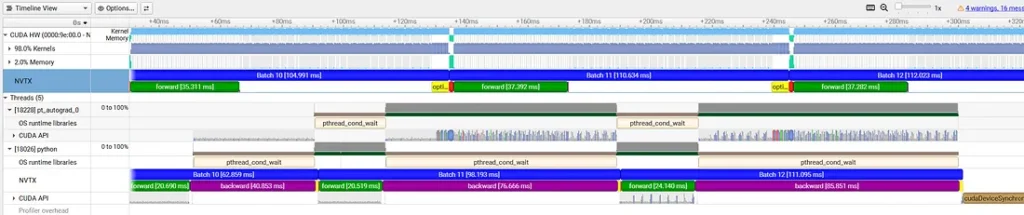 Single L40S GPU Nsight Systems Trace (by Author)
In this post we will focus on the CUDA portion of the timeline. Looking at the NVTX row, we see the recurring red (CPU-to-GPU copy), green (forward), purple (backward), and yellow (optimizer update) pattern that makes up our train step. Note, however, that the purple appears as just a tiny blip while, in practice, the backward pass fills the entire gap between the forward and optimizer blocks: The NVTX library appears to have captured only the initial launch of the autograd graph.
We will use this trace as a comparative baseline for our next experiments.
Single L40S GPU Nsight Systems Trace (by Author)
In this post we will focus on the CUDA portion of the timeline. Looking at the NVTX row, we see the recurring red (CPU-to-GPU copy), green (forward), purple (backward), and yellow (optimizer update) pattern that makes up our train step. Note, however, that the purple appears as just a tiny blip while, in practice, the backward pass fills the entire gap between the forward and optimizer blocks: The NVTX library appears to have captured only the initial launch of the autograd graph.
We will use this trace as a comparative baseline for our next experiments.
DDP with 1 GPU
We assess the impact of the DDP wrapper by running torchrun on a single GPU:
bash
torchrun --nproc_per_node=1 \
    --no-python \
    nsys profile \
    --capture-range=cudaProfilerApi \
    --capture-range-end=stop \
    --trace=cuda,nvtx,nccl,osrt \
    --output=ddp-1gpu \
    python train.py
The resulting throughput drops to 8.40 steps per second on the L40S GPU and 5.04 steps per second on the A100. Even in the absence of any cross-GPU communication, DDP introduces overhead that can decrease throughput by ~3–7%. The important lesson from this is to always ensure that single GPU training is run without DDP.
The nsys trace of the L40S experiment confirms the presence of the DDP overhead:
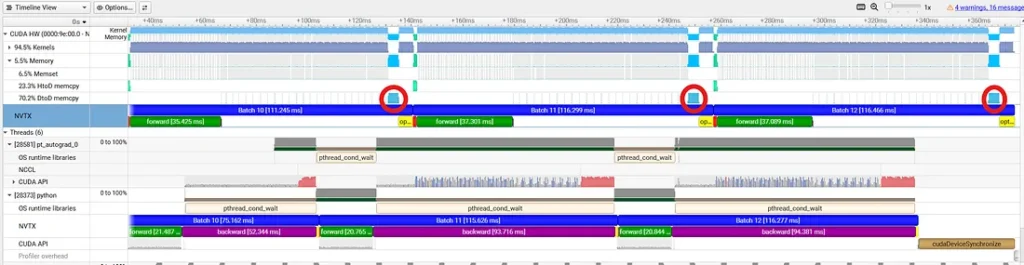 Single L40S GPU With DDP - Profiler Trace (by Author)
The main change from the training step in the previous trace is a large chunk of device-to-device (DtoD) memory copies at the end of the backward block and just before the optimizer block (highlighted in the trace above). This is the DDP in action: Even in the absence of a cross GPU gradient reduction, DDP prepares the local gradients in a dedicated memory block for reduction and then copies the results back into the grad property of each parameter in preparation for the gradient update. (Note that the DtoD copies are between two memory locations on the same GPU — not between two different GPUs).
Single L40S GPU With DDP - Profiler Trace (by Author)
The main change from the training step in the previous trace is a large chunk of device-to-device (DtoD) memory copies at the end of the backward block and just before the optimizer block (highlighted in the trace above). This is the DDP in action: Even in the absence of a cross GPU gradient reduction, DDP prepares the local gradients in a dedicated memory block for reduction and then copies the results back into the grad property of each parameter in preparation for the gradient update. (Note that the DtoD copies are between two memory locations on the same GPU — not between two different GPUs).
DDP With Multiple GPUs
Next, we assess the impact of gradient sharing between 2, 4, and 8 GPUs:
bash
torchrun --nproc_per_node=8 \
    --no-python \
    nsys profile \
    --capture-range=cudaProfilerApi \
    --capture-range-end=stop \
    --trace=cuda,nvtx,nccl,osrt \
    --output=ddp-8gpu_%q{RANK} \
    python train.py
The table below captures impact on the training throughput on the g6e.48xlarge and the p4d.24xlarge:
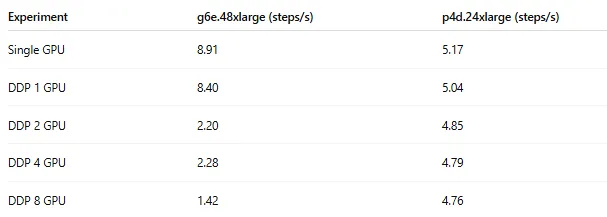 Throughput Performance of DDP Training (by Author)
DDP training performance plummets on the g6e.48xlarge instance: The 8-GPU throughput is more than 6 times slower than the single-GPU result. The NCCL logs include multiple lines describing the communication paths between the GPUs, e.g.:
bash
Throughput Performance of DDP Training (by Author)
DDP training performance plummets on the g6e.48xlarge instance: The 8-GPU throughput is more than 6 times slower than the single-GPU result. The NCCL logs include multiple lines describing the communication paths between the GPUs, e.g.:
bash
NCCL INFO Channel 00 : 0[0] -> 1[1] via SHM/direct/direct
This indicates that the data transfer between each two GPUs passes through CPU shared memory which greatly limits the communication bandwidth.
On the p4d.24xlarge, in contrast, where the NVLink connections allow for direct peer-to-peer (P2P) communication, the 8-GPU throughput is just 8% lower than the baseline result:
bash
NCCL INFO Channel 00/0 : 0[0] -> 1[1] via P2P/CUMEM/read
Even though each individual L40S outperforms the A100 on our toy model by 72%, the inclusion of NVLink makes the p4d.24xlarge more optimal than the g6e.48xlarge for running DDP over 8 GPUs.
The data transfer bottleneck on the g6e.48xlarge can be easily seen in the nsys trace. Here we use the “multiple view” option to display the activity of all the DDP processes in a single timeline:
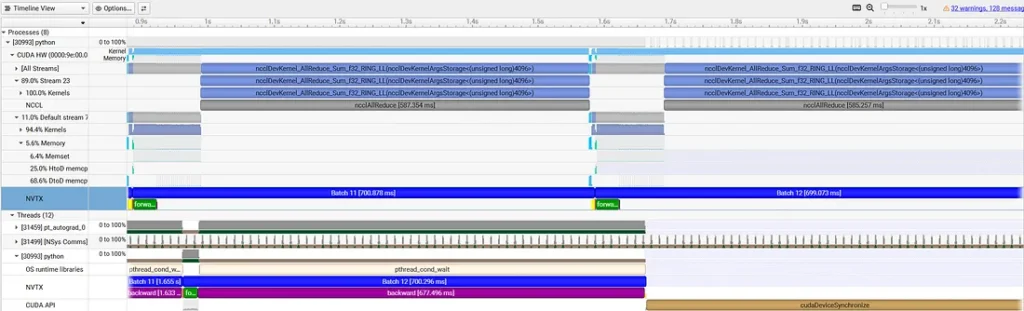 8-GPU DDP on g6e.48xlarge - Profiler Trace (by Author)
The gradient reduction occurs in the ncclAllReduce call on the NCCL row. This comes just after the local gradient calculation has completed and just before the DtoD memory operation discussed above that copies the reduced gradients back to the grad field of each parameter. On the g6e.48xlarge the NCCL operation dominates the backward pass, accounting for approximately 84% of the overall step time (587 out of 701 milliseconds).
On the p4d.24xlarge, the NCCL call takes up a much smaller portion of the training step:
8-GPU DDP on g6e.48xlarge - Profiler Trace (by Author)
The gradient reduction occurs in the ncclAllReduce call on the NCCL row. This comes just after the local gradient calculation has completed and just before the DtoD memory operation discussed above that copies the reduced gradients back to the grad field of each parameter. On the g6e.48xlarge the NCCL operation dominates the backward pass, accounting for approximately 84% of the overall step time (587 out of 701 milliseconds).
On the p4d.24xlarge, the NCCL call takes up a much smaller portion of the training step:
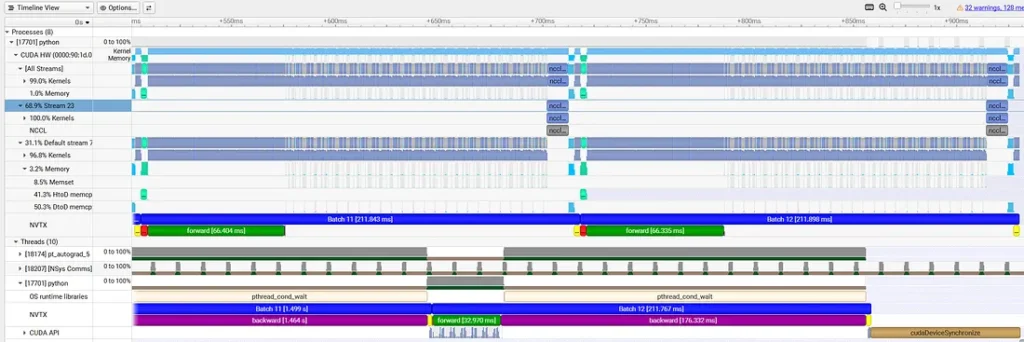 8-GPU DDP on p4d.24xlarge - Profiler Trace (by Author)
In the next sections we will discuss a few DDP optimization techniques and assess their impact on runtime performance. We will limit our scope to PyTorch-level optimizations, leaving other methods (e.g., NCCL/OS/network tuning) for another post.
A general approach for dealing with communication bottlenecks is to reduce the frequency of communication. In DDP workloads this can be achieved by increasing the data batch size (i.e., increasing the compute per step) or, if the memory capacity forbids this, apply gradient accumulation — instead of applying the gradient reduction and update every step, accumulate the local gradients for N steps and apply the reduction every N th step. Both techniques increase the effective batch size — the number of overall samples between gradient updates which can impact model convergence and may require tuning of the optimization parameters. In our discussion we assume the effective batch size is fixed.
We will cover four techniques. The first two focus on reducing DDP overhead. The final two directly address the data transfer bottleneck.
8-GPU DDP on p4d.24xlarge - Profiler Trace (by Author)
In the next sections we will discuss a few DDP optimization techniques and assess their impact on runtime performance. We will limit our scope to PyTorch-level optimizations, leaving other methods (e.g., NCCL/OS/network tuning) for another post.
A general approach for dealing with communication bottlenecks is to reduce the frequency of communication. In DDP workloads this can be achieved by increasing the data batch size (i.e., increasing the compute per step) or, if the memory capacity forbids this, apply gradient accumulation — instead of applying the gradient reduction and update every step, accumulate the local gradients for N steps and apply the reduction every N th step. Both techniques increase the effective batch size — the number of overall samples between gradient updates which can impact model convergence and may require tuning of the optimization parameters. In our discussion we assume the effective batch size is fixed.
We will cover four techniques. The first two focus on reducing DDP overhead. The final two directly address the data transfer bottleneck.
Optimization 1: Static Graph Declaration
Our first change is to pass static_graph=True to the DDP container. Generally speaking, models might include parameters for which gradients are not calculated at every step — referred to as “unused parameters” in the DDP documentation. This is common in models with conditional logic. DDP includes dedicated mechanisms for identifying and handling unused parameters. In the case of our toy model, all of the gradients are calculated in each step — our graph is “static”. Explicitly declaring our graph as static reduces the overhead associated with handling a dynamic gradient set.
python
def configure_ddp(model, rank):
    dist.init_process_group("nccl")
    model = DDP(model,
                device_ids=[rank],
                static_graph=True,
                bucket_cap_mb=2000)
    return model
In the case of our toy model, the impact of this change is negligible on both the g6e.48xlarge and the p4d.24xlarge. Without any further delay, we proceed to the next optimization.
Optimization 2: Increase Memory Efficiency
Our second technique addresses the large chunk of DtoD memory copying we identified above. Instead of copying the gradients to and from the NCCL communication memory blocks, we can explicitly set the parameter gradients to point directly to the NCCL communication buffers. Consequently, the same memory is used to store the local gradients, to perform the gradient reduction, and to apply the gradient updates. This is configured by passing gradient_as_bucket_view=True to the DDP container:
python
def configure_ddp(model, rank):
    dist.init_process_group("nccl")
    model = DDP(model,
                device_ids=[rank],
                static_graph=True,
                gradient_as_bucket_view=True,
                bucket_cap_mb=2000)
    return model
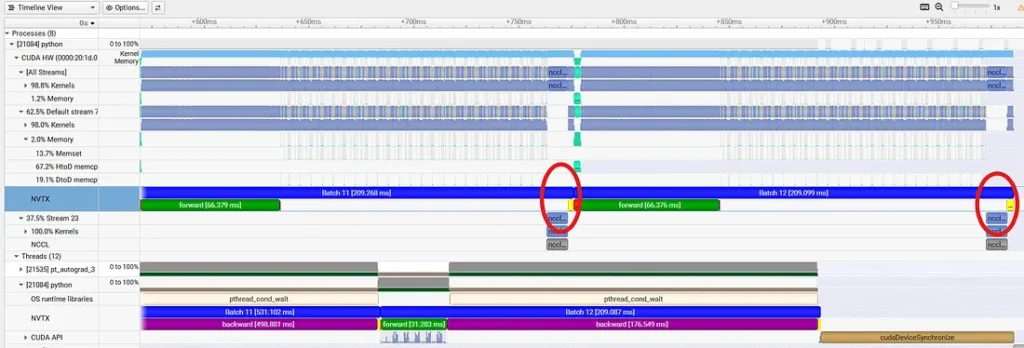
In the trace below, captured on the p4d.24xlarge, we no longer see the block of DtoD memory copy between the all-reduce and (yellow) optimizer steps:
 Memory-Optimized DDP on p4d.24xlarge - Profiler Trace (by Author)
In the case of our toy example, this optimization boosts performance by a modest 1%.
Memory-Optimized DDP on p4d.24xlarge - Profiler Trace (by Author)
In the case of our toy example, this optimization boosts performance by a modest 1%.
Optimization 3: Gradient Compression
A common approach for addressing communication bottlenecks is to apply compression algorithms to reduce the size of the payload. PyTorch DDP provides a number of dedicated communication hooks that automate compression of gradients before NCCL reduction and decompression afterward. In the code block below, we apply bfloat16 gradient compression:
python
import torch.distributed.algorithms.ddp_comm_hooks.default_hooks as ddp_hks

def configure_ddp(model, rank):
    dist.init_process_group("nccl")
    model = DDP(model,
                device_ids=[rank],
                static_graph=True,
                gradient_as_bucket_view=True,
                bucket_cap_mb=2000)

    model.register_comm_hook(state=None, hook=ddp_hks.bf16_compress_hook)
    return model
On the heavily bottlenecked g6e.48xlarge instance bfloat16 compression results in a considerable 65% speed-up! The nsys trace shows the reduced-sized NCCL call as well as the newly introduced compression operations:
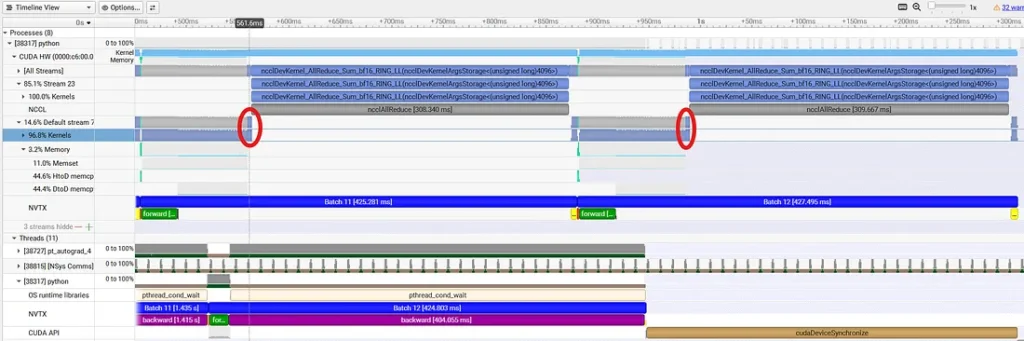 BF16-Compressed DDP on g6e.48xlarge - Profiler Trace (by Author)
On the p4d.24xlarge the overhead of the compression operations outweigh the gains in the communication speed, leading to an overall reduction in throughput:
BF16-Compressed DDP on g6e.48xlarge - Profiler Trace (by Author)
On the p4d.24xlarge the overhead of the compression operations outweigh the gains in the communication speed, leading to an overall reduction in throughput:
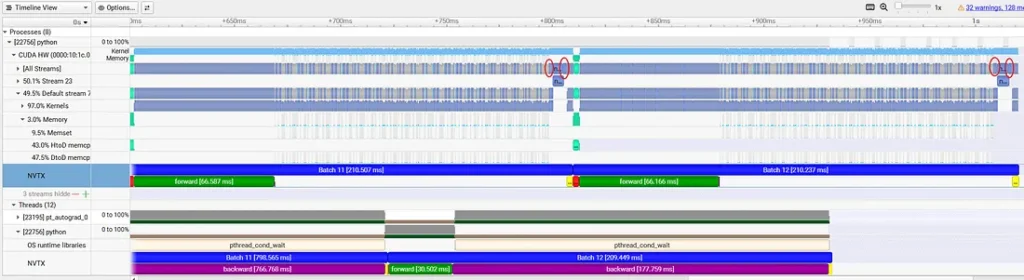 BF16-Compressed DDP on p4d.24xlarge - Profiler Trace (by Author)
PyTorch offers a more aggressive compression algorithm than bfloat16, called PowerSGD. Below we present a naive usage — in practice this can require a lot of tuning. Please see the documentation for details:
python
BF16-Compressed DDP on p4d.24xlarge - Profiler Trace (by Author)
PyTorch offers a more aggressive compression algorithm than bfloat16, called PowerSGD. Below we present a naive usage — in practice this can require a lot of tuning. Please see the documentation for details:
python
from torch.distributed.algorithms.ddp_comm_hooks import powerSGD_hook

def configure_ddp(model, rank):
    dist.init_process_group("nccl")
    model = DDP(model,
                device_ids=[rank],
                static_graph=True,
                gradient_as_bucket_view=True,
                bucket_cap_mb=2000)

    state = powerSGD_hook.PowerSGDState(
        process_group=None
    )

    model.register_comm_hook(
        state,
        hook=powerSGD_hook.powerSGD_hook
    )
    return model
PowerSGD has a dramatic impact on the g6e.48xlarge instance, increasing throughput all the way back up to 7.5 steps per second — more than five times faster than the baseline result! Note the reduction in NCCL kernel size in the resultant trace:
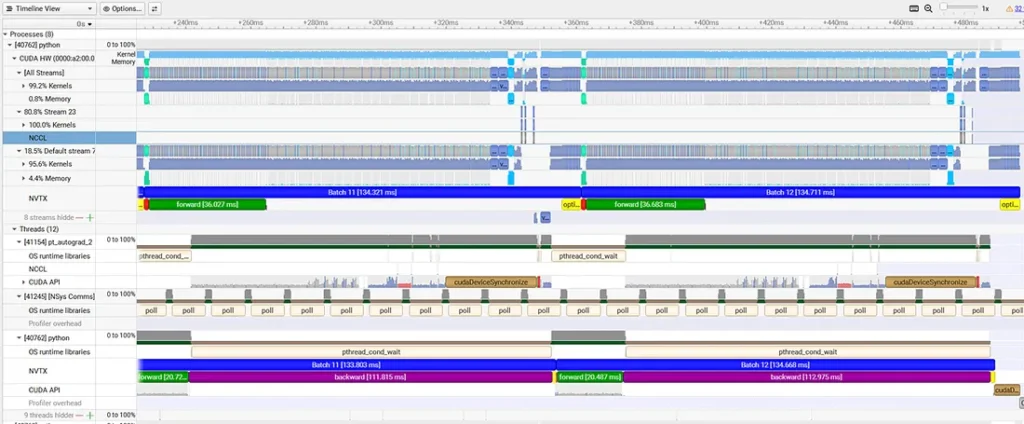 PowerSGD-Compressed DDP on g6e.48xlarge - Profiler Trace (by Author)
It is important to note that these compression algorithms are precision-lossy and should be used with caution, as they may impact your model convergence.
PowerSGD-Compressed DDP on g6e.48xlarge - Profiler Trace (by Author)
It is important to note that these compression algorithms are precision-lossy and should be used with caution, as they may impact your model convergence.
Optimization 4: Parallelize Gradient Reduction
DDP groups parameters into multiple buckets and triggers gradient reduction of each bucket independently — as soon as the bucket is filled. This allows for running gradient reduction of filled buckets while gradient calculation (of other buckets) is still ongoing. The degree of overlap depends on the number of DDP buckets which we control via the bucket_cap_mb setting of the DDP container. Recall that in our initial implementation, we explicitly set this to 2000(2 GB) which (given the size of our model) translated to a single DDP bucket. The table below shows the throughput for different values of bucket_cap_mb. The optimal setting will vary based on the details of the model and runtime environment.
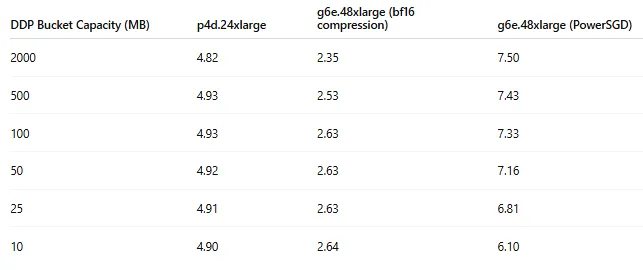 DDP Throughput vs. Bucket Capacity (by Author)
Note the significant 12% improvement when using multiple buckets on the g6e.48xlarge with BF16 compression. PowerSGD, on the other hand, works best when applied to a single bucket.
In the image below, captured on a p4d.24xlarge with bucket_cap_mb set to 100 , we can see the impact of this optimization on the profiler trace:
DDP Throughput vs. Bucket Capacity (by Author)
Note the significant 12% improvement when using multiple buckets on the g6e.48xlarge with BF16 compression. PowerSGD, on the other hand, works best when applied to a single bucket.
In the image below, captured on a p4d.24xlarge with bucket_cap_mb set to 100 , we can see the impact of this optimization on the profiler trace:
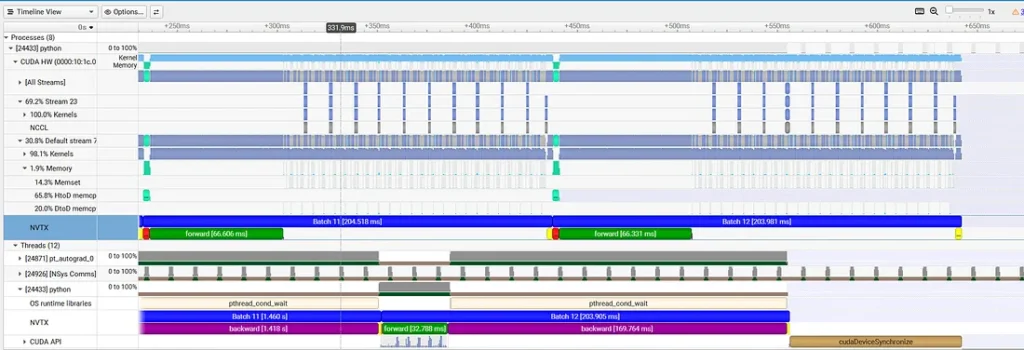 DDP With Multiple Buckets on p4d.24xlarge - Profiler Trace (by Author)
In place of the single NCCL all-reduce operation, we now have 11 smaller blocks running in parallel with the local gradient computation.
DDP With Multiple Buckets on p4d.24xlarge - Profiler Trace (by Author)
In place of the single NCCL all-reduce operation, we now have 11 smaller blocks running in parallel with the local gradient computation.
Results
We summarize the results of our experiments in the following table:
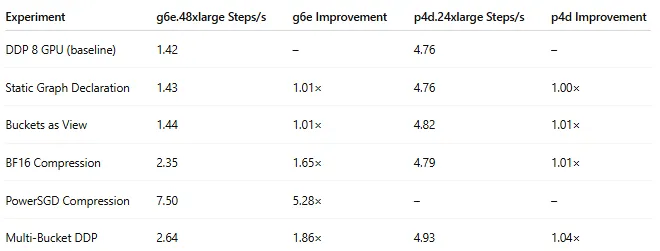 Experiment Results (by Author)
On the p4d.24xlarge, where the data is transferred over NVLink, the overall impact was a modest 4% speed-up. But on the g6e.48xlarge the gains were significant and mostly due to gradient compression — and 86% boost for the BF16 scheme and an over 5X improvement for (the naive implementation of) PowerSGD.
Importantly, these results can vary considerably based on the model architecture and runtime environment.
Experiment Results (by Author)
On the p4d.24xlarge, where the data is transferred over NVLink, the overall impact was a modest 4% speed-up. But on the g6e.48xlarge the gains were significant and mostly due to gradient compression — and 86% boost for the BF16 scheme and an over 5X improvement for (the naive implementation of) PowerSGD.
Importantly, these results can vary considerably based on the model architecture and runtime environment.
Summary
This concludes our three-part series on identifying and solving data transfer bottlenecks with NVIDIA Nsight™ Systems (nsys) profiler. In each of the posts we demonstrated the tendency of data transfers to introduce performance bottlenecks and resource under-utilization. In each case, we used nsys profiler to identify the bottlenecks and measure the impact of different optimization techniques.
The accelerations we achieved in each of the use-cases that we studied strengthen the importance of integrating the regular use of tools such as nsys profiler into the AI/ML development workflow and highlight the opportunity — even for non-CUDA specialists — to achieve meaningful performance gains and AI/ML cost reductions.
Register Now to Continue Reading
Unlock Towards Data Science with a Free Account
All articles on Towards Data Science are available to registered users. Create a free account today to access this article and thousands more.
Register for freeSign in to your account
 Written By
See all from Chaim Rand
Deep DivesArtificial IntelligenceDeep LearningNvidia GpuPytorch
Share This Article
Towards Data Science is a community publication. Submit your insights to reach our global audience and earn through the TDS Author Payment Program.
Write for TDS
Related Articles
Data Engineering
CDC elevates the game for data integrations. But it is hard to to get right - learn what it takes to build data integrations with CDC.
Raghotham Murthy
April 21, 202111 min read
Programming
Enforcing meaningful structure to dbt data models
Giorgos Myrianthous
November 9, 20227 min read
Artificial Intelligence
Skills that will actually make you employable
Terence Shin, MSc, MBA
September 5, 20217 min read
Data Science
Practical steps to identifying business-critical data models and dashboards and drive confidence in your data
Mikkel Dengsøe
June 14, 20239 min read
Artificial Intelligence
Implementing prompt-loss-weight, and why we should replace prompt-masking with prompt-weighting
David Vaughn
September 30, 202431 min read
Data Science
Improve Poor Performance of Your Data Warehouse by Applying These Steps
Hanzala Qureshi
April 26, 20226 min read
Data Science
Hands-on tutorial for starting your Parquet learning
Arli
December 16, 20228 min read
Data Science
When it comes to writing unit-tests for PySpark pipelines, writing focussed, fast, isolated and concise tests can be a challenge.
Julian West
January 16, 202311 min read
Deep Learning
Part 2 - Towards Mamba State Space Models for Images, Videos and Time Series
Sascha Kirch
August 22, 202418 min read
Your home for data science and AI. The world's leading publication for data science, data analytics, data engineering, machine learning, and artificial intelligence professionals.
Subscribe to Our NewsletterWrite For TDS•About•Advertise•Privacy Policy•Terms of Use
© Insight Media Group, LLC 2026•The New Stack•roadmap.sh•Creator Network
Recommended Articles
Close