
We value your privacy
We use cookies to enhance your browsing experience, serve personalised ads or content, and analyse our traffic. By clicking "Accept All", you consent to our use of cookies.
Customise Reject All Accept All
Customise Consent Preferences 
We use cookies to help you navigate efficiently and perform certain functions. You will find detailed information about all cookies under each consent category below.
The cookies that are categorised as "Necessary" are stored on your browser as they are essential for enabling the basic functionalities of the site. ... Show more
NecessaryAlways Active
Necessary cookies are required to enable the basic features of this site, such as providing secure log-in or adjusting your consent preferences. These cookies do not store any personally identifiable data.
* Cookie
BCTempID
* Duration
10 minutes
* Description
No description available.
* Cookie
__cf_bm
* Duration
1 hour
* Description
This cookie, set by Cloudflare, is used to support Cloudflare Bot Management.
* Cookie
AWSALBCORS
* Duration
7 days
* Description
Amazon Web Services set this cookie for load balancing.
* Cookie
_cfuvid
* Duration
session
* Description
Cloudflare sets this cookie to track users across sessions to optimize user experience by maintaining session consistency and providing personalized services
* Cookie
li_gc
* Duration
6 months
* Description
Linkedin set this cookie for storing visitor's consent regarding using cookies for non-essential purposes.
* Cookie
__hssrc
* Duration
session
* Description
This cookie is set by Hubspot whenever it changes the session cookie. The __hssrc cookie set to 1 indicates that the user has restarted the browser, and if the cookie does not exist, it is assumed to be a new session.
* Cookie
__hssc
* Duration
1 hour
* Description
HubSpot sets this cookie to keep track of sessions and to determine if HubSpot should increment the session number and timestamps in the __hstc cookie.
* Cookie
wpEmojiSettingsSupports
* Duration
session
* Description
WordPress sets this cookie when a user interacts with emojis on a WordPress site. It helps determine if the user's browser can display emojis properly.
* Cookie
BCSessionID
* Duration
1 year 1 month 4 days
* Description
Blueconic sets this cookie as a unique identifier for the BlueConic profile.
* Cookie
_octo
* Duration
1 year
* Description
No description available.
* Cookie
logged_in
* Duration
1 year
* Description
No description available.
* Cookie
__Secure-YEC
* Duration
past
* Description
YouTube sets this cookie to stores the user's video player preferences using embedded YouTube video
* Cookie
__eoi
* Duration
6 months
* Description
Description is currently not available.
* Cookie
AWSALBTGCORS
* Duration
7 days
* Description
No description available.
* Cookie
login-status-p
* Duration
past
* Description
Description is currently not available.
* Cookie
AWSALBTG
* Duration
7 days
* Description
No description available.
* Cookie
csrf_token
* Duration
session
* Description
No description available.
* Cookie
token_v2
* Duration
1 day
* Description
Description is currently not available.
* Cookie
D
* Duration
1 year
* Description
Description is currently not available.
* Cookie
PHPSESSID
* Duration
session
* Description
This cookie is native to PHP applications. The cookie stores and identifies a user's unique session ID to manage user sessions on the website. The cookie is a session cookie and will be deleted when all the browser windows are closed.
* Cookie
VISITOR_PRIVACY_METADATA
* Duration
6 months
* Description
YouTube sets this cookie to store the user's cookie consent state for the current domain.
* Cookie
cookietest
* Duration
session
* Description
The cookietest cookie is typically used to determine whether the user's browser accepts cookies, essential for website functionality and user experience.
* Cookie
__Host-airtable-session
* Duration
1 year
* Description
This cookie is used to enable us to integrate the services of Airtable.
* Cookie
__Host-airtable-session.sig
* Duration
1 year
* Description
This cookie is used to enable us to integrate the services of Airtable.
* Cookie
m
* Duration
1 year 1 month 4 days
* Description
Stripe sets this cookie for fraud prevention purposes. It identifies the device used to access the website, allowing the website to be formatted accordingly.
* Cookie
BIGipServer*
* Duration
session
* Description
Marketo sets this cookie to collect information about the user's online activity and build a profile about their interests to provide advertisements relevant to the user.
* Cookie
__cfruid
* Duration
session
* Description
Cloudflare sets this cookie to identify trusted web traffic.
* Cookie
_GRECAPTCHA
* Duration
6 months
* Description
Google Recaptcha service sets this cookie to identify bots to protect the website against malicious spam attacks.
* Cookie
__Secure-YNID
* Duration
6 months
* Description
Google cookie used to protect user security and prevent fraud, especially during the login process.
* Cookie
cookieyes-consent
* Duration
1 year
* Description
CookieYes sets this cookie to remember users' consent preferences so that their preferences are respected on subsequent visits to this site. It does not collect or store any personal information about the site visitors.
Functional
Functional cookies help perform certain functionalities like sharing the content of the website on social media platforms, collecting feedback, and other third-party features.
* Cookie
lidc
* Duration
1 day
* Description
LinkedIn sets the lidc cookie to facilitate data center selection.
* Cookie
brw
* Duration
1 year
* Description
No description available.
* Cookie
brwConsent
* Duration
5 minutes
* Description
Description is currently not available.
* Cookie
WMF-Uniq
* Duration
1 year
* Description
Description is currently not available.
* Cookie
loom_anon_comment
* Duration
1 year
* Description
No description available.
* Cookie
loom_referral_video
* Duration
session
* Description
Description is currently not available.
* Cookie
VISITOR_INFO1_LIVE
* Duration
6 months
* Description
A cookie set by YouTube to measure bandwidth that determines whether the user gets the new or old player interface.
* Cookie
yt-remote-connected-devices
* Duration
Never Expires
* Description
YouTube sets this cookie to store the user's video preferences using embedded YouTube videos.
* Cookie
ytidb::LAST_RESULT_ENTRY_KEY
* Duration
Never Expires
* Description
The cookie ytidb::LAST_RESULT_ENTRY_KEY is used by YouTube to store the last search result entry that was clicked by the user. This information is used to improve the user experience by providing more relevant search results in the future.
* Cookie
yt-remote-device-id
* Duration
Never Expires
* Description
YouTube sets this cookie to store the user's video preferences using embedded YouTube videos.
* Cookie
yt-remote-session-name
* Duration
session
* Description
The yt-remote-session-name cookie is used by YouTube to store the user's video player preferences using embedded YouTube video.
* Cookie
yt-remote-fast-check-period
* Duration
session
* Description
The yt-remote-fast-check-period cookie is used by YouTube to store the user's video player preferences for embedded YouTube videos.
* Cookie
yt-remote-session-app
* Duration
session
* Description
The yt-remote-session-app cookie is used by YouTube to store user preferences and information about the interface of the embedded YouTube video player.
* Cookie
yt-remote-cast-available
* Duration
session
* Description
The yt-remote-cast-available cookie is used to store the user's preferences regarding whether casting is available on their YouTube video player.
* Cookie
yt-remote-cast-installed
* Duration
session
* Description
The yt-remote-cast-installed cookie is used to store the user's video player preferences using embedded YouTube video.
* Cookie
cp_session
* Duration
3 months
* Description
Codepen sets this cookie for Help systems found in the website.
* Cookie
loid
* Duration
1 year 1 month 4 days
* Description
This cookie is set by the Reddit. The cookie enables the sharing of content from the website onto the social media platform.
Analytics
Analytical cookies are used to understand how visitors interact with the website. These cookies help provide information on metrics such as the number of visitors, bounce rate, traffic source, etc.
* Cookie
__hstc
* Duration
6 months
* Description
Hubspot set this main cookie for tracking visitors. It contains the domain, initial timestamp (first visit), last timestamp (last visit), current timestamp (this visit), and session number (increments for each subsequent session).
* Cookie
hubspotutk
* Duration
6 months
* Description
HubSpot sets this cookie to keep track of the visitors to the website. This cookie is passed to HubSpot on form submission and used when deduplicating contacts.
* Cookie
_ga
* Duration
1 year 1 month 4 days
* Description
Google Analytics sets this cookie to calculate visitor, session and campaign data and track site usage for the site's analytics report. The cookie stores information anonymously and assigns a randomly generated number to recognise unique visitors.
* Cookie
_ga_*
* Duration
1 year 1 month 4 days
* Description
Google Analytics sets this cookie to store and count page views.
* Cookie
__Host-psifi.analyticsTrace
* Duration
6 hours
* Description
Description is currently not available.
* Cookie
__Host-psifi.analyticsTraceV2
* Duration
6 hours
* Description
Description is currently not available.
* Cookie
_gh_sess
* Duration
session
* Description
GitHub sets this cookie for temporary application and framework state between pages like what step the user is on in a multiple step form.
* Cookie
YSC
* Duration
session
* Description
YSC cookie is set by Youtube and is used to track the views of embedded videos on Youtube pages.
* Cookie
ajs_anonymous_id
* Duration
1 year
* Description
This cookie is set by Segment to count the number of people who visit a certain site by tracking if they have visited before.
* Cookie
vuid
* Duration
1 year 1 month 4 days
* Description
Vimeo installs this cookie to collect tracking information by setting a unique ID to embed videos on the website.
Performance
Performance cookies are used to understand and analyse the key performance indexes of the website which helps in delivering a better user experience for the visitors.
* Cookie
AWSALB
* Duration
7 days
* Description
AWSALB is an application load balancer cookie set by Amazon Web Services to map the session to the target.
* Cookie
acq
* Duration
past
* Description
Description is currently not available.
* Cookie
acq.sig
* Duration
past
* Description
Description is currently not available.
* Cookie
ptc
* Duration
2 years
* Description
No description available.
Advertisement
Advertisement cookies are used to provide visitors with customised advertisements based on the pages you visited previously and to analyse the effectiveness of the ad campaigns.
* Cookie
muc_ads
* Duration
1 year 1 month 4 days
* Description
Twitter sets this cookie to collect user behaviour and interaction data to optimize the website.
* Cookie
guest_id_marketing
* Duration
1 year 1 month 4 days
* Description
Twitter sets this cookie to identify and track the website visitor.
* Cookie
guest_id_ads
* Duration
1 year 1 month 4 days
* Description
Twitter sets this cookie to identify and track the website visitor.
* Cookie
personalization_id
* Duration
1 year 1 month 4 days
* Description
Twitter sets this cookie to integrate and share features for social media and also store information about how the user uses the website, for tracking and targeting.
* Cookie
guest_id
* Duration
1 year 1 month 4 days
* Description
Twitter sets this cookie to identify and track the website visitor. It registers if a user is signed in to the Twitter platform and collects information about ad preferences.
* Cookie
bcookie
* Duration
1 year
* Description
LinkedIn sets this cookie from LinkedIn share buttons and ad tags to recognize browser IDs.
* Cookie
__Secure-ROLLOUT_TOKEN
* Duration
6 months
* Description
YouTube sets this cookie to manage feature rollout and experimentation. It helps Google control which new features or interface changes are shown to users as part of testing and staged rollouts, ensuring consistent experience for a given user during an experiment.
* Cookie
yt.innertube::nextId
* Duration
Never Expires
* Description
YouTube sets this cookie to register a unique ID to store data on what videos from YouTube the user has seen.
* Cookie
yt.innertube::requests
* Duration
Never Expires
* Description
YouTube sets this cookie to register a unique ID to store data on what videos from YouTube the user has seen.
* Cookie
session_tracker
* Duration
session
* Description
This cookie is set by the Reddit. This cookie is used to identify trusted web traffic. It also helps in adverstising on the website.
* Cookie
edgebucket
* Duration
session
* Description
Reddit sets this cookie to save the information about a log-on Reddit user, for the purpose of advertisement recommendations and updating the content.
* Cookie
did
* Duration
1 year
* Description
Arbor sets this cookie to show targeted ads to site visitors.This cookie expires after 2 months or 1 year.
Uncategorised
Other uncategorised cookies are those that are being analysed and have not been classified into a category as yet.
No cookies to display.
Reject All Save My Preferences Accept All
Toggle Search[](https://towardsdatascience.com/)Toggle Mobile Navigation
[](https://towardsdatascience.com/)
Publish AI, ML & data-science insights to a global community of data professionals.
Sign in[Submit an Article](https://write.insightmediagroup.io)
[Latest](https://towardsdatascience.com/latest/)[Editor's Picks](https://towardsdatascience.com/tag/editors-pick/)[Newsletter](https://towardsdatascience.com/tag/the-variable/)[ShipAI](https://towardsdatascience.com/shipai/)
* * *
[Write For TDS](https://towardsdatascience.com/submissions/)
[LinkedIn](https://www.linkedin.com/company/towards-data-science/)[X](https://x.com/TDataScience)Toggle Search
[Data Science](https://towardsdatascience.com/category/data-science/)
# Journey to Full-Stack Data Scientist: Model Deployment
An introduction to productionizing a machine learning model using APIs and Docker.
[Alex Davis](https://towardsdatascience.com/author/adavis08/)
January 4, 20259 min read
### An introduction to productionizing machine learning models using APIs and Docker.
## Growing Responsibilities of Data Scientists
The title of data scientist is ever-changing and often vague. It usually involves one who is fluent in mathematics, programming, and machine learning. They spend time cleaning data, building models, fine-tuning, and conducting experimentation. They must also have great communication skills, a good grasp on their domain, and other soft skills.
However, this is not always exactly the case. If you spend enough time scrolling through job boards, "Data Scientist" can differ quite a bit. Some read more like a data engineer, focusing on pipelines and big data platforms. Some are closer to a data analyst, focusing on data cleaning and dashboarding. And as of late, there are many that are similar to software or ML engineering, focusing on object-oriented programming, building applications, deploying models, and sometimes even web development.
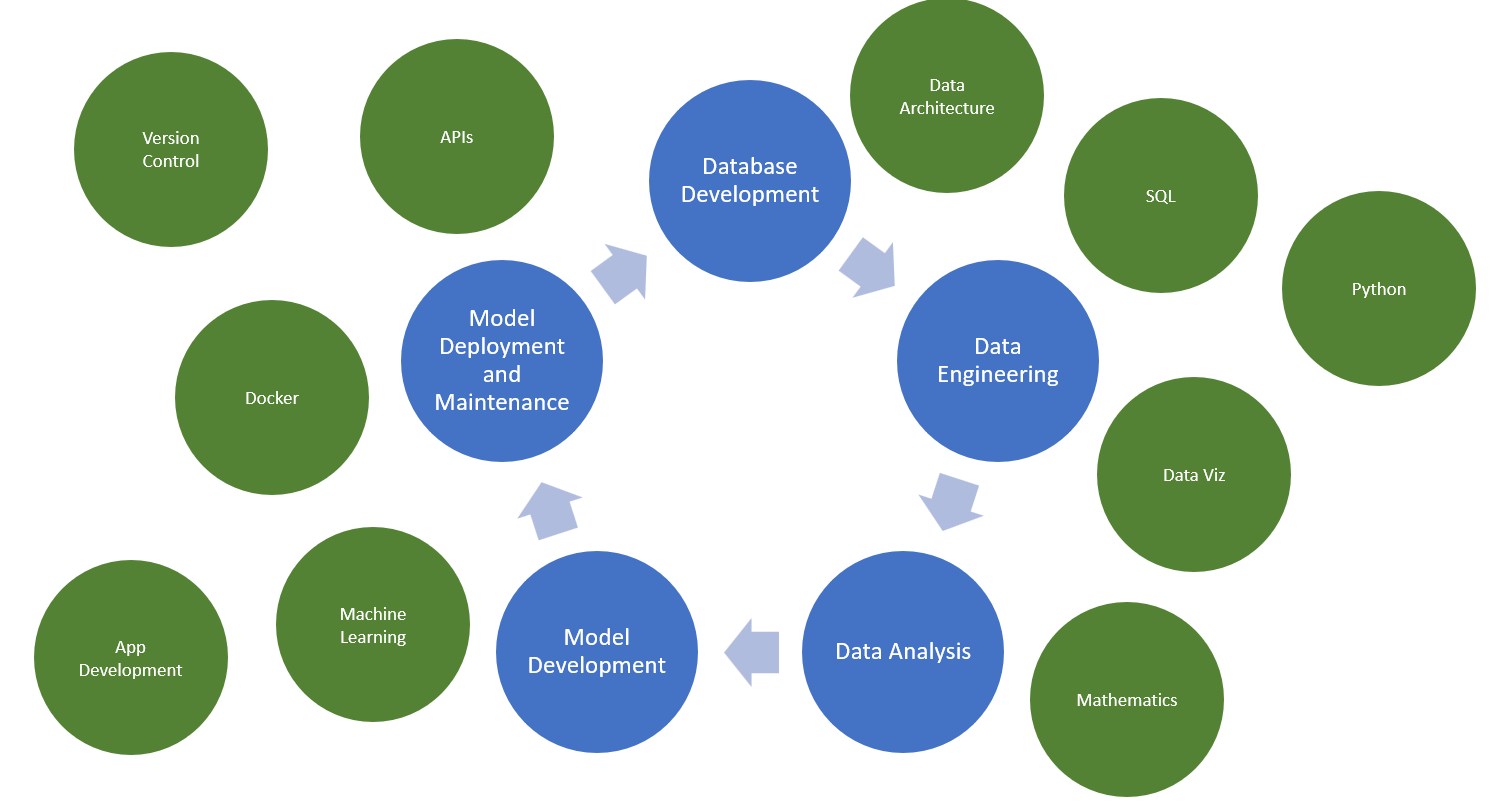
Image by Author
And there are those who expect all of this and more, thus, the "full-stack Data Scientist". With this in mind, data scientists should consider looking to go beyond developing models in a notebook and expand their skillset to other areas like ML Ops. As [Pau Labarta Bajo](https://datamachines.xyz/) says: "**ML models inside Jupyter notebooks have a business value of $𝟬.𝟬𝟬".**
**This article will go over how data scientists can successfully deploy their machine learning models from notebooks to fully productionized APIs by using FastAPI and Docker.**
### Thoughts on the "Full-Stack" Data Scientist
First, my personal opinion on the "full-stack data scientist". With all of these emerging expectations, it is important for us to learn and be comfortable with other skills that we may not have learned in our education or early career. However, the expectation seems to be to master all of these skills, on top of keeping up with traditional data science. And while there are a few out there who are capable of this, it is not feasible for most of us.
I don't believe that becoming a full-stack data scientist means mastering every one of these skills, technologies, etc. **I think that a full-stack data scientist is about being able to wear all of the hats in the data science lifecycle through continuous learning and development.**
While it may not be my expertise, I should be able to collaborate with data engineers to optimize pipelines. And while I am much more comfortable with developing models, I should be able to wear my "ML Engineer" hat and help get a model into deployment. A great data scientist will always have their niches, but will also have a working knowledge of other areas and can quickly learn new skills if and when they need to.
* * *
## Model Development
First, for our example, we need to develop a model. **Since this article focuses on model deployment, we will not worry about the performance of the model.** **Instead, we will build a simple model with limited features to focus on learning model deployment.**
In this example, we will predict a data professional's salary based on a few features, such as experience, job title, company size, etc.
_See data here:_[_https://www.kaggle.com/datasets/ruchi798/data-science-job-salaries_](https://www.kaggle.com/datasets/ruchi798/data-science-job-salaries) _(CC0: Public Domain). I slightly modified the data to reduce the number of options for certain features._
python
```
#import packages for data manipulation
import pandas as pd
import numpy as np
#import packages for machine learning
from sklearn import linear_model
from sklearn.model_selection import train_test_split
from sklearn.preprocessing import OneHotEncoder, OrdinalEncoder
from sklearn.metrics import mean_squared_error, r2_score
#import packages for data management
import joblib
```
First, let's take a look at the data.
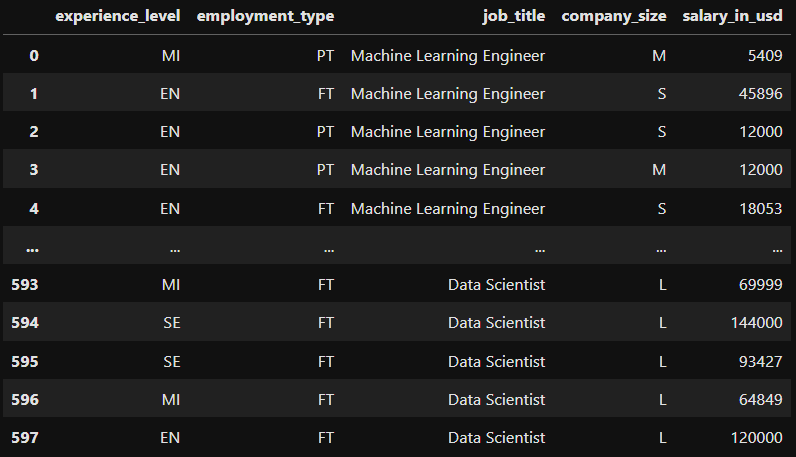
Image by Author
Since all of our features are categorical, we will use encoding to transform our data to numerical. Below, we use ordinal encoders to encode experience level and company size. These are ordinal because they represent some kind of progression (1 = entry level, 2 = mid-level, etc.).
For job title and employment type, we will create a dummy variables for each option (note we drop the first to avoid multicollinearity).
python
```
#use ordinal encoder to encode experience level
encoder = OrdinalEncoder(categories=[['EN', 'MI', 'SE', 'EX']])
salary_data['experience_level_encoded'] = encoder.fit_transform(salary_data[['experience_level']])
#use ordinal encoder to encode company size
encoder = OrdinalEncoder(categories=[['S', 'M', 'L']])
salary_data['company_size_encoded'] = encoder.fit_transform(salary_data[['company_size']])
#encode employmeny type and job title using dummy columns
salary_data = pd.get_dummies(salary_data, columns = ['employment_type', 'job_title'], drop_first = True, dtype = int)
#drop original columns
salary_data = salary_data.drop(columns = ['experience_level', 'company_size'])
```
Now that we have transformed our model inputs, we can create our training and test sets. We will input these features into a simple linear regression model to predict the employee's salary.
python
```
#define independent and dependent features
X = salary_data.drop(columns = 'salary_in_usd')
y = salary_data['salary_in_usd']
#split between training and testing sets
X_train, X_test, y_train, y_test = train_test_split(
X, y, random_state = 104, test_size = 0.2, shuffle = True)
#fit linear regression model
regr = linear_model.LinearRegression()
regr.fit(X_train, y_train)
#make predictions
y_pred = regr.predict(X_test)
#print the coefficients
print("Coefficients: n", regr.coef_)
#print the MSE
print("Mean squared error: %.2f" % mean_squared_error(y_test, y_pred))
#print the adjusted R2 value
print("R2: %.2f" % r2_score(y_test, y_pred))
```
Let's see how our model did.

Image by Author
Looks like our R-squared is 0.27, yikes. A lot more work would need to be done with this model. We would likely need more data and additional information on the observations. But for the sake of this article, we will move forward and save our model.
python
```
#save model using joblib
joblib.dump(regr, 'lin_regress.sav')
```
* * *
## Creating an API
There are several ways to deploy a model. One of those ways is with an API. **An API (Application Programming Interface) enables two pieces of software to communicate with each other.** There are several API architectures like SOAP, RPC, and REST APIs. We will use a REST API, which is the most popular and flexible architecture to access a service.
For our framework, we will use FastAPI (), which is great for beginners as its fairly easy to use and has tons of documentation and examples.
With REST APIs, there are five methods that are commonly used: POST, GET, PUT, PATCH, and DELETE. These correspond to create, read, update, and delete operations. Our script below (Main.py) will follow these steps:
1. Initialize the FastAPI framework and define the request format.
2. Download the model.
3. Create a GET endpoint to retrieve the model.
4. Create a POST endpoint to allow the user to send it new data and create a prediction.
5. Define the host IP and port (location to operate the API).
python
```
import uvicorn
import pandas as pd
from fastapi import FastAPI
from pydantic import BaseModel
import joblib
# Initialize FastAPI
app = FastAPI()
# Define the request body format for predictions
class PredictionFeatures(BaseModel):
experience_level_encoded: float
company_size_encoded: float
employment_type_PT: int
job_title_Data_Engineer: int
job_title_Data_Manager: int
job_title_Data_Scientist: int
job_title_Machine_Learning_Engineer: int
# Global variable to store the loaded model
model = None
# Download the model
def download_model():
global model
model = joblib.load('lin_regress.sav')
# Download the model immediately when the script runs
download_model()
# API Root endpoint
@app.get("/")
async def index():
return {"message": "Welcome to the Data Science Income API. Use the /predict feature to predict your income."}
# Prediction endpoint
@app.post("/predict")
async def predict(features: PredictionFeatures):
# Create input DataFrame for prediction
input_data = pd.DataFrame([{
"experience_level_encoded": features.experience_level_encoded,
"company_size_encoded": features.company_size_encoded,
"employment_type_PT": features.employment_type_PT,
"job_title_Data Engineer": features.job_title_Data_Engineer,
"job_title_Data Manager": features.job_title_Data_Manager,
"job_title_Data Scientist": features.job_title_Data_Scientist,
"job_title_Machine Learning Engineer": features.job_title_Machine_Learning_Engineer
}])
# Predict using the loaded model
prediction = model.predict(input_data)[0]
return {
"Salary (USD)": prediction
}
if __name__ == "__main__":
uvicorn.run(app, host="0.0.0.0", port=8000)
```
Now let's use the command line to test the API. First, change the directory to your project. Then, run the API using uvicorn.
shell
```
cd "C:UsersadaviOneDriveDesktopSalary Model"
py -m uvicorn main:app --reload
```
The command line gives me a link to follow. I am then greeted with the message from the GET endpoint. Nice!
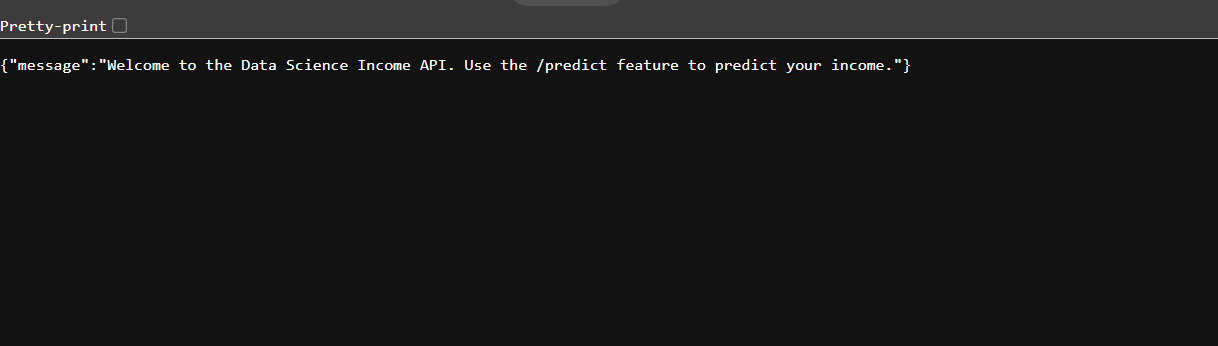
Image by Author
Lastly, let's create a test script to submit new data and retrieve a prediction. Using the requests library, we define the URL and submit a new observation.
python
```
import requests
url = 'http://127.0.0.1:8000/predict'
#dummy data to test API
data = {"experience_level_encoded": 3.0,
"company_size_encoded": 3.0,
"employment_type_PT": 0,
"job_title_Data_Engineer": 0,
"job_title_Data_Manager": 1,
"job_title_Data_Scientist": 0,
"job_title_Machine_Learning_Engineer": 0}
#make a POST request to the API
response = requests.post(url, json=data)
#print response
response.json()
```

Image by Author
The prediction is then returned in JSON format thanks to the POST endpoint. Great, we have a functioning API!
* * *
## Deploying Model Using Docker
### What is Docker?
Now we have a way to interact with our model, but the model is still not deployed. Let's say we have a team of 20 people, all of whom we want to have the API running on their computer. This is likely to be a headache. Replicating data science applications can be challenging as there are a number of roadblocks, such as different operating systems, dependencies, tech stacks, etc.
This is where Docker comes in. Docker is a platform that enables developers to package their applications and all of their dependencies in "containers". Anyone who has access to a container can run the application without worrying about downloading the correct versions of packages, changing operating systems, etc. Docker containers are also very fast and lightweight, giving an advantage over virtual environments or machines.
Download Docker Desktop here:
### Creating a DockerFile and Image
Before we create a container, we must first create an image. A Docker image is a snapshot of the application and its dependencies. It basically outlines the instructions for the container.
To create an image, you must create a Dockerfile (). The Dockerfile is a text-based document that is stored inside the project and provides the instructions on how to assemble the image. The Dockerfile cannot be a .txt file. It must have no extension. **The easiest way to create a Dockerfile is through VSCode. Simply add a new file, and name it "Dockerfile".**
I built the following Dockerfile using their beginner documentation. It follows these steps:
1. Install python 3.9.
2. Create a new directory and copy the project files.
3. Install the necessary packages using requirements.txt.
4. Specify the port (8000).
5. Run the application.
bash
```
# A Dockerfile is a text document that contains all the commands
# a user could call on the command line to assemble an image.
FROM python:3.9.4-buster
# Our Debian with python is now installed.
RUN mkdir build
# We create folder named build for our stuff.
WORKDIR /build
# Now we just want to our WORKDIR to be /build
COPY . .
# FROM [path to files from the folder we run docker run]
# TO [current WORKDIR]
# We copy our files (files from .dockerignore are ignored)
# to the WORKDIR
RUN pip install --no-cache-dir -r requirements.txt
# OK, now we pip install our requirements
EXPOSE 8000
# Instruction informs Docker that the container listens on port 8000
WORKDIR /build/app
# Now we just want to our WORKDIR to be /build/app for simplicity
CMD ["uvicorn", "main:app", "--host", "0.0.0.0", "--port", "8000"]
# This command runs our uvicorn server
```
Now that we have our Dockerfile, we can create the image with the following command. The name of the image will be "apiserver".
bash
```
#build docker image
docker build . -t apiserver
```
If we navigate to Docker Desktop, we can see that the image was successfully created.
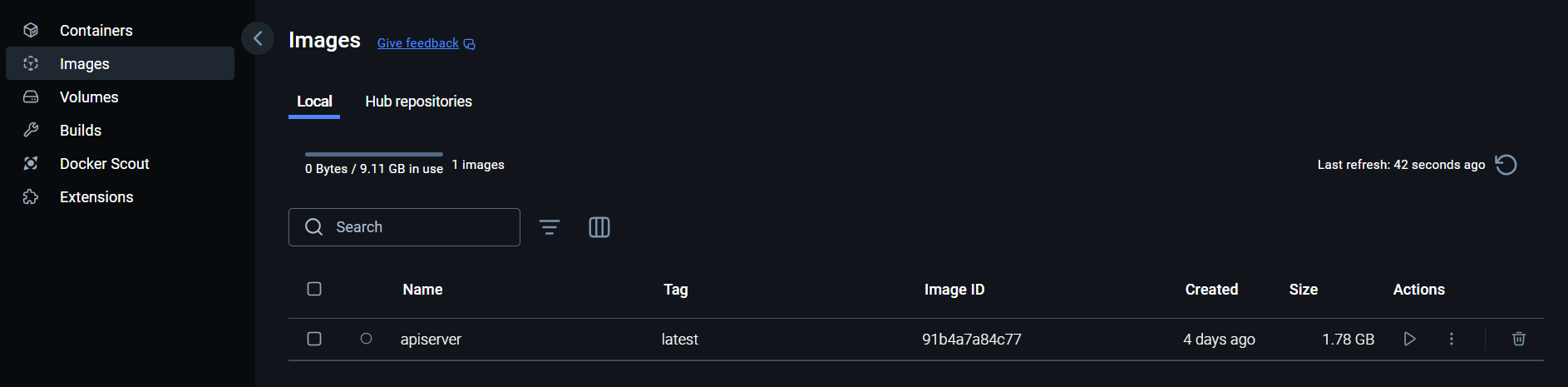
Image by Author
### Creating a Docker Container
Now that we have an image, creating the container is very simple. Once we run the image with a few instructions, the container is created. Below, we run the image and specify the port.
bash
```
#run docker image
#acces at http://localhost:8000
docker run --rm -it -p 8000:8000/tcp apiserver:latest
```
If we navigate back to Docker Desktop again, we can see the container. Docker gives containers random names, which can become difficult to track. If you develop many applications, it is useful to rename them.
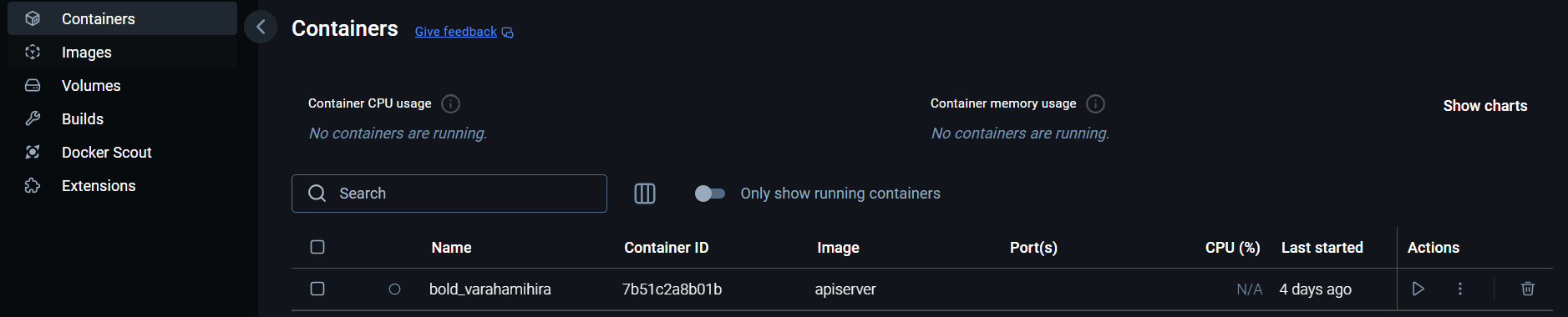
Image by Author
The model is now deployed! Going back to our team of 20, all they need is Docker installed on their machine and access to our container. Then they can run the container and use the API as needed.
* * *
## Conclusion
In conclusion, with new expectations for data scientists, it is vital to learn other skills like software engineering and ML Ops. The need for "full-stack data scientists" is growing as organizations need those that can engage in all stages of the data science lifecycle.
Taking machine learning models out of notebooks and into production is a great first step to become a full-stack data scientist. By using tools like FastAPI and Docker, you can share the hard work it took to build your model by allowing others to use it too.
* * *
_I hope you have enjoyed my article! Please feel free to comment, ask questions, or request other topics._
_Connect with me on LinkedIn:_[_https://www.linkedin.com/in/alexdavis2020/_](https://www.linkedin.com/in/alexdavis2020/)
## Register Now to Continue Reading
### Unlock Towards Data Science with a Free Account
All articles on Towards Data Science are available to registered users. Create a free account today to access this article and thousands more.
Register for freeSign in to your account
* * *

Written By
## [Alex Davis](https://towardsdatascience.com/author/adavis08/)
[See all from Alex Davis](https://towardsdatascience.com/author/adavis08/)
[API](https://towardsdatascience.com/tag/api/)[Data Science](https://towardsdatascience.com/tag/data-science/)[Docker](https://towardsdatascience.com/tag/docker/)[Mlops](https://towardsdatascience.com/tag/mlops/)[Regression](https://towardsdatascience.com/tag/regression/)
Share This Article
* [](https://www.facebook.com/sharer/sharer.php?u=https%3A%2F%2Ftowardsdatascience.com%2Fjourney-to-full-stack-data-scientist-model-deployment-f385f244ec67%2F&title=Journey%20to%20Full-Stack%20Data%20Scientist%3A%20Model%20Deployment)
* [](https://www.linkedin.com/shareArticle?mini=true&url=https%3A%2F%2Ftowardsdatascience.com%2Fjourney-to-full-stack-data-scientist-model-deployment-f385f244ec67%2F&title=Journey%20to%20Full-Stack%20Data%20Scientist%3A%20Model%20Deployment)
* [](https://x.com/share?url=https%3A%2F%2Ftowardsdatascience.com%2Fjourney-to-full-stack-data-scientist-model-deployment-f385f244ec67%2F&text=Journey%20to%20Full-Stack%20Data%20Scientist%3A%20Model%20Deployment)
Towards Data Science is a community publication. Submit your insights to reach our global audience and earn through the TDS Author Payment Program.
[Write for TDS](https://towardsdatascience.com/submissions/)
## Related Articles
* [](https://towardsdatascience.com/pandas-groupby-vs-sql-group-by-39ccd7d2b779/)
## [Pandas Groupby vs SQL Group By](https://towardsdatascience.com/pandas-groupby-vs-sql-group-by-39ccd7d2b779/)
[Artificial Intelligence](https://towardsdatascience.com/category/artificial-intelligence/)
Explained with examples.
[Soner Yıldırım](https://towardsdatascience.com/author/sonery/)
October 28, 20205 min read
* [](https://towardsdatascience.com/market-basket-analysis-with-pandas-246fb8ee10a5/)
## [Market Basket Analysis with Pandas](https://towardsdatascience.com/market-basket-analysis-with-pandas-246fb8ee10a5/)
[Artificial Intelligence](https://towardsdatascience.com/category/artificial-intelligence/)
What items are usually bought together?
[Soner Yıldırım](https://towardsdatascience.com/author/sonery/)
October 7, 20205 min read
* [](https://towardsdatascience.com/how-i-built-a-deep-learning-powered-emoji-slackbot-5d3e59b76d0/)
## [How I Built a Deep Learning Powered Emoji Slackbot 😄 😖 😀](https://towardsdatascience.com/how-i-built-a-deep-learning-powered-emoji-slackbot-5d3e59b76d0/)
[Deep Learning](https://towardsdatascience.com/category/artificial-intelligence/deep-learning/)
And Why the Hard Part of AI has Nothing to Do with AI
[Chenggang Wu](https://towardsdatascience.com/author/cgwu0530/)
July 23, 20204 min read
* [](https://towardsdatascience.com/what-i-learned-setting-up-storage-for-a-machine-learning-project-7ae1e5668762/)
## [What I Learned Setting up Storage for a Machine Learning Project](https://towardsdatascience.com/what-i-learned-setting-up-storage-for-a-machine-learning-project-7ae1e5668762/)
[Machine Learning](https://towardsdatascience.com/category/artificial-intelligence/machine-learning/)
A journey towards a fast and scalable storage solution
[Stefan Pfaffel](https://towardsdatascience.com/author/stfsy/)
February 8, 20216 min read
* [](https://towardsdatascience.com/gpu-optional-python-be36a02b634d/)
## [GPU-Optional Python](https://towardsdatascience.com/gpu-optional-python-be36a02b634d/)
[Data Science](https://towardsdatascience.com/category/data-science/)
Write code that exploits a GPU when available and desirable, but that runs fine on your CPUs when not
[Carl Kadie](https://towardsdatascience.com/author/carlmkadie/)
November 11, 20206 min read
* [](https://towardsdatascience.com/regional-and-online-learnable-fields-cbb18b74e01e/)
## [Regional and Online Learnable Fields](https://towardsdatascience.com/regional-and-online-learnable-fields-cbb18b74e01e/)
[Machine Learning](https://towardsdatascience.com/category/artificial-intelligence/machine-learning/)
A new, not so new, clustering algorithm
[Johannes Wohlenberg](https://towardsdatascience.com/author/johanneswohlenberg/)
July 13, 20216 min read
* [](https://towardsdatascience.com/explainable-ai-xai-with-class-maps-d0e137a91d2c/)
## [Explainable AI (XAI) with Class Maps](https://towardsdatascience.com/explainable-ai-xai-with-class-maps-d0e137a91d2c/)
[Artificial Intelligence](https://towardsdatascience.com/category/artificial-intelligence/)
Introducing a novel visual tool for explaining the results of classification algorithms, with examples in R and Python.
[Nura Kawa](https://towardsdatascience.com/author/nurakawa/)
February 2, 202213 min read
* [](https://towardsdatascience.com/discovering-powerful-data-the-guardian-news-api-into-python-for-nlp-1829b568fb0f/)
## [Discovering Powerful Data: An NLP Goldmine](https://towardsdatascience.com/discovering-powerful-data-the-guardian-news-api-into-python-for-nlp-1829b568fb0f/)
[Machine Learning](https://towardsdatascience.com/category/artificial-intelligence/machine-learning/)
Using the Free Guardian News API with Python to Unlock a Plethora of Tagged Data
[Adrian Causby](https://towardsdatascience.com/author/adrian.causby15/)
February 17, 20221 min read
* [](https://towardsdatascience.com/hierarchical-clustering-and-k-means-clustering-on-country-data-84b2bf54d282/)
## [Hierarchical Clustering and K-means Clustering on Country Data](https://towardsdatascience.com/hierarchical-clustering-and-k-means-clustering-on-country-data-84b2bf54d282/)
[Data Science](https://towardsdatascience.com/category/data-science/)
An overview of two clustering techniques and comparing the results
[Andrea Gustafsen](https://towardsdatascience.com/author/andreagustafsen/)
May 4, 202214 min read
* [YouTube](https://www.youtube.com/c/TowardsDataScience)
* [X](https://x.com/TDataScience)
* [LinkedIn](https://www.linkedin.com/company/towards-data-science/)
* [Threads](https://www.threads.net/@towardsdatascience)
* [Bluesky](https://bsky.app/profile/towardsdatascience.com)
[](https://towardsdatascience.com/)
Your home for data science and AI. The world's leading publication for data science, data analytics, data engineering, machine learning, and artificial intelligence professionals.
Subscribe to Our Newsletter[Write For TDS](https://towardsdatascience.com/submissions/)•[About](https://towardsdatascience.com/about-towards-data-science-d691af11cc2f/)•[Advertise](https://contact.towardsdatascience.com/advertise-with-towards-data-science)•[Privacy Policy](https://towardsdatascience.com/privacy-policy/)•[Terms of Use](https://towardsdatascience.com/website-terms-of-use/)
© Insight Media Group, LLC 2026•[The New Stack](https://thenewstack.io)•[roadmap.sh](https://roadmap.sh)•[Creator Network](https://insightmediagroup.io/creator-network)
#### Recommended Articles
Close
* [  How Relevance Models Foreshadowed Transformers for NLP ](https://towardsdatascience.com/how-relevance-models-foreshadowed-transformers-for-nlp/ "How Relevance Models Foreshadowed Transformers for NLP")
* [  Javascript Fatigue: HTMX Is All You Need to Build ChatGPT — Part 1 ](https://towardsdatascience.com/javascript-fatigue-you-dont-need-js-to-build-chatgpt/ "Javascript Fatigue: HTMX Is All You Need to Build ChatGPT — Part 1")
* [  The Subset Sum Problem Solved in Linear Time for Dense Enough Inputs ](https://towardsdatascience.com/subset-sum-problem-solved-in-linear-time-for-dense-enough-inputs/ "The Subset Sum Problem Solved in Linear Time for Dense Enough Inputs")
* [  Does Your Company Have a Data Strategy? ](https://towardsdatascience.com/does-your-company-have-a-data-strategy-e8944dbec4ae/ "Does Your Company Have a Data Strategy?")