保留正文与补采附件。源页面当前未重新核验;具体限制见交付清单。
 We value your privacy
We use cookies to enhance your browsing experience, serve personalised ads or content, and analyse our traffic. By clicking "Accept All", you consent to our use of cookies.
Customise Reject All Accept All
Customise Consent Preferences
We value your privacy
We use cookies to enhance your browsing experience, serve personalised ads or content, and analyse our traffic. By clicking "Accept All", you consent to our use of cookies.
Customise Reject All Accept All
Customise Consent Preferences  We use cookies to help you navigate efficiently and perform certain functions. You will find detailed information about all cookies under each consent category below.
The cookies that are categorised as "Necessary" are stored on your browser as they are essential for enabling the basic functionalities of the site. ... Show more
NecessaryAlways Active
Necessary cookies are required to enable the basic features of this site, such as providing secure log-in or adjusting your consent preferences. These cookies do not store any personally identifiable data.
We use cookies to help you navigate efficiently and perform certain functions. You will find detailed information about all cookies under each consent category below.
The cookies that are categorised as "Necessary" are stored on your browser as they are essential for enabling the basic functionalities of the site. ... Show more
NecessaryAlways Active
Necessary cookies are required to enable the basic features of this site, such as providing secure log-in or adjusting your consent preferences. These cookies do not store any personally identifiable data.
-
Cookie
BCTempID
-
Duration
10 minutes
-
Description
No description available.
-
Cookie
__cf_bm
-
Duration
1 hour
-
Description
This cookie, set by Cloudflare, is used to support Cloudflare Bot Management.
-
Cookie
AWSALBCORS
-
Duration
7 days
-
Description
Amazon Web Services set this cookie for load balancing.
-
Cookie
_cfuvid
-
Duration
session
-
Description
Cloudflare sets this cookie to track users across sessions to optimize user experience by maintaining session consistency and providing personalized services
-
Cookie
li_gc
-
Duration
6 months
-
Description
Linkedin set this cookie for storing visitor's consent regarding using cookies for non-essential purposes.
-
Cookie
__hssrc
-
Duration
session
-
Description
This cookie is set by Hubspot whenever it changes the session cookie. The __hssrc cookie set to 1 indicates that the user has restarted the browser, and if the cookie does not exist, it is assumed to be a new session.
-
Cookie
__hssc
-
Duration
1 hour
-
Description
HubSpot sets this cookie to keep track of sessions and to determine if HubSpot should increment the session number and timestamps in the __hstc cookie.
-
Cookie
wpEmojiSettingsSupports
-
Duration
session
-
Description
WordPress sets this cookie when a user interacts with emojis on a WordPress site. It helps determine if the user's browser can display emojis properly.
-
Cookie
BCSessionID
-
Duration
1 year 1 month 4 days
-
Description
Blueconic sets this cookie as a unique identifier for the BlueConic profile.
-
Cookie
_octo
-
Duration
1 year
-
Description
No description available.
-
Cookie
logged_in
-
Duration
1 year
-
Description
No description available.
-
Cookie
__Secure-YEC
-
Duration
past
-
Description
YouTube sets this cookie to stores the user's video player preferences using embedded YouTube video
-
Cookie
__eoi
-
Duration
6 months
-
Description
Description is currently not available.
-
Cookie
AWSALBTGCORS
-
Duration
7 days
-
Description
No description available.
-
Cookie
login-status-p
-
Duration
past
-
Description
Description is currently not available.
-
Cookie
AWSALBTG
-
Duration
7 days
-
Description
No description available.
-
Cookie
csrf_token
-
Duration
session
-
Description
No description available.
-
Cookie
token_v2
-
Duration
1 day
-
Description
Description is currently not available.
-
Cookie
D
-
Duration
1 year
-
Description
Description is currently not available.
-
Cookie
PHPSESSID
-
Duration
session
-
Description
This cookie is native to PHP applications. The cookie stores and identifies a user's unique session ID to manage user sessions on the website. The cookie is a session cookie and will be deleted when all the browser windows are closed.
-
Cookie
VISITOR_PRIVACY_METADATA
-
Duration
6 months
-
Description
YouTube sets this cookie to store the user's cookie consent state for the current domain.
-
Cookie
cookietest
-
Duration
session
-
Description
The cookietest cookie is typically used to determine whether the user's browser accepts cookies, essential for website functionality and user experience.
-
Cookie
__Host-airtable-session
-
Duration
1 year
-
Description
This cookie is used to enable us to integrate the services of Airtable.
-
Cookie
__Host-airtable-session.sig
-
Duration
1 year
-
Description
This cookie is used to enable us to integrate the services of Airtable.
-
Cookie
m
-
Duration
1 year 1 month 4 days
-
Description
Stripe sets this cookie for fraud prevention purposes. It identifies the device used to access the website, allowing the website to be formatted accordingly.
-
Cookie
BIGipServer*
-
Duration
session
-
Description
Marketo sets this cookie to collect information about the user's online activity and build a profile about their interests to provide advertisements relevant to the user.
-
Cookie
__cfruid
-
Duration
session
-
Description
Cloudflare sets this cookie to identify trusted web traffic.
-
Cookie
_GRECAPTCHA
-
Duration
6 months
-
Description
Google Recaptcha service sets this cookie to identify bots to protect the website against malicious spam attacks.
-
Cookie
__Secure-YNID
-
Duration
6 months
-
Description
Google cookie used to protect user security and prevent fraud, especially during the login process.
-
Cookie
cookieyes-consent
-
Duration
1 year
-
Description
CookieYes sets this cookie to remember users' consent preferences so that their preferences are respected on subsequent visits to this site. It does not collect or store any personal information about the site visitors.
Functional
Functional cookies help perform certain functionalities like sharing the content of the website on social media platforms, collecting feedback, and other third-party features.
-
Cookie
lidc
-
Duration
1 day
-
Description
LinkedIn sets the lidc cookie to facilitate data center selection.
-
Cookie
brw
-
Duration
1 year
-
Description
No description available.
-
Cookie
brwConsent
-
Duration
5 minutes
-
Description
Description is currently not available.
-
Cookie
WMF-Uniq
-
Duration
1 year
-
Description
Description is currently not available.
-
Cookie
loom_anon_comment
-
Duration
1 year
-
Description
No description available.
-
Cookie
loom_referral_video
-
Duration
session
-
Description
Description is currently not available.
-
Cookie
VISITOR_INFO1_LIVE
-
Duration
6 months
-
Description
A cookie set by YouTube to measure bandwidth that determines whether the user gets the new or old player interface.
-
Cookie
yt-remote-connected-devices
-
Duration
Never Expires
-
Description
YouTube sets this cookie to store the user's video preferences using embedded YouTube videos.
-
Cookie
ytidb::LAST_RESULT_ENTRY_KEY
-
Duration
Never Expires
-
Description
The cookie ytidb::LAST_RESULT_ENTRY_KEY is used by YouTube to store the last search result entry that was clicked by the user. This information is used to improve the user experience by providing more relevant search results in the future.
-
Cookie
yt-remote-device-id
-
Duration
Never Expires
-
Description
YouTube sets this cookie to store the user's video preferences using embedded YouTube videos.
-
Cookie
yt-remote-session-name
-
Duration
session
-
Description
The yt-remote-session-name cookie is used by YouTube to store the user's video player preferences using embedded YouTube video.
-
Cookie
yt-remote-fast-check-period
-
Duration
session
-
Description
The yt-remote-fast-check-period cookie is used by YouTube to store the user's video player preferences for embedded YouTube videos.
-
Cookie
yt-remote-session-app
-
Duration
session
-
Description
The yt-remote-session-app cookie is used by YouTube to store user preferences and information about the interface of the embedded YouTube video player.
-
Cookie
yt-remote-cast-available
-
Duration
session
-
Description
The yt-remote-cast-available cookie is used to store the user's preferences regarding whether casting is available on their YouTube video player.
-
Cookie
yt-remote-cast-installed
-
Duration
session
-
Description
The yt-remote-cast-installed cookie is used to store the user's video player preferences using embedded YouTube video.
-
Cookie
cp_session
-
Duration
3 months
-
Description
Codepen sets this cookie for Help systems found in the website.
-
Cookie
loid
-
Duration
1 year 1 month 4 days
-
Description
This cookie is set by the Reddit. The cookie enables the sharing of content from the website onto the social media platform.
Analytics
Analytical cookies are used to understand how visitors interact with the website. These cookies help provide information on metrics such as the number of visitors, bounce rate, traffic source, etc.
-
Cookie
__hstc
-
Duration
6 months
-
Description
Hubspot set this main cookie for tracking visitors. It contains the domain, initial timestamp (first visit), last timestamp (last visit), current timestamp (this visit), and session number (increments for each subsequent session).
-
Cookie
hubspotutk
-
Duration
6 months
-
Description
HubSpot sets this cookie to keep track of the visitors to the website. This cookie is passed to HubSpot on form submission and used when deduplicating contacts.
-
Cookie
_ga
-
Duration
1 year 1 month 4 days
-
Description
Google Analytics sets this cookie to calculate visitor, session and campaign data and track site usage for the site's analytics report. The cookie stores information anonymously and assigns a randomly generated number to recognise unique visitors.
-
Cookie
ga*
-
Duration
1 year 1 month 4 days
-
Description
Google Analytics sets this cookie to store and count page views.
-
Cookie
__Host-psifi.analyticsTrace
-
Duration
6 hours
-
Description
Description is currently not available.
-
Cookie
__Host-psifi.analyticsTraceV2
-
Duration
6 hours
-
Description
Description is currently not available.
-
Cookie
_gh_sess
-
Duration
session
-
Description
GitHub sets this cookie for temporary application and framework state between pages like what step the user is on in a multiple step form.
-
Cookie
YSC
-
Duration
session
-
Description
YSC cookie is set by Youtube and is used to track the views of embedded videos on Youtube pages.
-
Cookie
ajs_anonymous_id
-
Duration
1 year
-
Description
This cookie is set by Segment to count the number of people who visit a certain site by tracking if they have visited before.
-
Cookie
vuid
-
Duration
1 year 1 month 4 days
-
Description
Vimeo installs this cookie to collect tracking information by setting a unique ID to embed videos on the website.
Performance
Performance cookies are used to understand and analyse the key performance indexes of the website which helps in delivering a better user experience for the visitors.
-
Cookie
AWSALB
-
Duration
7 days
-
Description
AWSALB is an application load balancer cookie set by Amazon Web Services to map the session to the target.
-
Cookie
acq
-
Duration
past
-
Description
Description is currently not available.
-
Cookie
acq.sig
-
Duration
past
-
Description
Description is currently not available.
-
Cookie
ptc
-
Duration
2 years
-
Description
No description available.
Advertisement
Advertisement cookies are used to provide visitors with customised advertisements based on the pages you visited previously and to analyse the effectiveness of the ad campaigns.
-
Cookie
muc_ads
-
Duration
1 year 1 month 4 days
-
Description
Twitter sets this cookie to collect user behaviour and interaction data to optimize the website.
-
Cookie
guest_id_marketing
-
Duration
1 year 1 month 4 days
-
Description
Twitter sets this cookie to identify and track the website visitor.
-
Cookie
guest_id_ads
-
Duration
1 year 1 month 4 days
-
Description
Twitter sets this cookie to identify and track the website visitor.
-
Cookie
personalization_id
-
Duration
1 year 1 month 4 days
-
Description
Twitter sets this cookie to integrate and share features for social media and also store information about how the user uses the website, for tracking and targeting.
-
Cookie
guest_id
-
Duration
1 year 1 month 4 days
-
Description
Twitter sets this cookie to identify and track the website visitor. It registers if a user is signed in to the Twitter platform and collects information about ad preferences.
-
Cookie
bcookie
-
Duration
1 year
-
Description
LinkedIn sets this cookie from LinkedIn share buttons and ad tags to recognize browser IDs.
-
Cookie
__Secure-ROLLOUT_TOKEN
-
Duration
6 months
-
Description
YouTube sets this cookie to manage feature rollout and experimentation. It helps Google control which new features or interface changes are shown to users as part of testing and staged rollouts, ensuring consistent experience for a given user during an experiment.
-
Cookie
yt.innertube::nextId
-
Duration
Never Expires
-
Description
YouTube sets this cookie to register a unique ID to store data on what videos from YouTube the user has seen.
-
Cookie
yt.innertube::requests
-
Duration
Never Expires
-
Description
YouTube sets this cookie to register a unique ID to store data on what videos from YouTube the user has seen.
-
Cookie
session_tracker
-
Duration
session
-
Description
This cookie is set by the Reddit. This cookie is used to identify trusted web traffic. It also helps in adverstising on the website.
-
Cookie
edgebucket
-
Duration
session
-
Description
Reddit sets this cookie to save the information about a log-on Reddit user, for the purpose of advertisement recommendations and updating the content.
-
Cookie
did
-
Duration
1 year
-
Description
Arbor sets this cookie to show targeted ads to site visitors.This cookie expires after 2 months or 1 year.
Uncategorised
Other uncategorised cookies are those that are being analysed and have not been classified into a category as yet.
No cookies to display.
Reject All Save My Preferences Accept All
Toggle SearchToggle Mobile Navigation
Publish AI, ML & data-science insights to a global community of data professionals.
Sign inSubmit an Article
LatestEditor's PicksNewsletterShipAI
Write For TDS
LinkedInXToggle Search
Data Science
Don't just fit data, gain insights too
A lightweight Python package can give you a lot of insights into your regression problems.
Tirthajyoti Sarkar
January 13, 20226 min read
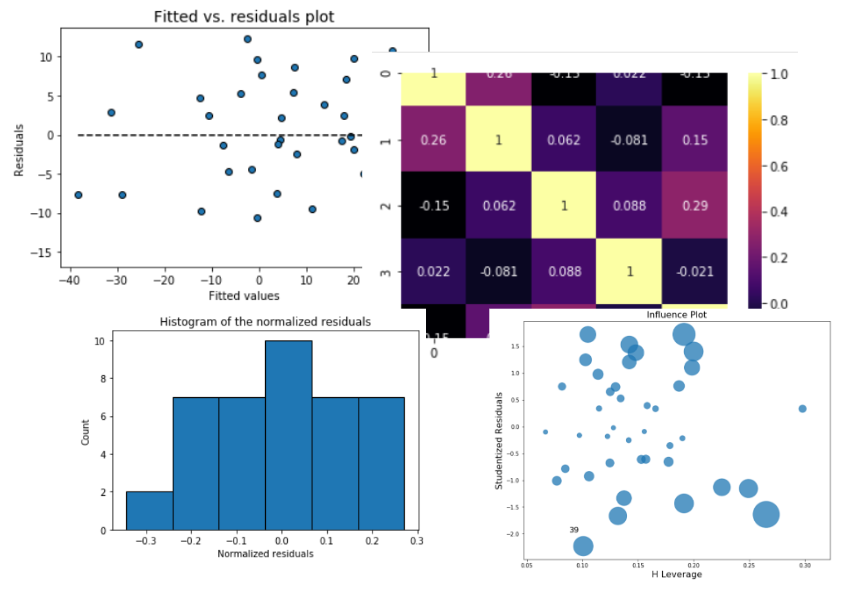
A lightweight Python package can give you a lot of insights into your regression problems
Why insights are needed?
First thing first. Why is linear regression important?
Linear regression is the fundamental technique, which is rooted strongly in the time-tested theory of statistical learning and inference, and powers all the regression-based algorithms used in the modern data science pipelines. And, for the majority of data analytics work - other than problems dealing with high-dimensional data like image, audio, or natural language - such regression techniques are still the most widely used tools.
They are simple to implement and more importantly, simple to follow and explain. And, explainability is becoming more and more important.
The key role of Explainable AI in the next decade - Blog
However, the success of a linear regression model also depends on some fundamental assumptions about the nature of the underlying data. One cannot emphasize enough how important it is to verify whether these assumptions were "reasonably" satisfied. That check is the only guarantee of ensuring the quality of your linear regression model.
Learn this step by step with the interactive AI and Data Scientist and Machine Learning roadmaps.
I explored these issues in a previous story,
How do you check the quality of your regression model in Python?
For all of us using Python as the language of choice for data science, the go-to package for machine learning is Scikit-learn. Although the estimators of Scikit-learn are highly optimized and thoughtfully designed, they do not provide many statistical insights or checks for regression tasks. For example, they can give you the _R_² score and regression coefficients, and not much else.
But, what if you wanted - from the same estimator - the following insights/ plots?
- Residuals vs. predicting variables plots
- Fitted vs. residuals plot
- Histogram of the normalized residuals
- Q-Q plot of the normalized residuals
- Shapiro-Wilk normality test on the residuals
- Cook's distance plot of the residuals
- Variance inflation factor (VIF) of the predicting features
Each of these plots is critical to tell you if the regression problem (i.e. the incoming data) was of good quality or the modeling assumptions have been satisfied. Essentially, the problem has to satisfy these,
In this article, we will explore a simple, lightweight Python package called **mlr**to demonstrate how to gain some insights into a regression problem with a minimal amount of code.
Install and basic fitting
Basic pip install.
text
pip install mlr
We can generate some random data for the demo.
text
num_samples=40
num_dim = 5
X = 10*np.random.random(size=(num_samples,num_dim))
coeff = np.array([2,-3.5,1.2,4.1,-2.5])
y = np.dot(coeff,X.T)+10*np.random.randn(num_samples)
The feature vector has 5 dimensions. Note the random noise added to the data. How does it look like? We plot the response variable w.r.t. each dimension of the feature vector,
At this point, we can create a model instance using the mlr library.
text
model = mlr()
What is it? We can probe :-)
text
model
text
>> I am a Linear Regression model!
The next step is to ingest the data. Not fit, yet, but just to ingest.
text
model.ingest_data(X,y)
At this point, the data has been ingested but not fitted.
text
model.is_ingested
text
>> True
text
model.is_fitted
text
>> False
Immediately, the correlation matrix is available for visualization. Even before fitting a regression model, you have to check for multi-collinearity, don't you?
text
model.corrplot()
All the correlation data and the full covariance matrix is also available. We won't print them just to save space,
text
model.corrcoef()
model.covar()
Then, just fit.
text
model.fit()
A bunch of stuff at your disposal
Once fitted, a lot of internal action happens and the model object is primed with a host of metrics and visualizations for you to gain insight about.
Simple R² score (and all the associated metrics)
We can print the simple R² coefficients,
text
model.r_squared()
>> 0.8023008559130889
text
model.adj_r_squared()
>> 0.7732274523708961
Or, we can print all of them in one shot!
text
model.print_metrics()
>>
sse:     3888.1185
sst:     19666.8452
mse:     97.2030
r^2:     0.8023
adj_r^2: 0.7732
AIC:     308.5871
BIC:     318.7204
For the sake of brevity, I won't go through all these metrics but these are the basics of linear regression problems that you should already be familiar with :-)
Perform the F-test of overall significance
It returns the F-statistic and the p-value of the test. If the p-value is a small number you can reject the Null hypothesis that all the regression coefficient is zero. That means a small p-value (generally < 0.01) indicates that the overall regression is statistically significant.
text
model.ftest()
text
>> (27.59569772244756, 4.630496783262639e-11)
t-test statistics, and standard errors of the coefficients
Standard errors and corresponding t-tests give us the p-values for each regression coefficient, which tells us whether that particular coefficient is statistically significant or not (based on the given data).
Again, all of these, one function call away,
text
print("P-values:",model.pvalues())
print("t-test values:",model.tvalues())
print("Standard errors:",model.std_err())
We get,
text
P-values: [1.37491834e-01 8.39253557e-06 1.62863484e-05 1.64865547e-03
 1.23943729e-06 1.97055499e-02]
t-test values: [-1.5210582   5.23964721 -5.017859    3.41906173  5.87822303 -2.44746809]
Standard errors: [7.35200748 0.65528743 0.58944149 0.58706879 0.55966142 0.7806859 ]
Confidence intervals for each feature?
One line of code,
text
model.conf_int()
>>
array([[-26.12390808,   3.75824557],
       [  2.10177067,   4.76517923],
       [ -4.15562353,  -1.75984506],
       [  0.81415711,   3.20029178],
       [  2.15244579,   4.42718347],
       [ -3.49724847,  -0.3241592 ]])
Visual analysis of the residuals
Residual analysis is crucial to check the assumptions of a linear regression model. mlr helps you check those assumptions easily by providing straightforward visual analytics methods for the residuals.
Fitted vs. residuals plot
Check the assumption of constant variance and uncorrelated features (independence) with this plot.
text
model.fitted_vs_residual()
Fitted vs features plot
Check the assumption of linearity with this plot,
text
model.fitted_vs_features()
Histogram and Q-Q plot of standardized residuals
Check the normality assumption of the error terms using these plots,
text
model.histogram_resid()
text
model.qqplot_resid()
Feature selection
One of the good things about a simplified API is that we can use it to do complicated tasks with only a few lines of code. For example, we may want to use mlr to check how the regression metrics change as we start with only one explanatory variable and gradually add more. This is a common task for the feature selection method.
For this, assume that we have already put the data into a Pandas DataFrame and using the fit_dataframe method.
text
for i in range(1,6):
    m = mlr() # Model instance
    # List of explanatory variables
    X = ['X'+str(j) for j in range(i)]
    # Fitting the dataframe by passing on the list
    m.fit_dataframe(X=X,y='y',dataframe=df)
    print("nRegression model built with feature vector", X)
    print("Metrics are as follows...")
    print("-"*80)
    m.print_metrics()
Something like the following gets printed,
We can also plot the gradual decrease in the value of AIC and BIC as the variables are added.
What kind of insights you can get from the plot above? Perhaps, if you are resource-constrained for model training, you may stop with three features to build the model.
And explain to your customer, why you chose those three features only.
A full list of methods is available here.
Summary
It is not enough to just fit the data and predict. There are many statistical significance tests and residuals check that should be performed for rigorous regression analysis. Having a single lightweight library can help achieve that with a minimal amount of coding. That is what we demonstrated in this article.
Read the full documentation of this library (mlr) here: Documentation.
Loved the article? Become a Medium member to continue learning without limits . I'll receive a portion of your membership fee if you use the following link,__with no extra cost to you .
Join Medium with my referral link - Tirthajyoti Sarkar
Register Now to Continue Reading
Unlock Towards Data Science with a Free Account
All articles on Towards Data Science are available to registered users. Create a free account today to access this article and thousands more.
Register for freeSign in to your account
 Written By
See all from Tirthajyoti Sarkar
Data ScienceMachine LearningPython
Share This Article
Towards Data Science is a community publication. Submit your insights to reach our global audience and earn through the TDS Author Payment Program.
Write for TDS
Related Articles
Artificial Intelligence
The art of reusing models trained by others
Vincent Mueller
September 13, 20215 min read
Machine Learning
A Step by Step Tutorial To Create Stunning Visualizations
Sara A. Metwalli
August 2, 20208 min read
Machine Learning
Build a CNN classifier and turn it to a recommendation engine.
Alexandre Warembourg
October 17, 20194 min read
Data Science
Visualising Geospatial Variations in Well Log Measurements Within the Subsurface
Andy McDonald
June 16, 20237 min read
Step-by-step guide toward automation
Philip Tsang
December 20, 202210 min read
Data Science
TLDR; process it with a new Python Data Processing Engine in the Cloud.
Roman Orac
November 22, 20216 min read
Artificial Intelligence
Comparing model-free and model-based RL methods on a dynamic grid world
Ryan Pégoud
September 23, 202314 min read
Data Science
Estimate the distance between any pair of sites from their geographical coordinates as a stepping stone to solving routing problems
Carlos Jimenez Uribe-echeverria
July 16, 202314 min read
Data Science
An extensive guide to structuring data to predict future sales using machine learning. It walks through how to use python to create lagged...
Nicklas Ankarstad
June 9, 202121 min read
Your home for data science and AI. The world's leading publication for data science, data analytics, data engineering, machine learning, and artificial intelligence professionals.
Subscribe to Our NewsletterWrite For TDS•About•Advertise•Privacy Policy•Terms of Use
© Insight Media Group, LLC 2026•The New Stack•roadmap.sh•Creator Network
Recommended Articles
Close