保留正文与补采附件。源页面当前未重新核验;具体限制见交付清单。
 We value your privacy
We use cookies to enhance your browsing experience, serve personalised ads or content, and analyse our traffic. By clicking "Accept All", you consent to our use of cookies.
Customise Reject All Accept All
Customise Consent Preferences
We value your privacy
We use cookies to enhance your browsing experience, serve personalised ads or content, and analyse our traffic. By clicking "Accept All", you consent to our use of cookies.
Customise Reject All Accept All
Customise Consent Preferences  We use cookies to help you navigate efficiently and perform certain functions. You will find detailed information about all cookies under each consent category below.
The cookies that are categorised as "Necessary" are stored on your browser as they are essential for enabling the basic functionalities of the site. ... Show more
NecessaryAlways Active
Necessary cookies are required to enable the basic features of this site, such as providing secure log-in or adjusting your consent preferences. These cookies do not store any personally identifiable data.
We use cookies to help you navigate efficiently and perform certain functions. You will find detailed information about all cookies under each consent category below.
The cookies that are categorised as "Necessary" are stored on your browser as they are essential for enabling the basic functionalities of the site. ... Show more
NecessaryAlways Active
Necessary cookies are required to enable the basic features of this site, such as providing secure log-in or adjusting your consent preferences. These cookies do not store any personally identifiable data.
-
Cookie
BCTempID
-
Duration
10 minutes
-
Description
No description available.
-
Cookie
__cf_bm
-
Duration
1 hour
-
Description
This cookie, set by Cloudflare, is used to support Cloudflare Bot Management.
-
Cookie
AWSALBCORS
-
Duration
7 days
-
Description
Amazon Web Services set this cookie for load balancing.
-
Cookie
_cfuvid
-
Duration
session
-
Description
Cloudflare sets this cookie to track users across sessions to optimize user experience by maintaining session consistency and providing personalized services
-
Cookie
li_gc
-
Duration
6 months
-
Description
Linkedin set this cookie for storing visitor's consent regarding using cookies for non-essential purposes.
-
Cookie
__hssrc
-
Duration
session
-
Description
This cookie is set by Hubspot whenever it changes the session cookie. The __hssrc cookie set to 1 indicates that the user has restarted the browser, and if the cookie does not exist, it is assumed to be a new session.
-
Cookie
__hssc
-
Duration
1 hour
-
Description
HubSpot sets this cookie to keep track of sessions and to determine if HubSpot should increment the session number and timestamps in the __hstc cookie.
-
Cookie
wpEmojiSettingsSupports
-
Duration
session
-
Description
WordPress sets this cookie when a user interacts with emojis on a WordPress site. It helps determine if the user's browser can display emojis properly.
-
Cookie
BCSessionID
-
Duration
1 year 1 month 4 days
-
Description
Blueconic sets this cookie as a unique identifier for the BlueConic profile.
-
Cookie
_octo
-
Duration
1 year
-
Description
No description available.
-
Cookie
logged_in
-
Duration
1 year
-
Description
No description available.
-
Cookie
__Secure-YEC
-
Duration
past
-
Description
YouTube sets this cookie to stores the user's video player preferences using embedded YouTube video
-
Cookie
__eoi
-
Duration
6 months
-
Description
Description is currently not available.
-
Cookie
AWSALBTGCORS
-
Duration
7 days
-
Description
No description available.
-
Cookie
login-status-p
-
Duration
past
-
Description
Description is currently not available.
-
Cookie
AWSALBTG
-
Duration
7 days
-
Description
No description available.
-
Cookie
csrf_token
-
Duration
session
-
Description
No description available.
-
Cookie
token_v2
-
Duration
1 day
-
Description
Description is currently not available.
-
Cookie
D
-
Duration
1 year
-
Description
Description is currently not available.
-
Cookie
PHPSESSID
-
Duration
session
-
Description
This cookie is native to PHP applications. The cookie stores and identifies a user's unique session ID to manage user sessions on the website. The cookie is a session cookie and will be deleted when all the browser windows are closed.
-
Cookie
VISITOR_PRIVACY_METADATA
-
Duration
6 months
-
Description
YouTube sets this cookie to store the user's cookie consent state for the current domain.
-
Cookie
cookietest
-
Duration
session
-
Description
The cookietest cookie is typically used to determine whether the user's browser accepts cookies, essential for website functionality and user experience.
-
Cookie
__Host-airtable-session
-
Duration
1 year
-
Description
This cookie is used to enable us to integrate the services of Airtable.
-
Cookie
__Host-airtable-session.sig
-
Duration
1 year
-
Description
This cookie is used to enable us to integrate the services of Airtable.
-
Cookie
m
-
Duration
1 year 1 month 4 days
-
Description
Stripe sets this cookie for fraud prevention purposes. It identifies the device used to access the website, allowing the website to be formatted accordingly.
-
Cookie
BIGipServer*
-
Duration
session
-
Description
Marketo sets this cookie to collect information about the user's online activity and build a profile about their interests to provide advertisements relevant to the user.
-
Cookie
__cfruid
-
Duration
session
-
Description
Cloudflare sets this cookie to identify trusted web traffic.
-
Cookie
_GRECAPTCHA
-
Duration
6 months
-
Description
Google Recaptcha service sets this cookie to identify bots to protect the website against malicious spam attacks.
-
Cookie
__Secure-YNID
-
Duration
6 months
-
Description
Google cookie used to protect user security and prevent fraud, especially during the login process.
-
Cookie
cookieyes-consent
-
Duration
1 year
-
Description
CookieYes sets this cookie to remember users' consent preferences so that their preferences are respected on subsequent visits to this site. It does not collect or store any personal information about the site visitors.
Functional
Functional cookies help perform certain functionalities like sharing the content of the website on social media platforms, collecting feedback, and other third-party features.
-
Cookie
lidc
-
Duration
1 day
-
Description
LinkedIn sets the lidc cookie to facilitate data center selection.
-
Cookie
brw
-
Duration
1 year
-
Description
No description available.
-
Cookie
brwConsent
-
Duration
5 minutes
-
Description
Description is currently not available.
-
Cookie
WMF-Uniq
-
Duration
1 year
-
Description
Description is currently not available.
-
Cookie
loom_anon_comment
-
Duration
1 year
-
Description
No description available.
-
Cookie
loom_referral_video
-
Duration
session
-
Description
Description is currently not available.
-
Cookie
VISITOR_INFO1_LIVE
-
Duration
6 months
-
Description
A cookie set by YouTube to measure bandwidth that determines whether the user gets the new or old player interface.
-
Cookie
yt-remote-connected-devices
-
Duration
Never Expires
-
Description
YouTube sets this cookie to store the user's video preferences using embedded YouTube videos.
-
Cookie
ytidb::LAST_RESULT_ENTRY_KEY
-
Duration
Never Expires
-
Description
The cookie ytidb::LAST_RESULT_ENTRY_KEY is used by YouTube to store the last search result entry that was clicked by the user. This information is used to improve the user experience by providing more relevant search results in the future.
-
Cookie
yt-remote-device-id
-
Duration
Never Expires
-
Description
YouTube sets this cookie to store the user's video preferences using embedded YouTube videos.
-
Cookie
yt-remote-session-name
-
Duration
session
-
Description
The yt-remote-session-name cookie is used by YouTube to store the user's video player preferences using embedded YouTube video.
-
Cookie
yt-remote-fast-check-period
-
Duration
session
-
Description
The yt-remote-fast-check-period cookie is used by YouTube to store the user's video player preferences for embedded YouTube videos.
-
Cookie
yt-remote-session-app
-
Duration
session
-
Description
The yt-remote-session-app cookie is used by YouTube to store user preferences and information about the interface of the embedded YouTube video player.
-
Cookie
yt-remote-cast-available
-
Duration
session
-
Description
The yt-remote-cast-available cookie is used to store the user's preferences regarding whether casting is available on their YouTube video player.
-
Cookie
yt-remote-cast-installed
-
Duration
session
-
Description
The yt-remote-cast-installed cookie is used to store the user's video player preferences using embedded YouTube video.
-
Cookie
cp_session
-
Duration
3 months
-
Description
Codepen sets this cookie for Help systems found in the website.
-
Cookie
loid
-
Duration
1 year 1 month 4 days
-
Description
This cookie is set by the Reddit. The cookie enables the sharing of content from the website onto the social media platform.
Analytics
Analytical cookies are used to understand how visitors interact with the website. These cookies help provide information on metrics such as the number of visitors, bounce rate, traffic source, etc.
-
Cookie
__hstc
-
Duration
6 months
-
Description
Hubspot set this main cookie for tracking visitors. It contains the domain, initial timestamp (first visit), last timestamp (last visit), current timestamp (this visit), and session number (increments for each subsequent session).
-
Cookie
hubspotutk
-
Duration
6 months
-
Description
HubSpot sets this cookie to keep track of the visitors to the website. This cookie is passed to HubSpot on form submission and used when deduplicating contacts.
-
Cookie
_ga
-
Duration
1 year 1 month 4 days
-
Description
Google Analytics sets this cookie to calculate visitor, session and campaign data and track site usage for the site's analytics report. The cookie stores information anonymously and assigns a randomly generated number to recognise unique visitors.
-
Cookie
ga*
-
Duration
1 year 1 month 4 days
-
Description
Google Analytics sets this cookie to store and count page views.
-
Cookie
__Host-psifi.analyticsTrace
-
Duration
6 hours
-
Description
Description is currently not available.
-
Cookie
__Host-psifi.analyticsTraceV2
-
Duration
6 hours
-
Description
Description is currently not available.
-
Cookie
_gh_sess
-
Duration
session
-
Description
GitHub sets this cookie for temporary application and framework state between pages like what step the user is on in a multiple step form.
-
Cookie
YSC
-
Duration
session
-
Description
YSC cookie is set by Youtube and is used to track the views of embedded videos on Youtube pages.
-
Cookie
ajs_anonymous_id
-
Duration
1 year
-
Description
This cookie is set by Segment to count the number of people who visit a certain site by tracking if they have visited before.
-
Cookie
vuid
-
Duration
1 year 1 month 4 days
-
Description
Vimeo installs this cookie to collect tracking information by setting a unique ID to embed videos on the website.
Performance
Performance cookies are used to understand and analyse the key performance indexes of the website which helps in delivering a better user experience for the visitors.
-
Cookie
AWSALB
-
Duration
7 days
-
Description
AWSALB is an application load balancer cookie set by Amazon Web Services to map the session to the target.
-
Cookie
acq
-
Duration
past
-
Description
Description is currently not available.
-
Cookie
acq.sig
-
Duration
past
-
Description
Description is currently not available.
-
Cookie
ptc
-
Duration
2 years
-
Description
No description available.
Advertisement
Advertisement cookies are used to provide visitors with customised advertisements based on the pages you visited previously and to analyse the effectiveness of the ad campaigns.
-
Cookie
muc_ads
-
Duration
1 year 1 month 4 days
-
Description
Twitter sets this cookie to collect user behaviour and interaction data to optimize the website.
-
Cookie
guest_id_marketing
-
Duration
1 year 1 month 4 days
-
Description
Twitter sets this cookie to identify and track the website visitor.
-
Cookie
guest_id_ads
-
Duration
1 year 1 month 4 days
-
Description
Twitter sets this cookie to identify and track the website visitor.
-
Cookie
personalization_id
-
Duration
1 year 1 month 4 days
-
Description
Twitter sets this cookie to integrate and share features for social media and also store information about how the user uses the website, for tracking and targeting.
-
Cookie
guest_id
-
Duration
1 year 1 month 4 days
-
Description
Twitter sets this cookie to identify and track the website visitor. It registers if a user is signed in to the Twitter platform and collects information about ad preferences.
-
Cookie
bcookie
-
Duration
1 year
-
Description
LinkedIn sets this cookie from LinkedIn share buttons and ad tags to recognize browser IDs.
-
Cookie
__Secure-ROLLOUT_TOKEN
-
Duration
6 months
-
Description
YouTube sets this cookie to manage feature rollout and experimentation. It helps Google control which new features or interface changes are shown to users as part of testing and staged rollouts, ensuring consistent experience for a given user during an experiment.
-
Cookie
yt.innertube::nextId
-
Duration
Never Expires
-
Description
YouTube sets this cookie to register a unique ID to store data on what videos from YouTube the user has seen.
-
Cookie
yt.innertube::requests
-
Duration
Never Expires
-
Description
YouTube sets this cookie to register a unique ID to store data on what videos from YouTube the user has seen.
-
Cookie
session_tracker
-
Duration
session
-
Description
This cookie is set by the Reddit. This cookie is used to identify trusted web traffic. It also helps in adverstising on the website.
-
Cookie
edgebucket
-
Duration
session
-
Description
Reddit sets this cookie to save the information about a log-on Reddit user, for the purpose of advertisement recommendations and updating the content.
-
Cookie
did
-
Duration
1 year
-
Description
Arbor sets this cookie to show targeted ads to site visitors.This cookie expires after 2 months or 1 year.
Uncategorised
Other uncategorised cookies are those that are being analysed and have not been classified into a category as yet.
No cookies to display.
Reject All Save My Preferences Accept All
Toggle SearchToggle Mobile Navigation
Publish AI, ML & data-science insights to a global community of data professionals.
Sign inSubmit an Article
LatestEditor's PicksNewsletterShipAI
Write For TDS
LinkedInXToggle Search
Data Science
Time Series Forecasting: A Practical Guide to Exploratory Data Analysis
How to use Exploratory Data Analysis to drive information from time series data and enhance feature engineering using Python
Maicol Nicolini
May 9, 202415 min read
 Photo by Ales Krivec on Unsplash
Introduction
Time series analysis certainly represents one of the most widespread topics in the field of data science and machine learning: whether predicting financial events, energy consumption, product sales or stock market trends, this field has always been of great interest to businesses.
Obviously, the great increase in data availability, combined with the constant progress in machine learning models, has made this topic even more interesting today. Alongside traditional forecasting methods derived from statistics (e.g. regressive models, ARIMA models, exponential smoothing), techniques relating to machine learning (e.g. tree-based models) and deep learning (e.g. LSTM Networks, CNNs, Transformer-based Models) have emerged for some time now.
Despite the huge differences between these techniques, there is a preliminary step that must be done, no matter what the model is: Exploratory Data Analysis.
Learn this step by step with the interactive AI and Data Scientist roadmap.
In statistics, Exploratory Data Analysis (EDA) is a discipline consisting in analyzing and visualizing data in order to summarize their main characteristics and gain relevant information from them. This is of considerable importance in the data science field because it allows to lay the foundations to another important step: feature engineering. That is, the practice that consists on creating, transforming and extracting features from the dataset so that the model can work to the best of its possibilities.
The objective of this article is therefore to define a clear exploratory data analysis template, focused on time series, which can summarize and highlight the most important characteristics of the dataset. To do this, we will use some common Python libraries such as Pandas , Seaborn and S tatsmodel.
Data
Let's first define the dataset: for the purposes of this article, we will take Kaggle's Hourly Energy Consumption data. This dataset relates to PJM Hourly Energy Consumption data, a regional transmission organization in the United States, that serves electricity to Delaware, Illinois, Indiana, Kentucky, Maryland, Michigan, New Jersey, North Carolina, Ohio, Pennsylvania, Tennessee, Virginia, West Virginia, and the District of Columbia.
The hourly power consumption data comes from PJM's website and are in megawatts (MW).
Exploratory Data Analysis
Let's now define which are the most significant analyses to be performed when dealing with time series.
For sure, one of the most important thing is to plot the data: graphs can highlight many features, such as patterns, unusual observations, changes over time, and relationships between variables. As already said, the insight that emerge from these plots must then be taken into consideration, as much as possible, into the forecasting model. Moreover, some mathematical tools such as descriptive statistics and time series decomposition, will also be very useful.
Said that, the EDA I'm proposing in this article consists on six steps: Descriptive Statistics, Time Plot, Seasonal Plots, Box Plots, Time Series Decomposition, Lag Analysis.
1. Descriptive Statistics
Descriptive statistic is a summary statistic that quantitatively describes or summarizes features from a collection of structured data.
Some metrics that are commonly used to describe a dataset are: measures of central tendency (e.g. mean , median), measures of dispersion (e.g. range , standard deviation), and measure of position (e.g. percentiles , quartile). All of them can be summarized by the so called five number summary , which include: minimum, first quartile (Q1), median or second quartile (Q2), third quartile (Q3) and maximum of a distribution.
In Python, these information can be easily retrieved using the well know describe method from Pandas:
python
import pandas as pd

# Loading and preprocessing steps
df = pd.read_csv('../input/hourly-energy-consumption/PJME_hourly.csv')
df = df.set_index('Datetime')
df.index = pd.to_datetime(df.index)

df.describe()
PJME statistic summary.
2. Time plot
The obvious graph to start with is the time plot. That is, the observations are plotted against the time they were observed, with consecutive observations joined by lines.
In Python , we can use Pandas and Matplotlib:
python
import matplotlib.pyplot as plt

# Set pyplot style
plt.style.use("seaborn")

# Plot
df['PJME_MW'].plot(title='PJME - Time Plot', figsize=(10,6))
plt.ylabel('Consumption [MW]')
plt.xlabel('Date')
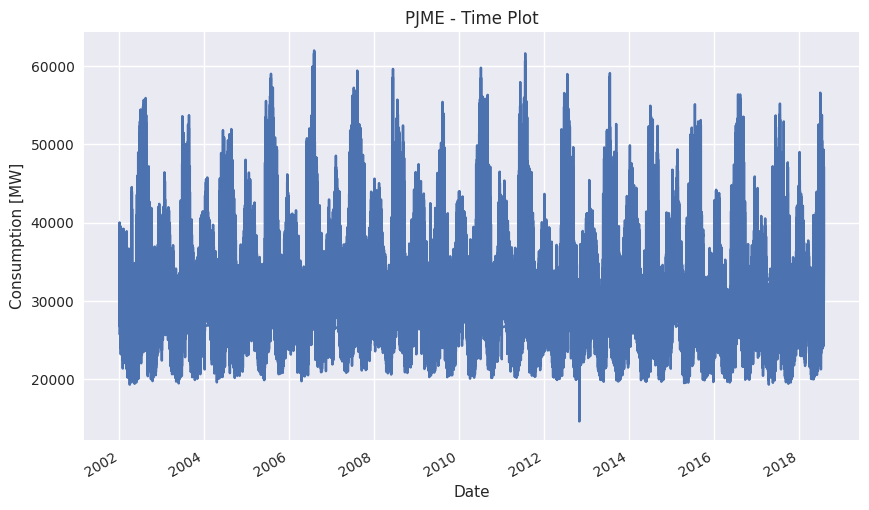 2.1 PJME Consumption Time Plot.
This plot already provides several information:
2.1 PJME Consumption Time Plot.
This plot already provides several information:
- As we could expect, the pattern shows yearly seasonality.
- Focusing on a single year, it seems that more pattern emerges. Likely, the consumptions will have a peak in winter and one another in summer, due to the greater electricity consumption.
- The series does not exhibit a clear increasing/decreasing trend over the years, the average consumptions remains stationary.
- There is an anomalous value around 2023, probably it should be imputed when implementing the model.
3. Seasonal Plots
A seasonal plot is fundamentally a time plot where data are plotted against the individual "seasons" of the series they belong.
Regarding energy consumption, we usually have hourly data available, so there could be several seasonality: yearly , weekly , daily. Before going deep into these plots, let's first set up some variables in our Pandas dataframe:
python
# Defining required fields
df['year'] = [x for x in df.index.year]
df['month'] = [x for x in df.index.month]
df = df.reset_index()
df['week'] = df['Datetime'].apply(lambda x:x.week)
df = df.set_index('Datetime')
df['hour'] = [x for x in df.index.hour]
df['day'] = [x for x in df.index.day_of_week]
df['day_str'] = [x.strftime('%a') for x in df.index]
df['year_month'] = [str(x.year) + '_' + str(x.month) for x in df.index]
3.1 Seasonal plot - Yearly consumption
A very interesting plot is the one referring to the energy consumption grouped by year over months, this highlights yearly seasonality and can inform us about ascending/descending trends over the years.
Here is the Python code:
python
import numpy as np

# Defining colors palette
np.random.seed(42)
df_plot = df[['month', 'year', 'PJME_MW']].dropna().groupby(['month', 'year']).mean()[['PJME_MW']].reset_index()
years = df_plot['year'].unique()
colors = np.random.choice(list(mpl.colors.XKCD_COLORS.keys()), len(years), replace=False)

# Plot
plt.figure(figsize=(16,12))
for i, y in enumerate(years):
    if i > 0:
        plt.plot('month', 'PJME_MW', data=df_plot[df_plot['year'] == y], color=colors[i], label=y)
        if y == 2018:
            plt.text(df_plot.loc[df_plot.year==y, :].shape[0]+0.3, df_plot.loc[df_plot.year==y, 'PJME_MW'][-1:].values[0], y, fontsize=12, color=colors[i])
        else:
            plt.text(df_plot.loc[df_plot.year==y, :].shape[0]+0.1, df_plot.loc[df_plot.year==y, 'PJME_MW'][-1:].values[0], y, fontsize=12, color=colors[i])

# Setting labels
plt.gca().set(ylabel= 'PJME_MW', xlabel = 'Month')
plt.yticks(fontsize=12, alpha=.7)
plt.title("Seasonal Plot - Monthly Consumption", fontsize=20)
plt.ylabel('Consumption [MW]')
plt.xlabel('Month')
plt.show()
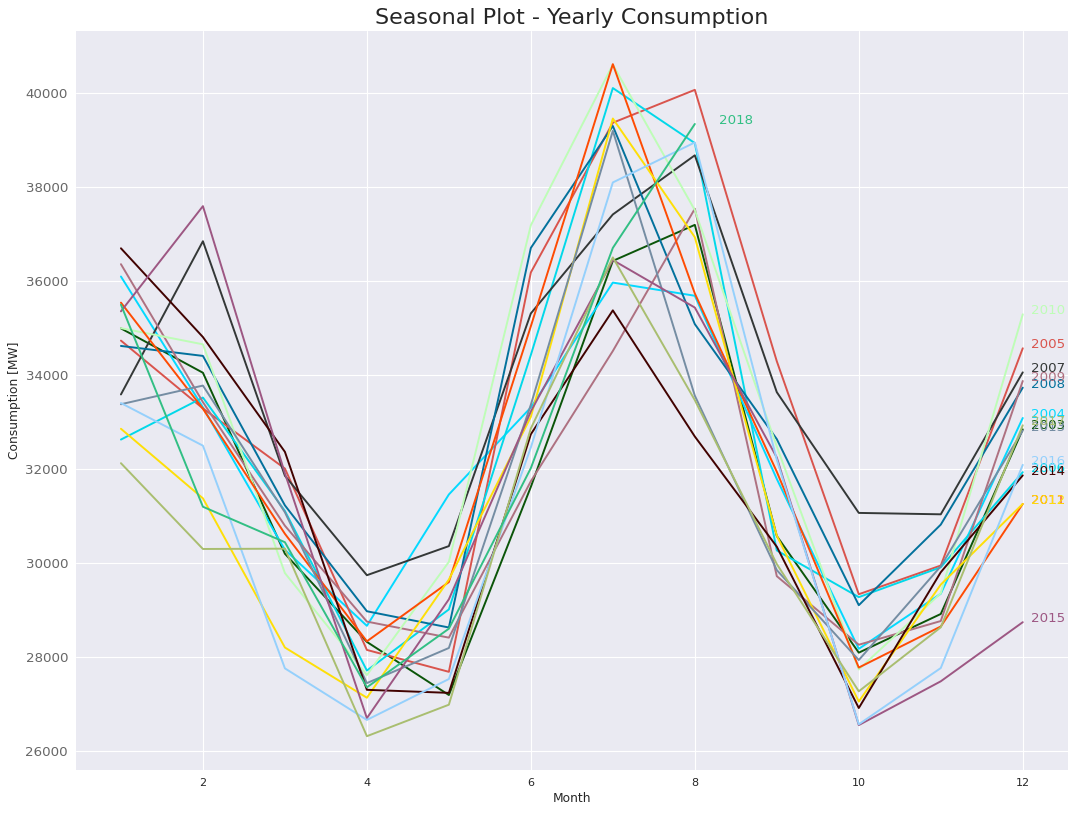 3.1 PJME Yearly Seasonal Plot
This plot shows every year has actually a very predefined pattern: the consumption increases significantly during winter and has a peak in summer (due to heating/cooling systems), while has a minima in spring and in autumn when no heating or cooling is usually required.
Furthermore, this plot tells us that's not a clear increasing/decreasing pattern in the overall consumptions across years.
3.1 PJME Yearly Seasonal Plot
This plot shows every year has actually a very predefined pattern: the consumption increases significantly during winter and has a peak in summer (due to heating/cooling systems), while has a minima in spring and in autumn when no heating or cooling is usually required.
Furthermore, this plot tells us that's not a clear increasing/decreasing pattern in the overall consumptions across years.
3.2 Seasonal plot - Weekly consumption
Another useful plot is the weekly plot, it depicts the consumptions during the week over months and can also suggest if and how weekly consumptions are changing over a single year.
Let's see how to figure it out with Python:
python
# Defining colors palette
np.random.seed(42)
df_plot = df[['month', 'day_str', 'PJME_MW', 'day']].dropna().groupby(['day_str', 'month', 'day']).mean()[['PJME_MW']].reset_index()
df_plot = df_plot.sort_values(by='day', ascending=True)

months = df_plot['month'].unique()
colors = np.random.choice(list(mpl.colors.XKCD_COLORS.keys()), len(months), replace=False)

# Plot
plt.figure(figsize=(16,12))
for i, y in enumerate(months):
    if i > 0:
        plt.plot('day_str', 'PJME_MW', data=df_plot[df_plot['month'] == y], color=colors[i], label=y)
        if y == 2018:
            plt.text(df_plot.loc[df_plot.month==y, :].shape[0]-.9, df_plot.loc[df_plot.month==y, 'PJME_MW'][-1:].values[0], y, fontsize=12, color=colors[i])
        else:
            plt.text(df_plot.loc[df_plot.month==y, :].shape[0]-.9, df_plot.loc[df_plot.month==y, 'PJME_MW'][-1:].values[0], y, fontsize=12, color=colors[i])

# Setting Labels
plt.gca().set(ylabel= 'PJME_MW', xlabel = 'Month')
plt.yticks(fontsize=12, alpha=.7)
plt.title("Seasonal Plot - Weekly Consumption", fontsize=20)
plt.ylabel('Consumption [MW]')
plt.xlabel('Month')
plt.show()
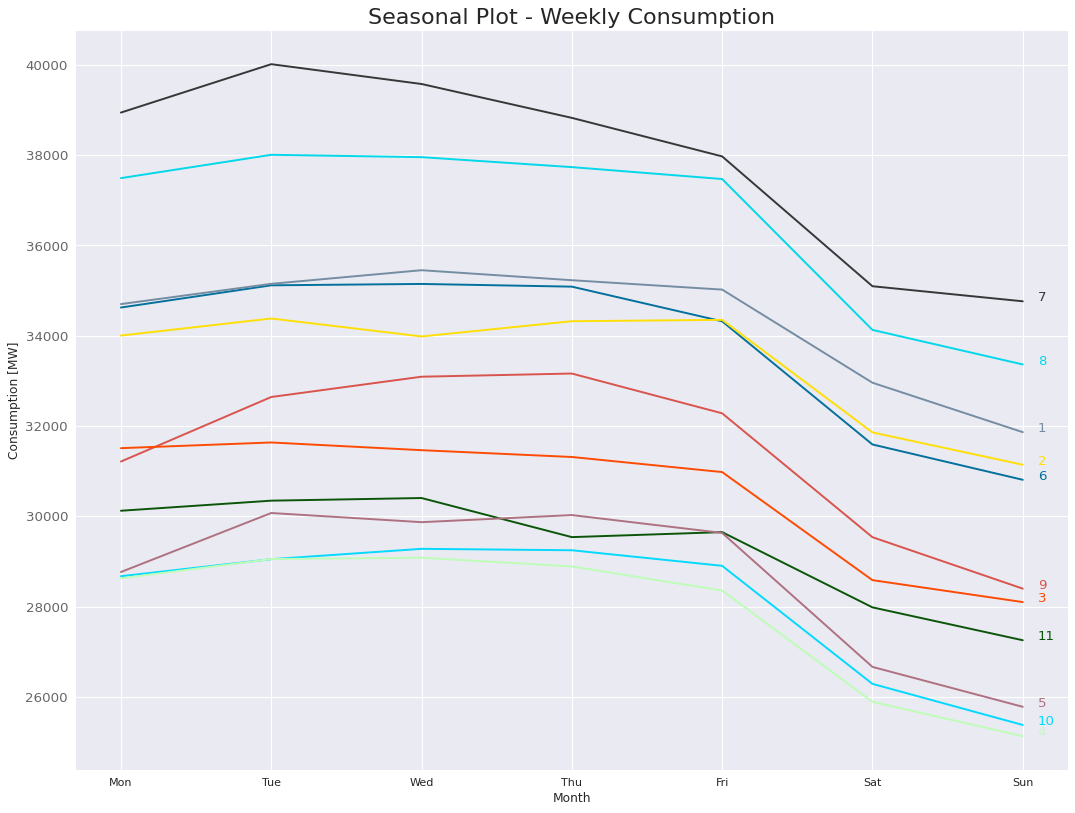 3.2 PJME Weekly Seasonal Plot
3.3 Seasonal plot - Daily consumption
Finally, the last seasonal plot I want to show is the daily consumption plot. As you can guess, it represents how consumption change over the day. In this case, data are first grouped by day of week and then aggregated taking the mean.
Here's the code:
python
import seaborn as sns

# Defining the dataframe
df_plot = df[['hour', 'day_str', 'PJME_MW']].dropna().groupby(['hour', 'day_str']).mean()[['PJME_MW']].reset_index()

# Plot using Seaborn
plt.figure(figsize=(10,8))
sns.lineplot(data = df_plot, x='hour', y='PJME_MW', hue='day_str', legend=True)
plt.locator_params(axis='x', nbins=24)
plt.title("Seasonal Plot - Daily Consumption", fontsize=20)
plt.ylabel('Consumption [MW]')
plt.xlabel('Hour')
plt.legend()
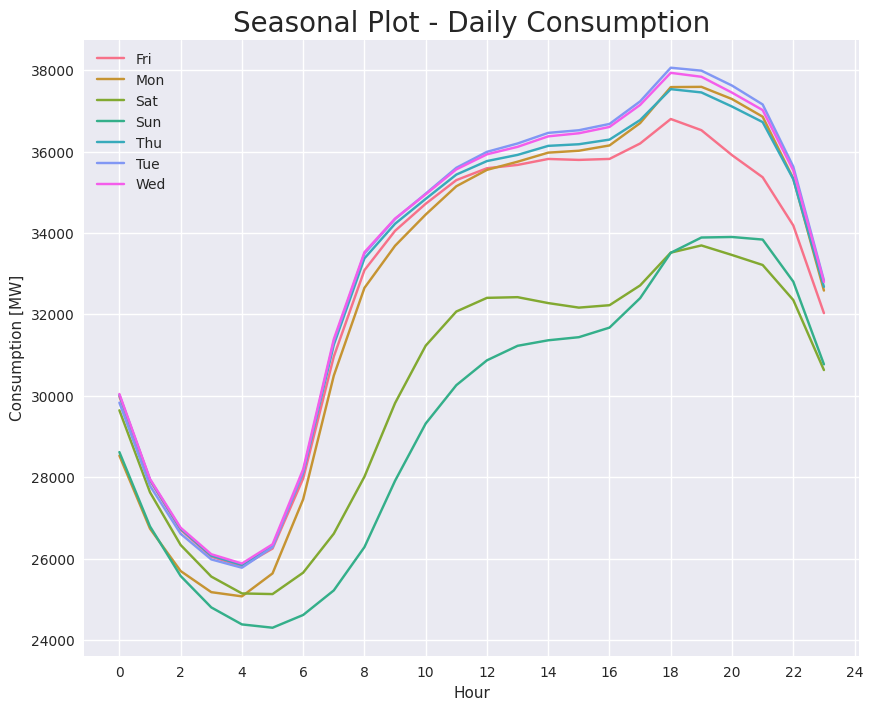 3.3 PJME Daily Seasonal Plot
Often, this plot show a very typical pattern, someone calls it "M profile" since consumptions seems to depict an "M" during the day. Sometimes this pattern is clear, others not (like in this case).
However, this plots usually shows a relative peak in the middle of the day (from 10 am to 2 pm), then a relative minima (from 2 pm to 6 pm) and another peak (from 6 pm to 8 pm). Finally, it also shows the difference in consumptions from weekends and other days.
3.3 PJME Daily Seasonal Plot
Often, this plot show a very typical pattern, someone calls it "M profile" since consumptions seems to depict an "M" during the day. Sometimes this pattern is clear, others not (like in this case).
However, this plots usually shows a relative peak in the middle of the day (from 10 am to 2 pm), then a relative minima (from 2 pm to 6 pm) and another peak (from 6 pm to 8 pm). Finally, it also shows the difference in consumptions from weekends and other days.
3.4 Seasonal plot - Feature Engineering
Let's now see how to use this information for feature engineering. Let's suppose we are using some ML model that requires good quality features (e.g. ARIMA models or tree-based models).
These are the main evidences coming from seasonal plots:
- Yearly consumptions do not change a lot over years: this suggests the possibility to use, when available, yearly seasonality features coming from lag or exogenous variables.
- Weekly consumptions follow the same pattern across months: this suggests to use weekly features coming from lag or exogenous variables.
- Daily consumption differs from normal days and weekends: this suggest to use categorical features able to identify when a day is a normal day and when it is not.
4. Box Plots
Boxplot are a useful way to identify how data are distributed. Briefly, boxplots depict percentiles, which represent 1st (Q1), 2nd (Q2/median) and 3rd (Q3) quartile of a distribution and whiskers, which represent the range of the data. Every value beyond the whiskers can be thought as an outlier , more in depth, whiskers are often computed as:
Whiskers Formula
4.1 Box Plots - Total consumption
Let's first compute the box plot regarding the total consumption, this can be easily done with Seaborn :
python
plt.figure(figsize=(8,5))
sns.boxplot(data=df, x='PJME_MW')
plt.xlabel('Consumption [MW]')
plt.title(f'Boxplot - Consumption Distribution');
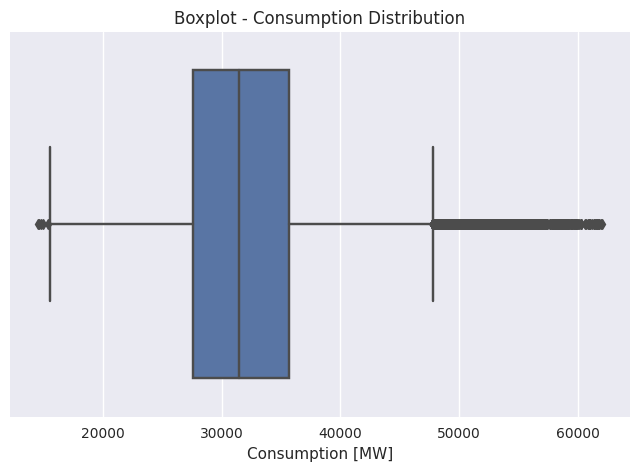 4.1 PJME Boxplot
Even if this plot seems not to be much informative, it tells us we are dealing with a Gaussian-like distribution, with a tail more accentuated towards the right.
4.1 PJME Boxplot
Even if this plot seems not to be much informative, it tells us we are dealing with a Gaussian-like distribution, with a tail more accentuated towards the right.
4.2 Box Plots - Day month distribution
A very interesting plot is the day/month box plot. It is obtained creating a "day month" variable and grouping consumptions by it. Here is the code, referring only from year 2017:
python
df['year'] = [x for x in df.index.year]
df['month'] = [x for x in df.index.month]
df['year_month'] = [str(x.year) + '_' + str(x.month) for x in df.index]

df_plot = df[df['year'] >= 2017].reset_index().sort_values(by='Datetime').set_index('Datetime')
plt.title(f'Boxplot Year Month Distribution');
plt.xticks(rotation=90)
plt.xlabel('Year Month')
plt.ylabel('MW')

sns.boxplot(x='year_month', y='PJME_MW', data=df_plot)
plt.ylabel('Consumption [MW]')
plt.xlabel('Year Month')
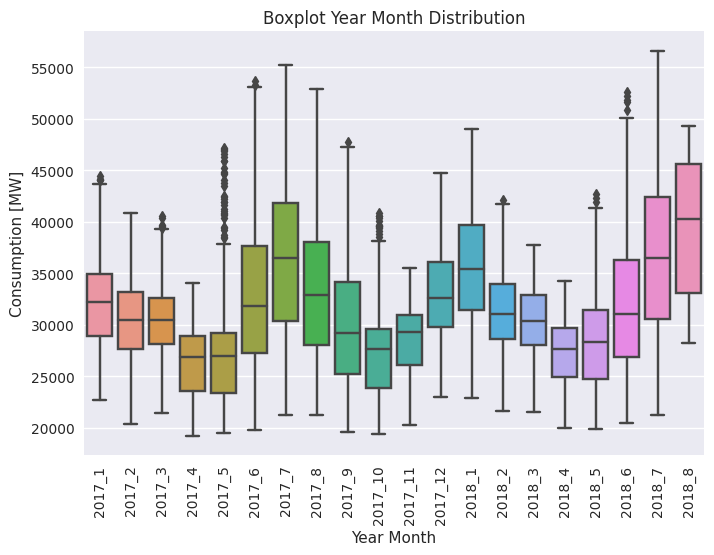 4.2 PJME Year/Month Boxplot
It can be seen that consumption are less uncertain in summer/winter months (i.e. when we have peaks) while are more dispersed in spring/autumn (i.e. when temperatures are more variable). Finally, consumption in summer 2018 are higher than 2017, maybe due to a warmer summer. When feature engineering, remember to include (if available) the temperature curve, probably it can be used as an exogenous variable.
4.2 PJME Year/Month Boxplot
It can be seen that consumption are less uncertain in summer/winter months (i.e. when we have peaks) while are more dispersed in spring/autumn (i.e. when temperatures are more variable). Finally, consumption in summer 2018 are higher than 2017, maybe due to a warmer summer. When feature engineering, remember to include (if available) the temperature curve, probably it can be used as an exogenous variable.
4.3 Box Plots - Day distribution
Another useful plot is the one referring consumption distribution over the week, this is similar to the weekly consumption seasonal plot.
python
df_plot = df[['day_str', 'day', 'PJME_MW']].sort_values(by='day')
plt.title(f'Boxplot Day Distribution')
plt.xlabel('Day of week')
plt.ylabel('MW')
sns.boxplot(x='day_str', y='PJME_MW', data=df_plot)
plt.ylabel('Consumption [MW]')
plt.xlabel('Day of week')
 4.3 PJME Day Boxplot
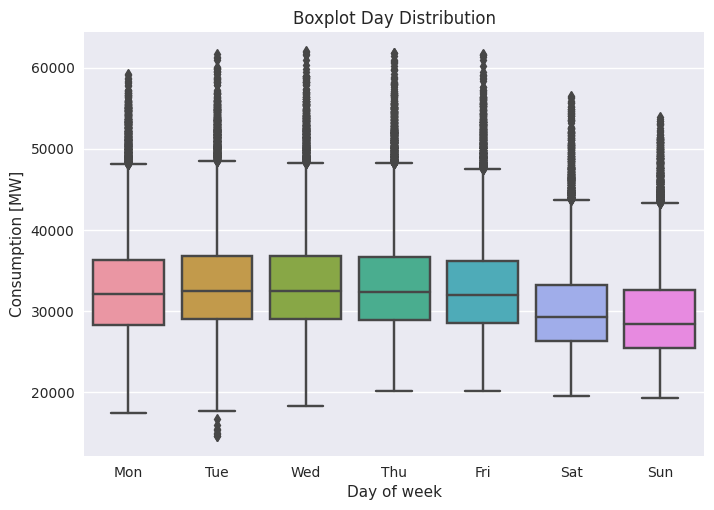
As seen before, consumptions are noticeably lower on weekends. Anyway, there are several outliers pointing out that calendar features like "day of week" for sure are useful but could not fully explain the series.
4.3 PJME Day Boxplot
As seen before, consumptions are noticeably lower on weekends. Anyway, there are several outliers pointing out that calendar features like "day of week" for sure are useful but could not fully explain the series.
4.4 Box Plots - Hour distribution
Let's finally see hour distribution box plot. It is similar to the daily consumption seasonal plot since it provides how consumptions are distributed over the day. Following, the code:
python
plt.title(f'Boxplot Hour Distribution');
plt.xlabel('Hour')
plt.ylabel('MW')
sns.boxplot(x='hour', y='PJME_MW', data=df)
plt.ylabel('Consumption [MW]')
plt.xlabel('Hour')
 4.4 PJME Hour Boxplot
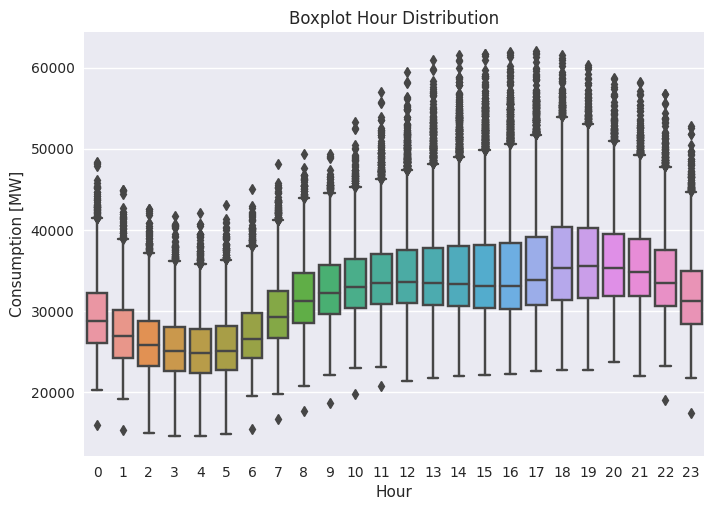
Note that the "M" shape seen before is now much more crushed. Furthermore there are a lot of outliers, this tells us data not only relies on daily seasonality (e.g. the consumption on today's 12 am is similar to the consumption of yesterday 12 am) but also on something else, probably some exogenous climatic feature like temperature or humidity.
4.4 PJME Hour Boxplot
Note that the "M" shape seen before is now much more crushed. Furthermore there are a lot of outliers, this tells us data not only relies on daily seasonality (e.g. the consumption on today's 12 am is similar to the consumption of yesterday 12 am) but also on something else, probably some exogenous climatic feature like temperature or humidity.
5. Time Series Decomposition
As already said, time series data can exhibit a variety of patterns. Often, it is helpful to split a time series into several components, each representing an underlying pattern category.
We can think of a time series as comprising three components: a trend component, a seasonal component and a remainder component (containing anything else in the time series). For some time series (e.g., energy consumption series), there can be more than one seasonal component, corresponding to different seasonal periods (daily, weekly, monthly, yearly).
There are two main type of decomposition: additive and multiplicative.
For the additive decomposition, we represent a series (𝑦) as the sum of a seasonal component (𝑆), a trend (𝑇) and a remainder (𝑅):
 Similarly, a multiplicative decomposition can be written as:
 Generally speaking, additive decomposition best represent series with constant variance while multiplicative decomposition best suits time series with non-stationary variances.
In Python, time series decomposition can be easily fulfilled with Statsmodel library:
python
Generally speaking, additive decomposition best represent series with constant variance while multiplicative decomposition best suits time series with non-stationary variances.
In Python, time series decomposition can be easily fulfilled with Statsmodel library:
python
df_plot = df[df['year'] == 2017].reset_index()
df_plot = df_plot.drop_duplicates(subset=['Datetime']).sort_values(by='Datetime')
df_plot = df_plot.set_index('Datetime')
df_plot['PJME_MW - Multiplicative Decompose'] = df_plot['PJME_MW']
df_plot['PJME_MW - Additive Decompose'] = df_plot['PJME_MW']

# Additive Decomposition
result_add = seasonal_decompose(df_plot['PJME_MW - Additive Decompose'], model='additive', period=24*7)

# Multiplicative Decomposition
result_mul = seasonal_decompose(df_plot['PJME_MW - Multiplicative Decompose'], model='multiplicative', period=24*7)

# Plot
result_add.plot().suptitle('', fontsize=22)
plt.xticks(rotation=45)
result_mul.plot().suptitle('', fontsize=22)
plt.xticks(rotation=45)
plt.show()
 5.1 PJME Series Decomposition - Additive Decompose.
 5.2 PJME Series Decomposition - Multiplicative Decompose.
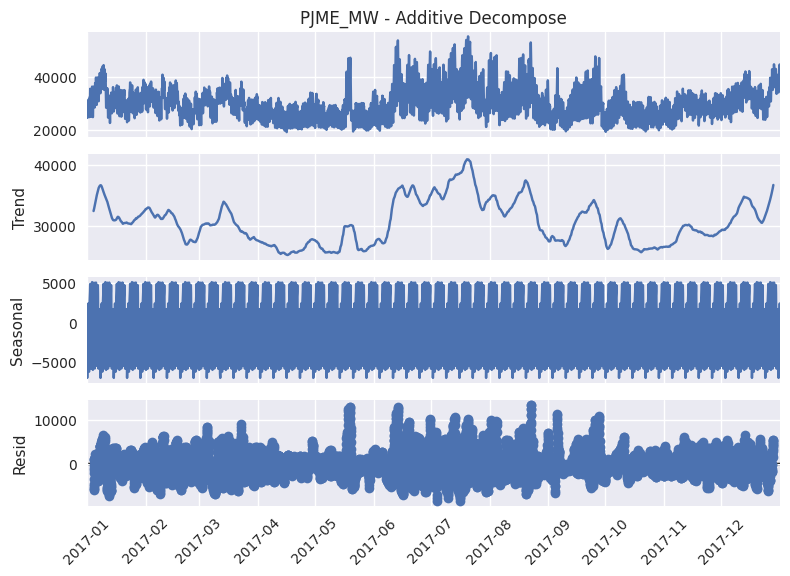
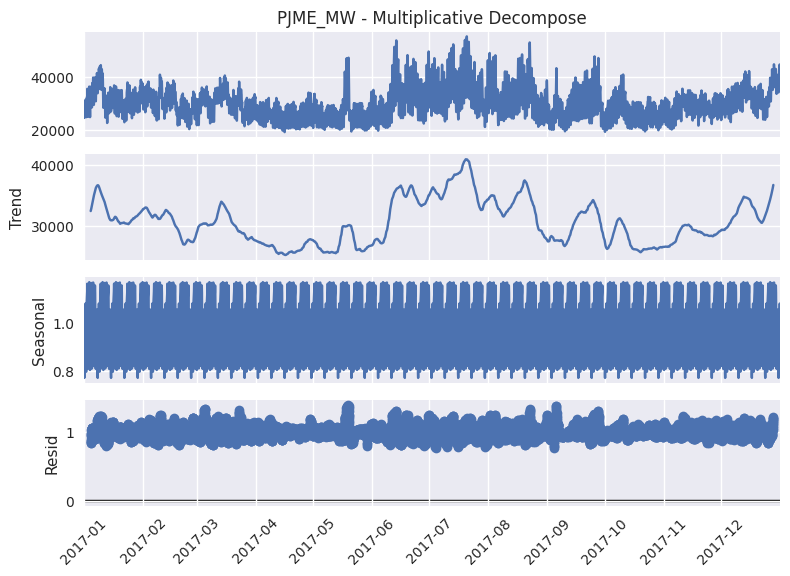
The above plots refers to 2017. In both cases, we see the trend has several local peaks, with higher values in summer. From the seasonal component, we can see the series actually has several periodicities, this plot highlights more the weekly one, but if we focus on a particular month (January) of the same year, daily seasonality emerges too:
python
5.2 PJME Series Decomposition - Multiplicative Decompose.
The above plots refers to 2017. In both cases, we see the trend has several local peaks, with higher values in summer. From the seasonal component, we can see the series actually has several periodicities, this plot highlights more the weekly one, but if we focus on a particular month (January) of the same year, daily seasonality emerges too:
python
df_plot = df[(df['year'] == 2017)].reset_index()
df_plot = df_plot[df_plot['month'] == 1]
df_plot['PJME_MW - Multiplicative Decompose'] = df_plot['PJME_MW']
df_plot['PJME_MW - Additive Decompose'] = df_plot['PJME_MW']

df_plot = df_plot.drop_duplicates(subset=['Datetime']).sort_values(by='Datetime')
df_plot = df_plot.set_index('Datetime')

# Additive Decomposition
result_add = seasonal_decompose(df_plot['PJME_MW - Additive Decompose'], model='additive', period=24*7)

# Multiplicative Decomposition
result_mul = seasonal_decompose(df_plot['PJME_MW - Multiplicative Decompose'], model='multiplicative', period=24*7)

# Plot
result_add.plot().suptitle('', fontsize=22)
plt.xticks(rotation=45)
result_mul.plot().suptitle('', fontsize=22)
plt.xticks(rotation=45)
plt.show()
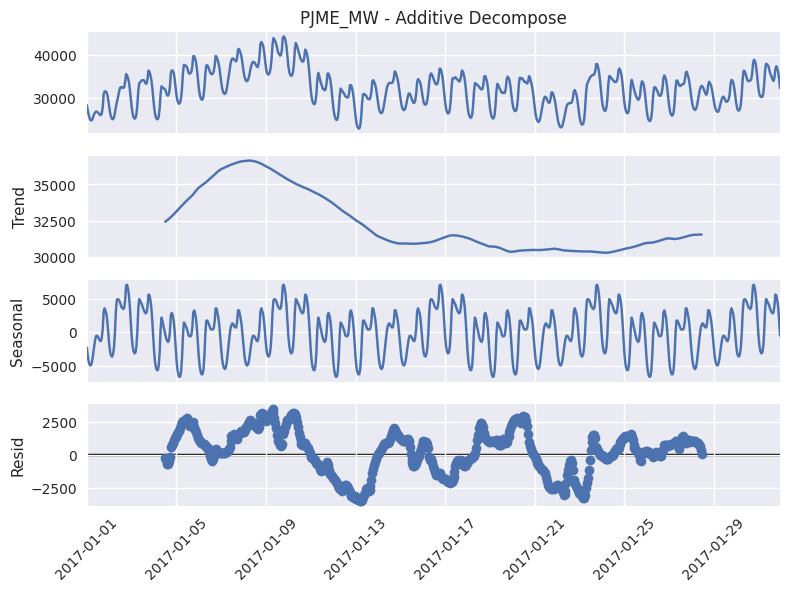 5.3 PJME Series Decomposition - Additive Decompose, focus on January 2017.
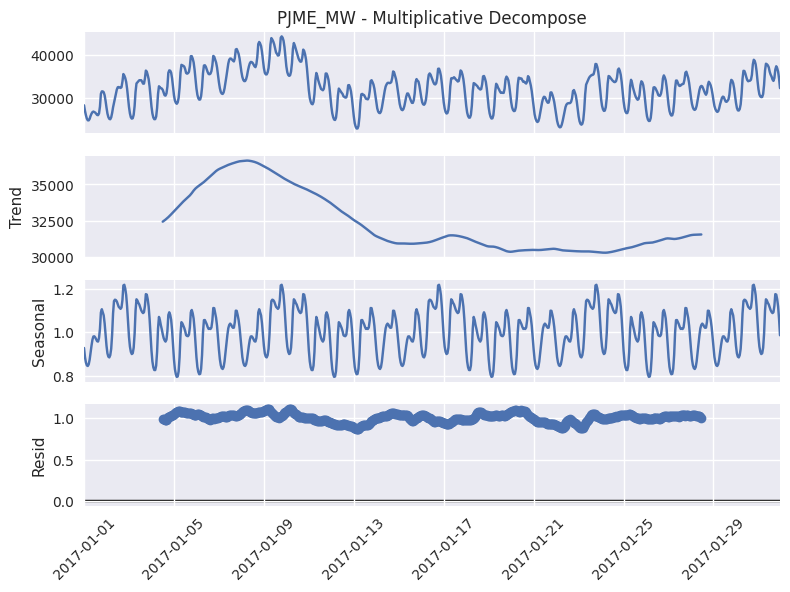 5.4 PJME Series Decomposition - Multiplicative Decompose, focus on January 2017.
6. Lag Analysis
In time series forecasting, a lag is simply a past value of the series. For example, for daily series, the first lag refers to the value the series had the previous day, the second to the value of the day before and so on.
Lag analysis is based on computing correlations between the series and a lagged version of the series itself, this is also called autocorrelation. For a k-lagged version of a series, we define the autocorrelation coefficient as:
 Where y bar represent the mean value of the series and k the lag.
The autocorrelation coefficients make up the autocorrelation function (ACF) for the series, this is simply a plot depicting the auto-correlation coefficient versus the number of lags taken into consideration.
When data has a trend, the autocorrelations for small lags are usually large and positive because observations close in time are also nearby in value. When data show seasonality, autocorrelation values will be larger in correspondence of seasonal lags (and multiples of the seasonal period) than for other lags. Data with both trend and seasonality will show a combination of these effects.
In practice, a more useful function is the partial autocorrelation function (PACF). It is similar to the ACF, except that it shows only the direct autocorrelation between two lags. For example, the partial autocorrelation for lag 3 refers to the only correlation lag 1 and 2 do not explain. In other words, the partial correlation refers to the direct effect a certain lag has on the current time value.
Before moving to the Python code, it is important to highlight that autocorrelation coefficient emerges more clearly if the series is stationary, so often is better to first differentiate the series to stabilize the signal.
Said that, here is the code to plot PACF for different hours of the day:
python
Where y bar represent the mean value of the series and k the lag.
The autocorrelation coefficients make up the autocorrelation function (ACF) for the series, this is simply a plot depicting the auto-correlation coefficient versus the number of lags taken into consideration.
When data has a trend, the autocorrelations for small lags are usually large and positive because observations close in time are also nearby in value. When data show seasonality, autocorrelation values will be larger in correspondence of seasonal lags (and multiples of the seasonal period) than for other lags. Data with both trend and seasonality will show a combination of these effects.
In practice, a more useful function is the partial autocorrelation function (PACF). It is similar to the ACF, except that it shows only the direct autocorrelation between two lags. For example, the partial autocorrelation for lag 3 refers to the only correlation lag 1 and 2 do not explain. In other words, the partial correlation refers to the direct effect a certain lag has on the current time value.
Before moving to the Python code, it is important to highlight that autocorrelation coefficient emerges more clearly if the series is stationary, so often is better to first differentiate the series to stabilize the signal.
Said that, here is the code to plot PACF for different hours of the day:
python
from statsmodels.graphics.tsaplots import plot_pacf

actual = df['PJME_MW']
hours = range(0, 24, 4)

for hour in hours:
    plot_pacf(actual[actual.index.hour == hour].diff().dropna(), lags=30, alpha=0.01)
    plt.title(f'PACF - h = {hour}')
    plt.ylabel('Correlation')
    plt.xlabel('Lags')
    plt.show()
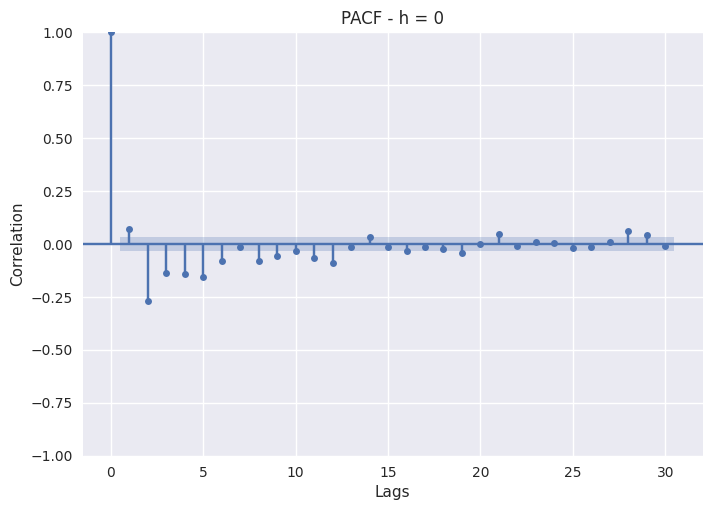 6.1 PJME Lag Analysis - Partial Auto Correlation Function (h=0).
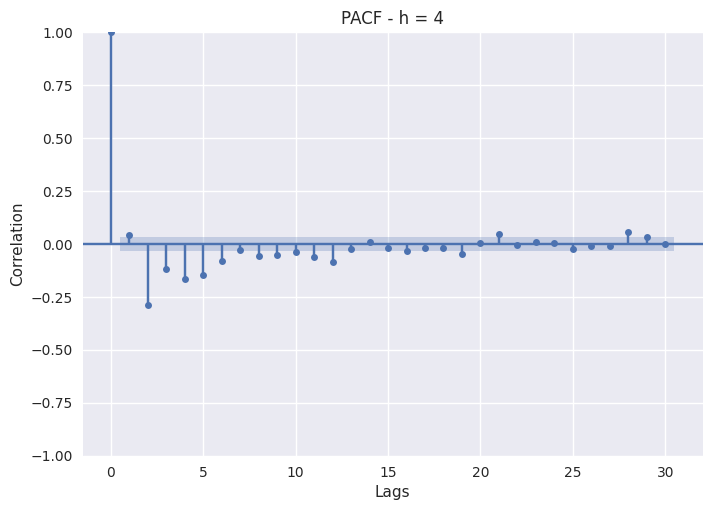 6.2 PJME Lag Analysis - Partial Auto Correlation Function (h=4).
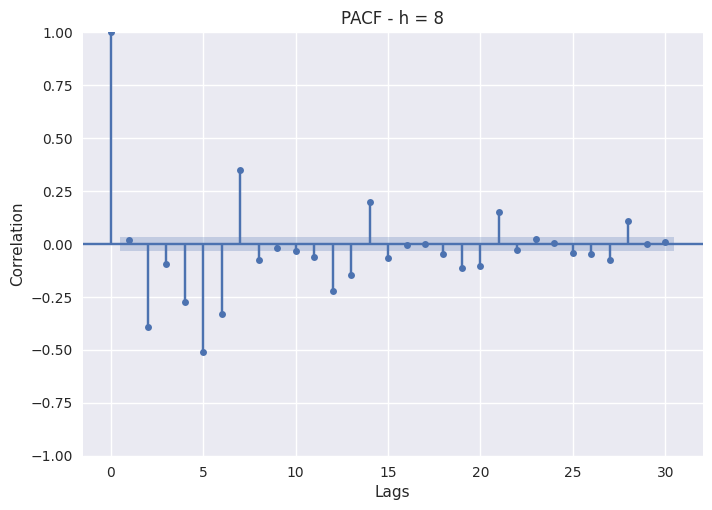 6.3 PJME Lag Analysis - Partial Auto Correlation Function (h=8).
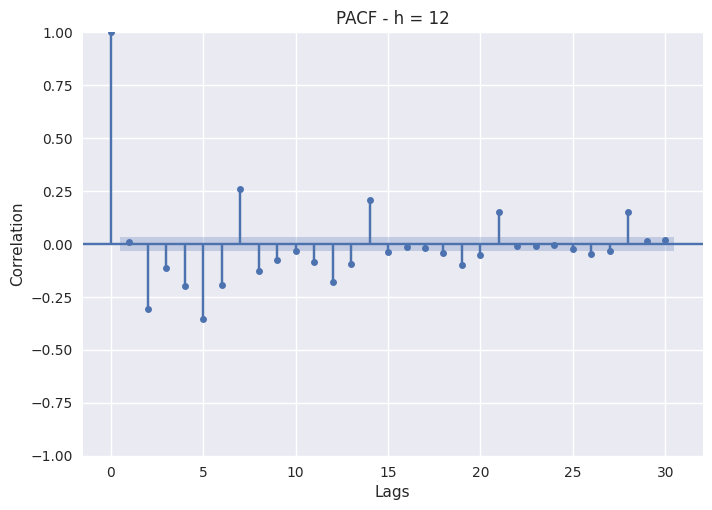 6.4 PJME Lag Analysis - Partial Auto Correlation Function (h=12).
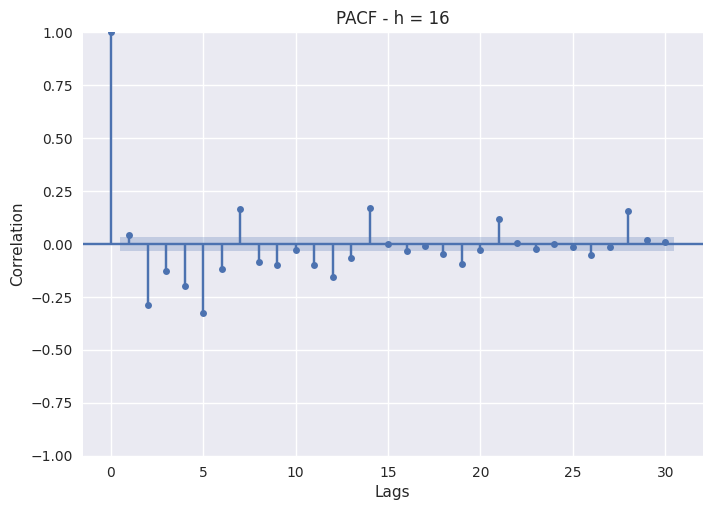 6.5 PJME Lag Analysis - Partial Auto Correlation Function (h=16).
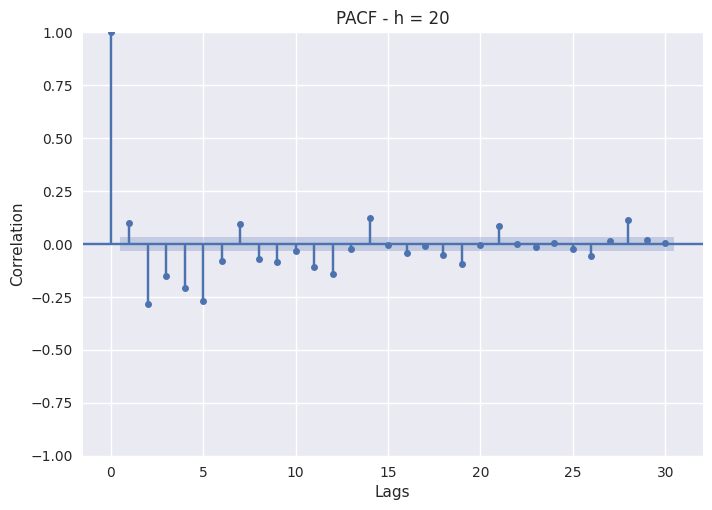 6.6 PJME Lag Analysis - Partial Auto Correlation Function (h=20).
As you can see, the PACF simply consists on plotting Pearson partial auto-correlation coefficients for different lags. Of course, the non-lagged series shows a perfect auto-correlation with itself, so lag 0 will always be 1. The blue band represent the confidence interval: if a lag exceed that band, then it is statistically significant and we can assert it is has great importance.
6.6 PJME Lag Analysis - Partial Auto Correlation Function (h=20).
As you can see, the PACF simply consists on plotting Pearson partial auto-correlation coefficients for different lags. Of course, the non-lagged series shows a perfect auto-correlation with itself, so lag 0 will always be 1. The blue band represent the confidence interval: if a lag exceed that band, then it is statistically significant and we can assert it is has great importance.
6.1 Lag analysis - Feature Engineering
Lag analysis is one of the most impactful study on time series feature engineering. As already said, a lag with high correlation is an important lag for the series, then it should be taken into consideration.
A widely used feature engineering technique consists on making an hourly division of the dataset. That is, splitting data in 24 subset, each one referring to an hour of the day. This has the effect to regularize and smooth the signal, making it more simple to forecast.
Each subset should then be feature engineered, trained and fine-tuned. The final forecast will be achieved combining the results of these 24 models. Said that, every hourly model will have its peculiarities, most of them will regard important lags.
Before moving on, let's define two types of lag we can deal with when doing lag analysis:
- Auto-regressive lags : lags close to lag 0, for which we expect high values (recent lags are more likely to predict the present value). They are a representation on how much trend the series shows.
- Seasonal lags : lags referring to seasonal periods. When hourly splitting the data, they usually represent weekly seasonality.
Note that auto-regressive lag 1 can also be taught as a daily seasonal lag for the series.
Let's now discuss about the PACF plots printed above.
Night Hours
Consumption on night hours (0, 4) relies more on auto-regressive than on weekly lags, since the most important are all localized on the first five. Seasonal periods such as 7, 14, 21, 28 seems not to be too much important, this advises us to pay particular attention on lag 1 to 5 when feature engineering.
Day Hours
Consumption on day hours (8, 12, 16, 20) exhibit both auto-regressive and seasonal lags. This particularly true for hours 8 and 12 - when consumption is particularly high - while seasonal lags become less important approaching the night. For these subsets we should also include seasonal lag as well as auto-regressive ones.
Finally, here are some tips when feature engineering lags:
- Do not to take into consideration too many lags since this will probably lead to over fitting. Generally, auto-regressive lags goes from 1 to 7, while weekly lags should be 7, 14, 21 and 28. But it's not mandatory to take each of them as features.
- Taking into consideration lags that are not auto-regressive or seasonal is usually a bad idea since they could bring to overfitting as well. Rather, try to understand while a certain lag is important.
- Transforming lags can often lead to more powerful features. For example, seasonal lags can be aggregated using a weighted mean to create a single feature representing the seasonality of the series.
Free Resources
Finally, I would like to mention a very useful (and free) book explaining time series, which I have personally used a lot: Forecasting: Principles and Practice.
Even though it is meant to use R instead of Python, this textbook provides a great introduction to forecasting methods, covering the most important aspects of time series analysis.
Conclusion
The aim of this article was to present a comprehensive Exploratory Data Analysis template for time series forecasting.
EDA is a fundamental step in any type of data science study since it allows to understand the nature and the peculiarities of the data and lays the foundation to feature engineering, which in turn can dramatically improve model performance.
We have then described some of the most used analysis for time series EDA, these can be both statistical/mathematical and graphical. Obviously, the intention of this work was only to give a practical framework to start with, subsequent investigations need to be carried out based on the type of historical series being examined and the business context.
Thanks for having followed me until the end.
Unless otherwise noted, all images are by the author.
Register Now to Continue Reading
Unlock Towards Data Science with a Free Account
All articles on Towards Data Science are available to registered users. Create a free account today to access this article and thousands more.
Register for freeSign in to your account
 Written By
See all from Maicol Nicolini
Data ScienceEnergy ConsumptionExploratory Data AnalysisFeature EngineeringTime Series Analysis
Share This Article
Towards Data Science is a community publication. Submit your insights to reach our global audience and earn through the TDS Author Payment Program.
Write for TDS
Related Articles
Data Science
How to remove extra noise in your audio data
Jeremy Pagirsky
October 27, 20216 min read
Data Science
A Step-by-Step Tutorial to Create an Interactive Choropleth Map Using Folium with Layer Control and Customized Tooltips
My Data Talk
January 4, 20227 min read
Programming
Analyze Tesla stock in Python, calculate Trading Indicators and plot the OHLC chart. Includes a Jupyter Notebook with code examples.
Roman Orac
October 19, 20205 min read
Programming
How to plot the trajectory of a point over a complex surface
Luis Medina
November 11, 202310 min read
Machine Learning
A query from an investor friend nudged me into a long weekend deep dive into the ML landscape. As I was gathering notes, I thought it...
Pranil Dasika
November 28, 20206 min read
Machine Learning
Which features carry the most weight? How do original features contribute to principal components? These 5 visualization types have the...
Dario Radečić
August 2, 20248 min read
Machine Learning
Our weekly selection of must-read Editors' Picks and original features
TDS Editors
November 4, 20214 min read
Artificial Intelligence
In this story, we will walk through the steps of detecting pneumonia using deep learning and deploy the model using swagger.
Devarshpatel
July 16, 20206 min read
Data Science
Getting Started With Markov Attribution Models
Borna Almasi
February 23, 202113 min read
Your home for data science and AI. The world's leading publication for data science, data analytics, data engineering, machine learning, and artificial intelligence professionals.
Subscribe to Our NewsletterWrite For TDS•About•Advertise•Privacy Policy•Terms of Use
© Insight Media Group, LLC 2026•The New Stack•roadmap.sh•Creator Network
Recommended Articles
Close