保留正文与补采附件。源页面当前未重新核验;具体限制见交付清单。
 We value your privacy
We use cookies to enhance your browsing experience, serve personalised ads or content, and analyse our traffic. By clicking "Accept All", you consent to our use of cookies.
Customise Reject All Accept All
Customise Consent Preferences
We value your privacy
We use cookies to enhance your browsing experience, serve personalised ads or content, and analyse our traffic. By clicking "Accept All", you consent to our use of cookies.
Customise Reject All Accept All
Customise Consent Preferences  We use cookies to help you navigate efficiently and perform certain functions. You will find detailed information about all cookies under each consent category below.
The cookies that are categorised as "Necessary" are stored on your browser as they are essential for enabling the basic functionalities of the site. ... Show more
NecessaryAlways Active
Necessary cookies are required to enable the basic features of this site, such as providing secure log-in or adjusting your consent preferences. These cookies do not store any personally identifiable data.
We use cookies to help you navigate efficiently and perform certain functions. You will find detailed information about all cookies under each consent category below.
The cookies that are categorised as "Necessary" are stored on your browser as they are essential for enabling the basic functionalities of the site. ... Show more
NecessaryAlways Active
Necessary cookies are required to enable the basic features of this site, such as providing secure log-in or adjusting your consent preferences. These cookies do not store any personally identifiable data.
-
Cookie
BCTempID
-
Duration
10 minutes
-
Description
No description available.
-
Cookie
__cf_bm
-
Duration
1 hour
-
Description
This cookie, set by Cloudflare, is used to support Cloudflare Bot Management.
-
Cookie
AWSALBCORS
-
Duration
7 days
-
Description
Amazon Web Services set this cookie for load balancing.
-
Cookie
_cfuvid
-
Duration
session
-
Description
Cloudflare sets this cookie to track users across sessions to optimize user experience by maintaining session consistency and providing personalized services
-
Cookie
li_gc
-
Duration
6 months
-
Description
Linkedin set this cookie for storing visitor's consent regarding using cookies for non-essential purposes.
-
Cookie
__hssrc
-
Duration
session
-
Description
This cookie is set by Hubspot whenever it changes the session cookie. The __hssrc cookie set to 1 indicates that the user has restarted the browser, and if the cookie does not exist, it is assumed to be a new session.
-
Cookie
__hssc
-
Duration
1 hour
-
Description
HubSpot sets this cookie to keep track of sessions and to determine if HubSpot should increment the session number and timestamps in the __hstc cookie.
-
Cookie
wpEmojiSettingsSupports
-
Duration
session
-
Description
WordPress sets this cookie when a user interacts with emojis on a WordPress site. It helps determine if the user's browser can display emojis properly.
-
Cookie
BCSessionID
-
Duration
1 year 1 month 4 days
-
Description
Blueconic sets this cookie as a unique identifier for the BlueConic profile.
-
Cookie
_octo
-
Duration
1 year
-
Description
No description available.
-
Cookie
logged_in
-
Duration
1 year
-
Description
No description available.
-
Cookie
__Secure-YEC
-
Duration
past
-
Description
YouTube sets this cookie to stores the user's video player preferences using embedded YouTube video
-
Cookie
__eoi
-
Duration
6 months
-
Description
Description is currently not available.
-
Cookie
AWSALBTGCORS
-
Duration
7 days
-
Description
No description available.
-
Cookie
login-status-p
-
Duration
past
-
Description
Description is currently not available.
-
Cookie
AWSALBTG
-
Duration
7 days
-
Description
No description available.
-
Cookie
csrf_token
-
Duration
session
-
Description
No description available.
-
Cookie
token_v2
-
Duration
1 day
-
Description
Description is currently not available.
-
Cookie
D
-
Duration
1 year
-
Description
Description is currently not available.
-
Cookie
PHPSESSID
-
Duration
session
-
Description
This cookie is native to PHP applications. The cookie stores and identifies a user's unique session ID to manage user sessions on the website. The cookie is a session cookie and will be deleted when all the browser windows are closed.
-
Cookie
VISITOR_PRIVACY_METADATA
-
Duration
6 months
-
Description
YouTube sets this cookie to store the user's cookie consent state for the current domain.
-
Cookie
cookietest
-
Duration
session
-
Description
The cookietest cookie is typically used to determine whether the user's browser accepts cookies, essential for website functionality and user experience.
-
Cookie
__Host-airtable-session
-
Duration
1 year
-
Description
This cookie is used to enable us to integrate the services of Airtable.
-
Cookie
__Host-airtable-session.sig
-
Duration
1 year
-
Description
This cookie is used to enable us to integrate the services of Airtable.
-
Cookie
m
-
Duration
1 year 1 month 4 days
-
Description
Stripe sets this cookie for fraud prevention purposes. It identifies the device used to access the website, allowing the website to be formatted accordingly.
-
Cookie
BIGipServer*
-
Duration
session
-
Description
Marketo sets this cookie to collect information about the user's online activity and build a profile about their interests to provide advertisements relevant to the user.
-
Cookie
__cfruid
-
Duration
session
-
Description
Cloudflare sets this cookie to identify trusted web traffic.
-
Cookie
_GRECAPTCHA
-
Duration
6 months
-
Description
Google Recaptcha service sets this cookie to identify bots to protect the website against malicious spam attacks.
-
Cookie
__Secure-YNID
-
Duration
6 months
-
Description
Google cookie used to protect user security and prevent fraud, especially during the login process.
-
Cookie
cookieyes-consent
-
Duration
1 year
-
Description
CookieYes sets this cookie to remember users' consent preferences so that their preferences are respected on subsequent visits to this site. It does not collect or store any personal information about the site visitors.
Functional
Functional cookies help perform certain functionalities like sharing the content of the website on social media platforms, collecting feedback, and other third-party features.
-
Cookie
lidc
-
Duration
1 day
-
Description
LinkedIn sets the lidc cookie to facilitate data center selection.
-
Cookie
brw
-
Duration
1 year
-
Description
No description available.
-
Cookie
brwConsent
-
Duration
5 minutes
-
Description
Description is currently not available.
-
Cookie
WMF-Uniq
-
Duration
1 year
-
Description
Description is currently not available.
-
Cookie
loom_anon_comment
-
Duration
1 year
-
Description
No description available.
-
Cookie
loom_referral_video
-
Duration
session
-
Description
Description is currently not available.
-
Cookie
VISITOR_INFO1_LIVE
-
Duration
6 months
-
Description
A cookie set by YouTube to measure bandwidth that determines whether the user gets the new or old player interface.
-
Cookie
yt-remote-connected-devices
-
Duration
Never Expires
-
Description
YouTube sets this cookie to store the user's video preferences using embedded YouTube videos.
-
Cookie
ytidb::LAST_RESULT_ENTRY_KEY
-
Duration
Never Expires
-
Description
The cookie ytidb::LAST_RESULT_ENTRY_KEY is used by YouTube to store the last search result entry that was clicked by the user. This information is used to improve the user experience by providing more relevant search results in the future.
-
Cookie
yt-remote-device-id
-
Duration
Never Expires
-
Description
YouTube sets this cookie to store the user's video preferences using embedded YouTube videos.
-
Cookie
yt-remote-session-name
-
Duration
session
-
Description
The yt-remote-session-name cookie is used by YouTube to store the user's video player preferences using embedded YouTube video.
-
Cookie
yt-remote-fast-check-period
-
Duration
session
-
Description
The yt-remote-fast-check-period cookie is used by YouTube to store the user's video player preferences for embedded YouTube videos.
-
Cookie
yt-remote-session-app
-
Duration
session
-
Description
The yt-remote-session-app cookie is used by YouTube to store user preferences and information about the interface of the embedded YouTube video player.
-
Cookie
yt-remote-cast-available
-
Duration
session
-
Description
The yt-remote-cast-available cookie is used to store the user's preferences regarding whether casting is available on their YouTube video player.
-
Cookie
yt-remote-cast-installed
-
Duration
session
-
Description
The yt-remote-cast-installed cookie is used to store the user's video player preferences using embedded YouTube video.
-
Cookie
cp_session
-
Duration
3 months
-
Description
Codepen sets this cookie for Help systems found in the website.
-
Cookie
loid
-
Duration
1 year 1 month 4 days
-
Description
This cookie is set by the Reddit. The cookie enables the sharing of content from the website onto the social media platform.
Analytics
Analytical cookies are used to understand how visitors interact with the website. These cookies help provide information on metrics such as the number of visitors, bounce rate, traffic source, etc.
-
Cookie
__hstc
-
Duration
6 months
-
Description
Hubspot set this main cookie for tracking visitors. It contains the domain, initial timestamp (first visit), last timestamp (last visit), current timestamp (this visit), and session number (increments for each subsequent session).
-
Cookie
hubspotutk
-
Duration
6 months
-
Description
HubSpot sets this cookie to keep track of the visitors to the website. This cookie is passed to HubSpot on form submission and used when deduplicating contacts.
-
Cookie
_ga
-
Duration
1 year 1 month 4 days
-
Description
Google Analytics sets this cookie to calculate visitor, session and campaign data and track site usage for the site's analytics report. The cookie stores information anonymously and assigns a randomly generated number to recognise unique visitors.
-
Cookie
ga*
-
Duration
1 year 1 month 4 days
-
Description
Google Analytics sets this cookie to store and count page views.
-
Cookie
__Host-psifi.analyticsTrace
-
Duration
6 hours
-
Description
Description is currently not available.
-
Cookie
__Host-psifi.analyticsTraceV2
-
Duration
6 hours
-
Description
Description is currently not available.
-
Cookie
_gh_sess
-
Duration
session
-
Description
GitHub sets this cookie for temporary application and framework state between pages like what step the user is on in a multiple step form.
-
Cookie
YSC
-
Duration
session
-
Description
YSC cookie is set by Youtube and is used to track the views of embedded videos on Youtube pages.
-
Cookie
ajs_anonymous_id
-
Duration
1 year
-
Description
This cookie is set by Segment to count the number of people who visit a certain site by tracking if they have visited before.
-
Cookie
vuid
-
Duration
1 year 1 month 4 days
-
Description
Vimeo installs this cookie to collect tracking information by setting a unique ID to embed videos on the website.
Performance
Performance cookies are used to understand and analyse the key performance indexes of the website which helps in delivering a better user experience for the visitors.
-
Cookie
AWSALB
-
Duration
7 days
-
Description
AWSALB is an application load balancer cookie set by Amazon Web Services to map the session to the target.
-
Cookie
acq
-
Duration
past
-
Description
Description is currently not available.
-
Cookie
acq.sig
-
Duration
past
-
Description
Description is currently not available.
-
Cookie
ptc
-
Duration
2 years
-
Description
No description available.
Advertisement
Advertisement cookies are used to provide visitors with customised advertisements based on the pages you visited previously and to analyse the effectiveness of the ad campaigns.
-
Cookie
muc_ads
-
Duration
1 year 1 month 4 days
-
Description
Twitter sets this cookie to collect user behaviour and interaction data to optimize the website.
-
Cookie
guest_id_marketing
-
Duration
1 year 1 month 4 days
-
Description
Twitter sets this cookie to identify and track the website visitor.
-
Cookie
guest_id_ads
-
Duration
1 year 1 month 4 days
-
Description
Twitter sets this cookie to identify and track the website visitor.
-
Cookie
personalization_id
-
Duration
1 year 1 month 4 days
-
Description
Twitter sets this cookie to integrate and share features for social media and also store information about how the user uses the website, for tracking and targeting.
-
Cookie
guest_id
-
Duration
1 year 1 month 4 days
-
Description
Twitter sets this cookie to identify and track the website visitor. It registers if a user is signed in to the Twitter platform and collects information about ad preferences.
-
Cookie
bcookie
-
Duration
1 year
-
Description
LinkedIn sets this cookie from LinkedIn share buttons and ad tags to recognize browser IDs.
-
Cookie
__Secure-ROLLOUT_TOKEN
-
Duration
6 months
-
Description
YouTube sets this cookie to manage feature rollout and experimentation. It helps Google control which new features or interface changes are shown to users as part of testing and staged rollouts, ensuring consistent experience for a given user during an experiment.
-
Cookie
yt.innertube::nextId
-
Duration
Never Expires
-
Description
YouTube sets this cookie to register a unique ID to store data on what videos from YouTube the user has seen.
-
Cookie
yt.innertube::requests
-
Duration
Never Expires
-
Description
YouTube sets this cookie to register a unique ID to store data on what videos from YouTube the user has seen.
-
Cookie
session_tracker
-
Duration
session
-
Description
This cookie is set by the Reddit. This cookie is used to identify trusted web traffic. It also helps in adverstising on the website.
-
Cookie
edgebucket
-
Duration
session
-
Description
Reddit sets this cookie to save the information about a log-on Reddit user, for the purpose of advertisement recommendations and updating the content.
-
Cookie
did
-
Duration
1 year
-
Description
Arbor sets this cookie to show targeted ads to site visitors.This cookie expires after 2 months or 1 year.
Uncategorised
Other uncategorised cookies are those that are being analysed and have not been classified into a category as yet.
No cookies to display.
Reject All Save My Preferences Accept All
Toggle SearchToggle Mobile Navigation
Publish AI, ML & data-science insights to a global community of data professionals.
Sign inSubmit an Article
LatestEditor's PicksNewsletterShipAI
Write For TDS
LinkedInXToggle Search
Artificial Intelligence
Social Network Analysis with NetworkX: A Gentle Introduction
Learn how companies like Facebook and LinkedIn extract insights from networks
Riccardo Andreoni
September 28, 20238 min read
 Image source: pixabay.com
How do streaming platforms like Netflix recommend the perfect movie for your evening? How can we optimize player positioning in sports like soccer? How can we identify fraudulent activities in financial networks? How can we predict a match in dating apps like Tinder?
All these challenges have the same solution: Social Network Analysis.
Social Network Analysis (SNA) is a powerful data science field that allows to explore the intricate relationships within a network of entities, discovering hidden patterns and capturing insights. Network entities can be everything: they can be people on a social network like Instagram, websites on the internet, or even sport teams in a tournament network.
In the following sections, I will help you understand what are networks in data science, I will describe the most common types, and I will implement several algorithms to extract valuable information from the networks.
All the theoretical parts will be combined with practical examples. You will find several Python code snippets to familiarize yourself with the NetworkX Python library.
Learn this step by step with the interactive AI Engineer, AI and Data Scientist and Machine Learning roadmaps.
Image source: pixabay.com
How do streaming platforms like Netflix recommend the perfect movie for your evening? How can we optimize player positioning in sports like soccer? How can we identify fraudulent activities in financial networks? How can we predict a match in dating apps like Tinder?
All these challenges have the same solution: Social Network Analysis.
Social Network Analysis (SNA) is a powerful data science field that allows to explore the intricate relationships within a network of entities, discovering hidden patterns and capturing insights. Network entities can be everything: they can be people on a social network like Instagram, websites on the internet, or even sport teams in a tournament network.
In the following sections, I will help you understand what are networks in data science, I will describe the most common types, and I will implement several algorithms to extract valuable information from the networks.
All the theoretical parts will be combined with practical examples. You will find several Python code snippets to familiarize yourself with the NetworkX Python library.
Learn this step by step with the interactive AI Engineer, AI and Data Scientist and Machine Learning roadmaps.
Understanding Networks
A network, also called a graph, is a particular representation of information consisting of two essential components: nodes and edges.
Nodes are the building blocks of a network. They represent the individual entities within a network. They can impersonate a wide variety of things such as people in a social network but also genes in a biological network.
Edges , instead, represent the relationships between the nodes. They can define interactions between two people, associations, or dependencies. Edges may be directed, meaning that the relationship they represent goes from one node to another. Think of a directed edge representing the payment made by a person to another, it is indeed beneficial to know the direction of the money exchange. This asymmetry is represented with arrows.
In NetworkX, nodes and edges are easily represented as follows:
python
import networkx as nx

# Create an instance of a graph
G = nx.Graph()

# Create an edge between two nodes. The nodes will be also created.
G.add_edge('A', 'B', weight=6)
The result of the above "Hello world" code is this little and naive network:
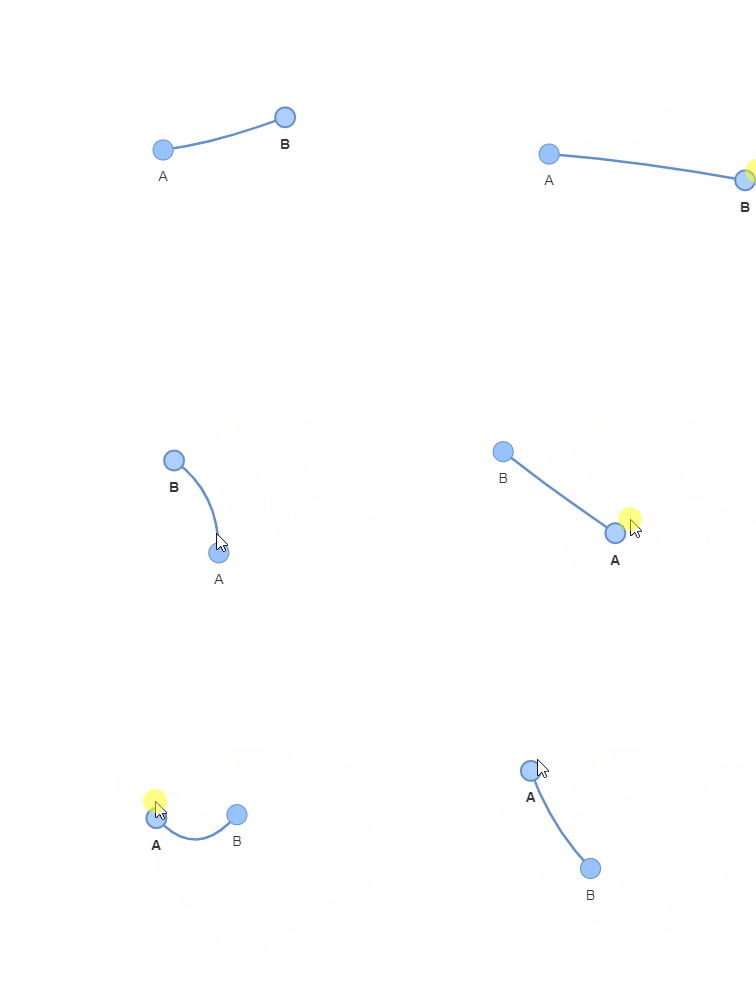 Image by the author.
However, in a similar fashion, the NetwrokX library can easily create more complex networks such as the one displayed below:
Image by the author.
However, in a similar fashion, the NetwrokX library can easily create more complex networks such as the one displayed below:
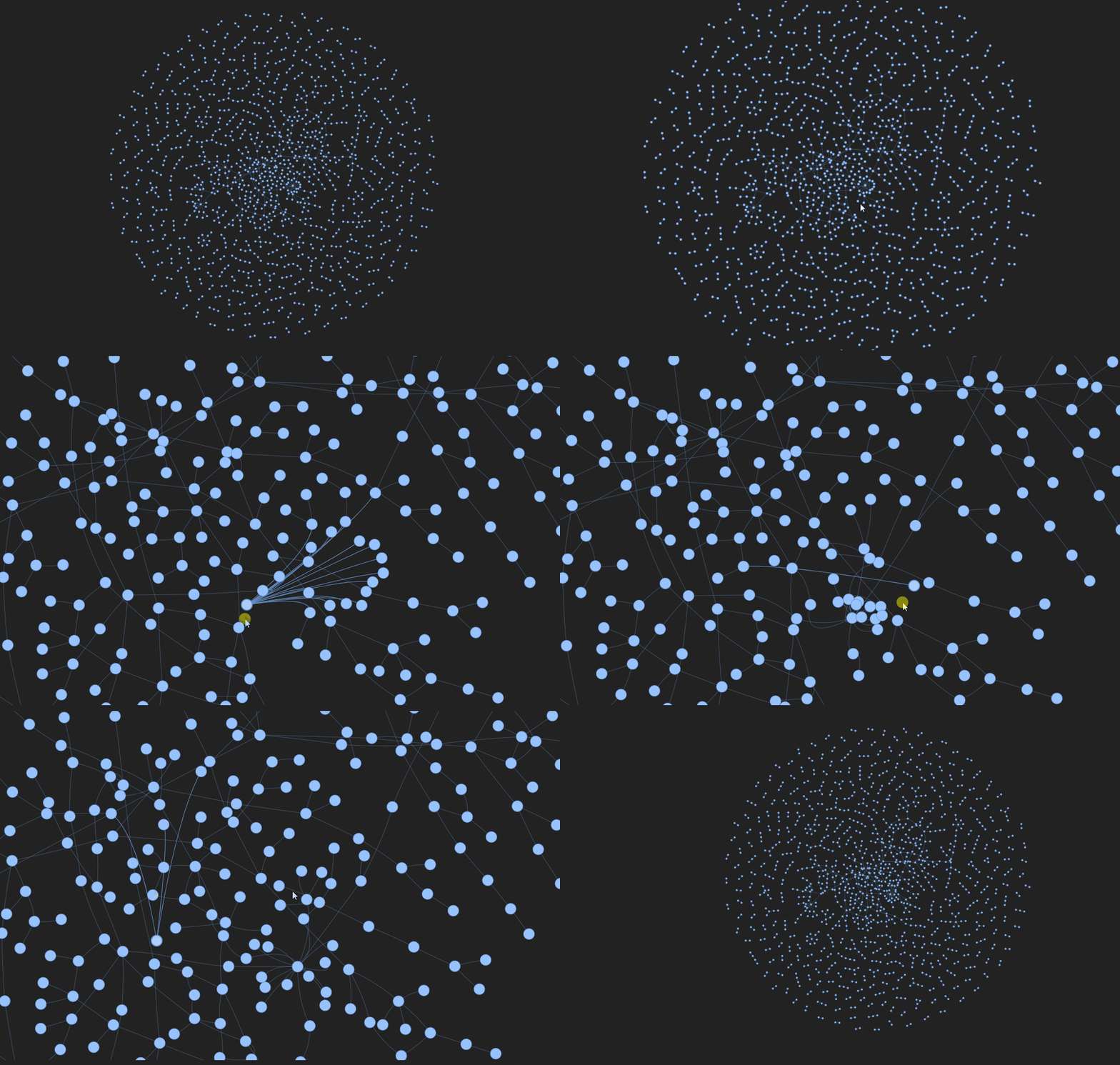 Image by the author. Data source.
Types of Networks
In modeling a real-world network, we must consider that there exist several structures of them. I will briefly introduce the most common networks and show how easy it is to model them with NetworkX.
Directed and Undirected Networks
Directed networks have edges with a defined direction. This indicates an asymetry in the relation between two nodes. For example, in an email network, the direction of the edge can indicate which node sends the email and which one receives it.
On the other hand, undirected networks neglect any direction of the arcs, implying symmetric relations between the nodes. An example could be a friendship network, where usually the relationship is mutual, or a sport tournament network.
In NetworkX the code used to instantiate respectively directed and undirected networks is DiGraph() or Graph(). I randomly generate synthetic networks with the Numpy library:
python
# Synthetic Directed Graph
Gd = nx.DiGraph()
for i in range(30):
    node_1 = np.random.randint(10)
    node_2 = np.random.randint(10)
    if node_1 != node_2:
        Gd.add_edge(node_1, node_2)

# Synthetic Undirected Graph
G = nx.Graph()
for i in range(30):
    node_1 = np.random.randint(10)
    node_2 = np.random.randint(10)
    if node_1 != node_2:
        G.add_edge(node_1, node_2)
You can explore the graphs with some beautiful interactive visualizations:
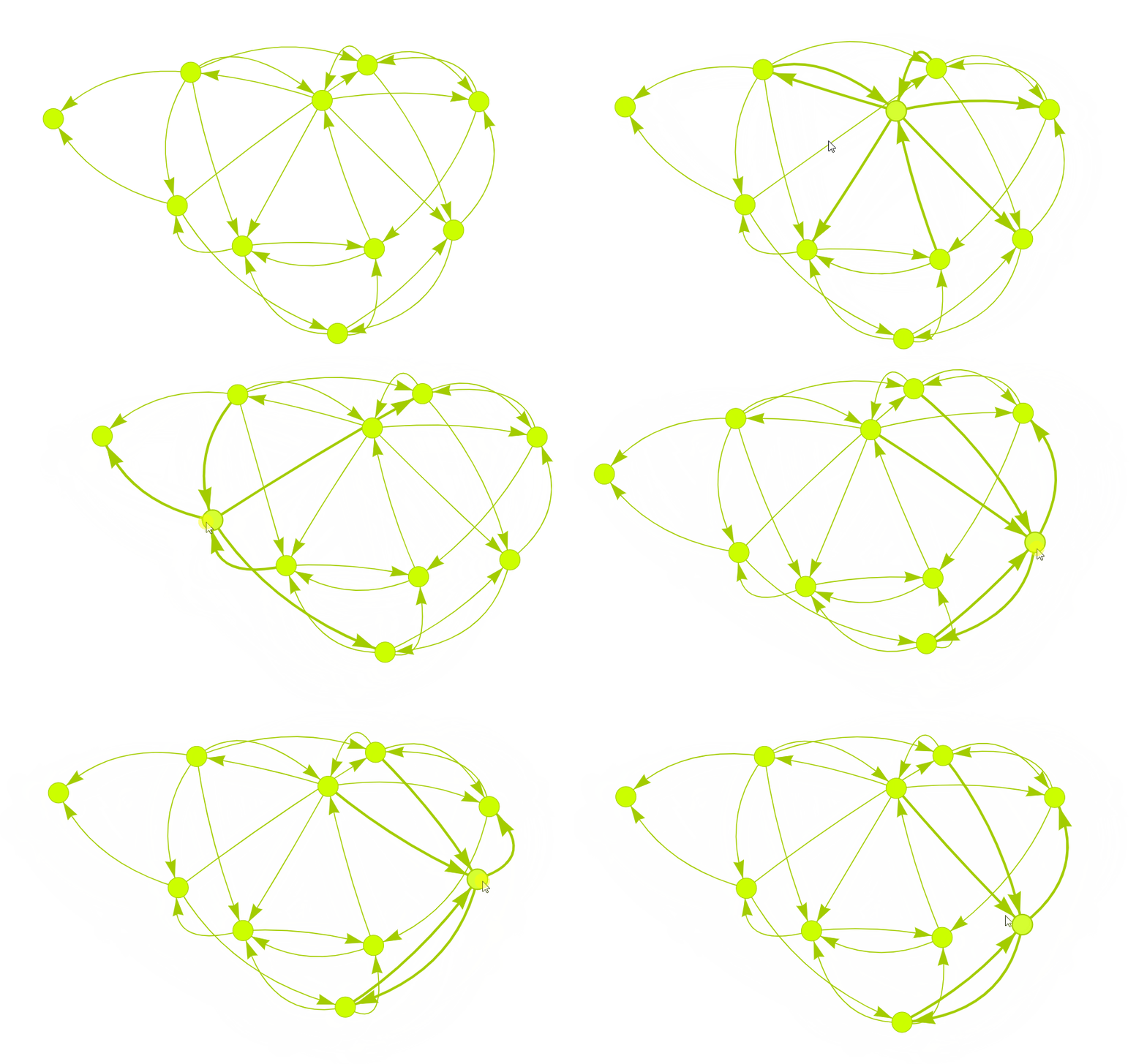 Synthetic Directed Graph. Image by the author.
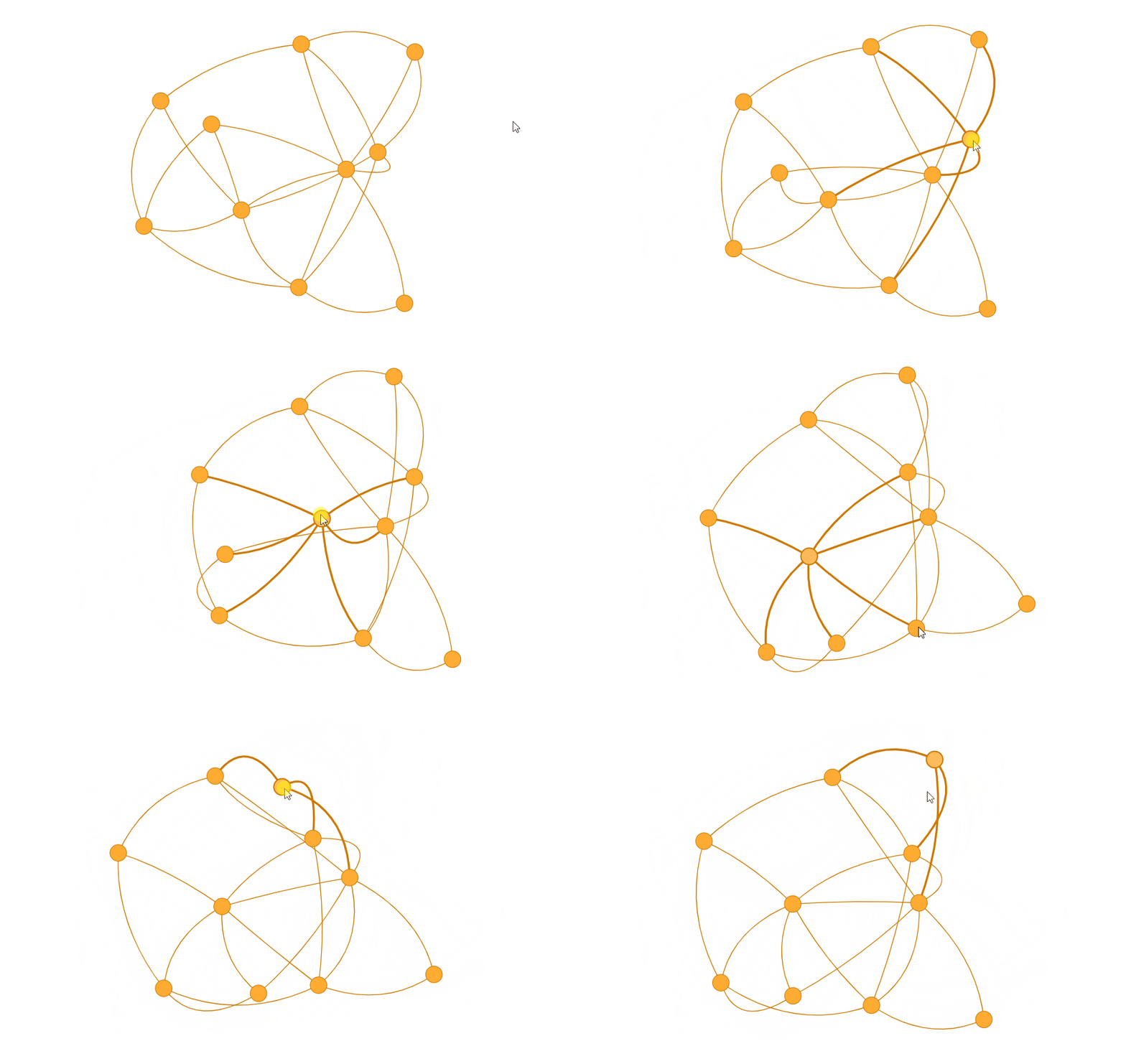 Synthetic Undirected Graph. Image by the author.
Weighted Networks
In some cases, the relationships between entities are not equal. We can measure the "strength" of a relationship by adding a weight to each edge. The weight reflects the significance of the interaction between a couple of nodes.
Consider, as an instance, a flight network. Each airport represents a node and edges represent the flights between them. It is convenient to assign a weight to each edge to model information such as the flight duration, distance, or ticket price.
To create a simple weighted network in NetworkX, we need to initialize an empty nx.Graph()object. The second step is to add edges with the add_edge() method and include the weight attribute.
python
# Initialize the graph
G = nx.Graph()

# Add weighted edges
G.add_edge("A", "B", weight=0.6)
G.add_edge("A", "C", weight=0.2)
G.add_edge("C", "D", weight=0.1)
G.add_edge("C", "E", weight=0.7)
G.add_edge("C", "F", weight=0.9)
G.add_edge("A", "D", weight=0.3)
Finally, we can visualize the weighted network.
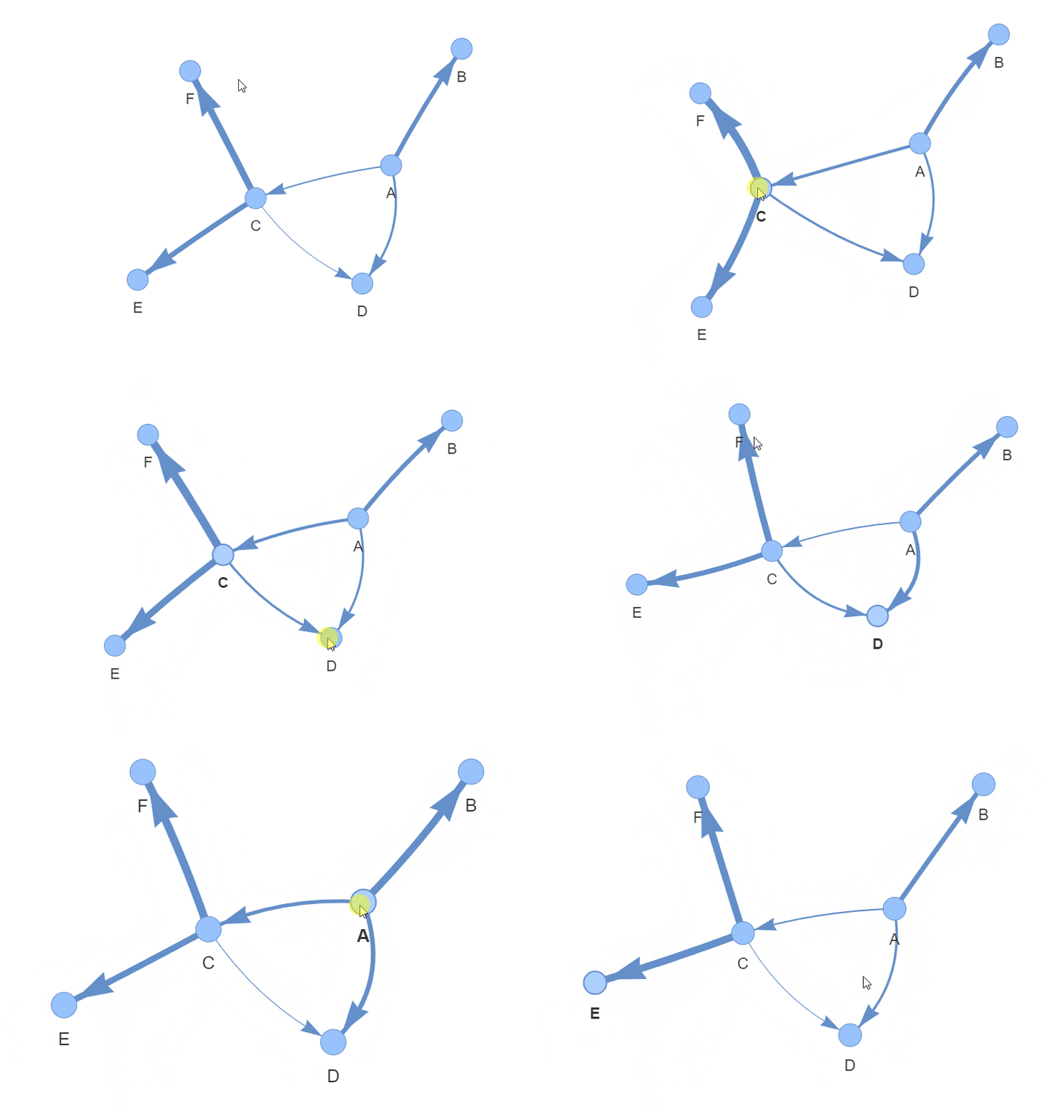 Synthetic Weighted Graph. Image by the author.
One variety of weighted networks are signed networks. They take into account the positivity or negativity of each relationship by assigning a sign (+ or -) to each edge.
One example of a signed network is an online product reviews network. Such a network represents products and customers as nodes and customer reviews are edges. Edges can have a positive sign (+) or a negative one (-) reflecting respectively a positive or a negative review.
In NetworkX signed graphs are created as easily as weighted graphs:
python
Synthetic Weighted Graph. Image by the author.
One variety of weighted networks are signed networks. They take into account the positivity or negativity of each relationship by assigning a sign (+ or -) to each edge.
One example of a signed network is an online product reviews network. Such a network represents products and customers as nodes and customer reviews are edges. Edges can have a positive sign (+) or a negative one (-) reflecting respectively a positive or a negative review.
In NetworkX signed graphs are created as easily as weighted graphs:
python
# Initialize the graph
G = nx.Graph()

# Add weighted edges
G.add_edge("A", "B", sign='+')
G.add_edge("A", "C", sign='-')
G.add_edge("C", "D", sign='-')
G.add_edge("C", "E", sign='+')
G.add_edge("C", "F", sign='-')
G.add_edge("A", "D", sign='+')
Extracting Information from Networks
Once we understand the different forms networks can assume, we need to know how to extract meaningful insights from them. We may want to find which are the key nodes or edges, and uncover hidden patterns. Fortunately, several algorithms have been developed to answer these questions.
PageRank Algorithm
PageRank is a famous algorithm that measures the importance of nodes within a network. It was originally developed by Larry Page and Sergey Brin at Google and it achieved tremendous results in ranking web pages for their search engine.
The core idea of the PageRank algorithm is that important nodes are the ones that have many incoming edges from other network's nodes, especially from other important nodes.
The step followed by the PageRank algorithm are straightforward:
- Assign an initial PageRank score to each node, equal to 1/N (where N is the total number of nodes in the network).
- Apply the basic PageRank update rule. It states that each node provides to his neighbors nodes an equal fraction of its PageRank score.
- The new PageRank score of each node is updated as the sum of the values it receive from its neighbors.
These steps are repeated until the PageRank scores converge to stable values.
If we take the following 25 nodes network, which I synthetically generated, it is extremely complex to state which is the most influential.
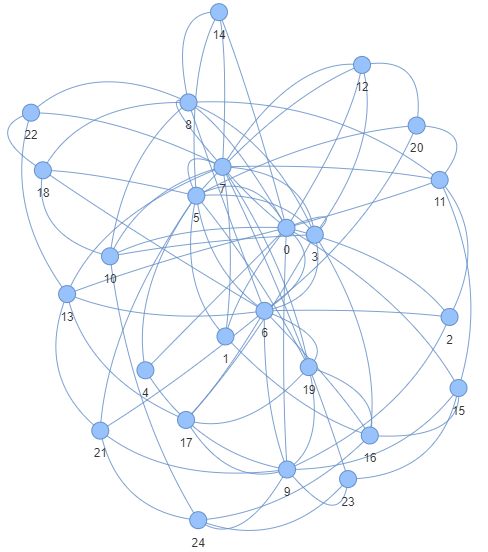 Synthetic Network generated with the PAM algorithm. Image by the author.
We may have some clues, but the PageRank algorithm makes our lives easier by assigning a mathematical value to each node's importance. Fortunately, NetworkX has an in-built PageRank method.
python
Synthetic Network generated with the PAM algorithm. Image by the author.
We may have some clues, but the PageRank algorithm makes our lives easier by assigning a mathematical value to each node's importance. Fortunately, NetworkX has an in-built PageRank method.
python
# Generate an artificial network of 25 nodes
G = nx.barabasi_albert_graph(25,4, seed=42)

# Apply the PageRank algorithm and store the scores in a pd dataframe
pagerank_results = nx.pagerank(G, alpha=0.85, max_iter=100, tol=1e-06)
pagerank_results = pd.Series(pagerank_results).sort_values(ascending=False)

# Plot the most importan node scores
fig, ax = plt.subplots()
sns.barplot(x=pagerank_results.iloc[:10].values, y=pagerank_results.iloc[:10].index.astype(str), orient='h', alpha=0.75)
ax.set_xlabel('PageRank Score')
ax.set_ylabel('Node')
ax.spines['top'].set_visible(False)
ax.spines['bottom'].set_visible(False)
ax.spines['right'].set_visible(False)
ax.spines['left'].set_visible(False)
for i in ax.containers:
    ax.bar_label(i,fmt='%.2f')
We can clearly see from the results that nodes 0, 7, and 6 have the highest PageRank score.
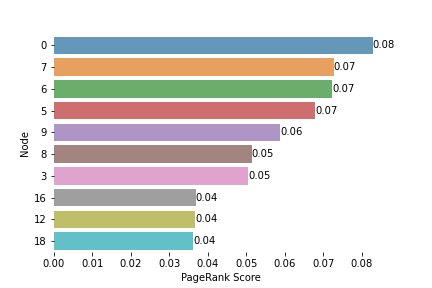 Image by the author.
HITS Algorithm
The HITS algorithm aims to identify two types of important nodes in a network: hubs and authorities.
- Hubs are the nodes that point to many other nodes.
- Authorities are the nodes that are pointed to by many hubs.
Differently than PageRank, with HITS we can not only measure the importance of each node in the network but also extrapolate insights about its role in the graph.
The steps followed by the HITS algorithm are:
- Assign to each node in the network an Authority score and an Hub score equal to 1.
- Apply the Authority Update Rule to each node. The Authority score of a node is the sum of the Hub score of the nodes pointing to it.
- Apply the Hub Update Rule to each node. The Hub score of a node is the sum of the Authority score of the nodes it is pointing at.
After each iteration, we update the Authority and Hub scores. After a large number of iterations both the scores should converge.
Thanks to the NetworkX library, we can compare the HITS results with the ones provided by NetworkX.
python
# Convert the previously create graph to directed
G_dir = G.to_directed()
for a, b in list(G.edges()):
    G_dir.remove_edge(a, b)

# Compute HITS scores
hits_results = nx.hits(G_dir, max_iter=100, tol=1e-06)
authority_results = pd.Series(hits_results[1]).sort_values(ascending=False)
hubs_results = pd.Series(hits_results[0]).sort_values(ascending=False)

# Plot the results
fig, (ax1, ax2) = plt.subplots(nrows=1, ncols=2)
fig.set_figheight(8)
fig.set_figwidth(16)
sns.barplot(x=authority_results.iloc[:10].values, y=authority_results.iloc[:10].index.astype(str), orient='h', alpha=0.75, ax=ax1)
ax1.set_xlabel('Authority Score')
ax1.set_ylabel('Node')
ax1.spines['top'].set_visible(False)
ax1.spines['bottom'].set_visible(False)
ax1.spines['right'].set_visible(False)
ax1.spines['left'].set_visible(False)
for i in ax1.containers:
    ax1.bar_label(i,fmt='%.2f')

sns.barplot(x=hubs_results.iloc[:10].values, y=hubs_results.iloc[:10].index.astype(str), orient='h', alpha=0.75, ax=ax2)
ax2.set_xlabel('Hub Score')
ax2.set_ylabel('Node')
ax2.spines['top'].set_visible(False)
ax2.spines['bottom'].set_visible(False)
ax2.spines['right'].set_visible(False)
ax2.spines['left'].set_visible(False)
for i in ax2.containers:
    ax2.bar_label(i,fmt='%.2f')
We clearly see how the nodes with the higher Authority score are among the ones with the higher PageRank score. Node 0 ranks first in both the two metrics, and nodes 7, 6, and 5 are among the top ones.
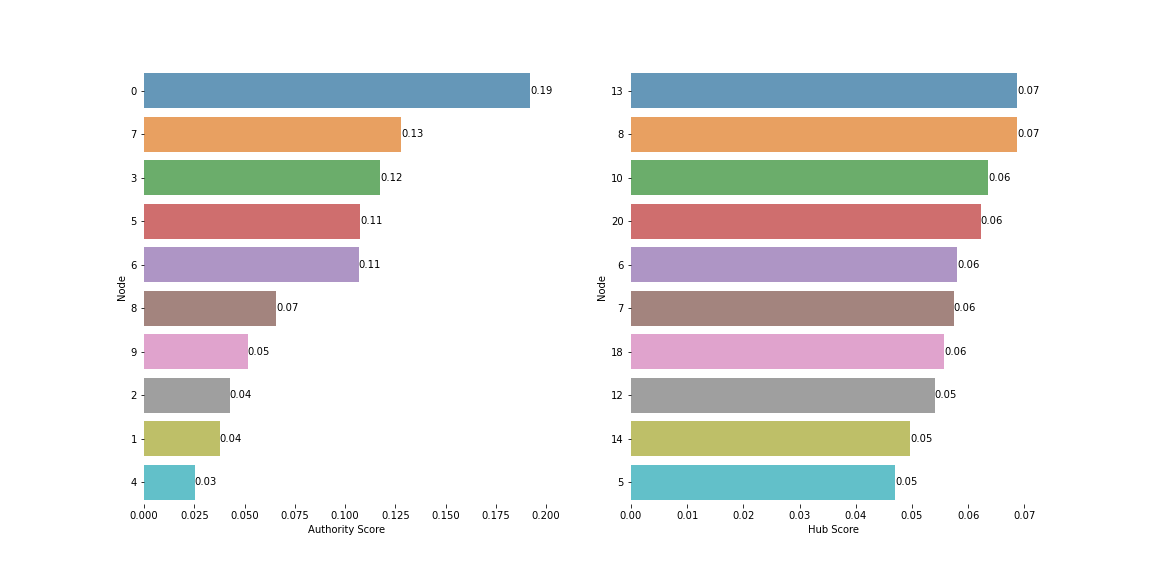 Image by the author.
What PageRank misses is the "Hub" role of nodes 13, 8, 10 and20. They are connected with relevant nodes, so we can affirm they play a significant role in the network.
Image by the author.
What PageRank misses is the "Hub" role of nodes 13, 8, 10 and20. They are connected with relevant nodes, so we can affirm they play a significant role in the network.
Conclusion
In this post, we saw how extracting information from networks is made more accessible through specialized libraries like NetworkX. Most metrics and network algorithms can be computed with a single function.
What we saw is only an introduction to social network analysis in machine learning, topics that should be part of every data scientist toolkit. While we've touched upon some fundamental concepts, the field extends far beyond these introductory insights.
I recommend digging into the resources and references attached to this article.
If you liked this story, consider following me to be notified of my upcoming projects and articles!
Here are some of my past projects:
Ensemble Learning with Scikit-Learn: A Friendly Introduction
Use Deep Learning to Generate Fantasy Names: Build a Language Model from Scratch
References
Register Now to Continue Reading
Unlock Towards Data Science with a Free Account
All articles on Towards Data Science are available to registered users. Create a free account today to access this article and thousands more.
Register for freeSign in to your account
 Written By
See all from Riccardo Andreoni
Artificial IntelligenceData ScienceGetting StartedMachine LearningPython
Share This Article
Towards Data Science is a community publication. Submit your insights to reach our global audience and earn through the TDS Author Payment Program.
Write for TDS
Related Articles
Machine Learning
Explaining sequence generation, padding and hyperparameter tuning for FD004
Koen Peters
December 13, 20200 min read
Artificial Intelligence
Without having to install anything.
Soner Yıldırım
December 23, 20225 min read
LLM Applications
A deep-dive and practical guide to cross-encoders, advanced techniques, and why your retrieval pipeline deserves a second pass.
Ian Ho
April 11, 202625 min read
Artificial Intelligence
Understanding how to interpret numerous weather patterns with Data Science visualizations and CBAM
Bharath K
August 5, 20216 min read
Machine Learning
Why is preventing data leakage so hard? Data scientists know that when they build training...
Jack Ploshnick
May 30, 20216 min read
Programming
Kind of like Google Translate, but for the language of ̶l̶o̶v̶e̶ data
Holly Dalligan
March 8, 20225 min read
ChatGPT
How simple prompt engineering can replace custom software
Blake Norrish
July 8, 20248 min read
Artificial Intelligence
Use the gradient boosting classes in Scikit-Learn to solve different classification and regression problems
Dr. Roi Yehoshua
July 19, 202313 min read
Artificial Intelligence
You don't always need advanced ML/DL algorithms to achieve 93.75% accuracy.
Arunn Thevapalan
February 10, 20218 min read
Your home for data science and AI. The world's leading publication for data science, data analytics, data engineering, machine learning, and artificial intelligence professionals.
Subscribe to Our NewsletterWrite For TDS•About•Advertise•Privacy Policy•Terms of Use
© Insight Media Group, LLC 2026•The New Stack•roadmap.sh•Creator Network
Recommended Articles
Close