保留正文与补采附件。源页面当前未重新核验;具体限制见交付清单。
 We value your privacy
We use cookies to enhance your browsing experience, serve personalised ads or content, and analyse our traffic. By clicking "Accept All", you consent to our use of cookies.
Customise Reject All Accept All
Customise Consent Preferences
We value your privacy
We use cookies to enhance your browsing experience, serve personalised ads or content, and analyse our traffic. By clicking "Accept All", you consent to our use of cookies.
Customise Reject All Accept All
Customise Consent Preferences  We use cookies to help you navigate efficiently and perform certain functions. You will find detailed information about all cookies under each consent category below.
The cookies that are categorised as "Necessary" are stored on your browser as they are essential for enabling the basic functionalities of the site. ... Show more
NecessaryAlways Active
Necessary cookies are required to enable the basic features of this site, such as providing secure log-in or adjusting your consent preferences. These cookies do not store any personally identifiable data.
We use cookies to help you navigate efficiently and perform certain functions. You will find detailed information about all cookies under each consent category below.
The cookies that are categorised as "Necessary" are stored on your browser as they are essential for enabling the basic functionalities of the site. ... Show more
NecessaryAlways Active
Necessary cookies are required to enable the basic features of this site, such as providing secure log-in or adjusting your consent preferences. These cookies do not store any personally identifiable data.
-
Cookie
BCTempID
-
Duration
10 minutes
-
Description
No description available.
-
Cookie
__cf_bm
-
Duration
1 hour
-
Description
This cookie, set by Cloudflare, is used to support Cloudflare Bot Management.
-
Cookie
AWSALBCORS
-
Duration
7 days
-
Description
Amazon Web Services set this cookie for load balancing.
-
Cookie
_cfuvid
-
Duration
session
-
Description
Cloudflare sets this cookie to track users across sessions to optimize user experience by maintaining session consistency and providing personalized services
-
Cookie
li_gc
-
Duration
6 months
-
Description
Linkedin set this cookie for storing visitor's consent regarding using cookies for non-essential purposes.
-
Cookie
__hssrc
-
Duration
session
-
Description
This cookie is set by Hubspot whenever it changes the session cookie. The __hssrc cookie set to 1 indicates that the user has restarted the browser, and if the cookie does not exist, it is assumed to be a new session.
-
Cookie
__hssc
-
Duration
1 hour
-
Description
HubSpot sets this cookie to keep track of sessions and to determine if HubSpot should increment the session number and timestamps in the __hstc cookie.
-
Cookie
wpEmojiSettingsSupports
-
Duration
session
-
Description
WordPress sets this cookie when a user interacts with emojis on a WordPress site. It helps determine if the user's browser can display emojis properly.
-
Cookie
BCSessionID
-
Duration
1 year 1 month 4 days
-
Description
Blueconic sets this cookie as a unique identifier for the BlueConic profile.
-
Cookie
_octo
-
Duration
1 year
-
Description
No description available.
-
Cookie
logged_in
-
Duration
1 year
-
Description
No description available.
-
Cookie
__Secure-YEC
-
Duration
past
-
Description
YouTube sets this cookie to stores the user's video player preferences using embedded YouTube video
-
Cookie
__eoi
-
Duration
6 months
-
Description
Description is currently not available.
-
Cookie
AWSALBTGCORS
-
Duration
7 days
-
Description
No description available.
-
Cookie
login-status-p
-
Duration
past
-
Description
Description is currently not available.
-
Cookie
AWSALBTG
-
Duration
7 days
-
Description
No description available.
-
Cookie
csrf_token
-
Duration
session
-
Description
No description available.
-
Cookie
token_v2
-
Duration
1 day
-
Description
Description is currently not available.
-
Cookie
D
-
Duration
1 year
-
Description
Description is currently not available.
-
Cookie
PHPSESSID
-
Duration
session
-
Description
This cookie is native to PHP applications. The cookie stores and identifies a user's unique session ID to manage user sessions on the website. The cookie is a session cookie and will be deleted when all the browser windows are closed.
-
Cookie
VISITOR_PRIVACY_METADATA
-
Duration
6 months
-
Description
YouTube sets this cookie to store the user's cookie consent state for the current domain.
-
Cookie
cookietest
-
Duration
session
-
Description
The cookietest cookie is typically used to determine whether the user's browser accepts cookies, essential for website functionality and user experience.
-
Cookie
__Host-airtable-session
-
Duration
1 year
-
Description
This cookie is used to enable us to integrate the services of Airtable.
-
Cookie
__Host-airtable-session.sig
-
Duration
1 year
-
Description
This cookie is used to enable us to integrate the services of Airtable.
-
Cookie
m
-
Duration
1 year 1 month 4 days
-
Description
Stripe sets this cookie for fraud prevention purposes. It identifies the device used to access the website, allowing the website to be formatted accordingly.
-
Cookie
BIGipServer*
-
Duration
session
-
Description
Marketo sets this cookie to collect information about the user's online activity and build a profile about their interests to provide advertisements relevant to the user.
-
Cookie
__cfruid
-
Duration
session
-
Description
Cloudflare sets this cookie to identify trusted web traffic.
-
Cookie
_GRECAPTCHA
-
Duration
6 months
-
Description
Google Recaptcha service sets this cookie to identify bots to protect the website against malicious spam attacks.
-
Cookie
__Secure-YNID
-
Duration
6 months
-
Description
Google cookie used to protect user security and prevent fraud, especially during the login process.
-
Cookie
cookieyes-consent
-
Duration
1 year
-
Description
CookieYes sets this cookie to remember users' consent preferences so that their preferences are respected on subsequent visits to this site. It does not collect or store any personal information about the site visitors.
Functional
Functional cookies help perform certain functionalities like sharing the content of the website on social media platforms, collecting feedback, and other third-party features.
-
Cookie
lidc
-
Duration
1 day
-
Description
LinkedIn sets the lidc cookie to facilitate data center selection.
-
Cookie
brw
-
Duration
1 year
-
Description
No description available.
-
Cookie
brwConsent
-
Duration
5 minutes
-
Description
Description is currently not available.
-
Cookie
WMF-Uniq
-
Duration
1 year
-
Description
Description is currently not available.
-
Cookie
loom_anon_comment
-
Duration
1 year
-
Description
No description available.
-
Cookie
loom_referral_video
-
Duration
session
-
Description
Description is currently not available.
-
Cookie
VISITOR_INFO1_LIVE
-
Duration
6 months
-
Description
A cookie set by YouTube to measure bandwidth that determines whether the user gets the new or old player interface.
-
Cookie
yt-remote-connected-devices
-
Duration
Never Expires
-
Description
YouTube sets this cookie to store the user's video preferences using embedded YouTube videos.
-
Cookie
ytidb::LAST_RESULT_ENTRY_KEY
-
Duration
Never Expires
-
Description
The cookie ytidb::LAST_RESULT_ENTRY_KEY is used by YouTube to store the last search result entry that was clicked by the user. This information is used to improve the user experience by providing more relevant search results in the future.
-
Cookie
yt-remote-device-id
-
Duration
Never Expires
-
Description
YouTube sets this cookie to store the user's video preferences using embedded YouTube videos.
-
Cookie
yt-remote-session-name
-
Duration
session
-
Description
The yt-remote-session-name cookie is used by YouTube to store the user's video player preferences using embedded YouTube video.
-
Cookie
yt-remote-fast-check-period
-
Duration
session
-
Description
The yt-remote-fast-check-period cookie is used by YouTube to store the user's video player preferences for embedded YouTube videos.
-
Cookie
yt-remote-session-app
-
Duration
session
-
Description
The yt-remote-session-app cookie is used by YouTube to store user preferences and information about the interface of the embedded YouTube video player.
-
Cookie
yt-remote-cast-available
-
Duration
session
-
Description
The yt-remote-cast-available cookie is used to store the user's preferences regarding whether casting is available on their YouTube video player.
-
Cookie
yt-remote-cast-installed
-
Duration
session
-
Description
The yt-remote-cast-installed cookie is used to store the user's video player preferences using embedded YouTube video.
-
Cookie
cp_session
-
Duration
3 months
-
Description
Codepen sets this cookie for Help systems found in the website.
-
Cookie
loid
-
Duration
1 year 1 month 4 days
-
Description
This cookie is set by the Reddit. The cookie enables the sharing of content from the website onto the social media platform.
Analytics
Analytical cookies are used to understand how visitors interact with the website. These cookies help provide information on metrics such as the number of visitors, bounce rate, traffic source, etc.
-
Cookie
__hstc
-
Duration
6 months
-
Description
Hubspot set this main cookie for tracking visitors. It contains the domain, initial timestamp (first visit), last timestamp (last visit), current timestamp (this visit), and session number (increments for each subsequent session).
-
Cookie
hubspotutk
-
Duration
6 months
-
Description
HubSpot sets this cookie to keep track of the visitors to the website. This cookie is passed to HubSpot on form submission and used when deduplicating contacts.
-
Cookie
_ga
-
Duration
1 year 1 month 4 days
-
Description
Google Analytics sets this cookie to calculate visitor, session and campaign data and track site usage for the site's analytics report. The cookie stores information anonymously and assigns a randomly generated number to recognise unique visitors.
-
Cookie
ga*
-
Duration
1 year 1 month 4 days
-
Description
Google Analytics sets this cookie to store and count page views.
-
Cookie
__Host-psifi.analyticsTrace
-
Duration
6 hours
-
Description
Description is currently not available.
-
Cookie
__Host-psifi.analyticsTraceV2
-
Duration
6 hours
-
Description
Description is currently not available.
-
Cookie
_gh_sess
-
Duration
session
-
Description
GitHub sets this cookie for temporary application and framework state between pages like what step the user is on in a multiple step form.
-
Cookie
YSC
-
Duration
session
-
Description
YSC cookie is set by Youtube and is used to track the views of embedded videos on Youtube pages.
-
Cookie
ajs_anonymous_id
-
Duration
1 year
-
Description
This cookie is set by Segment to count the number of people who visit a certain site by tracking if they have visited before.
-
Cookie
vuid
-
Duration
1 year 1 month 4 days
-
Description
Vimeo installs this cookie to collect tracking information by setting a unique ID to embed videos on the website.
Performance
Performance cookies are used to understand and analyse the key performance indexes of the website which helps in delivering a better user experience for the visitors.
-
Cookie
AWSALB
-
Duration
7 days
-
Description
AWSALB is an application load balancer cookie set by Amazon Web Services to map the session to the target.
-
Cookie
acq
-
Duration
past
-
Description
Description is currently not available.
-
Cookie
acq.sig
-
Duration
past
-
Description
Description is currently not available.
-
Cookie
ptc
-
Duration
2 years
-
Description
No description available.
Advertisement
Advertisement cookies are used to provide visitors with customised advertisements based on the pages you visited previously and to analyse the effectiveness of the ad campaigns.
-
Cookie
muc_ads
-
Duration
1 year 1 month 4 days
-
Description
Twitter sets this cookie to collect user behaviour and interaction data to optimize the website.
-
Cookie
guest_id_marketing
-
Duration
1 year 1 month 4 days
-
Description
Twitter sets this cookie to identify and track the website visitor.
-
Cookie
guest_id_ads
-
Duration
1 year 1 month 4 days
-
Description
Twitter sets this cookie to identify and track the website visitor.
-
Cookie
personalization_id
-
Duration
1 year 1 month 4 days
-
Description
Twitter sets this cookie to integrate and share features for social media and also store information about how the user uses the website, for tracking and targeting.
-
Cookie
guest_id
-
Duration
1 year 1 month 4 days
-
Description
Twitter sets this cookie to identify and track the website visitor. It registers if a user is signed in to the Twitter platform and collects information about ad preferences.
-
Cookie
bcookie
-
Duration
1 year
-
Description
LinkedIn sets this cookie from LinkedIn share buttons and ad tags to recognize browser IDs.
-
Cookie
__Secure-ROLLOUT_TOKEN
-
Duration
6 months
-
Description
YouTube sets this cookie to manage feature rollout and experimentation. It helps Google control which new features or interface changes are shown to users as part of testing and staged rollouts, ensuring consistent experience for a given user during an experiment.
-
Cookie
yt.innertube::nextId
-
Duration
Never Expires
-
Description
YouTube sets this cookie to register a unique ID to store data on what videos from YouTube the user has seen.
-
Cookie
yt.innertube::requests
-
Duration
Never Expires
-
Description
YouTube sets this cookie to register a unique ID to store data on what videos from YouTube the user has seen.
-
Cookie
session_tracker
-
Duration
session
-
Description
This cookie is set by the Reddit. This cookie is used to identify trusted web traffic. It also helps in adverstising on the website.
-
Cookie
edgebucket
-
Duration
session
-
Description
Reddit sets this cookie to save the information about a log-on Reddit user, for the purpose of advertisement recommendations and updating the content.
-
Cookie
did
-
Duration
1 year
-
Description
Arbor sets this cookie to show targeted ads to site visitors.This cookie expires after 2 months or 1 year.
Uncategorised
Other uncategorised cookies are those that are being analysed and have not been classified into a category as yet.
No cookies to display.
Reject All Save My Preferences Accept All
Toggle SearchToggle Mobile Navigation
Publish AI, ML & data-science insights to a global community of data professionals.
Sign inSubmit an Article
LatestEditor's PicksNewsletterShipAI
Write For TDS
LinkedInXToggle Search
Data Science
4 Pandas Concepts That Quietly Break Your Data Pipelines
Master data types, index alignment, and defensive Pandas practices to prevent silent bugs in real data pipelines.
Ibrahim Salami
March 23, 20269 min read
 Generated with Nano Banana
When I first started using Pandas, I thought I was doing pretty well.
I could clean datasets, run
Generated with Nano Banana
When I first started using Pandas, I thought I was doing pretty well.
I could clean datasets, run groupby, merge tables, and build quick analyses in a Jupyter notebook. Most tutorials made it feel straightforward: load data, transform it, visualize it, and you’re done.
And to be fair, my code usually worked.
Until it didn’t.
At some point, I started running into strange issues that were hard to explain. Numbers didn’t add up the way I expected. A column that looked numeric behaved like text. Sometimes a transformation ran without errors but produced results that were clearly wrong.
The frustrating part was that Pandas rarely complained.
There were no obvious exceptions or crashes. The code executed just fine — it simply produced incorrect results.
That’s when I realized something important: most Pandas tutorials focus on what you can do , but they rarely explain how Pandas actually behaves under the hood.
Things like:
- How Pandas handles data types
- How index alignment works
- The difference between a copy and a view
- and how to write defensive data manipulation code
These concepts don’t feel exciting when you’re first learning Pandas. They’re not as flashy as groupby tricks or fancy visualizations.
But they’re exactly the things that prevent silent bugs in real-world data pipelines.
In this article, I’ll walk through four Pandas concepts that most tutorials skip — the same ones that kept causing subtle bugs in my own code.
If you understand these ideas, your Pandas workflows become far more reliable, especially when your analysis starts turning into production data pipelines instead of one-off notebooks.
Let’s start with one of the most common sources of trouble: data types.
A Small Dataset (and a Subtle Bug)
To make these ideas concrete, let’s work with a small e-commerce dataset.
Imagine we’re analyzing orders from an online store. Each row represents an order and includes revenue and discount information.
python
import pandas as pd
orders = pd.DataFrame({
"order_id": [1001, 1002, 1003, 1004],
"customer_id": [1, 2, 2, 3],
"revenue": ["120", "250", "80", "300"], # looks numeric
"discount": [None, 10, None, 20]
})
orders
Output:
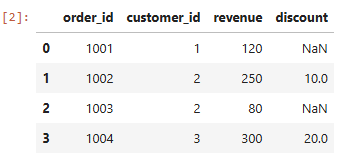 At first glance, everything looks normal. We have revenue values, some discounts, and a few missing entries.
Now let’s answer a simple question:
What is the total revenue?
python
At first glance, everything looks normal. We have revenue values, some discounts, and a few missing entries.
Now let’s answer a simple question:
What is the total revenue?
python
orders["revenue"].sum()
You might expect something like:
markup
750
Instead, Pandas returns:
text
'12025080300'
This is a perfect example of what I mentioned earlier: Pandas often fails silently. The code runs successfully, but the output isn’t what you expect.
The reason is subtle but incredibly important:
The revenue column appears to be numeric, but Pandas actually stores it as text.
We can confirm this by checking the dataframe’s data types.
python
orders.dtypes
This small detail introduces one of the most common sources of bugs in Pandas workflows: data types.
Let’s fix that next.
1. Data Types: The Hidden Source of Many Pandas Bugs
The issue we just saw comes down to something simple: data types.
Even though the revenue column looks numeric, Pandas interpreted it as an object (essentially text).
We can confirm that:
python
orders.dtypes
Output:
markup
order_id int64 customer_id int64 revenue object discount float64 dtype: object
Because revenue is stored as text, operations behave differently. When we asked Pandas to sum the column earlier, it concatenated strings instead of adding numbers:
This kind of issue shows up surprisingly often when working with real datasets. Data exported from spreadsheets, CSV files, or APIs frequently stores numbers as text.
The safest approach is to explicitly define data types instead of relying on Pandas’ guesses.
We can fix the column using astype():
python
orders["revenue"] = orders["revenue"].astype(int)
Now if we check the types again:
python
orders.dtypes
We get:
markup
order_id int64 customer_id int64 revenue int64 discount float64 dtype: object
And the calculation finally behaves as expected:
python
orders["revenue"].sum()
Output:
markup
750
A Simple Defensive Habit
Whenever I load a new dataset now, one of the first things I run is:
orders.info()
It gives a quick overview of:
- column data types
- missing values
- memory usage
This simple step often reveals subtle issues before they turn into confusing bugs later.
But data types are only one part of the story.
Another Pandas behavior causes even more confusion — especially when combining datasets or performing calculations.
It’s something called index alignment.
Index Alignment: Pandas Matches Labels, Not Rows
One of the most powerful — and confusing — behaviors in Pandas is index alignment.
When Pandas performs operations between objects (like Series or DataFrames), it does not match rows by position.
Instead, it matches them by index labels.
At first, this seems subtle. But it can easily produce results that look correct at a glance while actually being wrong.
Let’s see a simple example.
python
revenue = pd.Series([120, 250, 80], index=[0, 1, 2])
discount = pd.Series([10, 20, 5], index=[1, 2, 3])
revenue + discount
The result looks like this:
markup
0 NaN1 2602 1003 NaNdtype: float64
At first glance, this might feel strange.
Why did Pandas produce four rows instead of three?
The reason is that Pandas aligned the values based on index labels.
Pandas aligns values using their index labels. Internally, the calculation looks like this:
- At index 0 , revenue exists but discount does not → result becomes
NaN
- At index 1 , both values exist →
250 + 10 = 260
- At index 2 , both values exist →
80 + 20 = 100
- At index 3 , discount exists but revenue does not → result becomes
NaN
Which produces:
markup
0 NaN1 2602 1003 NaNdtype: float64
Rows without matching indices produce missing values,basically.
This behavior is actually one of Pandas’ strengths because it allows datasets with different structures to combine intelligently.
But it can also introduce subtle bugs.
How This Shows Up in Real Analysis
Let’s go back to our orders dataset.
Suppose we filter orders with discounts:
python
discounted_orders = orders[orders["discount"].notna()]
Now imagine we try to calculate net revenue by subtracting the discount.
python
orders["revenue"] - discounted_orders["discount"]
You might expect a straightforward subtraction.
Instead, Pandas aligns rows using the original indices.
The result will contain missing values because the filtered dataframe no longer has the same index structure.
This can easily lead to:
- unexpected
NaN values
- miscalculated metrics
- confusing downstream results
And again — Pandas will not raise an error.
A Defensive Approach
If you want operations to behave row-by-row , a good practice is to reset the index after filtering.
python
discounted_orders = orders[orders["discount"].notna()].reset_index(drop=True)
Now the rows are aligned by position again.
Another option is to explicitly align objects before performing operations:
python
orders.align(discounted_orders)
Or in situations where alignment is unnecessary, you can work with raw arrays:
python
orders["revenue"].values
In the end, it all boils down to this.
In Pandas, operations align by index labels , not row order.
Understanding this behavior helps explain many mysterious NaN values that appear during analysis.
But there’s another Pandas behavior that has confused almost every data analyst at some point.
You’ve probably seen it before:
**SettingWithCopyWarning**
Let’s unpack what’s actually happening there.
Great — let’s continue with the next section.
The Copy vs View Problem (and the Famous Warning)
If you’ve used Pandas for a while, you’ve probably seen this warning before:
SettingWithCopyWarning
When I first encountered it, I mostly ignored it. The code still ran, and the output looked fine, so it didn’t seem like a big deal.
But this warning points to something important about how Pandas works: sometimes you’re modifying the original dataframe , and sometimes you’re modifying a temporary copy.
The tricky part is that Pandas doesn’t always make this obvious.
Let’s look at an example using our orders dataset.
Suppose we want to adjust revenue for orders where a discount exists.
A natural approach might look like this:
python
discounted_orders = orders[orders["discount"].notna()]
discounted_orders["revenue"] = discounted_orders["revenue"] - discounted_orders["discount"]
This often triggers the warning:
SettingWithCopyWarning:
A value is trying to be set on a copy of a slice from a DataFrame
The problem is that discounted_orders may not be an independent dataframe. It might just be a view into the original orders dataframe.
So when we modify it, Pandas isn’t always sure whether we intend to modify the original data or modify the filtered subset. This ambiguity is what produces the warning.
Even worse, the modification might not behave consistently depending on how the dataframe was created. In some situations, the change affects the original dataframe; in others, it doesn’t.
This kind of unpredictable behavior is exactly the sort of thing that causes subtle bugs in real data workflows.
The Safer Way: Use .loc
A more reliable approach is to modify the dataframe explicitly using.loc.
python
orders.loc[orders["discount"].notna(), "revenue"] = (
orders["revenue"] - orders["discount"]
)
This syntax clearly tells Pandas which rows to modify and which column to update. Because the operation is explicit, Pandas can safely apply the change without ambiguity.
Another Good Habit: Use .copy()
Sometimes you really do want to work with a separate dataframe. In that case, it’s best to create an explicit copy.
python
discounted_orders = orders[orders["discount"].notna()].copy()
Now discounted_orders is a completely independent object, and modifying it won’t affect the original dataset.
So far we’ve seen how three behaviors can quietly cause problems:
- incorrect data types
- unexpected index alignment
- ambiguous copy vs view operations
But there’s one more habit that can dramatically improve the reliability of your data workflows.
It’s something many data analysts rarely think about: defensive data manipulation.
Defensive Data Manipulation: Writing Pandas Code That Fails Loudly
One thing I’ve slowly realized while working with data is that most problems don’t come from code crashing.
They come from code that runs successfully but produces the wrong numbers.
And in Pandas, this happens surprisingly often because the library is designed to be flexible. It rarely stops you from doing something questionable.
That’s why many data engineers and experienced analysts rely on something called defensive data manipulation.
Here's the idea.
Instead of assuming your data is correct, you actively validate your assumptions as you work.
This helps catch issues early before they quietly propagate through your analysis or pipeline.
Let’s look at a few practical examples.
Validate Your Data Types
Earlier we saw how the revenue column looked numeric but was actually stored as text. One way to prevent this from slipping through is to explicitly check your assumptions.
For example:
python
assert orders["revenue"].dtype == "int64"
If the dtype is incorrect, the code will immediately raise an error.
This is much better than discovering the problem later when your metrics don’t add up.
Prevent Dangerous Merges
Another common source of silent errors is merging datasets.
Imagine we add a small customer dataset:
python
customers = pd.DataFrame({
"customer_id": [1, 2, 3],
"city": ["Lagos", "Abuja", "Ibadan"]
})
A typical merge might look like this:
orders.merge(customers, on="customer_id")
This works fine, but there’s a hidden risk.
If the keys aren’t unique, the merge could accidentally create duplicate rows , which inflates metrics like revenue totals.
Pandas provides a very useful safeguard for this:
python
orders.merge(customers, on="customer_id", validate="many_to_one")
Now Pandas will raise an error if the relationship between the datasets isn’t what you expect.
This small parameter can prevent some very painful debugging later.
Check for Missing Data Early
Missing values can also cause unexpected behavior in calculations.
A quick diagnostic check can help reveal issues immediately:
python
orders.isna().sum()
This shows how many missing values exist in each column.
When datasets are large, these small checks can quickly surface problems that might otherwise go unnoticed.
A Simple Defensive Workflow
Over time, I’ve started following a small routine whenever I work with a new dataset:
- Inspect the structure
df.info()
- Fix data types
astype()
- Check missing values
df.isna().sum()
- Validate merges
validate="one_to_one" or "many_to_one"
- Use
.loc when modifying data
These steps only take a few seconds, but they dramatically reduce the chances of introducing silent bugs.
Final Thoughts
When I first started learning Pandas, most tutorials focused on powerful operations like groupby, merge, or pivot_table.
Those tools are important, but I’ve come to realize that reliable data work depends just as much on understanding how Pandas behaves under the hood.
Concepts like:
- data types
- index alignment
- copy vs view behavior
- defensive data manipulation
may not feel exciting at first, but they’re exactly the things that keep data workflows stable and trustworthy.
The biggest mistakes in data analysis rarely come from code that crashes.
They come from code that runs perfectly — while quietly producing the wrong results.
And understanding these Pandas fundamentals is one of the best ways to prevent that.
Thanks for reading! If you found this article helpful, feel free to let me know. I truly appreciate your feedback
Medium
LinkedIn
Twitter
YouTube
Register Now to Continue Reading
Unlock Towards Data Science with a Free Account
All articles on Towards Data Science are available to registered users. Create a free account today to access this article and thousands more.
Register for freeSign in to your account
 Written By
See all from Ibrahim Salami
Data AnalysisData TypePandasProgrammingPython
Share This Article
Towards Data Science is a community publication. Submit your insights to reach our global audience and earn through the TDS Author Payment Program.
Write for TDS
Related Articles
Machine Learning
On the value of building on existing foundations
Stephanie Kirmer
July 17, 20268 min read
Data Science
A guide to easily creating elegantly formatted charts & slides using Google APIs
Mikey Gracie
August 21, 20216 min read
Data Science
A comparison based on statistics and linear programming
Nicolas Garcia Aramouni
April 19, 202210 min read
Artificial Intelligence
In this article, we review classical classifier combination techniques that are usually used as benchmarks against a newly proposed method.
Mahmoud Albardan
November 1, 20206 min read
Artificial Intelligence
Learn about bias, variance and total error relationship to model complexity and overfitting/underfitting.
Manpreet Singh Minhas
January 16, 20217 min read
Artificial Intelligence
A brief exploration of juristic and social dilemmas within language models
Jillian Chambers
December 22, 20215 min read
Data Science
The Most Common Discrete Probability Distributions Explained with Examples
Kessie Zhang
September 14, 20206 min read
Machine Learning
Learn how regularization reduces overfitting and improves model stability in linear regression.
Niklas Lang
January 30, 202510 min read
Programming
Introduction
Terence Shin, MSc, MBA
April 14, 20226 min read
Your home for data science and AI. The world's leading publication for data science, data analytics, data engineering, machine learning, and artificial intelligence professionals.
Subscribe to Our NewsletterWrite For TDS•About•Advertise•Privacy Policy•Terms of Use
© Insight Media Group, LLC 2026•The New Stack•roadmap.sh•Creator Network
Recommended Articles
Close