{
"source_file": "0930",
"source_platform": "Medium",
"author": "Bradney Smith",
"title_listed": "A Complete Guide to BERT with Code",
"keywords": "",
"domain": "大模型算法",
"content_type": "深度技术解析",
"is_paid_flag": "否",
"url": "https://towardsdatascience.com/a-complete-guide-to-bert-with-code-9f87602e4a11/",
"publish_date": "2024-05-13",
"corpus_stage": "",
"notes": "",
"id": "3ee6af29ee1a",
"collected_at": "2026-10-02T01:02:29",
"title": "A Complete Guide to BERT with Code | Towards Data Science",
"body_markdown": "\nWe value your privacy\nWe use cookies to enhance your browsing experience, serve personalised ads or content, and analyse our traffic. By clicking \"Accept All\", you consent to our use of cookies.\nCustomise Reject All Accept All\nCustomise Consent Preferences \nWe use cookies to help you navigate efficiently and perform certain functions. You will find detailed information about all cookies under each consent category below.\nThe cookies that are categorised as \"Necessary\" are stored on your browser as they are essential for enabling the basic functionalities of the site. ... Show more\nNecessaryAlways Active\nNecessary cookies are required to enable the basic features of this site, such as providing secure log-in or adjusting your consent preferences. These cookies do not store any personally identifiable data.\n * Cookie\nBCTempID\n * Duration\n10 minutes\n * Description\nNo description available.\n\n\n * Cookie\n__cf_bm\n * Duration\n1 hour\n * Description\nThis cookie, set by Cloudflare, is used to support Cloudflare Bot Management. \n\n\n * Cookie\nAWSALBCORS\n * Duration\n7 days\n * Description\nAmazon Web Services set this cookie for load balancing.\n\n\n * Cookie\n_cfuvid\n * Duration\nsession\n * Description\nCloudflare sets this cookie to track users across sessions to optimize user experience by maintaining session consistency and providing personalized services\n\n\n * Cookie\nli_gc\n * Duration\n6 months\n * Description\nLinkedin set this cookie for storing visitor's consent regarding using cookies for non-essential purposes.\n\n\n * Cookie\n__hssrc\n * Duration\nsession\n * Description\nThis cookie is set by Hubspot whenever it changes the session cookie. The __hssrc cookie set to 1 indicates that the user has restarted the browser, and if the cookie does not exist, it is assumed to be a new session.\n\n\n * Cookie\n__hssc\n * Duration\n1 hour\n * Description\nHubSpot sets this cookie to keep track of sessions and to determine if HubSpot should increment the session number and timestamps in the __hstc cookie.\n\n\n * Cookie\nwpEmojiSettingsSupports\n * Duration\nsession\n * Description\nWordPress sets this cookie when a user interacts with emojis on a WordPress site. It helps determine if the user's browser can display emojis properly.\n\n\n * Cookie\nBCSessionID\n * Duration\n1 year 1 month 4 days\n * Description\nBlueconic sets this cookie as a unique identifier for the BlueConic profile.\n\n\n * Cookie\n_octo\n * Duration\n1 year\n * Description\nNo description available.\n\n\n * Cookie\nlogged_in\n * Duration\n1 year\n * Description\nNo description available.\n\n\n * Cookie\n__Secure-YEC\n * Duration\npast\n * Description\nYouTube sets this cookie to stores the user's video player preferences using embedded YouTube video\n\n\n * Cookie\n__eoi\n * Duration\n6 months\n * Description\nDescription is currently not available.\n\n\n * Cookie\nAWSALBTGCORS\n * Duration\n7 days\n * Description\nNo description available.\n\n\n * Cookie\nlogin-status-p\n * Duration\npast\n * Description\nDescription is currently not available.\n\n\n * Cookie\nAWSALBTG\n * Duration\n7 days\n * Description\nNo description available.\n\n\n * Cookie\ncsrf_token\n * Duration\nsession\n * Description\nNo description available.\n\n\n * Cookie\ntoken_v2\n * Duration\n1 day\n * Description\nDescription is currently not available.\n\n\n * Cookie\nD\n * Duration\n1 year\n * Description\nDescription is currently not available.\n\n\n * Cookie\nPHPSESSID\n * Duration\nsession\n * Description\nThis cookie is native to PHP applications. The cookie stores and identifies a user's unique session ID to manage user sessions on the website. The cookie is a session cookie and will be deleted when all the browser windows are closed.\n\n\n * Cookie\nVISITOR_PRIVACY_METADATA\n * Duration\n6 months\n * Description\nYouTube sets this cookie to store the user's cookie consent state for the current domain. \n\n\n * Cookie\ncookietest\n * Duration\nsession\n * Description\nThe cookietest cookie is typically used to determine whether the user's browser accepts cookies, essential for website functionality and user experience.\n\n\n * Cookie\n__Host-airtable-session\n * Duration\n1 year\n * Description\nThis cookie is used to enable us to integrate the services of Airtable.\n\n\n * Cookie\n__Host-airtable-session.sig\n * Duration\n1 year\n * Description\nThis cookie is used to enable us to integrate the services of Airtable.\n\n\n * Cookie\nm\n * Duration\n1 year 1 month 4 days\n * Description\nStripe sets this cookie for fraud prevention purposes. It identifies the device used to access the website, allowing the website to be formatted accordingly.\n\n\n * Cookie\nBIGipServer*\n * Duration\nsession\n * Description\nMarketo sets this cookie to collect information about the user's online activity and build a profile about their interests to provide advertisements relevant to the user. \n\n\n * Cookie\n__cfruid\n * Duration\nsession\n * Description\nCloudflare sets this cookie to identify trusted web traffic.\n\n\n * Cookie\n_GRECAPTCHA\n * Duration\n6 months\n * Description\nGoogle Recaptcha service sets this cookie to identify bots to protect the website against malicious spam attacks.\n\n\n * Cookie\n__Secure-YNID\n * Duration\n6 months\n * Description\nGoogle cookie used to protect user security and prevent fraud, especially during the login process.\n\n\n * Cookie\ncookieyes-consent\n * Duration\n1 year\n * Description\nCookieYes sets this cookie to remember users' consent preferences so that their preferences are respected on subsequent visits to this site. It does not collect or store any personal information about the site visitors.\n\n\nFunctional\nFunctional cookies help perform certain functionalities like sharing the content of the website on social media platforms, collecting feedback, and other third-party features.\n * Cookie\nlidc\n * Duration\n1 day\n * Description\nLinkedIn sets the lidc cookie to facilitate data center selection.\n\n\n * Cookie\nbrw\n * Duration\n1 year\n * Description\nNo description available.\n\n\n * Cookie\nbrwConsent\n * Duration\n5 minutes\n * Description\nDescription is currently not available.\n\n\n * Cookie\nWMF-Uniq\n * Duration\n1 year\n * Description\nDescription is currently not available.\n\n\n * Cookie\nloom_anon_comment\n * Duration\n1 year\n * Description\nNo description available.\n\n\n * Cookie\nloom_referral_video\n * Duration\nsession\n * Description\nDescription is currently not available.\n\n\n * Cookie\nVISITOR_INFO1_LIVE\n * Duration\n6 months\n * Description\nA cookie set by YouTube to measure bandwidth that determines whether the user gets the new or old player interface.\n\n\n * Cookie\nyt-remote-connected-devices\n * Duration\nNever Expires\n * Description\nYouTube sets this cookie to store the user's video preferences using embedded YouTube videos.\n\n\n * Cookie\nytidb::LAST_RESULT_ENTRY_KEY\n * Duration\nNever Expires\n * Description\nThe cookie ytidb::LAST_RESULT_ENTRY_KEY is used by YouTube to store the last search result entry that was clicked by the user. This information is used to improve the user experience by providing more relevant search results in the future.\n\n\n * Cookie\nyt-remote-device-id\n * Duration\nNever Expires\n * Description\nYouTube sets this cookie to store the user's video preferences using embedded YouTube videos.\n\n\n * Cookie\nyt-remote-session-name\n * Duration\nsession\n * Description\nThe yt-remote-session-name cookie is used by YouTube to store the user's video player preferences using embedded YouTube video.\n\n\n * Cookie\nyt-remote-fast-check-period\n * Duration\nsession\n * Description\nThe yt-remote-fast-check-period cookie is used by YouTube to store the user's video player preferences for embedded YouTube videos.\n\n\n * Cookie\nyt-remote-session-app\n * Duration\nsession\n * Description\nThe yt-remote-session-app cookie is used by YouTube to store user preferences and information about the interface of the embedded YouTube video player.\n\n\n * Cookie\nyt-remote-cast-available\n * Duration\nsession\n * Description\nThe yt-remote-cast-available cookie is used to store the user's preferences regarding whether casting is available on their YouTube video player.\n\n\n * Cookie\nyt-remote-cast-installed\n * Duration\nsession\n * Description\nThe yt-remote-cast-installed cookie is used to store the user's video player preferences using embedded YouTube video.\n\n\n * Cookie\ncp_session\n * Duration\n3 months\n * Description\nCodepen sets this cookie for Help systems found in the website.\n\n\n * Cookie\nloid\n * Duration\n1 year 1 month 4 days\n * Description\nThis cookie is set by the Reddit. The cookie enables the sharing of content from the website onto the social media platform.\n\n\nAnalytics\nAnalytical cookies are used to understand how visitors interact with the website. These cookies help provide information on metrics such as the number of visitors, bounce rate, traffic source, etc.\n * Cookie\n__hstc\n * Duration\n6 months\n * Description\nHubspot set this main cookie for tracking visitors. It contains the domain, initial timestamp (first visit), last timestamp (last visit), current timestamp (this visit), and session number (increments for each subsequent session).\n\n\n * Cookie\nhubspotutk\n * Duration\n6 months\n * Description\nHubSpot sets this cookie to keep track of the visitors to the website. This cookie is passed to HubSpot on form submission and used when deduplicating contacts.\n\n\n * Cookie\n_ga\n * Duration\n1 year 1 month 4 days\n * Description\nGoogle Analytics sets this cookie to calculate visitor, session and campaign data and track site usage for the site's analytics report. The cookie stores information anonymously and assigns a randomly generated number to recognise unique visitors.\n\n\n * Cookie\n_ga_*\n * Duration\n1 year 1 month 4 days\n * Description\nGoogle Analytics sets this cookie to store and count page views.\n\n\n * Cookie\n__Host-psifi.analyticsTrace\n * Duration\n6 hours\n * Description\nDescription is currently not available.\n\n\n * Cookie\n__Host-psifi.analyticsTraceV2\n * Duration\n6 hours\n * Description\nDescription is currently not available.\n\n\n * Cookie\n_gh_sess\n * Duration\nsession\n * Description\nGitHub sets this cookie for temporary application and framework state between pages like what step the user is on in a multiple step form.\n\n\n * Cookie\nYSC\n * Duration\nsession\n * Description\nYSC cookie is set by Youtube and is used to track the views of embedded videos on Youtube pages.\n\n\n * Cookie\najs_anonymous_id\n * Duration\n1 year\n * Description\nThis cookie is set by Segment to count the number of people who visit a certain site by tracking if they have visited before.\n\n\n * Cookie\nvuid\n * Duration\n1 year 1 month 4 days\n * Description\nVimeo installs this cookie to collect tracking information by setting a unique ID to embed videos on the website. \n\n\nPerformance\nPerformance cookies are used to understand and analyse the key performance indexes of the website which helps in delivering a better user experience for the visitors.\n * Cookie\nAWSALB\n * Duration\n7 days\n * Description\nAWSALB is an application load balancer cookie set by Amazon Web Services to map the session to the target.\n\n\n * Cookie\nacq\n * Duration\npast\n * Description\nDescription is currently not available.\n\n\n * Cookie\nacq.sig\n * Duration\npast\n * Description\nDescription is currently not available.\n\n\n * Cookie\nptc\n * Duration\n2 years\n * Description\nNo description available.\n\n\nAdvertisement\nAdvertisement cookies are used to provide visitors with customised advertisements based on the pages you visited previously and to analyse the effectiveness of the ad campaigns.\n * Cookie\nmuc_ads\n * Duration\n1 year 1 month 4 days\n * Description\nTwitter sets this cookie to collect user behaviour and interaction data to optimize the website.\n\n\n * Cookie\nguest_id_marketing\n * Duration\n1 year 1 month 4 days\n * Description\nTwitter sets this cookie to identify and track the website visitor.\n\n\n * Cookie\nguest_id_ads\n * Duration\n1 year 1 month 4 days\n * Description\nTwitter sets this cookie to identify and track the website visitor.\n\n\n * Cookie\npersonalization_id\n * Duration\n1 year 1 month 4 days\n * Description\nTwitter sets this cookie to integrate and share features for social media and also store information about how the user uses the website, for tracking and targeting.\n\n\n * Cookie\nguest_id\n * Duration\n1 year 1 month 4 days\n * Description\nTwitter sets this cookie to identify and track the website visitor. It registers if a user is signed in to the Twitter platform and collects information about ad preferences.\n\n\n * Cookie\nbcookie\n * Duration\n1 year\n * Description\nLinkedIn sets this cookie from LinkedIn share buttons and ad tags to recognize browser IDs.\n\n\n * Cookie\n__Secure-ROLLOUT_TOKEN\n * Duration\n6 months\n * Description\nYouTube sets this cookie to manage feature rollout and experimentation. It helps Google control which new features or interface changes are shown to users as part of testing and staged rollouts, ensuring consistent experience for a given user during an experiment.\n\n\n * Cookie\nyt.innertube::nextId\n * Duration\nNever Expires\n * Description\nYouTube sets this cookie to register a unique ID to store data on what videos from YouTube the user has seen.\n\n\n * Cookie\nyt.innertube::requests\n * Duration\nNever Expires\n * Description\nYouTube sets this cookie to register a unique ID to store data on what videos from YouTube the user has seen.\n\n\n * Cookie\nsession_tracker\n * Duration\nsession\n * Description\nThis cookie is set by the Reddit. This cookie is used to identify trusted web traffic. It also helps in adverstising on the website.\n\n\n * Cookie\nedgebucket\n * Duration\nsession\n * Description\nReddit sets this cookie to save the information about a log-on Reddit user, for the purpose of advertisement recommendations and updating the content.\n\n\n * Cookie\ndid\n * Duration\n1 year\n * Description\nArbor sets this cookie to show targeted ads to site visitors.This cookie expires after 2 months or 1 year.\n\n\nUncategorised\nOther uncategorised cookies are those that are being analysed and have not been classified into a category as yet.\nNo cookies to display.\nReject All Save My Preferences Accept All\nToggle Search[](https://towardsdatascience.com/)Toggle Mobile Navigation\n[](https://towardsdatascience.com/)\nPublish AI, ML & data-science insights to a global community of data professionals.\nSign in[Submit an Article](https://write.insightmediagroup.io)\n[Latest](https://towardsdatascience.com/latest/)[Editor's Picks](https://towardsdatascience.com/tag/editors-pick/)[Newsletter](https://towardsdatascience.com/tag/the-variable/)[ShipAI](https://towardsdatascience.com/shipai/)\n* * *\n[Write For TDS](https://towardsdatascience.com/submissions/)\n[LinkedIn](https://www.linkedin.com/company/towards-data-science/)[X](https://x.com/TDataScience)Toggle Search\n[Large Language Models](https://towardsdatascience.com/category/artificial-intelligence/large-language-models/)\n# A Complete Guide to BERT with Code\nHistory, Architecture, Pre-training, and Fine-tuning\n[Bradney Smith](https://towardsdatascience.com/author/bradneysmith/)\nMay 13, 202447 min read\n**Part 4 in the \"LLMs from Scratch\" series - a complete guide to understanding and building Large Language Models. If you are interested in learning more about how these models work I encourage you to read:**\n * [Prelude: A Brief History of LLMs and Transformers](https://medium.com/p/98a1320e7650)\n * [Part 1: Tokenization - A Complete Guide](https://medium.com/p/cedc9f72de4e)\n * [Part 2: Word Embeddings with word2vec from Scratch in Python](https://medium.com/p/eb9326c6ab7c/)\n * [Part 3: Self-Attention Explained with Code](https://medium.com/p/d7a9f0f4d94e)\n * **Part 4: A Complete Guide to BERT with Code**\n\n\n## **Introduction**\nBidirectional Encoder Representations from Transformers (BERT) is a Large Language Model (LLM) developed by Google AI Language which has made significant advancements in the field of Natural Language Processing (NLP). Many models in recent years have been inspired by or are direct improvements to BERT, such as RoBERTa, ALBERT, and DistilBERT to name a few. The original BERT model was released shortly after OpenAI's Generative Pre-trained Transformer (GPT), with both building on the work of the Transformer architecture proposed the year prior. While GPT focused on Natural Language Generation (NLG), BERT prioritised Natural Language Understanding (NLU). These two developments reshaped the landscape of NLP, cementing themselves as notable milestones in the progression of machine learning.\nThe following article will explore the history of BERT, and detail the landscape at the time of its creation. This will give a complete picture of not only the architectural decisions made by the paper's authors, but also an understanding of how to train and fine-tune BERT for use in industry and hobbyist applications. We will step through a detailed look at the architecture with diagrams and write code from scratch to fine-tune BERT on a sentiment analysis task.\nLearn this step by step with the interactive [AI Engineer](https://roadmap.sh/ai-engineer) and [Machine Learning](https://roadmap.sh/machine-learning) roadmaps.\n## Contents\n**1** - History and Key Features of BERT\n**2** - Architecture and Pre-training Objectives\n**3** - Fine-Tuning BERT for Sentiment Analysis\n**4** - Conclusion\n**5** - Further Reading\n## 1 - History and Key Features of BERT\nThe BERT model can be defined by four main features:\n * Encoder-only architecture\n * Pre-training approach\n * Model fine-tuning\n * Use of bidirectional context\n\n\nEach of these features were design choices made by the paper's authors and can be understood by considering the time in which the model was created. The following section will walk through each of these features and show how they were either inspired by BERT's contemporaries (the Transformer and GPT) or intended as an improvement to them.\n### 1.1 - **Encoder-Only Architecture**\nThe debut of the Transformer in 2017 kickstarted a race to produce new models that built on its innovative design. OpenAI struck first in June 2018, creating GPT: a **decoder-only** model that excelled in NLG, eventually going on to power ChatGPT in later iterations. Google responded by releasing BERT four months later: an **encoder-only** model designed for NLU. Both of these architectures can produce very capable models, but the tasks they are able to perform are slightly different. An overview of each architecture is given below.\n**Decoder-Only Models:**\n * **Goal:** Predict a new output sequence in response to an input sequence\n * **Overview:** The decoder block in the Transformer is responsible for generating an output sequence based on the input provided to the encoder. Decoder-only models are constructed by omitting the encoder block entirely and stacking multiple decoders together in a single model. These models accept prompts as inputs and generate responses by predicting the next most probable word (or more specifically, token) one at a time in a task known as Next Token Prediction (NTP). As a result, decoder-only models excel in NLG tasks such as: conversational chatbots, machine translation, and code generation. These kinds of models are likely the most familiar to the general public due to the widespread use of ChatGPT which is powered by decoder-only models (GPT-3.5 and GPT-4).\n\n\n**Encoder-Only Models:**\n * **Goal:** Make predictions about words within an input sequence\n * **Overview:** The encoder block in the Transformer is responsible for accepting an input sequence, and creating rich, numeric vector representations for each word (or more specifically, each token). Encoder-only models omit the decoder and stack multiple Transformer encoders to produce a single model. These models do not accept prompts as such, but rather an input sequence for a prediction to be made upon (e.g. predicting a missing word within the sequence). Encoder-only models lack the decoder used to generate new words, and so are not used for chatbot applications in the way that GPT is used. Instead, encoder-only models are most often used for NLU tasks such as: Named Entity Recognition (NER) and sentiment analysis. The rich vector representations created by the encoder blocks are what give BERT a deep understanding of the input text. The BERT authors argued that this architectural choice would improve BERT's performance compared to GPT, specifically writing that decoder-only architectures are:\n\n\n> \"sub-optimal for sentence-level tasks, and could be very harmful when applying finetuning based approaches to token-level tasks such as question answering\" [1]\n> **Note:** It is technically possible to generate text with BERT, but as we will see, this is not what the architecture was intended for, and the results do not rival decoder-only models in any way.\n**Architecture Diagrams for the Transformer, GPT, and BERT:**\nBelow is an architecture diagram for the three models we have discussed so far. This has been created by adapting the architecture diagram from the original Transformer paper \"Attention is All You Need\" [2]. The number of encoder or decoder blocks for the model is denoted by `N`. In the original Transformer, `N` is equal to 6 for the encoder and 6 for the decoder, since these are both made up of six encoder and decoder blocks stacked together respectively.\n![A comparison of the architectures for the Transformer, GPT, and BERT. Image adapted by author from the Transformer architecture diagram in the "Attention is All You Need" paper \\[2\\].](https://assets.insightmediagroup.io/media/wp-content/uploads/2024/05/1Qww2aaIdqrWVeNmo3AS0ZQ.png)\nA comparison of the architectures for the Transformer, GPT, and BERT. Image adapted by author from the Transformer architecture diagram in the \"Attention is All You Need\" paper [2].\n### **1.2 - Pre-training Approach**\nGPT influenced the development of BERT in several ways. Not only was the model the first decoder-only Transformer derivative, but GPT also popularised model **pre-training**. Pre-training involves training a single large model to acquire a broad understanding of language (encompassing aspects such as word usage and grammatical patterns) in order to produce a task-agnostic **foundational model**. In the diagrams above, the foundational model is made up of the components below the linear layer (shown in purple). Once trained, copies of this foundational model can be **fine-tuned** to address specific tasks. Fine-tuning involves training only the linear layer: a small feedforward neural network, often called a **classification head** or just a **head**. The weights and biases in the remainder of the model (that is, the foundational portion) remained unchanged, or **frozen**.\n**Analogy:**\nTo construct a brief analogy, consider a sentiment analysis task. Here, the goal is to classify text as either `positive` or `negative` based on the sentiment portrayed. For example, in some movie reviews, text such as `I loved this movie` would be classified as `positive` and text such as `I hated this movie` would be classified as `negative`. In the traditional approach to language modelling, you would likely train a new architecture from scratch specifically for this one task. You could think of this as teaching someone the English language from scratch by showing them movie reviews until eventually they are able to classify the sentiment found within them. This of course, would be slow, expensive, and require many training examples. Moreover, the resulting classifier would still only be proficient in this one task. In the pre-training approach, you take a generic model and fine-tune it for sentiment analysis. You can think of this as taking someone who is already fluent in English and simply showing them a small number of movie reviews to familiarise them with the current task. Hopefully, it is intuitive that the second approach is much more efficient.\n**Earlier Attempts at Pre-training:**\nThe concept of pre-training was not invented by OpenAI, and had been explored by other researchers in the years prior. One notable example is the ELMo model (Embeddings from Language Models), developed by researchers at the Allen Institute [3]. Despite these earlier attempts, no other researchers were able to demonstrate the effectiveness of pre-training as convincingly as OpenAI in their seminal paper. In their own words, the team found that their\n> \"task-agnostic model outperforms discriminatively trained models that use architectures specifically crafted for each task, significantly improving upon the state of the art\" [4].\nThis revelation firmly established the pre-training paradigm as the dominant approach to language modelling moving forward. In line with this trend, the BERT authors also fully adopted the pre-trained approach.\n### **1.3 - Model Fine-tuning**\n**Benefits of Fine-tuning:**\nFine-tuning has become commonplace today, making it easy to overlook how recent it was that this approach rose to prominence. Prior to 2018, it was typical for a new model architecture to be introduced for each distinct NLP task. Transitioning to pre-training not only drastically decreased the training time and compute cost needed to develop a model, but also reduced the volume of training data required. Rather than completely redesigning and retraining a language model from scratch, a generic model like GPT could be fine-tuned with a small amount of task-specific data in a fraction of the time. Depending on the task, the classification head can be changed to contain a different number of output neurons. This is useful for classification tasks such as sentiment analysis. For example, if the desired output of a BERT model is to predict whether a review is `positive` or `negative`, the head can be changed to feature two output neurons. The activation of each indicates the probability of the review being `positive` or `negative` respectively. For a multi-class classification task with 10 classes, the head can be changed to have 10 neurons in the output layer, and so on. This makes BERT more versatile, allowing the foundational model to be used for various downstream tasks.\n**Fine-tuning in BERT:**\nBERT followed in the footsteps of GPT and also took this pre-training/fine-tuning approach. Google released two versions of BERT: Base and Large, offering users flexibility in model size based on hardware constraints. Both variants took around 4 days to pre-train on many TPUs (tensor processing units), with BERT Base trained on 16 TPUs and BERT Large trained on 64 TPUs. For most researchers, hobbyists, and industry practitioners, this level of training would not be feasible. Hence, the idea of spending only a few hours fine-tuning a foundational model on a particular task remains a much more appealing alternative. The original BERT architecture has undergone thousands of fine-tuning iterations across various tasks and datasets, many of which are publicly accessible for download on platforms like Hugging Face [5].\n### **1.4 - Use of Bidirectional Context**\nAs a language model, BERT predicts the probability of observing certain words given that prior words have been observed. This fundamental aspect is shared by all language models, irrespective of their architecture and intended task. However, it's the utilisation of these probabilities that gives the model its task-specific behaviour. For example, GPT is trained to predict the next most probable word in a sequence. That is, the model predicts the next word, given that the previous words have been observed. Other models might be trained on sentiment analysis, predicting the sentiment of an input sequence using a textual label such as `positive` or `negative`, and so on. Making any meaningful predictions about text requires the surrounding context to be understood, especially in NLU tasks. BERT ensures good understanding through one of its key properties: **bidirectionality**.\nBidirectionality is perhaps BERT's most significant feature and is pivotal to its high performance in NLU tasks, as well as being the driving reason behind the model's encoder-only architecture. While the self-attention mechanism of Transformer encoders calculates bidirectional context, the same cannot be said for decoders which produce **unidirectional** context. The BERT authors argued that this lack of bidirectionality in GPT prevents it from achieving the same depth of language representation as BERT.\n**Defining Bidirectionality:**\nBut what exactly does \"bidirectional\" context mean? Here, bidirectional denotes that each word in the input sequence can gain context from both preceding and succeeding words (called the left context and right context respectively). In technical terms, we say that the attention mechanism can **attend** to the preceding and subsequent tokens for each word. To break this down, recall that BERT only makes predictions about words _within_ an input sequence, and does not generate new sequences like GPT. Therefore, when BERT predicts a word within the input sequence, it can incorporate contextual clues from all the surrounding words. This gives context in both directions, helping BERT to make more informed predictions.\nContrast this with decoder-only models like GPT, where the objective is to predict new words one at a time to generate an output sequence. Each predicted word can only leverage the context provided by preceding words (left context) as the subsequent words (right context) have not yet been generated. Therefore, these models are called **unidirectional**.\n\nA comparison of unidirectional and bidirectional context. Image by author.\n**Image Breakdown:**\nThe image above shows an example of a typical BERT task using bidirectional context, and a typical GPT task using unidirectional context. For BERT, the task here is to predict the masked word indicated by `[MASK]`. Since this word has words to both the left and right, the words from either side can be used to provide context. If you, as a human, read this sentence with only the left or right context, you would probably struggle to predict the masked word yourself. However, with bidirectional context it becomes much more likely to guess that the masked word is `fishing`.\nFor GPT, the goal is to perform the classic NTP task. In this case, the objective is to generate a new sequence based on the context provided by the input sequence and the words already generated in the output. Given that the input sequence instructs the model to write a poem and the words generated so far are `Upon a`, you might predict that the next word is `river` followed by `bank`. With many potential candidate words, GPT (as a language model) calculates the likelihood of each word in its vocabulary appearing next and selects one of the most probable words based on its training data.\n### **1.5 - Limitations of BERT**\nAs a bidirectional model, BERT suffers from two major drawbacks:\n**Increased Training Time:**\nBidirectionality in Transformer-based models was proposed as a direct improvement over the left-to-right context models prevalent at the time. The idea was that GPT could only gain contextual information about input sequences in a unidirectional manner and therefore lacked a complete grasp of the causal links between words. Bidirectional models, however, offer a broader understanding of the causal connections between words and so can potentially see better results on NLU tasks. Though bidirectional models had been explored in the past, their success was limited, as seen with bidirectional RNNs in the late 1990s [6]. Typically, these models demand more computational resources for training, so for the same computational power you could train a larger unidirectional model.\n**Poor Performance in Language Generation:**\nBERT was specifically designed to solve NLU tasks, opting to trade decoders and the ability to generate new sequences for encoders and the ability to develop rich understandings of input sequences. As a result, BERT is best suited to a subset of NLP tasks like NER, sentiment analysis and so on. Notably, BERT doesn't accept prompts but rather processes sequences to formulate predictions about. While BERT can technically produce new output sequences, it is important to recognise the design differences between LLMs as we might think of them in the post-ChatGPT era, and the reality of BERT's design.\n## 2 - Architecture and Pre-training Objectives\n### **2.1 - Overview of BERT's Pre-training Objectives**\nTraining a bidirectional model requires tasks that allow both the left and right context to be used in making predictions. Therefore, the authors carefully constructed two pre-training objectives to build up BERT's understanding of language. These were: the **Masked Language Model** task (MLM), and the **Next Sentence Prediction** task (NSP). The training data for each was constructed from a scrape of all the English Wikipedia articles available at the time (2,500 million words), and an additional 11,038 books from the BookCorpus dataset (800 million words) [7]. The raw data was first preprocessed according to the specific tasks however, as described below.\n### **2.2 - Masked Language Modelling (MLM)**\n**Overview of MLM:**\nThe Masked Language Modelling task was created to directly address the need for training a bidirectional model. To do so, the model must be trained to use both the left context and right context of an input sequence to make a prediction. This is achieved by randomly **masking** 15% of the words in the training data, and training BERT to predict the missing word. In the input sequence, the masked word is replaced with the `[MASK]` token. For example, consider that the sentence `A man was fishing on the river` exists in the raw training data found in the book corpus. When converting the raw text into training data for the MLM task, the word `fishing` might be randomly masked and replaced with the `[MASK]` token, giving the training input `A man was [MASK] on the river` with target `fishing`. Therefore, the goal of BERT is to predict the single missing word `fishing`, and not regenerate the input sequence with the missing word filled in. The masking process can be repeated for all the possible input sequences (e.g. sentences) when building up the training data for the MLM task. This task had existed previously in linguistics literature, and is referred to as the **Cloze** task [8]. However, in machine learning contexts, it is commonly referred to as MLM due to the popularity of BERT.\n**Mitigating Mismatches Between Pre-training and Fine-tuning:**\nThe authors noted however, that since the `[MASK]` token will only ever appear in the training data and not in live data (at inference time), there would be a mismatch between pre-training and fine-tuning. To mitigate this, not all masked words are replaced with the `[MASK]` token. Instead, the authors state that:\n> The training data generator chooses 15% of the token positions at random for prediction. If the i-th token is chosen, we replace the i-th token with (1) the `[MASK]` token 80% of the time (2) a random token 10% of the time (3) the unchanged i-th token 10% of the time.\n**Calculating the Error Between the Predicted Word and the Target Word:**\nBERT will take in an input sequence of a maximum of 512 tokens for both BERT Base and BERT Large. If fewer than the maximum number of tokens are found in the sequence, then padding will be added using `[PAD]` tokens to reach the maximum count of 512. The number of output tokens will also be exactly equal to the number of input tokens. If a masked token exists at position _i_ in the input sequence, BERT's prediction will lie at position _i_ in the output sequence. All other tokens will be ignored for the purposes of training, and so updates to the models weights and biases will be calculated based on the error between the predicted token at position _i_ , and the target token. The error is calculated using a loss function, which is typically the Cross Entropy Loss (Negative Log Likelihood) function, as we will see later.\n### **2.3 - Next Sentence Prediction (NSP)**\n**Overview:**\nThe second of BERT's pre-training tasks is Next Sentence Prediction, in which the goal is to classify if one segment (typically a sentence) logically follows on from another. The choice of NSP as a pre-training task was made specifically to complement MLM and enhance BERT's NLU capabilities, with the authors stating:\n> Many important downstream tasks such as Question Answering (QA) and Natural Language Inference (NLI) are based on understanding the relationship between two sentences, which is not directly captured by language modeling.\nBy pre-training for NSP, BERT is able to develop an understanding of flow between sentences in prose text - an ability that is useful for a wide range of NLU problems, such as:\n * sentence pairs in paraphrasing\n * hypothesis-premise pairs in entailment\n * question-passage pairs in question answering\n\n\n**Implementing NSP in BERT:**\nThe input for NSP consists of the first and second segments (denoted A and B) separated by a `[SEP]` token with a second `[SEP]` token at the end. BERT actually expects at least one `[SEP]` token per input sequence to denote the end of the sequence, regardless of whether NSP is being performed or not. For this reason, the WordPiece tokenizer will append one of these tokens to the end of inputs for the MLM task as well as any other non-NSP task that do not feature one. NSP forms a classification problem, where the output corresponds to `IsNext` when segment A logically follows segment B, and `NotNext` when it does not. Training data can be easily generated from any monolingual corpus by selecting sentences with their next sentence 50% of the time, and a random sentence for the remaining 50% of sentences.\n**2.4 - Input Embeddings in BERT**\nThe input embedding process for BERT is made up of three stages: positional encoding, segment embedding, and token embedding (as shown in the diagram below).\n**Positional Encoding:**\nJust as with the Transformer model, positional information is injected into the embedding for each token. Unlike the Transformer however, the positional encodings in BERT are fixed and not generated by a function. This means that BERT is restricted to 512 tokens in its input sequence for both BERT Base and BERT Large.\n**Segment Embedding:**\nVectors encoding the segment that each token belongs to are also added. For the MLM pre-training task or any other non-NSP task (which feature only one `[SEP]`) token, all tokens in the input are considered to belong to segment A. For NSP tasks, all tokens after the second `[SEP]` are denoted as segment B.\n**Token Embedding:**\nAs with the original Transformer, the learned embedding for each token is then added to its positional and segment vectors to create the final embedding that will be passed to the self-attention mechanisms in BERT to add contextual information.\n![An overview of the BERT embedding process. Image taken from the BERT paper \\[1\\].](https://assets.insightmediagroup.io/media/wp-content/uploads/2024/05/1w4r6Hz2IF-Uvo4YHg2-bCw-1.png)\nAn overview of the BERT embedding process. Image taken from the BERT paper [1].\n### **2.5 - The Special Tokens**\nIn the image above, you may have noted that the input sequence has been prepended with a `[CLS]` (classification) token. This token is added to encapsulate a summary of the semantic meaning of the entire input sequence, and helps BERT to perform classification tasks. For example, in the sentiment analysis task, the `[CLS]` token in the final layer can be analysed to extract a prediction for whether the sentiment of the input sequence is `positive` or `negative`. `[CLS]` and `[PAD]` etc are examples of BERT's **special tokens**. It's important to note here that this is a BERT-specific feature, and so you should not expect to see these special tokens in models such as GPT. In total, BERT has five special tokens. A summary is provided below:\n * `[PAD]` (token ID: `0`) - a padding token used to bring the total number of tokens in an input sequence up to 512.\n * `[UNK]` (token ID: `100`) - an unknown token, used to represent a token that is not in BERT's vocabulary.\n * `[CLS]` (token ID: `101`) - a classification token, one is expected at the beginning of every sequence, whether it is used or not. This token encapsulates the class information for classification tasks, and can be thought of as an aggregate sequence representation.\n * `[SEP]` (token ID: `102`) - a separator token used to distinguish between two segments in a single input sequence (for example, in Next Sentence Prediction). At least one `[SEP]` token is expected per input sequence, with a maximum of two.\n * `[MASK]` (token ID: `103`) - a mask token used to train BERT on the Masked Language Modelling task, or to perform inference on a masked sequence.\n\n\n### **2.4 - Architecture Comparison for BERT Base and BERT Large**\nBERT Base and BERT Large are very similar from an architecture point-of-view, as you might expect. They both use the WordPiece tokenizer (and hence expect the same special tokens described earlier), and both have a maximum sequence length of 512 tokens. The vocabulary size for BERT is 30,522, with approximately 1,000 of those tokens left as \"unused\". The unused tokens are intentionally left blank to allow users to add custom tokens without having to retrain the entire tokenizer. This is useful when working with domain-specific vocabulary, such as medical and legal terminology. Both BERT Base and BERT Large have a higher number of embedding dimensions (_d _model_) compared to the original Transformer. This corresponds to the size of the learned vector representations for each token in the model's vocabulary. For BERT Base _d _model_ = 768, and for BERT Large _d _model_ = 1024 (double the original Transformer at 512).\nThe two models mainly differ in four categories:\n * **Number of encoder blocks,**`**N**`**:** the number of encoder blocks stacked on top of each other.\n * **Number of attention heads per encoder block:** the attention heads calculate the contextual vector embeddings for the input sequence. Since BERT uses multi-head attention, this value refers to the number of heads per encoder layer.\n * **Size of hidden layer in feedforward network:** the linear layer consists of a hidden layer with a fixed number of neurons (e.g. 3072 for BERT Base) which feed into an output layer that can be of various sizes. The size of the output layer depends on the task. For instance, a binary classification problem will require just two output neurons, a multi-class classification problem with ten classes will require ten neurons, and so on.\n * **Total parameters:** the total number of weights and biases in the model. At the time, a model with hundreds of millions was very large. However, by today's standards, these values are comparatively small.\n\n\nA comparison between BERT Base and BERT Large for each of these categories is shown in the image below.\n\nA comparison between BERT Base and BERT Large. Image by author.\n## 3 - Fine-Tuning BERT for Sentiment Analysis\nThis section covers a practical example of fine-tuning BERT in Python. The code takes the form of a task-agnostic fine-tuning pipeline, implemented in a Python class. We will then instantiate an object of this class and use it to fine-tune a BERT model on the sentiment analysis task. The class can be reused to fine-tune BERT on other tasks, such as Question Answering, Named Entity Recognition, and more. **Sections 3.1 to 3.5 walk through the fine-tuning process, and Section 3.6 shows the full pipeline in its entirety.**\n### **3.1 - Load and Preprocess a Fine-Tuning Dataset**\nThe first step in fine-tuning is to select a dataset that is suitable for the specific task. In this example, we will use a sentiment analysis dataset provided by Stanford University. This dataset contains 50,000 online movie reviews from the Internet Movie Database (IMDb), with each review labelled as either `positive` or `negative`. You can download the dataset directly from the [Stanford University website](https://ai.stanford.edu/~amaas/data/sentiment/), or you can create a notebook on [Kaggle](https://www.kaggle.com/datasets/lakshmi25npathi/imdb-dataset-of-50k-movie-reviews) and compare your work with others.\npython\n\n```\nimport pandas as pd\n\ndf = pd.read_csv('IMDB Dataset.csv')\ndf.head()\n```\n\n\nThe first five rows of the IMDb dataset as shown in a Pandas DataFrame. Image by author.\nUnlike earlier NLP models, Transformer-based models such as BERT require minimal preprocessing. Steps such as removing stop words and punctuation can prove counterproductive in some cases, since these elements provide BERT with valuable context for understanding the input sentences. Nevertheless, it is still important to inspect the text to check for any formatting issues or unwanted characters. Overall, the IMDb dataset is fairly clean. However, there appear to be some artefacts of the scraping process leftover, such as HTML break tags (`
`) and unnecessary whitespace, which should be removed.\npython\n\n```\n# Remove the break tags (
)\ndf['review_cleaned'] = df['review'].apply(lambda x: x.replace('
', ''))\n\n# Remove unnecessary whitespace\ndf['review_cleaned'] = df['review_cleaned'].replace('s+', ' ', regex=True)\n\n# Compare 72 characters of the second review before and after cleaning\nprint('Before cleaning:')\nprint(df.iloc[1]['review'][0:72])\n\nprint('nAfter cleaning:')\nprint(df.iloc[1]['review_cleaned'][0:72])\n```\n\nshell\n\n```\nBefore cleaning:\nA wonderful little production.
The filming technique is very\n\nAfter cleaning:\nA wonderful little production. The filming technique is very unassuming-\n```\n\n**Encode the Sentiment:**\nThe final step of the preprocessing is to encode the sentiment of each review as either `0` for `negative` or `1` for positive. These labels will be used to train the classification head later in the fine-tuning process.\npython\n\n```\ndf['sentiment_encoded'] = df['sentiment'].\n apply(lambda x: 0 if x == 'negative' else 1)\ndf.head()\n```\n\n\nThe first five rows of the IMDb dataset after the sentiment column has been encoded. Image by author.\n### **3.2 - Tokenize the Fine-Tuning Data**\nOnce preprocessed, the fine-tuning data can undergo tokenization. This process: splits the review text into individual tokens, adds the `[CLS]` and `[SEP]` special tokens, and handles padding. It's important to select the appropriate tokenizer for the model, as different language models require different tokenization steps (e.g. GPT does not expect `[CLS]` and `[SEP]` tokens). We will use the `BertTokenizer` class from the Hugging Face `transformers` library, which is designed to be used with BERT-based models. For a more in-depth discussion of how tokenization works, see [Part 1 of this series](https://medium.com/p/cedc9f72de4e).\nTokenizer classes in the `transformers` library provide a simple way to create pre-trained tokenizer models with the `from_pretrained` method. To use this feature: import and instantiate a tokenizer class, call the `from_pretrained` method, and pass in a string with the name of a tokenizer model hosted on the Hugging Face model repository. Alternatively, you can pass in the path to a directory containing the vocabulary files required by the tokenizer [9]. For our example, we will use a pre-trained tokenizer from the model repository. There are four main options when working with BERT, each of which use the vocabulary from Google's pre-trained tokenizers. These are:\n * `bert-base-uncased` - the vocabulary for the smaller version of BERT, which is NOT case sensitive (e.g. the tokens `Cat` and `cat` will be treated the same)\n * `bert-base-cased` - the vocabulary for the smaller version of BERT, which IS case sensitive (e.g. the tokens `Cat` and `cat` will not be treated the same)\n * `bert-large-uncased` - the vocabulary for the larger version of BERT, which is NOT case sensitive (e.g. the tokens `Cat` and `cat` will be treated the same)\n * `bert-large-cased` - the vocabulary for the larger version of BERT, which IS case sensitive (e.g. the tokens `Cat` and `cat` will not be treated the same)\n\n\nBoth BERT Base and BERT Large use the same vocabulary, and so there is actually no difference between `bert-base-uncased` and `bert-large-uncased`, nor is there a difference between `bert-base-cased` and `bert-large-cased`. This may not be the same for other models, so it is best to use the same tokenizer and model size if you are unsure.\n**When to Use**`**cased**`**vs**`**uncased**`**:**\nThe decision between using `cased` and `uncased` depends on the nature of your dataset. The IMDb dataset contains text written by internet users who may be inconsistent with their use of capitalisation. For example, some users may omit capitalisation where it is expected, or use capitalisation for dramatic effect (to show excitement, frustration, etc). For this reason, we will choose to ignore case and use the `bert-base-uncased` tokenizer model.\nOther situations may see a performance benefit by accounting for case. An example here may be in a Named Entity Recognition task, where the goal is to identify entities such as people, organisations, locations, etc in some input text. In this case, the presence of upper case letters can be extremely helpful in identifying if a word is someone's name or a place, and so in this situation it may be more appropriate to choose `bert-base-cased`.\npython\n\n```\nfrom transformers import BertTokenizer\n\ntokenizer = BertTokenizer.from_pretrained('bert-base-uncased')\nprint(tokenizer)\n```\n\nshell\n\n```\nBertTokenizer(\n name_or_path='bert-base-uncased',\n vocab_size=30522,\n model_max_length=512,\n is_fast=False,\n padding_side='right',\n truncation_side='right',\n special_tokens={\n 'unk_token': '[UNK]',\n 'sep_token': '[SEP]',\n 'pad_token': '[PAD]',\n 'cls_token': '[CLS]',\n 'mask_token': '[MASK]'},\n clean_up_tokenization_spaces=True),\n\nadded_tokens_decoder={\n 0: AddedToken(\n \"[PAD]\",\n rstrip=False,\n lstrip=False,\n single_word=False,\n normalized=False, \n special=True),\n\n 100: AddedToken(\n \"[UNK]\",\n rstrip=False,\n lstrip=False,\n single_word=False,\n normalized=False,\n special=True),\n\n 101: AddedToken(\n \"[CLS]\",\n rstrip=False,\n lstrip=False,\n single_word=False,\n normalized=False,\n special=True),\n\n 102: AddedToken(\n \"[SEP]\",\n rstrip=False,\n lstrip=False,\n single_word=False,\n normalized=False,\n special=True),\n\n 103: AddedToken(\n \"[MASK]\",\n rstrip=False,\n lstrip=False,\n single_word=False,\n normalized=False,\n special=True),\n }\n```\n\n**Encoding Process: Converting Text to Tokens to Token IDs**\nNext, the tokenizer can be used to encode the cleaned fine-tuning data. This process will convert each review into a tensor of token IDs. For example, the review `I liked this movie` will be encoded by the following steps:\n 1. Convert the review to lower case (since we are using `bert-base-uncased`)\n 2. Break the review down into individual tokens according to the `bert-base-uncased` vocabulary: `['i', 'liked', 'this', 'movie']`\n 3. Add the special tokens expected by BERT: `['[CLS]', 'i', 'liked', 'this', 'movie', '[SEP]']`\n 4. Convert the tokens to their token IDs, also according to the `bert-base-uncased` vocabulary (e.g. `[CLS]` -> `101`, `i` -> `1045`, etc)\n\n\nThe `encode` method of the `BertTokenizer` class encodes text using the above process, and can return the tensor of token IDs as PyTorch tensors, Tensorflow tensors, or NumPy arrays. The data type for the return tensor can be specified using the `return_tensors` argument, which takes the values: `pt`, `tf`, and `np` respectively.\n> **Note:** Token IDs are often called `input IDs` in Hugging Face, so you may see these terms used interchangeably.\npython\n\n```\n# Encode a sample input sentence\nsample_sentence = 'I liked this movie'\ntoken_ids = tokenizer.encode(sample_sentence, return_tensors='np')[0]\nprint(f'Token IDs: {token_ids}')\n\n# Convert the token IDs back to tokens to reveal the special tokens added\ntokens = tokenizer.convert_ids_to_tokens(token_ids)\nprint(f'Tokens : {tokens}')\n```\n\nshell\n\n```\nToken IDs: [ 101 1045 4669 2023 3185 102]\nTokens : ['[CLS]', 'i', 'liked', 'this', 'movie', '[SEP]']\n```\n\n**Truncation and Padding:**\nBoth BERT Base and BERT Large are designed to handle input sequences of exactly 512 tokens. But what do you do when your input sequence doesn't fit this limit? The answer is truncation and padding! Truncation reduces the number of tokens by simply removing any tokens beyond a certain length. In the `encode` method, you can set `truncation` to `True` and specify a `max_length` argument to enforce a length limit on all encoded sequences. Several of the entries in this dataset exceed the 512 token limit, and so the `max_length` parameter here has been set to 512 to extract the most amount of text possible from all reviews. If no review exceeds 512 tokens, the `max_length` parameter can be left unset and it will default to the model's maximum length. Alternatively, you can still enforce a maximum length which is less than 512 to reduce training time during fine-tuning, albeit at the expense of model performance. For reviews shorter than 512 tokens (which is the majority here), padding tokens are added to extend the encoded review to 512 tokens. This can be achieved by setting the padding `parameter` to `max_length`. Refer to the Hugging Face documentation for more details on the encode method [10].\npython\n\n```\nreview = df['review_cleaned'].iloc[0]\n\ntoken_ids = tokenizer.encode(\n review,\n max_length = 512,\n padding = 'max_length',\n truncation = True,\n return_tensors = 'pt')\n\nprint(token_ids)\n```\n\nshell\n\n```\ntensor([[ 101, 2028, 1997, 1996, 2060, 15814, 2038, 3855, 2008, 2044,\n 3666, 2074, 1015, 11472, 2792, 2017, 1005, 2222, 2022, 13322,\n\n ...\n\n 0, 0, 0, 0, 0, 0, 0, 0, 0, 0,\n 0, 0, 0, 0, 0, 0, 0, 0, 0, 0,\n 0, 0]])\n```\n\n**Using the Attention Mask with**`**encode_plus**`**:**\nThe example above shows the encoding for the first review in the dataset, which contains 119 padding tokens. If used in its current state for fine-tuning, BERT could attend to the padding tokens, potentially leading to a drop in performance. To address this, we can apply an attention mask that will instruct BERT to ignore certain tokens in the input (in this case the padding tokens). We can generate this attention mask by modifying the code above to use the `encode_plus` method, rather than the standard `encode` method. The `encode_plus` method returns a dictionary (called a Batch Encoder in Hugging Face), which contains the keys:\n * `input_ids` - the same token IDs returned by the standard `encode` method\n * `token_type_ids` - the segment IDs used to distinguish between sentence A (id = 0) and sentence B (id = 1) in sentence pair tasks such as Next Sentence Prediction\n * `attention_mask` - a list of 0s and 1s where 0 indicates that a token should be ignored during the attention process and 1 indicates a token should not be ignored\n\n\npython\n\n```\nreview = df['review_cleaned'].iloc[0]\n\nbatch_encoder = tokenizer.encode_plus(\n review,\n max_length = 512,\n padding = 'max_length',\n truncation = True,\n return_tensors = 'pt')\n\nprint('Batch encoder keys:')\nprint(batch_encoder.keys())\n\nprint('nAttention mask:')\nprint(batch_encoder['attention_mask'])\n```\n\nshell\n\n```\nBatch encoder keys:\ndict_keys(['input_ids', 'token_type_ids', 'attention_mask'])\n\nAttention mask:\ntensor([[1, 1, 1, 1, 1, 1, 1, 1, 1, 1, 1, 1, 1, 1, 1, 1, 1, 1, 1, 1, 1, 1, 1,\n 1, 1, 1, 1, 1, 1, 1, 1, 1, 1, 1, 1, 1, 1, 1, 1, 1, 1, 1, 1, 1, 1, 1,\n\n ...\n\n 0, 0, 0, 0, 0, 0, 0, 0, 0, 0, 0, 0, 0, 0, 0, 0, 0, 0, 0, 0, 0, 0, 0,\n 0, 0, 0, 0, 0, 0, 0, 0, 0, 0, 0, 0, 0, 0, 0, 0, 0, 0, 0, 0, 0, 0, 0, \n 0, 0, 0, 0, 0, 0, 0, 0]])\n```\n\n**Encode All Reviews:**\nThe last step for the tokenization stage is to encode all the reviews in the dataset and store the token IDs and corresponding attention masks as tensors.\npython\n\n```\nimport torch\n\ntoken_ids = []\nattention_masks = []\n\n# Encode each review\nfor review in df['review_cleaned']:\n batch_encoder = tokenizer.encode_plus(\n review,\n max_length = 512,\n padding = 'max_length',\n truncation = True,\n return_tensors = 'pt')\n\n token_ids.append(batch_encoder['input_ids'])\n attention_masks.append(batch_encoder['attention_mask'])\n\n# Convert token IDs and attention mask lists to PyTorch tensors\ntoken_ids = torch.cat(token_ids, dim=0)\nattention_masks = torch.cat(attention_masks, dim=0)\n```\n\n### **3.3 - Create the Train and Validation DataLoaders**\nNow that each review has been encoded, we can split our data into a training set and a validation set. The validation set will be used to evaluate the effectiveness of the fine-tuning process as it happens, allowing us to monitor the performance throughout the process. We expect to see a decrease in loss (and consequently an increase in model accuracy) as the model undergoes further fine-tuning across **epochs**. An epoch refers to one full pass of the train data. The BERT authors recommend 2–4 epochs for fine-tuning [1], meaning that the classification head will see every review 2–4 times.\nTo partition the data, we can use the `train_test_split` function from SciKit-Learn's `model_selection` package. This function requires the dataset we intend to split, the percentage of items to be allocated to the test set (or validation set in our case), and an optional argument for whether the data should be randomly shuffled. For reproducibility, we will set the shuffle parameter to `False`. For the `test_size`, we will choose a small value of 0.1 (equivalent to 10%). It is important to strike a balance between using enough data to validate the model and get an accurate picture of how it is performing, and retaining enough data for training the model and improving its performance. Therefore, smaller values such as `0.1` are often preferred. After the token IDs, attention masks, and labels have been split, we can group the training and validation tensors together in PyTorch TensorDatasets. We can then create a PyTorch DataLoader class for training and validation by dividing these TensorDatasets into batches. The BERT paper recommends batch sizes of 16 or 32 (that is, presenting the model with 16 reviews and corresponding sentiment labels before recalculating the weights and biases in the classification head). Using DataLoaders will allow us to efficiently load the data into the model during the fine-tuning process by exploiting multiple CPU cores for parallelisation [11].\npython\n\n```\nfrom sklearn.model_selection import train_test_split\nfrom torch.utils.data import TensorDataset, DataLoader\n\nval_size = 0.1\n\n# Split the token IDs\ntrain_ids, val_ids = train_test_split(\n token_ids,\n test_size=val_size,\n shuffle=False)\n\n# Split the attention masks\ntrain_masks, val_masks = train_test_split(\n attention_masks,\n test_size=val_size,\n shuffle=False)\n\n# Split the labels\nlabels = torch.tensor(df['sentiment_encoded'].values)\ntrain_labels, val_labels = train_test_split(\n labels,\n test_size=val_size,\n shuffle=False)\n\n# Create the DataLoaders\ntrain_data = TensorDataset(train_ids, train_masks, train_labels)\ntrain_dataloader = DataLoader(train_data, shuffle=True, batch_size=16)\nval_data = TensorDataset(val_ids, val_masks, val_labels)\nval_dataloader = DataLoader(val_data, batch_size=16)\n```\n\n### **3.4 - Instantiate a BERT Model**\nThe next step is to load in a pre-trained BERT model for us to fine-tune. We can import a model from the Hugging Face model repository similarly to how we did with the tokenizer. Hugging Face has many versions of BERT with classification heads already attached, which makes this process very convenient. Some examples of models with pre-configured classification heads include:\n * `BertForMaskedLM`\n * `BertForNextSentencePrediction`\n * `BertForSequenceClassification`\n * `BertForMultipleChoice`\n * `BertForTokenClassification`\n * `BertForQuestionAnswering`\n\n\nOf course, it is possible to import a headless BERT model and create your own classification head from scratch in PyTorch or Tensorflow. However in our case, we can simply import the `BertForSequenceClassification` model since this already contains the linear layer we need. This linear layer is initialised with random weights and biases, which will be trained during the fine-tuning process. Since BERT Base uses 768 embedding dimensions, the hidden layer contains 768 neurons which are connected to the final encoder block of the model. The number of output neurons is determined by the `num_labels` argument, and corresponds to the number of unique sentiment labels. The IMDb dataset features only `positive` and `negative`, and so the `num_labels` argument is set to `2`. For more complex sentiment analyses, perhaps including labels such as `neutral` or `mixed`, we can simply increase/decrease the `num_labels` value.\n> **Note:** If you are interested in seeing how the pre-configured models are written in the source code, the `modelling_bert.py` file on the Hugging Face transformers repository shows the process of loading in a headless BERT model and adding the linear layer [12]. The linear layer is added in the `__init__` method of each class.\npython\n\n```\nfrom transformers import BertForSequenceClassification\n\nmodel = BertForSequenceClassification.from_pretrained(\n 'bert-base-uncased',\n num_labels=2)\n```\n\n### **3.5 - Instantiate an Optimizer, Loss Function, and Scheduler**\n**Optimizer:**\nAfter the classification head encounters a batch of training data, it updates the weights and biases in the linear layer to improve the model's performance on those inputs. Across many batches and multiple epochs, the aim is for these weights and biases to converge towards optimal values. An **optimizer** is required to calculate the changes needed to each weight and bias, and can be imported from PyTorch's `optim` package. Hugging Face use the AdamW optimizer in their examples, and so this is the optimizer we will use here [13].\n**Loss Function:**\nThe optimizer works by determining how changes to the weights and biases in the classification head will affect the loss against a scoring function called the **loss function**. Loss functions can be easily imported from PyTorch's `nn` package, as shown below. Language models typically use the cross entropy loss function (also called the negative log likelihood function), and so this is the loss function we will use here.\n**Scheduler:**\nA parameter called the **learning rate** is used to determine the size of the changes made to the weights and biases in the classification head. In early batches and epochs, large changes may prove advantageous since the randomly-initialised parameters will likely need substantial adjustments. However, as the training progresses, the weights and biases tend to improve, potentially making large changes counterproductive. Schedulers are designed to gradually decrease the learning rate as the training process continues, reducing the size of the changes made to each weight and bias in each optimizer step.\npython\n\n```\nfrom torch.optim import AdamW\nimport torch.nn as nn\nfrom transformers import get_linear_schedule_with_warmup\n\nEPOCHS = 2\n\n# Optimizer\noptimizer = AdamW(model.parameters())\n\n# Loss function\nloss_function = nn.CrossEntropyLoss()\n\n# Scheduler\nnum_training_steps = EPOCHS * len(train_dataloader)\nscheduler = get_linear_schedule_with_warmup(\n optimizer,\n num_warmup_steps=0,\n num_training_steps=num_training_steps)\n```\n\n### **3.6 - Fine-Tuning Loop**\n**Utilise GPUs with CUDA:**\nCompute Unified Device Architecture (CUDA) is a computing platform created by NVIDIA to improve the performance of applications in various fields, such as scientific computing and engineering [14]. PyTorch's `cuda` package allows developers to leverage the CUDA platform in Python and utilise their Graphical Processing Units (GPUs) for accelerated computing when training machine learning models. The `torch.cuda.is_available` command can be used to check if a GPU is available. If not, the code can default back to using the Central Processing Unit (CPU), with the caveat that this will take longer to train. In subsequent code snippets, we will use the PyTorch `Tensor.to` method to move tensors (containing the model weights and biases etc) to the GPU for faster calculations. If the device is set to `cpu` then the tensors will not be moved and the code will be unaffected.\npython\n\n```\n# Check if GPU is available for faster training time\nif torch.cuda.is_available():\n device = torch.device('cuda:0')\nelse:\n device = torch.device('cpu')\n```\n\nThe training process will take place over two for loops: an outer loop to repeat the process for each epoch (so that the model sees all the training data multiple times), and an inner loop to repeat the loss calculation and optimization step for each batch. To explain the training loop, consider the process in the steps below. The code for the training loop has been adapted from this fantastic blog post by Chris McCormick and Nick Ryan [15], which I highly recommend.\n**For each epoch:**\n 1. Switch the model to be in train mode using the `train` method on the model object. This will cause the model to behave differently than when in evaluation mode, and is especially useful when working with batchnorm and dropout layers. If you looked at the source code for the `BertForSequenceClassification`class earlier, you may have seen that the classification head does in fact contain a dropout layer, and so it is important we correctly distinguish between train and evaluation mode in our fine-tuning. These kinds of layers should only be active during training and not inference, and so the ability to switch between different modes for training and inference is a useful feature.\n 2. Set the training loss to 0 for the start of the epoch. This is used to track the loss of the model on the training data over subsequent epochs. The loss should decrease with each epoch if training is successful.\n\n\n**For each batch:**\nAs per the BERT authors' recommendations, the training data for each epoch is split into batches. Loop through the training process for each batch.\n 1. Move the token IDs, attention masks, and labels to the GPU if available for faster processing, otherwise these will be kept on the CPU.\n 2. Invoke the `zero_grad` method to reset the calculated gradients from the previous iteration of this loop. It might not be obvious why this is not the default behaviour in PyTorch, but some suggested reasons for this describe models such as Recurrent Neural Networks which require the gradients to not be reset between iterations.\n 3. Pass the batch to the model to calculate the logits (predictions based on the current classifier weights and biases) as well as the loss.\n 4. Increment the total loss for the epoch. The loss is returned from the model as a PyTorch tensor, so extract the float value using the `item` method.\n 5. Perform a backward pass of the model and propagate the loss through the classifier head. This will allow the model to determine what adjustments to make to the weights and biases to improve its performance on the batch.\n 6. Clip the gradients to be no larger than 1.0 so the model does not suffer from the exploding gradients problem.\n 7. Call the optimizer to take a step in the direction of the error surface as determined by the backward pass.\n\n\n**After training on each batch:**\n 1. Calculate the average loss and time taken for training on the epoch.\n\n\npython\n\n```\nfor epoch in range(0, EPOCHS):\n\n model.train()\n training_loss = 0\n\n for batch in train_dataloader:\n\n batch_token_ids = batch[0].to(device)\n batch_attention_mask = batch[1].to(device)\n batch_labels = batch[2].to(device)\n\n model.zero_grad()\n\n loss, logits = model(\n batch_token_ids,\n token_type_ids = None,\n attention_mask=batch_attention_mask,\n labels=batch_labels,\n return_dict=False)\n\n training_loss += loss.item()\n loss.backward()\n torch.nn.utils.clip_grad_norm_(model.parameters(), 1.0)\n optimizer.step()\n scheduler.step()\n\n average_train_loss = training_loss / len(train_dataloader)\n```\n\nThe validation step takes place within the outer loop, so that the average validation loss is calculated for each epoch. As the number of epochs increases, we would expect to see the validation loss decrease and the classifier accuracy increase. The steps for the validation process are outlined below.\n**Validation step for the epoch:**\n 1. Switch the model to evaluation mode using the `eval` method - this will deactivate the dropout layer.\n 2. Set the validation loss to 0. This is used to track the loss of the model on the validation data over subsequent epochs. The loss should decrease with each epoch if training was successful.\n 3. Split the validation data into batches.\n\n\n**For each batch:**\n 1. Move the token IDs, attention masks, and labels to the GPU if available for faster processing, otherwise these will be kept on the CPU.\n 2. Invoke the `no_grad` method to instruct the model not to calculate the gradients since we will not be performing any optimization steps here, only inference.\n 3. Pass the batch to the model to calculate the logits (predictions based on the current classifier weights and biases) as well as the loss.\n 4. Extract the logits and labels from the model and move them to the CPU (if they are not already there).\n 5. Increment the loss and calculate the accuracy based on the true labels in the validation dataloader.\n 6. Calculate the average loss and accuracy.\n\n\npython\n\n```\n model.eval()\n val_loss = 0\n val_accuracy = 0\n\n for batch in val_dataloader:\n\n batch_token_ids = batch[0].to(device)\n batch_attention_mask = batch[1].to(device)\n batch_labels = batch[2].to(device)\n\n with torch.no_grad():\n (loss, logits) = model(\n batch_token_ids,\n attention_mask = batch_attention_mask,\n labels = batch_labels,\n token_type_ids = None,\n return_dict=False)\n\n logits = logits.detach().cpu().numpy()\n label_ids = batch_labels.to('cpu').numpy()\n val_loss += loss.item()\n val_accuracy += calculate_accuracy(logits, label_ids)\n\n average_val_accuracy = val_accuracy / len(val_dataloader)\n```\n\nThe second-to-last line of the code snippet above uses the function `calculate_accuracy` which we have not yet defined, so let's do that now. The accuracy of the model on the validation set is given by the fraction of correct predictions. Therefore, we can take the logits produced by the model, which are stored in the variable `logits`, and use this `argmax` function from NumPy. The `argmax` function will simply return the index of the element in the array that is the largest. If the logits for the text `I liked this movie` are `[0.08, 0.92]`, where `0.08` indicates the probability of the text being `negative` and `0.92` indicates the probability of the text being `positive`, the `argmax` function will return the index `1` since the model believes the text is more likely positive than it is negative. We can then compare the label `1` against our `labels` tensor we encoded earlier in Section 3.3 (line 19). Since the `logits` variable will contain the positive and negative probability values for every review in the batch (16 in total), the accuracy for the model will be calculated out of a maximum of 16 correct predictions. The code in the cell above shows the `val_accuracy` variable keeping track of every accuracy score, which we divide at the end of the validation to determine the average accuracy of the model on the validation data.\npython\n\n```\ndef calculate_accuracy(preds, labels):\n \"\"\" Calculate the accuracy of model predictions against true labels.\n\n Parameters:\n preds (np.array): The predicted label from the model\n labels (np.array): The true label\n\n Returns:\n accuracy (float): The accuracy as a percentage of the correct\n predictions.\n \"\"\"\n pred_flat = np.argmax(preds, axis=1).flatten()\n labels_flat = labels.flatten()\n accuracy = np.sum(pred_flat == labels_flat) / len(labels_flat)\n\n return accuracy\n```\n\n### **3.7 - Complete Fine-tuning Pipeline**\nAnd with that, we have completed the explanation of fine-tuning! The code below pulls everything above into a single, reusable class that can be used for any NLP task for BERT. Since the data preprocessing step is task-dependent, this has been taken outside of the fine-tuning class.\n**Preprocessing Function for Sentiment Analysis with the IMDb Dataset:**\npython\n\n```\ndef preprocess_dataset(path):\n \"\"\" Remove unnecessary characters and encode the sentiment labels.\n\n The type of preprocessing required changes based on the dataset. For the\n IMDb dataset, the review texts contains HTML break tags (
) leftover\n from the scraping process, and some unnecessary whitespace, which are\n removed. Finally, encode the sentiment labels as 0 for \"negative\" and 1 for\n \"positive\". This method assumes the dataset file contains the headers\n \"review\" and \"sentiment\".\n\n Parameters:\n path (str): A path to a dataset file containing the sentiment analysis\n dataset. The structure of the file should be as follows: one column\n called \"review\" containing the review text, and one column called\n \"sentiment\" containing the ground truth label. The label options\n should be \"negative\" and \"positive\".\n\n Returns:\n df_dataset (pd.DataFrame): A DataFrame containing the raw data\n loaded from the self.dataset path. In addition to the expected\n \"review\" and \"sentiment\" columns, are:\n\n > review_cleaned - a copy of the \"review\" column with the HTML\n break tags and unnecessary whitespace removed\n\n > sentiment_encoded - a copy of the \"sentiment\" column with the\n \"negative\" values mapped to 0 and \"positive\" values mapped\n to 1\n \"\"\"\n df_dataset = pd.read_csv(path)\n\n df_dataset['review_cleaned'] = df_dataset['review'].\n apply(lambda x: x.replace('
', ''))\n\n df_dataset['review_cleaned'] = df_dataset['review_cleaned'].\n replace('s+', ' ', regex=True)\n\n df_dataset['sentiment_encoded'] = df_dataset['sentiment'].\n apply(lambda x: 0 if x == 'negative' else 1)\n\n return df_dataset\n```\n\n**Task-Agnostic Fine-tuning Pipeline Class:**\npython\n\n```\nfrom datetime import datetime\nimport numpy as np\nimport pandas as pd\nfrom sklearn.model_selection import train_test_split\nimport torch\nimport torch.nn as nn\nimport torch.nn.functional as F\nfrom torch.optim import AdamW\nfrom torch.utils.data import TensorDataset, DataLoader\nfrom transformers import (\n BertForSequenceClassification,\n BertTokenizer,\n get_linear_schedule_with_warmup)\n\nclass FineTuningPipeline:\n\n def __init__(\n self,\n dataset,\n tokenizer,\n model,\n optimizer,\n loss_function = nn.CrossEntropyLoss(),\n val_size = 0.1,\n epochs = 4,\n seed = 42):\n\n self.df_dataset = dataset\n self.tokenizer = tokenizer\n self.model = model\n self.optimizer = optimizer\n self.loss_function = loss_function\n self.val_size = val_size\n self.epochs = epochs\n self.seed = seed\n\n # Check if GPU is available for faster training time\n if torch.cuda.is_available():\n self.device = torch.device('cuda:0')\n else:\n self.device = torch.device('cpu')\n\n # Perform fine-tuning\n self.model.to(self.device)\n self.set_seeds()\n self.token_ids, self.attention_masks = self.tokenize_dataset()\n self.train_dataloader, self.val_dataloader = self.create_dataloaders()\n self.scheduler = self.create_scheduler()\n self.fine_tune()\n\n def tokenize(self, text):\n \"\"\" Tokenize input text and return the token IDs and attention mask.\n\n Tokenize an input string, setting a maximum length of 512 tokens.\n Sequences with more than 512 tokens will be truncated to this limit,\n and sequences with less than 512 tokens will be supplemented with [PAD]\n tokens to bring them up to this limit. The datatype of the returned\n tensors will be the PyTorch tensor format. These return values are\n tensors of size 1 x max_length where max_length is the maximum number\n of tokens per input sequence (512 for BERT).\n\n Parameters:\n text (str): The text to be tokenized.\n\n Returns:\n token_ids (torch.Tensor): A tensor of token IDs for each token in\n the input sequence.\n\n attention_mask (torch.Tensor): A tensor of 1s and 0s where a 1\n indicates a token can be attended to during the attention\n process, and a 0 indicates a token should be ignored. This is\n used to prevent BERT from attending to [PAD] tokens during its\n training/inference.\n \"\"\"\n batch_encoder = self.tokenizer.encode_plus(\n text,\n max_length = 512,\n padding = 'max_length',\n truncation = True,\n return_tensors = 'pt')\n\n token_ids = batch_encoder['input_ids']\n attention_mask = batch_encoder['attention_mask']\n\n return token_ids, attention_mask\n\n def tokenize_dataset(self):\n \"\"\" Apply the self.tokenize method to the fine-tuning dataset.\n\n Tokenize and return the input sequence for each row in the fine-tuning\n dataset given by self.dataset. The return values are tensors of size\n len_dataset x max_length where len_dataset is the number of rows in the\n fine-tuning dataset and max_length is the maximum number of tokens per\n input sequence (512 for BERT).\n\n Parameters:\n None.\n\n Returns:\n token_ids (torch.Tensor): A tensor of tensors containing token IDs\n for each token in the input sequence.\n\n attention_masks (torch.Tensor): A tensor of tensors containing the\n attention masks for each sequence in the fine-tuning dataset.\n \"\"\"\n token_ids = []\n attention_masks = []\n\n for review in self.df_dataset['review_cleaned']:\n tokens, masks = self.tokenize(review)\n token_ids.append(tokens)\n attention_masks.append(masks)\n\n token_ids = torch.cat(token_ids, dim=0)\n attention_masks = torch.cat(attention_masks, dim=0)\n\n return token_ids, attention_masks\n\n def create_dataloaders(self):\n \"\"\" Create dataloaders for the train and validation set.\n\n Split the tokenized dataset into train and validation sets according to\n the self.val_size value. For example, if self.val_size is set to 0.1,\n 90% of the data will be used to form the train set, and 10% for the\n validation set. Convert the \"sentiment_encoded\" column (labels for each\n row) to PyTorch tensors to be used in the dataloaders.\n\n Parameters:\n None.\n\n Returns:\n train_dataloader (torch.utils.data.dataloader.DataLoader): A\n dataloader of the train data, including the token IDs,\n attention masks, and sentiment labels.\n\n val_dataloader (torch.utils.data.dataloader.DataLoader): A\n dataloader of the validation data, including the token IDs,\n attention masks, and sentiment labels.\n\n \"\"\"\n train_ids, val_ids = train_test_split(\n self.token_ids,\n test_size=self.val_size,\n shuffle=False)\n\n train_masks, val_masks = train_test_split(\n self.attention_masks,\n test_size=self.val_size,\n shuffle=False)\n\n labels = torch.tensor(self.df_dataset['sentiment_encoded'].values)\n train_labels, val_labels = train_test_split(\n labels,\n test_size=self.val_size,\n shuffle=False)\n\n train_data = TensorDataset(train_ids, train_masks, train_labels)\n train_dataloader = DataLoader(train_data, shuffle=True, batch_size=16)\n val_data = TensorDataset(val_ids, val_masks, val_labels)\n val_dataloader = DataLoader(val_data, batch_size=16)\n\n return train_dataloader, val_dataloader\n\n def create_scheduler(self):\n \"\"\" Create a linear scheduler for the learning rate.\n\n Create a scheduler with a learning rate that increases linearly from 0\n to a maximum value (called the warmup period), then decreases linearly\n to 0 again. num_warmup_steps is set to 0 here based on an example from\n Hugging Face:\n\n https://github.com/huggingface/transformers/blob/5bfcd0485ece086ebcbed2\n d008813037968a9e58/examples/run_glue.py#L308\n\n Read more about schedulers here:\n\n https://huggingface.co/docs/transformers/main_classes/optimizer_\n schedules#transformers.get_linear_schedule_with_warmup\n \"\"\"\n num_training_steps = self.epochs * len(self.train_dataloader)\n scheduler = get_linear_schedule_with_warmup(\n self.optimizer,\n num_warmup_steps=0,\n num_training_steps=num_training_steps)\n\n return scheduler\n\n def set_seeds(self):\n \"\"\" Set the random seeds so that results are reproduceable.\n\n Parameters:\n None.\n\n Returns:\n None.\n \"\"\"\n np.random.seed(self.seed)\n torch.manual_seed(self.seed)\n torch.cuda.manual_seed_all(self.seed)\n\n def fine_tune(self):\n \"\"\"Train the classification head on the BERT model.\n\n Fine-tune the model by training the classification head (linear layer)\n sitting on top of the BERT model. The model trained on the data in the\n self.train_dataloader, and validated at the end of each epoch on the\n data in the self.val_dataloader. The series of steps are described\n below:\n\n Training:\n\n > Create a dictionary to store the average training loss and average\n validation loss for each epoch.\n > Store the time at the start of training, this is used to calculate\n the time taken for the entire training process.\n > Begin a loop to train the model for each epoch in self.epochs.\n\n For each epoch:\n\n > Switch the model to train mode. This will cause the model to behave\n differently than when in evaluation mode (e.g. the batchnorm and\n dropout layers are activated in train mode, but disabled in\n evaluation mode).\n > Set the training loss to 0 for the start of the epoch. This is used\n to track the loss of the model on the training data over subsequent\n epochs. The loss should decrease with each epoch if training is\n successful.\n > Store the time at the start of the epoch, this is used to calculate\n the time taken for the epoch to be completed.\n > As per the BERT authors' recommendations, the training data for each\n epoch is split into batches. Loop through the training process for\n each batch.\n\n For each batch:\n\n > Move the token IDs, attention masks, and labels to the GPU if\n available for faster processing, otherwise these will be kept on the\n CPU.\n > Invoke the zero_grad method to reset the calculated gradients from\n the previous iteration of this loop.\n > Pass the batch to the model to calculate the logits (predictions\n based on the current classifier weights and biases) as well as the\n loss.\n > Increment the total loss for the epoch. The loss is returned from the\n model as a PyTorch tensor so extract the float value using the item\n method.\n > Perform a backward pass of the model and propagate the loss through\n the classifier head. This will allow the model to determine what\n adjustments to make to the weights and biases to improve its\n performance on the batch.\n > Clip the gradients to be no larger than 1.0 so the model does not\n suffer from the exploding gradients problem.\n > Call the optimizer to take a step in the direction of the error\n surface as determined by the backward pass.\n\n After training on each batch:\n\n > Calculate the average loss and time taken for training on the epoch.\n\n Validation step for the epoch:\n\n > Switch the model to evaluation mode.\n > Set the validation loss to 0. This is used to track the loss of the\n model on the validation data over subsequent epochs. The loss should\n decrease with each epoch if training was successful.\n > Store the time at the start of the validation, this is used to\n calculate the time taken for the validation for this epoch to be\n completed.\n > Split the validation data into batches.\n\n For each batch:\n\n > Move the token IDs, attention masks, and labels to the GPU if\n available for faster processing, otherwise these will be kept on the\n CPU.\n > Invoke the no_grad method to instruct the model not to calculate the\n gradients since we wil not be performing any optimization steps here,\n only inference.\n > Pass the batch to the model to calculate the logits (predictions\n based on the current classifier weights and biases) as well as the\n loss.\n > Extract the logits and labels from the model and move them to the CPU\n (if they are not already there).\n > Increment the loss and calculate the accuracy based on the true\n labels in the validation dataloader.\n > Calculate the average loss and accuracy, and add these to the loss\n dictionary.\n \"\"\"\n\n loss_dict = {\n 'epoch': [i+1 for i in range(self.epochs)],\n 'average training loss': [],\n 'average validation loss': []\n }\n\n t0_train = datetime.now()\n\n for epoch in range(0, self.epochs):\n\n # Train step\n self.model.train()\n training_loss = 0\n t0_epoch = datetime.now()\n\n print(f'{\"-\"*20} Epoch {epoch+1} {\"-\"*20}')\n print('nTraining:n---------')\n print(f'Start Time: {t0_epoch}')\n\n for batch in self.train_dataloader:\n\n batch_token_ids = batch[0].to(self.device)\n batch_attention_mask = batch[1].to(self.device)\n batch_labels = batch[2].to(self.device)\n\n self.model.zero_grad()\n\n loss, logits = self.model(\n batch_token_ids,\n token_type_ids = None,\n attention_mask=batch_attention_mask,\n labels=batch_labels,\n return_dict=False)\n\n training_loss += loss.item()\n loss.backward()\n torch.nn.utils.clip_grad_norm_(self.model.parameters(), 1.0)\n self.optimizer.step()\n self.scheduler.step()\n\n average_train_loss = training_loss / len(self.train_dataloader)\n time_epoch = datetime.now() - t0_epoch\n\n print(f'Average Loss: {average_train_loss}')\n print(f'Time Taken: {time_epoch}')\n\n # Validation step\n self.model.eval()\n val_loss = 0\n val_accuracy = 0\n t0_val = datetime.now()\n\n print('nValidation:n---------')\n print(f'Start Time: {t0_val}')\n\n for batch in self.val_dataloader:\n\n batch_token_ids = batch[0].to(self.device)\n batch_attention_mask = batch[1].to(self.device)\n batch_labels = batch[2].to(self.device)\n\n with torch.no_grad():\n (loss, logits) = self.model(\n batch_token_ids,\n attention_mask = batch_attention_mask,\n labels = batch_labels,\n token_type_ids = None,\n return_dict=False)\n\n logits = logits.detach().cpu().numpy()\n label_ids = batch_labels.to('cpu').numpy()\n val_loss += loss.item()\n val_accuracy += self.calculate_accuracy(logits, label_ids)\n\n average_val_accuracy = val_accuracy / len(self.val_dataloader)\n average_val_loss = val_loss / len(self.val_dataloader)\n time_val = datetime.now() - t0_val\n\n print(f'Average Loss: {average_val_loss}')\n print(f'Average Accuracy: {average_val_accuracy}')\n print(f'Time Taken: {time_val}n')\n\n loss_dict['average training loss'].append(average_train_loss)\n loss_dict['average validation loss'].append(average_val_loss)\n\n print(f'Total training time: {datetime.now()-t0_train}')\n\n def calculate_accuracy(self, preds, labels):\n \"\"\" Calculate the accuracy of model predictions against true labels.\n\n Parameters:\n preds (np.array): The predicted label from the model\n labels (np.array): The true label\n\n Returns:\n accuracy (float): The accuracy as a percentage of the correct\n predictions.\n \"\"\"\n pred_flat = np.argmax(preds, axis=1).flatten()\n labels_flat = labels.flatten()\n accuracy = np.sum(pred_flat == labels_flat) / len(labels_flat)\n\n return accuracy\n\n def predict(self, dataloader):\n \"\"\"Return the predicted probabilities of each class for input text.\n\n Parameters:\n dataloader (torch.utils.data.DataLoader): A DataLoader containing\n the token IDs and attention masks for the text to perform\n inference on.\n\n Returns:\n probs (PyTorch.Tensor): A tensor containing the probability values\n for each class as predicted by the model.\n\n \"\"\"\n\n self.model.eval()\n all_logits = []\n\n for batch in dataloader:\n\n batch_token_ids, batch_attention_mask = tuple(t.to(self.device) \n for t in batch)[:2]\n\n with torch.no_grad():\n logits = self.model(batch_token_ids, batch_attention_mask)\n\n all_logits.append(logits)\n\n all_logits = torch.cat(all_logits, dim=0)\n\n probs = F.softmax(all_logits, dim=1).cpu().numpy()\n return probs\n```\n\n**Example of Using the Class for Sentiment Analysis with the IMDb Dataset:**\npython\n\n```\n# Initialise parameters\ndataset = preprocess_dataset('IMDB Dataset Very Small.csv')\ntokenizer = BertTokenizer.from_pretrained('bert-base-uncased')\nmodel = BertForSequenceClassification.from_pretrained(\n 'bert-base-uncased',\n num_labels=2)\noptimizer = AdamW(model.parameters())\n\n# Fine-tune model using class\nfine_tuned_model = FineTuningPipeline(\n dataset = dataset,\n tokenizer = tokenizer,\n model = model,\n optimizer = optimizer,\n val_size = 0.1,\n epochs = 2,\n seed = 42\n )\n\n# Make some predictions using the validation dataset\nmodel.predict(model.val_dataloader)\n```\n\n## 4 -Conclusion\nIn this article, we have explored various aspects of BERT, including the landscape at the time of its creation, a detailed breakdown of the model architecture, and writing a task-agnostic fine-tuning pipeline, which we demonstrated using sentiment analysis. Despite being one of the earliest LLMs, BERT has remained relevant even today, and continues to find applications in both research and industry. Understanding BERT and its impact on the field of NLP sets a solid foundation for working with the latest state-of-the-art models. Pre-training and fine-tuning remain the dominant paradigm for LLMs, so hopefully this article has given some valuable insights you can take away and apply in your own projects!\n## 5 - Further Reading\n[1] J. Devlin, M. Chang, K. Lee, and K. Toutanova, [BERT: Pre-training of Deep Bidirectional Transformers for Language Understanding](https://arxiv.org/abs/1810.04805) (2019), North American Chapter of the Association for Computational Linguistics\n[2] A. Vaswani, N. Shazeer, N. Parmar, J. Uszkoreit, L. Jones, A. N. Gomez, Ł. Kaiser, and I. Polosukhin, [Attention is All You Need](https://arxiv.org/pdf/1706.03762) (2017), Advances in Neural Information Processing Systems 30 (NIPS 2017)\n[3] M. E. Peters, M. Neumann, M. Iyyer, M. Gardner, C. Clark, K. Lee, and L. Zettlemoyer, [Deep contextualized word representations](https://arxiv.org/pdf/1802.05365) (2018), Proceedings of the 2018 Conference of the North American Chapter of the Association for Computational Linguistics: Human Language Technologies, Volume 1 (Long Papers)\n[4] A. Radford, K. Narasimhan, T. Salimans, and I. Sutskever (2018), [Improving Language Understanding by Generative Pre-Training](https://cdn.openai.com/research-covers/language-unsupervised/language_understanding_paper.pdf),\n[5] Hugging Face, [Fine-Tuned BERT Models](https://huggingface.co/models?sort=trending&search=BERT) (2024), HuggingFace.co\n[6] M. Schuster and K. K. Paliwal, [Bidirectional recurrent neural networks](https://www.researchgate.net/publication/3316656_Bidirectional_recurrent_neural_networks) (1997), IEEE Transactions on Signal Processing 45\n[7] Y. Zhu, R. Kiros, R. Zemel, R. Salakhutdinov, R. Urtasun, A. Torralba, and S. Fidler, [Aligning Books and Movies: Towards Story-like Visual Explanations by Watching Movies and Reading Books](https://arxiv.org/pdf/1506.06724v1.pdf) (2015), 2015 IEEE International Conference on Computer Vision (ICCV)\n[8] L. W. Taylor, [\"Cloze Procedure\": A New Tool for Measuring Readability](https://gwern.net/doc/psychology/writing/1953-taylor.pdf) (1953), Journalism Quarterly, 30(4), 415–433.\n[9] Hugging Face, [Pre-trained Tokenizers](https://huggingface.co/docs/transformers/v4.40.1/en/internal/tokenization_utils#transformers.PreTrainedTokenizerBase.from_pretrained.pretrained_model_name_or_path) (2024) HuggingFace.co\n[10] Hugging Face, [Pre-trained Tokenizer Encode Method](https://huggingface.co/docs/transformers/en/main_classes/tokenizer#transformers.PreTrainedTokenizer.encode) (2024) HuggingFace.co\n[11] T. Vo, [PyTorch DataLoader: Features, Benefits, and How to Use it](https://saturncloud.io/blog/pytorch-dataloader-features-benefits-and-how-to-use-it/#:~:text=There%20are%20several%20benefits%20of,time,%20especially%20for%20large%20datasets) (2023) SaturnCloud.io\n[12] Hugging Face, [Modelling BERT](https://github.com/huggingface/transformers/tree/v4.40.1) (2024) GitHub.com\n[13] Hugging Face, [Run Glue]( d008813037968a9e58/examples/run_glue.py#L308), GitHub.com\n[14] NVIDIA, [CUDA Zone](https://developer.nvidia.com/cuda-zone#:~:text=CUDA%C2%AE%20is%20a%20parallel,harnessing%20the%20power%20of%20GPUs.) (2024), Developer.NVIDIA.com\n[15] C. McCormick and N. Ryan, [BERT Fine-tuning](https://mccormickml.com/2019/07/22/BERT-fine-tuning/#4-train-our-classification-model) (2019), McCormickML.com\n## Register Now to Continue Reading\n### Unlock Towards Data Science with a Free Account\nAll articles on Towards Data Science are available to registered users. Create a free account today to access this article and thousands more.\nRegister for freeSign in to your account\n* * *\n\nWritten By\n## [Bradney Smith](https://towardsdatascience.com/author/bradneysmith/)\n[See all from Bradney Smith](https://towardsdatascience.com/author/bradneysmith/)\n[Bert](https://towardsdatascience.com/tag/bert/)[Fine Tuning](https://towardsdatascience.com/tag/fine-tuning/)[Large Language Models](https://towardsdatascience.com/tag/large-language-models/)[Machine Learning](https://towardsdatascience.com/tag/machine-learning/)[NLP](https://towardsdatascience.com/tag/nlp/)\nShare This Article\n * [](https://www.facebook.com/sharer/sharer.php?u=https%3A%2F%2Ftowardsdatascience.com%2Fa-complete-guide-to-bert-with-code-9f87602e4a11%2F&title=A%20Complete%20Guide%20to%20BERT%20with%20Code)\n * [](https://www.linkedin.com/shareArticle?mini=true&url=https%3A%2F%2Ftowardsdatascience.com%2Fa-complete-guide-to-bert-with-code-9f87602e4a11%2F&title=A%20Complete%20Guide%20to%20BERT%20with%20Code)\n * [](https://x.com/share?url=https%3A%2F%2Ftowardsdatascience.com%2Fa-complete-guide-to-bert-with-code-9f87602e4a11%2F&text=A%20Complete%20Guide%20to%20BERT%20with%20Code)\n\n\nTowards Data Science is a community publication. Submit your insights to reach our global audience and earn through the TDS Author Payment Program.\n[Write for TDS](https://towardsdatascience.com/submissions/)\n## Related Articles\n * [](https://towardsdatascience.com/generative-adversarial-networks-learning-to-create-8b15709587c9/)\n## [Generative Adversarial Networks - Learning to Create](https://towardsdatascience.com/generative-adversarial-networks-learning-to-create-8b15709587c9/)\n[Artificial Intelligence](https://towardsdatascience.com/category/artificial-intelligence/)\nA peek into the design, training, loss functions and arithmetic behind GANs\n[Mahendran Venkatachalam](https://towardsdatascience.com/author/mahendran.venkatachalam/)\nJanuary 27, 20196 min read\n * [](https://towardsdatascience.com/market-basket-analysis-using-high-utility-itemset-mining-df233b297c0d/)\n## [Market Basket Analysis Using High Utility Itemset Mining](https://towardsdatascience.com/market-basket-analysis-using-high-utility-itemset-mining-df233b297c0d/)\n[Artificial Intelligence](https://towardsdatascience.com/category/artificial-intelligence/)\nFinding high-value patterns in transactions\n[Laurin Brechter](https://towardsdatascience.com/author/brechterlaurin/)\nSeptember 11, 20249 min read\n * [](https://towardsdatascience.com/machine-learning-in-academic-research-v-s-practical-5e7b3642fc06/)\n## [Machine Learning in Academic Research v.s. Practical](https://towardsdatascience.com/machine-learning-in-academic-research-v-s-practical-5e7b3642fc06/)\n[Artificial Intelligence](https://towardsdatascience.com/category/artificial-intelligence/)\nDevelopment Phases of a typical industrial machine learning project\n[Christopher Tao](https://towardsdatascience.com/author/christophertao/)\nFebruary 19, 20208 min read\n * [](https://towardsdatascience.com/building-a-local-voice-assistant-with-llms-and-neural-networks-on-your-cpu-laptop-95a876c11130/)\n## [Building a Local Voice Assistant with LLMs and Neural Networks on Your CPU Laptop](https://towardsdatascience.com/building-a-local-voice-assistant-with-llms-and-neural-networks-on-your-cpu-laptop-95a876c11130/)\n[Large Language Models](https://towardsdatascience.com/category/artificial-intelligence/large-language-models/)\nA practical guide to run lightweight LLMs using python\n[Yu-Cheng Tsai](https://towardsdatascience.com/author/yuchengtsai84/)\nNovember 19, 20246 min read\n * [](https://towardsdatascience.com/coupling-gpt-3-with-speech-recognition-and-synthesis-to-achieve-a-fully-talking-chatbot-that-runs-abfcb7bf580/)\n## [Coupling GPT-3 with speech recognition and synthesis to achieve a fully talking chatbot that runs...](https://towardsdatascience.com/coupling-gpt-3-with-speech-recognition-and-synthesis-to-achieve-a-fully-talking-chatbot-that-runs-abfcb7bf580/)\n[Artificial Intelligence](https://towardsdatascience.com/category/artificial-intelligence/)\nHow I created this web app with which you can talk naturally with GPT-3 about any topic you want, all web-based in your laptop, smartphone...\n[Luciano Abriata](https://towardsdatascience.com/author/lucianosphere/)\nSeptember 1, 202210 min read\n * [](https://towardsdatascience.com/natural-language-inference-an-overview-57c0eecf6517/)\n## [Natural Language Inference: An Overview](https://towardsdatascience.com/natural-language-inference-an-overview-57c0eecf6517/)\n[NLP](https://towardsdatascience.com/category/artificial-intelligence/nlp/)\nBenchmark and models\n[Oleh Lokshyn](https://towardsdatascience.com/author/olokshyn/)\nJune 9, 202211 min read\n * [](https://towardsdatascience.com/build-no-code-automated-machine-learning-model-with-optimalflow-web-app-8acaad8262b1/)\n## [Build No-code Automated Machine Learning Model with OptimalFlow Web App](https://towardsdatascience.com/build-no-code-automated-machine-learning-model-with-optimalflow-web-app-8acaad8262b1/)\n[Machine Learning](https://towardsdatascience.com/category/artificial-intelligence/machine-learning/)\nOptimalFlow added a Flask-based 'no-code' Web App as a GUI. Users could build Automated Machine Learning model all by clicks, without...\n[Tony Dong](https://towardsdatascience.com/author/tonyleidong/)\nSeptember 18, 20205 min read\n * [](https://towardsdatascience.com/multilingual-nlp-get-started-with-the-tydiqa-goldp-dataset-in-10-minutes-or-less-c56c01ad47d2/)\n## [Multilingual NLP: Get Started with the TyDiQA-GoldP Dataset in 10 Minutes or Less](https://towardsdatascience.com/multilingual-nlp-get-started-with-the-tydiqa-goldp-dataset-in-10-minutes-or-less-c56c01ad47d2/)\n[Deep Learning](https://towardsdatascience.com/category/artificial-intelligence/deep-learning/)\nA hands-on tutorial for retrieving, processing and using the dataset\n[Yousef Nami](https://towardsdatascience.com/author/namiyousef96/)\nOctober 25, 202210 min read\n * [](https://towardsdatascience.com/visual-pollen-classification-using-cnns-and-vision-transformers/)\n## [Visual Pollen Classification Using CNNs and Vision Transformers](https://towardsdatascience.com/visual-pollen-classification-using-cnns-and-vision-transformers/)\n[Machine Learning](https://towardsdatascience.com/category/artificial-intelligence/machine-learning/)\nFilling the data gap: A machine learning approach to pollen identification in ecology and biotechnology\n[Karol Struniawski](https://towardsdatascience.com/author/karol.struniawski/)\nOctober 1, 202517 min read\n\n\n * [YouTube](https://www.youtube.com/c/TowardsDataScience)\n * [X](https://x.com/TDataScience)\n * [LinkedIn](https://www.linkedin.com/company/towards-data-science/)\n * [Threads](https://www.threads.net/@towardsdatascience)\n * [Bluesky](https://bsky.app/profile/towardsdatascience.com)\n\n\n[](https://towardsdatascience.com/)\nYour home for data science and AI. The world's leading publication for data science, data analytics, data engineering, machine learning, and artificial intelligence professionals.\nSubscribe to Our Newsletter[Write For TDS](https://towardsdatascience.com/submissions/)•[About](https://towardsdatascience.com/about-towards-data-science-d691af11cc2f/)•[Advertise](https://contact.towardsdatascience.com/advertise-with-towards-data-science)•[Privacy Policy](https://towardsdatascience.com/privacy-policy/)•[Terms of Use](https://towardsdatascience.com/website-terms-of-use/)\n© Insight Media Group, LLC 2026•[The New Stack](https://thenewstack.io)•[roadmap.sh](https://roadmap.sh)•[Creator Network](https://insightmediagroup.io/creator-network)\nword word word word word word word word word word word word word word word word word word word word word word word word word word word word word word word word word word word word word word word word word word word word word word word word word word word word word word word word word word word word word word word word word word word word word word word word word word word word word word word word word word word word word word word word word word word word word word word word word word word word word word word word word word word word word word word word word word word word word word word word word word word word word word word word word word word word word word word word word word word word word word word word word word word word word word word word word word word word word word word word word word word word word word word word word word word word word word word word word word word word word word word word word word word word word word word word word word word word word word word word\n \nmmMwWLliI0fiflO&1 \nmmMwWLliI0fiflO&1 \nmmMwWLliI0fiflO&1 \nmmMwWLliI0fiflO&1 \nmmMwWLliI0fiflO&1 \nmmMwWLliI0fiflO&1 \nmmMwWLliI0fiflO&1\n#### Recommended Articles \nClose\n * [  Check Your Biases ](https://towardsdatascience.com/check-your-biases-ba2685a7f799/ \"Check Your Biases\")\n * [  The Subset Sum Problem Solved in Linear Time for Dense Enough Inputs ](https://towardsdatascience.com/subset-sum-problem-solved-in-linear-time-for-dense-enough-inputs/ \"The Subset Sum Problem Solved in Linear Time for Dense Enough Inputs\")\n * [  Does Your Company Have a Data Strategy? ](https://towardsdatascience.com/does-your-company-have-a-data-strategy-e8944dbec4ae/ \"Does Your Company Have a Data Strategy?\")\n * [  Machine Learning Tricks, Learning with ChatGPT, and Other Recent Must-Reads ](https://towardsdatascience.com/machine-learning-tricks-learning-with-chatgpt-and-other-recent-must-reads-f277648a1921/ \"Machine Learning Tricks, Learning with ChatGPT, and Other Recent Must-Reads\")\n\n\n",
"metadata": {
"title": "A Complete Guide to BERT with Code | Towards Data Science",
"description": "History, Architecture, Pre-training, and Fine-tuning",
"keywords": null,
"author": "Bradney Smith",
"og:locale": "en_US",
"og:type": "article",
"og:title": "A Complete Guide to BERT with Code",
"og:description": "History, Architecture, Pre-training, and Fine-tuning",
"og:url": "https://towardsdatascience.com/a-complete-guide-to-bert-with-code-9f87602e4a11/",
"og:site_name": "Towards Data Science",
"og:image": "https://assets.insightmediagroup.io/media/wp-content/uploads/2024/05/1Qww2aaIdqrWVeNmo3AS0ZQ.png",
"og:image:width": "2867",
"og:image:height": "1839",
"og:image:type": "image/png",
"twitter:card": "summary_large_image",
"twitter:site": "@TDataScience",
"twitter:creator": "@TDataScience",
"twitter:label1": "Written by",
"twitter:data1": "Bradney Smith",
"twitter:label2": "Est. reading time",
"twitter:data2": "47 min read",
"article:published_time": "2024-05-13T14:40:34.000Z",
"article:modified_time": "2024-05-13T14:40:34.000Z",
"article:author": "https://towardsdatascience.com/author/bradneysmith/"
},
"paywall": {
"listed_paid": false,
"detected": false,
"marker": "",
"public_only": false,
"policy": "付费/会员内容只保留页面公开可见部分,不绕过付费墙"
},
"crawl": {
"success": true,
"status_code": 200,
"error": "",
"retried": true
},
"code_blocks": [
{
"language": "txt",
"file": "attachments/3ee6af29ee1a/code/block_000.txt",
"chars": 68
},
{
"language": "txt",
"file": "attachments/3ee6af29ee1a/code/block_001.txt",
"chars": 419
},
{
"language": "txt",
"file": "attachments/3ee6af29ee1a/code/block_002.txt",
"chars": 180
},
{
"language": "txt",
"file": "attachments/3ee6af29ee1a/code/block_003.txt",
"chars": 102
},
{
"language": "txt",
"file": "attachments/3ee6af29ee1a/code/block_004.txt",
"chars": 120
},
{
"language": "txt",
"file": "attachments/3ee6af29ee1a/code/block_005.txt",
"chars": 1046
},
{
"language": "txt",
"file": "attachments/3ee6af29ee1a/code/block_006.txt",
"chars": 332
},
{
"language": "txt",
"file": "attachments/3ee6af29ee1a/code/block_007.txt",
"chars": 104
},
{
"language": "txt",
"file": "attachments/3ee6af29ee1a/code/block_008.txt",
"chars": 199
},
{
"language": "txt",
"file": "attachments/3ee6af29ee1a/code/block_009.txt",
"chars": 386
},
{
"language": "txt",
"file": "attachments/3ee6af29ee1a/code/block_010.txt",
"chars": 314
},
{
"language": "txt",
"file": "attachments/3ee6af29ee1a/code/block_011.txt",
"chars": 490
},
{
"language": "txt",
"file": "attachments/3ee6af29ee1a/code/block_012.txt",
"chars": 550
},
{
"language": "txt",
"file": "attachments/3ee6af29ee1a/code/block_013.txt",
"chars": 1042
},
{
"language": "txt",
"file": "attachments/3ee6af29ee1a/code/block_014.txt",
"chars": 154
},
{
"language": "txt",
"file": "attachments/3ee6af29ee1a/code/block_015.txt",
"chars": 419
},
{
"language": "txt",
"file": "attachments/3ee6af29ee1a/code/block_016.txt",
"chars": 158
},
{
"language": "txt",
"file": "attachments/3ee6af29ee1a/code/block_017.txt",
"chars": 724
},
{
"language": "txt",
"file": "attachments/3ee6af29ee1a/code/block_018.txt",
"chars": 754
},
{
"language": "txt",
"file": "attachments/3ee6af29ee1a/code/block_019.txt",
"chars": 523
},
{
"language": "txt",
"file": "attachments/3ee6af29ee1a/code/block_020.txt",
"chars": 1811
},
{
"language": "txt",
"file": "attachments/3ee6af29ee1a/code/block_021.txt",
"chars": 16411
},
{
"language": "txt",
"file": "attachments/3ee6af29ee1a/code/block_022.txt",
"chars": 595
}
],
"images": [
{
"status": "http_404",
"url": "https://h030.towardsdatascience.com/rest/v2/contentStores/d7d3a4ab-7caf-4383-bbd2-fbf7fb4f1787/items/3642/image?etag=1780830904480&width=500&height=500",
"src": "https://h030.towardsdatascience.com/rest/v2/contentStores/d7d3a4ab-7caf-4383-bbd2-fbf7fb4f1787/items/3642/image?etag=1780830904480&width=500&height=500",
"alt": "",
"downloaded": false,
"discovery": "saved_markdown",
"retried_at": "2026-10-20T17:37:57Z"
},
{
"status": "http_404",
"url": "https://h030.towardsdatascience.com/rest/v2/contentStores/d7d3a4ab-7caf-4383-bbd2-fbf7fb4f1787/items/607930/image?etag=1782124566054&width=500&height=500",
"src": "https://h030.towardsdatascience.com/rest/v2/contentStores/d7d3a4ab-7caf-4383-bbd2-fbf7fb4f1787/items/607930/image?etag=1782124566054&width=500&height=500",
"alt": "",
"downloaded": false,
"discovery": "saved_markdown",
"retried_at": "2026-10-20T17:37:57Z"
},
{
"status": "http_404",
"url": "https://h030.towardsdatascience.com/rest/v2/contentStores/d7d3a4ab-7caf-4383-bbd2-fbf7fb4f1787/items/3660/image?etag=1780176246070&width=500&height=500",
"src": "https://h030.towardsdatascience.com/rest/v2/contentStores/d7d3a4ab-7caf-4383-bbd2-fbf7fb4f1787/items/3660/image?etag=1780176246070&width=500&height=500",
"alt": "",
"downloaded": false,
"discovery": "saved_markdown",
"retried_at": "2026-10-20T17:37:57Z"
},
{
"status": "http_404",
"url": "https://h030.towardsdatascience.com/rest/v2/contentStores/d7d3a4ab-7caf-4383-bbd2-fbf7fb4f1787/items/4973/image?etag=1782232567105&width=500&height=500",
"src": "https://h030.towardsdatascience.com/rest/v2/contentStores/d7d3a4ab-7caf-4383-bbd2-fbf7fb4f1787/items/4973/image?etag=1782232567105&width=500&height=500",
"alt": "",
"downloaded": false,
"discovery": "saved_markdown",
"retried_at": "2026-10-20T17:37:57Z"
}
],
"audio": [],
"videos": [
{
"url": "https://www.youtube.com/c/TowardsDataScience",
"kind": "channel_reference",
"status": "reference_only"
}
],
"links": [],
"retry_at": "2026-10-03T08:04:23",
"repair_version": 2,
"repaired_at": "2026-10-20T17:23:12Z",
"source_url": "https://towardsdatascience.com/a-complete-guide-to-bert-with-code-9f87602e4a11/",
"delivery_status": "unverified",
"discovery_status": "http_403",
"missing_reason": "源页面未重新核验:http_403;已按保留正文补采图片",
"repair_error": "",
"actual_video_files": [],
"expected_saved_body_images": 4,
"image_discovery": "saved_markdown",
"source_body_markdown": "\nWe value your privacy\nWe use cookies to enhance your browsing experience, serve personalised ads or content, and analyse our traffic. By clicking \"Accept All\", you consent to our use of cookies.\nCustomise Reject All Accept All\nCustomise Consent Preferences \nWe use cookies to help you navigate efficiently and perform certain functions. You will find detailed information about all cookies under each consent category below.\nThe cookies that are categorised as \"Necessary\" are stored on your browser as they are essential for enabling the basic functionalities of the site. ... Show more\nNecessaryAlways Active\nNecessary cookies are required to enable the basic features of this site, such as providing secure log-in or adjusting your consent preferences. These cookies do not store any personally identifiable data.\n * Cookie\nBCTempID\n * Duration\n10 minutes\n * Description\nNo description available.\n\n\n * Cookie\n__cf_bm\n * Duration\n1 hour\n * Description\nThis cookie, set by Cloudflare, is used to support Cloudflare Bot Management. \n\n\n * Cookie\nAWSALBCORS\n * Duration\n7 days\n * Description\nAmazon Web Services set this cookie for load balancing.\n\n\n * Cookie\n_cfuvid\n * Duration\nsession\n * Description\nCloudflare sets this cookie to track users across sessions to optimize user experience by maintaining session consistency and providing personalized services\n\n\n * Cookie\nli_gc\n * Duration\n6 months\n * Description\nLinkedin set this cookie for storing visitor's consent regarding using cookies for non-essential purposes.\n\n\n * Cookie\n__hssrc\n * Duration\nsession\n * Description\nThis cookie is set by Hubspot whenever it changes the session cookie. The __hssrc cookie set to 1 indicates that the user has restarted the browser, and if the cookie does not exist, it is assumed to be a new session.\n\n\n * Cookie\n__hssc\n * Duration\n1 hour\n * Description\nHubSpot sets this cookie to keep track of sessions and to determine if HubSpot should increment the session number and timestamps in the __hstc cookie.\n\n\n * Cookie\nwpEmojiSettingsSupports\n * Duration\nsession\n * Description\nWordPress sets this cookie when a user interacts with emojis on a WordPress site. It helps determine if the user's browser can display emojis properly.\n\n\n * Cookie\nBCSessionID\n * Duration\n1 year 1 month 4 days\n * Description\nBlueconic sets this cookie as a unique identifier for the BlueConic profile.\n\n\n * Cookie\n_octo\n * Duration\n1 year\n * Description\nNo description available.\n\n\n * Cookie\nlogged_in\n * Duration\n1 year\n * Description\nNo description available.\n\n\n * Cookie\n__Secure-YEC\n * Duration\npast\n * Description\nYouTube sets this cookie to stores the user's video player preferences using embedded YouTube video\n\n\n * Cookie\n__eoi\n * Duration\n6 months\n * Description\nDescription is currently not available.\n\n\n * Cookie\nAWSALBTGCORS\n * Duration\n7 days\n * Description\nNo description available.\n\n\n * Cookie\nlogin-status-p\n * Duration\npast\n * Description\nDescription is currently not available.\n\n\n * Cookie\nAWSALBTG\n * Duration\n7 days\n * Description\nNo description available.\n\n\n * Cookie\ncsrf_token\n * Duration\nsession\n * Description\nNo description available.\n\n\n * Cookie\ntoken_v2\n * Duration\n1 day\n * Description\nDescription is currently not available.\n\n\n * Cookie\nD\n * Duration\n1 year\n * Description\nDescription is currently not available.\n\n\n * Cookie\nPHPSESSID\n * Duration\nsession\n * Description\nThis cookie is native to PHP applications. The cookie stores and identifies a user's unique session ID to manage user sessions on the website. The cookie is a session cookie and will be deleted when all the browser windows are closed.\n\n\n * Cookie\nVISITOR_PRIVACY_METADATA\n * Duration\n6 months\n * Description\nYouTube sets this cookie to store the user's cookie consent state for the current domain. \n\n\n * Cookie\ncookietest\n * Duration\nsession\n * Description\nThe cookietest cookie is typically used to determine whether the user's browser accepts cookies, essential for website functionality and user experience.\n\n\n * Cookie\n__Host-airtable-session\n * Duration\n1 year\n * Description\nThis cookie is used to enable us to integrate the services of Airtable.\n\n\n * Cookie\n__Host-airtable-session.sig\n * Duration\n1 year\n * Description\nThis cookie is used to enable us to integrate the services of Airtable.\n\n\n * Cookie\nm\n * Duration\n1 year 1 month 4 days\n * Description\nStripe sets this cookie for fraud prevention purposes. It identifies the device used to access the website, allowing the website to be formatted accordingly.\n\n\n * Cookie\nBIGipServer*\n * Duration\nsession\n * Description\nMarketo sets this cookie to collect information about the user's online activity and build a profile about their interests to provide advertisements relevant to the user. \n\n\n * Cookie\n__cfruid\n * Duration\nsession\n * Description\nCloudflare sets this cookie to identify trusted web traffic.\n\n\n * Cookie\n_GRECAPTCHA\n * Duration\n6 months\n * Description\nGoogle Recaptcha service sets this cookie to identify bots to protect the website against malicious spam attacks.\n\n\n * Cookie\n__Secure-YNID\n * Duration\n6 months\n * Description\nGoogle cookie used to protect user security and prevent fraud, especially during the login process.\n\n\n * Cookie\ncookieyes-consent\n * Duration\n1 year\n * Description\nCookieYes sets this cookie to remember users' consent preferences so that their preferences are respected on subsequent visits to this site. It does not collect or store any personal information about the site visitors.\n\n\nFunctional\nFunctional cookies help perform certain functionalities like sharing the content of the website on social media platforms, collecting feedback, and other third-party features.\n * Cookie\nlidc\n * Duration\n1 day\n * Description\nLinkedIn sets the lidc cookie to facilitate data center selection.\n\n\n * Cookie\nbrw\n * Duration\n1 year\n * Description\nNo description available.\n\n\n * Cookie\nbrwConsent\n * Duration\n5 minutes\n * Description\nDescription is currently not available.\n\n\n * Cookie\nWMF-Uniq\n * Duration\n1 year\n * Description\nDescription is currently not available.\n\n\n * Cookie\nloom_anon_comment\n * Duration\n1 year\n * Description\nNo description available.\n\n\n * Cookie\nloom_referral_video\n * Duration\nsession\n * Description\nDescription is currently not available.\n\n\n * Cookie\nVISITOR_INFO1_LIVE\n * Duration\n6 months\n * Description\nA cookie set by YouTube to measure bandwidth that determines whether the user gets the new or old player interface.\n\n\n * Cookie\nyt-remote-connected-devices\n * Duration\nNever Expires\n * Description\nYouTube sets this cookie to store the user's video preferences using embedded YouTube videos.\n\n\n * Cookie\nytidb::LAST_RESULT_ENTRY_KEY\n * Duration\nNever Expires\n * Description\nThe cookie ytidb::LAST_RESULT_ENTRY_KEY is used by YouTube to store the last search result entry that was clicked by the user. This information is used to improve the user experience by providing more relevant search results in the future.\n\n\n * Cookie\nyt-remote-device-id\n * Duration\nNever Expires\n * Description\nYouTube sets this cookie to store the user's video preferences using embedded YouTube videos.\n\n\n * Cookie\nyt-remote-session-name\n * Duration\nsession\n * Description\nThe yt-remote-session-name cookie is used by YouTube to store the user's video player preferences using embedded YouTube video.\n\n\n * Cookie\nyt-remote-fast-check-period\n * Duration\nsession\n * Description\nThe yt-remote-fast-check-period cookie is used by YouTube to store the user's video player preferences for embedded YouTube videos.\n\n\n * Cookie\nyt-remote-session-app\n * Duration\nsession\n * Description\nThe yt-remote-session-app cookie is used by YouTube to store user preferences and information about the interface of the embedded YouTube video player.\n\n\n * Cookie\nyt-remote-cast-available\n * Duration\nsession\n * Description\nThe yt-remote-cast-available cookie is used to store the user's preferences regarding whether casting is available on their YouTube video player.\n\n\n * Cookie\nyt-remote-cast-installed\n * Duration\nsession\n * Description\nThe yt-remote-cast-installed cookie is used to store the user's video player preferences using embedded YouTube video.\n\n\n * Cookie\ncp_session\n * Duration\n3 months\n * Description\nCodepen sets this cookie for Help systems found in the website.\n\n\n * Cookie\nloid\n * Duration\n1 year 1 month 4 days\n * Description\nThis cookie is set by the Reddit. The cookie enables the sharing of content from the website onto the social media platform.\n\n\nAnalytics\nAnalytical cookies are used to understand how visitors interact with the website. These cookies help provide information on metrics such as the number of visitors, bounce rate, traffic source, etc.\n * Cookie\n__hstc\n * Duration\n6 months\n * Description\nHubspot set this main cookie for tracking visitors. It contains the domain, initial timestamp (first visit), last timestamp (last visit), current timestamp (this visit), and session number (increments for each subsequent session).\n\n\n * Cookie\nhubspotutk\n * Duration\n6 months\n * Description\nHubSpot sets this cookie to keep track of the visitors to the website. This cookie is passed to HubSpot on form submission and used when deduplicating contacts.\n\n\n * Cookie\n_ga\n * Duration\n1 year 1 month 4 days\n * Description\nGoogle Analytics sets this cookie to calculate visitor, session and campaign data and track site usage for the site's analytics report. The cookie stores information anonymously and assigns a randomly generated number to recognise unique visitors.\n\n\n * Cookie\n_ga_*\n * Duration\n1 year 1 month 4 days\n * Description\nGoogle Analytics sets this cookie to store and count page views.\n\n\n * Cookie\n__Host-psifi.analyticsTrace\n * Duration\n6 hours\n * Description\nDescription is currently not available.\n\n\n * Cookie\n__Host-psifi.analyticsTraceV2\n * Duration\n6 hours\n * Description\nDescription is currently not available.\n\n\n * Cookie\n_gh_sess\n * Duration\nsession\n * Description\nGitHub sets this cookie for temporary application and framework state between pages like what step the user is on in a multiple step form.\n\n\n * Cookie\nYSC\n * Duration\nsession\n * Description\nYSC cookie is set by Youtube and is used to track the views of embedded videos on Youtube pages.\n\n\n * Cookie\najs_anonymous_id\n * Duration\n1 year\n * Description\nThis cookie is set by Segment to count the number of people who visit a certain site by tracking if they have visited before.\n\n\n * Cookie\nvuid\n * Duration\n1 year 1 month 4 days\n * Description\nVimeo installs this cookie to collect tracking information by setting a unique ID to embed videos on the website. \n\n\nPerformance\nPerformance cookies are used to understand and analyse the key performance indexes of the website which helps in delivering a better user experience for the visitors.\n * Cookie\nAWSALB\n * Duration\n7 days\n * Description\nAWSALB is an application load balancer cookie set by Amazon Web Services to map the session to the target.\n\n\n * Cookie\nacq\n * Duration\npast\n * Description\nDescription is currently not available.\n\n\n * Cookie\nacq.sig\n * Duration\npast\n * Description\nDescription is currently not available.\n\n\n * Cookie\nptc\n * Duration\n2 years\n * Description\nNo description available.\n\n\nAdvertisement\nAdvertisement cookies are used to provide visitors with customised advertisements based on the pages you visited previously and to analyse the effectiveness of the ad campaigns.\n * Cookie\nmuc_ads\n * Duration\n1 year 1 month 4 days\n * Description\nTwitter sets this cookie to collect user behaviour and interaction data to optimize the website.\n\n\n * Cookie\nguest_id_marketing\n * Duration\n1 year 1 month 4 days\n * Description\nTwitter sets this cookie to identify and track the website visitor.\n\n\n * Cookie\nguest_id_ads\n * Duration\n1 year 1 month 4 days\n * Description\nTwitter sets this cookie to identify and track the website visitor.\n\n\n * Cookie\npersonalization_id\n * Duration\n1 year 1 month 4 days\n * Description\nTwitter sets this cookie to integrate and share features for social media and also store information about how the user uses the website, for tracking and targeting.\n\n\n * Cookie\nguest_id\n * Duration\n1 year 1 month 4 days\n * Description\nTwitter sets this cookie to identify and track the website visitor. It registers if a user is signed in to the Twitter platform and collects information about ad preferences.\n\n\n * Cookie\nbcookie\n * Duration\n1 year\n * Description\nLinkedIn sets this cookie from LinkedIn share buttons and ad tags to recognize browser IDs.\n\n\n * Cookie\n__Secure-ROLLOUT_TOKEN\n * Duration\n6 months\n * Description\nYouTube sets this cookie to manage feature rollout and experimentation. It helps Google control which new features or interface changes are shown to users as part of testing and staged rollouts, ensuring consistent experience for a given user during an experiment.\n\n\n * Cookie\nyt.innertube::nextId\n * Duration\nNever Expires\n * Description\nYouTube sets this cookie to register a unique ID to store data on what videos from YouTube the user has seen.\n\n\n * Cookie\nyt.innertube::requests\n * Duration\nNever Expires\n * Description\nYouTube sets this cookie to register a unique ID to store data on what videos from YouTube the user has seen.\n\n\n * Cookie\nsession_tracker\n * Duration\nsession\n * Description\nThis cookie is set by the Reddit. This cookie is used to identify trusted web traffic. It also helps in adverstising on the website.\n\n\n * Cookie\nedgebucket\n * Duration\nsession\n * Description\nReddit sets this cookie to save the information about a log-on Reddit user, for the purpose of advertisement recommendations and updating the content.\n\n\n * Cookie\ndid\n * Duration\n1 year\n * Description\nArbor sets this cookie to show targeted ads to site visitors.This cookie expires after 2 months or 1 year.\n\n\nUncategorised\nOther uncategorised cookies are those that are being analysed and have not been classified into a category as yet.\nNo cookies to display.\nReject All Save My Preferences Accept All\nToggle Search[](https://towardsdatascience.com/)Toggle Mobile Navigation\n[](https://towardsdatascience.com/)\nPublish AI, ML & data-science insights to a global community of data professionals.\nSign in[Submit an Article](https://write.insightmediagroup.io)\n[Latest](https://towardsdatascience.com/latest/)[Editor's Picks](https://towardsdatascience.com/tag/editors-pick/)[Newsletter](https://towardsdatascience.com/tag/the-variable/)[ShipAI](https://towardsdatascience.com/shipai/)\n* * *\n[Write For TDS](https://towardsdatascience.com/submissions/)\n[LinkedIn](https://www.linkedin.com/company/towards-data-science/)[X](https://x.com/TDataScience)Toggle Search\n[Large Language Models](https://towardsdatascience.com/category/artificial-intelligence/large-language-models/)\n# A Complete Guide to BERT with Code\nHistory, Architecture, Pre-training, and Fine-tuning\n[Bradney Smith](https://towardsdatascience.com/author/bradneysmith/)\nMay 13, 202447 min read\n**Part 4 in the \"LLMs from Scratch\" series - a complete guide to understanding and building Large Language Models. If you are interested in learning more about how these models work I encourage you to read:**\n * [Prelude: A Brief History of LLMs and Transformers](https://medium.com/p/98a1320e7650)\n * [Part 1: Tokenization - A Complete Guide](https://medium.com/p/cedc9f72de4e)\n * [Part 2: Word Embeddings with word2vec from Scratch in Python](https://medium.com/p/eb9326c6ab7c/)\n * [Part 3: Self-Attention Explained with Code](https://medium.com/p/d7a9f0f4d94e)\n * **Part 4: A Complete Guide to BERT with Code**\n\n\n## **Introduction**\nBidirectional Encoder Representations from Transformers (BERT) is a Large Language Model (LLM) developed by Google AI Language which has made significant advancements in the field of Natural Language Processing (NLP). Many models in recent years have been inspired by or are direct improvements to BERT, such as RoBERTa, ALBERT, and DistilBERT to name a few. The original BERT model was released shortly after OpenAI's Generative Pre-trained Transformer (GPT), with both building on the work of the Transformer architecture proposed the year prior. While GPT focused on Natural Language Generation (NLG), BERT prioritised Natural Language Understanding (NLU). These two developments reshaped the landscape of NLP, cementing themselves as notable milestones in the progression of machine learning.\nThe following article will explore the history of BERT, and detail the landscape at the time of its creation. This will give a complete picture of not only the architectural decisions made by the paper's authors, but also an understanding of how to train and fine-tune BERT for use in industry and hobbyist applications. We will step through a detailed look at the architecture with diagrams and write code from scratch to fine-tune BERT on a sentiment analysis task.\nLearn this step by step with the interactive [AI Engineer](https://roadmap.sh/ai-engineer) and [Machine Learning](https://roadmap.sh/machine-learning) roadmaps.\n## Contents\n**1** - History and Key Features of BERT\n**2** - Architecture and Pre-training Objectives\n**3** - Fine-Tuning BERT for Sentiment Analysis\n**4** - Conclusion\n**5** - Further Reading\n## 1 - History and Key Features of BERT\nThe BERT model can be defined by four main features:\n * Encoder-only architecture\n * Pre-training approach\n * Model fine-tuning\n * Use of bidirectional context\n\n\nEach of these features were design choices made by the paper's authors and can be understood by considering the time in which the model was created. The following section will walk through each of these features and show how they were either inspired by BERT's contemporaries (the Transformer and GPT) or intended as an improvement to them.\n### 1.1 - **Encoder-Only Architecture**\nThe debut of the Transformer in 2017 kickstarted a race to produce new models that built on its innovative design. OpenAI struck first in June 2018, creating GPT: a **decoder-only** model that excelled in NLG, eventually going on to power ChatGPT in later iterations. Google responded by releasing BERT four months later: an **encoder-only** model designed for NLU. Both of these architectures can produce very capable models, but the tasks they are able to perform are slightly different. An overview of each architecture is given below.\n**Decoder-Only Models:**\n * **Goal:** Predict a new output sequence in response to an input sequence\n * **Overview:** The decoder block in the Transformer is responsible for generating an output sequence based on the input provided to the encoder. Decoder-only models are constructed by omitting the encoder block entirely and stacking multiple decoders together in a single model. These models accept prompts as inputs and generate responses by predicting the next most probable word (or more specifically, token) one at a time in a task known as Next Token Prediction (NTP). As a result, decoder-only models excel in NLG tasks such as: conversational chatbots, machine translation, and code generation. These kinds of models are likely the most familiar to the general public due to the widespread use of ChatGPT which is powered by decoder-only models (GPT-3.5 and GPT-4).\n\n\n**Encoder-Only Models:**\n * **Goal:** Make predictions about words within an input sequence\n * **Overview:** The encoder block in the Transformer is responsible for accepting an input sequence, and creating rich, numeric vector representations for each word (or more specifically, each token). Encoder-only models omit the decoder and stack multiple Transformer encoders to produce a single model. These models do not accept prompts as such, but rather an input sequence for a prediction to be made upon (e.g. predicting a missing word within the sequence). Encoder-only models lack the decoder used to generate new words, and so are not used for chatbot applications in the way that GPT is used. Instead, encoder-only models are most often used for NLU tasks such as: Named Entity Recognition (NER) and sentiment analysis. The rich vector representations created by the encoder blocks are what give BERT a deep understanding of the input text. The BERT authors argued that this architectural choice would improve BERT's performance compared to GPT, specifically writing that decoder-only architectures are:\n\n\n> \"sub-optimal for sentence-level tasks, and could be very harmful when applying finetuning based approaches to token-level tasks such as question answering\" [1]\n> **Note:** It is technically possible to generate text with BERT, but as we will see, this is not what the architecture was intended for, and the results do not rival decoder-only models in any way.\n**Architecture Diagrams for the Transformer, GPT, and BERT:**\nBelow is an architecture diagram for the three models we have discussed so far. This has been created by adapting the architecture diagram from the original Transformer paper \"Attention is All You Need\" [2]. The number of encoder or decoder blocks for the model is denoted by `N`. In the original Transformer, `N` is equal to 6 for the encoder and 6 for the decoder, since these are both made up of six encoder and decoder blocks stacked together respectively.\n![A comparison of the architectures for the Transformer, GPT, and BERT. Image adapted by author from the Transformer architecture diagram in the "Attention is All You Need" paper \\[2\\].](https://assets.insightmediagroup.io/media/wp-content/uploads/2024/05/1Qww2aaIdqrWVeNmo3AS0ZQ.png)\nA comparison of the architectures for the Transformer, GPT, and BERT. Image adapted by author from the Transformer architecture diagram in the \"Attention is All You Need\" paper [2].\n### **1.2 - Pre-training Approach**\nGPT influenced the development of BERT in several ways. Not only was the model the first decoder-only Transformer derivative, but GPT also popularised model **pre-training**. Pre-training involves training a single large model to acquire a broad understanding of language (encompassing aspects such as word usage and grammatical patterns) in order to produce a task-agnostic **foundational model**. In the diagrams above, the foundational model is made up of the components below the linear layer (shown in purple). Once trained, copies of this foundational model can be **fine-tuned** to address specific tasks. Fine-tuning involves training only the linear layer: a small feedforward neural network, often called a **classification head** or just a **head**. The weights and biases in the remainder of the model (that is, the foundational portion) remained unchanged, or **frozen**.\n**Analogy:**\nTo construct a brief analogy, consider a sentiment analysis task. Here, the goal is to classify text as either `positive` or `negative` based on the sentiment portrayed. For example, in some movie reviews, text such as `I loved this movie` would be classified as `positive` and text such as `I hated this movie` would be classified as `negative`. In the traditional approach to language modelling, you would likely train a new architecture from scratch specifically for this one task. You could think of this as teaching someone the English language from scratch by showing them movie reviews until eventually they are able to classify the sentiment found within them. This of course, would be slow, expensive, and require many training examples. Moreover, the resulting classifier would still only be proficient in this one task. In the pre-training approach, you take a generic model and fine-tune it for sentiment analysis. You can think of this as taking someone who is already fluent in English and simply showing them a small number of movie reviews to familiarise them with the current task. Hopefully, it is intuitive that the second approach is much more efficient.\n**Earlier Attempts at Pre-training:**\nThe concept of pre-training was not invented by OpenAI, and had been explored by other researchers in the years prior. One notable example is the ELMo model (Embeddings from Language Models), developed by researchers at the Allen Institute [3]. Despite these earlier attempts, no other researchers were able to demonstrate the effectiveness of pre-training as convincingly as OpenAI in their seminal paper. In their own words, the team found that their\n> \"task-agnostic model outperforms discriminatively trained models that use architectures specifically crafted for each task, significantly improving upon the state of the art\" [4].\nThis revelation firmly established the pre-training paradigm as the dominant approach to language modelling moving forward. In line with this trend, the BERT authors also fully adopted the pre-trained approach.\n### **1.3 - Model Fine-tuning**\n**Benefits of Fine-tuning:**\nFine-tuning has become commonplace today, making it easy to overlook how recent it was that this approach rose to prominence. Prior to 2018, it was typical for a new model architecture to be introduced for each distinct NLP task. Transitioning to pre-training not only drastically decreased the training time and compute cost needed to develop a model, but also reduced the volume of training data required. Rather than completely redesigning and retraining a language model from scratch, a generic model like GPT could be fine-tuned with a small amount of task-specific data in a fraction of the time. Depending on the task, the classification head can be changed to contain a different number of output neurons. This is useful for classification tasks such as sentiment analysis. For example, if the desired output of a BERT model is to predict whether a review is `positive` or `negative`, the head can be changed to feature two output neurons. The activation of each indicates the probability of the review being `positive` or `negative` respectively. For a multi-class classification task with 10 classes, the head can be changed to have 10 neurons in the output layer, and so on. This makes BERT more versatile, allowing the foundational model to be used for various downstream tasks.\n**Fine-tuning in BERT:**\nBERT followed in the footsteps of GPT and also took this pre-training/fine-tuning approach. Google released two versions of BERT: Base and Large, offering users flexibility in model size based on hardware constraints. Both variants took around 4 days to pre-train on many TPUs (tensor processing units), with BERT Base trained on 16 TPUs and BERT Large trained on 64 TPUs. For most researchers, hobbyists, and industry practitioners, this level of training would not be feasible. Hence, the idea of spending only a few hours fine-tuning a foundational model on a particular task remains a much more appealing alternative. The original BERT architecture has undergone thousands of fine-tuning iterations across various tasks and datasets, many of which are publicly accessible for download on platforms like Hugging Face [5].\n### **1.4 - Use of Bidirectional Context**\nAs a language model, BERT predicts the probability of observing certain words given that prior words have been observed. This fundamental aspect is shared by all language models, irrespective of their architecture and intended task. However, it's the utilisation of these probabilities that gives the model its task-specific behaviour. For example, GPT is trained to predict the next most probable word in a sequence. That is, the model predicts the next word, given that the previous words have been observed. Other models might be trained on sentiment analysis, predicting the sentiment of an input sequence using a textual label such as `positive` or `negative`, and so on. Making any meaningful predictions about text requires the surrounding context to be understood, especially in NLU tasks. BERT ensures good understanding through one of its key properties: **bidirectionality**.\nBidirectionality is perhaps BERT's most significant feature and is pivotal to its high performance in NLU tasks, as well as being the driving reason behind the model's encoder-only architecture. While the self-attention mechanism of Transformer encoders calculates bidirectional context, the same cannot be said for decoders which produce **unidirectional** context. The BERT authors argued that this lack of bidirectionality in GPT prevents it from achieving the same depth of language representation as BERT.\n**Defining Bidirectionality:**\nBut what exactly does \"bidirectional\" context mean? Here, bidirectional denotes that each word in the input sequence can gain context from both preceding and succeeding words (called the left context and right context respectively). In technical terms, we say that the attention mechanism can **attend** to the preceding and subsequent tokens for each word. To break this down, recall that BERT only makes predictions about words _within_ an input sequence, and does not generate new sequences like GPT. Therefore, when BERT predicts a word within the input sequence, it can incorporate contextual clues from all the surrounding words. This gives context in both directions, helping BERT to make more informed predictions.\nContrast this with decoder-only models like GPT, where the objective is to predict new words one at a time to generate an output sequence. Each predicted word can only leverage the context provided by preceding words (left context) as the subsequent words (right context) have not yet been generated. Therefore, these models are called **unidirectional**.\n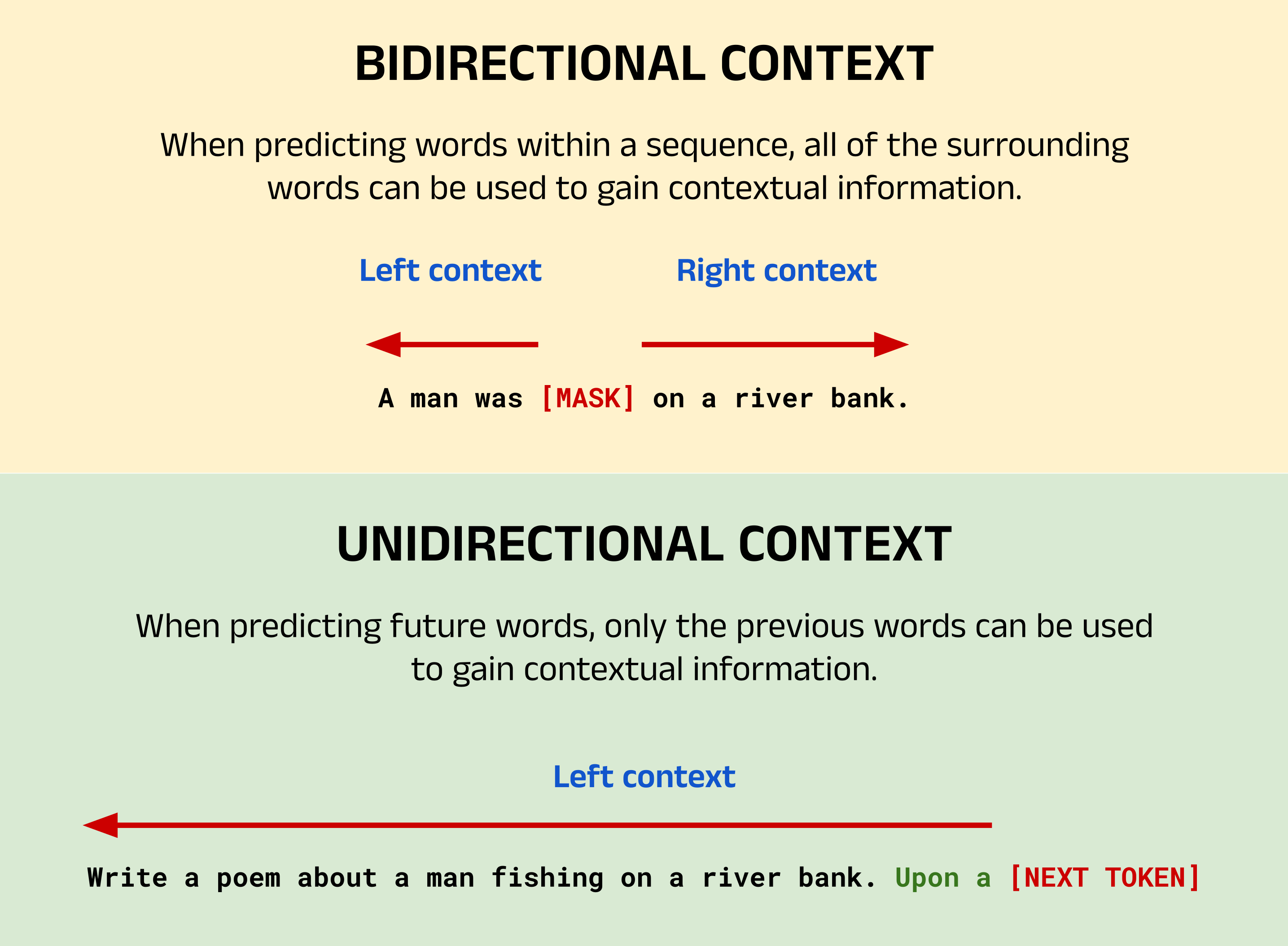\nA comparison of unidirectional and bidirectional context. Image by author.\n**Image Breakdown:**\nThe image above shows an example of a typical BERT task using bidirectional context, and a typical GPT task using unidirectional context. For BERT, the task here is to predict the masked word indicated by `[MASK]`. Since this word has words to both the left and right, the words from either side can be used to provide context. If you, as a human, read this sentence with only the left or right context, you would probably struggle to predict the masked word yourself. However, with bidirectional context it becomes much more likely to guess that the masked word is `fishing`.\nFor GPT, the goal is to perform the classic NTP task. In this case, the objective is to generate a new sequence based on the context provided by the input sequence and the words already generated in the output. Given that the input sequence instructs the model to write a poem and the words generated so far are `Upon a`, you might predict that the next word is `river` followed by `bank`. With many potential candidate words, GPT (as a language model) calculates the likelihood of each word in its vocabulary appearing next and selects one of the most probable words based on its training data.\n### **1.5 - Limitations of BERT**\nAs a bidirectional model, BERT suffers from two major drawbacks:\n**Increased Training Time:**\nBidirectionality in Transformer-based models was proposed as a direct improvement over the left-to-right context models prevalent at the time. The idea was that GPT could only gain contextual information about input sequences in a unidirectional manner and therefore lacked a complete grasp of the causal links between words. Bidirectional models, however, offer a broader understanding of the causal connections between words and so can potentially see better results on NLU tasks. Though bidirectional models had been explored in the past, their success was limited, as seen with bidirectional RNNs in the late 1990s [6]. Typically, these models demand more computational resources for training, so for the same computational power you could train a larger unidirectional model.\n**Poor Performance in Language Generation:**\nBERT was specifically designed to solve NLU tasks, opting to trade decoders and the ability to generate new sequences for encoders and the ability to develop rich understandings of input sequences. As a result, BERT is best suited to a subset of NLP tasks like NER, sentiment analysis and so on. Notably, BERT doesn't accept prompts but rather processes sequences to formulate predictions about. While BERT can technically produce new output sequences, it is important to recognise the design differences between LLMs as we might think of them in the post-ChatGPT era, and the reality of BERT's design.\n## 2 - Architecture and Pre-training Objectives\n### **2.1 - Overview of BERT's Pre-training Objectives**\nTraining a bidirectional model requires tasks that allow both the left and right context to be used in making predictions. Therefore, the authors carefully constructed two pre-training objectives to build up BERT's understanding of language. These were: the **Masked Language Model** task (MLM), and the **Next Sentence Prediction** task (NSP). The training data for each was constructed from a scrape of all the English Wikipedia articles available at the time (2,500 million words), and an additional 11,038 books from the BookCorpus dataset (800 million words) [7]. The raw data was first preprocessed according to the specific tasks however, as described below.\n### **2.2 - Masked Language Modelling (MLM)**\n**Overview of MLM:**\nThe Masked Language Modelling task was created to directly address the need for training a bidirectional model. To do so, the model must be trained to use both the left context and right context of an input sequence to make a prediction. This is achieved by randomly **masking** 15% of the words in the training data, and training BERT to predict the missing word. In the input sequence, the masked word is replaced with the `[MASK]` token. For example, consider that the sentence `A man was fishing on the river` exists in the raw training data found in the book corpus. When converting the raw text into training data for the MLM task, the word `fishing` might be randomly masked and replaced with the `[MASK]` token, giving the training input `A man was [MASK] on the river` with target `fishing`. Therefore, the goal of BERT is to predict the single missing word `fishing`, and not regenerate the input sequence with the missing word filled in. The masking process can be repeated for all the possible input sequences (e.g. sentences) when building up the training data for the MLM task. This task had existed previously in linguistics literature, and is referred to as the **Cloze** task [8]. However, in machine learning contexts, it is commonly referred to as MLM due to the popularity of BERT.\n**Mitigating Mismatches Between Pre-training and Fine-tuning:**\nThe authors noted however, that since the `[MASK]` token will only ever appear in the training data and not in live data (at inference time), there would be a mismatch between pre-training and fine-tuning. To mitigate this, not all masked words are replaced with the `[MASK]` token. Instead, the authors state that:\n> The training data generator chooses 15% of the token positions at random for prediction. If the i-th token is chosen, we replace the i-th token with (1) the `[MASK]` token 80% of the time (2) a random token 10% of the time (3) the unchanged i-th token 10% of the time.\n**Calculating the Error Between the Predicted Word and the Target Word:**\nBERT will take in an input sequence of a maximum of 512 tokens for both BERT Base and BERT Large. If fewer than the maximum number of tokens are found in the sequence, then padding will be added using `[PAD]` tokens to reach the maximum count of 512. The number of output tokens will also be exactly equal to the number of input tokens. If a masked token exists at position _i_ in the input sequence, BERT's prediction will lie at position _i_ in the output sequence. All other tokens will be ignored for the purposes of training, and so updates to the models weights and biases will be calculated based on the error between the predicted token at position _i_ , and the target token. The error is calculated using a loss function, which is typically the Cross Entropy Loss (Negative Log Likelihood) function, as we will see later.\n### **2.3 - Next Sentence Prediction (NSP)**\n**Overview:**\nThe second of BERT's pre-training tasks is Next Sentence Prediction, in which the goal is to classify if one segment (typically a sentence) logically follows on from another. The choice of NSP as a pre-training task was made specifically to complement MLM and enhance BERT's NLU capabilities, with the authors stating:\n> Many important downstream tasks such as Question Answering (QA) and Natural Language Inference (NLI) are based on understanding the relationship between two sentences, which is not directly captured by language modeling.\nBy pre-training for NSP, BERT is able to develop an understanding of flow between sentences in prose text - an ability that is useful for a wide range of NLU problems, such as:\n * sentence pairs in paraphrasing\n * hypothesis-premise pairs in entailment\n * question-passage pairs in question answering\n\n\n**Implementing NSP in BERT:**\nThe input for NSP consists of the first and second segments (denoted A and B) separated by a `[SEP]` token with a second `[SEP]` token at the end. BERT actually expects at least one `[SEP]` token per input sequence to denote the end of the sequence, regardless of whether NSP is being performed or not. For this reason, the WordPiece tokenizer will append one of these tokens to the end of inputs for the MLM task as well as any other non-NSP task that do not feature one. NSP forms a classification problem, where the output corresponds to `IsNext` when segment A logically follows segment B, and `NotNext` when it does not. Training data can be easily generated from any monolingual corpus by selecting sentences with their next sentence 50% of the time, and a random sentence for the remaining 50% of sentences.\n**2.4 - Input Embeddings in BERT**\nThe input embedding process for BERT is made up of three stages: positional encoding, segment embedding, and token embedding (as shown in the diagram below).\n**Positional Encoding:**\nJust as with the Transformer model, positional information is injected into the embedding for each token. Unlike the Transformer however, the positional encodings in BERT are fixed and not generated by a function. This means that BERT is restricted to 512 tokens in its input sequence for both BERT Base and BERT Large.\n**Segment Embedding:**\nVectors encoding the segment that each token belongs to are also added. For the MLM pre-training task or any other non-NSP task (which feature only one `[SEP]`) token, all tokens in the input are considered to belong to segment A. For NSP tasks, all tokens after the second `[SEP]` are denoted as segment B.\n**Token Embedding:**\nAs with the original Transformer, the learned embedding for each token is then added to its positional and segment vectors to create the final embedding that will be passed to the self-attention mechanisms in BERT to add contextual information.\n![An overview of the BERT embedding process. Image taken from the BERT paper \\[1\\].](https://assets.insightmediagroup.io/media/wp-content/uploads/2024/05/1w4r6Hz2IF-Uvo4YHg2-bCw-1.png)\nAn overview of the BERT embedding process. Image taken from the BERT paper [1].\n### **2.5 - The Special Tokens**\nIn the image above, you may have noted that the input sequence has been prepended with a `[CLS]` (classification) token. This token is added to encapsulate a summary of the semantic meaning of the entire input sequence, and helps BERT to perform classification tasks. For example, in the sentiment analysis task, the `[CLS]` token in the final layer can be analysed to extract a prediction for whether the sentiment of the input sequence is `positive` or `negative`. `[CLS]` and `[PAD]` etc are examples of BERT's **special tokens**. It's important to note here that this is a BERT-specific feature, and so you should not expect to see these special tokens in models such as GPT. In total, BERT has five special tokens. A summary is provided below:\n * `[PAD]` (token ID: `0`) - a padding token used to bring the total number of tokens in an input sequence up to 512.\n * `[UNK]` (token ID: `100`) - an unknown token, used to represent a token that is not in BERT's vocabulary.\n * `[CLS]` (token ID: `101`) - a classification token, one is expected at the beginning of every sequence, whether it is used or not. This token encapsulates the class information for classification tasks, and can be thought of as an aggregate sequence representation.\n * `[SEP]` (token ID: `102`) - a separator token used to distinguish between two segments in a single input sequence (for example, in Next Sentence Prediction). At least one `[SEP]` token is expected per input sequence, with a maximum of two.\n * `[MASK]` (token ID: `103`) - a mask token used to train BERT on the Masked Language Modelling task, or to perform inference on a masked sequence.\n\n\n### **2.4 - Architecture Comparison for BERT Base and BERT Large**\nBERT Base and BERT Large are very similar from an architecture point-of-view, as you might expect. They both use the WordPiece tokenizer (and hence expect the same special tokens described earlier), and both have a maximum sequence length of 512 tokens. The vocabulary size for BERT is 30,522, with approximately 1,000 of those tokens left as \"unused\". The unused tokens are intentionally left blank to allow users to add custom tokens without having to retrain the entire tokenizer. This is useful when working with domain-specific vocabulary, such as medical and legal terminology. Both BERT Base and BERT Large have a higher number of embedding dimensions (_d _model_) compared to the original Transformer. This corresponds to the size of the learned vector representations for each token in the model's vocabulary. For BERT Base _d _model_ = 768, and for BERT Large _d _model_ = 1024 (double the original Transformer at 512).\nThe two models mainly differ in four categories:\n * **Number of encoder blocks,**`**N**`**:** the number of encoder blocks stacked on top of each other.\n * **Number of attention heads per encoder block:** the attention heads calculate the contextual vector embeddings for the input sequence. Since BERT uses multi-head attention, this value refers to the number of heads per encoder layer.\n * **Size of hidden layer in feedforward network:** the linear layer consists of a hidden layer with a fixed number of neurons (e.g. 3072 for BERT Base) which feed into an output layer that can be of various sizes. The size of the output layer depends on the task. For instance, a binary classification problem will require just two output neurons, a multi-class classification problem with ten classes will require ten neurons, and so on.\n * **Total parameters:** the total number of weights and biases in the model. At the time, a model with hundreds of millions was very large. However, by today's standards, these values are comparatively small.\n\n\nA comparison between BERT Base and BERT Large for each of these categories is shown in the image below.\n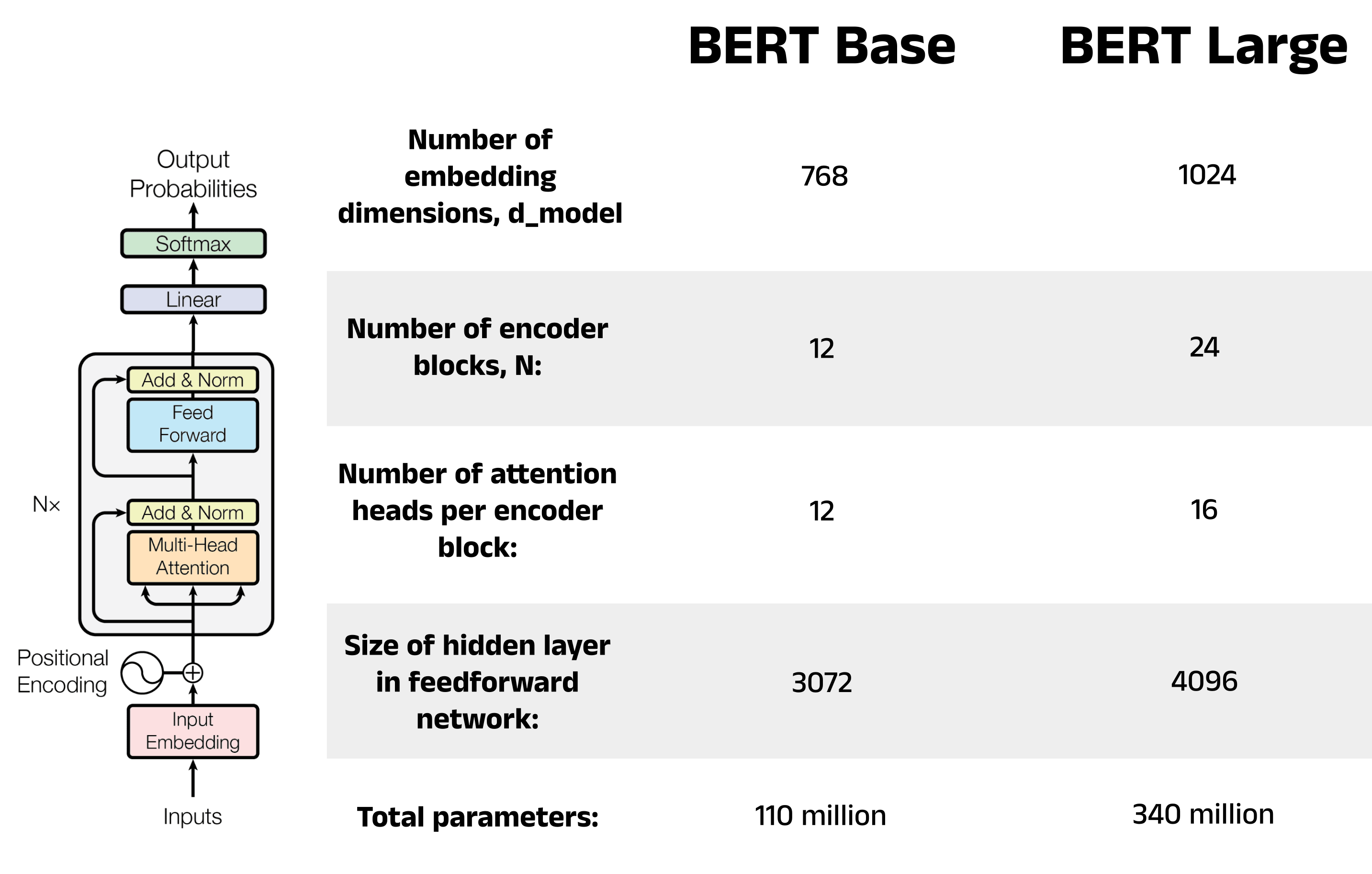\nA comparison between BERT Base and BERT Large. Image by author.\n## 3 - Fine-Tuning BERT for Sentiment Analysis\nThis section covers a practical example of fine-tuning BERT in Python. The code takes the form of a task-agnostic fine-tuning pipeline, implemented in a Python class. We will then instantiate an object of this class and use it to fine-tune a BERT model on the sentiment analysis task. The class can be reused to fine-tune BERT on other tasks, such as Question Answering, Named Entity Recognition, and more. **Sections 3.1 to 3.5 walk through the fine-tuning process, and Section 3.6 shows the full pipeline in its entirety.**\n### **3.1 - Load and Preprocess a Fine-Tuning Dataset**\nThe first step in fine-tuning is to select a dataset that is suitable for the specific task. In this example, we will use a sentiment analysis dataset provided by Stanford University. This dataset contains 50,000 online movie reviews from the Internet Movie Database (IMDb), with each review labelled as either `positive` or `negative`. You can download the dataset directly from the [Stanford University website](https://ai.stanford.edu/~amaas/data/sentiment/), or you can create a notebook on [Kaggle](https://www.kaggle.com/datasets/lakshmi25npathi/imdb-dataset-of-50k-movie-reviews) and compare your work with others.\npython\n\n```\nimport pandas as pd\n\ndf = pd.read_csv('IMDB Dataset.csv')\ndf.head()\n```\n\n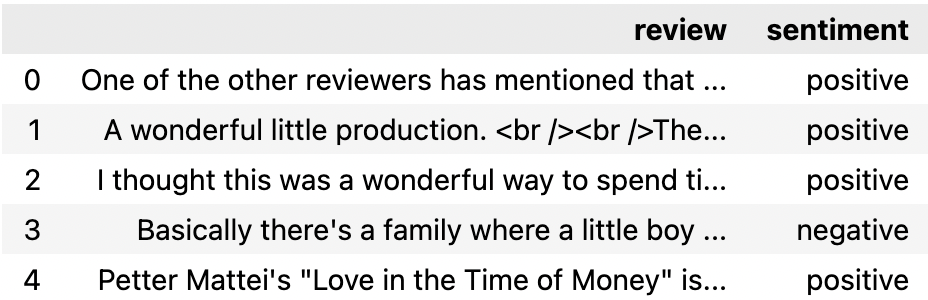\nThe first five rows of the IMDb dataset as shown in a Pandas DataFrame. Image by author.\nUnlike earlier NLP models, Transformer-based models such as BERT require minimal preprocessing. Steps such as removing stop words and punctuation can prove counterproductive in some cases, since these elements provide BERT with valuable context for understanding the input sentences. Nevertheless, it is still important to inspect the text to check for any formatting issues or unwanted characters. Overall, the IMDb dataset is fairly clean. However, there appear to be some artefacts of the scraping process leftover, such as HTML break tags (`
`) and unnecessary whitespace, which should be removed.\npython\n\n```\n# Remove the break tags (
)\ndf['review_cleaned'] = df['review'].apply(lambda x: x.replace('
', ''))\n\n# Remove unnecessary whitespace\ndf['review_cleaned'] = df['review_cleaned'].replace('s+', ' ', regex=True)\n\n# Compare 72 characters of the second review before and after cleaning\nprint('Before cleaning:')\nprint(df.iloc[1]['review'][0:72])\n\nprint('nAfter cleaning:')\nprint(df.iloc[1]['review_cleaned'][0:72])\n```\n\nshell\n\n```\nBefore cleaning:\nA wonderful little production.
The filming technique is very\n\nAfter cleaning:\nA wonderful little production. The filming technique is very unassuming-\n```\n\n**Encode the Sentiment:**\nThe final step of the preprocessing is to encode the sentiment of each review as either `0` for `negative` or `1` for positive. These labels will be used to train the classification head later in the fine-tuning process.\npython\n\n```\ndf['sentiment_encoded'] = df['sentiment'].\n apply(lambda x: 0 if x == 'negative' else 1)\ndf.head()\n```\n\n\nThe first five rows of the IMDb dataset after the sentiment column has been encoded. Image by author.\n### **3.2 - Tokenize the Fine-Tuning Data**\nOnce preprocessed, the fine-tuning data can undergo tokenization. This process: splits the review text into individual tokens, adds the `[CLS]` and `[SEP]` special tokens, and handles padding. It's important to select the appropriate tokenizer for the model, as different language models require different tokenization steps (e.g. GPT does not expect `[CLS]` and `[SEP]` tokens). We will use the `BertTokenizer` class from the Hugging Face `transformers` library, which is designed to be used with BERT-based models. For a more in-depth discussion of how tokenization works, see [Part 1 of this series](https://medium.com/p/cedc9f72de4e).\nTokenizer classes in the `transformers` library provide a simple way to create pre-trained tokenizer models with the `from_pretrained` method. To use this feature: import and instantiate a tokenizer class, call the `from_pretrained` method, and pass in a string with the name of a tokenizer model hosted on the Hugging Face model repository. Alternatively, you can pass in the path to a directory containing the vocabulary files required by the tokenizer [9]. For our example, we will use a pre-trained tokenizer from the model repository. There are four main options when working with BERT, each of which use the vocabulary from Google's pre-trained tokenizers. These are:\n * `bert-base-uncased` - the vocabulary for the smaller version of BERT, which is NOT case sensitive (e.g. the tokens `Cat` and `cat` will be treated the same)\n * `bert-base-cased` - the vocabulary for the smaller version of BERT, which IS case sensitive (e.g. the tokens `Cat` and `cat` will not be treated the same)\n * `bert-large-uncased` - the vocabulary for the larger version of BERT, which is NOT case sensitive (e.g. the tokens `Cat` and `cat` will be treated the same)\n * `bert-large-cased` - the vocabulary for the larger version of BERT, which IS case sensitive (e.g. the tokens `Cat` and `cat` will not be treated the same)\n\n\nBoth BERT Base and BERT Large use the same vocabulary, and so there is actually no difference between `bert-base-uncased` and `bert-large-uncased`, nor is there a difference between `bert-base-cased` and `bert-large-cased`. This may not be the same for other models, so it is best to use the same tokenizer and model size if you are unsure.\n**When to Use**`**cased**`**vs**`**uncased**`**:**\nThe decision between using `cased` and `uncased` depends on the nature of your dataset. The IMDb dataset contains text written by internet users who may be inconsistent with their use of capitalisation. For example, some users may omit capitalisation where it is expected, or use capitalisation for dramatic effect (to show excitement, frustration, etc). For this reason, we will choose to ignore case and use the `bert-base-uncased` tokenizer model.\nOther situations may see a performance benefit by accounting for case. An example here may be in a Named Entity Recognition task, where the goal is to identify entities such as people, organisations, locations, etc in some input text. In this case, the presence of upper case letters can be extremely helpful in identifying if a word is someone's name or a place, and so in this situation it may be more appropriate to choose `bert-base-cased`.\npython\n\n```\nfrom transformers import BertTokenizer\n\ntokenizer = BertTokenizer.from_pretrained('bert-base-uncased')\nprint(tokenizer)\n```\n\nshell\n\n```\nBertTokenizer(\n name_or_path='bert-base-uncased',\n vocab_size=30522,\n model_max_length=512,\n is_fast=False,\n padding_side='right',\n truncation_side='right',\n special_tokens={\n 'unk_token': '[UNK]',\n 'sep_token': '[SEP]',\n 'pad_token': '[PAD]',\n 'cls_token': '[CLS]',\n 'mask_token': '[MASK]'},\n clean_up_tokenization_spaces=True),\n\nadded_tokens_decoder={\n 0: AddedToken(\n \"[PAD]\",\n rstrip=False,\n lstrip=False,\n single_word=False,\n normalized=False, \n special=True),\n\n 100: AddedToken(\n \"[UNK]\",\n rstrip=False,\n lstrip=False,\n single_word=False,\n normalized=False,\n special=True),\n\n 101: AddedToken(\n \"[CLS]\",\n rstrip=False,\n lstrip=False,\n single_word=False,\n normalized=False,\n special=True),\n\n 102: AddedToken(\n \"[SEP]\",\n rstrip=False,\n lstrip=False,\n single_word=False,\n normalized=False,\n special=True),\n\n 103: AddedToken(\n \"[MASK]\",\n rstrip=False,\n lstrip=False,\n single_word=False,\n normalized=False,\n special=True),\n }\n```\n\n**Encoding Process: Converting Text to Tokens to Token IDs**\nNext, the tokenizer can be used to encode the cleaned fine-tuning data. This process will convert each review into a tensor of token IDs. For example, the review `I liked this movie` will be encoded by the following steps:\n 1. Convert the review to lower case (since we are using `bert-base-uncased`)\n 2. Break the review down into individual tokens according to the `bert-base-uncased` vocabulary: `['i', 'liked', 'this', 'movie']`\n 3. Add the special tokens expected by BERT: `['[CLS]', 'i', 'liked', 'this', 'movie', '[SEP]']`\n 4. Convert the tokens to their token IDs, also according to the `bert-base-uncased` vocabulary (e.g. `[CLS]` -> `101`, `i` -> `1045`, etc)\n\n\nThe `encode` method of the `BertTokenizer` class encodes text using the above process, and can return the tensor of token IDs as PyTorch tensors, Tensorflow tensors, or NumPy arrays. The data type for the return tensor can be specified using the `return_tensors` argument, which takes the values: `pt`, `tf`, and `np` respectively.\n> **Note:** Token IDs are often called `input IDs` in Hugging Face, so you may see these terms used interchangeably.\npython\n\n```\n# Encode a sample input sentence\nsample_sentence = 'I liked this movie'\ntoken_ids = tokenizer.encode(sample_sentence, return_tensors='np')[0]\nprint(f'Token IDs: {token_ids}')\n\n# Convert the token IDs back to tokens to reveal the special tokens added\ntokens = tokenizer.convert_ids_to_tokens(token_ids)\nprint(f'Tokens : {tokens}')\n```\n\nshell\n\n```\nToken IDs: [ 101 1045 4669 2023 3185 102]\nTokens : ['[CLS]', 'i', 'liked', 'this', 'movie', '[SEP]']\n```\n\n**Truncation and Padding:**\nBoth BERT Base and BERT Large are designed to handle input sequences of exactly 512 tokens. But what do you do when your input sequence doesn't fit this limit? The answer is truncation and padding! Truncation reduces the number of tokens by simply removing any tokens beyond a certain length. In the `encode` method, you can set `truncation` to `True` and specify a `max_length` argument to enforce a length limit on all encoded sequences. Several of the entries in this dataset exceed the 512 token limit, and so the `max_length` parameter here has been set to 512 to extract the most amount of text possible from all reviews. If no review exceeds 512 tokens, the `max_length` parameter can be left unset and it will default to the model's maximum length. Alternatively, you can still enforce a maximum length which is less than 512 to reduce training time during fine-tuning, albeit at the expense of model performance. For reviews shorter than 512 tokens (which is the majority here), padding tokens are added to extend the encoded review to 512 tokens. This can be achieved by setting the padding `parameter` to `max_length`. Refer to the Hugging Face documentation for more details on the encode method [10].\npython\n\n```\nreview = df['review_cleaned'].iloc[0]\n\ntoken_ids = tokenizer.encode(\n review,\n max_length = 512,\n padding = 'max_length',\n truncation = True,\n return_tensors = 'pt')\n\nprint(token_ids)\n```\n\nshell\n\n```\ntensor([[ 101, 2028, 1997, 1996, 2060, 15814, 2038, 3855, 2008, 2044,\n 3666, 2074, 1015, 11472, 2792, 2017, 1005, 2222, 2022, 13322,\n\n ...\n\n 0, 0, 0, 0, 0, 0, 0, 0, 0, 0,\n 0, 0, 0, 0, 0, 0, 0, 0, 0, 0,\n 0, 0]])\n```\n\n**Using the Attention Mask with**`**encode_plus**`**:**\nThe example above shows the encoding for the first review in the dataset, which contains 119 padding tokens. If used in its current state for fine-tuning, BERT could attend to the padding tokens, potentially leading to a drop in performance. To address this, we can apply an attention mask that will instruct BERT to ignore certain tokens in the input (in this case the padding tokens). We can generate this attention mask by modifying the code above to use the `encode_plus` method, rather than the standard `encode` method. The `encode_plus` method returns a dictionary (called a Batch Encoder in Hugging Face), which contains the keys:\n * `input_ids` - the same token IDs returned by the standard `encode` method\n * `token_type_ids` - the segment IDs used to distinguish between sentence A (id = 0) and sentence B (id = 1) in sentence pair tasks such as Next Sentence Prediction\n * `attention_mask` - a list of 0s and 1s where 0 indicates that a token should be ignored during the attention process and 1 indicates a token should not be ignored\n\n\npython\n\n```\nreview = df['review_cleaned'].iloc[0]\n\nbatch_encoder = tokenizer.encode_plus(\n review,\n max_length = 512,\n padding = 'max_length',\n truncation = True,\n return_tensors = 'pt')\n\nprint('Batch encoder keys:')\nprint(batch_encoder.keys())\n\nprint('nAttention mask:')\nprint(batch_encoder['attention_mask'])\n```\n\nshell\n\n```\nBatch encoder keys:\ndict_keys(['input_ids', 'token_type_ids', 'attention_mask'])\n\nAttention mask:\ntensor([[1, 1, 1, 1, 1, 1, 1, 1, 1, 1, 1, 1, 1, 1, 1, 1, 1, 1, 1, 1, 1, 1, 1,\n 1, 1, 1, 1, 1, 1, 1, 1, 1, 1, 1, 1, 1, 1, 1, 1, 1, 1, 1, 1, 1, 1, 1,\n\n ...\n\n 0, 0, 0, 0, 0, 0, 0, 0, 0, 0, 0, 0, 0, 0, 0, 0, 0, 0, 0, 0, 0, 0, 0,\n 0, 0, 0, 0, 0, 0, 0, 0, 0, 0, 0, 0, 0, 0, 0, 0, 0, 0, 0, 0, 0, 0, 0, \n 0, 0, 0, 0, 0, 0, 0, 0]])\n```\n\n**Encode All Reviews:**\nThe last step for the tokenization stage is to encode all the reviews in the dataset and store the token IDs and corresponding attention masks as tensors.\npython\n\n```\nimport torch\n\ntoken_ids = []\nattention_masks = []\n\n# Encode each review\nfor review in df['review_cleaned']:\n batch_encoder = tokenizer.encode_plus(\n review,\n max_length = 512,\n padding = 'max_length',\n truncation = True,\n return_tensors = 'pt')\n\n token_ids.append(batch_encoder['input_ids'])\n attention_masks.append(batch_encoder['attention_mask'])\n\n# Convert token IDs and attention mask lists to PyTorch tensors\ntoken_ids = torch.cat(token_ids, dim=0)\nattention_masks = torch.cat(attention_masks, dim=0)\n```\n\n### **3.3 - Create the Train and Validation DataLoaders**\nNow that each review has been encoded, we can split our data into a training set and a validation set. The validation set will be used to evaluate the effectiveness of the fine-tuning process as it happens, allowing us to monitor the performance throughout the process. We expect to see a decrease in loss (and consequently an increase in model accuracy) as the model undergoes further fine-tuning across **epochs**. An epoch refers to one full pass of the train data. The BERT authors recommend 2–4 epochs for fine-tuning [1], meaning that the classification head will see every review 2–4 times.\nTo partition the data, we can use the `train_test_split` function from SciKit-Learn's `model_selection` package. This function requires the dataset we intend to split, the percentage of items to be allocated to the test set (or validation set in our case), and an optional argument for whether the data should be randomly shuffled. For reproducibility, we will set the shuffle parameter to `False`. For the `test_size`, we will choose a small value of 0.1 (equivalent to 10%). It is important to strike a balance between using enough data to validate the model and get an accurate picture of how it is performing, and retaining enough data for training the model and improving its performance. Therefore, smaller values such as `0.1` are often preferred. After the token IDs, attention masks, and labels have been split, we can group the training and validation tensors together in PyTorch TensorDatasets. We can then create a PyTorch DataLoader class for training and validation by dividing these TensorDatasets into batches. The BERT paper recommends batch sizes of 16 or 32 (that is, presenting the model with 16 reviews and corresponding sentiment labels before recalculating the weights and biases in the classification head). Using DataLoaders will allow us to efficiently load the data into the model during the fine-tuning process by exploiting multiple CPU cores for parallelisation [11].\npython\n\n```\nfrom sklearn.model_selection import train_test_split\nfrom torch.utils.data import TensorDataset, DataLoader\n\nval_size = 0.1\n\n# Split the token IDs\ntrain_ids, val_ids = train_test_split(\n token_ids,\n test_size=val_size,\n shuffle=False)\n\n# Split the attention masks\ntrain_masks, val_masks = train_test_split(\n attention_masks,\n test_size=val_size,\n shuffle=False)\n\n# Split the labels\nlabels = torch.tensor(df['sentiment_encoded'].values)\ntrain_labels, val_labels = train_test_split(\n labels,\n test_size=val_size,\n shuffle=False)\n\n# Create the DataLoaders\ntrain_data = TensorDataset(train_ids, train_masks, train_labels)\ntrain_dataloader = DataLoader(train_data, shuffle=True, batch_size=16)\nval_data = TensorDataset(val_ids, val_masks, val_labels)\nval_dataloader = DataLoader(val_data, batch_size=16)\n```\n\n### **3.4 - Instantiate a BERT Model**\nThe next step is to load in a pre-trained BERT model for us to fine-tune. We can import a model from the Hugging Face model repository similarly to how we did with the tokenizer. Hugging Face has many versions of BERT with classification heads already attached, which makes this process very convenient. Some examples of models with pre-configured classification heads include:\n * `BertForMaskedLM`\n * `BertForNextSentencePrediction`\n * `BertForSequenceClassification`\n * `BertForMultipleChoice`\n * `BertForTokenClassification`\n * `BertForQuestionAnswering`\n\n\nOf course, it is possible to import a headless BERT model and create your own classification head from scratch in PyTorch or Tensorflow. However in our case, we can simply import the `BertForSequenceClassification` model since this already contains the linear layer we need. This linear layer is initialised with random weights and biases, which will be trained during the fine-tuning process. Since BERT Base uses 768 embedding dimensions, the hidden layer contains 768 neurons which are connected to the final encoder block of the model. The number of output neurons is determined by the `num_labels` argument, and corresponds to the number of unique sentiment labels. The IMDb dataset features only `positive` and `negative`, and so the `num_labels` argument is set to `2`. For more complex sentiment analyses, perhaps including labels such as `neutral` or `mixed`, we can simply increase/decrease the `num_labels` value.\n> **Note:** If you are interested in seeing how the pre-configured models are written in the source code, the `modelling_bert.py` file on the Hugging Face transformers repository shows the process of loading in a headless BERT model and adding the linear layer [12]. The linear layer is added in the `__init__` method of each class.\npython\n\n```\nfrom transformers import BertForSequenceClassification\n\nmodel = BertForSequenceClassification.from_pretrained(\n 'bert-base-uncased',\n num_labels=2)\n```\n\n### **3.5 - Instantiate an Optimizer, Loss Function, and Scheduler**\n**Optimizer:**\nAfter the classification head encounters a batch of training data, it updates the weights and biases in the linear layer to improve the model's performance on those inputs. Across many batches and multiple epochs, the aim is for these weights and biases to converge towards optimal values. An **optimizer** is required to calculate the changes needed to each weight and bias, and can be imported from PyTorch's `optim` package. Hugging Face use the AdamW optimizer in their examples, and so this is the optimizer we will use here [13].\n**Loss Function:**\nThe optimizer works by determining how changes to the weights and biases in the classification head will affect the loss against a scoring function called the **loss function**. Loss functions can be easily imported from PyTorch's `nn` package, as shown below. Language models typically use the cross entropy loss function (also called the negative log likelihood function), and so this is the loss function we will use here.\n**Scheduler:**\nA parameter called the **learning rate** is used to determine the size of the changes made to the weights and biases in the classification head. In early batches and epochs, large changes may prove advantageous since the randomly-initialised parameters will likely need substantial adjustments. However, as the training progresses, the weights and biases tend to improve, potentially making large changes counterproductive. Schedulers are designed to gradually decrease the learning rate as the training process continues, reducing the size of the changes made to each weight and bias in each optimizer step.\npython\n\n```\nfrom torch.optim import AdamW\nimport torch.nn as nn\nfrom transformers import get_linear_schedule_with_warmup\n\nEPOCHS = 2\n\n# Optimizer\noptimizer = AdamW(model.parameters())\n\n# Loss function\nloss_function = nn.CrossEntropyLoss()\n\n# Scheduler\nnum_training_steps = EPOCHS * len(train_dataloader)\nscheduler = get_linear_schedule_with_warmup(\n optimizer,\n num_warmup_steps=0,\n num_training_steps=num_training_steps)\n```\n\n### **3.6 - Fine-Tuning Loop**\n**Utilise GPUs with CUDA:**\nCompute Unified Device Architecture (CUDA) is a computing platform created by NVIDIA to improve the performance of applications in various fields, such as scientific computing and engineering [14]. PyTorch's `cuda` package allows developers to leverage the CUDA platform in Python and utilise their Graphical Processing Units (GPUs) for accelerated computing when training machine learning models. The `torch.cuda.is_available` command can be used to check if a GPU is available. If not, the code can default back to using the Central Processing Unit (CPU), with the caveat that this will take longer to train. In subsequent code snippets, we will use the PyTorch `Tensor.to` method to move tensors (containing the model weights and biases etc) to the GPU for faster calculations. If the device is set to `cpu` then the tensors will not be moved and the code will be unaffected.\npython\n\n```\n# Check if GPU is available for faster training time\nif torch.cuda.is_available():\n device = torch.device('cuda:0')\nelse:\n device = torch.device('cpu')\n```\n\nThe training process will take place over two for loops: an outer loop to repeat the process for each epoch (so that the model sees all the training data multiple times), and an inner loop to repeat the loss calculation and optimization step for each batch. To explain the training loop, consider the process in the steps below. The code for the training loop has been adapted from this fantastic blog post by Chris McCormick and Nick Ryan [15], which I highly recommend.\n**For each epoch:**\n 1. Switch the model to be in train mode using the `train` method on the model object. This will cause the model to behave differently than when in evaluation mode, and is especially useful when working with batchnorm and dropout layers. If you looked at the source code for the `BertForSequenceClassification`class earlier, you may have seen that the classification head does in fact contain a dropout layer, and so it is important we correctly distinguish between train and evaluation mode in our fine-tuning. These kinds of layers should only be active during training and not inference, and so the ability to switch between different modes for training and inference is a useful feature.\n 2. Set the training loss to 0 for the start of the epoch. This is used to track the loss of the model on the training data over subsequent epochs. The loss should decrease with each epoch if training is successful.\n\n\n**For each batch:**\nAs per the BERT authors' recommendations, the training data for each epoch is split into batches. Loop through the training process for each batch.\n 1. Move the token IDs, attention masks, and labels to the GPU if available for faster processing, otherwise these will be kept on the CPU.\n 2. Invoke the `zero_grad` method to reset the calculated gradients from the previous iteration of this loop. It might not be obvious why this is not the default behaviour in PyTorch, but some suggested reasons for this describe models such as Recurrent Neural Networks which require the gradients to not be reset between iterations.\n 3. Pass the batch to the model to calculate the logits (predictions based on the current classifier weights and biases) as well as the loss.\n 4. Increment the total loss for the epoch. The loss is returned from the model as a PyTorch tensor, so extract the float value using the `item` method.\n 5. Perform a backward pass of the model and propagate the loss through the classifier head. This will allow the model to determine what adjustments to make to the weights and biases to improve its performance on the batch.\n 6. Clip the gradients to be no larger than 1.0 so the model does not suffer from the exploding gradients problem.\n 7. Call the optimizer to take a step in the direction of the error surface as determined by the backward pass.\n\n\n**After training on each batch:**\n 1. Calculate the average loss and time taken for training on the epoch.\n\n\npython\n\n```\nfor epoch in range(0, EPOCHS):\n\n model.train()\n training_loss = 0\n\n for batch in train_dataloader:\n\n batch_token_ids = batch[0].to(device)\n batch_attention_mask = batch[1].to(device)\n batch_labels = batch[2].to(device)\n\n model.zero_grad()\n\n loss, logits = model(\n batch_token_ids,\n token_type_ids = None,\n attention_mask=batch_attention_mask,\n labels=batch_labels,\n return_dict=False)\n\n training_loss += loss.item()\n loss.backward()\n torch.nn.utils.clip_grad_norm_(model.parameters(), 1.0)\n optimizer.step()\n scheduler.step()\n\n average_train_loss = training_loss / len(train_dataloader)\n```\n\nThe validation step takes place within the outer loop, so that the average validation loss is calculated for each epoch. As the number of epochs increases, we would expect to see the validation loss decrease and the classifier accuracy increase. The steps for the validation process are outlined below.\n**Validation step for the epoch:**\n 1. Switch the model to evaluation mode using the `eval` method - this will deactivate the dropout layer.\n 2. Set the validation loss to 0. This is used to track the loss of the model on the validation data over subsequent epochs. The loss should decrease with each epoch if training was successful.\n 3. Split the validation data into batches.\n\n\n**For each batch:**\n 1. Move the token IDs, attention masks, and labels to the GPU if available for faster processing, otherwise these will be kept on the CPU.\n 2. Invoke the `no_grad` method to instruct the model not to calculate the gradients since we will not be performing any optimization steps here, only inference.\n 3. Pass the batch to the model to calculate the logits (predictions based on the current classifier weights and biases) as well as the loss.\n 4. Extract the logits and labels from the model and move them to the CPU (if they are not already there).\n 5. Increment the loss and calculate the accuracy based on the true labels in the validation dataloader.\n 6. Calculate the average loss and accuracy.\n\n\npython\n\n```\n model.eval()\n val_loss = 0\n val_accuracy = 0\n\n for batch in val_dataloader:\n\n batch_token_ids = batch[0].to(device)\n batch_attention_mask = batch[1].to(device)\n batch_labels = batch[2].to(device)\n\n with torch.no_grad():\n (loss, logits) = model(\n batch_token_ids,\n attention_mask = batch_attention_mask,\n labels = batch_labels,\n token_type_ids = None,\n return_dict=False)\n\n logits = logits.detach().cpu().numpy()\n label_ids = batch_labels.to('cpu').numpy()\n val_loss += loss.item()\n val_accuracy += calculate_accuracy(logits, label_ids)\n\n average_val_accuracy = val_accuracy / len(val_dataloader)\n```\n\nThe second-to-last line of the code snippet above uses the function `calculate_accuracy` which we have not yet defined, so let's do that now. The accuracy of the model on the validation set is given by the fraction of correct predictions. Therefore, we can take the logits produced by the model, which are stored in the variable `logits`, and use this `argmax` function from NumPy. The `argmax` function will simply return the index of the element in the array that is the largest. If the logits for the text `I liked this movie` are `[0.08, 0.92]`, where `0.08` indicates the probability of the text being `negative` and `0.92` indicates the probability of the text being `positive`, the `argmax` function will return the index `1` since the model believes the text is more likely positive than it is negative. We can then compare the label `1` against our `labels` tensor we encoded earlier in Section 3.3 (line 19). Since the `logits` variable will contain the positive and negative probability values for every review in the batch (16 in total), the accuracy for the model will be calculated out of a maximum of 16 correct predictions. The code in the cell above shows the `val_accuracy` variable keeping track of every accuracy score, which we divide at the end of the validation to determine the average accuracy of the model on the validation data.\npython\n\n```\ndef calculate_accuracy(preds, labels):\n \"\"\" Calculate the accuracy of model predictions against true labels.\n\n Parameters:\n preds (np.array): The predicted label from the model\n labels (np.array): The true label\n\n Returns:\n accuracy (float): The accuracy as a percentage of the correct\n predictions.\n \"\"\"\n pred_flat = np.argmax(preds, axis=1).flatten()\n labels_flat = labels.flatten()\n accuracy = np.sum(pred_flat == labels_flat) / len(labels_flat)\n\n return accuracy\n```\n\n### **3.7 - Complete Fine-tuning Pipeline**\nAnd with that, we have completed the explanation of fine-tuning! The code below pulls everything above into a single, reusable class that can be used for any NLP task for BERT. Since the data preprocessing step is task-dependent, this has been taken outside of the fine-tuning class.\n**Preprocessing Function for Sentiment Analysis with the IMDb Dataset:**\npython\n\n```\ndef preprocess_dataset(path):\n \"\"\" Remove unnecessary characters and encode the sentiment labels.\n\n The type of preprocessing required changes based on the dataset. For the\n IMDb dataset, the review texts contains HTML break tags (
) leftover\n from the scraping process, and some unnecessary whitespace, which are\n removed. Finally, encode the sentiment labels as 0 for \"negative\" and 1 for\n \"positive\". This method assumes the dataset file contains the headers\n \"review\" and \"sentiment\".\n\n Parameters:\n path (str): A path to a dataset file containing the sentiment analysis\n dataset. The structure of the file should be as follows: one column\n called \"review\" containing the review text, and one column called\n \"sentiment\" containing the ground truth label. The label options\n should be \"negative\" and \"positive\".\n\n Returns:\n df_dataset (pd.DataFrame): A DataFrame containing the raw data\n loaded from the self.dataset path. In addition to the expected\n \"review\" and \"sentiment\" columns, are:\n\n > review_cleaned - a copy of the \"review\" column with the HTML\n break tags and unnecessary whitespace removed\n\n > sentiment_encoded - a copy of the \"sentiment\" column with the\n \"negative\" values mapped to 0 and \"positive\" values mapped\n to 1\n \"\"\"\n df_dataset = pd.read_csv(path)\n\n df_dataset['review_cleaned'] = df_dataset['review'].\n apply(lambda x: x.replace('
', ''))\n\n df_dataset['review_cleaned'] = df_dataset['review_cleaned'].\n replace('s+', ' ', regex=True)\n\n df_dataset['sentiment_encoded'] = df_dataset['sentiment'].\n apply(lambda x: 0 if x == 'negative' else 1)\n\n return df_dataset\n```\n\n**Task-Agnostic Fine-tuning Pipeline Class:**\npython\n\n```\nfrom datetime import datetime\nimport numpy as np\nimport pandas as pd\nfrom sklearn.model_selection import train_test_split\nimport torch\nimport torch.nn as nn\nimport torch.nn.functional as F\nfrom torch.optim import AdamW\nfrom torch.utils.data import TensorDataset, DataLoader\nfrom transformers import (\n BertForSequenceClassification,\n BertTokenizer,\n get_linear_schedule_with_warmup)\n\nclass FineTuningPipeline:\n\n def __init__(\n self,\n dataset,\n tokenizer,\n model,\n optimizer,\n loss_function = nn.CrossEntropyLoss(),\n val_size = 0.1,\n epochs = 4,\n seed = 42):\n\n self.df_dataset = dataset\n self.tokenizer = tokenizer\n self.model = model\n self.optimizer = optimizer\n self.loss_function = loss_function\n self.val_size = val_size\n self.epochs = epochs\n self.seed = seed\n\n # Check if GPU is available for faster training time\n if torch.cuda.is_available():\n self.device = torch.device('cuda:0')\n else:\n self.device = torch.device('cpu')\n\n # Perform fine-tuning\n self.model.to(self.device)\n self.set_seeds()\n self.token_ids, self.attention_masks = self.tokenize_dataset()\n self.train_dataloader, self.val_dataloader = self.create_dataloaders()\n self.scheduler = self.create_scheduler()\n self.fine_tune()\n\n def tokenize(self, text):\n \"\"\" Tokenize input text and return the token IDs and attention mask.\n\n Tokenize an input string, setting a maximum length of 512 tokens.\n Sequences with more than 512 tokens will be truncated to this limit,\n and sequences with less than 512 tokens will be supplemented with [PAD]\n tokens to bring them up to this limit. The datatype of the returned\n tensors will be the PyTorch tensor format. These return values are\n tensors of size 1 x max_length where max_length is the maximum number\n of tokens per input sequence (512 for BERT).\n\n Parameters:\n text (str): The text to be tokenized.\n\n Returns:\n token_ids (torch.Tensor): A tensor of token IDs for each token in\n the input sequence.\n\n attention_mask (torch.Tensor): A tensor of 1s and 0s where a 1\n indicates a token can be attended to during the attention\n process, and a 0 indicates a token should be ignored. This is\n used to prevent BERT from attending to [PAD] tokens during its\n training/inference.\n \"\"\"\n batch_encoder = self.tokenizer.encode_plus(\n text,\n max_length = 512,\n padding = 'max_length',\n truncation = True,\n return_tensors = 'pt')\n\n token_ids = batch_encoder['input_ids']\n attention_mask = batch_encoder['attention_mask']\n\n return token_ids, attention_mask\n\n def tokenize_dataset(self):\n \"\"\" Apply the self.tokenize method to the fine-tuning dataset.\n\n Tokenize and return the input sequence for each row in the fine-tuning\n dataset given by self.dataset. The return values are tensors of size\n len_dataset x max_length where len_dataset is the number of rows in the\n fine-tuning dataset and max_length is the maximum number of tokens per\n input sequence (512 for BERT).\n\n Parameters:\n None.\n\n Returns:\n token_ids (torch.Tensor): A tensor of tensors containing token IDs\n for each token in the input sequence.\n\n attention_masks (torch.Tensor): A tensor of tensors containing the\n attention masks for each sequence in the fine-tuning dataset.\n \"\"\"\n token_ids = []\n attention_masks = []\n\n for review in self.df_dataset['review_cleaned']:\n tokens, masks = self.tokenize(review)\n token_ids.append(tokens)\n attention_masks.append(masks)\n\n token_ids = torch.cat(token_ids, dim=0)\n attention_masks = torch.cat(attention_masks, dim=0)\n\n return token_ids, attention_masks\n\n def create_dataloaders(self):\n \"\"\" Create dataloaders for the train and validation set.\n\n Split the tokenized dataset into train and validation sets according to\n the self.val_size value. For example, if self.val_size is set to 0.1,\n 90% of the data will be used to form the train set, and 10% for the\n validation set. Convert the \"sentiment_encoded\" column (labels for each\n row) to PyTorch tensors to be used in the dataloaders.\n\n Parameters:\n None.\n\n Returns:\n train_dataloader (torch.utils.data.dataloader.DataLoader): A\n dataloader of the train data, including the token IDs,\n attention masks, and sentiment labels.\n\n val_dataloader (torch.utils.data.dataloader.DataLoader): A\n dataloader of the validation data, including the token IDs,\n attention masks, and sentiment labels.\n\n \"\"\"\n train_ids, val_ids = train_test_split(\n self.token_ids,\n test_size=self.val_size,\n shuffle=False)\n\n train_masks, val_masks = train_test_split(\n self.attention_masks,\n test_size=self.val_size,\n shuffle=False)\n\n labels = torch.tensor(self.df_dataset['sentiment_encoded'].values)\n train_labels, val_labels = train_test_split(\n labels,\n test_size=self.val_size,\n shuffle=False)\n\n train_data = TensorDataset(train_ids, train_masks, train_labels)\n train_dataloader = DataLoader(train_data, shuffle=True, batch_size=16)\n val_data = TensorDataset(val_ids, val_masks, val_labels)\n val_dataloader = DataLoader(val_data, batch_size=16)\n\n return train_dataloader, val_dataloader\n\n def create_scheduler(self):\n \"\"\" Create a linear scheduler for the learning rate.\n\n Create a scheduler with a learning rate that increases linearly from 0\n to a maximum value (called the warmup period), then decreases linearly\n to 0 again. num_warmup_steps is set to 0 here based on an example from\n Hugging Face:\n\n https://github.com/huggingface/transformers/blob/5bfcd0485ece086ebcbed2\n d008813037968a9e58/examples/run_glue.py#L308\n\n Read more about schedulers here:\n\n https://huggingface.co/docs/transformers/main_classes/optimizer_\n schedules#transformers.get_linear_schedule_with_warmup\n \"\"\"\n num_training_steps = self.epochs * len(self.train_dataloader)\n scheduler = get_linear_schedule_with_warmup(\n self.optimizer,\n num_warmup_steps=0,\n num_training_steps=num_training_steps)\n\n return scheduler\n\n def set_seeds(self):\n \"\"\" Set the random seeds so that results are reproduceable.\n\n Parameters:\n None.\n\n Returns:\n None.\n \"\"\"\n np.random.seed(self.seed)\n torch.manual_seed(self.seed)\n torch.cuda.manual_seed_all(self.seed)\n\n def fine_tune(self):\n \"\"\"Train the classification head on the BERT model.\n\n Fine-tune the model by training the classification head (linear layer)\n sitting on top of the BERT model. The model trained on the data in the\n self.train_dataloader, and validated at the end of each epoch on the\n data in the self.val_dataloader. The series of steps are described\n below:\n\n Training:\n\n > Create a dictionary to store the average training loss and average\n validation loss for each epoch.\n > Store the time at the start of training, this is used to calculate\n the time taken for the entire training process.\n > Begin a loop to train the model for each epoch in self.epochs.\n\n For each epoch:\n\n > Switch the model to train mode. This will cause the model to behave\n differently than when in evaluation mode (e.g. the batchnorm and\n dropout layers are activated in train mode, but disabled in\n evaluation mode).\n > Set the training loss to 0 for the start of the epoch. This is used\n to track the loss of the model on the training data over subsequent\n epochs. The loss should decrease with each epoch if training is\n successful.\n > Store the time at the start of the epoch, this is used to calculate\n the time taken for the epoch to be completed.\n > As per the BERT authors' recommendations, the training data for each\n epoch is split into batches. Loop through the training process for\n each batch.\n\n For each batch:\n\n > Move the token IDs, attention masks, and labels to the GPU if\n available for faster processing, otherwise these will be kept on the\n CPU.\n > Invoke the zero_grad method to reset the calculated gradients from\n the previous iteration of this loop.\n > Pass the batch to the model to calculate the logits (predictions\n based on the current classifier weights and biases) as well as the\n loss.\n > Increment the total loss for the epoch. The loss is returned from the\n model as a PyTorch tensor so extract the float value using the item\n method.\n > Perform a backward pass of the model and propagate the loss through\n the classifier head. This will allow the model to determine what\n adjustments to make to the weights and biases to improve its\n performance on the batch.\n > Clip the gradients to be no larger than 1.0 so the model does not\n suffer from the exploding gradients problem.\n > Call the optimizer to take a step in the direction of the error\n surface as determined by the backward pass.\n\n After training on each batch:\n\n > Calculate the average loss and time taken for training on the epoch.\n\n Validation step for the epoch:\n\n > Switch the model to evaluation mode.\n > Set the validation loss to 0. This is used to track the loss of the\n model on the validation data over subsequent epochs. The loss should\n decrease with each epoch if training was successful.\n > Store the time at the start of the validation, this is used to\n calculate the time taken for the validation for this epoch to be\n completed.\n > Split the validation data into batches.\n\n For each batch:\n\n > Move the token IDs, attention masks, and labels to the GPU if\n available for faster processing, otherwise these will be kept on the\n CPU.\n > Invoke the no_grad method to instruct the model not to calculate the\n gradients since we wil not be performing any optimization steps here,\n only inference.\n > Pass the batch to the model to calculate the logits (predictions\n based on the current classifier weights and biases) as well as the\n loss.\n > Extract the logits and labels from the model and move them to the CPU\n (if they are not already there).\n > Increment the loss and calculate the accuracy based on the true\n labels in the validation dataloader.\n > Calculate the average loss and accuracy, and add these to the loss\n dictionary.\n \"\"\"\n\n loss_dict = {\n 'epoch': [i+1 for i in range(self.epochs)],\n 'average training loss': [],\n 'average validation loss': []\n }\n\n t0_train = datetime.now()\n\n for epoch in range(0, self.epochs):\n\n # Train step\n self.model.train()\n training_loss = 0\n t0_epoch = datetime.now()\n\n print(f'{\"-\"*20} Epoch {epoch+1} {\"-\"*20}')\n print('nTraining:n---------')\n print(f'Start Time: {t0_epoch}')\n\n for batch in self.train_dataloader:\n\n batch_token_ids = batch[0].to(self.device)\n batch_attention_mask = batch[1].to(self.device)\n batch_labels = batch[2].to(self.device)\n\n self.model.zero_grad()\n\n loss, logits = self.model(\n batch_token_ids,\n token_type_ids = None,\n attention_mask=batch_attention_mask,\n labels=batch_labels,\n return_dict=False)\n\n training_loss += loss.item()\n loss.backward()\n torch.nn.utils.clip_grad_norm_(self.model.parameters(), 1.0)\n self.optimizer.step()\n self.scheduler.step()\n\n average_train_loss = training_loss / len(self.train_dataloader)\n time_epoch = datetime.now() - t0_epoch\n\n print(f'Average Loss: {average_train_loss}')\n print(f'Time Taken: {time_epoch}')\n\n # Validation step\n self.model.eval()\n val_loss = 0\n val_accuracy = 0\n t0_val = datetime.now()\n\n print('nValidation:n---------')\n print(f'Start Time: {t0_val}')\n\n for batch in self.val_dataloader:\n\n batch_token_ids = batch[0].to(self.device)\n batch_attention_mask = batch[1].to(self.device)\n batch_labels = batch[2].to(self.device)\n\n with torch.no_grad():\n (loss, logits) = self.model(\n batch_token_ids,\n attention_mask = batch_attention_mask,\n labels = batch_labels,\n token_type_ids = None,\n return_dict=False)\n\n logits = logits.detach().cpu().numpy()\n label_ids = batch_labels.to('cpu').numpy()\n val_loss += loss.item()\n val_accuracy += self.calculate_accuracy(logits, label_ids)\n\n average_val_accuracy = val_accuracy / len(self.val_dataloader)\n average_val_loss = val_loss / len(self.val_dataloader)\n time_val = datetime.now() - t0_val\n\n print(f'Average Loss: {average_val_loss}')\n print(f'Average Accuracy: {average_val_accuracy}')\n print(f'Time Taken: {time_val}n')\n\n loss_dict['average training loss'].append(average_train_loss)\n loss_dict['average validation loss'].append(average_val_loss)\n\n print(f'Total training time: {datetime.now()-t0_train}')\n\n def calculate_accuracy(self, preds, labels):\n \"\"\" Calculate the accuracy of model predictions against true labels.\n\n Parameters:\n preds (np.array): The predicted label from the model\n labels (np.array): The true label\n\n Returns:\n accuracy (float): The accuracy as a percentage of the correct\n predictions.\n \"\"\"\n pred_flat = np.argmax(preds, axis=1).flatten()\n labels_flat = labels.flatten()\n accuracy = np.sum(pred_flat == labels_flat) / len(labels_flat)\n\n return accuracy\n\n def predict(self, dataloader):\n \"\"\"Return the predicted probabilities of each class for input text.\n\n Parameters:\n dataloader (torch.utils.data.DataLoader): A DataLoader containing\n the token IDs and attention masks for the text to perform\n inference on.\n\n Returns:\n probs (PyTorch.Tensor): A tensor containing the probability values\n for each class as predicted by the model.\n\n \"\"\"\n\n self.model.eval()\n all_logits = []\n\n for batch in dataloader:\n\n batch_token_ids, batch_attention_mask = tuple(t.to(self.device) \n for t in batch)[:2]\n\n with torch.no_grad():\n logits = self.model(batch_token_ids, batch_attention_mask)\n\n all_logits.append(logits)\n\n all_logits = torch.cat(all_logits, dim=0)\n\n probs = F.softmax(all_logits, dim=1).cpu().numpy()\n return probs\n```\n\n**Example of Using the Class for Sentiment Analysis with the IMDb Dataset:**\npython\n\n```\n# Initialise parameters\ndataset = preprocess_dataset('IMDB Dataset Very Small.csv')\ntokenizer = BertTokenizer.from_pretrained('bert-base-uncased')\nmodel = BertForSequenceClassification.from_pretrained(\n 'bert-base-uncased',\n num_labels=2)\noptimizer = AdamW(model.parameters())\n\n# Fine-tune model using class\nfine_tuned_model = FineTuningPipeline(\n dataset = dataset,\n tokenizer = tokenizer,\n model = model,\n optimizer = optimizer,\n val_size = 0.1,\n epochs = 2,\n seed = 42\n )\n\n# Make some predictions using the validation dataset\nmodel.predict(model.val_dataloader)\n```\n\n## 4 -Conclusion\nIn this article, we have explored various aspects of BERT, including the landscape at the time of its creation, a detailed breakdown of the model architecture, and writing a task-agnostic fine-tuning pipeline, which we demonstrated using sentiment analysis. Despite being one of the earliest LLMs, BERT has remained relevant even today, and continues to find applications in both research and industry. Understanding BERT and its impact on the field of NLP sets a solid foundation for working with the latest state-of-the-art models. Pre-training and fine-tuning remain the dominant paradigm for LLMs, so hopefully this article has given some valuable insights you can take away and apply in your own projects!\n## 5 - Further Reading\n[1] J. Devlin, M. Chang, K. Lee, and K. Toutanova, [BERT: Pre-training of Deep Bidirectional Transformers for Language Understanding](https://arxiv.org/abs/1810.04805) (2019), North American Chapter of the Association for Computational Linguistics\n[2] A. Vaswani, N. Shazeer, N. Parmar, J. Uszkoreit, L. Jones, A. N. Gomez, Ł. Kaiser, and I. Polosukhin, [Attention is All You Need](https://arxiv.org/pdf/1706.03762) (2017), Advances in Neural Information Processing Systems 30 (NIPS 2017)\n[3] M. E. Peters, M. Neumann, M. Iyyer, M. Gardner, C. Clark, K. Lee, and L. Zettlemoyer, [Deep contextualized word representations](https://arxiv.org/pdf/1802.05365) (2018), Proceedings of the 2018 Conference of the North American Chapter of the Association for Computational Linguistics: Human Language Technologies, Volume 1 (Long Papers)\n[4] A. Radford, K. Narasimhan, T. Salimans, and I. Sutskever (2018), [Improving Language Understanding by Generative Pre-Training](https://cdn.openai.com/research-covers/language-unsupervised/language_understanding_paper.pdf),\n[5] Hugging Face, [Fine-Tuned BERT Models](https://huggingface.co/models?sort=trending&search=BERT) (2024), HuggingFace.co\n[6] M. Schuster and K. K. Paliwal, [Bidirectional recurrent neural networks](https://www.researchgate.net/publication/3316656_Bidirectional_recurrent_neural_networks) (1997), IEEE Transactions on Signal Processing 45\n[7] Y. Zhu, R. Kiros, R. Zemel, R. Salakhutdinov, R. Urtasun, A. Torralba, and S. Fidler, [Aligning Books and Movies: Towards Story-like Visual Explanations by Watching Movies and Reading Books](https://arxiv.org/pdf/1506.06724v1.pdf) (2015), 2015 IEEE International Conference on Computer Vision (ICCV)\n[8] L. W. Taylor, [\"Cloze Procedure\": A New Tool for Measuring Readability](https://gwern.net/doc/psychology/writing/1953-taylor.pdf) (1953), Journalism Quarterly, 30(4), 415–433.\n[9] Hugging Face, [Pre-trained Tokenizers](https://huggingface.co/docs/transformers/v4.40.1/en/internal/tokenization_utils#transformers.PreTrainedTokenizerBase.from_pretrained.pretrained_model_name_or_path) (2024) HuggingFace.co\n[10] Hugging Face, [Pre-trained Tokenizer Encode Method](https://huggingface.co/docs/transformers/en/main_classes/tokenizer#transformers.PreTrainedTokenizer.encode) (2024) HuggingFace.co\n[11] T. Vo, [PyTorch DataLoader: Features, Benefits, and How to Use it](https://saturncloud.io/blog/pytorch-dataloader-features-benefits-and-how-to-use-it/#:~:text=There%20are%20several%20benefits%20of,time,%20especially%20for%20large%20datasets) (2023) SaturnCloud.io\n[12] Hugging Face, [Modelling BERT](https://github.com/huggingface/transformers/tree/v4.40.1) (2024) GitHub.com\n[13] Hugging Face, [Run Glue]( d008813037968a9e58/examples/run_glue.py#L308), GitHub.com\n[14] NVIDIA, [CUDA Zone](https://developer.nvidia.com/cuda-zone#:~:text=CUDA%C2%AE%20is%20a%20parallel,harnessing%20the%20power%20of%20GPUs.) (2024), Developer.NVIDIA.com\n[15] C. McCormick and N. Ryan, [BERT Fine-tuning](https://mccormickml.com/2019/07/22/BERT-fine-tuning/#4-train-our-classification-model) (2019), McCormickML.com\n## Register Now to Continue Reading\n### Unlock Towards Data Science with a Free Account\nAll articles on Towards Data Science are available to registered users. Create a free account today to access this article and thousands more.\nRegister for freeSign in to your account\n* * *\n\nWritten By\n## [Bradney Smith](https://towardsdatascience.com/author/bradneysmith/)\n[See all from Bradney Smith](https://towardsdatascience.com/author/bradneysmith/)\n[Bert](https://towardsdatascience.com/tag/bert/)[Fine Tuning](https://towardsdatascience.com/tag/fine-tuning/)[Large Language Models](https://towardsdatascience.com/tag/large-language-models/)[Machine Learning](https://towardsdatascience.com/tag/machine-learning/)[NLP](https://towardsdatascience.com/tag/nlp/)\nShare This Article\n * [](https://www.facebook.com/sharer/sharer.php?u=https%3A%2F%2Ftowardsdatascience.com%2Fa-complete-guide-to-bert-with-code-9f87602e4a11%2F&title=A%20Complete%20Guide%20to%20BERT%20with%20Code)\n * [](https://www.linkedin.com/shareArticle?mini=true&url=https%3A%2F%2Ftowardsdatascience.com%2Fa-complete-guide-to-bert-with-code-9f87602e4a11%2F&title=A%20Complete%20Guide%20to%20BERT%20with%20Code)\n * [](https://x.com/share?url=https%3A%2F%2Ftowardsdatascience.com%2Fa-complete-guide-to-bert-with-code-9f87602e4a11%2F&text=A%20Complete%20Guide%20to%20BERT%20with%20Code)\n\n\nTowards Data Science is a community publication. Submit your insights to reach our global audience and earn through the TDS Author Payment Program.\n[Write for TDS](https://towardsdatascience.com/submissions/)\n## Related Articles\n * [](https://towardsdatascience.com/generative-adversarial-networks-learning-to-create-8b15709587c9/)\n## [Generative Adversarial Networks - Learning to Create](https://towardsdatascience.com/generative-adversarial-networks-learning-to-create-8b15709587c9/)\n[Artificial Intelligence](https://towardsdatascience.com/category/artificial-intelligence/)\nA peek into the design, training, loss functions and arithmetic behind GANs\n[Mahendran Venkatachalam](https://towardsdatascience.com/author/mahendran.venkatachalam/)\nJanuary 27, 20196 min read\n * [](https://towardsdatascience.com/market-basket-analysis-using-high-utility-itemset-mining-df233b297c0d/)\n## [Market Basket Analysis Using High Utility Itemset Mining](https://towardsdatascience.com/market-basket-analysis-using-high-utility-itemset-mining-df233b297c0d/)\n[Artificial Intelligence](https://towardsdatascience.com/category/artificial-intelligence/)\nFinding high-value patterns in transactions\n[Laurin Brechter](https://towardsdatascience.com/author/brechterlaurin/)\nSeptember 11, 20249 min read\n * [](https://towardsdatascience.com/machine-learning-in-academic-research-v-s-practical-5e7b3642fc06/)\n## [Machine Learning in Academic Research v.s. Practical](https://towardsdatascience.com/machine-learning-in-academic-research-v-s-practical-5e7b3642fc06/)\n[Artificial Intelligence](https://towardsdatascience.com/category/artificial-intelligence/)\nDevelopment Phases of a typical industrial machine learning project\n[Christopher Tao](https://towardsdatascience.com/author/christophertao/)\nFebruary 19, 20208 min read\n * [](https://towardsdatascience.com/building-a-local-voice-assistant-with-llms-and-neural-networks-on-your-cpu-laptop-95a876c11130/)\n## [Building a Local Voice Assistant with LLMs and Neural Networks on Your CPU Laptop](https://towardsdatascience.com/building-a-local-voice-assistant-with-llms-and-neural-networks-on-your-cpu-laptop-95a876c11130/)\n[Large Language Models](https://towardsdatascience.com/category/artificial-intelligence/large-language-models/)\nA practical guide to run lightweight LLMs using python\n[Yu-Cheng Tsai](https://towardsdatascience.com/author/yuchengtsai84/)\nNovember 19, 20246 min read\n * [](https://towardsdatascience.com/coupling-gpt-3-with-speech-recognition-and-synthesis-to-achieve-a-fully-talking-chatbot-that-runs-abfcb7bf580/)\n## [Coupling GPT-3 with speech recognition and synthesis to achieve a fully talking chatbot that runs...](https://towardsdatascience.com/coupling-gpt-3-with-speech-recognition-and-synthesis-to-achieve-a-fully-talking-chatbot-that-runs-abfcb7bf580/)\n[Artificial Intelligence](https://towardsdatascience.com/category/artificial-intelligence/)\nHow I created this web app with which you can talk naturally with GPT-3 about any topic you want, all web-based in your laptop, smartphone...\n[Luciano Abriata](https://towardsdatascience.com/author/lucianosphere/)\nSeptember 1, 202210 min read\n * [](https://towardsdatascience.com/natural-language-inference-an-overview-57c0eecf6517/)\n## [Natural Language Inference: An Overview](https://towardsdatascience.com/natural-language-inference-an-overview-57c0eecf6517/)\n[NLP](https://towardsdatascience.com/category/artificial-intelligence/nlp/)\nBenchmark and models\n[Oleh Lokshyn](https://towardsdatascience.com/author/olokshyn/)\nJune 9, 202211 min read\n * [](https://towardsdatascience.com/build-no-code-automated-machine-learning-model-with-optimalflow-web-app-8acaad8262b1/)\n## [Build No-code Automated Machine Learning Model with OptimalFlow Web App](https://towardsdatascience.com/build-no-code-automated-machine-learning-model-with-optimalflow-web-app-8acaad8262b1/)\n[Machine Learning](https://towardsdatascience.com/category/artificial-intelligence/machine-learning/)\nOptimalFlow added a Flask-based 'no-code' Web App as a GUI. Users could build Automated Machine Learning model all by clicks, without...\n[Tony Dong](https://towardsdatascience.com/author/tonyleidong/)\nSeptember 18, 20205 min read\n * [](https://towardsdatascience.com/multilingual-nlp-get-started-with-the-tydiqa-goldp-dataset-in-10-minutes-or-less-c56c01ad47d2/)\n## [Multilingual NLP: Get Started with the TyDiQA-GoldP Dataset in 10 Minutes or Less](https://towardsdatascience.com/multilingual-nlp-get-started-with-the-tydiqa-goldp-dataset-in-10-minutes-or-less-c56c01ad47d2/)\n[Deep Learning](https://towardsdatascience.com/category/artificial-intelligence/deep-learning/)\nA hands-on tutorial for retrieving, processing and using the dataset\n[Yousef Nami](https://towardsdatascience.com/author/namiyousef96/)\nOctober 25, 202210 min read\n * [](https://towardsdatascience.com/visual-pollen-classification-using-cnns-and-vision-transformers/)\n## [Visual Pollen Classification Using CNNs and Vision Transformers](https://towardsdatascience.com/visual-pollen-classification-using-cnns-and-vision-transformers/)\n[Machine Learning](https://towardsdatascience.com/category/artificial-intelligence/machine-learning/)\nFilling the data gap: A machine learning approach to pollen identification in ecology and biotechnology\n[Karol Struniawski](https://towardsdatascience.com/author/karol.struniawski/)\nOctober 1, 202517 min read\n\n\n * [YouTube](https://www.youtube.com/c/TowardsDataScience)\n * [X](https://x.com/TDataScience)\n * [LinkedIn](https://www.linkedin.com/company/towards-data-science/)\n * [Threads](https://www.threads.net/@towardsdatascience)\n * [Bluesky](https://bsky.app/profile/towardsdatascience.com)\n\n\n[](https://towardsdatascience.com/)\nYour home for data science and AI. The world's leading publication for data science, data analytics, data engineering, machine learning, and artificial intelligence professionals.\nSubscribe to Our Newsletter[Write For TDS](https://towardsdatascience.com/submissions/)•[About](https://towardsdatascience.com/about-towards-data-science-d691af11cc2f/)•[Advertise](https://contact.towardsdatascience.com/advertise-with-towards-data-science)•[Privacy Policy](https://towardsdatascience.com/privacy-policy/)•[Terms of Use](https://towardsdatascience.com/website-terms-of-use/)\n© Insight Media Group, LLC 2026•[The New Stack](https://thenewstack.io)•[roadmap.sh](https://roadmap.sh)•[Creator Network](https://insightmediagroup.io/creator-network)\nword word word word word word word word word word word word word word word word word word word word word word word word word word word word word word word word word word word word word word word word word word word word word word word word word word word word word word word word word word word word word word word word word word word word word word word word word word word word word word word word word word word word word word word word word word word word word word word word word word word word word word word word word word word word word word word word word word word word word word word word word word word word word word word word word word word word word word word word word word word word word word word word word word word word word word word word word word word word word word word word word word word word word word word word word word word word word word word word word word word word word word word word word word word word word word word word word word word word word word word word\n \nmmMwWLliI0fiflO&1 \nmmMwWLliI0fiflO&1 \nmmMwWLliI0fiflO&1 \nmmMwWLliI0fiflO&1 \nmmMwWLliI0fiflO&1 \nmmMwWLliI0fiflO&1 \nmmMwWLliI0fiflO&1\n#### Recommended Articles \nClose\n * [  Check Your Biases ](https://towardsdatascience.com/check-your-biases-ba2685a7f799/ \"Check Your Biases\")\n * [  The Subset Sum Problem Solved in Linear Time for Dense Enough Inputs ](https://towardsdatascience.com/subset-sum-problem-solved-in-linear-time-for-dense-enough-inputs/ \"The Subset Sum Problem Solved in Linear Time for Dense Enough Inputs\")\n * [  Does Your Company Have a Data Strategy? ](https://towardsdatascience.com/does-your-company-have-a-data-strategy-e8944dbec4ae/ \"Does Your Company Have a Data Strategy?\")\n * [  Machine Learning Tricks, Learning with ChatGPT, and Other Recent Must-Reads ](https://towardsdatascience.com/machine-learning-tricks-learning-with-chatgpt-and-other-recent-must-reads-f277648a1921/ \"Machine Learning Tricks, Learning with ChatGPT, and Other Recent Must-Reads\")\n\n\n",
"body_base_path": "attachments/3ee6af29ee1a/pages/",
"body_markdown_path": "attachments/3ee6af29ee1a/pages/archived-body.md",
"local_html": "attachments/3ee6af29ee1a/pages/archived-body.html",
"body_source": "prior_capture"
}