{
"source_file": "0930",
"source_platform": "Medium",
"author": "Ransaka Ravihara",
"title_listed": "Using Llama 3 for Building AI Agents",
"keywords": "Llama 3,AI Agent,函数调用",
"domain": "大模型算法",
"content_type": "深度技术解析",
"is_paid_flag": "部分免费/会员墙",
"url": "https://towardsdatascience.com/using-llama-3-for-building-ai-agents-7e74f79d1ccc/",
"publish_date": "2024-07",
"corpus_stage": "预训练/SFT",
"notes": "",
"id": "52475b398bd3",
"collected_at": "2026-10-01T23:11:27",
"title": "Using Llama 3 for Building AI Agents | Towards Data Science",
"body_markdown": "\nWe value your privacy\nWe use cookies to enhance your browsing experience, serve personalised ads or content, and analyse our traffic. By clicking \"Accept All\", you consent to our use of cookies.\nCustomise Reject All Accept All\nCustomise Consent Preferences \nWe use cookies to help you navigate efficiently and perform certain functions. You will find detailed information about all cookies under each consent category below.\nThe cookies that are categorised as \"Necessary\" are stored on your browser as they are essential for enabling the basic functionalities of the site. ... Show more\nNecessaryAlways Active\nNecessary cookies are required to enable the basic features of this site, such as providing secure log-in or adjusting your consent preferences. These cookies do not store any personally identifiable data.\n * Cookie\nBCTempID\n * Duration\n10 minutes\n * Description\nNo description available.\n\n\n * Cookie\n__cf_bm\n * Duration\n1 hour\n * Description\nThis cookie, set by Cloudflare, is used to support Cloudflare Bot Management. \n\n\n * Cookie\nAWSALBCORS\n * Duration\n7 days\n * Description\nAmazon Web Services set this cookie for load balancing.\n\n\n * Cookie\n_cfuvid\n * Duration\nsession\n * Description\nCloudflare sets this cookie to track users across sessions to optimize user experience by maintaining session consistency and providing personalized services\n\n\n * Cookie\nli_gc\n * Duration\n6 months\n * Description\nLinkedin set this cookie for storing visitor's consent regarding using cookies for non-essential purposes.\n\n\n * Cookie\n__hssrc\n * Duration\nsession\n * Description\nThis cookie is set by Hubspot whenever it changes the session cookie. The __hssrc cookie set to 1 indicates that the user has restarted the browser, and if the cookie does not exist, it is assumed to be a new session.\n\n\n * Cookie\n__hssc\n * Duration\n1 hour\n * Description\nHubSpot sets this cookie to keep track of sessions and to determine if HubSpot should increment the session number and timestamps in the __hstc cookie.\n\n\n * Cookie\nwpEmojiSettingsSupports\n * Duration\nsession\n * Description\nWordPress sets this cookie when a user interacts with emojis on a WordPress site. It helps determine if the user's browser can display emojis properly.\n\n\n * Cookie\nBCSessionID\n * Duration\n1 year 1 month 4 days\n * Description\nBlueconic sets this cookie as a unique identifier for the BlueConic profile.\n\n\n * Cookie\n_octo\n * Duration\n1 year\n * Description\nNo description available.\n\n\n * Cookie\nlogged_in\n * Duration\n1 year\n * Description\nNo description available.\n\n\n * Cookie\n__Secure-YEC\n * Duration\npast\n * Description\nYouTube sets this cookie to stores the user's video player preferences using embedded YouTube video\n\n\n * Cookie\n__eoi\n * Duration\n6 months\n * Description\nDescription is currently not available.\n\n\n * Cookie\nAWSALBTGCORS\n * Duration\n7 days\n * Description\nNo description available.\n\n\n * Cookie\nlogin-status-p\n * Duration\npast\n * Description\nDescription is currently not available.\n\n\n * Cookie\nAWSALBTG\n * Duration\n7 days\n * Description\nNo description available.\n\n\n * Cookie\ncsrf_token\n * Duration\nsession\n * Description\nNo description available.\n\n\n * Cookie\ntoken_v2\n * Duration\n1 day\n * Description\nDescription is currently not available.\n\n\n * Cookie\nD\n * Duration\n1 year\n * Description\nDescription is currently not available.\n\n\n * Cookie\nPHPSESSID\n * Duration\nsession\n * Description\nThis cookie is native to PHP applications. The cookie stores and identifies a user's unique session ID to manage user sessions on the website. The cookie is a session cookie and will be deleted when all the browser windows are closed.\n\n\n * Cookie\nVISITOR_PRIVACY_METADATA\n * Duration\n6 months\n * Description\nYouTube sets this cookie to store the user's cookie consent state for the current domain. \n\n\n * Cookie\ncookietest\n * Duration\nsession\n * Description\nThe cookietest cookie is typically used to determine whether the user's browser accepts cookies, essential for website functionality and user experience.\n\n\n * Cookie\n__Host-airtable-session\n * Duration\n1 year\n * Description\nThis cookie is used to enable us to integrate the services of Airtable.\n\n\n * Cookie\n__Host-airtable-session.sig\n * Duration\n1 year\n * Description\nThis cookie is used to enable us to integrate the services of Airtable.\n\n\n * Cookie\nm\n * Duration\n1 year 1 month 4 days\n * Description\nStripe sets this cookie for fraud prevention purposes. It identifies the device used to access the website, allowing the website to be formatted accordingly.\n\n\n * Cookie\nBIGipServer*\n * Duration\nsession\n * Description\nMarketo sets this cookie to collect information about the user's online activity and build a profile about their interests to provide advertisements relevant to the user. \n\n\n * Cookie\n__cfruid\n * Duration\nsession\n * Description\nCloudflare sets this cookie to identify trusted web traffic.\n\n\n * Cookie\n_GRECAPTCHA\n * Duration\n6 months\n * Description\nGoogle Recaptcha service sets this cookie to identify bots to protect the website against malicious spam attacks.\n\n\n * Cookie\n__Secure-YNID\n * Duration\n6 months\n * Description\nGoogle cookie used to protect user security and prevent fraud, especially during the login process.\n\n\n * Cookie\ncookieyes-consent\n * Duration\n1 year\n * Description\nCookieYes sets this cookie to remember users' consent preferences so that their preferences are respected on subsequent visits to this site. It does not collect or store any personal information about the site visitors.\n\n\nFunctional\nFunctional cookies help perform certain functionalities like sharing the content of the website on social media platforms, collecting feedback, and other third-party features.\n * Cookie\nlidc\n * Duration\n1 day\n * Description\nLinkedIn sets the lidc cookie to facilitate data center selection.\n\n\n * Cookie\nbrw\n * Duration\n1 year\n * Description\nNo description available.\n\n\n * Cookie\nbrwConsent\n * Duration\n5 minutes\n * Description\nDescription is currently not available.\n\n\n * Cookie\nWMF-Uniq\n * Duration\n1 year\n * Description\nDescription is currently not available.\n\n\n * Cookie\nloom_anon_comment\n * Duration\n1 year\n * Description\nNo description available.\n\n\n * Cookie\nloom_referral_video\n * Duration\nsession\n * Description\nDescription is currently not available.\n\n\n * Cookie\nVISITOR_INFO1_LIVE\n * Duration\n6 months\n * Description\nA cookie set by YouTube to measure bandwidth that determines whether the user gets the new or old player interface.\n\n\n * Cookie\nyt-remote-connected-devices\n * Duration\nNever Expires\n * Description\nYouTube sets this cookie to store the user's video preferences using embedded YouTube videos.\n\n\n * Cookie\nytidb::LAST_RESULT_ENTRY_KEY\n * Duration\nNever Expires\n * Description\nThe cookie ytidb::LAST_RESULT_ENTRY_KEY is used by YouTube to store the last search result entry that was clicked by the user. This information is used to improve the user experience by providing more relevant search results in the future.\n\n\n * Cookie\nyt-remote-device-id\n * Duration\nNever Expires\n * Description\nYouTube sets this cookie to store the user's video preferences using embedded YouTube videos.\n\n\n * Cookie\nyt-remote-session-name\n * Duration\nsession\n * Description\nThe yt-remote-session-name cookie is used by YouTube to store the user's video player preferences using embedded YouTube video.\n\n\n * Cookie\nyt-remote-fast-check-period\n * Duration\nsession\n * Description\nThe yt-remote-fast-check-period cookie is used by YouTube to store the user's video player preferences for embedded YouTube videos.\n\n\n * Cookie\nyt-remote-session-app\n * Duration\nsession\n * Description\nThe yt-remote-session-app cookie is used by YouTube to store user preferences and information about the interface of the embedded YouTube video player.\n\n\n * Cookie\nyt-remote-cast-available\n * Duration\nsession\n * Description\nThe yt-remote-cast-available cookie is used to store the user's preferences regarding whether casting is available on their YouTube video player.\n\n\n * Cookie\nyt-remote-cast-installed\n * Duration\nsession\n * Description\nThe yt-remote-cast-installed cookie is used to store the user's video player preferences using embedded YouTube video.\n\n\n * Cookie\ncp_session\n * Duration\n3 months\n * Description\nCodepen sets this cookie for Help systems found in the website.\n\n\n * Cookie\nloid\n * Duration\n1 year 1 month 4 days\n * Description\nThis cookie is set by the Reddit. The cookie enables the sharing of content from the website onto the social media platform.\n\n\nAnalytics\nAnalytical cookies are used to understand how visitors interact with the website. These cookies help provide information on metrics such as the number of visitors, bounce rate, traffic source, etc.\n * Cookie\n__hstc\n * Duration\n6 months\n * Description\nHubspot set this main cookie for tracking visitors. It contains the domain, initial timestamp (first visit), last timestamp (last visit), current timestamp (this visit), and session number (increments for each subsequent session).\n\n\n * Cookie\nhubspotutk\n * Duration\n6 months\n * Description\nHubSpot sets this cookie to keep track of the visitors to the website. This cookie is passed to HubSpot on form submission and used when deduplicating contacts.\n\n\n * Cookie\n_ga\n * Duration\n1 year 1 month 4 days\n * Description\nGoogle Analytics sets this cookie to calculate visitor, session and campaign data and track site usage for the site's analytics report. The cookie stores information anonymously and assigns a randomly generated number to recognise unique visitors.\n\n\n * Cookie\n_ga_*\n * Duration\n1 year 1 month 4 days\n * Description\nGoogle Analytics sets this cookie to store and count page views.\n\n\n * Cookie\n__Host-psifi.analyticsTrace\n * Duration\n6 hours\n * Description\nDescription is currently not available.\n\n\n * Cookie\n__Host-psifi.analyticsTraceV2\n * Duration\n6 hours\n * Description\nDescription is currently not available.\n\n\n * Cookie\n_gh_sess\n * Duration\nsession\n * Description\nGitHub sets this cookie for temporary application and framework state between pages like what step the user is on in a multiple step form.\n\n\n * Cookie\nYSC\n * Duration\nsession\n * Description\nYSC cookie is set by Youtube and is used to track the views of embedded videos on Youtube pages.\n\n\n * Cookie\najs_anonymous_id\n * Duration\n1 year\n * Description\nThis cookie is set by Segment to count the number of people who visit a certain site by tracking if they have visited before.\n\n\n * Cookie\nvuid\n * Duration\n1 year 1 month 4 days\n * Description\nVimeo installs this cookie to collect tracking information by setting a unique ID to embed videos on the website. \n\n\nPerformance\nPerformance cookies are used to understand and analyse the key performance indexes of the website which helps in delivering a better user experience for the visitors.\n * Cookie\nAWSALB\n * Duration\n7 days\n * Description\nAWSALB is an application load balancer cookie set by Amazon Web Services to map the session to the target.\n\n\n * Cookie\nacq\n * Duration\npast\n * Description\nDescription is currently not available.\n\n\n * Cookie\nacq.sig\n * Duration\npast\n * Description\nDescription is currently not available.\n\n\n * Cookie\nptc\n * Duration\n2 years\n * Description\nNo description available.\n\n\nAdvertisement\nAdvertisement cookies are used to provide visitors with customised advertisements based on the pages you visited previously and to analyse the effectiveness of the ad campaigns.\n * Cookie\nmuc_ads\n * Duration\n1 year 1 month 4 days\n * Description\nTwitter sets this cookie to collect user behaviour and interaction data to optimize the website.\n\n\n * Cookie\nguest_id_marketing\n * Duration\n1 year 1 month 4 days\n * Description\nTwitter sets this cookie to identify and track the website visitor.\n\n\n * Cookie\nguest_id_ads\n * Duration\n1 year 1 month 4 days\n * Description\nTwitter sets this cookie to identify and track the website visitor.\n\n\n * Cookie\npersonalization_id\n * Duration\n1 year 1 month 4 days\n * Description\nTwitter sets this cookie to integrate and share features for social media and also store information about how the user uses the website, for tracking and targeting.\n\n\n * Cookie\nguest_id\n * Duration\n1 year 1 month 4 days\n * Description\nTwitter sets this cookie to identify and track the website visitor. It registers if a user is signed in to the Twitter platform and collects information about ad preferences.\n\n\n * Cookie\nbcookie\n * Duration\n1 year\n * Description\nLinkedIn sets this cookie from LinkedIn share buttons and ad tags to recognize browser IDs.\n\n\n * Cookie\n__Secure-ROLLOUT_TOKEN\n * Duration\n6 months\n * Description\nYouTube sets this cookie to manage feature rollout and experimentation. It helps Google control which new features or interface changes are shown to users as part of testing and staged rollouts, ensuring consistent experience for a given user during an experiment.\n\n\n * Cookie\nyt.innertube::nextId\n * Duration\nNever Expires\n * Description\nYouTube sets this cookie to register a unique ID to store data on what videos from YouTube the user has seen.\n\n\n * Cookie\nyt.innertube::requests\n * Duration\nNever Expires\n * Description\nYouTube sets this cookie to register a unique ID to store data on what videos from YouTube the user has seen.\n\n\n * Cookie\nsession_tracker\n * Duration\nsession\n * Description\nThis cookie is set by the Reddit. This cookie is used to identify trusted web traffic. It also helps in adverstising on the website.\n\n\n * Cookie\nedgebucket\n * Duration\nsession\n * Description\nReddit sets this cookie to save the information about a log-on Reddit user, for the purpose of advertisement recommendations and updating the content.\n\n\n * Cookie\ndid\n * Duration\n1 year\n * Description\nArbor sets this cookie to show targeted ads to site visitors.This cookie expires after 2 months or 1 year.\n\n\nUncategorised\nOther uncategorised cookies are those that are being analysed and have not been classified into a category as yet.\nNo cookies to display.\nReject All Save My Preferences Accept All\nToggle Search[](https://towardsdatascience.com/)Toggle Mobile Navigation\n[](https://towardsdatascience.com/)\nPublish AI, ML & data-science insights to a global community of data professionals.\nSign in[Submit an Article](https://write.insightmediagroup.io)\n[Latest](https://towardsdatascience.com/latest/)[Editor's Picks](https://towardsdatascience.com/tag/editors-pick/)[Newsletter](https://towardsdatascience.com/tag/the-variable/)[ShipAI](https://towardsdatascience.com/shipai/)\n* * *\n[Write For TDS](https://towardsdatascience.com/submissions/)\n[LinkedIn](https://www.linkedin.com/company/towards-data-science/)[X](https://x.com/TDataScience)Toggle Search\n[Programming](https://towardsdatascience.com/category/programming/)\n# Using Llama 3 for Building AI Agents\nComprehensive guide to building AI Agents with Llama 3 function calling capabilities.\n[Ransaka Ravihara](https://towardsdatascience.com/author/ransakaravihara/)\nJuly 31, 202410 min read\n\nImage by Author via [Canva](https://www.canva.com/ai-image-generator/)\n### Introduction\nImagine you want to buy something. You visit an e-commerce website and use the search option to find what you want. Maybe you have multiple items to buy, so the process isn't very efficient. Now consider this scenario: open an application, describe what you want in plain English, and press enter. You don't have to worry about searching and price comparisons because the application handles it automatically for you. Pretty cool, right? That's exactly what we'll build in this tutorial.\nLet's look at some examples first.\n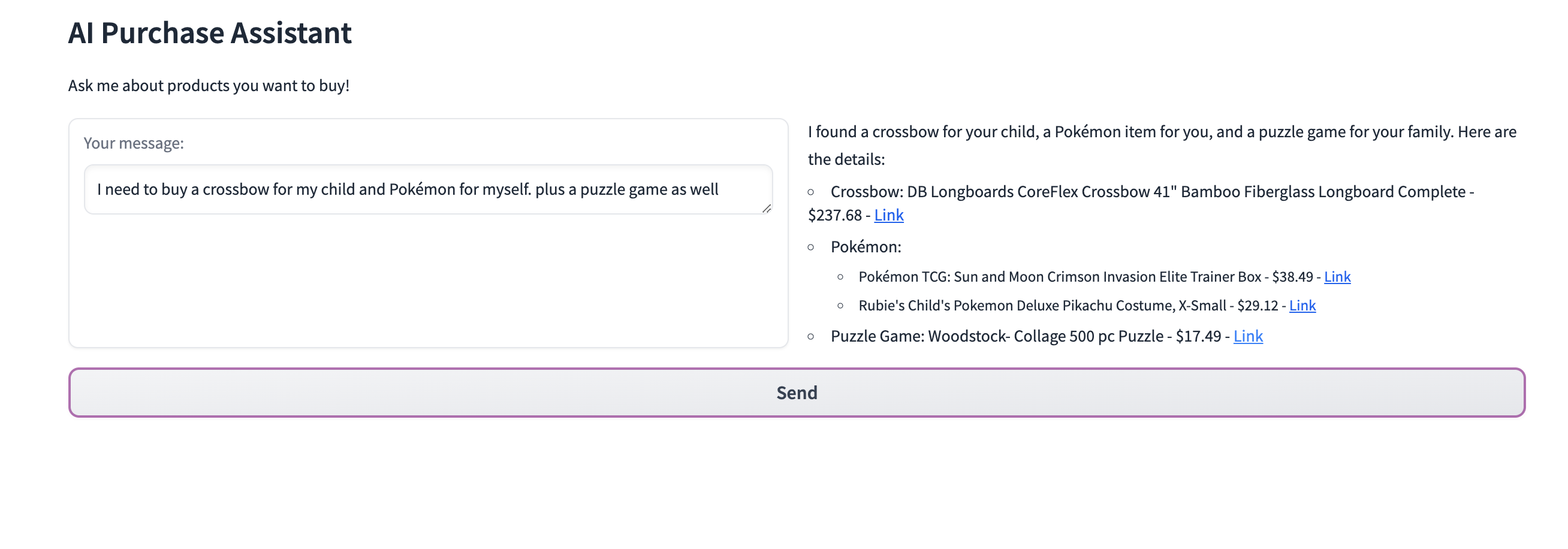\nuser asking for multiple products at once\n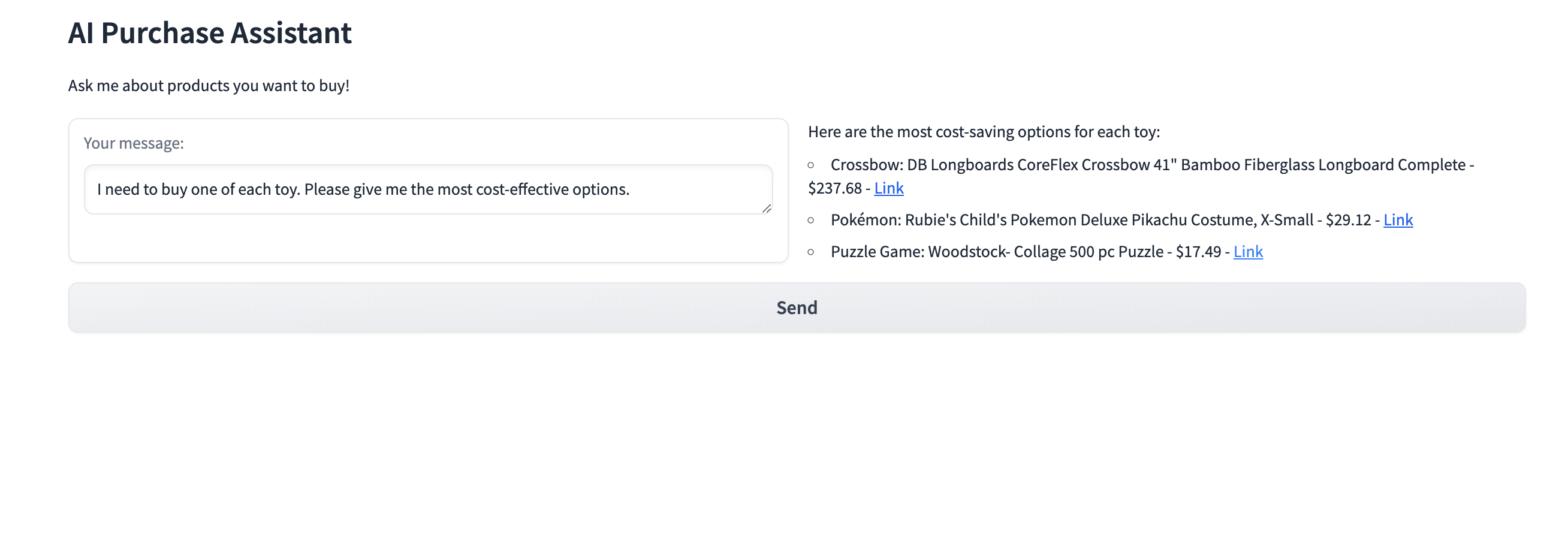\nThe user is asking for the most cost-effective purchase he/she can make.\nAlright, let's bring life to this application. We're going to use Meta's Llama 3 model with function calling capability. However, this can also be accomplished using the 3.1 models. According to [Meta's announcement](https://ai.meta.com/blog/meta-llama-3-1/), the 3.1 models can use tools and functions more effectively.\n> These are multilingual and have a significantly longer context length of 128K, state-of-the-art tool use, and overall stronger reasoning capabilities\nI will use Groq Cloud, specifically their model for this article. The initial workflow of this application should consist of an embedding model, a retriever, and two major tools for handling user purchase interests and cost-related concerns. In summary, we need something similar to what we've described in the diagram below.\n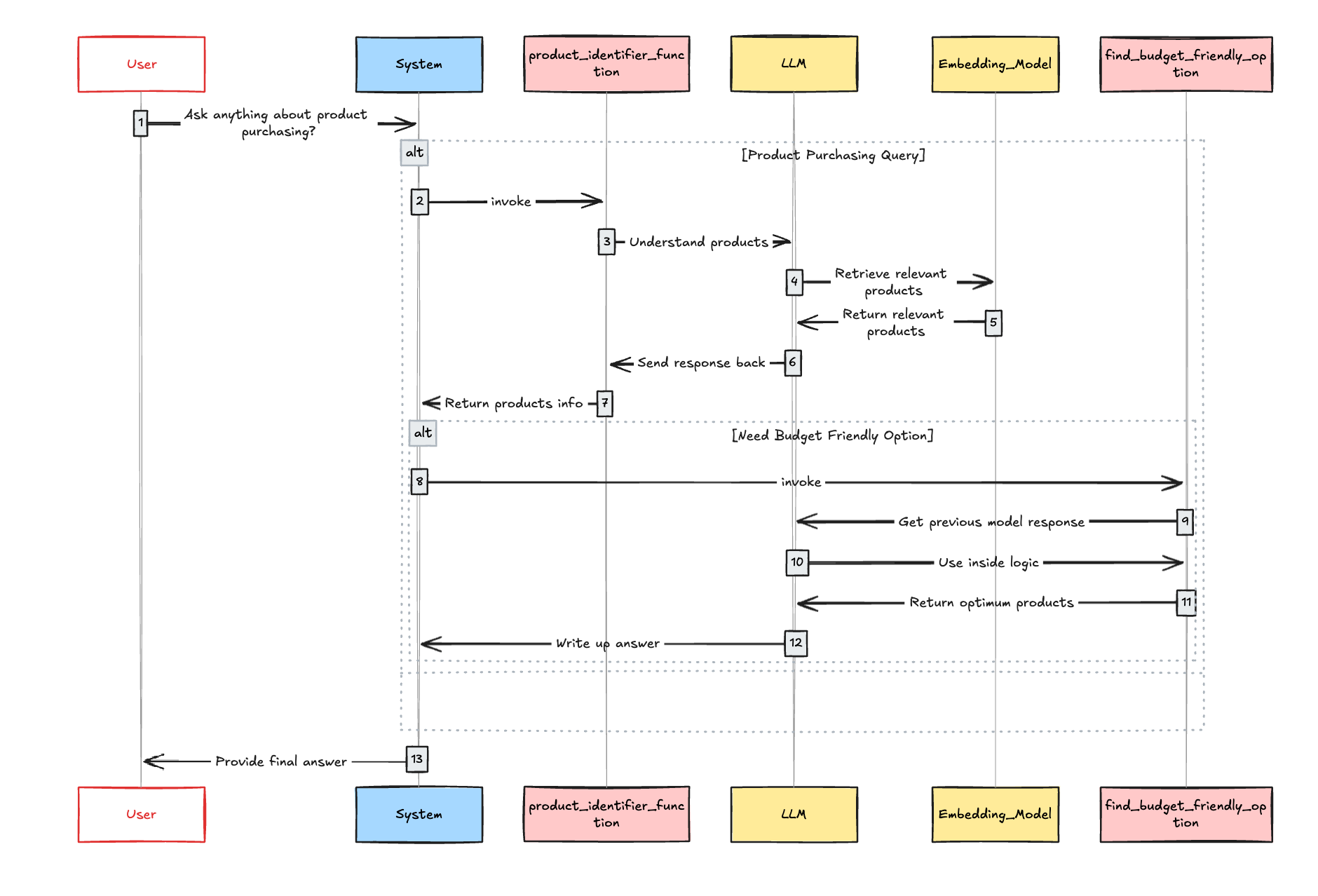\nArchitecture Diagram\nNow we have to use an LLM orchestration framework. For that, I am picking my all-time favorite, [Haystack](https://haystack.deepset.ai/).\nOkay, we got what we need. Let's jump into the actual work!\n### Loading and indexing data\nSince we have an RAG pipeline, we should build a document indexing service as the first step. For this demo, I am going to use the in-memory vector database that Haystack offers. Please note that each document in our vector database contains,\n * Content - Which we used to perform a similarity search\n * Id - Unique identifier\n * Price - Product price\n * URL - Product URL\n\n\nWhen our RAG pipeline is invoked, the Content field is used for vector search. All other fields are included as metadata. It's crucial to preserve this metadata as it's essential for front-end presentation to the user.\nLet's see how we can implement that.\npython\n\n```\nfrom haystack import Pipeline, Document\nfrom haystack.document_stores.in_memory import InMemoryDocumentStore\nfrom haystack.components.writers import DocumentWriter\nfrom haystack.components.embedders import SentenceTransformersDocumentEmbedder\nfrom haystack.components.generators import OpenAIGenerator\nfrom haystack.utils import Secret\nfrom haystack.components.generators.chat import OpenAIChatGenerator\nfrom haystack.components.builders import PromptBuilder\nfrom haystack.components.embedders import SentenceTransformersTextEmbedder\nfrom haystack.components.retrievers.in_memory import InMemoryEmbeddingRetriever\nfrom haystack.dataclasses import ChatMessage\nimport pandas as pd\n\n# Load product data from CSV\ndf = pd.read_csv(\"product_sample.csv\")\n\n# Initialize an in-memory document store\ndocument_store = InMemoryDocumentStore()\n\n# Convert the product data into Haystack Document objects\ndocuments = [\n Document(\n content=item.product_name, \n meta={\n \"id\": item.uniq_id, \n \"price\": item.selling_price, \n \"url\": item.product_url\n }\n ) for item in df.itertuples()\n]\n\n# Create a pipeline for indexing the documents\nindexing_pipeline = Pipeline()\n\n# Add a document embedder to the pipeline using Sentence Transformers model\nindexing_pipeline.add_component(\n instance=SentenceTransformersDocumentEmbedder(model=\"sentence-transformers/all-MiniLM-L6-v2\"), name=\"doc_embedder\"\n)\n\n# Add a document writer to the pipeline to store documents in the document store\nindexing_pipeline.add_component(instance=DocumentWriter(document_store=document_store), name=\"doc_writer\")\n\n# Connect the embedder's output to the writer's input\nindexing_pipeline.connect(\"doc_embedder.documents\", \"doc_writer.documents\")\n\n# Run the indexing pipeline to process and store the documents\nindexing_pipeline.run({\"doc_embedder\": {\"documents\": documents}})\n```\n\nGreat, we've completed the first step of our AI agent application. Now it's time to build the product identifier tool. To better understand the primary task of the product identifier, let's consider the example below.\n> User Query: I want to buy a camping boot, a charcoal and google pixel 9 back cover. Let's understand our ideal workflow for the product identifier function.\n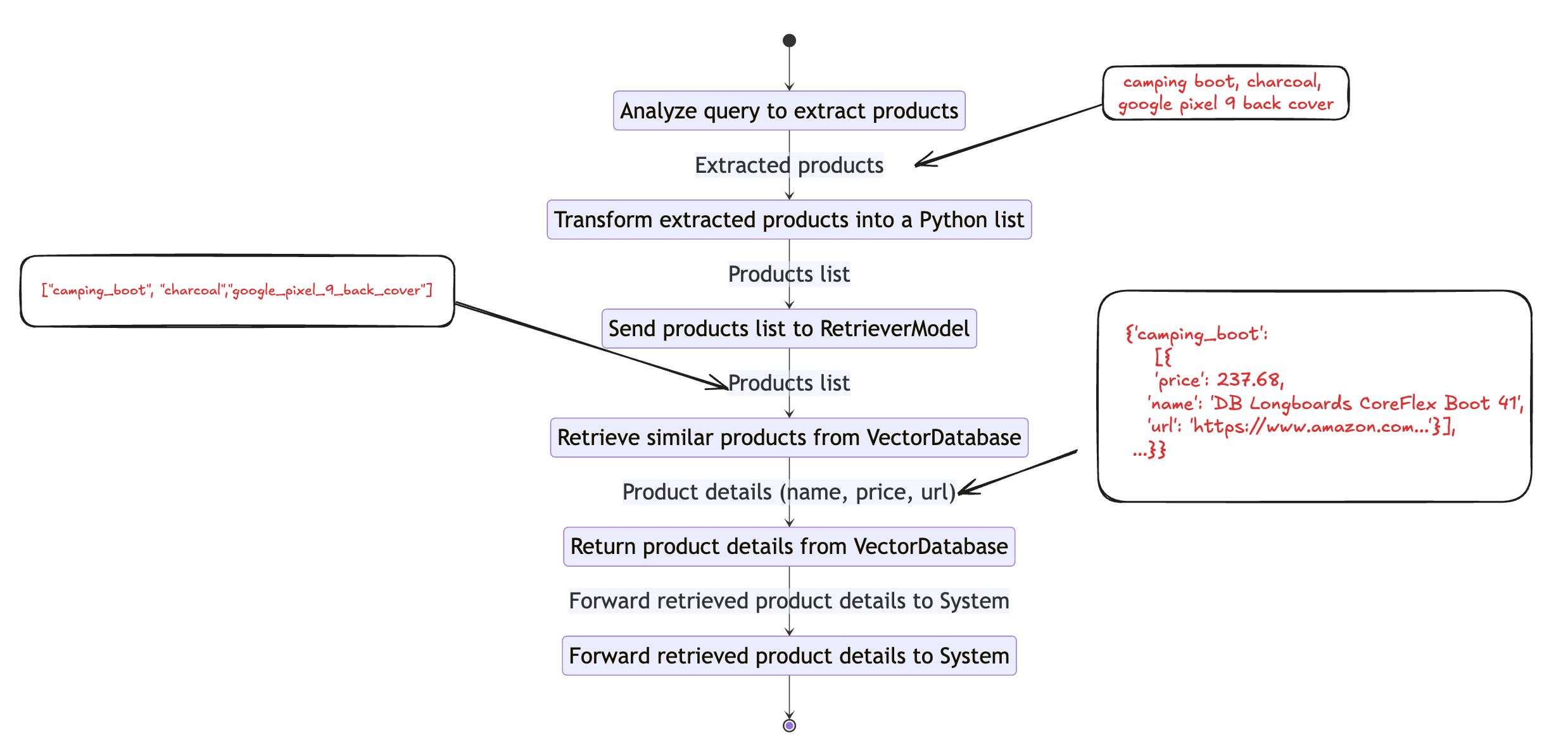\nWorkflow of product_identifier_function\nFirst, we need to create a tool for analyzing user queries and identifying user-interested products. We can build such a tool using code snippets below.\n### Building User Query Analyzer\npython\n\n```\ntemplate = \"\"\"\nUnderstand the user query and list of products the user is interested in and return product names as list.\nYou should always return a Python list. Do not return any explanation.\n\nExamples:\nQuestion: I am interested in camping boots, charcoal and disposable rain jacket.\nAnswer: [\"camping_boots\",\"charcoal\",\"disposable_rain_jacket\"]\n\nQuestion: Need a laptop, wireless mouse, and noise-cancelling headphones for work.\nAnswer: [\"laptop\",\"wireless_mouse\",\"noise_cancelling_headphones\"]\n\nQuestion: {{ question }}\nAnswer:\n\"\"\"\n\nproduct_identifier = Pipeline()\n\nproduct_identifier.add_component(\"prompt_builder\", PromptBuilder(template=template))\nproduct_identifier.add_component(\"llm\", generator())\n\nproduct_identifier.connect(\"prompt_builder\", \"llm\")\n```\n\nOkay, now we have completed half of our first function, now it's time to complete the function by adding the RAG pipeline.\n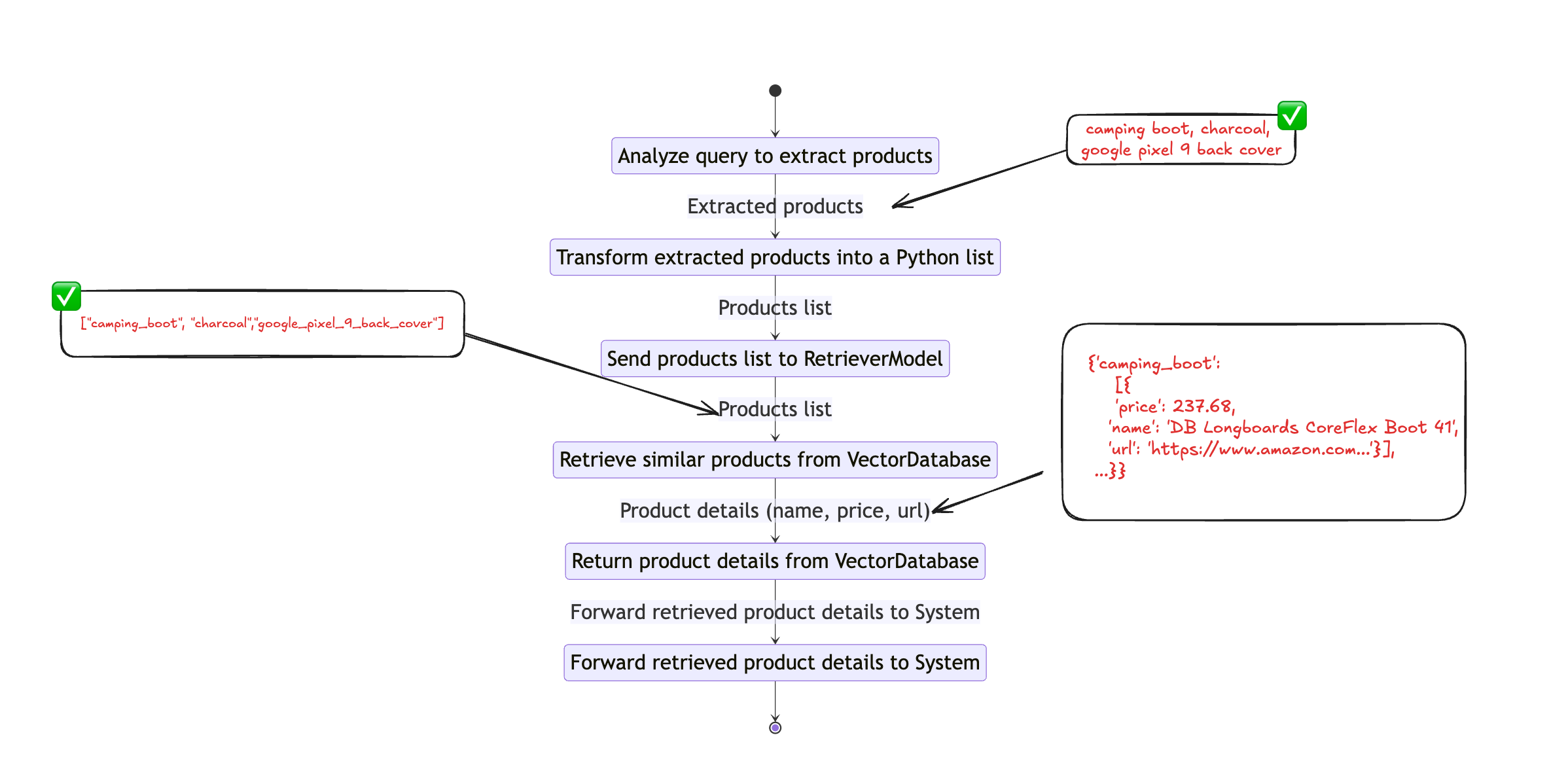\nWorkflow of product_identifier_function\n### Creating RAG Pipeline\nphp\n\n```\ntemplate = \"\"\"\nReturn product name, price, and url as a python dictionary. \nYou should always return a Python dictionary with keys price, name and url for single product.\nYou should always return a Python list of dictionaries with keys price, name and url for multiple products.\nDo not return any explanation.\n\nLegitimate Response Schema:\n{\"price\": \"float\", \"name\": \"string\", \"url\": \"string\"}\nLegitimate Response Schema for multiple products:\n[{\"price\": \"float\", \"name\": \"string\", \"url\": \"string\"},{\"price\": \"float\", \"name\": \"string\", \"url\": \"string\"}]\n\nContext:\n{% for document in documents %}\n product_price: {{ document.meta['price'] }}\n product_url: {{ document.meta['url'] }}\n product_id: {{ document.meta['id'] }}\n product_name: {{ document.content }}\n{% endfor %}\nQuestion: {{ question }}\nAnswer:\n\"\"\"\n\nrag_pipe = Pipeline()\nrag_pipe.add_component(\"embedder\", SentenceTransformersTextEmbedder(model=\"sentence-transformers/all-MiniLM-L6-v2\"))\nrag_pipe.add_component(\"retriever\", InMemoryEmbeddingRetriever(document_store=document_store, top_k=5))\nrag_pipe.add_component(\"prompt_builder\", PromptBuilder(template=template))\nrag_pipe.add_component(\"llm\", generator())\n\nrag_pipe.connect(\"embedder.embedding\", \"retriever.query_embedding\")\nrag_pipe.connect(\"retriever\", \"prompt_builder.documents\")\nrag_pipe.connect(\"prompt_builder\", \"llm\")\n```\n\nAfter this stage, we have completed both RAG and Query Analyzer pipelines. Now it's time to convert this into a tool. For that, we can use a regular function declaration, as shown below. Creating a tool for the Agent is just like creating a Python function. In case you have a question like\n> How is it possible for the Agent to invoke this function?\nThe solution is straightforward: by leveraging a model-specific tool schema, which we plan to incorporate in a future step. For now, it's time to create a wrapper function that uses both the query analyzer and RAG pipeline.\nLet's clarify the objectives of this function.\n**Objective 1:** Identify all products the user is interested in and return them as a list. **Objective 2:** For each identified product, retrieve up to five products from the database along with their metadata.\n### Finalizing Product Identifier Function\npython\n\n```\ndef product_identifier_func(query: str):\n \"\"\"\n Identifies products based on a given query and retrieves relevant details for each identified product.\n\n Parameters:\n query (str): The query string used to identify products.\n\n Returns:\n dict: A dictionary where the keys are product names and the values are details of each product. If no products are found, returns \"No product found\".\n \"\"\"\n product_understanding = product_identifier.run({\"prompt_builder\": {\"question\": query}})\n\n try:\n product_list = literal_eval(product_understanding[\"llm\"][\"replies\"][0])\n except:\n return \"No product found\"\n\n results = {}\n\n for product in product_list:\n response = rag_pipe.run({\"embedder\": {\"text\": product}, \"prompt_builder\": {\"question\": product}})\n try:\n results[product] = literal_eval(response[\"llm\"][\"replies\"][0])\n except:\n results[product] = {}\n\n return results\n```\n\n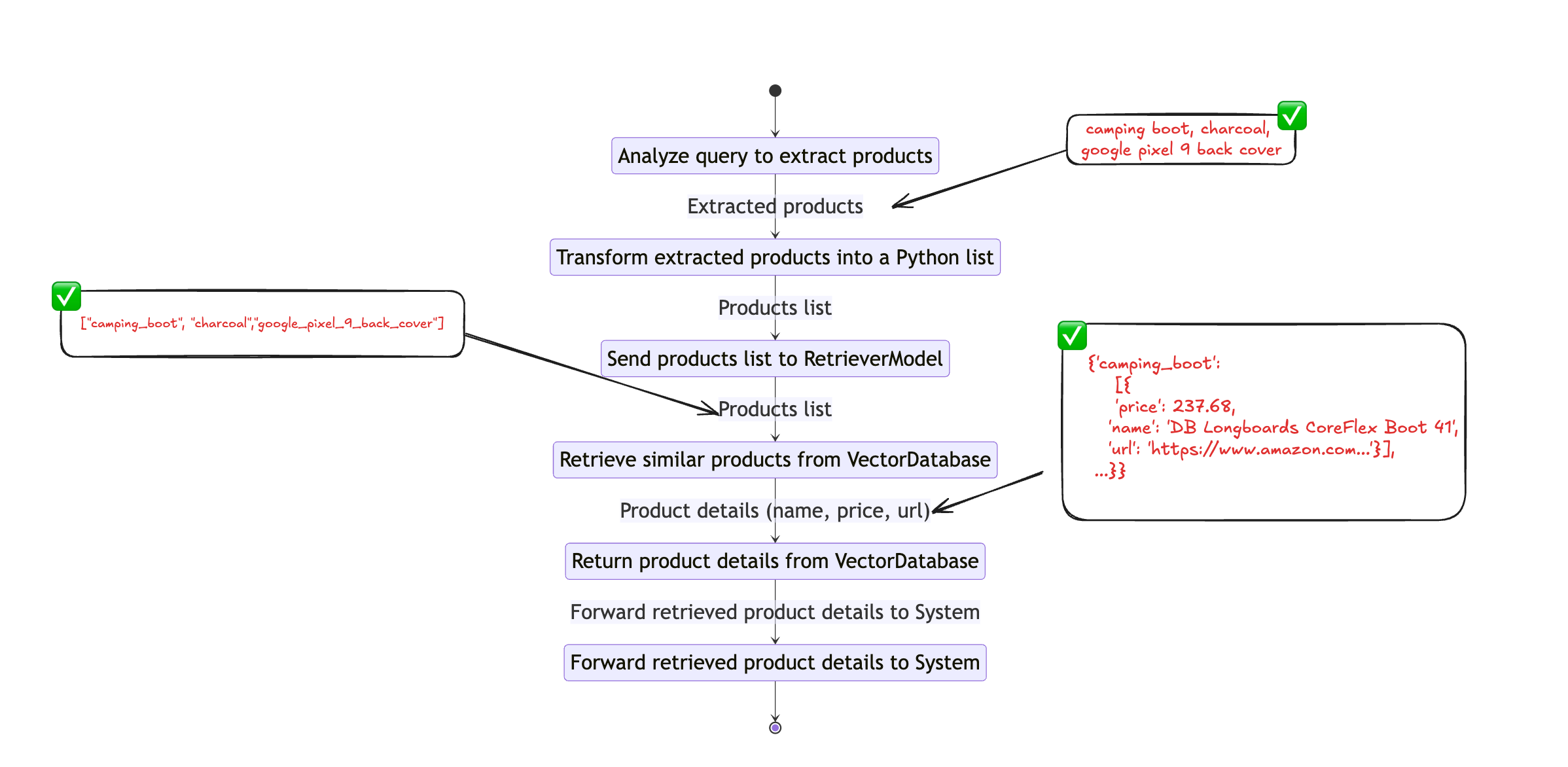\nWorkflow of product_identifier_function\nWith that, we have completed our first tool for the agent. Let's see whether it works as expected.\npython\n\n```\nquery = \"I want crossbow and woodstock puzzle\"\n#execute function\nproduct_identifier_func(query)\n\n# {'crossbow': {'name': 'DB Longboards CoreFlex Crossbow 41\" Bamboo Fiberglass '\n# 'Longboard Complete',\n# 'price': 237.68,\n# 'url': 'https://www.amazon.com/DB-Longboards-CoreFlex-Fiberglass-Longboard/dp/B07KMVJJK7'},\n# 'woodstock_puzzle': {'name': 'Woodstock- Collage 500 pc Puzzle',\n# 'price': 17.49,\n# 'url': 'https://www.amazon.com/Woodstock-Collage-500-pc-Puzzle/dp/B07MX21WWX'}}\n```\n\nIt worked!! However, it's worth noting the return output schema. You can see the general schema below.\njson\n\n```\n{\n \"product_key\": {\n \"name\": \"string\",\n \"price\": \"float\",\n \"url\": \"string\"\n }\n}\n```\n\nThat's exactly what we have advised the model to produce in the RAG pipeline. As a next step, let's build an optional tool called `find_budget_friendly_option`.\npython\n\n```\ndef find_budget_friendly_option(selected_product_details):\n \"\"\"\n Finds the most budget-friendly option for each category of products.\n\n Parameters:\n selected_product_details (dict): A dictionary where the keys are product categories and the values are lists of product details. Each product detail is expected to be a dictionary containing a 'price' key.\n\n Returns:\n dict: A dictionary where the keys are product categories and the values are the most budget-friendly product details for each category.\n \"\"\"\n budget_friendly_options = {}\n\n for category, items in selected_product_details.items():\n if isinstance(items, list):\n lowest_price_item = min(items, key=lambda x: x['price'])\n else:\n lowest_price_item = items\n\n budget_friendly_options[category] = lowest_price_item\n\n return budget_friendly_options\n```\n\nOkay, let's focus on the most crucial aspect of this application, which is enabling the agent to use these functions as needed. As we previously talked about, this is achievable through a model-specific tool schema. T[here](https://huggingface.co/Groq/Llama-3-Groq-70B-Tool-Use)fore, we need to locate the tool schema specific to the selected model. Fortunately, it's mentioned in the model card here. We need to adjust that to fit our use case.\n### Finalizing Chat Template\nbash\n\n```\nchat_template = '''<|start_header_id|>system<|end_header_id|>\n\nYou are a function calling AI model. You are provided with function signatures within XML tags. You may call one or more functions to assist with the user query. Don't make assumptions about what values to plug into functions. For each function call return a json object with function name and arguments within XML tags as follows:\n\n{\"name\": ,\"arguments\": }\n\n\nHere are the available tools:\n\n {\n \"name\": \"product_identifier_func\",\n \"description\": \"To understand user interested products and its details\",\n \"parameters\": {\n \"type\": \"object\",\n \"properties\": {\n \"query\": {\n \"type\": \"string\",\n \"description\": \"The query to use in the search. Infer this from the user's message. It should be a question or a statement\"\n }\n },\n \"required\": [\"query\"]\n }\n },\n {\n \"name\": \"find_budget_friendly_option\",\n \"description\": \"Get the most cost-friendly option. If selected_product_details has morethan one key this should return most cost-friendly options\",\n \"parameters\": {\n \"type\": \"object\",\n \"properties\": {\n \"selected_product_details\": {\n \"type\": \"dict\",\n \"description\": \"Input data is a dictionary where each key is a category name, and its value is either a single dictionary with 'price', 'name', and 'url' keys or a list of such dictionaries; example: {'category1': [{'price': 10.5, 'name': 'item1', 'url': 'http://example.com/item1'}, {'price': 8.99, 'name': 'item2', 'url': 'http://example.com/item2'}], 'category2': {'price': 15.0, 'name': 'item3', 'url': 'http://example.com/item3'}}\"\n }\n },\n \"required\": [\"selected_product_details\"]\n }\n }\n<|eot_id|><|start_header_id|>user<|end_header_id|>\n\nI need to buy a crossbow<|eot_id|><|start_header_id|>assistant<|end_header_id|>\n\n\n{\"id\":\"call_deok\",\"name\":\"product_identifier_func\",\"arguments\":{\"query\":\"I need to buy a crossbow\"}}\n<|eot_id|><|start_header_id|>tool<|end_header_id|>\n\n\n{\"id\":\"call_deok\",\"result\":{'crossbow': {'price': 237.68,'name': 'crossbow','url': 'https://www.amazon.com/crossbow/dp/B07KMVJJK7'}}}\n<|eot_id|><|start_header_id|>assistant<|end_header_id|>\n'''\n```\n\nNow there are only a few steps left. Before doing anything, let's test our agent.\nphp\n\n```\n## Testing agent\nmessages = [\n ChatMessage.from_system(\n chat_template\n ),\n ChatMessage.from_user(\"I need to buy a crossbow for my child and Pokémon for myself.\"),\n]\n\nchat_generator = get_chat_generator()\nresponse = chat_generator.run(messages=messages)\npprint(response)\n\n## response\n{'replies': [ChatMessage(content='n'\n '{\"id\": 0, \"name\": \"product_identifier_func\", '\n '\"arguments\": {\"query\": \"I need to buy a '\n 'crossbow for my child\"}}n'\n 'n'\n 'n'\n '{\"id\": 1, \"name\": \"product_identifier_func\", '\n '\"arguments\": {\"query\": \"I need to buy a '\n 'Pokemon for myself\"}}n'\n '',\n role=,\n name=None,\n meta={'finish_reason': 'stop',\n 'index': 0,\n 'model': 'llama3-groq-70b-8192-tool-use-preview',\n 'usage': {'completion_time': 0.217823967,\n 'completion_tokens': 70,\n 'prompt_time': 0.041348261,\n 'prompt_tokens': 561,\n 'total_time': 0.259172228,\n 'total_tokens': 631}})]}\n```\n\nWith that, we have completed about 90% of our work.\n\nYou almost there\n* * *\nOne thing you may have noticed in the above response is that the XML tag `` encloses tool calls. Thus, we need to develop a mechanism to extract the tool_call object.\npython\n\n```\ndef extract_tool_calls(tool_calls_str):\n json_objects = re.findall(r'(.*?)', tool_calls_str, re.DOTALL)\n\n result_list = [json.loads(obj) for obj in json_objects]\n\n return result_list\n\navailable_functions = {\n \"product_identifier_func\": product_identifier_func, \n \"find_budget_friendly_option\": find_budget_friendly_option\n }\n```\n\nWith this step completed, we can directly access the agent's response when it calls a tool. Now the only thing pending is to get the tool call object and execute the function accordingly. Let's complete that piece too.\npython\n\n```\nmessages.append(ChatMessage.from_user(message))\nresponse = chat_generator.run(messages=messages)\n\nif response and \"\" in response[\"replies\"][0].content:\n function_calls = extract_tool_calls(response[\"replies\"][0].content)\n for function_call in function_calls:\n # Parse function calling information\n function_name = function_call[\"name\"]\n function_args = function_call[\"arguments\"]\n\n # Find the corresponding function and call it with the given arguments\n function_to_call = available_functions[function_name]\n function_response = function_to_call(**function_args)\n\n # Append function response to the messages list using `ChatMessage.from_function`\n messages.append(ChatMessage.from_function(content=json.dumps(function_response), name=function_name))\n response = chat_generator.run(messages=messages)\n```\n\nNow it's time to join each component together and build a proper chat application. I am going to use Gradio for that purpose.\npython\n\n```\nimport gradio as gr\n\nmessages = [ChatMessage.from_system(chat_template)]\nchat_generator = get_chat_generator()\n\ndef chatbot_with_fc(message, messages):\n messages.append(ChatMessage.from_user(message))\n response = chat_generator.run(messages=messages)\n\n while True:\n if response and \"\" in response[\"replies\"][0].content:\n function_calls = extract_tool_calls(response[\"replies\"][0].content)\n for function_call in function_calls:\n # Parse function calling information\n function_name = function_call[\"name\"]\n function_args = function_call[\"arguments\"]\n\n # Find the corresponding function and call it with the given arguments\n function_to_call = available_functions[function_name]\n function_response = function_to_call(**function_args)\n\n # Append function response to the messages list using `ChatMessage.from_function`\n messages.append(ChatMessage.from_function(content=json.dumps(function_response), name=function_name))\n response = chat_generator.run(messages=messages)\n\n # Regular Conversation\n else:\n messages.append(response[\"replies\"][0])\n break\n return response[\"replies\"][0].content\n\ndef chatbot_interface(user_input, state):\n response_content = chatbot_with_fc(user_input, state)\n return response_content, state\n\nwith gr.Blocks() as demo:\n gr.Markdown(\"# AI Purchase Assistant\")\n gr.Markdown(\"Ask me about products you want to buy!\")\n\n state = gr.State(value=messages)\n\n with gr.Row():\n user_input = gr.Textbox(label=\"Your message:\")\n response_output = gr.Markdown(label=\"Response:\")\n\n user_input.submit(chatbot_interface, [user_input, state], [response_output, state])\n gr.Button(\"Send\").click(chatbot_interface, [user_input, state], [response_output, state])\n\ndemo.launch()\n```\n\nThat's it! We have built the Llama 3-based AI Agent 🤖 with function calling capability. You can access the full code from this G[itHub repo.](https://github.com/Ransaka/ai-agents-with-llama3) Thanks for reading.\nAccess to the dataset used in [this](https://www.kaggle.com/datasets/promptcloud/amazon-product-dataset-2020) article is available through this Kaggle link (Under CC0: Public Domain).\n### Conclusion\nWhen constructing an AI agent-based system, it's important to consider the time required to complete a task and the number of API calls (tokens) used for each task. One of the major challenges is reducing hallucination in the system, which is an active area of research. Therefore, there are no set rules for building LLMs and agent systems. It's necessary to work patiently and strategically to ensure the AI agent, the LLM, is functioning correctly.\n_All images, unless otherwise noted, are by the author._\n### Reference:\n> [**Introducing Llama 3.1: Our most capable models to date**](https://ai.meta.com/blog/meta-llama-3-1/)\n> [**Groq/Llama-3-Groq-70B-Tool-Use · Hugging Face**](https://huggingface.co/Groq/Llama-3-Groq-70B-Tool-Use)\n\n## Register Now to Continue Reading\n### Unlock Towards Data Science with a Free Account\nAll articles on Towards Data Science are available to registered users. Create a free account today to access this article and thousands more.\nRegister for freeSign in to your account\n* * *\n\nWritten By\n## [Ransaka Ravihara](https://towardsdatascience.com/author/ransakaravihara/)\n[See all from Ransaka Ravihara](https://towardsdatascience.com/author/ransakaravihara/)\n[Ai Agent](https://towardsdatascience.com/tag/ai-agent/)[Llama 3](https://towardsdatascience.com/tag/llama-3/)[Llm](https://towardsdatascience.com/tag/llm/)[Machine Learning](https://towardsdatascience.com/tag/machine-learning/)[Programming](https://towardsdatascience.com/tag/programming/)\nShare This Article\n * [](https://www.facebook.com/sharer/sharer.php?u=https%3A%2F%2Ftowardsdatascience.com%2Fusing-llama-3-for-building-ai-agents-7e74f79d1ccc%2F&title=Using%20Llama%203%20for%20Building%20AI%20Agents)\n * [](https://www.linkedin.com/shareArticle?mini=true&url=https%3A%2F%2Ftowardsdatascience.com%2Fusing-llama-3-for-building-ai-agents-7e74f79d1ccc%2F&title=Using%20Llama%203%20for%20Building%20AI%20Agents)\n * [](https://x.com/share?url=https%3A%2F%2Ftowardsdatascience.com%2Fusing-llama-3-for-building-ai-agents-7e74f79d1ccc%2F&text=Using%20Llama%203%20for%20Building%20AI%20Agents)\n\n\nTowards Data Science is a community publication. Submit your insights to reach our global audience and earn through the TDS Author Payment Program.\n[Write for TDS](https://towardsdatascience.com/submissions/)\n## Related Articles\n * [](https://towardsdatascience.com/testing-aws-lambdas-locally-with-a-https-proxy-f7888ffd2d53/)\n## [Testing AWS Lambdas Locally with a HTTPS Proxy](https://towardsdatascience.com/testing-aws-lambdas-locally-with-a-https-proxy-f7888ffd2d53/)\n[Programming](https://towardsdatascience.com/category/programming/)\nAWS Lambda is generally one of the easiest ways to deploy and execute code in the cloud, especially when deploying code with the sam CLI...\n[Grant Seward](https://towardsdatascience.com/author/grant-6562/)\nNovember 30, 20203 min read\n * [](https://towardsdatascience.com/after-beating-physics-at-modeling-atoms-and-molecules-machine-learning-is-now-collaborating-with-6e4dab20ae5c/)\n## [After Beating Physics at Modeling Atoms and Molecules, Machine Learning Is Now Collaborating with...](https://towardsdatascience.com/after-beating-physics-at-modeling-atoms-and-molecules-machine-learning-is-now-collaborating-with-6e4dab20ae5c/)\n[Machine Learning](https://towardsdatascience.com/category/artificial-intelligence/machine-learning/)\nBringing the best of both worlds together\n[Luciano Abriata](https://towardsdatascience.com/author/lucianosphere/)\nDecember 29, 202218 min read\n * [](https://towardsdatascience.com/version-control-your-database-part-1-creating-migrations-and-seeding-992d86c90170/)\n## [Version control your database Part 1: creating migrations and seeding](https://towardsdatascience.com/version-control-your-database-part-1-creating-migrations-and-seeding-992d86c90170/)\n[Programming](https://towardsdatascience.com/category/programming/)\nEasily plan, validate, and safely apply changes to your database If you are not working...\n[Mike Huls](https://towardsdatascience.com/author/mikehuls/)\nMay 20, 20218 min read\n * [](https://towardsdatascience.com/how-we-pinpointed-the-generalized-impact-of-73-kinds-of-severe-weather-on-fast-food-and-retail-3120eb22ca9a/)\n## [How we pinpointed the generalized impact of 73 kinds of severe weather on fast food and retail...](https://towardsdatascience.com/how-we-pinpointed-the-generalized-impact-of-73-kinds-of-severe-weather-on-fast-food-and-retail-3120eb22ca9a/)\n[Machine Learning](https://towardsdatascience.com/category/artificial-intelligence/machine-learning/)\nAnd how to architect machine learning models with dynamic feature sets to overcome data sparsity.\n[Dr. Xuxu Wang](https://towardsdatascience.com/author/xuxu_wang/)\nNovember 5, 20218 min read\n * [](https://towardsdatascience.com/automating-the-setup-of-my-data-science-projects-656bb5c9ff5e/)\n## [Automating the Setup of my Data Science Projects](https://towardsdatascience.com/automating-the-setup-of-my-data-science-projects-656bb5c9ff5e/)\n[Machine Learning](https://towardsdatascience.com/category/artificial-intelligence/machine-learning/)\nUsing Python to automate the process of setting up new project directories and making the first commit to a new repository in Github\n[Jack Leitch](https://towardsdatascience.com/author/jackmleitch/)\nDecember 21, 20204 min read\n * [](https://towardsdatascience.com/an-approach-to-detect-ddos-attack-with-a-i-15a768998cf7/)\n## [An approach to detect DDoS attack with A.I.](https://towardsdatascience.com/an-approach-to-detect-ddos-attack-with-a-i-15a768998cf7/)\n[Deep Learning](https://towardsdatascience.com/category/artificial-intelligence/deep-learning/)\nThe DDoS attack is one of the most powerful hacking techniques over the internet. The base weapon that the hacker uses during these types...\n[VICTOR BASU](https://towardsdatascience.com/author/basu369victor/)\nOctober 13, 20206 min read\n * [](https://towardsdatascience.com/regularized-linear-regression-models-57bbdce90a8c/)\n## [Regularized Linear Regression Models](https://towardsdatascience.com/regularized-linear-regression-models-57bbdce90a8c/)\n[Machine Learning](https://towardsdatascience.com/category/artificial-intelligence/machine-learning/)\nPart One of Three: Introduction, Linear Regression Modeling, Ordinary Least Squares (OLS)\n[Wyatt Walsh](https://towardsdatascience.com/author/wyattowalsh/)\nJanuary 13, 20216 min read\n * [](https://towardsdatascience.com/support-vector-machine-803884d967e3/)\n## [Support Vector Machine](https://towardsdatascience.com/support-vector-machine-803884d967e3/)\n[Machine Learning](https://towardsdatascience.com/category/artificial-intelligence/machine-learning/)\nA dive into the math behind the SVM model and a python implementation based on quadratic programming.\n[Victor Varaschin](https://towardsdatascience.com/author/vvaraschin/)\nJuly 22, 202020 min read\n * [](https://towardsdatascience.com/top-python-packages-to-acquire-dataset-3c1b4a31a287/)\n## [Top Python Packages to Acquire Dataset](https://towardsdatascience.com/top-python-packages-to-acquire-dataset-3c1b4a31a287/)\n[Artificial Intelligence](https://towardsdatascience.com/category/artificial-intelligence/)\nImprove your Data Science portfolio with these datasets\n[Cornellius Wijaya](https://towardsdatascience.com/author/cornelliusyudhawijaya/)\nApril 19, 20227 min read\n\n\n * [YouTube](https://www.youtube.com/c/TowardsDataScience)\n * [X](https://x.com/TDataScience)\n * [LinkedIn](https://www.linkedin.com/company/towards-data-science/)\n * [Threads](https://www.threads.net/@towardsdatascience)\n * [Bluesky](https://bsky.app/profile/towardsdatascience.com)\n\n\n[](https://towardsdatascience.com/)\nYour home for data science and AI. The world's leading publication for data science, data analytics, data engineering, machine learning, and artificial intelligence professionals.\nSubscribe to Our Newsletter[Write For TDS](https://towardsdatascience.com/submissions/)•[About](https://towardsdatascience.com/about-towards-data-science-d691af11cc2f/)•[Advertise](https://contact.towardsdatascience.com/advertise-with-towards-data-science)•[Privacy Policy](https://towardsdatascience.com/privacy-policy/)•[Terms of Use](https://towardsdatascience.com/website-terms-of-use/)\n© Insight Media Group, LLC 2026•[The New Stack](https://thenewstack.io)•[roadmap.sh](https://roadmap.sh)•[Creator Network](https://insightmediagroup.io/creator-network)\n#### Recommended Articles \nClose\n * [  Critical Mistakes Companies Make When Integrating AI/ML into Their Processes ](https://towardsdatascience.com/critical-mistakes-companies-make-when-integrating-ai-ml-into-their-processes/ \"Critical Mistakes Companies Make When Integrating AI/ML into Their Processes\")\n * [  How Relevance Models Foreshadowed Transformers for NLP ](https://towardsdatascience.com/how-relevance-models-foreshadowed-transformers-for-nlp/ \"How Relevance Models Foreshadowed Transformers for NLP\")\n * [  Javascript Fatigue: HTMX Is All You Need to Build ChatGPT — Part 1 ](https://towardsdatascience.com/javascript-fatigue-you-dont-need-js-to-build-chatgpt/ \"Javascript Fatigue: HTMX Is All You Need to Build ChatGPT — Part 1\")\n * [  The Subset Sum Problem Solved in Linear Time for Dense Enough Inputs ](https://towardsdatascience.com/subset-sum-problem-solved-in-linear-time-for-dense-enough-inputs/ \"The Subset Sum Problem Solved in Linear Time for Dense Enough Inputs\")\n\n\n",
"metadata": {
"title": "Using Llama 3 for Building AI Agents | Towards Data Science",
"description": "Comprehensive guide to building AI Agents with Llama 3 function calling capabilities.",
"keywords": null,
"author": "Ransaka Ravihara",
"og:locale": "en_US",
"og:type": "article",
"og:title": "Using Llama 3 for Building AI Agents",
"og:description": "Comprehensive guide to building AI Agents with Llama 3 function calling capabilities.",
"og:url": "https://towardsdatascience.com/using-llama-3-for-building-ai-agents-7e74f79d1ccc/",
"og:site_name": "Towards Data Science",
"og:image": "https://assets.insightmediagroup.io/media/wp-content/uploads/2024/07/1EWGo-7t4Kl6l82rB2-ZK9Q.png",
"og:image:width": "1080",
"og:image:height": "1080",
"og:image:type": "image/png",
"twitter:card": "summary_large_image",
"twitter:site": "@TDataScience",
"twitter:creator": "@TDataScience",
"twitter:label1": "Written by",
"twitter:data1": "Ransaka Ravihara",
"twitter:label2": "Est. reading time",
"twitter:data2": "10 min read",
"article:published_time": "2024-07-31T06:26:22.000Z",
"article:modified_time": "2024-07-31T06:26:22.000Z",
"article:author": "https://towardsdatascience.com/author/ransakaravihara/"
},
"paywall": {
"listed_paid": true,
"detected": false,
"marker": "",
"public_only": true,
"policy": "付费/会员内容只保留页面公开可见部分,不绕过付费墙"
},
"crawl": {
"success": true,
"status_code": 200,
"error": ""
},
"code_blocks": [
{
"language": "txt",
"file": "attachments/52475b398bd3/code/block_000.txt",
"chars": 1886
},
{
"language": "txt",
"file": "attachments/52475b398bd3/code/block_001.txt",
"chars": 760
},
{
"language": "txt",
"file": "attachments/52475b398bd3/code/block_002.txt",
"chars": 1351
},
{
"language": "txt",
"file": "attachments/52475b398bd3/code/block_003.txt",
"chars": 954
},
{
"language": "txt",
"file": "attachments/52475b398bd3/code/block_004.txt",
"chars": 580
},
{
"language": "txt",
"file": "attachments/52475b398bd3/code/block_005.txt",
"chars": 107
},
{
"language": "txt",
"file": "attachments/52475b398bd3/code/block_006.txt",
"chars": 880
},
{
"language": "txt",
"file": "attachments/52475b398bd3/code/block_007.txt",
"chars": 2531
},
{
"language": "txt",
"file": "attachments/52475b398bd3/code/block_008.txt",
"chars": 1613
},
{
"language": "txt",
"file": "attachments/52475b398bd3/code/block_009.txt",
"chars": 366
},
{
"language": "txt",
"file": "attachments/52475b398bd3/code/block_010.txt",
"chars": 880
},
{
"language": "txt",
"file": "attachments/52475b398bd3/code/block_011.txt",
"chars": 1942
}
],
"images": [
{
"src": "https://assets.insightmediagroup.io/media/wp-content/uploads/2024/07/1EWGo-7t4Kl6l82rB2-ZK9Q.png",
"alt": "Image by Author via Canva",
"local_path": "attachments/52475b398bd3/images/000.png",
"bytes": 1394432,
"downloaded": true
},
{
"src": "https://assets.insightmediagroup.io/media/wp-content/uploads/2024/07/1ikbr1ozv37PIB2meVfCCfA.png",
"alt": "user asking for multiple products at once",
"local_path": "attachments/52475b398bd3/images/001.png",
"bytes": 94580,
"downloaded": true
},
{
"src": "https://assets.insightmediagroup.io/media/wp-content/uploads/2024/07/1AZPn3_KCDRV0pAszd3vLmA.png",
"alt": "The user is asking for the most cost-effective purchase he/she can make.",
"local_path": "attachments/52475b398bd3/images/002.png",
"bytes": 146816,
"downloaded": true
},
{
"src": "https://assets.insightmediagroup.io/media/wp-content/uploads/2024/07/1EZVySX3GD2O07fzEPwLcbQ.png",
"alt": "Architecture Diagram",
"local_path": "attachments/52475b398bd3/images/003.png",
"bytes": 116257,
"downloaded": true
},
{
"src": "https://assets.insightmediagroup.io/media/wp-content/uploads/2024/07/1kXGYjlMi4pQcqIKpmUZLRQ.png",
"alt": "Workflow of product_identifier_function",
"local_path": "attachments/52475b398bd3/images/004.png",
"bytes": 121859,
"downloaded": true
},
{
"src": "https://assets.insightmediagroup.io/media/wp-content/uploads/2024/07/1JyxINdc8Wz-qAg_PCAkLbA.png",
"alt": "Workflow of product_identifier_function",
"local_path": "attachments/52475b398bd3/images/005.png",
"bytes": 116855,
"downloaded": true
},
{
"src": "https://assets.insightmediagroup.io/media/wp-content/uploads/2024/07/1HWRTdWvvcw2MZP4uoaQdeQ.png",
"alt": "Workflow of product_identifier_function",
"local_path": "attachments/52475b398bd3/images/006.png",
"bytes": 119232,
"downloaded": true
},
{
"src": "https://assets.insightmediagroup.io/media/wp-content/uploads/2024/07/1nYVXcgpm3RZ3g5h5d4UK_A.png",
"alt": "You almost there",
"local_path": "attachments/52475b398bd3/images/007.png",
"bytes": 48079,
"downloaded": true
},
{
"src": "https://assets.insightmediagroup.io/media/wp-content/uploads/2020/11/1WZ5pig7_WqrlwqG5zZZtrA.png",
"alt": "",
"local_path": "attachments/52475b398bd3/images/008.png",
"bytes": 8201723,
"downloaded": true
},
{
"src": "https://assets.insightmediagroup.io/media/wp-content/uploads/2022/12/0Q3KyNphkYtcAUK2z-scaled.jpg",
"alt": "",
"local_path": "attachments/52475b398bd3/images/009.jpg",
"bytes": 308044,
"downloaded": true
},
{
"src": "https://assets.insightmediagroup.io/media/wp-content/uploads/2021/05/14fitaE9zB5wNlp4byoBU5w.jpeg",
"alt": "",
"local_path": "attachments/52475b398bd3/images/010.jpeg",
"bytes": 136469,
"downloaded": true
},
{
"src": "https://assets.insightmediagroup.io/media/wp-content/uploads/2021/11/14oyZKlybHmbbNmzb1CY3JA.png",
"alt": "",
"local_path": "attachments/52475b398bd3/images/011.png",
"bytes": 275301,
"downloaded": true
},
{
"src": "https://assets.insightmediagroup.io/media/wp-content/uploads/2020/12/0LrjR3vGa1OrCpOWh-scaled.jpg",
"alt": "",
"local_path": "attachments/52475b398bd3/images/012.jpg",
"bytes": 309870,
"downloaded": true
},
{
"src": "https://assets.insightmediagroup.io/media/wp-content/uploads/2020/10/10Dnd9woqoHQ7qyx9mk1C6w-scaled.jpeg",
"alt": "",
"local_path": "attachments/52475b398bd3/images/013.jpeg",
"bytes": 253379,
"downloaded": true
},
{
"src": "https://assets.insightmediagroup.io/media/wp-content/uploads/2021/01/1cju3fHmuTtt5w4AFV7lfFg.png",
"alt": "",
"local_path": "attachments/52475b398bd3/images/014.png",
"bytes": 124004,
"downloaded": true
},
{
"src": "https://assets.insightmediagroup.io/media/wp-content/uploads/2020/07/1eppYezxTTnEAzXxHuc7cWQ.png",
"alt": "",
"local_path": "attachments/52475b398bd3/images/015.png",
"bytes": 16315,
"downloaded": true
},
{
"src": "https://assets.insightmediagroup.io/media/wp-content/uploads/2022/04/0HMe3HWSPsUjAuHde-scaled.jpg",
"alt": "",
"local_path": "attachments/52475b398bd3/images/016.jpg",
"bytes": 754740,
"downloaded": true
}
],
"audio": [],
"videos": [
{
"src": "https://www.youtube.com/c/TowardsDataScience",
"quality": "unavailable",
"local_path": "",
"note": "无1080p且无720p,未交付更低清晰度"
}
],
"links": [
{
"type": "internal",
"href": "https://towardsdatascience.com/"
},
{
"type": "internal",
"href": "https://towardsdatascience.com/latest/"
},
{
"type": "internal",
"href": "https://towardsdatascience.com/tag/editors-pick/"
},
{
"type": "internal",
"href": "https://towardsdatascience.com/tag/the-variable/"
},
{
"type": "internal",
"href": "https://towardsdatascience.com/shipai/"
},
{
"type": "internal",
"href": "https://towardsdatascience.com/submissions/"
},
{
"type": "internal",
"href": "https://towardsdatascience.com/category/programming/"
},
{
"type": "internal",
"href": "https://towardsdatascience.com/author/ransakaravihara/"
},
{
"type": "internal",
"href": "https://towardsdatascience.com/tag/ai-agent/"
},
{
"type": "internal",
"href": "https://towardsdatascience.com/tag/llama-3/"
},
{
"type": "internal",
"href": "https://towardsdatascience.com/tag/llm/"
},
{
"type": "internal",
"href": "https://towardsdatascience.com/tag/machine-learning/"
},
{
"type": "internal",
"href": "https://towardsdatascience.com/tag/programming/"
},
{
"type": "internal",
"href": "https://towardsdatascience.com/testing-aws-lambdas-locally-with-a-https-proxy-f7888ffd2d53/"
},
{
"type": "internal",
"href": "https://towardsdatascience.com/author/grant-6562/"
},
{
"type": "internal",
"href": "https://towardsdatascience.com/after-beating-physics-at-modeling-atoms-and-molecules-machine-learning-is-now-collaborating-with-6e4dab20ae5c/"
},
{
"type": "internal",
"href": "https://towardsdatascience.com/category/artificial-intelligence/machine-learning/"
},
{
"type": "internal",
"href": "https://towardsdatascience.com/author/lucianosphere/"
},
{
"type": "internal",
"href": "https://towardsdatascience.com/version-control-your-database-part-1-creating-migrations-and-seeding-992d86c90170/"
},
{
"type": "internal",
"href": "https://towardsdatascience.com/author/mikehuls/"
},
{
"type": "external",
"href": "https://write.insightmediagroup.io"
},
{
"type": "external",
"href": "https://www.linkedin.com/company/towards-data-science/"
},
{
"type": "external",
"href": "https://x.com/TDataScience"
},
{
"type": "external",
"href": "https://www.canva.com/ai-image-generator/"
},
{
"type": "external",
"href": "https://ai.meta.com/blog/meta-llama-3-1/"
},
{
"type": "external",
"href": "https://haystack.deepset.ai/"
},
{
"type": "external",
"href": "https://huggingface.co/Groq/Llama-3-Groq-70B-Tool-Use"
},
{
"type": "external",
"href": "https://github.com/Ransaka/ai-agents-with-llama3"
},
{
"type": "external",
"href": "https://www.kaggle.com/datasets/promptcloud/amazon-product-dataset-2020"
},
{
"type": "external",
"href": "https://docs.together.ai/docs/llama-3-function-calling"
},
{
"type": "external",
"href": "https://www.facebook.com/sharer/sharer.php?title=Using+Llama+3+for+Building+AI+Agents&u=https%3A%2F%2Ftowardsdatascience.com%2Fusing-llama-3-for-building-ai-agents-7e74f79d1ccc%2F"
},
{
"type": "external",
"href": "https://www.linkedin.com/shareArticle?mini=true&title=Using+Llama+3+for+Building+AI+Agents&url=https%3A%2F%2Ftowardsdatascience.com%2Fusing-llama-3-for-building-ai-agents-7e74f79d1ccc%2F"
},
{
"type": "external",
"href": "https://x.com/share?text=Using+Llama+3+for+Building+AI+Agents&url=https%3A%2F%2Ftowardsdatascience.com%2Fusing-llama-3-for-building-ai-agents-7e74f79d1ccc%2F"
},
{
"type": "external",
"href": "https://www.youtube.com/c/TowardsDataScience"
},
{
"type": "external",
"href": "https://www.threads.net/@towardsdatascience"
},
{
"type": "external",
"href": "https://bsky.app/profile/towardsdatascience.com"
},
{
"type": "external",
"href": "https://thenewstack.io"
},
{
"type": "external",
"href": "https://roadmap.sh"
},
{
"type": "external",
"href": "https://insightmediagroup.io/creator-network"
}
],
"repair_version": 2,
"repaired_at": "2026-10-14T11:11:49Z",
"source_url": "https://towardsdatascience.com/using-llama-3-for-building-ai-agents-7e74f79d1ccc/",
"delivery_status": "excluded_paid",
"discovery_status": "excluded_paid",
"missing_reason": "按原约定排除付费/会员全文"
}