{
"source_file": "0930",
"source_platform": "Medium",
"author": "Dario Radečić",
"title_listed": "5 Crucial Tweaks That Will Make Your Charts Accessible to People with Visual Impairments",
"keywords": "数据可视化,无障碍",
"domain": "数据处理",
"content_type": "深度技术解析",
"is_paid_flag": "部分免费/会员墙",
"url": "https://towardsdatascience.com/5-crucial-tweaks-that-will-make-your-charts-accessible-to-people-with-visual-impairments/",
"publish_date": "2025-06",
"corpus_stage": "预训练/SFT",
"notes": "",
"id": "7c9d27c17fb5",
"collected_at": "2026-10-01T20:54:40",
"title": "5 Crucial Tweaks That Will Make Your Charts Accessible to People with Visual Impairments | Towards Data Science",
"body_markdown": "Toggle Search[](https://towardsdatascience.com/)Toggle Mobile Navigation\n[](https://towardsdatascience.com/)\nPublish AI, ML & data-science insights to a global community of data professionals.\nSign in[Submit an Article](https://write.insightmediagroup.io)\n[Latest](https://towardsdatascience.com/latest/)[Editor's Picks](https://towardsdatascience.com/tag/editors-pick/)[Newsletter](https://towardsdatascience.com/tag/the-variable/)[ShipAI](https://towardsdatascience.com/shipai/)\n* * *\n[Write For TDS](https://towardsdatascience.com/submissions/)\n[LinkedIn](https://www.linkedin.com/company/towards-data-science/)[X](https://x.com/TDataScience)Toggle Search\n[Data Visualization](https://towardsdatascience.com/category/data-science/data-visualization/)\n# 5 Crucial Tweaks That Will Make Your Charts Accessible to People with Visual Impairments\nMore than 350 million people are colorblind — make sure they can read your visualizations.\n[Dario Radečić](https://towardsdatascience.com/author/radecicdario/)\nJune 6, 202511 min read\n\nPhoto by [The New York Public Library](https://unsplash.com/@nypl?utm_content=creditCopyText&utm_medium=referral&utm_source=unsplash) on [Unsplash](https://unsplash.com/photos/Lxos0BKPCjM?utm_content=creditCopyText&utm_medium=referral&utm_source=unsplash)\nPhoto by The New York Public Library on Unsplash\n[Approximately 4.5% of the world's population is colorblind.](https://www.colorblindguide.com/post/colorblind-people-population-live-counter)\nThat’s about 350 million people worldwide having just one type of visual impairment. The numbers get significantly higher if you were to take all conditions into account. Yet, it’s a rarely discussed topic.\nAs a data professional, you don’t want anyone misinterpreting your visuals. Sure, being extra clear is more work, but you’ll make a decent chunk of the population happier. \nToday you’ll get 5 actionable tips for making your existing visualizations accessible.\n## Concrete Guidelines for Implementing Accessibility In Your Data Visualization\nBut first, let’s go over some general guidelines you should follow when accessibility is a top priority.\nEverything listed below is a curated and significantly shortened checklist of the [A11Y project](https://www.a11yproject.com/checklist/). If you’re wondering, \"A11Y\" is an abbreviation for \"accessibility\" (11 letters between \"A\" and \"Y\").\nAnyhow, here’s what you should pay attention to:\n * **Don’t rely on color to explain the data** - A decent chunk of the population is color blind or suffers from some other visual impairment. Patterns are a way to go.\n * **If using color, go with darker, high-contrast tones** - Light and low-contrast colors make it nearly impossible to distinguish between groups on a chart visually.\n * **Don’t hide important data behind interactions** - Hover events are available only on the desktop. The majority of your users are on smartphones.\n * **Use labels and legends** - Without them, the reader doesn’t know what the data represents.\n * **Translate data into clear insights** - Simplify the data as much as possible, and then some. You don’t want anything to be open for interpretation.\n * **Provide context and explain the visualization** - If feasible, annotate data points of interest, and add subtitle/caption.\n * **Have users with screen readers in mind** - People with visual impairments use screen readers to navigate web pages. Use alt text to describe your embedded charts.\n\n\nWith these in mind, I came up with 5 actionable tweaks you can make to your visualizations right now.\nLet’s dive into #1.\n## 1. Use a High-Contrast or Colorblind-Friendly Color Palette\nThe easiest way to understand why color choice matters is by doing the wrong thing first.\nConsider the following dataset:\npython\n\n```\nx = np.array([\"New York\", \"San Francisco\", \"Los Angeles\", \"Chicago\", \"Miami\"])\ny1 = np.array([50, 63, 40, 68, 35])\ny2 = np.array([77, 85, 62, 89, 58])\ny3 = np.array([50, 35, 79, 43, 67])\ny4 = np.array([59, 62, 33, 77, 72])\n```\n\nIt’s a perfect candidate for a stacked bar chart. In other words, to show office locations on the X-axis and stack employee counts on the Y-axis.\nNow imagine you’re really into the color green. \nYou might want to color individual bar portions in different shades of green. It’s a horrible practice (except for some monochromatic color palettes), as you can see from the following:\npython\n\n```\nplt.bar(x, y1, label=\"HR\", color=\"#32a852\")\nplt.bar(x, y2, bottom=y1, label=\"Engineering\", color=\"#3ebd61\")\nplt.bar(x, y3, bottom=y1 + y2, label=\"Marketing\", color=\"#2bc254\")\nplt.bar(x, y4, bottom=y1 + y2 + y3, label=\"Sales\", color=\"#44c767\")\n\nplt.title(\"[DON'T] Employee Count Per Location And Department\", loc=\"left\", fontdict={\"weight\": \"bold\"}, y=1.06)\nplt.xlabel(\"Office Location\")\nplt.ylabel(\"Count\")\n\nplt.legend(loc=\"upper right\", ncol=4)\nplt.ylim(top=320)\nplt.show()\n```\n\n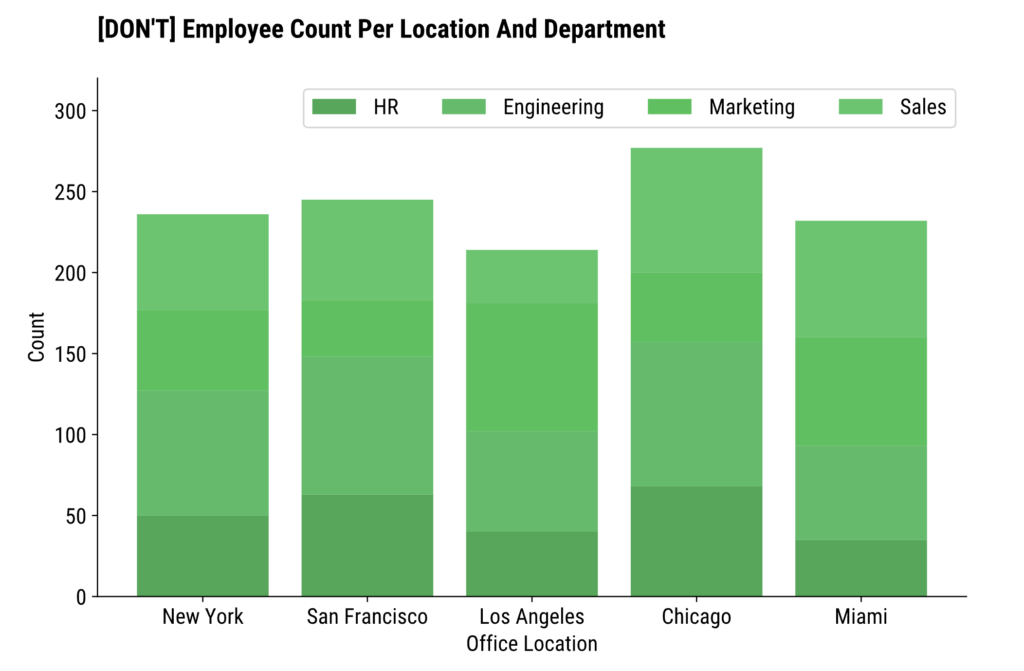\nImage 1 - Color palette with indistinguishable colors (image by author)\nMany people wonder what their chart would look like if it was printed in a black-and-white book. \nThis one would look only marginally worse, but only because it looks horrendous from the get-go. Distinguishing between bar portions is challenging even for people without visual impairments.\n[_You can use this website to check the contrast between two colors._](https://contrastchecker.online/)\nLet’s fix it by using a high-contrast color palette.\n### Custom High-Contrast Color Palette\nI’ll continue with the assumption you like the color green.\n**Question:** how can you create a high-contrast color palette from one color? \n**Answer:** start with a dark shade and finish with a color similar enough to your primary color. In this case, yellow-gold is a perfect candidate.\nYou get the best of both worlds this way. You’re still using colors you like and the colors don’t have to get lighter (which would reduce the contrast) as you go through bar segments.\nIn practice, this boils down to playing around with the `color` parameter for all segments:\npython\n\n```\nplt.bar(x, y1, label=\"HR\", color=\"#14342B\")\nplt.bar(x, y2, bottom=y1, label=\"Engineering\", color=\"#60935D\")\nplt.bar(x, y3, bottom=y1 + y2, label=\"Marketing\", color=\"#BAB700\")\nplt.bar(x, y4, bottom=y1 + y2 + y3, label=\"Sales\", color=\"#F5E400\")\n\nplt.title(\"[DO] Employee Count Per Location And Department\", loc=\"left\", fontdict={\"weight\": \"bold\"}, y=1.06)\nplt.xlabel(\"Office Location\")\nplt.ylabel(\"Count\")\n\nplt.legend(loc=\"upper right\", ncol=4)\nplt.ylim(top=320)\nplt.show()\n```\n\n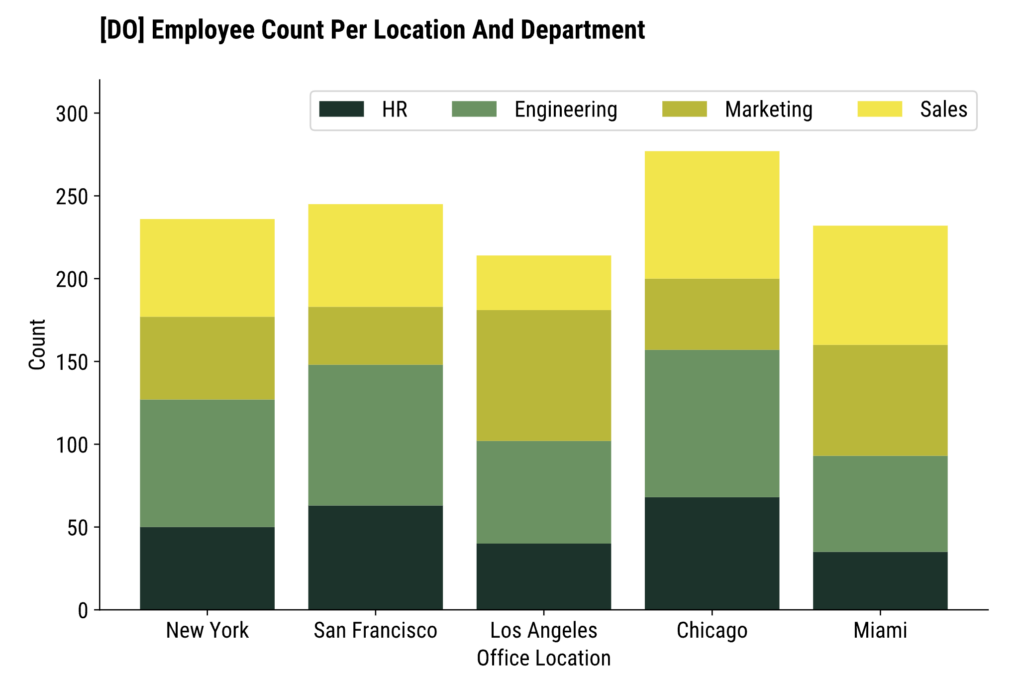\nImage 2 - Custom color palette (image by author)\nSo much easier on the eyes.\n### Predefined Colorblind Color Palette\nBut consider the following scenarios:\n * You don’t have the time to play around with different color combinations\n * You do have the time, but there are about a dozen categories in your dataset (read: dozen colors to find)\n\n\nThere’s an easier solution to make your chart color scheme easier on the eyes while accounting for people with visual impairments.\nOne such solution is to use a colorblind-friendly color palette.\nThe first line of the snippet shows you how:\npython\n\n```\nplt.style.use(\"tableau-colorblind10\")\n\nplt.bar(x, y1, label=\"HR\")\nplt.bar(x, y2, bottom=y1, label=\"Engineering\")\nplt.bar(x, y3, bottom=y1 + y2, label=\"Marketing\")\nplt.bar(x, y4, bottom=y1 + y2 + y3, label=\"Sales\")\n\nplt.title(\"[DO] Employee Count Per Location And Department\", loc=\"left\", fontdict={\"weight\": \"bold\"}, y=1.06)\nplt.xlabel(\"Office Location\")\nplt.ylabel(\"Count\")\n\nplt.legend(loc=\"upper right\", ncol=4)\nplt.ylim(top=320)\nplt.show()\n```\n\n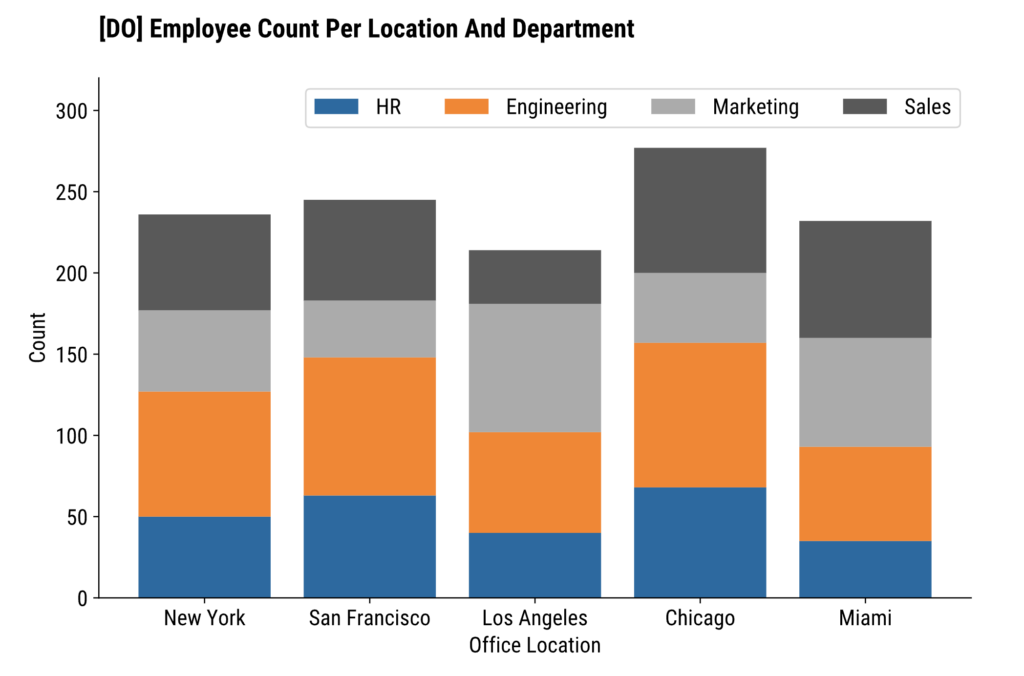\nImage 3 - Built-in colorblind palette (image by author)\nThis palette contains 10 colorblind-friendly colors, so it’s a good fit for charts with 10 groups or less.\nIf you need more, maybe you’ll be better off rethinking your visualization strategy.\n## 2. Stop Using Colors - Use Patterns Instead\nAnother great way to remove any kind of misinterpretation from your charts is to use patterns instead of colors (or as an addition to colors).\nMatplotlib has [10 hatch patterns](https://matplotlib.org/stable/gallery/shapes_and_collections/hatch_style_reference.html) you can choose from.\nYou can further customize the hatches by increasing their density or by combining multiple patterns. But that’s a topic for another time.\nTo implement patterns, add the `hatch` parameter to `plt.bar()`. The example below removes color altogether by setting `fill=False`:\npython\n\n```\nplt.bar(x, y1, label=\"HR\", fill=False, hatch=\"*\")\nplt.bar(x, y2, bottom=y1, label=\"Engineering\", fill=False, hatch=\"xx\")\nplt.bar(x, y3, bottom=y1 + y2, label=\"Marketing\", fill=False, hatch=\"..\")\nplt.bar(x, y4, bottom=y1 + y2 + y3, label=\"Sales\", fill=False, hatch=\"//\")\n\nplt.title(\"[DO] Employee Count Per Location And Department\", loc=\"left\", fontdict={\"weight\": \"bold\"}, y=1.06)\nplt.xlabel(\"Office Location\")\nplt.ylabel(\"Count\")\n\nplt.legend(loc=\"upper right\", ncol=4)\nplt.ylim(top=320)\nplt.show()\n```\n\n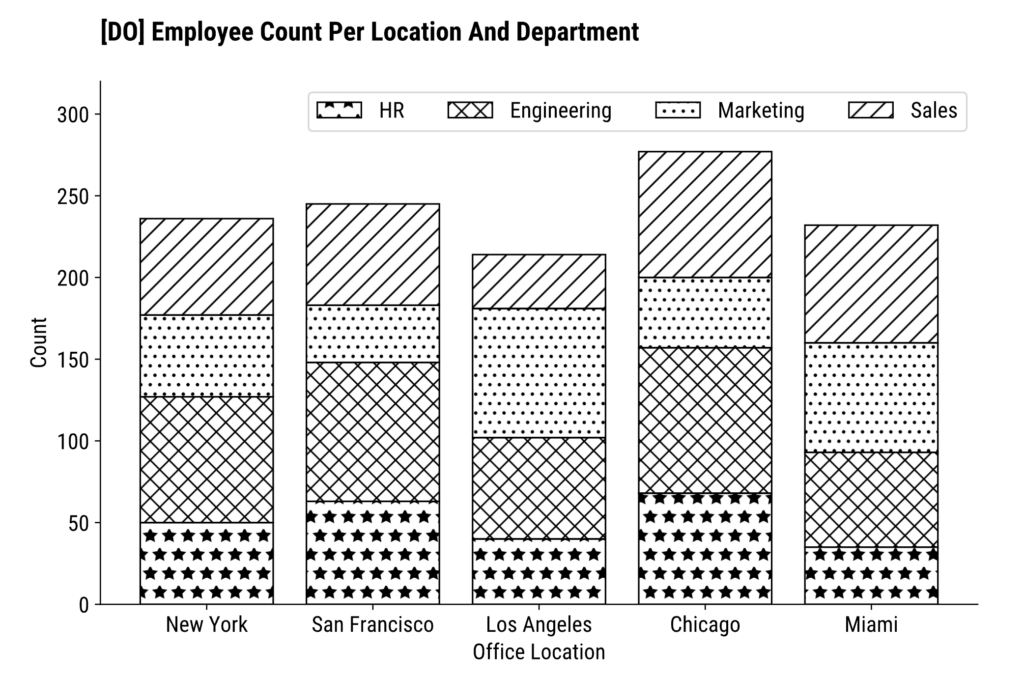\nImage 4 - Plotting with patterns (image by author)\nNow there’s no way to misinterpret data on this chart.\n### Can You Mix Patterns with Color?\nIf you want the best of both worlds, color + pattern is where it’s at.\nYou’ll want to remove the fill=False parameter and change it with `color`. Or, just copy the following code snippet:\npython\n\n```\nplt.bar(x, y1, label=\"HR\", color=\"#14342B\", hatch=\"*\")\nplt.bar(x, y2, bottom=y1, label=\"Engineering\", color=\"#60935D\", hatch=\"xx\")\nplt.bar(x, y3, bottom=y1 + y2, label=\"Marketing\", color=\"#BAB700\", hatch=\"..\")\nplt.bar(x, y4, bottom=y1 + y2 + y3, label=\"Sales\", color=\"#F5E400\", hatch=\"//\")\n\nplt.title(\"[DO] Employee Count Per Location And Department\", loc=\"left\", fontdict={\"weight\": \"bold\"}, y=1.06)\nplt.xlabel(\"Office Location\")\nplt.ylabel(\"Count\")\n\nplt.legend(loc=\"upper right\", ncol=4)\nplt.ylim(top=320)\nplt.show()\n```\n\n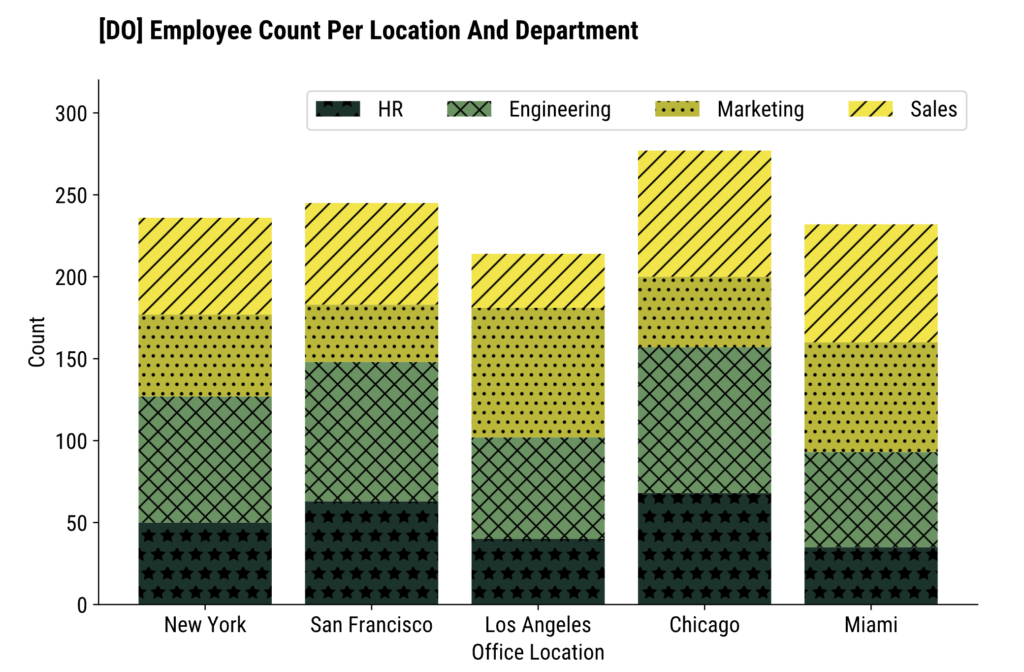\nImage 5 - Plotting with colors and patterns (image by author)\nDark patterns are clearly visible on bar segments, but that might not always be the case.\nThe `edgecolor` parameter controls the pattern color. Let’s see what happens after setting it to white:\npython\n\n```\nplt.bar(x, y1, label=\"HR\", color=\"#14342B\", hatch=\"*\", edgecolor=\"#FFFFFF\")\nplt.bar(x, y2, bottom=y1, label=\"Engineering\", color=\"#60935D\", hatch=\"xx\", edgecolor=\"#FFFFFF\")\nplt.bar(x, y3, bottom=y1 + y2, label=\"Marketing\", color=\"#BAB700\", hatch=\"..\", edgecolor=\"#FFFFFF\")\nplt.bar(x, y4, bottom=y1 + y2 + y3, label=\"Sales\", color=\"#F5E400\", hatch=\"///\", edgecolor=\"#FFFFFF\")\n\nplt.title(\"[MAYBE] Employee Count Per Location And Department\", loc=\"left\", fontdict={\"weight\": \"bold\"}, y=1.06)\nplt.xlabel(\"Office Location\")\nplt.ylabel(\"Count\")\n\nplt.legend(loc=\"upper right\", ncol=4)\nplt.ylim(top=320)\nplt.show()\n```\n\n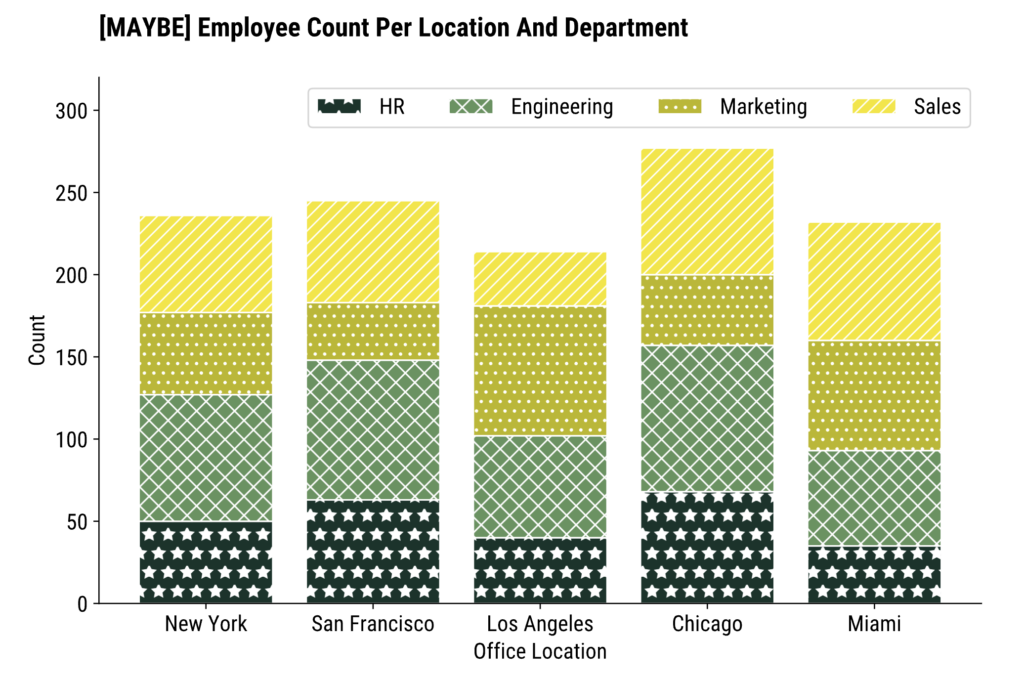\nImage 6 - Plotting with colors and patterns (2) (image by author)\nThe pattern is visible for _HR_ and _Engineering_ departments, but the two on the top are a different story.\nYou might have no trouble seeing the lines on the topmost chart segment, but put yourself in the shoes of a person with visual impairments. They should always be your frame of reference.\n**Remember:** Light-colored patterns work well on dark backgrounds. Dark-colored patterns work well on light backgrounds. Adjust accordingly.\n## 3. Don’t Overwhelm User with the Information\nThis principle goes in two directions:\n * Don’t put too much information on a single chart\n * Don’t put too many charts next to each other, e.g., in your applications/dashboards\n\n\nDoing both simultaneously is somewhat of an **ultimate sin** in data visualization.\nLet’s start by adding a couple more departments into the mix.\nThe data is getting difficult to manage with Python lists, so I’ve opted for a Pandas DataFrame instead:\npython\n\n```\nimport pandas as pd\n\n\ndf = pd.DataFrame({\n \"HR\": [50, 63, 40, 68, 35],\n \"Engineering\": [77, 85, 62, 89, 58],\n \"Marketing\": [50, 35, 79, 43, 67],\n \"Sales\": [59, 62, 33, 77, 72],\n \"Customer Service\": [31, 34, 61, 70, 39],\n \"Distribution\": [35, 21, 66, 90, 31],\n \"Logistics\": [50, 54, 13, 71, 32],\n \"Production\": [22, 51, 54, 28, 40],\n \"Maintenance\": [50, 32, 61, 69, 50],\n \"Quality Control\": [20, 21, 88, 89, 39]\n}, index=[\"New York\", \"San Francisco\", \"Los Angeles\", \"Chicago\", \"Miami\"])\n\ndf\n```\n\n\nImage 7 - Wider dataset (image by author)\nNow, using the colorblind-friendly palette, let’s plot the employee count per location and department as a stacked bar chart. To make things extra crammed, I’ve also thrown text counts into the mix:\npython\n\n```\nplt.style.use(\"tableau-colorblind10\")\nax = df.plot(kind=\"bar\", stacked=True)\n\nfor container in ax.containers:\n ax.bar_label(container, label_type=\"center\", fontsize=10, color=\"#000000\", fontweight=\"bold\")\n\nplt.title(\"[DON'T] Employee Count Per Location And Department\", loc=\"left\", fontdict={\"weight\": \"bold\"}, y=1.06)\nplt.xlabel(\"Office Location\")\nplt.ylabel(\"Count\")\nplt.legend(title=\"Department\", bbox_to_anchor=(1.05, 1), loc='upper left', ncol=1)\n\nplt.show()\n```\n\n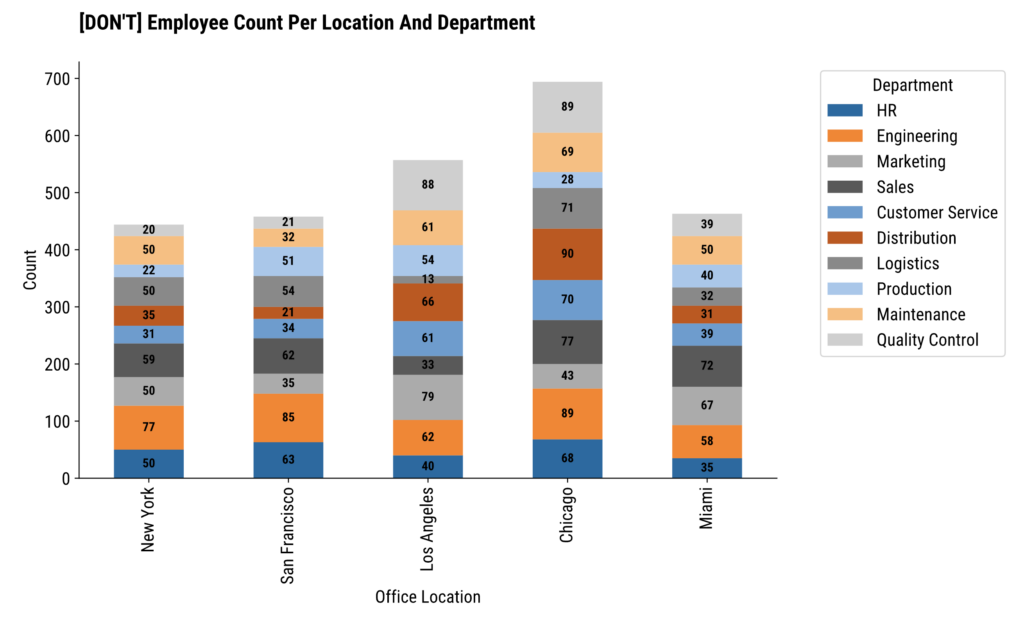\nImage 8 - Crammed visualization (image by author)\nNow that’s just ugly.\n### Fix #1 - Present Less Information\nOne way to solve this unpresentable mess is by showing less information to the user.\nFor example, only show employee count in one city (across departments). You can then add a **dropdown menu** to the side of the chart so the user can control the office location.\nThe following snippet plots employees per department in Chicago as a horizontal bar chart:\npython\n\n```\nchicago_data = df.loc[\"Chicago\"].sort_values()\n\nbars = plt.barh(chicago_data.index, chicago_data.values, color=\"#60935D\", edgecolor=\"#000000\")\nfor bar in bars:\n plt.text(bar.get_width() + 2, bar.get_y() + bar.get_height() / 2, f\"{int(bar.get_width())}\", va=\"center\", ha=\"left\", fontsize=14, color=\"#000000\")\n\nplt.title(\"[DO] Employee Count by Department in Chicago\", loc=\"left\", fontdict={\"weight\": \"bold\"}, y=1.06)\nplt.xlabel(\"Count\")\nplt.ylabel(\"Department\")\n\nplt.show()\n```\n\n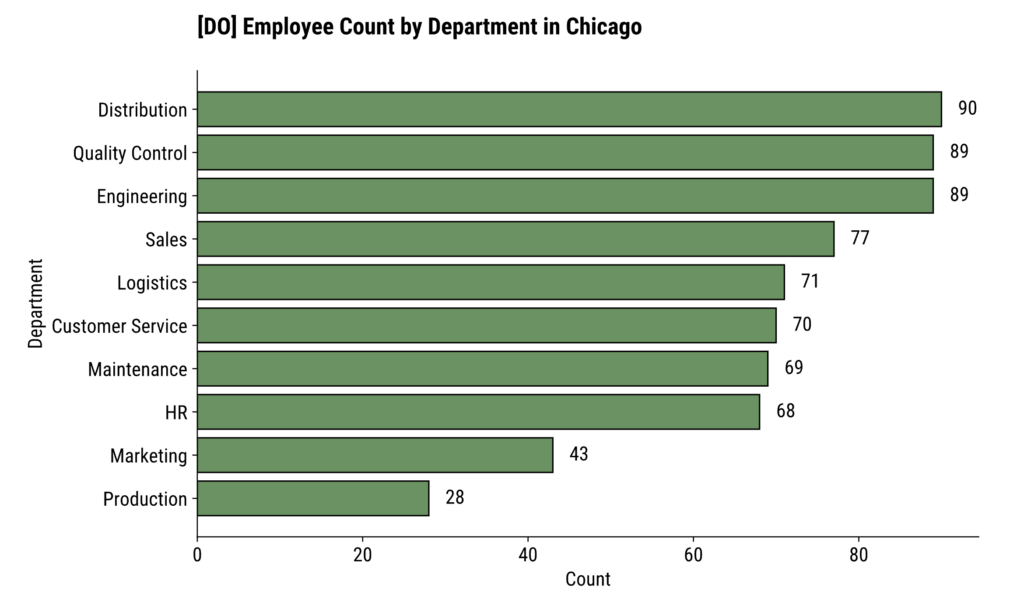\nImage 9 - More readable visualization (image by author)\n### Fix #2 - Reorganize the Data\nIf showing less information isn’t an option, maybe you can **transpose your data**.\nFor example, we’re dealing with 5 office locations and 10 departments. Showing 10 columns instead of 10 bar segments is easier on the eyes. \nThis way, you’ll end up showing office locations as bar segments instead of departments:\npython\n\n```\ndf_transposed = df.T\ndf_sorted = df_transposed.loc[df_transposed.sum(axis=1).sort_values().index]\n\nax = df_sorted.plot(kind=\"barh\", width=0.8, edgecolor=\"#000000\", stacked=True)\n\nfor container in ax.containers:\n ax.bar_label(container, label_type=\"center\", fontsize=10, color=\"#FFFFFF\", fontweight=\"bold\")\n\nplt.title(\"[DO] Employee Count Per Location And Department\", loc=\"left\", fontdict={\"weight\": \"bold\"}, y=1.06)\nplt.xlabel(\"Office Location\")\nplt.ylabel(\"Count\")\n\nplt.show()\n```\n\n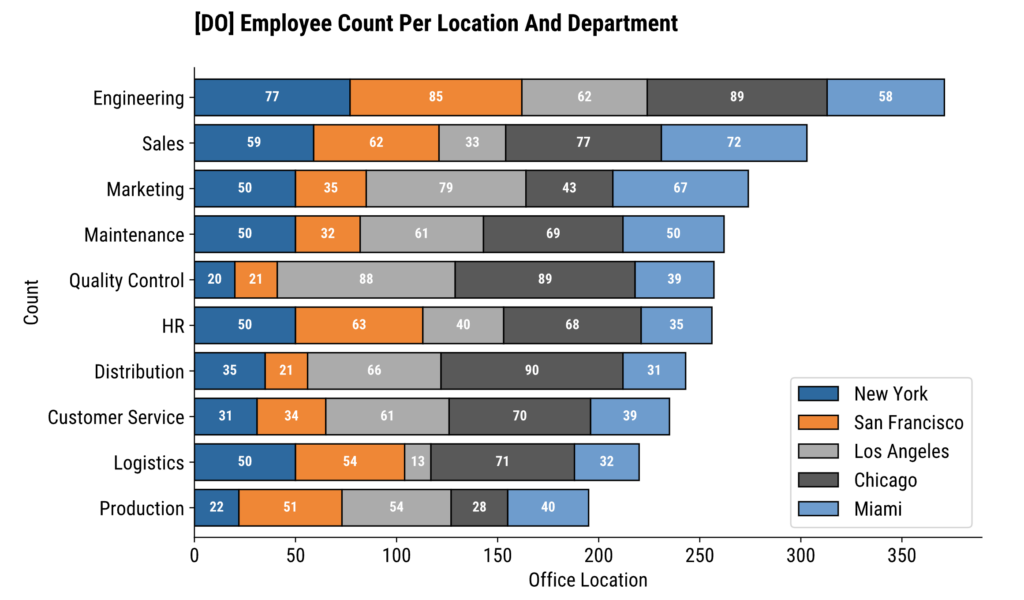\nImage 10 - Transposed column chart (image by author)\nIt’s just a matter of reframing the problem.\nThe chart on _Image 10_ is miles ahead of the chart on _Image 8_. It’s a fact. No one can argue with it.\n## 4. Provide In-Depth Explanations of Data On Your Charts\nYou can leverage subtitle and/or caption sections of your chart to add extra information.\nThis comes in handy when you want to provide more context about the data, cite sources, or summarize the main point(s) of your visualization. The last one is most applicable for people with visual impairments.\nThe problem with matplotlib is that it **doesn’t have a dedicated function** for chart subtitles and captions. You can use suptitle(), but you’ll have to play around with x and y-axis coordinates.\nHere’s an example:\npython\n\n```\nplt.bar(x, y1, label=\"HR\", color=\"#14342B\", hatch=\"*\")\nplt.bar(x, y2, bottom=y1, label=\"Engineering\", color=\"#60935D\", hatch=\"xx\")\nplt.bar(x, y3, bottom=y1 + y2, label=\"Marketing\", color=\"#BAB700\", hatch=\"..\")\nplt.bar(x, y4, bottom=y1 + y2 + y3, label=\"Sales\", color=\"#F5E400\", hatch=\"//\")\n\nplt.suptitle(\"Chart shows how the employees are distributed per department and per office location.\\nChicago office has the most employees.\", x=0.125, y=0.98, ha=\"left\", fontsize=14, fontstyle=\"italic\")\nplt.title(\"Employee Count Per Location And Department\", fontsize=20, fontweight=\"bold\", y=1.15, loc=\"left\")\nplt.xlabel(\"Office Location\")\nplt.ylabel(\"Count\")\n\nplt.legend(loc=\"upper right\", ncol=4)\nplt.ylim(top=320)\nplt.show()\n```\n\n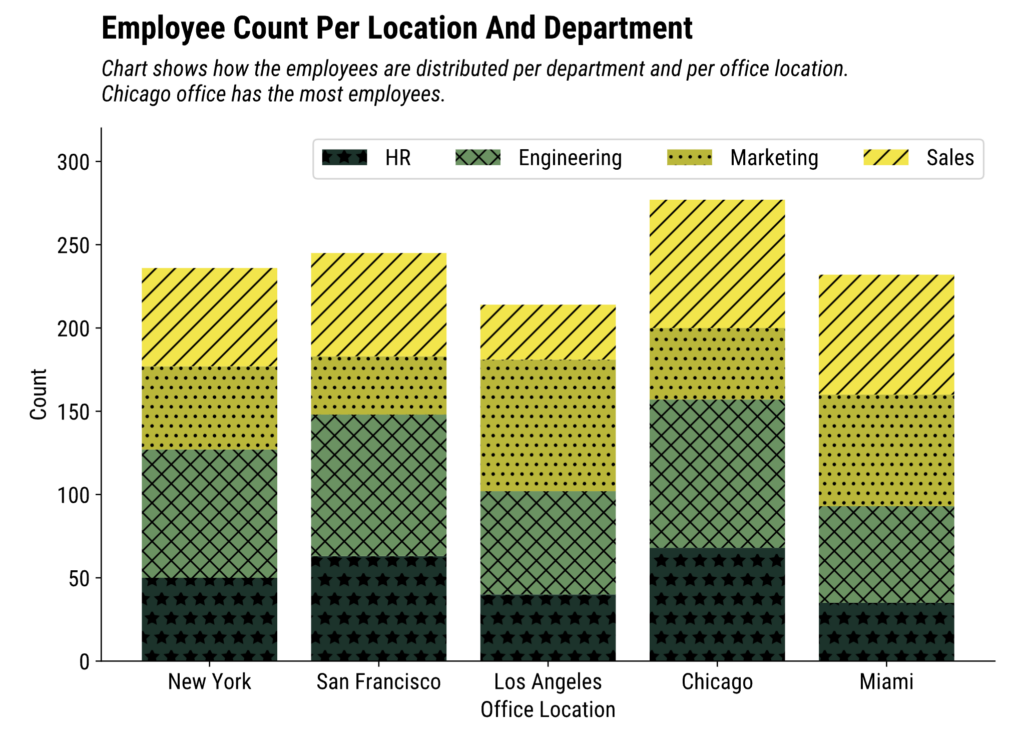\nImage 11 - Chart with title and subtitle (image by author)\nIf you prefer a caption over a subtitle, you only have the change y-axis coordinate in `plt.suptitle()`:\npython\n\n```\nplt.bar(x, y1, label=\"HR\", color=\"#14342B\", hatch=\"*\")\nplt.bar(x, y2, bottom=y1, label=\"Engineering\", color=\"#60935D\", hatch=\"xx\")\nplt.bar(x, y3, bottom=y1 + y2, label=\"Marketing\", color=\"#BAB700\", hatch=\"..\")\nplt.bar(x, y4, bottom=y1 + y2 + y3, label=\"Sales\", color=\"#F5E400\", hatch=\"//\")\n\nplt.suptitle(\"Chart shows how the employees are distributed per department and per office location.\\nChicago office has the most employees.\", x=0.125, y=0, ha=\"left\", fontsize=14, fontstyle=\"italic\")\nplt.title(\"Employee Count Per Location And Department\", fontsize=20, fontweight=\"bold\", y=1.06, loc=\"left\")\nplt.xlabel(\"Office Location\")\nplt.ylabel(\"Count\")\n\nplt.legend(loc=\"upper right\", ncol=4)\nplt.ylim(top=320)\nplt.show()\n```\n\n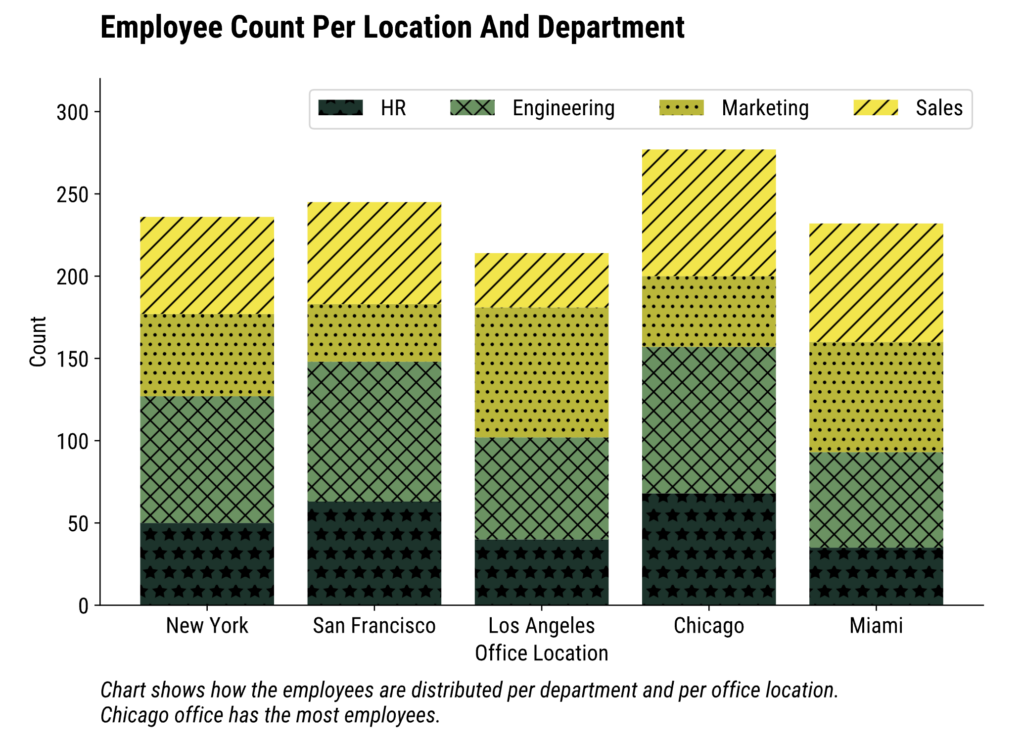\nImage 12 - Chart with title and caption (image by author)\nAll in all, a subtitle or a caption may be the deciding factor in correctly getting your message to a person with visual impairments. \nJust don’t make it 10 paragraphs long. Otherwise, it’s the 3rd point of this article all over again.\n## 5. Add Alt Text When Embedding Plots\nMany people with visual impairments use screen readers.\n**The problem with screen readers and charts** is that they simply can’t coexist. They might be able to pick up textual elements from the graph, but they can’t interpret the visual content. So, whenever you’re sharing your visualizations (e.g., embedding them into a website), you must add alt text.\nThis is a paragraph the screen reader will read to your user.\nTo demonstrate, let’s use the `plt.savefig()` function to save the chart as an image:\npython\n\n```\nplt.bar(x, y1, label=\"HR\", color=\"#14342B\", hatch=\"*\")\nplt.bar(x, y2, bottom=y1, label=\"Engineering\", color=\"#60935D\", hatch=\"xx\")\nplt.bar(x, y3, bottom=y1 + y2, label=\"Marketing\", color=\"#BAB700\", hatch=\"..\")\nplt.bar(x, y4, bottom=y1 + y2 + y3, label=\"Sales\", color=\"#F5E400\", hatch=\"//\")\n\nplt.suptitle(\"Chart shows how the employees are distributed per department and per office location.\\nChicago office has the most employees.\", x=0.125, y=0, ha=\"left\", fontsize=14, fontstyle=\"italic\")\nplt.title(\"Employee Count Per Location And Department\", fontsize=20, fontweight='bold', y=1.06, loc=\"left\")\nplt.xlabel(\"Office Location\")\nplt.ylabel(\"Count\")\n\nplt.legend(loc=\"upper right\", ncol=4)\nplt.ylim(top=320)\nplt.savefig(\"figure.jpg\", dpi=300, bbox_inches=\"tight\")\n```\n\nIn a new HTML document, add an `![]() ` tag that points to the image. This is where you should provide alt text:\nmarkup\n\n```\n Document
` tag that points to the image. This is where you should provide alt text:\nmarkup\n\n```\n Document  \n```\n\n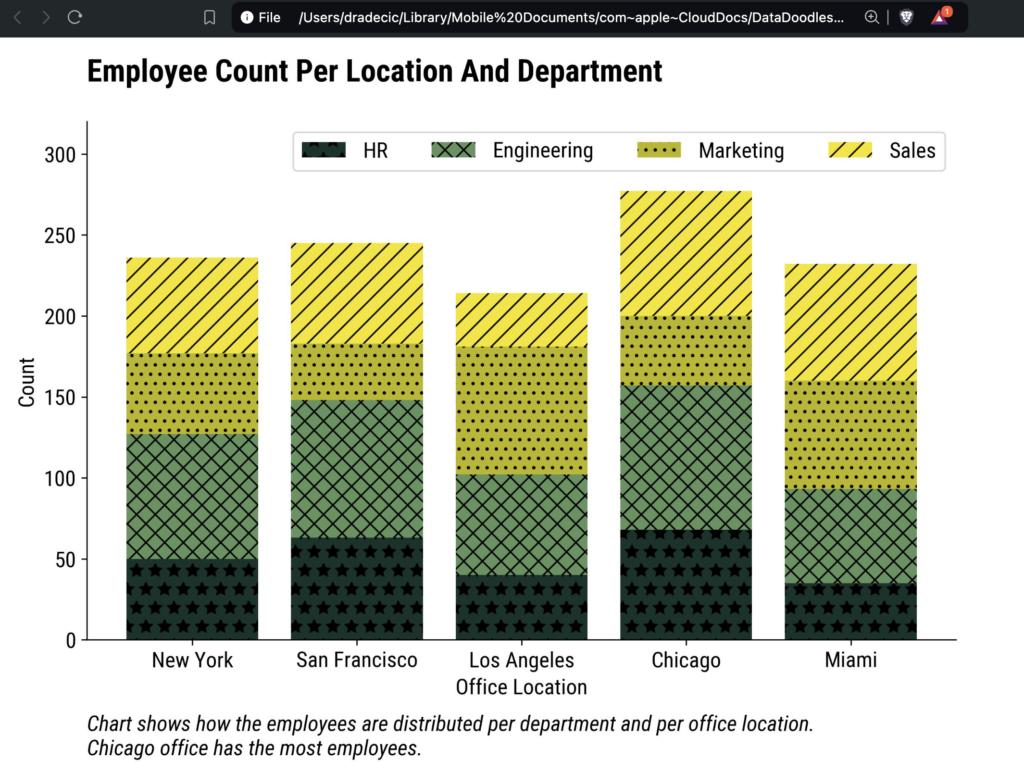\nImage 13 - Plot image embedded in HTML (image by author)\nYou can’t see alt text when you open the HTML file, but that’s because you’re not using a screen reader.\nIf the screen reader is detected, the alt text will be automatically read to the user.\nThe best you can do is use a [screen reader plugin](https://chromewebstore.google.com/detail/screen-reader/kgejglhpjiefppelpmljglcjbhoiplfn) or point to the image that doesn’t exist in HTML:\nmarkup\n\n```\n
\n```\n\n\nImage 13 - Plot image embedded in HTML (image by author)\nYou can’t see alt text when you open the HTML file, but that’s because you’re not using a screen reader.\nIf the screen reader is detected, the alt text will be automatically read to the user.\nThe best you can do is use a [screen reader plugin](https://chromewebstore.google.com/detail/screen-reader/kgejglhpjiefppelpmljglcjbhoiplfn) or point to the image that doesn’t exist in HTML:\nmarkup\n\n```\n \n```\n\n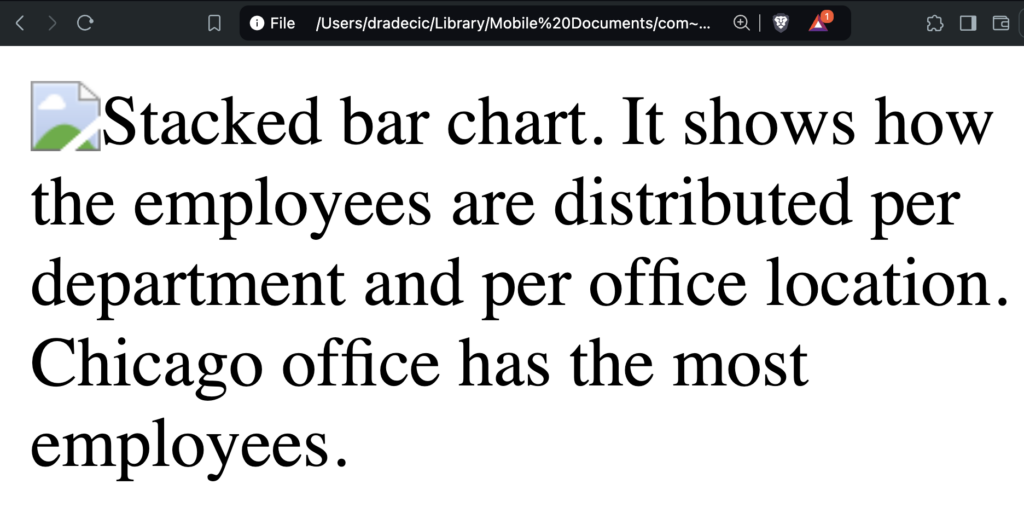\nImage 14 - Alt text for unfound images (image by author)\nNow the image can’t be found, so alt text is displayed instead.\n## Summing Up Data Visualization Accessibility\nAnd there you have it — 5 things you should always keep in mind when designing data visualizations. \nThese tips are helpful in general but are of vital importance when accessibility is essential. And it always should be. It requires a tiny bit of extra work from your end, but makes your findings accessible to millions of additional people worldwide.\n_Which data visualization features for accessibility do you implement for your charts and applications?_\n* * *\n\nWritten By\n## [Dario Radečić](https://towardsdatascience.com/author/radecicdario/)\nhttps://writingfordevs.substack.com\n[See all from Dario Radečić](https://towardsdatascience.com/author/radecicdario/)\n[Editor's Picks](https://towardsdatascience.com/tag/editors-pick/)[Accessibility](https://towardsdatascience.com/tag/accessibility/)[Color Blindness](https://towardsdatascience.com/tag/color-blindness/)[Data Science](https://towardsdatascience.com/tag/data-science/)[Python](https://towardsdatascience.com/tag/python/)\nShare This Article\n * [](https://www.facebook.com/sharer/sharer.php?u=https%3A%2F%2Ftowardsdatascience.com%2F5-crucial-tweaks-that-will-make-your-charts-accessible-to-people-with-visual-impairments%2F&title=5%20Crucial%20Tweaks%20That%20Will%20Make%20Your%20Charts%20Accessible%20to%20People%20with%20Visual%20Impairments)\n * [](https://www.linkedin.com/shareArticle?mini=true&url=https%3A%2F%2Ftowardsdatascience.com%2F5-crucial-tweaks-that-will-make-your-charts-accessible-to-people-with-visual-impairments%2F&title=5%20Crucial%20Tweaks%20That%20Will%20Make%20Your%20Charts%20Accessible%20to%20People%20with%20Visual%20Impairments)\n * [](https://x.com/share?url=https%3A%2F%2Ftowardsdatascience.com%2F5-crucial-tweaks-that-will-make-your-charts-accessible-to-people-with-visual-impairments%2F&text=5%20Crucial%20Tweaks%20That%20Will%20Make%20Your%20Charts%20Accessible%20to%20People%20with%20Visual%20Impairments)\n\n\nTowards Data Science is a community publication. Submit your insights to reach our global audience and earn through the TDS Author Payment Program.\n[Write for TDS](https://towardsdatascience.com/submissions/)\n## Related Articles\n * [](https://towardsdatascience.com/recursion-in-python-b026d7dde906/)\n## [Recursion in Python](https://towardsdatascience.com/recursion-in-python-b026d7dde906/)\n[Programming](https://towardsdatascience.com/category/programming/)\nUnderstanding Recursion in Python\n[Sadrach Pierre, Ph.D.](https://towardsdatascience.com/author/spierre91/)\nMarch 30, 20203 min read\n * [](https://towardsdatascience.com/sap-kpi-throughput-lead-time-manufacturing-b74d1e4c21b8/)\n## [SAP KPI: Throughput/ Lead Time (Manufacturing)](https://towardsdatascience.com/sap-kpi-throughput-lead-time-manufacturing-b74d1e4c21b8/)\n[Data Science](https://towardsdatascience.com/category/data-science/)\nWhat SAP tables to join to analyze Throughput Time\n[Jesko Rehberg](https://towardsdatascience.com/author/jesko-rehberg/)\nApril 7, 20213 min read\n * [](https://towardsdatascience.com/kernel-methods-a-simple-introduction-4a26dcbe4ebd/)\n## [Kernel Methods: A Simple Introduction](https://towardsdatascience.com/kernel-methods-a-simple-introduction-4a26dcbe4ebd/)\n[Machine Learning](https://towardsdatascience.com/category/artificial-intelligence/machine-learning/)\nThe basics of kernel methods and Radial Basis Functions\n[Diego Unzueta](https://towardsdatascience.com/author/diegounzuetaruedas/)\nOctober 14, 20216 min read\n * [](https://towardsdatascience.com/anime2vec-a-sequence-recommender-1e0a3e558c44/)\n## [Anime2vec : A sequence recommender](https://towardsdatascience.com/anime2vec-a-sequence-recommender-1e0a3e558c44/)\n[Deep Learning](https://towardsdatascience.com/category/artificial-intelligence/deep-learning/)\nExtract Embedding from a skipgram model\n[Alexandre Warembourg](https://towardsdatascience.com/author/alexandrewarembourg/)\nSeptember 3, 20193 min read\n * [](https://towardsdatascience.com/stunning-tables-using-bokeh-and-svg-e612a6f1c541/)\n## [Stunning Tables using bokeh and svg](https://towardsdatascience.com/stunning-tables-using-bokeh-and-svg-e612a6f1c541/)\n[Data Visualization](https://towardsdatascience.com/category/data-science/data-visualization/)\nClear and Concise Data Presentation\n[Pirmin Loetscher](https://towardsdatascience.com/author/pirmin-loetscher/)\nMarch 13, 20212 min read\n * [](https://towardsdatascience.com/the-history-of-bodybuilding-through-network-visualization-2527f81c1f01/)\n## [The History of Bodybuilding Through Network Visualization](https://towardsdatascience.com/the-history-of-bodybuilding-through-network-visualization-2527f81c1f01/)\n[Data Science](https://towardsdatascience.com/category/data-science/)\nConstructing the Shared Podium Graph of Mr. Olympia Winners (1965-2023) using Python and Gephi.\n[Milan Janosov](https://towardsdatascience.com/author/janosovm/)\nMay 30, 20245 min read\n * [](https://towardsdatascience.com/power-bi-connects-to-azure-databricks-44bea6731be7/)\n## [Power BI Connects to Azure Databricks](https://towardsdatascience.com/power-bi-connects-to-azure-databricks-44bea6731be7/)\n[Data Visualization](https://towardsdatascience.com/category/data-science/data-visualization/)\nDeriving the Spark URL and creating user token that is used by PowerBI to authenticate into Azure Databricks.\n[Christopher Tao](https://towardsdatascience.com/author/christophertao/)\nMarch 6, 20205 min read\n * [](https://towardsdatascience.com/what-is-the-goal-of-a-statistical-analysis-e9b794a4d860/)\n## [What is the goal of a statistical analysis?](https://towardsdatascience.com/what-is-the-goal-of-a-statistical-analysis-e9b794a4d860/)\n[Data Science](https://towardsdatascience.com/category/data-science/)\nManagement approaches you and asks you to do a statistical analysis of their data. What do you do?\n[Leonard Schuler](https://towardsdatascience.com/author/leonardschuler/)\nJanuary 22, 20216 min read\n * [](https://towardsdatascience.com/how-to-pick-the-right-career-in-the-data-world-1cec8a084767/)\n## [How To Pick The Right Career In The Data World](https://towardsdatascience.com/how-to-pick-the-right-career-in-the-data-world-1cec8a084767/)\n[Data Science](https://towardsdatascience.com/category/data-science/)\nData Scientist, Data Analyst, or Data Engineer? How do you know which one is right for you?\n[Tessa Xie](https://towardsdatascience.com/author/tessaxie/)\nJanuary 23, 20217 min read\n\n\n * [YouTube](https://www.youtube.com/c/TowardsDataScience)\n * [X](https://x.com/TDataScience)\n * [LinkedIn](https://www.linkedin.com/company/towards-data-science/)\n * [Threads](https://www.threads.net/@towardsdatascience)\n * [Bluesky](https://bsky.app/profile/towardsdatascience.com)\n\n\n[](https://towardsdatascience.com/)\nYour home for data science and AI. The world's leading publication for data science, data analytics, data engineering, machine learning, and artificial intelligence professionals.\nSubscribe to Our Newsletter[Write For TDS](https://towardsdatascience.com/submissions/)•[About](https://towardsdatascience.com/about-towards-data-science-d691af11cc2f/)•[Advertise](https://contact.towardsdatascience.com/advertise-with-towards-data-science)•[Privacy Policy](https://towardsdatascience.com/privacy-policy/)•[Terms of Use](https://towardsdatascience.com/website-terms-of-use/)\n© Insight Media Group, LLC 2026•[The New Stack](https://thenewstack.io)•[roadmap.sh](https://roadmap.sh)•[Creator Network](https://insightmediagroup.io/creator-network)\n#### Recommended Articles \nClose\nword word word word word word word word word word word word word word word word word word word word word word word word word word word word word word word word word word word word word word word word word word word word word word word word word word word word word word word word word word word word word word word word word word word word word word word word word word word word word word word word word word word word word word word word word word word word word word word word word word word word word word word word word word word word word word word word word word word word word word word word word word word word word word word word word word word word word word word word word word word word word word word word word word word word word word word word word word word word word word word word word word word word word word word word word word word word word word word word word word word word word word word word word word word word word word word word word word word word word word word word\n \nmmMwWLliI0fiflO&1 \nmmMwWLliI0fiflO&1 \nmmMwWLliI0fiflO&1 \nmmMwWLliI0fiflO&1 \nmmMwWLliI0fiflO&1 \nmmMwWLliI0fiflO&1 \nmmMwWLliI0fiflO&1\n",
"metadata": {
"title": "5 Crucial Tweaks That Will Make Your Charts Accessible to People with Visual Impairments | Towards Data Science",
"description": "More than 350 million people are colorblind — make sure they can read your visualizations.",
"keywords": null,
"author": "Dario Radečić",
"og:locale": "en_US",
"og:type": "article",
"og:title": "5 Crucial Tweaks That Will Make Your Charts Accessible to People with Visual Impairments",
"og:description": "More than 350 million people are colorblind — make sure they can read your visualizations.",
"og:url": "https://towardsdatascience.com/5-crucial-tweaks-that-will-make-your-charts-accessible-to-people-with-visual-impairments/",
"og:site_name": "Towards Data Science",
"og:image": "https://assets.insightmediagroup.io/media/wp-content/uploads/2025/06/the-new-york-public-library-Lxos0BKPCjM-unsplash-scaled-1.jpg",
"og:image:width": "2075",
"og:image:height": "2560",
"og:image:type": "image/jpeg",
"twitter:card": "summary_large_image",
"twitter:site": "@TDataScience",
"twitter:creator": "@TDataScience",
"twitter:label1": "Written by",
"twitter:data1": "Dario Radečić",
"twitter:label2": "Est. reading time",
"twitter:data2": "11 min read",
"article:published_time": "2025-06-06T06:39:57.000Z",
"article:modified_time": "2025-06-06T06:39:57.000Z",
"article:author": "https://towardsdatascience.com/author/radecicdario/"
},
"paywall": {
"listed_paid": true,
"detected": false,
"marker": "",
"public_only": true,
"policy": "付费/会员内容只保留页面公开可见部分,不绕过付费墙"
},
"crawl": {
"success": true,
"status_code": 200,
"error": "",
"retried": true
},
"code_blocks": [
{
"language": "txt",
"file": "attachments/7c9d27c17fb5/code/block_000.txt",
"chars": 223
},
{
"language": "txt",
"file": "attachments/7c9d27c17fb5/code/block_001.txt",
"chars": 475
},
{
"language": "txt",
"file": "attachments/7c9d27c17fb5/code/block_002.txt",
"chars": 472
},
{
"language": "txt",
"file": "attachments/7c9d27c17fb5/code/block_003.txt",
"chars": 443
},
{
"language": "txt",
"file": "attachments/7c9d27c17fb5/code/block_004.txt",
"chars": 499
},
{
"language": "txt",
"file": "attachments/7c9d27c17fb5/code/block_005.txt",
"chars": 519
},
{
"language": "txt",
"file": "attachments/7c9d27c17fb5/code/block_006.txt",
"chars": 607
},
{
"language": "txt",
"file": "attachments/7c9d27c17fb5/code/block_007.txt",
"chars": 520
},
{
"language": "txt",
"file": "attachments/7c9d27c17fb5/code/block_008.txt",
"chars": 467
},
{
"language": "txt",
"file": "attachments/7c9d27c17fb5/code/block_009.txt",
"chars": 476
},
{
"language": "txt",
"file": "attachments/7c9d27c17fb5/code/block_010.txt",
"chars": 482
},
{
"language": "txt",
"file": "attachments/7c9d27c17fb5/code/block_011.txt",
"chars": 720
},
{
"language": "txt",
"file": "attachments/7c9d27c17fb5/code/block_012.txt",
"chars": 717
},
{
"language": "txt",
"file": "attachments/7c9d27c17fb5/code/block_013.txt",
"chars": 762
},
{
"language": "txt",
"file": "attachments/7c9d27c17fb5/code/block_014.txt",
"chars": 413
},
{
"language": "txt",
"file": "attachments/7c9d27c17fb5/code/block_015.txt",
"chars": 208
}
],
"images": [
{
"src": "https://assets.insightmediagroup.io/media/wp-content/uploads/2025/06/the-new-york-public-library-Lxos0BKPCjM-unsplash-scaled-1.jpg",
"alt": "Photo by The New York Public Library on Unsplash",
"local_path": "attachments/7c9d27c17fb5/images/000.jpg",
"bytes": 727202,
"downloaded": true
},
{
"src": "https://assets.insightmediagroup.io/media/wp-content/uploads/2025/06/1-2-1024x671.png",
"alt": "",
"local_path": "attachments/7c9d27c17fb5/images/001.png",
"bytes": 40239,
"downloaded": true
},
{
"src": "https://assets.insightmediagroup.io/media/wp-content/uploads/2020/03/16KCB3rG4xxP7_iwZzZVxbA-scaled.jpeg",
"alt": "",
"local_path": "attachments/7c9d27c17fb5/images/002.jpeg",
"bytes": 229577,
"downloaded": true
},
{
"src": "https://assets.insightmediagroup.io/media/wp-content/uploads/2021/04/1JRmmVA3vAaK-fkKzqXrhig.jpeg",
"alt": "",
"local_path": "attachments/7c9d27c17fb5/images/003.jpeg",
"bytes": 35317,
"downloaded": true
},
{
"src": "https://assets.insightmediagroup.io/media/wp-content/uploads/2021/10/0V2XbjEqNCaQsV1p_-scaled.jpg",
"alt": "",
"local_path": "attachments/7c9d27c17fb5/images/004.jpg",
"bytes": 745454,
"downloaded": true
},
{
"src": "https://assets.insightmediagroup.io/media/wp-content/uploads/2019/09/05w0MLK-Hl2eDuU9l.png",
"alt": "",
"local_path": "attachments/7c9d27c17fb5/images/005.png",
"bytes": 19227,
"downloaded": true
},
{
"src": "https://assets.insightmediagroup.io/media/wp-content/uploads/2021/03/1PpQ3IXI4JqFMrtV1cEuqKQ.png",
"alt": "",
"local_path": "attachments/7c9d27c17fb5/images/006.png",
"bytes": 54904,
"downloaded": true
},
{
"src": "https://assets.insightmediagroup.io/media/wp-content/uploads/2024/05/14qB6ZhlArmuuYunlNNs6kA.png",
"alt": "",
"local_path": "attachments/7c9d27c17fb5/images/007.png",
"bytes": 514331,
"downloaded": true
},
{
"src": "https://assets.insightmediagroup.io/media/wp-content/uploads/2020/03/05c3pTws7RHxHShU3.jpg",
"alt": "",
"local_path": "attachments/7c9d27c17fb5/images/008.jpg",
"bytes": 238721,
"downloaded": true
},
{
"src": "https://assets.insightmediagroup.io/media/wp-content/uploads/2021/01/0naghyayO8E8maYrV-scaled.jpg",
"alt": "",
"local_path": "attachments/7c9d27c17fb5/images/009.jpg",
"bytes": 291019,
"downloaded": true
},
{
"src": "https://assets.insightmediagroup.io/media/wp-content/uploads/2021/01/0YbHZHZZ4u63W-4VN-scaled.jpg",
"alt": "",
"local_path": "attachments/7c9d27c17fb5/images/010.jpg",
"bytes": 310181,
"downloaded": true
}
],
"audio": [],
"videos": [],
"links": [],
"retry_at": "2026-10-03T07:58:01",
"repair_version": 2,
"repaired_at": "2026-10-14T11:11:48Z",
"source_url": "https://towardsdatascience.com/5-crucial-tweaks-that-will-make-your-charts-accessible-to-people-with-visual-impairments/",
"delivery_status": "excluded_paid",
"discovery_status": "excluded_paid",
"missing_reason": "按原约定排除付费/会员全文"
}
\n```\n\n\nImage 14 - Alt text for unfound images (image by author)\nNow the image can’t be found, so alt text is displayed instead.\n## Summing Up Data Visualization Accessibility\nAnd there you have it — 5 things you should always keep in mind when designing data visualizations. \nThese tips are helpful in general but are of vital importance when accessibility is essential. And it always should be. It requires a tiny bit of extra work from your end, but makes your findings accessible to millions of additional people worldwide.\n_Which data visualization features for accessibility do you implement for your charts and applications?_\n* * *\n\nWritten By\n## [Dario Radečić](https://towardsdatascience.com/author/radecicdario/)\nhttps://writingfordevs.substack.com\n[See all from Dario Radečić](https://towardsdatascience.com/author/radecicdario/)\n[Editor's Picks](https://towardsdatascience.com/tag/editors-pick/)[Accessibility](https://towardsdatascience.com/tag/accessibility/)[Color Blindness](https://towardsdatascience.com/tag/color-blindness/)[Data Science](https://towardsdatascience.com/tag/data-science/)[Python](https://towardsdatascience.com/tag/python/)\nShare This Article\n * [](https://www.facebook.com/sharer/sharer.php?u=https%3A%2F%2Ftowardsdatascience.com%2F5-crucial-tweaks-that-will-make-your-charts-accessible-to-people-with-visual-impairments%2F&title=5%20Crucial%20Tweaks%20That%20Will%20Make%20Your%20Charts%20Accessible%20to%20People%20with%20Visual%20Impairments)\n * [](https://www.linkedin.com/shareArticle?mini=true&url=https%3A%2F%2Ftowardsdatascience.com%2F5-crucial-tweaks-that-will-make-your-charts-accessible-to-people-with-visual-impairments%2F&title=5%20Crucial%20Tweaks%20That%20Will%20Make%20Your%20Charts%20Accessible%20to%20People%20with%20Visual%20Impairments)\n * [](https://x.com/share?url=https%3A%2F%2Ftowardsdatascience.com%2F5-crucial-tweaks-that-will-make-your-charts-accessible-to-people-with-visual-impairments%2F&text=5%20Crucial%20Tweaks%20That%20Will%20Make%20Your%20Charts%20Accessible%20to%20People%20with%20Visual%20Impairments)\n\n\nTowards Data Science is a community publication. Submit your insights to reach our global audience and earn through the TDS Author Payment Program.\n[Write for TDS](https://towardsdatascience.com/submissions/)\n## Related Articles\n * [](https://towardsdatascience.com/recursion-in-python-b026d7dde906/)\n## [Recursion in Python](https://towardsdatascience.com/recursion-in-python-b026d7dde906/)\n[Programming](https://towardsdatascience.com/category/programming/)\nUnderstanding Recursion in Python\n[Sadrach Pierre, Ph.D.](https://towardsdatascience.com/author/spierre91/)\nMarch 30, 20203 min read\n * [](https://towardsdatascience.com/sap-kpi-throughput-lead-time-manufacturing-b74d1e4c21b8/)\n## [SAP KPI: Throughput/ Lead Time (Manufacturing)](https://towardsdatascience.com/sap-kpi-throughput-lead-time-manufacturing-b74d1e4c21b8/)\n[Data Science](https://towardsdatascience.com/category/data-science/)\nWhat SAP tables to join to analyze Throughput Time\n[Jesko Rehberg](https://towardsdatascience.com/author/jesko-rehberg/)\nApril 7, 20213 min read\n * [](https://towardsdatascience.com/kernel-methods-a-simple-introduction-4a26dcbe4ebd/)\n## [Kernel Methods: A Simple Introduction](https://towardsdatascience.com/kernel-methods-a-simple-introduction-4a26dcbe4ebd/)\n[Machine Learning](https://towardsdatascience.com/category/artificial-intelligence/machine-learning/)\nThe basics of kernel methods and Radial Basis Functions\n[Diego Unzueta](https://towardsdatascience.com/author/diegounzuetaruedas/)\nOctober 14, 20216 min read\n * [](https://towardsdatascience.com/anime2vec-a-sequence-recommender-1e0a3e558c44/)\n## [Anime2vec : A sequence recommender](https://towardsdatascience.com/anime2vec-a-sequence-recommender-1e0a3e558c44/)\n[Deep Learning](https://towardsdatascience.com/category/artificial-intelligence/deep-learning/)\nExtract Embedding from a skipgram model\n[Alexandre Warembourg](https://towardsdatascience.com/author/alexandrewarembourg/)\nSeptember 3, 20193 min read\n * [](https://towardsdatascience.com/stunning-tables-using-bokeh-and-svg-e612a6f1c541/)\n## [Stunning Tables using bokeh and svg](https://towardsdatascience.com/stunning-tables-using-bokeh-and-svg-e612a6f1c541/)\n[Data Visualization](https://towardsdatascience.com/category/data-science/data-visualization/)\nClear and Concise Data Presentation\n[Pirmin Loetscher](https://towardsdatascience.com/author/pirmin-loetscher/)\nMarch 13, 20212 min read\n * [](https://towardsdatascience.com/the-history-of-bodybuilding-through-network-visualization-2527f81c1f01/)\n## [The History of Bodybuilding Through Network Visualization](https://towardsdatascience.com/the-history-of-bodybuilding-through-network-visualization-2527f81c1f01/)\n[Data Science](https://towardsdatascience.com/category/data-science/)\nConstructing the Shared Podium Graph of Mr. Olympia Winners (1965-2023) using Python and Gephi.\n[Milan Janosov](https://towardsdatascience.com/author/janosovm/)\nMay 30, 20245 min read\n * [](https://towardsdatascience.com/power-bi-connects-to-azure-databricks-44bea6731be7/)\n## [Power BI Connects to Azure Databricks](https://towardsdatascience.com/power-bi-connects-to-azure-databricks-44bea6731be7/)\n[Data Visualization](https://towardsdatascience.com/category/data-science/data-visualization/)\nDeriving the Spark URL and creating user token that is used by PowerBI to authenticate into Azure Databricks.\n[Christopher Tao](https://towardsdatascience.com/author/christophertao/)\nMarch 6, 20205 min read\n * [](https://towardsdatascience.com/what-is-the-goal-of-a-statistical-analysis-e9b794a4d860/)\n## [What is the goal of a statistical analysis?](https://towardsdatascience.com/what-is-the-goal-of-a-statistical-analysis-e9b794a4d860/)\n[Data Science](https://towardsdatascience.com/category/data-science/)\nManagement approaches you and asks you to do a statistical analysis of their data. What do you do?\n[Leonard Schuler](https://towardsdatascience.com/author/leonardschuler/)\nJanuary 22, 20216 min read\n * [](https://towardsdatascience.com/how-to-pick-the-right-career-in-the-data-world-1cec8a084767/)\n## [How To Pick The Right Career In The Data World](https://towardsdatascience.com/how-to-pick-the-right-career-in-the-data-world-1cec8a084767/)\n[Data Science](https://towardsdatascience.com/category/data-science/)\nData Scientist, Data Analyst, or Data Engineer? How do you know which one is right for you?\n[Tessa Xie](https://towardsdatascience.com/author/tessaxie/)\nJanuary 23, 20217 min read\n\n\n * [YouTube](https://www.youtube.com/c/TowardsDataScience)\n * [X](https://x.com/TDataScience)\n * [LinkedIn](https://www.linkedin.com/company/towards-data-science/)\n * [Threads](https://www.threads.net/@towardsdatascience)\n * [Bluesky](https://bsky.app/profile/towardsdatascience.com)\n\n\n[](https://towardsdatascience.com/)\nYour home for data science and AI. The world's leading publication for data science, data analytics, data engineering, machine learning, and artificial intelligence professionals.\nSubscribe to Our Newsletter[Write For TDS](https://towardsdatascience.com/submissions/)•[About](https://towardsdatascience.com/about-towards-data-science-d691af11cc2f/)•[Advertise](https://contact.towardsdatascience.com/advertise-with-towards-data-science)•[Privacy Policy](https://towardsdatascience.com/privacy-policy/)•[Terms of Use](https://towardsdatascience.com/website-terms-of-use/)\n© Insight Media Group, LLC 2026•[The New Stack](https://thenewstack.io)•[roadmap.sh](https://roadmap.sh)•[Creator Network](https://insightmediagroup.io/creator-network)\n#### Recommended Articles \nClose\nword word word word word word word word word word word word word word word word word word word word word word word word word word word word word word word word word word word word word word word word word word word word word word word word word word word word word word word word word word word word word word word word word word word word word word word word word word word word word word word word word word word word word word word word word word word word word word word word word word word word word word word word word word word word word word word word word word word word word word word word word word word word word word word word word word word word word word word word word word word word word word word word word word word word word word word word word word word word word word word word word word word word word word word word word word word word word word word word word word word word word word word word word word word word word word word word word word word word word word word word\n \nmmMwWLliI0fiflO&1 \nmmMwWLliI0fiflO&1 \nmmMwWLliI0fiflO&1 \nmmMwWLliI0fiflO&1 \nmmMwWLliI0fiflO&1 \nmmMwWLliI0fiflO&1 \nmmMwWLliI0fiflO&1\n",
"metadata": {
"title": "5 Crucial Tweaks That Will Make Your Charts Accessible to People with Visual Impairments | Towards Data Science",
"description": "More than 350 million people are colorblind — make sure they can read your visualizations.",
"keywords": null,
"author": "Dario Radečić",
"og:locale": "en_US",
"og:type": "article",
"og:title": "5 Crucial Tweaks That Will Make Your Charts Accessible to People with Visual Impairments",
"og:description": "More than 350 million people are colorblind — make sure they can read your visualizations.",
"og:url": "https://towardsdatascience.com/5-crucial-tweaks-that-will-make-your-charts-accessible-to-people-with-visual-impairments/",
"og:site_name": "Towards Data Science",
"og:image": "https://assets.insightmediagroup.io/media/wp-content/uploads/2025/06/the-new-york-public-library-Lxos0BKPCjM-unsplash-scaled-1.jpg",
"og:image:width": "2075",
"og:image:height": "2560",
"og:image:type": "image/jpeg",
"twitter:card": "summary_large_image",
"twitter:site": "@TDataScience",
"twitter:creator": "@TDataScience",
"twitter:label1": "Written by",
"twitter:data1": "Dario Radečić",
"twitter:label2": "Est. reading time",
"twitter:data2": "11 min read",
"article:published_time": "2025-06-06T06:39:57.000Z",
"article:modified_time": "2025-06-06T06:39:57.000Z",
"article:author": "https://towardsdatascience.com/author/radecicdario/"
},
"paywall": {
"listed_paid": true,
"detected": false,
"marker": "",
"public_only": true,
"policy": "付费/会员内容只保留页面公开可见部分,不绕过付费墙"
},
"crawl": {
"success": true,
"status_code": 200,
"error": "",
"retried": true
},
"code_blocks": [
{
"language": "txt",
"file": "attachments/7c9d27c17fb5/code/block_000.txt",
"chars": 223
},
{
"language": "txt",
"file": "attachments/7c9d27c17fb5/code/block_001.txt",
"chars": 475
},
{
"language": "txt",
"file": "attachments/7c9d27c17fb5/code/block_002.txt",
"chars": 472
},
{
"language": "txt",
"file": "attachments/7c9d27c17fb5/code/block_003.txt",
"chars": 443
},
{
"language": "txt",
"file": "attachments/7c9d27c17fb5/code/block_004.txt",
"chars": 499
},
{
"language": "txt",
"file": "attachments/7c9d27c17fb5/code/block_005.txt",
"chars": 519
},
{
"language": "txt",
"file": "attachments/7c9d27c17fb5/code/block_006.txt",
"chars": 607
},
{
"language": "txt",
"file": "attachments/7c9d27c17fb5/code/block_007.txt",
"chars": 520
},
{
"language": "txt",
"file": "attachments/7c9d27c17fb5/code/block_008.txt",
"chars": 467
},
{
"language": "txt",
"file": "attachments/7c9d27c17fb5/code/block_009.txt",
"chars": 476
},
{
"language": "txt",
"file": "attachments/7c9d27c17fb5/code/block_010.txt",
"chars": 482
},
{
"language": "txt",
"file": "attachments/7c9d27c17fb5/code/block_011.txt",
"chars": 720
},
{
"language": "txt",
"file": "attachments/7c9d27c17fb5/code/block_012.txt",
"chars": 717
},
{
"language": "txt",
"file": "attachments/7c9d27c17fb5/code/block_013.txt",
"chars": 762
},
{
"language": "txt",
"file": "attachments/7c9d27c17fb5/code/block_014.txt",
"chars": 413
},
{
"language": "txt",
"file": "attachments/7c9d27c17fb5/code/block_015.txt",
"chars": 208
}
],
"images": [
{
"src": "https://assets.insightmediagroup.io/media/wp-content/uploads/2025/06/the-new-york-public-library-Lxos0BKPCjM-unsplash-scaled-1.jpg",
"alt": "Photo by The New York Public Library on Unsplash",
"local_path": "attachments/7c9d27c17fb5/images/000.jpg",
"bytes": 727202,
"downloaded": true
},
{
"src": "https://assets.insightmediagroup.io/media/wp-content/uploads/2025/06/1-2-1024x671.png",
"alt": "",
"local_path": "attachments/7c9d27c17fb5/images/001.png",
"bytes": 40239,
"downloaded": true
},
{
"src": "https://assets.insightmediagroup.io/media/wp-content/uploads/2020/03/16KCB3rG4xxP7_iwZzZVxbA-scaled.jpeg",
"alt": "",
"local_path": "attachments/7c9d27c17fb5/images/002.jpeg",
"bytes": 229577,
"downloaded": true
},
{
"src": "https://assets.insightmediagroup.io/media/wp-content/uploads/2021/04/1JRmmVA3vAaK-fkKzqXrhig.jpeg",
"alt": "",
"local_path": "attachments/7c9d27c17fb5/images/003.jpeg",
"bytes": 35317,
"downloaded": true
},
{
"src": "https://assets.insightmediagroup.io/media/wp-content/uploads/2021/10/0V2XbjEqNCaQsV1p_-scaled.jpg",
"alt": "",
"local_path": "attachments/7c9d27c17fb5/images/004.jpg",
"bytes": 745454,
"downloaded": true
},
{
"src": "https://assets.insightmediagroup.io/media/wp-content/uploads/2019/09/05w0MLK-Hl2eDuU9l.png",
"alt": "",
"local_path": "attachments/7c9d27c17fb5/images/005.png",
"bytes": 19227,
"downloaded": true
},
{
"src": "https://assets.insightmediagroup.io/media/wp-content/uploads/2021/03/1PpQ3IXI4JqFMrtV1cEuqKQ.png",
"alt": "",
"local_path": "attachments/7c9d27c17fb5/images/006.png",
"bytes": 54904,
"downloaded": true
},
{
"src": "https://assets.insightmediagroup.io/media/wp-content/uploads/2024/05/14qB6ZhlArmuuYunlNNs6kA.png",
"alt": "",
"local_path": "attachments/7c9d27c17fb5/images/007.png",
"bytes": 514331,
"downloaded": true
},
{
"src": "https://assets.insightmediagroup.io/media/wp-content/uploads/2020/03/05c3pTws7RHxHShU3.jpg",
"alt": "",
"local_path": "attachments/7c9d27c17fb5/images/008.jpg",
"bytes": 238721,
"downloaded": true
},
{
"src": "https://assets.insightmediagroup.io/media/wp-content/uploads/2021/01/0naghyayO8E8maYrV-scaled.jpg",
"alt": "",
"local_path": "attachments/7c9d27c17fb5/images/009.jpg",
"bytes": 291019,
"downloaded": true
},
{
"src": "https://assets.insightmediagroup.io/media/wp-content/uploads/2021/01/0YbHZHZZ4u63W-4VN-scaled.jpg",
"alt": "",
"local_path": "attachments/7c9d27c17fb5/images/010.jpg",
"bytes": 310181,
"downloaded": true
}
],
"audio": [],
"videos": [],
"links": [],
"retry_at": "2026-10-03T07:58:01",
"repair_version": 2,
"repaired_at": "2026-10-14T11:11:48Z",
"source_url": "https://towardsdatascience.com/5-crucial-tweaks-that-will-make-your-charts-accessible-to-people-with-visual-impairments/",
"delivery_status": "excluded_paid",
"discovery_status": "excluded_paid",
"missing_reason": "按原约定排除付费/会员全文"
}